When you purchase through links on our site, we may earn an affiliate commission. Here’s how it works.
NordVPN Review 2026



Our experts have reviewed 53 VPN providers, which were put through extensive rounds of testing. To learn more about that process, here’s how we review VPNs, where we explain our criteria and our policy of being fully transparent.
People often ask us “is NordVPN legit?” and whether it’s safe to use. To answer that, we conducted a hands-on NordVPN review based on our extensive VPN testing methodology. We looked into its jurisdiction, server network, encryption, logging policies, and tested speeds across multiple locations. By doing this, we were able to see exactly how does NordVPN work in real-world conditions, from casual browsing and streaming to torrenting and gaming. Here is what we actually think:
Pros:
✅ Privacy-friendly jurisdiction backed by verified no-logs audits – Headquartered in Panama, outside 5/9/14 Eyes, with a no-logs policy independently audited five times (2018–2025) to confirm no IP or activity tracking.
✅ Advanced encryption, modern protocols, and leak-proof infrastructure – All traffic uses AES-256-GCM, ChaCha20, and Post-Quantum Encryption (NordLynx Protocol) and NordLynx (WireGuard-based), OpenVPN, IKEv2/IPsec, and NordWhisper with Perfect Forward Secrecy, plus 100% RAM-only servers and private DNS to minimize IP, DNS, WebRTC, and IPv6 leaks.
✅ Specialized servers and advanced privacy tools for unrestricted access – Double VPN, Onion over VPN, obfuscated servers, and P2P-optimized servers support torrenting, censorship bypass, and sensitive use cases, with shared IPs and optional dedicated IPs.
✅ Massive global server network with consistently high speeds – Over 8,900+ servers in 129 countries and a network capacity exceeding 100 Tbps deliver stable worldwide access with about a 9% average speed drop suitable for 4K streaming, gaming, and heavy tasks.
✅ Strong threat protection and real-time security enhancements – Threat Protection Pro blocks malware, phishing, ads, and trackers, while dark web monitoring and frequent updates harden day-to-day security. Also, Threat Protection Pro now integrates CrowdStrike threat intelligence feeds for stronger malware and phishing detection.
✅ Clean, intuitive apps with flexibility for beginners and advanced users – Simple interface for quick connections plus advanced controls like protocol choice, auto-connect rules, and split tunneling.
✅ Wide device compatibility with generous simultaneous connections – Works on Windows, macOS, Linux, iOS, Android, browser extensions, and more, with up to ten devices at once.
✅ Reliable customer support and ongoing feature development – 24/7 live chat, extensive guides, a 30-day money‑back guarantee, and continuous additions like post-quantum encryption, OpenWrt support, Linux GUI, and scam call protection.
Cons:
❌ Higher monthly pricing and billing concerns – Month-to-month plans are expensive compared to competitors, and a pending U.S. auto-renewal lawsuit may concern some users. Additionally, a recent lawsuit raised concerns about subscription auto-renewal transparency in the U.S.
❌ Limited city-level server options – Only a few countries offer city-specific servers, which restricts precise geo-targeting for streaming or testing.
❌ Split tunneling and platform limitations – Split tunneling isn’t available on macOS or iOS, and Linux requires command-line setup instead of a full GUI.
❌ Router setup is manual and technical – Without a dedicated router app, configuration can be time-consuming and challenging for less experienced users.
Our Ultimate Verdict on NordVPN
After thorough testing and review, one thing is clear that NordVPN is a reliable, high-performance VPN that excels in privacy, speed, and security. Its RAM-only servers, strict no-logs policy, and multiple independent audits give users confidence that their data stays private, while features like Threat Protection Pro and advanced encryption provide protection against malware, trackers, and phishing attempts.
NordVPN has also recently expanded beyond its traditional VPN roots by introducing a broader digital security platform that combines VPN protection, next-generation antivirus capabilities, phishing and scam protection, and Dark Web monitoring within a single application. Also, with a massive server network and specialized options for streaming, torrenting, gaming, and bypassing restrictions, it performs consistently across Windows, macOS, Linux, iOS, Android, routers, and streaming devices.
While the month-to-month subscription is pricier, the combination of speed, reliability, highly useful features, and strong security makes it a top choice for both casual users and privacy-conscious professionals. Overall, it’s easy to see why NordVPN remains one of the most trusted and recommended VPNs available today.
Best For:
- Speed seekers who want minimal slowdowns, with the NordLynx protocol often keeping speeds close to their normal connection for smooth 4K streaming and large downloads.
- Streaming enthusiasts who need dependable access to multiple global libraries, including many Netflix regions plus major services like Disney+, BBC iPlayer, and Hulu.
- Frequent torrenters who need fast, reliable P2P servers combined with strict IP confidentiality.
- Privacy‑critical users who care about independently verified security standards and multiple third‑party audits confirming the provider’s no‑logs practices and overall robustness.
- Security power users who want advanced tools such as Double VPN, Onion over VPN, and post‑quantum encryption to add layers of anonymity and future‑proof their data.
- Gamers who need low ping, protection from DDoS attacks, and extras like Meshnet to host secure virtual LAN sessions for competitive play.
- Remote workers and travelers who must secure public Wi‑Fi and bypass censorship in restrictive regions with the help of specialized obfuscated servers.
- Gamblers and betting enthusiasts who want to access online casinos and sportsbooks more privately, hiding their real location and encrypting all wagering activity.
- Beginners who prefer a simple, “one‑click” experience, supported by an intuitive, map‑based app that delivers premium protection without a learning curve.
Background, Jurisdiction & Reputation
NordVPN has had certain problems in the past. However, the fact is that this VPN remains one of the most transparent and user-friendly VPNs out there. Our Score: 8.5/10
When choosing a VPN, you must know whether you can trust it. One of the best ways to find a trustworthy VPN is to check its background. You'll want to know about its jurisdiction as well as if there were any problematic data leaks in the past.
Where Is NordVPN Based?
NordVPN is based in Panama (the company behind NordVPN is called 'Nord Security - NordSec Ltd' / previously known as 'Tefincom S.A.'). This was a good choice, as this country has no data retention laws that could force VPNs to collect your private data. Also, Panama is not a member of the 5/9/14 Eyes Alliance, a group of countries with mandatory data retention laws and aggressive mass surveillance operations.
It should be noted that certain rumors were circulating about this VPN a while back. According to those, NordVPN was owned by a company called Tesonet, based in Lithuania. Even though a connection exists between NordVPN and Tesonet (both of those brands come from the same team), there's nothing malicious in that connection.
In October 2021, NordVPN's parent company (Nord Security) acquired Atlas VPN, a relatively new VPN service known for offering a free tier. In February 2022, Nord Security merged with Surfshark, another well-known VPN service. That means NordVPN's parent company has close business relations with Atlas VPN and Surfshark, but that's where any connections between those VPNs end.
More precisely, NordVPN, Atlas VPN, and Surfshark have their own development paths and product roadmaps. They target different types of users and customers, and there's no data sharing involved between those brands.
If you'd like to take a much deeper dive into NordVPN's business structure and relations to other cybersecurity companies, we have a guide answering the question of who owns NordVPN.
Did NordVPN Leak Personal Data in the Past?
No, NordVPN has never leaked personal data in the past. It has a strict no-logs policy, and it promises not to collect your personal data. You'll be happy to know that NordVPN looks to be sticking to that promise by employing strict protocols that prevent any kind of unauthorized access to their servers.
Still, that doesn't mean there weren't any problematic situations in this VPN's past.
- In September 2018, it was revealed that NordVPN had contained a privilege escalation bug that, in theory, could have exposed some of the user data (which didn't happen). However, this bug was fixed before the report became public.
- In April 2019, there were reports of strange behavior related to NordVPN's data flow through the VPN's servers. However, the official explanation soon followed - saying that it was caused by NordVPN's anti-censorship mechanism (nothing suspicious, once again).
- We've also learned that NordVPN was hacked in 2018 after an unknown hacker managed to access one of the VPN's Finland-based data centers. As NordVPN explained, this was an isolated case that didn't endanger any personal information.
Is NordVPN Safe and Legal to Use?
Yes, NordVPN is safe and legal because it uses industry-standard encryption and VPN tunnels to protect you from hackers and snooping government organizations. In fact, it has further rolled out post-quantum encryption throughout all the devices, establishing itself as a future-ready VPN.
It uses the AES-256-CBC cipher encryption, which the government uses and is the gold standard in the industry. The VPN provider also features three tunneling protocols: OpenVPN, NordLynx, and IKEv2/IPsec to best suit user preference and device compatibility.
Another layer of security comes from NordVPN’s Double VPN feature, which routes your traffic through two separate servers, adding an extra shield of protection. For even more peace of mind, it has a kill switch that blocks your Internet connection if the VPN unexpectedly drops. This feature ensures your data is never exposed.
On top of all that, NordVPN has undergone several third-party audits to confirm its no-logs claims. So, from a technical and legal point of view, NordVPN is as safe and legal as it comes.
Supported Platforms & Devices
NordVPN covers almost every platform imaginable. You can always count on using a native app from them, including their recent release for ARM-based Windows devices. Our Score: 10/10
Here’s a table showing NordVPN on multiple devices, detailing which ones are natively supported by the VPN:
They've recently launched a native app for the Surface Pro series and other ARM-powered devices like Lenovo Flex 5G, Samsung Galaxy Book S, Acer Spin 7, and HP Elite Folio. NordVPN built its app specifically for ARM64 devices, complementing the existing app for x64 systems.
What’s also important to note is that you can use NordVPN on devices not mentioned in the table above – as long as those devices support the OpenVPN protocol.
In those cases, you would need to set up NordVPN manually (like NordVPN on Roku). In general, that's not an overly complicated procedure. You can always rely on NordVPN's customer support for any assistance.
Installing NordVPN on a compatible router (e.g., Asus, DD-WRT, Tomato) protects all connected devices using just one slot of your 10-device limit.
Installation & Initial Configuration
Downloading, installing, and configuring NordVPN doesn’t require you to have any technical knowledge. The entire process is very user-centric and intuitive. Our Score: 10/10
In this section of our NordVPN review, we'll provide you with a brief explanation of how the VPN provider works, as well as how to get started using it. So, keep reading!
How to Download and Use NordVPN?
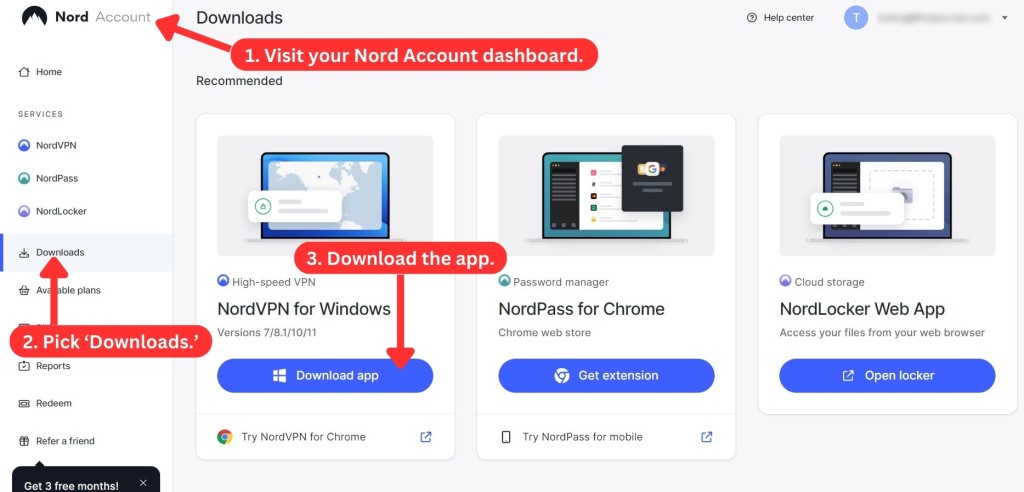

Downloading and installing the NordVPN app is a straightforward process. There are two ways to get the app: via the official website or the app store.
To have the smoothest experience, we advise you to download NordVPN directly from their official website. Aside from that, some countries restrict downloading the app from app stores, so your best bet is the official website.
Here's a simple step-by-step approach to setting up NordVPN:
- Subscribe to NordVPN using your favorite Web browser.
- Then, return to NordVPN's website and click "Log In."
- Access your Nord Account by supplying your credentials.
- Select "Downloads" on the left.
- Download the installation file and install the app.
- Launch NordVPN and provide your login details (you'll do that via your browser).
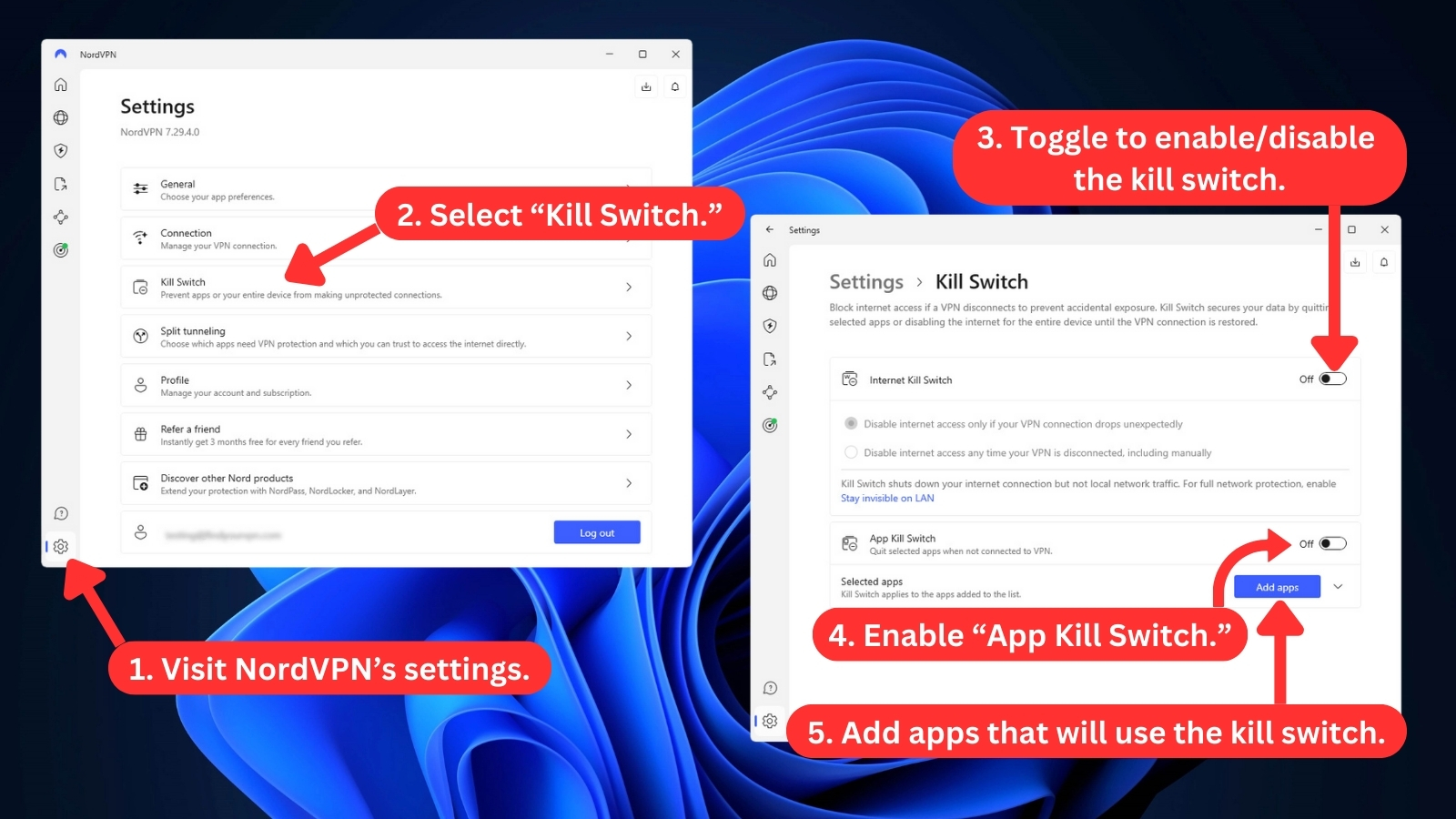
- Go into NordVPN's settings (bottom-left corner) and activate the "Kill Switch."
- Return to NordVPN's home screen and enable "Threat Protection Pro" features.
- Pick any server and connect. That's it!
In the guide above, we advised you to enable NordVPN's kill switch, which allows you to add a list of apps that will be forced to quit if your VPN connection drops. That way, those apps won't leak your sensitive information, as their access to the Web will be disabled.
Also, NordVPN's "Threat Protection" is a very handy feature that comes included with your subscription. You can use it to block malicious sites, stop Web tracking, block ads, and more.
To use NordVPN across a range of supported devices, check our central guide on how to set up NordVPN. In cases where NordVPN won't connect, the recommended first step is to contact its customer support. We'll explore some troubleshooting options later if you prefer a self-help approach.
Prominent Features
NordVPN is among the most feature-rich VPNs. It covers the basics quite well and also offers a range of advanced and unique features to protect you on the Web. Our Score: 10/10
In this segment, we look at a set of standard and advanced features that VPNs typically offer. Speaking of NordVPN’s features, you’ll find plenty of options here.
Here's an overview of what to expect.
- DNS and IPv6 Leak Protection: This feature prevents your IP address and DNS requests from being exposed to third parties. It works by blocking your IPv6 interface and routing all your IPv4 traffic through NordVPN's encrypted tunnel and DNS servers. This way, you can enjoy online privacy without worrying about third parties spying on your every move.
- Threat Protection Pro: This recently introduced feature, available on Plus and Ultimate plans, offers enhanced security by blocking ads, trackers, and malware. It functions similarly to the DNS filtering option available to all Basic plan subscribers. NordVPN's new vulnerability detection tool also strengthens your cybersecurity by scanning Windows for vulnerable programs and providing alerts about security flaws for quick action. And guess what? The NordVPN Threat Protection Tool recently earned the AV-Comparatives Certification for Phishing Protection. Now this has happened for 2 years straight. So is it reliable? Duhh! Now, NordVPN also recently integrated CrowdStrike’s threat intelligence feed into Threat Protection Pro for enhanced real-time malware and phishing defense.

- High-End Data Encryption: NordVPN protects your online traffic from prying eyes through advanced encryption standards (AES) with 256-bit keys, which are virtually impossible to crack. An encrypted connection also ensures you’re privately browsing the Web without worrying about hackers, ISPs, or government agencies snooping on your data.
- SmartDNS: With this feature, you can stream restricted content from any device that supports custom DNS settings. It keeps your connection fast and secure by changing your DNS settings only. The other benefit is that you can use this VPN to stream from different platforms simultaneously without switching servers or regions.
- Kill Switch: NordVPN's kill switch is a built-in feature that protects your data from leaking if your VPN connection drops. It blocks your device's Web access until the VPN is restored. You don't need to activate it, as it’s ‘on’ by default. The service also offers an advanced kill switch that you can enable manually for extra security against rare IP leaks. This feature is available for Windows, macOS, Linux, Android, and iOS.
- Private DNS: This option lets you securely browse the Web by connecting to NordVPN's DNS server. It does that by encrypting all your DNS requests. Using this, you can also access any site without censorship or interference. Private DNS is ‘on’ by default on all NordVPN apps, but you can also set it up manually if you wish to do so.
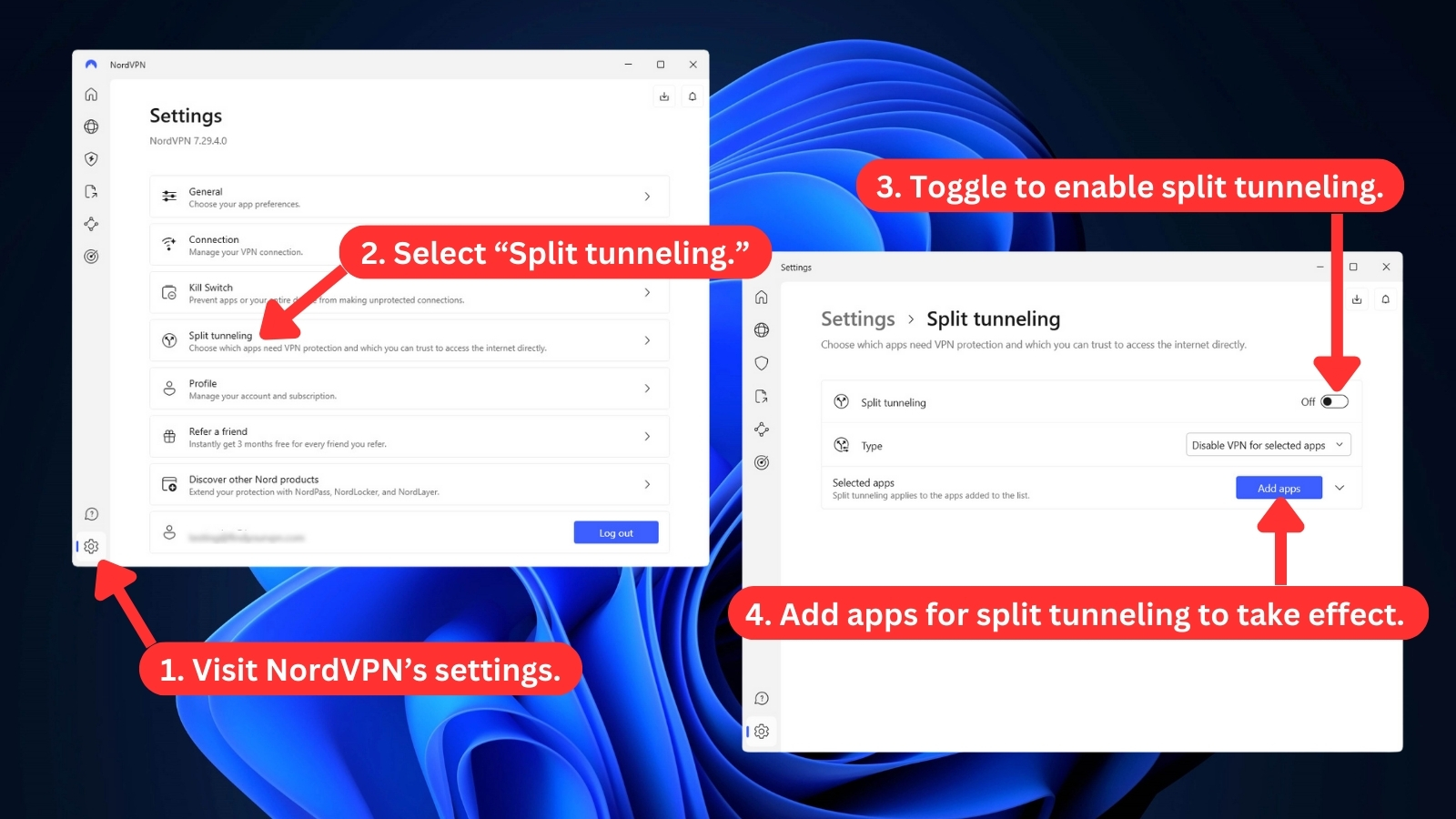
- Split Tunneling: With split tunneling, you can decide which apps use NordVPN and which don't. You can also mark your apps as 'trusted' and see who else is on the same connection. This feature is only for Android, Android TV, and Windows devices. The macOS and Linux apps don't have it yet.
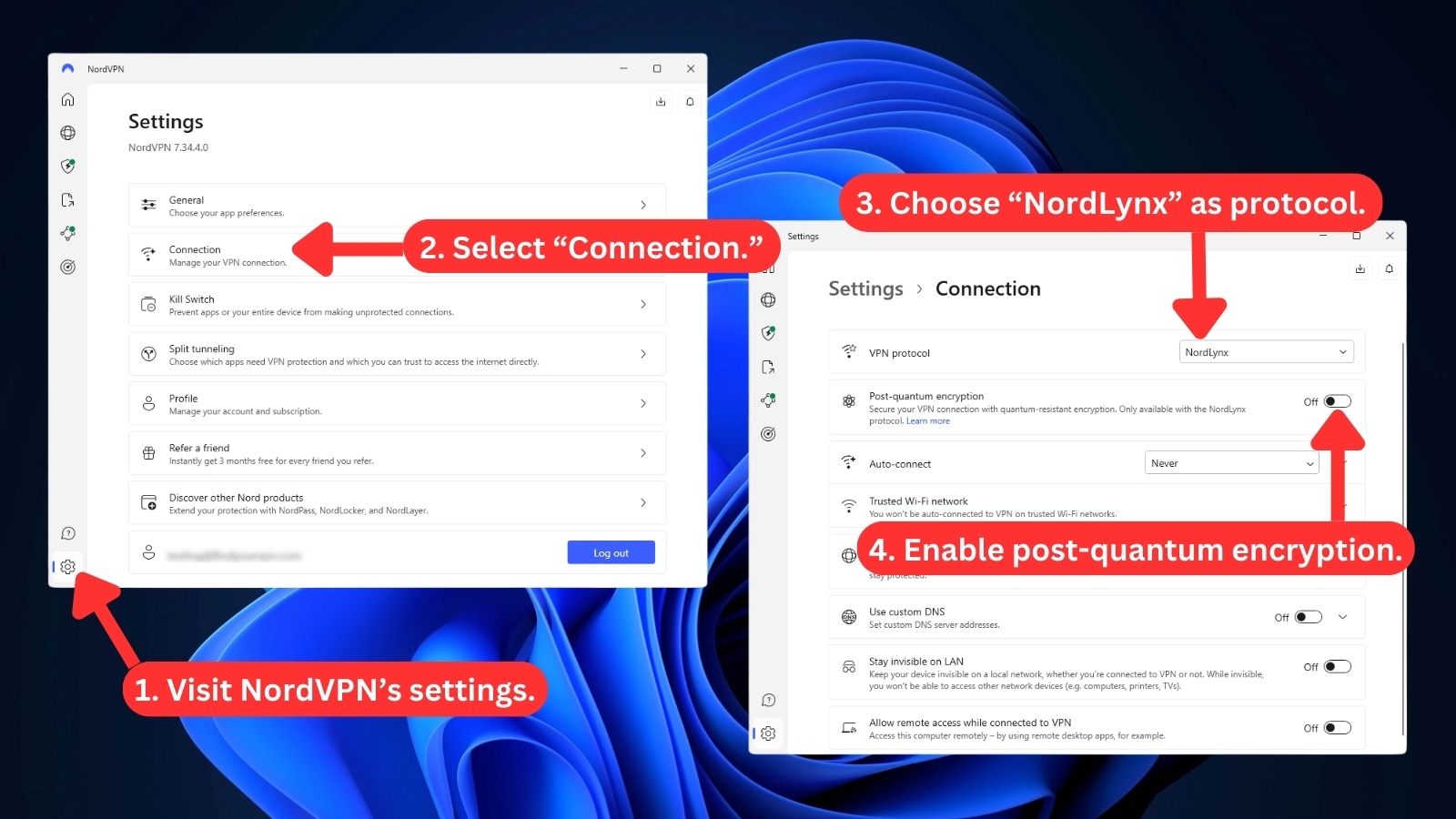
- VPN Protocol: This VPN offers a variety of protocols for secure connections. Depending on your device and preference, you can select from OpenVPN, NordLynx, NordWhisper, and IKEv2/IPsec. Each protocol has its own advantages and disadvantages. For instance, OpenVPN is an open-source protocol that is widely compatible and customizable. NordLynx is NordVPN's own version of WireGuard, which is fast and lightweight. IKEv2 is another speedy protocol that’s ideal for mobile devices.
- NordVPN Meshnet: By using the Meshnet, you can create a secure network with other NordVPN users. This feature lets you share files, play games, and access content remotely. It does that by connecting your devices directly through encrypted tunnels and giving them special IP addresses. However, NordVPN earlier decided to withdraw Meshnet feature from December 21, 2025. Fortunately, on September 29, 2025, they overturned their decision and decided to retain Meshnet.

- Dark Web Monitor: This cybersecurity feature lets you scan the dark web for any credential leaks associated with your NordVPN email address and notifies you of potential threats. It runs in the background and requires no configuration. The Dark Web Monitor feature is available on macOS, iOS, Windows, and Android apps.
- Dedicated IP: You can get a dedicated IP address from NordVPN that belongs to one of these countries: the US, Canada, Japan, the UK, Germany, France, the Netherlands, and plenty more. It costs $8.99 per month if you have NordVPN’s monthly plan, and you can buy it after you sign up for the VPN. However, with a 2-year plan, it costs you way less - $4.19 per month, thereby, helping you save around 38%.
- Double VPN: NordVPN’s Double VPN feature routes traffic through two VPN servers instead of one, encrypting your data and hiding your IP address twice. As you can expect, with this optional feature turned on, no one can track what you do online. It’s available on Android, macOS, iOS, Linux, and Windows apps.
- Post-Quantum Cryptography: This NordVPN's latest feature is available on Windows, Mac, Linux, Android, iOS, Android TV, and tvOS. It protects your VPN connection from future quantum computer attacks. However, it only works with the NordLynx protocol. That means if you’re using a dedicated IP, other protocols, obfuscated servers, or Meshnet, post-quantum encryption won’t be active.
- Onion Over VPN: Through this feature, your data first goes through a secure NordVPN server before it hits the Tor network. This extra-layered encryption makes it virtually impossible to trace your online activity back to you. You can access Onion Over VPN under the ‘Specialty Servers’ section on Android, macOS, iOS, Linux, and Windows apps.
- NordProtect: This protection feature is exclusively available to US 'Prime' plan subscribers. It offers comprehensive identity theft protection, dark Web monitoring, credit activity tracking, timely alerts, and expert support for identity theft recovery, including protection against cyber extortion.
- “Is It Down?” Website Outage Tracker: Recently launched by NordVPN, this tool helps users check whether popular websites are experiencing outages. Instead of relying solely on third-party reports, it uses user-based outage tracking to provide real-time insights into accessibility issues.
- Scam Call Protection (U.S. Android Users): Another fresh addition, this tool automatically blocks suspicious calls from known scam numbers, protecting users from phishing attempts and phone fraud. Currently, it’s rolling out for Android users in the United States, with future expansion likely. When we got in touch with NordVPN regarding the expansion of scam call protection, they explained that they will soon be rolling it out across devices. Read the exclusive interview here.
- Next-Generation Antivirus: NordVPN has recently expanded its focus beyond VPN services by positioning itself as a broader digital security platform. The company now highlights its next-generation antivirus technology alongside its VPN and Dark Web Monitor, aiming to protect users against phishing attacks, online scams, malware, identity theft attempts, account takeovers, and other modern cyber threats. Unlike traditional antivirus software that primarily targets malicious files, NordVPN's solution is designed to proactively identify a wider range of online risks while maintaining a privacy-first approach.
- Adult Site Blocking: This DNS-based Threat Protection feature lets Android and iOS users automatically block thousands of adult websites before they load, helping maintain a safer and more controlled browsing experience. Integrated directly into the NordVPN mobile app, it enhances online protection alongside ad, tracker, and malware blocking. Users can enable it easily with a single toggle, ensuring cleaner and more family-friendly mobile browsing without affecting VPN privacy or performance.
- Fire TV Stick App: NordVPN’s new app for Amazon’s Fire TV Stick delivers secure, high-speed streaming with full server coverage and NordLynx protocol support. Built specifically for Amazon’s new Vega OS, it provides instant protection through auto-connect and a familiar, lightweight interface optimized for TV use. Available via the Amazon App Store, the app ensures seamless VPN security for streaming and entertainment on the latest Fire TV devices.
Server Count & Infrastructure
NordVPN comes with a trove of servers spread across the entire planet - and it often expands that network in a rapid manner. Our Score: 10/10
NordVPN is one of the VPNs with the most substantial number of servers. To discover more information, check out the table found below.
As you can tell, the number of NordVPN servers is astounding (with servers in India, the UK, the US, Australia, and Canada). Due to its 8900+ server network (129 countries and a network capacity exceeding 100 Tbps), NordVPN is among the VPNs with the most servers.
Also, there are active NordVPN obfuscated servers available in the following locations:
NordVPN doesn’t disclose the exact number of obfuscated servers at each location. However, we noticed that the Android app offers city-specific obfuscation for U.S. connections. To use these servers, just select "Obfuscated Servers" from the "Specialty Servers" list and connect to the fastest server or your preferred location.
Does NordVPN Use Virtual Server Locations?
Yes, NordVPN does use virtual servers. They started with a single virtual server for India in January 2024, with a physical server via Singapore. To expand their reach, they've now significantly increased their offerings by adding more than 60 virtual VPN locations.
The new virtual locations include Angola (Luanda), Bahrain (Manama), India (Mumbai), Jordan (Amman), Kuwait (Kuwait City), Mozambique (Maputo), Senegal (Dakar), Tunisia (Tunis), and two in Vietnam (Hanoi and Ho Chi Minh).
Furthermore, NordVPN has implemented a colocated server network, which means it owns and operates its servers in secure data centers, giving it greater control over security, performance, and user privacy. This is a major benefit (especially compared to its competitors) as it gives NordVPN a better chance of creating an incredibly safe and privacy-respecting environment.
UI/UX Design & Ease of Use
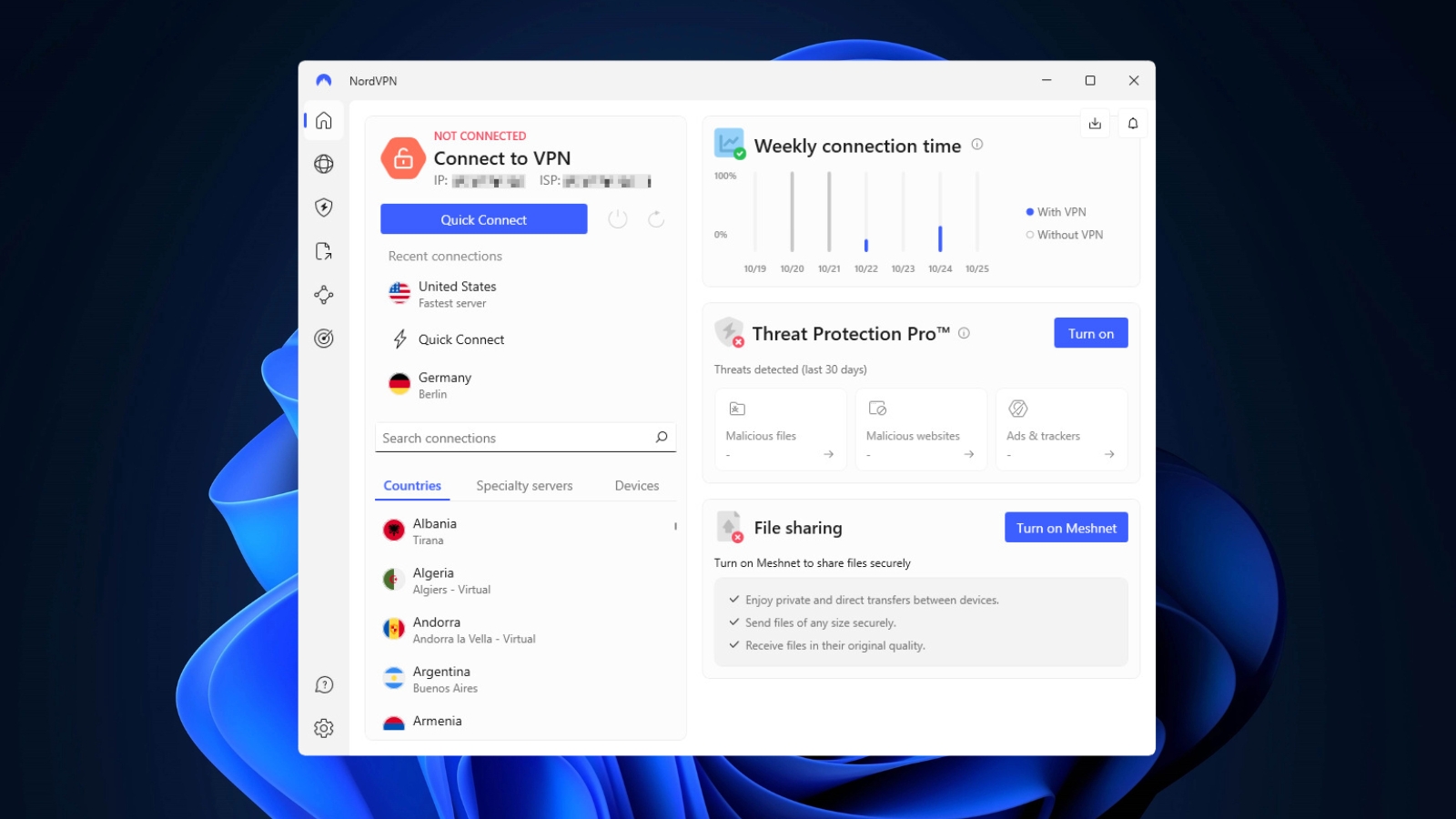
NordVPN is very easy to use. It comes with a user-centric and modern-looking UI across all its apps, suitable even for complete beginners. Our Score: 10/10
In this segment of our NordVPN review, we'll take a look at the VPN's apps for desktop and mobile platforms. And since Web browser extensions are on offer, we'll explain what you can expect from NordVPN in that aspect as well.
How Well Does NordVPN Work on Desktop Platforms?
NordVPN’s desktop app is user-friendly, making privacy simple for everyone. Key features like Quick Connect and intuitive settings help even beginners stay secure online.
The home screen (or "dashboard" on Windows) shows your connection status, recent activity, and weekly usage. The VPN tab features an interactive map for quick server selection. To view all server options, return to the home screen to search manually or choose from specialty servers like:
- P2P
- Dedicated IP
- Double VPN
- Obfuscated Servers
- Onion Over VPN

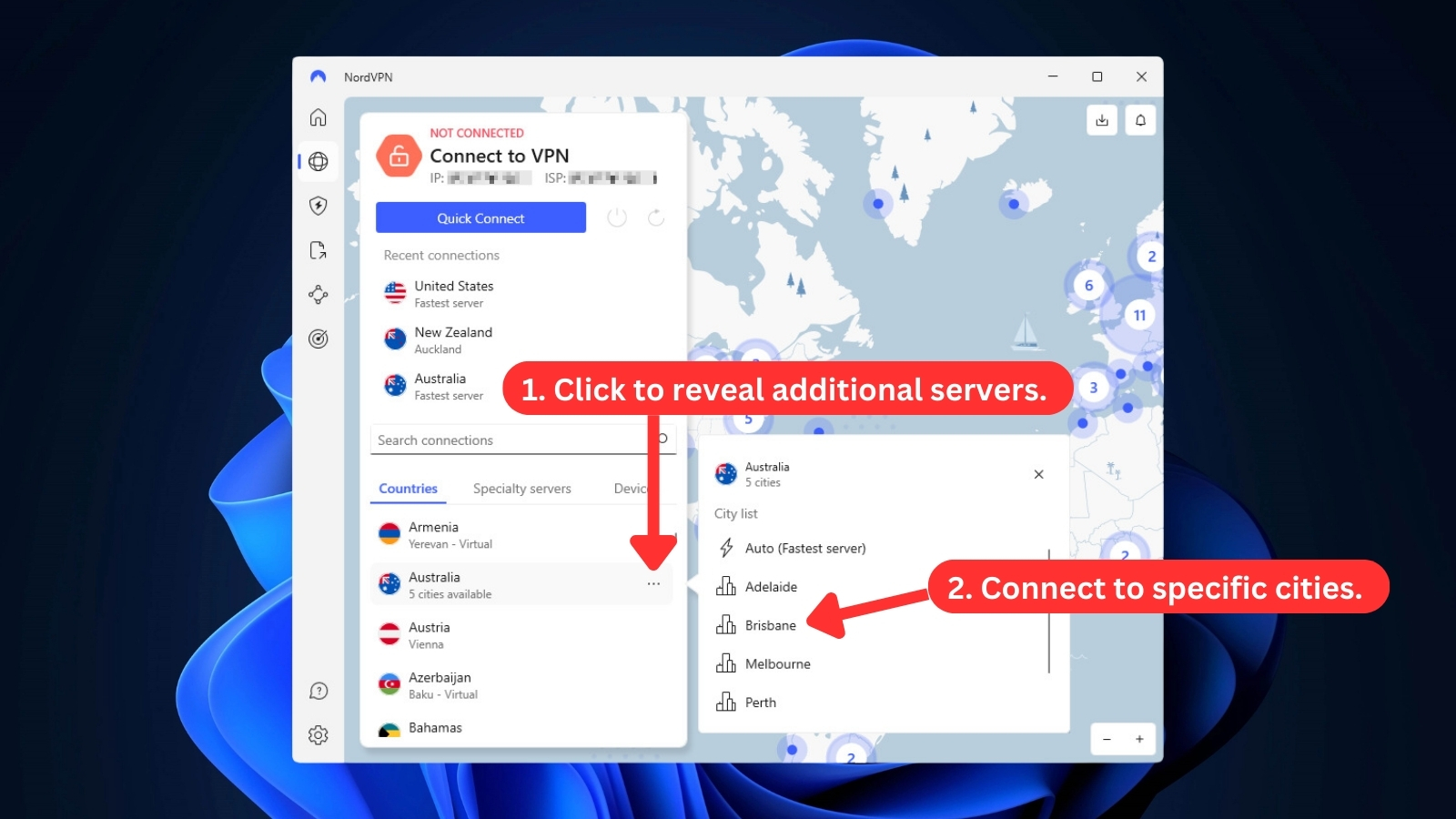
Before you click on any country's name from the left-placed list, you can take your time to pick a server manually. Hover over any country's name, and you'll see a 'three dots' icon on the right. Click on that icon, and a menu will appear. Then, pick a city server from this menu and connect to it.
Recent UI updates simplified the server selection menu by removing the separate P2P category. Now, all NordVPN servers support P2P, so there is no need for a special category.
In the same sidebar menu, there's a convenient shortcut to customizing the "Threat Protection Pro" feature and securing access to your devices or sharing files through "Meshnet."
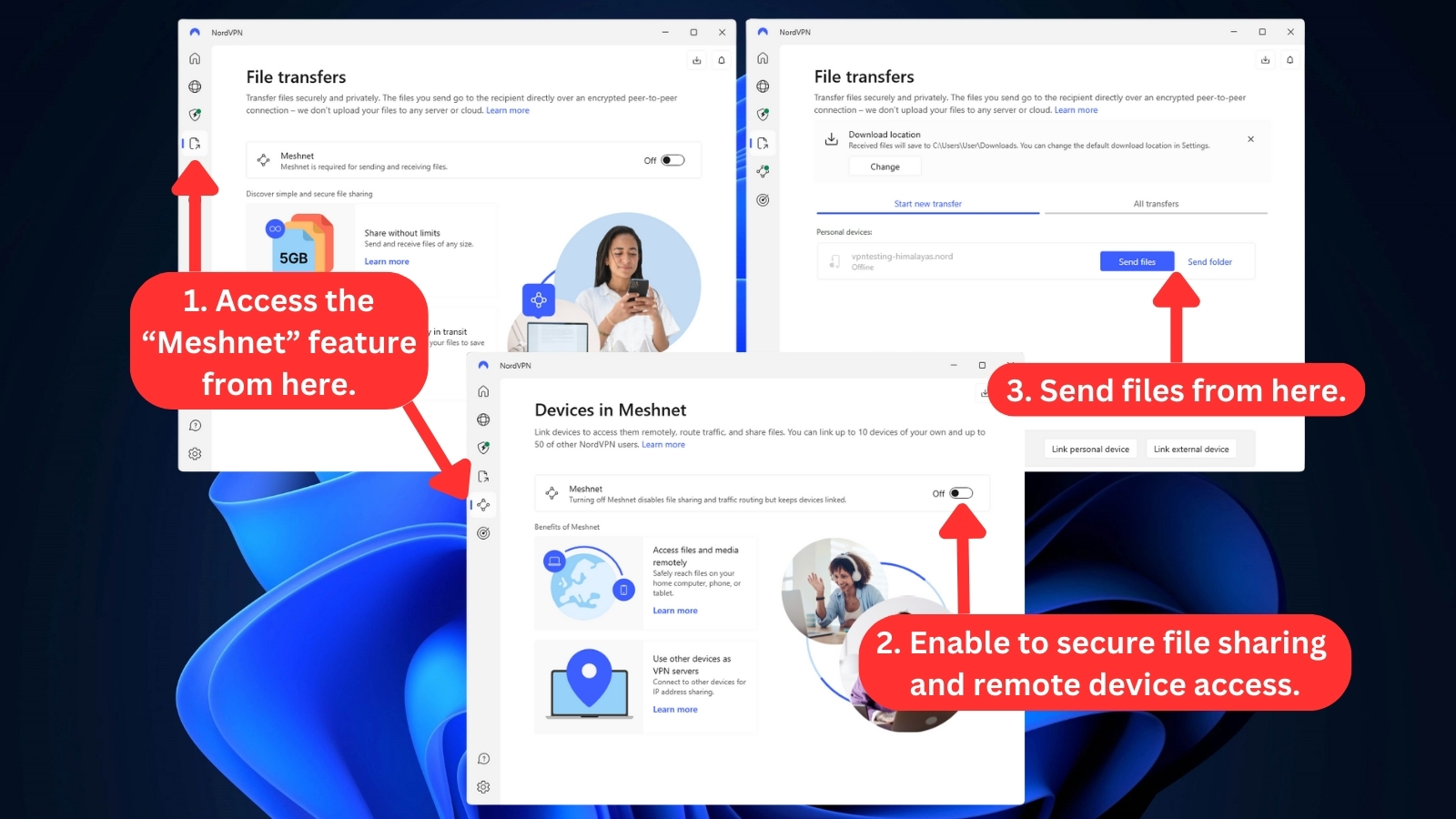
Below the 'Meshnet' icon is NordVPN's "Dark Web Monitor." NordVPN checks your email address for leaks that might have happened on the Dark Web. In general, this seems like a handy feature to have.

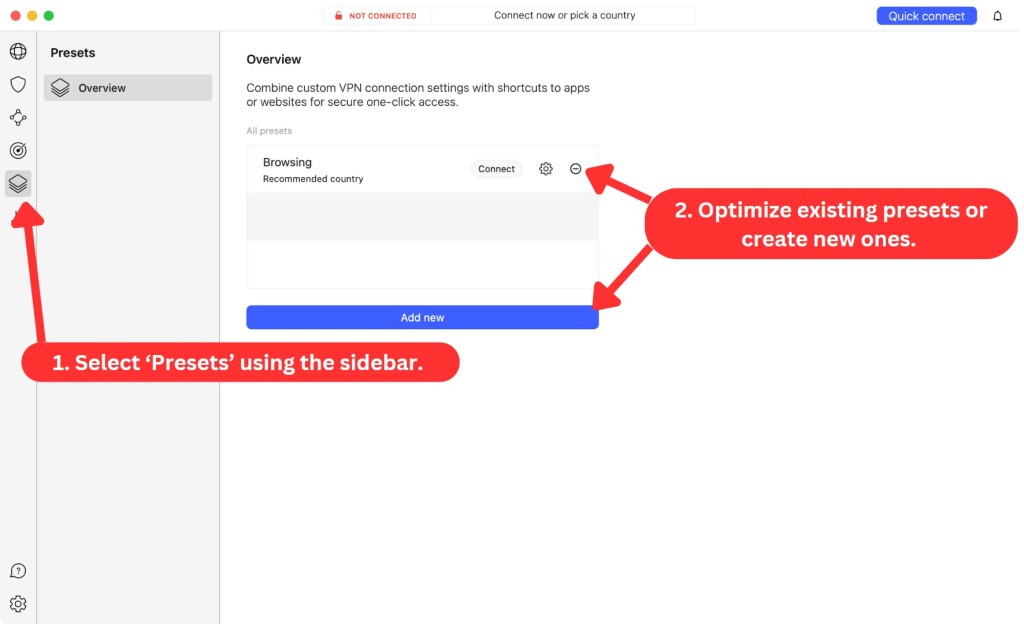
On macOS, NordVPN also gives you customizable presets (you can add more), accessible via its home screen. You can set a custom protocol and pick a server. That way, you can optimize NordVPN for speed, downloading files, Web browsing, and more.
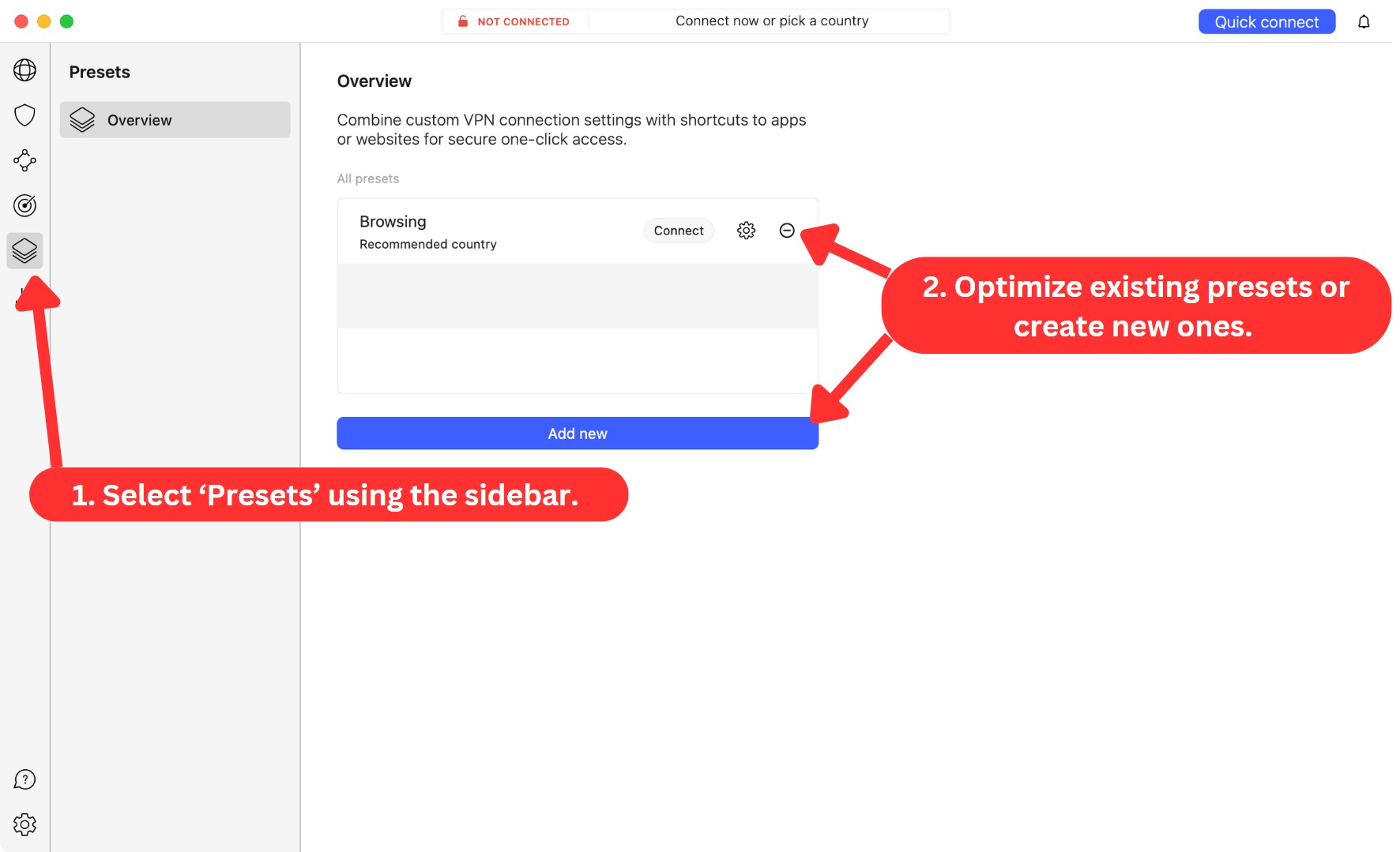
To dive deeper into what NordVPN offers, you can check its settings. To access that side of the VPN, click on the 'Settings' icon, visible in the bottom-left corner. We've tested NordVPN on a Windows computer, so here's what the VPN allowed us to customize:
- General: This is where you can instruct NordVPN to auto-start on system startup. Other than that, you can change the app's appearance and language, run diagnostics, and decide whether to send crash reports.
- Connection: Here, you can manage how you connect to VPN servers, including protocol selection, auto-connect options, DNS filtering, setting custom DNS, using quantum-resistant encryption, and more.
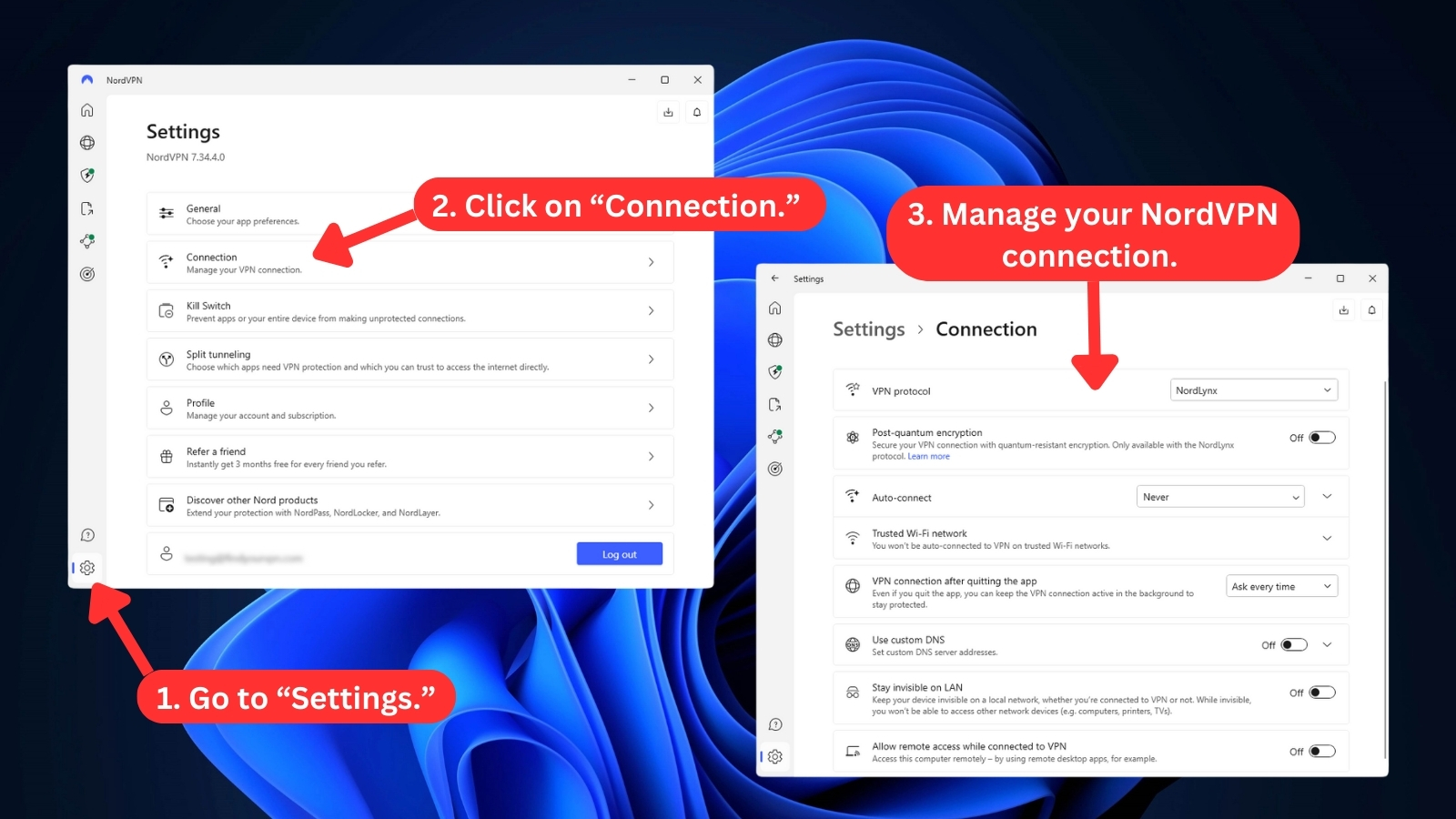
- Kill Switch: If you enable NordVPN's Internet kill switch, your data will be secured in case your connection drops. You can also set a list of apps that will be shut down automatically to prevent your data from leaking.
- Split Tunneling: You can choose which apps use the VPN for secure browsing and which can directly access the Internet.
- Profile: Manage your NordVPN account and view subscription details here. Plus, you can download links for other devices or even grab a QR code for easy app installation.
How Well Does NordVPN Work on Mobile Platforms?
NordVPN works so well on mobile platforms. It has done a wonderful job of creating a uniform user experience. That means you can count on the same set of UI design principles across all its apps. This is something we don't often see these days, and it puts NordVPN ahead of its competition.
Using NordVPN on phone is a joy, and we can't emphasize it enough. On iOS, the app's home screen shows a list of servers, along with an interactive map. Tap on any country using this map, or select a server manually - and you'll be connected in an instant.
However, take note that the full array of specialty servers on iOS only appears when using the OpenVPN protocols (UDP/TCP).
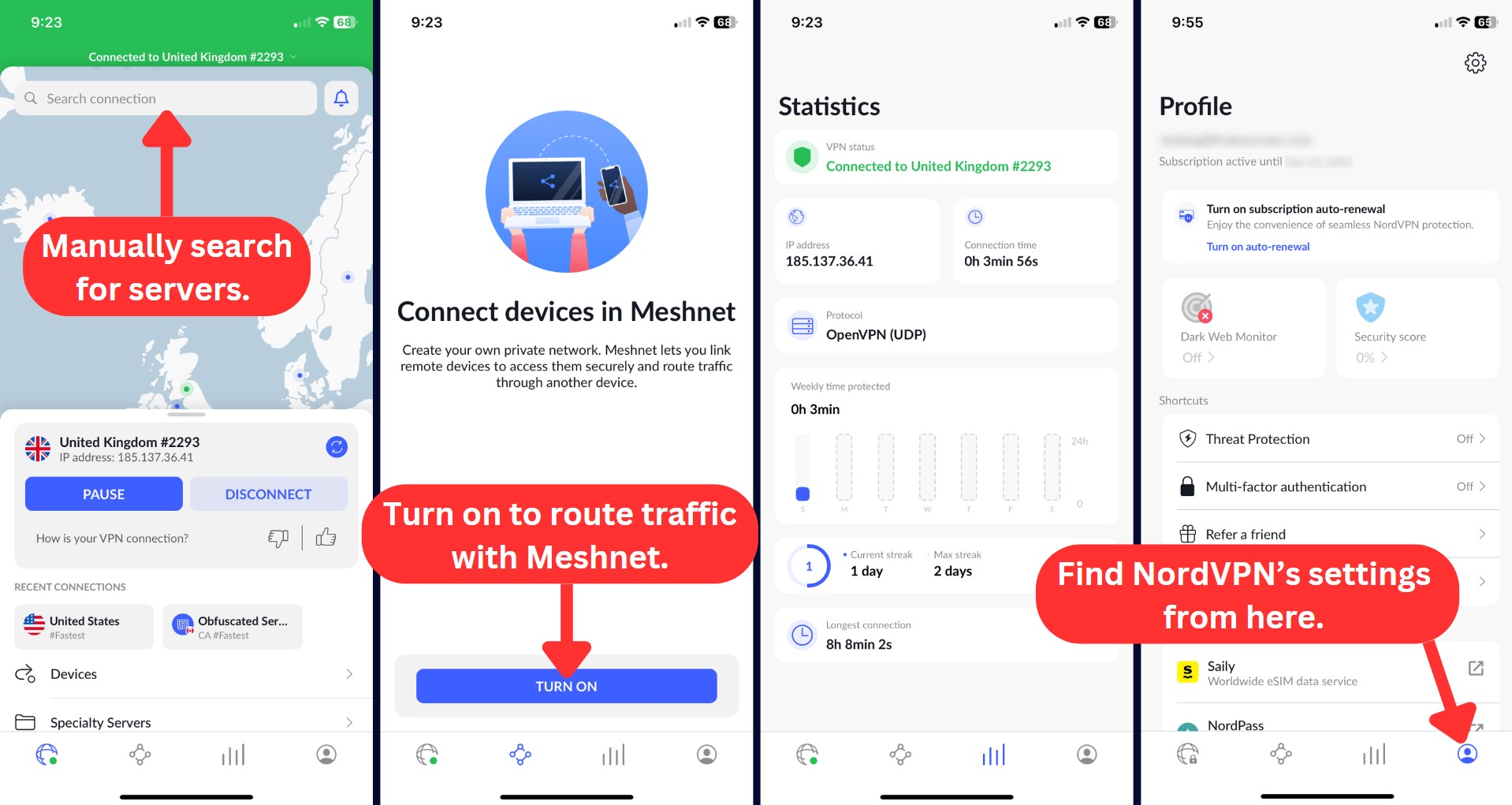
At the bottom of the screen, you can check detailed information about the currently active VPN session, access NordVPN's Meshnet, and you'll find a button that takes you to the app's settings (where you can change the VPN protocol and more).
When it comes to Android, you'll see a home screen that's similar to iOS. This includes an interactive map, along with a list of all NordVPN's servers below (including specialty servers as well). Like iOS, you can access NordVPN's settings via "Profile" in the bottom-right corner.
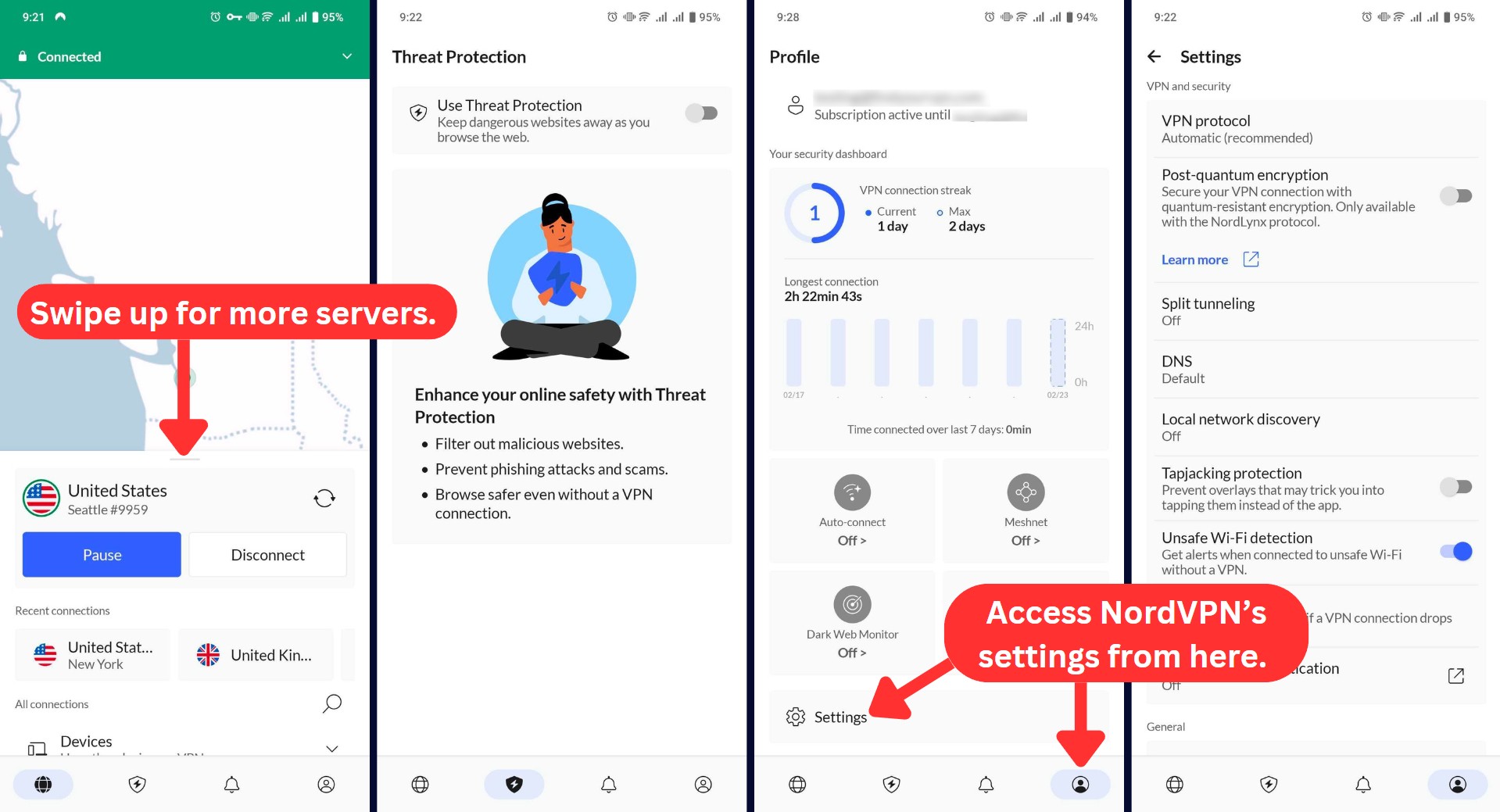
Speaking of NordVPN's settings on iOS and Android, know that there's plenty to fine-tune. So, here's an overview of what to expect.
All in all, NordVPN's Android and iOS apps are hugely polished and incredibly capable. We highly recommend using them.
How Well Do NordVPN's Web Browser Extensions Work?
NordVPN offers extensions for Chrome, Firefox, and Edge (also compatible with other Chromium/Gecko-based browsers). Safari is not supported, but the macOS app works seamlessly with Safari. The browser extension has a refreshed interface. After logging in, you can:
- Use Quick Connect for the fastest nearby server
- Manually select a server location
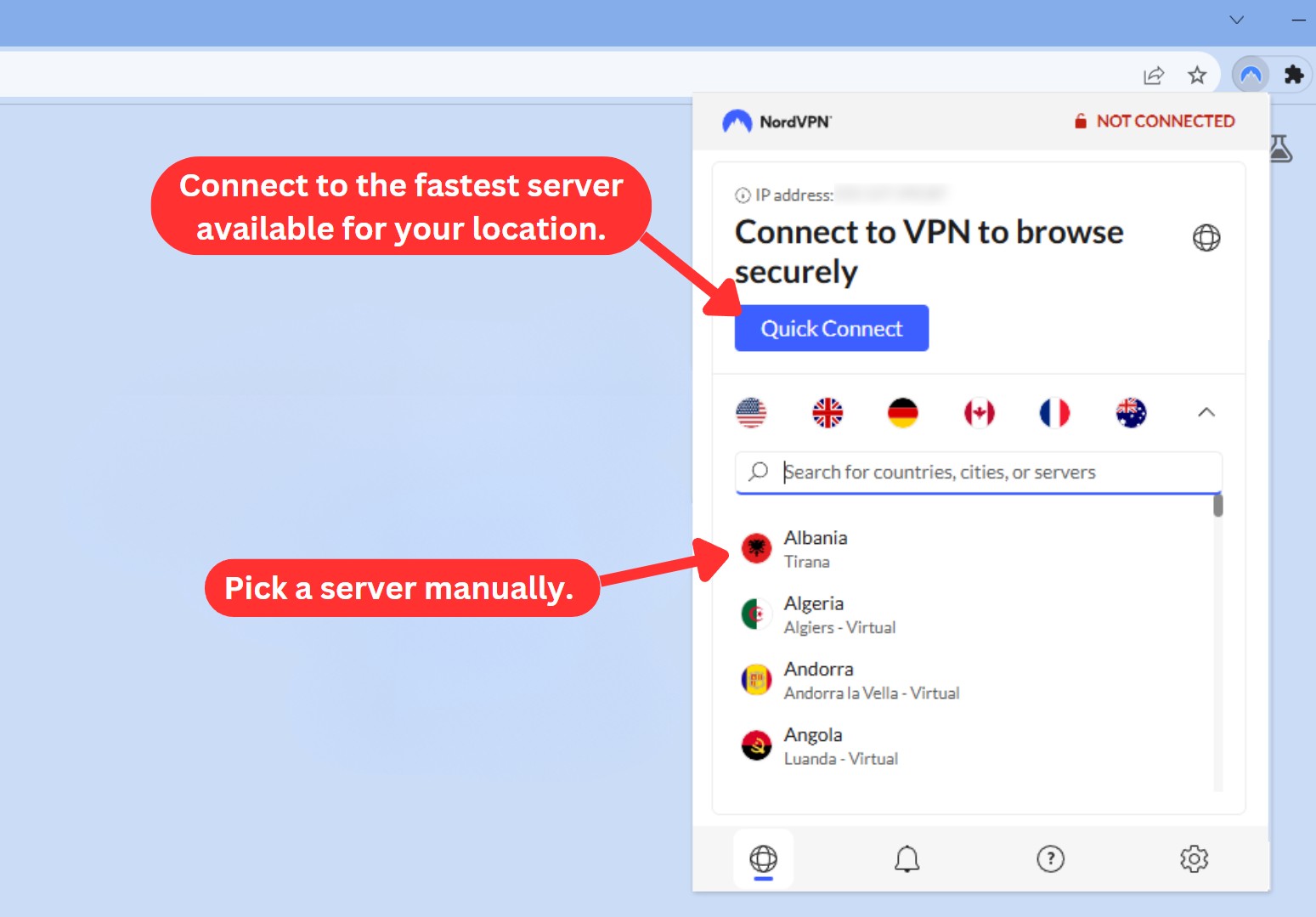
To dive deeper, click on the "Settings" icon in the bottom-right corner. You'll get to block WebRTC leaks, enable NordVPN's ad-blocking feature, and manage your list of websites that can bypass Nord's proxy (split tunneling).
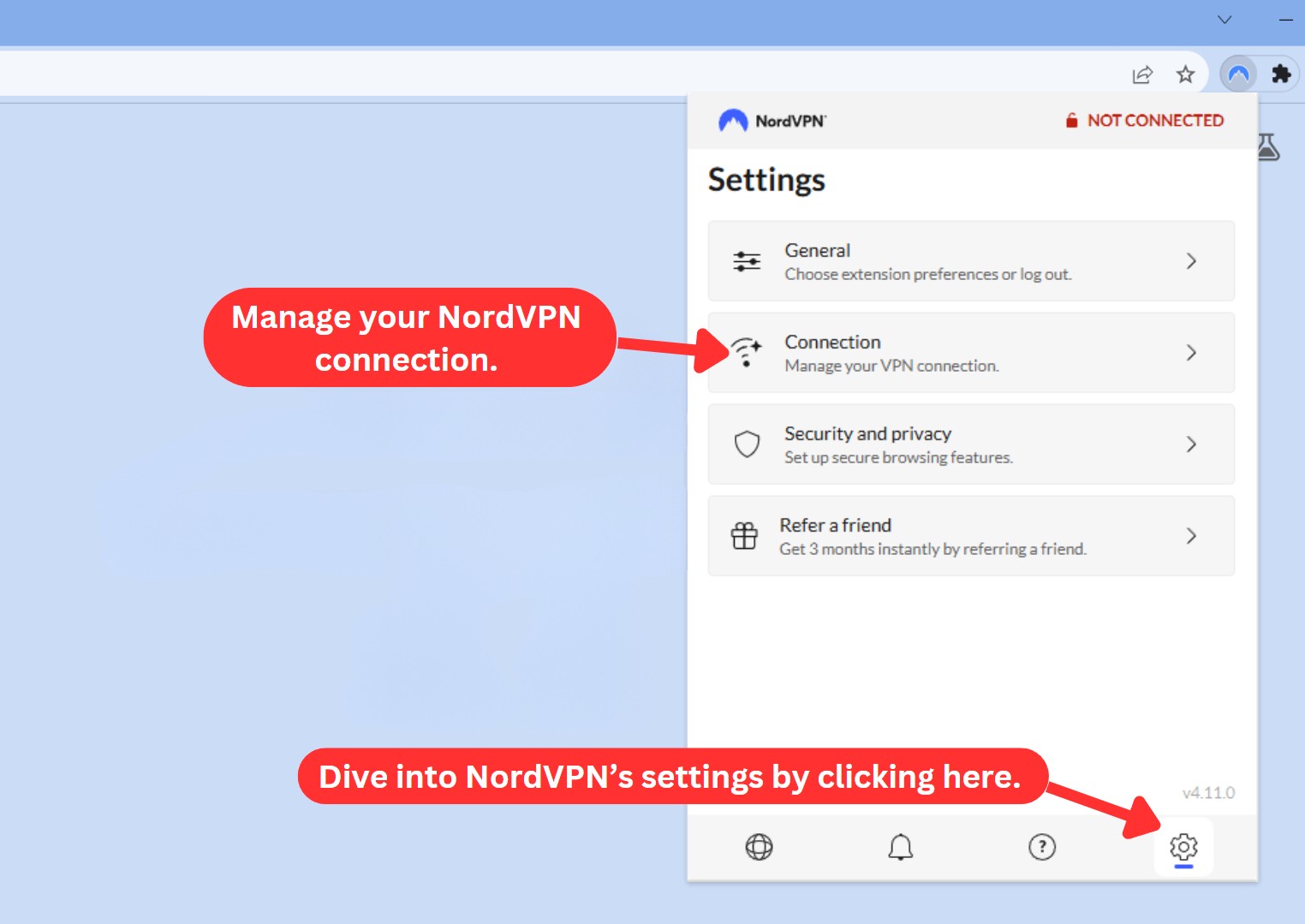
Keep in mind that NordVPN's Web browser extensions don't provide the same security level as the VPN's native apps. Using the app, you get a range of ultra-secure protocols and high-end encryption. And using the extension, your HTTPS traffic will be encrypted via the "Transport Layer Security" (TLS 1.2) protocol, which means we're talking about a proxy (not a VPN) here.
On a brighter note, there's a tab where you can "refer a friend" and instantly earn 3 free months of NordVPN. Your friend will also benefit from receiving up to 3 free months (depending on the plan they choose).
Overall, it's good to know that NordVPN's browser extension looks and works great - especially if you need fast performance, better protection for your data, or to eliminate ads.
Media Streaming, Torrenting, and Gaming Support
NordVPN unblocks dozens of streaming services and comes with streaming-friendly speeds. Also, it can be used to download torrents and play online games. Our Score: 10/10
One of the main reasons people use VPNs is to access content online, whether it’s streaming, downloading torrents, or playing games. However, not all VPNs can deliver a smooth and satisfying experience for these activities. Let’s see if NordVPN’s up to the task.
Is NordVPN Good for Streaming?
Yes, NordVPN is an excellent VPN provider for streaming, as it offers fast speeds and a wide array of server locations. It uses SmartPlay technology, which combines the security of a VPN and the flexibility of SmartDNS to provide smooth and fast streaming.
We've used NordVPN to watch shows on Netflix, Disney+, and Hulu without any major hiccups. It consistently unblocked Netflix libraries worldwide, allowing us to access a diverse range of titles, including exclusive originals and region-specific content. It also worked well for bypassing sports blackouts, letting us stream games that would’ve otherwise been restricted.
More importantly, we didn't experience any buffering or lag, even while streaming 4K content on Android TV, Fire TV, and Apple TV. However, we encountered a few minor issues watching Prime Video on Windows due to Amazon's VPN detection.
Here are some of the most notable US-based streaming platforms this VPN unblocks.
NordVPN dominates other VPNs for international and non-US streaming platforms, too. Here’s what you can expect.
NordVPN is the best streaming VPN that has improved in the past few months. Before, finding a server that worked with Netflix and other platforms involved manually trying different connections.
Despite not having dedicated streaming servers, NordVPN works with Netflix and other popular streaming platforms without notable issues. Simply choose a server in the country of your desired streaming service and enjoy unblocked content.
Is NordVPN Good for Torrenting?
Yes, NordVPN for torrenting is good, thanks to its dedicated P2P servers. You can find them under 'Specialty Servers,' and they’re available in almost every country on the list.
Let’s not forget that the service is based in Panama, outside the jurisdiction of major surveillance alliances, and follows a strict no-logs policy, which means it doesn't spy on your torrents. That's why NordVPN remains the safest VPN for torrenting, especially for those with serious privacy concerns, such as journalists, activists, and folks living in countries with restrictive Internet censorship.
The other thing that’s truly helpful is NordVPN’s SOCKS5 proxy, which we've tested with torrent clients like BitTorrent. However, we don't recommend using this feature, as it’s less secure than a VPN. A SOCKS5 proxy only changes your IP address, but it doesn't encrypt your traffic.
Is NordVPN Good for Gaming?
Yes, we believe that NordVPN is a great choice for gaming online. It has a large network of servers around the world and supports almost any device or platform. Also, it lets you customize your connection for gaming with different protocols, including IKEv2/IPSec.
IKEv2/IPsec may be an older and slightly less secure protocol, but it excels in specific use cases like high-speed downloads or online gaming that demand a stable connection.
In fact, NordVPN has many features for gamers. For example, it can block ads, malware, and other online threats that can affect your gaming performance and security. We know DDoS attacks can ruin gameplay, and in our experience, NordVPN is brilliant at saving you from them through its kill switch feature.
We've also tested NordVPN with CoD Warzone, Destiny 2, and PUBG, and our connection stayed stable without noticeable lag. Apart from that, it can also help you access games that are restricted in your region through its SmartPlay feature and automatically connect you to the best server for gaming.
Security & Privacy
Despite some 'risky' situations from its past, NordVPN is still a highly trustworthy VPN that respects and protects your personal data. Our Score: 9.5/10
Now, let’s talk about privacy and security – perhaps the most important aspects when choosing a VPN. We’re going to take a look at NordVPN’s encryption and logging policies, and we’ll test its claims as well.
NordVPN Protocols - Listed & Explained!
The table found below shows which VPN protocols are found in each NordVPN app. So, we strongly recommend taking a look below before we discuss what each of those protocols brings.
It's worth highlighting that, in some cases, you can add new VPN protocols manually. For example, this is possible with the IKEv2 protocol on Windows and Linux (GUI version available now). By installing this protocol manually, you can take advantage of it even if it's not offered natively.
Still, there's a reason why NordVPN offers a select range of protocols in each of its apps. Even though you can overcome that "limitation," you should do that only if you really know what you're doing. Otherwise, rely on NordVPN's built-in protocols.
- OpenVPN: OpenVPN is present across all of NordVPN's apps. This is a hugely powerful protocol that comes with strong encryption algorithms. NordVPN couples this protocol with AES-256-GCM (with a 4,096-bit DH key). This would mean that even if someone gets to your data, it would be impossible for them to actually "read" that data.
- IKEv2: The IKEv2 protocol is found across Apple-made devices in this case, and it's used by default in NordVPN's apps for macOS and iOS. IKEv2 is considered one of the strongest protocols out there while also managing to provide reliable performance. NordVPN couples it with AES-256 encryption, which should provide the highest level of data protection.
- NordLynx (WireGuard): NordLynx is NordVPN's spin on the WireGuard protocol. This is the newest VPN protocol available, boasting high-end security while providing incredibly fast performance. After extensive testing across several platforms, NordLynx became available in April 2020. As NordVPN highlights, NordLynx is "modern, extremely fast, and insanely lean in architecture." It consists of only 4,000 lines of code, which makes it incredibly lightweight and flexible. Therefore, you get both protection and performance.
- NordWhisper: NordVPN's newest protocol called NordWhisper is designed to bypass strict network filters by disguising VPN traffic as regular Web activity. Built for restrictive environments like public Wi-Fi and heavily censored regions, it ensures reliable access when other protocols are blocked. It's currently available on Windows, Android, Android TV, and Linux devices.
Does NordVPN Keep Logs?
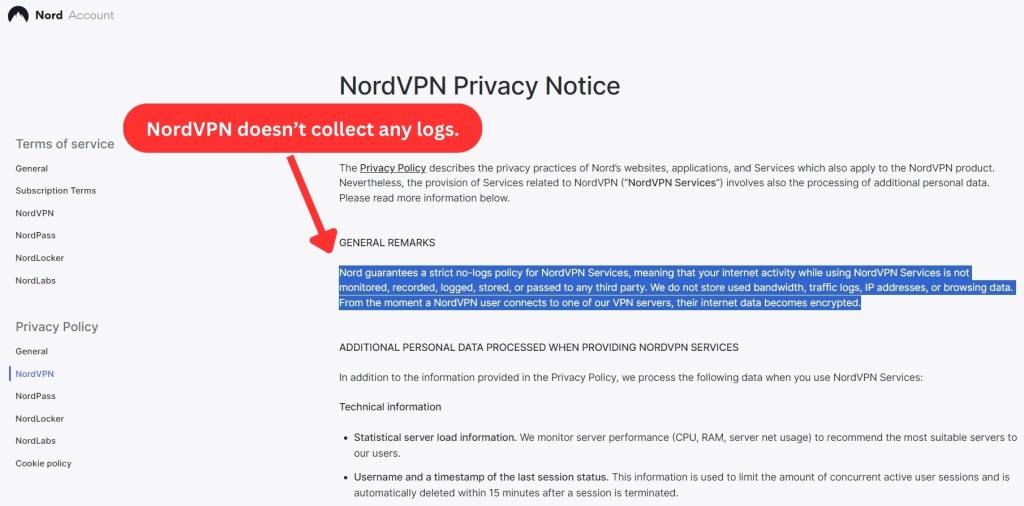
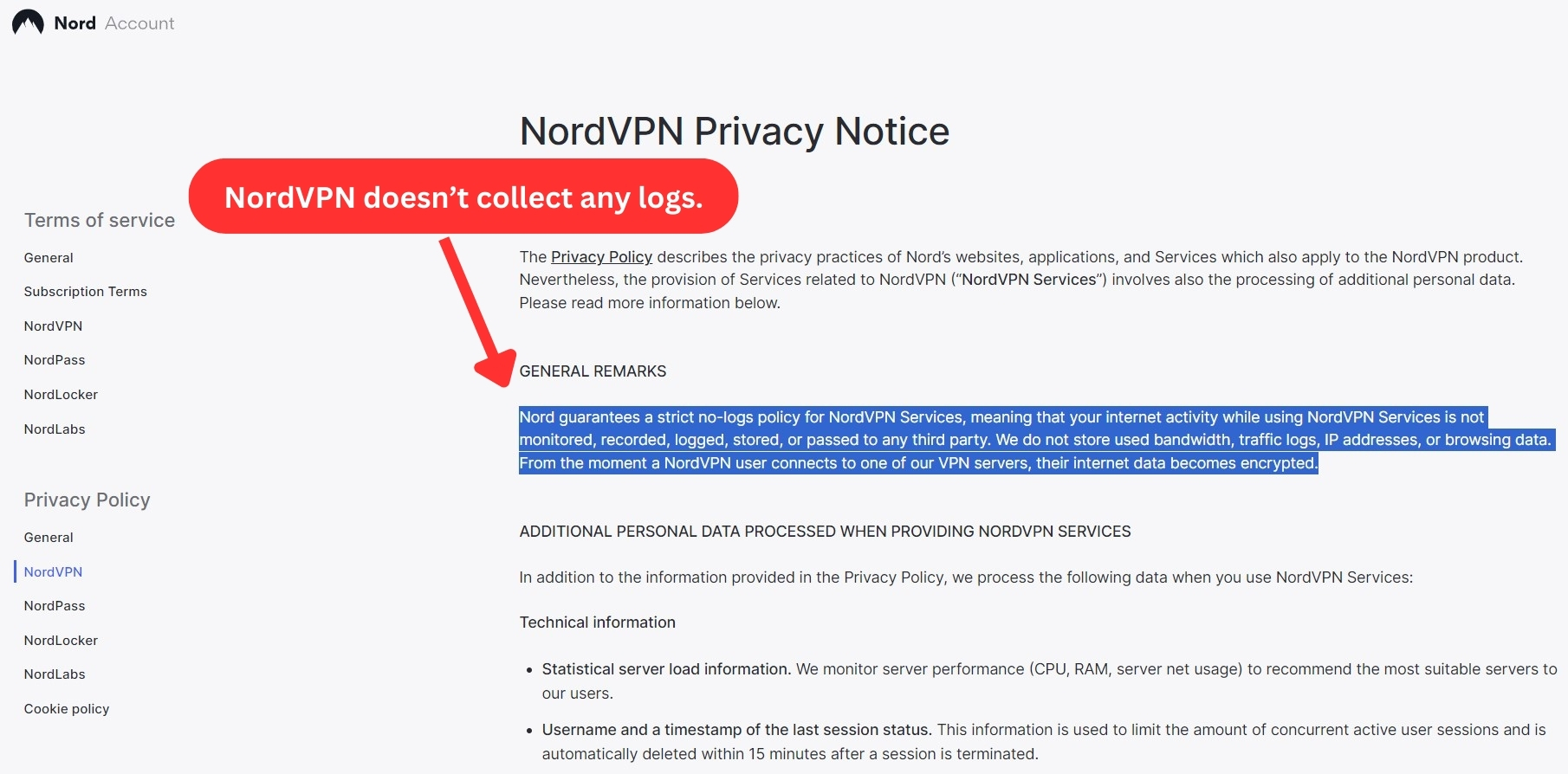
No, NordVPN doesn't keep logs related to your private data, online activity, or your Internet browsing history due to its strict no-logs policy.
In other words, none of your personal information is stored on any of NordVPN’s thousands of servers. And to prove this no-logging policy, NordVPN went through many independent audits.
- First audit in 2018
- PwC Switzerland audit in 2020
- Deloitte audits for security and infrastructure and penetration testing in 2022 and 2023
- Fifth annual audit completed in late 2024
- Sixth annual audit in 2025 by Delloite confirming that NordVPN did not expose any data, which directly implies that it is a safe VPN.
While NordVPN does collect some minimal data, it's important to clarify:
- This includes anonymized diagnostic logs, telemetry data, and basic device info
- These are used strictly for improving service performance and resolving technical issues
- No personally identifiable information is stored
For more on NordVPN’s advancement in VPN market:
- NordVPN’s Threat Protection Pro has earned AV-Comparatives certification for phishing protection, with its effectiveness verified for two years.
- Learn about Nord Security’s 2024 Impact Report, including sustainability and charitable efforts
Does NordVPN Leak/Expose Your Personal Data?
No, NordVPN doesn't leak or expose your personal data. To check for any DNS leak, we've made several VPN connections using NordVPN and tested those VPN tunnels.
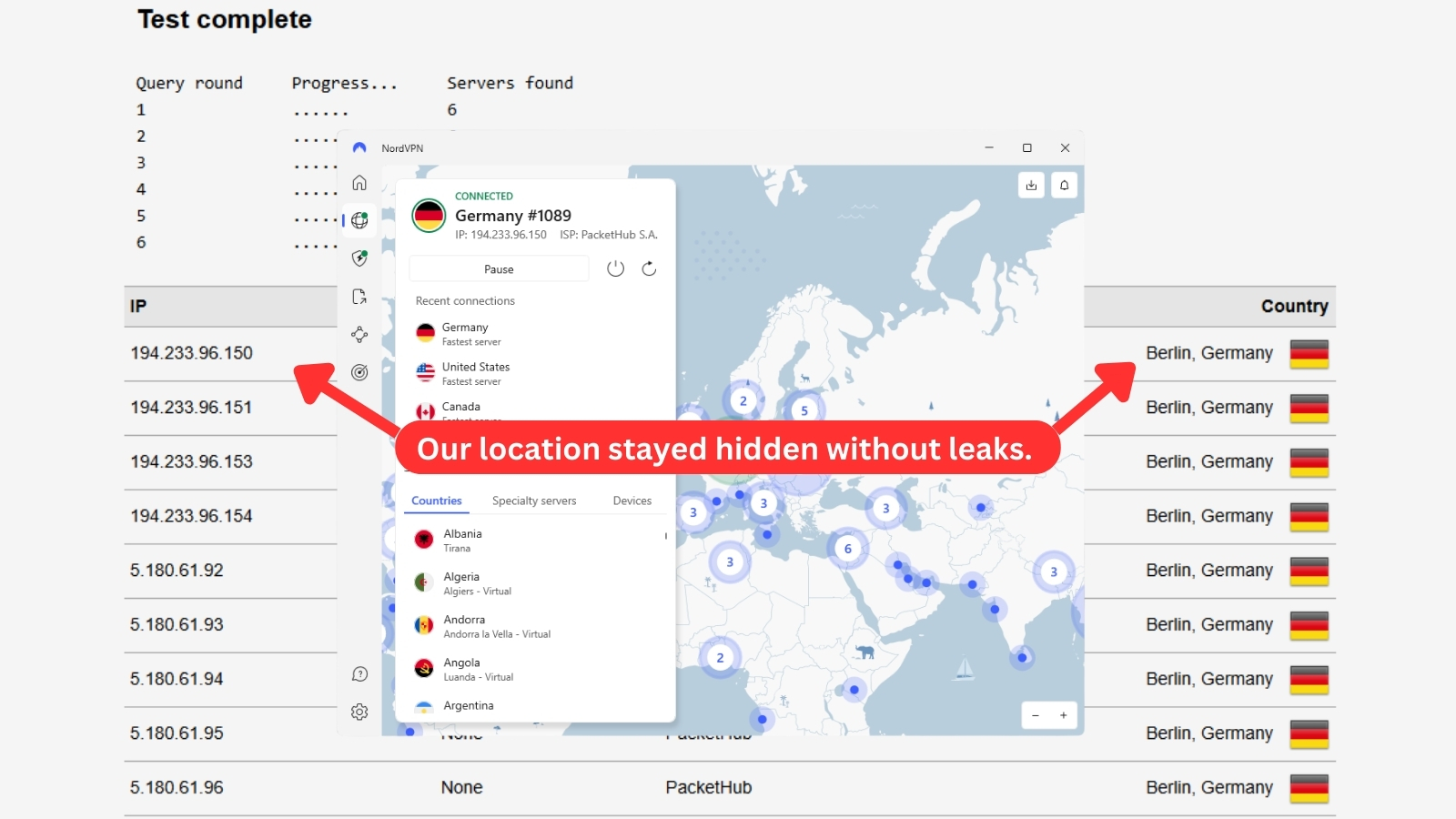
As you can see from the image in this segment, our 'true' IP address remained hidden and was replaced by NordVPN's 'virtual' information.
Keep in mind that we've done extensive DNS leak tests covering IP, DNS, WebRTC, and geo-location data leaks. All of our data never left NordVPN's tunnel, and no leaks were detected. Therefore, we conclude that this VPN will keep you safe and protected online.
Speed & Performance
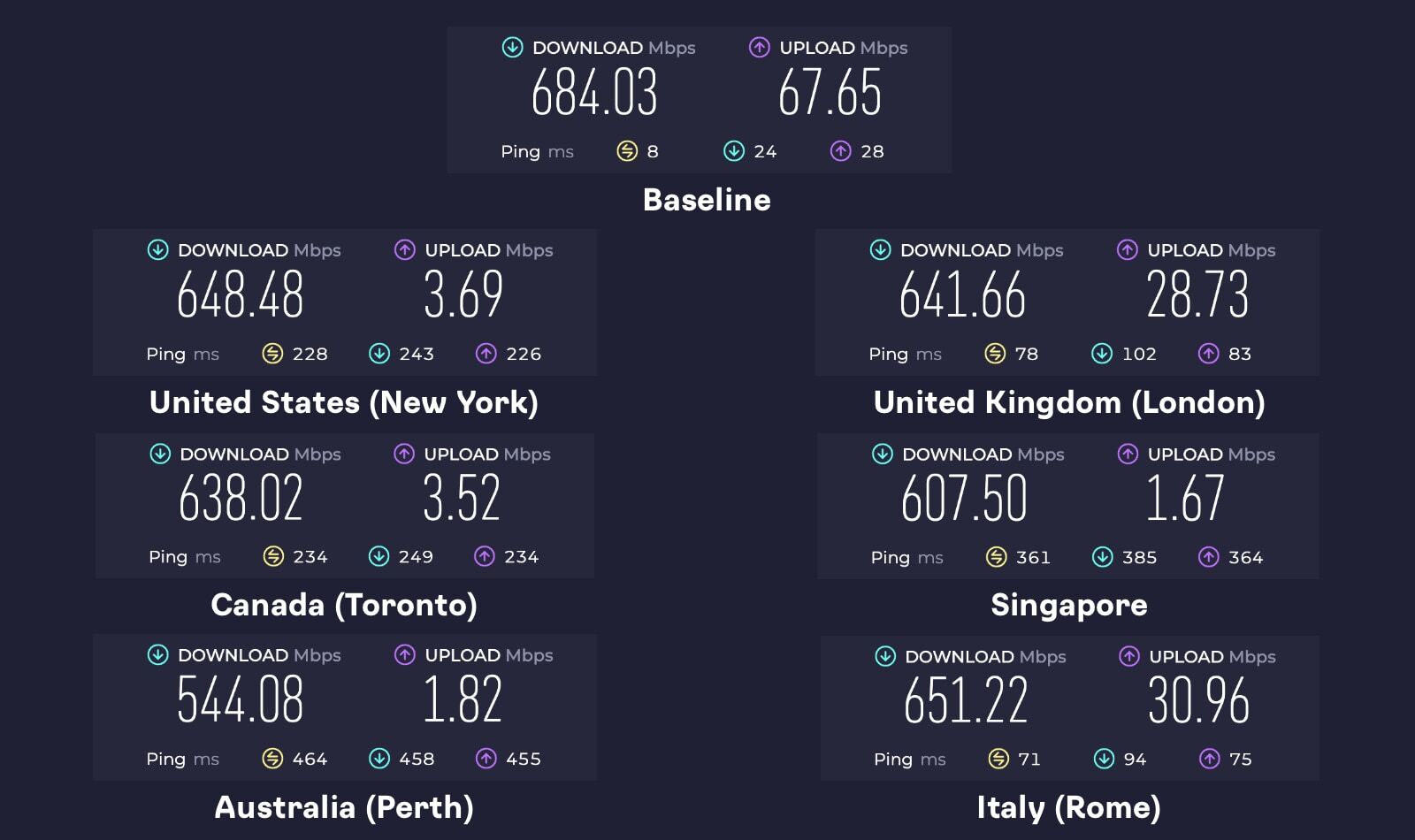
NordVPN is among the fastest VPNs. Streaming in 4K or downloading large files shouldn't be a problem, even if you don’t have an ultra-fast baseline connection. Our Score: 10/10
- Average speed loss: 9%
- Lowest speed: 544 Mbps (Australia)
- Performance: Consistently fast; upload speeds may vary
NordVPN handles both nearby and distant servers well. Even at its slowest, speeds were high enough for demanding activities like 4K streaming on multiple devices.
Customer Support
NordVPN offers a complete range of customer support channels - so you can have all your questions answered promptly. Our Score: 10/10
If you take a look at older reviews of NordVPN still found online, you’ll see that many were complaining about this company’s lack of live chat and other types of customer support. Well, that is no longer the case.
NordVPN has upgraded its customer support system, and you can expect the following types of resources:
- Live Chat: Instant access via NordVPN’s website (start with “Can I talk to a live agent?”).
- Email: Use [email protected] (response within 48 hrs).
- Support Center: Searchable help articles and tutorials.
- Tutorials: Step-by-step guides for all supported devices.
Reaching live customer support may initially involve navigating through a chatbot. However, once you connect with a real person, the support is generally good. Knowledgeable representatives can assist with questions, troubleshoot issues, and even offer helpful tips like coupon codes. To streamline the process, it's a good idea to start your chat conversation with, "Can I talk to a live agent?"
If NordVPN won't connect:
- Check your Internet
- Try a different server
- Verify subscription status
- Disable antivirus temporarily
- Restart TAP adapter (Windows)
For persistent issues, contact live support for fast help.
Pricing
NordVPN is a high-priced VPN, but it gets much more affordable via its long-term plans. You'll also find highly attractive deals (with one being available right now). Our Score: 9/10
How Much Does NordVPN Cost?
NordVPN has 4 subscription plans, starting at $3.09/month. You can choose from four options: Basic, Plus, Complete, and Prime. The pricing of each plan depends on the subscription duration you choose and the features you want - premium features being available on the higher-end plans. All plans come with a 30-day money-back guarantee, which can be used as a NordVPN free trial. Here’s a quick look at what each plan includes.
For businesses looking for secure network access and centralized management, NordLayer serves as a business-focused version of NordVPN. It provides enhanced security controls and starts with a minimum of five licenses. A 14-day money-back guarantee is available.
In terms of payment, NordVPN allows you to pay using credit/debit cards, crypto, Amazon Pay, Google Pay, PayPal, Apple Pay, and more. However, if you purchased NordVPN through Apple’s App Store, then NordVPN will not grant refunds directly. You’ll need to request a refund through Apple’s App Store support.
Deals to Lookout For: Additional Discounts
Save upto 70% on NordVPN’s 2-year plan – now priced at $3.39/month ($81.36 in total). 30-day money-back guarantees available!
Great NordVPN deals are out there, but the NordVPN price you see might change depending on your location. For example, in Canada gets offer at 74% off, while the UK, Australia, Germany, Netherlands, Italy, and France get offers at 73%, and the US can find plans up to 77% off.
NordVPN frequently offers discounts and coupon codes to help you save on your subscription. If you're interested in learning more about these deals and how to apply them, check out our guide on how to apply NordVPN coupon codes.
Disclaimer: The price you see now might not be the price you pay when your plan renews. NordVPN can change their renewal prices, so you could end up paying more than you expected.
Is NordVPN Free?
No, NordVPN isn’t free because it’s a premium provider. It doesn't offer a free trial on its website, but you can try it for free for 7 days if you're using Android, with the trial following Google Play's terms.
You'll need to provide your credit card details and pay for your chosen subscription, but you’ll have 30 days to change your mind and get your money back - without any questions asked. This 30-day risk-free trial covers all devices. Here's how to cancel your NordVPN subscription and get a refund.
Despite offering multiple paid plans, a NordVPN lifetime subscription doesn’t exist as it’s not sustainable for the brand. Offering it would mean selling the service for a low price and losing the regular income needed to maintain the service. The longest subscription can last up to 2 years, meaning you won't find a NordVPN 3-year deal anymore, which is in line with other top-rated VPN brands.
That said, there’s a way to score up to 1 year of NordVPN for free. If you buy a 2-year plan (Plus, Complete, or Prime), NordVPN will send you a coupon within 48 hours. It could be for 6 or 12 extra months, and you can either add it to your subscription or pass it to a friend.
NordVPN Comparison with Other VPN Providers
In general, NordVPN stands out as a strong contender when it comes to VPN providers, boasting a range of impressive features. The following list compares NordVPN to other popular VPN providers, including ExpressVPN, Private Internet Access, Surfshark, IPVanish, and more.
| Review Summary This is certainly one of the most interesting VPNs available today. We're sure that many of you are going to be perfectly happy with NordVPN. | 9.7 Overall Score | ||
| Background, Jurisdiction & Reputation | 8.5 | ||
| Supported Platforms & Devices | 10 | ||
| Installation & Initial Configuration | 10 | ||
| Prominent Features | 10 | ||
| Server Count & Infrastructure | 10 | ||
| UI/UX Design & Ease of Use | 10 | ||
| Media Streaming, Torrenting, and Gaming Support | 10 | ||
| Security & Privacy | 9.5 | ||
| Speed & Performance | 10 | ||
| Customer Support | 10 | ||
| Pricing | 9 | ||