When you purchase through links on our site, we may earn an affiliate commission. Here’s how it works.
Private Internet Access (PIA) Review 2026



Our experts have reviewed 53 VPN providers, which were put through extensive rounds of testing. To learn more about that process, here’s how we review VPNs, where we explain our criteria and our policy of being fully transparent.
Before recommending Private Internet Access (PIA), we subjected it to the same rigorous, hands-on evaluation we use for every VPN we review. We analyzed its server network structure, encryption standards, open-source apps, and strict no-logs policy, then validated those claims through controlled testing and long-term usage. We tested PIA across everyday browsing, torrenting, gaming, and streaming scenarios, measuring speed consistency, latency stability, DNS/IP leak protection, and connection reliability under varying network conditions. We also examined how its advanced features, such as customizable encryption and port forwarding, impact performance and security. This PIA review is based entirely on our direct testing experience and technical analysis, not promotional claims.
Pros
✅ Court-proven no-logs policy despite U.S. jurisdiction – While being based in the United States raises valid privacy concerns, PIA has repeatedly demonstrated that it does not store user activity or connection logs. In real FBI cases, the company was unable to provide customer data because none existed, proving its privacy model works under legal pressure, not just in theory or audits.
✅ Independently audited infrastructure with RAM-only servers – PIA passed an independent Deloitte audit confirming its no-logs policy and now operates RAM-only servers, meaning all data is wiped on reboot. This significantly reduces long-term data exposure risks and aligns PIA with the highest security standards in the VPN industry.
✅ Massive global server coverage including all 50 U.S. states – With locations in 91 countries and servers in every U.S. state, PIA offers one of the most geographically flexible networks available. This makes it especially useful for avoiding regional restrictions, accessing state-specific services, and maintaining low latency regardless of location.
✅ Highly customizable encryption and protocol stack – PIA allows users to fine-tune encryption strength, handshake methods, ports, and protocols (WireGuard, OpenVPN, IKEv2), giving advanced users rare control over the balance between security and performance, something most consumer VPNs intentionally restrict.
✅ Unlimited Simultaneous Connections – One subscription covers every device you own, including phones, laptops, desktops, routers, TVs, and streaming boxes. This makes PIA especially cost-effective for families, multi-device users, and privacy-conscious households.
✅ Exceptional device compatibility including Windows ARM and routers – PIA supports nearly every platform imaginable, including native Windows ARM devices, Linux distributions, ChromeOS setups, streaming sticks, smart TVs, and advanced router firmware. Few VPNs offer this level of cross-platform consistency.
✅ Advanced privacy tools beyond standard VPN protection – Features like Shadowsocks obfuscation, Multi-Hop proxy routing, SOCKS5 proxy access, split tunneling, advanced kill switch modes, and port forwarding make PIA especially strong for censorship resistance, torrenting, gaming, and advanced privacy workflows.
✅ Strong P2P and torrenting support across all servers – PIA allows torrenting on its entire network, supports port forwarding, and offers SOCKS5 proxy access, resulting in stable connections, faster peer discovery, and improved swarm performance, making it one of the most torrent-friendly VPNs available.
✅ Built-in ad, tracker, and malware blocking via MACE – PIA’s MACE feature blocks intrusive ads, tracking domains, and malicious URLs at the DNS level, improving both privacy and browsing performance without requiring browser extensions or third-party tools.
✅ Excellent long-term pricing with premium feature depth – Starting at $2.03 per month for 24 months plan, PIA offers enterprise-grade configurability, unlimited devices, advanced networking tools, and massive server coverage at a fraction of the cost of premium competitors.
Cons
❌ U.S. jurisdiction remains a concern for privacy purists – Despite its proven no-logs track record, PIA operates within a Five Eyes country, which may deter users seeking providers based in privacy-friendly offshore jurisdictions with minimal government surveillance authority.
❌ Speed performance drops significantly on distant servers – While nearby connections perform well, long-distance servers experience notable slowdowns, with average speed losses around 50% in testing, making PIA less ideal for latency-sensitive tasks across continents.
❌ Interface complexity may overwhelm casual users – PIA’s extensive configuration options, while powerful, can feel intimidating for beginners who prefer simpler VPN apps that prioritize automation over manual control.
❌ Streaming reliability requires manual server switching – Although PIA unblocks most major platforms, Netflix and similar services work inconsistently across locations, often requiring users to try multiple servers rather than relying on dedicated streaming-optimized locations.
❌ Upload speeds can be heavily throttled on some servers – Upload performance varies widely depending on distance and congestion, which may impact cloud backups, live streaming, or large file transfers.
Our Ultimate Verdict on PIA VPN
Private Internet Access (PIA) stands out as a versatile VPN for power users and privacy-conscious individuals. Its audited no-logs policy, RAM-only servers, and consistent refusal to comply with data requests provide strong assurances that user activity remains private, even under U.S. jurisdiction. With extensive protocol and encryption options, port forwarding, multi-hop, SOCKS5 proxy, and obfuscation tools, PIA allows users to fine-tune both security and performance to their exact needs.
In practical use, PIA excels across multiple devices and platforms, offering unlimited simultaneous connections for desktops, mobile devices, routers, and streaming platforms. Streaming access to Netflix, Hulu, Disney+, and BBC iPlayer is reliable, though occasional server switching may be needed. Torrenting and gaming also benefit from fast, stable connections across PIA’s 10 Gbps servers, while extended 35-minute sessions show smooth, uninterrupted playback with minimal resolution drops.
While PIA’s U.S. base and advanced interface may be less appealing to beginners, its combination of strong privacy, flexibility, multi-platform support, and affordable long-term pricing has earned it a place among the best VPNs. Overall, PIA balances privacy, power, and usability, making it a dependable, feature-rich option for 2026.
Best For
- Power users (advanced customization)
- Multi-device households
- Torrenters (secure P2P support & port forwarding)
- Gamers (stable low-latency connections, 10 Gbps servers, configurable routing)
- Budget-conscious users
- Streamers
This review offers a detailed analysis of the Private Internet Access VPN service. To understand the methodologies we use when testing and reviewing VPN services, check out how we review VPN services.
That said, let's dive into this Private Internet Access review and check out what it has to offer!
Background, Jurisdiction & Reputation
PIA comes from the USA, which isn’t ideal. Also, it's owned by Kape, a company that owns a number of VPNs. However, it's also true that PIA has proven in the past that no data logging is involved, which is what matters most. Our Score: 8/10
A VPN acts as your online guardian, so knowing its origins and legal landscape is vital for ensuring your privacy and security. We’ve done in-depth research to assess PIA's trustworthiness, and here's what we uncovered.
Where Is Private Internet Access Based?
Private Internet Access (PIA) is based in the United States, particularly in Denver, Colorado. 'London Trust Media' was the original owner (and creator) of this VPN service. That company used to own a selection of privacy-related brands covering different types of software, online publications, and more.
Some of the most prominent brands owned by London Trust Media were Linux Journal (which is no longer available), BlockExplorer, FreeNode, Kore Asian Media, and a crypto-based search engine called Private.sh.
In 2019, Kape Technologies acquired Private Internet Access, following previous acquisitions of CyberGhost VPN and ZenMate VPN. Kape Technologies also acquired ExpressVPN for $936 million, becoming perhaps the most dominant VPN company today. All these VPN services now operate under the same company, which also owns the review sites WizCase and vpnMentor.
However, Kape Technologies went private in June 2023, with Unikmind Holdings, a significant shareholder, leading the privatization. Despite being under the Unikmind umbrella, PIA maintains its own distinct identity and privacy policy.
In our article explaining which VPNs are owned by Kape, you can learn more about this company's turbulent history. However, the bottom line is that we have no reason to distrust Kape Technologies, as all of its VPNs have remained dedicated to their no-logs policies while also expanding their set of features in the meantime.
Even though PIA isn’t proudly showcasing its true location on the home page, it’s not hiding it either. We can understand that, as the USA is perhaps one of the least desirable countries in the world for VPN businesses. After all, there’s the 5/9/14-Eyes Alliance, and there was plenty of talk about Edward Snowden’s NSA revelations.
These revelations are crucial for Internet users because they exposed extensive government surveillance, raising concerns about privacy and prompting a reevaluation of online security practices.
It’s safe to say that the USA is capable of collecting even the most personal data of its citizens, which makes us question whether we should trust PIA in the first place. However, we do believe that this VPN has proven many times before that it truly cares about its customers, as you're about to find out.
Did PIA Leak Private Data in the Past?
No, PIA hasn't leaked private data in the past. It's true that this VPN is located in the USA. However, that doesn’t mean PIA is actively sharing your personal data with third parties. In fact, there are no records of PIA providing access to third parties or leaking any personal information whatsoever.
However, in 2015, Private Internet Access faced an IP address leak vulnerability that could expose the real IP address of its users who were using the port forwarding feature. Further investigation revealed a distinct but related issue with its desktop client. To address these vulnerabilities, PIA promptly released updated VPN apps to ensure the prevention of any leaks.
In 2018, this VPN was forced by the FBI to hand over the personal files of an individual using PIA. However, this company proved its 'zero logs' promise by not providing a single file (even when pressured by the FBI). That was a big win for PIA and its no-logging policy.
Is Private Internet Access Safe?
Yes, Private Internet Access is safe. It prioritizes top-tier encryption, offering a choice between 128-bit or 256-bit AES ciphers trusted by governments and security agencies.
It also secures your connection using robust VPN tunnels, primarily through the OpenVPN and WireGuard protocols. Additionally, PIA has a strict no-logs policy. They don’t keep any record of your online activities, making it difficult for outside parties to track your online activities.
Above all, in 2022, PIA underwent an independent audit by Deloitte Audit Romania and passed with flying colors, confirming its no-logs policy.
However, it's essential to note that no company or service can guarantee 100% safety. So, it's always a good idea to be vigilant about your online security and keep an eye on any news or updates about the service.
Supported Platforms & Devices
PIA has consistently impressed us with its extensive device compatibility. It has even broadened its platform coverage to include ARM-powered devices so more users can enjoy its robust VPN services. Our Score: 10/10
Check out the following table to learn more about the applications and software currently offered by Private Internet Access.
Private Internet Access offers impressive compatibility across a wide range of devices. The latest addition to their platform is a native Windows ARM app. This means you can now enjoy PIA's full benefits on the latest generation of Windows PCs, specifically those powered by Microsoft's Copilot+ technology and Qualcomm's high-performance Snapdragon X Elite processors.
Aside from Windows, PIA also supports macOS, ChromeOS, and various Linux distributions (Ubuntu, Mint, Arch, or Debian). And don't worry about older computers - PIA can handle them, too.
Moreover, PIA provides a Chrome extension and browser add-ons for Firefox and Opera. For secure Web browsing on the move, trust PIA's native apps on iPhone and Android. And for complete home network protection, PIA seamlessly integrates with a wide range of routers, safeguarding smart TVs, gaming consoles, and even Internet-connected appliances.
This is a great way to ensure comprehensive online security for your entire household without needing to install the VPN app on each device.
Lastly, the PIA VPN app is now also available on media streaming devices like Fire Stick, including Chromecast, Apple TV, Kodi, Roku, and other smart TVs, via Smart DNS configuration.
Let’s also not forget to mention that PIA now supports unlimited simultaneous connections. That means you can install PIA's apps on as many devices as you want - and connect from all those devices at the same time.
Installation & Initial Configuration
You can download, install, and begin using PIA in less than one minute. The installation process is very simple and doesn’t come with any complications. Our Score: 10/10
In this section, we'll show you how to set up the VPN on your device and get it ready. The process is impressively seamless, and it doesn't demand any prior technical expertise.
How to Download and Use Private Internet Access?
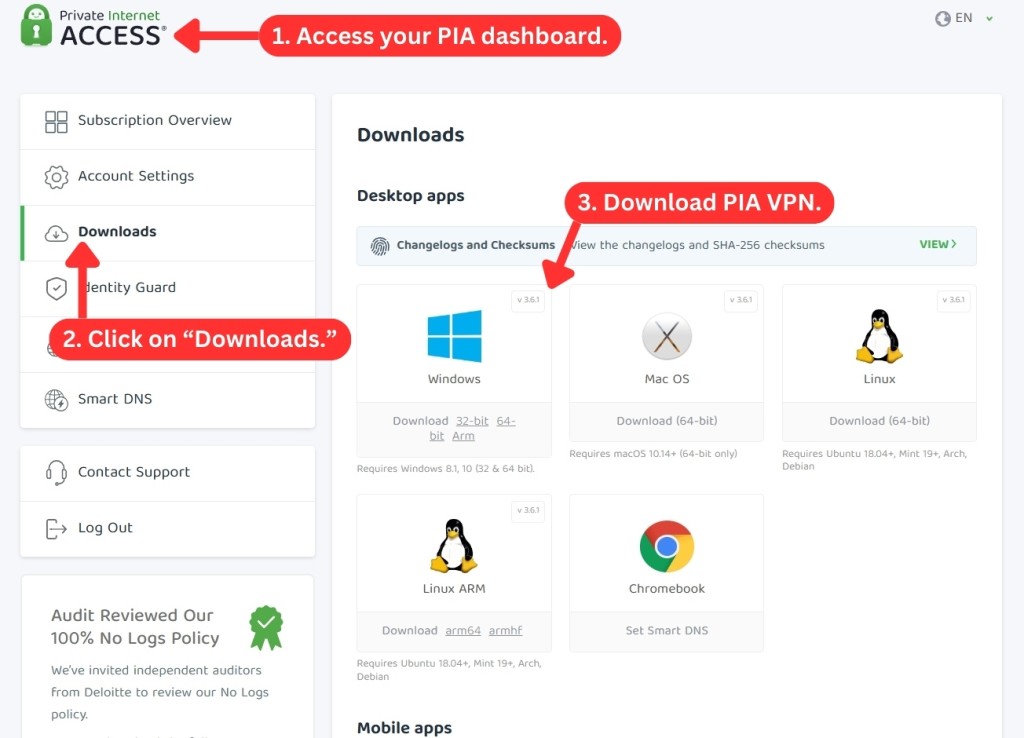
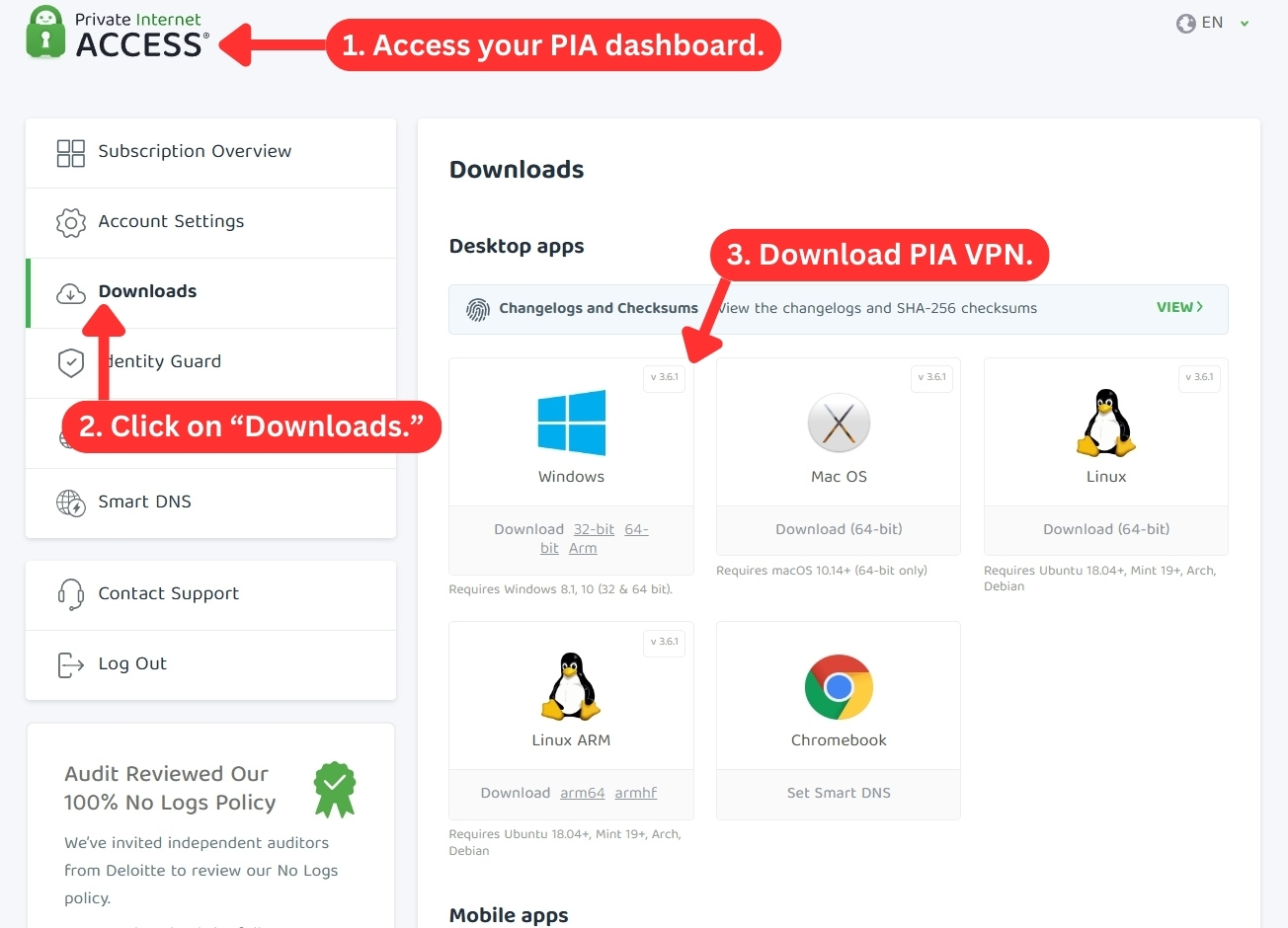
Getting started with PIA is incredibly easy. You have two convenient options: either through PIA's official website or your device's app store. For the most streamlined experience, we recommend getting the Private Internet Access VPN app directly from its official website.
Here's a simple guide to download and use Private Internet Access on a Windows device:
- Subscribe to PIA VPN via any Web browser.
- Download the official app from PIA's website.
- Run the installation file to install Private Internet Access.
- Once installed, log in using your credentials.
- Connect to a server to secure your Web connection. That's it!
When it comes to other platforms, the installation procedure is very simple as well. In case you get stuck along the way, you can always return to PIA’s website and read the installation guides. All in all, this is a very easy and straightforward process.
Prominent Features
Even though PIA comes with a strong and very interesting feature set, it does things a bit differently. Still, it's a very capable and reliable VPN solution. Our Score: 9.5/10
PIA has been around for a long time as a VPN provider, and it has kept up with the competition by adding new features over the years. In this section, we’ll see how well PIA meets our standards for a good VPN service and explore some of its key features.
Here’s a breakdown of the features you can expect from PIA:
- DNS and IP Leak Protection: Without any surprise, PIA VPN is capable of creating an ultra-tough VPN tunnel. That means you won't have to worry about DNS or IP leaks, so no one will know what you do online. Just like its direct competitors, PIA can protect you from IPv4 and IPv6 leaks.
- High-End Encryption: Whether you're browsing, streaming, gaming, or shopping, PIA VPN will keep your data encrypted and your identity hidden with its 128-bit AES and 256-bit AES encryption. These are the same levels of encryption trusted by the military to protect their secrets. They're virtually impossible to crack.
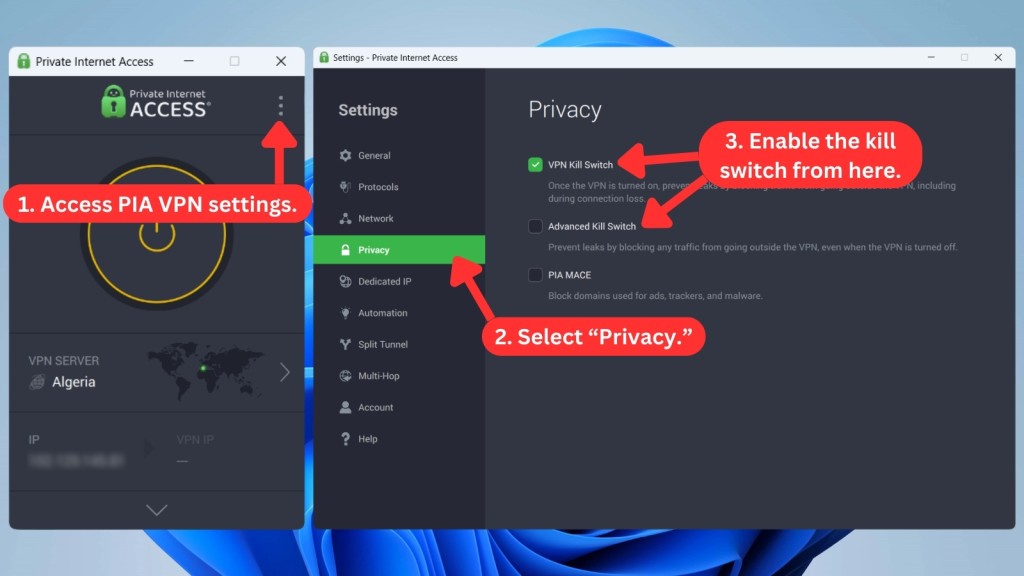
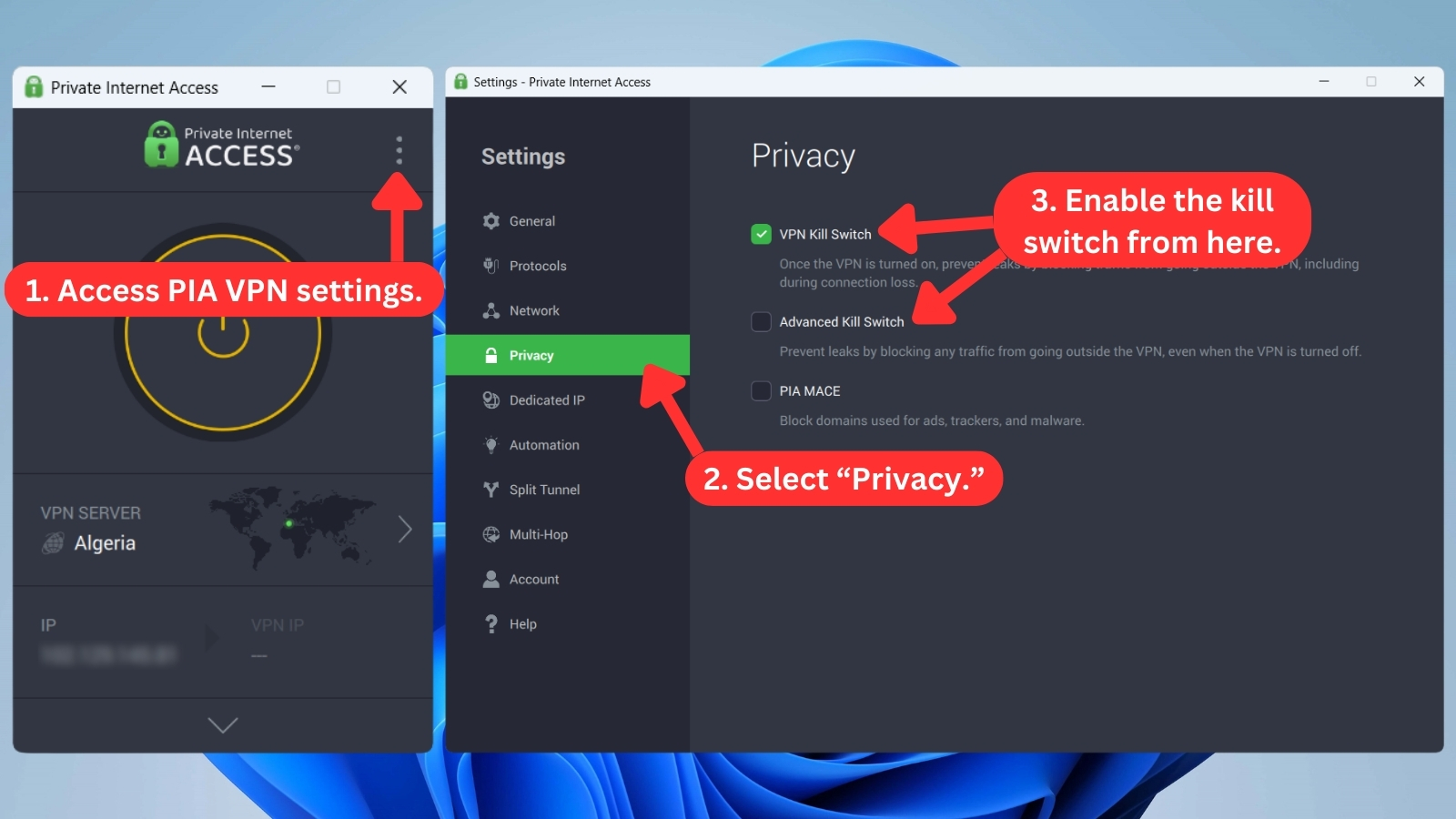
- Kill Switch: PIA's kill switch feature works on all its apps, which means you can use it on Windows, macOS, Linux, Android, iOS, and more. While the app enables the "VPN Kill Switch" by default, the "Advanced Kill Switch" goes a step further. This feature completely blocks your Internet connection before the app launches, ensuring your privacy even before you connect to the VPN. This is particularly helpful for secure downloads.
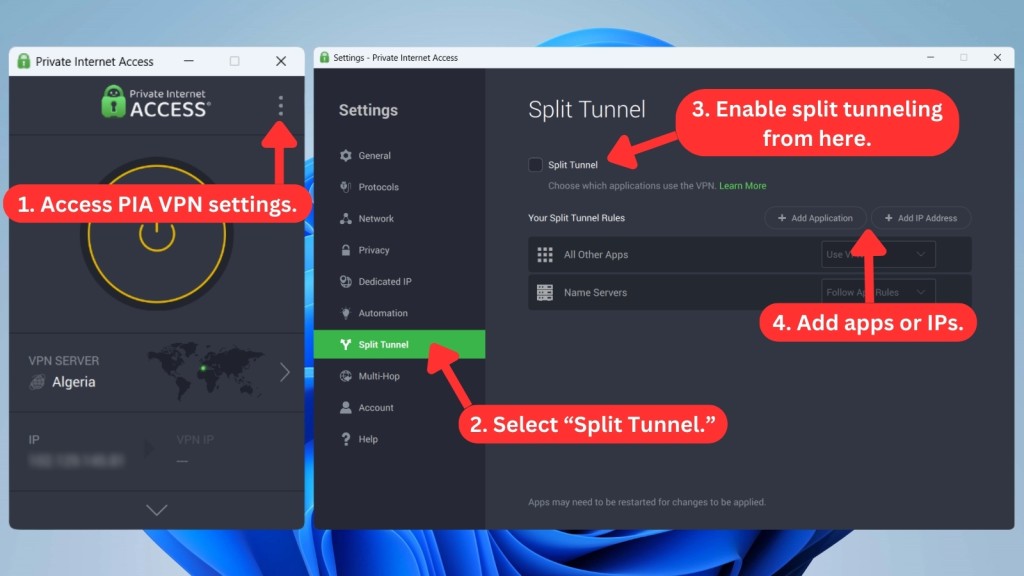
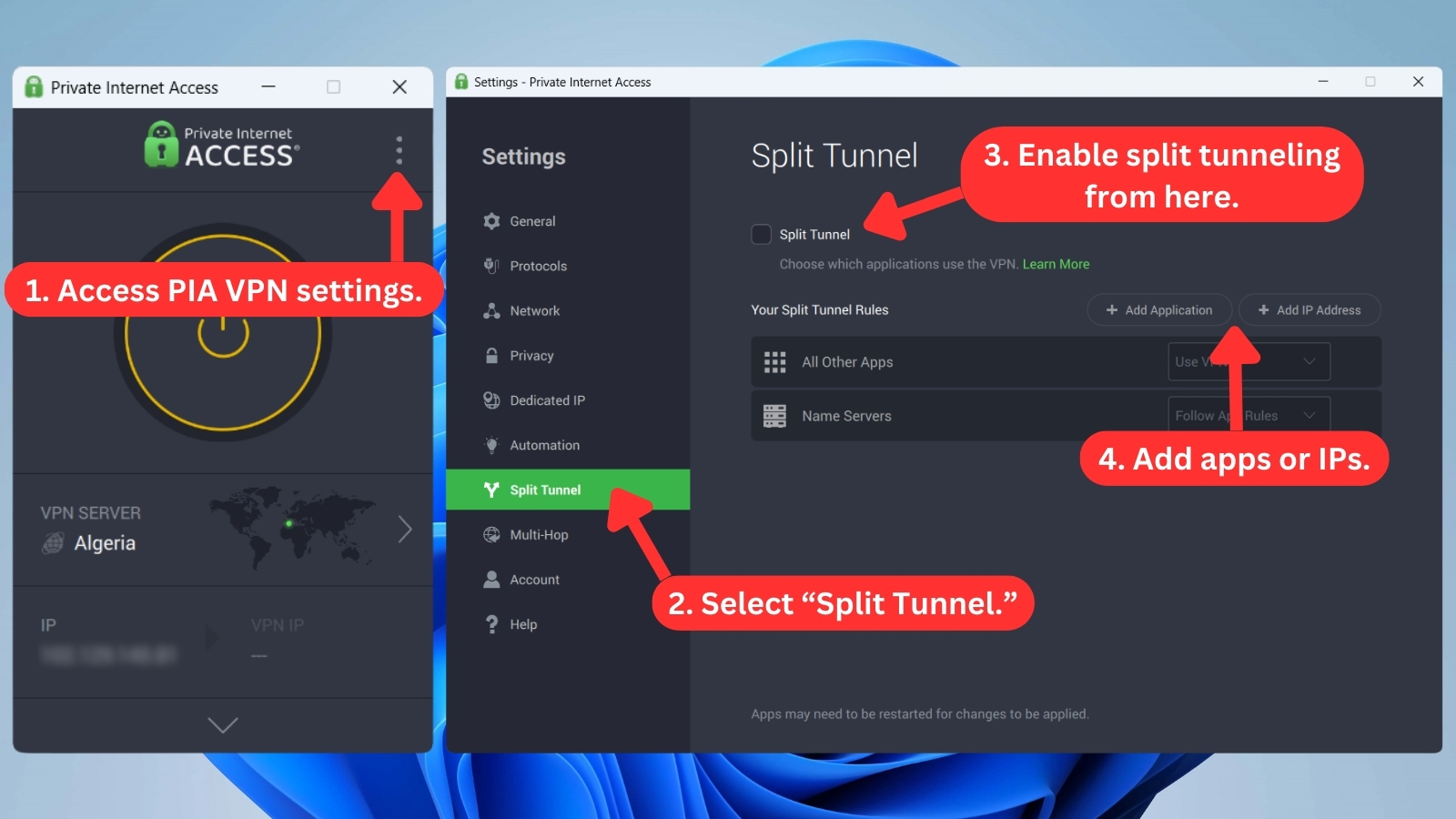
- Split Tunneling: PIA offers split tunneling on Windows, macOS, Linux, and Android. The only platform that doesn't have this feature is iOS. The service used to have a very complex set of split tunneling options. But to simplify things, PIA redesigned their apps recently. Now, setting up split tunneling is a breeze, even if you're new to this feature.
- Dedicated IP Addresses: PIA offers dedicated or static IP addresses for an extra $2.50 per month. This VPN service has a token-based system to safeguard your privacy. You'll be responsible for activating your (random) token, so PIA's team won't know the IP address linked to your account. Dedicated IPs are available in 23 locations. You can choose locations from countries like Belgium, Sweden, the US, Australia, Canada, Switzerland, Germany, the UK, Japan, and Singapore.
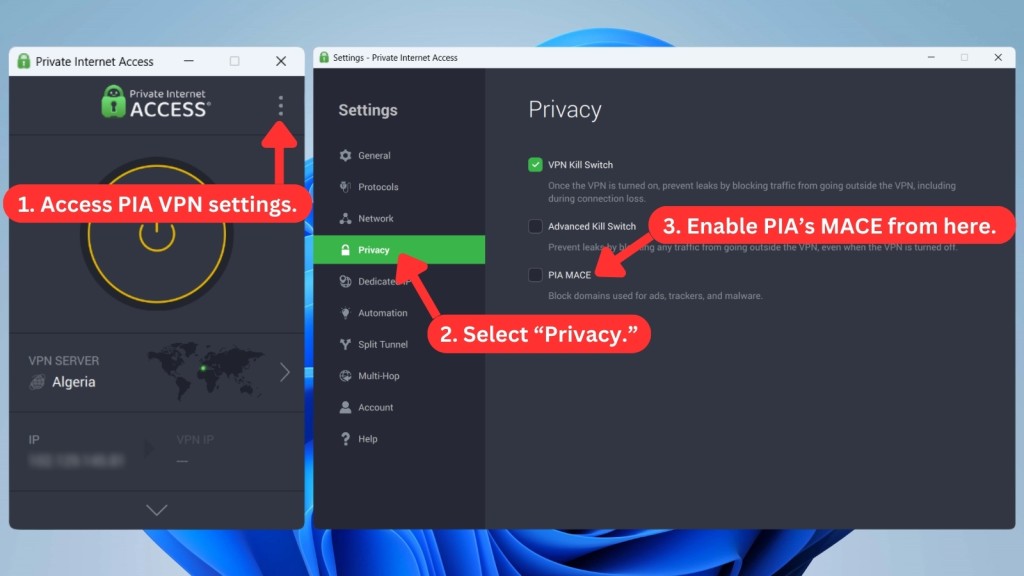
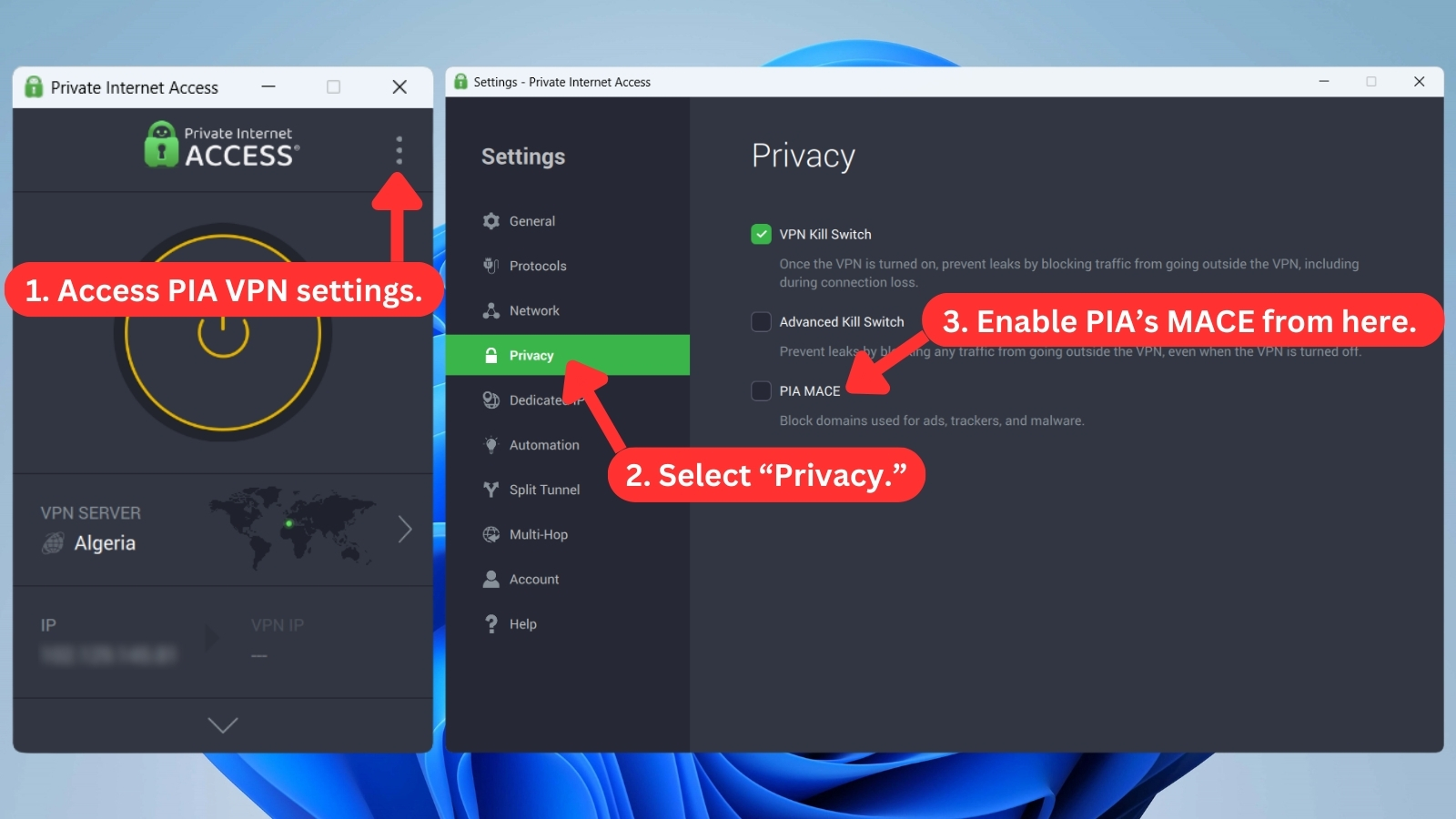
- Ad-Blocker: Private Internet Access has a feature called 'MACE.' It blocks ads, trackers, and malware. It works on Windows, macOS, Linux, Android, and Web browsers. This feature routes your traffic through a special DNS process run by PIA. However, keep in mind that PIA's MACE is “off” by default. You can turn it “on” in the app's settings (Settings > Privacy). On iOS, a similar feature appears as "Safari Content Blocker."
- Obfuscation: Top VPNs like PIA offer obfuscation, making your VPN traffic appear indistinguishable from regular Web traffic, effectively hiding VPN use from your ISP. This feature is available only on Windows, macOS, Linux, and Android.
- Multi-Hop: To further enhance your privacy, PIA lets you use a proxy to reroute the VPN connection through an extra location. This feature, which is available on Windows, Mac, and Linux, adds an extra layer of anonymity, especially in P2P activities.
- SOCKS5: Use this handy tool if you want to hide your IP address while engaging in torrenting and Web scraping activities, as well as accessing geo-restricted content. Thanks to its non-encrypted nature, the SOCKS5 proxy ensures a notably faster connection. But keep in mind that while it offers speed advantages, it doesn't provide the same level of security as a VPN. To activate this feature, access the "Multi-Hop" setting in all desktop apps supported by PIA.
- Port Forwarding: This PIA VPN feature allows you to securely access devices or services from anywhere. It works by opening specific ports on your device, enabling seamless connections for tasks like online gaming or remote access to your home network. This feature is available on Windows, macOS, and Linux, including Android devices.
- Unlimited Server Switches and Bandwidth: The service gives you unlimited access to its global network of servers. You can switch between servers as often as you want without any extra fees or limitations. PIA VPN also lets you use as much data as you need without any caps or throttling.
Server Count & Infrastructure
Spanning 91 countries, PIA boasts one of the largest server networks, though many are virtual. Yet, their colocated, RAM-only, and 10 Gbps servers offer physical control, enhanced security, and faster connections. Our Score: 9/10
VPNs that offer a large number of servers can more easily accommodate numerous users at once. So, here’s how Private Internet Access ranks in that aspect.
In the past, the VPN service used to have a dedicated page on its website, providing the exact number (and locations) of Private Internet Access servers. Throughout 2020 and 2021, that number ranged from 17,500+ to 30,000+ as the VPN switched to its "NextGen" network.
To help you make sense of those numbers, we'll say that VPNs with the most servers have 3,000 to 6,000 server units in their networks. With that said, we're not exactly sure how PIA used to count the number of servers it had on its network. When asked about using virtual servers, for example, PIA told us that only a limited number of virtual servers exist in its network.
In any case, it's obvious that PIA offers a massive server list. Still, what's even more important is that PIA's server locations span over 91 countries.
Let’s also not forget to mention that you can connect to specific cities within certain countries, such as the USA, Canada, Germany, the UK, and Australia. Furthermore, PIA is the only VPN that offers servers in all 50 US states. So, if you need an IP associated with a specific US state to bypass blackout restrictions or access your bank account from abroad, PIA is the right pick.
Beyond dedicated 10 Gbps Internet lines for smooth data flow, PIA also uses colocated servers. These physically controlled servers, equipped with 10 Gbps network cards and operating solely on RAM, aim to minimize potential slowdowns and data leaks, contributing to a potentially faster and more secure VPN experience.
Lastly, PIA offers obfuscation via Shadowsocks. It cleverly disguises your VPN traffic to make it seem as if you're browsing the Internet without a VPN. This feature requires OpenVPN, so make sure your protocol is set accordingly before proceeding.
On Windows, you can access it through Settings > Multi-Hop > Multi-Hop and Obfuscation. Next, click "Edit" on Shadowsocks to choose from a selection of 9 obfuscated servers.
Does Private Internet Access Use Virtual Server Locations?
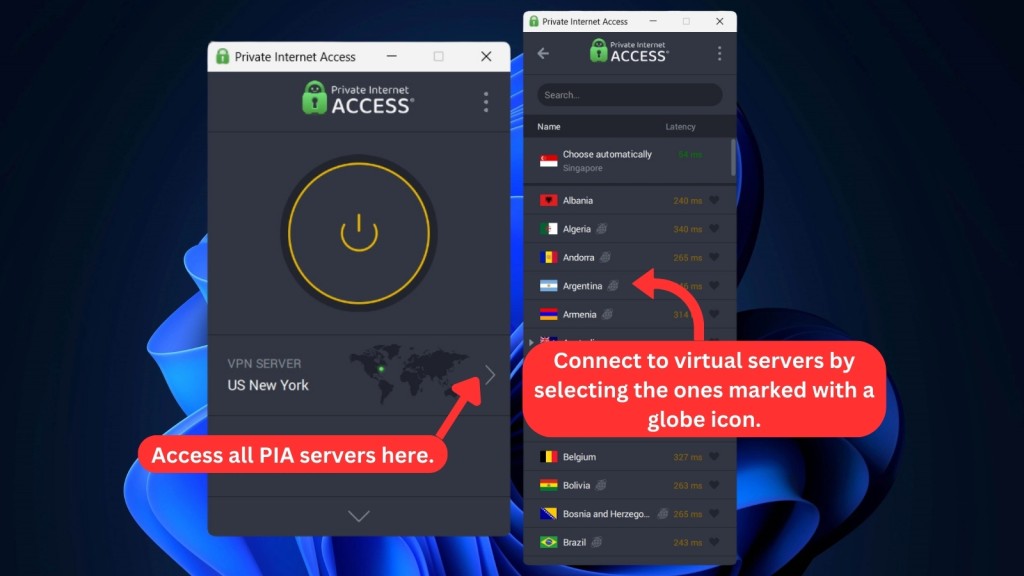
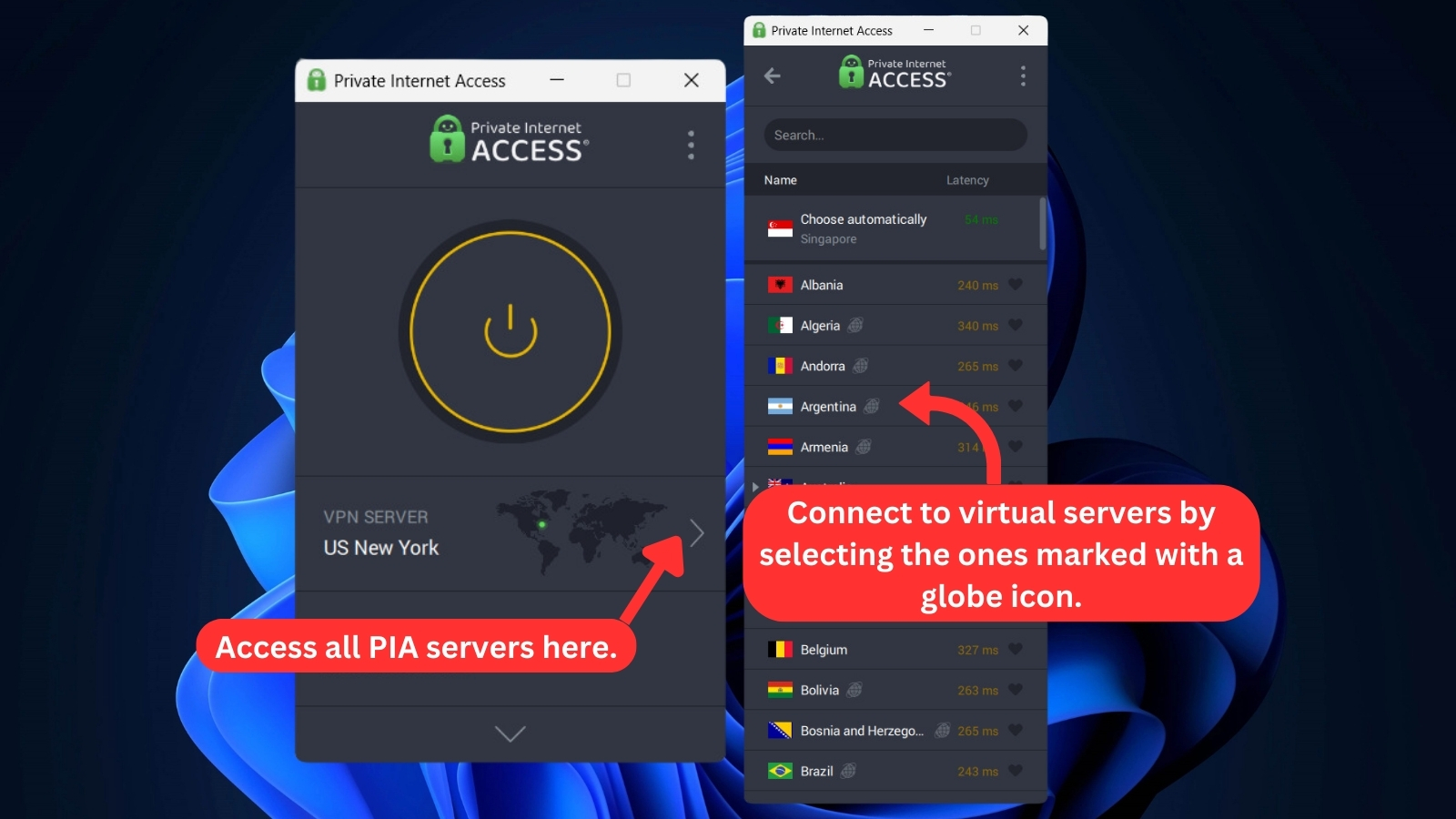
Yes, PIA uses a number of VPN virtual locations. These are so-called 'geo-located servers,' available in countries where using a VPN can be restricted.
In other words, PIA's geolocated region isn't physically available in its 'end' countries. Still, once you connect to one, you'll get an IP address associated with the chosen country. All your virtual information will correspond to the selected country, just like when connected to a physical server.
PIA doesn't hide the fact that it's using a number of virtual locations, and those are clearly labeled in PIA's apps. However, it seems the list of virtual servers on their website might not be up-to-date with what's actually available in the apps.
For the most accurate information, it's best to check the PIA app directly. But to give you an overview, here's a table summarizing PIA's virtual servers (as shown on the PIA apps).
UI/UX Design & Ease of Use
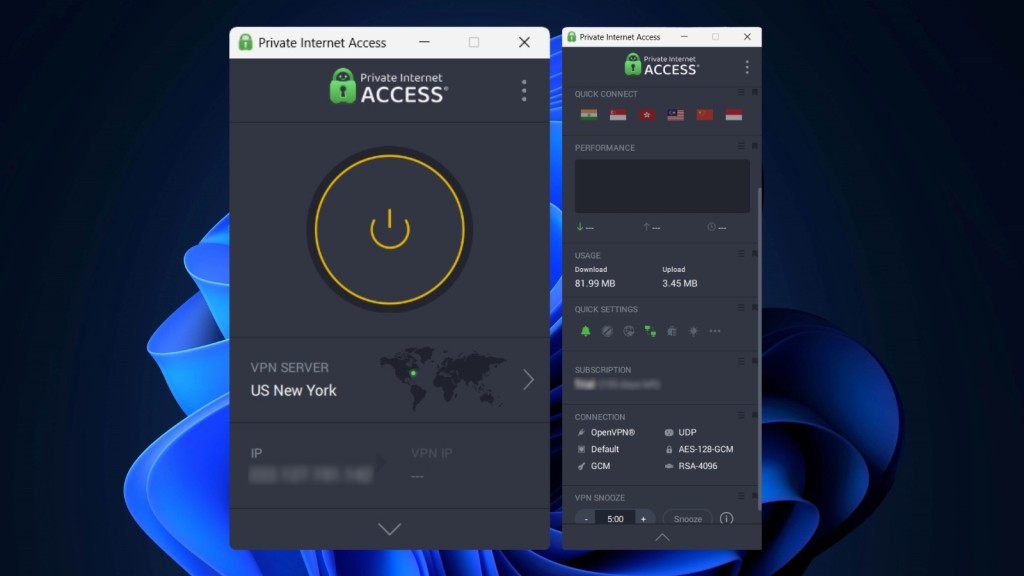
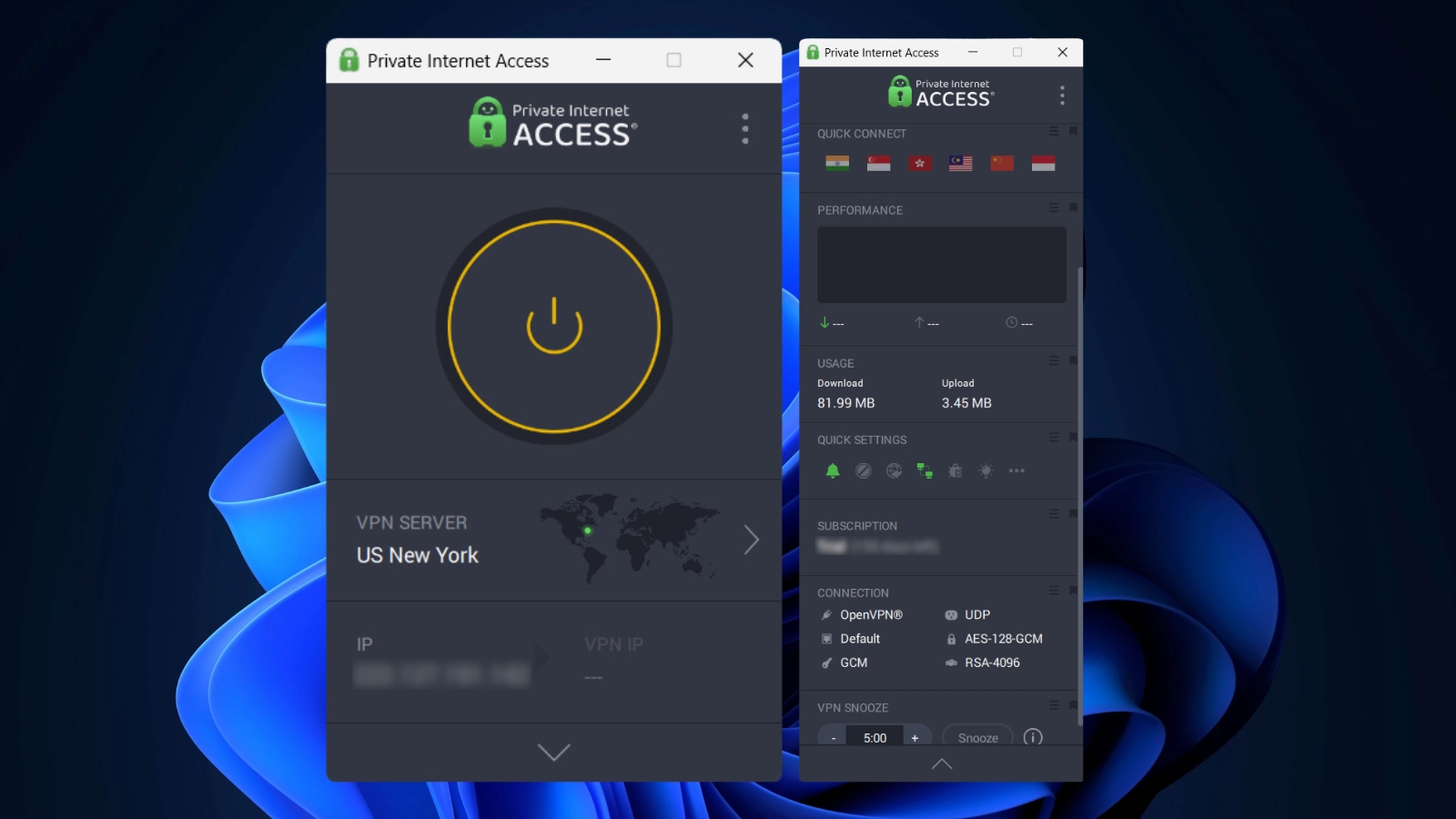
PIA now has a brand-new UI design that looks great on both small and large screens. It can be a bit confusing at first (especially if you've never used a VPN before), but it's highly usable and customizable. Our Score: 9/10
In this segment of our Private Internet Access VPN review, we will take a close look at PIA's desktop and mobile software. And since this VPN offers Web browser extensions, we won't forget to check those as well.
How Well Does PIA Work on Desktop Platforms?
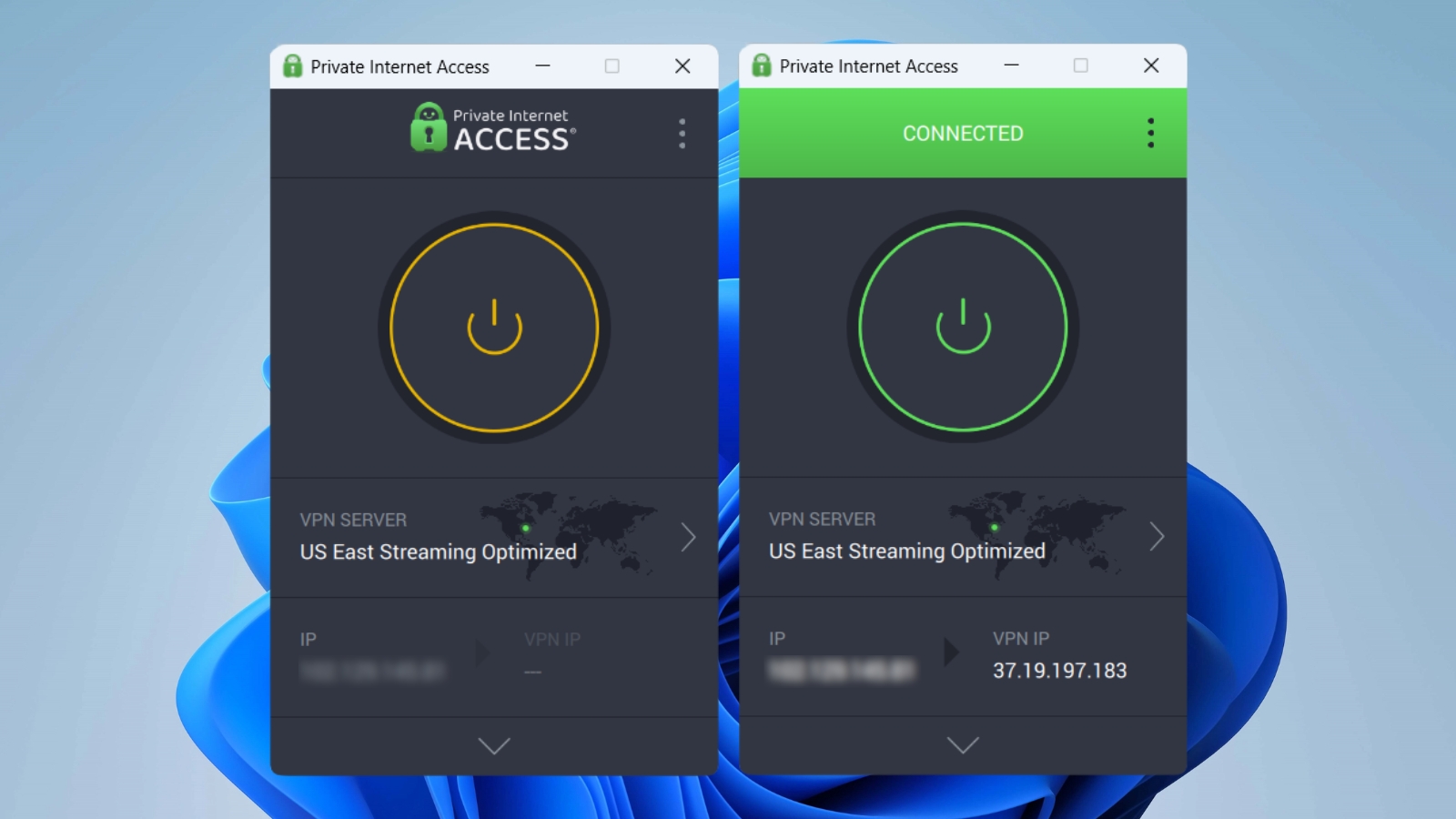
When you launch the Private Internet Access app for the first time, you’ll see its 'compact' version, whose interface allows you to quickly select a server and connect. It provides some basic information as well, like your real IP and your VPN (virtual) IP address.
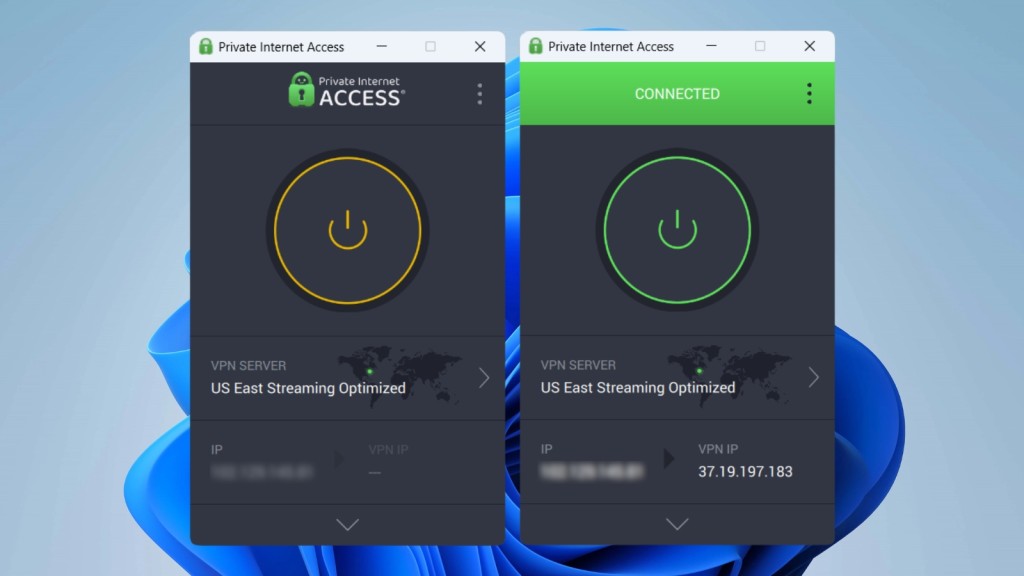
To expand that information, click on the arrow icon found at the bottom of PIA's 'compact' UI. That action will expand PIA's options, allowing you to connect to specific locations quickly, check the real-time performance and data usage, and there’s a quick settings panel and more.
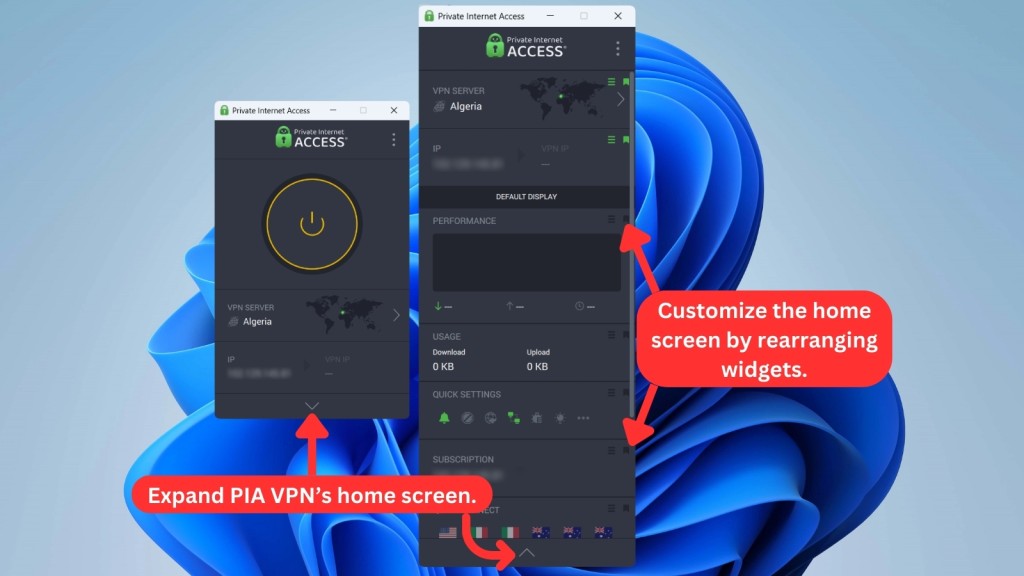
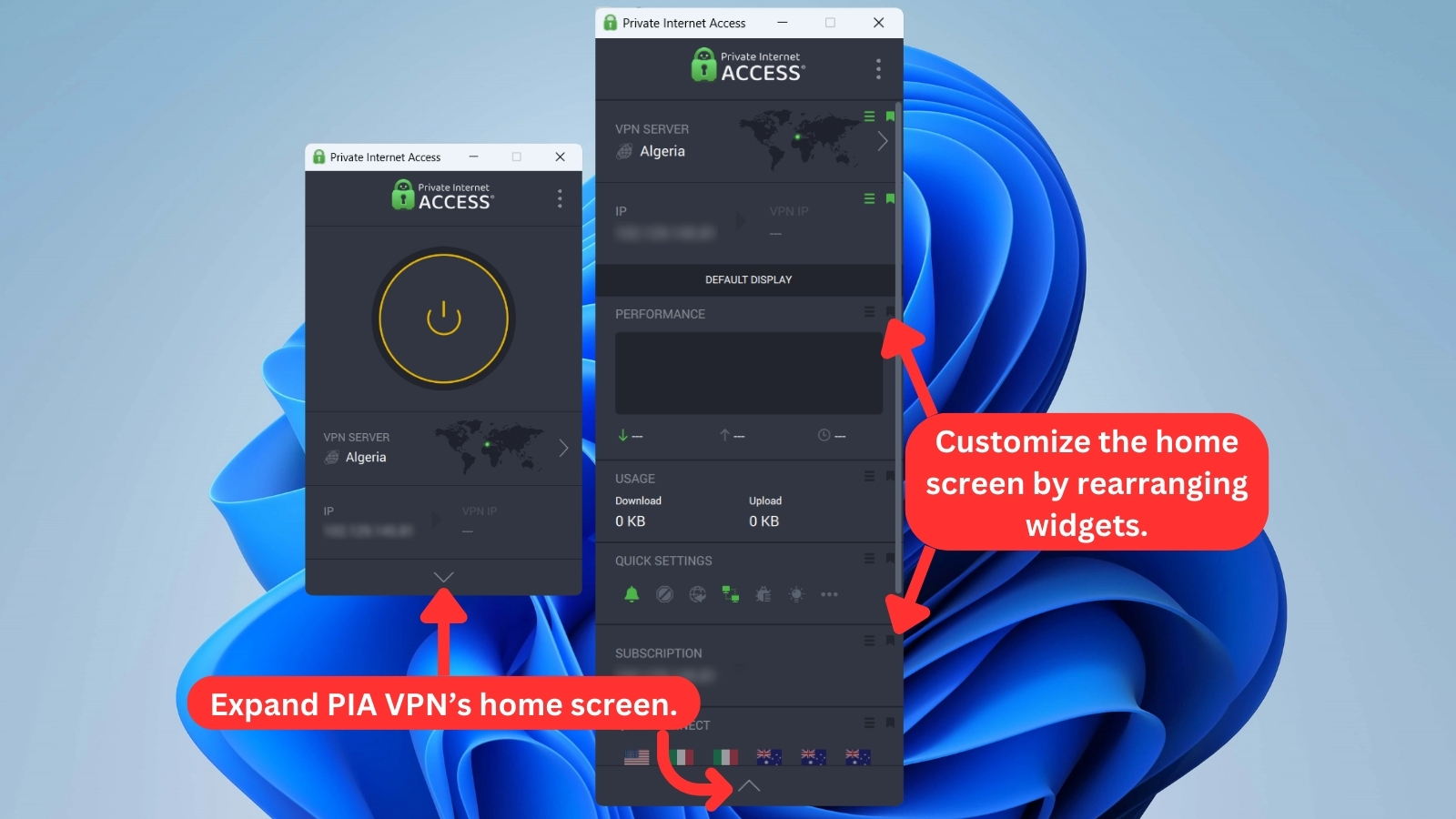
At any moment, you can 'bookmark' any of those segments if you want them to become part of the 'compact' UI. That means that PIA brings a high level of customization. Let's not forget to mention that you can choose from two themes (dark and light), both of which look amazing.
When choosing a server, you’ll be presented with a sizeable list of countries. You can mark any of those as your favorites so you can easily connect to them in the future. PIA also provides an option to connect you to the best available server, which depends on your physical location.
Lastly, don’t forget to take a peek behind the 'three dots' icon, found in the top-right corner. This is where you'll find additional options and settings. So, here’s what to expect here:
- General: This is where you can set Private Internet Access to launch on system startup and connect to a specific server automatically. Then, you can choose from more than a dozen different languages, switch between different themes, and more.
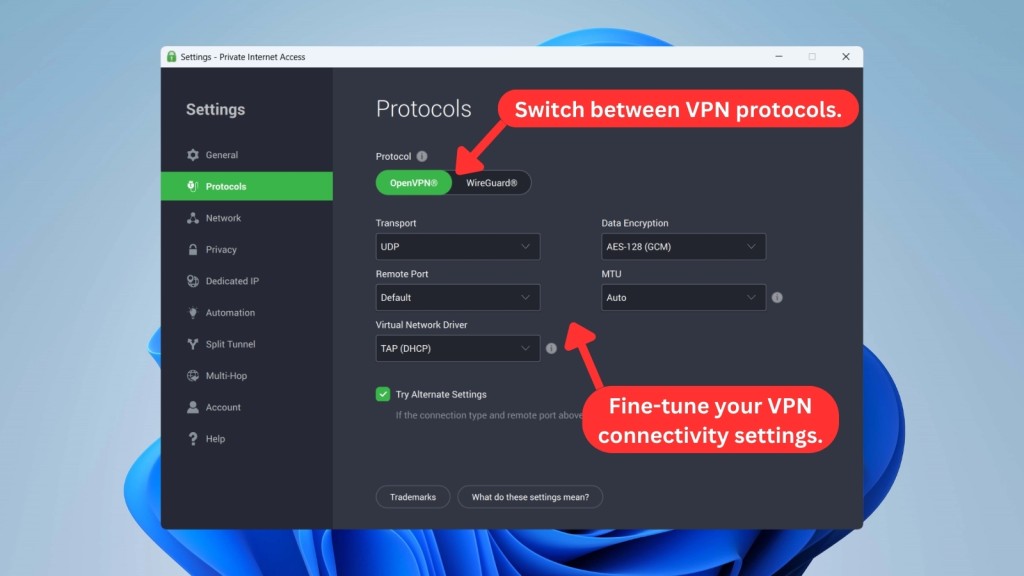
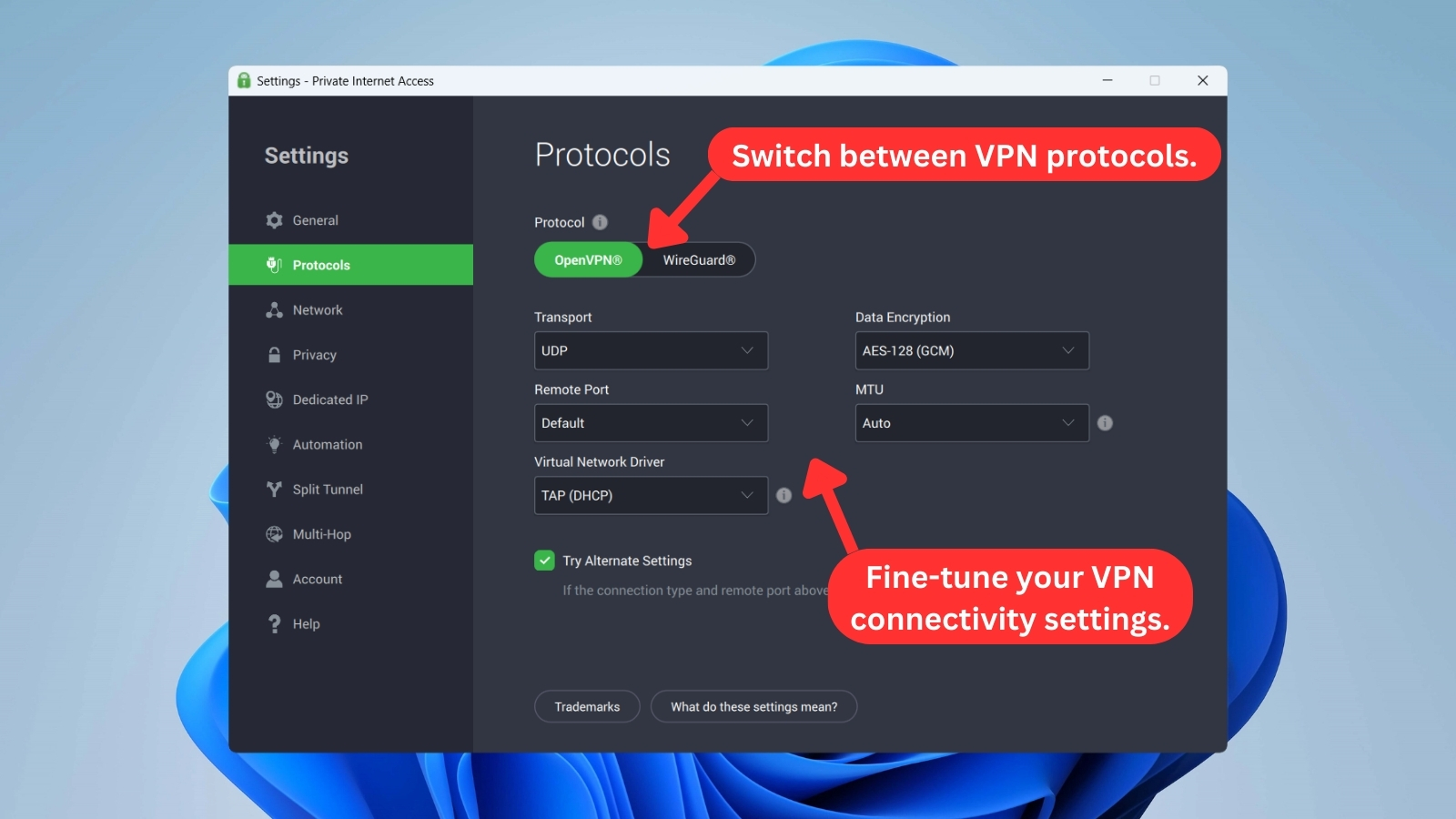
- Protocols: As the name of this tab implies, this is where you can change PIA's protocol. Unlike other VPN services, this one lets you dive deep into customizing your connection. When it comes to OpenVPN (for example), you can pick the type of data transport, encryption, as well as remote and local ports.
- Network: In case you’d like to use a different (custom) DNS and port forwarding, you can find those options there. Also, you can easily enable/disable LAN traffic between your local devices.
- Privacy: Three options are present here. You can enable the VPN’s kill switch or turn on PIA's MACE, which blocks malicious domains with aggressive ads, trackers, and malware. PIA offers an ‘Advanced Kill Switch’ as well, blocking any traffic from going outside the VPN, even when the VPN is disabled.
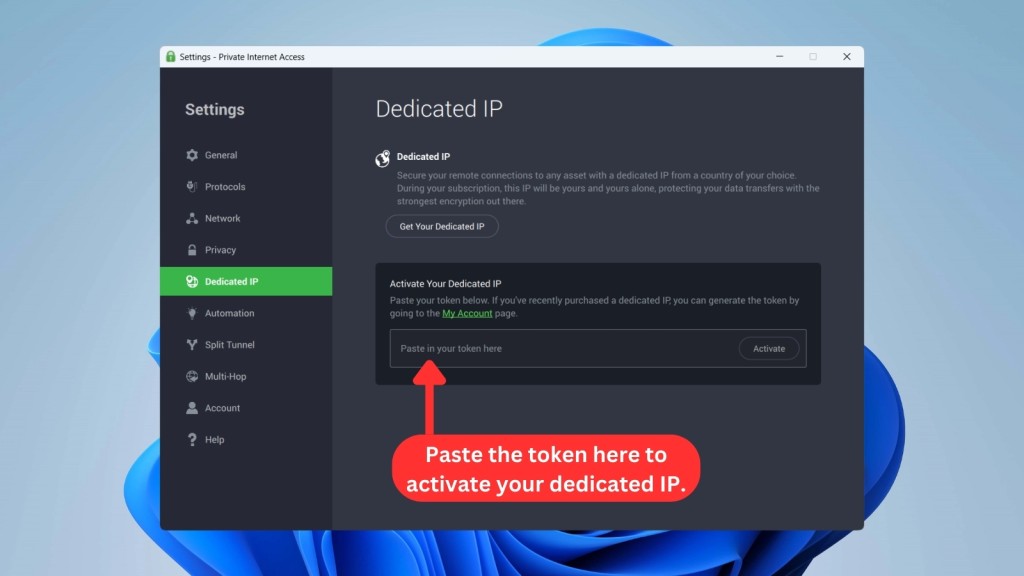
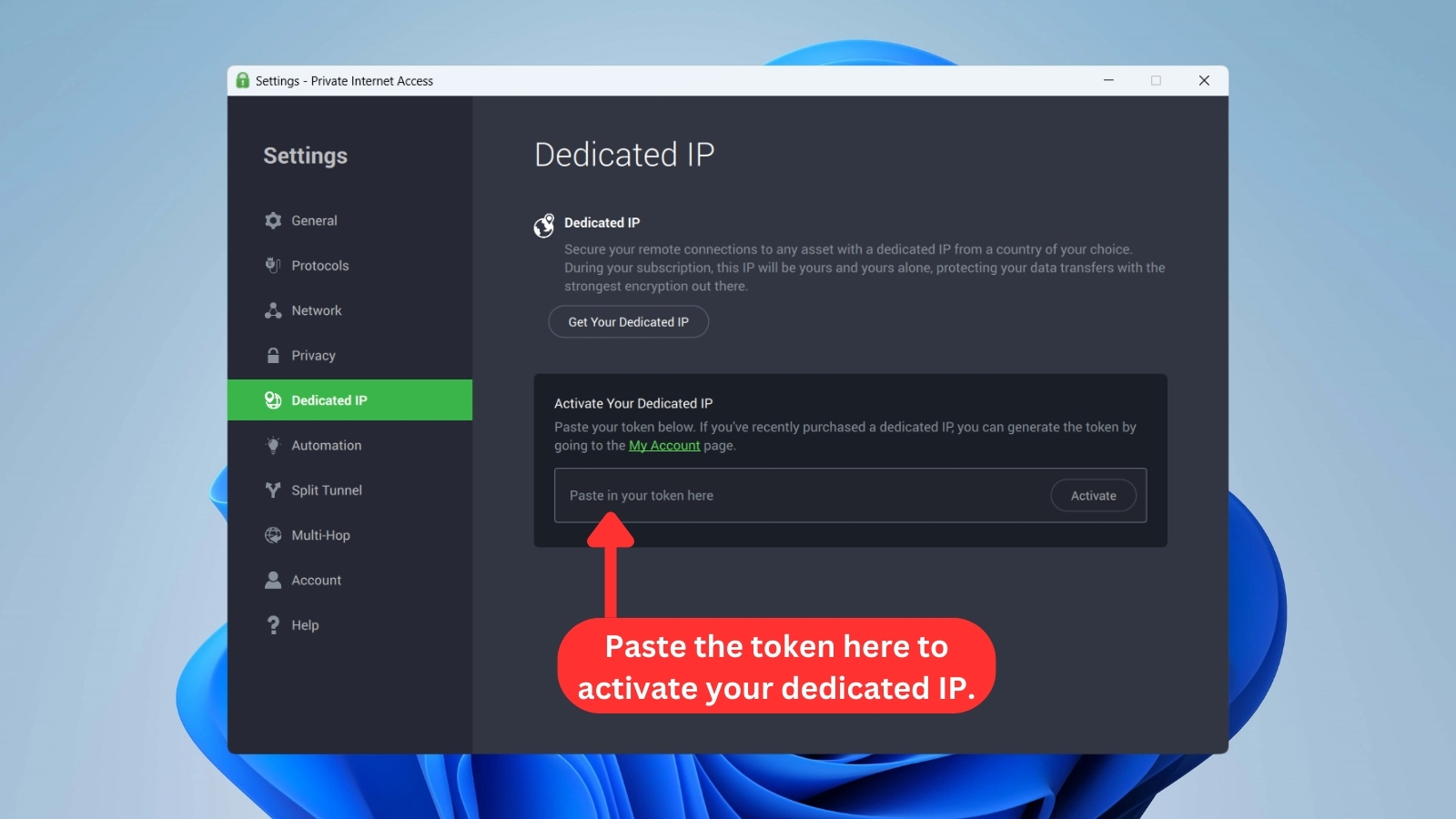
- Dedicated IP: As mentioned above, Private Internet Access now offers dedicated IPs, which are priced extra. If you decide to get one, you'll need to use the 'Dedicated IP' tab to activate your token, which is generated using your 'My Account' page on PIA's website.
- Automation: Using this tab, you can instruct PIA to connect or disconnect from its servers once your computer joins a specific Wi-Fi network. That's how, for example, you can instruct PIA to protect you using a public Wi-Fi network and then turn it off once you enter your home.
- Split Tunnel: A recent update to PIA's apps gave split tunneling its own section. That should make it easier to set up various split-tunneling options by adding applications or IP addresses and then letting PIA know whether to route its traffic through its servers.
- Multi-Hop: This tab allows you to add an extra layer of protection by including an additional proxy in your Web traffic flow. There are two types of proxies available in this scenario: Shadowsocks or SOCKS5 proxy. PIA allows you to pick a country, which will be the location of the additional server that will route your Web data. The purpose of using this type of obfuscation is to hide that you're using a VPN app.
- Account: If you’d like to see when your subscription is due to expire, this is where you can check that information. You’ll also find links that let you manage your account and log out.
- Help: Lastly, this is where you can do maintenance tasks that can resolve certain problems, such as reinstalling the network driver, submitting debug logs, and more.
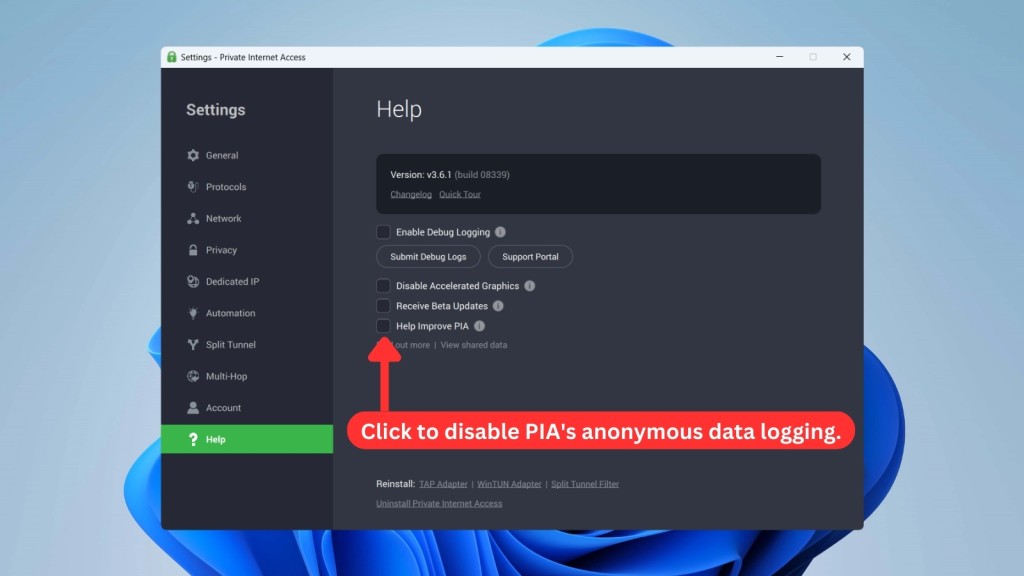
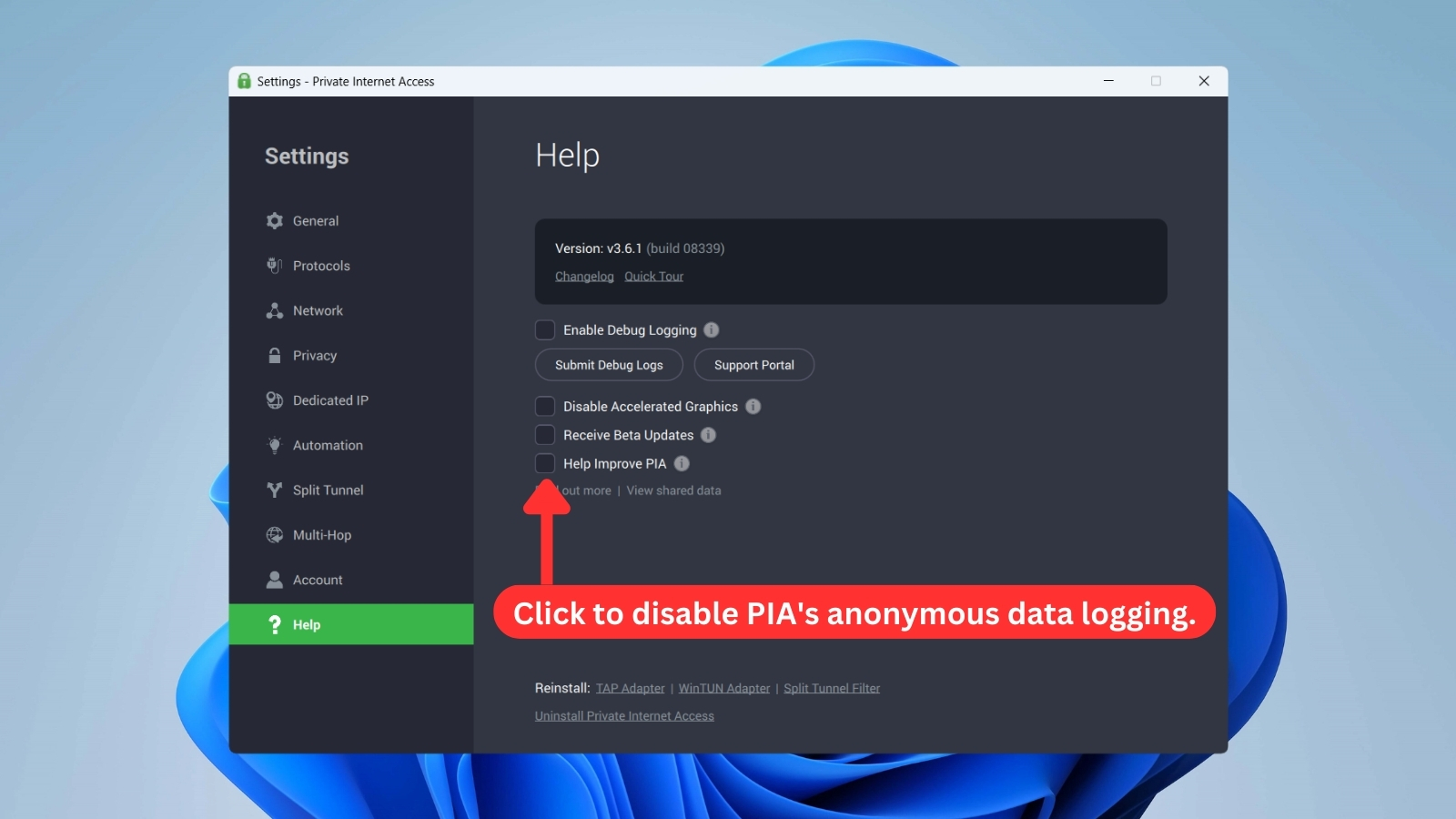
As you can see above, PIA offers a huge number of customizations. With that said, it's oriented toward those who wish to control their VPN connection in depth.
Inexperienced users will also find their way through PIA, even though some other VPNs might offer a more suitable environment for that early stage of entering the world of VPNs.
How Well Does PIA Work on Mobile Platforms?
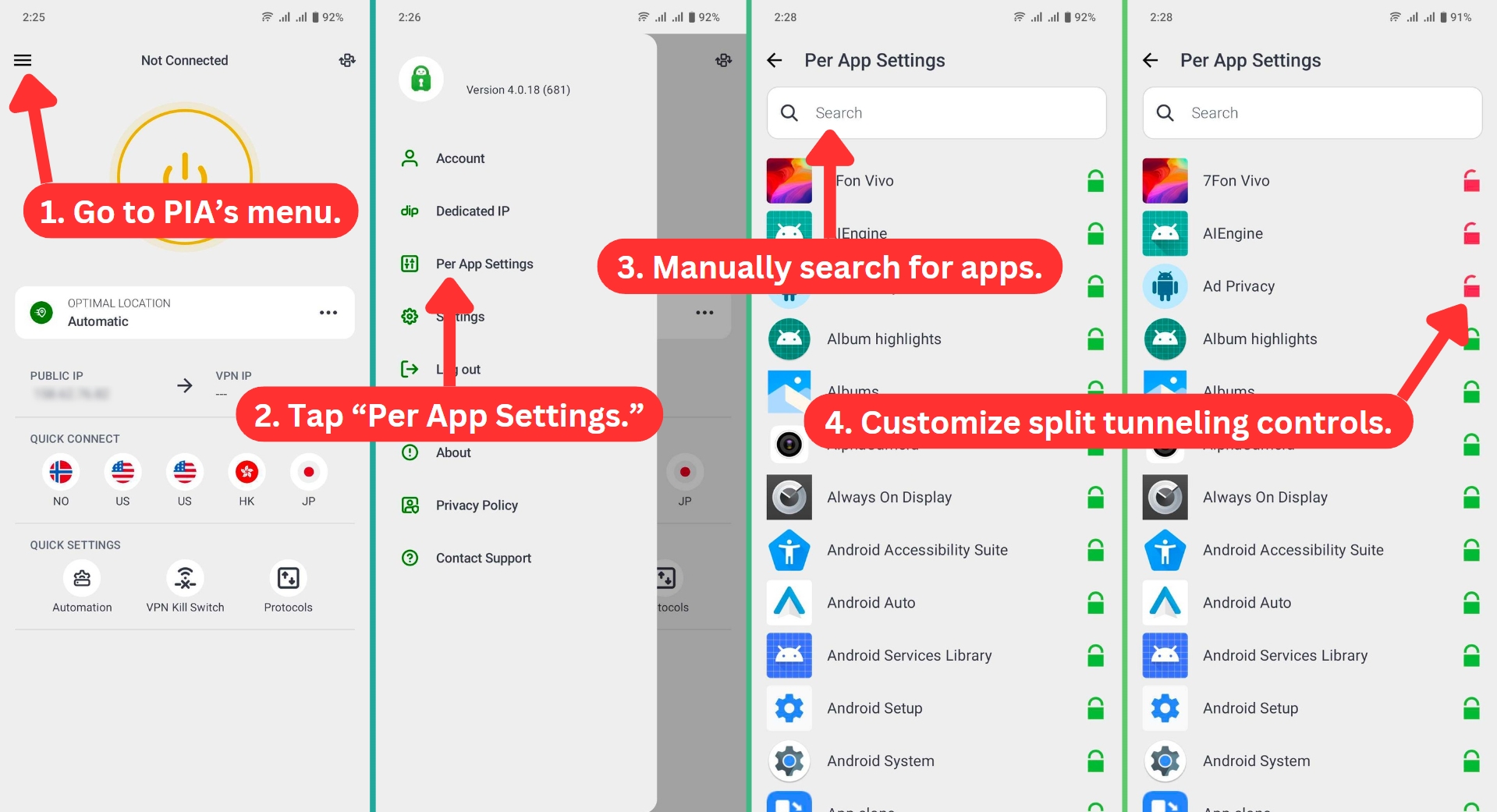
PIA has done a magnificent job of creating a series of similar-looking and highly polished mobile apps. On Android, you'll see a customizable home page. Without going deeper into the app, you'll get to connect to servers, check your 'real' and 'virtual' IP, snooze the VPN, and more.
Of course, all of those segments can be enabled or disabled, which is done by clicking on the 'Home Screen Edit' button (found in the top-right corner).
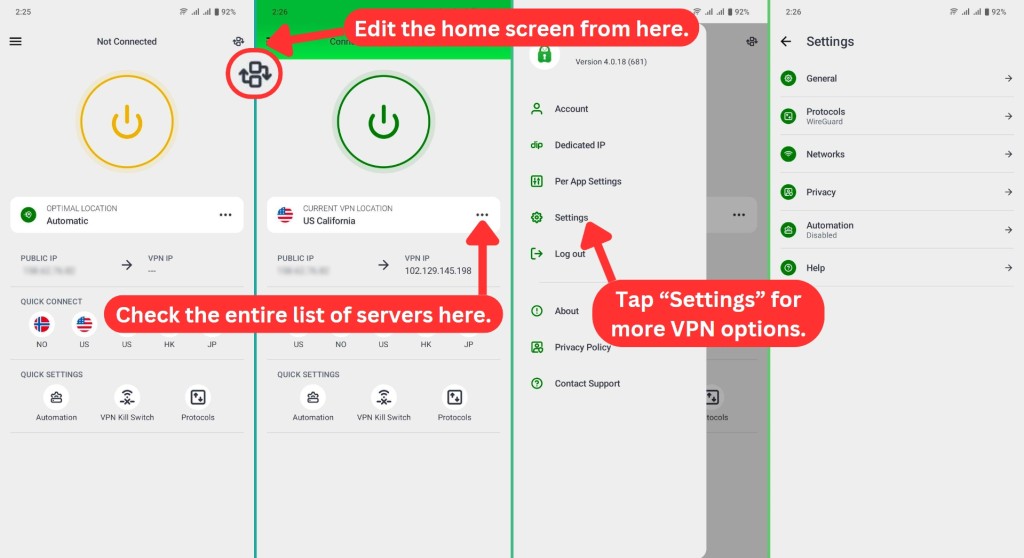
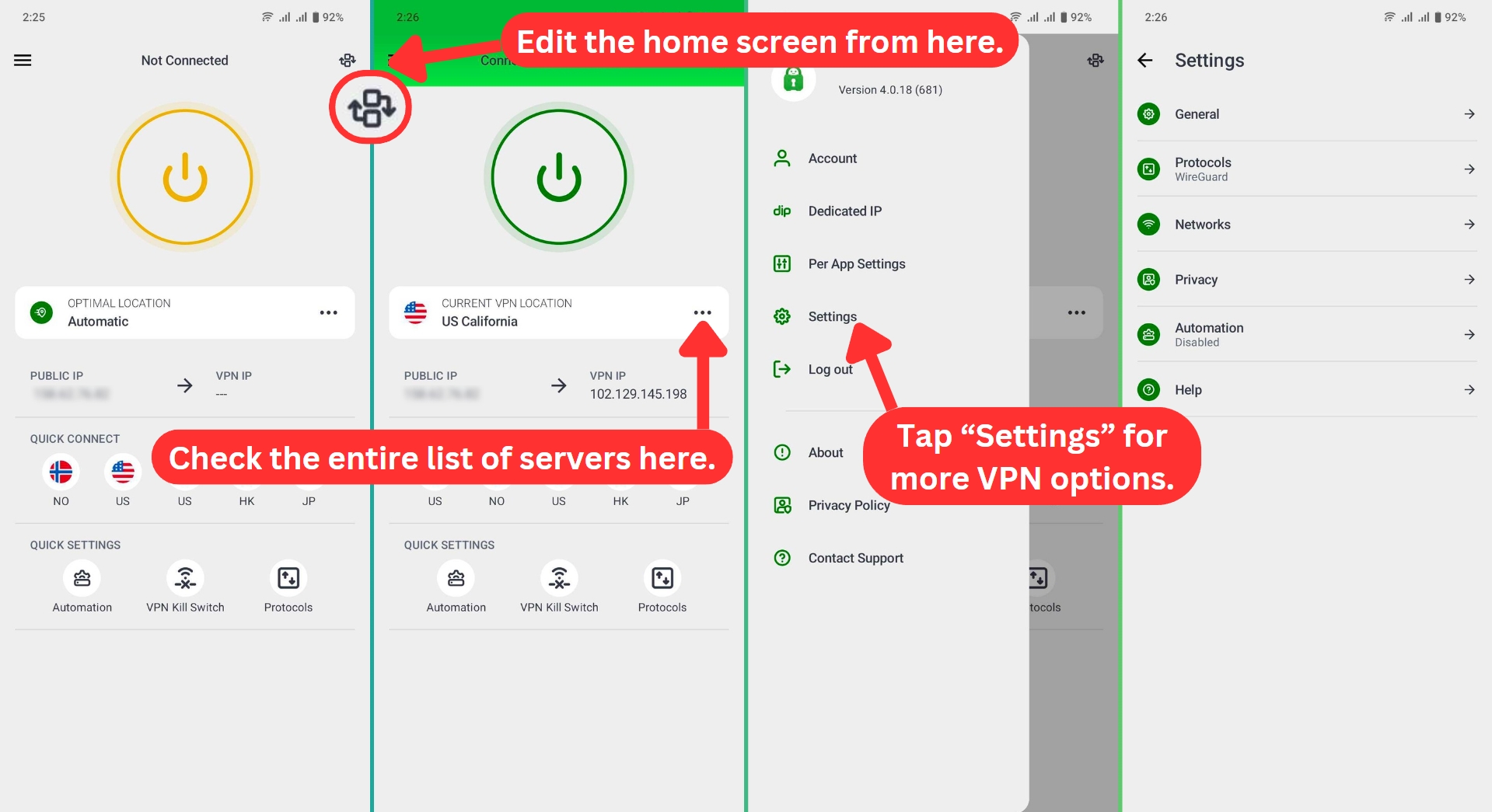
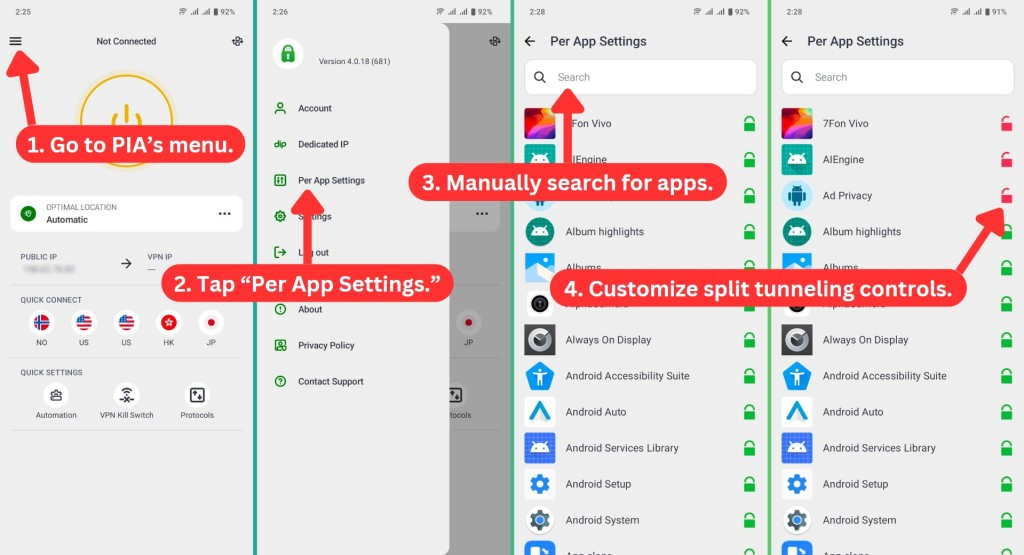
The PIA app for Android has more options if you tap the 'hamburger' button in the top-left corner. This is where you can review your account information ('Account'), activate a dedicated IP, fine-tune split tunneling ('Per App Settings'), and play with PIA's settings.
Speaking of the settings panel ('Hamburger' button > Settings) of PIA's Android app, there's plenty of customization. This is where you can enable the kill switch, change protocols, set up the VPN's encryption level, and more. You can even set up PIA to auto-launch on system start, keeping you protected at all times.
Then, we also have PIA's iOS app. For the most part, it looks a bit similar to the Android app. This means that you get a customizable home screen that can be as simple or as complex as you want it to be.
Once again, diving deeper is done by using the 'hamburger' button. That's where you'll find a list of PIA's servers, information related to your account, and the app's settings (which are more limited than what you'll find on Android).
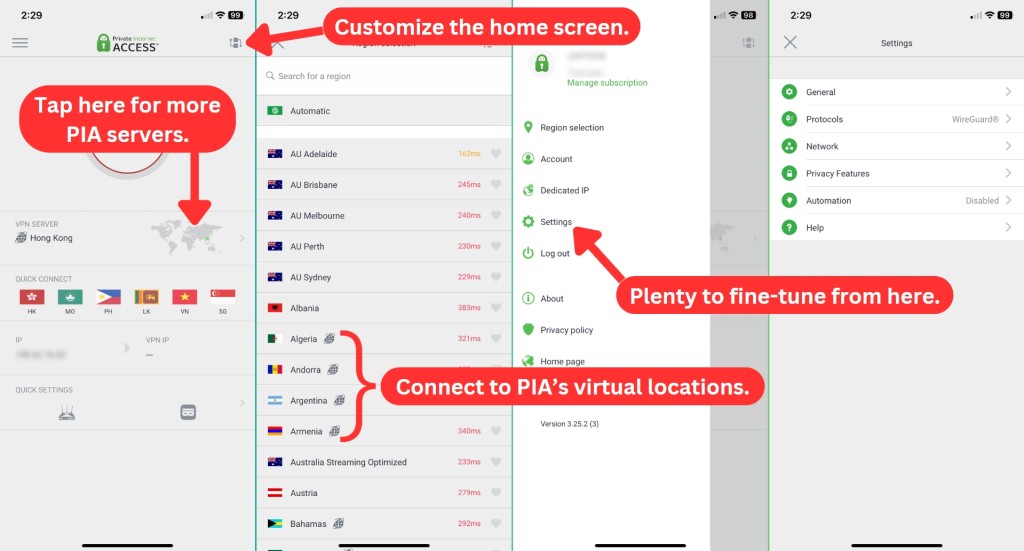
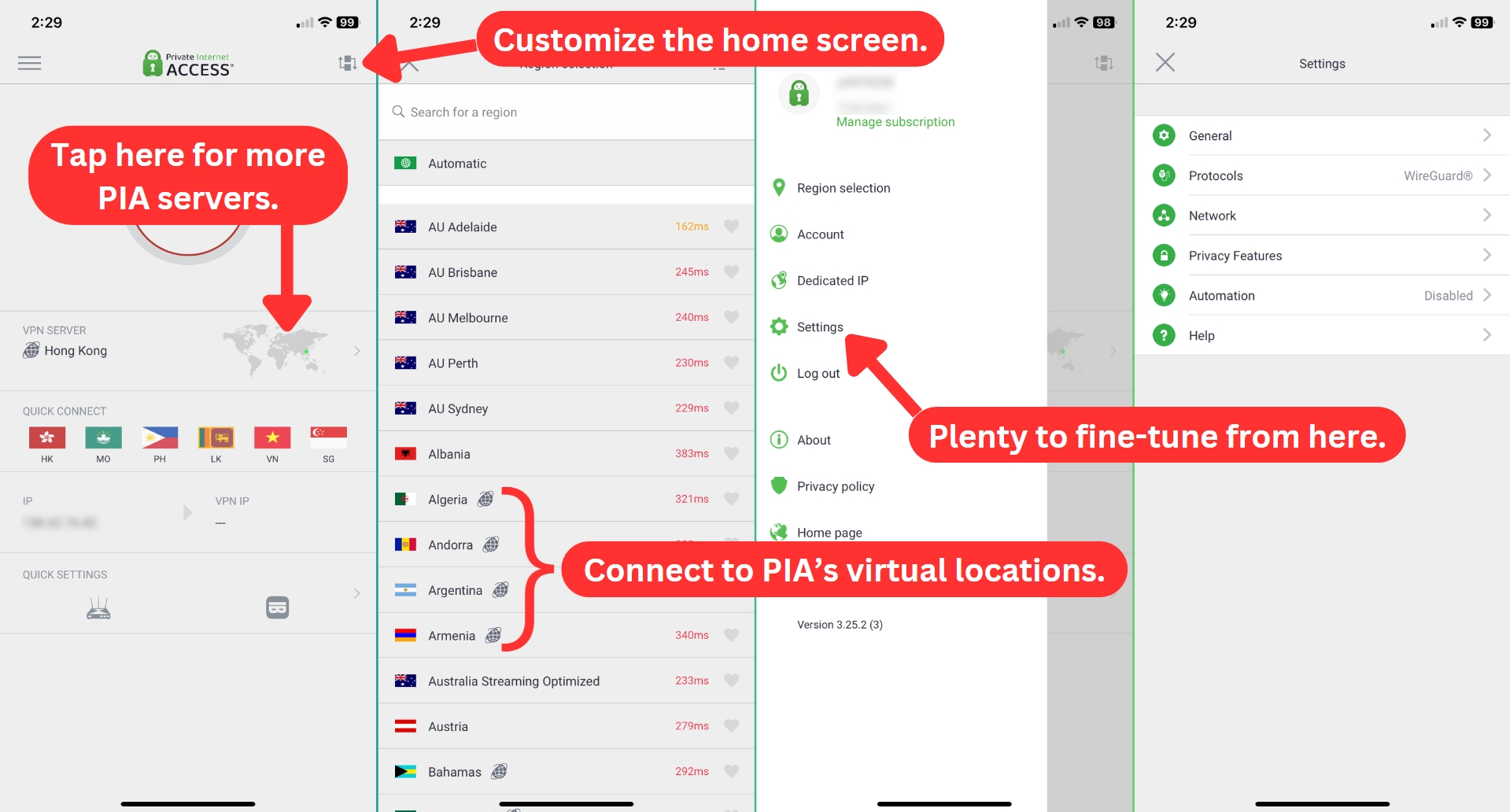
When it comes to fine-tuning on iOS, you can pick a different protocol, set up a custom DNS, set up PIA's level of encryption, force the app to use small packets, and enable/disable the kill switch. All in all, even advanced users should be happy with this app.
How Well Do PIA's Web Browser Extensions Work?
We have to say that the Private Internet Access VPN extension is probably the best VPN extension we've tried so far. They're packed with highly useful features that make a big difference in the way you interact with the Web.
Private Internet Access comes with extensions compatible with Chrome, Firefox, and Opera. However, keep in mind that you'll need a PIA account to use them (therefore, they don't come free of charge).
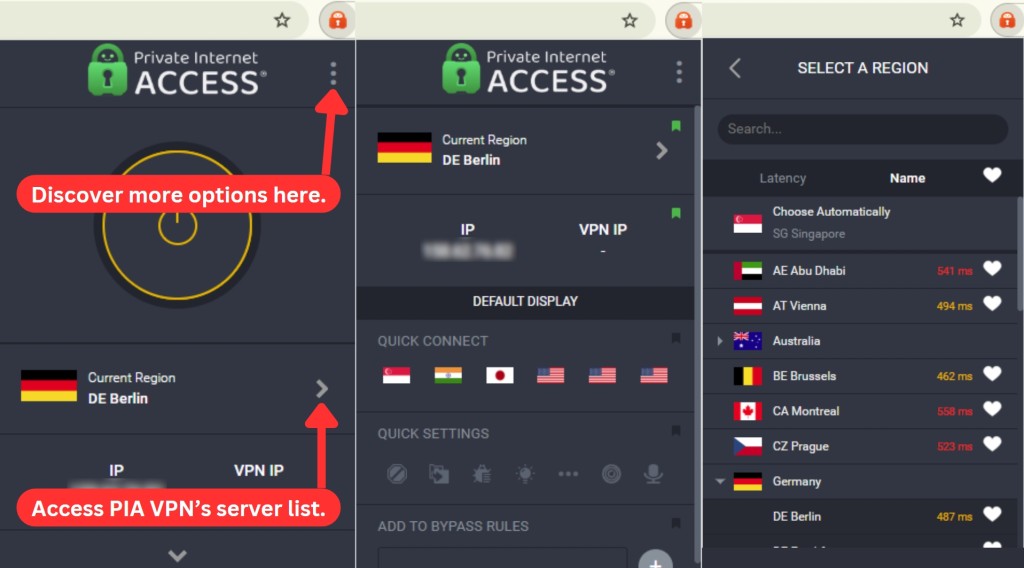
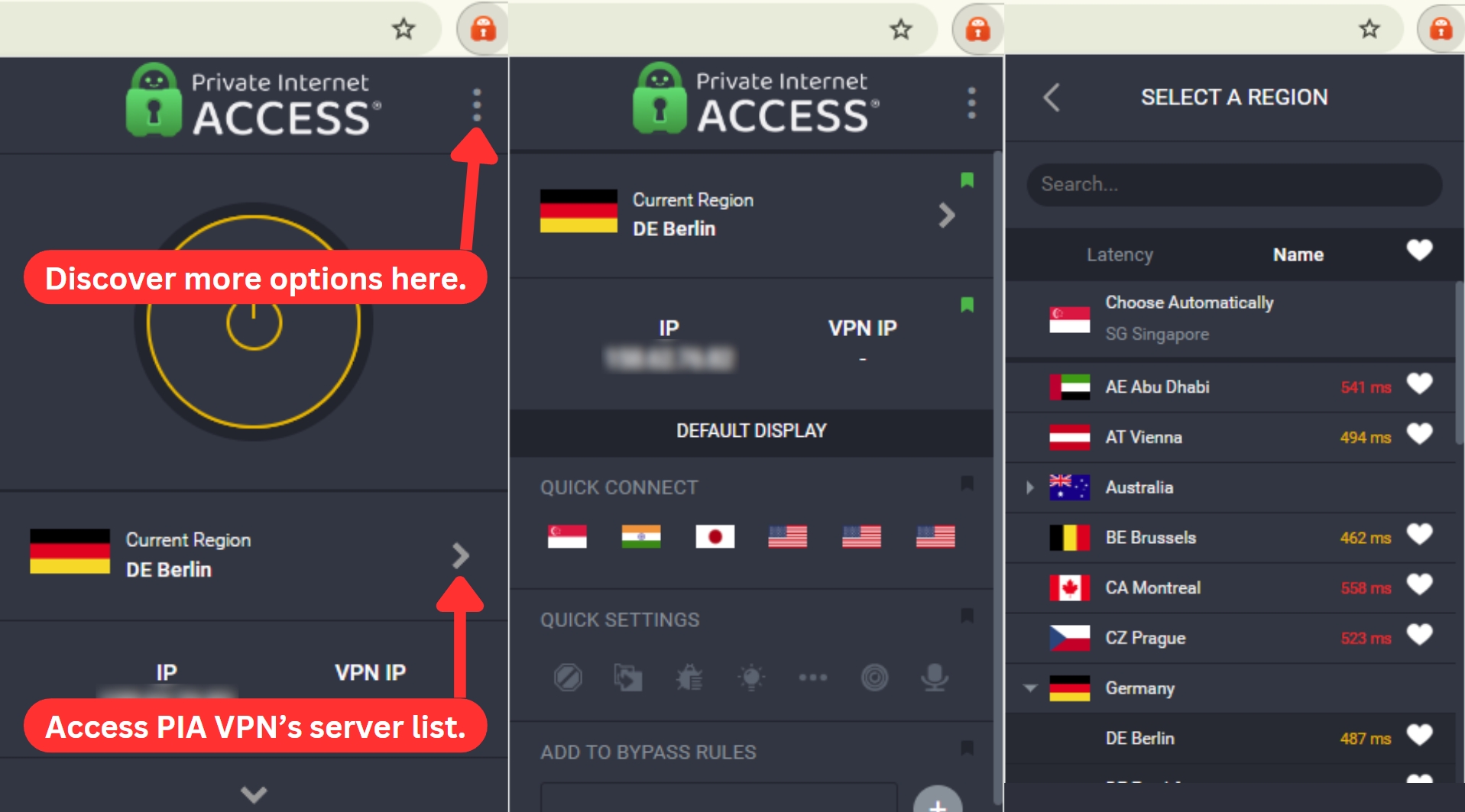
As PIA features a uniform design across all of its software creations, this also applies to its Web browser extensions. The home screen lets you connect to servers, toggle quick settings ON or OFF, and more. However, the real power of these extensions is found behind an icon in the top-right corner, where you'll find 'Extra Features.'
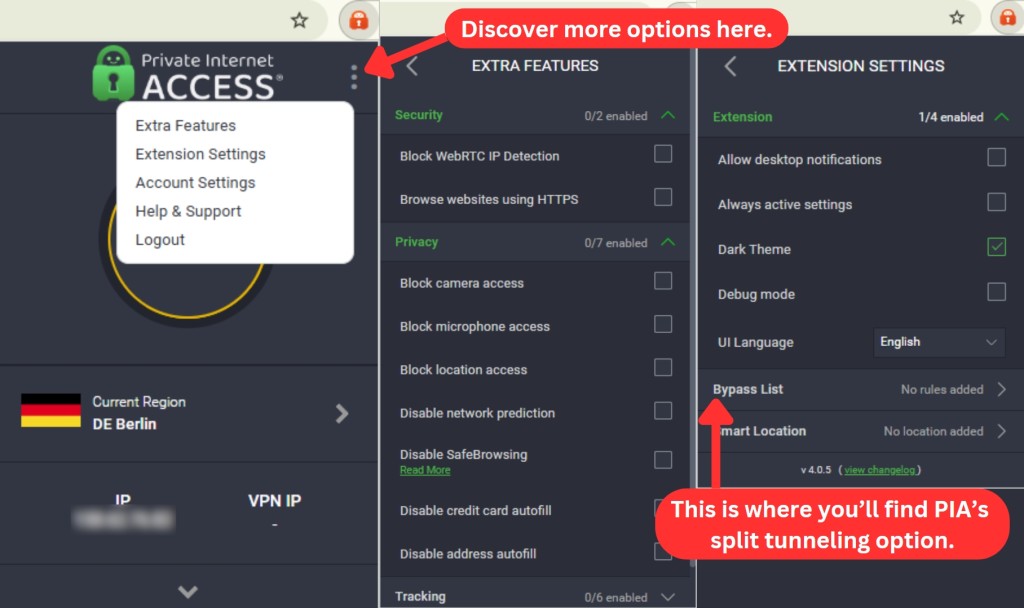
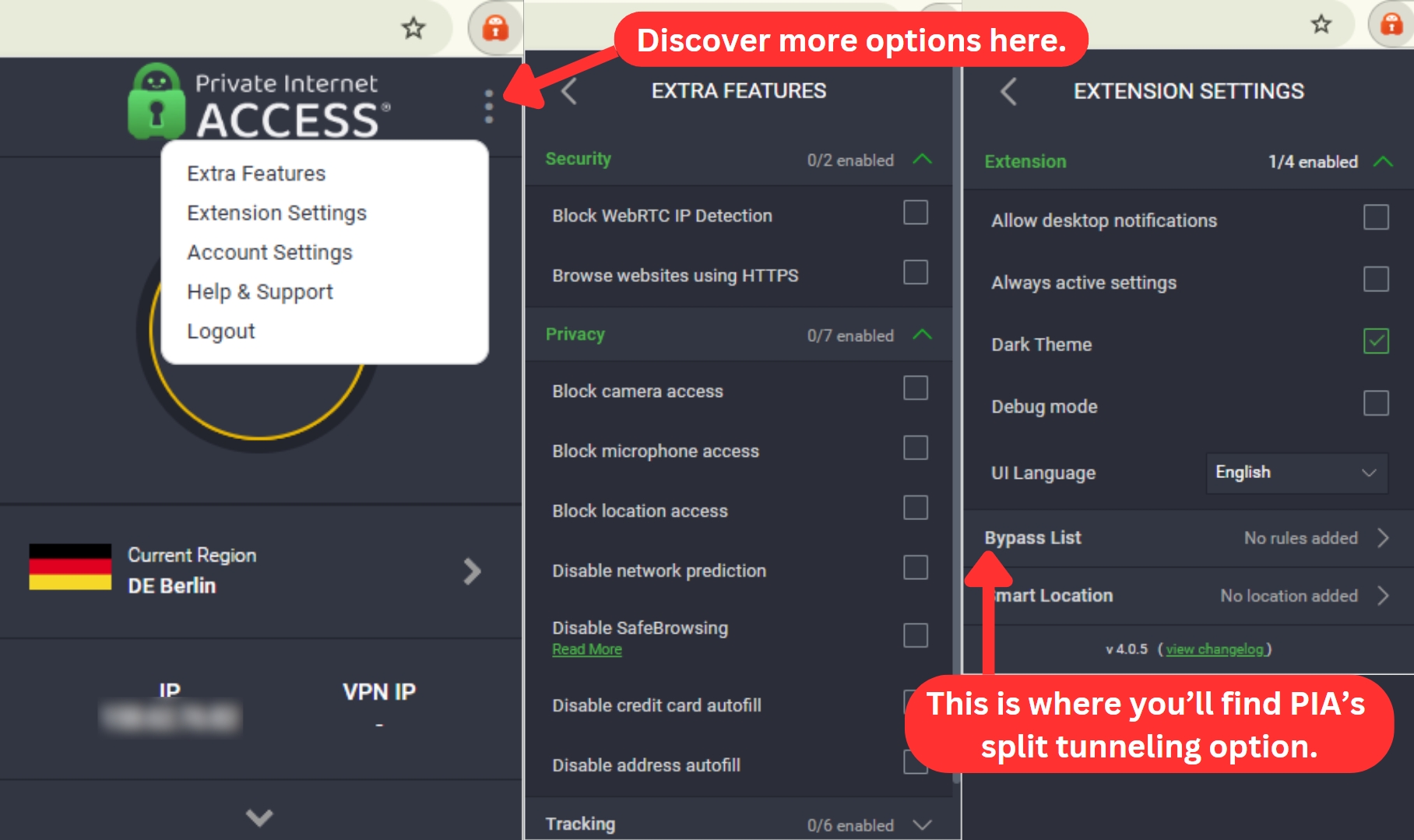
PIA's Web browser extensions allow you to block WebRTC leaks, force your browser to use HTTPS, as well as block access to your camera, microphone, location, data autofill, and plenty more. And in terms of tracking, you can disable cookies, block ads, and more.
It's also worth noting that split tunneling is available via PIA's Chrome extension, including Opera and Firefox extensions. This feature is found by going to Extension Settings > Bypass List. You're free to add any URL here, which will force PIA to route you to those domains outside of its secure tunnel.
All in all, PIA's extensions for Web browsers are hugely capable. Unlike what other VPNs offer, these extensions aren't an afterthought. Instead, they bring genuinely useful features designed to protect your digital privacy.
Media Streaming, Torrenting, and Gaming Support
PIA's 10 Gbps network infrastructure delivers fast speed across all their servers, so you can enjoy buffer-free streaming, efficient P2P sharing, and lag-free gaming. Plus, with unlimited bandwidth, you never have to worry about hitting data caps. Our Score: 8/10
One of the main reasons why people use VPNs is to access various types of online content, like streaming services, torrenting sites, or gaming platforms. However, not every VPN can handle these tasks equally well. That's why we've put PIA to the test and evaluated its performance in these areas.
Is Private Internet Access Good for Streaming?
Yes, Private Internet Access (PIA) is a suitable VPN for streaming. We’ve used it to access movies and TV shows from different platforms worldwide. That said, not every PIA server gets through to Netflix. Some work fine, others don’t.
That means you might need to switch servers a few times to find one that works. PIA has streaming-optimized servers, which seem to have better luck with Netflix and other services. We also tested it out during major sporting events, and it consistently got us past the blackout restrictions, giving us access to live streams we wouldn’t have been able to watch otherwise.
Here are some of the most notable US-based streaming platforms this VPN unblocks.
The provider is equally good with platforms outside the US. Here are some non-US streaming services you can enjoy with this VPN.
Is Private Internet Access Good for Torrenting?
Yes. PIA supports torrenting across its global server network, so you’re not limited to specific locations. More importantly, it has a strict no-logs policy, meaning your activity isn’t tracked or stored. That’s essential for staying anonymous while torrenting.
We tested PIA's torrenting performance by downloading large files via uTorrent. It worked well, with stable speeds and no interruptions. We also tried seeding torrents to see how well PIA handled upload speeds, and the performance held up without any sudden drops.
On top of that, PIA supports port forwarding, which helped us improve our download speeds on some trackers. But if you want to check out other VPNs that work well for torrents, read our guide to the best VPNs for torrenting.
Is Private Internet Access Good for Gaming?
Yes, PIA is a serious contender for the best gaming VPN title, especially if you take the time to tweak its settings. It works fine right out of the box, but optimizing it can help you squeeze out better performance. In our tests, fine-tuning the settings helped lower ping, making it a capable option for cloud gaming.
The VPN’s 10 Gbps server network and port forwarding support also helped stabilize our connection and reduce lag - two things that matter when every millisecond counts. We recorded an average ping of 30 ms and latency of 40 ms, both reasonable for gaming.
While testing PIA with League of Legends, we noticed smoother gameplay with fewer lag spikes. On Steam Deck, it worked well for securing online multiplayer matches without impacting performance.
PIA also helps protect against DDoS attacks with built-in DNS leak protection. If the VPN disconnects, the kill switch kicks in to prevent accidental IP leaks. We also set it up on a router to cover gaming consoles, giving our entire setup the same level of protection.
Security & Privacy
Private Internet Access has a reputation for protecting its users, even once police organizations such as the FBI come knocking at their doors. So, even though it's based in the US, which isn't ideal, there are a lot of reasons to trust this VPN. Our Score: 9/10
You must be wondering how effective PIA is when it comes to protecting your private data. In this PIA VPN review, we’ll be taking a look at three aspects of this VPN service: VPN protocols, its logging policy, and the prevention of IP/DNS leaks.
Private Internet Access VPN Protocols
PIA comes with a comprehensive set of VPN protocols, such as OpenVPN, WireGuard, as well as IPsec (IKEv2). The following table will show you a list of PIA's applications, along with the VPN protocols supported by each of those apps.
As you can see above, PIA brings OpenVPN and WireGuard across all its apps. Then, there's IPsec (IKEv2) available on iOS as well. All of those are incredibly secure protocols, giving you some room to choose between security and performance.
In the past, PIA supported PPTP and L2TP. Even though you can still find guides on how to set up those protocols manually, keep in mind that PIA is moving away from those two protocols. This goes hand-in-hand with the VPN's 'Next-Gen' infrastructure, with legacy servers being left behind.
- OpenVPN: This is known as the most secure and stable VPN protocol, being used across numerous VPN services. Even though this protocol will slow you down a bit, it brings an unparalleled level of security to your private data. It uses AES-128-GCM and AES-256-GCM key lengths within PIA for maximum online protection.
- WireGuard: This one is a brand-new VPN protocol that comes with plenty of promises. Most importantly, it's incredibly lightweight with ChaCha20 encryption. That means that connecting and disconnecting from servers is done instantly. You can also expect incredibly fast Web speeds.
- IPsec (IKEv2): PIA uses this protocol on iOS, which is known for its stability and security. However, it's primarily designed for mobile devices. That's how you can easily switch from a 4G/5G network to a Wi-Fi connection without losing connectivity. For this protocol, you can choose between AES-128-CBC and AES-256-CBC encryption algorithms.
Does Private Internet Access Keep Logs?
No, PIA doesn't keep logs — it has a strict no-logs policy. It doesn’t keep records of your online activities at all. This VPN doesn’t store any information that could be used to identify you or your online activity.
PIA's no-logs policy has also undergone an independent audit and is designed to protect the privacy and security of its users. This policy is an essential aspect of its service, as it ensures that users can browse, stream, and download content without worrying about their online activities being tracked or recorded.
However, it's important to note that PIA does collect some minimal data, such as the amount of data you use, the date and time of your connection, and the server location you connect to. This information is used to troubleshoot technical issues and improve the service, isn’t linked to any identifiable information, and is regularly deleted.
Does PIA VPN Leak/Expose Your Private Data?
No, PIA VPN doesn't leak or expose personal data. We've done a DNS leak test while connected to different PIA servers. With that said, we're happy to report that PIA seems to be incredibly secure, with no VPN leaks detected.
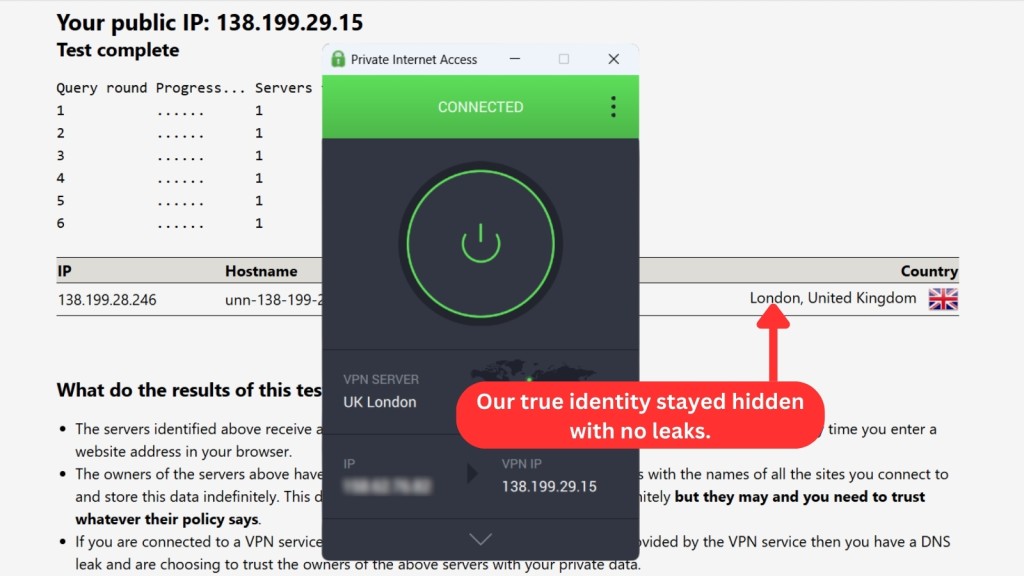
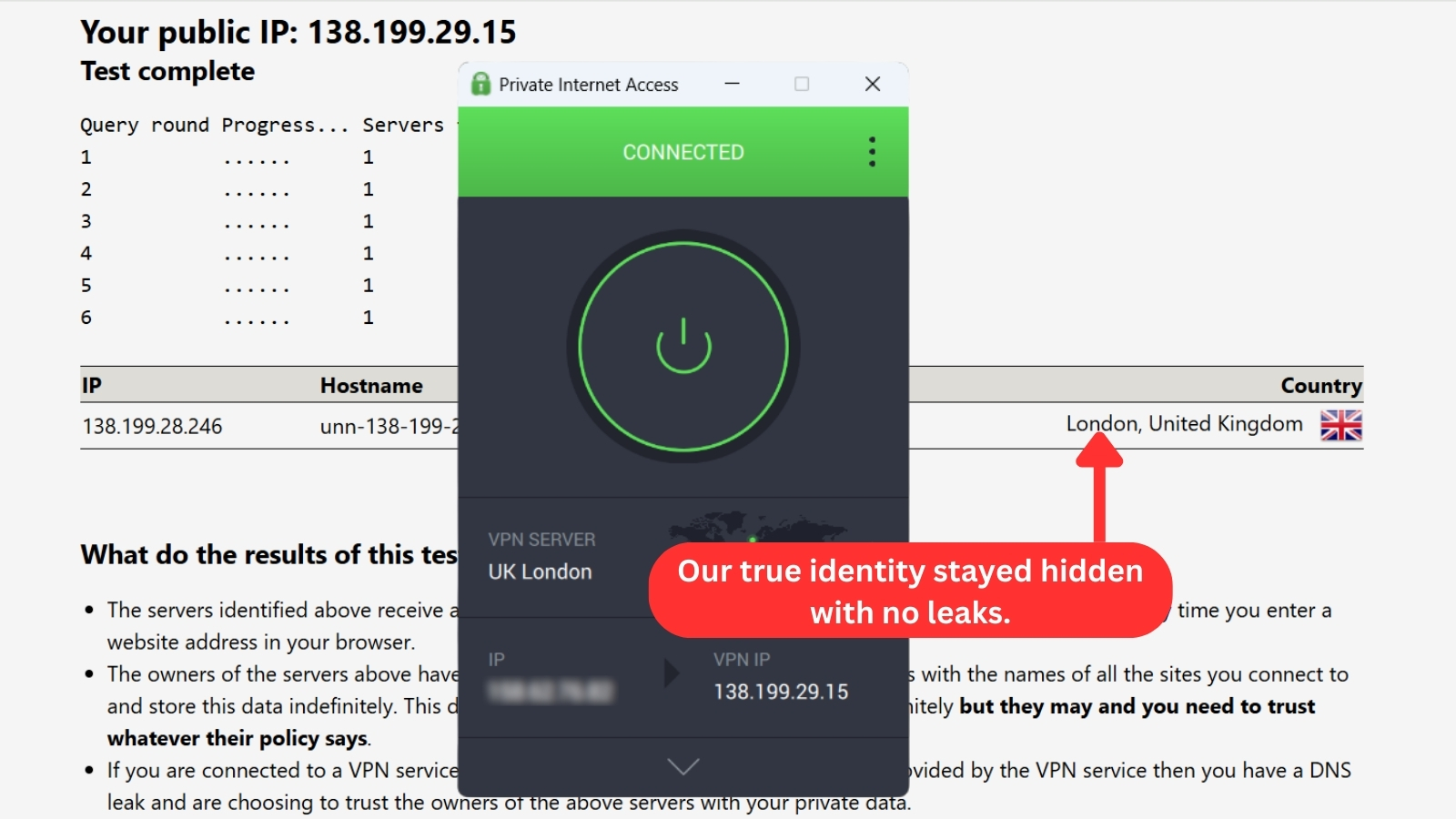
More precisely, we've checked for IP, DNS, WebRTC, and geo-location leaks. PIA's VPN tunnel seems to be incredibly strong, not allowing anyone to get to our private information. Instead, our 'virtual' information is what's visible, without any surprises.
Speed & Performance
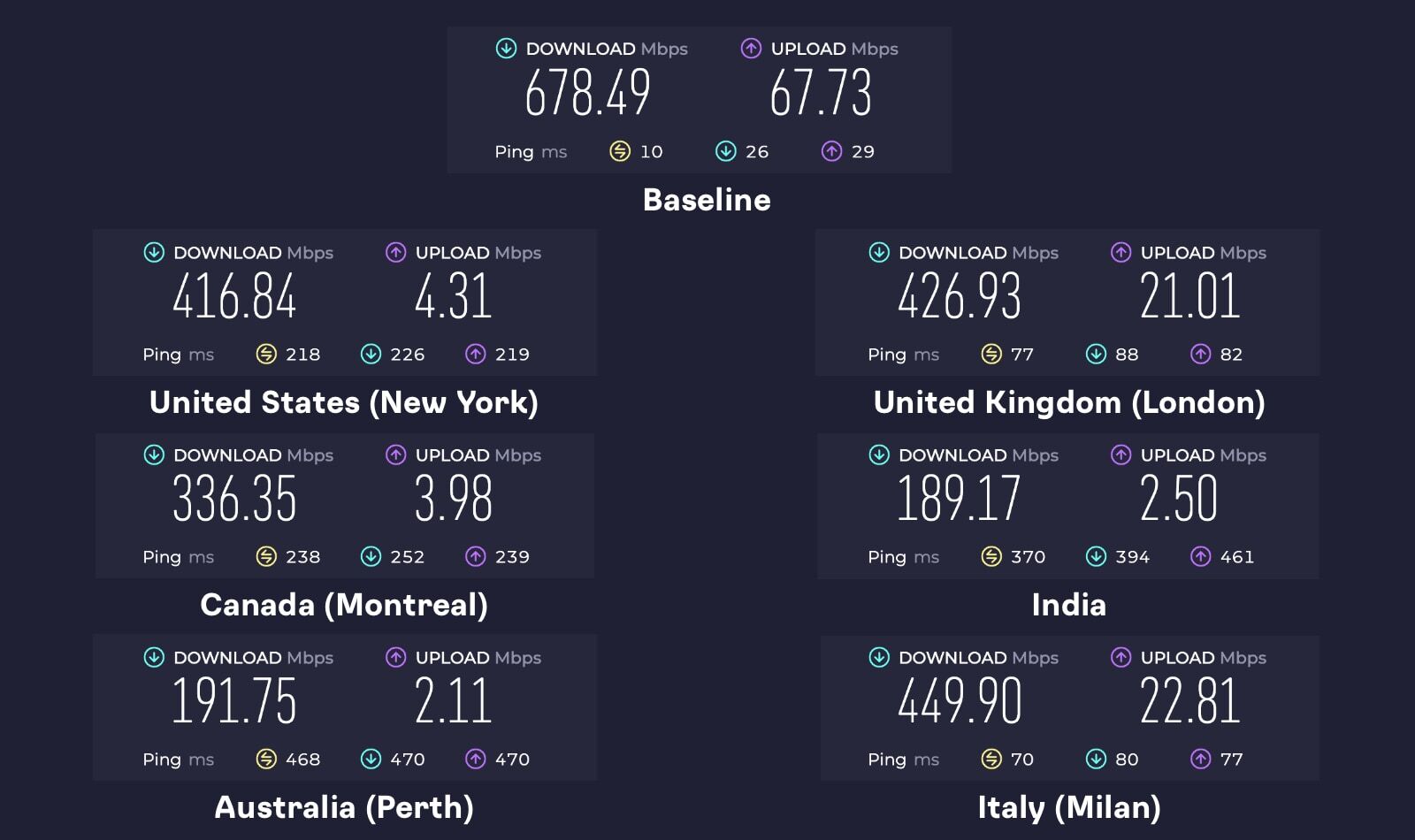
PIA's nearby servers performed decently, but long-distance ones experienced a noticeable drop in speed. With an overall average speed loss of 51%, it’s clear that some optimization may be needed to get the best performance. Our Score: 6/10
In this part of our review, we'll see how PIA VPN affects our connection speed. We're doing this test on a 700 Mbps connection. Our baseline speed test showed 678.49 Mbps for PIA download speeds and 67.73 Mbps for uploads. That's our 'naked' connection without the VPN. Next, we'll connect to different servers around the world and compare the results.
Recognizing that VPNs often come with a speed trade-off, we evaluated PIA's performance to see if it could hold its own among the fastest VPNs.
Here are the results of our other server tests:
- USA Server (New York): Despite the server's distance, the download speed held up well, dropping by 39% from 678.49 Mbps to 416.84 Mbps. This minimal speed loss indicates the US server's strong connection and good long-distance traffic handling capability. The overall performance is impressive, even with an upload speed of only 4.31 Mbps.
- UK Server (London): Similar to the Italy server (below), this nearby server had a 37% average speed reduction. Download speeds were up to 426.93 Mbps, and upload speeds reached 21.01 Mbps - both faster than other servers we tested.
- Canada Server (Montreal): Since this server is far from our location, we expected a significant speed drop, and we were right. We got an average speed loss of 50%. Even so, the download speed held up at 336.35 Mbps, while uploads reached 3.98 Mbps.
- India Server: Out of all the servers tested, this one, the farthest from us, lived up to its remote location in terms of performance. The connection took a nosedive, dropping a staggering 72% to settle at 189.17 Mbps download and 2.5 Mbps upload. While the server managed to maintain some functionality despite the distance, its performance clearly suffered compared to closer options.
- Australia Server (Perth): While geographically remote, this server delivered a better download speed of 191.75 Mbps compared to the Indian server. This also represents a 72% speed reduction, ranking second-slowest in our tests.
- Italy Server (Milan): This is the closest server to our location, and it delivered the fastest download speed we tested at 449.9 Mbps. That worked out to an average 34% speed loss, which is about what we anticipated for a nearby server.
Our test results show that our PIA speeds slowed down by 51% on average compared to the baseline speed. Nevertheless, the service has done a great job of optimizing its servers for speed and performance. That said, be aware that your upload speed will be noticeably throttled if you use overly remote servers.
Customer Support
PIA comes with many support channels available, including live chat. We’re happy to report that they offer 24/7 client support and that their reps are very responsive and helpful. Our Score: 10/10
It’s crucial for VPN services to offer reliable customer service. That's because they are highly complex technical solutions, and something can easily go wrong – which is why you need to know if help is on the way. Here are all the ways that PIA helps its customers.
- Live Chat: We are happy to see PIA reintroduce live chat via its official website. This option was abandoned a few years back, but now you can once again talk to this VPN’s customer support agents in real-time and resolve your issue quickly.
- Knowledge Base: PIA has prepared around 200 articles on solving different technical problems. They also have a pretty neat search function that retrieves results from different categories (news, files, tickets, guides, etc.).
- Setup Guides: No matter your platform of choice, you’ll find a nice range of setup guides. These come with clearly explained steps accompanied by screenshots, making it easy to install Private Internet Access on any of its supported platforms.
- Email Support: PIA’s email support mainly works through ticket submissions. Just submit a ticket via the contact form, and they’ll respond to you through email. But if you’d rather reach out directly, you can also email [email protected].
Additionally, PIA VPN offers a blog with news and articles, active social media channels (Facebook, X), a YouTube channel, and a subreddit community for further support and interaction.
Pricing
Private Internet Access VPN is one of the most affordable VPNs on the market (in the long term). Overall, its price seems fair enough. Our Score: 9/10
Now, it's time to check the price of Private Internet Access. Make sure to read this segment carefully, as we'll unveil a number of interesting tidbits.
How Much Is Private Internet Access?
PIA starts at $2.19/month and offers three subscription plans to suit different needs and budgets. Let's take a look at the deals below and see what they have to offer.
- 1-Month Plan: If you need a VPN for a short time or want to try the service first, the monthly plan might suit you. It lets you pay as you go, but it's also the priciest option at $11.99 per month. You also won't get a discount with this plan, so it's not very cost-effective. However, you do get an extra email breach monitoring feature on top of VPN protection.
- 6-Month Plan: This plan is a perfect balance between flexibility and cost-effectiveness, as you only pay $45.00 every six months, which is $7.50 per month. That means you’ll save about 37% compared to the monthly plan. You also get 500 GB of free cloud storage from pCloud for a full year with this plan.
- 2-Year Plan (+2 Months Free): PIA’s long-term plan is the best value for money. For just $56.94, you get 2 years of subscription and 2 free months, along with a complimentary 500 GB of cloud storage for one year. This plan will only cost you $2.19 per month, which is a whopping 83% savings compared to the monthly plan. If you need a VPN for a long time or want to get the most out of your money, get this plan.
PIA also offers an affordable antivirus add-on for Windows 7 and above, starting at just $1.45/month, and a dedicated IP for $2.50/month (when you choose the long-term deal). Whatever plan you choose, you'll get access to all the features and benefits of PIA VPN, such as unlimited bandwidth, fast speeds, multiple protocols, thousands of servers, and more. You'll also get a 30-day money-back guarantee, so you can try the service risk-free.
PIA VPN accepts various payment methods, including debit/credit cards, PayPal, Amazon Pay, and even cryptocurrencies. If you value your privacy and anonymity, you might want to pay with Bitcoin or another digital currency, as this will leave no trace of your identity.
Is Private Internet Access Free?
No, PIA isn't free. However, they do provide a 30-day money-back guarantee, essentially allowing you to use the first 30 days as a free trial period.
There's also a 7-day PIA free trial available for Android and iOS users. However, with the mobile trial, you'll need to pay upfront and request a refund within 24 hours before the trial ends. Keep in mind that if you purchase through the Apple App Store, third-party websites, or gift cards, refunds can only be processed by those entities, not PIA directly.
For this reason, we recommend buying PIA from its website. This way, you can test PIA risk-free for a month with its 30-day money-back guarantee. If you’re not happy with the service, you can ask for a refund within the first month of your subscription. However, their refund policy states that you can only do this once every three months.
PIA VPN Comparison with Other VPN Providers
PIA's direct competitors are NordVPN and ExpressVPN, including Surfshark as a runner-up. These VPNs bring high-end privacy protection, sizable server networks, and a plethora of unique features. So, if you're in doubt about which one to pick, check out the following VPN comparisons:
- NordVPN vs. PIA
- ExpressVPN vs. PIA
- PIA vs. Ivacy VPN
- TorGuard vs Private Internet Access
- Surfshark vs. Private Internet Access
| Review Summary Despite its minor drawbacks, PIA provides a lot of value for its price. Most importantly, it's a trusty VPN, quick to develop new features, helping you stay safe online. | 8.9 Overall Score | ||
| Background, Jurisdiction & Reputation | 8 | ||
| Supported Platforms & Devices | 10 | ||
| Installation & Initial Configuration | 10 | ||
| Prominent Features | 9.5 | ||
| Server Count & Infrastructure | 9 | ||
| UI/UX Design & Ease of Use | 9 | ||
| Media Streaming, Torrenting & Gaming Support | 8 | ||
| Security & Privacy | 9 | ||
| Speed & Performance | 6 | ||
| Customer Support | 10 | ||
| Pricing | 9 | ||