When you purchase through links on our site, we may earn an affiliate commission. Here’s how it works.
5 Best VPN for Gaming in 2026 (Fast & Lag-Free)



Our experts have reviewed 53 VPN providers, which were put through extensive rounds of testing. To learn more about that process, here’s how we review VPNs, where we explain our criteria and our policy of being fully transparent.
- For smooth online gaming, NordVPN, ExpressVPN, and Surfshark stand out as top performers. They deliver low-latency connections, fast and stable servers, and robust DDoS protection, ensuring uninterrupted gameplay on PC, consoles, and mobile devices. Features like split tunneling, region switching for bot lobbies, and VPN Accelerator or NordLynx protocols optimize performance, while unlimited simultaneous connections let multiple devices play securely. These VPNs also help bypass geo-restrictions and IP-based blocks, making them ideal for competitive, multiplayer, and cloud gaming sessions.
Lag spikes, high ping, and DDoS attacks can ruin your gaming sessions, especially in competitive or multiplayer matches. On top of that, some ISPs throttle gaming traffic or restrict access to certain servers, leaving you frustrated and disconnected. A high-quality gaming VPN solves these problems by hiding your IP, blocking attacks, and giving you access to servers worldwide, so you can play faster, smoother, and safer.
Not every VPN is built for gaming, though. That’s why the TechNadu team tested over 53 VPNs across PC, consoles, and mobile platforms, measuring latency, server stability, protocol performance, and protection against DDoS attacks and throttling. In this guide, we break down the 5 best VPNs for gamers in 2026, explain what makes each one stand out, and share tips on choosing the right one, avoiding VPN bans, optimizing ping, troubleshooting issues, and more.
After reading this guide, you’ll have a clear picture of which VPNs deliver stable connections, low latency, and uninterrupted gameplay.
Editor's Picks: Top Gaming VPNs
- NordVPN - Best Overall VPN for fast, low-latency gaming sessions
- ExpressVPN - Fastest VPN for ultra-stable speeds and minimal ping
- Surfshark - The cheapest gaming VPN with unlimited device connections
- Private Internet Access - Highly configurable VPN for power users
- Proton VPN - Privacy-first VPN with Secure Core and VPN Accelerator
How We Chose the Best VPN for Gaming (Testing & Criteria)
When identifying the best VPN for gaming, we focus on services that deliver minimal latency, reliable server connections, and robust security to protect player data. A gaming-ready VPN must maintain stable speeds, prevent throttling by ISPs, and ensure smooth gameplay across global servers without interruptions.
Because online gaming can expose users to cyber threats, data leaks, and lag-related frustrations, our recommendations are based strictly on verified performance metrics, consistent reliability, and transparent privacy practices, not marketing claims.
Below is the methodology we apply (and recommend you follow) to evaluate and compare the top VPNs for gamers.
1. Low Ping (Latency) & Minimal Packet Loss
For gamers, ping matters more than raw speed. A high-latency connection can ruin even the fastest hardware. To get a good gaming experience, a VPN must:
- Add as little latency as possible
- Maintain stable ping during long sessions
- Avoid packet loss and jitter
What helps:
- Servers physically close to game servers
- Modern protocols like WireGuard or Lightway
- Optimized routing and non-overloaded servers
Rule of thumb: Good gaming VPNs increase ping by no more than 10–20 ms on nearby servers, ensuring smooth online play without noticeable lag spikes.
2. High-Speed Servers (But Stability First)
While gaming rarely consumes massive bandwidth, stability is critical. VPNs should provide:
- Consistent throughput over extended sessions
- No sudden speed drops or spikes
- Traffic management that avoids throttling during peak hours
A spike in raw speed is useless if the connection is unstable, as even a brief disconnect can disrupt competitive gameplay.
3. Large, Strategically Located Server Network
VPN routing improves only when servers are well placed. Key regions include:
- US (multiple regions)
- Europe (UK, Germany, Netherlands)
- Asia-Pacific (Japan, Singapore)
- Middle East & South America (for regional matchmaking)
Benefits:
- Lower ping to regional game servers
- Improved matchmaking performance
- Access to region-locked games or DLCs
4. Access Bot Lobbies
Certain popular games like Fortnite, Call of Duty: Warzone, Apex Legends, and PUBG offer bot lobbies for easier matches. To reach these lobbies consistently, a VPN must:
- Provide servers in countries where bot lobbies are most commonly available
- Maintain low latency on those servers
- Offer fast, stable connections to prevent disconnects while entering the lobby
5. DDoS Protection (Major Advantage)
Competitive and peer-to-peer multiplayer gaming can expose players to DDoS attacks. Therefore, a VPN that is suitable for gaming must:
- Hide your real IP address
- Absorb or block DDoS attempts
- Keep your connection stable even under attack
6. No Throttling or ISP Traffic Shaping
Some ISPs intentionally throttle gaming traffic during peak hours. A quality VPN:
- Encrypts traffic to prevent ISP throttling
- Maintains consistent performance even when the network is busy
7. Fast Protocols & Manual Protocol Selection
Modern protocols significantly impact gaming performance. The best VPNs offer:
- WireGuard
- Lightway
- OpenVPN UDP
Advanced features:
- Manual protocol switching for fine-tuning
- Auto-connect to the fastest available server for optimal performance
8. Compatibility with Gaming Platforms
A gaming VPN must work across all platforms players use:
- Windows & macOS
- PlayStation & Xbox (via router or Smart DNS)
- Nintendo Switch
- Mobile gaming (Android / iOS)
Bonus features: Router firmware support (OpenWRT, DD-WRT) and detailed console-friendly setup guides make connecting non-PC devices straightforward.
9. Split Tunneling (Highly Useful)
Split tunneling allows selective routing of traffic:
- Games → VPN
- Voice chat, browsers → standard connection
Benefits:
- Lower ping for game packets
- Clearer voice quality during team communication
- Reduced VPN overhead and resource usage
10. Ability to Bypass Geo-Restrictions & IP Bans
Gaming VPNs are frequently used to:
- Access region-locked titles
- Play early releases before local launch
- Avoid unfair IP bans in multiplayer sessions
Important distinction: VPNs cannot bypass account bans, only IP-based restrictions. Correct use ensures access without violating terms of service.
11. Always-On Kill Switch (Less Critical, Still Helpful)
Not essential, but a kill switch adds protection for sensitive gaming situations:
- Prevents IP exposure if the VPN drops mid-session
- Useful when connecting via public Wi-Fi
- Helps protect against DDoS exposure during competitive play
Even if not mandatory, an always-on kill switch provides an extra safety layer for uninterrupted and secure gaming.
12. Reliable Customer Support
Even the best VPN can run into technical issues during gaming. A provider with responsive, expert support ensures uninterrupted play. Look for:
- 24/7 live chat availability for immediate troubleshooting
- Email or ticket-based support for more complex issues
- Clear setup guides, FAQs, and tutorials specific to gaming and consoles
Lag spikes, connection drops, or configuration issues can disrupt sessions and affect performance in competitive environments. Fast and knowledgeable customer support can resolve problems before they impact gameplay.
The Best VPNs for Safe and Fast Gaming in 2026
Want to game online without lag, DDoS attacks, or annoying region blocks? As established above, a solid VPN is key to keeping your connection fast, secure, and stable while you play. But which VPN delivers the best mix of low latency, strong protection, and global servers for gaming? After testing over 53 VPNs, our experts have handpicked these 5 best VPNs for gaming in 2026:
1. NordVPN - Best Overall VPN For Fast, Low-Latency Gaming Sessions
NordVPN stands out as one of the most complete and secure VPNs for gaming in 2026, combining ultra-low latency, strong DDoS protection, and advanced encryption. Based in Panama, it avoids 5/9/14 Eyes surveillance, making it a top pick for gamers who want both speed and privacy. Its mature server network and advanced protocols ensure smooth gameplay across PC, consoles, and mobile devices, while optional features like split tunneling, Meshnet, and obfuscated servers provide extra flexibility for competitive or private gaming sessions.
Pros
- Ultra-Low Latency Servers: NordVPN’s gaming servers are optimized to minimize ping and reduce lag. In real-world tests, we observed 482 Mbps on a 700 Mbps baseline while maintaining minimal latency. Optimized routing, server proximity, and WireGuard-based NordLynx ensure stable, jitter-free gameplay, even during extended sessions.
- Advanced DDoS Protection: Competitive multiplayer games can expose players to attacks. NordVPN protects your connection by hiding your IP and absorbing malicious traffic, keeping your connection uninterrupted and stable. Combined with AES-256-GCM, ChaCha20, and Post-Quantum Encryption (NordLynx Protocol), your gaming sessions remain secure from online threats.
- Access to Bot Lobbies: NordVPN enables consistent access to bot lobbies in games like Fortnite, CoD Warzone, Apex Legends, and PUBG. Servers in multiple regions allow you to practice and farm resources in easier matches, without manual trial-and-error or inconsistent connectivity.
- Lightning-Fast NordLynx Protocol: NordLynx combines strong encryption with high-speed connections. Testing showed ~9% average speed loss, making it ideal for FPS, MMORPGs, and other bandwidth-intensive games. OpenVPN UDP and IKEv2/IPsec provide additional protocol options for flexibility.
- Kill Switch & Leak Protection: NordVPN’s system-level kill switch prevents IP leaks if the VPN disconnects. RAM-only servers and private DNS eliminate DNS, WebRTC, and IPv6 leaks, while obfuscated servers keep your activity hidden on restricted networks.
- Private LAN Gaming via Meshnet: The Meshnet feature lets you create a secure virtual LAN with friends anywhere. This ensures low-latency private connections for co-op or LAN-style matches, with full privacy and minimal lag.
- Split Tunneling for Optimized Performance: Split tunneling lets you route only your game traffic through the VPN while keeping other apps on your normal connection. This reduces overhead and ensures smooth voice chat and gameplay simultaneously.
- Extensive Global Server Network: With 8,900+ servers in 129 countries, NordVPN reduces congestion and ensures stable, reliable connections worldwide. Whether accessing regional servers for geo-restricted content or distant game servers, your ping stays low.
- Multi-Device Support: There are 10 simultaneous connections. NordVPN works on Windows, macOS, Linux, iOS, Android, routers, and consoles via Smart DNS, protecting PCs, mobiles, and gaming consoles with a single account.
- Strong Privacy & Panama Jurisdiction: Based in Panama, outside 5/9/14 Eyes alliances, NordVPN protects your data from legal requests. Multiple independent no-logs audits (2018–2024) confirm that IPs and activity are never stored.
- Threat Protection & Ongoing Security Updates: NordVPN’s Threat Protection Pro blocks malware, trackers, and phishing attacks, earning AV-Comparatives certification. Continuous updates, like post-quantum encryption, session hijacking alerts, and new router support, ensure long-term security.
- 24/7 Support & Risk-Free Subscription: NordVPN offers 24/7 live chat and a 30-day money-back guarantee, letting you test performance across platforms without risk. Comprehensive setup guides make installation on any device quick and straightforward.
Cons
- Higher Short-Term Pricing: While NordVPN’s long-term plans offer good value, monthly subscriptions are relatively expensive. Its longer plans start from $3.09 per month for 24 months. But when we talk about montly plan, it is for $12.99/month. Gamers who only need temporary protection for seasonal play, tournaments, or short-term events may find it pricier than alternatives.
- Rare Game Server VPN Detection: Occasionally, aggressive anti-VPN measures may temporarily block NordVPN IPs. While these instances are rare, players may need to switch servers to regain access.
- Limited Manual Server Routing: Advanced users may prefer more granular control over specialized servers.
- U.S. Legal Action Over Auto-Renewals: Minor concern for some customers, though it does not affect service quality.
2. ExpressVPN - Fastest VPN For Ultra-Stable Speeds And Minimal Ping
ExpressVPN is a fast, secure, and reliable VPN for gamers in 2026. Based in the British Virgin Islands, it combines ultra-low latency, advanced encryption, and a mature global server network, making it ideal for FPS, MMO, and competitive gaming. Its Lightway protocol, obfuscated servers, and RAM-only TrustedServer tech ensure both privacy and performance, while router support enables console gaming without limits.
Pros
- Lightning-Fast Speeds & Low Latency: ExpressVPN’s Lightway protocol ensures minimal ping and stable throughput across all servers. In testing, it achieved 621 Mbps on a 700 Mbps baseline, providing smooth real-time gameplay even for long-distance matches. High-speed connections combined with optimized routing keep latency and jitter low, crucial for FPS, battle royale, and MMO games.
- Access to Bot Lobbies: Gamers can reliably enter bot lobbies in titles like Fortnite, PUBG, Apex Legends, and CoD Warzone. Servers in multiple regions allow you to practice in easier matches or farm resources without manual trial-and-error or connection issues.
- Built-in DDoS Protection: ExpressVPN protects your connection from targeted attacks that could disrupt multiplayer sessions. Combined with strong encryption (AES-256 and ChaCha20/Poly1305) and modern protocols (OpenVPN, Lightway, and IKEv2), your gaming remains uninterrupted even under aggressive online attacks. Post-quantum encryption and Threat Manager protect against trackers, malware, and malicious domains, making it a safe choice for online gaming.
- Obfuscated Servers: All ExpressVPN servers are obfuscated by default. This hides VPN traffic from ISPs and networks, allowing you to bypass geo-blocks and restrictions, access region-locked games, and avoid throttling during peak hours.
- TrustedServer RAM-Only Infrastructure: Every server runs on diskless RAM, meaning data is wiped with every reboot. This protects your identity and activity during online multiplayer sessions, ensuring no logs are ever stored.
- Extensive Global Server Network: ExpressVPN covers undisclosed number of servers in 105 countries, including all 50 U.S. states, ensuring stable connections worldwide. This reduces congestion, improves matchmaking options, and provides access to region-locked game content.
- Split Tunneling Support: Split tunneling allows gamers to route only game traffic through the VPN while keeping other apps local. This reduces network load, maintains low latency, and optimizes in-game performance.
- Multi-Device & Console Support: You get 10-14 simultaneous connections on ExpressVPN. Additionally, it works on Windows, macOS, Linux, iOS, Android, and streaming devices, with router support for Xbox, PlayStation, and Nintendo Switch. Recent firmware updates (AircoveOS v5.3) improve router-based VPN performance for smooth console gaming.
- Beginner-Friendly UX & Setup: ExpressVPN offers a polished interface with one-click protection, customizable themes, iOS shortcuts, and a Linux GUI app. Installation and connection are straightforward, whether on PC, mobile, or router.
- Trusted Privacy & Audits: Three independent no-logs audits (2019, 2022, 2025) by PwC and KPMG LLP confirm ExpressVPN does not store IPs or activity. Operating outside the 5/9/14 Eyes alliance in the British Virgin Islands provides additional privacy assurance.
- 24/7 Customer Support & Risk-Free Trial: ExpressVPN provides 24/7 live chat support and a 30-day money-back guarantee, allowing gamers to test servers, latency, and connection reliability without risk.
Cons
- Higher Price Point: ExpressVPN is more expensive than many competitors. To begin with, its cheapest option is for $2.44 per month for a 24 months plan. While long-term plans offer value, short-term subscriptions may be costly for seasonal or casual gamers.
- Limited Customization Options: Advanced users may find fewer opportunities for deep protocol tweaking or manual routing. ExpressVPN prioritizes simplicity and automation over granular control.
- Ongoing U.S. Legal Dispute Regarding Auto-Renewal Disclosures: ExpressVPN is currently involved in a U.S. lawsuit concerning alleged shortcomings in auto-renewal disclosures, while the company maintains that its billing practices are transparent and compliant.
3. Surfshark - The Cheapest Gaming VPN With Unlimited Device Connections
Surfshark is one of the best gaming VPNs in 2026, offering strong performance, unlimited device connections, and advanced privacy tools at a significantly lower price than most premium competitors. While it may not always beat top-tier VPNs on ultra-long-distance routes, Surfshark delivers stable low-latency gaming, excellent region switching, and impressive value for households or multi-device players.
Pros
- Low-Latency Performance with Stable Ping Control: Ping consistency matters more than raw speed in gaming, and Surfshark performs well in this area. Using the WireGuard protocol, Surfshark delivered stable latency during long gaming sessions with minimal jitter. In our testing on a 700 Mbps baseline connection, Surfshark reached 442 Mbps, while keeping ping increases within an acceptable range for competitive and casual multiplayer games.
- Fast Protocols Optimized for Gaming Traffic: Surfshark supports WireGuard, IKEv2, OpenVPN, and Dausos, all well-suited for gaming. WireGuard, in particular, offered the best balance between speed and security, enabling smooth real-time gameplay. Advanced users can manually switch protocols, while casual gamers can rely on automatic selection without tuning settings.
- Large, Well-Distributed Global Server Network: With 4,500+ servers in 100 countries, Surfshark provides solid geographic coverage across North America, Europe, Asia-Pacific, and emerging regions. This makes it easier to connect close to game servers for lower ping, improve matchmaking times, and access region-specific servers. The network also supports region switching for accessing different matchmaking pools and bot lobbies in supported games.
- Access to Bot Lobbies via Region Switching: Surfshark allows players to switch regions easily, which can help access bot-heavy matchmaking pools in certain titles such as Call of Duty, Fortnite, Apex Legends, and PUBG. While results vary by game and region, Surfshark’s wide country coverage and fast server switching make it a practical option for players experimenting with easier lobbies.
- Built-In DDoS Protection and IP Masking: By hiding your real IP address, Surfshark protects against targeted DDoS attacks, a common issue in competitive and peer-to-peer multiplayer games. During testing, connections remained stable even under heavy traffic conditions. This makes Surfshark suitable for FPS games, MMORPGs, and player-hosted lobbies where DDoS attacks are more common.
- Unlimited Simultaneous Connections for Gaming Households: One of Surfshark’s biggest advantages is unlimited simultaneous connections. We tested Surfshark across PCs, mobile devices, consoles (via router or Smart DNS), and secondary devices simultaneously without hitting connection limits.
- Split Tunneling (Bypasser) for Optimized Performance: Surfshark’s split tunneling feature allows users to route only game traffic through the VPN, while keeping voice chat, browsers, or local services on a direct connection. This reduces unnecessary overhead and helps maintain lower latency during gameplay. Bypasser is available on Windows, Android, and now macOS.
- Reliable Leak Protection & Audited No-Logs Policy: Surfshark passed all IP, DNS, and WebRTC leak tests during our evaluation. Its no-logs policy has been independently audited, ensuring that gaming activity, connection timestamps, and IP addresses are not stored. Additional privacy technologies, such as RAM-only servers, private DNS, and metadata-reduction patents, further strengthen protection during online play.
- NoBorders Mode for Restricted or Throttled Networks: Surfshark’s NoBorders mode automatically detects restrictive networks and applies obfuscation. This is especially useful for gaming from schools, workplaces, hotels, or regions where gaming traffic is throttled or blocked.
- Broad Platform & Console Compatibility: Surfshark supports Windows, macOS, Linux, Android, iOS, and browser extensions, with router compatibility for consoles like PlayStation, Xbox, Nintendo Switch, and Steam Deck. Smart DNS support simplifies console setup for users who don’t want to install a VPN at the router level.
- Affordable Pricing with Strong Support: Surfshark is one of the most affordable premium gaming VPNs, starting at $1.99 per month on a 24 months plan. All plans include 24/7 live chat support and a 30-day money-back guarantee, allowing gamers to test performance risk-free.
Cons
- No Dedicated Gaming or Low-Ping Server Labels: Surfshark does not clearly label servers optimized specifically for gaming or low-latency play. Gamers may need to manually test nearby locations to find the best ping for specific titles.
- Slightly Higher Ping on Competitive FPS Compared to Top-Tier Rivals: While performance is strong overall, ultra-competitive players may notice slightly higher ping compared to premium VPNs like NordVPN or ExpressVPN when playing fast-paced shooters.
- Initial Connection Can Take Slightly Longer Than Premium Rivals: While this does not impact gameplay once connected, Surfshark can take a few extra seconds to establish the initial VPN tunnel, which may be noticeable when frequently switching servers or regions.
- Minor Speed Variations on Very Distant Servers: Although Surfshark delivers strong speeds overall, connections to faraway locations can experience mild speed drops during peak hours, which may slightly affect latency-sensitive games.
- Pending U.S. legal action regarding auto-renewal disclosures: Surfshark is facing a class-action lawsuit in the United States related to auto-renewal fee transparency, while its VPN functionality, security features, and privacy safeguards remain unaffected.
4. Private Internet Access - Highly Configurable VPN For Power Users
Private Internet Access (PIA) is a highly configurable, security-focused VPN for gamers that caters especially well to experienced gamers who want granular control over performance, routing, and privacy. Unlike beginner-oriented VPNs, PIA prioritizes transparency, open-source development, and advanced networking features, making it a strong choice for competitive multiplayer, cloud gaming, and self-hosted servers.
Pros
- Low-Latency Performance with Manual Optimization: PIA delivers strong gaming performance once properly configured. On a 700 Mbps baseline connection, we recorded 466 Mbps, with ping remaining stable even on long-distance servers. While it may require some manual tuning, PIA rewards experienced users with consistently low latency, making it suitable for fast-paced multiplayer games and cloud gaming platforms.
- Advanced Protocol Selection for Latency-Sensitive Gaming: PIA supports WireGuard, OpenVPN, and IPsec (IKEv2), all of which are suitable for gaming. WireGuard provided the best balance of speed and responsiveness, while OpenVPN allows further customization for users who want to fine-tune encryption strength versus latency. This flexibility is particularly valuable for gamers who understand networking trade-offs.
- Port Forwarding for Competitive and Self-Hosted Games: One of PIA’s standout advantages is manual port forwarding, a feature rarely offered by mainstream VPNs. This is especially useful for:
- Hosting private game servers
- Peer-to-peer multiplayer games
- Improving connectivity and NAT traversal
- For advanced multiplayer setups, this alone makes PIA a top-tier gaming VPN.
- Strong DDoS Protection and Optional Dedicated IP: By masking your real IP address, PIA protects against DDoS attacks, which are common in competitive and peer-hosted environments. For users who want added stability, PIA also offers dedicated IPs in regions like the US, UK, Germany, Netherlands, and Japan, helpful for consistent matchmaking and avoiding shared-IP issues.
- Massive, Self-Owned Server Network in 91 Countries: PIA operates a large, fully self-owned server infrastructure, reducing reliance on third-party hosts. While it no longer publishes total server numbers, coverage across 91 countries ensures gamers can connect close to game servers, reduce congestion, access regional matchmaking pools, and unlock foreign game marketplaces.
- Access to Bot Lobbies via Region Switching: With broad regional coverage and flexible routing, PIA enables region switching, which can help access bot-heavy matchmaking pools in supported games. Results vary by title, but PIA’s extensive network makes experimentation easier compared to smaller VPNs.
- Unlimited Simultaneous Connections for Multi-Device Gaming: PIA allows unlimited simultaneous connections, letting users protect gaming PCs, consoles (via router), mobile devices, and secondary systems under a single subscription. This is especially useful for households with multiple gamers or streamers.
- Split Tunneling, Multi-Hop, and Automation Rules: PIA offers some of the most advanced routing controls available:
- Multiple split-tunneling modes
- Multi-hop routing
- Automation rules for trusted networks
- Gamers can route only game traffic through the VPN, reducing overhead while keeping voice chat and local services unaffected.
- Leak-Free Architecture with Audited No-Logs Policy: PIA passed all IP, DNS, and WebRTC leak tests during evaluation. Its no-logs policy has been independently audited (2022, 2024), and reinforced by 2025 transparency reports showing zero cases of user-identifiable data being shared, important for privacy-conscious gamers.
- Broad Platform & Router Compatibility: PIA supports Windows, macOS, Linux, Android, iOS, and browser extensions, with strong router support for PlayStation, Xbox, Nintendo Switch, and Steam Deck. This makes it suitable for both PC and console gaming setups.
- Affordable Pricing with Strong Support: PIA is competitively priced at $2.03 per month on a 24 months plan, backed by a 30-day money-back guarantee. Support includes 24/7 live chat, ticketing, and extensive documentation, particularly helpful given the VPN’s advanced feature set.
Cons
- Requires Manual Fine-Tuning for Optimal Gaming Performance: PIA offers extensive customization, but achieving the best ping and stability may require adjusting protocols, encryption settings, or routing options.
- Advanced Interface May Overwhelm Casual Gamers: The abundance of technical controls can feel complex for users who prefer a simple, one-click VPN experience.
- Not the Absolute Fastest VPN Out of the Box: While performance is strong, PIA may lag slightly behind top-tier competitors on heavily loaded or very long-distance routes without manual optimization.
- U.S.-Based Jurisdiction (Five Eyes): PIA is headquartered in the United States, which may concern privacy purists, despite its independently audited no-logs policy and transparency reports.
5. Proton VPN - Privacy-First VPN With Secure Core And VPN Accelerator
Proton VPN takes a markedly different approach from performance-first gaming VPNs, placing privacy engineering, transparency, and jurisdictional protection at the core of its service. Developed by Proton AG and headquartered in Switzerland, Proton VPN is designed for users who want verifiable security without sacrificing stable gaming performance. In 2026, it remains one of the most trusted VPNs for online gamers who value anonymity, strong encryption, and long-term reliability, especially when gaming on restricted networks or international servers.
Pros
- Stable Low-Latency Performance with VPN Accelerator: While Proton VPN isn’t the absolute fastest VPN on paper, its VPN Accelerator technology significantly improves latency and stability on long-distance connections. During testing, Proton VPN reached 436 Mbps on a 700 Mbps baseline, delivering smooth performance for competitive and cloud gaming, even when connected to overseas servers.
- WireGuard & Stealth Protocols for Smooth Gameplay: Proton VPN supports WireGuard, OpenVPN, IKEv2, and Stealth, with WireGuard providing the best balance of speed and responsiveness for gaming. The Stealth protocol is especially valuable for gamers on school, workplace, or public Wi-Fi networks, as it disguises VPN traffic to bypass firewalls and VPN blocks without increasing latency.
- Secure Core Servers for DDoS & Network-Level Protection: Proton VPN’s Secure Core architecture routes traffic through hardened servers in privacy-friendly countries like Switzerland, Iceland, and Sweden before exiting to the destination server. This adds protection against DDoS attacks and network-level surveillance, which is particularly useful for competitive gamers and streamers.
- Extensive Global Server Coverage for Matchmaking & Regional Access: With 17,276 servers in 127 countries, Proton VPN offers one of the largest global VPN networks available. This broad coverage helps gamers:
- Connect closer to regional game servers
- Reduce congestion during peak hours
- Access regional matchmaking pools and game marketplaces
- The large number of exit nodes also makes bot lobby switching possible in supported games, depending on region and title.
- Split Tunneling for Optimized Gaming Traffic: Proton VPN includes split tunneling on Windows and Android, allowing gamers to route only game traffic through the VPN while keeping voice chat, launchers, or background apps on the regular connection. This helps preserve bandwidth and reduce unnecessary latency.
- Leak-Proof Architecture with Audited No-Logs Policy: Proton VPN passed all IP, DNS, and WebRTC leak tests during evaluation. Its no-logs policy has been independently audited four times (2022–2025) by Securitum, confirming that no user activity or IP data is stored.
- NetShield for Cleaner, Safer Gaming Sessions: The built-in NetShield feature blocks ads, trackers, and known malware domains at the DNS level. This not only improves security but can also reduce background network noise that may impact online gameplay.
- Cross-Platform Support Including Consoles via Router: Proton VPN supports Windows, macOS, Linux, Android, iOS, Android TV, and browsers, with router compatibility for PlayStation, Xbox, and Nintendo Switch. This makes it easy to protect both PC and console gaming setups under one account.
Cons
- Noticeable Speed Reduction on Some Connections Compared to Performance-First VPNs: Internal testing shows an average speed reduction of around 53%, which may impact ultra-competitive players compared to top-tier gaming VPNs focused purely on raw speed.
- Split Tunneling Not Available on macOS or iOS: Apple users currently lack app-level routing controls, which limits traffic optimization on those platforms.
- No Live Chat Support for Urgent Issues: Support is limited to ticket-based assistance and documentation, which may feel slow for gamers needing immediate troubleshooting.
- Higher Pricing Compared To Competitors: Proton VPN’s plans are pricier than many other VPNs, which may be a consideration for budget-conscious gamers. This is the cheapest plan they have - $2.49 per month for a 24 months plan. Yes, it does offer a free version, but we highly discourage it as it is not secure and has very slow speeds.
How to Set Up and Use a VPN for Gaming
Gaming safely and with the best possible performance takes more than just downloading a VPN; it’s about setting it up correctly to protect your privacy, reduce lag, and unlock regional content. Here’s a step-by-step guide to help you securely set up and use a VPN for gaming:
- Pick a VPN optimized for gaming (we recommend NordVPN).
- Head over to the official VPN website or your device’s app store, and install the app for your platform.
- Launch the app and sign in with your account credentials to access full features.
- Choose a server close to your game’s server region to reduce lag and ping.
- Enable These Gaming-Specific Features
- Kill Switch: Prevents your real IP from being exposed if the VPN disconnects.
- Obfuscation / Stealth Mode: Helps bypass VPN blocks in countries or on networks that restrict gaming VPN use.
- DNS Leak Protection: Ensures your ISP can’t track your gaming traffic or throttle your speeds.
- Split Tunneling: Route only your game traffic through the VPN, keeping other apps on regular internet to save bandwidth and maintain speed.
- DDoS Protection: Blocks malicious attacks that could crash your game or lag you out, crucial for competitive gaming.
- Before launching your game, check for IP and DNS leaks using trusted leak test tools to make sure your real IP is hidden and you're fully protected.
- You're ready to play! Whether you're bypassing geo-restrictions, avoiding lag, or shielding yourself from DDoS attacks, keep the VPN connected for the entire session to enjoy maximum performance and protection
Why Skilled Gamers Use VPNs for Their Gaming Sessions?
Highly-trained and expert gamers use VPNs to lower their ping, ensure the lowest latency, protect their privacy, and even bypass geo-blocks that let them play games early. Here's more info:
- Enhance Your Gameplay Performance: By rerouting your internet traffic through optimized servers, a VPN can help reduce your ping and provide a more responsive gaming experience. Also, a VPN helps bypass ISP throttling, giving you better speeds and helping you lower your ping.
- Reach Bot Lobbies: To access bot lobbies, you'll need a VPN that gives you access to special services with bots, letting you improve your stats quickly.
- Protection from DDoS Attacks: Skilled gamers often face targeted attacks that can knock them offline during crucial matches. Using a VPN provides built-in DDoS protection, keeping their connection stable and secure even under attack.
- Avoid IP-Based Blocks/Bans: A VPN helps you replace your IP address each time you connect to a server, which is how you'll bypass IP-based blocks and bans.
- Bypass Geo-Restrictions: If some games are blocked in your county or region, a VPN will help you unblock that content by making it look like you're in some other country. Plus, you'll get to play games early by changing your time zone. Also, VPNs hide your IP, so you'll make it harder for malicious individuals to reach your device, and you can forget about DDoS attacks.
- Reach Less Crowded Servers: If you're experiencing performance issues, know that a VPN can re-route your traffic, connecting you to a less crowded game server.
- Access to Early Game Releases: Many gamers use VPNs to connect through servers in regions where new games or updates launch earlier. This lets them play fresh content ahead of others without waiting for local release dates.
- Avoid Network Blocks: If you're a gamer who likes to use public Wi-Fi networks to play games on the go, a VPN will come in handy, as it encrypts any web connection. In other words, you'll get to access gaming servers from your school, workplace, or any restricted network.
- Acquire Cosmetics & Add-Ons for Free: Many games offer region-based cosmetics and add-ons, which you can redeem by changing your IP address using a VPN.
- Buy Games Cheaper: If games or add-ons are too expensive in your region, a VPN will help you change your virtual location and buy games for cheap.
- Hide Your Online Activity: Your Internet provider sees everything you do online. To hide what you do online, connect to a VPN server and start encrypting your traffic.
Is It Legal to Use a VPN for Gaming?
Yes, it's legal to use a VPN for gaming. However, know that specific games might ban VPNs or block VPN traffic as a precautionary measure. In terms of their legality, VPNs are 100% safe. They protect your right to privacy, so you can feel free to pick any commercial VPN service out there. Still, there's a very small group of countries where VPNs are illegal, and those are primarily countries with authoritarian regimes. So, be aware of your country's laws.
VPN Use and Game Developer Policies
While gaming with a VPN is not illegal, some online games (MMORPGs mostly) may prohibit the use of VPNs, as per their Terms of Use and other legal documents. Since VPNs can give you a competitive edge, they could be considered a way of cheating. Let's have a look at policies of some of the major gaming platforms:
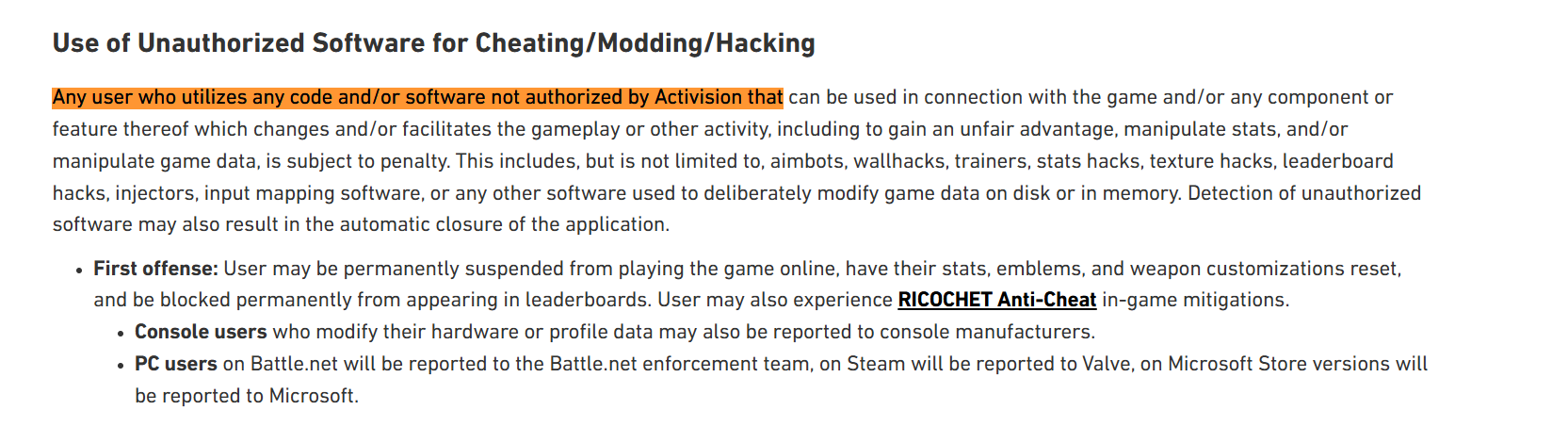
1. Call of Duty (Modern Warfare / Warzone) – Activision
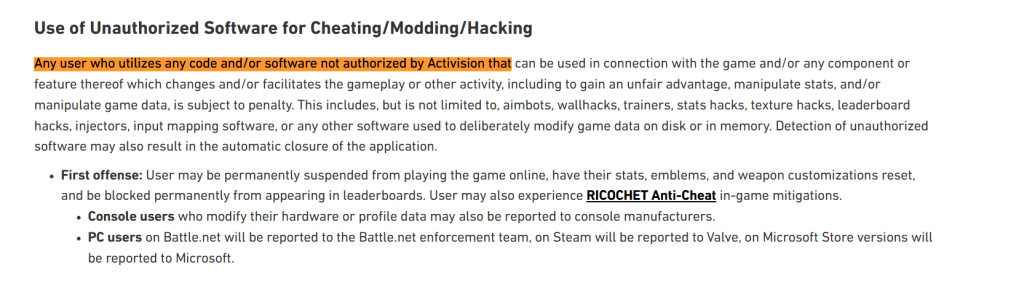
Call of Duty is a globally popular first-person shooter known for its fast-paced multiplayer and Warzone battle royale modes. While VPNs are commonly used to reduce ping or avoid SBMM (Skill-Based Matchmaking), Activision's Terms of Use warn against unfair advantages, which may include manipulating matchmaking with VPNs.
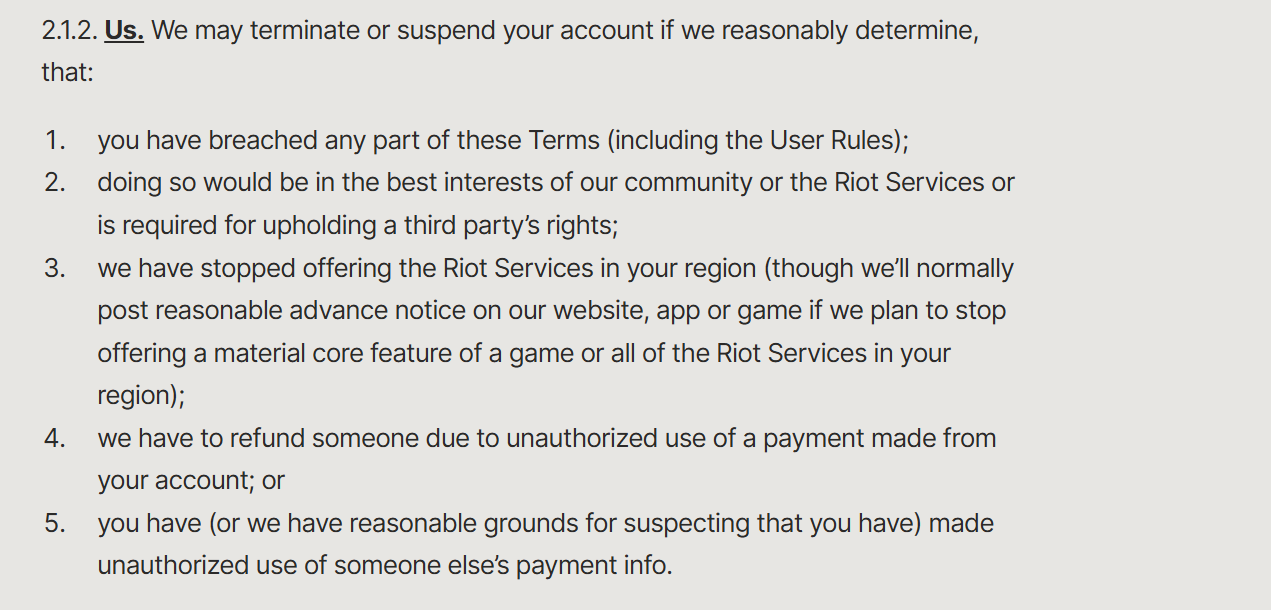
2. Valorant – Riot Games
Valorant is a competitive tactical shooter where split-second latency can mean victory or defeat. Riot's Terms of Service emphasize fair play, and they may flag VPN usage as suspicious activity, particularly if it changes your region or is used to evade bans.

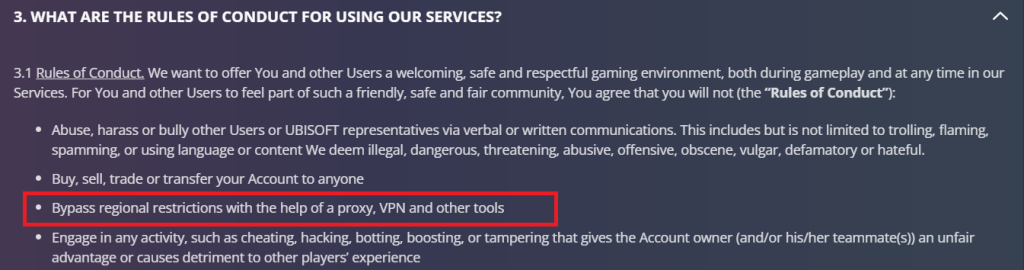
3. Rainbow Six Siege?
Ubisoft doesn’t prohibit VPN usage outright. However, if a VPN is used to gain unfair advantages, like bypassing regional restrictions or manipulating matchmaking, it may result in disciplinary action, including suspensions or permanent bans. This is clearly addressed in Ubisoft’s Terms of Use:
When Is VPN Use Considered Safe for Gaming?
Using a VPN for gaming is generally fine when:
- You're trying to reduce ping or avoid throttling from your ISP.
- You’re playing a region-locked game not available in your country (but not against the game’s TOS).
- You want to secure your connection on public Wi-Fi.
- You aim to avoid DDoS attacks in competitive matches.
However, always read the Terms of Service of the game you’re playing. A VPN might keep your identity private, but it won’t protect you from account bans if the platform detects a policy violation.
Best Country to Connect VPN for Gaming
Choosing the right VPN server depends on what you want to achieve. If your priority is low ping, DDoS protection, or avoiding ISP throttling, connect to a server close to your actual location to keep latency minimal.
On the other hand, if your goal is to bypass geo-restrictions, like accessing bot lobbies or unlocking region-specific skins, pick a server in the country you want your connection to appear from. The optimal choice varies by game, so here are some examples of the best VPN countries for gaming:
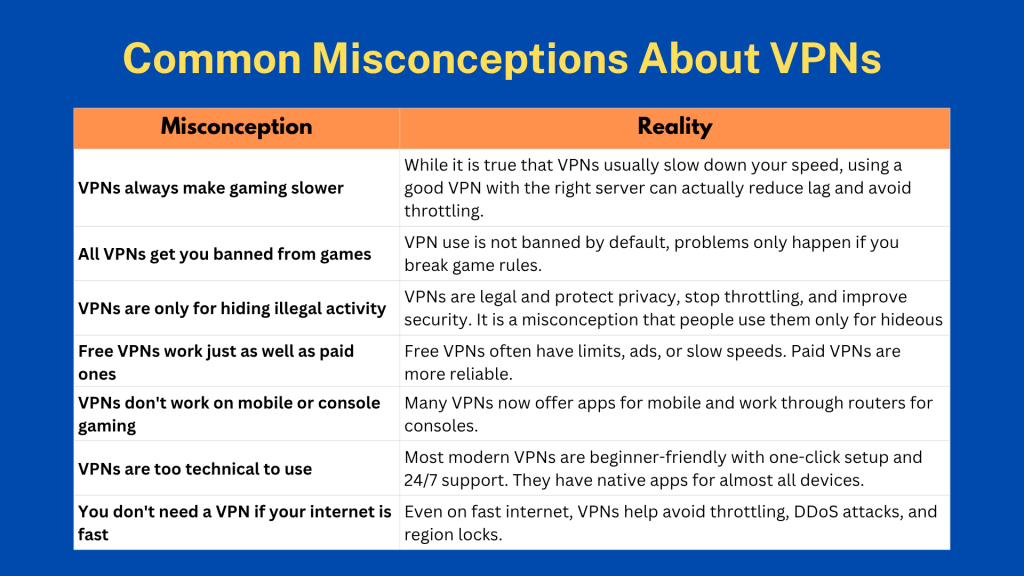
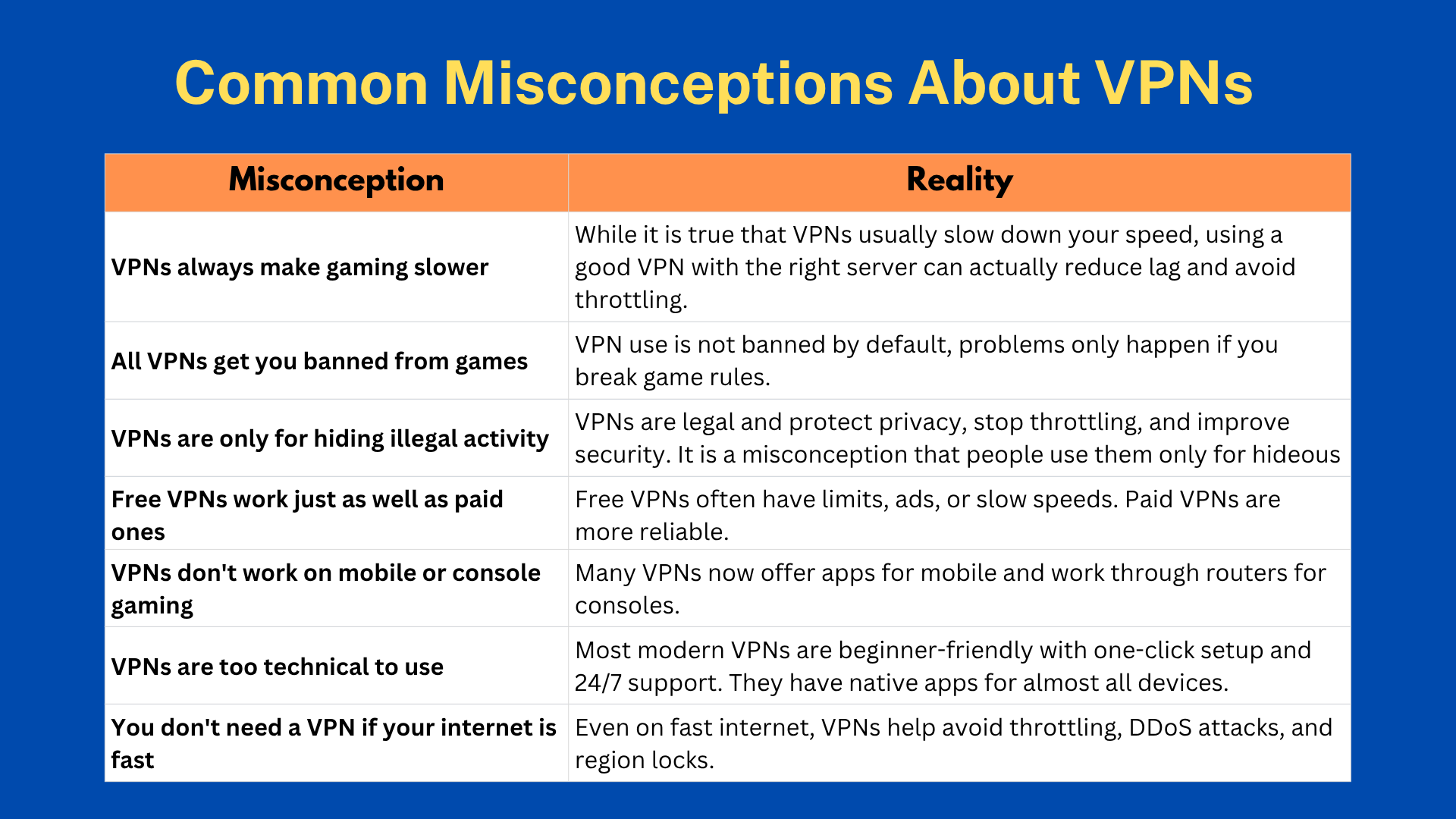
Common Misconceptions About VPNs
Many people misunderstand what VPNs actually do, especially when it comes to gaming. Let’s clear up some of the most common myths and show how VPNs can actually help.
Risks and Considerations of Using a VPN
While using a VPN is highly preferable, here are some things that you must consider before getting one. Let's have a look at each of them:
- Lag or Slower Speeds: A VPN can sometimes make your connection slower if you use a faraway or crowded server.
- Blocked by Games: Some games detect VPNs and may block you from logging in or playing online.
- Breaking Game Rules: Using a VPN to change regions or bypass restrictions can go against the game’s terms and get you banned.
- False Privacy Claims: Some VPNs say they don’t log data or are fast, but they might not be telling the truth.
- Not Made for Gaming: Certain VPNs are too slow or unstable for gaming and can disconnect often.
- Hard to Use on Consoles: VPNs don’t work easily on Xbox, PlayStation, or Switch unless you set them up through a special router.
- Wasted Money: If the VPN doesn’t improve your gaming or causes issues, you might feel like you wasted your money.
That said, let us clarify that the VPNs that we have recommended are free of all these risks. TechNadu's team has already tested them on all these parameters; therefore, you can choose any of them and rest assured.
Why Your Games Lag, Crash, or VPN Fails – And How to Fix It
Gaming should be smooth and immersive, but nothing ruins the experience faster than lag, crashes, or a malfunctioning VPN. These issues often stem from common but overlooked causes. Below is a practical table that outlines the most frequent gaming and VPN-related problems and offers straightforward solutions to get you back into the action quickly.
Here's more guidance on reducing lag, fixing crashes, and improving connection stability in Genshin Impact, Fortnite, Roblox, and Warzone.
Can You Use a Free VPN for Gaming?
Yes, you can use a free gaming VPN, but you'll encounter a very limited experience. We don't recommend free VPNs because they come with various restrictions that can ruin your gameplay experience and even leave you with a banned/blocked account. Let's have a quick look why we don't recommend free VPNs and what you should look for instead.
Nothing can replace a capable premium VPN. If you wish to go risk-free, go with a free VPN trial. That's how you'll get premium features for a limited time and experience how a truly capable VPN should work. We recommend the NordVPN free trial, which can be activated on Android, but this VPN also has a 30-day money-back guarantee that applies to all other devices.
Final Thoughts
After reviewing the entire guide, one thing becomes clear, a reliable gaming VPN can significantly enhance your online gaming experience by lowering ping, preventing DDoS attacks, bypassing regional restrictions, and unlocking easier matchmaking or bot lobbies. Beyond performance gains, it protects your real IP address, prevents ISP throttling, and ensures stable, secure connections across competitive, casual, and cloud gaming environments.
Keeping all factors in mind, here are the best VPNs for gaming in 2026:
- NordVPN – Outstanding overall performance with NordLynx protocol, consistently low ping, strong DDoS protection, and reliable access to global game servers.
- ExpressVPN – Premium-speed gaming VPN with the Lightway protocol, excellent stability on long-distance servers, and seamless performance for competitive play.
- Surfshark – Best value gaming VPN with unlimited device connections, easy bot lobby access, NoBorders mode for restricted networks, and solid low-latency speeds.
- Private Internet Access (PIA VPN) – Highly customizable gaming VPN with port forwarding, massive server coverage, strong DDoS protection, and advanced routing controls for experienced users.
- Proton VPN – Privacy-first gaming VPN with Swiss jurisdiction, Secure Core servers, VPN Accelerator technology, and strong protection for long, secure gaming sessions.
So whether your priority is low latency, competitive security, bot lobby access, privacy, multi-device gaming, or budget-friendly pricing, these gaming VPNs deliver the best balance of speed, stability, and protection for modern online gaming in 2026.
That would be all that we've prepared for this guide on 'best VPNs for Gaming in 2026.' If you have any questions or doubts, let us know via the comments section below. Lastly, thanks for reading!