When you purchase through links on our site, we may earn an affiliate commission. Here’s how it works.
VyprVPN Review 2026


Our experts have reviewed 53 VPN providers, which were put through extensive rounds of testing. To learn more about that process, here’s how we review VPNs, where we explain our criteria and our policy of being fully transparent.
VyprVPN is a VPN service based in Switzerland that has been active since 2009. Currently under the ownership of its US-based parent company, Certida, it was previously held by Golden Frog. Known for providing security solutions for both individuals and businesses, Golden Frog laid the foundation for VyprVPN's commitment to online privacy and protection.
Luckily, VyprVPN's location isn't a part of any international surveillance alliances, and it claims that it doesn't keep any user logs. VyprVPN also provides excellent security features, including a kill switch, DNS leak protection, and its proprietary Chameleon protocol.
Although past issues (a server bug and data breach) raise concerns, they're actively fixing vulnerabilities and improving security to prevent future incidents. This ongoing commitment, coupled with a server network of 700+ in 60+ countries, makes it a good option for most online activities, including torrenting, gaming, and streaming.
So, it's no surprise that VyprVPN has been selected as part of our list of the best VPN services. Before we delve deeper into our VyprVPN review, let's take a look at its key features in the table below:
For our reviews, we always test VPN services ourselves, so you can trust that our opinions are based on real-world usage. We keep our reviews up-to-date at all times, so you can be sure that you're getting the latest information on VyprVPN. To learn more about our process, check out our guide on how we review VPNs.
Background, Jurisdiction & Reputation
Despite past incidents, VyprVPN is taking significant steps to prioritize transparency in its operations by disclosing important information about its policies and practices. Additionally, they're deliberately distancing themselves from the 5-Eyes Alliance. Our Score: 4.5/10
If you're looking for a VPN, it's crucial to do your homework and learn about its history. Understanding where it comes from and whether it has a record of data leaks is key to determining its reliability. It's important to know if the VPN provider can be trusted and if they prioritize your data privacy.
Where Is VyprVPN Based?
VyprVPN is based in Switzerland, a country with a reputation for a strong economy and impartial diplomacy. As a non-member of the EU, Switzerland's neutrality is an advantage for those concerned about data privacy. What's more, Switzerland isn't part of the 5/9/14 Eyes alliance and is one of the best VPNs outside 14 Eyes countries.
In the past, Golden Frog, founded by Ron and Carolyn Yokubaitis, owned VyprVPN, driven by a mission sparked by NSA surveillance. Now, Certida, based in Texas, USA, has taken over as VyprVPN's parent company. However, this shift doesn't alter VyprVPN's commitment to privacy.
Certida is actively managing and enhancing VyprVPN's features from its Texas headquarters, maintaining its own server and network infrastructure globally. They also have no economic ties to other VPN providers, ensuring they don't share user information with any competing service.
Did VyprVPN Leak Personal Data in the Past?
Yes, VyprVPN leaked data in the past. In 2023, VyprVPN had a data breach. The incident exposed sensitive user information like personal email addresses. However, VyprVPN has since taken steps to bolster its security to prevent similar incidents in the future.
Additionally, it had a server bug in 2021 that could've been exploited for DDoS attacks. In response, VyprVPN swiftly patched the issue within an hour. Thankfully, no data was compromised.
On top of VyprVPN's involvement in these issues, the company has also been linked to copyright infringement notices. Numerous users have reported receiving these notices, indicating that VyprVPN has monitored user activity and has been willing to cooperate with authorities.
While this is a less-than-ideal situation, it's worth noting that VyprVPN has taken steps to address this issue. In fact, the company has undergone an independent audit of its no-logs policy. The audit was conducted by Leviathan Security, which identified a few weaknesses that VyprVPN promptly addressed. As a result, there have been no recent reports of VyprVPN logging user activity.
Overall, VyprVPN might not be the perfect option, but its commitment to improving its no-logs policy is commendable.
Is VyprVPN Safe?
Yes, VyprVPN could be a safe service if you're not too concerned about privacy. While there have been reports in the past of the company being linked to copyright infringement notices, VyprVPN has taken steps to address the issues and improve its no-logs policy.
VyprVPN also offers a robust host of security features, including AES 256-bit encryption, split tunneling, a kill switch, public Wi-Fi protection, a NAT firewall, server obfuscation, and DNS, IPv6, and WebRTC leak protection. The provider employs a solid variety of VPN connection protocols as well, such as WireGuard, L2TP, PPTP, IKEv2, OpenVPN, and Chameleon, allowing you to choose your level of encryption based on your needs.
Furthermore, VyprVPN’s location in neutral Switzerland provides a sturdy foundation for VyprVPN's operations, which is reassuring. While VyprVPN's past association with copyright infringement notices is less than ideal, the company's no-logs policy improvements, along with its third-party audit, make it a good enough option for those seeking a safe VPN.
Supported Platforms and Devices
Though plenty of devices are supported (even some obscure ones), VyprVPN doesn’t offer a browser extension. Since browser extensions will always be inferior to any native software, it’s not a huge detractor. Our Score: 8/10
The best-case scenario is to find a VPN that supports all your devices and allows many simultaneous connections with a single subscription. Let’s take a look at VyprVPN’s device and platform compatibility.
VyprVPN is compatible with a wide range of devices - all the major mobile (Android, iPhone) and desktop platforms (Windows, Mac), including Linux and ChromeOS (for Chromebook), are on the list. Support is also extended to both routers and streaming platforms (Firestick, Kodi). Unfortunately, Roku isn't supported, but the VPN works well on Android TV and Apple TV.
Also, browser extensions such as those for Chrome and Firefox aren't supported by VyprVPN - we don’t see this as a major downside since these typically act as simple proxies. Installing a native app on your device is always preferred to encrypt all incoming and outgoing traffic.
Additionally, a VyprVPN subscription permits only up to 5 simultaneous connections, even though the account page advertises support for 30 connections. We've verified this through their customer support representative. However, it's worth noting that the website hasn't been updated to reflect this change.
Installation & Initial Configuration
Downloading and installing VyprVPN is very easy. The application already comes optimized, but you can fine-tune it on your own as well. Our Score: 8/10
In this part of our VyprVPN review, we'll walk you through the process of downloading, installing, and configuring VyprVPN. As you're about to discover, the steps involved are incredibly straightforward.
How to Download and Use VyprVPN?
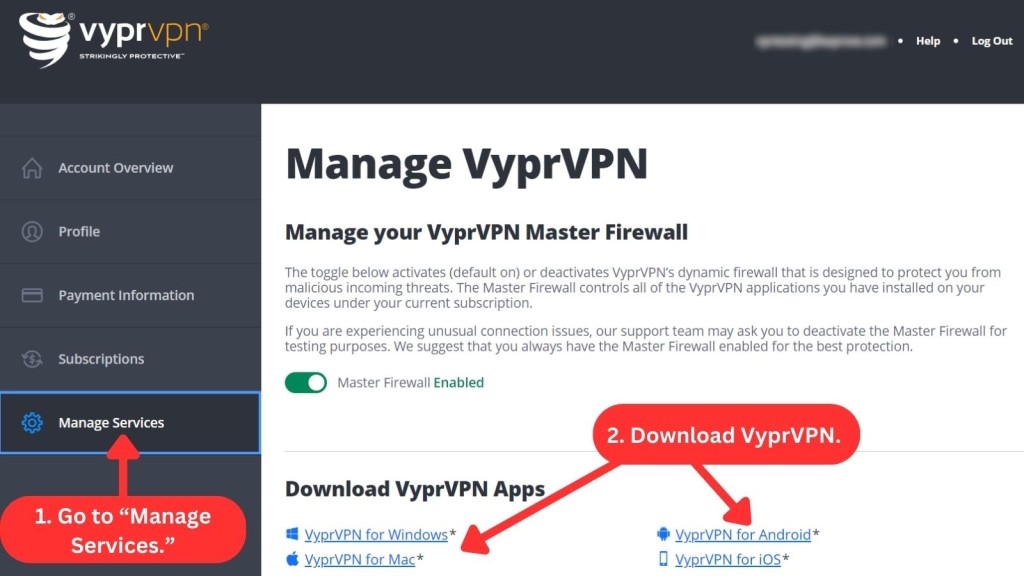
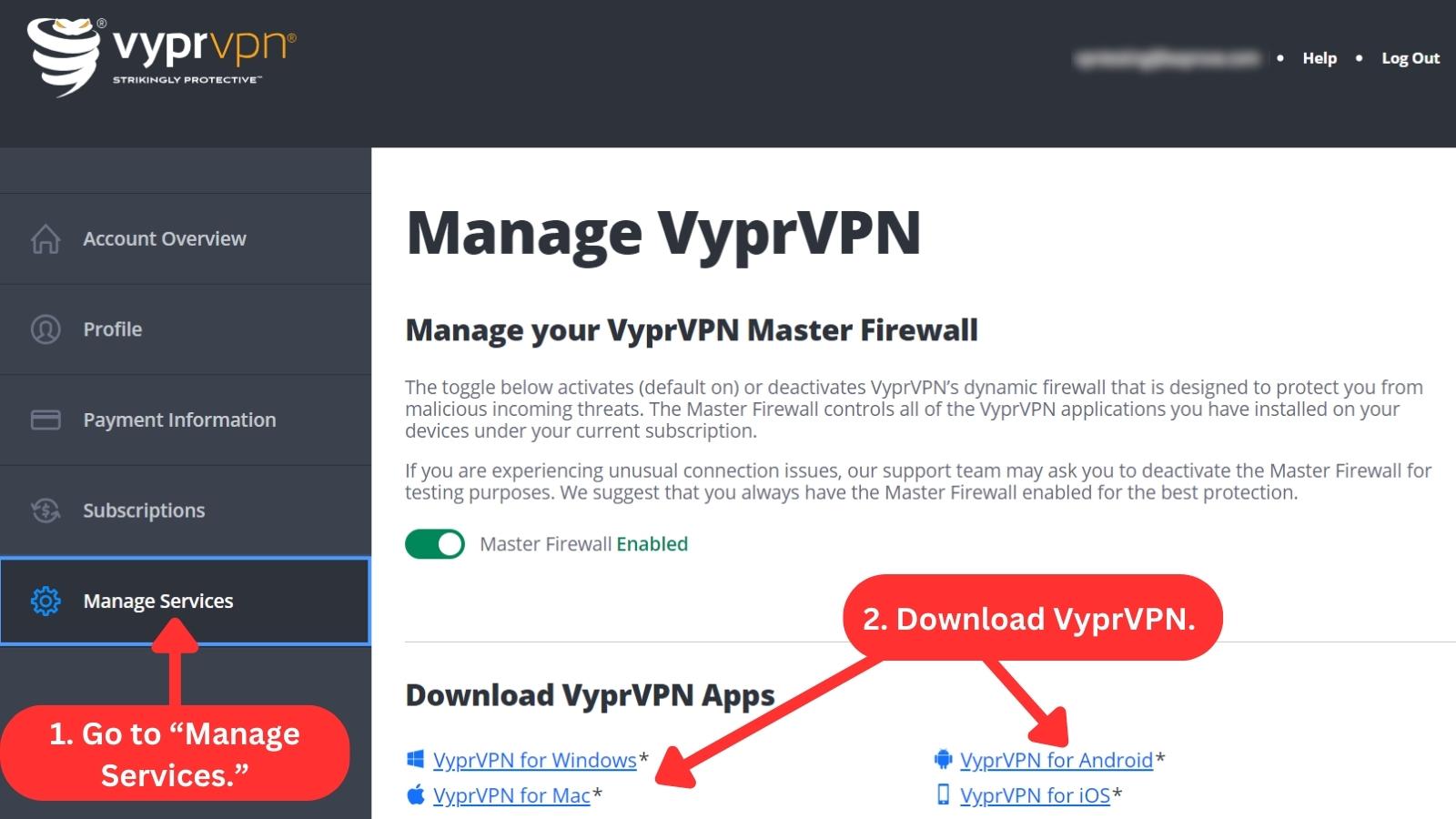
To get started with this VPN, you need to subscribe, get the installation file from the official VyprVPN website, and install it on your device. The VPN setup typically takes just a few minutes. To download VyprVPN on a Windows PC, follow these steps:
- Subscribe to VyprVPN using a Web browser.
- Log in to your account to access your VyprVPN dashboard.
- Navigate to the right-side panel and click "Manage Services."
- Select your device for download.
- Download and run the installation file.
- Once installed, log in using your credentials.
- Choose a server to connect. That's it!
On macOS, you only need to drag and drop the VyprVPN app to your Applications folder. Once you've done that, open the application, log in with your credentials, and it will be ready for use.
In case you're downloading VyprVPN outside the US, opt for the APK version for Android devices. For iOS, you may need to explore workarounds, as it typically requires US credentials when downloading from the App Store.
Prominent Features
VyprVPN comes with a solid set of features, including a highly interesting proprietary technology. However, it’s missing a built-in ad and malware blocker, both of which are commonly offered by other top VPNs. Our Score: 8.5/10
Every reliable VPN needs to offer a certain set of features. So, let’s take a look at how VyprVPN performs in this area.
- DNS and IPv6 Leak Protection: VyprVPN’s leak protection features ensure that your DNS and IP aren't leaked to any entity. This protects your true location and identity.
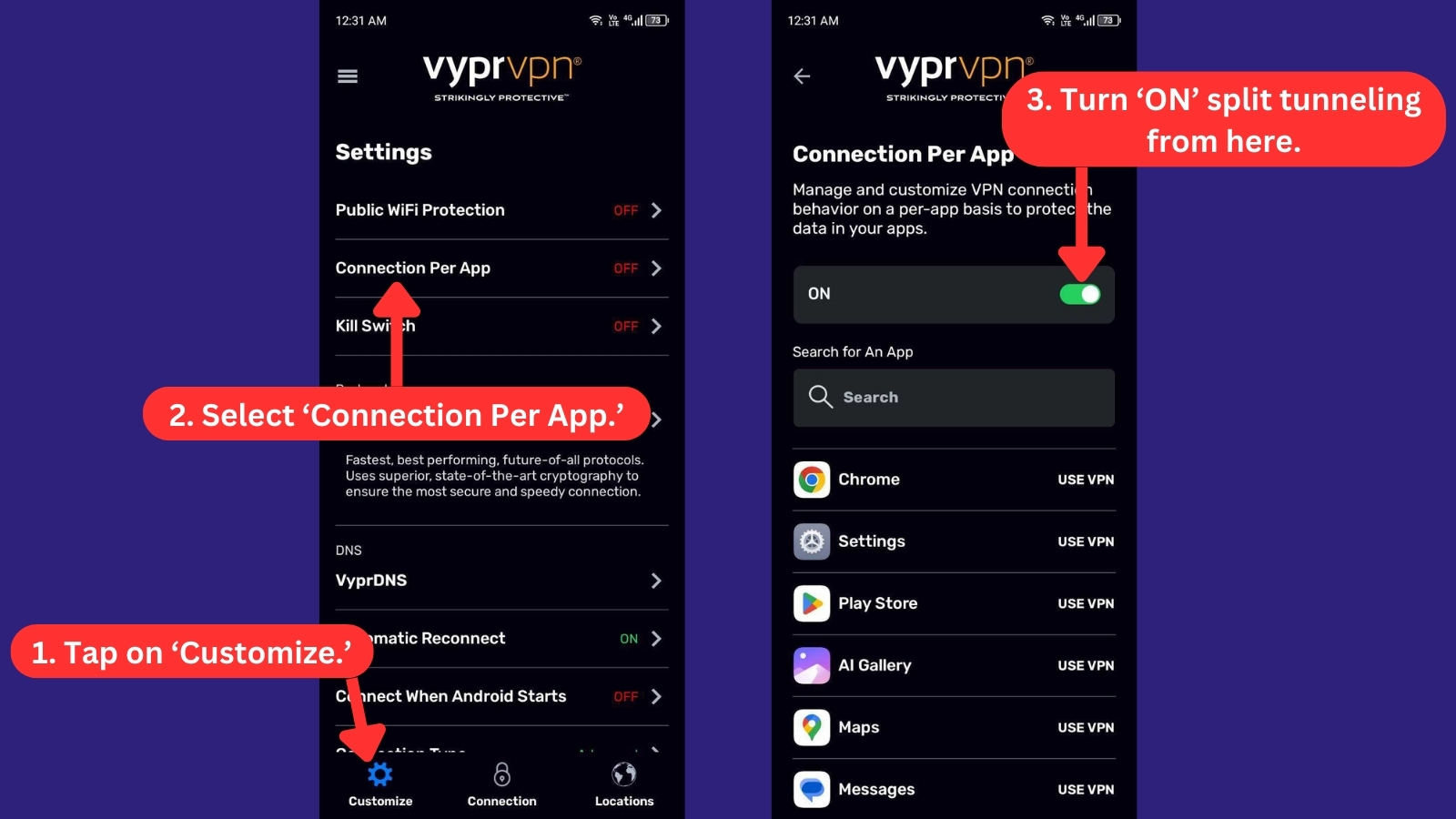
- Connection Per App (Split Tunneling): This is feature offered by VyprVPN is only available on Windows, Mac, and Android devices. While it serves the same purpose as split tunneling, it uses a different method. It provides you the flexibility to decide which apps use VyprVPN's connection when it's in use and which ones don't.
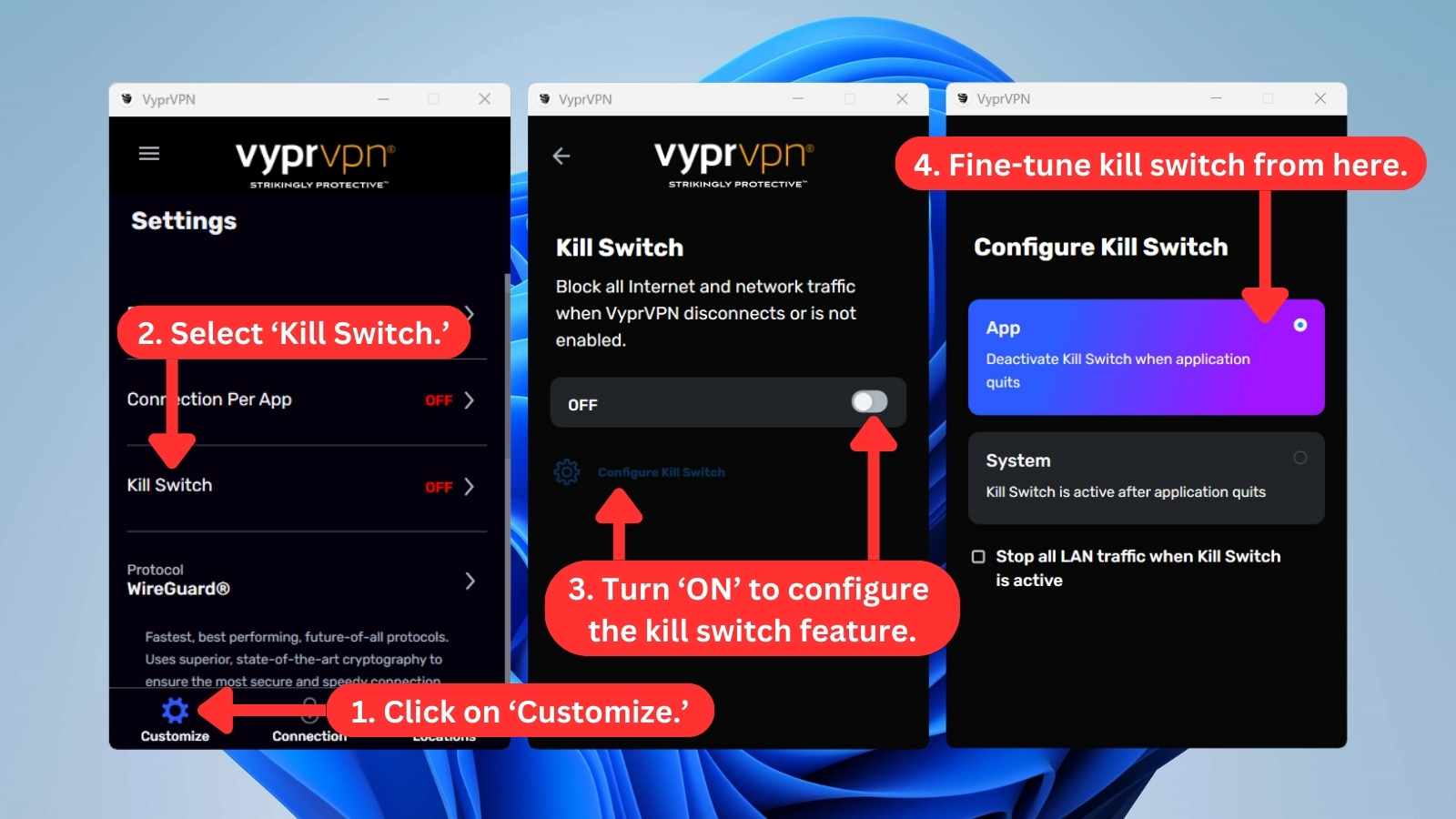
- Kill Switch: This feature blocks all Internet and network traffic automatically when the VyprVPN connection is disabled, ensuring your personal information and peer-to-peer (P2P) traffic remain private. You can use this feature on Windows, macOS, and Android apps.
- Public Wi-Fi Protection: Accessible across all supported apps, this feature ensures the VPN app automatically links to a VyprVPN server when connecting to an unfamiliar Wi-Fi network. This feature safeguards your connection, shielding you from potential threats posed by hackers and snoopers.
- Unlimited Server Switches, Bandwidth, and Data – VyprVPN allows you to switch between servers as many times as you want without any restrictions. The service also enables you to use the Internet as much as you want without worrying about any bandwidth caps or data limits.
- Master Firewall: Formerly called as NAT Firewall, this feature provides an extra layer of security by blocking unauthorized inbound Internet traffic. It's activated by default on all VyprVPN accounts. In case you encounter connection issues, you can disable this feature right from your account dashboard.

- VPN Protocols: VyprVPN hooks you up with WireGuard, the top-notch VPN protocol for a super-fast, ultra-private, and mega-secure connection on all your devices. Plus, you've got other options like IPsec, OpenVPN, and its proprietary VPN protocol called Chameleon to tailor your encryption, speed, and protection levels.
- VyprDNS: This in-house DNS service is exclusively offered by VyprVPN. It seamlessly integrates with the apps, providing automatic use upon VPN connection. However, take note that you can't use VyprDNS independently - it's an integral part of your VyprVPN experience to boost and secure DNS functionality.
- Automatic Reconnect: With this feature turned on, VyprVPN will seamlessly re-establish your connection if it's interrupted, keeping you protected without any manual intervention.
- Fastest Server: This server option connects you to the server location, offering the quickest connection. Combine this with VyprVPN's Automatic Reconnect feature to ensure you're always protected by the fastest available server, even after a connection drop.
VyprVPN appears to be a capable VPN provider with strong leak protection and enhanced security features. However, the lack of an ad blocker is notable, as many other VPNs have begun to offer this feature in the past year.
Moreover, VyprVPN doesn't support port forwarding in the traditional sense. Here's why. When connected, all outbound ports are open, but inbound ports are closed by the default Master Firewall. While you can't open specific inbound ports, you have the option to open all inbound ports by disabling the Master Firewall in your account dashboard's "Manage Services" section.
In addition, VyprVPN doesn't offer dedicated IP addresses for their standard individual or business plans. The exclusive availability of a dedicated IP is restricted to the Business Cloud plan.
However, if you purchased a dedicated IP through Amazon Web Services, VyprVPN allows you to integrate it into their application, granting you the capability to use that specific IP within the framework of the Business Cloud plan.
Server Count and Infrastructure
Considering that top-rated VPNs offer 3,000 to 7,000+ servers, VyprVPN’s 700+ server network won’t impress anyone, but they can still get the job done. Our Score: 7/10
When it comes to developing its server network, VyprVPN is taking its time. Here’s a handy overview of the basic information regarding its server count.
With around 700+ servers, VyprVPN offers a significantly smaller network than some of the VPNs with the most servers, which offer more than 7,000 servers. Even though VyprVPN servers seem to be strategically located, there are some VPNs that provide significantly better coverage.
It’s also worth noting that this VPN only allows you to connect to servers in specific cities in the USA and Australia, whereas many competitors allow you to select server locations in any country they cover.
VyprVPN server locations have physical and virtual setups, but when we contacted their customer support, they were unable to provide any further specifics. Instead, they informed us that they frequently rotate their servers to provide the best quality of service.
Even though VyprVPN doesn’t have the biggest network of servers out there, it owns, engineers, and operates its entire infrastructure of VPN server clusters, whereas competitors often use third-party-hosted servers. This gives VyprVPN an advantage when it comes to speed and performance.
UI/UX Design and Ease of Use
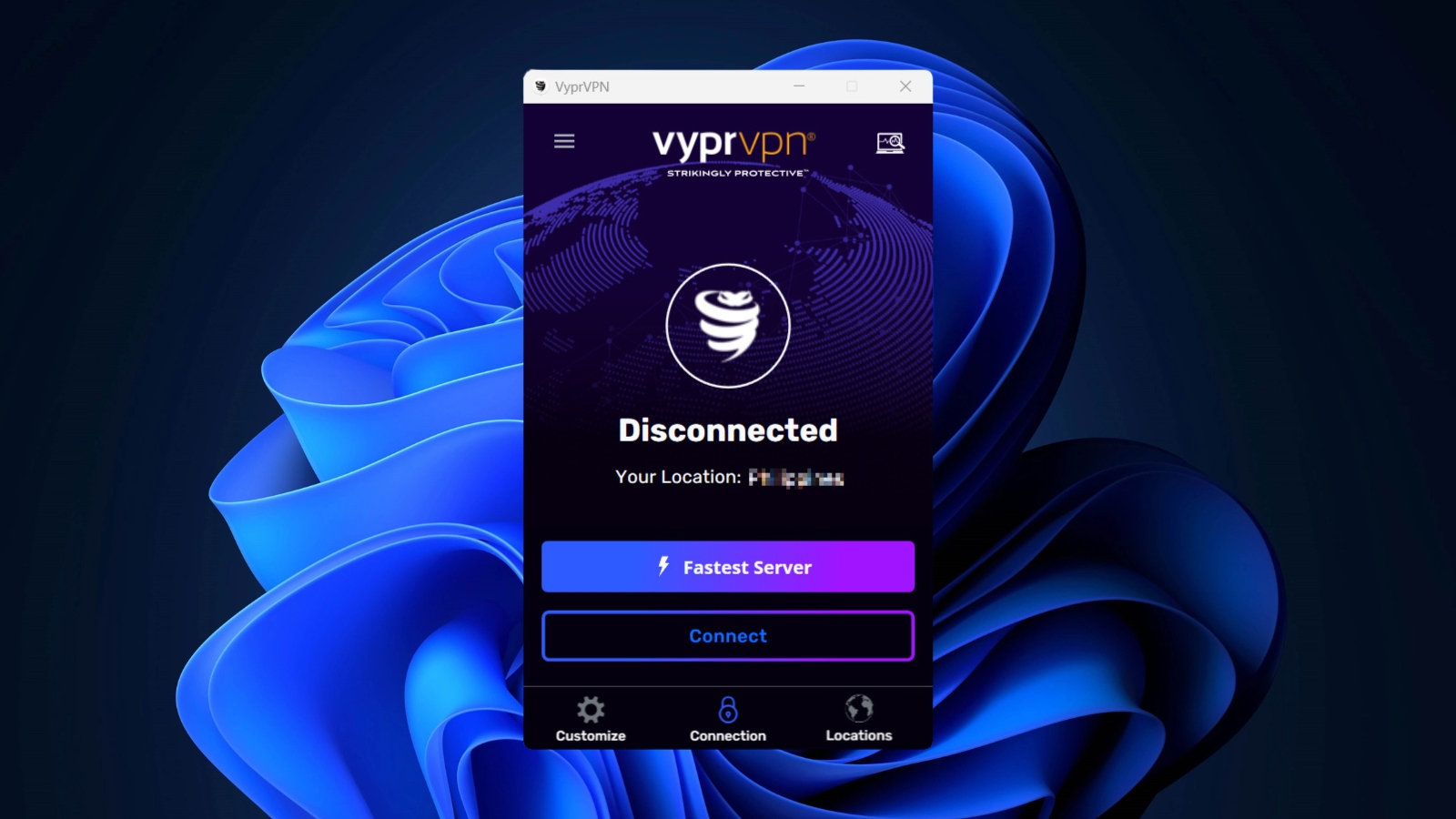
VyprVPN has updated its UI across Windows, macOS, iOS, and Android. Expect a fresh, modern design that simplifies your VPN experience across all your devices. Our Score: 8/10
In this section of our VyprVPN review, we'll evaluate the user interface and usability of VyprVPN's desktop and mobile applications. We'll explore how these apps contribute to the overall user experience.
How Well Does VyprVPN Work on Desktop Platforms?
VyprVPN's main screen looks the same on Windows PC and Mac. You'll find a "Connect" button in the middle to connect or disconnect from the VPN. The list of servers and access to different settings are also right there on the main screen.
You can click the country above the connect button or go to the "Locations" tab in the bottom left corner. It's also easy to sort the servers by country and mark your favorites for convenient access.

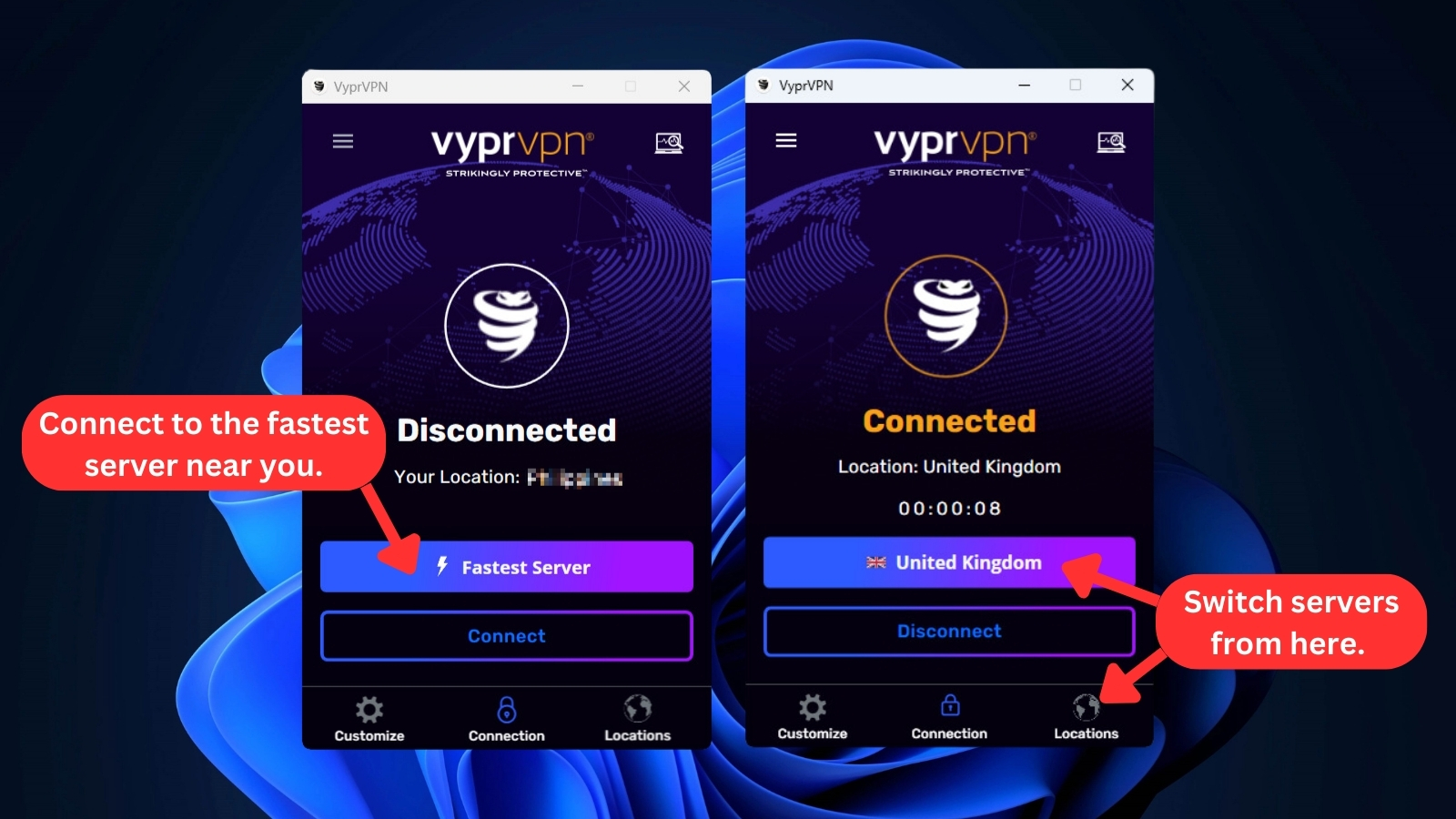
You'll know you're connected when the VyprVPN logo lights up with golden yellow rings. If you click on a different server on the list, it will disconnect you from your current location and link you to the one you've chosen.
On your right, you'll find a hamburger button. Clicking it reveals a sidebar menu where you can view your account details, access the help center and customer support, and explore more details about the VPN.
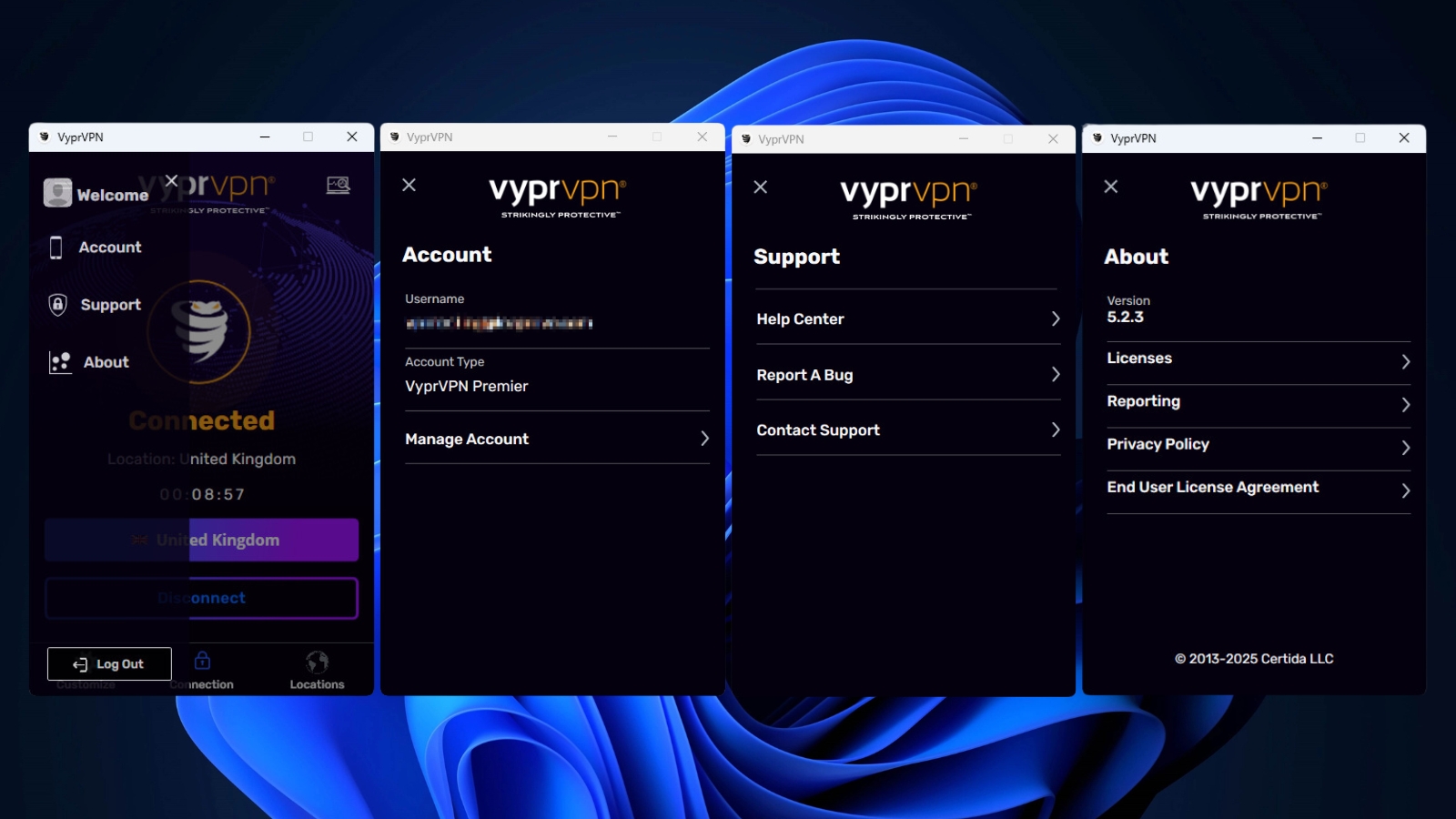
At the bottom of the app, you'll find three tabs: Customize, Connection, and Locations.
- Customize: In this tab, you can switch protocols, modify startup and notification preferences, and tweak other VPN settings.
- Connection: Clicking this tab will lead you to VyprVPN's home screen, where you can connect or disconnect to the VPN. You can also choose different server locations from this tab by clicking the name of the country above the "Connect" button. Once connected, you can check your connection details by clicking the laptop icon in the upper-left corner of the screen.

- Locations: Here, you can manually search for server locations or mark your favorites. You can also sort servers by country, region, or speed.
We have to add that there's no native app for Linux systems, so you'll need to set up VyprVPN manually. If you run into any hiccups setting up on Linux, you can easily get in touch with VyprVPN's 24/7 support team. In our experience, they're quick to lend a hand.
To make sure you're getting the best Linux support, check out our guide on the best VPN for Linux.
How Well Does VyprVPN Work on Mobile Platforms?
Similar to the desktop apps, VyprVPN's Android and iPhone apps maintain a consistent appearance. When you land on their home screens, you'll notice a striking resemblance, with almost identical looks and features.
Furthermore, when it comes to connecting to servers, both mobile experiences mirror those of desktops, showcasing the VyprVPN logo animated with those distinctive yellow rings. Both the sidebar and bottom menu also offer a consistent set of features.
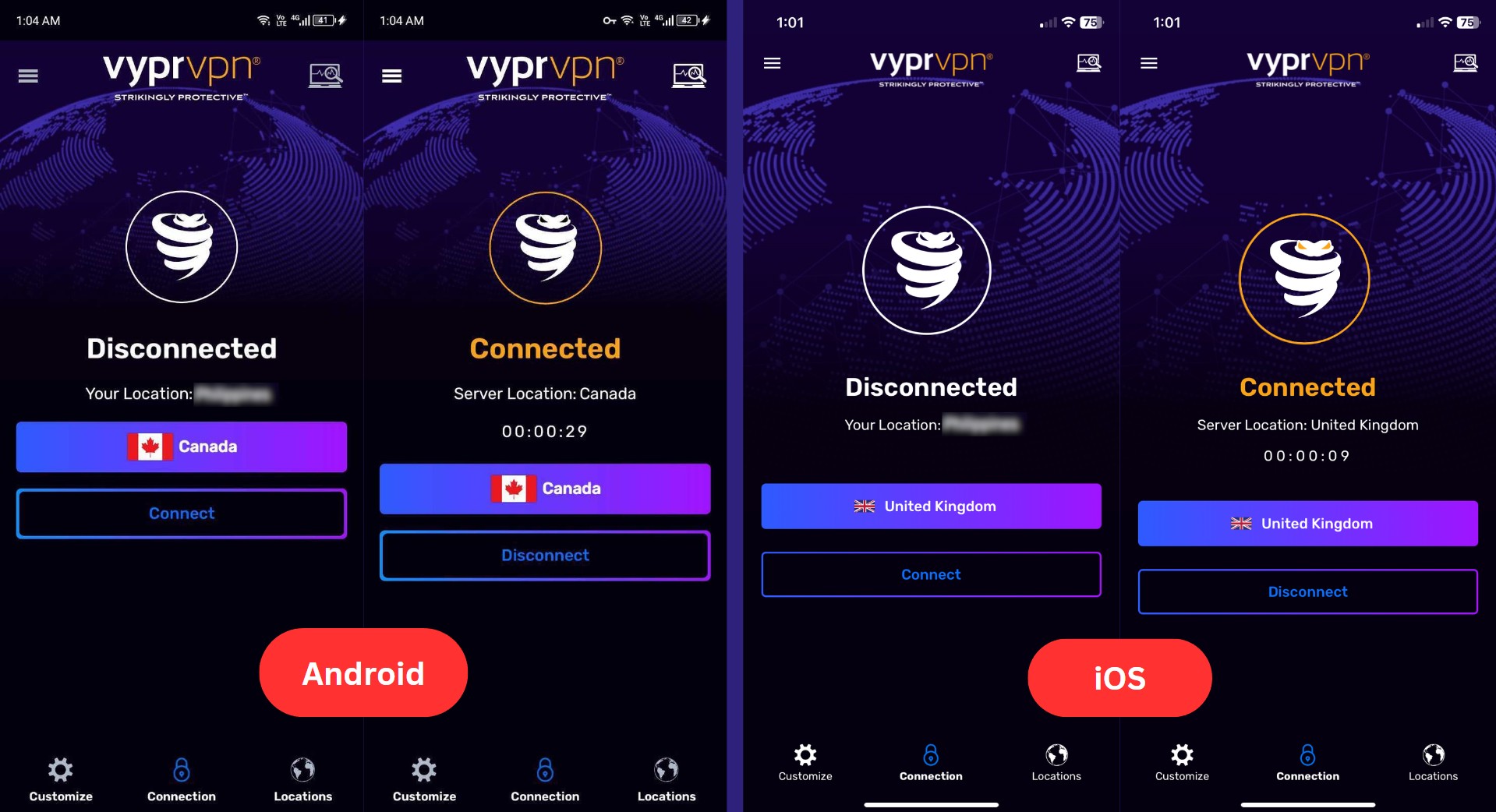
Yet, it's worth noting that the mobile apps lack the "Tap Adapter" option found in the Windows app. This feature is designed to handle VPN connections, particularly for the OpenVPN and Chameleon protocols.
Now, when you head to the "Customize" tab in the bottom right corner, you'll notice some differences. Android offers more features compared to its iPhone counterpart. Let's explore these features below:
- Public Wifi Protection: With this feature enabled, you have the option to include the WiFi networks you trust. This prevents VyprVPN from automatically starting a VPN connection when Public WiFi Protection is activated.
- Kill Switch: When VyprVPN is either disconnected or inactive, this feature effectively blocks all Internet and network traffic. Unfortunately, Kill Switch isn't supported on iOS devices, putting it a step behind the Android app.
- Protocol: When it comes to VPN protocols, the iOS app has an edge, boasting an extra protocol on its list. It supports WireGuard, IKEv2, Chameleon, and OpenVPN protocols. In contrast, the Android app doesn't include the IKEv2 protocol.
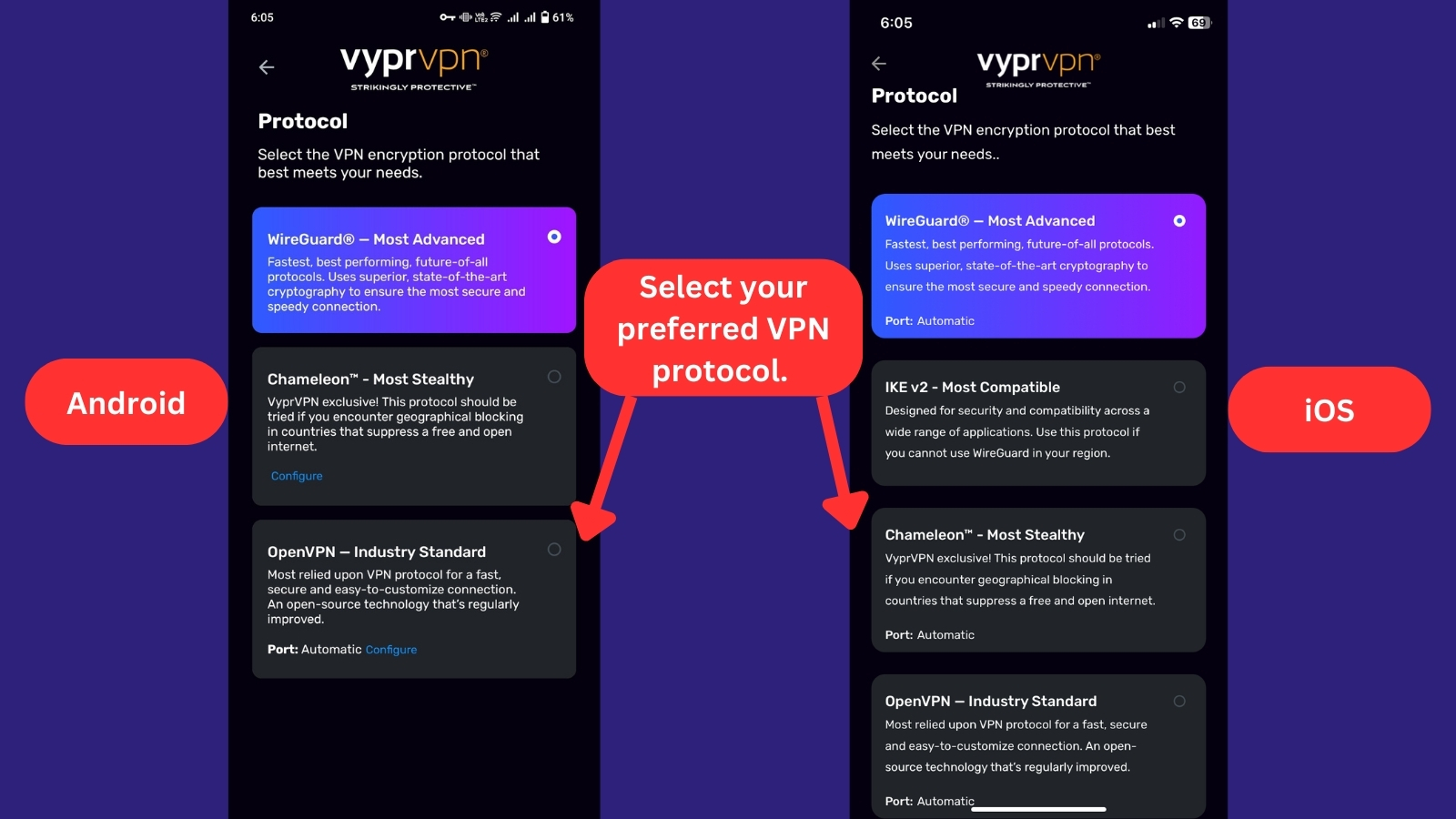
- DNS: You can select the domain name server VyprVPN uses with the DNS setting. But on mobile platforms, this feature is exclusive to Android and isn't available on iOS devices.
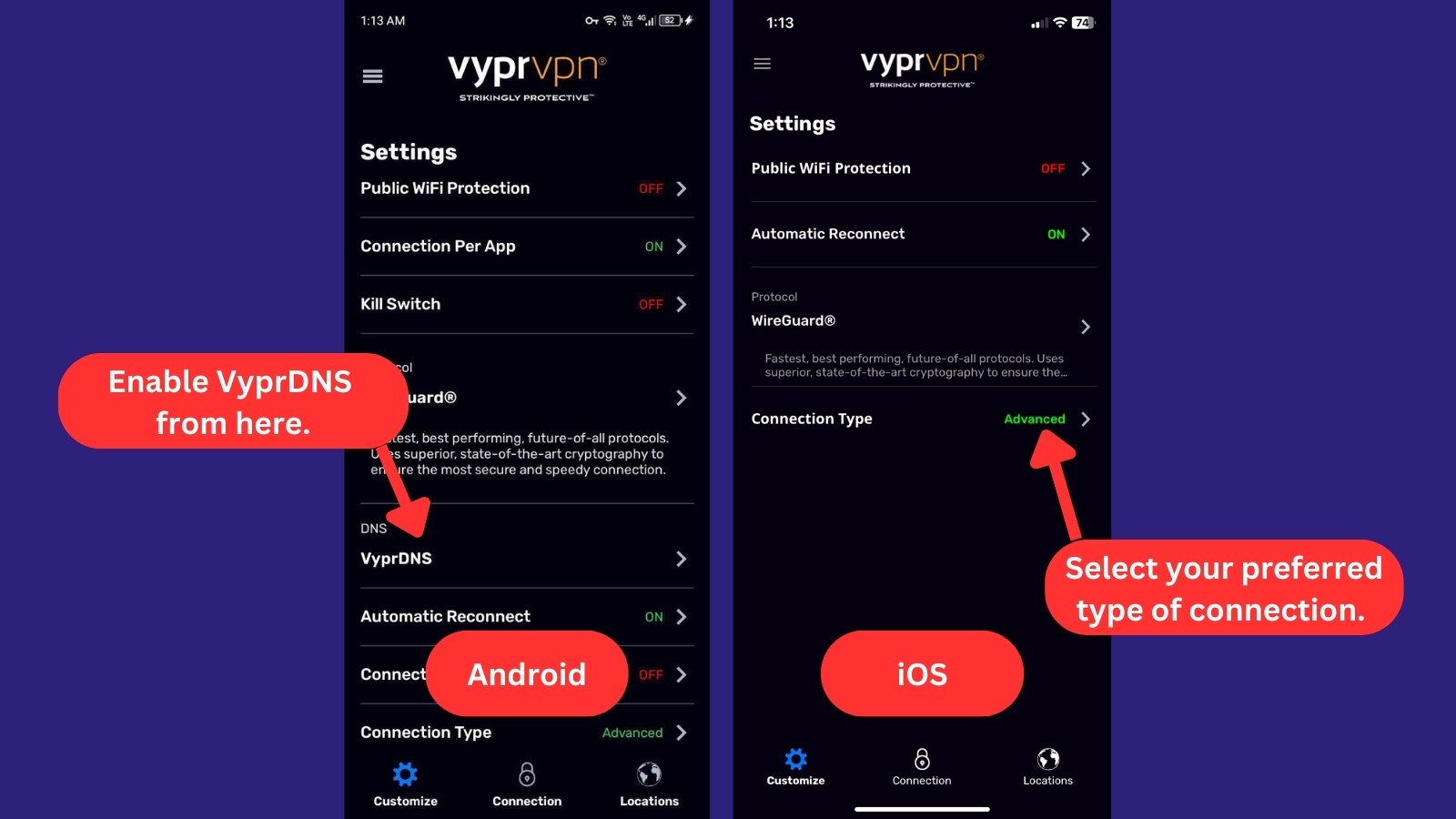
- Automatic Reconnect: Enabling this feature ensures that VyprVPN automatically reconnects in case of a dropped connection, offering continuous protection. This feature is available on both Android and iOS devices.
- Connect When Android Starts: If you want VyprVPN to connect as soon as your Android starts, just turn "on" this option.
- Connection Type: Here, you can choose between "Advanced" and "Quick Connect." If you go with "Quick Connect," you can conveniently pick the specific region you want to quickly connect to.
One notable difference is found in the mobile apps' server list, which stands out for its functional sorting capabilities. It effectively organizes servers based on country, region, and speed - just like the Windows app.
We also reached out to one of their live agents, who informed us that VyprVPN no longer supports browser extensions. It turns out Google changed its policy, leading to the removal of several censorship-bypassing services, including VyprVPN, from their app stores.
This decision came about because VyprVPN could be used to bypass censorship. We just hope that in the future, they'll consider exploring browser extensions again. This could offer users an additional, convenient option to connect to their robust VPN network.
Media Streaming, Torrenting, and Gaming Support
VyprVPN provides a reliable experience for streaming, torrenting, and gaming, but it lacks certain features that some other VPNs offer to enhance performance. Our Score: 8/10
When it comes to VPNs, there are lots of good things to discover, like unblocking content, ensuring lag-free gaming, and making torrenting easy. But finding a VPN that's great at all of these things can be a bit tricky. Let's take a closer look at what VyprVPN can do.
Is VyprVPN Good for Streaming?
Yes. When we tested VyprVPN for streaming, we were able to easily unblock websites like Netflix (US & UK versions), BBC iPlayer, Hulu, and Prime Video. Streaming was smooth, and it worked well for bypassing sports blackouts, which was a nice bonus.
Overall, VyprVPN showed itself to be a reliable VPN for streaming, offering solid access to popular platforms without hassle. Here are some major US-based streaming platforms that VyprVPN unblocks:
Despite variations in speed based on the servers we selected, we're happy to report that we managed to stream in HD with minimal buffering. When it comes to streaming services outside the US, here’s what you can expect from VyprVPN:
Is VyprVPN Good for Torrenting?
Yes, we downloaded a few public-domain, classic films using uTorrent, and it handled P2P sharing well. It fully supports torrenting on all servers, and speeds were steady throughout downloads. Nothing record-breaking, but reliable enough for large files. The kill switch also worked as expected, immediately cutting off the connection when we force-closed the VPN.
That said, there’s no port forwarding or SOCKS5 proxy support, which might affect performance for some setups. On top of that, there have also been reports of copyright infringement notices in the past, so sticking to legal torrents is the safest bet. Even though VyprVPN's no-logs policy is reassuring, there are more torrent-friendly VPNs out there.
Is VyprVPN Good for Gaming?
Yes. We played a few rounds of Call of Duty: Warzone, Fortnite, and League of Legends, and the experience was mostly positive. Connecting to nearby servers gave us smooth performance with minimal ping increases, keeping latency low and stable. Even during intense moments, the gameplay felt responsive, and we barely noticed any lag.
However, when switching to distant servers, the latency increased more noticeably, which caused some lag, particularly in fast-paced games like Warzone. In comparison, other top-performing gaming VPNs tend to offer more consistent results. The "Master Firewall" feature, though, provided solid protection against DDoS attacks, keeping the connection secure during our gaming sessions.
Security & Privacy
VyprVPN is an audited service. However, it does collect some of your data. This data collection, along with past incidents, leaves you wondering how anonymous you really are with VyprVPN. Our Score: 6/10
Now, we're going to take a closer look at how this VPN keeps you safe online. We'll assess its VPN protocols, logging policy, and potential vulnerabilities like IP/DNS leaks. These will reveal how effectively VyprVPN safeguards your data and anonymity online.
VyprVPN Protocols
VyprVPN offers strong encryption, depending on the VPN protocols you select. The service supports 6 protocols—OpenVPN, WireGuard, IKEv2, L2TP, PPTP, and Chameleon—each of which comes with different pros and cons.
It's important to note that some protocols are platform-specific. Here’s a breakdown of their features and best use cases:
- OpenVPN – This protocol is a secure and flexible option that supports various levels of encryption, including 128-bit and 256-bit AES. OpenVPN provides the widest compatibility and is supported on most operating systems, including Windows, macOS, iOS, Linux, Android, and routers.
- WireGuard – This protocol provides 256-bit encryption and is supported on most operating systems, including Windows, macOS, iOS, and Android. WireGuard is a secure choice for users who want fast speeds and need to use a VPN on multiple devices.
- IKEv2 – IKEv2 is a newer protocol that boasts impressive speed and performance. It's ideal for mobile devices, especially if you're interested in streaming online media. You can take advantage of VyprVPN's support for IKEv2 on Windows, macOS, and iOS.
- LT2P/IPsec – L2TP is an older protocol that has been around for many years. Although it's more secure than its predecessor, PPTP, it's not as secure as newer protocols like OpenVPN. It’s typically combined with IPsec for encryption purposes. Despite its limitations, VyprVPN still offers L2TP/IPsec on Windows, Mac, Android, and iOS via manual configuration.
- PPTP – This protocol offers a speedy connection with 128-bit encryption. That's why it's a good fit for users with slower connections. However, VyprVPN's support for PPTP connection issues is quite limited. That said, PPTP remains accessible for manual configuration on most of VyprVPN's supported devices, including desktops, mobiles, Linux, and even some routers.
- Chameleon – This is VyprVPN's proprietary protocol, which provides the highest level of encryption and is designed to bypass throttling and VPN blocking. Chameleon is supported on most operating systems, including Windows, macOS, iOS, and Android.
As you can see, it's important to choose the right VPN protocol for your specific needs. OpenVPN is the most versatile option overall and is compatible with most operating systems.
Does VyprVPN Keep Logs?
VyprVPN claims to be a "zero-logs" VPN, but the picture is a bit more complex. They do collect some personal information that you disclose to them, such as your name, email address, username, and billing details. However, they assure users this is for account management, billing, and service provision only. This information isn't supposedly tied to your actual VPN activity.
But keep in mind that all this data falls under the category of personally identifiable information (PII). This means it can be used to directly or indirectly identify you as an individual. Additionally, they keep PII for as long as necessary to fulfill the purposes outlined in their privacy policy. They may also be required by law to retain your information for a certain period.
Furthermore, VyprVPN might also share your PII in specific circumstances. This could happen during business transactions like mergers, acquisitions, or asset sales. In such cases, your information may be transferred to the new owner.
In light of this, VyprVPN certainly contradicts its claim of being a zero-logs VPN. And as previously mentioned, numerous reports have surfaced about VyprVPN users receiving copyright infringement notices.
To address these concerns, VyprVPN underwent an independent audit and updated its privacy policy. The latest privacy policy clearly states that the company doesn't collect any logs or DNS requests.
Although the company claims to have never taken advantage of personal data, the fact that it collected it at all raises concerns. The scope and limitations of the audit should be carefully examined to determine if VyprVPN truly operates as a zero-logs VPN.
Does VyprVPN Leak/Expose Your Private Data?
No, VyprVPN doesn't leak your personal data. To determine whether VyprVPN exposes your data, we ran a DNS leak test. This checks what information third-party websites see when we visit them. If the VPN is secure, they should see only what the VyprVPN server shows them, which should never reveal our true IP address or location.
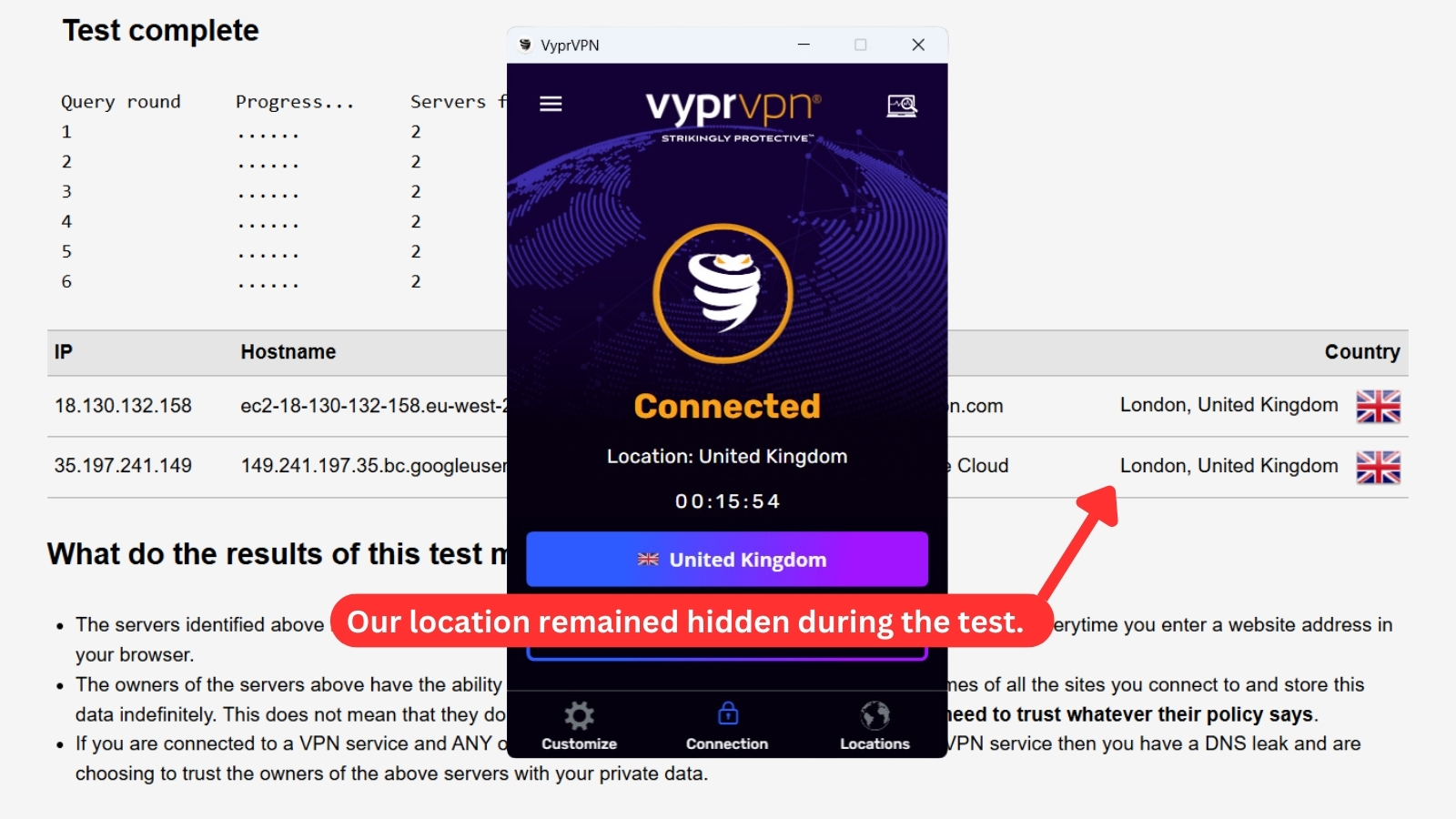
As you can see from the image above, the website identified that we were “located” in London, UK, and it confirmed that all our traffic was routed through VyprVPN’s servers. This means our true information was hidden, and there was no VPN leakage.
Speed & Performance
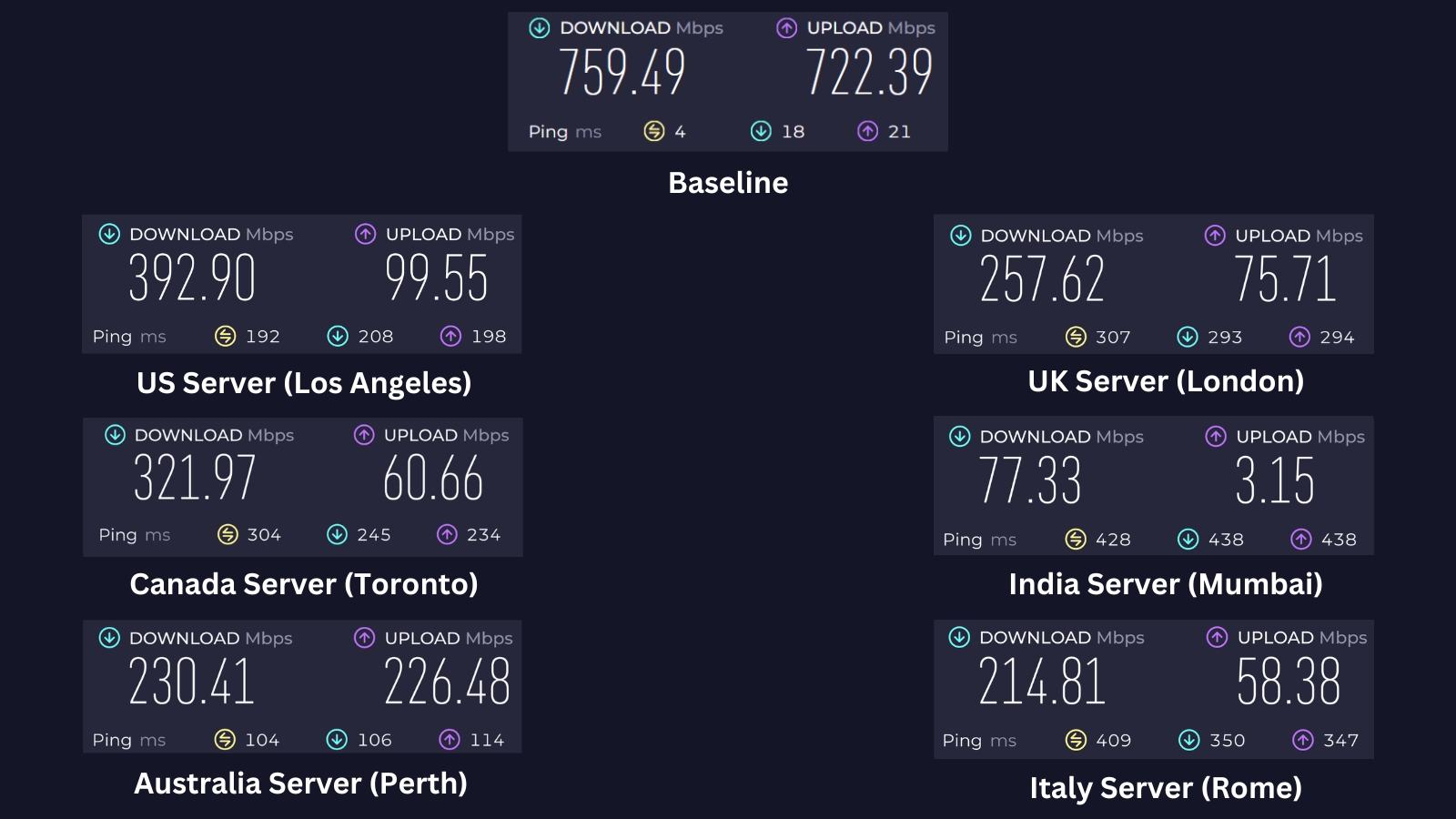
Our tests showed that VyprVPN reduced speeds by roughly 67%. Compared with other VPNs we've tested, its performance felt significantly slower and less consistent. Our Score: 4/10
To evaluate VyprVPN's performance, we connected to multiple servers and conducted a speed test after each connection. Then, we compiled the results and analyzed how much the VPN affects our Internet connection, as using a VPN can often lead to speed reductions.
We started by measuring the baseline speed of our Internet connection without a VPN running. We're located in Asia and tested this VPN on a 700 Mbps connection. As the results show, we clocked 759.49 Mbps for downloads and 722.39 Mbps for uploads. From that starting point, we used VyprVPN and the WireGuard protocol to connect to six servers around the world:
- US Server (Los Angeles) – We recorded a download speed of 392.90 Mbps with a 48% speed loss, making it the top performer in our tests. The efficient routing and robust infrastructure seem to handle the long-haul connection very well, which clearly distinguishes this server from the rest.
- UK Server (London) – With a download speed of 257.62 Mbps and a 66% loss from the baseline, this speed drop shows how distance can impact performance. The data travels a much longer route, leading to additional latency.
- Canada Server (Toronto) – The Toronto server achieved 321.97 Mbps for downloads while experiencing a 58% speed loss. This balanced performance suggests a relatively direct routing path and fewer congestion issues, which helps maintain a solid speed despite the distance.
- India Server (Mumbai) – This server recorded the lowest performance, with a download speed of only 77.33 Mbps and a 90% speed loss. Despite being geographically closer, potential issues like local network congestion or less efficient infrastructure seem to have dramatically impacted its performance.
- Australia Server (Perth) – In Perth, our downloads came in at 230.41 Mbps (a 70% reduction in speed). Although Australia is closer to some transcontinental routes, inconsistent routing or overloaded nodes might have contributed to the speed reduction we observed here.
- Italy Server (Rome) – Finally, the Rome server delivered 214.81 Mbps download speeds with a 72% loss. The extended, indirect routing across multiple networks likely introduced additional latency, leading to a noticeable decrease in performance.
We’ve put together a helpful table to give you a clearer picture of VyprVPN's speeds above. Take a look below for more details.
Overall, VyprVPN had us moving about 67% slower on average. In our speed tests, this VPN falls into the mid-range category among the VPNs we've tested. While it doesn't quite reach the speed levels of the fastest VPNs like NordVPN or ExpressVPN, it does perform better than many others in the field.
Customer Support
VyprVPN's customer support is top-notch. They offer multiple support channels, including live chat, which is very helpful. Our Score: 8/10
VPNs are powered by advanced technology that might produce technical problems at times. This is why you need a VPN provider with helpful customer support. Let’s take a look at how VyprVPN can assist you with any questions or issues.
- Live Chat Support – Thankfully, VyprVPN offers multiple methods of support, including live chat, which comes in very handy. We reached out to their customer service team several times and didn’t have to wait long to get a response. In fact, they've even followed up with us via email within the hour to ensure that our issue was resolved.
- FAQs – VyprVPN’s FAQ section is a real gold mine of information, with over 50 common questions answered in detail. We found that their answers were well-written and linked to related articles, which made finding a solution a breeze.
- Troubleshooting – If you encounter a technical problem, you'll want a VPN provider that has a helpful troubleshooting section. Fortunately, VyprVPN's troubleshooting page is quite elaborate and provides you with plenty of information to help you fix your issue.
- Support Tickets – If you can't find the answer to your problem on their website, you can always submit a support ticket. We're happy to report that VyprVPN has a quick turnaround time, with most tickets answered within 48 hours.
- Email Support – Aside from submitting tickets, another direct way to get assistance is through email. You can reach VyprVPN support directly at [email protected].
All in all, we're impressed with VyprVPN's commitment to customer support. They go above and beyond to ensure satisfaction, and their blog adds extra value for users.
Pricing
While VyprVPN’s monthly plan is pricey, there's also an annual plan that can save you 70% in the long run. Our Score: 5/10
VyprVPN provides you with three subscription plans: a monthly plan, a 1-year plan, and a 2-year plan. To see if the long-term plan is worth it, let's explore the cost of each option.
How Much Is VyprVPN?
VyprVPN starts at $3 per month when you get the 2-year plan. All plans offer 5 simultaneous device connections and a 30-day refund when you sign up via VyprVPN's website. Here's the current VyprVPN pricing so you can choose the plan that suits you best:
- 1-Month Plan – The monthly plan is more flexible, allowing users to pay on a monthly basis with no long-term commitment. However, at the cost of $10 per month, it's relatively expensive compared to other providers.
- 1-Year Plan – The annual plan, on the other hand, offers a much better deal, costing just $60 for the year. That breaks down to $5 per month, which is 50% cheaper compared to the monthly plan. Plus, VyprVPN offers a 30-day money-back guarantee if you want to test their services risk-free.
- 2-Year Plan – This plan requires a bigger upfront payment of $72, but it's a good choice if you plan on using the VPN for an extended period. It only costs $3 per month, letting you save 70% compared to the monthly plan.
In addition to the monthly and yearly plans, VyprVPN also offers business plans that start at $299 per year to meet the specific needs of organizations. They provide a VPN server deployment solution known as VyprVPN Cloud, allowing businesses to customize and scale their VPN infrastructure according to their requirements.
Additionally, some users may be disappointed that VyprVPN doesn't offer more options for anonymous payments, as cryptocurrencies aren't currently accepted. You can pay for a subscription with a debit or credit card, PayPal, Amazon Pay, or UnionPay.
For VyprVPN mobile app subscriptions, your payment will be processed through Google Play or Apple App Store / iTunes, depending on your device.
Is VyprVPN Free?
No, VyprVPN doesn't provide a free account. While they offer a 3-day free trial for subscriptions via iTunes or Google Play, the 30-day money-back guarantee is applicable only to those who use other payment methods.
So, if you decide VyprVPN isn't the right fit within the first month and you didn't subscribe through iTunes or Google Play, you can request a full refund.
Final Thoughts - Is VyprVPN Good?
Yes, VyprVPN is a decent VPN provider that performed fairly well in our testing. Its applications are reliable and easy to use, and the live chat support is particularly helpful for both app setup and resolving issues.
However, VyprVPN is still lacking in some areas. For instance, its server network is smaller compared to many of its competitors and it offers only a limited range of features. Hopefully, we’ll see more options introduced in the near future.
In recent years, VyprVPN has also updated its policies to improve user privacy. This is clearly a step in the right direction, but the company's lack of consistent transparency about its data collection practices might make some users hesitant.
For iron-clad no-logs policies, we strongly recommend NordVPN. VyprVPN offers a good foundation, but NordVPN takes it a step further, providing the best combination of speed, security, advanced features, and transparency for your online privacy needs.
PROS
- Has an audited no-logs policy.
- Strong encryption protocols.
- Compatible with many devices.
- Reliably unblocks streaming services.
- Obfuscation via the Chameleon protocol.
- Provides a built-in DNS service.
- Responsive 24/7 live chat support.
CONS
- Inconsistent data collection transparency.
- Fewer features than other VPNs.
- Limited to 5 simultaneous connections.
- Above-average pricing.
- Speeds can vary.
| Review Summary VyprVPN's excellent unblocking capability and user-friendly interface are dampened by its high price tag and history of murky data collection policies. Despite offering the latest VPN technology, its quality and past privacy issues may not justify the investment for many users. | 7 Overall Score | ||
| Background, Jurisdiction & Reputation | 4.5 | ||
| Supported Platforms & Devices | 8 | ||
| Installation & Initial Configuration | 8 | ||
| Prominent Features | 8.5 | ||
| Server Count & Infrastructure | 7 | ||
| UI/UX Design & Ease of Use | 8 | ||
| Media Streaming, Torrenting, and Gaming Support | 8 | ||
| Security & Privacy | 6 | ||
| Speed & Performance | 4 | ||
| Customer Support | 8 | ||
| Pricing | 5 | ||