When you purchase through links on our site, we may earn an affiliate commission. Here’s how it works.
5 Best VPNs to Watch Fox Sports from Anywhere in 2026



Our experts have reviewed 53 VPN providers, which were put through extensive rounds of testing. To learn more about that process, here’s how we review VPNs, where we explain our criteria and our policy of being fully transparent.
Ever tried streaming Fox Sports outside the US only to see the error: “Oops - Geoblocked: Invalid or unknown DMA”? Annoying, right? That happens because Fox Sports limits its content to the US, and even within the country, regional blackouts often block certain games. On top of that, many users worry about data tracking while streaming.
The good news is that a reliable VPN fixes all of this. By masking your IP address and routing your connection through US servers, a VPN lets you watch Fox Sports from anywhere, bypass local blackouts, and even protect your privacy while streaming.
Here’s why you need a VPN for Fox Sports:
✅ Unblock Fox Sports from Anywhere
✅ Watch Your Favorite Games While Traveling
✅ Bypass ISP Bandwidth Throttling
✅ Mask Your IP for Privacy
✅ Block Annoying Ads & Trackers
This article recommends the 5 best Fox Sports VPNs and explains how our team selected them. You can consult these criteria to help choose the right VPN for you. We also explain why you need a VPN. In addition, you’ll find easy guides on how to watch Fox Sports with VPN assistance on various devices.
Does Fox Sports Restrict VPN Usage, and Is It Allowed by Law?
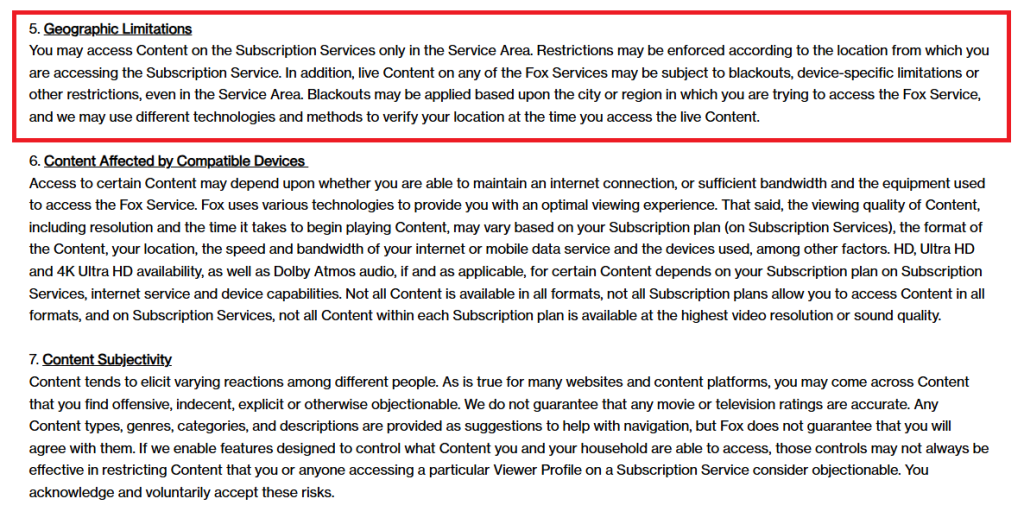
Fox Sports actively restricts the use of VPNs and other location-masking tools. Its terms of service clearly state that content is only accessible within approved service areas, and that live events may also be subject to blackouts based on your region. To enforce these rules, Fox uses technologies that verify your location, meaning VPN traffic can be detected and blocked. If you attempt to stream from outside the allowed region, access may be denied.
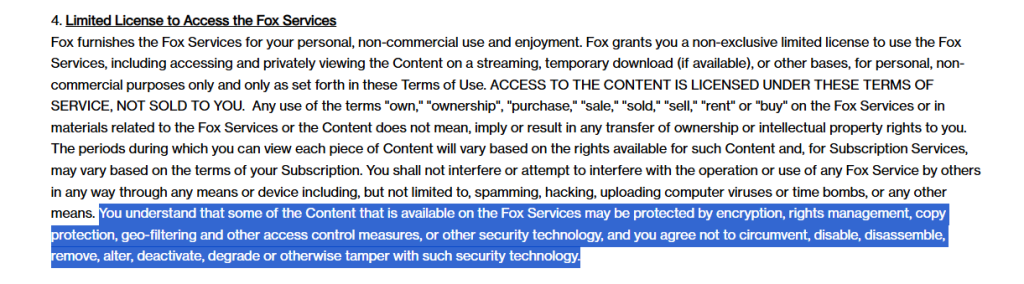
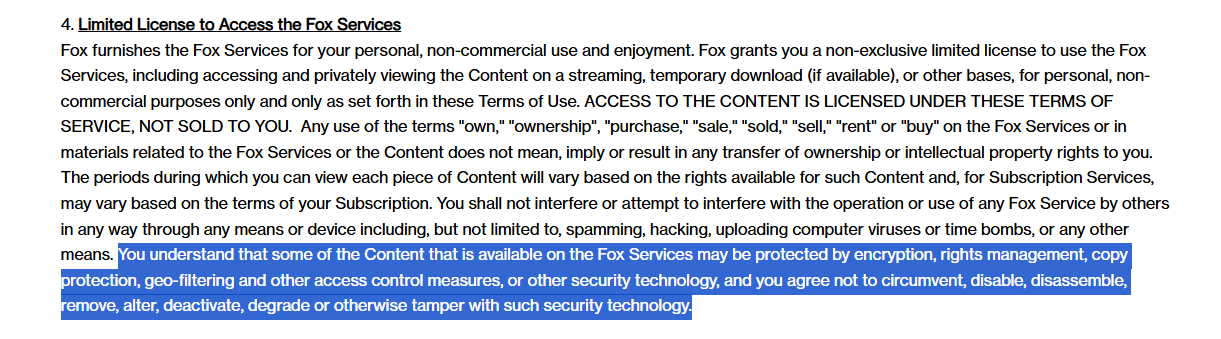
Legally, Fox protects its content with encryption, rights management, geo-filtering, and other security measures. By using the platform, you agree not to interfere with or bypass these controls. Circumventing geo-restrictions technically violates Fox’s terms of service, but it is not a criminal offense. The main risk is that Fox could suspend or restrict your account if it detects VPN usage, as this breaches their agreement with viewers.
That said, many users still rely on VPNs to access Fox Sports when traveling or to get around local blackouts. A VPN masks your IP address and helps you appear as if you’re connecting from within the US. While it’s possible, free VPNs are unreliable and risky, so premium VPNs are the safer option for both performance and privacy.
The Best VPNs to Watch Fox Sports in 2026
A top VPN for Fox Sports should reliably unblock regional restrictions while delivering fast, buffer-free streaming. Beyond accessing Fox Sports from anywhere, the best VPNs also provide strong privacy, robust security, and easy-to-use apps across multiple devices. Key features to look for include:
✅ Multiple servers in the US and other key regions for consistent streaming access
✅ Fast, stable speeds for HD and 4K sports streaming without buffering
✅ Strong encryption, kill switch, and multiple VPN protocols (OpenVPN, WireGuard, AES-256)
✅ Advanced features like obfuscation to disguise VPN traffic as regular HTTPS
✅ Strict no-logs policy and support for multiple simultaneous device connections
✅ User-friendly apps for computers, tablets, mobiles, and more
✅ Fair pricing, money-back guarantee, and 24/7 customer support
With these standards in mind, the following VPNs stand out for watching Fox Sports:
- NordVPN – Fox Sports VPN with blazing-fast speeds • Servers across the US and worldwide for reliable Fox Sports access • NordLynx protocol & AES-256 encryption for secure, buffer-free streaming • SmartPlay tech ensures effortless access to Fox Sports from anywhere
- Surfshark – Budget-friendly Fox Sports VPN with robust security • Unlimited simultaneous connections for all your devices • Thousands of servers optimized for streaming Fox Sports • NoBorders mode & CleanWeb ad blocker for smooth, secure viewing
- ExpressVPN – Premium Fox Sports VPN with very fast, user-friendly streaming • Servers in 105+ countries for global sports access • Proprietary Lightway protocol for speed and reliability • TrustedServer tech & Smart DNS for uninterrupted, high-quality Fox Sports streaming
- CyberGhost VPN – Easy-to-use Fox Sports VPN with dedicated streaming servers • Thousands of streaming-optimized servers worldwide • WireGuard & OpenVPN support for smooth HD and 4K sports playback • Dedicated streaming servers for reliable, buffer-free Fox Sports access
- Private Internet Access – Highly customizable Fox Sports VPN with servers in all 50 US states • Extensive US server network including all states • WireGuard & OpenVPN for strong streaming security • Unlimited device connections with advanced features like split tunneling and port forwarding
1. NordVPN
NordVPN is the best VPN to watch Fox Sports from anywhere. It has 8,900+ servers in 129 countries. It can easily bypass geo-restrictions and any blackouts imposed by the broadcaster. Connecting to any of its servers in the US will unblock Fox Sports and other sports streaming apps like ESPN from outside the country.
This provider has fast speeds, making it an ideal option for HD streaming without buffering. Plus, it was able to deliver reliable ultra-fast during all our tests. You also don’t have to worry about your online security with NordVPN. It encrypts your data with AES-256-GCM, ChaCha20, and Post-Quantum Encryption (NordLynx Protocol) and prevents leaks during accidental VPN disconnections with a kill switch.
You can choose between NordLynx (WireGuard-based), OpenVPN, IKEv2/IPsec, and NordWhisper, with Nordlynx being a proprietary WireGuard alternative. NordVPN also adheres to a strict no-logs policy. In addition, it has obfuscated servers to work on networks with restrictive firewalls that block VPNs, like the Internet at a school or office.
With NordVPN, you won’t see any ads as its Threat Protection feature can block ads, malware, and trackers. You can use it on 10 simultaneous connections, and it supports all popular devices like computers, tablets, smartphones, and routers. It also has 24/7 customer support to help you around the clock. Lastly, you can test NordVPN risk free with its 30-day money-back guarantee.
PROS
- Can easily unblock Fox Sports
- Large server network
- Threat Protection
- Obfuscated servers
- 30-day money-back policy
CONS
- Limited simultaneous connections
2. Surfshark
Surfshark is another great Fox Sports VPN with 4,500+ servers in 100 countries. These servers can easily access Fox Sports overseas and get around the broadcaster’s blackouts in the US. You’ll also be able to use the VPN to watch content on other restricted US sports streaming sites and apps like ESPN from anywhere.
You can easily stream your favorite Fox Sports content in HD without any interruptions thanks to Surfshark’s super-fast speeds. However, the VPN provider is upgrading its server network, so it is sometimes slow to connect initially. Other than this, it delivers dependable overall performance. Plus, you’ll have a choice between WireGuard, IKEv2, OpenVPN, and Dausos.
Surfshark safeguards your privacy with AES-256-GCM (OpenVPN and IKEv2), ChaCha20 (WireGuard), and Post-Quantum Encryption (WireGuard + Dausos) encryption ciphers and an automatic kill switch. You won’t need to worry about your online privacy as it adheres to a strict no-logs policy and does not record any of your online activities. In addition, it automatically obfuscates your online traffic with its Camouflage Mode whenever it detects a restrictive firewall or network.
On top of all that, Surfshark’s CleanWeb feature can prevent adware, malware, and trackers from compromising sensitive data. This VPN is one of the best options for large households as it allows unlimited simultaneous connections. Plus, it can protect any device, like computers, tablets, and mobiles. It also has 24/7 customer support and a 30-day money-back guarantee.
PROS
- Can bypass Fox Sports blackouts
- Automatic obfuscation
- CleanWeb
- Unlimited simultaneous device connections
- 30-day money-back period
CONS
- Slow initial connections sometimes
3. ExpressVPN
ExpressVPN is a reliable VPN that can easily access Fox Sports and other streaming channels like ESPN. It has a server network of undisclosed number of servers in 105 countries. If you find yourself in a blackout region, you can trick Fox Sports location settings into thinking you're located in a US city where restricted sporting events are airing.
In terms of speed, ExpressVPN is the fastest VPN on our list, delivering consistent ultra-fast, too. You won’t face any buffering or connectivity issues while watching Fox Sports with it. The optimal performance is partly thanks to its proprietary Lightway protocol, which it designed to deliver stable connections with the best speeds.
You can also choose between OpenVPN, Lightway, and IKEv2 in addition to Lightway. ExpressVPN safeguards your online security with AES-256 and ChaCha20/Poly1305 and a kill switch called Network Lock. It adheres to a strict no-logs policy and offers automatic obfuscation. Plus, its Threat Manager protects you from ads, malware, and trackers.
ExpressVPN has native apps for all popular devices, like computers, tablets, mobile phones, and more. All its apps are similar in design and easy to use, and it allows up to 10-14 simultaneous connections. Its solid 30-day money-back guarantee allows users to test it without any financial risk. Plus, it has 24/7 support to help you if you face any technical issues.
PROS
- Unblocks Fox Sports from anywhere
- Threat Manager prevents malware infections
- Best speeds on our list
- Automatic obfuscation on most servers
- 30-day refund policy
CONS
- Slightly expensive compared to others
4. CyberGhost VPN
CyberGhost is another solid option if you are looking to stream Fox Sports with VPN security. It has undisclosed number of servers in 100 countries, including 1,276 servers in the US, so it can unblock Fox Sports from anywhere. It also offers streaming-optimized servers for accessing other popular sports streamers like ESPN.
Capable of medium-fast medium, CyberGhost demonstrates stable overall performance. We did not experience any buffering issues while streaming Fox Sports in HD while connected to its US servers that we tested. It allows you to choose between OpenVPN, IKEv2, and WireGuard and protects your data with AES-256-GCM and ChaCha20 and a kill switch.
CyberGhost follows a strict no-logs policy but, unfortunately, doesn’t offer obfuscation. However, it can still reliably access Fox Sports and even offers automatic Wi-Fi protection to shield your data on public networks. Its Content Blocker feature can also prevent malware, trackers, and ads containing any malicious content, further safeguarding your privacy.
This provider supports any popular devices like computers, tablets, smartphones, routers, and more. You can simultaneously protect 7 simultaneous connections and contact its 24/7 customer support anytime you experience trouble. Lastly, CyberGhost has a 45-day money-back guarantee, so you can test all its features without any risk.
PROS
- Streaming servers for Fox Sports
- Robust security features
- Automatic Wi-Fi protection
- Content Blocker for ad protection
- 45-day refund guarantee
CONS
- No obfuscation available
5. Private Internet Access
Private Internet Access has undisclosed number of servers in 91 countries, including server locations in every single US state. With the largest server network on our list, it can easily access Fox Sports or any other sports channels like ESPN. It can also unblock live sporting events otherwise unavailable to you even if you’re in the US due to regional blackouts.
Although it only has medium, you can still watch Fox Sports live without buffering in HD with PIA because its performance is reliable. You can also customize its settings to improve your speeds. For example, you’ll get a faster connection if you opt for AES 128-bit instead of the more secure AES-128-GCM, AES-256-GCM, AES-128-CBC, AES-256-CBC, and ChaCha20.
In addition to customizable AES-128-GCM, AES-256-GCM, AES-128-CBC, AES-256-CBC, and ChaCha20, PIA safeguards your online privacy with its no-logs policy and a kill switch that has an additional advanced mode. Enabling the advanced kill switch blocks your Internet completely until you connect your VPN. This is particularly helpful on unsecured networks. It also offers the Shadowsocks proxy for obfuscation.
Additionally, PIA’s MACE feature can block ads, malware, and trackers. You can use the VPN to make up to unlimited simultaneous connections, and it supports many different devices, such as computers, smartphones, tablets, and more. Like other VPNs on this list, it offers 24/7 customer support and a trustworthy 30-day money-back guarantee.
PROS
- Bypasses Fox Sports blackouts easily
- Shadowsocks proxy for obfuscation
- MACE to prevent ads/malware
- Unlimited simultaneous connections
- 30-day money-back guarantee
CONS
- Average speeds only
How to Watch Fox Sports with a VPN from Anywhere
To watch Fox Sports with a VPN from anywhere, you first need to find a VPN with reliable US servers that can bypass the broadcaster's geoblocks. After that, install it and connect to any of its servers in the US. Below are the simplified steps for using a VPN for Fox Sports:
- Subscribe to a VPN that works with Fox Sports. Pick one that offers US servers, lightning-fast speeds, unlimited bandwidth, and a money-back guarantee so you can test it risk-free (we recommend NordVPN).
- Download and install the VPN on your device(s). Install the VPN app on Windows, macOS, iOS, Android, smart TVs, or even routers. For Fox Sports, you can also use split tunneling so only streaming traffic routes through the VPN while everything else stays on your regular internet.
- Enable key streaming and security features. Activate the Kill Switch, turn on DNS/IP leak protection, and enable built-in ad/tracker blockers (like NordVPN’s Threat Protection or Surfshark’s CleanWeb) to keep your connection smooth and private.
- Connect to a US server to unlock Fox Sports. Since the platform is geo-restricted, make sure to select a US-based server for full access to live sports, replays, and highlights.
- That’s it! Now, you can stream Fox Sports from anywhere.
How to Watch Fox Sports with a VPN on Your Devices
You can easily watch Fox Sports with a VPN (Our strongest recommendation is NordVPN) on your devices and trick Fox Sports location settings to avoid blackouts. Below are guides explaining how you can easily stream Fox Sports on various devices:
1. Roku TV
To watch Fox Sports on Roku TV, you will need to find a VPN that supports routers. This is because Roku does not natively support VPN apps. Install the VPN on your router and connect to any of its servers in the US. Follow these simplified steps to make things easy:
- Install a VPN with multiple US servers on your router.
- Connect to a US server location where your required content is available.
- Open Roku and search for the Fox Sports streaming channel in the search bar.
- Install and activate the channel.
- Launch Fox Sports and start watching your favorite sports content on Roku.
2. Kodi
To watch Fox Sports on Kodi, first subscribe to a VPN that supports routers. Install the VPN on your router and connect to a US server. Follow these easy steps for watching Fox Sports on Kodi from anywhere:
- Install a VPN that has reliable US servers on your router.
- After setting it up, connect to a US server.
- Open Kodi on your device and click on the Add-ons.
- Click the top-left icon that looks like an open box and choose “Install from repository.”
- Go to “Kodi Add-on repository” and then “Video Add-ons.”
- Find Fox Sports on the list.
- Install Fox Sports and launch it by following the activation prompts.
- That’s it! You can now watch Fox Sports overseas on your Kodi device.
3. Apple TV
To watch Fox Sports on Apple TV, sign up for and install a VPN on your router. Make sure that your VPN supports the router before installing. After this, connect to any of its servers in the US. The steps below explain the process for watching Fox Sports on Apple TV in a simplified way:
- Find and install a VPN with high-speed US servers on your router.
- Set up the VPN by adding your credentials, and connect to a US server.
- Turn on your Apple TV and connect it to the VPN-protected network.
- Go to the App Store and download the Fox Sports app, if not already installed.
- Open the app, and that's it! You can start watching Fox Sports.
4. Smart TV
To watch Fox Sports on a smart TV, find a VPN compatible with your device. If your TV is running on the Android OS, download the VPN’s Android app. Otherwise, set the VPN up on your router and connect to one of its US servers. Follow these easy steps to watch your favorite content on your smart TV:
- Install the VPN app on your smart TV.
- Launch your VPN and connect to a US server.
- Download and open Fox Sports.
- Alternatively, set up the VPN on your router and connect your TV to its network.
- That’s it! Now you can start watching Fox Sports on your smart TV.
VPN Not Working with Fox Sports? Here’s How to Fix It
Even the best VPNs can sometimes run into issues when streaming Fox Sports. You might see geo-block errors, blackouts for certain games, endless buffering, or the app refusing to load altogether. Luckily, most of these problems are easy to fix with a few quick adjustments. Let's look at some of the best resorts:
How Reliable are Free VPNs for Fox Sports in 2026?
It’s tempting to use a free VPN to stream Fox Sports, especially if you just want to catch a quick game. But the truth is, free VPNs usually come with major downsides that can ruin your viewing experience. From buffering and server limits to questionable privacy practices, they’re rarely the best choice for live sports streaming. Here are some of the main drawbacks:
✘ Limited servers and constant overcrowding – Most free VPNs only offer a few servers, which quickly become overloaded and cause streaming issues.
✘ Slow speeds and frequent buffering – Free VPNs usually cap speeds, making live Fox Sports streams frustratingly laggy.
✘ Unreliable access – Free VPNs are often blocked by streaming platforms, so you might not even get past Fox Sports’ geo-restrictions.
✘ Weak security and data risks – Many free services log and sell your data, exposing you to privacy concerns.
✘ Bandwidth caps – Free VPNs often have strict data limits, which can cut off your stream mid-game.
Final Thoughts
Fox Sports is the most popular sports broadcaster in the US. However, it is not available outside the country, and it even restricts live events with blackouts in some regions inside the country. In addition, some people simply want to protect their online privacy while streaming Fox Sports. You can solve all these issues by using a VPN.
We recommend NordVPN as the best VPN to watch Fox Sports. It has multiple servers in the US to unblock Fox Sports reliably from anywhere. Plus, its fast speeds are more than enough for streaming HD content without buffering.
Surfshark stands out as a budget-friendly option with unlimited device connections and strong security. ExpressVPN delivers premium performance with ultra-fast streaming and global reliability. CyberGhost is perfect for beginners thanks to its dedicated streaming servers and user-friendly apps. Finally, Private Internet Access is ideal for power users who want customizable features and servers across all 50 US states.
Some Guides for Your Reference:
- Best VPNs for Streaming Sports in 2026 – Discover the top VPNs that unlock every major sports platform, not just Fox Sports.
- Best VPNs for ESPN+ – Find the best VPNs to catch ESPN’s exclusive games and coverage anywhere.
- Best VPNs for Hulu – Stream Fox Sports and other live channels through top TV streaming services.
- Best VPNs for Bypassing Sports Blackouts – Get around frustrating local blackout restrictions to watch every game.
- Free vs Paid VPNs for Sports Streaming – Understand the pros, cons, and risks of using free VPNs for live sports.
- Set up VPNs on Firestick / Smart TVs – The easiest VPNs to set up for watching Fox Sports on your big screen.
That’s all for our guide on the best VPN for Fox Sports. If you have any questions, feel free to leave a comment below. Thank you for reading!