When you purchase through links on our site, we may earn an affiliate commission. Here’s how it works.
PureVPN Review 2026


Our experts have reviewed 53 VPN providers, which were put through extensive rounds of testing. To learn more about that process, here’s how we review VPNs, where we explain our criteria and our policy of being fully transparent.
PureVPN is a prominent contender in the vast world of VPNs. But what makes it stand out? Well, for starters, it follows a strict no-logs policy, ensuring your online activities remain private. Operating from the British Virgin Islands, it also distances itself from international surveillance alliances.
That said, PureVPN also falls short in some areas - it has a history of controversial leaks (more on that later on). Yet, there's more to explore. PureVPN supports P2P file sharing, unblocks geo-restricted streaming platforms, and delivers smooth gaming on local servers.
It's also armed with privacy and security features with AES 256-bit encryption, so it's no surprise that PureVPN secures a spot on our list of the best VPN services.
Before we get more into that, here’s an overview of the VPN, showing its specifications and other critical information.
📢Live Now: Save 83% on PureVPN's 5-Year Deal
This PureVPN review will cover each aspect of the VPN, from encryption to performance and reliability, privacy and security, user interface, pricing, server spread, streaming capabilities, and more. Check out how we review VPNs to learn about the uniform approach we've used in testing 65+ providers.
Background, Jurisdiction & Reputation
PureVPN has been under the privacy spotlight, with questions about its practices. In response, they've taken a step towards transparency by initiating an independent audit to verify their zero-logs policy. Our Score: 2/10
Evaluating the trustworthiness of a VPN relies on understanding how your data is handled and protected. In this context, two critical factors to consider are the VPN's background and the jurisdiction in which it operates. Now, let's explore how these factors relate to PureVPN.
Where Is PureVPN Based?
PureVPN is now based in the British Virgin Islands, a jurisdiction outside the 5/9/14 Eyes Alliance. In 2021, it relocated from Hong Kong to the British Virgin Islands in response to rising Chinese influence. This move reflects a wider trend of VPNs leaving Hong Kong to protect user data amid the city's shifting political dynamics.
More precisely, PureVPN is a product of a company called GZ Systems Limited, as per this VPN's legal documentation. That's where you'll find the company's address, providing a level of transparency that we don't often see in today's VPN services (if you don't take a closer look, as you're about to find out).
Digging a bit deeper will lead you to another company called Gaditek. This company is based in Karachi, Pakistan – and it even proudly showcases PureVPN's logo on its official website. Pakistan is a problematic country to base VPN operations in, as it has data retention laws and a highly complex political situation.
We also have to mention that Uzair Gadit, the co-founder and CEO of PureVPN, holds the position of co-founder and CEO at Gaditek. Notably, he's a founding partner of Disrupt.com as well. Other co-founders of PureVPN, Umair Gadit and Aaqib Gadit, also share the role of founding partners at Disrupt.com and are leading other companies under the same brand.
You should also know that Ivacy VPN recently merged with PureVPN, forming 'Ivacy Powered by PureVPN.' In other words, these two VPNs now use a shared framework of core features and infrastructure. These interconnected roles and associations definitely shed light on how such ventures work together.
Did PureVPN Leak Private Data in the Past?
There have been several privacy-related incidents directly connected to PureVPN. Most recently, it was discovered that PureVPN could have leaked passwords since it stored them in a plain text format. This discovery was unveiled in September 2018, and this security vulnerability has been apparently solved since.
In March of 2018, PureVPN found itself among a group of VPNs leaking IP data. Despite several protections in place, it was surprising to hear that PureVPN could have a DNS leak or IPv6 leak – fully exposing your online activities.
We should also mention that in 2017, PureVPN was happy to assist the FBI in catching a cyberstalker. At that time, the VPN claimed that no data was collected, which turned out to be false. Even though committing a crime is against any digital service's 'Terms of Service' out there, the problem is that PureVPN wasn't honest about its logging practices.
In 2013, PureVPN faced a data breach when attackers exploited a vulnerability to access email addresses and names. Fortunately, the breach didn't expose sensitive financial data, as PureVPN doesn't store such information. They also maintained their no-logs policy, ensuring that user privacy and security remained intact despite the incident.
Security researchers also found two vulnerabilities in PureVPN’s Linux client in 2023. The first one is a DNS leak, which exposes browsing history even when connected to the VPN. The second vulnerability is Remote Code Execution (RCE), allowing attackers to run malicious code on devices using PureVPN’s Linux app.
PureVPN has already patched the IP-leaking issue. However, they claim the RCE vulnerability lies within the Chromium framework and didn't directly affect their app, arguing it's a wider issue beyond their scope.
Finally, in an effort to improve its image, PureVPN went through an audit in 2019. As per the results of this audit, the VPN doesn't leak any personal information or store sensitive data. Since then, PureVPN has gone through regular audits to verify its no-logs policy, with the 4th audit being completed in 2023.
Is PureVPN Safe?
Yes. It uses AES 256-bit encryption, which takes your online data and transforms it into a complex code, rendering it nearly impossible for hackers to decipher. Moreover, it now operates from one of the world's most friendly locations for data privacy.
As we touched on earlier, this VPN has come under intense scrutiny in the past over concerns about its counteractive activities. However, just as importantly, it has taken very strong measures to rebuild trust. It has done this by implementing secure VPN tunnels and protocols like OpenVPN, WireGuard, IKEv2, and more.
In 2021, it became the first VPN to sanction an 'Always-On' audit. This means the audit firm in charge, KPMG, can analyze PureVPN’s network and servers at any time, without warning, to verify its no-logs claims.
Non-scheduled audits present a benchmark in an industry where most providers have never even had their servers evaluated by independent bodies.
Supported Platforms & Devices
PureVPN is compatible with currently popular devices and operating systems, both desktop and mobile. Router support is there as well. Our Score: 10/10
When choosing a VPN, you first need to pay attention to its native apps. Ideally, you want a VPN to offer native apps for just about any Internet-connected device. Leaving a single device unprotected could lead to a leak, eliminating your privacy protection efforts.
By looking at the table above, it's clear that PureVPN has broad device compatibility, covering the major desktop operating systems such as Windows, macOS, and even Linux distros (Linux Ubuntu and Arch Linux).
On the mobile side, it's got Android, iPhone, and Huawei, but other platforms such as ChromeOS, Android TV, and Amazon Fire OS are also supported. Not all VPNs provide this type of flexibility, so if you're juggling several devices, this sort of compatibility makes life a lot easier.
Of course, you can also install PureVPN on a router and, therefore, keep all your household devices protected at once. Even though that isn't the most straightforward process to go through, it's the best way to ensure that your personal data doesn't leak online.
In addition to that, PureVPN extends its support to the Chrome extension and other well-known browser extensions. Moreover, it provides a wealth of downloadable resources and tutorials, making it a breeze to configure not just on routers but also on Kodi, Amazon's Fire Stick, and more.
It's also worth knowing that you can use PureVPN on up to 10 devices at the same time. Using it on a router counts as a single device, no matter how many devices you connect to that router. This leaves plenty of 'empty' slots, so you can protect yourself even on the go.
Installation & Initial Configuration
In general, downloading and installing PureVPN comes without any annoyances. The process is suitable even for complete beginners. Our Score: 10/10
In this part of our PureVPN review, we'll show you how to get PureVPN, from downloading it to setting it up. It's an easy process, as you'll soon find out.
How to Download and Use PureVPN?

To get started with PureVPN, you need to subscribe first, download the installation file, and install the app on your device. The whole process is quick and straightforward, requiring just a few minutes of your time.
Here's what you need to do:
- Subscribe to PureVPN on any Web browser.
- Log in to your account to access the dashboard.
- Go to 'Download' and select your device.
- Next, download and run the installation file.
- Once installed, enter your username and password.
- Choose a server and connect. You're all set!
No matter which platform you use, the installation process for PureVPN is quite simple. And if you ever get stuck along the way, you can consult PureVPN's installation guides, which are nicely written and contain plenty of useful material.
Prominent Features
PureVPN has eliminated a group of unique yet very problematic features - and is now a reliable and powerful VPN service once again. However, not all of PureVPN's advertised features are available across all its apps. Our Score: 7.5/10
This is where we take a look at the standard and advanced features that PureVPN brings in 2026. So here's what to expect from the VPN service when it comes to features:
- High-End Data Encryption: PureVPN uses AES 256-bit encryption to both encrypt and decrypt your data. It also now uses quantum-resistant encryption keys to future-proof your data against any kind of threats that may be introduced with quantum computing.
- Full Leak Protection: Prioritizing your online anonymity, PureVPN employs IPv4 and IPv6 DNS leak protection to safeguard your online activities. It also ensures your security with WebRTC protection, shielding you from hackers and trackers while enhancing your online privacy.
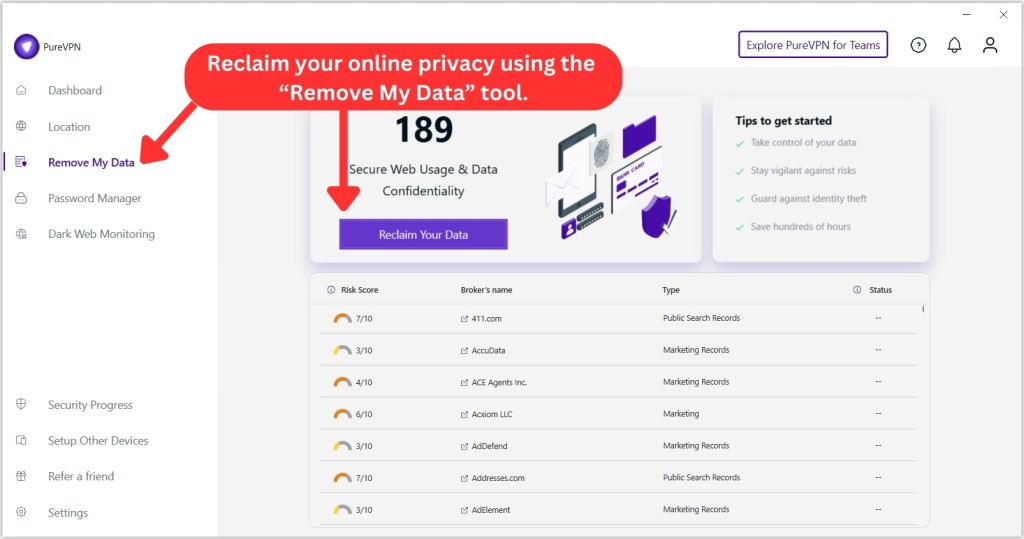
- Remove My Data: Exclusive to the PureMax plan, the 'Remove My Data' feature helps wipe your personal data from data broker sites. After getting your consent, PureVPN scans over 100 data brokers and continuously sends deletion requests every 60 days until your information is removed.
- Obfuscation: Using the OpenVPN protocol automatically connects you to PureVPN's obfuscated servers. These servers hide your VPN activity by making it look like normal Internet browsing. This helps you access websites freely, even in areas with tight Internet controls.
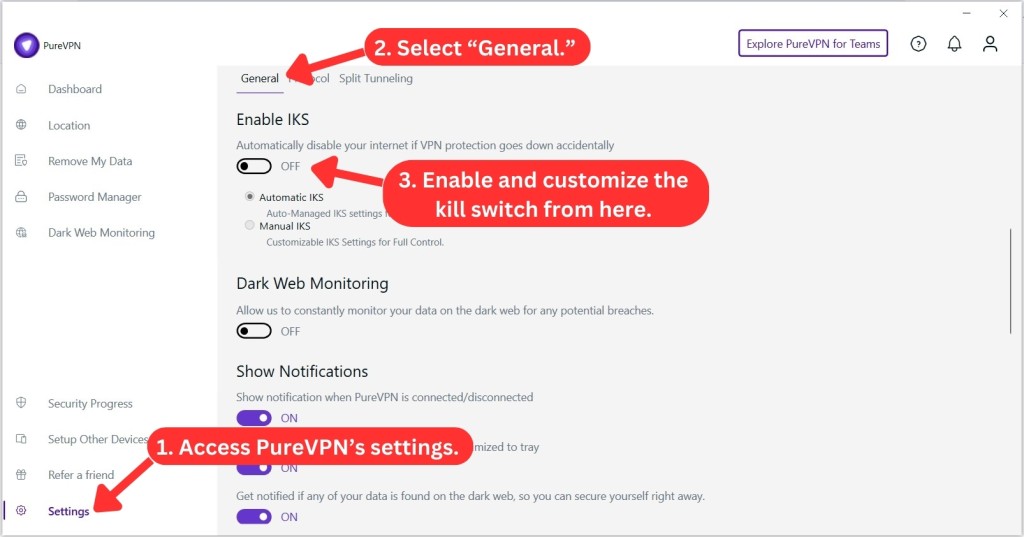
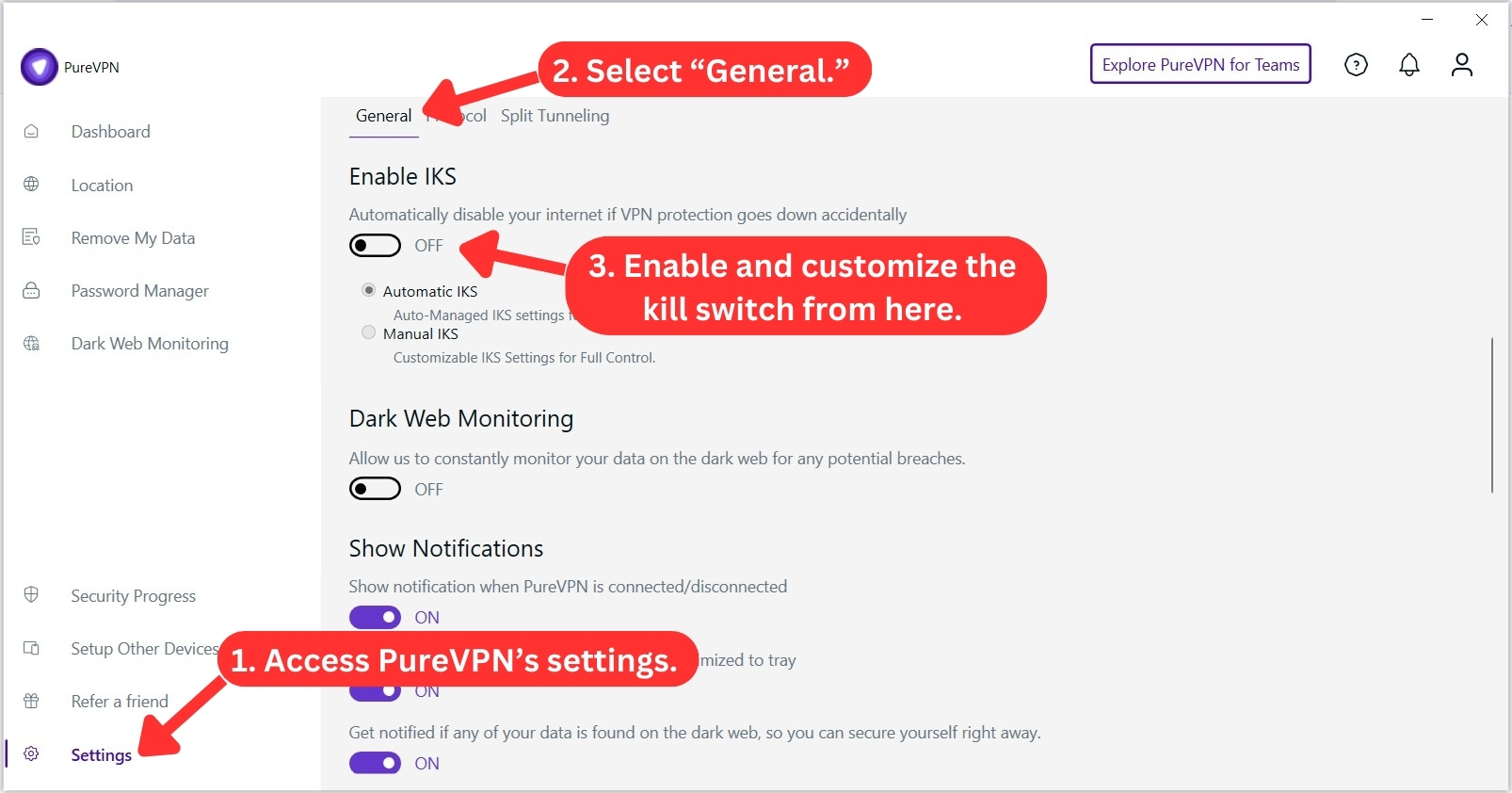
- Internet Kill Switch: This feature works by disconnecting your Internet when PureVPN's connection drops, ensuring that your real IP and various online activities remain protected. It's available on Windows, macOS, Android, and Linux devices.
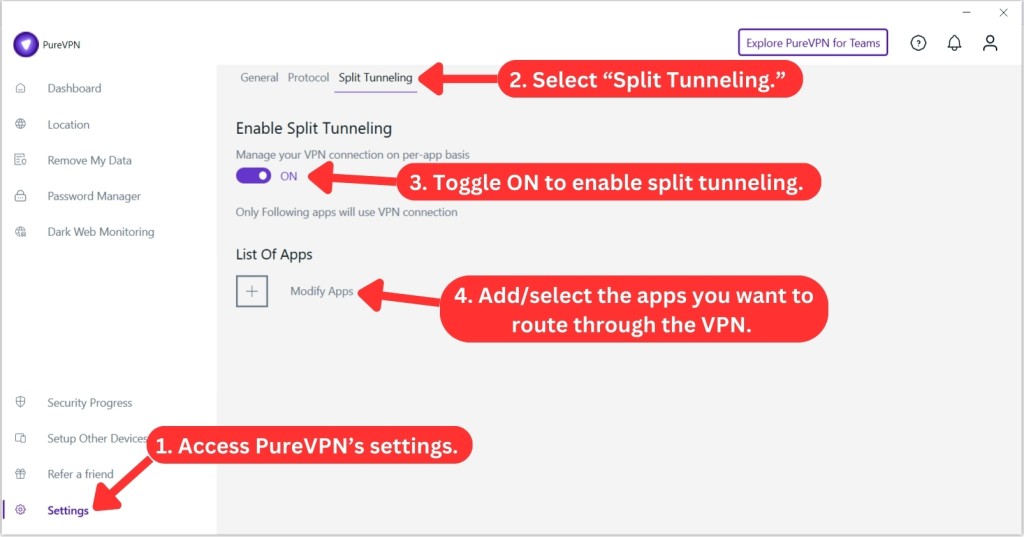
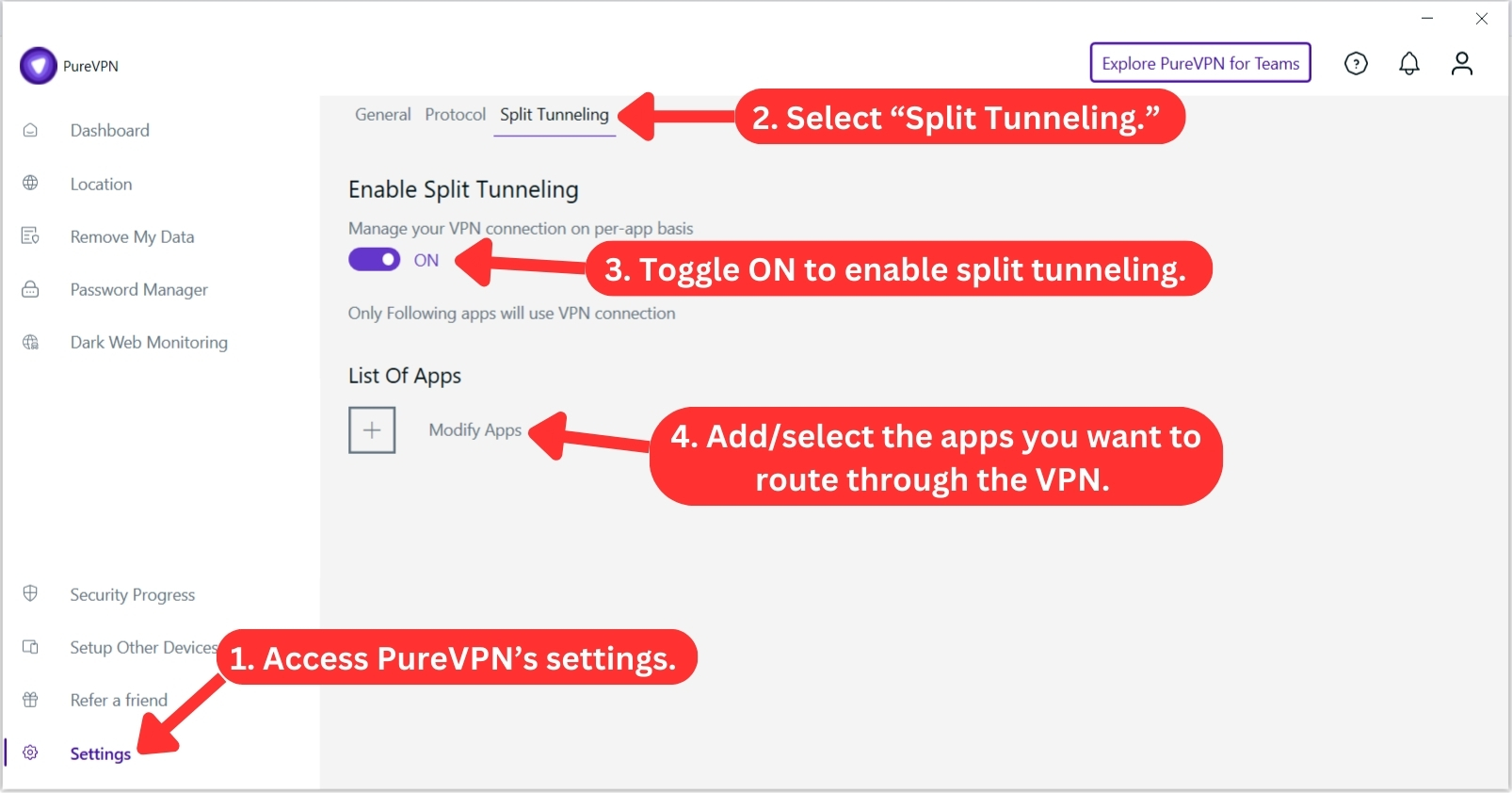
- Split Tunneling: PureVPN now offers split tunneling for Windows, Android, Android TV, and Firestick devices. This feature's name says it all – it splits your Internet traffic. You get to decide which apps go through the VPN network or your local network, customizing your online experience the way you want.
- PureKeep (Password Manager): This service is exclusively available to subscribers of the Plus and Max plans. It helps keep your passwords and sensitive information safe by storing them in encrypted vaults. You can save unlimited passwords, generate strong ones, and sync everything across up to 10 devices.
- Tracker & Ad Blocker: Enable this feature to stop websites from spying on your browsing habits. It scans for hidden trackers and shuts them down, keeping your data private. This means you'll see fewer personalized ads following you around the Web.
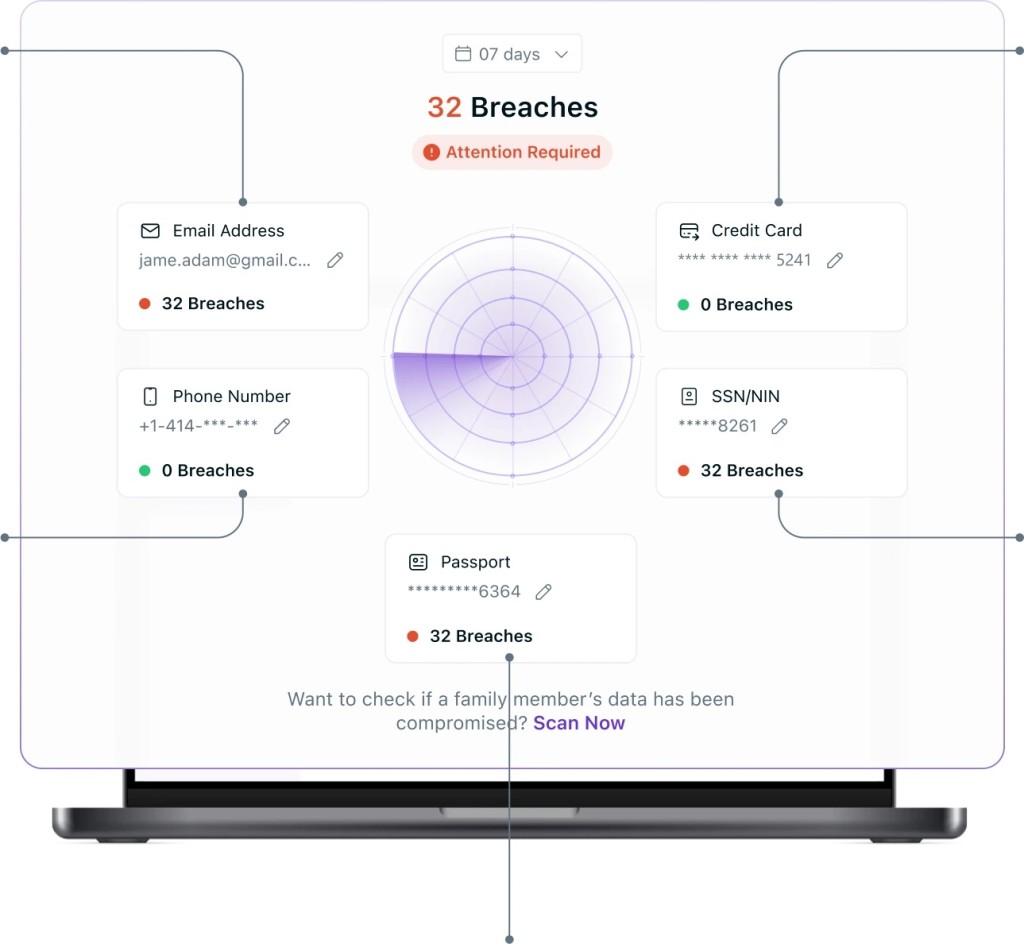
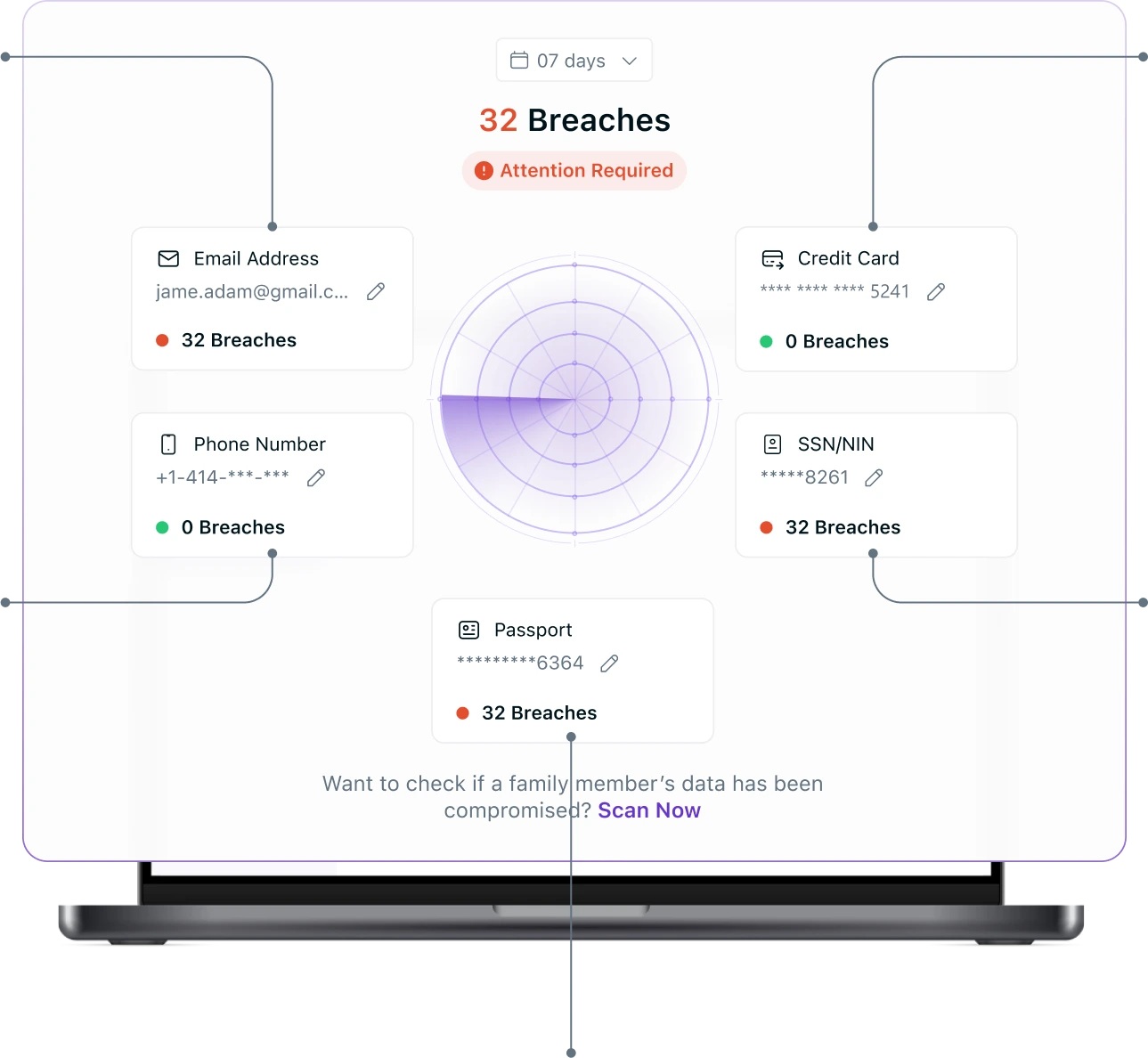
- Dark Web Monitoring: If your credentials show up on the dark Web, you’ll get an alert so you can take action before things get worse. PureVPN constantly scans underground sites, data dumps, and hacker forums to spot any leaks tied to your email. Right now, it’s available on Windows and iOS, but according to the customer service team, it should roll out to more platforms soon.
- Dedicated IP: PureVPN offers this special add-on, giving you an exclusive IP address and the choice of 10 different IP locations. With a dedicated IP, your IP address is yours alone and won't change even if you switch routers or networks. For multi-user setups, the provider also offers dedicated servers in 17 locations.
- Port Forwarding: This paid PureVPN add-on is available in 15 different locations. When activated, it provides extra protection for your Internet traffic, making sure it travels securely between the VPN server and the Web.
- Always-On (Android) / VPN On Demand (iOS): The Always-On feature in the Android App keeps you connected to the VPN continuously, even re-establishing the connection if it disconnects during a session. Meanwhile, on iOS, 'VPN on Demand' provides an instant VPN connection as soon as any Internet-based activity occurs on the specified domains, offering a seamless and time-saving experience.
Interestingly enough, PureVPN used to come with all kinds of unique features. For example, there were 'Gravity' and 'Ozone' servers used to scan for malware and obfuscate your traffic in a unique way. However, they also brought performance-related issues. That said, it's not surprising to see those features discontinued.
Server Count & Infrastructure
PureVPN doesn't have the largest network of servers out there, but it has the power to take you to any corner of the Web. Our Score: 9/10
The truth is that PureVPN has plenty of servers around the world. That said, our PureVPN review wouldn't be complete without inspecting its server network, which you can learn more about just below.
We have to say that PureVPN has exceeded our expectations. Having more than 6,000 servers spread across the globe, it's one of the VPNs with the most servers right now. Furthermore, it's trying to be as transparent as possible by giving you an overview of the countries with server locations and even letting you pick specific cities.
All that comes in handy once you start using PureVPN's software. On top of that, you can sort the server list by type. You get to choose P2P servers for file sharing, 'Quantum-resistant' (for added security), enabling port forwarding, and virtual options. This way, you get precisely what you need.
PureVPN's focus on speed also intensifies with its continuous addition of 20Gbps servers in popular locations like the US, the UK, France, Germany, and the Netherlands. Furthermore, when you use the OpenVPN (UDP/TCP) protocol with PureVPN, all servers obfuscate your data. This extra layer of security ensures the privacy and protection of your Web activities.
Does PureVPN Use Virtual Server Locations?
Yes, a portion of PureVPN's network uses virtual locations. We'll give you an example of how they work.
Imagine you want to use a server in Brazil, but PureVPN uses servers in Argentina for this. When you connect, your Internet traffic goes through Argentina's servers, but you get a Brazilian IP address. This makes it seem like your Web activity is coming from Brazil. It's like a virtual detour to the location you want.
UI/UX Design & Ease of Use
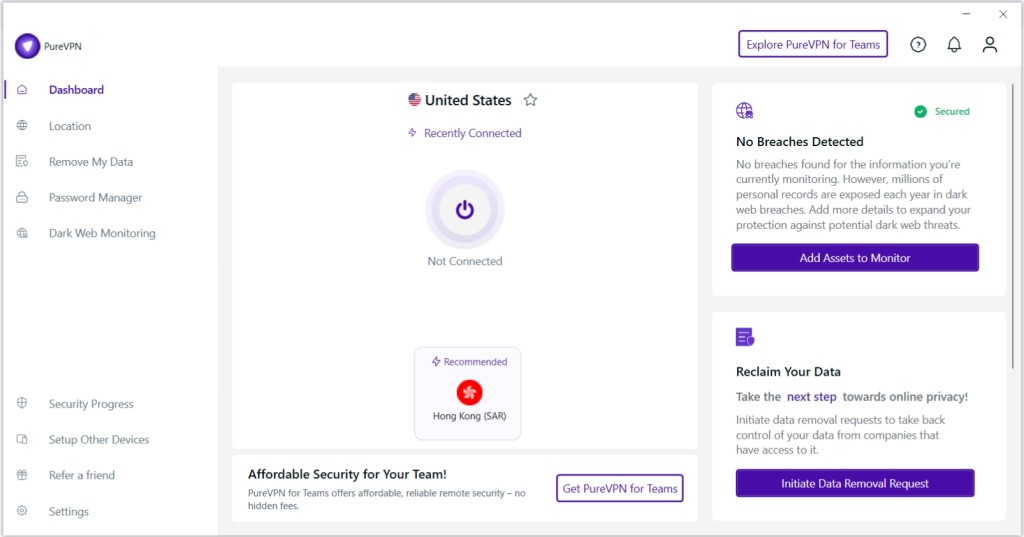
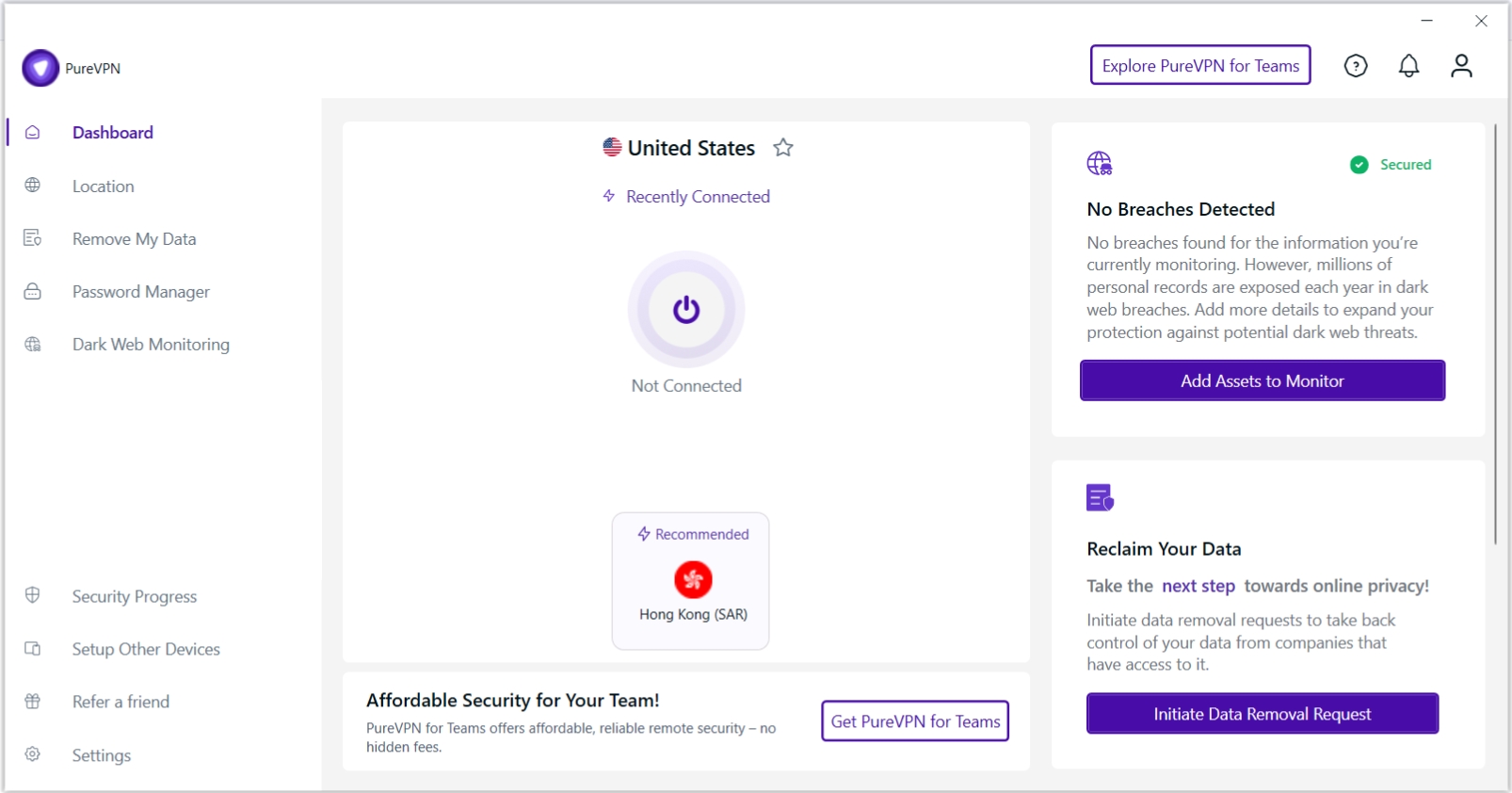
PureVPN has a much more polished application now - though it still has some areas that could be improved. Our Score: 7/10
In this segment of our PureVPN review, we'll look into the VPN's desktop and mobile apps. We'll also check what the VPN has to offer with its Web browser extensions.
How Well Does PureVPN Work on Desktop Platforms?
PureVPN has made its desktop apps more polished after a series of updates, but we think there’s still room for improvement. The home screen of PureVPN is very simple. You can connect to the nearest server or decide to connect to the most recently used one.
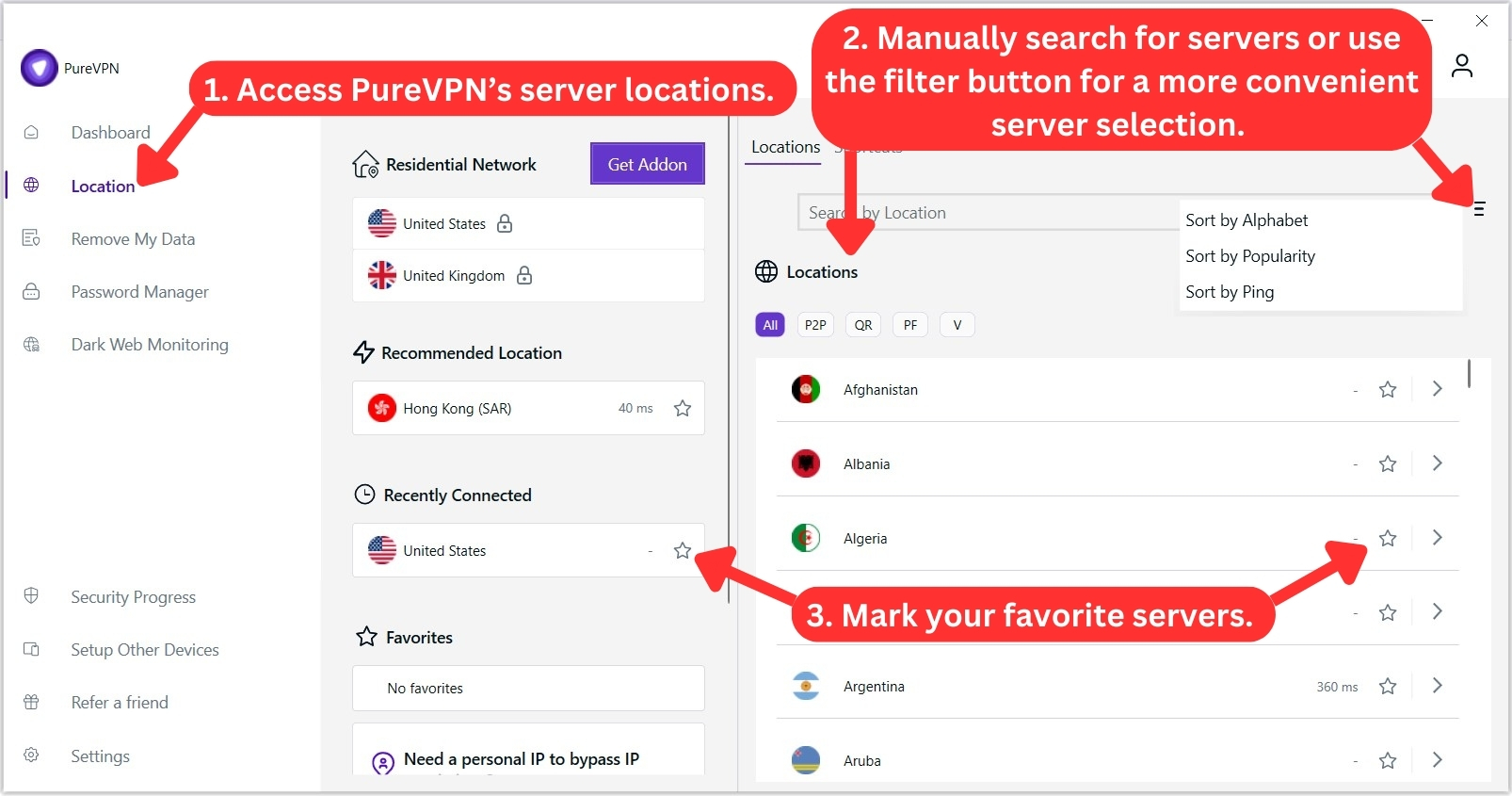
To explore all of PureVPN's servers, click the globe icon on the left-hand side. This section offers a recommended server based on your location, alongside your recently used and favorite servers. Alternatively, you can pick any server manually.

When using PureVPN on Windows, you’ll find that the left sidebar menu has been simplified to include only essential options. Here, you can access the 'Settings,' use the ‘Remove My Data’ feature for added privacy control, and enable 'Dark Web Monitoring' to get alerts if your info appears in data breaches.
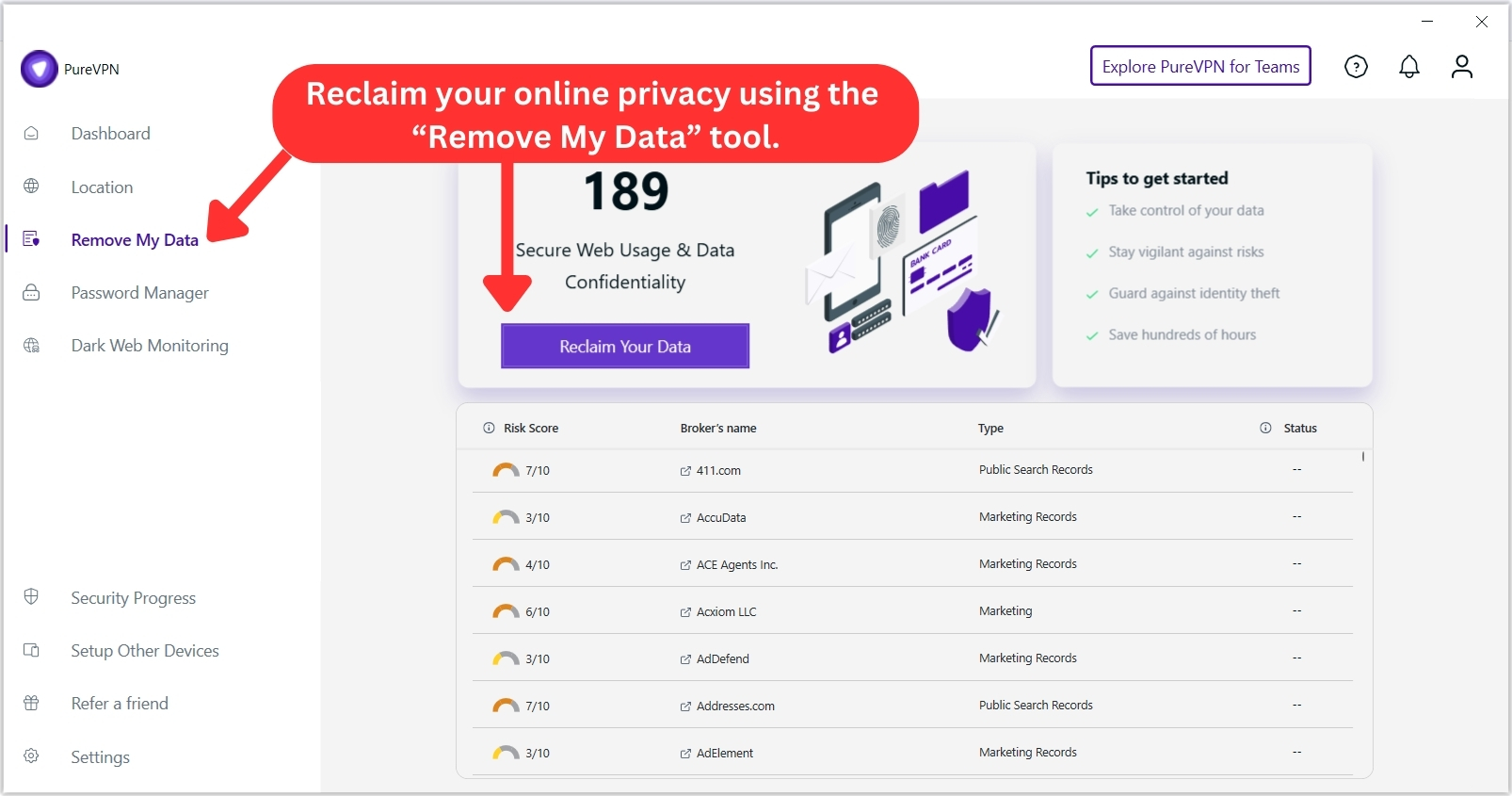
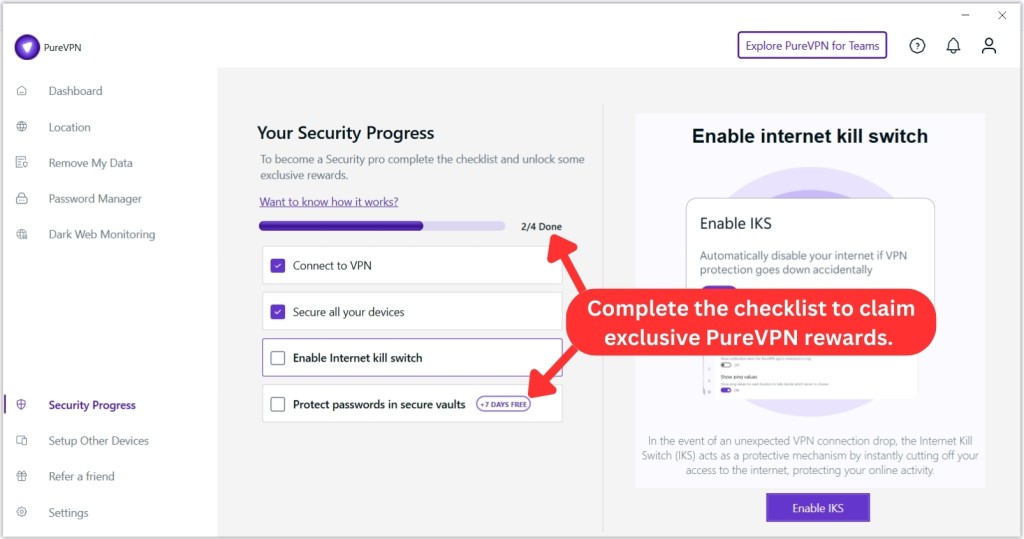
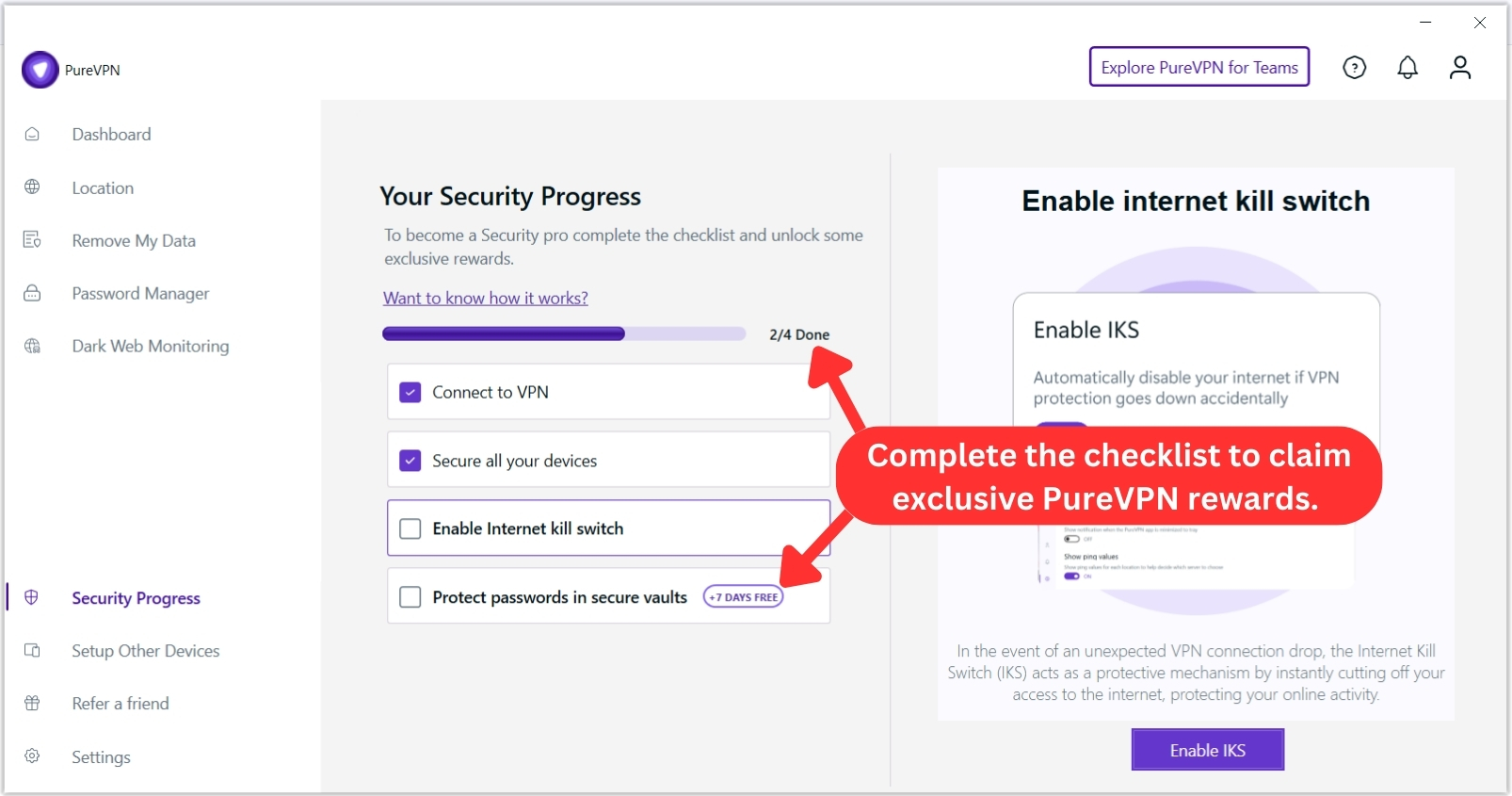
Then, there's a section highlighting a 'Password Manager,' which is only available with PureVPN's 'Plus' and 'Max' plans. Moving further down, there's a 'Security Progress' tab that lists tasks for you to complete. Interestingly, you'll be rewarded with a 7-day extension on your PureVPN subscription when you complete all tasks.
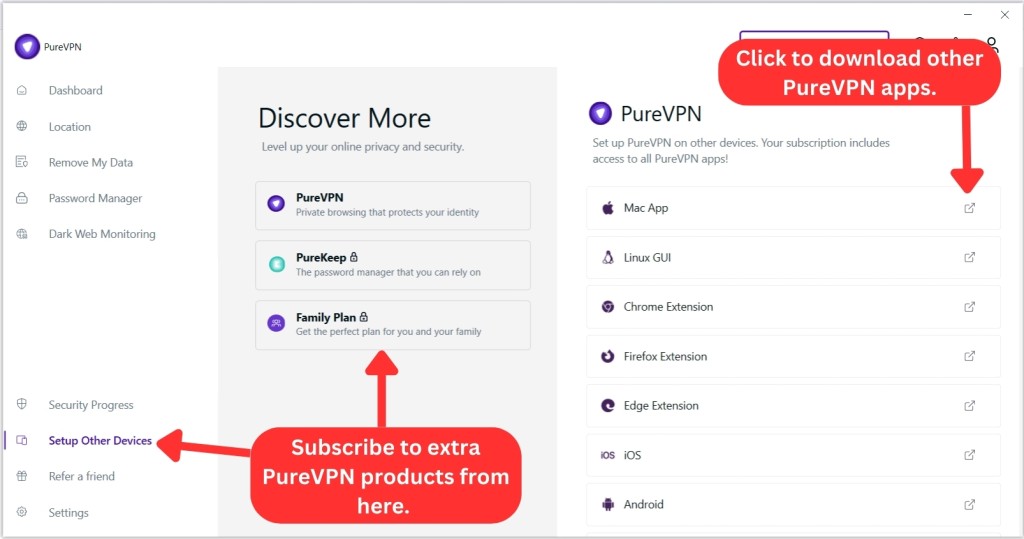
You'll also discover other products and services that you can get with PureVPN. These include 'PureKeep' (a password manager) and 'Family Plan' (which extends coverage to other family members).
In the same tab, you'll find download links for various PureVPN apps. Some of these lead to the PureVPN dashboard, where you can access apps and extensions, while others directly link to specific downloads, like browser extensions or app store versions.
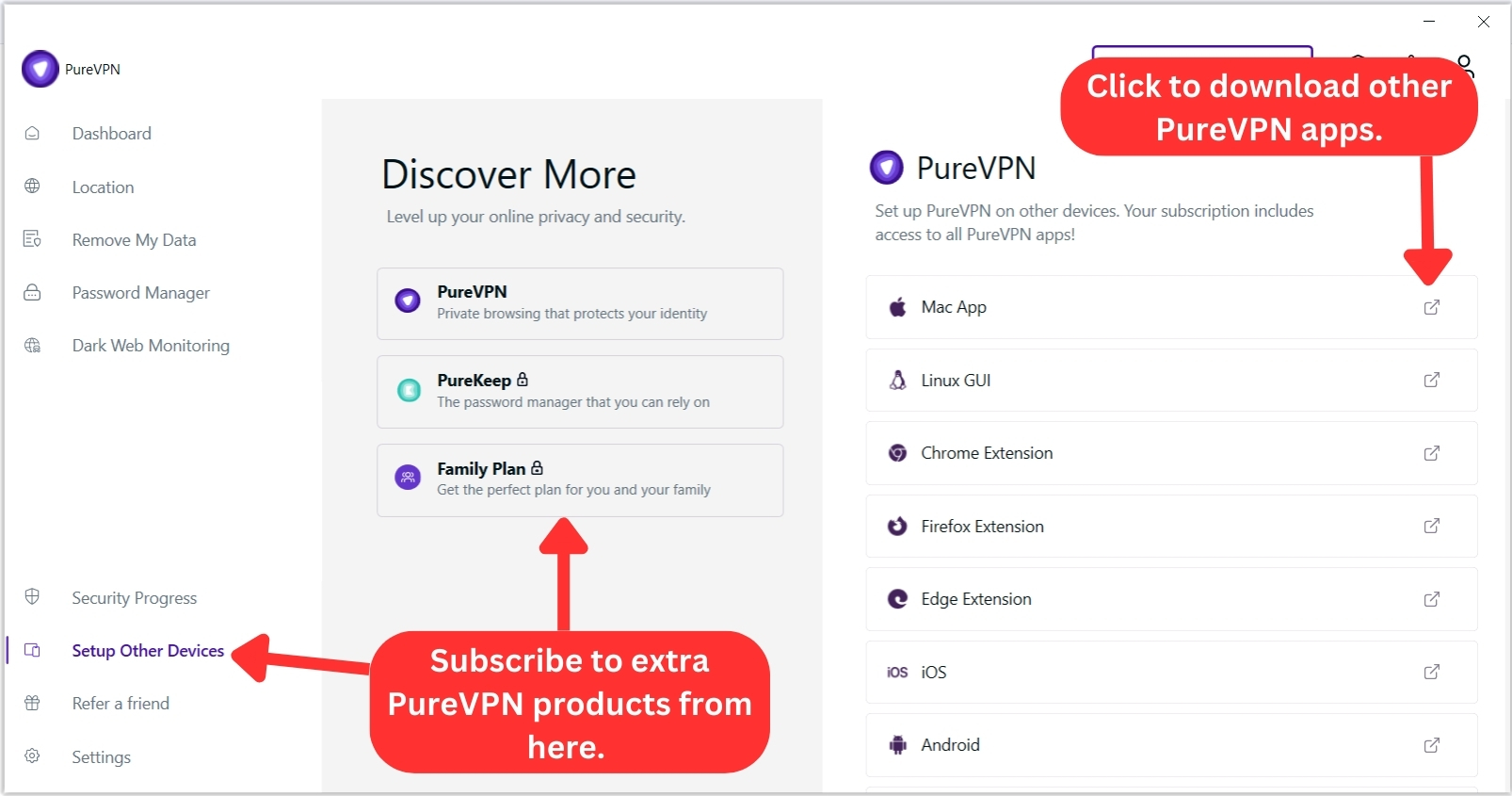
Another section is the 'Refer a Friend' tab that allows you to share free 30-day PureVPN access with friends and family. When someone signs up through your referral link, you’ll receive a $10 credit in return.
Lastly, if you head over to PureVPN's settings, you'll see three categories. Let's take a close look at what's found there (at least when it comes to Windows):
- General: This tab lets you pick another language, set the VPN to start automatically with your system, and enable auto-connect for round-the-clock protection. From here, you can also turn on the kill switch, activate the tracker blocker, manage notifications, and more.
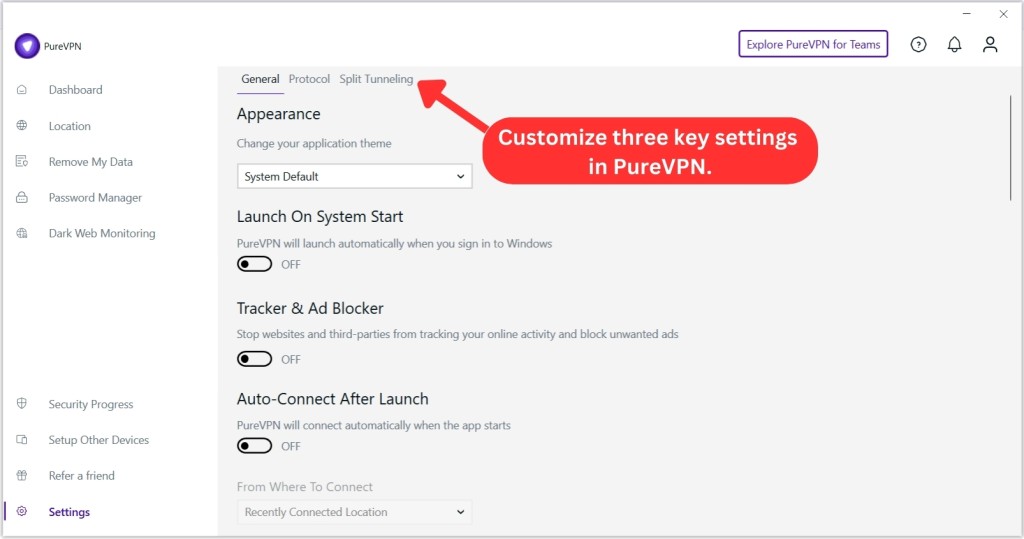
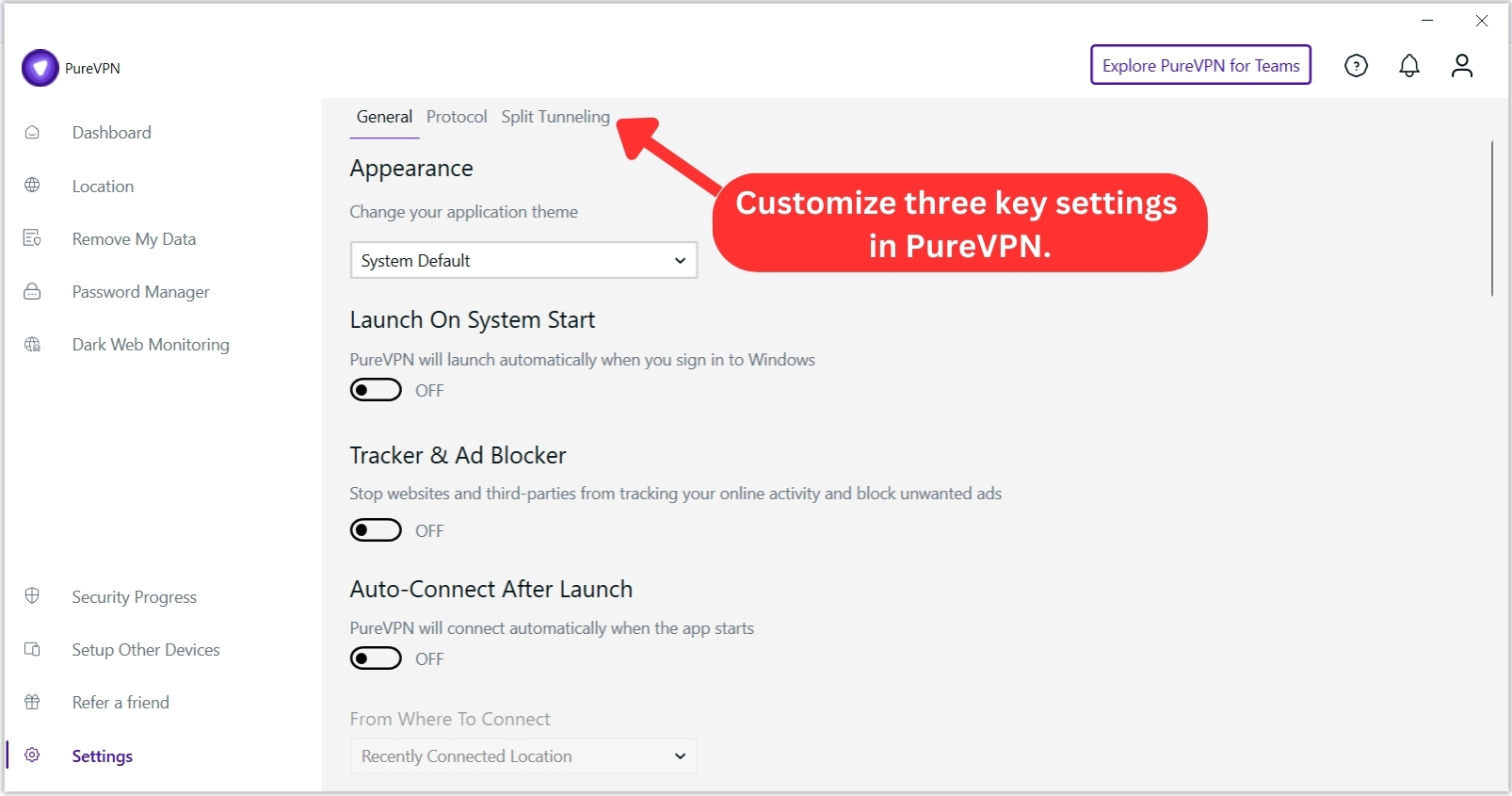
- Protocol: PureVPN makes it easy to switch between different VPN protocols. By default, the app will pick the best protocol. However, you can explore other options for tailored performance.
- Split Tunneling: Lastly, this tab allows you to control your Internet connection for individual apps. You can choose which apps will exclusively use the VPN connection.
In the top-right corner of the app, you’ll find a button to explore ‘PureVPN for Teams.’ Right beside it are three more tabs for support, notifications, and subscription details.
The 'Support' tab opens a section where you can browse the FAQ, submit a support ticket, start a live chat (by visiting PureVPN’s site), and more.
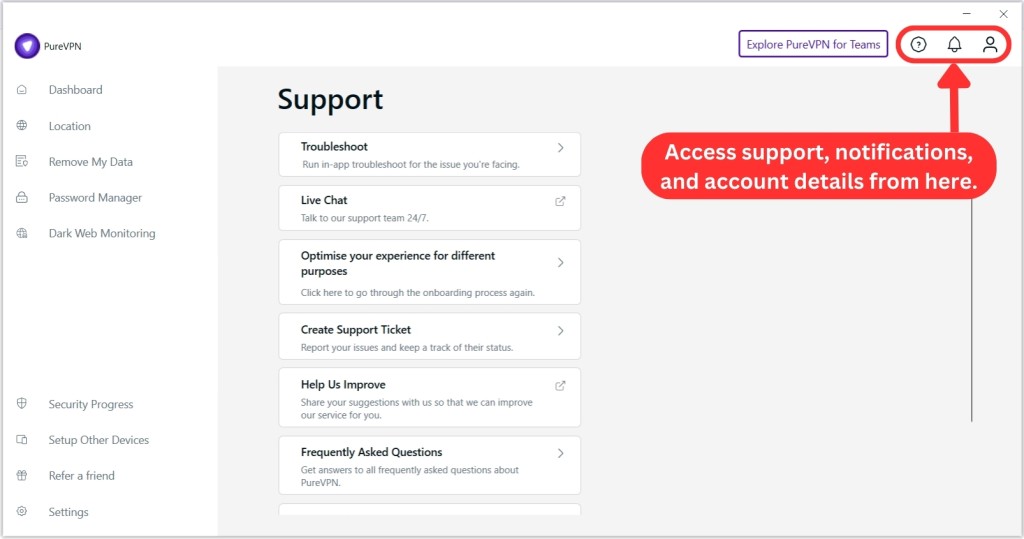
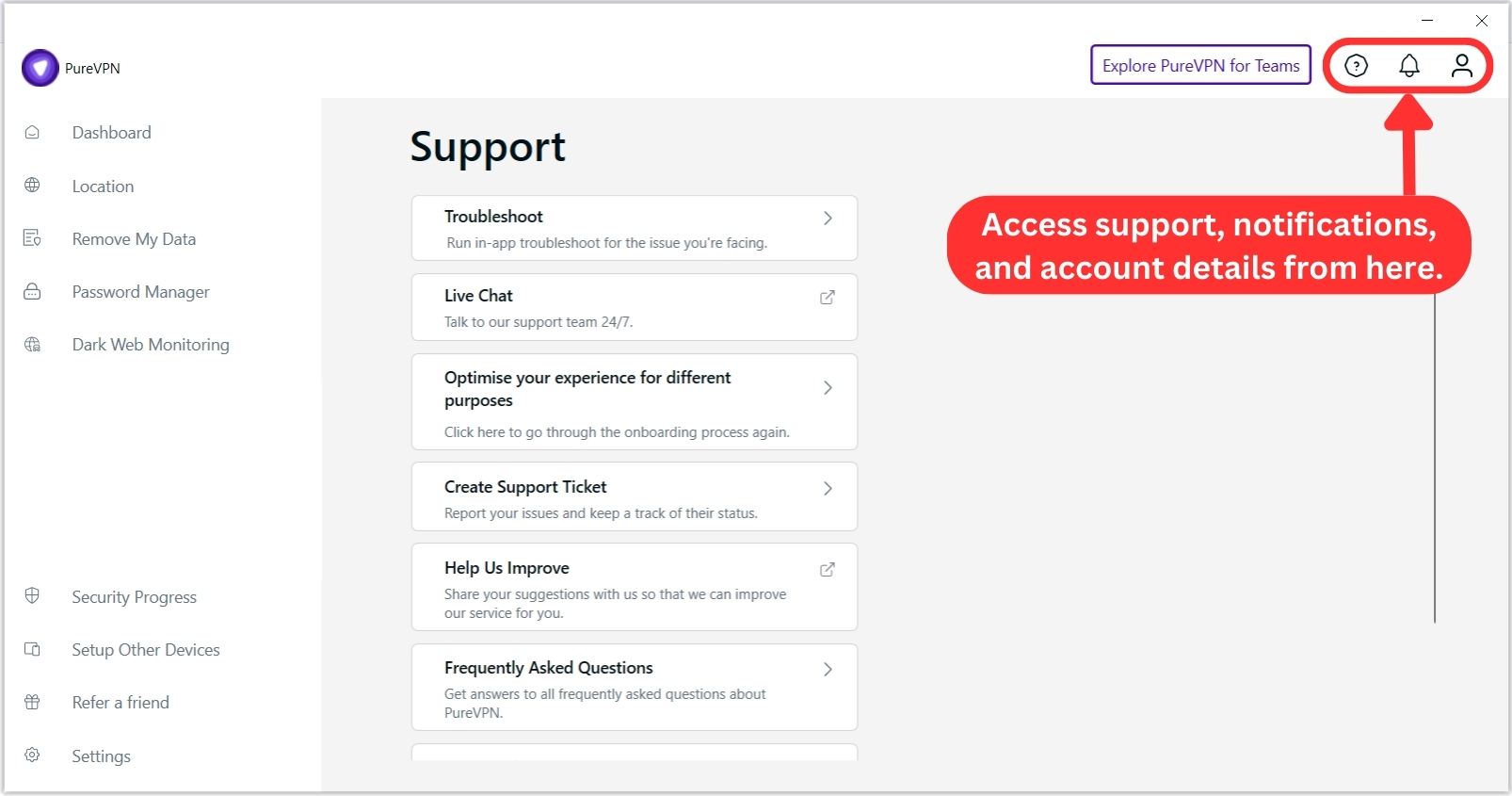
Next, the 'Notifications' tab serves as a message board, allowing PureVPN to inform you of anything requiring your attention (we have yet to see a message posted there).
The user icon next to 'Notifications' is where you'll find your 'Subscription Details.' This tab displays your username, email, account and plan type, subscription status, billing cycle, device login limit, and VPN expiration date. You’ll also find access to add-ons here.
How Well Does PureVPN Work on Mobile Platforms?
PureVPN's mobile apps share the same visual language as the desktop version. On the Android app, the home screen is clean and simple, which is perfect for first-time users. It lets you connect right away to the recommended server, usually the closest one to your location.
During the last couple of months, this VPN app has become more powerful, which is nice to see, as it initially launched with limited features.
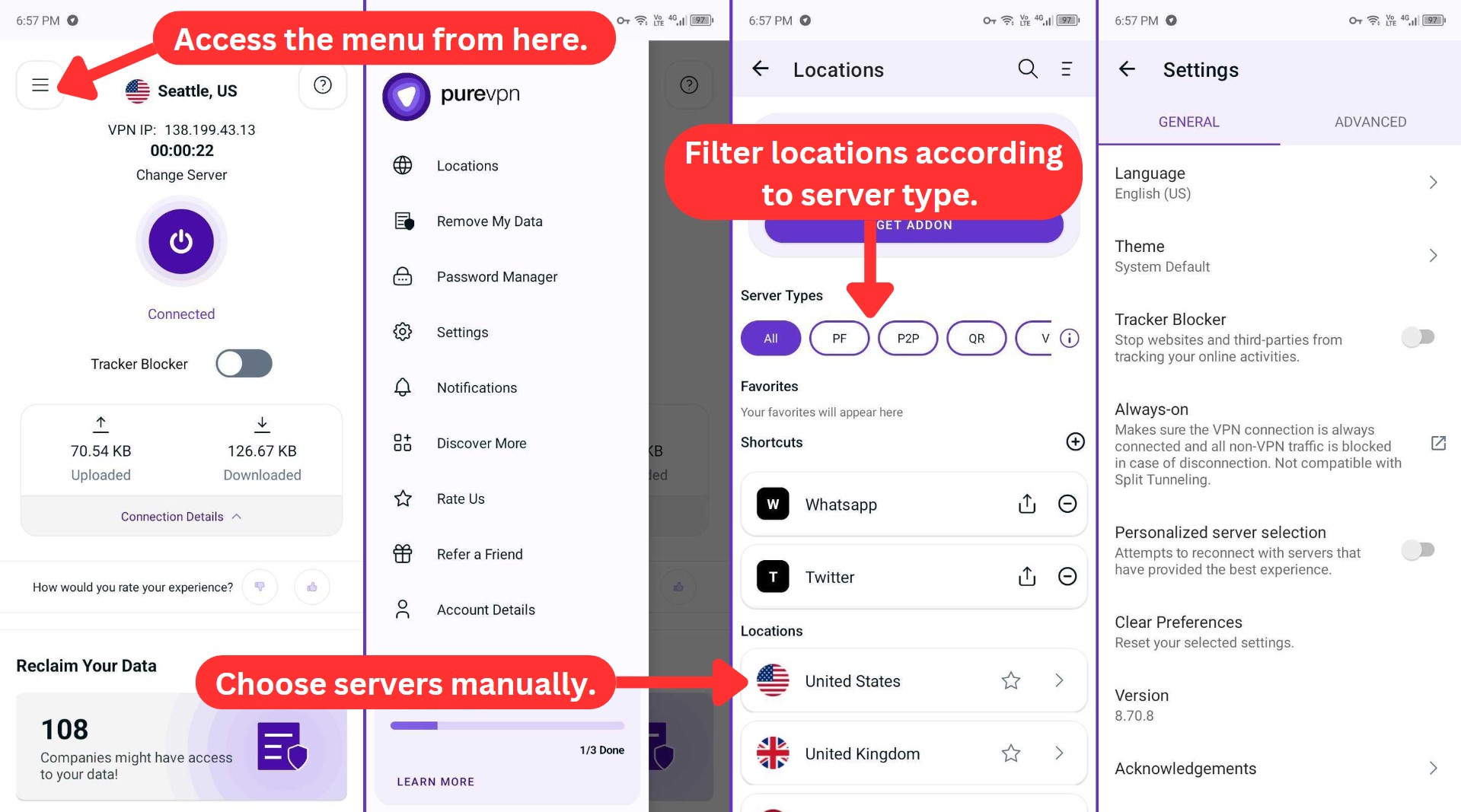
In the PureVPN Android app, you have a decent range of options to customize your server selection. If you’re aiming for smooth streaming, faster file sharing, added privacy, or exploring virtual servers, the mobile apps have you covered.
What sets PureVPN apart is its 'Quantum-Resistant' servers, boasting encryption keys crafted through a proven quantum process for the utmost security and privacy assurance.
However, we noticed a few differences in settings between Android and iOS. On iOS, 'Advanced' settings are more limited, offering only protocol changes and a couple of Dark Web Monitoring options. But the iOS version does have a 'Speed Test' tool in the 'General' settings, which Android doesn’t include.
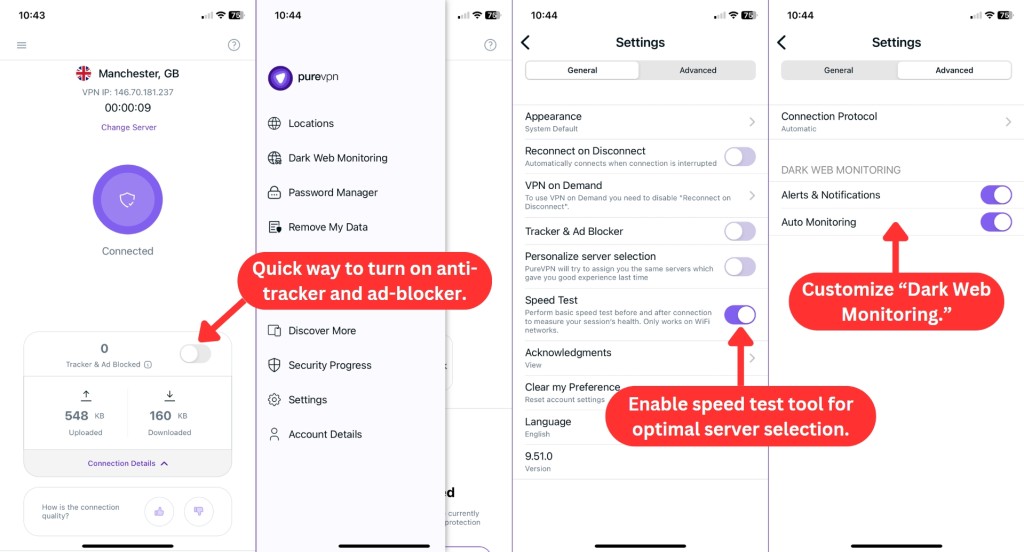
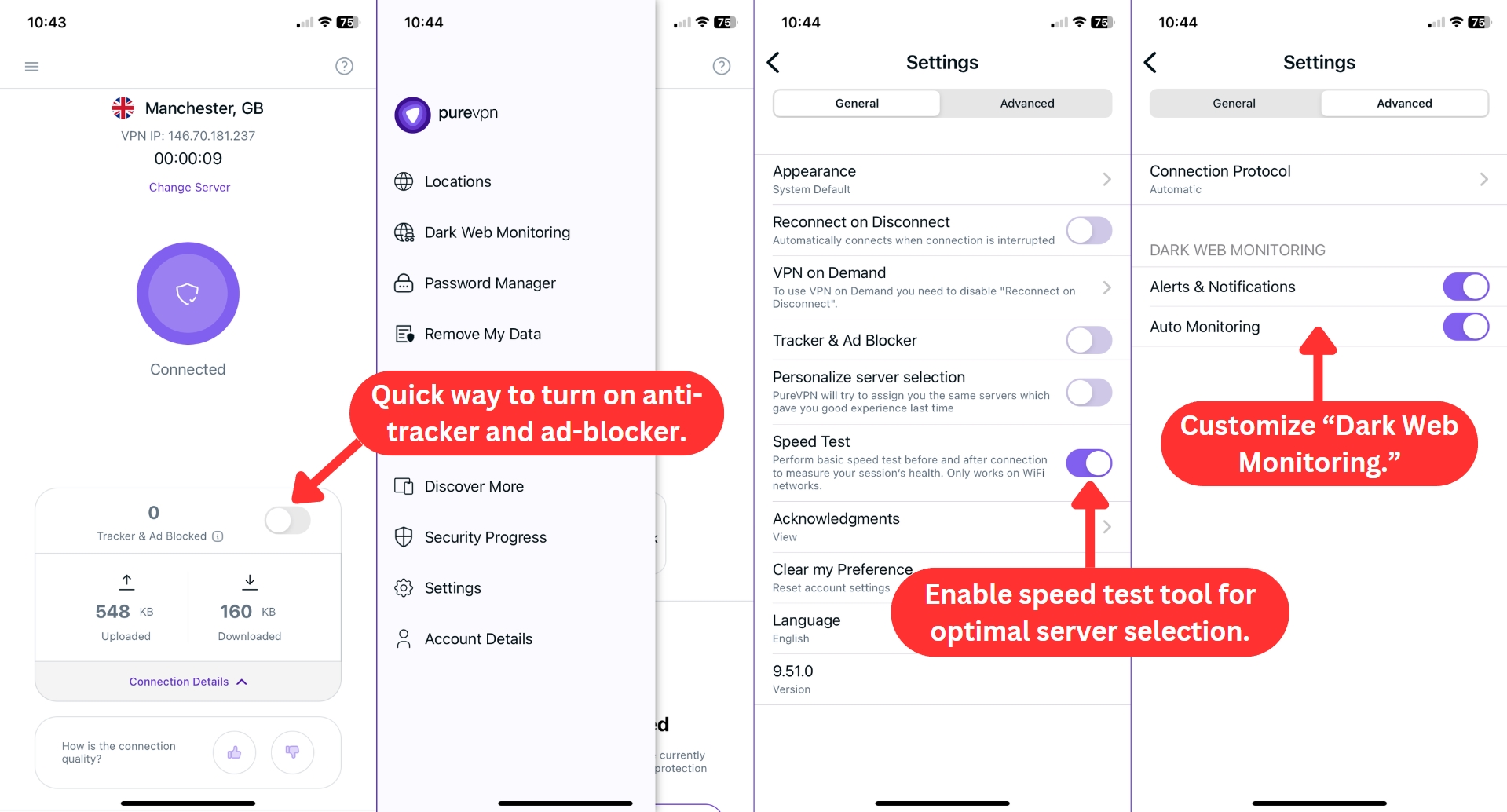
When you tap 'Settings' on Android, you can manage both 'General' and 'Advanced' options. Yet, it's in the 'Advanced' tab where you can fine-tune more of PureVPN's settings, which include:
- Connection Protocol: Handpick your preferred protocols or trust the app to automatically enable the best one for you.
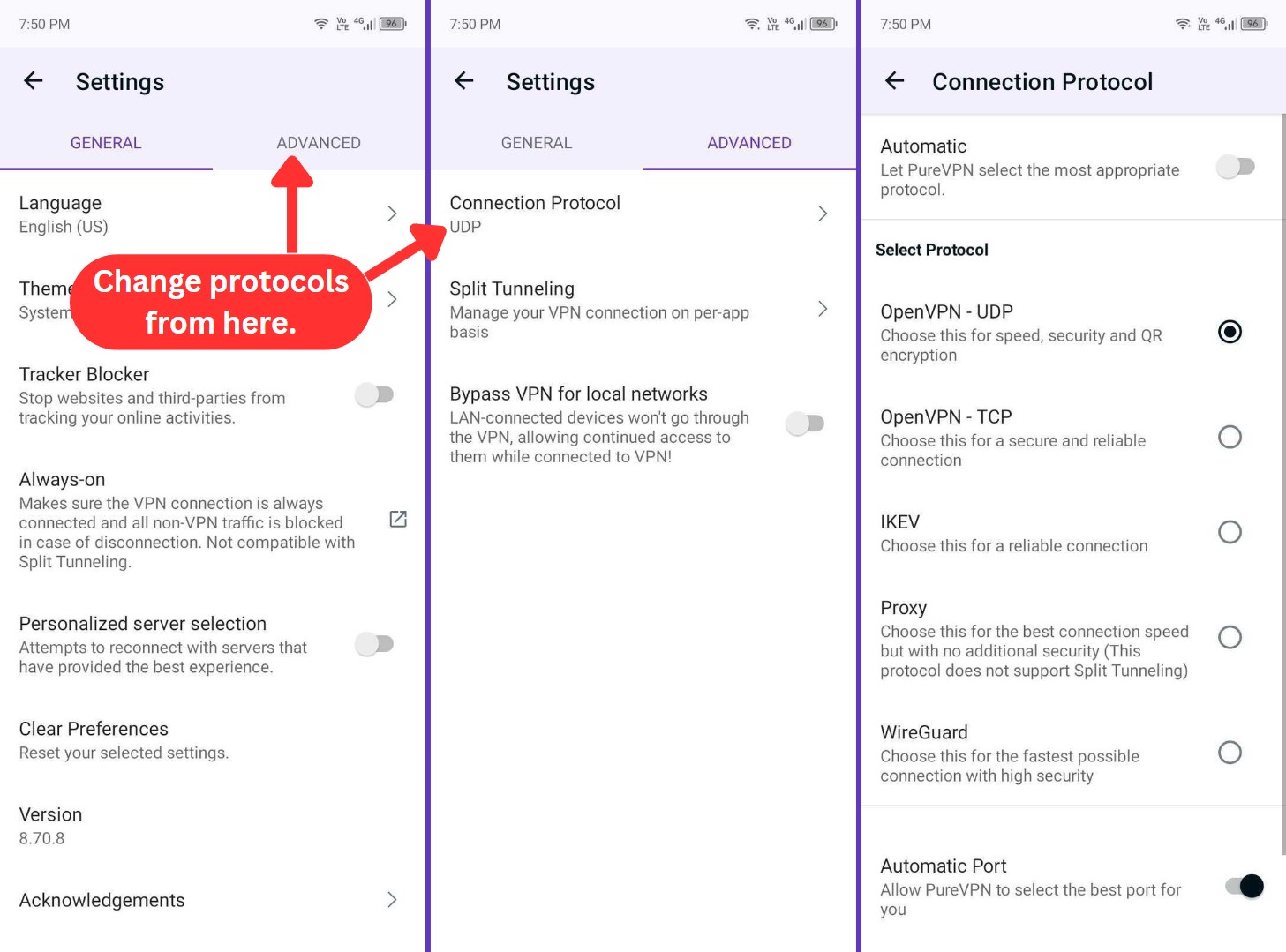
- Split Tunneling: This allows you to route your Internet traffic through PureVPN for chosen applications, enhancing selective privacy and security.
- Bypass VPN for Local Networks: This flexibility allows you to control how your local connections interact with the VPN. You can choose whether your local network stays outside the VPN or goes through it.
How Well Do PureVPN's Web Browser Extensions Work?
PureVPN offers extensions for popular browsers like Chrome, Firefox, and Edge, including Brave. These extensions share a common feature set, providing a consistent experience across different browsers.
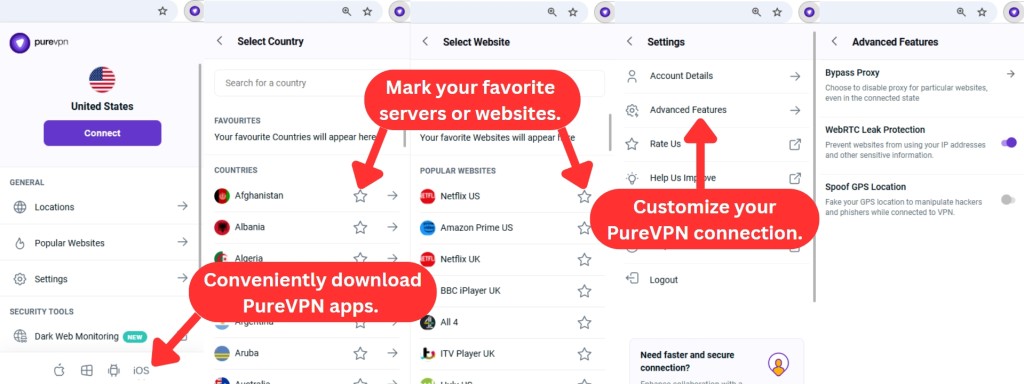
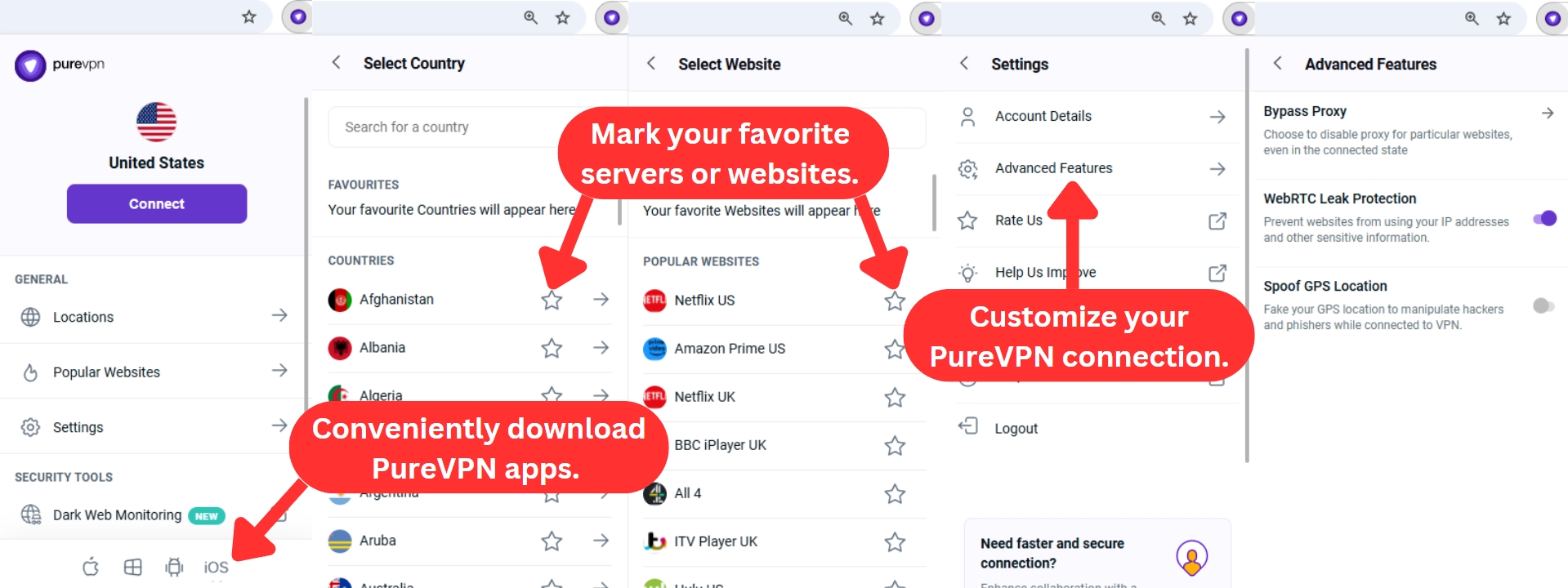
PureVPN has given its browser extensions a fresh update, making them look more modern while keeping the same reliable security and privacy features. You also have the convenience of downloading other PureVPN apps via these extensions, which is a cool feature. However, when it comes to advanced functionalities, it offers just three:
- Bypass Proxy: You can turn off a proxy for certain websites even though you're currently connected to the VPN.
- WebRTC Leak Protection: This feature safeguards your personal information and IP addresses from being misused on websites.
- Spoof GPS Location: Spoofing your GPS location is possible in a bid to evade phishers and hackers when online on PureVPN.
PureVPN has been giving its apps a fresh new look, and it’s definitely a step in the right direction. The design feels more modern, and while some areas could still use a bit of polish, the apps themselves are fairly easy to navigate. You can tell that they’re still working on making things smoother, and it's good to see that progress.
Media Streaming, Torrenting, and Gaming Support
As per our tests, PureVPN can unblock a whole range of popular media streaming services. It also fully supports torrenting via a series of specialized servers. However, this VPN's speed can be limited at times. Our Score: 8/10
VPNs offer various benefits, like unblocking websites, enabling torrent downloads, and ensuring secure, lag-free gaming. Yet, not every VPN excels in all these areas. Our PureVPN review shows how it performs in these crucial aspects. Here's what we found.
Is PureVPN Good for Streaming?
PureVPN excels at streaming and could easily secure a spot on our list of the best streaming VPNs. It has a special category when browsing its servers called 'Shortcuts,' which is optimized for streaming.
Based on our tests, it easily unblocks Netflix US and other libraries. We didn’t encounter any issues streaming exclusive US TV shows, even during sports blackouts, when connected to these streaming-optimized servers. The only hiccup was with Amazon Prime, but aside from that, it performed well across the board.
Here's a table showing some of the notable US-based streaming platforms unblocked by PureVPN:
PureVPN also extends your access to streaming platforms worldwide, not limiting you to the US. Here's a sneak peek at what's in store:
Is PureVPN Good for Torrenting?
PureVPN is certainly a good bet for P2P file sharing. We tested it using its torrent-optimized servers in Europe, Africa, Asia, and the Americas, and it was generally decent. However, it doesn’t quite make the cut as one of the best VPNs for torrenting.
During our tests, speeds were a bit inconsistent. Torrenting large files was sometimes a hassle when the speeds dropped out of nowhere. This is something to keep in mind if you’re planning to download massive files regularly.
Server location matters with PureVPN as well. We were cautious when testing from certain countries, as PureVPN makes it clear that torrenting isn’t allowed in regions like the US, UK, Canada, and Australia due to strict regulations. So, always double-check and use torrent-friendly server locations before you dive in.
With PureVPN, however, you'll get high-end encryption, an automatic kill switch, and a strict zero-logs policy to prevent IP address exposure. These features help keep your activity private, so nothing lingers after you're done torrenting.
Is PureVPN Good for Gaming?
PureVPN can be a good option for online gaming, especially when you're connected to nearby servers. During our tests with games like CoD: Warzone, Fortnite, and Apex Legends, we found that it held up pretty well when we stayed close to our location.
But when we connected to servers located farther away, such as in Asia and Australia, the performance plummeted. Ping times soared to more than 200 ms, resulting in noticeable lag and delays in the game. This made competitive gaming less fun.
PureVPN does provide additional features such as port forwarding and dedicated IPs, which are excellent if you're running your own game servers. These features allow you to play securely and without fear of sudden disconnections or security threats.
Basically, if you're gaming mainly on local servers, PureVPN should work just fine. However, if you need to connect to remote servers or specifically require a VPN for low-latency response, you might want to consider looking at other top-rated gaming VPNs.
Security & Privacy
PureVPN has had plenty of issues in the past. However, it seems that this VPN has done plenty in recent years to improve its reputation. Our Score: 6/10
In this section, we'll gauge PureVPN's security and privacy features and assess three key factors: VPN protocols, logging policy, and IP/DNS leak prevention. This helps us understand how well PureVPN safeguards our personal data.
PureVPN Protocols
PureVPN provides various VPN protocols, but their availability varies by device. To start, here's an overview of the protocols you can expect:
- OpenVPN UDP: This is a good choice for streaming and downloading. However, it ditches error checks for faster transmission - meaning it's a bit less reliable than TCP.
- OpenVPN TCP: While TCP in OpenVPN is known for its reliability, it does come at the cost of higher bandwidth usage. So, it may not be as fast as UDP.
- IKEv2: When it comes to VPN protocols, IKEv2 shines as one of the fastest options. It's the go-to choice for stable connections, often preferred for streaming and downloading purposes.
- WireGuard: This one excels at delivering both speed and security to your PureVPN connection, making it a popular choice for streaming and Web browsing.
- IPSec: Although speedier options exist, IPSec's strong reliability makes it a popular choice for secure Web browsing activities.
- Proxy: Opt for a Proxy if you want top-notch speed, but keep in mind that it doesn't offer added security. It's also worth noting that this protocol lacks support for split tunneling and is exclusive to Android devices.
Aside from these protocols, PureVPN still offers older protocols like PPTP, L2TP, and SSTP, but only in specific locations: Australia (Sydney), Germany, Netherlands, UK (London), and USA (California, Florida, Illinois, New York, Texas, and Washington DC).
Does PureVPN Keep Logs?
No, PureVPN doesn't keep any logs that could identify what you do online (it used to log that data through). However, some data is collected, which is the case with most of today's VPNs.
Even the most reliable VPN protocols don’t mean much if your VPN collects your data. And in 2017, PureVPN tarnished its own reputation. That was connected to a case where the FBI caught a cyber-stalker by forcing PureVPN to hand over very precise personal data about one of its subscribers. And all of that was happening at a time when PureVPN claimed it didn't know anything about its customers.
To improve its standing, PureVPN has done plenty to persuade its customers to stay. Here's what kind of information they log right now:
At Signup:
- Your name
- Email address
- Chosen password
- Mode of payment
During Service Usage for Support:
- Connection times
- ISP Tracking
- Day of connection
- Usage & activity logs
Data for App and Service Improvements:
- Software usage and performance data
- Information from live chats, emails, and feedback forms
The types of information mentioned above can't be used to identify what you do online. This means your real IP address, connection timestamps, or any other personally identifiable pieces of information remain private. PureVPN's 'no-logging' policy is also backed by four independent audits, with the latest completed in 2023, making it an interesting pick.
Additionally, when you use PureVPN’s Dark Web Monitoring service, the VPN collects certain personal details to scan for potential data breaches. By default, it fetches and monitors your email address. If you choose to expand the monitoring, you can also provide your phone, credit card (without the CVV code), national ID, Social Security, and passport details.
However, your personal data is never stored in plain text. Rather, it’s encrypted and processed through SpyCloud, a trusted third party, to cross-check against known breaches. If you no longer want to use this feature, you can opt out anytime by disabling auto-monitoring in the app's settings.
Does PureVPN Leak/Expose Private Data?
No, PureVPN doesn't leak your personal data. We've put PureVPN through a rigorous DNS leak test, and we're happy to report that no VPN leaks were detected.
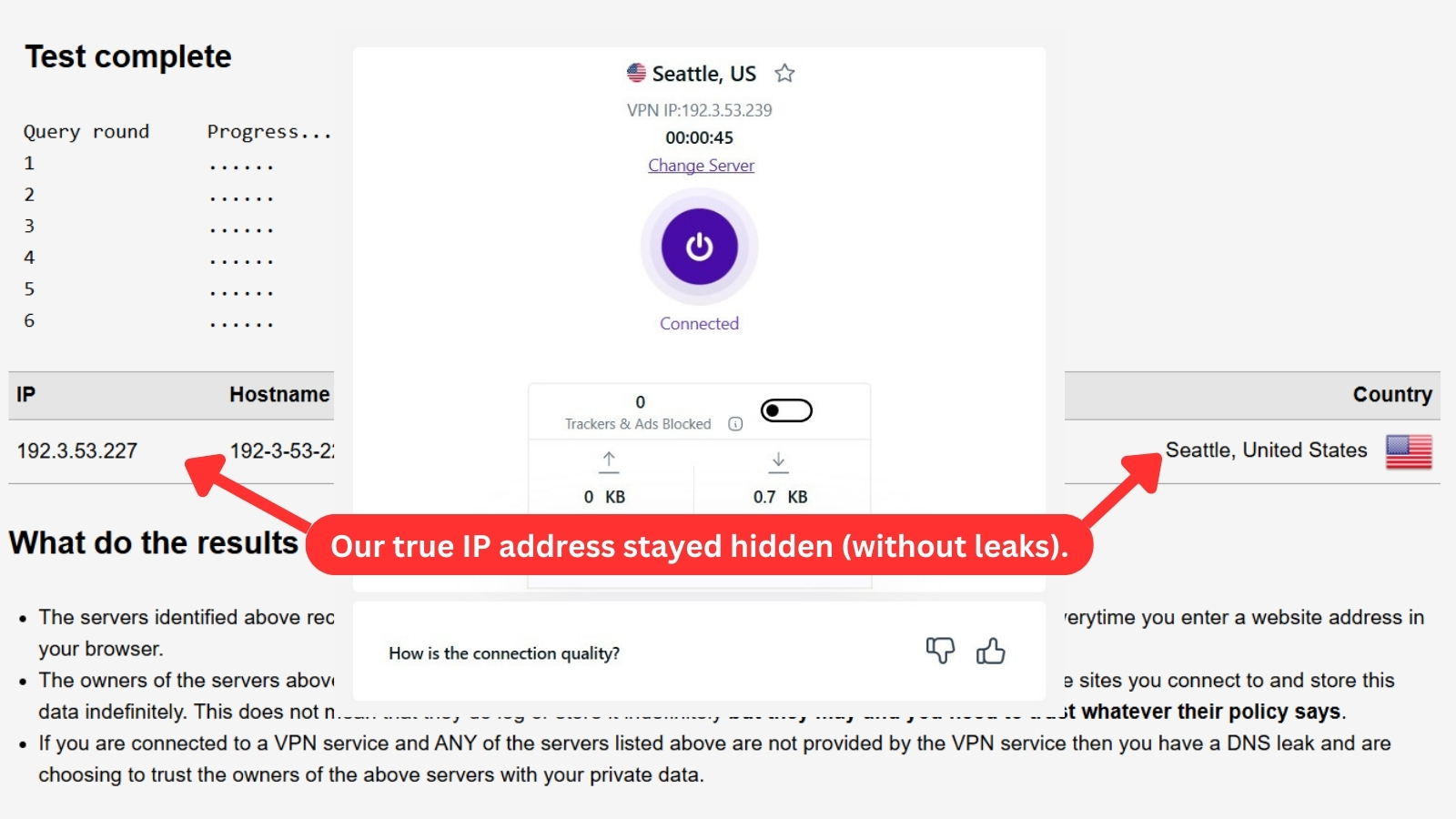
As you can see from the image above, our real IP stayed hidden. Once you connect to a PureVPN server, your private information will remain within this VPN's secure tunnel.
Speed & Performance
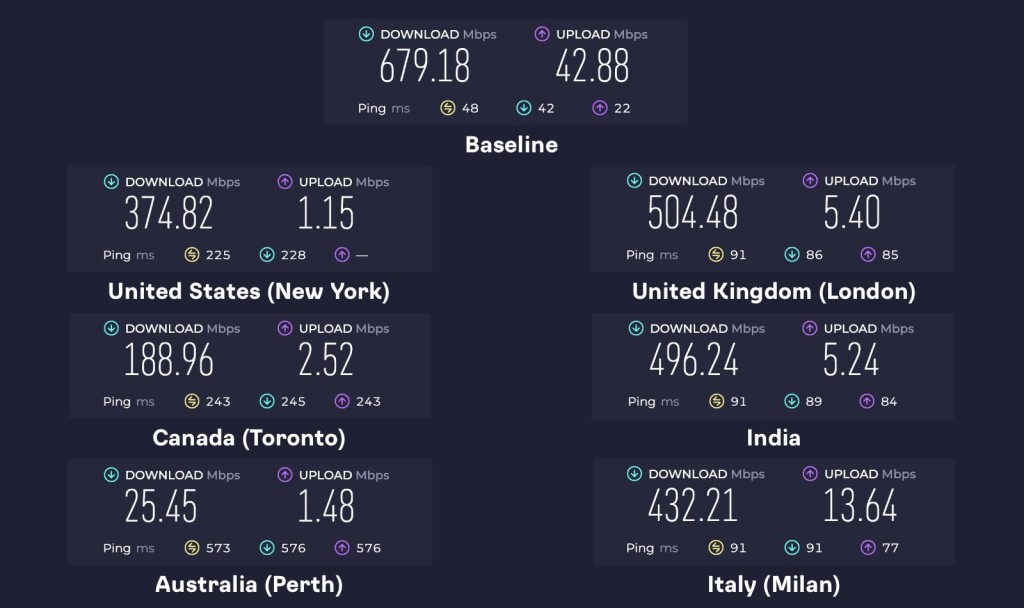
On average, PureVPN slowed our Web connection down by around 50%. This level of performance is a significant drop compared to previous tests and puts it behind other high-speed VPNs in the industry. Our Score: 6/10
The image above shows the speed of our Web connection without using the VPN. As you can see, we got 679.18 Mbps for downloads and 42.88 Mbps for uploads. These stats serve as our baseline for our current location in Europe.
When reviewing VPN services, we connect to both local and remote servers to check their speeds. We did the same with PureVPN, so here's what you can expect in terms of its performance.
- USA Server (New York): This US server was quite a trek from our European base, so a 45% speed drop wasn’t surprising. Download speeds hit 374.82 Mbps, while uploads were limited to just 1.15 Mbps.
- UK Server (London): Relatively close to home in Europe, the UK server delivered the best performance, with just a 26% reduction in speed. Our download speed surged to 504.48 Mbps, but our upload speed only reached 5.4 Mbps.
- Canada Server (Toronto): This PureVPN server was roughly as distant as the US server, so we were expecting similar results. Instead, it operated at a greater speed loss of 72%, reducing our connection from 679.18 Mbps to 188.96 Mbps.
- India Server: Despite being quite far from our location, this server performed impressively during testing, with a speed reduction of 27%, similar to the UK server. It delivered a strong download speed of 496.24 Mbps, ranking as the second-fastest server on our list.
- Australia Server (Perth): This one was a letdown, though we expected slower speeds given the distance. Still, it performed the worst, with downloads crawling at 25.45 Mbps - that's a massive 96% speed loss.
- Italy Server (Milan): We expected top speeds from this server since it’s the closest to our location, but performance was just moderate. Speeds dropped by 36%, with downloads reaching 432.21 Mbps and uploads at 13.64 Mbps.
To make sense of the data and images displayed above, we have put all that information in the following table.
We conclude that PureVPN made our Internet connection slower by 50% on average. Even though every VPN will slow you down, you can expect much better performance in general. Upload speeds were also particularly disappointing, ranging from 1 to 42 Mbps.
The lower end of that range isn’t functional for most tasks, but the higher end could handle video calls and file uploads without much issue. However, for more demanding tasks like streaming in 4K or uploading large videos to platforms like YouTube, those speeds could struggle to keep up, especially if you're dealing with longer uploads or high-quality live streaming.
Customer Support
PureVPN has plenty of customer support material, ranging from live chat to comprehensive FAQs. Our Score: 10/10
We'll also tell you what kind of customer support you can expect from PureVPN. After all, having someone to assist you in case of any questions or issues is quite important.
- Live Chat Support: On every page of PureVPN's website, you can find a live chat button in the bottom-right corner. This is the best and speediest way to get help since you can talk to a real person. There aren't any queues, and you can start chatting with someone in an instant.
- Email: PureVPN offers direct email support at [email protected], which is convenient if you prefer a more in-depth response over live chat. In our experience, their support team is responsive, although reply times can vary.
- Support Tickets: Alternatively, you can open a support ticket and send a message to PureVPN's support team. You should receive a response in a day or two.
- PureVPN YouTube Channel: If you prefer visual guides over written instructions, PureVPN’s YouTube channel, PureSquare, is the place to go. The videos are clear, to the point, and updated regularly with cybersecurity-related information.
- Setup Guides: To help you install this VPN, you can rely on several setup guides. This perhaps isn't needed when installing PureVPN on Windows or macOS. However, you'll find installation guides to be helpful when installing this VPN on a router, for example.
- FAQs: If you're unsure about anything, whether it is pricing, features, or setup, PureVPN's FAQ section has answers to common questions. It makes it easier to find what you need without contacting support.
- Special Guides: PureVPN also offers some special guides for users in China, how to watch Netflix outside the United States, and more.
- Blog: PureVPN’s blog is full of useful information regarding cybersecurity, online anonymity, and the latest digital trends. After exploring it, we were impressed with its well-organized and extensive collection of resources, covering everything from VPN guides to industry news.
Pricing
When compared to its competitors, PureVPN is a more affordable option. That especially goes for its long-term plans. Our Score: 8/10
PureVPN provides you with a choice of three different subscription plans. If you're looking to maximize savings, considering one of their longer-term plans might be a smart move. Here's how much you'll need to pay to become a PureVPN subscriber.
How Much Does PureVPN Cost?
PureVPN's plans start at $2.16/month and come in 3 different options: Standard, Plus, and Max. The cost of each plan depends on how long you want to subscribe.
Regardless of the plan, you'll enjoy a 31-day money-back guarantee and the convenience of 10 multi-logins. Plus, when you opt for the 2-year plan, you'll get up to 6 months of service. Let's take a look at each plan:
- Standard: This plan offers access to PureVPN's essential features, like ultra-fast download speeds, up to 10 device connections, tracker blocker, and 3 extra months for the 2-year subscription. However, the Standard monthly plan has no discount or cost savings.
- Plus: The Plus plan combines PureVPN with PureEncrypt for file encryption and PureKeep, a password manager. You can choose from 4 pricing options: $15.95 monthly, $5.82 annually, $2.96 for the first 2 years, and $2.66 for a 5-year term. You'll also get 3 more months when you subscribe to the 2-year plan.
- Max: This one is an all-inclusive package that also offers 'Dark Web Monitoring.' Prices start at $3.33 per month with the 5-year plan. For its 2-year plan, you'll pay $3.66/month with an extra 6 months for free.
As you can see, the most significant savings are found in PureVPN's long-term subscriptions. The 1-year subscription has a starting price of $3.99 per month, while the Standard 2-year plan offers up to 83% in savings at $2.14 per month, plus 3 extra months free.
You can also find discounts during the holiday season, such as PureVPN's Christmas deal and Black Friday offers. These promotions offer significant savings, making it a good time to sign up or extend your subscription at a lower price.
You can also give PureVPN a test run for 7 days for just $0.99. If you cancel within that period, you can get your money back, essentially making it a free trial.
Its other premium-priced monthly add-ons include a dedicated server, which starts at $12, port forwarding at $1.99, and a dedicated IP for $3.99. If you want both port forwarding and dedicated IP add-ons, the monthly cost starts at $5.49.
Additionally, the company has expanded its privacy options with new deals, products, and services. These include a 'Family Plan,' up to 15% off student discount offer, and 'PureDome' for teams and businesses to secure business networks.
As remote work becomes the norm, cybersecurity threats are multiplying for businesses. PureDome steps in to address this challenge, offering a comprehensive security solution specifically designed for teams and organizations.
PureDome also streamlines the process by providing a central hub for managing user activity and monitoring across your entire team. This translates to increased efficiency and reduced administrative burden. Additionally, PureDome prioritizes affordability, offering a cost-effective solution that won't break the bank.
When it comes to supported payment options, you can choose between credit/debit cards, PayPal, Google Pay, CoinPayments, and Paymentwall. Also, remember that with PureVPN, you can get your money back within 31 days – no questions asked.
For their refund policy, note that some payment methods don't include the refund option (if you pay via the Google Play Store or Apple App Store, for example).
Is PureVPN Free?
No, PureVPN isn't free. However, it provides a 7-day trial for a minimal cost of $0.99. This trial period allows you to experience PureVPN's services and assess factors like speed, security, and overall benefits. Following the free trial, the subscription renews at $44.95 for the next 12 months unless you cancel.
PureVPN also stands behind its service with a 31-day money-back guarantee. If, within this timeframe, you find that PureVPN doesn't meet your expectations, you can reach out to their customer support via direct email or live chat to initiate a refund process. This guarantee provides a risk-free opportunity to explore and decide if the service aligns with your needs.
Final Thoughts - Is PureVPN Good?
Yes, PureVPN is good, especially if you're looking for great deals. But there’s more to it than that. PureVPN also holds up solidly in many other areas, such as privacy and security. Military-level encryption, a no-logs policy, a wide server network, and loads of features and add-ons add up to present a solid VPN service.
That said, it will always hold a reputation as the VPN that gave away 'non-existent' customer logs to the FBI. That stain may never be wholly erased, but that won’t be down to the provider not trying. Unfortunately, those efforts also include white-washed reviews and marketing.
PureVPN also excels in streaming, with specialized servers for Netflix and other services, provides reasonable torrenting support, and is a good choice for online gaming when connected to nearby servers.
With its strong performance, privacy features, and plenty of servers, we highly recommend PureVPN for your online security and streaming requirements.
PROS
- Wide network of servers.
- Compatible with many devices.
- 4x independently audited.
- Strong VPN protocols.
- Privacy-friendly jurisdiction.
- Dedicated streaming and P2P servers.
- 'Dark Web Monitoring' service.
- Obfuscation via OpenVPN.
- 'Tracker Blocker' feature.
- Budget-friendly long-term plans.
CONS
- Troublesome history.
- Has a limited Linux app.
- Fails to unblock Prime Video.
| Review Summary PureVPN might not be the best option for protecting your privacy. However, it's an affordable VPN that works great for streaming and unblocking websites. | 7.8 Overall Score | ||
| Background, Jurisdiction & Reputation | 2 | ||
| Supported Platforms & Devices | 10 | ||
| Installation & Initial Configuration | 10 | ||
| Prominent Features | 7.5 | ||
| Server Count & Infrastructure | 9 | ||
| UI/UX Design & Ease of Use | 7 | ||
| Media Streaming, Torrenting, and Gaming Support | 8 | ||
| Security & Privacy | 6 | ||
| Speed & Performance | 6 | ||
| Customer Support | 10 | ||
| Pricing | 8 | ||