When you purchase through links on our site, we may earn an affiliate commission. Here’s how it works.
Hotspot Shield VPN Review 2026


Our experts have reviewed 53 VPN providers, which were put through extensive rounds of testing. To learn more about that process, here’s how we review VPNs, where we explain our criteria and our policy of being fully transparent.
Hotspot Shield, a US-based VPN, is renowned for speedy connections using its Hydra protocol. With more than 1,800 servers across 80+ countries, P2P support on all servers, and the ability to unblock popular streaming sites, it secures a spot on our list of the best VPN services.
While Hotspot Shield meets most essentials, such as high-end encryption (128-bit and 256-bit AES), a kill switch, and protection from malicious and phishing sites, it lacks some of the advanced features that other VPNs offer at the same price range. Additionally, the service hasn’t undergone an independent audit.
Also, remember that the US belongs to the Five Eyes Alliance and has strict surveillance laws. Hotspot Shield also keeps users' data logs. But it says these logs are anonymous and not shared or sold to anyone. Fortunately, the service hasn't had a major data breach before.
For casual users who want a quick and easy VPN for streaming, torrenting, and gaming, Hotspot Shield could be a good option. However, privacy-conscious users who desire more control and transparency over their VPN may want to consider other alternatives.
To start, let’s review some basic information about the service. The following table provides an overview of its key features and capabilities.
We’ll evaluate Hotspot Shield VPN based on various criteria, such as its country of origin, supported platforms, UI design, features, server network, performance, and more. If you’re interested in learning more about our methodology, you can read our guide on how we review VPNs.
Background, Jurisdiction & Reputation
Hotspot Shield's situation is highly problematic. The service is based in the US and has been accused of collecting data and having connections with US authorities. Hotspot Shield, however, denies any wrongdoing. Our Score: 6/10
It’s important to know where your chosen VPN comes from, as these online services abide by the laws of their home country. So, let’s see where Hotspot Shield comes from and what that means for its users.
Where Is Hotspot Shield Based?
Hotspot Shield is a US-based security company. In July 2020, Aura, the parent company of Pango, acquired Hotspot Shield. This acquisition isn’t ideal as the US has intrusive privacy laws and is a member of the 5 Eyes Alliance, known for sharing mass surveillance data.
Companies operating in such invasive jurisdictions may be compelled to retain and share users' information. Aside from Hotspot Shield, Pango, and Aura also own a range of other VPNs, such as Betternet, VPN360, and UltraVPN - none of which are known as high-end no-logs VPNs.
Notably, Aura also runs its own VPN called Aura VPN and acquired the review site Comparitech in 2021, while Pango acquired OVPN.
Did Hotspot Shield Leak Personal Data in the Past?
No, Hotspot Shield VPN hasn’t had any data leaks in the past. Despite its controversial history, the service hasn't leaked any personal data. A 2016 report exposed some of its questionable practices, such as injecting JavaScript codes for advertising and tracking in its free Android app. This allowed the company to collect user information and redirect traffic through affiliate networks for profit.
Also, we can’t help but mention how the service has been associated with morally ambiguous actions. Let’s list two of those incidents. First, in 2017, a report revealed problematic connections between their managers and US authorities. Following that, in 2018, a bug was discovered in Hotspot Shield that was ignored for two straight months, potentially compromising the security of hundreds of millions of users.
Additionally, Hotspot Shield's Privacy Policy offers some reassurance by outlining its no-logging practices, which include the absence of browsing history records and the deletion of session IP addresses.
However, it does admit to retaining certain data, such as bandwidth consumed, session duration, anonymized domain access, and device hashes, raising concerns about potential profile creation. Plus, Hotspot Shield's free version uses third-party software development kits, which can gather data on your device's advertising identifiers, IP address (which may be replaced by a VPN-determined location), device-specific information, and the app or website serving the ad.
But we have to mention an independent test conducted in 2018 involving Hotspot Shield VPN. The test was done by AV-TEST GmbH, a respected name in performance and security audits. And we have to say, the results of their comprehensive VPN comparison study were promising.
Hotspot Shield stood out in the crowd, exceeding expectations for both privacy and performance. AV-TEST found it to be the most secure and fastest solution among all the consumer and enterprise VPNs they tested. This independent validation is a strong indicator that Hotspot Shield could be a powerful and efficient choice for safeguarding your online activities.
While Hotspot Shield has a controversial history, it has taken steps to address its past practices. However, it’s important to note that this VPN may not provide a high level of privacy, even under the latest management and an updated logging policy.
Is Hotspot Shield Safe?
Yes, Hotspot Shield is a technically safe VPN service. It offers both 128-bit and 256-bit AES encryption, with 128-bit being the default. It's also well-equipped with the proprietary VPN protocol Hydra, along with IPSec and Wireguard, to provide a secure VPN tunnel. However, Hotspot Shield isn’t perfect, and there are some drawbacks that you should consider before using it.
First and foremost, the service is based in the US, which is a member of the Five Eyes Alliance and has a history of data requests from the government. This means that Hotspot Shield could be compelled to hand over your data if it receives a valid legal order.
Another issue is that Hotspot Shield has a questionable privacy policy, allowing it to collect anonymized data about your device, location, bandwidth usage, and network information. This data is used for diagnostic and analytical purposes and for providing targeted ads and offers.
On a positive note, the result of the AV-TEST GmbH independent comparative test in 2018 offers a glimpse of hope. However, the lack of independent audits means its practices remain unverified.
Supported Platforms & Devices
Hotspot Shield Premium allows you to install the app on up to 10 devices, while the free version is limited to 1. It’s compatible with a variety of platforms as well. Our Score: 9/10
When choosing a VPN, you want to make sure that you can use it on all your devices. So, let’s check out this aspect of Hotspot Shield VPN.
Hotspot Shield is one of the oldest VPNs on the market, and it’s not a surprise that it supports a wide range of devices. It allows up to 10 simultaneous connections, so you can use it on Windows PC and Mac computers, iPhone and Android phones, Linux systems, and router configurations that support FreshTomato, GL.iNet, AsusWRT, or DD-WRT.
However, note that support for Linux, smart TVs, routers, and gaming consoles is exclusively available for Premium subscribers. The VPN service provides pretty good installation guides for various routers on its website. This means you can also connect devices like Apple TV, Roku, and game consoles using a single subscription.
If you’re a Premium subscriber, you can enjoy Hotspot Shield’s VPN apps for Amazon Firestick and Android TV. These apps let you stream content from around the world at blazing-fast speeds. Lastly, Hotspot Shield offers a proxy extension for Chrome. This extension is quite useful, considering it can spoof your location, block ads, cookies, and trackers, as well as protect you from malware.
Installation & Initial Configuration
Hotspot Shield has a quick and distraction-free installation process, with simple and intuitive apps that are easy to use. Our Score: 10/10
In this Hotspot Shield VPN review, we'll show you how to download, install, and set up Hotspot Shield VPN. As you read on, you'll quickly realize that the process is straightforward and user-friendly.
How to Download and Use Hotspot Shield VPN?
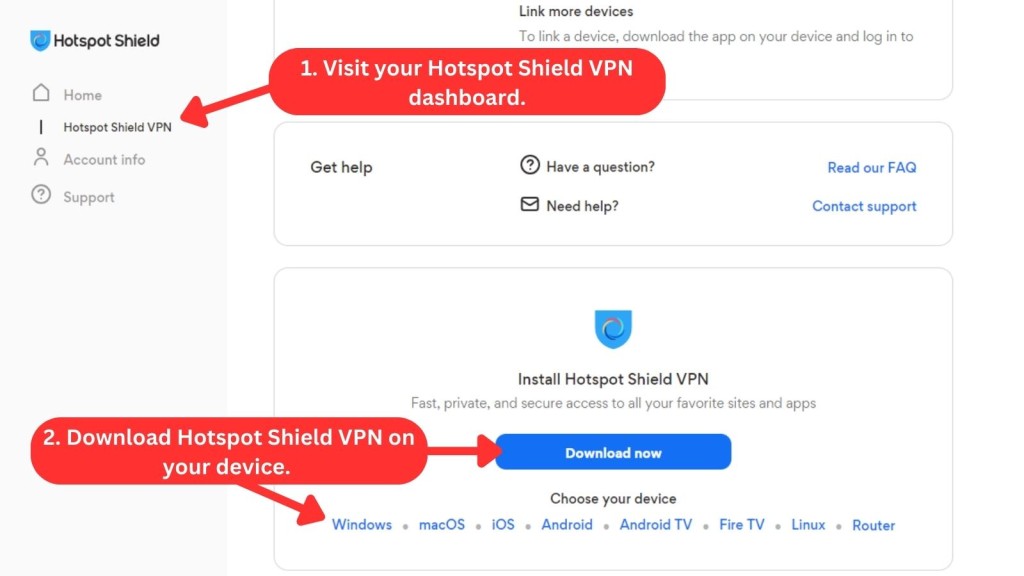
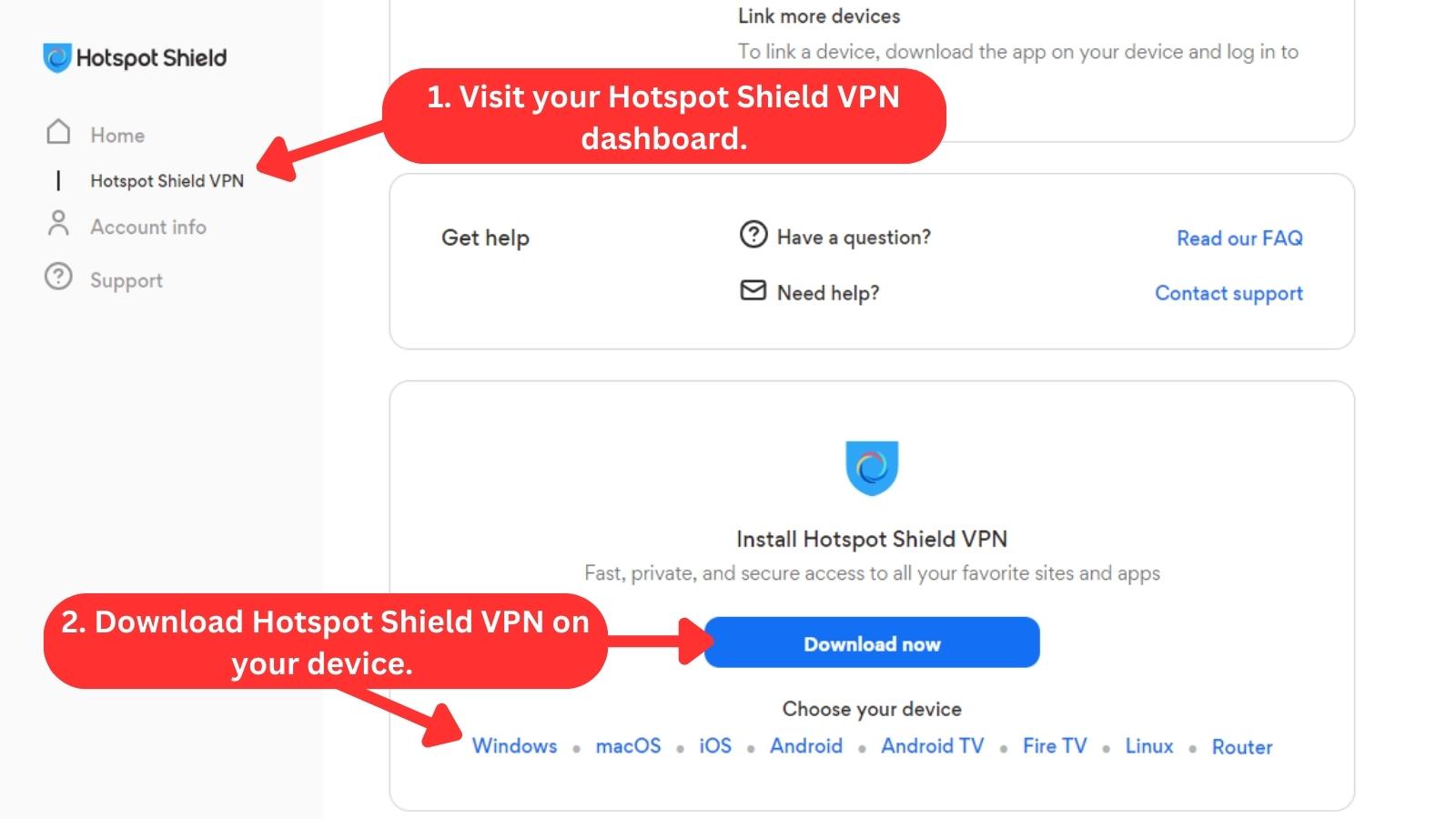
To get started with Hotspot Shield VPN, you'll need to subscribe first, download the installation file, and set it up on your device. The whole procedure is a breeze and will only take a few minutes. We used a Windows PC for this guide. Here's the step-by-step breakdown:
- Subscribe to Hotspot Shield VPN on a Web browser.
- Log in to your account to access the dashboard.
- Select "Hotspot Shield VPN" from the "Home" menu.
- Scroll down and select your device for download.
- Download and run the installation file.
- After installation, log in using your credentials.
- Pick any server and connect. That's it!
Setting up and using Hotspot Shield is an easy and hassle-free process that shouldn’t take more than a minute of your time. There’s also no adware or any other kind of usual annoyances during installation.
Prominent Features
Hotspot Shield comes with a fairly standard set of features. However, it lacks some more advanced options, such as IPv6 leak protection, for example. Our Score: 8.5/10
Considering that Hotspot Shield has been on the market for a while now, we expect to see a full feature set. However, that’s not the case. Here’s what you can expect from this VPN.
- DNS Leak Protection: Hotspot Shield protects your online privacy by hiding your DNS requests. But this feature is only available on desktop and mobile apps. If you use the browser extensions, your DNS and WebRTC data might still be exposed. Another issue is that Hotspot Shield doesn't handle IPv6 traffic. This means your ISP could see your personal information if you have an IPv6 address. To avoid this, you can disable IPv6 on your device.
- High-End Encryption: Hotspot Shield supports both 128-bit and 256-bit AES encryption, although it employs 128-bit AES as the default standard. Both options are considered highly secure, with 128-bit encryption being virtually unbreakable with current technology. This encryption scrambles your data into a coded format that can only be decrypted with a matching key. This way, your data is safe from all sorts of cyber threats, no matter what you do online.
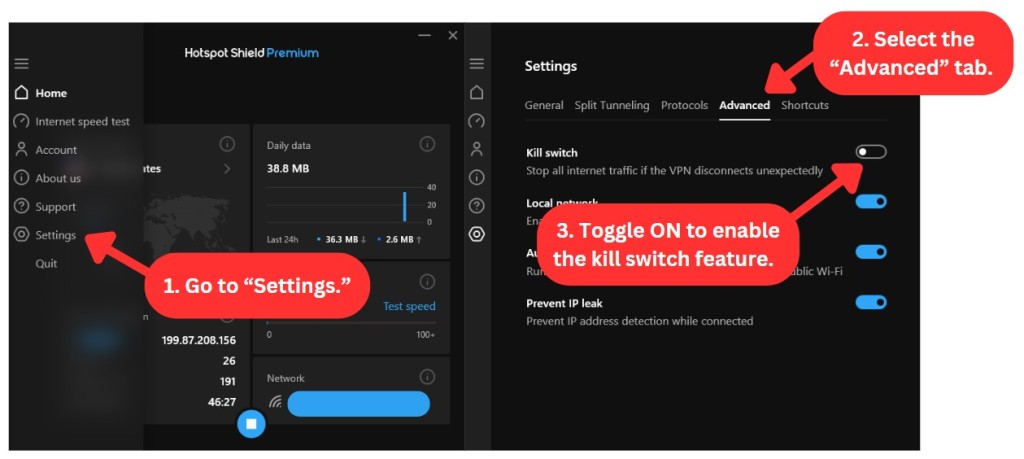
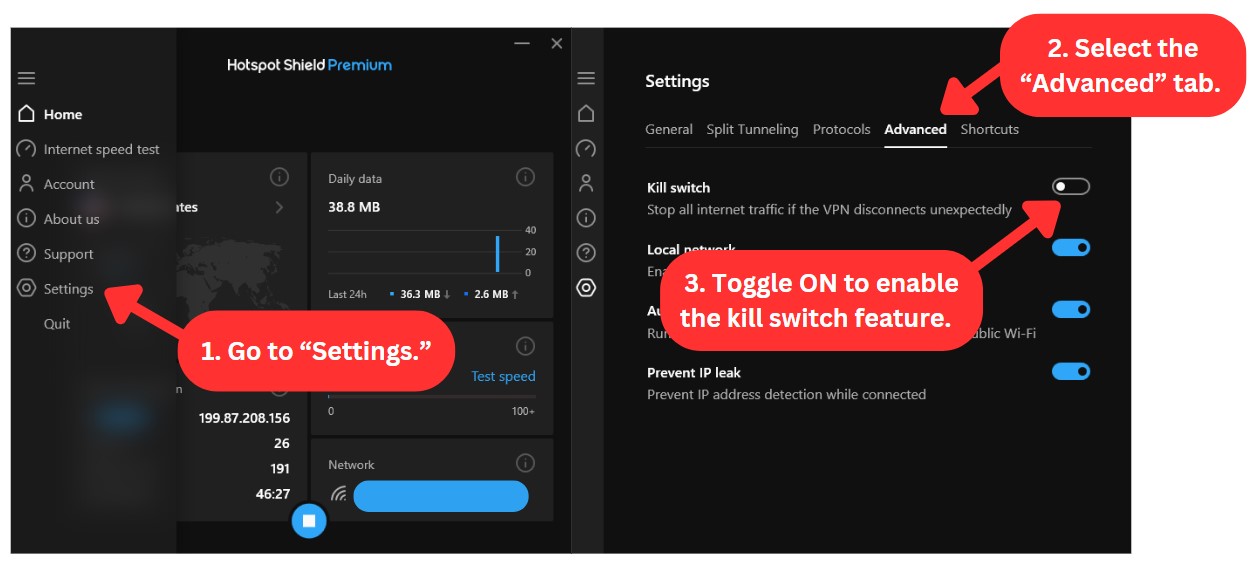
- Kill Switch: Hotspot Shield VPN has a kill switch that blocks your Web access if your connection drops unexpectedly. This prevents your IP address and other sensitive information from being exposed. You also need to enable this feature manually from the settings, as it’s turned off by default. This feature is available on Windows, macOS, Android, and iOS devices.
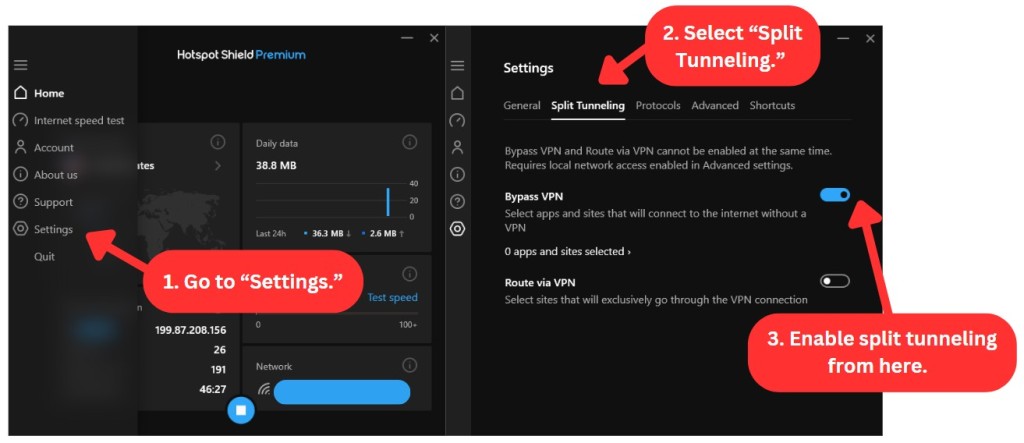
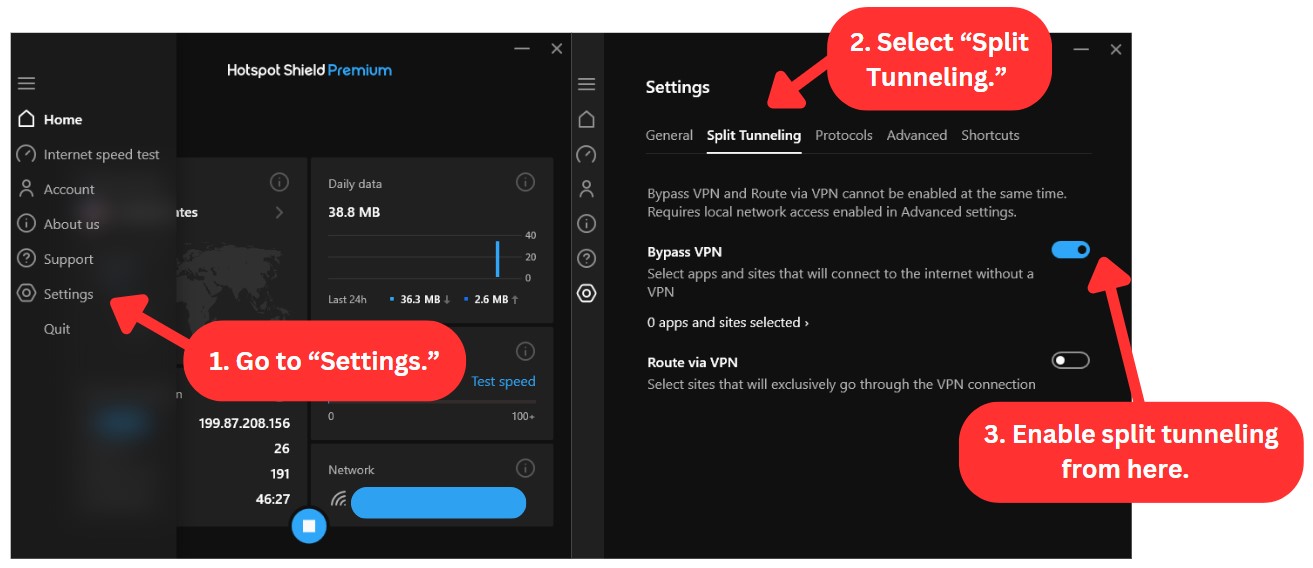
- Split Tunneling: This feature allows you to access your regular network while still being connected to the VPN. It's available on macOS, Windows, and mobile apps. On its Windows app, this feature is called Bypass VPN, enabling you to select different apps and sites that can use the encrypted tunnel.
- Auto-Connect: This handy feature automatically connects you to the last-used virtual location when you launch the app, eliminating the need for manual selection each time. Hotspot Shield offers this convenient feature for Windows, macOS, and Android users.
- Auto-Protect: Exclusively available on Windows, this feature automatically activates Hotspot Shield whenever you connect to an unsecured public network. These networks include those found in coffee shops, airports, or libraries.
- Always-On VPN: If your VPN connection drops unexpectedly, this feature allows automatic reconnection, eliminating any vulnerable gaps in your online shield. Unlike other VPNs, this feature can't be disabled, ensuring continuous protection. However, Windows users currently miss out on this one, as it's only available on macOS, Android, and iOS apps.
- Ad and Malware Blocker: When it comes to ad-blocking and protecting users against malware, Hotspot Shield can provide some protection. The VPN service relies on a database of potentially malicious websites and warns you if you try to access any of them. This means that Hotspot Shield doesn't actively block ads or malware but can still warn you before getting into dodgy situations.
- VPN Protocols: Hotspot Shield encrypts your Internet traffic using three VPN protocols: IPsec, WireGuard, and Hydra. Each protocol has its own advantages and disadvantages and is available on different devices. The introduction of the WireGuard protocol was quite recent and has since helped Hotspot Shield regain its edge over other VPNs.
- Unlimited Server Switches and Bandwidth: With Hotspot Shield VPN, you can browse, stream, and download without any limits. You can enjoy unlimited access to any server you want and in any location you choose. You don’t have to worry about paying extra fees or facing limitations on your server switches. Also, you can use as much data as you want without any throttling.
Hotspot Shield VPN offers a range of features designed to protect your privacy and keep your online activity secure. While it may not have many advanced features, it does tick all the essential boxes for basic security and privacy.
Server Count & Infrastructure
While Hotspot Shield has a network of over 1,800 servers spread across 80+ countries, it's not the largest selection of VPN locations available. Our Score: 8.5/10
Ideally, a VPN service should provide access to a large number of servers, especially if you have specific requirements, such as torrenting or media streaming. The best scenario is having a nearby server that delivers optimal performance and remote servers for website unblocking.
Given its considerable server network, the Hotspot Shield server list still falls short compared to the VPNs with the most servers, which offer an even more extensive range of choices. That said, Hotspot Shield VPN has over 1,800 servers in 80+ countries and 35+ cities, including popular locations like the US, UK, Canada, and Australia.
You can also choose from 28 Hotspot Shield VPN servers in the US and several other city-level options in the UK, Australia, Canada, and Italy.
Does Hotspot Shield Use Virtual Server Locations?
Yes, Hotspot Shield exclusively uses 115+ virtual locations. To understand the concept of Hotspot Shield VPN's virtual servers, here's an example. Suppose you want to connect to a server in India, but the VPN uses servers in Singapore for this. In this case, your Internet traffic is directed through servers in Singapore, and you're given an Indian IP address, making it seem like your online activities are coming from India.
In the free version, you can connect to 5 server locations: Los Angeles, New York, Singapore, the UK, and Auto, which randomly selects a US location. However, the app doesn't distinguish between free and premium servers, so you might realize you need to upgrade when trying to connect to specific ones. Upgrading to a premium account unlocks access to all virtual server locations.
Furthermore, the list of available servers can vary depending on the platform or device you're using. Some virtual locations are exclusive to specific platforms, so it's worth checking the list based on your device to ensure you get the desired server.
UI/UX Design & Ease of Use
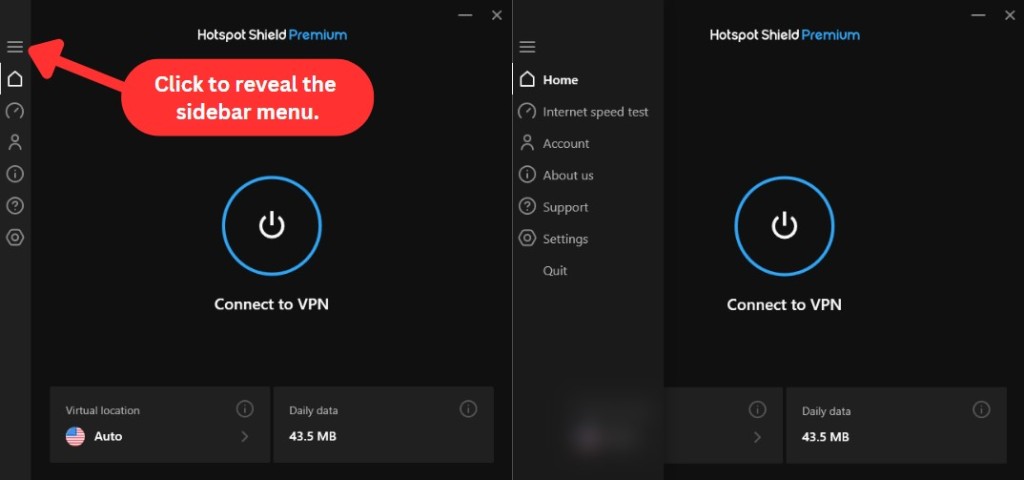
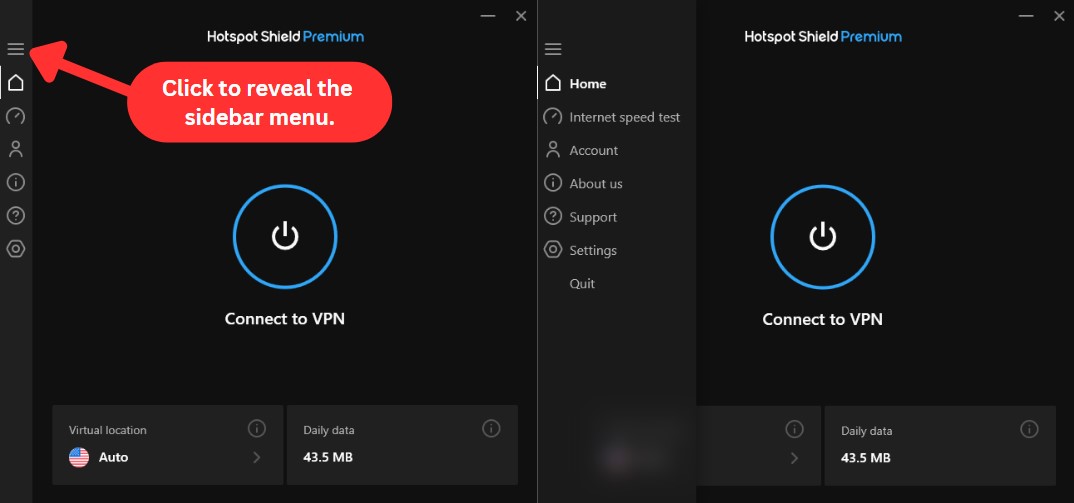
While Hotspot Shield doesn’t offer much in terms of advanced settings or customization, its apps are simple, intuitive, and easy to use. Our Score: 8/10
In this section of our Hotspot Shield review, we'll dive into the PC and mobile applications the VPN offers. We'll also explore Hotspot Shield's Web browser extensions and give you a sneak peek into what they bring to the table.
How Well Does Hotspot Shield Work on Desktop Platforms?
Hotspot Shield works well on desktop platforms, with Windows offering more features than Mac. Since the service has a uniform design across devices, its apps look pretty much the same on all platforms. However, for this review, we've focused on the Windows app.
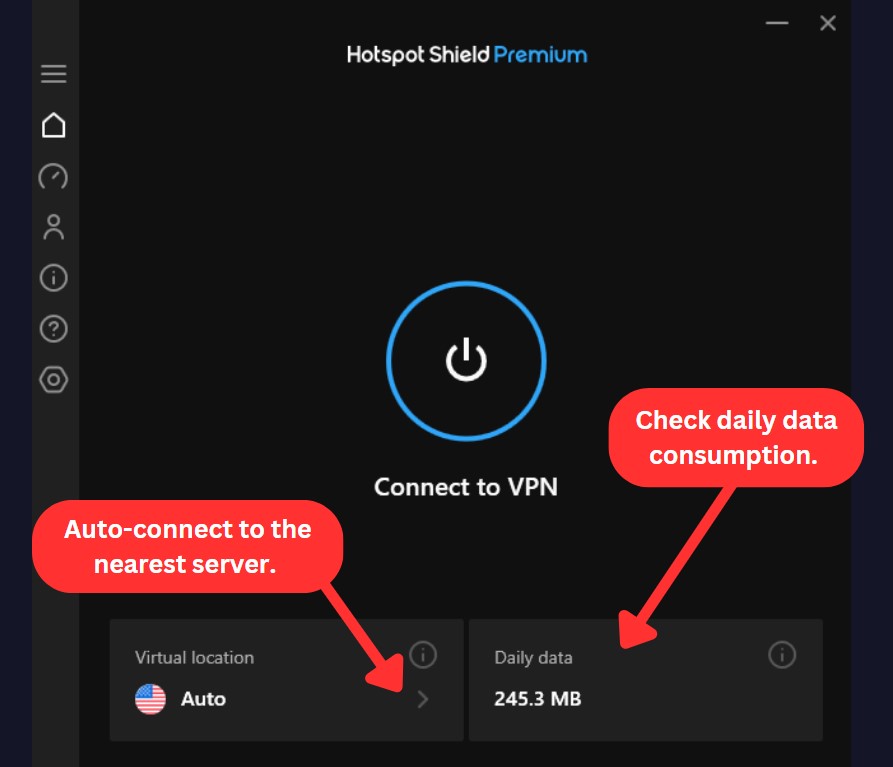
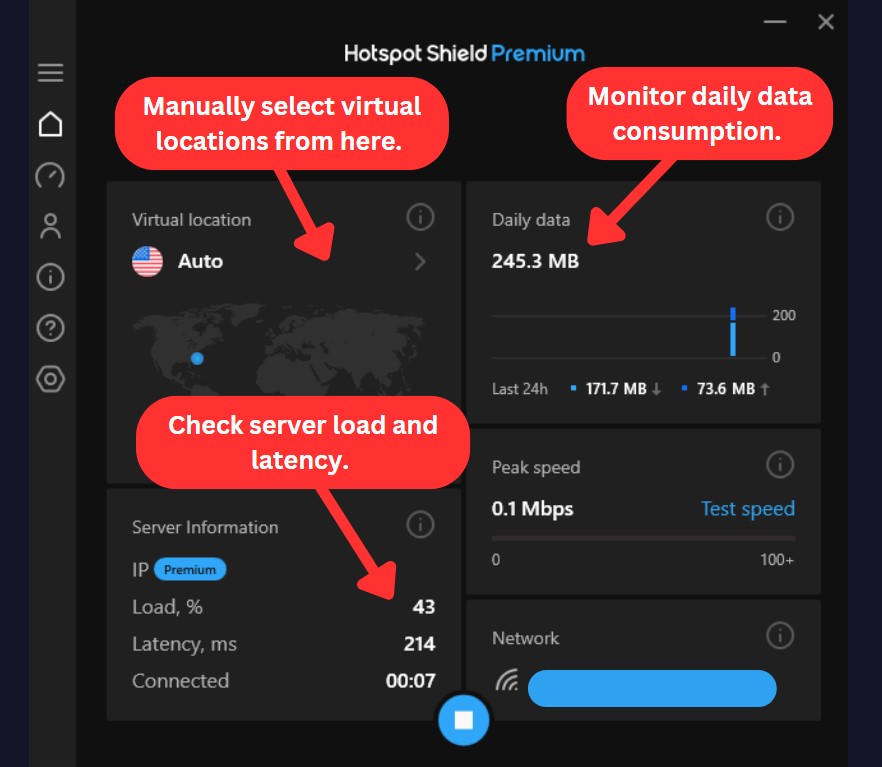
Upon launching Hotspot Shield, a large connect button takes center stage. When you click on it, you'll be automatically connected to the nearest server. Once connected, you can view useful data about your VPN connection. You can access virtual locations, check server information, peak speed, daily data consumed, and the network you're connected to.
Clicking on the map layout under the "Virtual location" option will lead you to a complete list of available servers. From there, you can manually select and connect to your preferred location(s).
The app has six tabs, including the home screen, which you can access through the hamburger icon on the top left-hand side. Here's a breakdown of each tab and what you can do with them:
- Home: Hotspot Shield VPN has a simple and user-friendly home screen. You can see a ‘connect’ icon in the center and the server list in the bottom-left corner. Apart from that, you can monitor how much data you’re using through another button on the bottom right.
- Internet Speed Test: As the name suggests, here, you can test the Internet speed of your network when the VPN is turned on. It also shows you the server and network you’re connected to and displays some useful information, such as its ping value and download speed. The app also saves your speed test results for future reference.
- Account: This tab has all your subscription information, including the expiration date and the number of linked devices to your account. You’ll also find a direct link to your online dashboard here, which you can use to manage your subscription.
- About Us: This tab features a brief introduction to Hotspot Shield and quick links to their Terms of Service, Privacy Policy, and About Us pages. There's also a product tour option to explore the service's features.
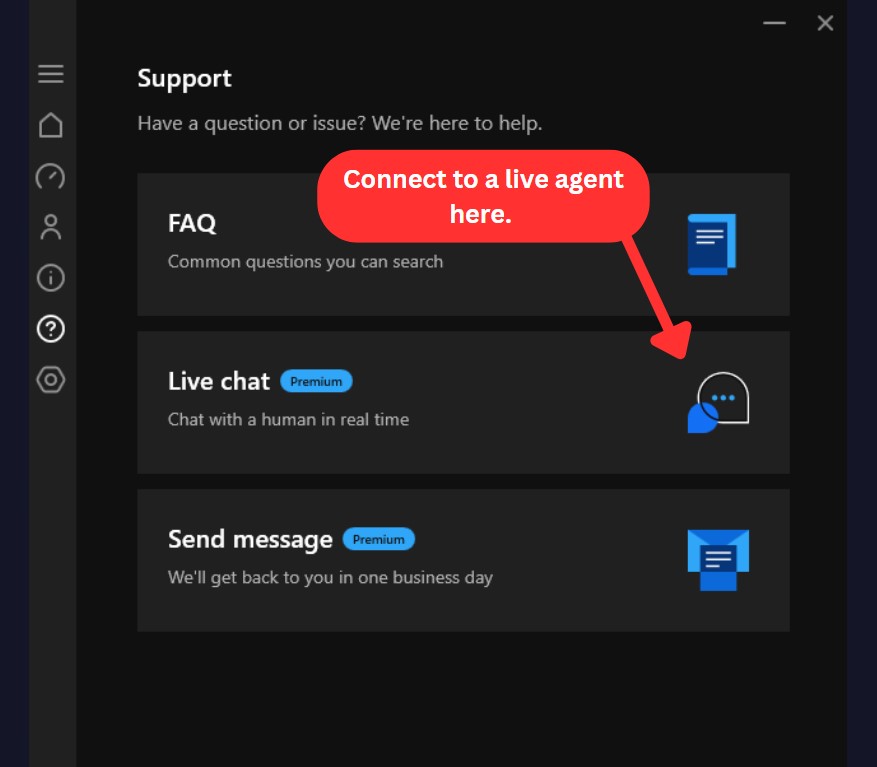
- Support: This tab offers direct links to three options: FAQ, Live Chat (for Premium users only), and Send Message. The FAQ section has questions related to setup and other common issues. Live Chat redirects you to their support page, while Send Message takes you to their website to raise a request for help.
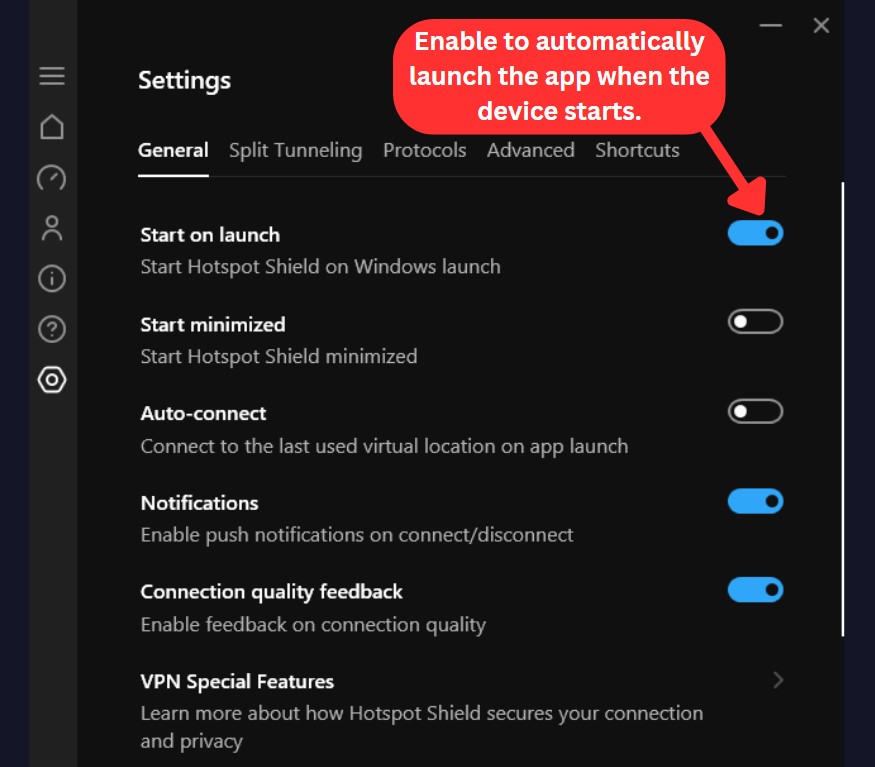
- Settings: This tab allows you to configure settings such as starting the VPN on launch, auto-connect, preventing IP leaks, and enabling the VPN's kill switch functionality. Here, you can also use the split tunneling feature to select which apps and sites you want to run on the VPN network. If you want to manually select protocols, you can do that from this tab as well.
We have to mention that Hotspot Shield offers greater customization options on a Windows PC compared to a MacBook, which is more minimal in its approach. The simplicity of the Mac app may be appealing to those seeking a straightforward VPN experience. However, those who prefer complete control over their VPN experience might find the Windows version or a different VPN more suitable.
How Well Does Hotspot Shield Work on Mobile Platforms?
Hotspot Shield's mobile apps offer a streamlined experience, featuring a prominent connect button in the center, a server list, and a settings menu similar to the desktop versions. Whether you're using an Android phone or iPhone, the experience remains consistent, providing a smooth and user-friendly interface.
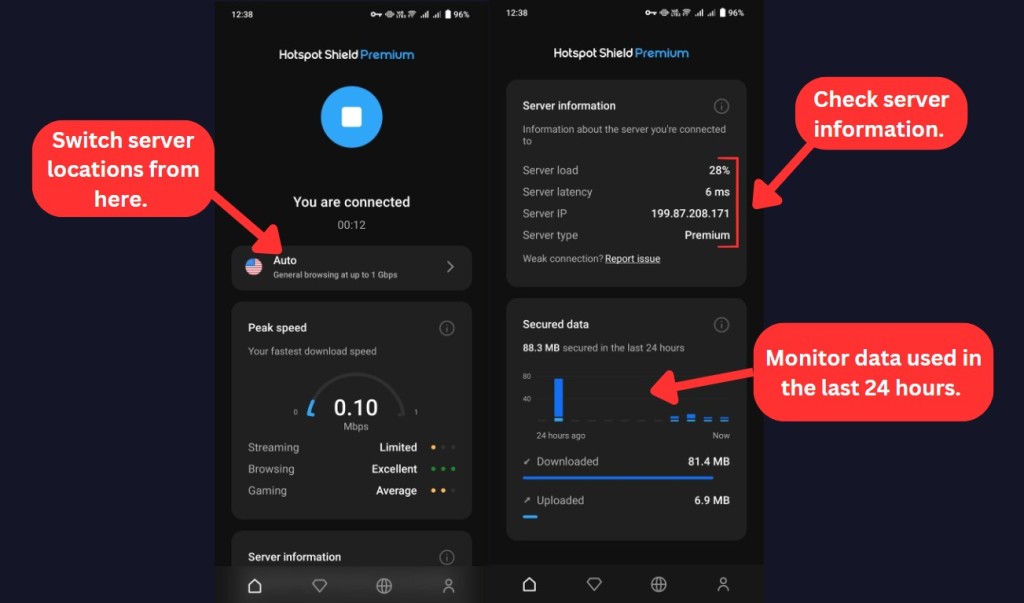
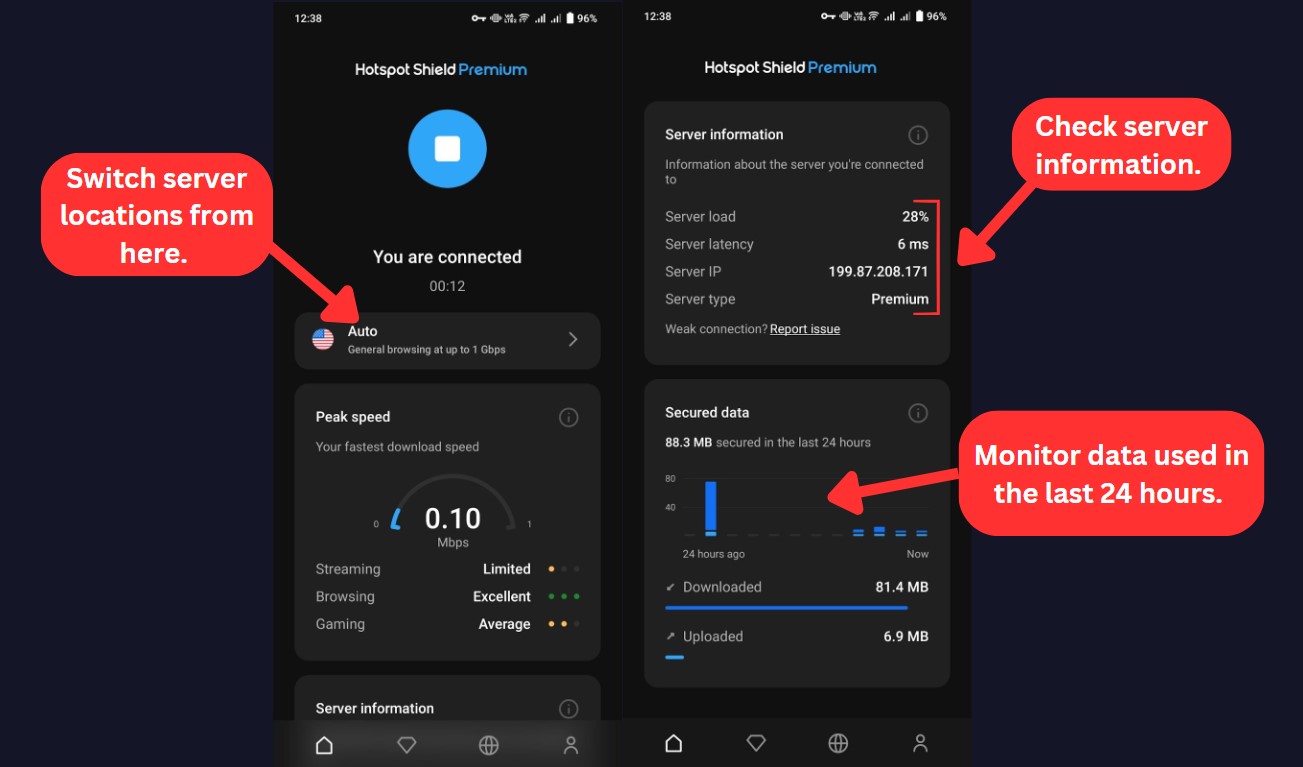
Similar to their desktop counterparts, the mobile apps display connection data upon establishing a VPN connection. They also show the quality of streaming, browsing, and gaming speeds while connected to a server location.
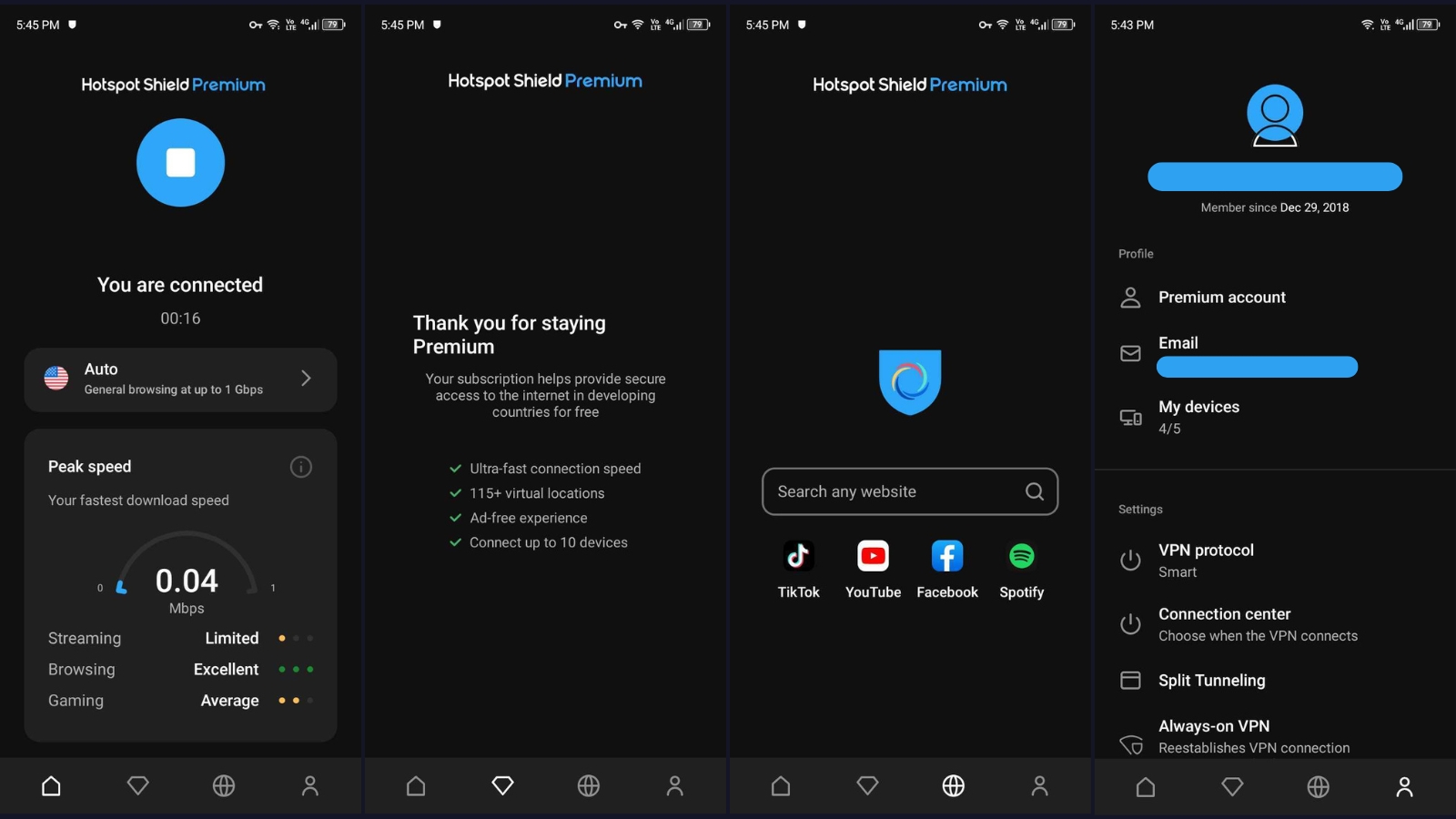
At the bottom of the Android app screen, you'll notice four tabs: the home screen, payment wall (for the free version), browser tab (for searching websites within the app), and the account tab. It's within the account tab that you can access the VPN settings. Now, let's explore what's in the account tab.
- Profile: This is where you'll get info on your account type (Premium or free), find your email details, and see how many devices are currently linked to your account.
- Settings: Under settings, you can switch VPN protocols, fine-tune connection preferences, and explore features like split tunneling, kill switch, and Always-On VPN.
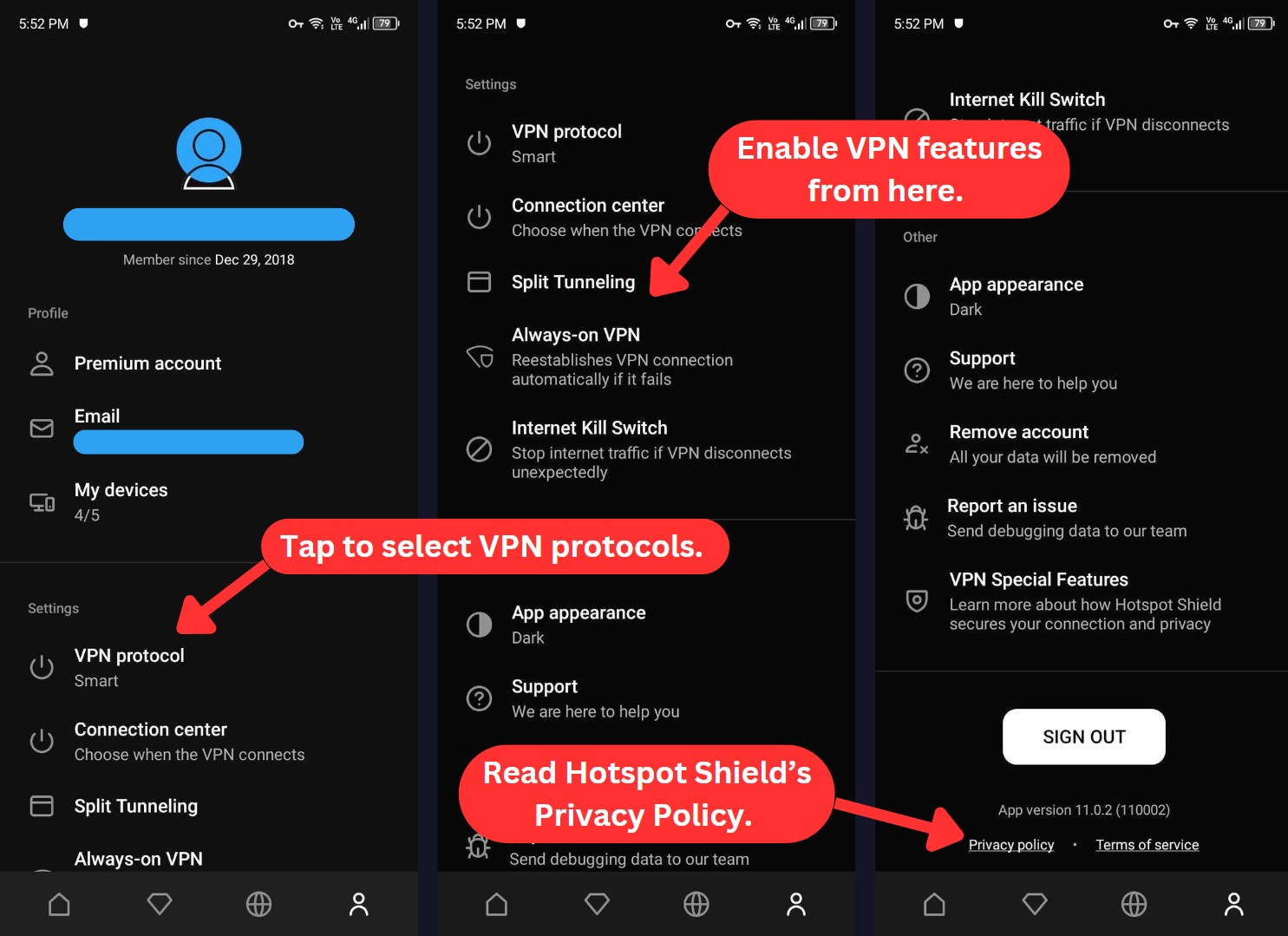
- Other: This option allows you to customize the app's appearance (from dark to light or auto), access the knowledge base, and discover more about Hotspot Shield's special features.
How Well Do Hotspot Shield’s Web Browser Extensions Work?
Hotspot Shield's browser extension works well, just as we expected. The VPN offers a Chrome extension for both free and premium plans.
The standout feature for us was the ability to add websites for auto-protection when Hotspot Shield is turned off and to specify websites that you want to bypass Hotspot Shield's security when it's active. However, it's worth noting that the extension offers a limited selection of just 9 server locations, even if you're using a premium account.
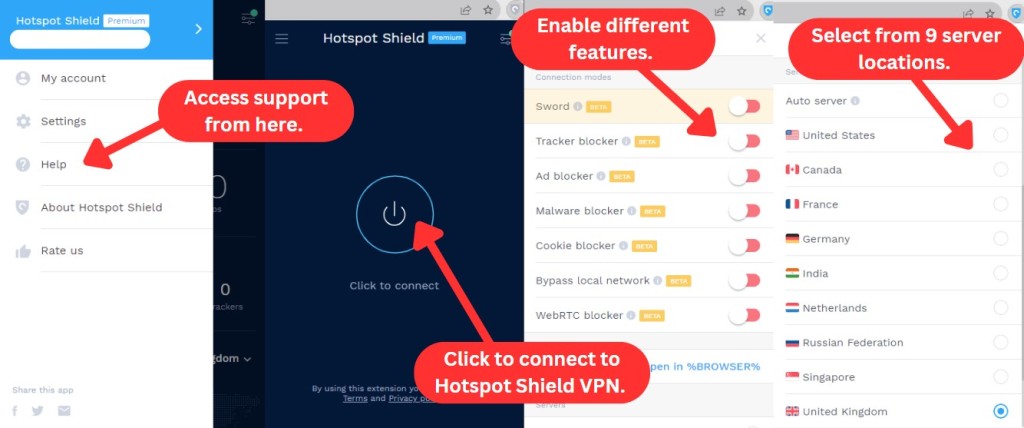
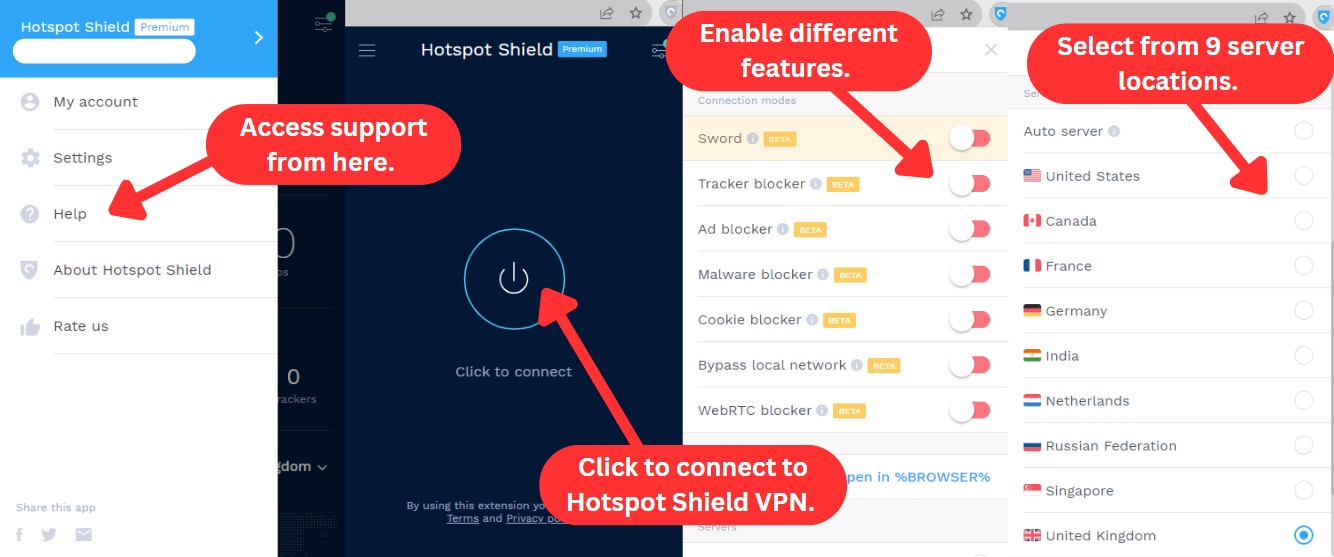
At the top-left of the extension, you'll notice a hamburger button. Clicking on it reveals several options. You can access your account details, the help tab, and the privacy policy and terms of service for Hotspot Shield. However, there isn't much to tinker with here.
If you choose "Rate us," it will direct you to the Chrome store for an extension rating. Additionally, the "Settings" option is misleading, as it only allows you to customize notifications and switch between five different languages.
To access further options, simply click the hamburger button located in the top-right corner. Here's what you'll find.
- Connection Modes: Hotspot Shield's got your back with a range of security features. From ad-blocking to malware protection, it's all here. Plus, you can bypass local network resources and throw off Web trackers with "Sword," a clever feature that masks your true online activities.
- Servers: You'll find 9 server locations here, along with an auto-connect feature that selects the best server for your connection. However, with the free version, you can only select either the auto-server or one US server.
Overall, Hotspot Shield has a well-designed app that caters to casual users who prefer a simplified experience. However, the app's streamlined approach may not appeal to tech enthusiasts who seek more extensive customization options.
Media Streaming, Torrenting, and Gaming Support
Hotspot Shield unblocks some streaming platforms but struggles with others, making it less reliable for full access. Its slow speeds and high ping also limit its usefulness for torrenting and gaming. Our Score: 5/10
VPNs are helpful in unblocking restricted websites, ensuring secure torrenting, and optimizing your gaming experience. However, not every VPN is equally proficient in all these areas. In this Hotspot Shield review, we'll explore how it performs in media streaming, torrent support, and gaming, shedding light on its unique strengths in each category.
Is Hotspot Shield Good for Streaming?
Yes, it's a suitable VPN for streaming, especially if you're keen on accessing websites like Netflix US and other regional libraries. It has specialized servers in the US and UK, fine-tuned for optimal Netflix and YouTube streaming, among others. However, it struggled to unblock Hulu, Disney+, and ESPN+, and it can't always bypass sports blackouts.
Here's a table that highlights several well-known US-based streaming platforms that Hotspot Shield VPN can unblock:
Hotspot Shield VPN doesn't stop at unblocking US streaming platforms - it also extends your access to international streaming services. Here's a glimpse of what's in the lineup:
If you ask us, Hotspot Shield wouldn't be our top pick for streaming due to its inability to unblock other popular US streaming services. Nevertheless, it performs adequately with other streaming platforms. Also, Hotspot Shield’s free version isn't ideal for HD streaming due to its limitations.
Is Hotspot Shield Good for Torrenting?
No, we don't recommend it for torrent downloads. On its website, it claims to support P2P. However, our tests using uTorrent and BitTorrent clients revealed slow speeds and bandwidth limits. Moreover, it has a shady logging policy that may expose your personal data to third parties.
While Hotspot Shield does have a kill switch for IP protection, it lacks port forwarding to connect to more peers and no SOCKS5 proxy for faster speeds. These shortcomings make it unsuitable for advanced torrenters. If you seek a seamless and secure torrenting experience, consider checking our article on the top VPNs for torrenting.
Is Hotspot Shield Good for Gaming?
Based on our hands-on testing, Hotspot Shield isn’t the best VPN for gaming, especially if you’re after low-latency, competitive play. A reliable gaming VPN needs a vast server network, performance optimizations, and ultra-fast speeds. Hotspot Shield does help bypass firewalls and access geo-blocked games, but high ping times remain an issue.
Since it has a free version, it can work for light gaming, like casual mobile games, but it’s not cut out for intensive, fast-paced games like Call of Duty: Warzone, Apex Legends, or PUBG. Even its gaming-optimized servers didn’t show a noticeable difference in performance. If you're serious about gaming, it's worth checking out other free gaming VPNs that offer better consistency.
Security & Privacy
Hotspot Shield rolls out support for both AES-128 and AES-256 encryption, keeping AES-128 as the default. It prevents IP and DNS leaks and also offers a secure proprietary protocol along with a reliable kill switch to protect your data. However, its privacy policy isn’t reassuring. Our Score: 6/10
Your online safety is the most important factor when choosing a VPN. That’s why we’re going to examine Hotspot Shield’s encryption, logging, and DNS leaks to see how well it protects you.
Hotspot Shield VPN Protocols
Hotspot Shield employs secure VPN protocols to ensure the safety of your Internet traffic. Let's take a closer look at each of these protocols:
- IPSec: This protocol encrypts data using the Internet Protocol Security (IPSec) framework, hence the name. It’s available on several platforms, including Windows, Linux, macOS, and iOS. IPSec is faster than OpenVPN and can easily bypass firewalls. However, it’s less secure than OpenVPN and vulnerable to some attacks.
- Hydra: This is a proprietary protocol developed by Hotspot Shield. It claims to be the fastest and most secure protocol in the world, using a combination of encryption techniques to enhance speed and security. Hydra works on all supported desktop and mobile platforms.
- WireGuard: This is a new protocol that offers fast and secure connections. It uses state-of-the-art cryptography and a simple design to protect your online privacy. Hotspot Shield has recently added WireGuard to its list of encryption protocols. Before this, it relied on its own protocol, Hydra, which wasn’t very consistent with its performance. You can use WireGuard on all supported platforms.
We also have to add that Hotspot Shield VPN still uses the OpenVPN protocol for routers.
Does Hotspot Shield VPN Keep Logs?
No, Hotspot Shield VPN doesn’t keep logs of any trackable data. The only data they collect is your IP address, which is encrypted and deleted after each session. However, some independent organizations have accused Hotspot Shield of storing and sharing user data with authorities.
Moreover, there are suspicious clauses buried deep in Hotspot Shield's policies related to advertisers. According to the clause, advertisers may be able to collect certain information independently, including your device's advertising ID, IMEI, MAC address, and wireless carrier.
Even though Hotspot Shield claims not to collect user data, the numerous loopholes and problematic reports from the past make it difficult to recommend the service for users seeking high-level anonymity online.
Does Hotspot Shield VPN Leak/Expose Your Private Data?
No, Hotspot Shield VPN doesn’t leak your private data. For this section, we conducted a few tests for VPN leaks, and we’re happy to inform you that we found no IP, DNS, or WebRTC leaks on its premium and free desktop and mobile applications.
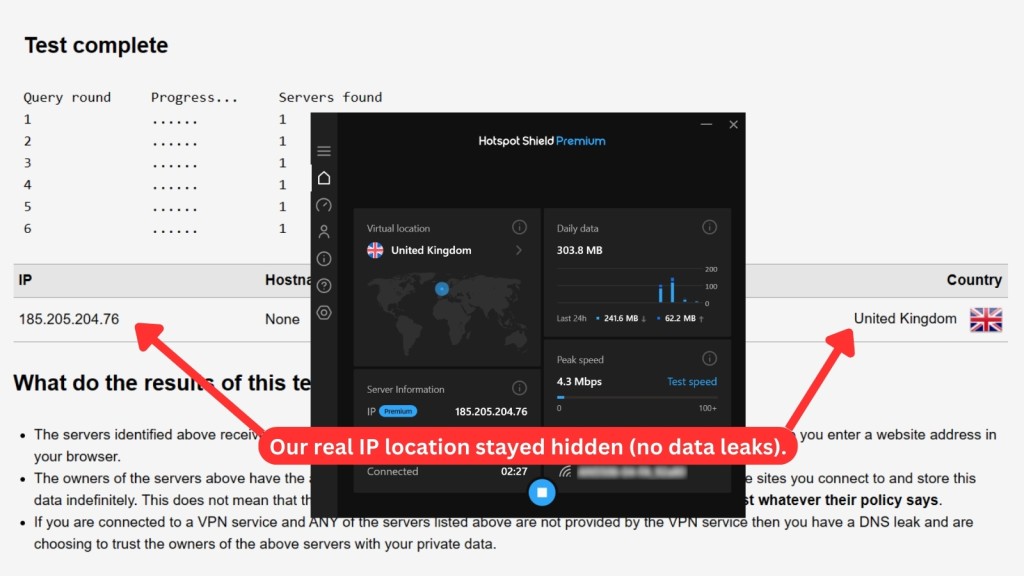
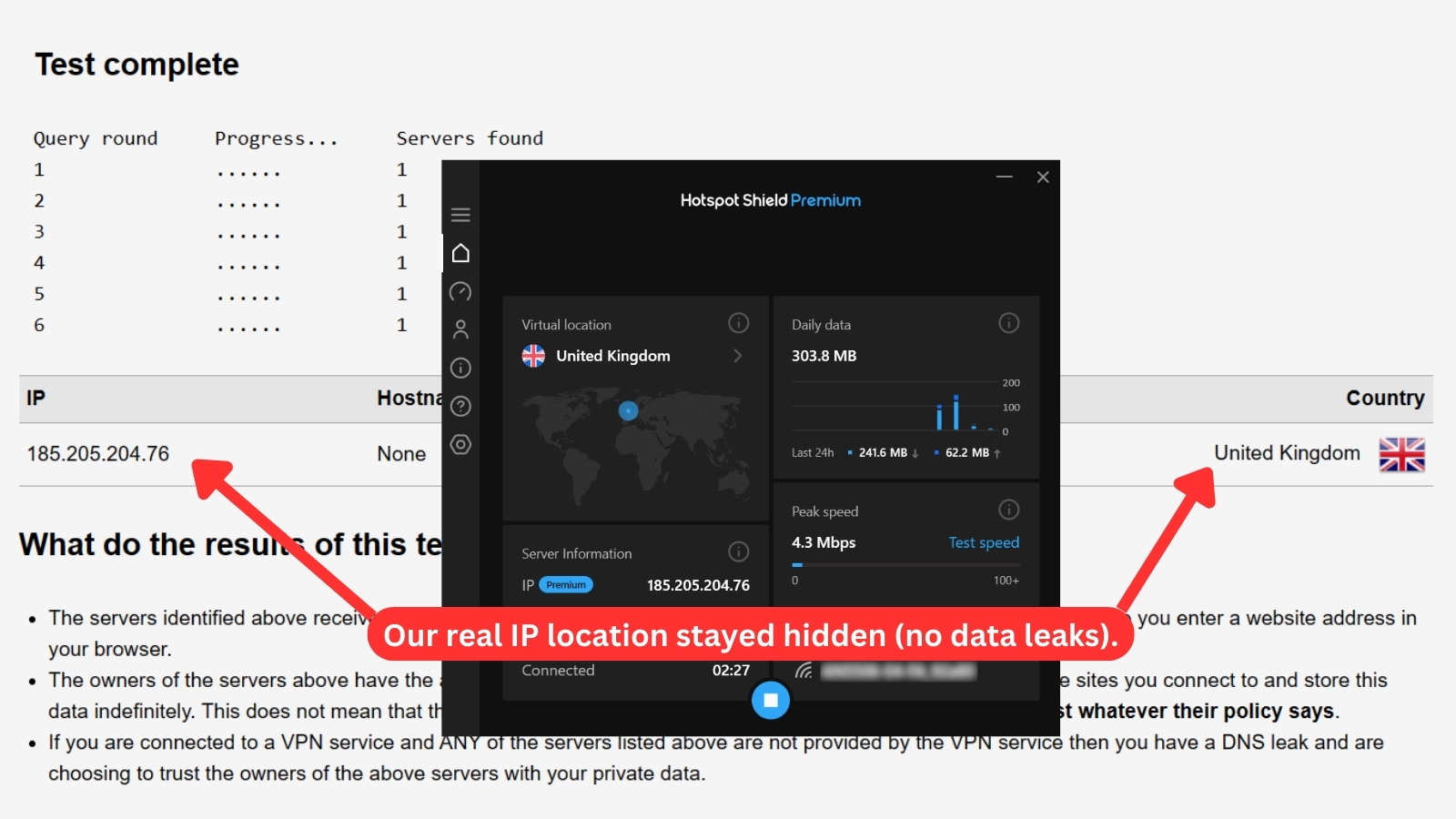
As a result, our real IP address and location remained hidden. It's also important to note that this VPN doesn't support IPv6 traffic. Therefore, if your ISP supplies you with an IPv6 address, your personal data may leak. However, disabling IPv6 on the device you're using can prevent this from happening.
Speed & Performance
Hotspot Shield keeps speeds fairly consistent, though some servers handle long distances better than others. The drop is noticeable on faraway connections, but the VPN still manages to keep things usable, especially on well-optimized routes. Our Score: 3/10
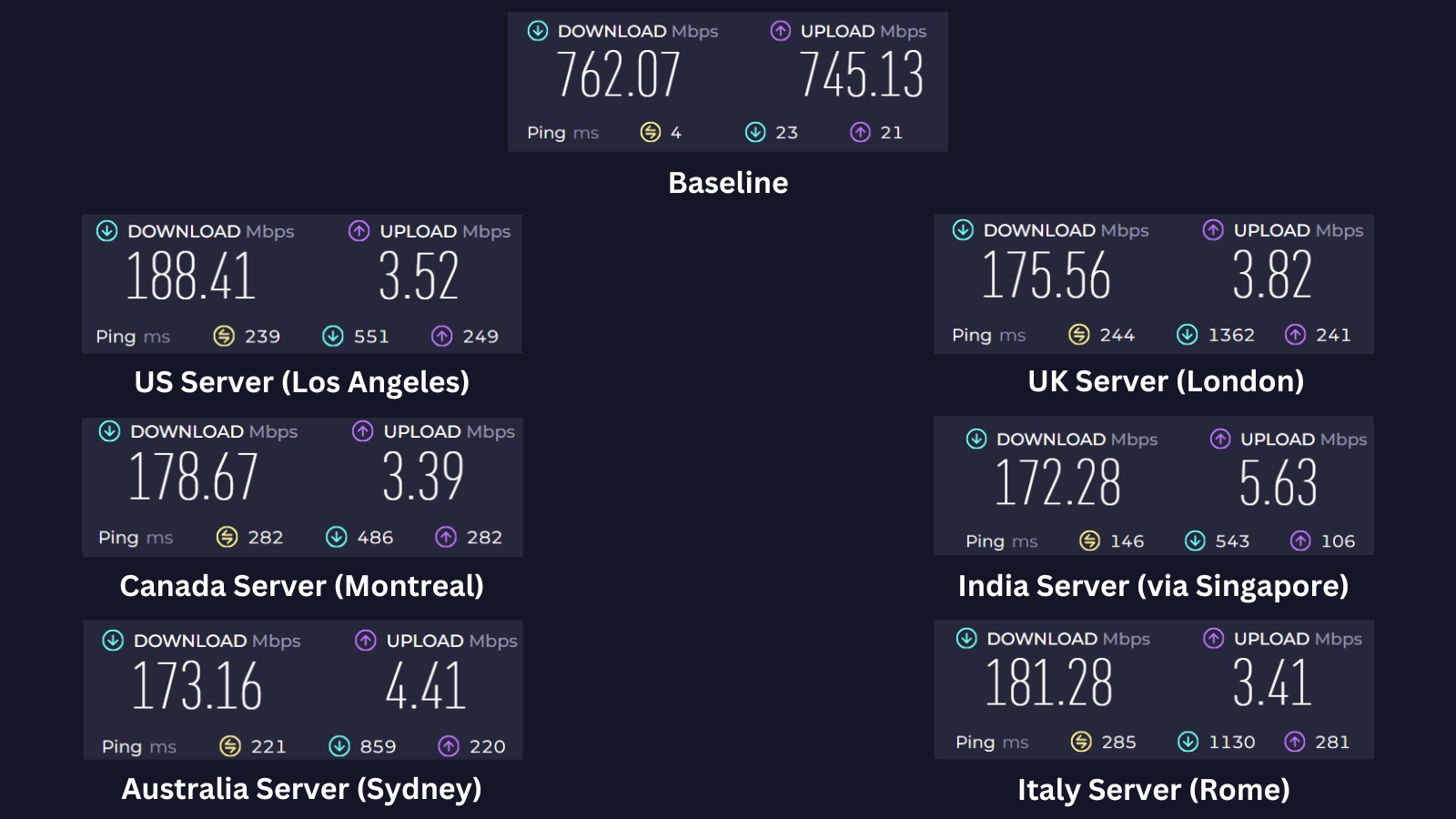
We're testing Hotspot Shield's speeds from one of our bases in Asia to see how well it handles nearby and distant connections. Before connecting, we recorded a baseline of 762.02 Mbps for downloads and 745.13 Mbps for uploads to measure the VPN's impact.
Here’s how Hotspot Shield performed in our speed tests:
- US Server (Los Angeles): This was the fastest server we tested, delivering a 188.41 Mbps download speed. Even with a 573 Mbps drop, which translates to a 75% speed reduction, performance remained decent. Hotspot Shield’s optimized routing in North America likely helped maintain better speeds despite the distance.
- UK Server (London): Our connection slowed to 175.56 Mbps, resulting in a 77% cut in speed. Given the distance and the high demand for UK servers, congestion likely played a role in the performance dip.
- Canada Server (Montreal): We recorded a 178.67 Mbps download speed, which means we lost 583 Mbps. That's a 77% decline in speed. While Canada has a strong infrastructure, the long-distance connection still had a major impact on overall performance.
- India (via Singapore) Server: Despite being closer than Europe or North America, this server performed the worst, dropping to 172.28 Mbps. The 77% slowdown might suggest that routing through Singapore added unnecessary delays, leading to slower speeds.
- Australia Server (Sydney): Our connection fell to 173.16 Mbps with an average 77% speed loss. Even though Australia isn’t too far, the performance drop could mean that Hotspot Shield’s network in this region isn’t as well-optimized as its North American servers.
- Italy Server (Milan): This server had a 181.28 Mbps download speed, meaning we lost 544 Mbps, translating to a 76% loss in speed. Despite the long distance, it performed slightly better than the UK and Canada, possibly due to more efficient routing.
Hotspot Shield showed an average speed loss of 77%, which is significantly higher compared to the fastest VPNs. This speed decrease might not be ideal for you if you prioritize fast Internet speeds, but it could be acceptable for those who value other features like multiple device support and a large server network over raw speed.
Customer Support
If you can't find answers in Hotspot Shield's knowledge base, you can contact support via live chat or email. Live chat is only available for 'Premium' customers, and while you’ll start with a basic chatbot, it quickly connects you to a real support agent for more personalized help. Our Score: 7/10
Hotspot Shield offers various ways to get help when facing technical difficulties. Here's an overview of what you can expect:
- Live Chat: Hotspot Shield does have 24/7 live chat, but there’s a catch. It’s only available for 'Premium' users, which can be frustrating if you just want to ask quick questions before signing up.
- Hotspot Shield Support Center: You can find answers to basic questions in Hotspot Shield's Support Center, which, in our experience, is pretty easy to navigate. This section covers various categories, including general support, payments, and subscriptions. And yes, you can access the Support Center in the app, but it will redirect you to the website for more in-depth information.
- Email Support: If you need help, you can submit an official support ticket or email [email protected]. The VPN team typically responds within 48 hours. This option may not be as quick as the live chat feature, but it's still useful for resolving technical issues.
The support site could use some refinements, but you'll most likely find the essential information you need quickly. Plus, you can count on a top-notch support team to assist with any other queries.
Pricing
Hotspot Shield's pricing isn’t the most competitive compared to other top VPNs. It’s decent if you want simple, no-frills protection, but there are better deals out there for what you’re paying. Our Score: 7.5/10
Hotspot Shield VPN offers three subscription plans, and if you're looking to keep some extra cash in your pocket, longer-term plans are worth considering. Here's a breakdown of the current pricing.
How Much Is Hotspot Shield VPN?
Hotspot Shield VPN starts at $2.99/month if you choose the 3-year plan. But if you prefer to pay monthly, the standard cost is $12.99. If you want to test the service before subscribing, you can do so by getting its free trial for 7 days.
Hotspot Shield VPN caters to your needs and budget with its three Premium plans. Additionally, there's the Basic (free) plan available, but it's limited to a single device connection and virtual location, including other restrictions.
Regardless of the plan you choose, you'll access the same features (except for the Basic plan), with only variations in simultaneous connections. Let's take a closer look at the different subscription plans to help you decide which one is best for you.
- 1-Month Plan: For $12.99 per month, you'll gain access to 1,800+ servers in 80+ countries, with unlimited data and bandwidth. You can connect up to 10 devices simultaneously and have an ad-free experience. This plan also includes a 45-day money-back guarantee and 24/7 live chat support.
- 1-Year Plan: For $95.99 per year (equivalent to $7.99 per month), the yearly plan gives you the same benefits as the monthly plan but at a lower price. By paying for a year in advance, you can save 38% compared to the monthly plan.
- 3-Year Plan: For long-term VPN coverage and substantial savings, Hotspot Shield VPN offers the 3-Year Plan for just $107.64 (equivalent to $2.99 per month). Right now, this option stands as the best deal on offer.
Is Hotspot Shield Free?
Yes, it's actually on our list of the best-rated free VPNs. It provides no bandwidth limit, allowing you to use it at full speed. However, it comes with several drawbacks, including support for just one device, minimal features, and the inconvenience of numerous ads on mobile apps. Additionally, there's only one US location, a 500 MB/day data limit, and no email or live chat support.
That said, Hotspot Shield’s paid longer plans offer better value for money. The VPN has a risk-free 45-day guarantee and a 7-day free trial. Sadly, there are limited payment options. The free trial is a good alternative to the free VPN service, but it requires payment details and must be canceled before the seven days are up.
While there's no bandwidth limit in the free version, it does come with significantly slower speeds. So, if you need more features and want to use the VPN on multiple devices with faster speeds, you should consider upgrading to the Premium plan.
This highlights the key differences between free, paid, and free trial VPNs. Free VPNs usually come with restrictions and can be risky (as they often make money through ads or data collection), while paid plans unlock full access to features, better speeds, and stronger security. Free trials, on the other hand, give you a chance to test premium features without a long-term commitment.
Final Thoughts - Is Hotspot Shield a Good VPN?
Hotspot Shield is all right, but it’s not the best out there. The free version is great if you just need basic VPN protection or a way around geo-blocks. The premium plan steps it up with more features, but lately, speeds have taken a hit, and the logging policy isn’t the most privacy-friendly. If you’re just looking for a casual VPN to use now and then, it does the job.
But if you want something faster, more secure, and actually built for privacy, we recommend using NordVPN. We’ve tested it extensively, and it consistently delivers ultra-fast speeds, strong encryption, and a strict no-logs policy. That’s the reason why it’s the VPN we trust for serious privacy and overall performance.
PROS
- Offers a free version.
- Simple and easy to use.
- Compatible with various devices.
- Large network of VPN servers.
- Unblocks US Netflix and other libraries.
- No leaks.
CONS
- Based in the USA.
- P2P traffic is throttled.
- Previously had privacy-related accusations.
- Limited unblocking of streaming websites.
- Free version shares user data.
| Review Summary Hotspot Shield presents a mixed bag of strengths and weaknesses. It excels in server coverage and is good for unblocking certain streaming services. However, concerns about its background and logging practices might deter privacy-focused users. | 7.1 Overall Score | ||
| Background, Jurisdiction & Reputation | 6 | ||
| Supported Platforms & Devices | 9 | ||
| Installation & Initial Configuration | 10 | ||
| Prominent Features | 8.5 | ||
| Server Count & Infrastructure | 8.5 | ||
| UI/UX Design & Ease of Use | 8 | ||
| Media Streaming, Torrenting, and Gaming Support | 5 | ||
| Security & Privacy | 6 | ||
| Speed & Performance | 3 | ||
| Customer Support | 7 | ||
| Pricing | 7.5 | ||