When you purchase through links on our site, we may earn an affiliate commission. Here’s how it works.
hide.me VPN Review 2026



Our experts have reviewed 53 VPN providers, which were put through extensive rounds of testing. To learn more about that process, here’s how we review VPNs, where we explain our criteria and our policy of being fully transparent.
Honestly, we didn’t just take hide.me at face value, we actually put it through real-world use to see how it performs. We tested it on streaming platforms, while gaming, downloading big files, and even browsing on public Wi-Fi. Switching servers was smooth, connections stayed stable, and leak protection actually worked, so it mostly lived up to what it promises. We also dug into its encryption, protocols, and privacy policies to make sure it really keeps your data safe.
We tried hide.me across multiple devices (Windows, Mac, Android, iOS, and routers) to see if it stayed consistent everywhere. For streaming, torrenting, and casual gaming, it handled things well, though some servers were faster than others. Bottom line: everything in this review comes from our hands-on testing, not marketing fluff, so you know exactly what to expect if you start using it.
Pros
✅ Independently verified no-logs & VTI accreditation – Hide.Me underwent a full independent no-logs audit in 2024, confirming it does not store user activity, IP addresses, or connection metadata. In 2026, it was re-accredited by the VPN Trust Initiative (VTI), showing strong adherence to industry privacy standards.
✅ Privacy-friendly jurisdiction & self-managed servers – Headquartered in Malaysia, Hide.Me is outside the 5/9/14 Eyes alliances. All servers are fully self-managed, meaning no third-party data centers are involved, which reduces the risk of external data access.
✅ High-grade encryption & wide protocol support – Supports OpenVPN, IKEv2, SSTP, WireGuard, and SoftEther with AES-256/128, ChaCha20, Noise framework, Curve25519, Poly1305, BLAKE2, SipHash24, and HKDF. Users can pick protocols for speed, stability, or compatibility without compromising security.
✅ Reliable speeds on local servers – Testing shows solid performance on nearby servers, making Hide.Me a dependable choice for browsing, streaming, and routine VPN use. Average speed drop across local connections is around 42%, which is competitive for everyday tasks.
✅ Torrenting & IPv6 support – Hide.Me allows P2P traffic and fully supports IPv6, offering modern network compatibility that many VPNs still lack.
✅ SmartGuard & StealthGuard for layered protection – SmartGuard blocks ads, trackers, and malicious domains at the DNS level. StealthGuard kill switch offers both system-wide and app-level control to prevent accidental leaks if the VPN disconnects.
✅ Wide device support & 10 simultaneous connections – Apps are available for Windows, macOS, Linux, iOS, Android, browsers, streaming devices, and routers. Support for 10 simultaneous connections makes it ideal for households with multiple devices. Windows users can also benefit from Bolt, an optimization tool that improves VPN traffic handling.
✅ Free plan & affordable premium options – Hide.Me offers a free tier for basic protection, while premium subscriptions start at $2.07/month (24 months) with a 30-day money-back guarantee.
✅ Streaming compatibility – Can reliably unblock multiple Netflix libraries and other streaming platforms, making it suitable for media enthusiasts.
✅ Multihop & advanced features – Offers multihop connections for extra anonymity, SOCKS proxy, port forwarding, and DNS filtering. These options give more control and privacy compared to typical “basic VPN” services.
✅ 10 Gbps servers across 60+ locations – Provides high-speed servers in over 60 locations worldwide, ensuring a balance between performance and geographic coverage.
✅ 24/7 live chat & strong support ecosystem – Customer service is available around the clock via live chat, with additional ticket support, a knowledge base, and an active community forum for troubleshooting or learning advanced setups.
Cons
❌ Medium-sized server network – While well-managed, the server network is smaller than top-tier VPNs, which may limit location options for some users.
❌ Noticeable speed drops on distant servers – Performance declines on long-distance connections, making it less suitable for latency-sensitive tasks like competitive gaming or 4K streaming across continents.
❌ Limited advanced customization – Hide.Me is beginner-friendly but offers fewer low-level configuration options than more advanced, power-user-focused VPNs.
❌ No independent audit in 2025 – While audited in 2024, there is no publicly documented independent security audit for 2025, which may concern users prioritizing regularly verified security practices.
Our Ultimate Verdict on Hide.Me VPN
After testing Hide.Me across multiple scenarios, it stands out as a privacy-conscious VPN that balances ease of use with advanced features. Its independent no-logs audit in 2024, combined with the 2026 VPN Trust Initiative (VTI) accreditation, confirms that user activity, IP addresses, and connection metadata are not stored. Headquartered in Malaysia, Hide.Me operates outside the 5/9/14 Eyes alliances, and all servers are fully self-managed, minimizing the risk of third-party access.
Hide.Me performs well on nearby servers, reliably supporting browsing, streaming, and torrenting, while P2P and IPv6 support ensure modern network compatibility. Extra privacy features like SmartGuard DNS filtering, StealthGuard kill switch, multihop connections, and port forwarding offer layered protection beyond basic VPN capabilities. Its apps cover Windows, macOS, Linux, iOS, Android, browsers, routers, and streaming devices, with support for 10 simultaneous connections and optimization tools like Bolt for Windows.
Streaming enthusiasts can unblock multiple Netflix libraries, and high-speed 10 Gbps servers in 60+ locations maintain consistent connectivity. While the medium-sized server network, speed drops on distant connections, and limited power-user customization may be drawbacks for some, Hide.Me’s combination of robust privacy protections, flexible features, and beginner-friendly interface make it a compelling choice for users seeking reliable security and performance in 2026.
Best For
- Casual streamers looking to unblock Netflix and other platforms reliably
- Users who value strong leak protection with SmartGuard and StealthGuard
- Beginners who want a simple, secure VPN with solid defaults and live chat support
This review will explore all aspects of this VPN, including its privacy policy, country of origin, device compatibility, server network, security features, and more. To learn more about our testing process, check this guide on how we review VPN services.
Background, Jurisdiction & Reputation
Coming from Malaysia, hide.me claims not to collect your personal data. Due to the absence of any leaks or breaches from the past, we trust those claims. Our Score: 9/10
When it comes to evaluating a VPN’s trustworthiness, the key factors to consider are its background, jurisdiction, and the rules it plays by. In this section of our hide.me review, we’ll examine how these factors apply to hide.me VPN.
Where Is hide.me VPN Based?
hide.me is based in Labuan, Malaysia, a country known for its authoritarian regime. This is one of the countries with the strictest laws, with heavy fines for various offenses.
On the one hand, this helps the country fight crime and keep different types of illegal activities to a bare minimum. On the other hand, this is enabling the government of Malaysia to impose censorship-oriented measures and fight against their opposition online.
Malaysian authorities have begun their fight against online piracy. This is one of the reasons why VPNs are so popular in this country, and this is why we have a dedicated article on the best VPN for Malaysia.
eVenture Ltd., a Malaysian IT security firm led by CEO Sebastian Schaub, owns hide.me VPN, its only product. It has set up shop in a place where the law prevents anyone from asking it to record your data.
So, is it safe to trust hide.me to be your VPN provider? Well, even though it comes with strict laws, VPNs are legal in this country. In addition, there are no reports of data centers being raided or VPNs being asked to hand over personal data. And there’s one more reassuring fact: this country hasn't been associated with the 5-Eyes Alliance.
Let’s also not forget the fact that hide.me claims to keep no records of its users’ online activities. The bottom line is this – even though Malaysia perhaps isn’t the most suitable country for a VPN business, it isn’t the worst either. The situation seems to be under control for now, and we can only hope that VPNs from this country won’t be under attack in the future.
Did hide.me Leak Personal Data in the Past?
No, hide.me has never leaked private data in the past. This can mean one of the following two things. Either they have high-end security that completely and fully blocks any unauthorized access, or they truly don’t keep any data about their users. We like to think it’s the latter.
Also, hide.me VPN follows a zero-logs policy and is among the pioneers in independent auditing. And when it comes to data requests from the government, as stated in their Privacy Policy, the company will comply with a court order. However, they can't be forced to hand over information they don't have.
They only collect a valid email address when customers sign up. And if required by law to keep a log of customer activity, they'll inform customers and take steps to protect their privacy, such as relocating or closing the service.
All in all, we can say that hide.me is a trustworthy VPN. There’s no reason not to believe their claims that your personal data is never collected. They’ve been on the market since 2012, which is plenty of time for any online service to show its weaknesses. Since this didn’t happen, hide.me is easy to recommend – at least from this aspect.
Is hide.me VPN Safe?
Yes, hide.me is a safe VPN provider as it uses industry-standard AES 256-bit encryption. Its powerful encryption protects you from governments, ISPs, and malicious actors looking to spy on your data. Plus, it doesn’t store any logs of your online activities or your personal information.
It also offers a wide range of connection protocols, such as OpenVPN (UDP/TCP), WireGuard, IKEv2, SoftEther, and SSTP. Each one comes with a different mix of security, speed, and compatibility.
hide.me VPN not only passed a third-party audit in 2015 led by security specialist Leon Juranic but also consistently shares transparency reports. Additionally, it has several more security features, including built-in leak protection, custom DNS functionality, IPv6 support, StealthGuard, a kill switch, and more.
Furthermore, hide.me VPN has earned the VTI Trust Seal, a mark of approval from the VPN Trust Initiative (VTI). VTI, launched in 2020 by the Internet Infrastructure Coalition, aims to enhance security, build trust, and reduce risks for VPN users.
The VTI Trust Seal is awarded to VPN providers who adhere to best practices in the VTI principle areas: security, advertising, privacy, disclosure, and transparency, as well as social responsibility. hide.me VPN has undergone VTI evaluation, confirming adherence to these standards.
hide.me VPN has also successfully undergone a Mobile Application Security Assessment (MASA) audit. This is a coordinated effort led by industry experts to improve the overall security posture of mobile applications. In essence, the MASA audit adds another layer of assurance to choosing hide.me VPN on mobile, giving you peace of mind that your online activity is shielded from potential security threats.
Finally, Securitum, a top security auditing firm in Europe, reconfirmed hide.me VPN’s no-logs policy in 2024. Just like past audits, the results confirm that your data stays private.
Supported Platforms & Devices
hide.me supports a wide range of platforms and devices. You can also install it on a router to protect your entire household at once. Our Score: 10/10
When picking a VPN, make sure that you can use it on all your Web-connected devices. Here are all the platforms covered by hide.me, both natively and via manual configuration.
The platforms mentioned in the table above represent native apps offered by hide.me VPN. This means that in terms of desktop platforms, there are apps for Windows and macOS. You can also use this VPN on Linux, but you’ll have to configure it manually.
When it comes to mobile platforms, both Android and iOS are on the list. In terms of Web browsers, there are Firefox, Edge, and Chrome extensions.
Regarding other devices, there’s a native app for Fire OS, which will make you happy if you have one of Amazon’s media streaming devices in your home. And to protect any other device, you can install hide.me on a compatible router.
Lastly, hide.me now supports 10 simultaneous connections, which seems generous enough. The free version, however, allows connection for just one device.
Installation & Initial Configuration
There are no unneeded offers of any distractions here. You can install hide.me and begin using this VPN in under one minute. It’s as simple as that. Our Score: 10/10
In this section of our hide.me review, we'll briefly explain how to get started using it and how the VPN provider works. You'll find this process incredibly easy.
First, you need to subscribe to hide.me by choosing one of its subscription plans. You'll receive your username and password when you fill out your details and pay for the subscription.
Interestingly enough, you don’t need these to download one of hide.me’s native apps, which are freely available on its official site. But of course, you'll need your credentials to log in and start using the application.
So, download the app on your device, and then double-click on the downloaded file to activate the installer. The application is very lightweight, and it’ll take a few seconds until it’s fully downloaded. The Installation Wizard comes with no distractions.
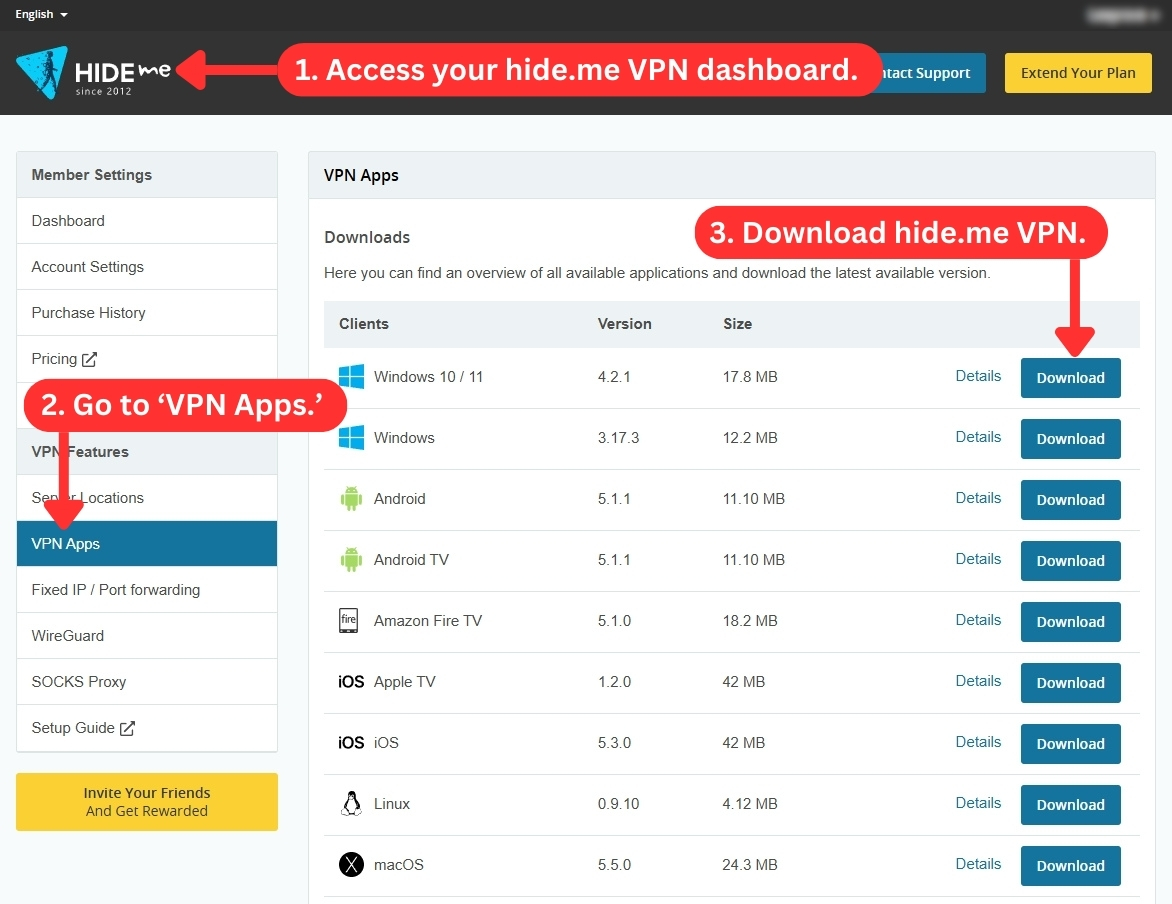
You can choose where to install the application, and the rest will be done automatically. You should be ready to use hide.me within a few seconds. Log in using your credentials, and this is where the real fun can begin.
If you want to install this VPN on a router, you’ll find nicely written guides for different routers. It’s important to say that even first-timers will easily find their way around this procedure.
Prominent Features
hide.me brings a compelling set of features, including split tunneling and a kill switch. However, it doesn't provide dedicated IPs. Our Score: 9/10
In this part of our hide.me review, we'll explore the features available on both the premium and free plans of hide.me VPN. What’s interesting about this VPN is that it’s constantly upgrading its feature set. Let’s take a closer look.
- Strong Encryption - Depending on the VPN protocol you choose, hide.me offers different encryption options. OpenVPN uses the industry-standard AES-256 encryption, while IKEv2 has both AES-128 and AES-256 encryption levels. WireGuard uses a different encryption suite consisting of ChaCha20, Curve25519, BLAKE2, Poly1305, SipHash24, and HKDF.
- Leak Protection - Now, with full IPv6 integration on all servers, hide.me VPN ensures smooth, encrypted connectivity across all devices, supporting both IPv4 and IPv6 protocols.
- StealthGuard - When you enable StealthGuard on Windows and macOS, you're adding an extra layer of security to your downloads. It allows you to limit certain apps or your entire internet connection to a VPN connection, ensuring that your IP address is always hidden from everyone, including your ISP.
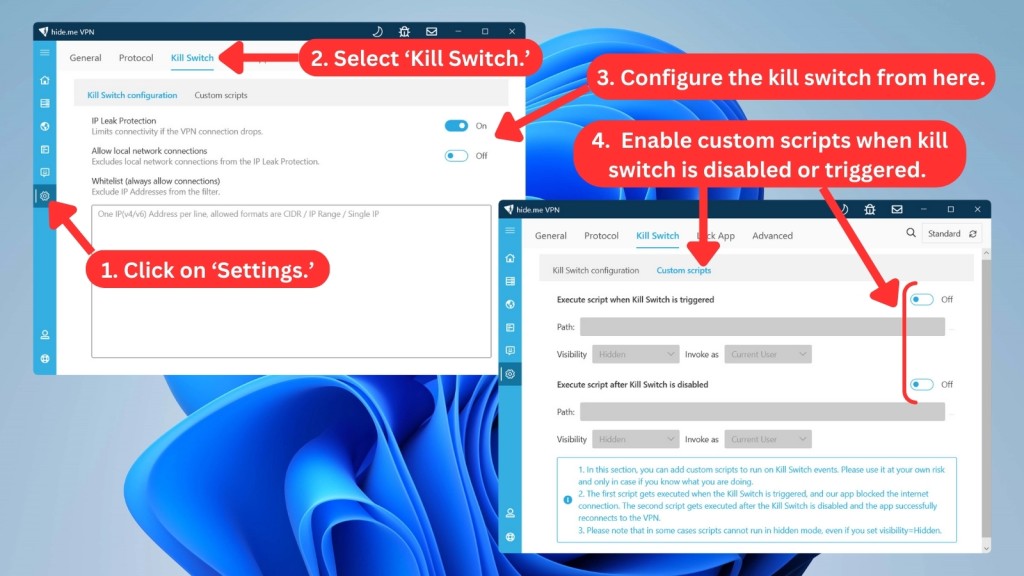
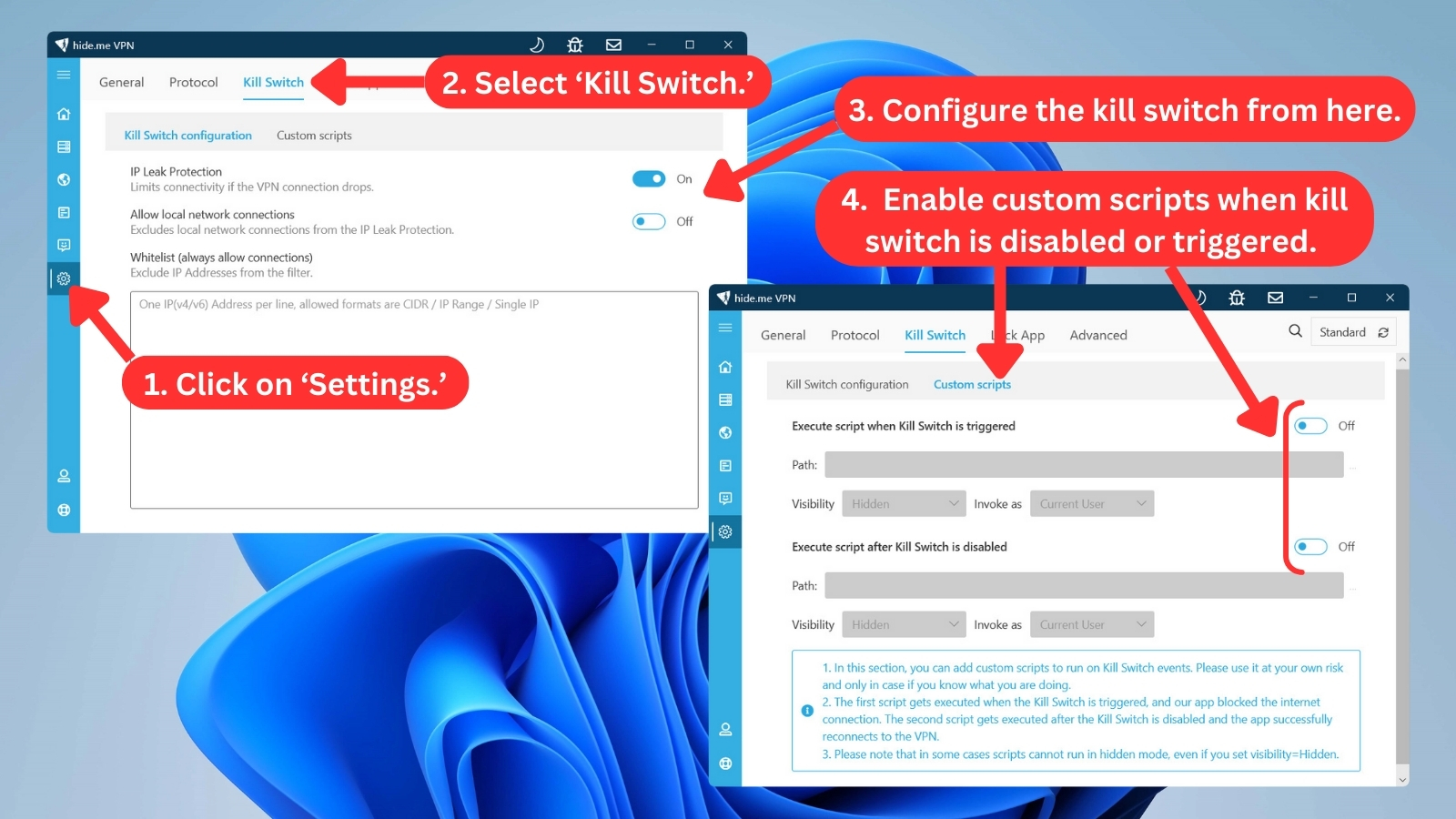
- Kill Switch - This prevents accidental leaks of your private info, ensuring your online safety. You also have the option to run custom scripts whenever the kill switch is triggered or deactivated for even more granular control over your online security. This feature is available on Windows, macOS, and iOS, and offers "Always-on" functionality on Android.
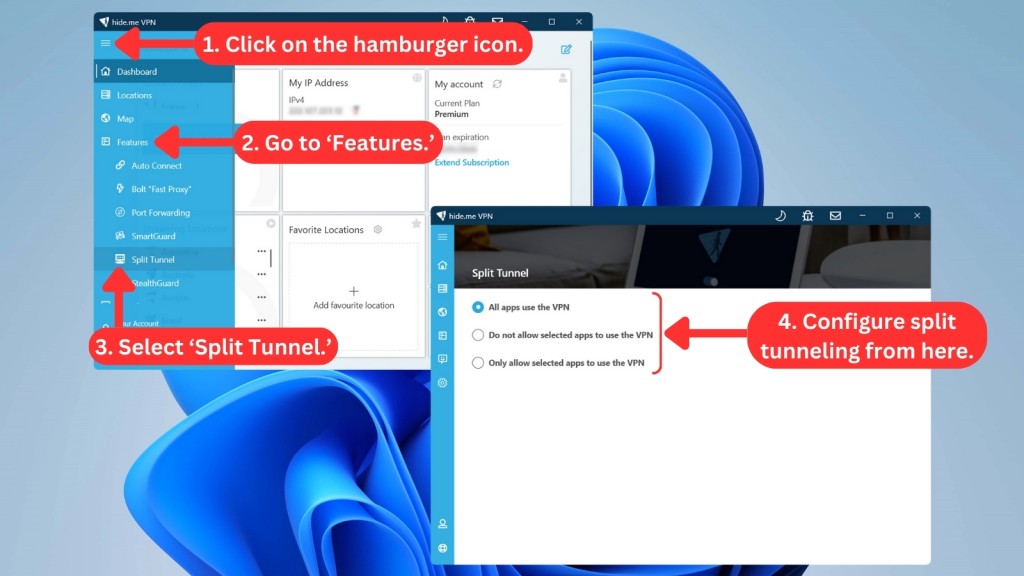
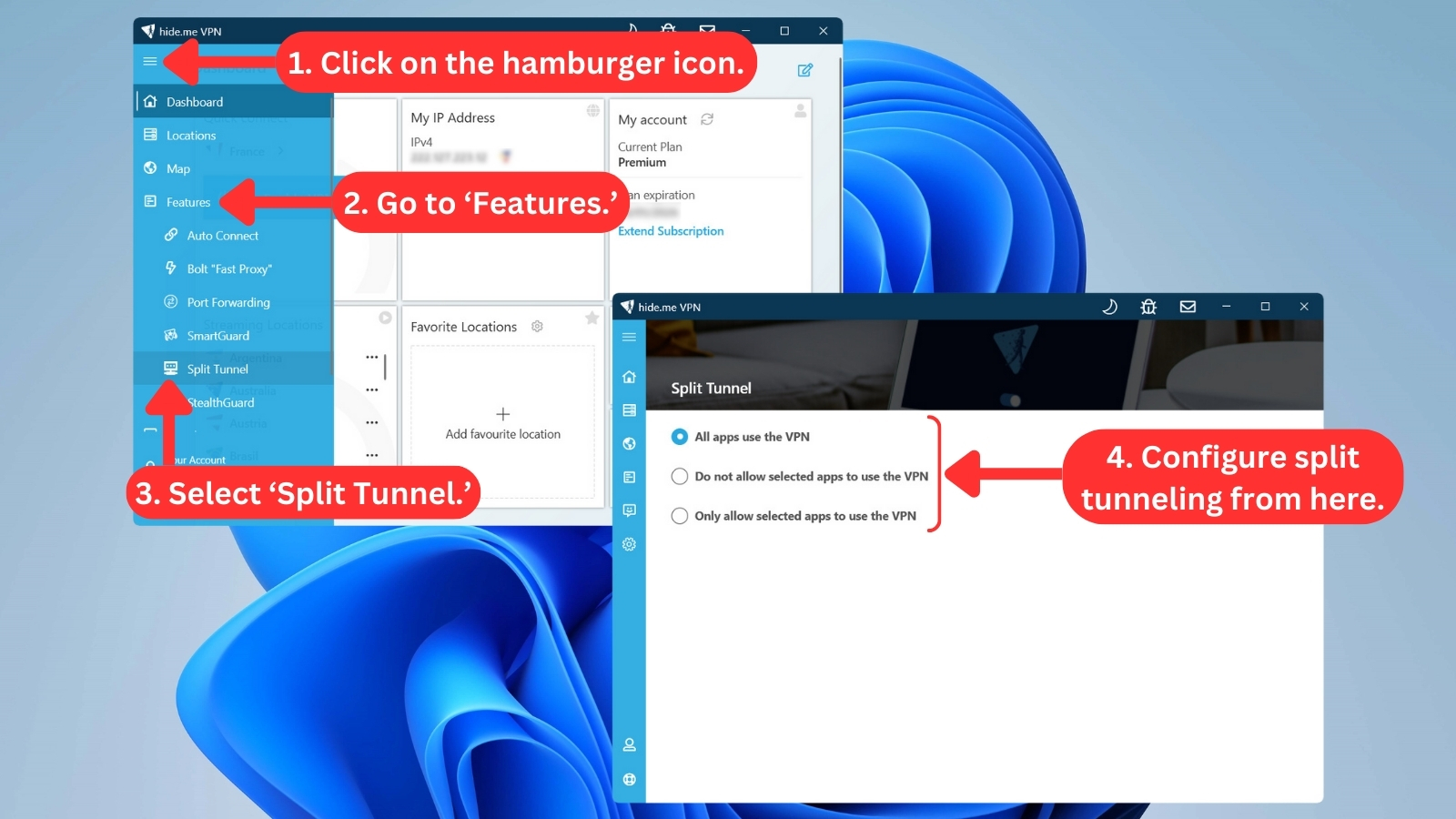
- Split Tunneling - Customize VPN protection by choosing which applications are protected by hide.me VPN. It's available on Windows, macOS, and Android. Unfortunately, hide.me VPN for iOS currently doesn't support split tunneling due to a lack of functionality offered by Apple to app developers.
- Port Forwarding - hide.me's Windows and macOS apps support dynamic port forwarding when connected. It utilizes dynamic port forwarding via the UPnP or NAT-PMP network protocol. This ensures enhanced security and efficiency by dynamically opening ports only when needed.
- SmartGuard - This feature ensures a cleaner and safer browsing experience using DNS filtering and a comprehensive database of known malicious sites and ad/tracker domains. It's available on Windows, macOS, Android, and iOS apps.
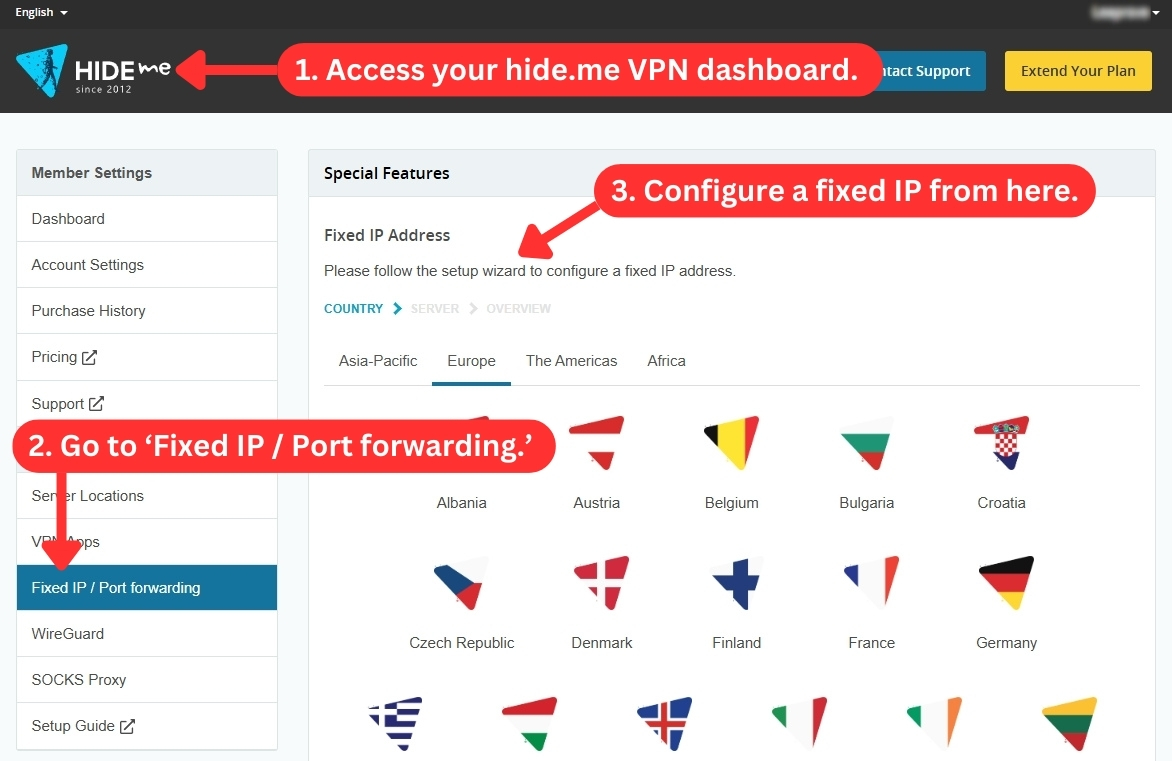
- Fixed IP - hide.me VPN offers this feature through your account on their website. With a fixed IP, you can secure your own spot on the VPN server, guaranteeing a consistent IP address every time you connect. However, keep in mind that during peak server loads, others might also vie for the same IP address.
- Bolt “Fast Proxy” - Currently available only on the Windows app, this feature optimizes your connection for a smoother and faster online experience.
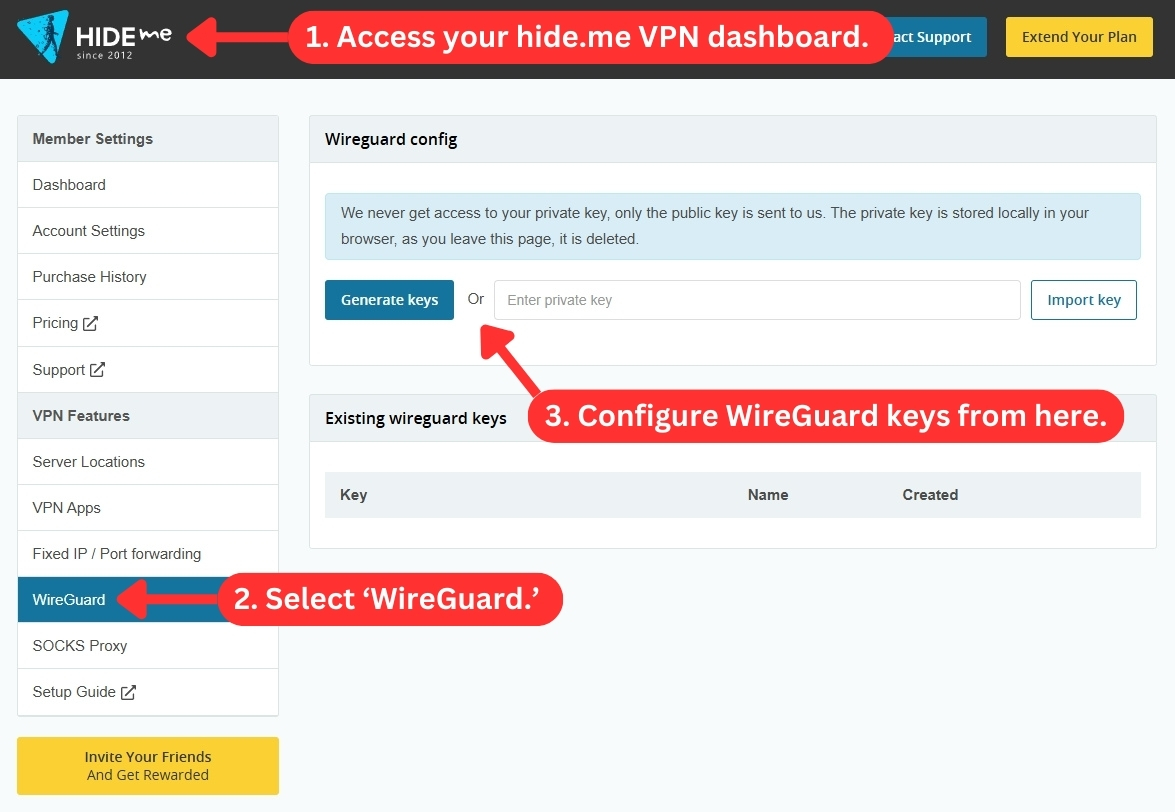
- Wireguard Static Configuration - Available only to Premium subscribers, this new feature offers a more stable connection by letting you set up fixed keys up to 10 per account. This is especially useful for devices like routers that don’t support the hide.me app, making integration much easier. You can configure it directly in your hide.me dashboard by navigating to VPN Features > WireGuard.
- SOCKS Proxy - All premium subscriptions include this speed-boosting feature when using the VPN. Alternatively, you can access SOCKS Proxy for free by using hide.me's supported browser extensions.
- Multihop - This hide.me VPN feature allows you to choose both an entry and exit server. In essence, your data is sent through two different server locations, adding an extra layer of protection. You can use Multihop servers on Windows, Mac, Android, and iOS apps.
Server Count & Infrastructure
hide.me VPN now comes with around 2,600+ servers and super-fast 10 Gbps options. This expansion offers wider connectivity and potentially faster speeds in more locations. Our Score: 7.5/10
Generally, the more servers a VPN service offers, the better. In this section, we’ll take a look at how many servers this VPN offers, whether you can select specific locations, and more.
During the previous months, hide.me VPN has been rapidly expanding its server network. For a long time, this VPN used to come with 160+ servers, but that's no longer the case. According to its official documentation, it now has 2,600+ servers spread across 50+ countries.
This server expansion brings more servers to Asia, Europe, and the Americas, along with infrastructure improvements in specific locations. Upgraded locations include South Africa, Indonesia, the Philippines, South Korea, Taiwan, Germany, Greece, Ireland, Italy, the Netherlands, and Ukraine.
Still, it's also worth noting that you can easily find VPNs with the most servers like NordVPN, ExpressVPN, Private Internet Access, and more. NordVPN specifically offers up to 7,000+ servers, which puts some things in perspective.
Having a larger server pool distributes users more effectively, reducing congestion on any single server. It also allows you to connect to servers in a wider range of countries. This is particularly helpful if you're looking to access geo-restricted content or bypass censorship limitations.
The free version of hide.me VPN gives you access to only 7 free server locations. If you want to use all the servers, you'll need to upgrade your plan.
However, hide.me VPN goes beyond just the number of servers. It also offers obfuscation through the OpenVPN protocol to bypass censorship or hide your VPN usage. Moreover, hide.me VPN offers 'Multihop' servers, which route your traffic through two VPN servers for enhanced security and privacy.
Additionally, all of hide.me VPN's servers are physical - they don't offer virtual locations. These are self-maintained servers, meaning only hide.me VPN can access the hardware, ensuring your privacy.
hide.me VPN has also upgraded its network by adding super-fast 10 Gbps servers in 60+ locations. This means you can enjoy blazing-fast speeds, rock-solid connections, and frequent network updates. hide.me VPN offers these servers in the following locations:
UI/UX Design & Ease of Use
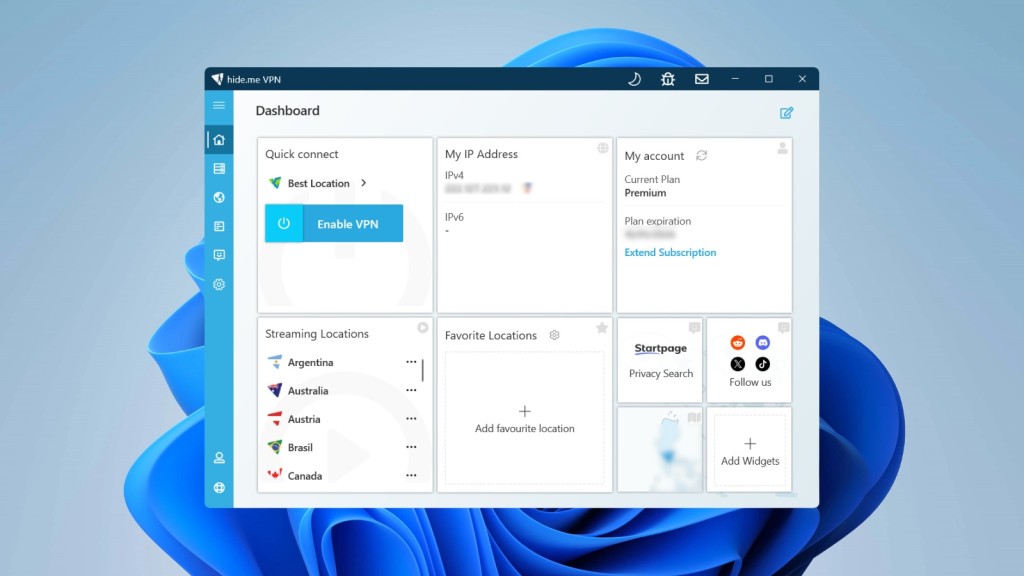
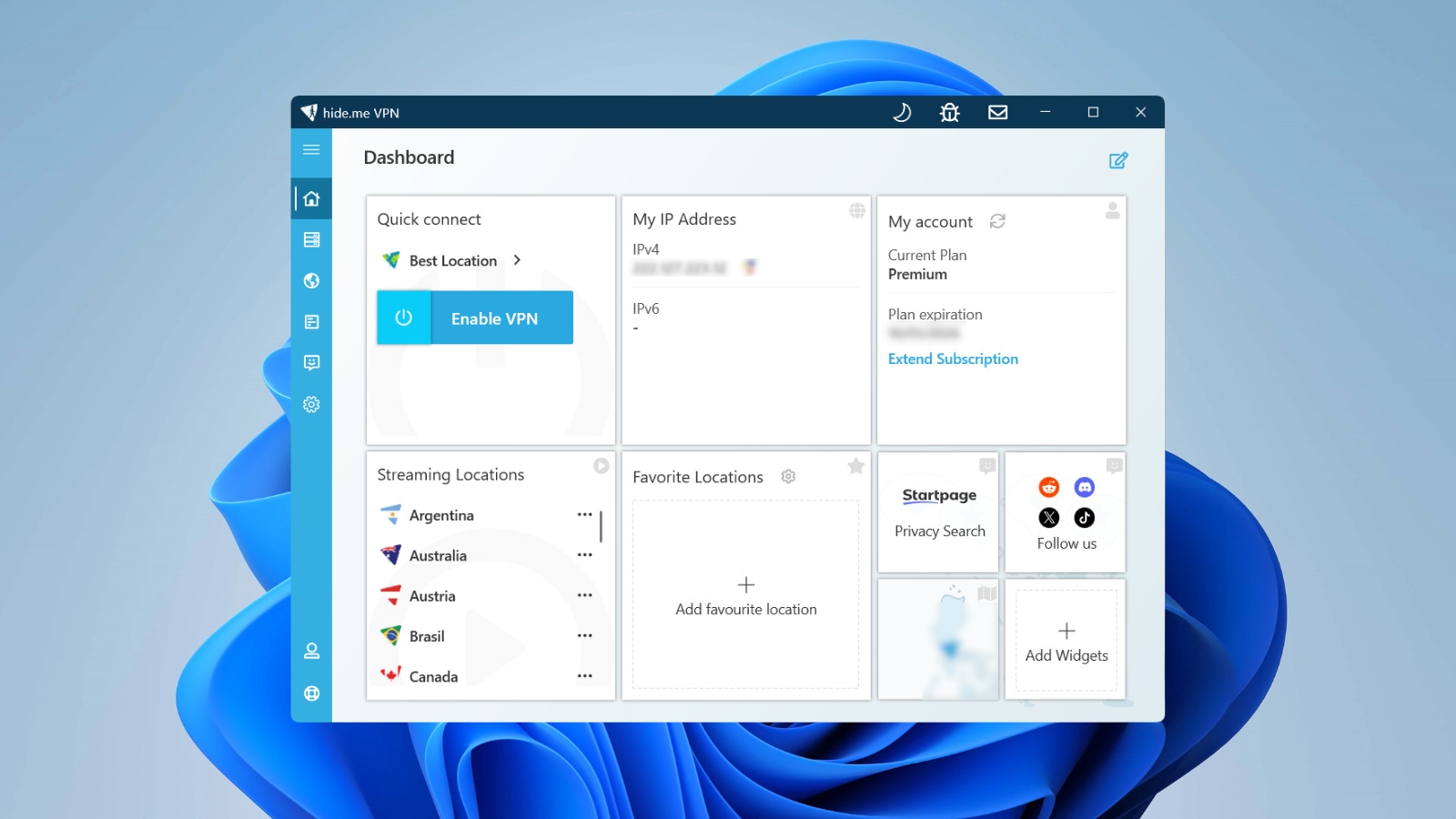
Navigating hide.me VPN is intuitive for beginners, with a recently updated Windows interface that offers more customization options right on the home screen. However, advanced users will still find a wealth of options for fine-tuning their experience. Our Score: 8/10
In this segment of our hide.me VPN review, we're checking out the VPN's desktop and mobile apps. Plus, we'll explore what it brings to the table in terms of Web browser extensions.
How Well Does hide.me VPN Work on Desktop Platforms?
hide.me VPN has recently undergone a design shift with the Windows app, prioritizing user customization over a streamlined interface. You can now personalize the app's home screen with custom columns and widgets, creating a potentially information-rich experience.
However, this flexibility comes with a potential trade-off, as the interface might appear cluttered to those who prefer a simpler layout.
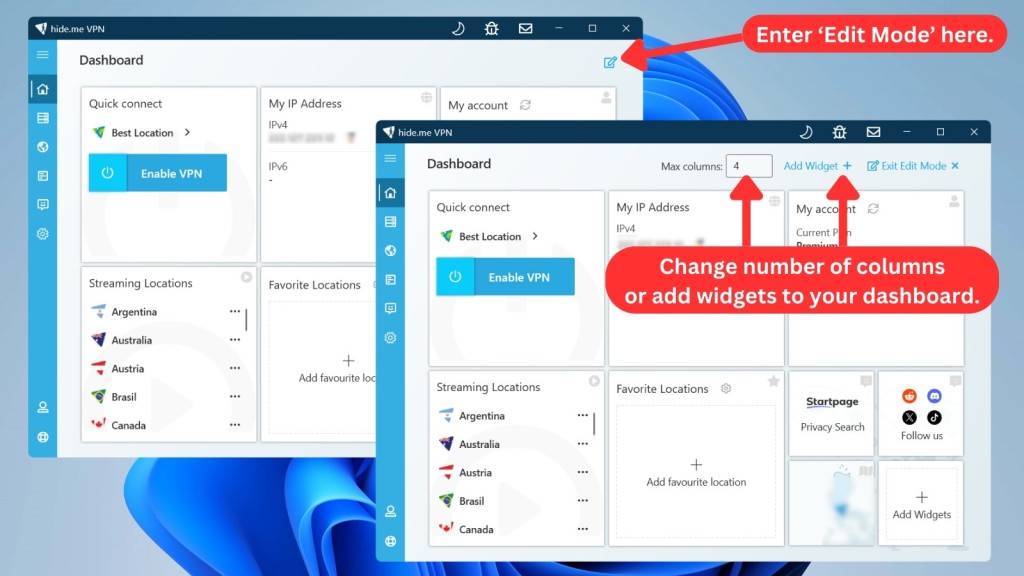
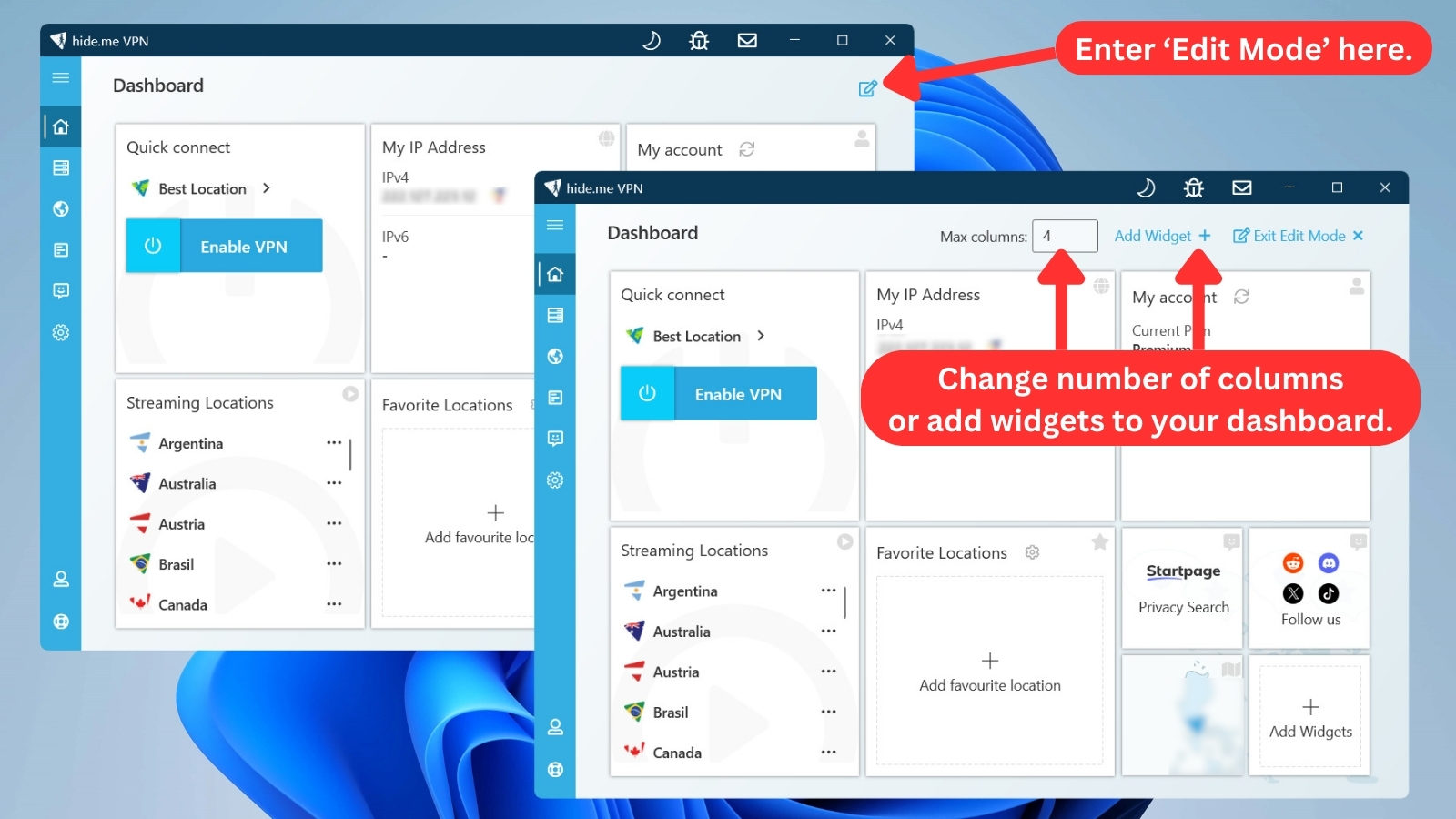
Crucial information like your IP address, account details, and available server locations are displayed prominently, depending on which widgets you choose to include. This level of customization allows you to tailor the home screen to your specific needs.
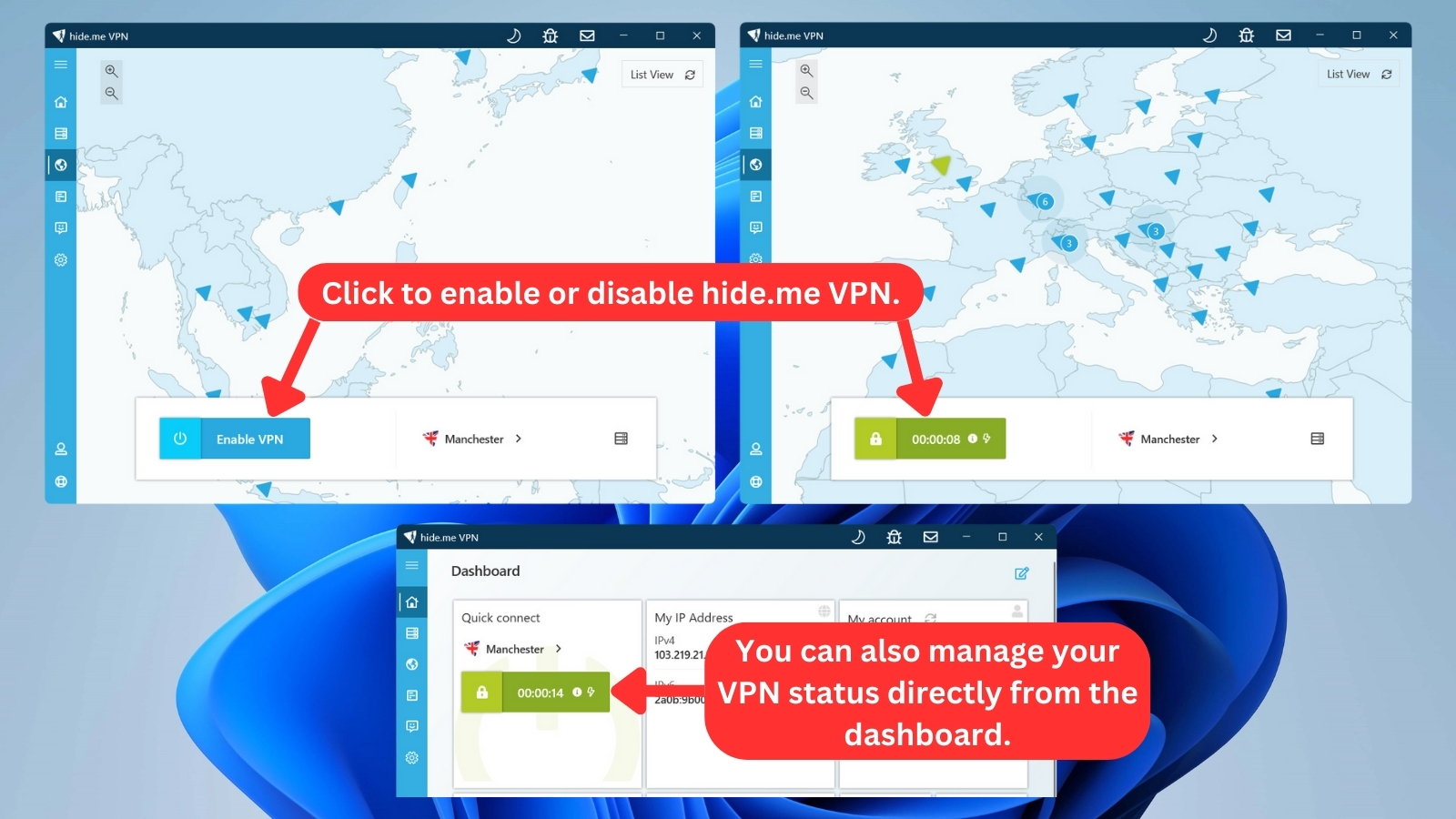
For instance, if you frequently connect to specific servers, you can add them as favorites for one-tap access. Additionally, you can directly connect to a VPN server location right from the home screen without needing to navigate through menus.
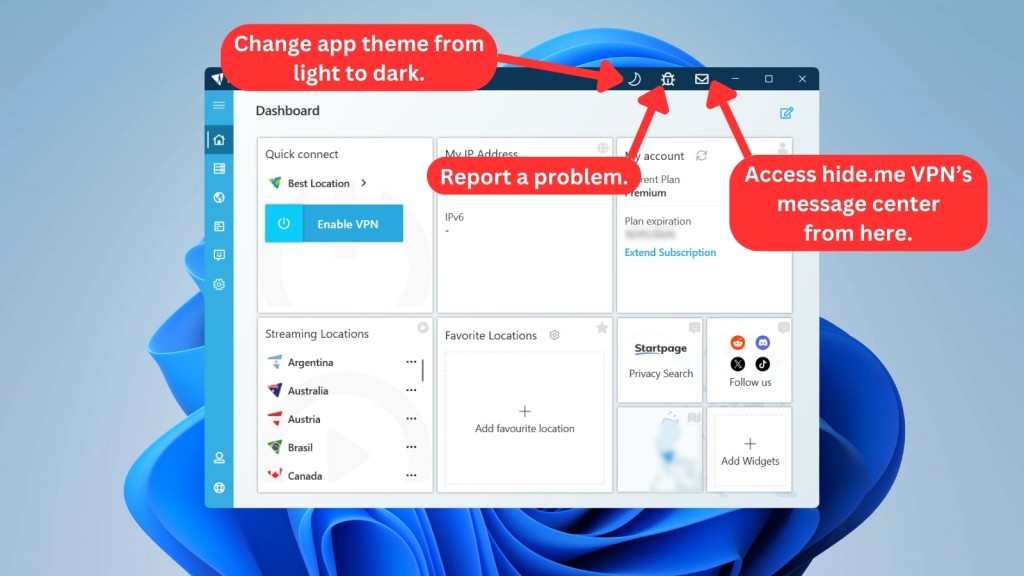
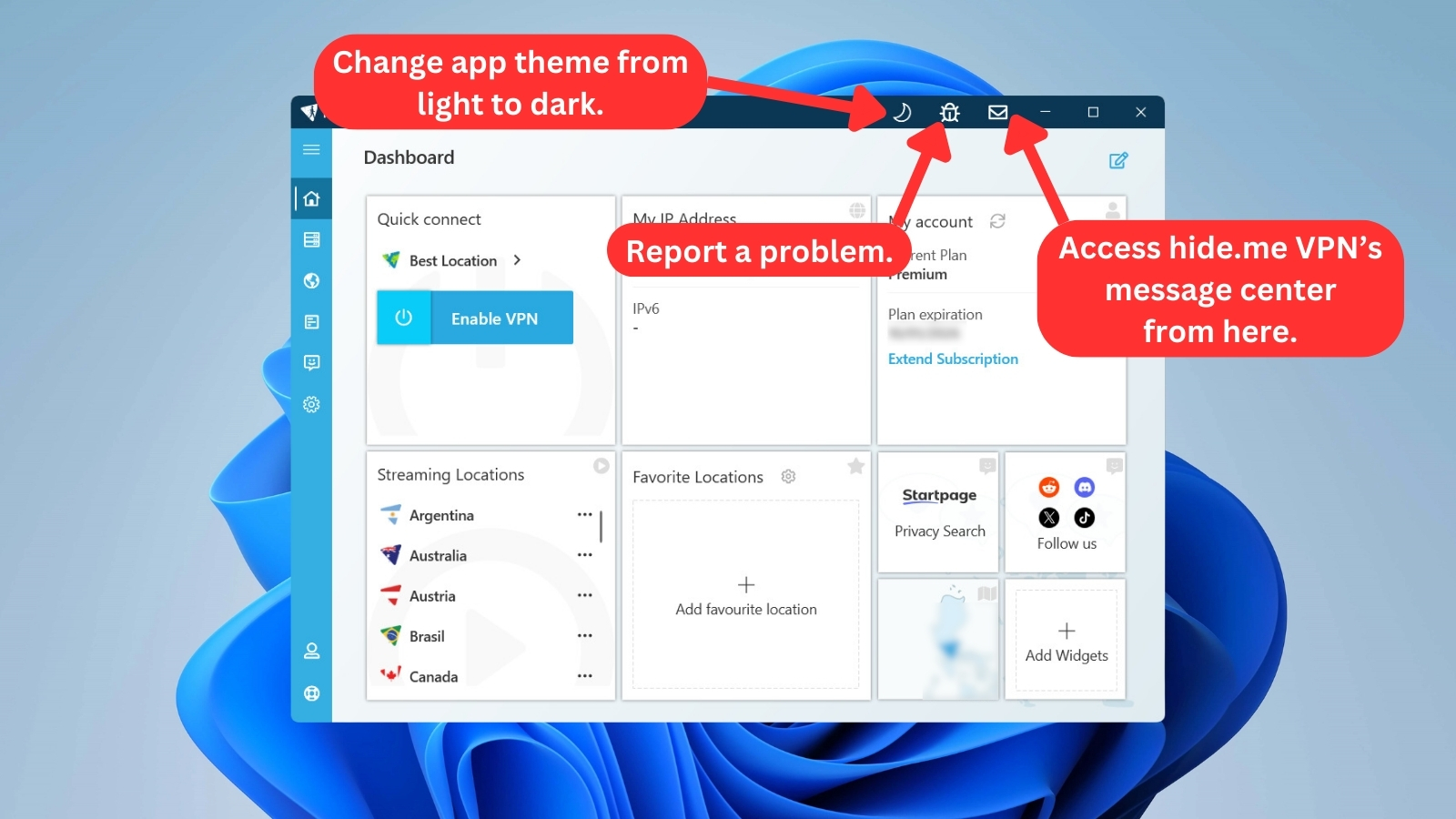
On the top right side of the screen, you'll find three additional options for personalizing your experience and staying informed. The first one lets you change the app's theme to match your preferences. If you encounter any issues, you can easily report a problem directly through this menu. Finally, the message center keeps you updated with important announcements and updates from hide.me VPN.
To access all hide.me features and options, click on the hamburger menu (three vertical lines) in the upper left corner. The first tab here is the 'Dashboard,' and as you can expect, this is where you can customize the home screen and connect to hide.me VPN servers.
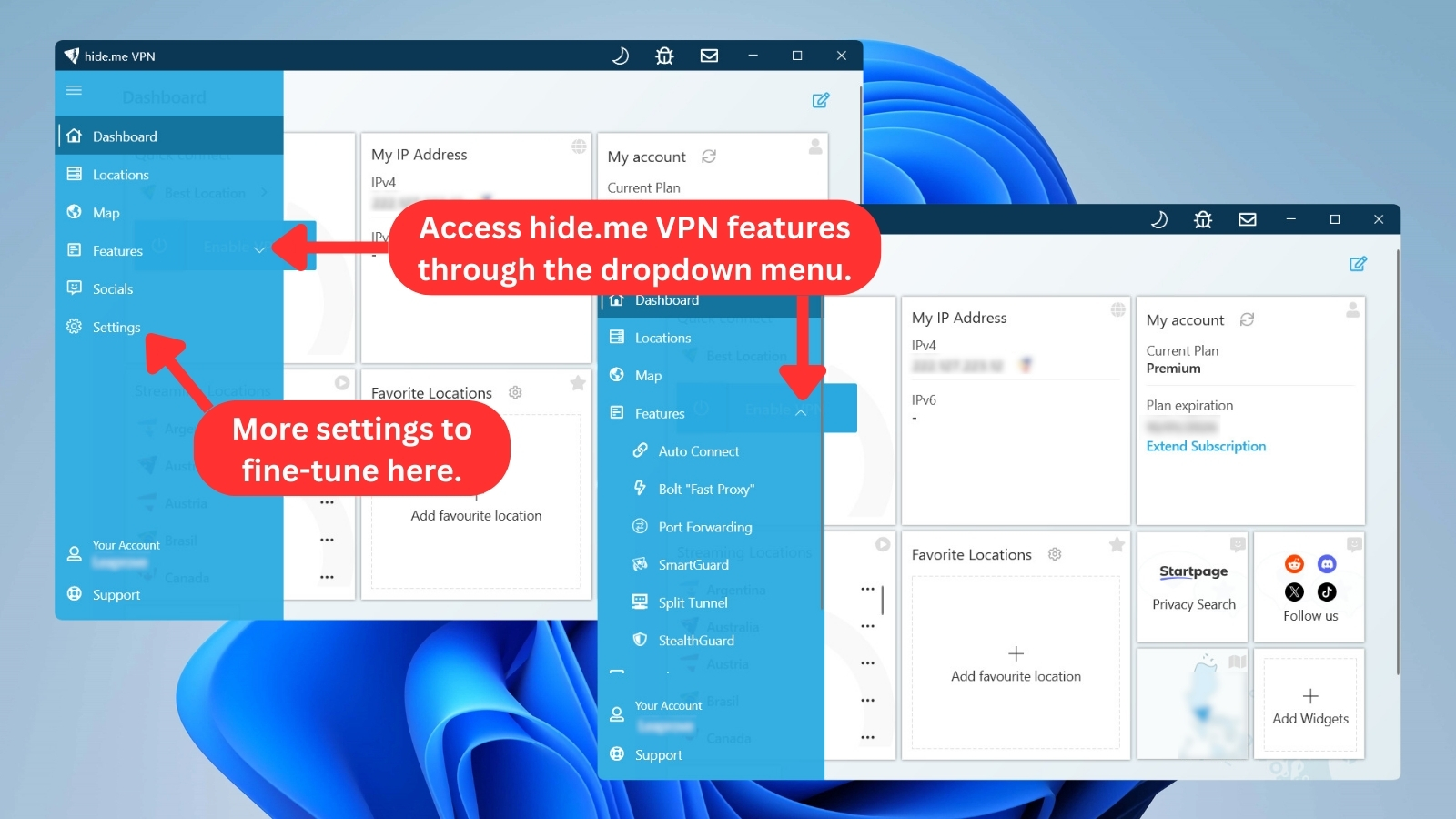
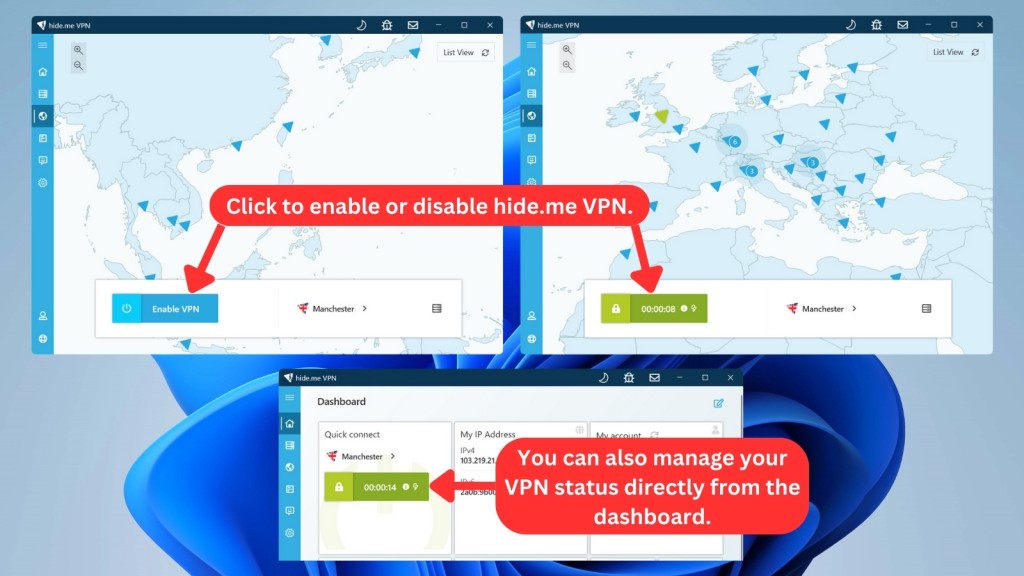
The next option in the menu is called 'Locations,' where you can connect to standard, streaming, and 'Multihop' servers. For a more visual approach, the 'Locations' section conveniently allows you to switch to a 'Map' view with a simple click on the button located in the upper right corner of the screen. This way, you can browse or connect to servers based on their geographical location.

To establish a connection, simply clicking on 'Enable VPN' does the trick. Once connected, the blue connect button changes to vibrant lime green with a lock icon, assuring you that your connection is now safe and secure with hide.me.
The next menu option is called 'Features.' As the name suggests, it provides access to the various features of hide.me VPN, as detailed earlier in this review. Consider it a one-stop shop to explore the different tools and settings the VPN offers.

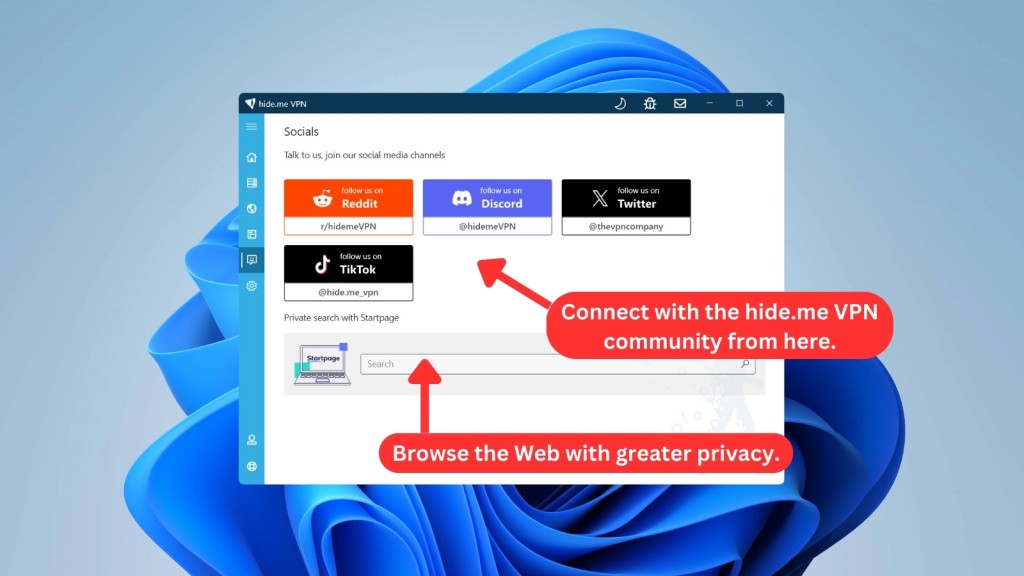
The 'Socials' section is your gateway to interacting with hide.me VPN and exploring the Web with extra privacy in mind. It provides links to hide.me's social media channels (X, TikTok, Reddit, and Discord) to stay connected. For enhanced privacy while browsing, this section also offers access to 'Startpage,' a private search engine.

Now, we'll check hide.me VPN's 'Settings' menu. This is where you'll find five key tabs for fine-tuning your hide.me VPN experience. Here’s a quick overview of what you can customize on Windows:
- General: This tab covers the core settings of the app. Here you can find details like the app version, control startup behavior (launching automatically or connecting upon startup), manage notifications, change the display language, reset settings, and more.
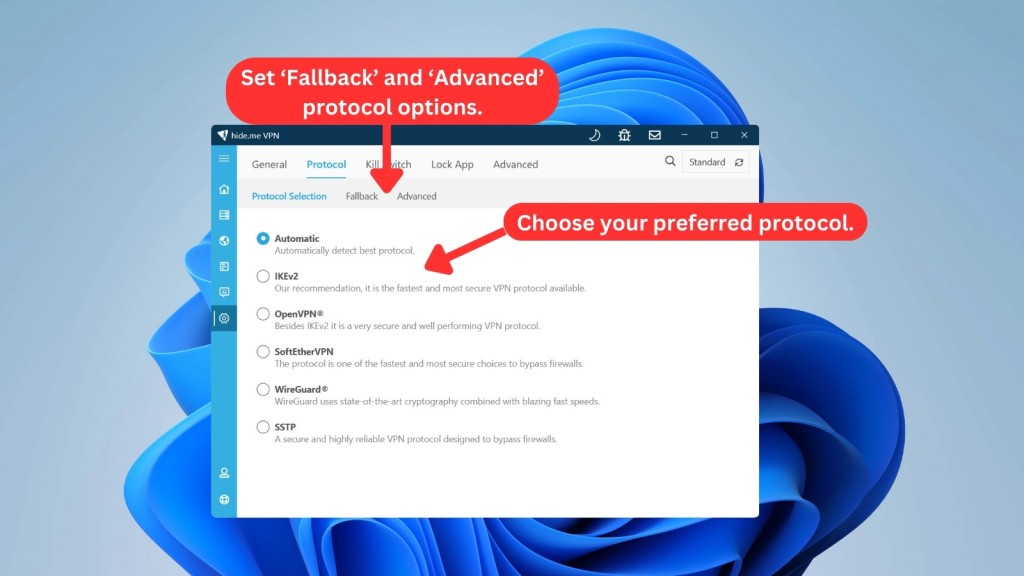
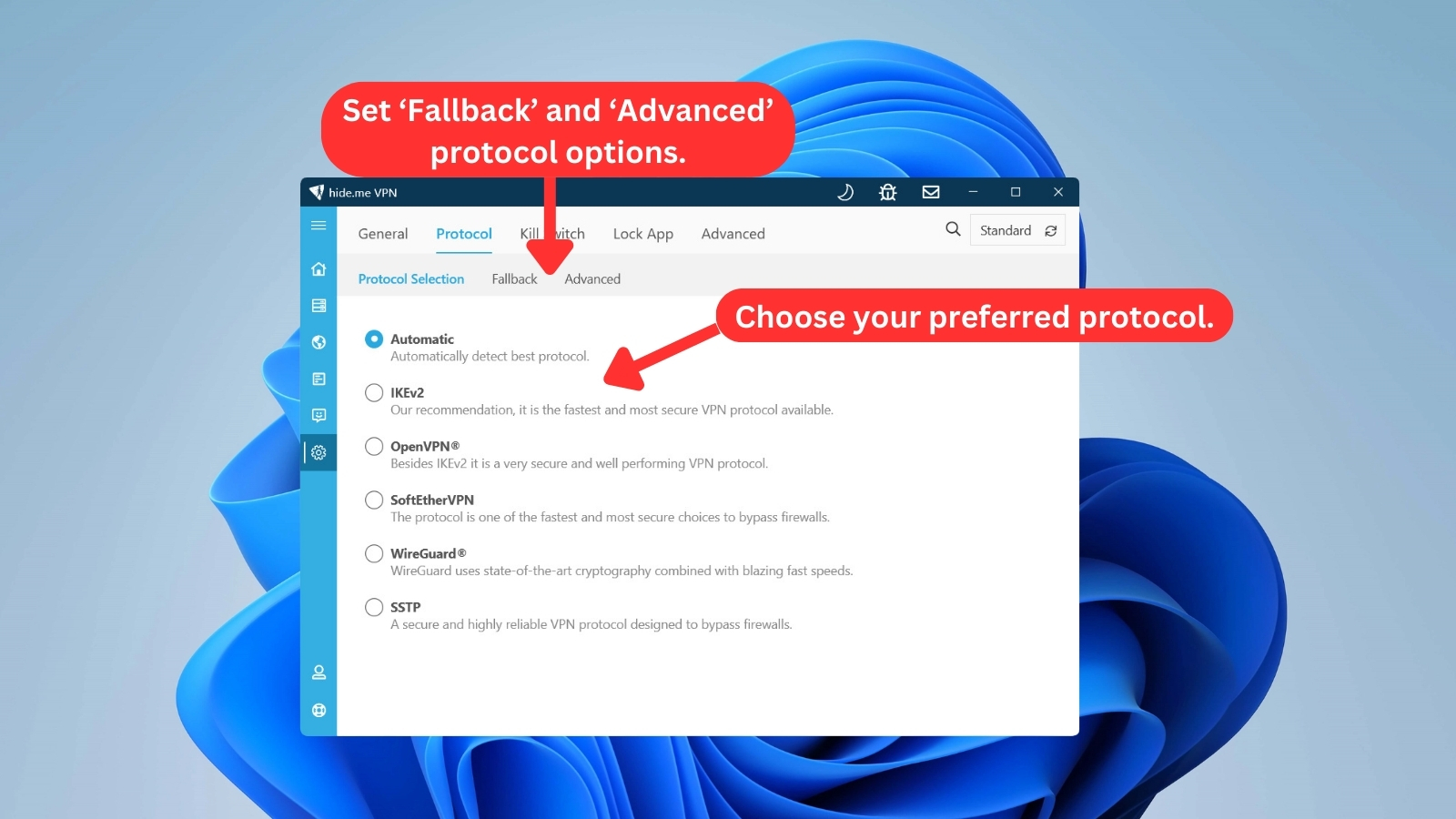
- Protocol: You get to choose from 5 protocols here, each offering unique advantages. A backup protocol can also be set in case your primary choice encounters issues. It even offers advanced protocol settings to customize your connection further.
- Kill Switch: Here, you can configure hide.me VPN's kill switch feature. You can even add custom scripts to run whenever the kill switch is triggered or disabled.
- Lock App: This setting adds an extra layer of security by allowing you to lock the hide.me VPN app with a PIN. It ensures that only authorized users can access and modify your VPN settings.
- Advanced: This section grants control over the best server selection and allows the app to stay active during sleep for seamless protection. Plus, advanced users can fine-tune the MTU size for potentially optimal performance.
Lastly, hide.me VPN offers dedicated sections for account management and support at the sidebar's base. 'Your Account' centralizes information control, while 'Support' equips you with downloadable mobile apps (including download links to browser extensions), FAQs, and the option to submit tickets for support.
How Well Does hide.me VPN Work on Mobile Platforms?
hide.me VPN ensures a smooth experience on both Android and iOS, mirroring their home screens with minor setting differences. The intuitive design promotes easy navigation, making it accessible for users across platforms.
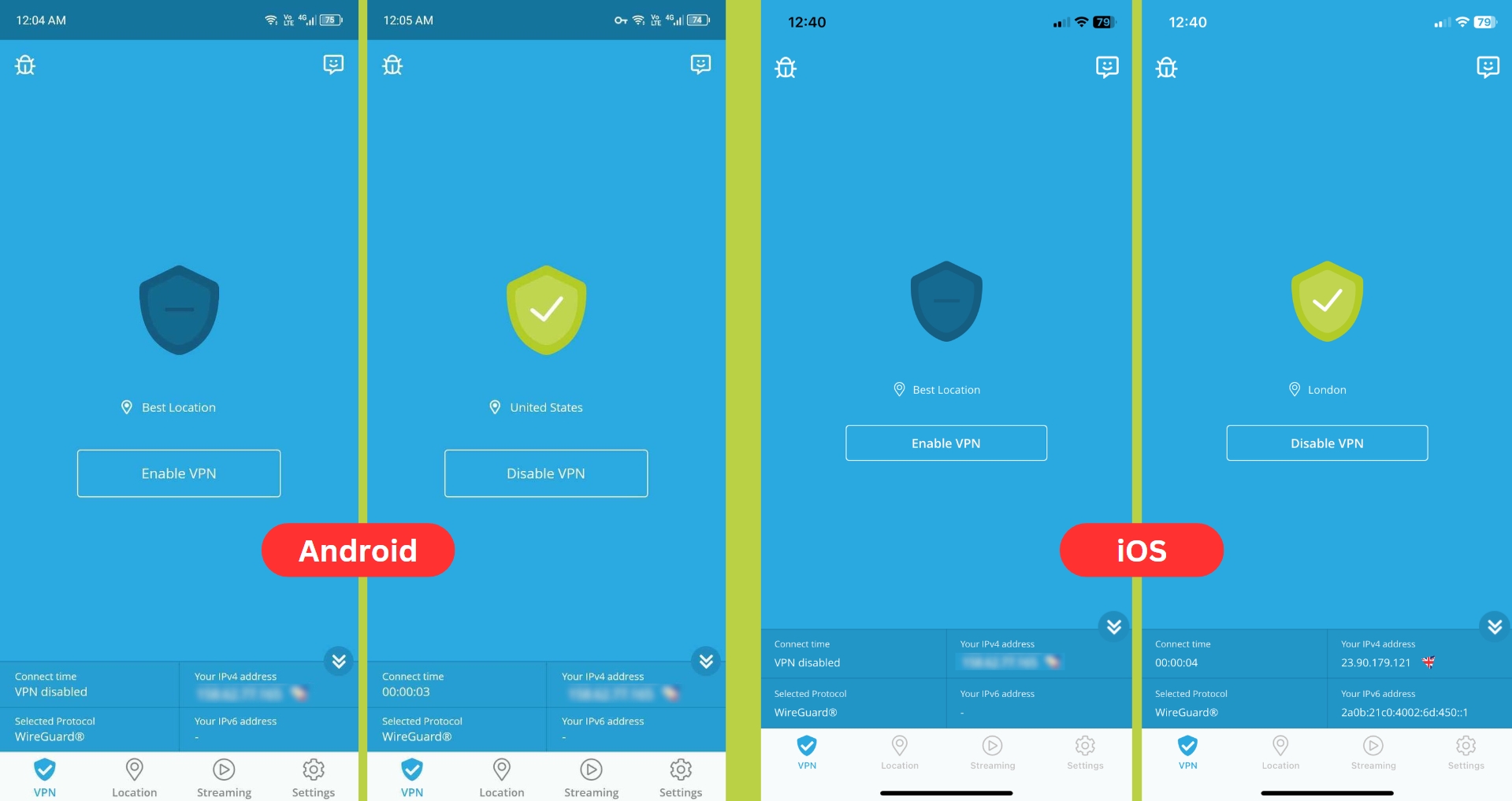
The bottom navigation panel on mobile platforms shares similar functions with their desktop counterparts, showcasing hide.me's commitment to a unified user experience. While the functionalities remain consistent, the layout and design adaptations for mobile platforms enhance usability.
However, customizing settings is easier on PCs than on mobile phones. Desktop apps give you more options, while mobile apps have fewer choices in this area.

On mobile, there's also a connection setting specifically for WireGuard optimization. That said, there's a key difference between platforms - Android includes a split tunneling feature, but iOS doesn't. That could be a dealbreaker, depending on what you need.
How Well Do hide.me VPN's Web Browser Extensions Work?
hide.me VPN’s free browser extensions for Chrome, Firefox, and Edge give you access to 3 server locations and one automatic option. Clicking the 'Download Now' button only takes you to the pricing page to buy a plan. So, even if you have a premium account, there’s no way to log in through the extension. You’re stuck with the free options.
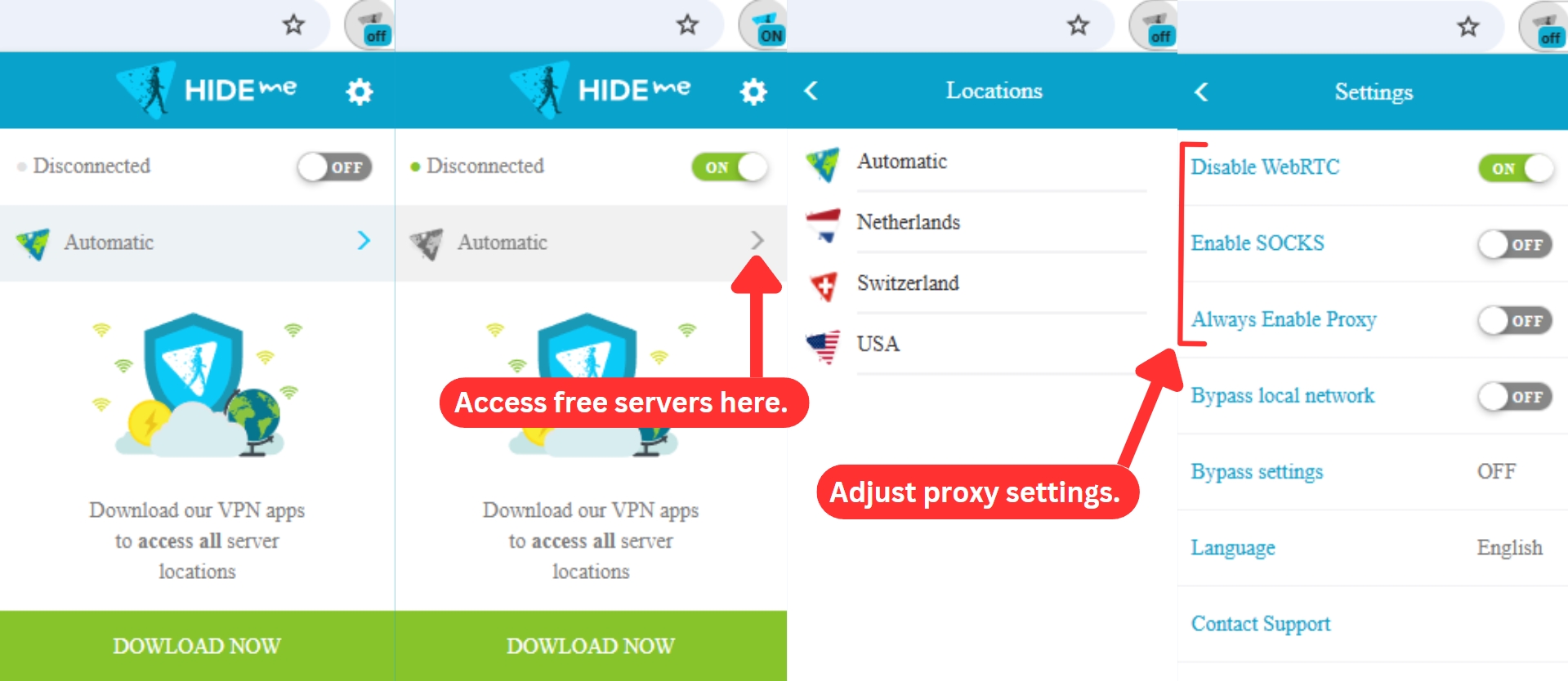
Even with these limitations, the extensions still offer some handy settings. You can speed up connections with the SOCKS proxy, disable WebRTC to prevent IP leaks, and bypass the local network when needed.
All in all, hide.me comes with a nicely designed UI. It’s simple enough for first-timers to use with no major issues. However, advanced users can also take advantage of it, as it allows plenty of fine-tuning. So, highly recommended!
Media Streaming, Torrenting, and Gaming Support
hide.me VPN works well for Netflix US and other content but has trouble with other popular streaming sites like BBC iPlayer, Prime Video, and Hulu. However, you can still easily download torrents and play games with this VPN. Our Score: 6.5/10
Exploring the VPN landscape opens doors to a range of benefits, from secure gaming to seamless torrenting and content unblocking. Yet, discovering a VPN that truly stands out in these aspects can be a challenge. Now, let's uncover what hide.me VPN brings to the table.
Is hide.me Good for Streaming?
Yes, it’s good enough, especially if streaming Netflix is your main priority. In our tests, it had no trouble unblocking Netflix US and a few other regional libraries. But when we tried accessing Hulu, Prime Video, Disney Plus, ESPN+, and BBC iPlayer, things didn’t go as smoothly.
Some worked after a few server switches, while others refused to load at all. It also couldn’t get around sports blackouts, which is a letdown for live sports fans. If you're after the best VPN for streaming across multiple services, this one has some limitations. But for Netflix alone, it does the trick.
To show you, here's a table highlighting notable US-based streaming platforms that hide.me VPN successfully unblocks.
To complement this, here's another table showcasing international and non-US streaming services that hide.me VPN can unblock.
The free version of hide.me VPN isn’t the best choice if you’re trying to unblock specific sites. Because it has few server locations, access isn't guaranteed. For better performance, you have to go for the premium plan, which comes with 20 servers optimized for streaming. This will give you a better shot at unblocking your favorite content without interruptions.
Is hide.me Good for Torrenting?
Yes, we’d say hide.me VPN works well for torrenting. The service even claims that all its servers support P2P traffic, and from our tests, that checks out.
It may not be the best torrenting VPN, but it has a few useful features that make a difference. Port forwarding helped us get faster speeds, while 'StealthGuard' and the kill switch gave us peace of mind, making sure our IP never leaked mid-download. The SOCKS proxy was another plus, letting us boost speeds without encryption slowing things down.
With these tools in place, we had no trouble downloading torrents. Everything ran smoothly, with no slowdowns or unexpected interruptions. hide.me doesn’t rely on specialized P2P servers, but honestly, we didn’t feel like we needed them.
Is hide.me Good for Gaming?
Yes, it holds up well as a gaming VPN. We even recommend hide.me as one of the top free gaming VPNs. It also helps that hide.me has built-in protection against DDoS attacks, along with port forwarding to improve cross-console connections. That’s a big plus if you’re trying to game with friends on different platforms.
hide.me doesn’t have specialized gaming servers, but we had no trouble playing COD: Warzone, Valorant, and other lobby-based multiplayer games. The connection stayed stable, and there weren’t any lag spikes that ruined the experience.
Keeping your VPN server close to the game’s server is also key to better performance. It keeps latency low and prevents frustrating ping spikes. If you’re gaming on a console, you’ll need to set up the VPN on a compatible router first.
And one more thing, hide.me owns the eSports team Valiance. If a VPN provider is that invested in gaming, it’s safe to say they know what they’re doing.
Security & Privacy
Thanks to a combination of robust encryption and incredibly capable VPN protocols, hide.me VPN can protect your data in the best way possible. Our Score: 9/10
As we explore hide.me VPN's security features, we'll pay close attention to the range of VPN protocols it offers, inspect its logging policy, and check for its vulnerability to DNS/IP leaks. Let's dig into these aspects to get a complete picture of its overall security measures.
hide.me VPN Protocols
In terms of VPN protocols, you can count on OpenVPN, WireGuard, IKEv2, SoftEther, and SSTP. Of course, not all of those are available across all of the supported platforms. However, you'll always get to count on OpenVPN, which is considered to be highly secure as it doesn’t have any significant weaknesses.
- OpenVPN (TCP/UDP): Whether you're using mobile, wired, or WiFi, OpenVPN is a dependable choice. It's easy to set up and especially great for desktop users.
- WireGuard: Found in all hide.me servers and apps, WireGuard is the latest cutting-edge protocol that uses advanced cryptography for top-notch security.
- IKEv2: Easy to set up and resilient, IKEv2 is an excellent overall choice, especially for home users. It supports strong encryption, operates smoothly over UDP, and can handle short-term network losses.
- SoftEther: Available only on Windows, Mac, and Linux, SoftEther is a smart combination of IPsec and OpenVPN, making it a powerful VPN solution.
- SSTP: Ideal for fixing connection or speed issues, SSTP combines SSL and TCP technologies. While it might not be the fastest, it's a solid choice for overcoming firewalls and ISP throttling.
Does hide.me VPN Keep Logs?
No, hide.me VPN doesn't keep logs. Ever since it was established, this company took pride in its 'no-logs' policy. They promise not to collect your personal data, which means you can be completely anonymous on the Web.
To keep your privacy safe, hide.me VPN only collects your email, which is stored in a secure way on completely encrypted servers. They don't ask for or keep your name, IP address, physical address, or any other personal info.
Your email might be used to send you updates, like newsletters or promotions related to your account. But if you don't want these, you can always say no.
Finally, hide.me has been checked and certified by an independent security analyst, Leon Juranic (founder of DefenseCode), and Securitum, a top security audit company in Europe, probed its zero-logs policy in 2024. The result? Same as before. hide.me keeps no logs and doesn't keep your data, so your anonymity is in good hands.
In addition to its audited no-logs policy, hide.me VPN has been re-accredited by the VPN Trust Initiative (VTI) through 2026. This confirms its continued compliance with industry standards for privacy, security, transparency, and responsible practices, and shows ongoing accountability rather than a one-time certification.
Does hide.me Leak/Expose Your Private Data?
No, hide.me doesn't leak your private data. We ran thorough tests for VPN leaks, including DNS leaks, and didn't find any signs of data slipping through.
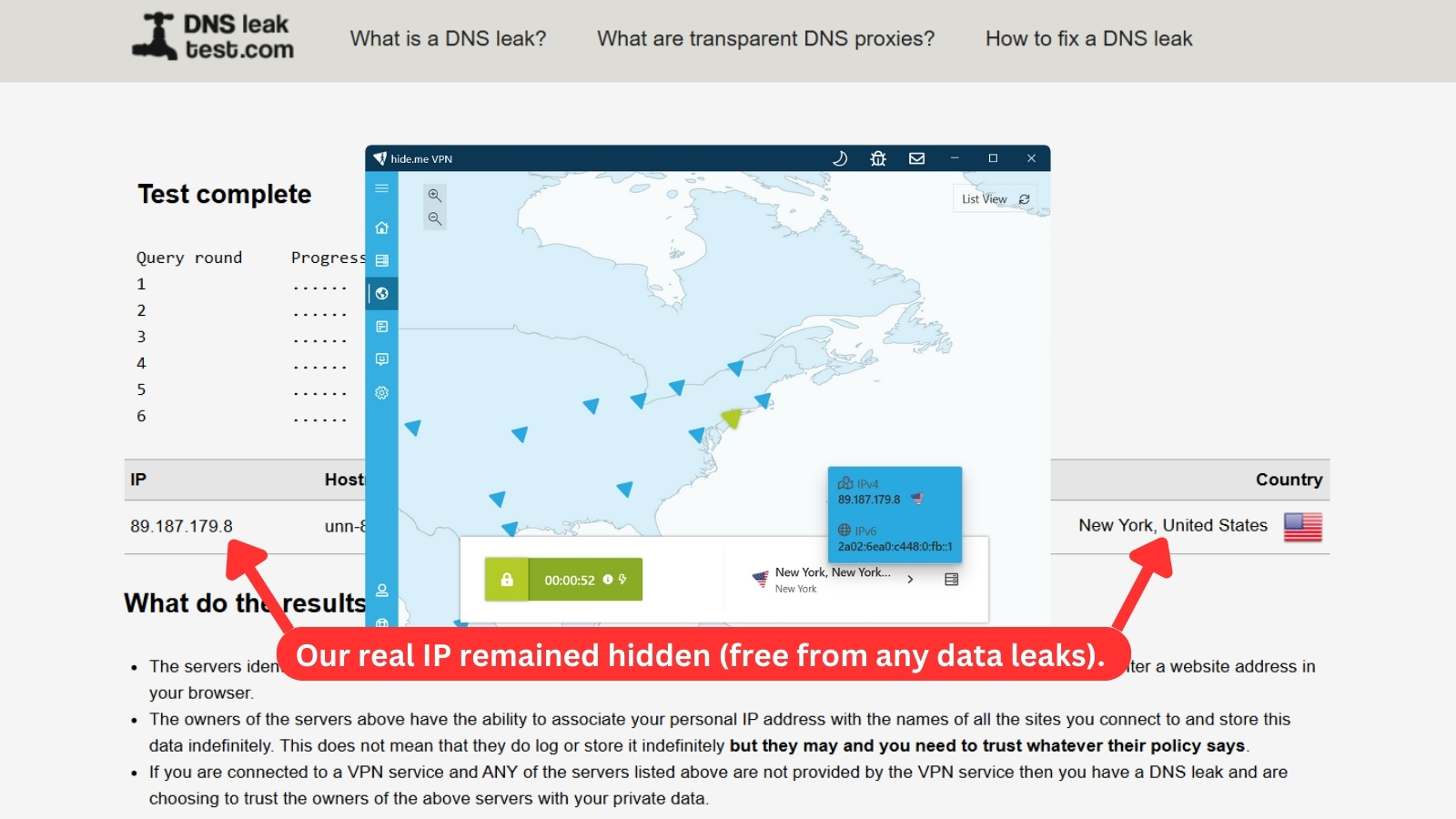
As seen in the image above, our true location remains hidden. This implies that third parties online only see our virtual information, not our actual details. This includes our virtual IP address, hostname, ISP, and country of origin.
Speed & Performance
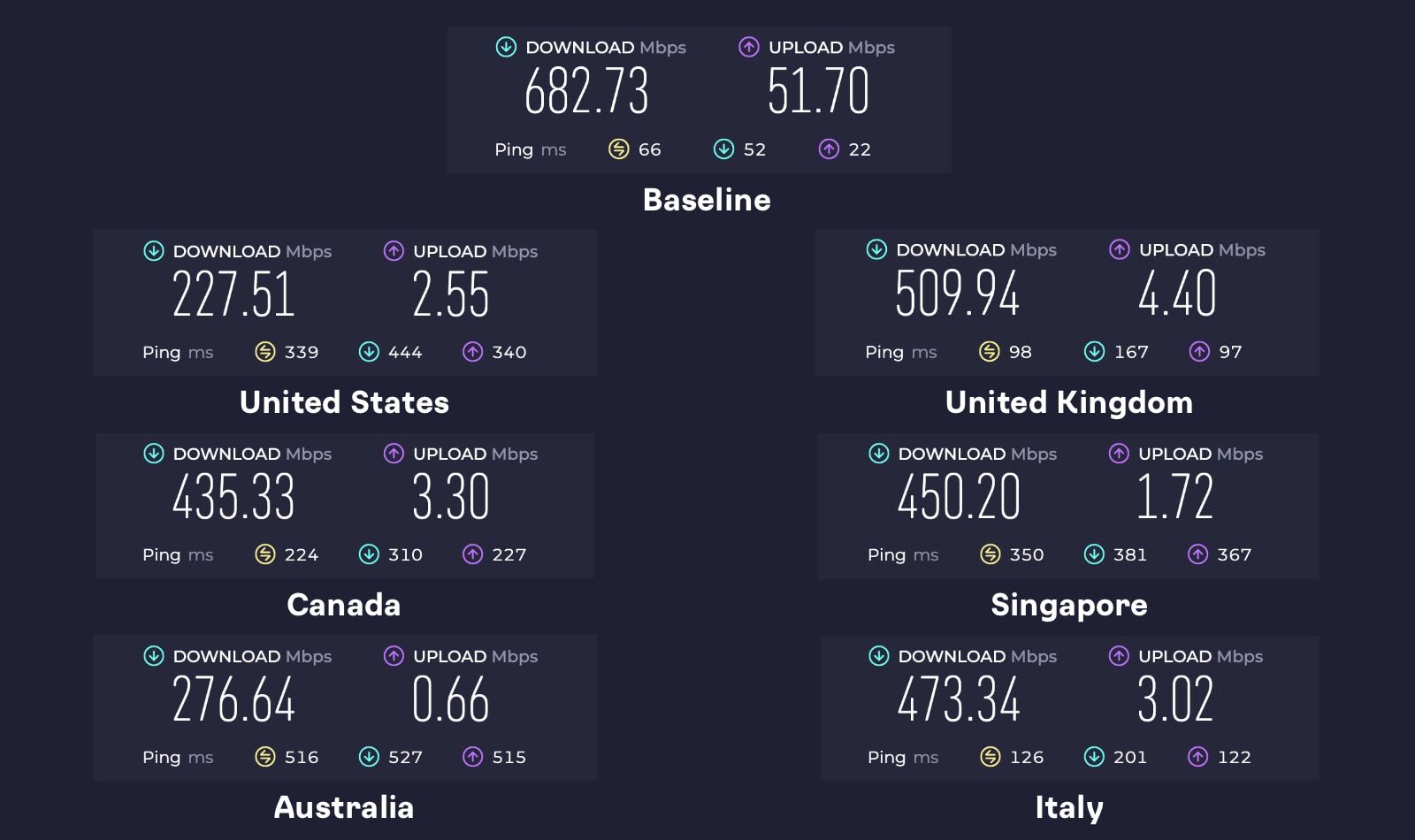
hide.me won’t impress you with its performance. It’s far from being the slowest around, but we did expect much better results. Our Score: 7/10
Just like we do in our every VPN review, we’ll check hide.me for its performance in speed. For this purpose, we connected to both nearby and remote servers, testing the speed of our Web connection along the way.
To establish some baseline data, we check the speed of our Web connection (without hide.me running in the background). As you can see from the screenshot, we got 682.73 Mbps for downloads and 51.7 Mbps for uploads.
Here are the results:
- US Server (New York): During our speed tests, this server displayed the most substantial speed reduction, with only 227.51 Mbps for downloads and 2.55 Mbps for uploads, indicating a 67% decrease from the baseline. However, the results weren't surprising, given how far this server is from our current location.
- UK Server (London): This server delivered the fastest speeds in our tests. Being relatively close to our location, the connection remained strong, with just a 25% speed drop. We recorded a download speed of 509.94 Mbps, while the upload managed 4.4 Mbps.
- Canada Server (Toronto): Despite the distance, this server outperformed the US one, possibly due to lower server congestion or better routing. We saw a 36% speed drop, with a download speed of 435.33 Mbps and an upload speed of 3.3 Mbps.
- Singapore Server: Surprisingly, this server, also far from our location, showed strong performance. The 34% speed reduction brought the download speed to 450.2 Mbps, which was better than expected. However, the upload speed remained low at just 1.72 Mbps.
- Australia Server (Perth): Since this was the farthest server from us, we expected a noticeable drop in speed. Our connection slowed down by 59%, which made sense given the distance. Download speeds reached 276.64 Mbps (still fast enough for most tasks), but the upload speed struggled at just 0.66 Mbps, making it less ideal for uploading large files or live streaming.
- Italy Server (Milan): We tested this server as it was the nearest to our location in Europe, and the results were reasonable. It came in second place for speed, with a 31% speed drop. The download speed reached 473.34 Mbps, though the upload speed was noticeably lower at 3.02 Mbps.
Our speed tests showed an average slowdown of 42% with hide.me. That kind of drop is usually expected from mid-tier VPNs or newer services still fine-tuning their network. Considering hide.me's reputation, the results were a bit underwhelming because we were expecting better performance.
Customer Support
Thanks to the many support channels available, we’re sure that hide.me can provide a timely response. Live chat is included as well. Our Score: 8.5/10
VPNs can be tricky to use, especially for first-timers. That’s why the most reputable VPN services have multiple ways to get help. Let’s see in what ways hide.me can assist you.
- Live Chat: On the official site of this VPN, you’ll see a live chat icon in the bottom-right corner. At any moment, you can click on it to start chatting with the company’s agents. These are real people, not bots, and they’ll be able to assist you in the best way possible. However, it's not available 24/7.
- Installation Guides: Installing hide.me on platforms like Windows, macOS, Android, and iOS should not give you any problems. However, you’ll need help if you want to install it on a router. Well, this is where a series of installation guides come into play.
- Knowledge Base: If you’re willing to dive into fixing your problem yourself, you can check out the knowledge base. This is a series of articles and frequently asked questions, which can be helpful in the majority of cases.
- hide.me VPN Community: Interestingly enough, hide.me offers a dedicated forum. You can check out its English and German versions, with the latter one being more active.
- Support Tickets: Finally, you can submit a support ticket at any moment. As noted earlier, this can also be done from the application itself.
- Email: If you prefer a more direct approach, you can reach out to hide.me’s support team by emailing [email protected]. This is a good option for inquiries or technical issues that might require more in-depth assistance.
Aside from these customer support channels, they also have an active blog and communities on Reddit, Discord, TikTok, Facebook, and X (Twitter). These helpful channels provide you with additional resources and allow you to connect with other hide.me users.
Pricing
hide.me VPN offers budget-friendly options, particularly with long-term plans, and justifies its value with a diverse range of features. Our Score: 8.5/10
You can use this VPN free of charge (in a very limited capacity), but it also offers several subscription plans. So, let's see how much you need to pay for this VPN.
How Much Is hide.me?
hide.me VPN starts at $2.69 per month. It offers three subscription plans, and the longer you commit, the better the savings.
All hide.me VPN plans provide the same features – top-notch privacy and security, 24/7 premium support, 10 simultaneous connections, unlimited data transfer, select 10 Gbps servers, and a 30-day money-back guarantee. The only difference is the duration of the plans and their cost.
Let's break down hide.me VPN's available plans:
- 1-Month Plan: Sign up for just $9.95 each month with this subscription. Your account will be charged the same amount every month for as long as it remains active.
- 12-Month Plan: Priced at $4.57 per month, this plan requires an upfront payment of $54.95 every year. It brings 54% savings compared to hide.me's monthly plan.
- 24-Month Plan: This long-term plan costs just $2.69 per month, totaling $69.95 per year. It grants you a substantial 73% savings compared to the monthly plan, plus 2 bonus months.
The cost of hide.me VPN changes based on your chosen plan and subscription length. You can pay every month or enjoy savings of up to 73% with the 26-month deal. When it comes to payment options, hide.me VPN accepts credit cards, PayPal, Google Pay, Amazon Pay, and even cryptocurrencies.
Is hide.me VPN Free?
Yes, hide.me VPN has a free tier with limited features. That said, you can only access all its features and servers with one of its paid plans. The good news is, their premium plans come with a 30-day money-back guarantee. This lets you essentially try the full service risk-free for a month.
Nonetheless, the hide.me free version still has a lot to offer, as you can see in the table below.
Furthermore, signing up for hide.me's free plan is quick and easy. hide.me is the only VPN in the industry that offers a truly hassle-free plan. You can use its free VPN for life without ever needing to provide an email address or credit card details. Just download the app and get started.
However, free plans expire. But don't worry, hide.me has you covered! Simply tap 'Renew Now' in the app to continue enjoying the free service. It's that simple!
If you're considering an upgrade but want to test the VPN before making a purchase, you can do that with their 1-day premium free trial. Just email them at [email protected] to get started.
Final Thoughts - Is hide.me a Good VPN?
Yes, hide.me VPN is a good and reliable VPN service. It has a strict no-logs policy, industry-standard encryption, and a range of security features.
If you're an occasional VPN user, budget-conscious, or a frequent traveler, you can use the free version of hide.me VPN. It offers ad-free, unlimited data browsing with access to 7 server locations, all without logging your activity. Aside from its decent free version, it also offers a 30-day refund policy, so you can test and use hide.me's paid features risk-free.
However, if you're looking for a comprehensive VPN solution, we strongly recommend NordVPN. It offers a much larger server network, high speeds, specialty servers, advanced features, and more. NordVPN may have a slightly higher price tag, but its extensive features and excellent performance truly justify the cost.
PROS
- Offers a free version.
- Extensive device support.
- Multihop feature.
- DNS filtering via 'SmartGuard.'
- 10 Gbps servers in 60+ locations.
- Unblocks different Netflix libraries.
- Offers SOCKS proxy and port forwarding.
- 10 simultaneous connections.
- 30-day money-back guarantee.
- 24/7 live chat support.
CONS
- Speed drops with distant servers.
- UI may intimidate new users.
| Review Summary hide.me is surprisingly a good VPN. It does the basics well and even throws in some fancy extras. Whether you're just starting with VPNs or you're a pro, hide.me has got you covered. It's a solid choice all around. | 8.6 Overall Score | ||
| Background, Jurisdiction & Reputation | 9 | ||
| Supported Platforms & Devices | 10 | ||
| Installation & Initial Configuration | 10 | ||
| Prominent Features | 9 | ||
| Server Count & Infrastructure | 7.5 | ||
| UI/UX Design & Ease of Use | 8 | ||
| Media Streaming, Torrenting, and Gaming Support | 6.5 | ||
| Security & Privacy | 9 | ||
| Speed & Performance | 7 | ||
| Customer Support | 8.5 | ||
| Pricing | 8.5 | ||