When you purchase through links on our site, we may earn an affiliate commission. Here’s how it works.
AVG Secure VPN Review 2026


Our experts have reviewed 53 VPN providers, which were put through extensive rounds of testing. To learn more about that process, here’s how we review VPNs, where we explain our criteria and our policy of being fully transparent.
AVG Secure VPN is owned by Avast. The VPN is based in the Czech Republic, which isn’t a member of the Eyes Alliance. However, the country adheres to EU data retention laws and participates in intelligence-sharing agreements. This means the government may gain access to some of your data through AVG VPN.
AVG Secure VPN uses industry-standard, military-grade AES-256 encryption. It also features a kill switch, split tunneling, and Wi-Fi threat protection. Popular protocols like WireGuard and OpenVPN, among others, help you stay safe online.
Nevertheless, it's important to note that AVG VPN retains specific user logs, including connection times and session data, which we consider excessive. Remarkably, no data leaks have been reported despite this practice.
Furthermore, AVG VPN is a solid choice for online gaming, streaming, and torrenting. It offers dedicated servers optimized for torrenting and streaming on popular platforms like US Netflix and BBC iPlayer. However, you should be cautious when torrenting due to its data logging policy.
Before going any deeper, our AVG VPN review starts with an overview of this service. Check out the table below.
In this comprehensive AVG VPN review, we'll carefully examine each aspect of the VPN, starting with its background, ease of use and installation, security and privacy features, speed performance, pricing, and more. For a better understanding of our hands-on testing methodology for VPN services, refer to our guide on how we review VPNs.
If AVG VPN doesn't sound like the ideal service for you, then you'd be sure to find one on our list of the best VPN services.
Background, Jurisdiction, & Reputation
While not a member of the 14-Eyes Alliance, AVG VPN is still subject to EU data retention rules. Nevertheless, there's no history of data leaks. Our Score: 6/10
VPNs are privy to a lot of information about you and your activities. Hence, it’s important to investigate any service before you pay for it. In this section, we'll examine AVG Secure VPN's background, history, data leaks, or any controversies surrounding the service or its owner.
Where Is AVG Secure VPN Based?
AVG Secure VPN is based in the Czech Republic. Although the country isn’t a part of the 5/9/14 Eyes Alliances, it complies with EU data retention regulations and intelligence-sharing agreements. Also, it has yet to be audited by a third party.
Following Czech legislation, AVG must provide retained data to law enforcement upon request. With a strict no-logs policy, it would have nothing to share when the government comes knocking. Sadly, AVG VPN stores some of your data.
Although the company says it only collects necessary data to improve its service, that’s not an excuse. It records timestamps of your connection, amount of data transferred, connection and product events, your email address, and billing info, among others. All this data gives European governments a better chance of figuring out your identity.
Established in 1991, AVG was a cybersecurity software enterprise until it merged with Avast through an acquisition in 2016. In July 2016, Avast acquired AVG, including AVG Secure VPN, in a $1.3 billion deal.
The current owner, Avast, is a large multinational cyber security company that also owns HMA VPN, although AVG VPN operates independently. However, in 2022, Avast merged with NortonLifeLock, another consumer cyber-safety company.
NortonLifeLock, now known as Gen Digital (or Gen), serves as the US-based parent company of several security brands, including Norton, LifeLock, AVG, Avast, Avira, and CCleaner. Interestingly, some of Gen's brands offer their own VPN services, including Avast SecureLine VPN, Norton Secure VPN, and Avira Phantom VPN.
These VPNs remain separate entities, but keep in mind that Avast SecureLine VPN and AVG Secure VPN share the same infrastructure. This means congestion on one VPN could also potentially impact the speed and performance of the other.
Did AVG Secure VPN Leak Private Data in the Past?
No, AVG Secure VPN didn’t leak data in the past. Although it logs data, it has kept it safe as the service has had no widely reported incidents or security breaches.
Regarding its logging policy, AVG VPN logs specific personal data to deliver its products and services effectively. It claims the data is used for product optimization, enhancement, direct marketing, and legal compliance. However, AVG VPN stores all your data for up to 2 years. This is risky in the event of a hack.
AVG VPN doesn’t collect your IP address, transferred data, or browsing history, but there’s still substantial room for improvement. So, if you prioritize your privacy, you might be better off choosing an alternative service, as AVG isn’t sufficiently confidential.
Is AVG Secure VPN Safe to Use?
No, AVG Secure VPN isn't safe to use - although it offers features that appear secure at first glance. It utilizes bank-grade encryption with the AES-256 bit key and employs three VPN protocols: OpenVPN, Mimic, and WireGuard. These protocols create secure tunnels to encrypt your Internet traffic, protecting your data from prying eyes. However, there are some concerns regarding complete privacy.
AVG boasts a no-logs policy, but a closer look reveals they retain some data for up to two years (more on that later). This data collection is definitely a privacy red flag. Additionally, there haven't been any independent audits to verify AVG's no-logging claims, raising questions about their true data practices.
Therefore, if absolute online privacy is your top priority, AVG Secure VPN might not be the best choice. Its data retention and lack of independent audits suggest that other VPN services might offer a more private browsing experience.
Supported Platforms & Devices
AVG Secure VPN's basic device coverage only supports Windows, macOS, iOS, and Android. It doesn't cover routers, Linux, or browser extensions. However, you can connect ten devices simultaneously. Our Score: 4/10
When choosing a VPN, it’s important to know which of your devices it can protect. Leaving a device unprotected can expose your data to potential snooping by your ISP or hackers. So, below is a table explaining which devices are natively supported by this VPN.
AVG Secure VPN presents dedicated VPN applications meticulously designed for four prominent operating platforms: Windows, macOS, iOS, and Android. However, it doesn’t support Linux, ChromeOS, or browser extensions. There’s no AVG VPN extension, but you get an AVG browser extension that works with other AVG products.
AVG Secure VPN doesn’t support TV streaming devices or gaming consoles as well. It lacks an app for the Fire TV Stick and doesn't offer a Smart DNS tool. Additionally, it can’t be configured on your home router.
Thankfully, AVG Secure VPN can support up to 10 of your devices at once. This means you have the freedom to download the app on supported platforms without much restriction.
Since AVG says its VPN is designed for family use, you can protect your loved ones with the same VPN subscription. Most VPNs support three to five devices, so supporting ten simultaneous device connections is commendable.
As you can see, Secure VPN isn't the best choice if you want to protect multiple devices. For extensive platform coverage, consider options like NordVPN or ExpressVPN.
Installation & Initial Configuration
Downloading, installing, and configuring AVG VPN is user-friendly and intuitive, requiring no technical expertise. Our Score: 10/10
In this section of our AVG VPN review, we'll share our experience with downloading and installing the VPN. You'll understand what to expect regarding ease of use and how technical the process is.
How to Download and Use AVG Secure VPN?
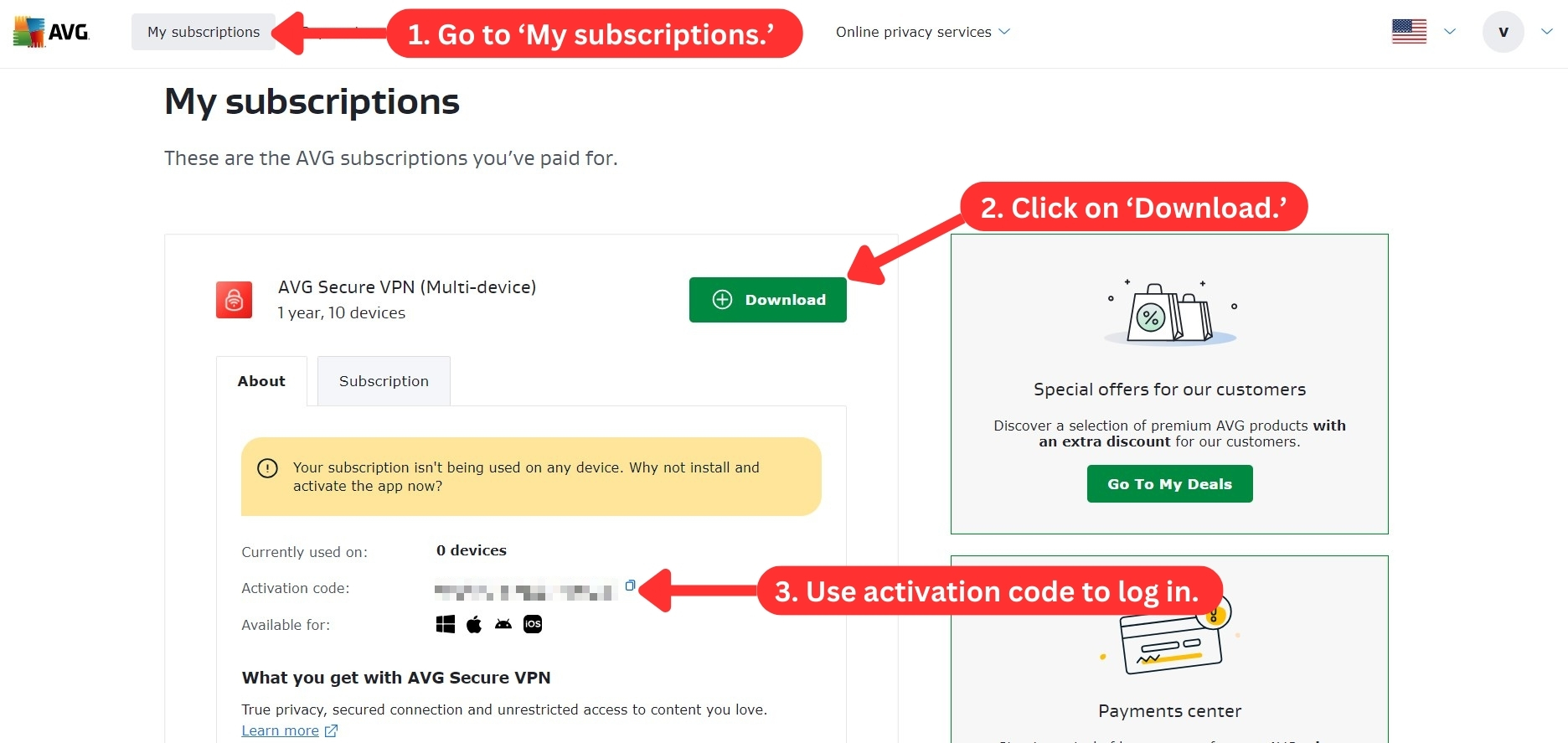
To download AVG VPN, subscribe to the VPN, download the installation file, and install it on your computer. Here's a step-by-step guide to installing AVG VPN on Windows:
- Subscribe to AVG VPN using your Web browser.
- Return to AVG VPN's website and log in to your AVG Account.
- Go to 'My subscriptions' on your dashboard.
- Click on the 'Download' button.
- In the pop-up card, select your device.
- Click ‘Continue’ to start the download.
- Open the installation file to install the AVG VPN app.
- Launch the VPN and sign in with your credentials or activation code.
- Select a server location to connect. That’s it!
AVG VPN is impressively simple to download and install across all four supported devices. Setting up a VPN on any device takes a lot of technical work, but AVG VPN neatly tucks all that away in the backend. Even a first-time VPN user would find the process hassle-free.
Prominent Features
AVG VPN falls short in its feature offerings. It offers no advanced features, and its basic features could be more extensive. Our Score: 6.5/10
The array of features AVG Secure VPN provides is relatively limited compared to other VPN providers. The offerings include a kill switch, a few auto-connect configurations, and a selection of P2P and streaming servers. This section will look at the prominent features offered by this VPN.
Here's what to expect from AVG VPN:
- Kill Switch: This feature ensures that if your VPN connection drops, your device will be automatically disconnected from the Internet. Doing so prevents any exposure to non-secure data transfers until your VPN connection is re-established. You can find this feature on the 'Settings' or 'Preferences' tab of the Windows, Mac, and Android versions of the app.

- Auto-Connect Options: You can set the VPN to automatically turn on once you connect to the Internet. This setting lets you determine how the VPN behaves on public and private Wi-Fi.
- Split Tunneling: This feature lets you set which apps use the VPN connection on your device. It’s only available in the Android app, but it’s a handy tool if there are applications you prefer not to connect to a VPN network.
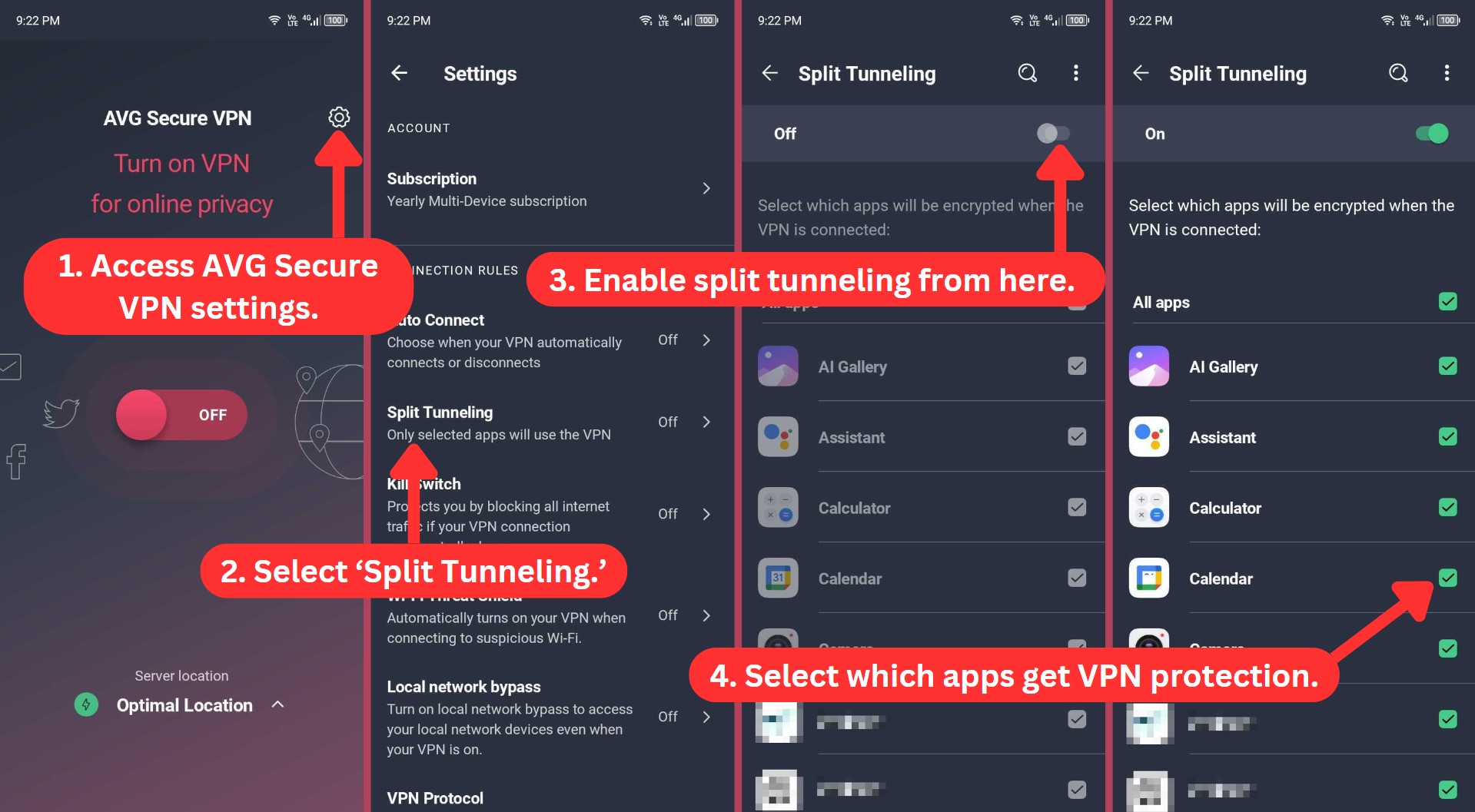
- Wi-Fi Threat Shield: This Android-only feature automatically turns on your VPN if you connect to a suspicious wireless connection.
- Local Network Bypass: The app allows you to access devices on your local network even when your VPN connection is active on Windows, macOS, and Android.
The Android version of AVG VPN has more features than other platforms, where only a handful of features are available. However, the iOS app has the least number of features, as it lacks the basic kill switch found on other devices.
Server Count & Infrastructure
With servers in 37 countries and approximately 50+ locations worldwide, AVG offers a small network of servers, thus failing to meet our expectations. Our Score: 2.5/10
With more servers comes more flexibility. When accessing various geo-blocked content or changing your IP address, VPNs with wide server coverage give you more freedom. This AVG Secure VPN review will also cover the server count and infrastructure the service offers.
AVG Secure VPN's server network is relatively limited, spanning 37 countries with 50+ locations. The official website doesn't list its available server locations, so you must download the app to see them. However, it has servers on all continents.
If you’re accustomed to using VPNs with the most servers offering thousands of options and over a hundred locations, you might be disappointed with this VPN. There are only a few servers for Africa, South America, and the Middle East. Most of the servers are spread across the other continents, with Europe and North America having the highest server counts.
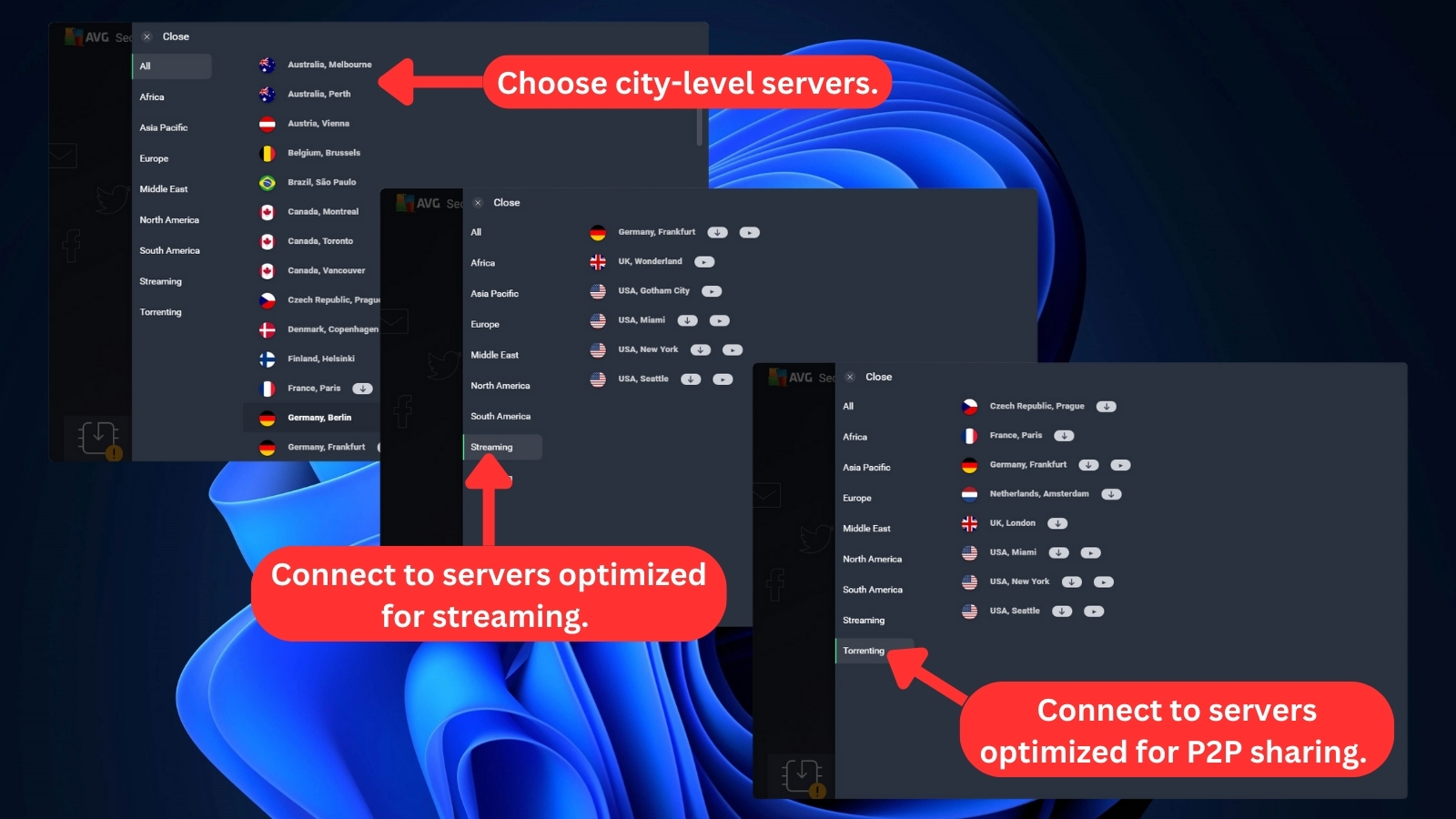
Fortunately, Secure VPN offers specialized servers for streaming and torrenting. Simply look for the designated icons within the app. Streaming servers are marked with a familiar TV icon while torrenting servers are identified by equilibrium arrows. This visual identification helps you quickly connect to the right server for your specific needs.
Additionally, you have the option to choose city-level servers in 6 countries: Australia, Canada, Germany, Spain, the UK, and the US. This grants you more granular control over your connection.
Does AVG VPN Use Virtual Server Locations?
Yes, AVG's customer support agents confirmed that the VPN uses virtual locations. However, they couldn't provide a list or proof of which servers are virtual. So, we can only assume that Secure VPN has a mix of physical and virtual servers in its 50+ locations.
Its coverage includes the most sought-after countries like the UK, the US, Australia, and Canada. You can select its servers at the city level as well.
Services that use VPN virtual locations give you an IP address in the country you select, but your data actually goes through a different location. For instance, if you choose to connect to the US, you’re given a US IP address. On the backend, however, your traffic is being routed through a nearby Canadian server.
UI/UX Design & Ease of Use

AVG VPN has a simple and user-intuitive interface. You don't need to be an expert to navigate and use all its features. Our Score: 10/10
Using this VPN is easy, even for complete novices. This section of our AVG VPN review will explore the VPN app's design on desktop and mobile platforms.
How Well Does AVG Secure VPN Work on Desktop Platforms?
AVG VPN works well on desktop platforms. Once you log in to your account, AVG VPN for Mac and Windows will show a clean, modern interface. On Windows, a central ON/OFF switch controls the connection. Under this, you'll see the current server location, your local IP address, and a button to select a different server.
To connect to the VPN, simply click on the central button. It might be red, signifying a disconnected state. Once connected, the button changes its color to green, providing a clear visual cue that you're good to go.

From the same screen, you can pick your desired location if you have a specific server in mind. For specialized needs, AVG Secure also offers dedicated servers for streaming and P2P transfers.
On the home screen, the top right corner features a 'Menu' button with 6 tabs, each offering different options. Let's explore what each menu option does.
- Enter Activation Code: This allows you to connect to your AVG subscription with an activation code. You can retrieve the code from your dashboard on AVG's website.

- Settings: This selection might seem like the hub for customization, but its focus has shifted. Now, it primarily deals with app behavior. You can choose when AVG Secure VPN launches, change the language, and manage promotional notifications. For VPN-specific settings, you're limited to the kill switch and VPN protocols.
- My Subscriptions: This displays relevant information about your subscription plan and lets you sign out of the app.
- Get Free Mobile Version: This tab links to a new page where you can input your email to receive a download link to the app's mobile versions.
- Support and Help: The app links to the 'Help and FAQ,' 'Community Forum,' and 'Contact Support' pages on the AVG website.
- About: This option shows your version of AVG Secure VPN. It also links to some third-party software, an Acceptable Use Policy, and end-user agreements.
There’s also a section of the sidebar dedicated to promoting other AVG products. If you only need the VPN, you don't have to pay attention to this promo section.
To customize the VPN, click on the 'Settings' tab. Here's what you can fine-tune in this section.
- General: Here, you can manage notifications, configure startup options, change the app language, enable or disable local device access, and show other AVG product offerings.
- Network Security: Decide if the VPN automatically connects when you go online, get notified about untrusted networks, and manage network profiles. You can also activate the kill switch feature here.
- VPN Protocols: This menu only allows protocol selection, not extensive configuration.

We also have to add that AVG VPN for Chrome and other browser extensions don’t exist. However, AVG has a Chrome extension to identify untrustworthy websites.
How Well Does AVG Secure VPN Work on Mobile Platforms?
AVG VPN works so well on mobile platforms. Even AVG VPN for Android and iOS shares similar designs with desktop apps. The home screen on the mobile apps is laid out the same way, with a prominent ON/OFF switch in the center and server selection options at the bottom. The 'Menu' button on Windows is replaced with a 'Settings' icon.
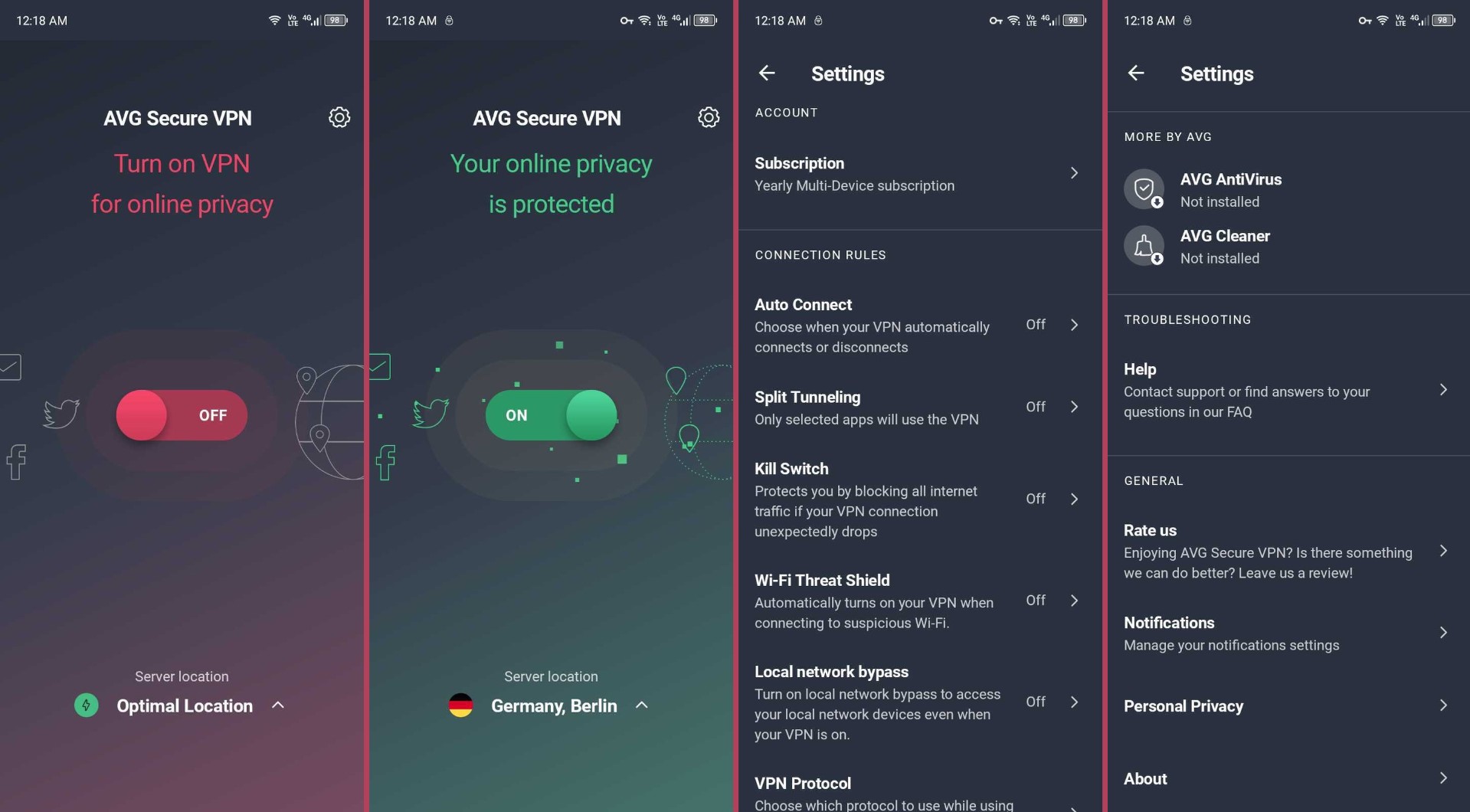
Below are the settings you can access on AVG VPN for iPhone and Android devices:
- Account: This lets you access your subscription info and settings.
- Connection Rules: You can customize VPN security and privacy features here, including VPN protocols (Android), auto-connect, split tunneling, kill switch (Android), and a few other VPN settings.
- Troubleshooting: Here, you can access FAQs, AVG Forum (Android), or contact Support for personalized assistance.
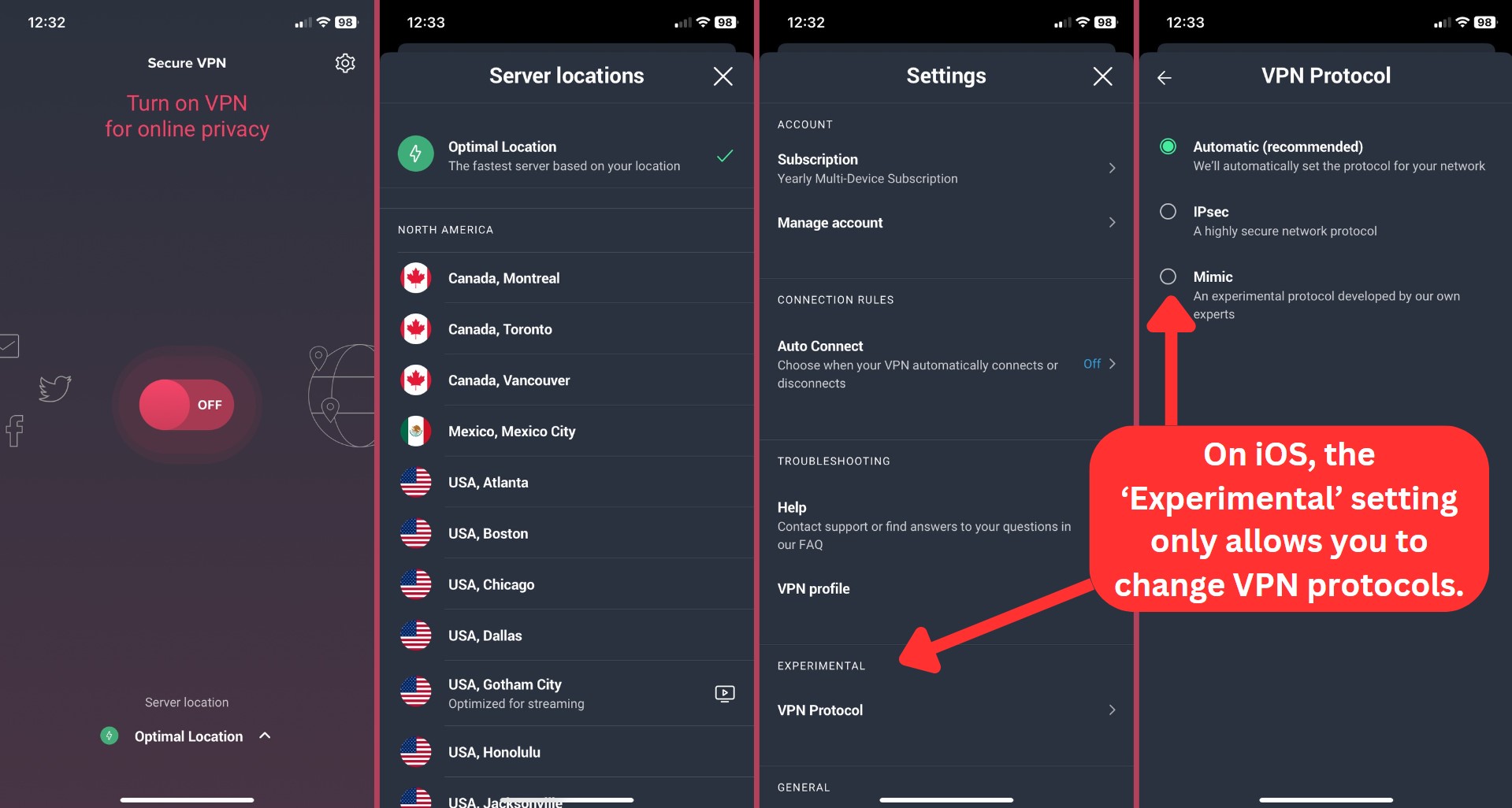
- Experimental: This tab is only available in the iOS version of the app. The term 'Experimental' might be a bit confusing because it currently only offers one function - changing VPN protocols. This tab might be intended for future features, but right now, it's the only place to change your VPN protocol settings on iOS.
- General: This section lets you provide feedback through app rating, review Secure VPN's privacy policy and terms of service, and choose to share optional usage data.
Media Streaming, Torrenting, and Gaming Support
AVG VPN has dedicated servers for streaming and torrenting for a faster and smoother experience. These servers also work well for online gaming. Our Score: 9/10
VPNs have many benefits, such as bypassing streaming restrictions, improving gaming, and securing P2P sharing. Our review assesses AVG Secure VPN’s performance in these areas, providing the info you need to make a decision.
Is AVG VPN Good for Streaming?
Yes, AVG Secure VPN is a good VPN for streaming. Although it doesn't make our best streaming VPN list, it delivered a fairly satisfactory performance.
Notably, we could access prominent media platforms such as Netflix, Disney+, Prime Video, Max, BBC iPlayer, and Hulu. We also streamed on US-based platforms with all four US streaming-optimized servers. Other servers performed well, but dedicated servers deliver a smoother experience.
This VPN easily unblocks popular US streaming platforms, as shown below:
AVG VPN extends its reach beyond the US, enabling access to streaming platforms around the globe. Here's a preview of the diverse streaming options you can enjoy with this VPN:
All 6 streaming-optimized servers gave us a reliable connection that allowed us to stream for hours. Non-streaming servers have also unblocked these platforms, but we recommend dedicated servers if they’re available. Thankfully, they’re easy to identify, as they’re marked with a white play icon.
Is AVG VPN Good for Torrenting?
Yes, AVG VPN is a good VPN provider for torrenting. It enhances your P2P connections with special torrenting servers optimized for faster download speeds.
There are 8 dedicated torrenting servers at your disposal. Three servers are located in the US, and one each in the UK, Netherlands, Germany, France, and Czech Republic.
P2P connections are also supported on its other 50+ server locations. However, AVG VPN doesn’t support port forwarding, which is why it isn't included in our list of the best VPN for torrents. Still, it emerges as a compelling choice if you often use torrent clients.
Is AVG VPN Good for Gaming?
Yes, AVG VPN is good for gaming. This stems from its ability to reroute data, leading to decreased ping and improved latency. It also has solid protocols to protect you from cyberattacks. As a result, your gaming experience is guaranteed to be smooth and enjoyable. However, AVG Secure VPN lacks dedicated servers for gaming.
If you need servers optimized specifically for gaming and advanced features to prevent DDoS attacks, choose a gaming VPN instead. Otherwise, if you’re a casual gamer playing with friends, AVG VPN is just fine. You can play in 50+ locations across the world and access geo-restricted games.
Security & Privacy
AVG VPN offers basic security features and collects some information about your online activities. However, it has had no data leaks. Our Score: 6/10
Security and privacy are important considerations when it comes to choosing a VPN. In this section, we'll determine if you can trust AVG VPN by reviewing its protocols, logging policy, and leak prevention.
AVG Secure VPN Protocols
AVG Secure VPN doesn’t have advanced features such as multi-hop, dedicated IP, or an ad blocker. It simply offers VPN protocols and encryption for average VPN users.
- WireGuard: This is the fastest protocol AVG VPN offers, and it works for all kinds of Internet traffic. It also keeps you safe with the new ChaCha20 authenticated encryption, which has shorter keys that keep it light.
- OpenVPN: Two variations of this protocol exist - UDP and TCP. However, it's not specified which version AVG VPN uses. But since Avast generally prefers OpenVPN UDP, it's safe to assume that AVG also uses UDP, which is known for its higher speed.
- Mimic: This protocol is exclusive to Avast and is available on all AVG Secure VPN devices. It mimics your traffic, giving snoopers fake info about your identity and online activities. If you’re in a country that regulates VPN use, then Mimic will help hide your actual traffic.
- IKEv2/IPSec: These protocols are only available in the macOS and iOS apps, and they’re great for streaming online content. Combined with AVG VPN's AES-256 encryption, you can stream at good speeds anonymously.
By default, AVG Secure VPN uses OpenVPN. If there's a problem with OpenVPN, the app automatically switches to Mimic.
Does AVG VPN Keep Logs?
Yes, AVG VPN keeps logs. While AVG VPN's logging policy has improved over the years, it's still far from ideal. The service no longer retains any portion of your IP address. Also, it doesn't store your browsing history, DNS queries, or any transferred data.
Nevertheless, it retains more data than is essential, including the amount of data you send and receive. It also stores your connection timestamps and events. All that service data can be stored for up to two years.
Lastly, there have been no third-party audits of this VPN to confirm how it processes your data. So, if you’re privacy conscious, then you should consider other options.
Does AVG VPN Leak/Expose Your Private Data?
No, AVG Secure VPN doesn’t leak or expose private data. AVG VPN totally hides your data from ISPs and other third parties when you’re connected. It protects user data from exposure to third parties during online browsing.
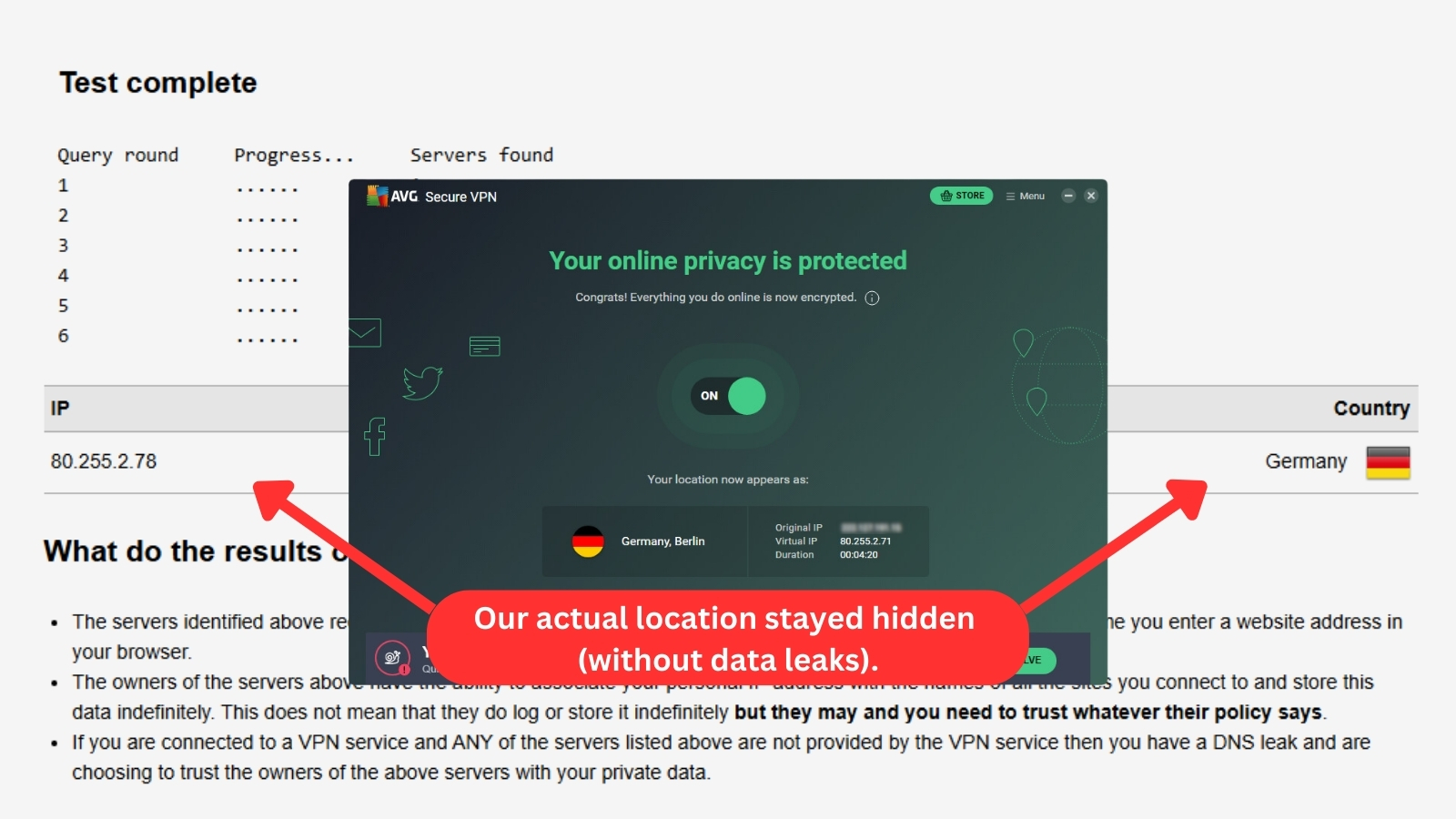
Based on the above results, it's evident that no DNS leaks were identified. However, AVG uses third-party tools to analyze the data it collects from you during your sessions.
Some of those tools are owned by Microsoft, Google, Facebook, and AppsFlyer Analytics. This means some of your data will be subject to these companies' privacy policies.
Speed & Performance

AVG VPN performed well, offering medium speed during testing on nearby and distant servers. On average, our speeds decreased by approximately 48%. Our Score: 6/10
Before discussing AVG Secure VPN's speed performance, it's important to note that VPNs typically reduce Internet speed due to encryption. However, while a speed decrease is expected, decent performance is still anticipated.
To begin, we recorded baseline speeds of 319.08 Mbps download and 275.18 Mbps upload. We compared these initial speeds to six servers in various countries and checked for speed drops. Let's see how AVG Secure VPN performed.
- USA Server (Atlanta): We recorded an acceptable and moderate speed performance here, considering the US is a distant location. Our download speed maxed out at 187.94 Mbps, showing a speed reduction of 41%. The upload speed, on the other hand, was a bit slower at 81.03 Mbps.
- UK Server (London): As expected for a remote server, this location placed third slowest on our speed tests. Download speeds averaged 149.94 Mbps, while upload speeds were the slowest among all tested servers at 43.33 Mbps. The average speed reduction for this server was 53%.
- Canada Server (Vancouver): Similar to the Italy server, this server's speed test result wasn’t impressive. It showed a similar performance with a reduced speed of 60%. We downloaded at 127.12 Mbps and uploaded at 102.48 Mbps.
- Singapore Server: This was the fastest server we tested, with only a 26% reduction in speed. Our download speed reached 236.89 Mbps, while the upload speed reached 105.03 Mbps. This excellent performance is likely due to its close proximity to our testing location.
- Australia Server (Perth): The download speed on this server was surprisingly slower than anticipated. Given its proximity to our testing location, we expected a performance comparable to that of the Singapore server. However, we observed a significant 40% speed reduction. Download speeds only reached 190.21 Mbps, and upload speeds were 78.57 Mbps.
- Italy Server (Milan): AVG Secure VPN performed the worst when connected to this server. We only got download speeds of 104.03 Mbps and upload speeds of 78.90 Mbps. This marked a 67% reduction in speed, leaving us with the slowest connection among all the servers we tested.
With its default configuration, AVG VPN averaged a 48% reduction in our Internet connection speed. This isn’t great, but it’s good enough for basic browsing and streaming. There's also some potential for improved performance if you adjust the VPN's settings, try different protocols, or use the fast servers we tested.
Despite the slowdown, our speed test indicates a consistent Internet connection. Download speeds dropped by 26% at the closest server and by up to 67% at the farthest server tested. But if you prioritize maximum speed, consider exploring the fastest VPNs.
Customer Support
AVG's customer support includes community forums, phone calls, FAQs, and a live chat. However, not all of them worked. Our Score: 6/10
If you're experiencing any trouble with AVG VPN, you can get help on its official website. Here are the support options you can expect.
- Live Chat: AVG VPN live chat doesn’t work on the technical support tab. Even when the chat was activated, it always ended with an error. However, we were able to use live chat through sales support. The sales agent promptly transferred us to one of their technicians. Getting connected to an agent took about 15 minutes.
- Phone Call: If you have an Avast account, you can directly call support agents using one of the three phone numbers provided once you have a ticket. Keep in mind that the ticket will only be valid for an hour.
- FAQ: AVG Secure VPN offers an FAQ section accessible through both the app and website. It consists of answers to installation, connection, device compatibility, and subscription questions. It’s pretty light, but it covers most of the basic questions new users might have.
- Community Forum: The forum primarily comprises tips and advice contributed by Avast and other users. Avast's support team has a good amount of engagement, but our questions were first hidden while awaiting approval from the team.
Pricing
AVG Secure VPN is pricey, considering it offers mostly basic VPN features. Its subscription plans also lack distinct offerings. Our Score: 6/10
In this segment, we'll consider how well-priced AVG VPN is and its pricing for desktop and mobile apps. Let's take a closer look at AVG VPN's plans.
How Much Does AVG Secure VPN Cost?
AVG Secure VPN starts at $4.39/month if you subscribe to its 2- and 3-year plans on its website. The AVG website offers three yearly pricing plans, with no option for a monthly subscription.
All its plans allow you to connect 10 devices simultaneously and are backed by a 30-day money-back guarantee. You get the same security and privacy features across all plans as well. However, that also means there’s little difference between these plans.
Here are the details of AVG's plans on its official website:
- 1-Year Plan: At $53.88 per year, you're paying $4.49 per month. It renews at $99.99, so you'll save 46% for the first year.
- 2-Year Plan: Charged at $105.36 for two years, this averages to $4.39 monthly. You also save 46% on your first 2-year purchase, which usually costs $194.99.
- 3-Year Plan: This plan costs $158.04 per year, or $4.39 monthly. You'll have the same 46% discount when you buy the 3-year plan, as it renews at $294.99.
You get the best long-term cost savings on AVG VPN's 2- and 3-year plans at $4.39 per month. When you buy via the website, you can pay with your credit card or via PayPal. However, its prices are different on both Android and iOS.
Buying the service on Android means you can only use it on Android devices. You can log in and protect up to two Android devices at once. All 50+ AVG VPN servers are available to you as well. However, unlike the desktop versions, mobile apps let you subscribe on a monthly basis. It's also important to note that pricing for mobile apps differs from what's offered for desktop apps.
Here’s an overview of AVG Secure VPN's pricing on mobile apps, as shown on its website:
- 1-Year Plan: This is the base plan at $4.99 per month with 40% cost savings.
- 2-Year Plan: Subscribing to this plan lets you lock in a lower price of $3.99 a month for the next 2 years. It's 51% cheaper than paying monthly.
- 3-Year Plan: This is the longest plan on Android and iOS, with a monthly cost of $3.99. With this plan, you also get a 51% savings on the month-over-month price.
As mentioned earlier, mobile app pricing and duration differ when you subscribe via app stores. Both mobile apps offer monthly payments, which cost $3.99 on Android and $2.99 on iOS. However, when you subscribe to the annual mobile plan, you can save up to 62% and only pay $1.50/month (Android) or $1.67/month (iOS).
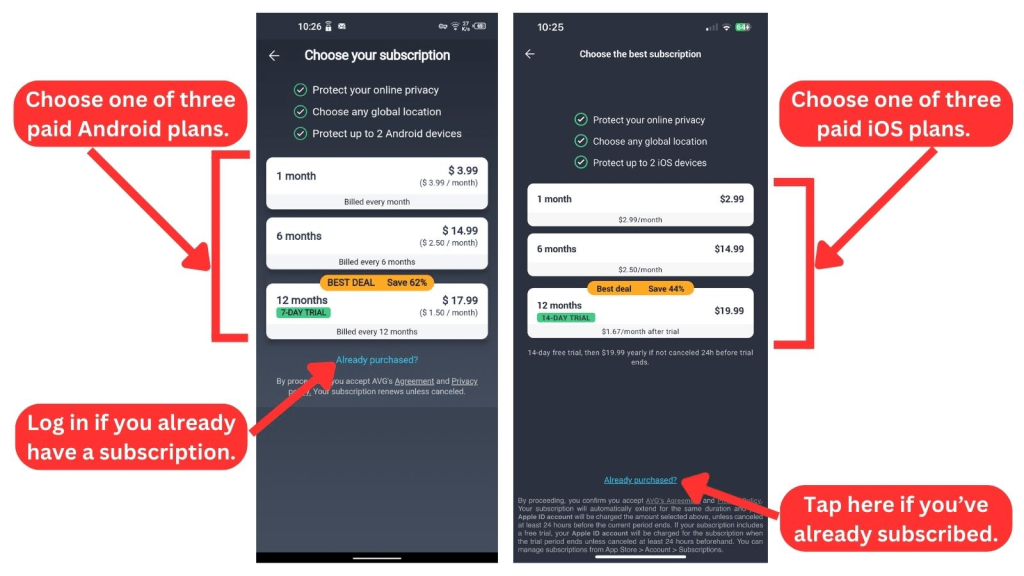
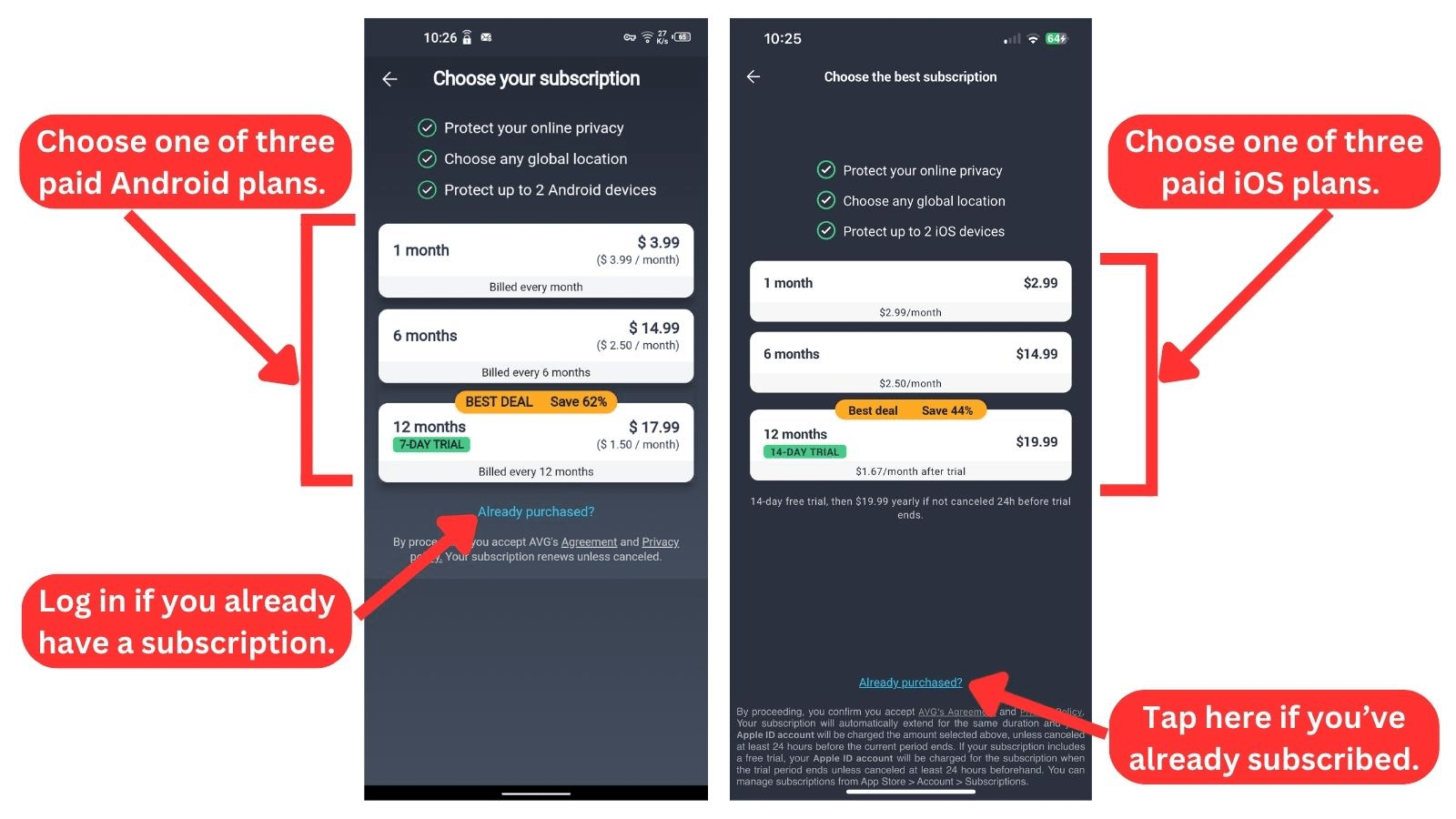
AVG VPN offers deeper discounts on Android with its yearly plan. However, iOS users might find the monthly plan more affordable, possibly because the iOS version has fewer features. The good news is that you can connect to two devices simultaneously, regardless of which platform you choose.
Is AVG VPN Free?
No, AVG VPN isn’t free, but it has a 60-day free trial on its website. If you're using the Android app, there's a 7-day free VPN trial, while the iOS app provides a generous 14-day trial.
Its desktop plans on the website also come with a 30-day money-back guarantee. Moreover, there are no restrictions when you use AVG VPN for free. That's why its lengthy 60-day free trial earns a spot on our list of the best free trial VPNs.
Final Thoughts – Is AVG VPN Good?
Yes, AVG Secure VPN is good for light VPN users. It boasts average speed performance, has an easy-to-use interface, and is easy to set up.
On the security and privacy end of things, we found that it had a decent blend of features and had no data leaks. It also performed relatively well when unblocking streaming services, casual gaming, and torrenting.
On the other hand, techy or regular VPN users might find it lacking in its logging policy and limited device coverage. It could also use more servers in more countries.
Premium VPNs are expected to have blazing-fast speeds and advanced features. So, these drawbacks may make it difficult to buy AVG VPN’s yearly plans. If you want the most out of your VPN, then we strongly recommend NordVPN.
PROS
- 60-day trial.
- 30-day money-back guarantee.
- Easy installation and setup.
- 10 simultaneous device connections.
- User-friendly interface.
- Good speed.
- Mid-level security features.
- No history of data leaks.
- Dedicated streaming and torrenting servers.
CONS
- Subject to EU data laws.
- Collects connection logs.
- Small server network.
- Lacks advanced features.
- Average customer service.
- Limited supported platforms.
- Non-uniform pricing across devices.
| Review Summary We recommend AVG Secure VPN only for casual users. While it offers reasonable performance and security, users with more privacy needs and a desire for advanced features may find it somewhat lacking compared to top-tier VPN services. | 6.5 Overall Score | ||
| Background, Jurisdiction & Reputation | 6 | ||
| Supported Platforms & Devices | 4 | ||
| Installation & Initial Configuration | 10 | ||
| Prominent Features | 6.5 | ||
| Server Count & Infrastructure | 2.5 | ||
| UI/UX Design & Ease of Use | 10 | ||
| Media Streaming & Torrenting, and Gaming Support | 9 | ||
| Security & Privacy | 6 | ||
| Speed & Performance | 6 | ||
| Customer Support | 6 | ||
| Pricing | 6 | ||