When you purchase through links on our site, we may earn an affiliate commission. Here’s how it works.
Apple TV Plus Free Trial 2026: Get Apple TV+ for Free
Last updated May 17, 2024

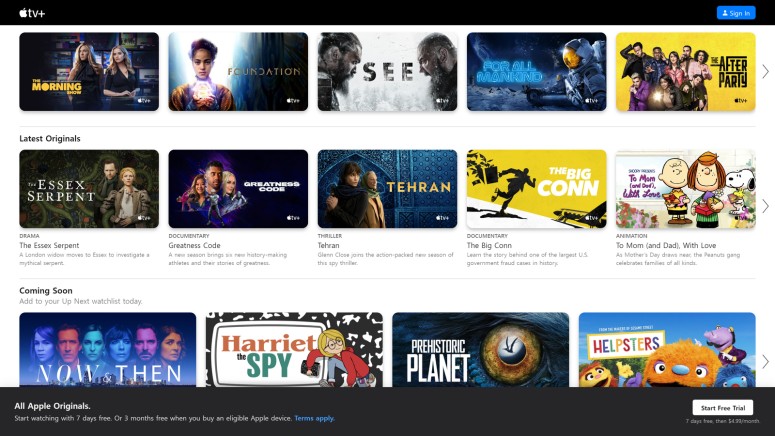
Almost all of the streaming platforms nowadays have free trials on offer since it's a great way to attract new customers, and Apple TV Plus is one of these services. It's only normal to look for a free trial before actually paying a subscription fee for one of the many streaming services currently on the market, so if you're thinking about becoming a customer but want to test it through a free trial first and see what the service has to offer, we have all the information you may need to get Apple TV Plus free trial.
Before moving on to the main topic, we should remind you that the Apple TV Plus streaming platform has geo-restrictions in place. This means access to the platform or some of its content may be blocked in some countries and territories, and you can create a subscription to the service, use the platform, or take advantage of any of its offers only where the service is available.
Is There a Free Trial for Apple TV Plus?
Yes, Apple TV Plus has a free trial. The streaming service offers a few ways for you to get your hands on a free trial, but keep in mind these apply to any services you haven’t already subscribed to. You can get free trials in the following situations:
- If you buy an eligible Apple device.
- Subscribing directly to the service's single plan.
- With Apple One, if you bundle Apple TV Plus with 5 other Apple services.
Watch now on the Apple TV app with an Apple TV+ subscription. Watch offline. Ad-free and on demand. New Originals every month. Up to six family members.
How Long Is the Apple TV Plus Free Trial?
As we mentioned before, there are three ways to get an Apple TV Plus free trial, and each of these has a different length. Here's how long the Apple TV+ free trial is:
- Subscribing on the Apple TV Plus platform - free trial for 7 days.
- When you purchase an eligible Apple device - free trial for 3 months.
- With Apple One - free trial for 1 month.
How to Get an Apple TV Plus Free Trial?
It's pretty easy to get one since it's all over the platform's website. Nonetheless, here's a step-by-step guide on how to get an Apple TV+ free trial. However, we should remind you that it is available exclusively for new customers.
1. Access the Apple TV Plus website (or the Apple TV app and choose the Apple TV Plus Originals tab) on your device.
2. Use the Start Free Trial button to get started.


3. Enter your Apple ID and click the Arrow button, then enter the password and click the Arrow button attached to the field (or create a new Apple ID following the on-screen steps).
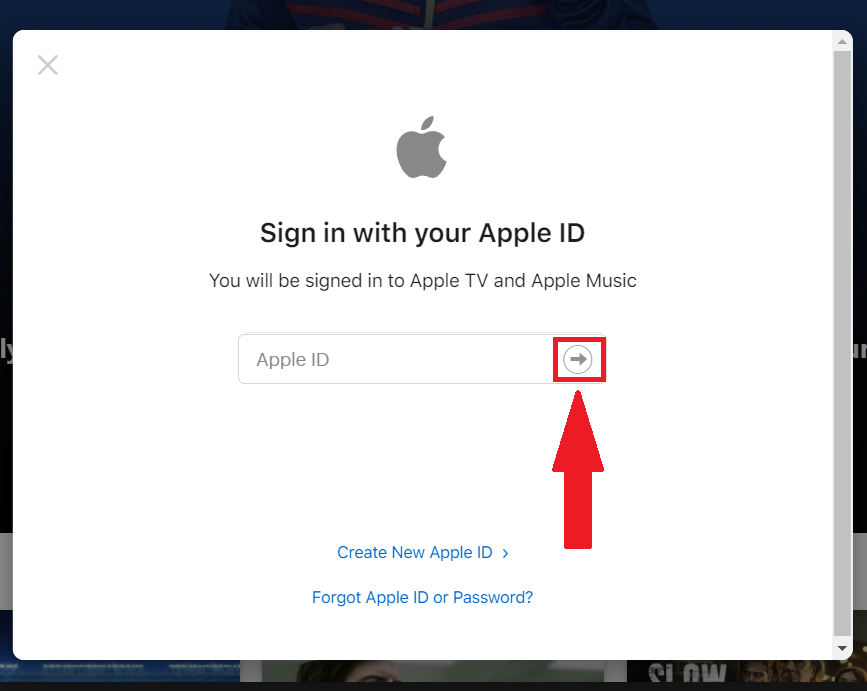
4. If asked, confirm your billing information and add a valid payment method, then choose Confirm.
Once the trial period ends you will get charged on the entered payment method. Also, If you use Family Sharing, you and up to 5 other family members get access to Apple TV Plus.
How Do I Get My Free 3 Months of Apple TV Plus?
You'll get 3 months free when you buy a new iPhone, iPad, iPod touch, Apple TV, or Mac and redeem the offer within 90 days. You can get one offer per Family Sharing group, and it is good for 3 months after eligible device activation.
Other Ways to Get Apple TV Plus for Free
Here are a couple of ways you can get a free Apple TV Plus subscription:
- The Apple Music Student Plan comes with a free subscription to Apple TV Plus for a limited period. To qualify, you must be a student studying an associate/bachelor/post-graduate degree, or equivalent higher education course at a college/university.
- You can also get Apple TV Plus for free with a T-Mobile Go5G plan. Go5GPlus and equivalent voice rate plans include a free subscription as a plan benefit. Furthermore, Go5G, Sprint ONE, and equivalent voice plans get Apple TV+ for free for 6 months.
- If you are part of the Sky VIP loyalty program, you can try Apple TV+ for free for 3 months. This offer is available for new and returning Apple TV+ customers.
- Another way to get 6 months free Apple TV+ is if you are an EE mobile customer (new and old) if they purchase a new iPhone contract.
- If you buy an iPhone, iPad, or one of Three's Home Broadband with Apple TV bundles, you can enjoy 3 months of Apple TV+ for free.
- Get 3 free months of Apple TV+ when you join Currys Perks.
- Those buying an eligible Apple device from O2 can get Apple TV Plus free for 3 months.
- Folks in the UK can get 1 month free of Apple TV+ on Roku. Please note that this is a limited-time offer.
What Devices Are Compatible With Apple TV Plus?
We are happy to say that this streaming service has already reached quite a lot of different device types. Here's the full list of devices compatible with Paramount Plus:
- Smartphones & Tablets: Android, iPhones & iPads.
- Media Streaming Devices: Apple TV, Fire TV, Roku, TiVo, Android TV, Google TV.
- Smart TVs: Vizio TVs, LG TVs, Samsung TVs, Panasonic, Sony, Hisense.
- Consoles: Xbox, PlayStation.
- Other Devices: Cable or satellite services.
What Does the Apple TV Plus Free Trial Offer?
Once you start a free trial on Apple TV Plus, you get access to the entire platform. This means you will be able to watch on-demand commercial-free content on all the compatible devices. Moreover, you can download your favorite Apple Originals to your Apple device and watch them anywhere, anytime. You will also be able to view content in 4K if you have a device that supports 4K HDR and Dolby Atmos sound, and one subscription includes access for up to six family members at no additional cost.
Apple TV+ library includes various movies and series and many Apple original titles as well, such as the Foundation series, See, WeCrashed, and Ted Lasso. The platform also offers access to Major League Baseball - the MLB events are free to access for a limited time, and you get Friday Night Baseball and daily coverage.
Apple TV+ Originals Available to Watch:
- For All Mankind
- The Morning Show
- Servant
- Truth Be Told
- The Big Cigar
- Sugar
- The Reluctant Traveler
- Criminal Record
- Slow Horses
- Roar
- Shining Girls
- The Essex Serpent
- Black Bird
- The Crowded Room
- Platonic
- Bad Sisters
- Shantaram
- Acapulco
- The Afterparty
- Little America
- Loot
- Silo
- Extrapolations
- Hollywood Con Queen
- WeCrashed
- Pachinko
- Mythic Quest
- Physical
- Ted Lasso
- Invasion
Can You Get an Apple TV Plus Free Trial Without a Credit Card?
The answer is no, you cannot get an Apple TV Plus free trial without a credit card. In order to sign up for Apple TV Plus, you are required to provide a future form of payment that will get charged once the trial ends or if you purchase something.
But keep in mind that you can cancel at any time before the trial ends in order to avoid being charged if you decide you don't want the subscription.
Will the Apple TV Plus Free Trial Automatically Renew Into a Subscription?
Yes, the Apple TV Plus free trial automatically renews into a subscription, as does most live TV and streaming platforms. As we mentioned above, you are asked to attach a payment method to your account, and the point of asking for payment details upon enrolling for a free trial with a service is to seamlessly transition to a paid subscription after the testing period ends.
This means your Apple TV Plus account will automatically switch to a paid membership when your free trial period is over unless you cancel before that happens. The card you entered will be charged the standard subscription price. The date your free trial ends will become your monthly billing date from now on.
How Much Does Apple TV Plus Cost After the Free Trial?
Your provided payment method will be charged the current price of the streaming service plan in the following manner:
- Subscribing on the Apple TV Plus platform - $9.99 per month.
- Purchasing an eligible Apple device - $9.99 per month.
- Apple One - $19.95 per month (Individual), $25.95 per month (Family), or $37.95 per month (Premier)
Keep in mind that for the Apple One service, the price refers to the Apple One subscription, which includes other services of your choice besides Apple TV Plus.
How to Cancel an Apple TV Plus Free Trial?
You can cancel Apple TV+ at any time in Settings at least one day before each renewal date. If you cancel during your free offer period, you and your family members will immediately lose access to Apple TV Plus and the remainder of your free trial.
Note: If you accidentally cancel, you can't reactivate this trial.
Here is how to cancel the Apple TV+ free trial:
- Go to tv.apple.com.
- Choose the account icon at the top of the page. (If you can’t see the account icon, tap or click Sign in, and then sign in with your Apple ID.)
- Choose Settings.
- Scroll to Subscriptions and choose Manage.
- Choose Cancel Subscription.
The steps are similar when trying to cancel your Apple TV Plus subscription on an iPhone, iPad, iPod touch, or Apple TV. For other devices, you can find more information on how to cancel the subscription here.
Related






Get expert insights on threats, breaches, scams, and security trends — delivered every Monday.
Most Popular