When you purchase through links on our site, we may earn an affiliate commission. Here’s how it works.
How to Watch BBC iPlayer in the USA for Free
Last updated May 1, 2024

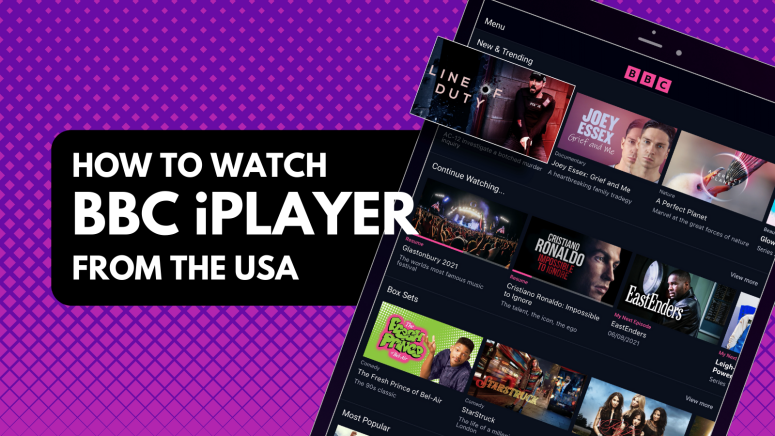
BBC iPlayer is a UK-based streaming service available only for UK residents and blocked for the rest of the world. It employs geo-restrictions to prevent anyone outside the UK from streaming its content. This is because it has to comply with copyright and licensing agreements. Even if you have a BBC iPlayer account, if you travel outside the UK (including in the States), you won't be able to use it.
That said, all hope is not lost. The trick to watch BBC iPlayer in the USA is to use a VPN. Streaming services such as BBC iPlayer can determine your location based on your connection's metadata and IP address. That's exactly what a VPN helps you change by routing your traffic through UK-based servers. So, you'll get to stream BBC iPlayer as if you were in the UK.
In this guide, you'll find detailed instructions on how to unblock BBC iPlayer in the USA, why you have to use a VPN, and which provider to go for. You'll also learn how to get iPlayer on various devices, the most popular shows and movies to watch, how to troubleshoot technical issues if BBC iPlayer is not working in the US with a VPN, and much more. Lastly, we'll answer some of the most common FAQs.
How to Watch BBC iPlayer in the USA
You must first subscribe to a VPN and connect to a UK-based server if you want to stream BBC iPlayer in the US. When you get your British IP, you can access iPlayer without restrictions. Follow these steps:
- Get a VPN that can unblock iPlayer in the USA (we recommend NordVPN).
- Download and install the VPN on the device(s) you'll use to stream iPlayer.
- Launch the VPN app and connect to a server in the United Kingdom.
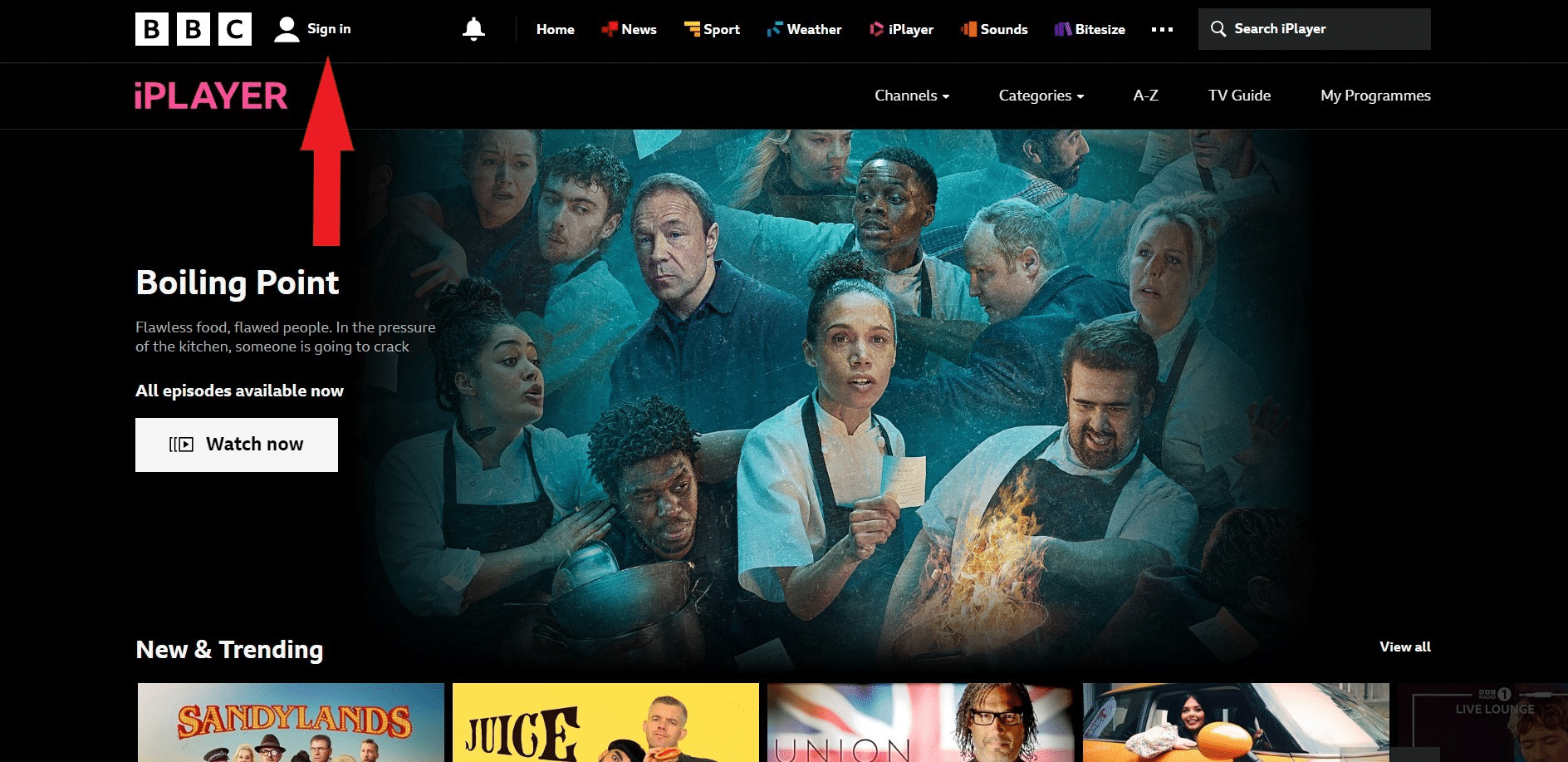
- Visit iPlayer’s website and click "Sign in."
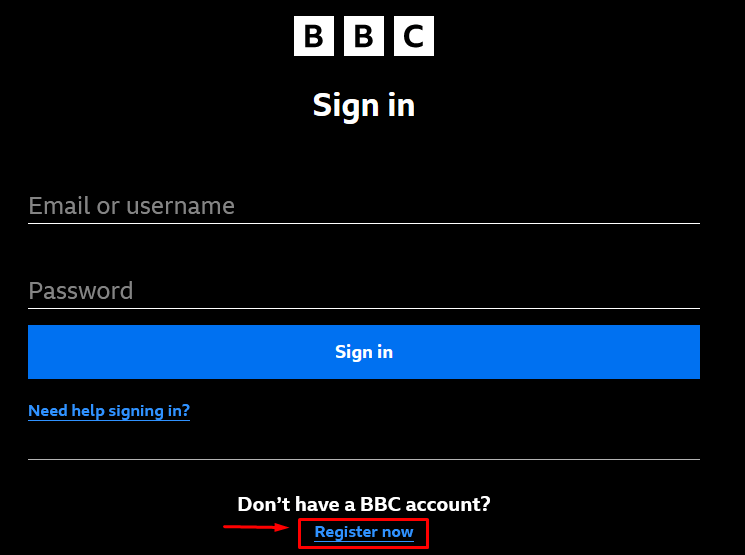
- Click on “Register now” to begin.
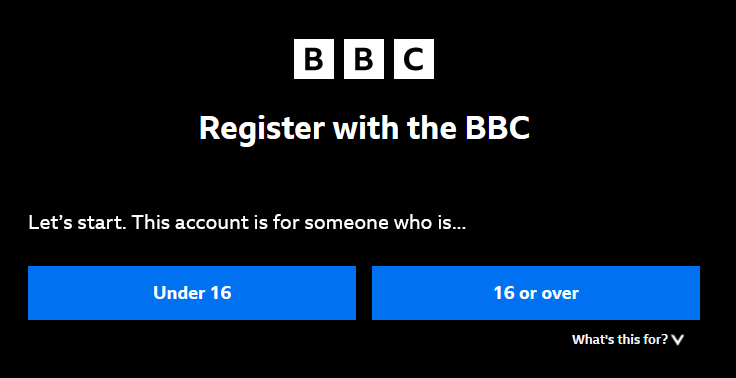
- Indicate your age group.
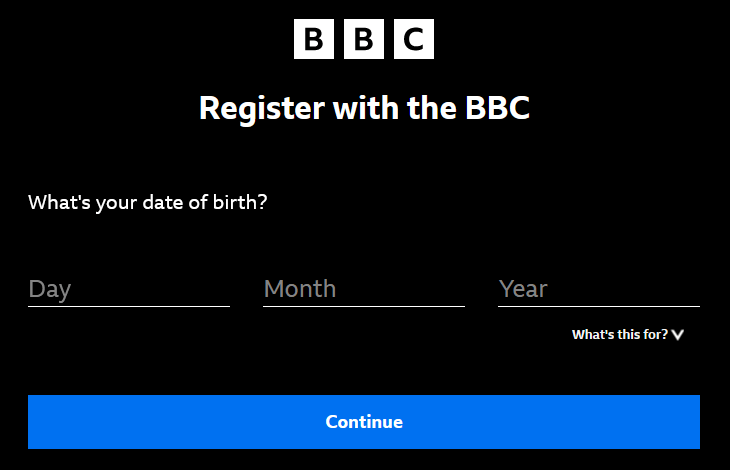
- Enter your date of birth.
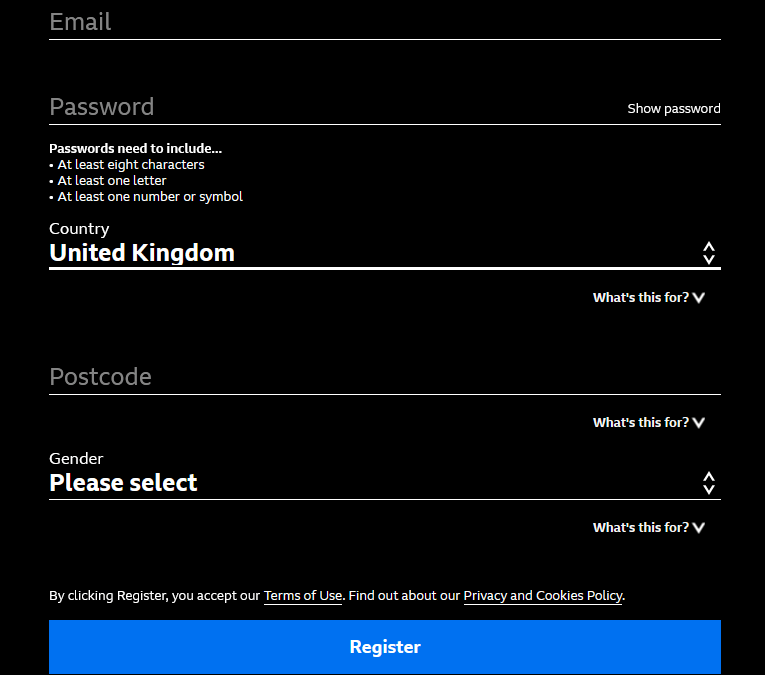
- Sign up using any UK postal code (you can find one on Google), and click “Register.”
- Pick any title you want to watch.
- When asked if you have a UK TV license, confirm that you do.
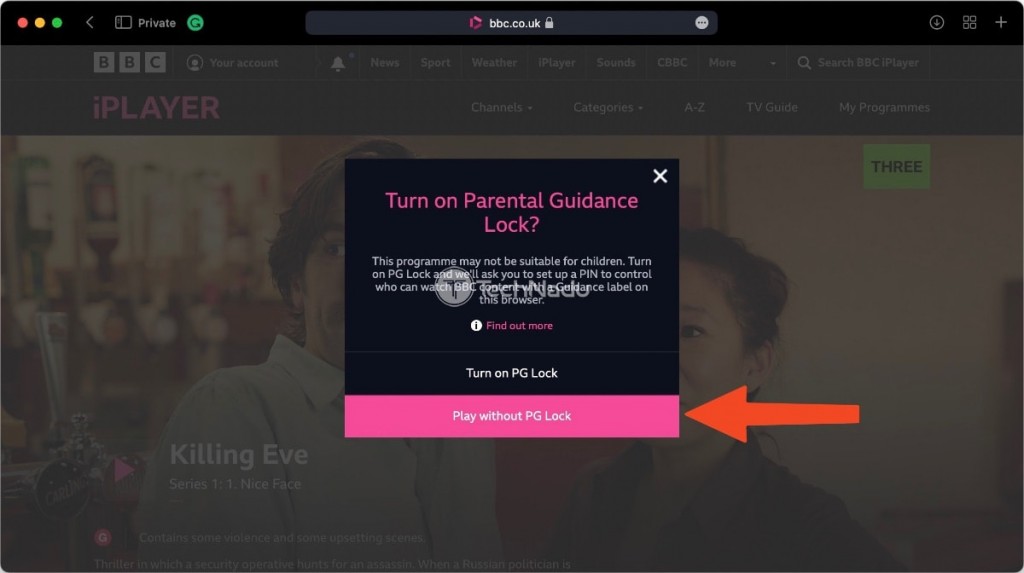
- Decide if you want to turn on iPlayer’s Parental Guidance lock.
- Press "Play," and the chosen title will begin to stream. That's it!
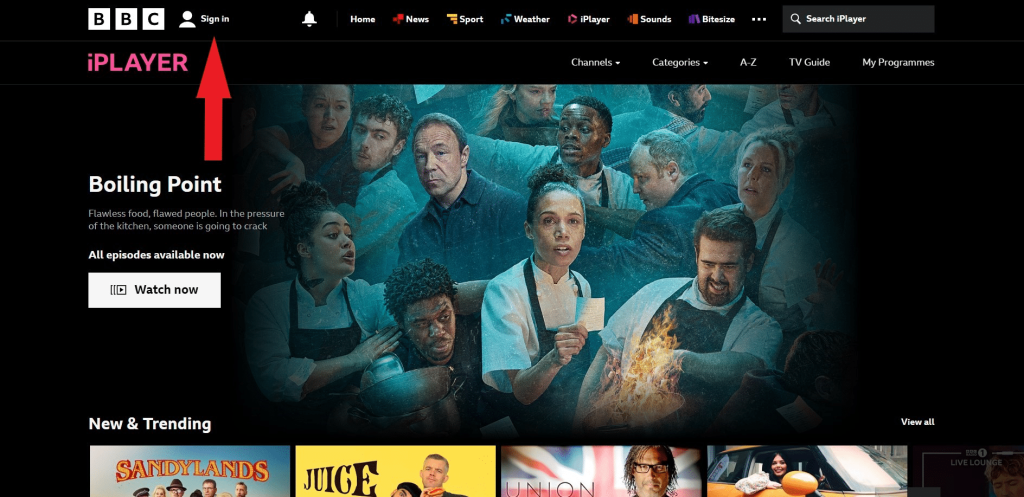
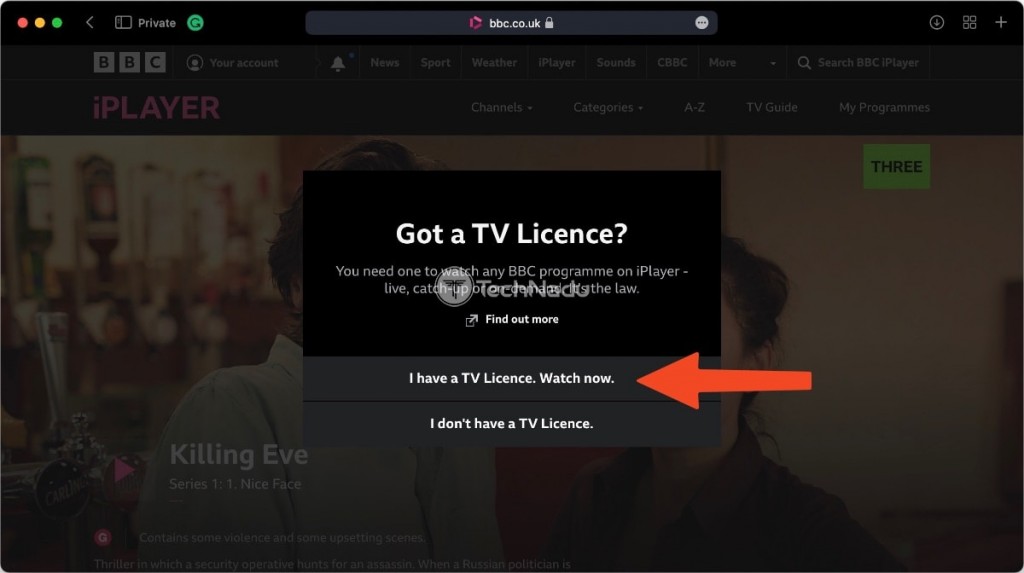
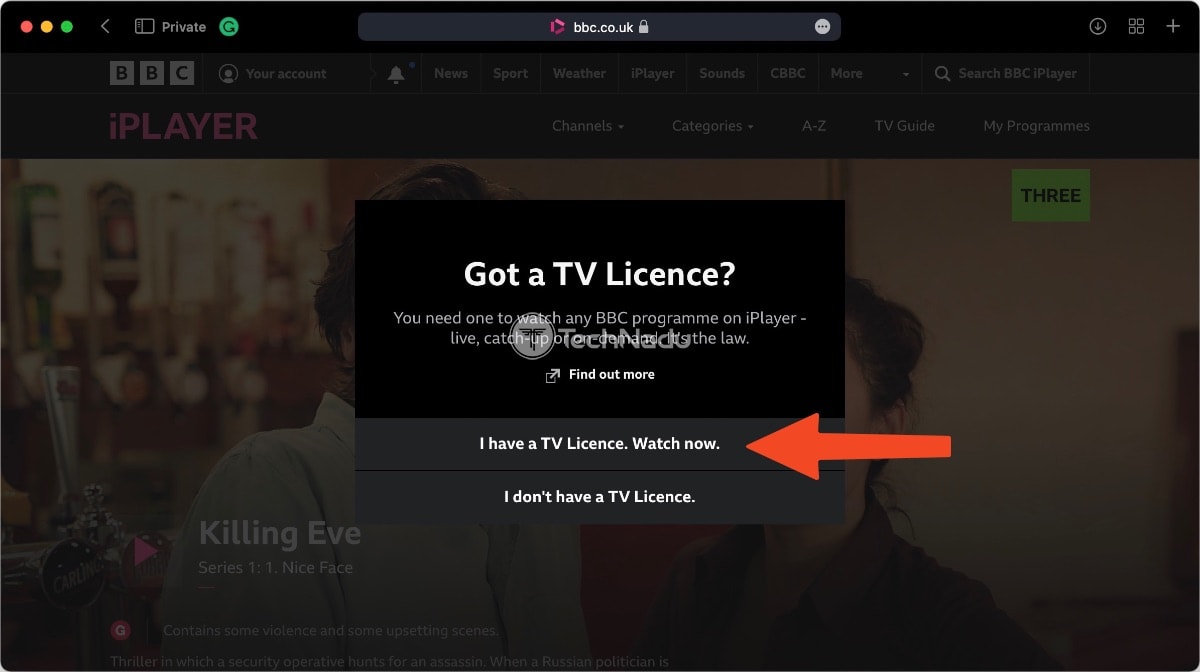
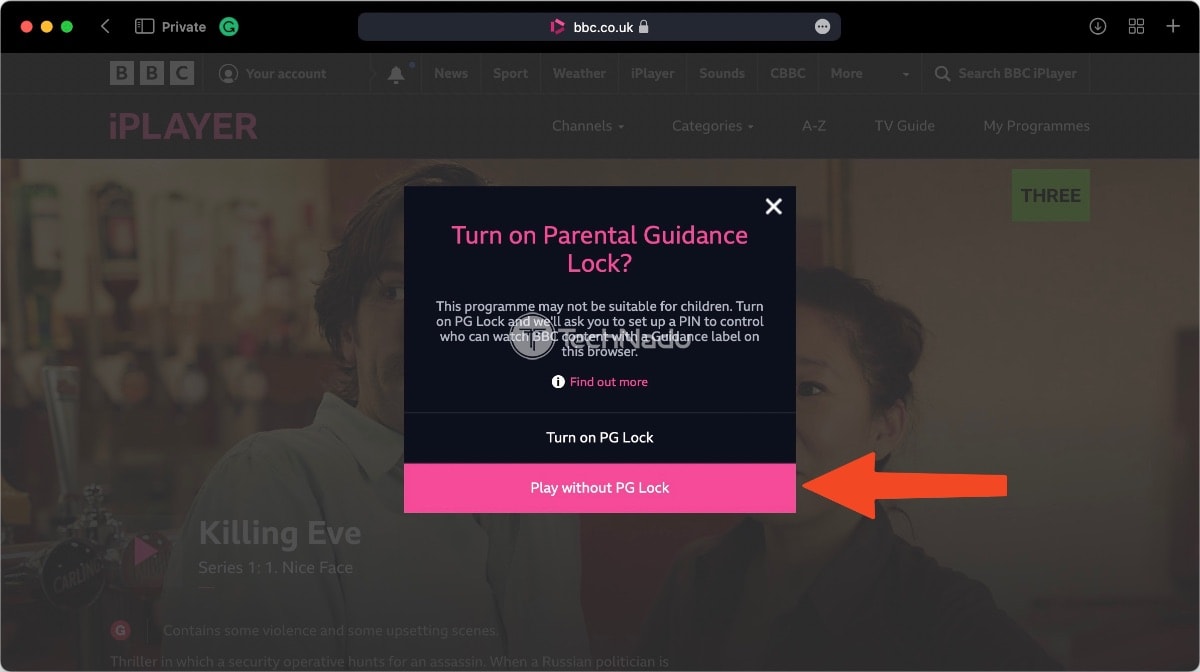
BBC iPlayer requires a UK TV license, which means that citizens of the UK already pay for the BBC (which covers iPlayer as well). Those who falsely declare that they have a TV license are subject to a penalty of £1,000. However, no one has ever been prosecuted for watching iPlayer without a license.
Should You Use a VPN to Stream BBC iPlayer in the USA?
Yes, you need a VPN for using BBC iPlayer in the US as that's the only way to access the service outside the UK. iPlayer employs geo-restrictions to block anyone not located in the UK from streaming its content. This happens in order to comply with copyright, licensing, and distribution agreements made with content creators and studios.
If you visit iPlayer’s site, you’ll see that its content is freely available. However, you’ll encounter a problem before streaming any movie or TV show. If you try to watch BBC iPlayer abroad, the following error message will appear: “BBC iPlayer only works in the UK. Sorry, it’s due to rights issues.”
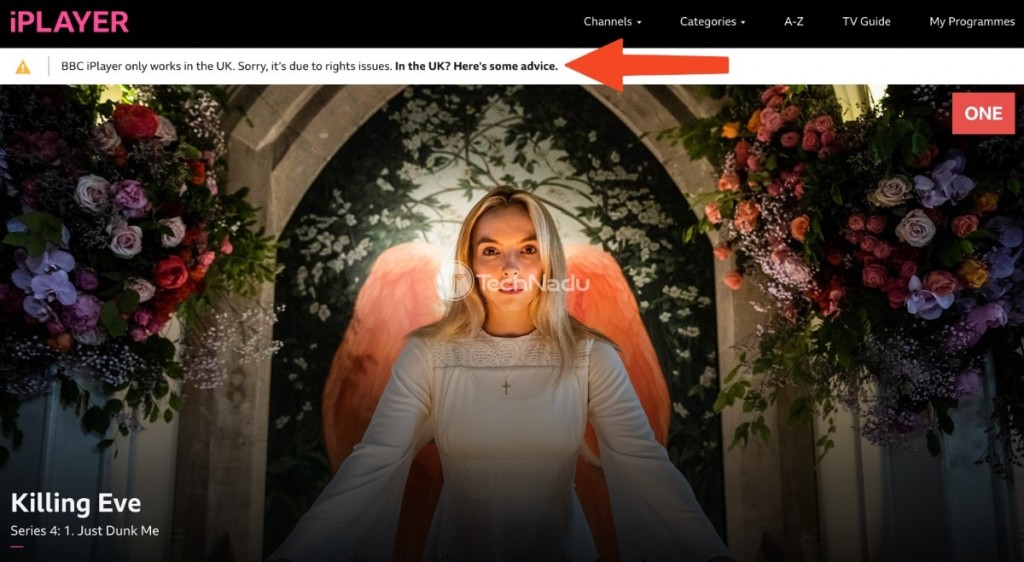
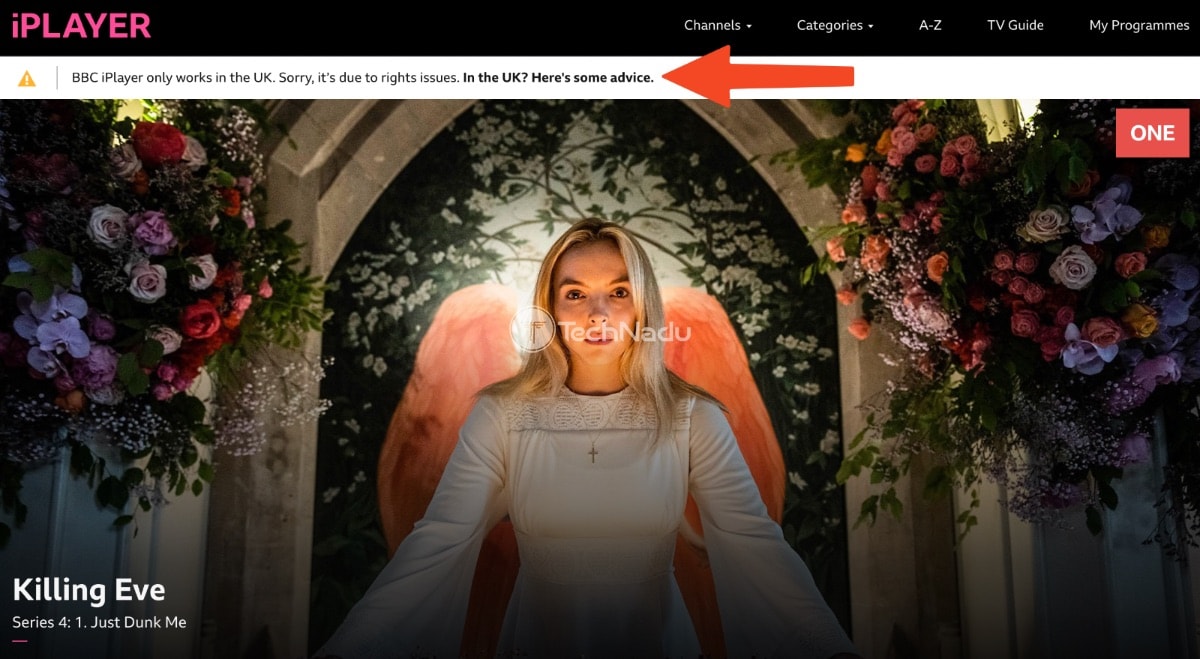
BBC iPlayer will always see your location, so you need to trick the streaming service into thinking you’re somewhere else by changing your IP. Using a VPN and connecting to a UK server is the most reliable way to obtain a UK IP address. Once you get your UK IP, you'll unblock iPlayer without a single issue. This is also the only way you'll be able to download BBC iPlayer outside the UK.
However, keep in mind that not every VPN works with iPlayer because it can detect VPNs. You'll need a capable VPN for BBC iPlayer to unblock the service and enjoy a better streaming experience overall. NordVPN is our top pick among all VPNs as it has hundreds of UK servers, it easily unblocks BBC iPlayer, and it's very fast.
The Best VPNs to Watch BBC iPlayer in the USA
To pinpoint the right VPN provider, you need to follow certain criteria. That said, the most important thing is to get a VPN that unblocks iPlayer and other streaming services. To make that happen, your chosen VPN needs a healthy number of servers in the UK, as well as a large network in many other countries.
Then, make sure it can deliver impressive performance and fast speeds, as you'll be using the VPN for streaming. It's also crucial to have access to obfuscated servers and a kill switch, helping you bypass BBC iPlayer's geo-blocks. And let's not forget about privacy and security features. Look for a no-logs policy, secure protocols, and strong encryption.
Having a sufficient number of simultaneous connections will allow you to stream iPlayer from multiple devices, and also make sure your VPN supports computers, smartphones, tablets, smart TVs, and more. Look for affordable pricing, too. Lastly, a solid money-back guarantee will make your purchase risk-free - but 24/7 customer support should be your first go-to resource.
Based on the criteria explained above, these are the 4 best VPNs to access BBC iPlayer from the US:
- NordVPN - Our #1-Rated VPN to Watch BBC iPlayer in the USA
- Surfshark - Unblock BBC iPlayer in America with Network-Wide Obfuscation
- ExpressVPN - Fast VPN to Get BBC iPlayer in the US on Any Device
- CyberGhost VPN - Budget VPN for Streaming BBC iPlayer in the US
1. NordVPN - Our #1-Rated VPN to Watch BBC iPlayer in the USA
NordVPN is the best VPN to stream BBC iPlayer in the USA because it can unblock BBC iPlayer from any corner of the world. This VPN bypasses any type of geo-blocks, which means other UK-based services are on offer as well (ITVX, Channel 4, and more). You'll gain access to 6,300+ servers in 111 countries, which includes 440+ UK servers in 4 locations: London, Glasgow, Manchester, and Edinburgh.
This is also a very fast VPN service with consistent performance. Since you'll be connecting to UK-based servers from the US, you can count on reliable speeds with minimal throttling. During our tests, we also connected to more remote servers to test other streamers and got the same level of performance. Even though only some of NordVPN's servers are obfuscated, they all work with iPlayer just fine.
Aside from streaming support, this VPN has a different, equally powerful side: privacy and security. There's a no-logs policy, which has been audited many times in the past. Plus, it comes with a kill switch to prevent data leaks. Also, there are protocols such as OpenVPN, IKEv2/IPsec, and NordLynx (based on WireGuard). And, of course, there's ultra-strong AES-256-GCM and ChaCha20 encryption.
NordVPN gives you 10 simultaneous connections and works on practically any device, including smartphones, tablets, computers, smart TVs, and more. You can also install it on a router to protect devices that don't support VPN apps themselves, like game consoles and streaming sticks.
This provider is pretty affordable, with a 2-year plan that costs as low as $3.09 per month. Lastly, you get a 30-day money-back policy, regardless of your chosen plan. And if any issues arise, you can turn to NordVPN's 24/7 live chat customer support.
PROS
- Unblocks iPlayer with ease.
- 440+ servers in the UK.
- Strong privacy features.
- Modern-looking apps.
- 24/7 live chat support.
- 30-day money-back guarantee.
CONS
- Only some servers are obfuscated.
2. Surfshark - Unblock BBC iPlayer in America with Network-Wide Obfuscation
You can't go wrong by choosing Surfshark because it easily unblocks BBC iPlayer in the US (and from anywhere else). It also works well for unblocking any other streaming platforms you might want to watch. This is thanks to its 3,200+ servers in 100 countries, including 212 UK servers in 4 locations (London, Glasgow, Edinburgh, and Manchester).
You'll enjoy lightning-fast speeds and dependable performance on all its servers, regardless of how far away they are from you. 4K streaming will be seamless. On top of that, Surfshark's network is fully obfuscated, so you'll be able to bypass even the toughest VPN blocks.
When it comes to privacy, Surfshark doesn't disappoint. It has a reliable kill switch and an audited no-logs policy, so you can rest assured your data will remain hidden. As for security, you'll be protected by secure protocols like OpenVPN, IKEv2, and WireGuard. The first 2 are paired with AES-256-GCM encryption, and the third uses ChaCha20.
Surfshark can be installed on any of your devices running Windows, macOS, Linux, Android, iOS, and more. It also supports smart TVs and devices that don't accept VPN apps. Overall, it allows unlimited simultaneous connections, which is fantastic for large families or splitting with a few friends.
This VPN is great if you're on a budget because it only costs $2.29 per month for a 2-year plan. You'll get a month to test Surfshark thanks to its 30-day refund period. Plus, you can reach out to its 24/7 customer support via chat if you need any help or want to get your money back.
PROS
- Unblocks iPlayer in the US.
- 212 fast UK servers.
- Unlimited simultaneous connections.
- Fully obfuscated network.
- 24/7 support via live chat.
- 30-day refund period.
CONS
- iOS app could be improved.
3. ExpressVPN - Fast VPN to Get BBC iPlayer in the US on Any Device
ExpressVPN is another excellent choice for streaming BBC iPlayer in the US, as well as other streamers. It comes with thousands of servers in 105 countries. You'll find tons of UK servers in 5 locations: Docklands, East London, London, Midlands, and Wembley. All its UK servers are optimized for streaming, so you won't find any roadblocks there.
Then, let's not forget that ExpressVPN delivers blazing-fast speeds and reliable performance, according to our own tests. It doesn't matter whether you connect to a server nearby or further away because its speeds remain consistent. You can enjoy 4K streaming without any annoying buffering on any international platforms. On top of that, its entire global server network is obfuscated.
ExpressVPN also delivers in terms of privacy and security. It has an audited no-logs policy and a powerful kill switch to ensure your data remains private. Plus, you can choose from a set of strong VPN protocols, including OpenVPN, IKEv2, and Lightway. The first two are paired with high-end AES-256 encryption, while Lightway (our top choice for streaming) uses the WolfSSL encryption library.
This provider can be installed on any popular streaming devices, including computers, tablets, smartphones, smart TVs, and more. Uniquely, ExpressVPN has a dedicated router app, making it easy to protect devices that don't support VPNs natively. You'll also get up to 8 simultaneous connections.
ExpressVPN can be expensive for some people, though - its annual plan costs $6.67 per month. But in case of any technical issues, know that it has 24/7 customer support available via live chat, in addition to a 30-day money-back policy. You can test it and get a refund if it's not a fit.
PROS
- Plenty of UK servers.
- Works well with iPlayer.
- Super-fast connection speeds.
- Entire network is obfuscated.
- 24/7 customer support.
- 30-day money-back policy.
CONS
- Limited customization options.
4. CyberGhost VPN - Budget VPN for Streaming iPlayer in the US
CyberGhost VPN supports dozens of streaming services. So, it's no wonder that it unblocks iPlayer every single time. Unlike most other VPNs, this one has specialized servers for streaming, so bypassing geo-blocks will never be an issue. Speaking of its server network, there are thousands of servers in 100 countries. More than 1,100 servers are in 3 UK locations: London, Manchester, and Berkshire.
This VPN has medium-fast speeds and stable performance, so it should let you stream iPlayer with no throttling. However, having a fast Web connection will certainly help. Sadly, CyberGhost doesn't support obfuscation on its servers, so its functionality isn't great in overly restrictive countries. We luckily had no trouble accessing BBC iPlayer, though.
When it comes to its privacy and security, you'll see that CyberGhost truly delivers. It has a freshly audited no-logs policy, plus an always-on kill switch to prevent data leaks if the VPN connection is interrupted. Moreover, it uses OpenVPN, IKEv2/IPsec, and WireGuard for its protocols with AES-256-GCM or ChaCha20 encryption (protocol dependent).
CyberGhost supports all popular devices like computers, smartphones, smart TVs, and many more. You also get 7 simultaneous connections, which seems quite generous because it's one of the cheaper options.
What's also generous is CyberGhost's pricing (as low as $2.03 per month for a 2-year plan) and 45-day money-back policy, which applies to its long-term plans. Finally, there's also round-the-clock customer support, as you can expect from any reputable VPN these days.
PROS
- Easily unblocks iPlayer.
- Great for media streaming.
- 7 parallel connections.
- 24/7 live chat.
- 45-day money-back policy.
CONS
- On the slower side.
- No obfuscation.
How to Get BBC iPlayer in the US on Your Devices
Watching BBC iPlayer on all your devices is easy if you subscribe to a VPN that can unblock the streaming service. Then, you can connect to a UK server. To make things easy for you, we created guides for various popular platforms, so check them out below.
Windows & Mac
There are two ways to stream BBC iPlayer in the US on your Windows or macOS computer. The easiest way is to use iPlayer’s website, which you can do in the following way:
- Subscribe to a VPN that can unblock iPlayer (we recommend NordVPN).
- Then, install your chosen VPN on your Windows or macOS computer.
- Launch the VPN and connect to a UK-based server.
- Use your favorite browser to access iPlayer's website.
- Sign in to your BBC iPlayer account.
- Pick any title to stream and start watching. That’s it!
Android
Android users are in luck because they can install the BBC iPlayer app manually without involving the Google Play Store. So, here are the steps to take to get BBC iPlayer in the USA on Android:
- Subscribe to a VPN that works with Android (we recommend NordVPN).
- Then, install your VPN from the Google Play Store.
- On your smartphone, download iPlayer’s APK file from APKPure.
- Tap on the downloaded file and then install the app manually.
- Before you open iPlayer, make sure to launch the VPN first.
- Connect to any server in the United Kingdom.
- Launch iPlayer and sign in.
- Select something you’d like to stream and enjoy!
If you don’t wish to use the iPlayer app, you can always use Chrome or any other Web browser. Luckily, iPlayer’s website works on smartphones just fine, but you’ll still need a VPN to unblock BBC iPlayer outside the United Kingdom.
iOS
Due to certain limitations of iOS, downloading the iPlayer app is a highly complex procedure if you're outside the UK. So, if you get BBC iPlayer on your iPhone, we recommend doing this:
- Subscribe to a VPN that works with iOS (we recommend NordVPN).
- You now need to install your VPN on your iPhone from the App Store.
- Launch the app, log in, and finalize the initial set-up procedure.
- Pick any server in the United Kingdom and connect to it.
- Then, launch Safari or any other iOS Web browser.
- Proceed to visit iPlayer’s website and access your iPlayer account.
- That's it! Pick any title and begin streaming.
If you wish to use iPlayer’s app for iOS, you’ll need an Apple account registered to an address in the United Kingdom. That’s definitely a more complex way to go, but if you have some time on your hands, it’s worth trying it out. Here's what to do:
- Get a VPN that can be installed on iOS (we recommend NordVPN).
- Download and install your VPN from the App Store.
- Launch the VPN, log in, and connect to a UK server.
- Sign up for a new Apple ID and use any UK-based address.
- Via Settings, log out of your old Apple ID and log in with the new UK Apple ID.
- Now, you can download the iPlayer app from the UK version of the App Store.
- Log in to the iPlayer app, pick something to watch, and start streaming!
Roku
Roku allows you to install BBC iPlayer as a channel. However, you'll need to have a UK Roku account. Plus, Roku doesn't support VPNs, so you'll have to install your VPN on your router first. Here are the steps to take to watch iPlayer in the USA on Roku:
- Pick a VPN that works on routers (we recommend NordVPN).
- Proceed to set up your VPN on your router using your VPN's router installation method.
- Make sure to configure a UK-based server during setup.
- Connect your Roku to the VPN-protected Wi-Fi network.
- Log out of your existing Roku account.
- Create a new Roku account registered to a UK address.
- Now you can install the BBC iPlayer channel on your Roku.
- Launch BBC iPlayer and sign in to your account.
- Now you can start watching your favorite content!
If you don't want to download the iPlayer app, there’s an alternative: screen mirroring. You can install a VPN on your phone, tablet, or computer. Then, you can screen mirror your device to Roku, which supports Chromecast, SmartPlay, and AirPlay, 3 of the world’s most popular media casting technologies.
Firestick
You need two things to use BBC iPlayer in the US on a Firestick: a VPN app and a way to sideload iPlayer. This is done in the following way:
- Subscribe to a VPN that works with Firestick (we recommend NordVPN).
- Then, download your chosen VPN from Amazon's App Store.
- Launch the VPN on your Firestick and log in to your account.
- Use its interface to connect to a server in the UK.
- Navigate to Find > Search.
- Search for and install the Downloader app.
- Before you launch Downloader, go to your Fire TV Stick’s Settings.
- Navigate to My Fire TV > Developer Options > Install Unknown Apps.
- Click on the Downloader app and set its permission to ON.
- Now, launch Downloader.
- Input this URL on its home page: https://apkpure.net/bbc-iplayer/bbc.iplayer.android/download
- Download and install the BBC iPlayer app.
- Launch BBC iPlayer, sign in, and that's it! You can start streaming.
It's true that getting BBC iPlayer on your Firestick isn't the simplest procedure. That's because it involves sideloading the app on your streaming device. This might not be as smooth for some users, who may need to try various BBC iPlayer APK files. We recommend turning to this online forum, where a number of iPlayer APK files can be found that have been modified to remove various errors.
Chromecast
The easiest way to watch BBC iPlayer on Chromecast is to use the iPlayer app on your phone. So, no matter if you have an Android or iOS device, follow these steps:
- Get an iPlayer-friendly VPN service (we recommend NordVPN).
- Install and open the VPN app.
- Connect to a server in the United Kingdom.
- Download the BBC iPlayer app using either the Android or iOS instructions above.
- Open iPlayer, sign in, and start streaming any title.
- Click on the "Cast" icon and select your Chromecast from the available devices. That's it!
You can also cast from a computer using the Chrome browser. This feature already comes built-in, so here's how to add the Cast button to the Chrome toolbar.
Smart TV
Many smart TVs don't support VPN services, which means you'll need a workaround. The best option would be to install a VPN on a router. Do the following process:
- Get a BBC iPlayer VPN that works on routers (we recommend NordVPN).
- Set up the VPN on your router using a UK-based server.
- Connect your smart TV to your VPN-enabled Wi-Fi network.
- Visit your TV's settings and ensure its region is set to the United Kingdom.
- Go to your TV's App Store and download the BBC iPlayer app.
- Launch iPlayer, log in, and stream any content.
Apple TV
The apps you see on the tvOS App Store are based on the region of your Apple account. So, to watch BBC iPlayer in the US, you need to have a UK-based account. Here's how to do it:
- Pick a capable VPN for your Apple TV (we recommend NordVPN).
- Install your chosen VPN and connect to a server in the UK.
- Create a new Apple ID with a UK address.
- Log in on your Apple TV using your UK-based Apple ID.
- Navigate to the tvOS App Store (which will now be the UK version) and download BBC iPlayer.
- Launch the iPlayer app and log in. That's it! Now you can watch whatever you want.
Since Apple TV runs on a closed and restricted platform (tvOS), getting iPlayer to work can be tiresome. If you're after a simpler solution and you have an iPhone, you can mirror your phone’s screen to your Apple TV.
What Can You Watch on BBC iPlayer in the USA?
BBC iPlayer lets you watch a range of TV channels live, on-demand movies and TV shows, and plenty of sports content as well. And yes, all of that is available free of charge. Choose from beloved UK shows like Sherlock, Luther, and Doctor Who or movies like The Martian and La La Land.
In terms of the available live TV channels and live streams, you'll find practically all national and some regional BBC channels on iPlayer, including CBeebies, BBC News, and BBC Parliament. And when it comes to sports, you won't be disappointed. You can watch the BKL Kabaddi Tournament, World Boxing Cup, Africa Cup of Nations, and many more.
Then, there's a vast selection of TV shows, with new titles arriving all the time. These are some of the most popular (and currently available) TV shows on BBC iPlayer:
BBC iPlayer Not Working with a VPN in the US – How to Fix
If you're having trouble getting BBC iPlayer to work properly while connected to a VPN in the US, there are plenty of troubleshooting options you can try. For example, you can use another server or protocol, or try clearing your cache. Here's more detailed information on how to make BBC iPlayer work with your VPN:
- Reboot Your Device/VPN – This should always be the first thing you do because it often fixes a lot of issues without any further hassle. It's especially effective on mobile devices.
- Check Your Internet – If the Internet you're connected to is unstable or too slow, your VPN might not work as it should. Besides that, streaming services need fast, stable Internet regardless of using a VPN or not. Check to see if you have enough of a signal by running a speed test or switching to a different network like mobile data to see if things improve.
- Switch Servers – Sometimes, it's not enough to connect to a UK-based server. Even if that server unblocked iPlayer before, it might encounter technical problems that prevent it from working this time around. It could also be overcrowded. Switch to another server and try again.
- Try a Different Protocol – Using a VPN with iPlayer relies on VPN protocols such as OpenVPN and WireGuard. Each protocol handles your data differently, as each is paired with a different type of VPN encryption. So, we recommend visiting your VPN app's settings and trying other protocols.
- Keep Your VPN Updated – When a VPN hasn't been updated in a while, it has often missed patches and bug fixes. This could prevent it from working properly. Make sure it's updated to the latest version.
- Clear Cache – If you’ve tried to access iPlayer in the past, the website probably stored temporary data (cache) on your device. So, even if you use a VPN now, that cache can prevent iPlayer from working. Try clearing your browser's cache and cookies.
- Use a Private Browser – Streaming services like iPlayer continuously evolve their anti-VPN mechanisms. That's why even the best VPNs need a bit of help to unblock iPlayer at times. Based on our experience, when nothing else seems to work, using a Web browser's Incognito or Private mode can push your VPN to unblock iPlayer in the US.
- Disable Your Device's Firewall – Device firewalls can interfere with proper operation of your VPN. Try disabling it temporarily and see if that clears things up.
- Uninstall Any Other VPN Apps – Having multiple VPNs installed at the same time can cause conflicts sometimes. It's best to only have 1 VPN installed at a time.
- Contact Your VPN's Support Team – If nothing else helps, remember that you can always turn to your VPN for additional support. VPNs such as NordVPN come with 24/7 live chat support, which is the fastest way to resolve your technical issues.
If you’re willing to try other possible solutions, here's our guide that explains why your VPN doesn't work - with plenty of actionable tips and tricks.
Can You Stream BBC iPlayer in the USA with a Free VPN?
Yes, it's possible to watch BBC iPlayer with free VPN services from outside the UK, but we don't recommend doing this. Free VPNs usually don't work with iPlayer or any other streaming platforms because they don't have sufficient technology to bypass geo-restrictions. Free VPNs have various bandwidth and data limitations, making them unsuitable for streaming.
Not to mention they're not very secure at all. They can even sell your data to advertisers to make a profit. Overall, you'll end up with a very frustrating streaming experience with the risk of compromising your sensitive information. What you need is a premium trial VPN for free. Premium VPNs have unlimited bandwidth, optimized performance, and various features designed to bypass geo-blocks.
No free VPN that can promise the same. Our top choice is getting the trial version of NordVPN for free - offered for 7 days on Android. It has a 30-day money-back guarantee for other devices. After the trial finishes, we suggest signing up for a long-term plan from one of the top VPN services we've reviewed.
Final Thoughts
BBC iPlayer brings a treasure trove of content, featuring a slate of blockbusters and hugely popular shows, among other things. Unfortunately, it's only available in the UK due to geo-restrictions. If you travel outside the UK (to the US, for example), you won't be able to use an existing BBC iPlayer account. That said, you'll be glad to know that you can unblock BBC iPlayer in the USA using a VPN.
NordVPN ranks first among other VPNs when it comes to unblocking BBC iPlayer in the US. It comes with hundreds of UK-based servers and supports practically any device imaginable. Plus, its ultra-high-speed connections will let you stream in 4K without buffering.
That would be all on how to watch BBC iPlayer in the USA. If you have any questions, let us know via the comments section below. Thank you for reading!
Related