When you purchase through links on our site, we may earn an affiliate commission. Here’s how it works.
How to Watch BBC iPlayer in New Zealand in 2026
Last updated January 20, 2025

BBC iPlayer provides an expansive collection of engaging content covering various genres and interests, from dramas to comedies and reality TV to news. Unfortunately, BBC iPlayer is only streaming in the UK. So, if you live in New Zealand, you can’t watch iPlayer content at all. Or, if you travel to NZ from the UK, you won’t be able to access your iPlayer account.
That said, you can download content before you leave the UK to watch anywhere for a limited time. If that’s not an option, there's a workaround for these issues. You can unblock BBC iPlayer in NZ with a VPN. All you have to do is connect to a UK server, and the streaming platform will think you’re in the UK.
In this article, we’ll show you how to watch BBC iPlayer in New Zealand, why you need a VPN for this, and how to choose the right one. We’ll also offer step-by-step guides on how to get iPlayer on your devices, recommendations on what to watch, answers to some FAQs, and more.
How to Watch BBC iPlayer in New Zealand
You need to subscribe to a VPN and connect to a UK server to stream iPlayer in NZ. Then, access BBC iPlayer and create a free account. Here are the steps:
- Get a subscription for a VPN that unblocks BBC iPlayer in NZ (we recommend NordVPN).
- Download and install the VPN on your device.
- Connect to a UK VPN server in any city.
- Go to the BBC iPlayer website and click “Sign In” at the top-left of the page.
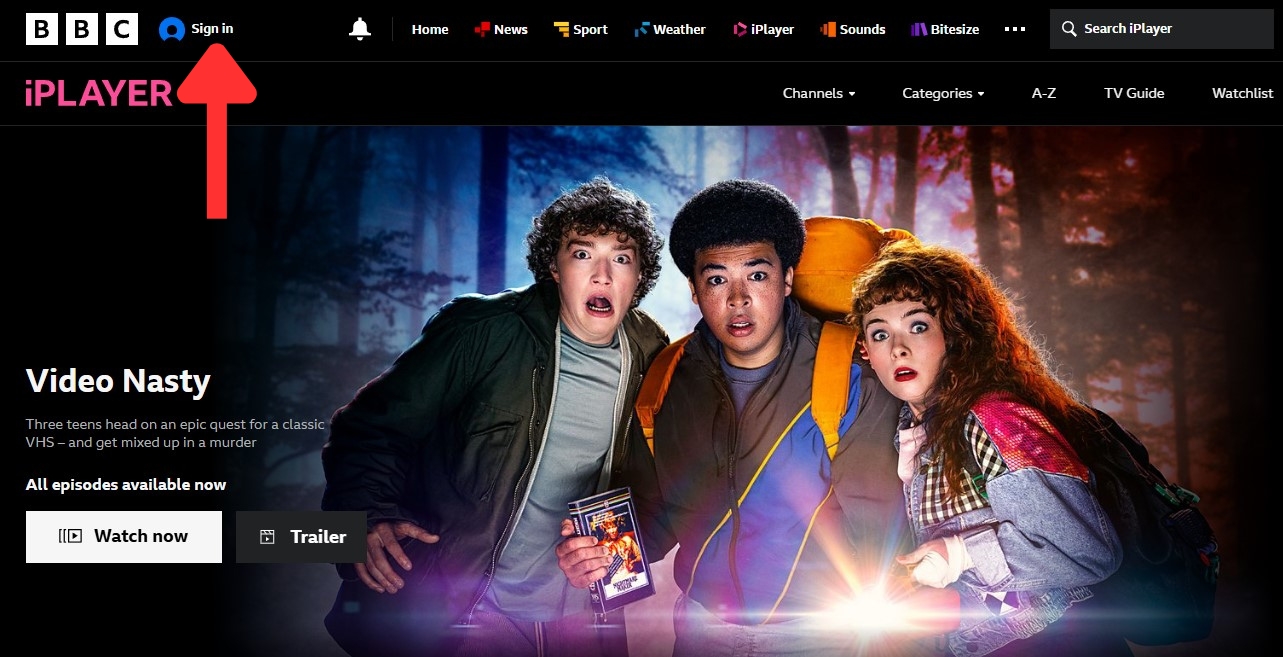

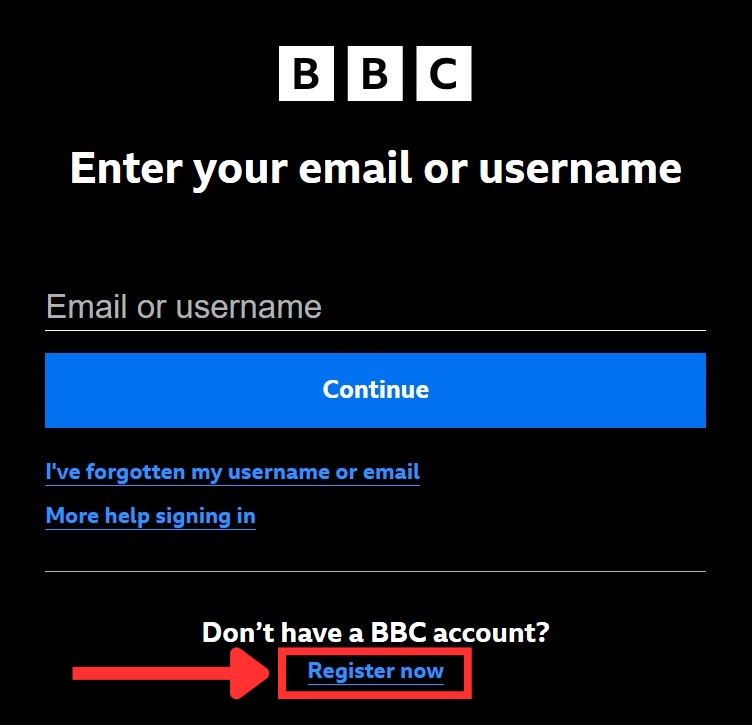
- Click on “Register now” to create an account.

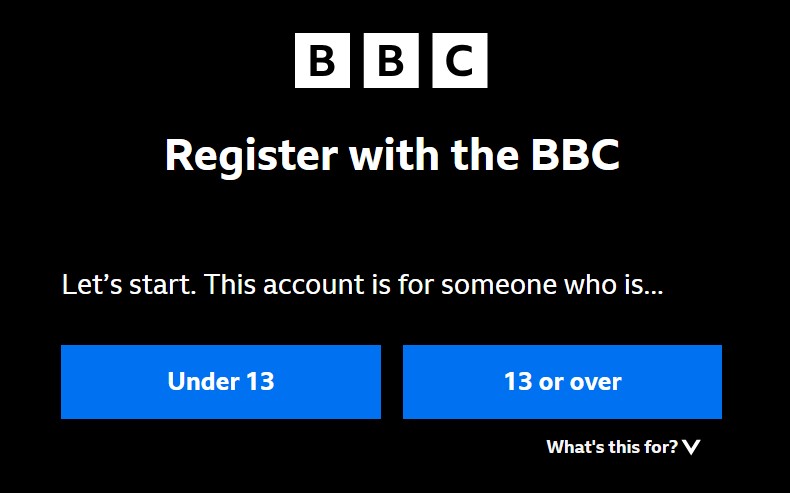
- Choose your age range (“Under 13” restricts some content).

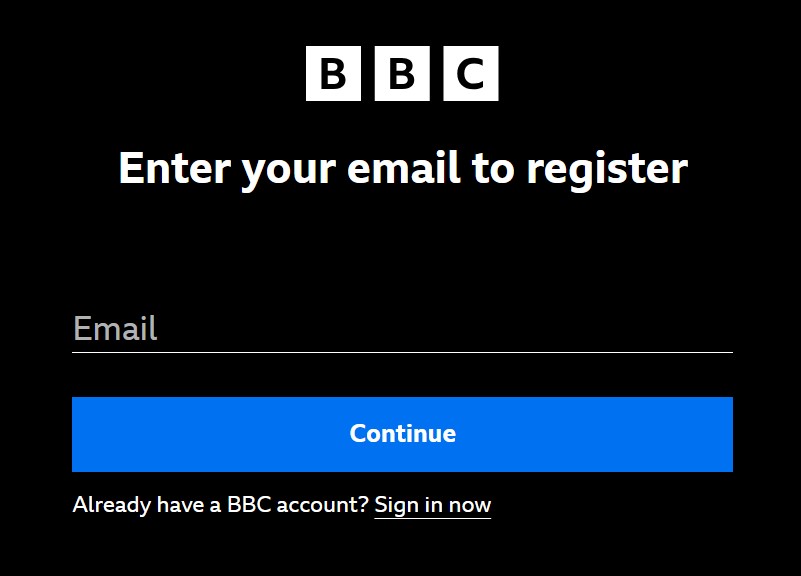
- Enter your email address and click “Continue.”

- Create a password and click “Continue.”


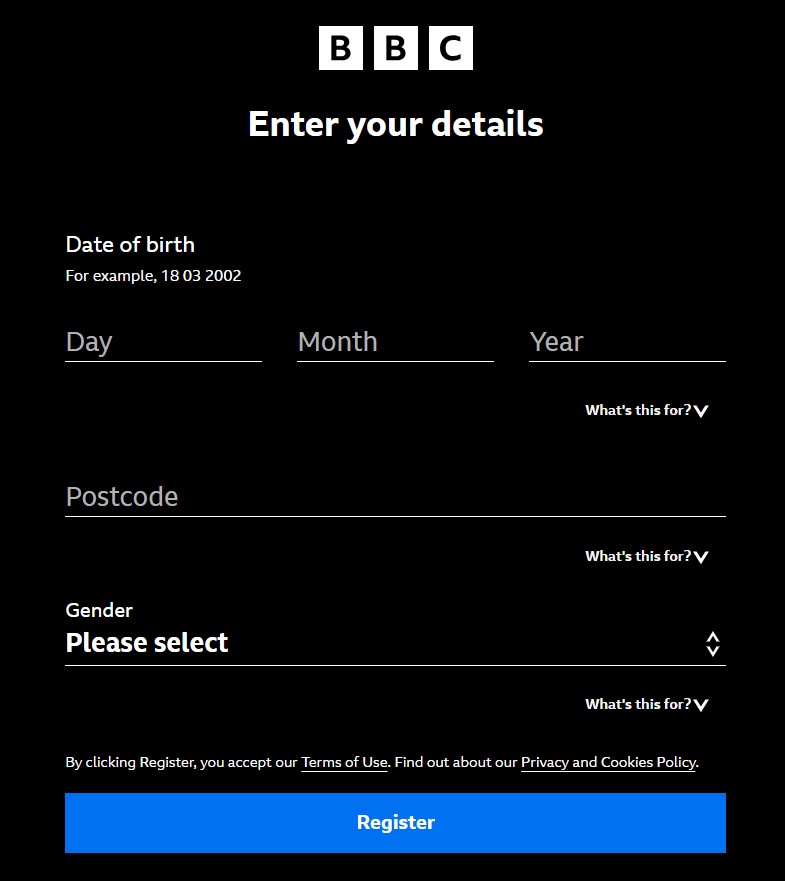
- Enter your details (you can find UK postcodes online to use) and click “Register.”

- Check your email to verify your iPlayer account, then click "Continue."
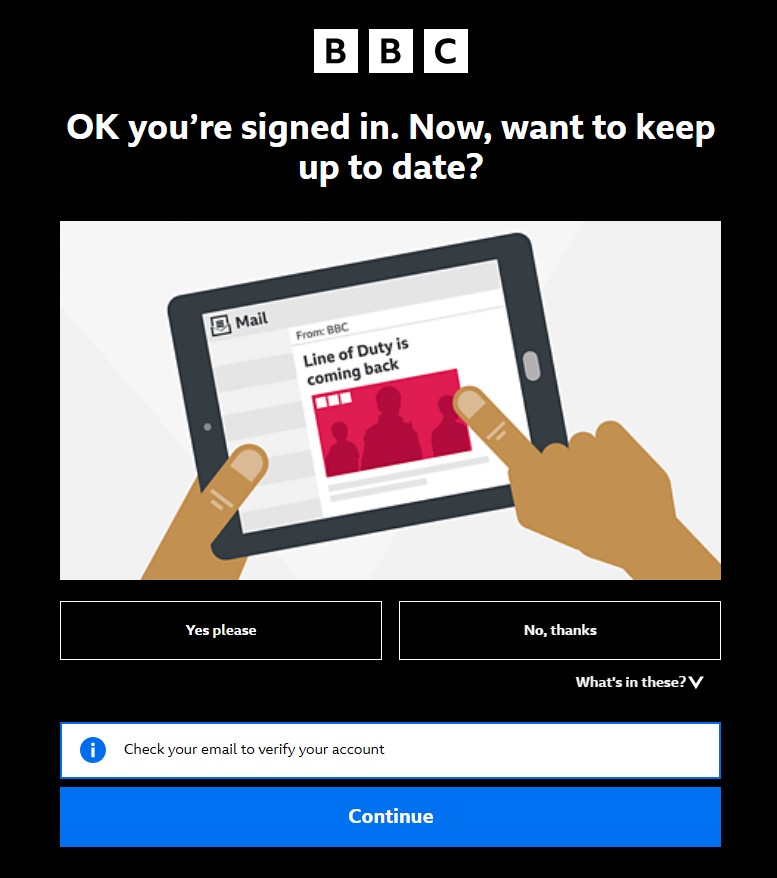

- Pick any movie or show you want to watch.
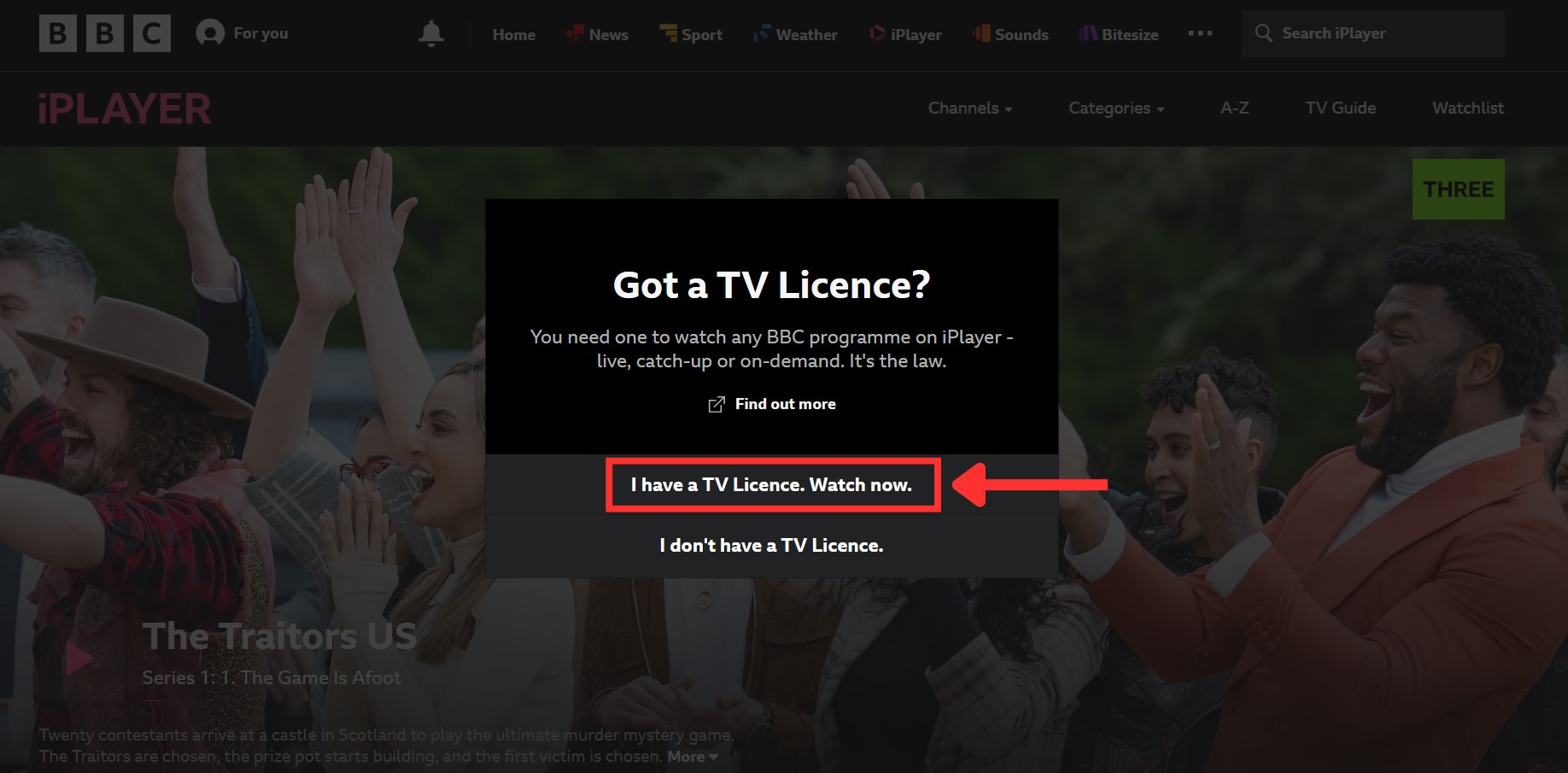
- When asked about a UK TV Licence, confirm that you have one.

- Decide if you want to enable BBC iPlayer's "Parental Guidance Lock" option.
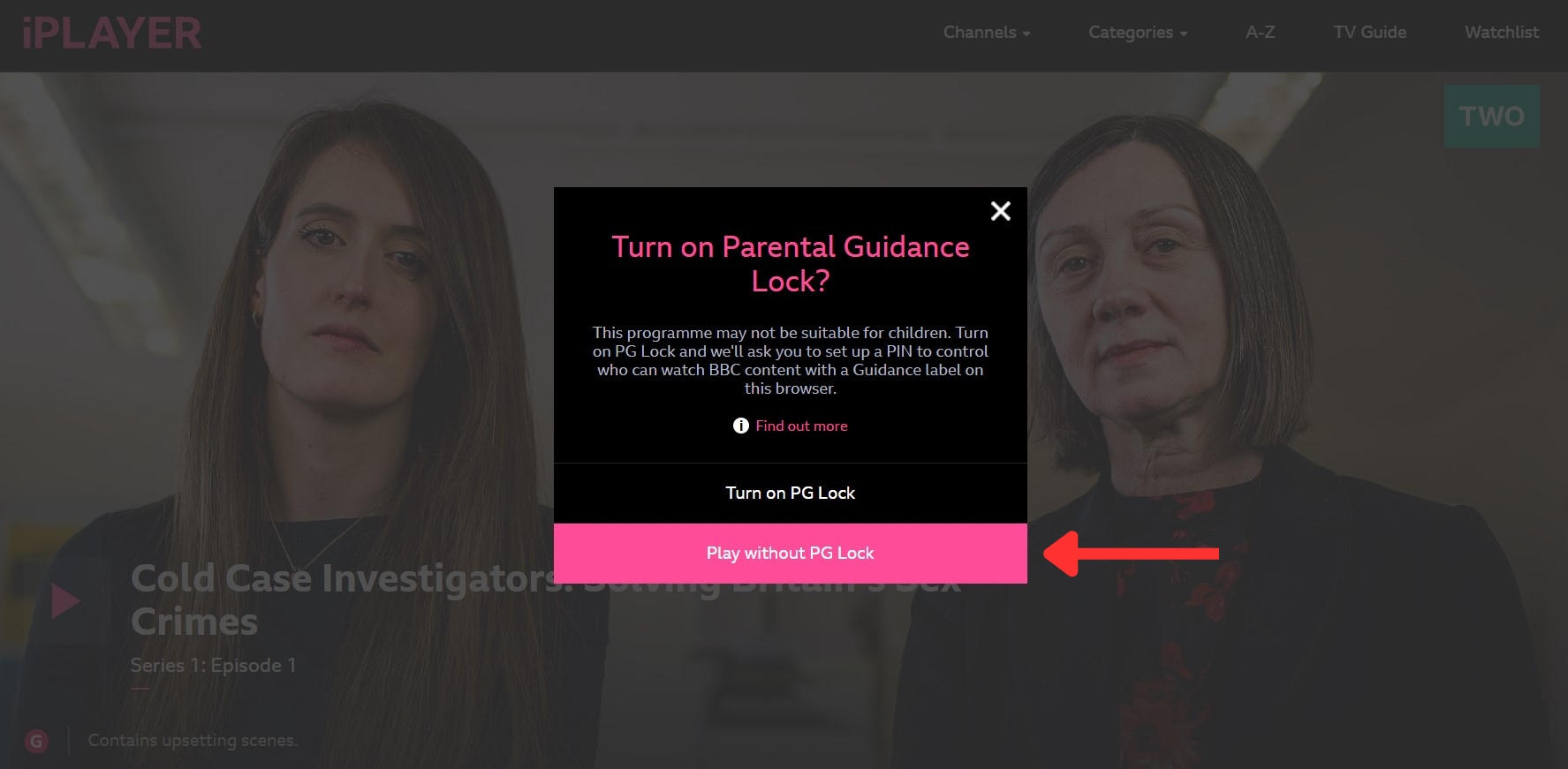

- Now you can start streaming BBC iPlayer in NZ!
You can stream BBC iPlayer for free because there's no subscription required. All you have to do is create an iPlayer account and get a VPN to unblock the streaming service. Then you can play whatever BBC content you want from NZ.
Why Do You Need a VPN to Stream BBC iPlayer in New Zealand?
A VPN is necessary for accessing BBC iPlayer in NZ because iPlayer uses location restrictions to block viewers outside the UK. Using a VPN masks your location by hiding your real IP address and giving you a temporary UK one.
Accessing BBC iPlayer’s website is possible no matter where you’re located, but once you click on any title to watch BBC iPlayer in NZ, you’ll receive this error message: “BBC iPlayer only works in the UK. Sorry, it’s due to rights issues. In the UK? Here's some advice.”
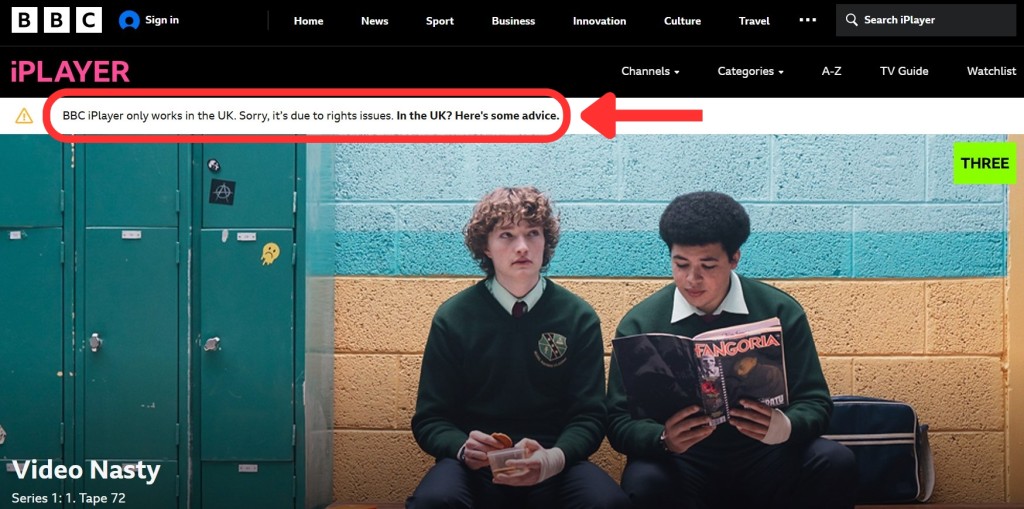

This happens because streaming platforms can see your IP address when browsing the Internet. But, with a VPN, you can bypass these restrictions and access BBC iPlayer outside the UK. Once you connect to a VPN server and get a UK IP address, iPlayer will think you’re in the United Kingdom, and you’ll automatically unblock your favorite shows.
But keep in mind that not just any VPN can do this job. You’ll need the best VPN for BBC iPlayer to access the streaming platform because it detects and blocks many VPN IPs. We recommend NordVPN because it unblocks BBC iPlayer consistently, has hundreds of UK servers, and supports 4K streaming.
The Best VPNs to Watch BBC iPlayer in New Zealand
When you’re trying to find the best VPN, you’ll want to make sure it can unblock BBC iPlayer consistently. For this, it needs to have an extensive UK server network. It should also have a large server infrastructure so that you can access other streaming platforms.
In addition, the VPN should provide amazing performance and fast speeds so you have a smooth streaming experience. Security-wise, premium VPNs offer features like obfuscation to disguise your VPN use and a kill switch to protect you from IP leaks. They also come with a strict no-logs policy, strong encryption (AES-256), and robust protocols (WireGuard and OpenVPN, for example).
The provider should also offer compatible VPN apps for most devices like computers, mobiles, and smart TVs. Plus, it needs to allow multiple simultaneous connections for streaming on multiple screens. Finally, a 30-day money-back guarantee lets you try it risk-free, and 24/7 live chat support is necessary for troubleshooting.
Based on the criteria mentioned above, here are the 4 best VPNs for streaming BBC iPlayer in New Zealand:
- NordVPN - Our #1-Rated VPN to Watch BBC iPlayer in New Zealand
- Surfshark - Stream BBC iPlayer in NZ with Unlimited Simultaneous Connections
- ExpressVPN - High-Speed VPN to Get BBC iPlayer in New Zealand
- CyberGhost VPN - Budget-Friendly VPN for Unblocking BBC iPlayer
1. NordVPN - Our #1-Rated VPN to Watch BBC iPlayer in New Zealand
NordVPN unblocks BBC iPlayer consistently, along with other streaming platforms. The VPN has 8,900+ servers in 129 countries around the world, including 440+ servers in 4 UK cities. Once you subscribe, you get access to UK locations like London, Manchester, Edinburgh, and Glasgow.
Additionally, NordVPN has super-fast speeds and reliable performance, making streaming a very pleasant experience. This was consistent no matter how far away our server was from us. We were able to stream in 4K on various international services and never experienced any annoying buffering.
Security-wise, NordVPN has an audited no-logs policy and strong protocols (NordLynx (WireGuard-based), OpenVPN, IKEv2/IPsec, and NordWhisper), along with AES-256-GCM, ChaCha20, and Post-Quantum Encryption (NordLynx Protocol) encryption. It also comes with a customizable kill switch and a reliable ad-blocker. Many servers have obfuscation as well, so we could always use it to bypass BBC iPlayer’s blocks.
NordVPN works on systems like iOS, Android, Windows, macOS, and Linux. It can be installed on many smart TVs and streaming devices, too. The apps have an intuitive design and let you connect 10 simultaneous connections. So, it's enough for BBC iPlayer’s 5-screen limit.
All NordVPN plans come with a 30-day money-back guarantee. Plus, knowledgeable reps are available 24/7 on live chat to answer any questions you might have.
PROS
- Unblocks BBC iPlayer easily.
- Audited no-logs policy.
- Strong security features.
- 440+ UK servers.
- 30-day money-back policy.
- 24/7 live chat.
CONS
- Obfuscation isn't network-wide.
2. Surfshark - Stream BBC iPlayer in NZ with Unlimited Simultaneous Connections
Surfshark is another excellent choice because it unblocks iPlayer from anywhere. It comes with 212 UK servers in 4 cities: London, Manchester, Glasgow, and Edinburgh. On top of that, it works with any other streaming services you might want to watch, thanks to its .
You'll never have to worry about buffering or waiting for videos to load because Surfshark is capable of blazing speeds and consistent performance. It didn't matter whether we connected to nearby or more remote servers because we always enjoyed the same quality of streaming support. Skipping through 4K videos was a breeze.
Surfshark takes your privacy very seriously, which is why it offers a reliable kill switch and follows a strict no-logs policy. Plus, your VPN usage will be hidden thanks to its network-wide obfuscation called "Camouflage Mode." It comes with WireGuard, IKEv2, and OpenVPN protocols, as well as AES-256-GCM (OpenVPN and IKEv2), ChaCha20 (WireGuard), and Post-Quantum Encryption (WireGuard) encryption.
This VPN can be installed on any popular device and operating system, including Windows, macOS, Android, iOS, Linux, smart TVs, routers, and more. Best of all, it allows unlimited simultaneous connections to protect all your screens and other devices.
Surfshark backs its plans with a 30-day money-back guarantee, so you can take your time testing it. Lastly, customer support is available around the clock if you need any help.
PROS
- Works well with BBC iPlayer.
- 200+ servers in the UK.
- Unlimited simultaneous connections.
- Network-wide obfuscation.
- 30-day refund period.
- 24/7 customer support.
CONS
- iOS app could be better.
3. ExpressVPN - High-Speed VPN to Get BBC iPlayer in New Zealand
ExpressVPN excels in unblocking BBC iPlayer and other streaming services in New Zealand. It has an undisclosed number of servers in 105 countries, covering 5 UK locations: Docklands, London, Wembley, Midlands, and East London.
The VPN comes with impressive speed and stable performance. In our tests, we were always able to stream HD and 4K videos without any quality drops. What’s more, there was no buffering when we skipped through the videos. This means you'll be able to easily watch BBC iPlayer in New Zealand in the highest quality settings.
When it comes to security, ExpressVPN has a built-in kill switch, strong AES-256 and ChaCha20/Poly1305 encryption, and an audited no-logs policy. For enhanced protection, it supports secure protocols like OpenVPN, Lightway, and IKEv2. "Lightway" is an excellent option for streaming. Plus, all servers are obfuscated, so streaming services won’t see you’re using a VPN.
ExpressVPN is compatible with every popular operating system, so you can easily use it on devices running Windows, Android, macOS, iOS, or Linux. What’s more, it has a router app, so you can use it with devices that don’t support VPNs natively (like game consoles or smart TVs).
Finally, ExpressVPN allows 10-14 simultaneous connections. It also comes with a 30-day money-back guarantee and 24/7 live chat support.
PROS
- Unblocks BBC iPlayer.
- Servers in 5 UK locations.
- Obfuscation on all servers.
- Up to 8 simultaneous connections.
- 24/7 live chat support.
- 30-day money-back guarantee.
CONS
- Lacks advanced customization options.
4. CyberGhost VPN - Budget-Friendly VPN for Unblocking BBC iPlayer
CyberGhost VPN made our list for a number of good reasons - namely, it easily unblocks BBC iPlayer in New Zealand and plenty of other streamers. Moreover, it has an undisclosed number of servers in 100 countries, with servers in 3 UK cities (London, Manchester, and Berkshire).
One downside, though, is that CyberGhost lacks obfuscation. However, we were still able to access services that block VPN traffic, like iPlayer, Netflix, and Hulu. While it provides medium-fast streaming speeds on nearby servers, some distant servers are a bit slower. There might be some delays in loading videos, depending on the service and server combo.
CyberGhost, fortunately, has top-notch security features. For instance, it has an always-on kill switch to prevent IP leaks in case the VPN connection drops. In addition, it offers bank-grade AES-256-GCM and ChaCha20 encryption, an audited no-logs policy that has been proven true, and strong protocols like OpenVPN, IKEv2, and WireGuard.
The provider has beginner-friendly, easy-to-install apps for almost any device. This includes computers, tablets, smartphones, smart TVs, and more. Plus, you can use the VPN on 7 simultaneous connections, so it’s very convenient.
CyberGhost offers budget-friendly plans, and the longer ones come with a generous 45-day money-back guarantee. You'll also have peace of mind knowing there's 24/7 support via live chat for troubleshooting.
PROS
- Servers in 3 UK locations.
- Streaming-optimized servers.
- 24/7 support via live chat.
- Always-on kill switch.
- 45-day money-back guarantee.
CONS
- No obfuscation.
- Slower speeds.
How to Access BBC iPlayer in NZ on Your Devices
Accessing BBC iPlayer from all your devices is easy if you have a VPN subscription - particularly one that can unblock the streaming platform. Once you're set up, simply connect to a UK server. To make the process easier, we've created handy guides for the most popular platforms. Check them out below.
Windows & Mac
To enjoy BBC iPlayer on your Windows or macOS device, you can use a VPN and access the BBC iPlayer website. Here's a simple guide:
- Obtain a VPN with UK servers (we recommend NordVPN).
- Download and install the VPN client on your computer.
- Connect to any UK server provided by the VPN.
- Visit the BBC iPlayer website and log in to your account.
- Start streaming your preferred shows.
Android
Getting the BBC iPlayer app on your Android device is straightforward and doesn't require downloading the app from Google Play Store. Here's how:
- Subscribe to a VPN that unlocks BBC iPlayer (we recommend NordVPN).
- Next, download and install the VPN client on your Android device.
- Connect to a UK server offered by the VPN.
- Download BBC iPlayer's APK file from a trusted source like APKMirror.
- Install the BBC iPlayer app manually by tapping on the downloaded file.
- Launch BBC iPlayer, log in, and start streaming.
iOS
While iOS devices have certain limitations, you can still access the BBC iPlayer app with the help of a VPN. Here's what you need to do:
- Get a VPN compatible with iOS devices (we recommend NordVPN).
- Now, download and install the VPN client from the App Store.
- Connect to a UK server provided by the VPN.
- Next, launch Safari or any iOS Web browser.
- Visit the BBC iPlayer website and log in to your account.
- Choose your preferred content and start streaming.
If you’d rather download the BBC iPlayer app directly from the App Store, you'll need to create a new Apple ID with a UK address. Here are the exact steps:
- Subscribe to a VPN with a dedicated iOS app (we recommend NordVPN).
- Download and install your chosen VPN from the App Store.
- Launch the app, log in, and connect to a UK server.
- Create a new Apple ID with a UK-based address.
- Log in using your UK Apple ID.
- Download the BBC iPlayer app from the UK App Store.
- Log in to your iPlayer account and start streaming your favorite content!
Smart TV
Since many smart TVs don't natively support VPN apps, you'll need to install the VPN on your router instead. Here's how:
- Subscribe to a VPN compatible with routers (we recommend NordVPN).
- Set up the VPN on your router and select a UK server during configuration.
- Connect your TV to the VPN-enabled Wi-Fi.
- Adjust your TV's settings by changing the region to the UK.
- Visit your TV's App Store and download the iPlayer app.
- Launch BBC iPlayer on your smart TV, log in, and start watching your preferred shows.
Apple TV
To watch BBC iPlayer on Apple TV, you'll need a VPN and a UK-based Apple account. Here are the steps you need to follow:
- Choose a reliable VPN for Apple TV (we recommend NordVPN).
- Install the VPN app and connect to a UK server.
- Create a brand new Apple ID with a UK address.
- Log in to your Apple TV with your new UK Apple ID.
- Visit the tvOS App Store and download BBC iPlayer.
- Launch BBC iPlayer and log in.
- That's it! You can now stream iPlayer content.
Apple TV uses a restricted operating system (tvOS) that can make accessing BBC iPlayer a bit tricky. But if you have an iPhone, you can easily mirror your phone's screen directly to your Apple TV.
Xbox
Just like many smart TVs, Xbox doesn’t natively support VPNs, so you’ll need to install it on a router. Here’s what the process entails:
- Get a VPN that's compatible with routers (we recommend NordVPN).
- Install the VPN on your router and configure a UK server during installation.
- Adjust your Xbox settings and change the region to the United Kingdom.
- Go to the Microsoft Store and download the BBC iPlayer app.
- Launch the iPlayer app, sign in, and watch your preferred shows.
What to Watch on BBC iPlayer in New Zealand?
Unblocking BBC iPlayer with a VPN opens doors to a diverse array of captivating content in New Zealand. Whether you're drawn to gripping drama series, blockbuster movies, engaging comedy shows, addicting reality TV, or thrilling sports events, BBC iPlayer offers an extensive selection. Here are the latest titles to add to your watch list:
BBC iPlayer Not Working with a VPN in New Zealand – How to Fix
If BBC iPlayer isn't working well with your VPN in New Zealand, there are several troubleshooting steps you can take. You could try connecting to different servers or protocols, or give your cache a clear-out. Here's a more detailed guide on how to ensure smooth streaming of BBC iPlayer with your VPN.
- Restart Your Device or VPN – Sometimes, simply rebooting your device or VPN app can fix many issues. Try it first, especially on phones!
- Ensure Your Internet Works – Your Internet connection must be stable and fast. Slow Internet can cause problems with both VPNs and streaming.
- Switch to Different Servers – If one UK server isn't working, try another. They might be crowded or have technical problems.
- Change VPN Protocol – For iPlayer, the effectiveness of your VPN depends on the VPN protocols it supports, like OpenVPN and WireGuard. These protocols manage your data uniquely, based on the type of VPN encryption they employ. Thus, we suggest exploring alternative protocols by accessing your VPN app's settings.
- Update Your VPN App – If a VPN hasn't received updates for some time, it may have overlooked important patches and bug fixes, potentially leading to operational issues. Ensure it's up-to-date with the latest version to avoid such problems.
- Clear Browser Cookies – If you've used BBC iPlayer before, it might have stored some data on your device. This could cause problems even when using a VPN. Consider clearing your browser's cache and cookies to resolve this issue.
- Turn Off Your Device's Firewall – Your device's firewall might be causing issues with your VPN. Try turning it off temporarily to see if that helps.
- Remove Other VPNs – Installing multiple VPNs can create conflicts on your device. To avoid this hassle, it's best to only have one VPN app installed and active at a time.
- Reach Out to Your VPN's Customer Support – If you've tried all the above solutions, contacting your VPN's customer support team is another option. VPN providers like NordVPN offer 24/7 live chat support for technical issues.
- Try a Different VPN Service – If all else fails, using another VPN might be the solution. The best VPN providers offer free trials, so you might find one that works better for unblocking BBC iPlayer in NZ.
If you're open to trying other possible solutions, our guide that explains why your VPN isn't working, along with plenty of actionable tips and tricks, might help.
Can You Use a Free VPN for Streaming BBC iPlayer in New Zealand?
No, you can't always use a free VPN to try streaming BBC iPlayer in New Zealand, as most of them don't offer UK servers. Also, free VPN providers often lack essential privacy and security features, leaving your data vulnerable to potential breaches or exploitation. They generally can’t unblock iPlayer and have limited bandwidth and data allocation.
Moreover, many free VPNs have been caught collecting and selling user data to third parties. Another significant drawback is their slow speeds and small server networks. They may also throttle your connection speeds, further inhibiting your streaming experience.
That said, you can try exploring a premium VPN free trial as a more reliable alternative. For a trusted VPN provider with a proven track record of unblocking geo-restricted content and safeguarding user privacy, we recommend the NordVPN free trial. It's available on Android for 7 days, or you can take advantage of their 30-day money-back guarantee to test other devices.
Premium VPN trials offer access to the best VPN services without a long-term commitment, allowing you to evaluate their performance, features, and compatibility with BBC iPlayer before making a decision. So, after your trial is up, you can decide to get a subscription if things work out.
Final Thoughts
BBC iPlayer offers tons of hit movies, exciting live sports, and widely acclaimed TV shows, among other popular content. However, due to geographic restrictions, BBC iPlayer is accessible only within the UK. Nonetheless, there's good news: you can bypass these restrictions and get BBC iPlayer in NZ by using a VPN.
We highly recommend NordVPN, as it consistently circumvents iPlayer's restrictions. It boasts a plethora of servers in the UK and is compatible with virtually any device you might own. Additionally, its super-fast connection speeds ensure that you can enjoy 4K streaming without any interruptions due to buffering.
But if you’re after something tailored to specific needs, there are excellent options besides NordVPN. For securing multiple devices while on a budget, Surfshark is your best bet. CyberGhost, on the other hand, offers convenient streaming through its optimized streaming servers, while ExpressVPN stands out with its network-wide obfuscation and fast streaming speeds.
You've reached the end of our guide. If you have any questions, let us know via the comments section below. Thanks for reading!
Related