When you purchase through links on our site, we may earn an affiliate commission. Here’s how it works.
HMA VPN Review 2026


Our experts have reviewed 53 VPN providers, which were put through extensive rounds of testing. To learn more about that process, here’s how we review VPNs, where we explain our criteria and our policy of being fully transparent.
When it comes to choosing the right VPN service, there are many factors to consider. Unfortunately, HMA VPN, formerly known as HideMyAss, falls short in many areas. While it promises complete online freedom, it’s not the most trustworthy VPN out there.
Based in the United Kingdom, HMA’s location raises a red flag right from the start. The UK is notorious for its intrusive data collection efforts and is a member of the 5 Eyes Alliance. Although HMA VPN now claims to have a strict no-logging policy, its track record is extremely poor.
In the past, it has shared user data with law enforcement agencies. For that reason, we wouldn’t recommend it for privacy protection, torrenting, and other sensitive activities.
While HMA doesn’t offer the best set of privacy and security features, it does include all the essentials. There are some advanced features, too, like split tunneling and a kill switch - making it a decent option for streaming, especially for US Netflix, Max, and Hulu.
Its gaming performance is also decent, but if you’re going to set up a VPN router for your gaming consoles, it can be a bit of a hassle. HMA VPN also stands out for its impressive international server selection, earning it a spot in our list of the best VPN services.
As with our other VPN reviews, we aim to simplify the comparisons between the various options available. Let's begin by examining some of the key features of HMA.
We take an objective approach to our evaluations and ensure that our reviews are impartial, accurate, and unbiased. If you’d like to learn more about our evaluation process, please refer to our guide on how we review VPNs.
Background, Jurisdiction & Reputation
HMA VPN, originating from the UK, isn’t the most reliable VPN service due to its practices of collecting and retaining personal data. Its past record of data leaks only adds to the concern. Our Score: 0/10
Choosing a VPN revolves around trust. To ensure its trustworthiness, it's crucial to closely examine its background, investigate its jurisdiction, and check for any past data leaks that might have caused issues. By doing so, you can keep your online experience secure and worry-free.
Where Is HMA VPN Based?
HMA VPN is based in the UK and is part of the Five Eyes Alliance, a group of countries that share intelligence information with each other. The country also has the Investigatory Powers Act, or the "Snooper's Charter," which gives the UK government broad powers to access and store personal data.
So, how does HMA operate in such a hostile environment? Well, the answer isn’t so simple. The service is actually owned by Avast, a cybersecurity company based in Prague, Czech Republic.
Avast, which also owns AVG Technologies, acquired HMA VPN in 2016 and claims to operate it as an independent entity. However, this doesn’t mean the provider is free from the UK's jurisdiction. The service still has to comply with British laws and regulations and even admits that it will cooperate with law enforcement requests if necessary.
Before that, AVG Technologies acquired Privax in 2015, HideMyAss’s original parent company. It's interesting to note that Privax continues to operate HMA.
In 2022, Avast merged with NortonLifeLock. Now, NortonLifeLock has rebranded as Gen Digital (or simply Gen), with its headquarters in the U.S. Gen Digital is the parent company overseeing a lineup of other security brands, including Norton, LifeLock, Avast, AVG, Avira, and CCleaner.
Adding to the complexity, various brands under Gen Digital also offer their VPN services. Besides HMA, you'll find Avast SecureLine, Norton Secure VPN, and Avira Phantom VPN, each contributing its own unique features to the digital security landscape.
We know it's quite a web of connections, but it's essential to know the broader context when choosing a VPN.
Did HMA VPN Leak Personal Data in the Past?
Yes, HMA has leaked personal data in the past. Back in 2011, the company handed over incriminating data to the FBI related to a LulzSec member accused of using HMA’s proxy to hack into the systems of Sony Pictures Entertainment. This incident highlighted HMA’s crucial role in confirming the individual’s identity and online activity.
However, this isn’t the only case where HMA has shared user data with law enforcement agencies. A Texas judge was arrested in 2016 for stalking and harassment, and his identity was uncovered using connection timestamps provided by HMA. Bear in mind that all of these instances of data sharing happened under HMA’s old privacy policy.
Additionally, HMA VPN follows a no-logs policy. However, it still collects a bit of info when you use it, like the dates you connect (morning or evening) and how much data you use. They only keep data for 35 days to help with any issues. If there's a legal reason, like a subpoena, they might also share your personal data.
While the VPN service has altered its logging policy since then, it still collects data. Therefore, if you’re considering HMA, keep in mind that it doesn’t make you truly anonymous.
Is HMA VPN Safe?
Yes, HMA VPN is safe to use. It has basic VPN security features, such as military-grade encryption with VPN protocols like OpenVPN, WireGuard, and Mimic, to establish secure VPN tunnels. A kill switch also adds another layer of protection in case your Internet connection drops.
Moreover, HMA VPN has a no-logs policy, audited by VerSprite (a cybersecurity consulting firm) in 2020. While HMA VPN doesn't keep personal logs, it does collect some data to improve its service.
This includes when you connect (morning or evening) to HMA and approximate data usage (rounded to the nearest digit). They use this info for better network planning. More importantly, none of this is connected to any specific person, so your privacy is safe with HMA VPN.
Supported Platforms & Devices
HMA offers applications for major desktop and mobile platforms, as well as for Android TV. However, it no longer supports browser extensions, putting it at a disadvantage compared to other top-rated VPNs. Our Score: 6/10
We list HMA's supported devices in this HideMyAss VPN review. Note that HMA allows between 5 and 10 devices per account in the Standard plan, so it's crucial to confirm compatibility with both desktop and mobile devices. Here’s a table to simplify things:
HMA offers decent coverage in terms of device support, with native apps available for Windows PC, Mac, Linux, Android, iPhone, and iPad. However, the service falls short when it comes to streaming devices, with support limited to Android TV.
While the Android TV app includes some useful features like split tunneling, kill switch, and refresh IP, it's disappointing that there's no native application for Fire TV devices. Moreover, the lack of proxy support for major browser extensions, like Chrome, can be a significant drawback.
To use HMA on other devices (those that don’t support VPNs), you need to install the VPN on a supported and compatible router. This process can be complicated and requires technical knowledge, so it may not be the most convenient option.
In terms of the number of simultaneous devices you can secure all at once, HMA gives you a few options. The 'Standard' plan covers up to 5 devices at the same time. If you need more, the 'Family' Plan, lets you protect up to 10 devices. For 'Business' Plans, they've got options for 10, 20, and 30 devices. If you need more than that, you can reach out to HMA for a custom quote.
Overall, HMA provides reasonable device support, but it doesn't quite measure up to the best VPNs, considering its discontinuation of Web proxy support via Chrome extension, as well as extensions for other popular browsers like Firefox and Edge.
Installation & Initial Configuration
You can install HMA within minutes. The entire procedure is very simple and quite streamlined, so even absolute beginners won’t have any problems. Our Score: 10/10
Getting started with HMA VPN is a breeze. First, you need to subscribe to HMA VPN. Then, you can proceed to download the official app from its website. We’ve tested it on Windows, and the installer file was just 1.2MB, making it a quick download.
Once downloaded, open the file, and you'll be greeted by a typical installation wizard. Accept the terms of use, select where you want to install the application, and you're good to go. It's worth noting that you could be asked to restart your machine, but this is just to ensure the installation process goes smoothly.
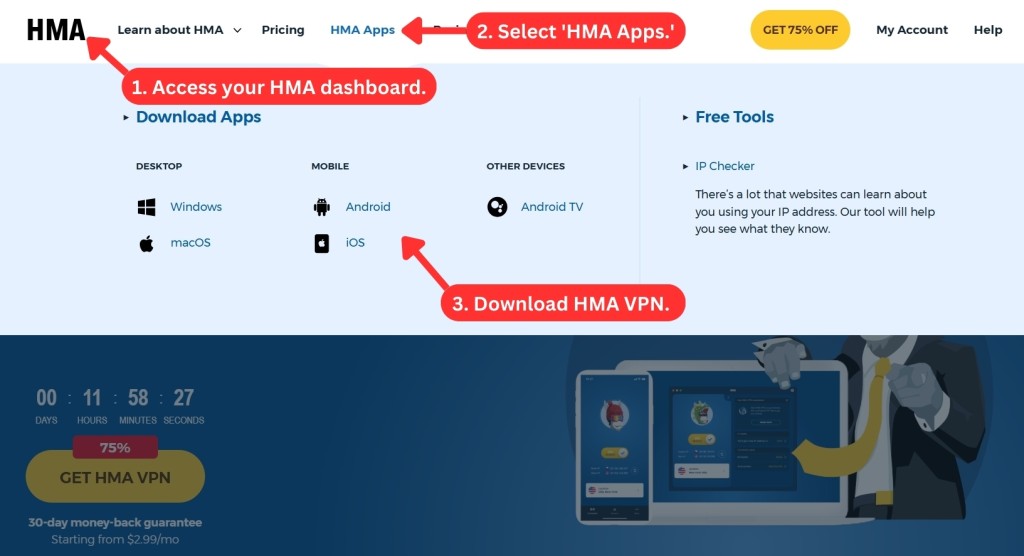
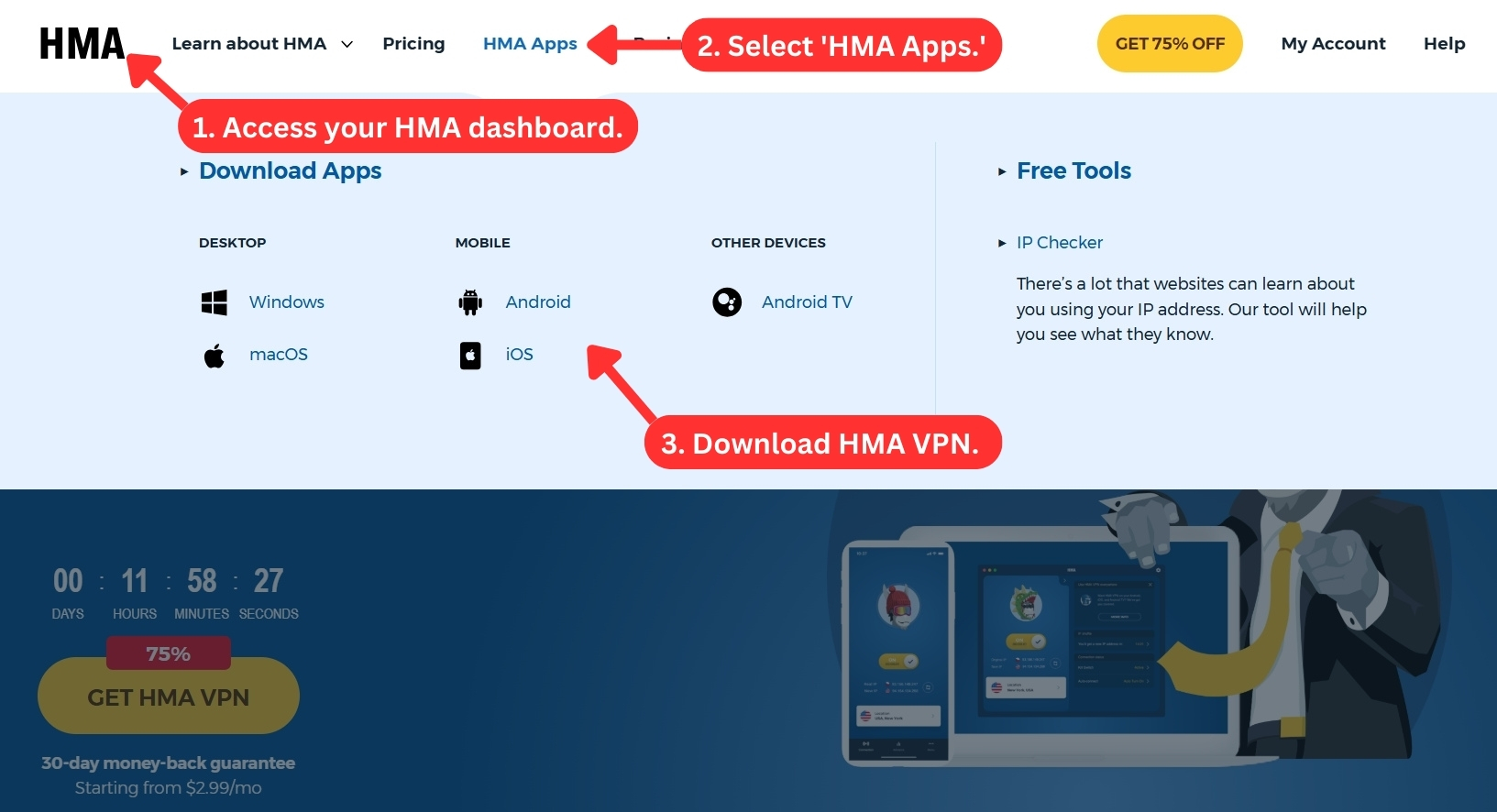
Once the app is installed, launch it by double-clicking on its icon. You'll be asked for your user credentials, which is standard procedure for any VPN. What's great about HMA is that it doesn't come bundled with any other apps that can often slow down your system.
If you're using HMA on mobile platforms, simply download the official Android or iOS app from its respective app store. After opening the app and signing in, you're ready to start using HMA VPN on the go.
Prominent Features
HMA VPN has made significant improvements lately, including the addition of advanced features to complement its existing set of basic features. Our Score: 7/10
To avoid getting overwhelmed by marketing messages, it's important to focus on the essential features when choosing a VPN. Fortunately, HideMyAss offers all the basic features you would expect from a reputable VPN, including AES-256 encryption and DNS servers.
We've collected all the necessary information about the security and privacy features available on the HideMyAss app. Here's a breakdown of what you need to know about each of them.
- DNS and IPv6 Leak Protection: HMA VPN employs sophisticated methods to protect your DNS and IPv6 from exposing your real IP address and jeopardizing your online privacy. This feature is included in all HMA VPN apps. However, some users have encountered problems with IPv6 leaks on macOS, so you should be careful if your ISP uses IPv6.
- AES-256 Encryption: HMA VPN uses AES-256 encryption, which is considered to be very secure and reliable. This encryption method protects your data from being intercepted, hacked, or exposed by cyberattacks, no matter where you are or what you're doing online. This encryption is available on all HMA VPN apps.
- VPN Protocols: A tunneling protocol is a set of rules for encrypting and transmitting data over a network. HMA gives you the choice of 3 tunneling protocols: OpenVPN, Mimic, and WireGuard. OpenVPN is available on all supported platforms, providing a consistent VPN experience. However, it's disappointing that Mimic and WireGuard are only accessible on the Windows app.
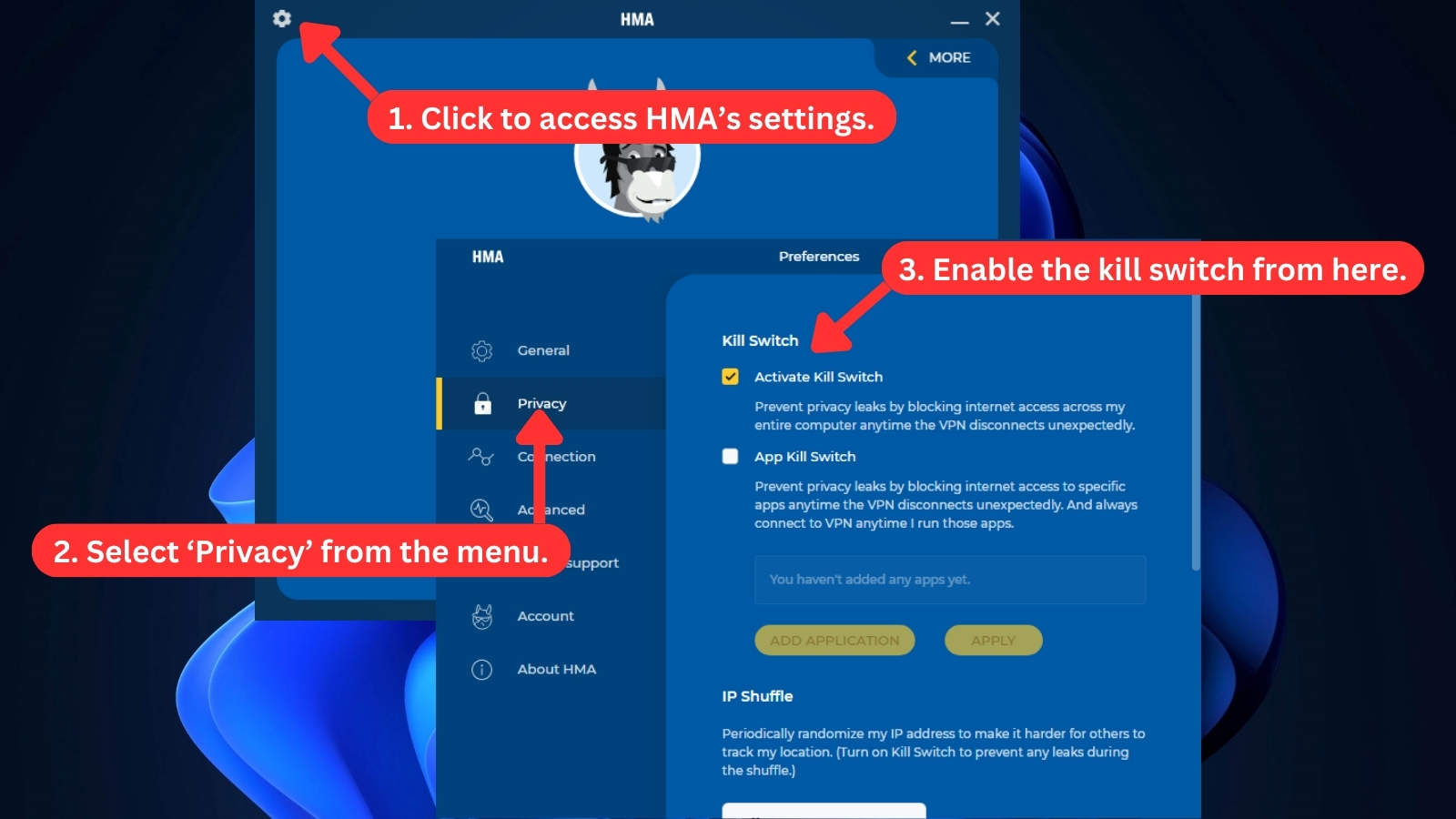
- Kill Switch: One of the benefits of HMA VPN is that it has a kill switch feature that protects your online privacy in case the VPN connection drops. This feature, which is available for Windows, Android, and Mac, stops any data from leaking if the VPN connection is interrupted.
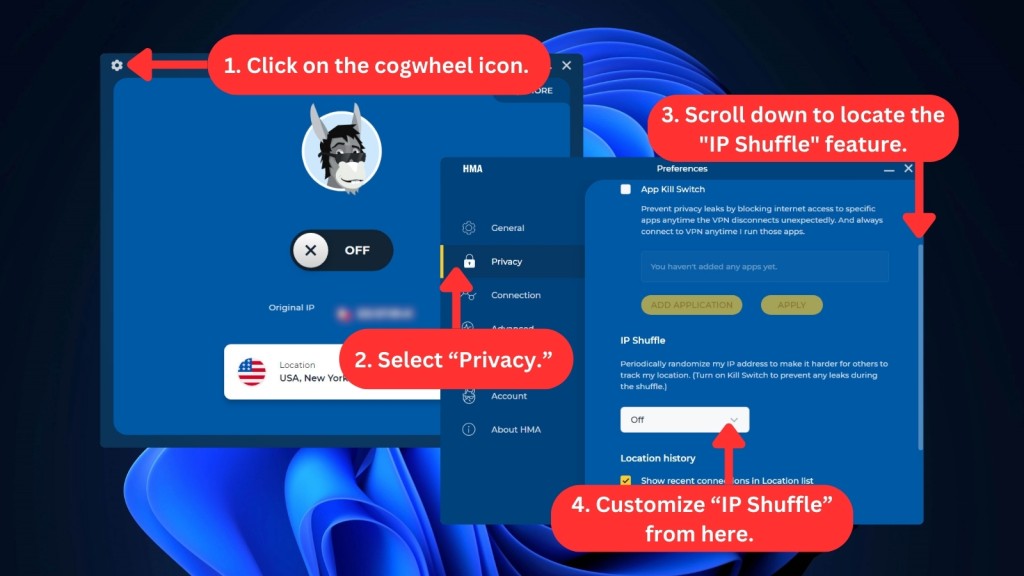
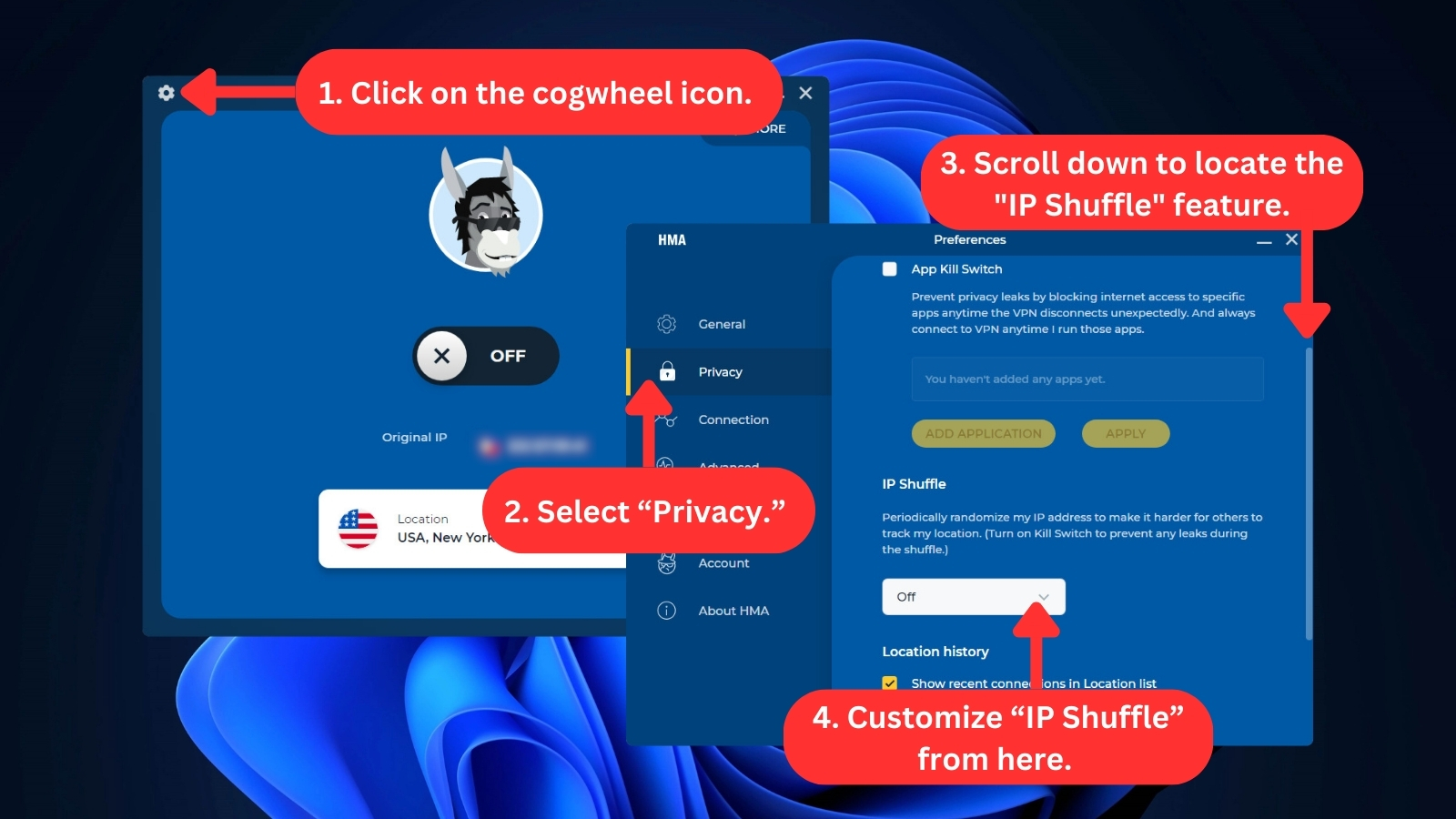
- IP Shuffle: If your current IP is unexpectedly banned, you can get a new one from the same or another place with the IP Shuffle feature of HMA VPN. Its function is to establish a random time interval for changing your IP address. It works similarly with 'IP Refresh,' where you can instantly change your IP address with just one tap or click. These features are included in all HMA VPN applications.
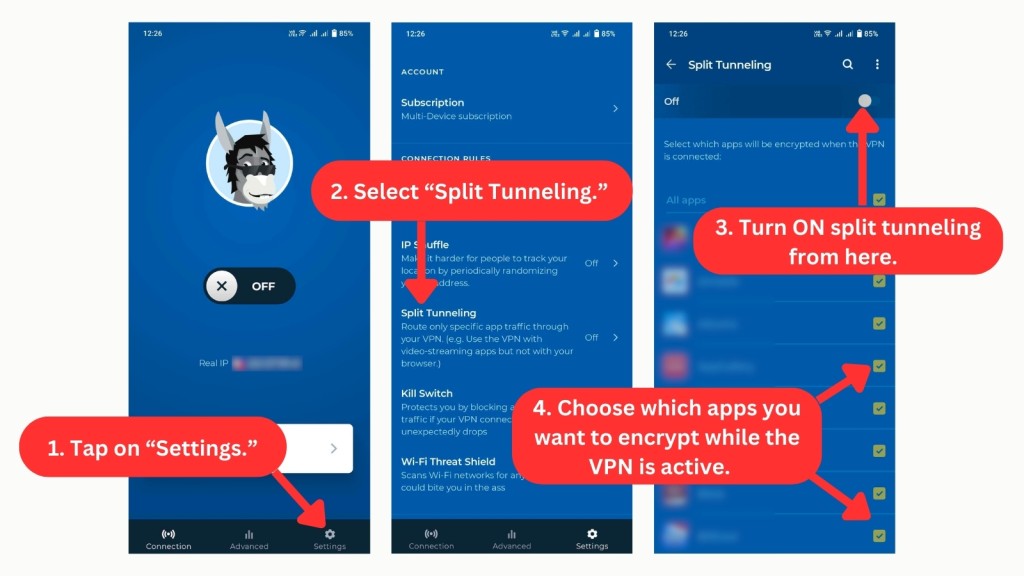
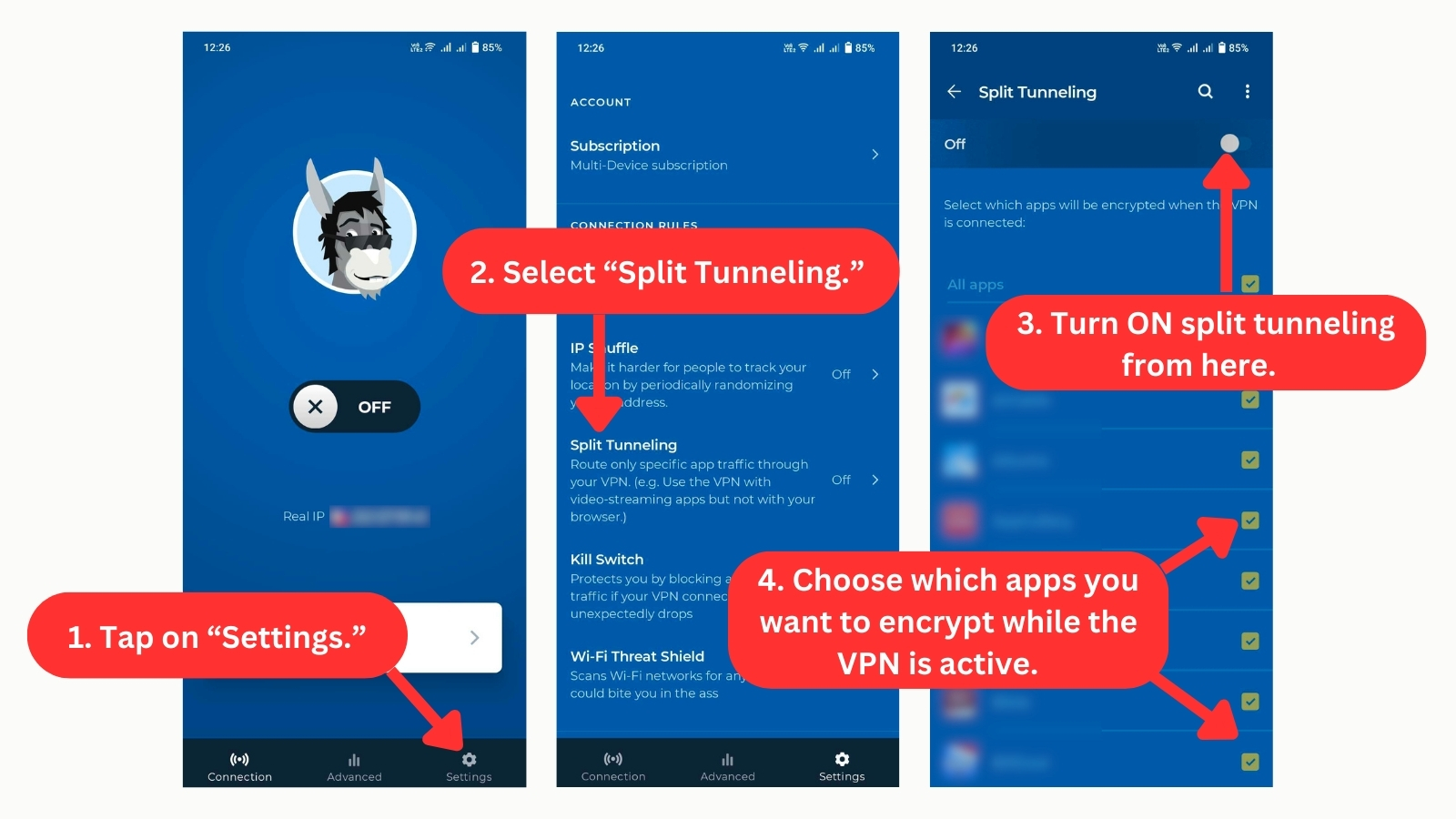
- Split Tunneling: Available only on Android, this feature lets you choose which apps or websites use the VPN connection and which ones don't. This way, you can enjoy the advantages of a VPN without sacrificing your speed or access to local content.
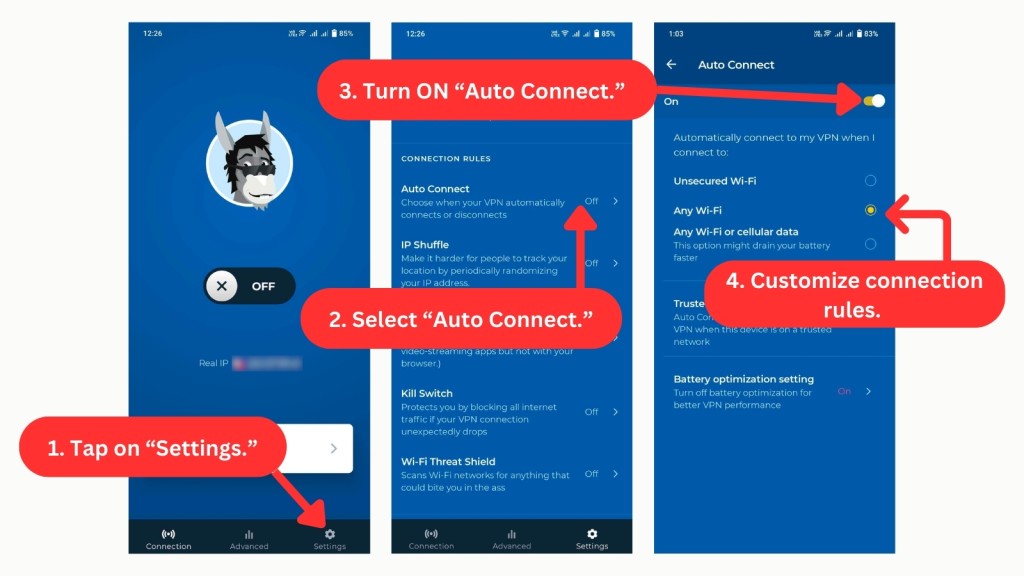
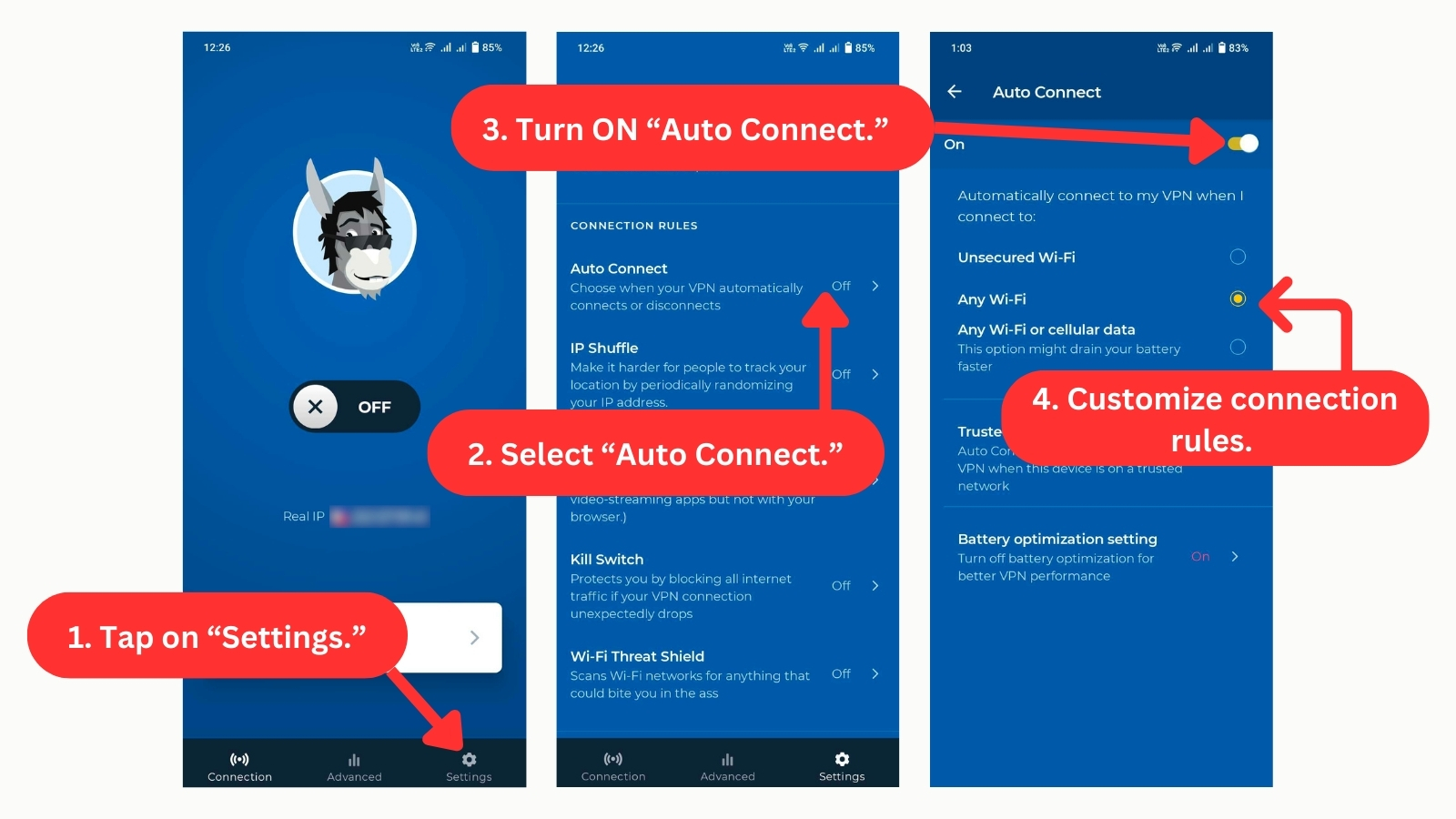
- Automatic Connection Rules: Also exclusive to Android devices, this feature enables HMA to automatically activate when your device connects to a new Wi-Fi or cellular network.
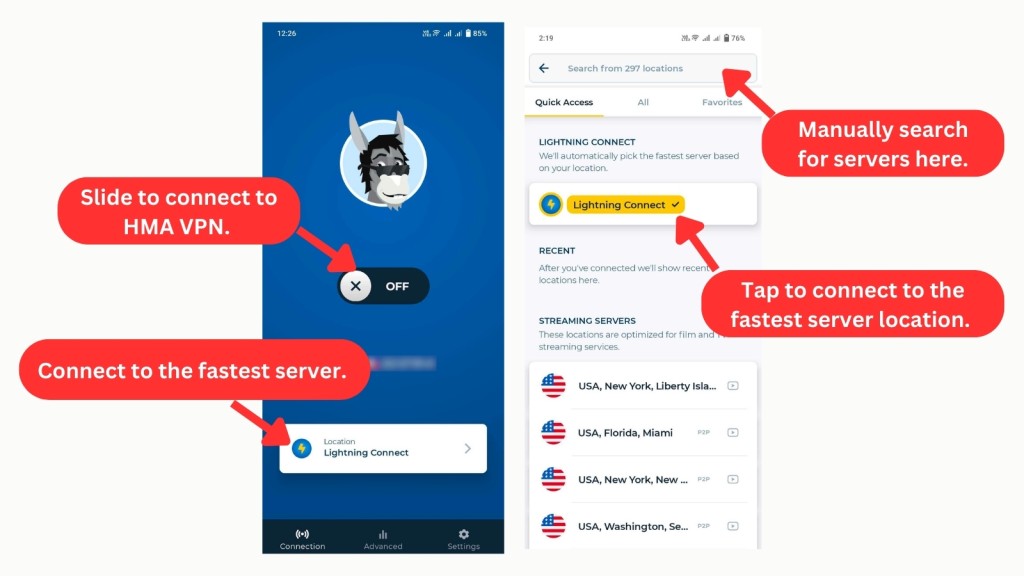
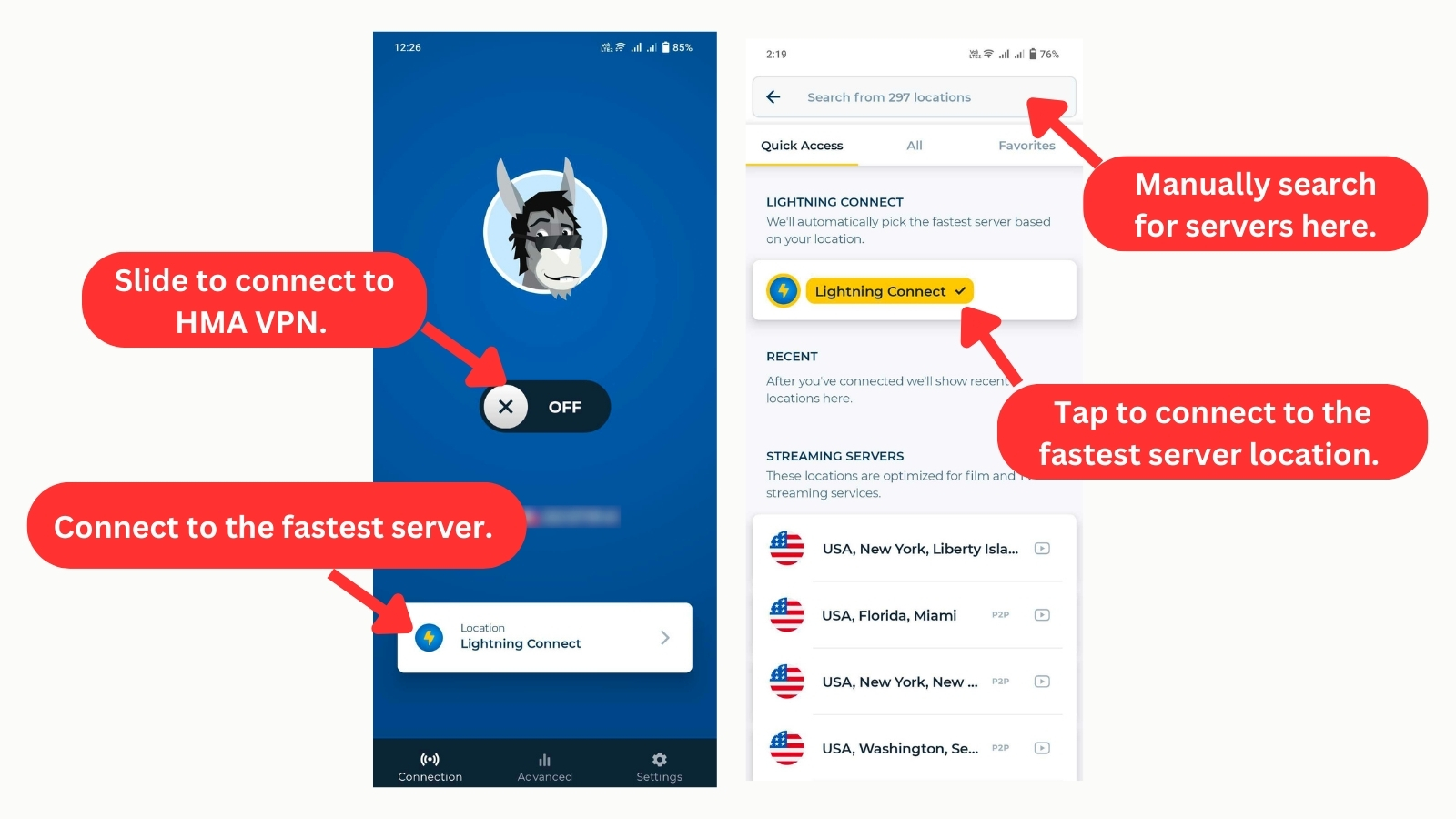
- Lightning Connect: With just one click, this feature connects you to the fastest server based on your true location, thanks to HMA VPN's smart algorithms. Access it easily on the home screen or in the app's server page under "Quick Access." This feature is now available on all supported apps.
- Unlimited Server Switches and Bandwidth: With HMA VPN, you can freely switch servers for better content access and faster browsing at no added costs. Plus, you'll enjoy unlimited data across all HMA VPN apps.
Server Count & Infrastructure
HMA’s server network covers many regions globally, but it’s not as extensive as some of the top-rated VPNs. Our Score: 8/10
In this segment of our HMA VPN review, we check the VPN's impressive server network. While it may not have the highest number of servers, they’re distributed evenly across the globe. However, there are still some issues with this aspect of the service.
HMA VPN boasts of having servers in more than 210 countries, but most of them are virtual. Rather than being physically located in the advertised country, these servers route your traffic through a different location while giving you an IP address from the country you selected.
However, using virtual servers could impact performance. Some virtual servers may introduce higher latency, and certain websites or services might detect them and block access. This VPN does have one advantage, though - it allows you to select specific cities in some countries and switch between locations as much as you want.
All that being said, HMA VPN falls behind other VPNs in terms of server quantity and quality. It has only 940+ servers, while VPNs with the most servers have more than 7,000. This service also hasn’t made any huge changes to its server locations for a long time, unlike other VPNs that keep growing their networks.
UI/UX Design & Ease of Use
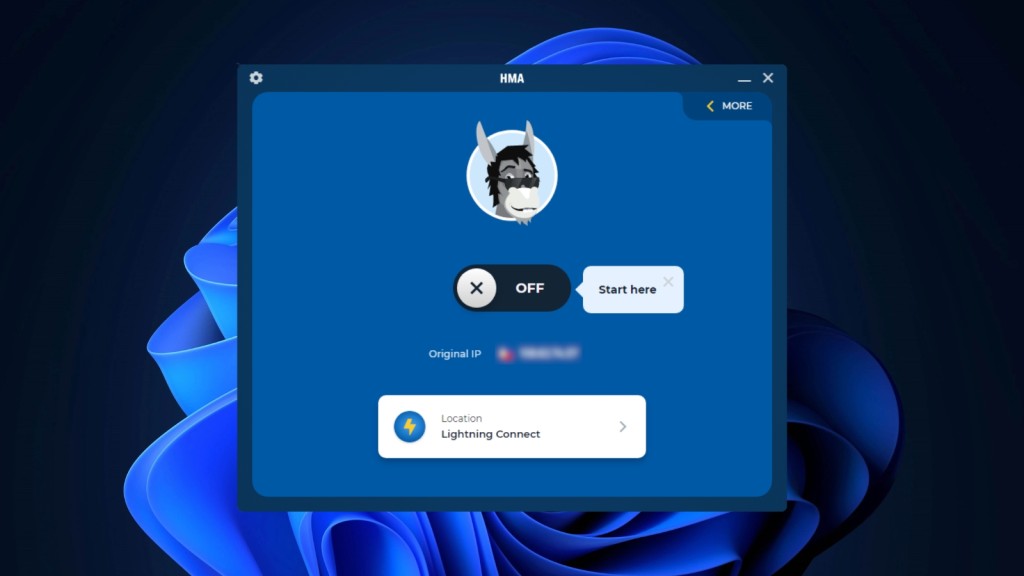
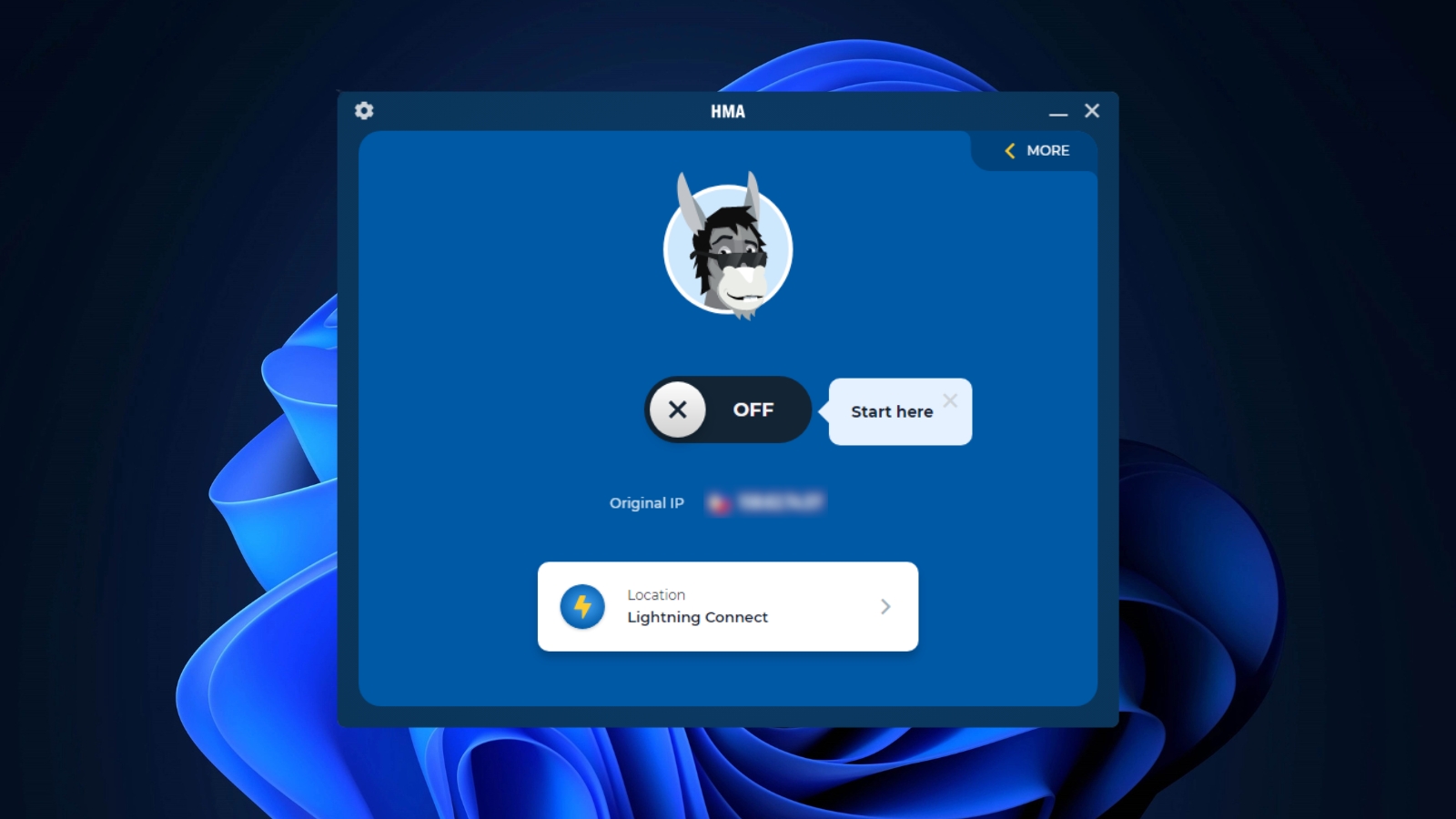
HMA has an easy-to-use application that anyone can navigate. The only drawback is that the window size is fixed and can’t be changed. Our Score: 8/10
This VPN service has a unique and entertaining approach to its UI, from its comical name to the amusing donkey mascot featured on its website and apps. Over the past year, the support for platforms has only increased, and the provider has been semi-successful at delivering a consistent user experience across most platforms.
The latest update streamlines the app, eliminating unnecessary clutter and presenting a more modern design. While this alone is a commendable improvement, the most significant enhancement is the app's increased simplicity.
Let's delve into the details of HMA's user interface.
- Home Screen: The front face of HMA VPN is refreshingly simple. It features the brand's donkey mascot, whose facial expressions change each time you mask your location. The home screen offers a large connect button to establish the connection. Below this, you’ll find your current IP address, and if you’re connected to a server, the new IP address will also be displayed here. There’s also a button to access the server list.
- More: This section shows a traffic meter with real-time stats on your downloaded and uploaded data while using the VPN. You’ll also find options like the kill switch and auto-connect settings to manage your connection.
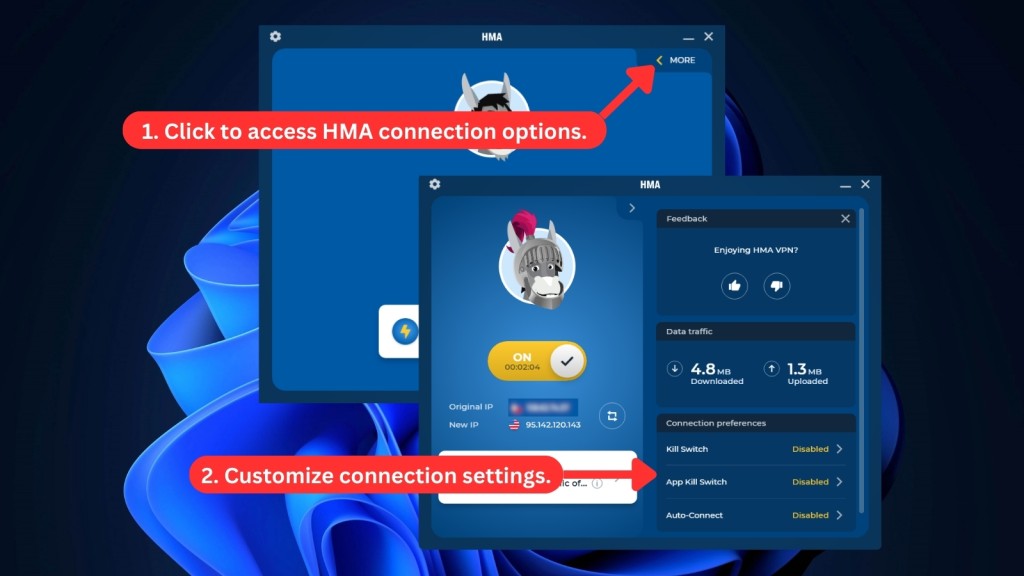
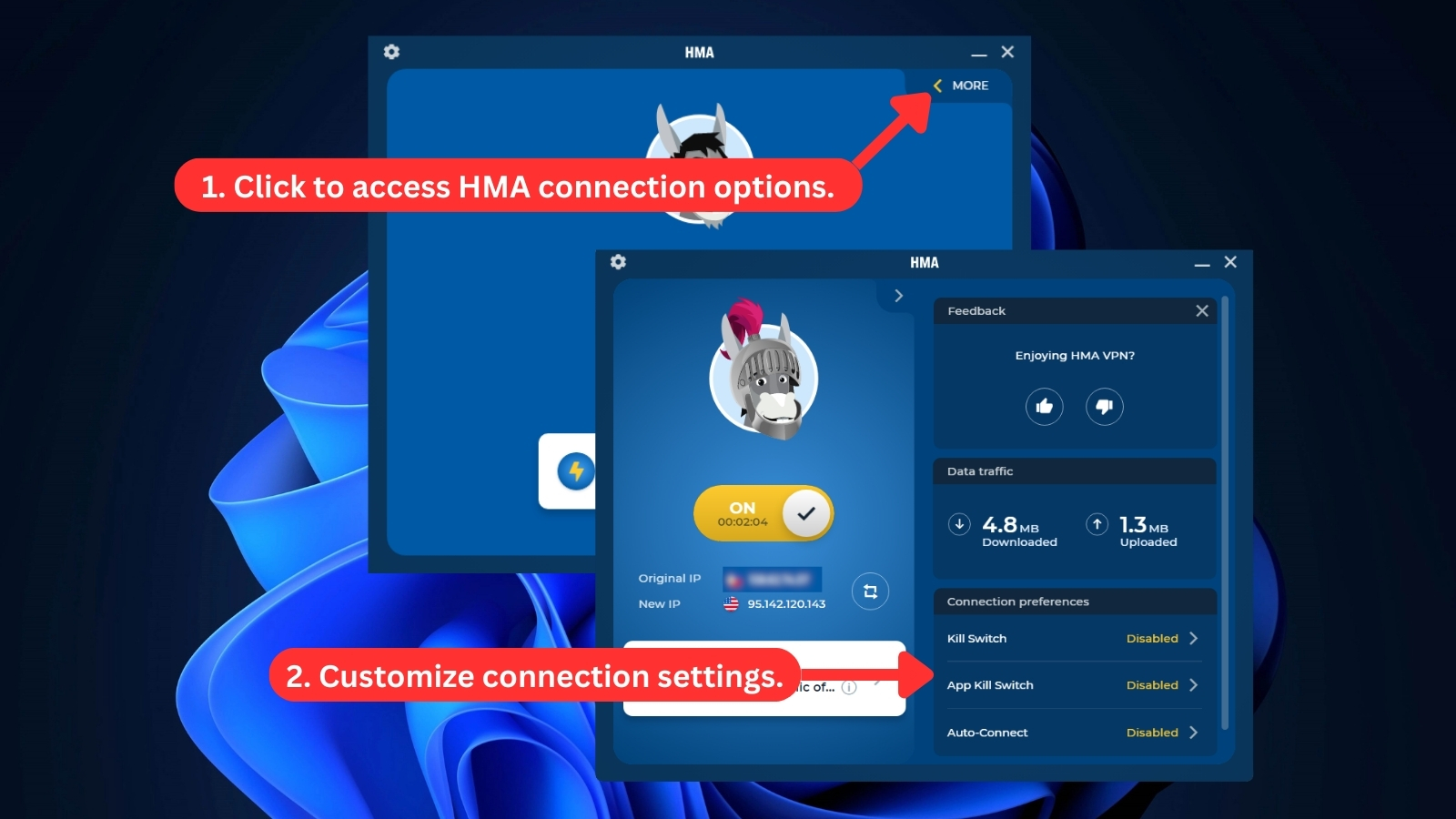
On the top left-hand side of the home screen, you’ll find a cogwheel icon that takes you to HMA VPN's menu. The menu offers seven options:
- General: This section lets you set the app to launch automatically when the device starts up. You can also turn off notifications for the app from here and change the language. The choice to opt in for beta testing updates, along with checking for updates, is also available.
- Privacy: This section is where you can turn on the kill switch and split tunneling (only on Android) features. From here, you can also set the duration for the IP Shuffle feature and check the location history. Enabling access to local devices is also possible from this section. This is a useful feature for users who often connect external devices to their computers.
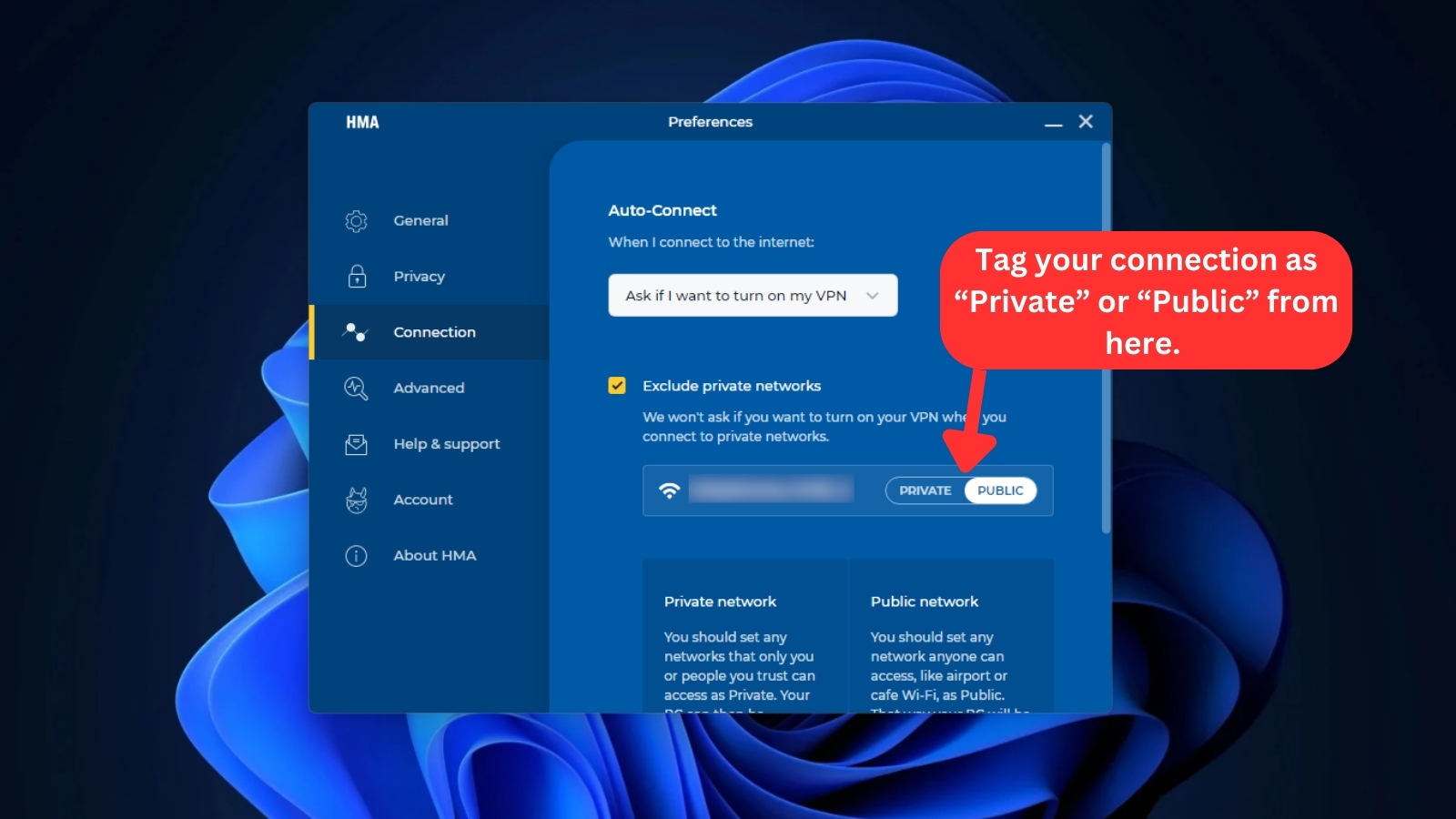
- Connection: This section allows you to configure your connections and select which networks to avoid. You can choose to filter your connections by private or public. This feature can also help protect your device from exposure to public networks and prevent potential vulnerabilities when you switch between different networks.
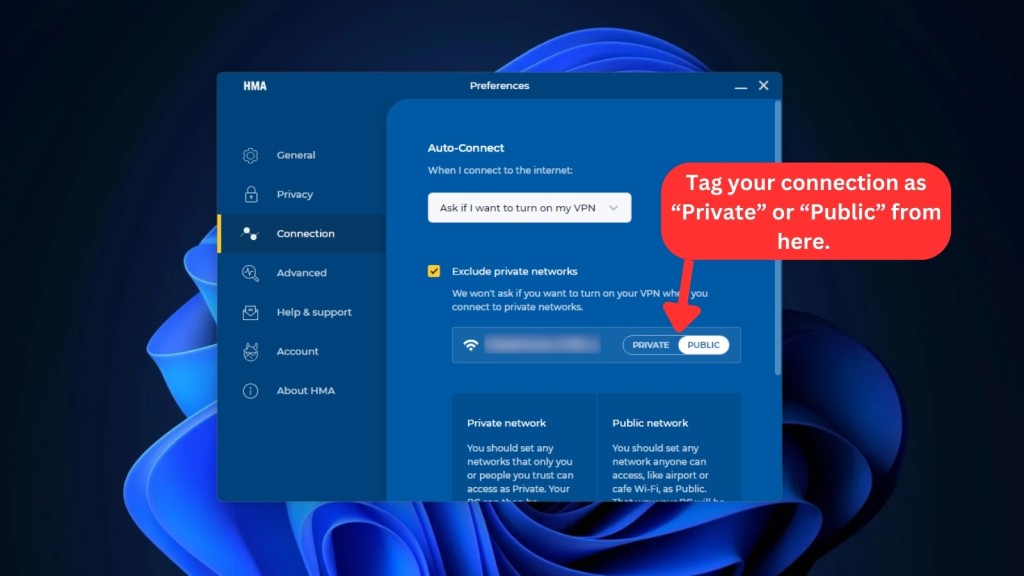
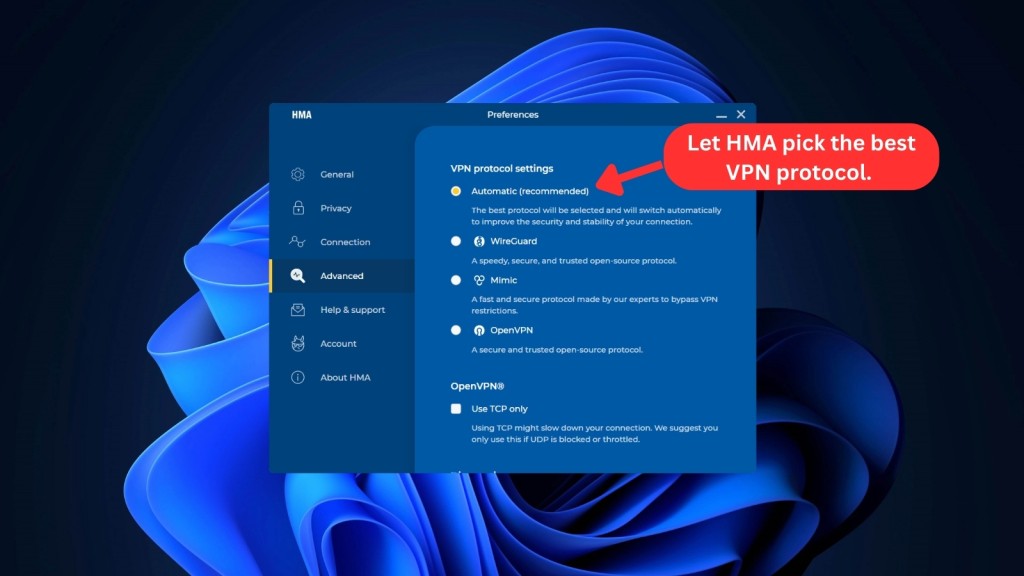
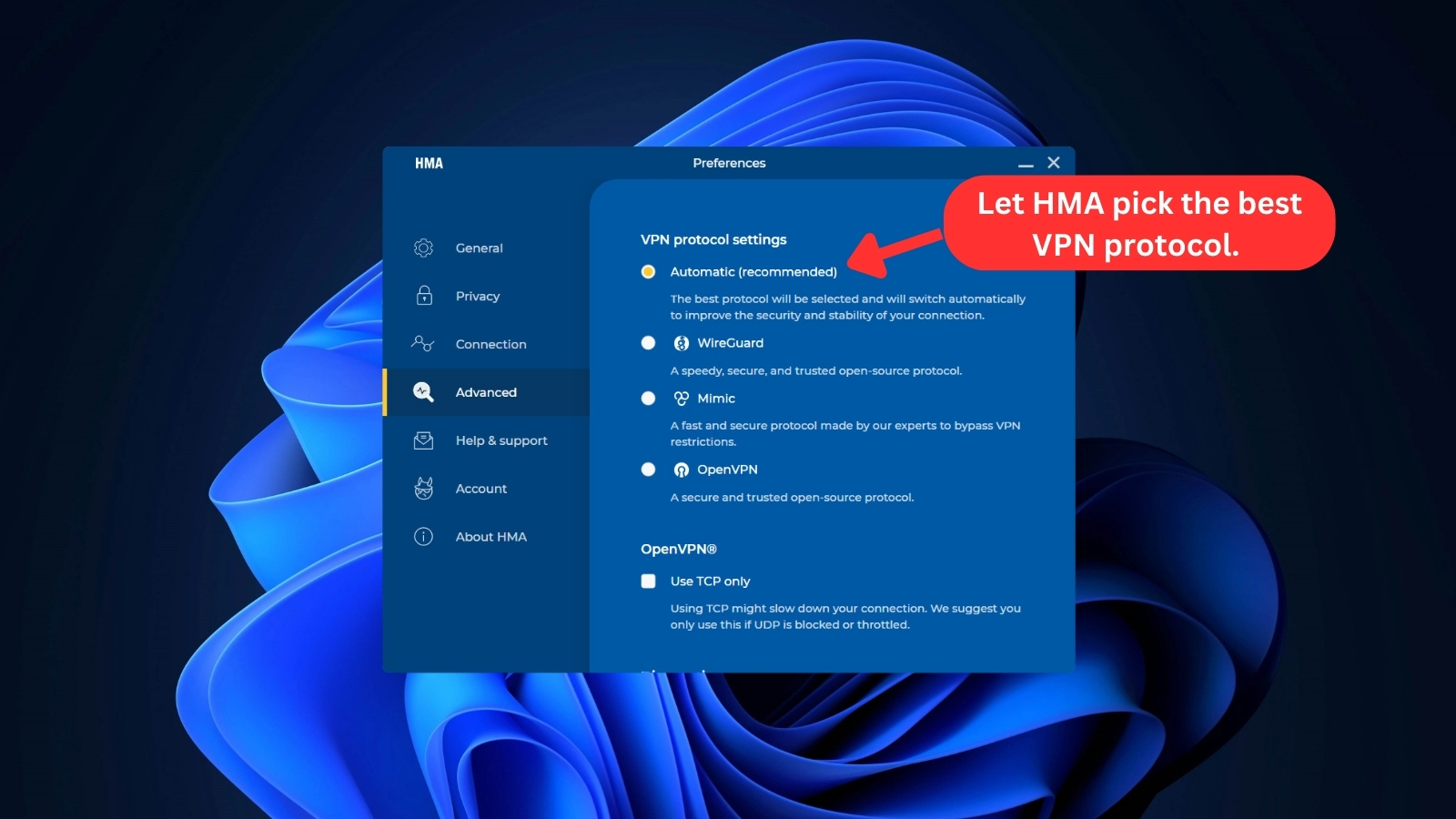
- Advanced: This section of the Windows app lets you switch between different protocols, including OpenVPN, WireGuard, and Mimic. You can opt to use a TCP-only setting for the OpenVPN protocol that blocks UDP. This setting is preferable if you’re streaming or gaming. There’s also a diagnostic feature that lets you save logs to share with HMA support for troubleshooting.
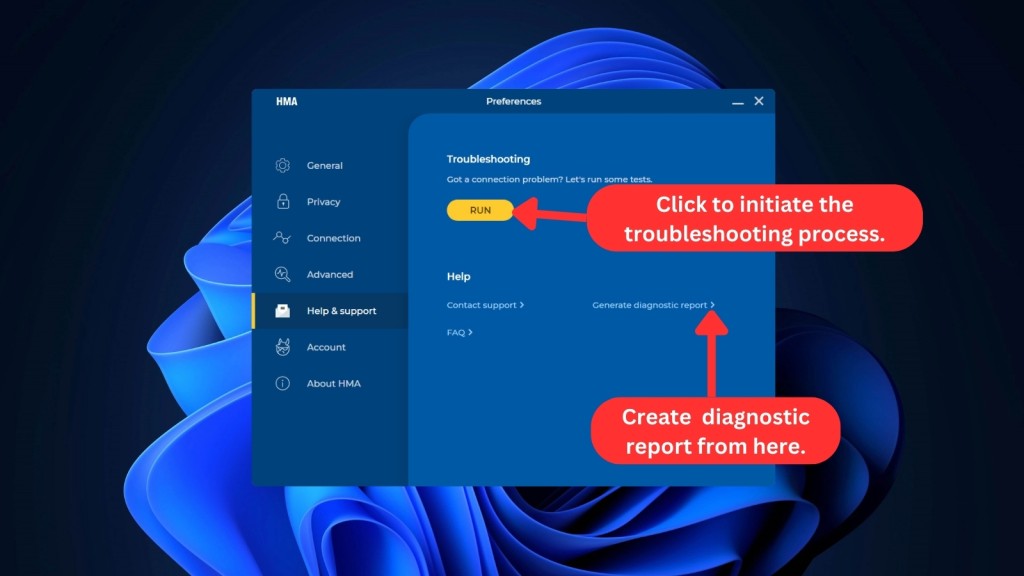
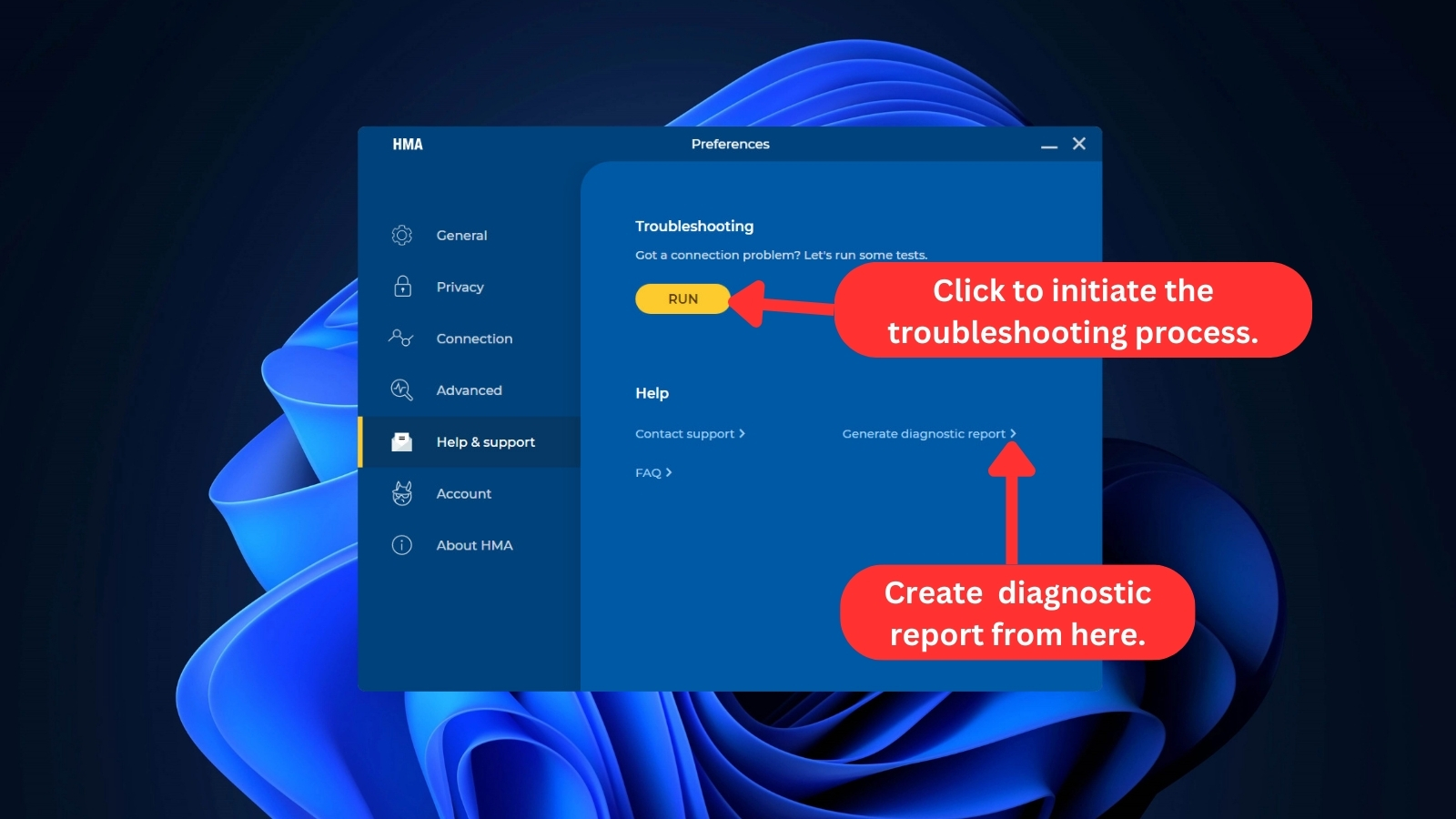
- Help & Support: This shortcut opens a page on HMA's website from where you can submit an official support request and access their FAQ section. This section is handy if you're facing any technical issues. You could also use this section to troubleshoot tests if you’re experiencing connectivity issues. You can generate diagnostic reports from here as well.
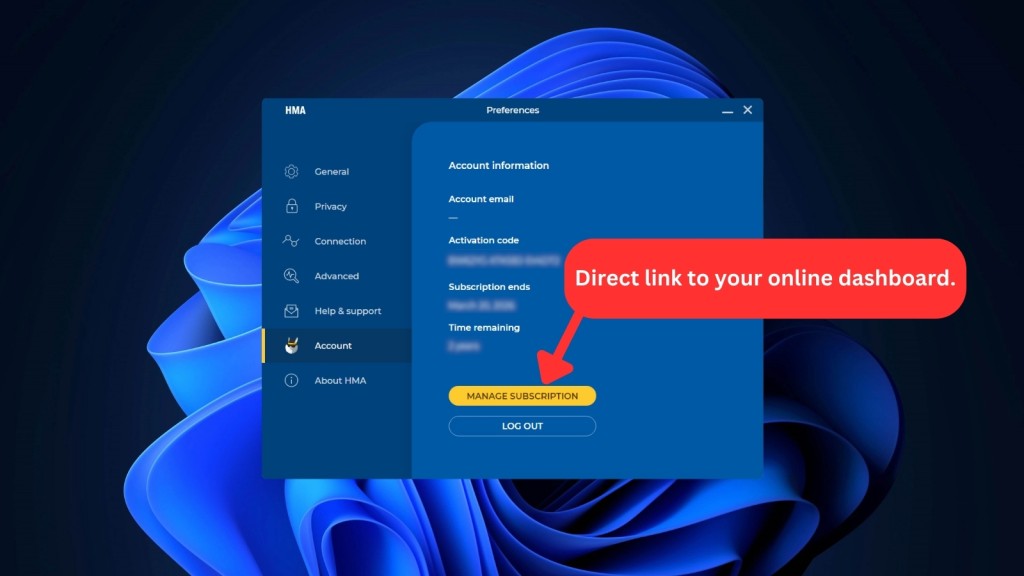
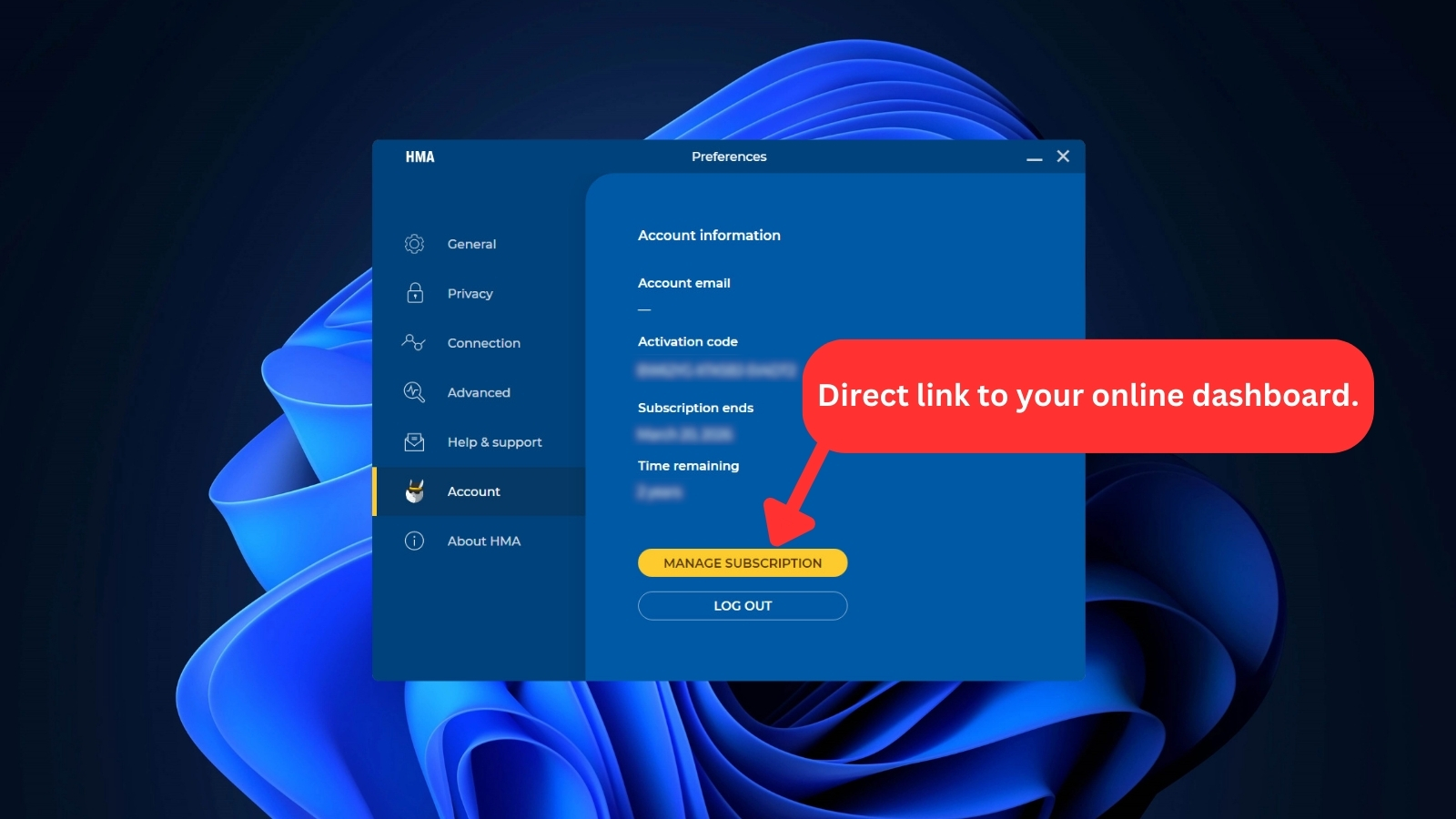
- Account: This section shows you the basic information on your current membership, including the email ID you used to sign up for the membership. You can also access the activation code you could use to access your membership on other devices. If you want to see when your subscription date is ending, you can check that from here, too.
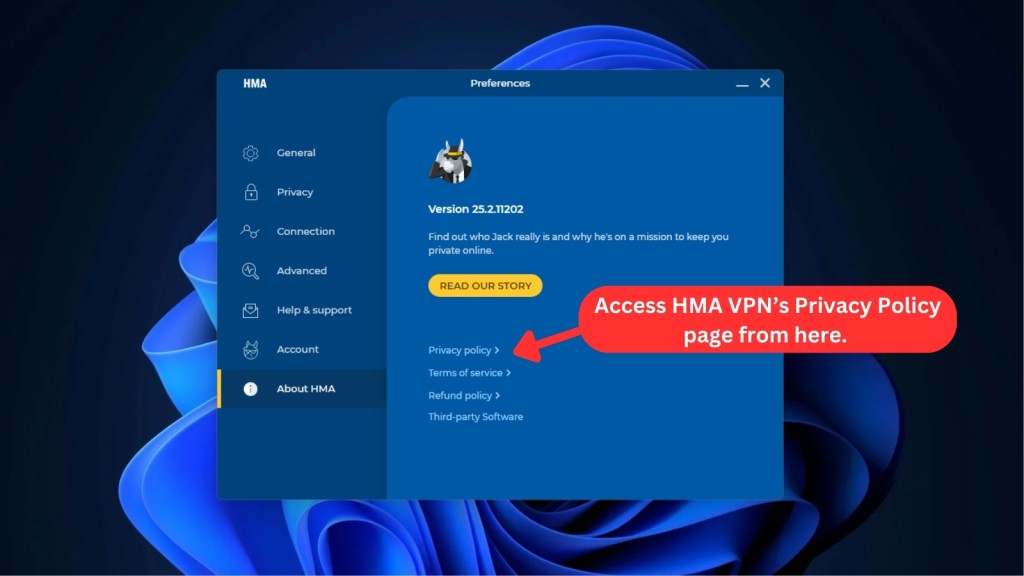
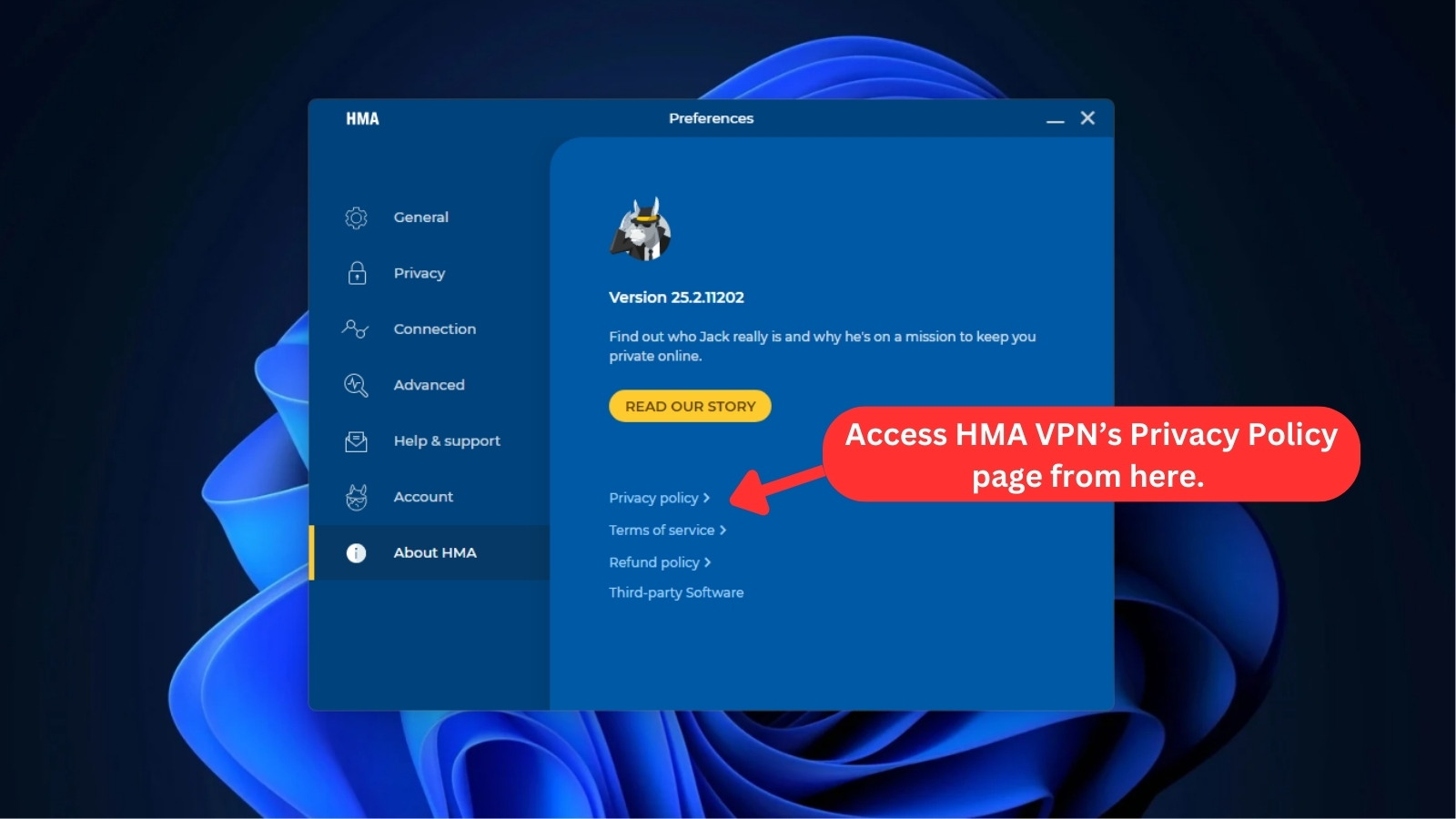
- About HMA: This section allows you to check the currently installed version of HMA and provides links to the VPN's privacy policy, terms of service, and refund policy.
In mobile apps, HMA maintains a consistent home screen design. A prominent toggle button in the center features a donkey that changes appearance upon VPN connection.
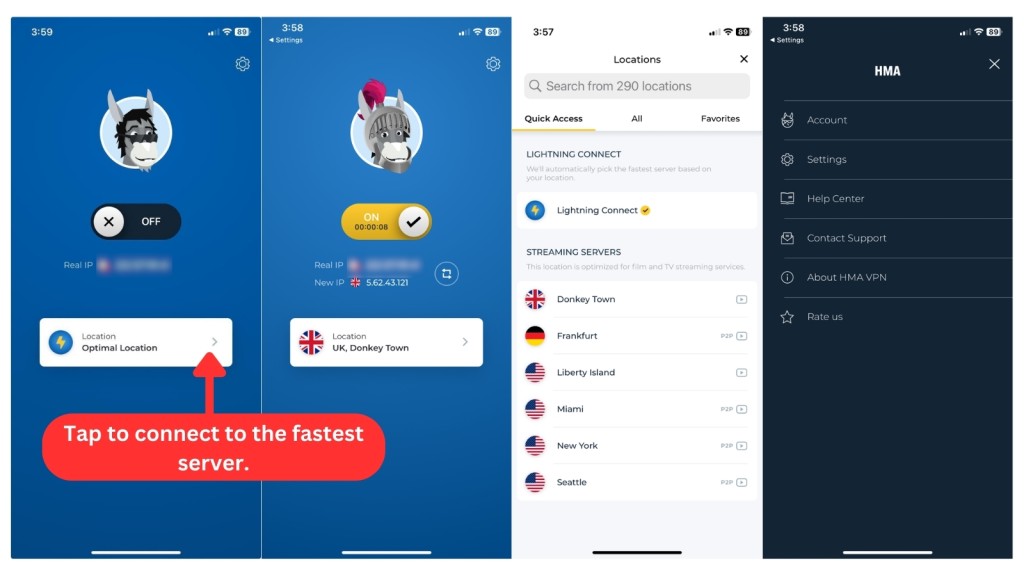
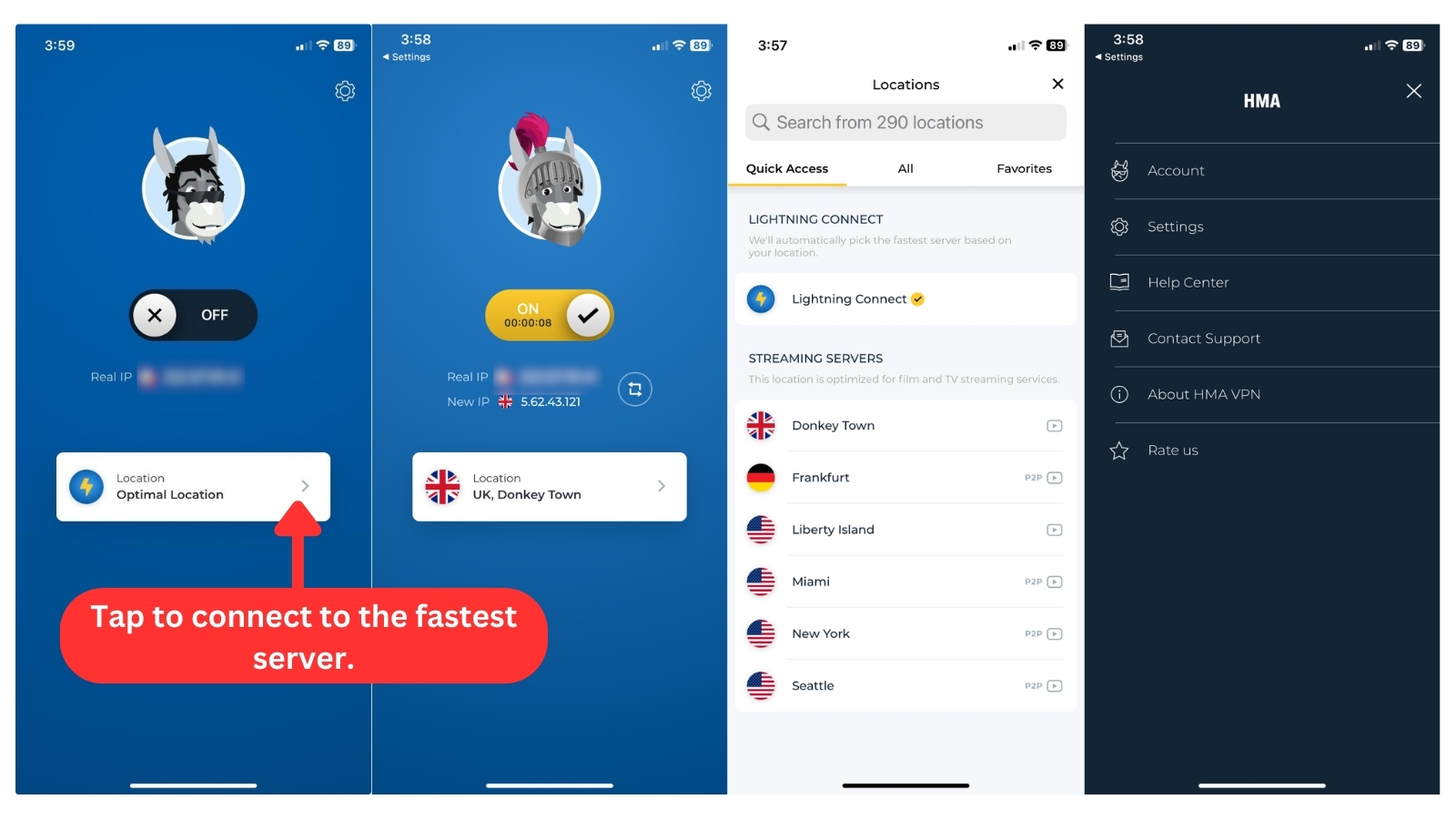
However, the difference lies in their settings. iPhones adopt a straightforward approach, while Android goes further, providing advanced settings for a more customized experience.
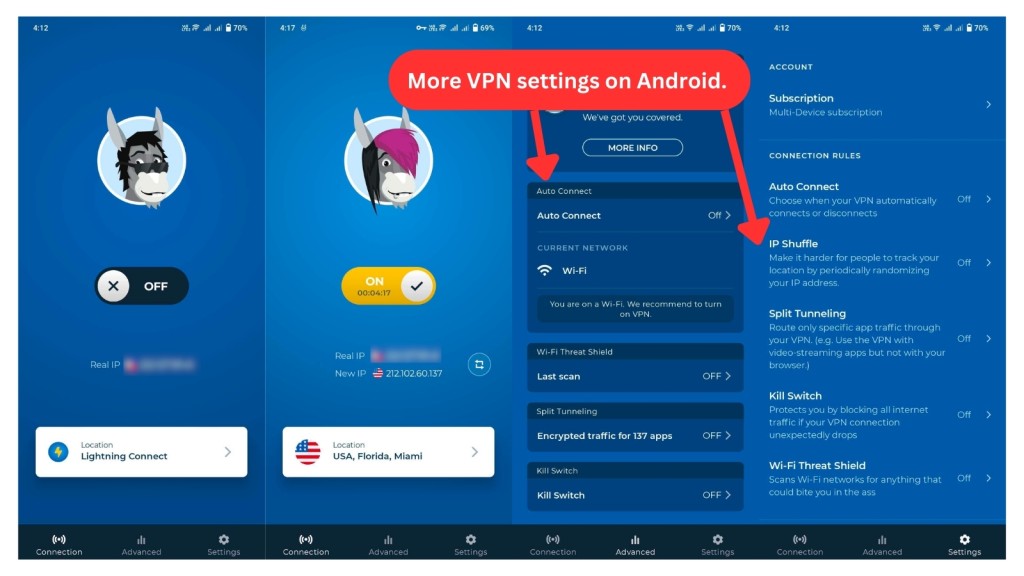
Overall, HMA has excelled in delivering a user-friendly interface. However, the experience could be enhanced if they hadn't decommissioned their Web browser extensions and if the app's window size were adjustable. If you have ultra-high monitor resolutions, scaling it up a bit might be necessary, as the text can be challenging to read at times.
Media Streaming, Torrenting, and Gaming Support
HMA can unblock Netflix and other streaming services, but torrenting should only involve legal files. The gaming performance is also decent. Our Score: 6/10
It’s now time to put HMA's ability to unblock popular streaming services, support torrent downloads, and gaming performance to the test. Check out our detailed assessments below for an in-depth discussion of our findings.
Is HMA VPN Good for Streaming?
Yes, HMA VPN is good enough for media streaming. Its dedicated servers can unblock websites like Netflix US, Hulu, Max, and Discovery+. However, it fails to bypass sports blackouts and may not be as effective with other platforms, such as ESPN+, Disney+, Amazon Prime Video, and BBC iPlayer.
That said, our testing indicated that HMA VPN's streaming performance was generally fast and stable, but it's worth noting that this may vary based on server load and location. To give you a quick overview, here's a handy table listing some of the major US-based streaming platforms that HMA VPN has successfully unblocked.
HMA VPN broadens your reach to streaming platforms internationally, not confining you to just the US. Here's a glimpse of what you can expect.
Overall, HideMyAss isn't the best VPN for streaming. But if you're primarily seeking a VPN service to unblock a wider range of streaming services, we recommend exploring other options, such as NordVPN or ExpressVPN.
Is HMA VPN Good for Torrenting?
HMA can work for torrenting if you're only looking at speed. Our tests, conducted with uTorrent and BitTorrent clients, showed seamless downloading of torrent files.
But as HMA is headquartered in a 5 Eyes Alliance nation, it raises some concerns. We recommend sticking to legal torrent downloads just to be safe. While the VPN provides P2P-optimized servers in the USA and Europe, it also scans downloaded files and restricts copyrighted materials.
Another consideration is that the service has previously cooperated with law enforcement agencies. This would be a drawback if you prioritize privacy. And although it has a kill switch for extra security, HMA lacks port forwarding and SOCKS5 proxies, which can contribute to faster speeds. So, if torrenting is your thing, we recommend using the best VPN for torrents.
Is HMA VPN Good for Gaming?
Yes, HMA can be a good choice for gaming, yet it also has limitations. In our tests with Fortnite and Call of Duty: Warzone, we found that local servers provided decent performance, but distant ones resulted in higher ping and increased latency. Since HMA lacks gaming-optimized servers, other top gaming VPNs may offer smoother gameplay.
Another limitation is the absence of a Smart DNS feature. If you want to use HMA on consoles like PlayStation or Xbox, you'll need to configure it on a router, which takes some extra steps. The good thing is that it does have protection against DDoS attacks, which is handy if you're gaming competitively.
Security & Privacy
Although HMA doesn’t expose your private data, it gathers a significant amount of personal information. This practice makes it an unfavorable option for privacy-focused individuals. Our Score: 3/10
While HMA VPN may have strengths in some areas, its weaknesses in other areas may outweigh those benefits. Ultimately, though, none of these considerations may matter much if the VPN service is unable to deliver complete online anonymity. Therefore, it’s crucial to examine how this VPN safeguards your online privacy and security.
HMA VPN Protocols
While it's true that HMA provides users with industry-standard 256-bit AES encryption, it's worth noting that this level of encryption is widely available among most VPN services these days. As for tunneling protocols, HMA VPN broadly offers 3 options: OpenVPN, Mimic, and WireGuard.
Here is a brief overview of each protocol and its benefits.
- OpenVPN: This protocol is the most widely used and trusted VPN protocol in the industry. It offers strong encryption, high compatibility, and fast speeds. OpenVPN is available on all HMA apps for Windows, Mac, Android, iOS, Linux, and routers.
- Mimic: If you want to access geo-restricted content in countries with strict Internet regulations like China, Iran, and Turkey, you can use Mimic. It’s HMA's own custom-made protocol that disguises your VPN traffic as regular HTTPS traffic. This makes it harder for firewalls and censors to block your connection. Mimic is available on Windows.
- WireGuard: This is a new and innovative VPN protocol that promises to deliver faster and more secure connections than other protocols. It uses modern cryptography and a simple design to achieve high performance and reliability. We've only seen this protocol exclusively on the Windows app, the same as Mimic.
According to HMA's website, the IKEv2/IPsec protocol is available for both Mac and iOS devices. However, we were unable to verify this information since our inquiry about the default protocols for each app went unanswered by their customer support.
Also, other native apps don't list the supported protocols, leaving us without the option to check or change them. The flexibility to switch VPN protocols to WireGuard, Mimic, and OpenVPN is exclusive to the Windows app.
Does HMA VPN Keep Logs?
No, HMA doesn’t keep logs. That means it doesn’t track or log your Internet activity. However, HMA still collects some personal information from its users, such as email addresses and usernames, which is a common practice among VPNs. The data that HMA does log in is aggregated and can’t be traced back to any specific user.
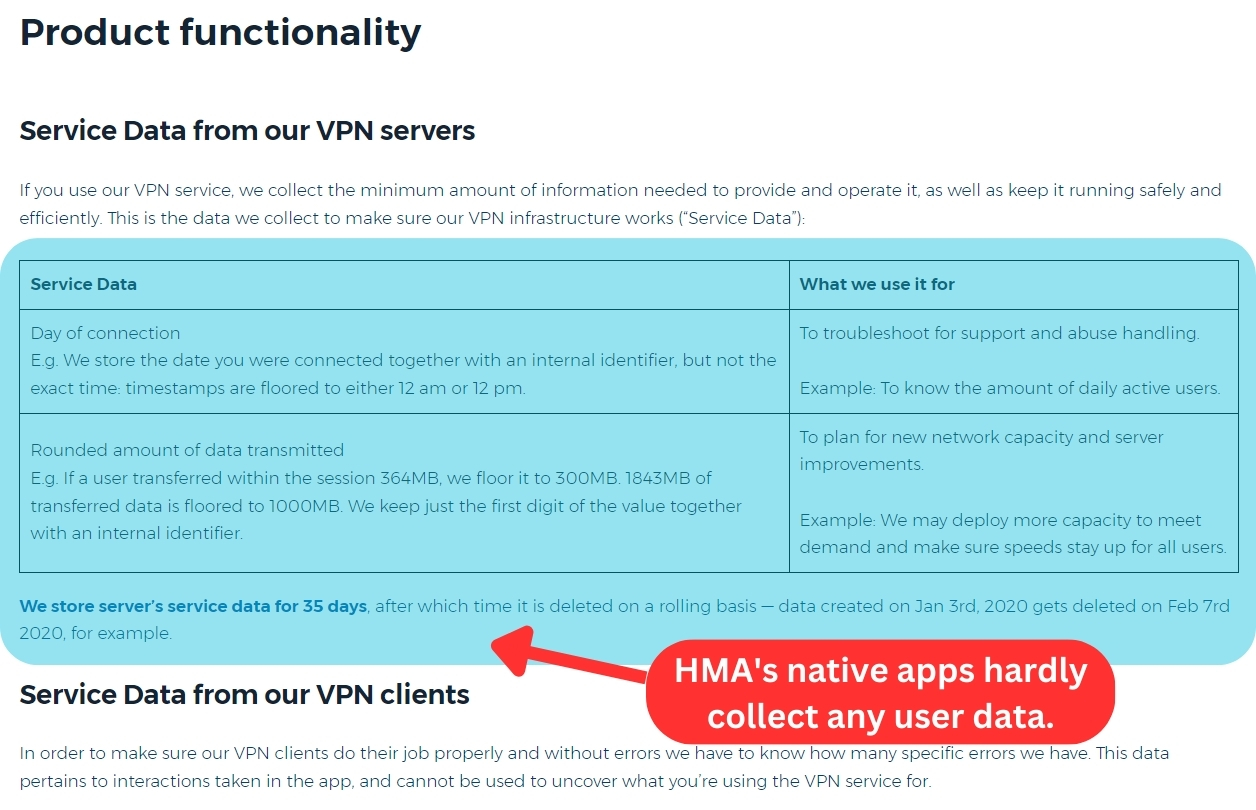
This doesn’t change the fact that HMA has a poor track record of safeguarding its customers’ privacy. To gain its users’ trust, the service has undergone a third-party security audit by VerSprite, a reputable cybersecurity firm. The firm has given HMA a clean chit by awarding it a ‘low-risk privacy impact’ rating.
In the recent past, the HMA VPN has updated its logging policy and removed invasive data retention, but we remain skeptical due to the company's history of cooperating with authorities. Moreover, HMA VPN is based in the UK, a country with intrusive data retention laws, which only compounds the issue.
Given the risks involved, we advise you to be careful with this VPN.
Does HMA VPN Leak/Expose Your Private Data?
No, HMA VPN doesn’t leak your data. We thoroughly tested it for VPN leaks, including DNS leaks, and found no exposure of private information.
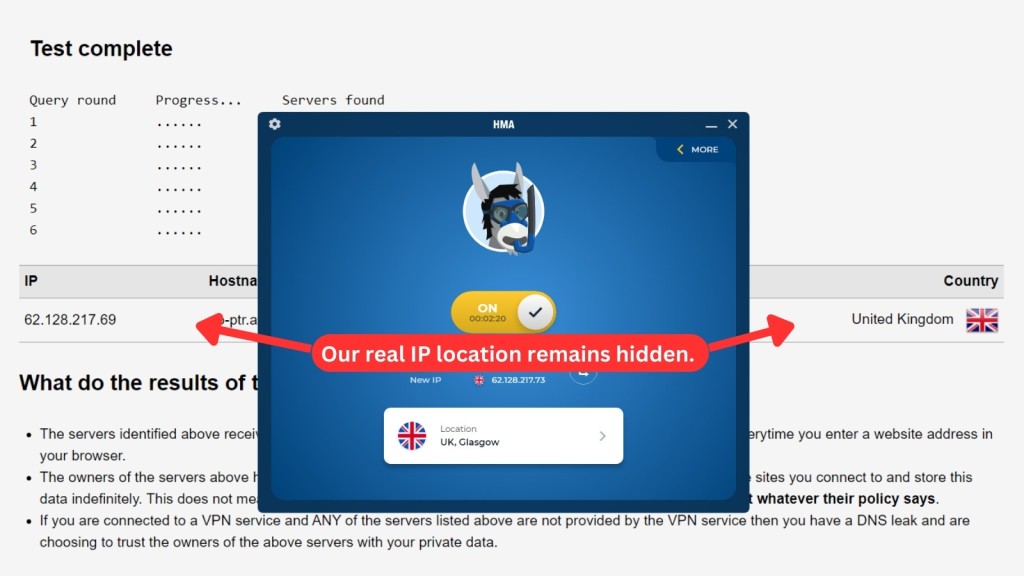
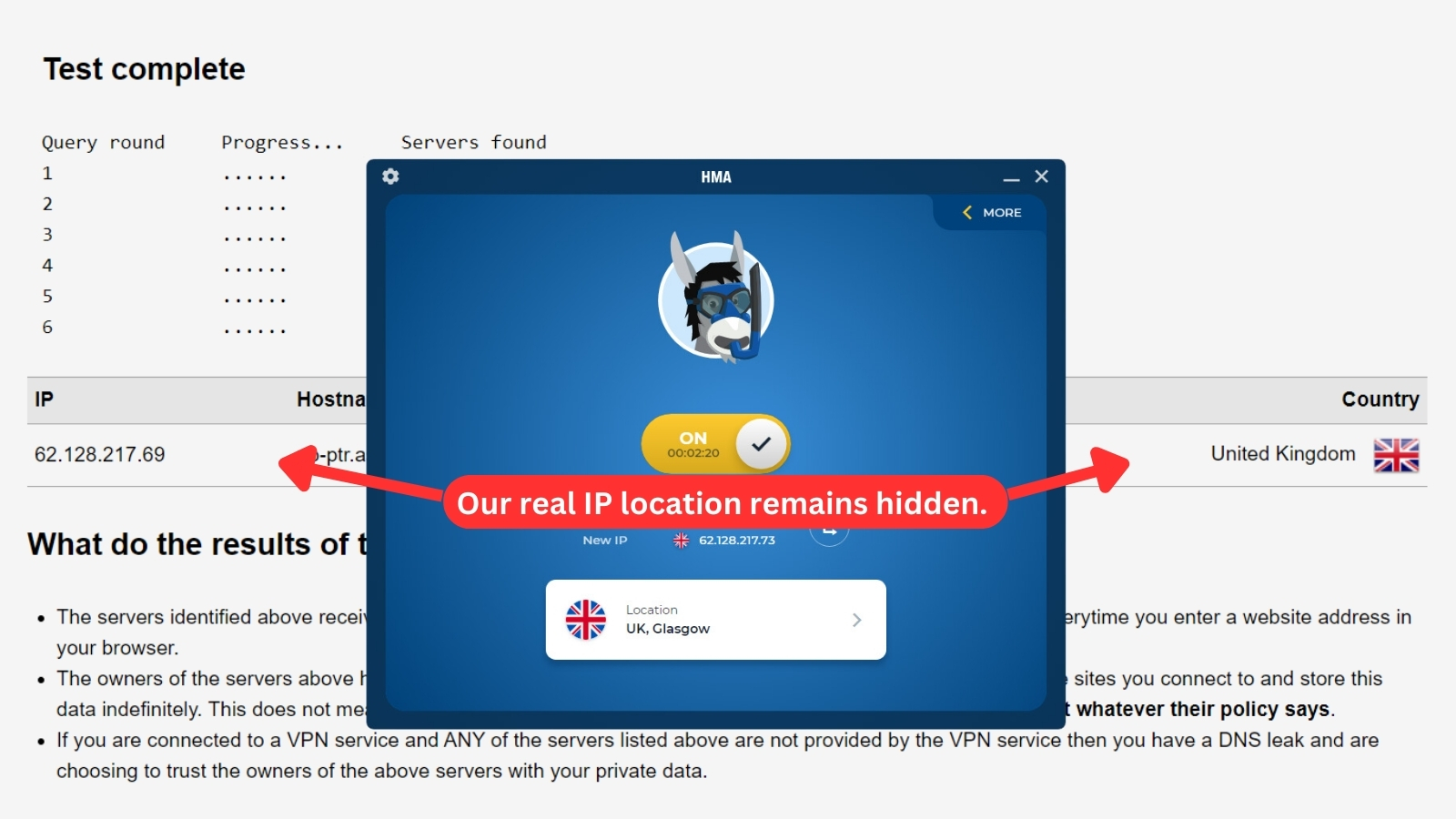
While our virtual IP address and its associated server were detected, our true information was never revealed, which is a testament to HMA's commitment to user privacy.
Speed & Performance
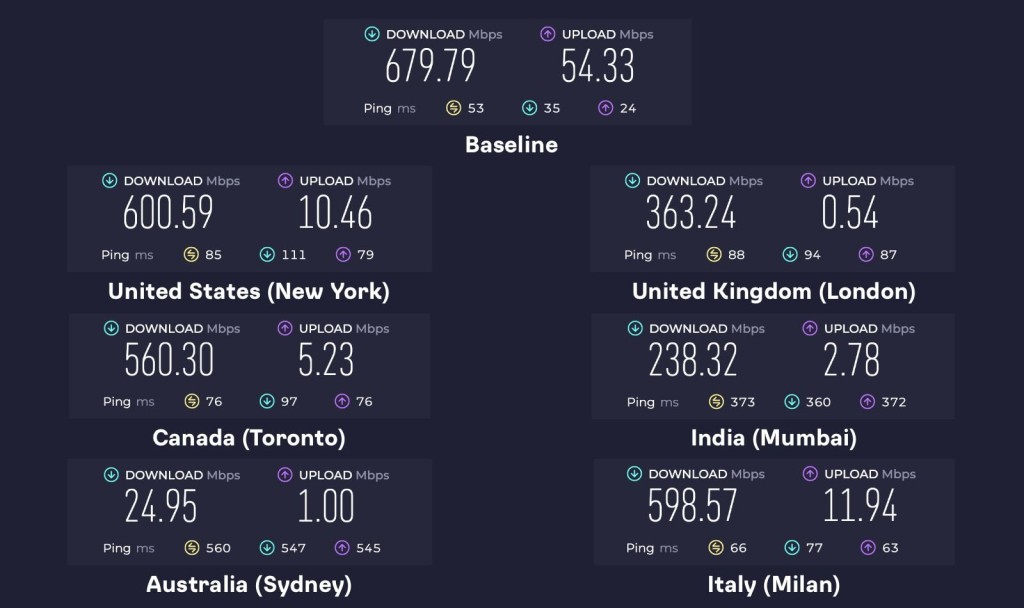
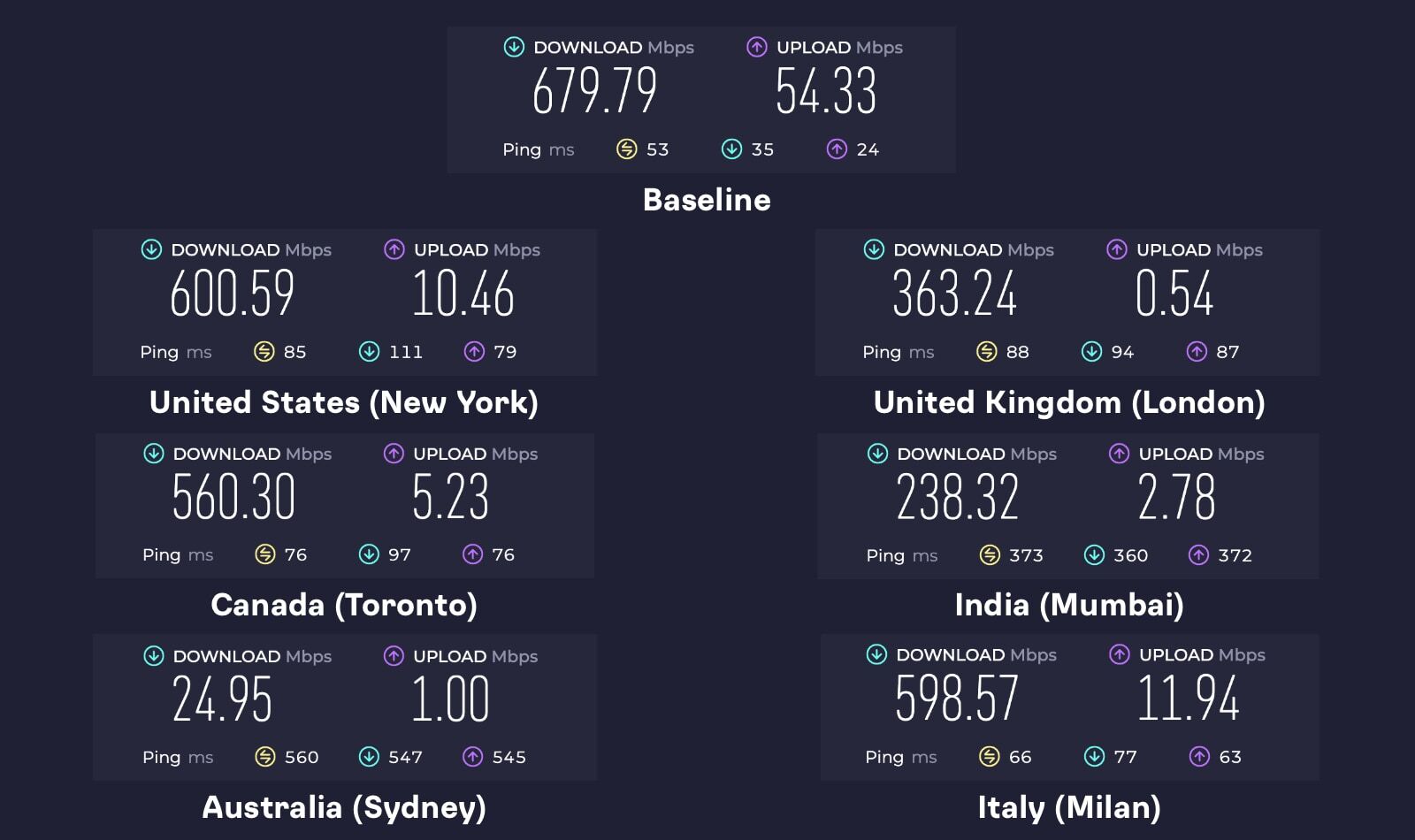
After conducting our speed tests, we found that HMA slows down your Web connection by approximately 42%, which is a manageable speed reduction. Our Score: 7/10
HMA doesn’t aggressively advertise its speeds, which gave us a bad first impression. However, we found its speed and performance to be moderately decent in this aspect.
For this test, we started with the speed of our Web connection without the VPN and got 679.79 Mbps for downloads and 54.33 Mbps for uploads. We then tested 6 servers around the world. It’s important to note that VPNs use encryption tunnels to mask your connection, which is expected to slow down the speed.
That said, here are the results of the rest of our server tests:
- US Server (New York): This distant server achieved above-average speeds in our tests. It had a download speed of 600.59 Mbps and an upload speed of 10.46 Mbps. The speed reduction was only 12%, which is much lower than the industry average. This speed is excellent for bandwidth-heavy tasks.
- UK Server (London): We’re located in Europe, and we expected the UK server to deliver better speeds due to its proximity. But that wasn't the case. The speed dropped by 47%, with a download speed of 363.24 Mbps. The upload speed also seemed to crawl at just 0.54 Mbps.
- Canada Server (Toronto): HMA's Canadian server did pretty well, reducing the speed by only 18%. With a download speed of 560.3 Mbps, it was just a bit slower than our baseline speed of 679.79 Mbps.
- India Server (Mumbai): With the server being quite far from us, we anticipated a slower performance, and that’s exactly what we got. Our download speed dropped by 65%, going from 679.79 Mbps to 238.32 Mbps.
- Australia Server (Sydney): Given the significant distance, we anticipated a result similar to what we saw with the Indian server. However, the download speed dropped even further to 24.95 Mbps, with an upload speed of only 1 Mbps. This marks a 96% reduction in speed, the largest decline across all the servers we tested.
- Italy Server (Milan): As the closest server to our location, we expected it to deliver the fastest download speeds. However, at 598.57 Mbps (a 12% drop from our baseline), it performed slightly slower than the US server, which was much farther away. It did, however, achieve the highest upload speed among all tested servers at 11.94 Mbps.
Upon testing, we found HMA VPN's server speeds to be reasonable, with an average speed reduction of approximately 42%. While this drop is noticeable, it’s not enough to cause significant frustration or disrupt online activities.
Customer Support
HMA offers decent customer support, but it doesn’t quite hit the mark for a VPN with its popularity. It has a solid knowledge base and ticketing support but lacks the convenience of live chat. Our Score: 6/10
During crises, it’s essential to have dependable customer support from your VPN provider. If you choose HMA as your VPN, you can access customer support through various channels.
Here’s a breakdown of the available support options offered by HMA:
- Installation Guides: While installing HMA is relatively straightforward, setting it up on a router can be challenging. Fortunately, the service offers a series of step-by-step installation guides on its official website to help users get started.
- FAQs: In addition to the installation guides, HMA VPN provides a list of frequently asked questions on its website. This can be a helpful resource for users with basic questions about how things work in and around HMA.
- Community: HMA VPN also has a community forum where subscribers can post their questions and receive answers from other users. While not the most active part of the website, it can still be a valuable resource for those seeking help or advice.
- Support Tickets: For more complex issues, you can submit a ticket and contact HMA VPN's customer support team via email. However, even after using this method for two days, we haven't received a response to our inquiry.
In terms of customer support, HMA doesn’t offer all the features one might expect from a top-tier VPN. HMA also has a blog, but it’s outdated. And when it comes to contacting a human for assistance, you can't rely on it. The live chat feature has been canceled, which is disappointing.
Pricing
Even though HMA’s 36-month plan brings an attractive price, it could be more affordable given its performance. Also, we’re disappointed that it doesn't offer anonymous payment options. Our Score: 5/10
HMA offers three subscription plans, with prices varying based on the duration and the number of devices you want to connect to. The more devices you need, the higher the plan cost. Here’s what you can expect from HMA VPN.
How Much Is HMA VPN?
HMA VPN comes at a price of $2.99 per month if you opt for the 36-month plan. Unfortunately, there's no monthly plan available. They only offer subscription options for 1, 2, and 3 years. Regardless of the plan you choose, you'll get security and privacy protection, a minimum of 5 simultaneous connections, a 30-day money-back guarantee, and 20 Gbps speeds.
- 12-Month Plan: This plan costs $4.99 per month and supports up to 5 device connections. If you need coverage for more devices, you can upgrade to a plan that allows 10 connections for $7.99 per month.
- 24-Month Plan: This plan is different from the other two because it lets you connect 10 devices instead of just 5. If you choose this plan, it will cost you $6.99 each month. This plan helps you save 46% on the total cost.
- 36-Month Plan: HMA's 36-month plan offers an even greater discount, costing only $2.99 per month. This premium plan requires a payment of $107.64 upfront, but you can save up to 75% off the regular price of the service. You can also upgrade to 10 connections for an additional fee.
All of the plans offered by HMA come with 5 simultaneous connections by default, which is decent for most users. However, if you need more, HMA provides an option to increase the number of connections to 10 for an additional fee.
For instance, the 12-month plan jumps from $4.99 to $7.99 with 10 simultaneous connections. Compared to other VPN services, the price for additional connections is relatively decent.
Apart from the consumer plans, the service also has additional plans for businesses, which allow up to 30 simultaneous connections. This is a considerable increase compared to the 10 in the standard plan.
We think HMA's long-term plans are reasonably priced, but they’re not enough to seal the deal, especially considering that it can't unblock some popular streaming services and has data collection issues.
Nonetheless, the 30-day money-back guarantee ensures that you can try the service risk-free. It doesn't have a free version, but it provides a 7-day free trial so you can test the software before making a purchase.
HMA accepts payments via credit cards, PayPal, wire transfers, and more. However, there are no anonymous payment methods available, which could be another downside for some users.
Final Thoughts - Is HideMyAss Good?
Yes, HMA VPN is good and covers basic VPN requirements. However, despite its ability to unblock popular streaming services like US Netflix, Hulu, and Max, its past logging practices and compliance with law enforcement requests may not sit well with those who prioritize privacy. While it has made improvements in this regard, it may still not be the best option.
On the bright side, HMA does offer a 7-day free trial and a 30-day money-back guarantee, allowing you to test the waters before making a commitment. Its user-friendly apps and 'IP Shuffle' feature are also commendable. However, it's also important to consider HMA's privacy policy, as it might not fully meet your privacy needs.
If keeping your information safe is really important to you, we highly recommend NordVPN. It has a massive server network and obfuscation to get around geo-restrictions - features HMA lacks. On top of that, NordVPN has double encryption and dedicated IPs for extra protection. Between its wide range of features and competitive pricing, NordVPN clearly offers better overall value if you're looking for more reliable protection.
PROS
- Easy-to-use and well-designed UI.
- Decent device compatibility.
- Unblocks US Netflix and BBC iPlayer.
- Comes with P2P-optimized servers.
- Includes an 'IP shuffle' feature.
- Offers a 7-day free trial.
- Has a 30-day refund policy.
CONS
- Based in the UK.
- Logs timestamps and data usage.
- Previously shared user data with the FBI.
- No Firestick app.
- No Smart DNS tool.
- Unblocks limited platforms.
- Few protocol options.
| Review Summary HMA has good speeds and can unblock Netflix US for smooth streaming. However, it may not be the best choice for its data collection practice and half-baked privacy policy. | 6.9 Overall Score | ||
| Background, Jurisdiction & Reputation | 0 | ||
| Supported Platforms & Devices | 6 | ||
| Installation & Initial Configuration | 10 | ||
| Prominent Features | 7 | ||
| Server Count & Infrastructure | 8 | ||
| UI/UX Design & Ease of Use | 8 | ||
| Media Streaming, Torrenting, and Gaming Support | 6 | ||
| Security & Privacy | 3 | ||
| Speed & Performance | 7 | ||
| Customer Support | 6 | ||
| Pricing | 5 | ||