When you purchase through links on our site, we may earn an affiliate commission. Here’s how it works.
5 Best VPN for Valorant in 2026



Our experts have reviewed 53 VPN providers, which were put through extensive rounds of testing. To learn more about that process, here’s how we review VPNs, where we explain our criteria and our policy of being fully transparent.
On average, 5.5 million people play Valorant every single day. So, it’s not that surprising that many are complaining about frequent lags and high ping. Also, Valorant players face voice chat blocks, IP bans, high ping issues, as well as DDoS attacks.
However, there’s a solution for that – and it comes in the form of a VPN for Valorant. A VPN re-routes your Web traffic, sending it to the nearest Valorant server while keeping your ping and latency in check. Plus, you'll get to unblock the game in restricted regions and on restricted networks, as well as bypass any throttling imposed by your ISP.
In this guide, we'll share the best VPNs for Valorant, show you how to use one, compare the best options, and explain why a VPN is needed. Then, we'll discuss the best VPN locations for Valorant, how to change in-game servers, how to lower your ping, change your location, avoid bans, and more.
Can You Get Banned for Using a VPN on Valorant?
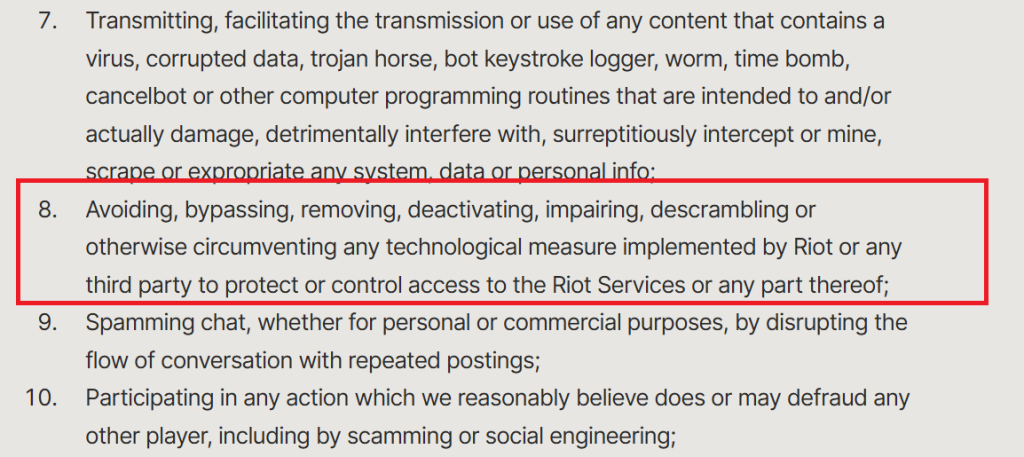
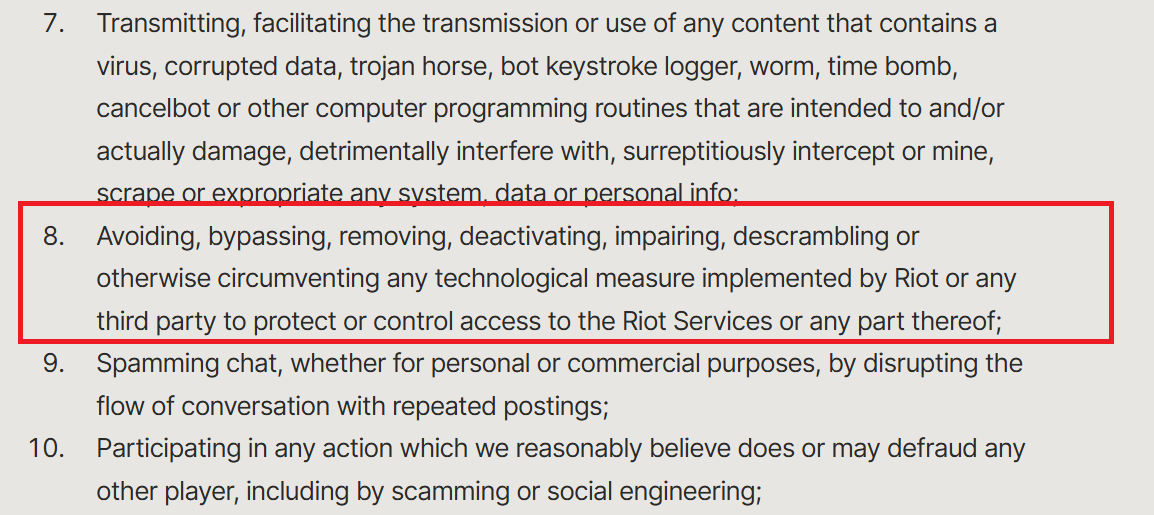
Using a VPN with Valorant isn’t outright illegal, but it can get you into trouble if you misuse it. Riot’s Terms of Service clearly prohibit bypassing or circumventing any technological measures they’ve put in place to protect access to their services. That includes using a VPN to spoof your location or dodge regional restrictions. If Riot detects that you’re trying to manipulate access controls, you risk getting flagged or even banned.
Valorant also ties your account to a specific shard or Region of Residence, which must match your physical location. If you’re using a VPN to play from a different region, it can mess with matchmaking and prevent you from playing with friends on your actual shard. Riot’s system checks for consistency between your IP and region, and if something looks off, you might get locked out or face account restrictions. So yeah, VPNs can be useful, but they’re not a free pass to hop shards or dodge rules.

Free VPNs are especially risky, they’re slow, unreliable, and more likely to trigger detection. If you’re serious about gaming and want to stay safe, stick to a tested VPN like Surfshark or NordVPN. We’ve tested these ourselves for speed, stability, and compliance, so follow our recommendations to avoid headaches and keep your account secure.
The Best VPNs for Valorant in 2026
So if you're planning to use a VPN with Valorant without risking bans, lag, or shard mismatches, the key is choosing one that’s built for gaming and tested to work with Riot’s systems. Not all VPNs are created equal, some trigger detection, others tank your ping, and free ones are basically asking for trouble. Here is what to look in VPNs when searching for best VPN for Valorant:
✔ Choose a VPN with a wide server network to switch regions and reduce ping.
✔ Look for stable performance with minimal speed drop (ideally under 15%).
✔ Make sure it has a kill switch to prevent IP leaks during connection drops.
✔ Use VPNs with fast, secure protocols like WireGuard or OpenVPN with AES-256.
✔ Ensure it offers native apps for PC, mobile, and router compatibility.
✔ Go for VPNs that allow 5+ or unlimited simultaneous device connections.
✔ Pick long-term plans for better pricing and bonus months.
✔ Check for a 30–45 day money-back guarantee for risk-free testing.
✔ Prioritize 24/7 live chat support to fix issues without losing game time.
Don't worry. We’ve done the heavy lifting and tested multiple VPNs for speed, stability, and shard compatibility. Below are the best VPNs for Valorant in 2026 that actually deliver smooth gameplay and keep your account safe.
- NordVPN – Our #1-Rated Best VPN for Valorant in 2026 • 7,400+ servers worldwide, including multiple US and EU locations for low-latency Valorant access • NordLynx protocol ensures minimal ping and stable matches • Advanced DDoS protection and AES-256 encryption for secure gameplay
- ExpressVPN – Fast and Reliable VPN for Valorant • Servers in 105+ countries with plenty of US hubs for optimal Valorant performance • Lightway protocol delivers smooth, lag-free gameplay • TrustedServer technology guarantees zero data logs
- Surfshark – Powerful VPN with Wide Server Coverage • Unlimited device connections on one account • 3,200+ servers worldwide, including optimized US and EU servers for Valorant • NoBorders mode and CleanWeb features for safe and uninterrupted gaming
- Private Internet Access – Customizable VPN for Competitive Gamers • 90+ countries covered with gaming-focused servers • WireGuard & OpenVPN with advanced settings for ping optimization • Unlimited devices plus split tunneling and port forwarding for fine-tuned performance
- Proton VPN – Best Free Option with Unlimited Bandwidth • Free plan includes US and EU servers with no data limits • Strong privacy focus with a strict no-logs policy • Solid speeds for casual Valorant matches, though fewer advanced features than premium VPNs
1. NordVPN
NordVPN is a fantastic Valorant VPN and a go-to choice for privacy-conscious players. This VPN has 8,900+ servers in 129 countries, many of which are specialized in privacy-related digital tasks. So, aside from using this VPN to optimize your gameplay and change your Valorant server, it's a fantastic option for digital security.
This VPN offers a specialized service called Meshnet that lets you form encrypted private networks and turn multiple devices into VPN endpoints. So, you can play Valorant with friends using a single VPN subscription and expect fantastic speeds on all connected devices.
From specialty servers to military-grade encryption (AES-256-GCM, ChaCha20, and Post-Quantum Encryption (NordLynx Protocol)), all security measures are there to provide anonymity, as reported in our comprehensive review of NordVPN. Needless to say, this VPN can easily keep your ping and latency in check.
In addition, NordVPN comes with an easy-to-set-up kill switch, letting you add Valorant to the list of apps that shut down if your VPN connection drops. However, don't expect that to happen often, as NordLynx (WireGuard-based), OpenVPN, IKEv2/IPsec, and NordWhisper power NordVPN. You also get 10 simultaneous connections and a great-looking app for Windows, macOS, Linux, Android, iOS, routers, and more.
All that is available at $3.09 per month (24 months plan). Like any reputable VPN, NordVPN gives you 30-day money-back guarantee to request a refund. However, if you face any issues, make sure to first contact this VPN's support through live chat, which is available 24/7.
NordVPN Features Useful for Valorant:
- Threat Protection Pro: Blocks malware, trackers, and malicious sites before they load, keeping your PC safe while you grind ranked matches.
- Dark Web Monitor: Notifies you if your Valorant or Riot Games account credentials leak online so you can secure your account immediately.
- Dedicated IP Option: Provides a stable IP address for smoother logins and fewer account verification prompts.
- NordLynx Protocol: Based on WireGuard, it ensures ultra-fast speeds and low latency, perfect for competitive Valorant gameplay.
- Obfuscated Servers: Bypass network restrictions in schools, workplaces, or regions where Valorant access is limited.
- Double VPN: Routes traffic through two servers for extra privacy, ideal when gaming on public or shared networks.
- Kill Switch: Protects your IP if the VPN disconnects, preventing sudden exposure that could disrupt matches.
- Split Tunneling: Lets you run Valorant through the VPN while keeping other apps on your normal internet for max performance.
PROS
- Plays well with Valorant.
- Incredibly simple to use.
- High-end privacy.
- Keeps ping and latency in check.
- 24/7 live chat support.
- 30-day money-back policy.
CONS
- Partially obfuscated network.
2. ExpressVPN
ExpressVPN is another gaming VPN that brings undisclosed number of servers in 105 countries. That means you'll always find a way to re-route your traffic flowing to and from Valorant servers, resulting in the lowest possible ping and latency.
All its servers provide unlimited bandwidth with fast connections, ensuring smooth gameplay and longer gaming sessions over any network, as you can read in our full analysis of ExpressVPN.
In terms of security, ExpressVPN uses AES-256 and ChaCha20/Poly1305 encryption. Not to forget, the advanced VPN tunneling protocols, including OpenVPN, Lightway, and IKEv2, also route your incoming and outgoing traffic through a safe passage only.
Worried about leaking your sensitive data while playing Valorant? There's no need for that in this case; ExpressVPN has a system-level kill switch. If something unexpected happens to your VPN connection, this VPN will prevent data leaks by shutting down your Web connection.
This VPN supports up to 10-14 simultaneous connections and offers apps for any platform. Without any surprise, its Windows app is highly polished, straightforward to use, and pairs well with any PC game.
You can sign up for $2.44 per month (24 months plan). We'll also mention that ExpressVPN comes with 30-day money-back guarantee, allowing you to get your money back with no questions asked. On top of that, 24/7 live chat support is there to help you with any issues or questions.
ExpressVPN Features That Keep Valorant Smooth, Secure & Accessible
- Obfuscation Technology: Hides VPN traffic so you can bypass regional restrictions or blocked networks and still access Valorant.
- Lightway Protocol: Custom-built for speed and stability, delivering low ping and responsive matches.
- Kill Switch: Stops IP leaks if the VPN disconnects, ensuring your real location never gets exposed mid-game.
- Split Tunneling: Route only Valorant through the VPN while keeping other apps on your regular network for optimized performance.
- Threat Manager: Blocks trackers and malicious scripts that could impact your data security or slow your system.
- Anti-DDoS Protection: Safeguards your IP against attacks, keeping competitive matches stable and uninterrupted.
PROS
- Highly polished Windows app.
- Gaming-ready servers.
- Bulletproof VPN protocols.
- Minimizes your ping and latency.
- 30-day money-back policy.
- 24/7 live chat support.
CONS
- Not the most affordable pick.
3. Surfshark
Surfshark is a well-known VPN provider that serves a global user base. It comes with high-speed servers in all countries where Valorant is available. More precisely, you'll find 4,500+ servers in 100 countries, which makes Surfshark one of the most expansive gaming VPN services.
All its servers are bare metal and RAM-only, so your complete activity gets removed after your VPN session ends. They're also strong enough to protect your device from any DDoS attack that pro players and streamers often face. And, of course, Surfshark is an ultra-fast VPN service that has no problem minimizing your latency and ping.
You get complete security from the hackers, your network admin, and your ISP as your data gets encrypted with AES-256-GCM (OpenVPN and IKEv2), ChaCha20 (WireGuard), and Post-Quantum Encryption (WireGuard + Dausos) encryption. In addition, the WireGuard, IKEv2, OpenVPN, and Dausos protocols offer a safe route to your gaming traffic. A kill switch is included as well.
Surfshark allows unlimited simultaneous connections. Hence, you can play Valorant on the go with complete security while simultaneously protecting your home gadgets. This VPN works on practically any device or platform, and yes, it has a user-centric Windows app.
Surfshark is available at $1.99 per month 24 months plan) and has a 30-day money-back guarantee. It's also no surprise that 24/7 live chat support is there, alongside a rich library of customer support resources.
Surfshark Features That Level Up Your Valorant Matches
- NoBorders Mode: Kicks in automatically in restricted regions so you can still access Valorant even where it’s blocked.
- WireGuard Protocol: Brings fast speeds and low ping, perfect for clutching rounds without stutter or lag.
- Kill Switch: Stops IP leaks if your VPN drops, making sure your real location never gets exposed mid-match.
- MultiHop: Doubles up your connection by routing traffic through two servers for extra privacy, great on shared or public networks.
- Split Tunneling (Bypasser): Route only Valorant through the VPN while keeping other apps on your normal connection for efficiency.
- CleanWeb: Blocks ads, trackers, and malware, keeping your PC secure and your focus locked on the game.
- Camouflage Mode: Makes your VPN traffic blend in like normal browsing, handy for bypassing VPN detection on strict networks.
PROS
- Keeps your ping and latency in check.
- Highly suitable for gaming.
- Incredibly simple to use.
- Unlimited simultaneous connections.
- 24/7 live chat support.
- 30-day money-back policy.
CONS
- Slower to connect on OpenVPN.
4. Private Internet Access
Private Internet Access is a US-based VPN provider. It is one of those advanced VPNs with a large, low-latency server network connecting all the countries with the most Valorant players. It has undisclosed number of servers in 91 countries, including every single US state.
All these servers offer unlimited bandwidth and ultra-fast performance. So, you get the best reach when bypassing the overcrowded game servers during busy hours and accessing one in a different location when it’s early morning or late night to have the lowest ping time (<15ms).
Also, this VPN uses AES-128-GCM, AES-256-GCM, AES-128-CBC, AES-256-CBC, and ChaCha20 encryption keys to safeguard your traffic and personal details. You can change the security level depending on your requirements.
There are also two types of kill switches, letting you decide how the VPN behaves when you lose your connectivity. Regarding its protocols, you can use WireGuard, OpenVPN, and IPsec (IKEv2). As you can see, PIA is a highly advanced VPN with lots to customize.
This provider comes with unlimited simultaneous connections and can be installed on all widely used platforms, and that includes support for Windows PCs.
PIA's 24 months plan is priced at $2.03 per month. If you decide that PIA isn't a good option for you, there's a 30-day money-back guarantee that comes with no questions asked. Lastly, to master PIA's in-depth customization, you can turn to its 24/7 live chat support.
Private Internet Access Features That Keep Your Valorant Fast, Safe & Competitive
- Kill Switch: Protects your real IP from being exposed if your VPN connection drops - keeping you safe even mid-match.
- Split Tunneling: Routes only Valorant traffic through the VPN while leaving other apps on your regular network for smoother performance.
- WireGuard Protocol: Delivers fast, stable, low-ping connections so your aim and reactions stay sharp in every round.
- Open-Source Apps: Provide full transparency and security - trusted protection you can rely on every time you queue up.
- Customizable Encryption: Lets you adjust encryption levels to balance speed and safety for peak in-game performance.
- MACE Ad & Malware Blocker: Stops ads, trackers, and malicious sites so nothing interrupts your ranked grind.
PROS
- Low ping on distant servers.
- Servers in 90+ countries.
- High-end VPN protocols.
- 24/7 live chat support.
- 30-day money-back guarantee.
CONS
- Relies on VPN terminology heavily.
5. Proton VPN
Proton VPN, despite some drawbacks, remains a solid choice for playing Valorant. Thanks to its free tier, you still get access to many of the same core features found in premium plans. Most importantly, it comes with unlimited bandwidth, which is rare for free VPN services and very handy for long gaming sessions.
However, limitations do apply. You’ll only have access to undisclosed number of servers in 5 countries - the United States, the Netherlands, Romania, Poland, and Japan. If you need Valorant servers in other regions, this free option won’t help.
Since those servers are usually crowded, speeds can dip, and your ping or latency might suffer unless you’re close to one of the supported locations.
On the positive side, Proton VPN uses WireGuard, OpenVPN, IKEv2, and Stealth with strong AES-256 and ChaCha20, backed by a strict no-logs policy to keep your data private. It also includes useful extras like a kill switch. But keep in mind, the free plan only allows one connection at a time, so you can’t use multiple devices simultaneously.
To unlock everything, you’ll need to upgrade at $2.49 per month for 24 months, with a 30-day money-back guarantee available. Customer support is decent, though live chat isn’t part of the free package.
Proton VPN Features That Level Up Your Valorant Matches
- Kill Switch: Stops IP leaks if your VPN drops, keeping your real location safe during intense Valorant matches.
- WireGuard Protocol: Brings fast speeds and low ping, perfect for clutching rounds without lag or stutter.
- No Bandwidth Limits: Lets you play Valorant as long as you want without interruptions or throttling.
- VPN Accelerator: Speeds up connections by up to 400%, reducing lag on distant servers for smoother gameplay.
- NoBorders Mode: Automatically works in restricted regions, so you can access Valorant from anywhere.
- Multi-Platform Support: Play on Windows, macOS, Android, iOS, and Linux without switching accounts or devices.
PROS
- Reputable and long-standing brand.
- Unlimited bandwidth.
- Strong security and privacy.
- No-logs policy.
- 30-day money-back policy.
CONS
- Limited performance.
- Limited server networks.
- You get 1 connection only.
How to Play Valorant with a VPN?
Your goal is to optimize your gaming traffic through a VPN, so you'll need to sign up for a VPN provider and download its app. You'll then connect to a suitable server, done in the following way:
- Sign up for a VPN that works with Valorant (we recommend NordVPN).
- Download the VPN app on your PC or router. Make sure it’s updated so you don’t run into compatibility issues mid-match.
- Sign in and enable security features like kill switch and DNS leak protection. These keep your IP hidden and your connection secure if the VPN drops.
- Choose a VPN server close to Riot’s servers for the region you want to play in. This helps reduce ping and latency, giving you a smoother experience.
- Once connected, open Valorant and jump into the game. A good VPN can help bypass ISP throttling, avoid region locks, and even reduce packet loss.
Before using a VPN on Valorant, ensure that your chosen server matches the 'Region of Residence' of your Riot account. You can create a new Riot account or change your existing account's region. And, as for the best VPN location for Valorant, pick one in the US if you want highly skilled players or in Brazil if you want more varied opponents.
Which VPN Server Location Is Best for Valorant?
The best Valorant regions when using a VPN are - Asia Pacific, Brazil, Europe, Korea, and America. Therefore, you must pick a VPN with multiple servers in most of these locations.
Then, connect to the server near your physical location to ensure low ping and high-speed gameplay. You can also connect to any server in these locations during the morning or late at night to get bot lobbies in Valorant.
We have provided a table mentioning all the best server locations to connect to for playing Valorant. So, check it out just below.
How to Change Servers in Valorant with a VPN?
Once you reroute your traffic through the VPN server, the game will see your new location and you'll get to play on different Valorant servers automatically. Do the following:
- Get a VPN that works with Valorant (we recommend NordVPN).
- Download and install the VPN on your Windows PC.
- Open the VPN app and log in to your account.
- Create a new Riot Account with the VPN running in the background.
- You can now log in to the game and start playing.
Valorant doesn't allow you to change servers on the fly. That's why you need to create a new Riot Account and then always connect to the same VPN server before you launch the game.
Why Is My Ping So High in Valorant?
Your ping is high in Valorant due to Internet connectivity issues. Ping, also known as latency, is the time it takes for a data packet (your gaming input) to go between its origin (your computer) and its destination (the game server) and vice versa.
High ping causes your game to lag. To fix it, you need to restart your router or switch to a faster Internet connection if you can.
Another reason you might have high ping in Valorant is that you’re too far away from your router. If your device and your router are separated by a few walls, doors, or floors, your Wi-Fi will be slower because the signal is weaker.
You could also be experiencing high ping issues related to your ISP (Internet Service Provider). ISPs can see when you’re using large amounts of data and slow down your Internet, also known as throttling. You can avoid this problem with a VPN.
The game server you’re playing on could also be experiencing technical difficulties. A VPN will solve this issue, as you’ll be able to change your location by choosing a server in a different area. This will adjust the game server you connect to as well.
Can I Change My Location on Valorant?
You have two options when it comes to changing your Valorant location. You can use a VPN (we recommend NordVPN) to obtain a new IP and then create a new Riot Account (with a new location assigned). If you don't wish to use a VPN, you can submit a request to change your region of residence manually./
1. With a VPN
By using a VPN, you can change your device's virtual location by connecting to a server in a specific location. With your new IP, you'll proceed to create a new account - like so:
- Get a VPN that has plenty of server locations.
- Download and install the VPN on your Windows PC.
- Connect to any VPN server based on your desired location.
- Create a new Riot Account and match the location of the VPN server.
- Launch Valorant, login, and start playing.
2. Manually
If you want to change your in-game location manually, you must reach the Valorant support team and change the "Region of Residence" listed on your Riot Account. Follow these steps:
- Visit this Valorant support page and log in with your credentials.
- Your current region will be displayed; Change it to your preferred location.
- You'll get a confirmation from the support team as they'll match your IP with the region you're changing to (use this option only after you move).
- Once they confirm, you're all set to play from the new location.
What to Do When a Valorant VPN Is Not Working?
There can be different reasons why your VPN might be having technical difficulties, such as the wrong VPN server, wrong VPN protocol, etc. Go through the following troubleshooting steps:
Is Using a Free VPN for Valorant Safe?
Even though you can use a free Valorant VPN, know that free VPNs aren't safe in general. That's because, with a free VPN, you will experience many limitations that will make your gaming experience quite frustrating. This includes:
❌ Limited number of servers, leading to high ping and frequent lag
❌ Strict data caps that can run out within hours of gaming
❌ Slower speeds due to overcrowded servers
❌ Weaker encryption and lower security standards
❌ Higher risk of data logging and selling user information
❌ Frequent connection drops that disrupt gameplay
❌ Inability to consistently bypass geo-blocks or game restrictions
If you want a streamlined gaming experience, your only option is a premium VPN, so visit our guide to the top VPN providers for extra options. Another great option is to get a trial version of a VPN.
For example, a NordVPN free trial is available on Android for 7 days. This VPN also offers a 30-day money-back policy, which applies to all of its supported devices.
If you're set on trying to find the best free VPN for Valorant, you can go with Proton VPN. You'll end up with 5 server locations only, but you'll also have unlimited bandwidth.
Final Thoughts
Without a VPN, your Valorant gameplay experience will most likely suffer, and you'll also risk IP bans, DDoS attacks, and problems with your ping. Not to mention overcrowded servers, ISP throttling, and the inability to access ther game in restricted regions. However, all those issues can be resolved with a VPN - but not just about any.
There's no better option than NordVPN because it has the fastest performance and advanced security - while enabling you to bypass geo-restrictions and play Valorant in different regions. Also, this is the best VPN for Valorant because it allows you to get the smoothest possible Valorant sessions with low ping and minimal latency.
ExpressVPN delivers fast, reliable, and secure Valorant gameplay with servers worldwide and smooth Lightway protocol performance. Surfshark offers wide server coverage, unlimited device connections, and features like NoBorders. Private Internet Access is ideal for competitive players who want advanced customization and port forwarding. Proton VPN is a good option with unlimited bandwidth, solid speeds for casual matches, and strong privacy.
Some Guides for Your Reference:
- Best VPNs for Other Popular Games – Guides like Best VPN for Fortnite, Best VPN for Roblox, or Best VPN for Minecraft since gamers often play multiple titles.
- How to Reduce Lag and Improve Ping in Online Games – Tips for optimizing network settings and VPN use for smoother gameplay.
- Top VPNs for Low Ping and Fast Gaming – Focused on speed, server locations, and protocols for competitive games.
- Gaming VPN Setup Tutorials – Step-by-step guides for configuring VPNs on PC, consoles, or mobile for specific games.
- Best Free VPN for Valorant – Some Free VPNs that work with Valorant to an extent.
That’s all! Now you know all about using VPN services to optimize your Valorant sessions. If you have further queries, drop us a comment through the below button. Thanks for reading!