When you purchase through links on our site, we may earn an affiliate commission. Here’s how it works.
Astrill VPN Review 2026


Our experts have reviewed 53 VPN providers, which were put through extensive rounds of testing. To learn more about that process, here’s how we review VPNs, where we explain our criteria and our policy of being fully transparent.
Astrill VPN is an excellent VPN service renowned for its ability to bypass the Great Firewall of China. It offers speedy and secure connections and is compatible with US Netflix. Headquartered in Liechtenstein, Astrill VPN isn’t a member of the Eyes Alliances, so it’s not required to share any user information with the government.
Astrill has a strict no-logging policy but also tracks sensitive information, such as IP address and device type, during active sessions. However, this information is permanently deleted once you disconnect from the VPN's server. Furthermore, Astrill just offers over 300 servers across 57 countries, so its relatively limited coverage holds it back.
Regarding security, Astrill is a secure option for online browsing, using an AES-256 encryption cipher and four tunneling protocols. It's impressive security package includes a kill switch, port forwarding, and leak protection. Also, there has been no history of data leaks on Astrill VPN.
Check the table below for a quick summary of what you need to know about Astrill VPN.
This comprehensive Astrill VPN review will cover important information, such as the VPN's jurisdiction, prominent features, security measures, ease of use, and everything else you need to know about the service.
If you're curious about our hands-on approach to testing VPN providers, you can check out our guide on how we review VPN services.
Background, Jurisdiction & Reputation
Astrill VPN is from Liechtenstein, outside the 14 Eyes data-sharing alliance group. It’s also free of any past accusations regarding data logging or leaking personal information. Our Score: 9/10
When choosing a VPN, consider its origin and jurisdiction - these factors reveal the privacy regulations it follows. This insight is crucial in assessing the VPN's overall trustworthiness and dedication to safeguarding privacy.
Where Is Astrill VPN Based?
Astrill VPN is based in Vaduz, Liechtenstein. It's owned by Veloxee Corp., a privately owned security solutions company. Besides Astrill, Veloxee also offers an antivirus system.
The strategic location in Liechtenstein comes with a perk – it's not part of the 5/9/14 Eyes Alliance, giving the company the edge of not being obliged to share intel with the government. It's definitely a noteworthy consideration if you're keen on online privacy.
While Astrill's Terms of Service stated that the company is based in Seychelles, recent confirmation from customer support clarifies that the VPN is currently headquartered in Liechtenstein.
Moreover, Liechtenstein is self-governing, and its strong data protection laws and ordinances align with the GDPR standards of the European Union, offering you an additional layer of privacy assurance.
Did Astrill VPN Leak Personal Data in the Past?
No, Astrill VPN has no record of past data leaks or any other controversial or problematic accusations. Astrill, being privately owned and located in Liechtenstein, focuses on keeping your information private. By running its VPN server network offshore, the company doesn't store data or maintain logs because there's no legal obligation.
Plus, there are no credible reports of the VPN leaking, collecting, sharing, or selling data with third parties. Astrill focuses on collecting only the necessary data for technical needs. During your session, it records essential details like IP address, connection time, device type, and app version, which are all deleted after you disconnect.
Astrill also keeps an eye on traffic for network planning without involving personal information. Additionally, it holds the last 20 connection records for customer support, free of personal details, and automatically clears them after 30 days of inactivity.
There's a catch, though. While Astrill follows a strict no-logs policy, it hasn't undergone a third-party audit to verify its claims.
Supported Platforms & Devices
Astrill VPN supports major platforms but lacks browser extensions. It can also be set up on select routers for network-wide protection, though feature availability varies by device. Our Score: 6/10
In the following table, you'll find which platforms Astrill VPN supports. Native apps typically offer the easiest way to secure your Web connection, while other platforms may require manual setup.
You can use Astrill VPN on multiple devices but only 5 can connect simultaneously, and only one router connection is allowed at a time. It supports Windows, macOS, Linux (be it Linux Mint, Ubuntu, Debian, and more), as well as Android and iOS.
While browser extensions aren’t available, you can install Astrill on select routers (DD-WRT, Tomato, ASUS Merlin with 8MB+ flash) for whole-home protection and to enable VPN on devices like Apple TV. Astrill also sells pre-configured VPN routers for easy setup.
Installation & Initial Configuration
With a focus on simplicity and efficiency, Astrill VPN streamlines the installation process, allowing you to set up and start using the VPN within minutes. Our Score: 7/10
In this part of our Astrill VPN review, we'll give you a quick overview of how the VPN service works and guide you on getting started with it.
How to Download and Use Astrill VPN?
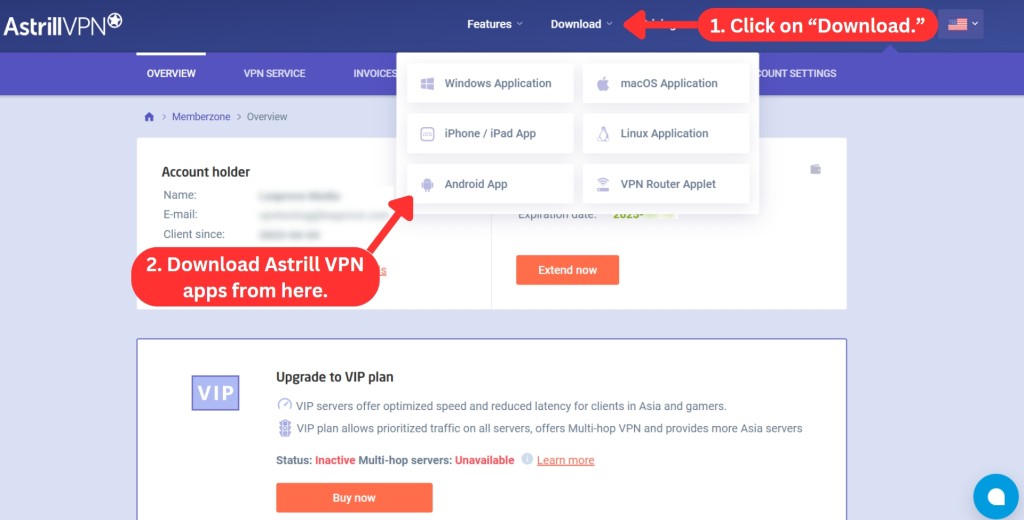
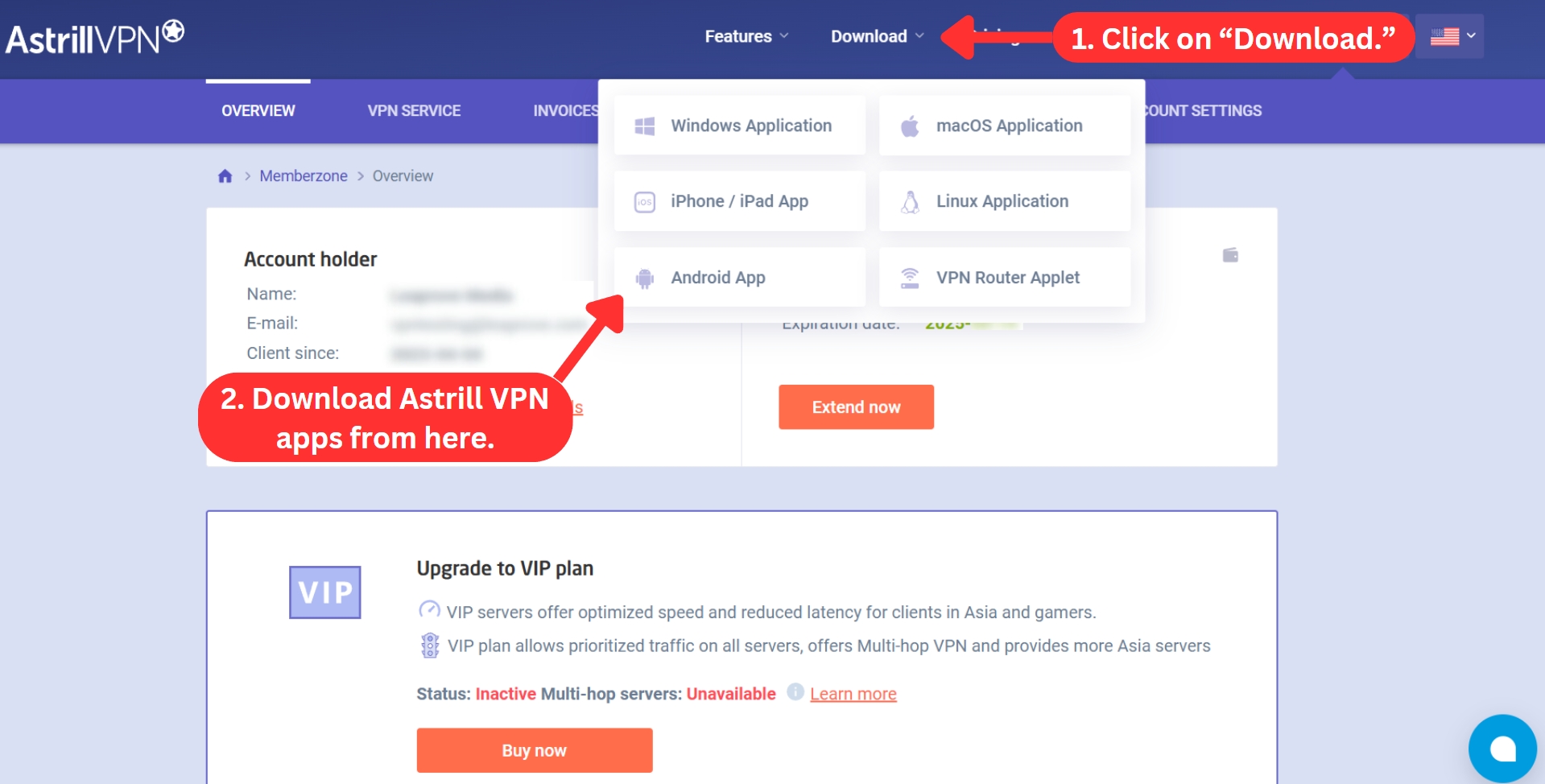
To start using this VPN, begin by subscribing, downloading its installation file, and installing the file on your device. It's actually a simple and quick process. We've laid out a step-by-step guide to help you through it.
- Subscribe to Astrill VPN on its official website.
- Go back to Astrill's website and log in using your account details.
- Select the "Download" tab.
- Choose the app for your device.
- Download the installation file and proceed to install the app.
- Restart your device to complete the installation process.
- Launch Astrill VPN and log in using your credentials.
- Choose a server location from the dropdown menu and connect. That's it!
Astrill is a lightweight application, so you'll manage to download the installation file almost instantly. We've tried this software on Windows, and we were prompted to restart our PC before launching the application.
Prominent Features
We’ve come across positive reviews of Astrill VPN, particularly praising its advanced capabilities. We were also impressed by its features, which we believe will meet the needs of even the most demanding users. Our Score: 9/10
Surpassing our expectations, Astrill VPN goes the extra mile in securing your data. They've got a mix of privacy and security features, covering the basics to the most advanced, all working together to safeguard your data. Here’s what you need to know.
- Smart Mode: When enabled, this feature provides users with advanced stealth and security, making it highly challenging for ISPs and government authorities to detect. ‘Smart Mode’ is only available when you're in China and works across all supported desktop and mobile devices.
- Kill Switch: Even though Astrill VPN is reliable, your connection may drop, which risks your data being exposed during reconnection. During these temporary lapses, a kill switch blocks all Internet activity until your connection is restored. This feature is integrated into Windows, macOS, and Linux applications.
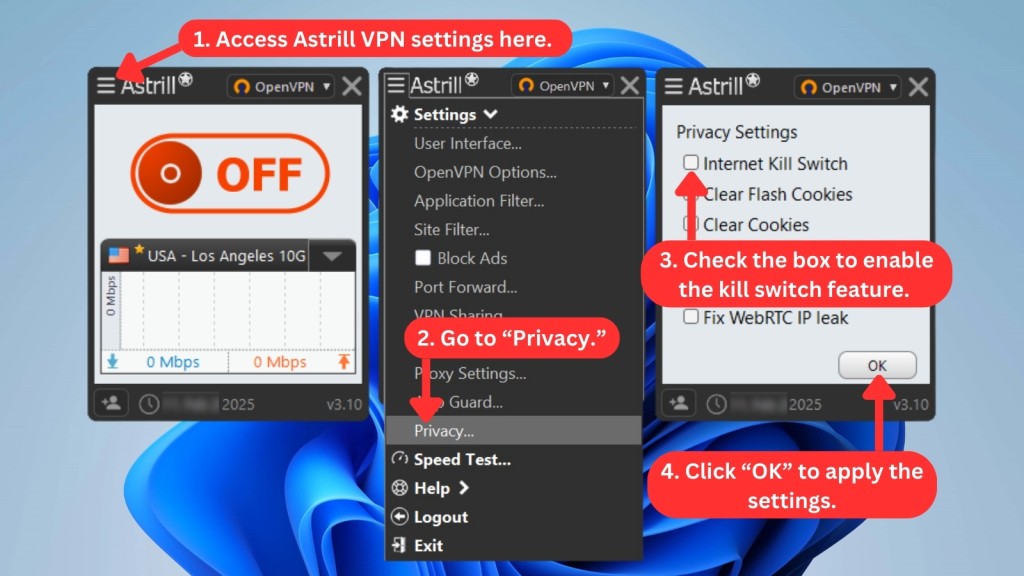
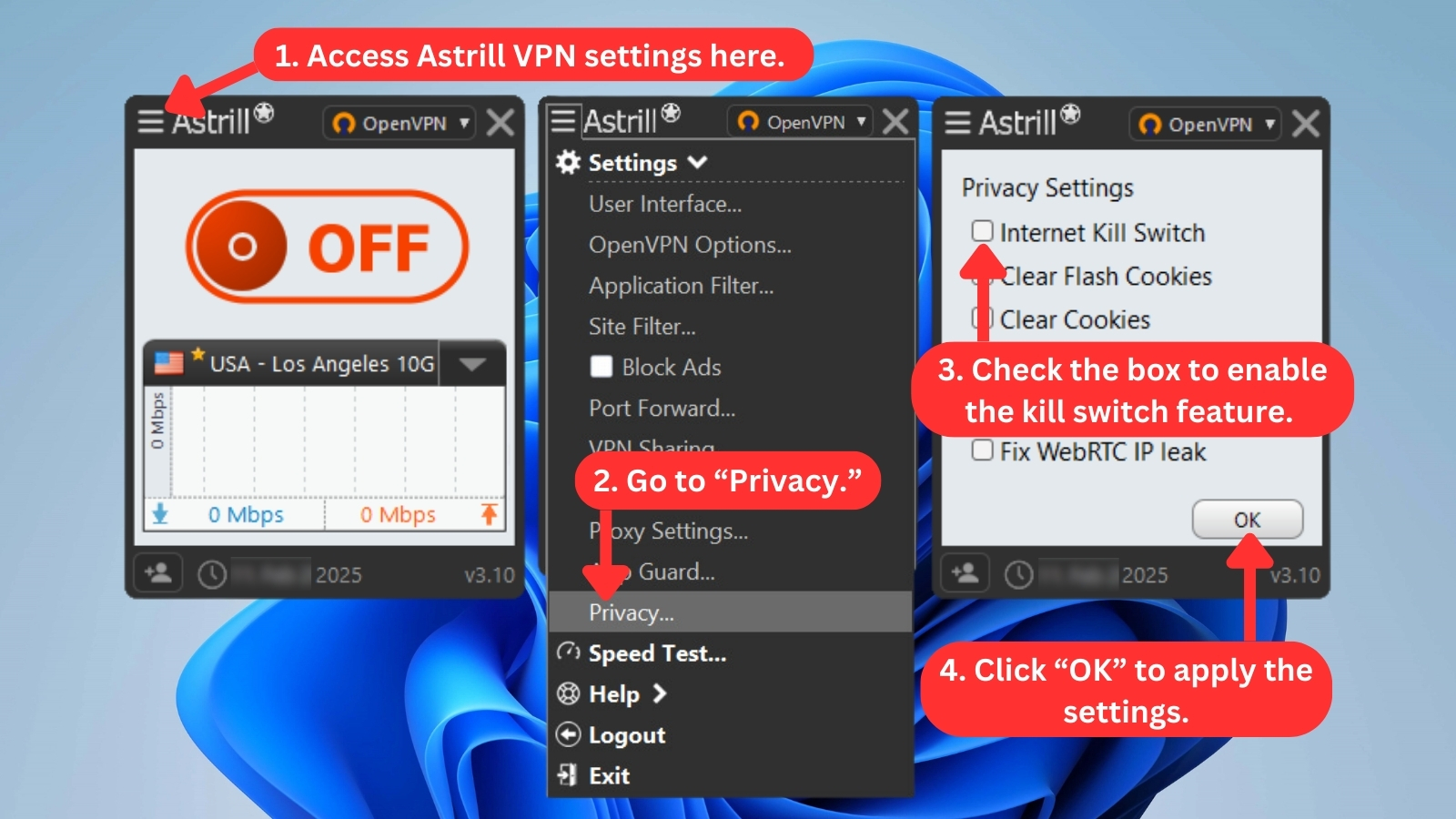
- App Guard: Astrill's enhanced kill switch for Windows, App Guard, blocks specific apps from Web access if the VPN disconnects, while others remain unaffected. It even works when the Astrill desktop app isn't running and is enabled automatically at system startup.
- Dedicated IPs: For the best experience and increased anonymity, you can try Astrill's dedicated IP. You get better browsing and streaming speeds, along with less lag and buffering. However, it costs $5 per month on top your subscription.
- Ad Blocker: This VPN also blocks irritating pop-ups and harmful ads that may contain malware. So, you can browse smoothly without interruption when the VPN is turned on. You can use this feature on supported desktop platforms.
- VPN Sharing: You'll find this feature on Windows, Mac, and Linux PCs. It lets you extend your desktop's VPN connection to other devices on your network - like phones, tablets, or other laptops - so they’re protected too.
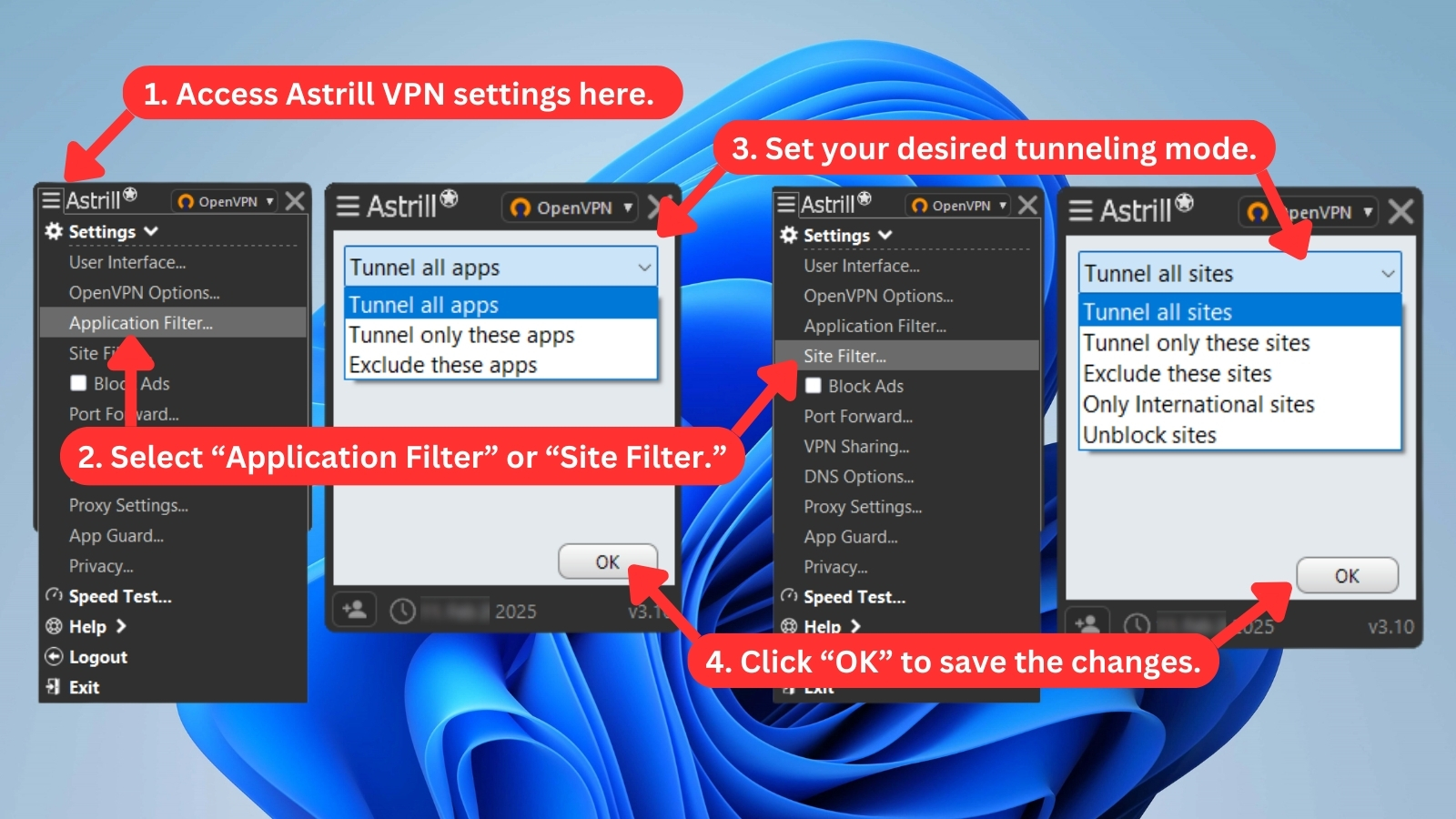
- Application and Site Filters: These features serve as split-tunneling tools. ‘Application Filter’ routes VPN traffic through selected apps, while ‘Site Filter’ handles domains or IPs for more flexible control. Both are available on desktop platforms, with ‘Application Filter’ also on Android and ‘Site Filter’ on routers.
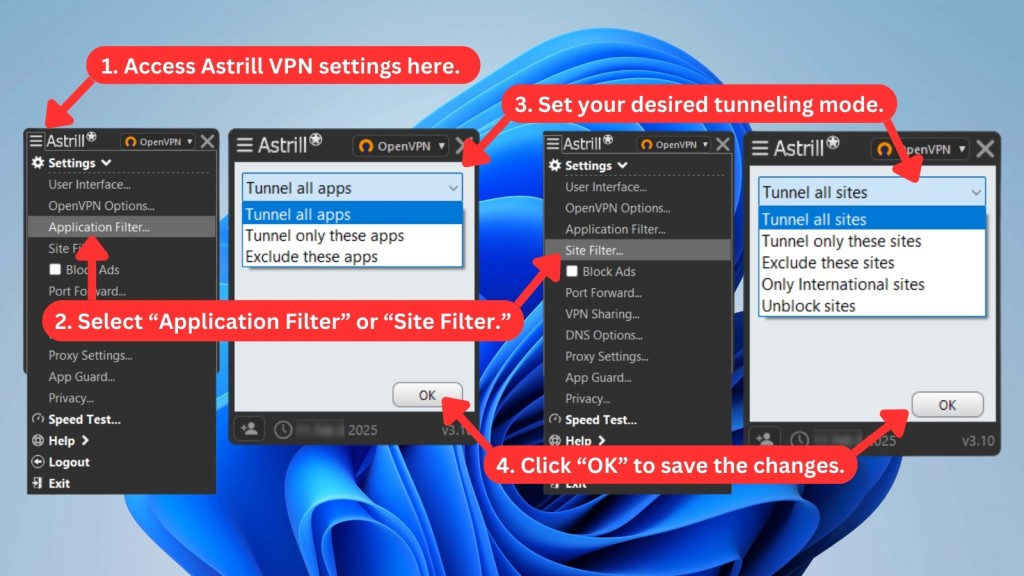
- Port Forwarding: This feature lets you redirect local LAN connections to an external device or the Internet and vice versa. Its key benefit lies in the extra speed you get when gaming or torrenting.
- Multi-Hop: This VIP add-on, starting at $10 per month, allows you to connect to one server initially and then route your traffic through another server. The entry server ensures a smooth start, while the exit server helps maintain top-level security. You can enjoy up to 3 multi-hop servers and use them via OpenWeb on various platforms like Windows, Mac, Linux, Android, and iOS.
- Onion Over VPN: This feature works on all supported platforms and devices, including Astrill VPN routers. With Astrill VPN's Onion over VPN, you can explore .onion sites without needing Tor or a Tor browser. This means you can seamlessly continue your regular Web browsing without interruption.
To add, Astrill VPN also offers custom DNS options and proxy server settings for extra flexibility. Dedicated IP addresses are best for forwarding all ports, while only a single pre-selected port can be forwarded on standard servers. If the risks of port forwarding outweigh the benefits for you, the feature can be disabled altogether.
Server Count & Infrastructure
Astrill runs an all-physical server network with strong coverage in Asia. While it allows city-level selection and unlimited switching, its overall scale feels limited next to top-tier VPNs. Our Score: 4.5/10
Astrill VPN features a diverse server network, with 'Supercharged' options for China. Here's what you need to know about its expansive network:
Astrill VPN has been on the market for over a decade. That means it could have had plenty of time to develop its server list. However, it just currently offers 300+ servers across 57 different countries. In comparison, VPNs with the most servers, like NordVPN (around 8,900+ servers in 129 countries), has significantly larger coverage, with lightning-fast servers on offer.
That said, Astrill ensures that all its server locations are physical, not virtual. In other words, Astrill helps avoid misleading locations and offers more reliable connections. Still, we would've liked to see its server count go a bit higher.
UI/UX Design & Ease of Use
Even though Astrill doesn't have the most polished UI, it has plenty of interesting options, tooltips, and other ways to get informed about its features. Our Score: 5/10
As soon as you open Astrill VPN, you'll see its somewhat outdated UI. Many of today's hugely popular VPNs bring highly polished interfaces that are perfectly suitable for beginners. Astrill VPN sure doesn't leave a positive first impression, but that doesn't mean it's hard to use.
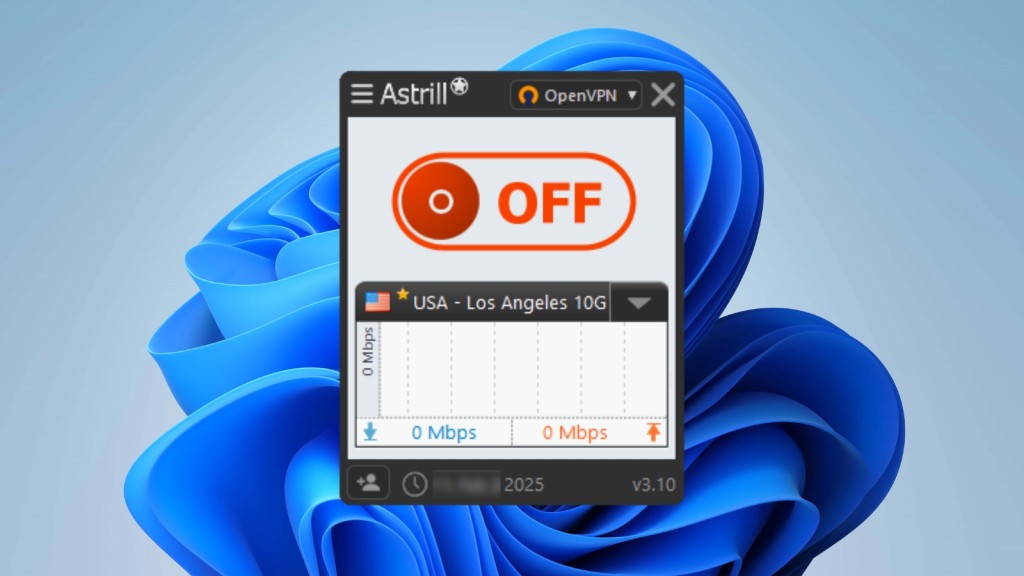
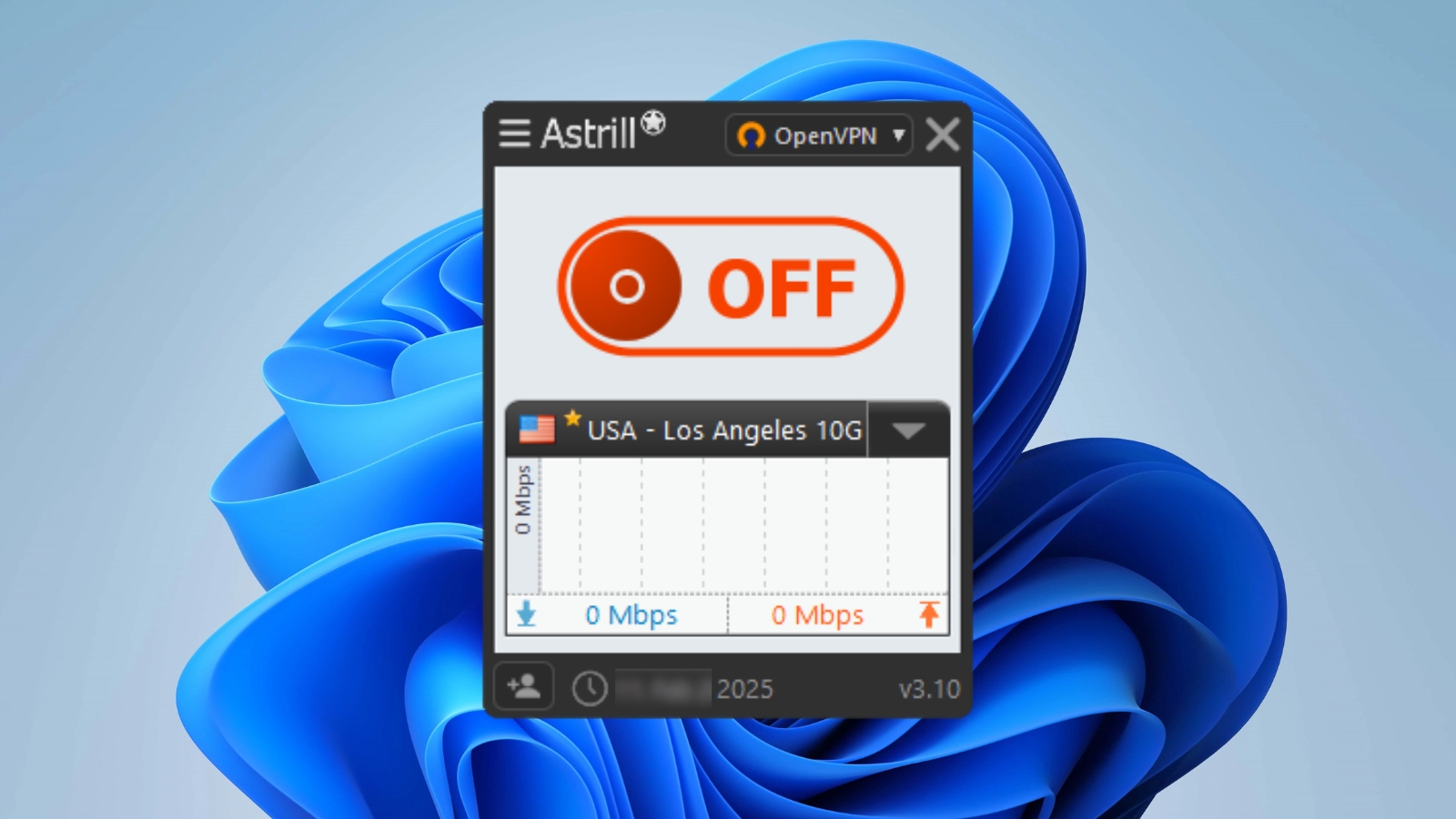
Setting up Astrill VPN during our test was simple, and the user interface was intuitive and easy to navigate. The primary interface consists of a huge OFF/ON toggle for connecting and disconnecting from the VPN. Choosing a server from a drop-down menu only takes a few clicks.
We've enlarged the image below to make it clearer, as the app is actually quite small and shows only a few server options at a time.
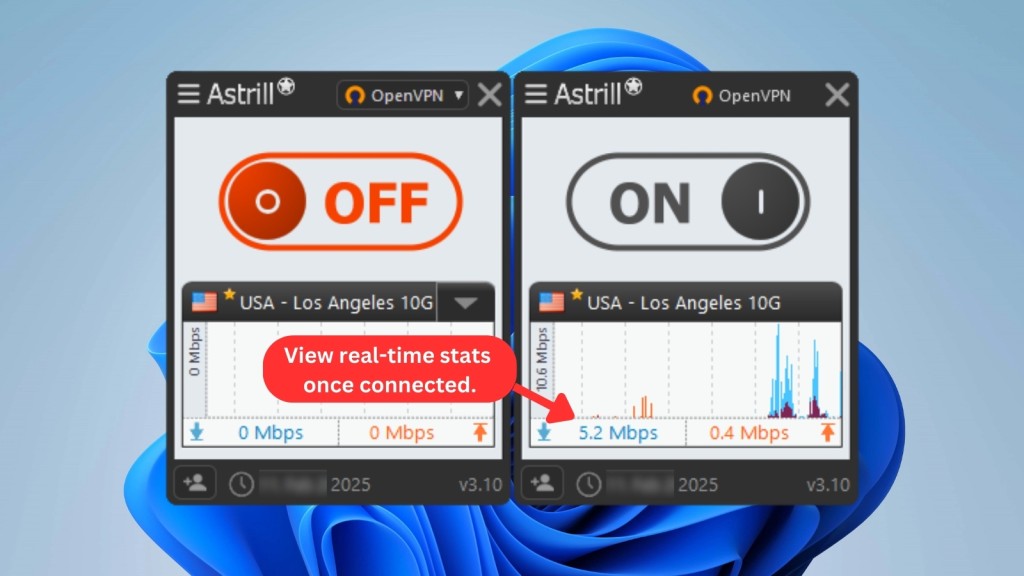
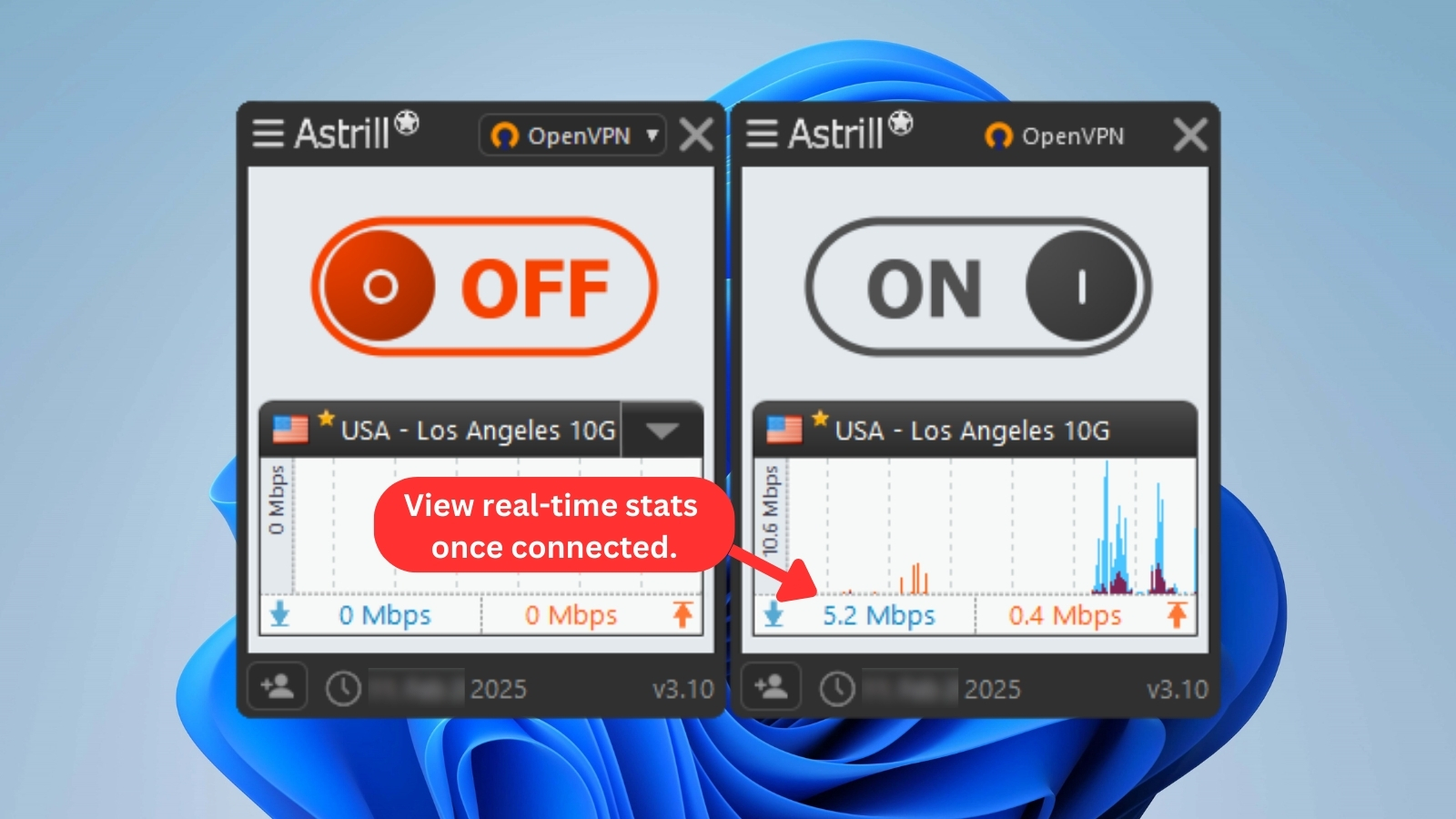
There are a couple of window size-related constraints, but navigating the server dropdown menu is one of the most obvious ones. The small window works fine for most other settings, such as user interface options and protocol selection. A larger window for in-app speed tests also pops up to show you more details.
Overall, navigating the settings' menu was relatively easy. Tooltips also open in a separate window to help provide some guidance as you explore the app. You can set it to show a new tip each day as well.
Then, you'll see a dropdown menu that lets you pick a server. Here, you can choose from 'Recommended,' 'Favorite,' and 'All' – pretty self-explanatory. In addition, there's a search field, so you can start typing the name of the server, its city, or country of origin. Once you find a server and connect to it, Astrill VPN will show you real-time stats and a small graph.
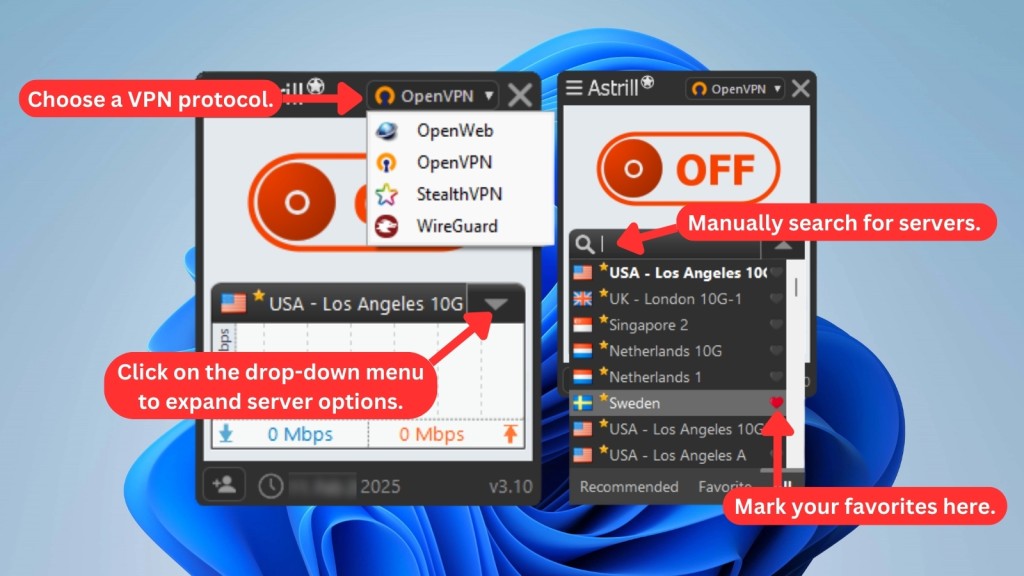
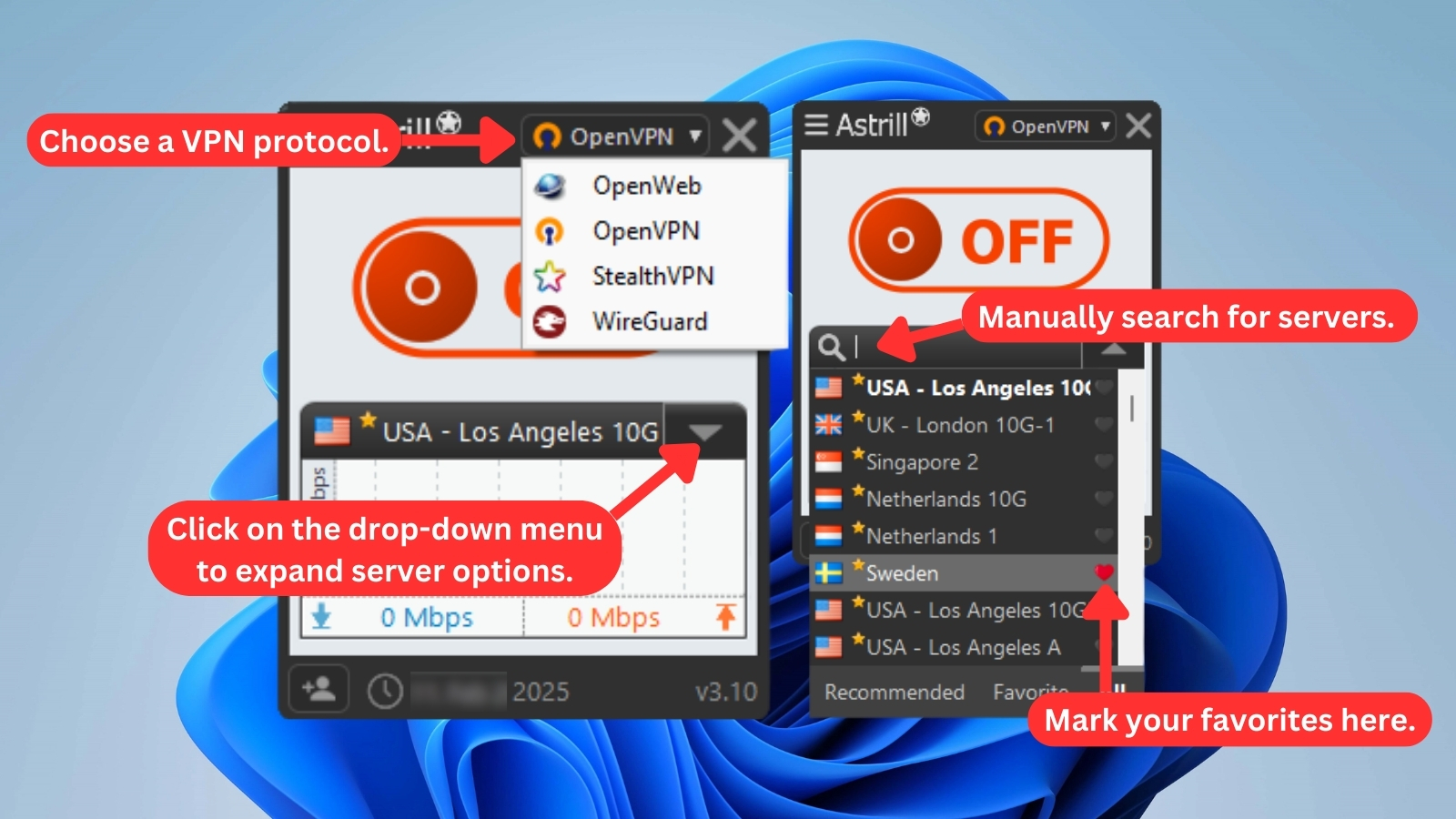
To get 'behind the scenes' and explore additional options, click the 'hamburger' button in the top-left corner. However, this menu changes depending on which VPN protocol you select – which can be done in the top-right corner.
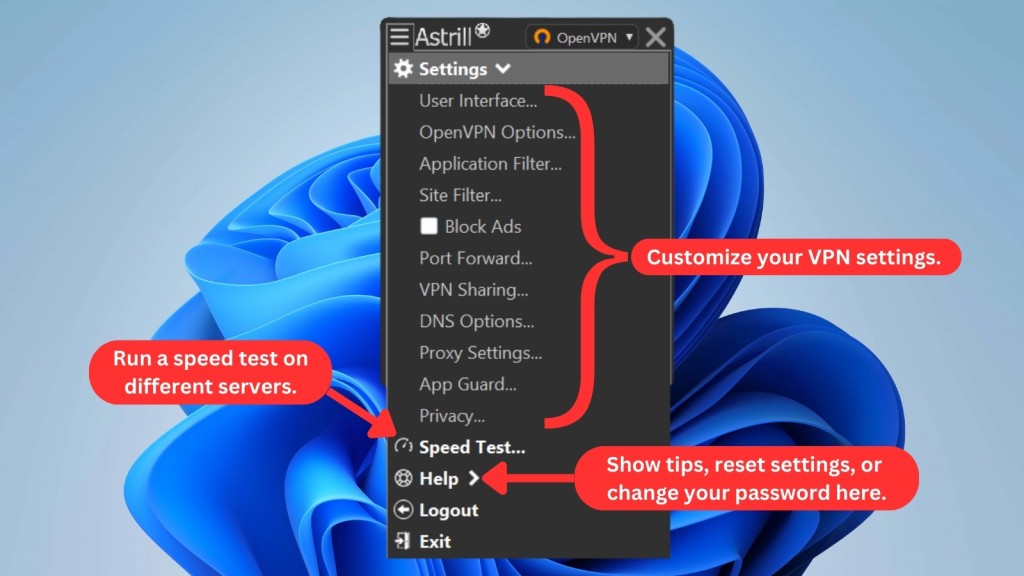
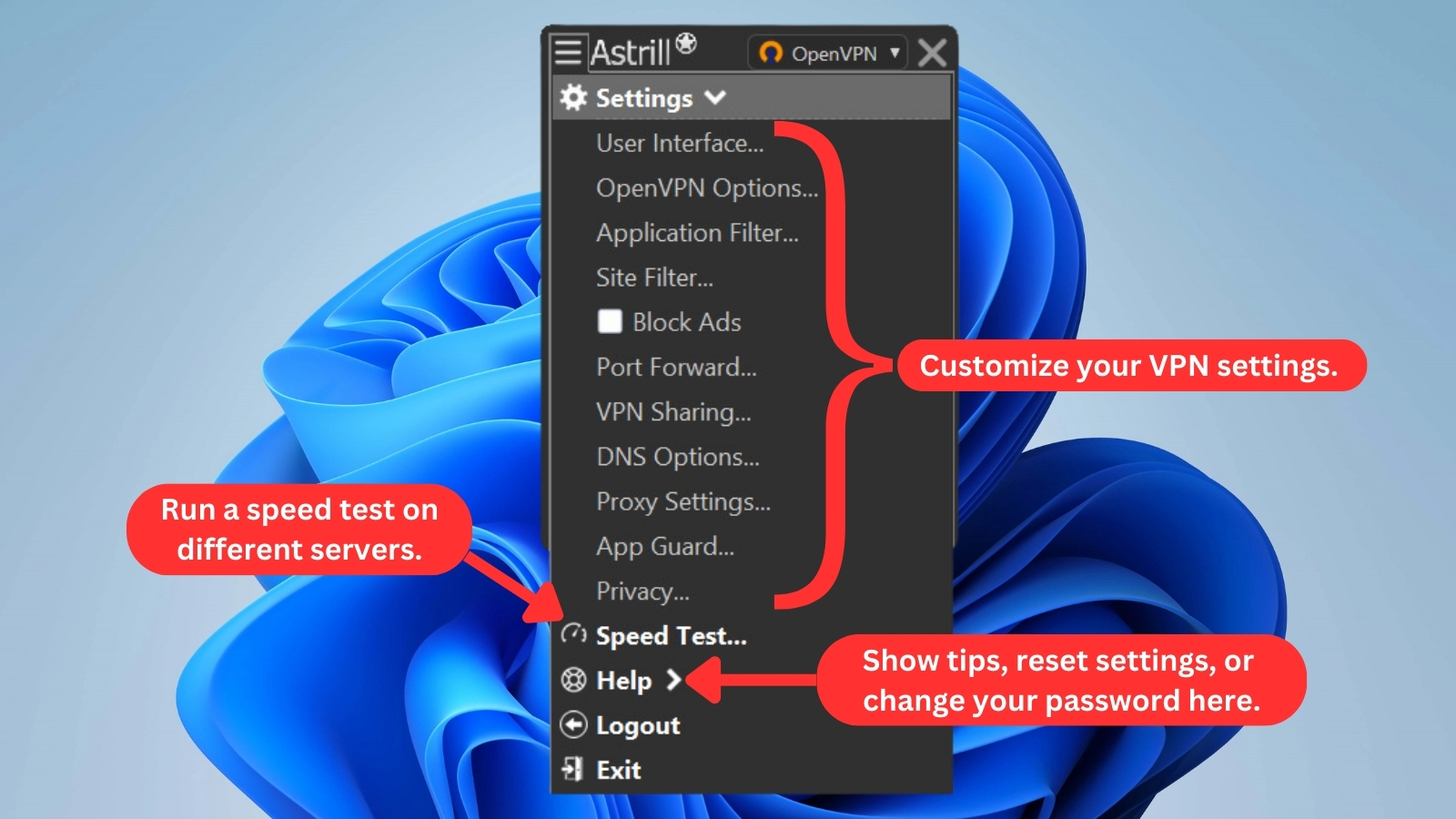
We've chosen OpenVPN, and here are the options you can find in this protocol:
- User Interface: Unfortunately, there isn't much to tinker with here. You can display a tray icon, use a 'big servers' menu, and ensure Astrill VPN always stays on top of other windows.
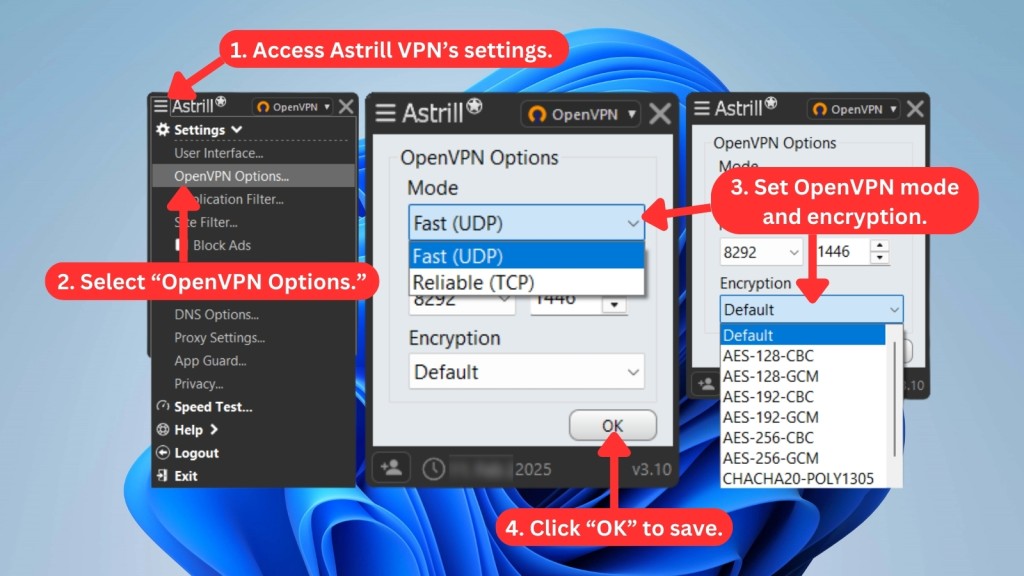
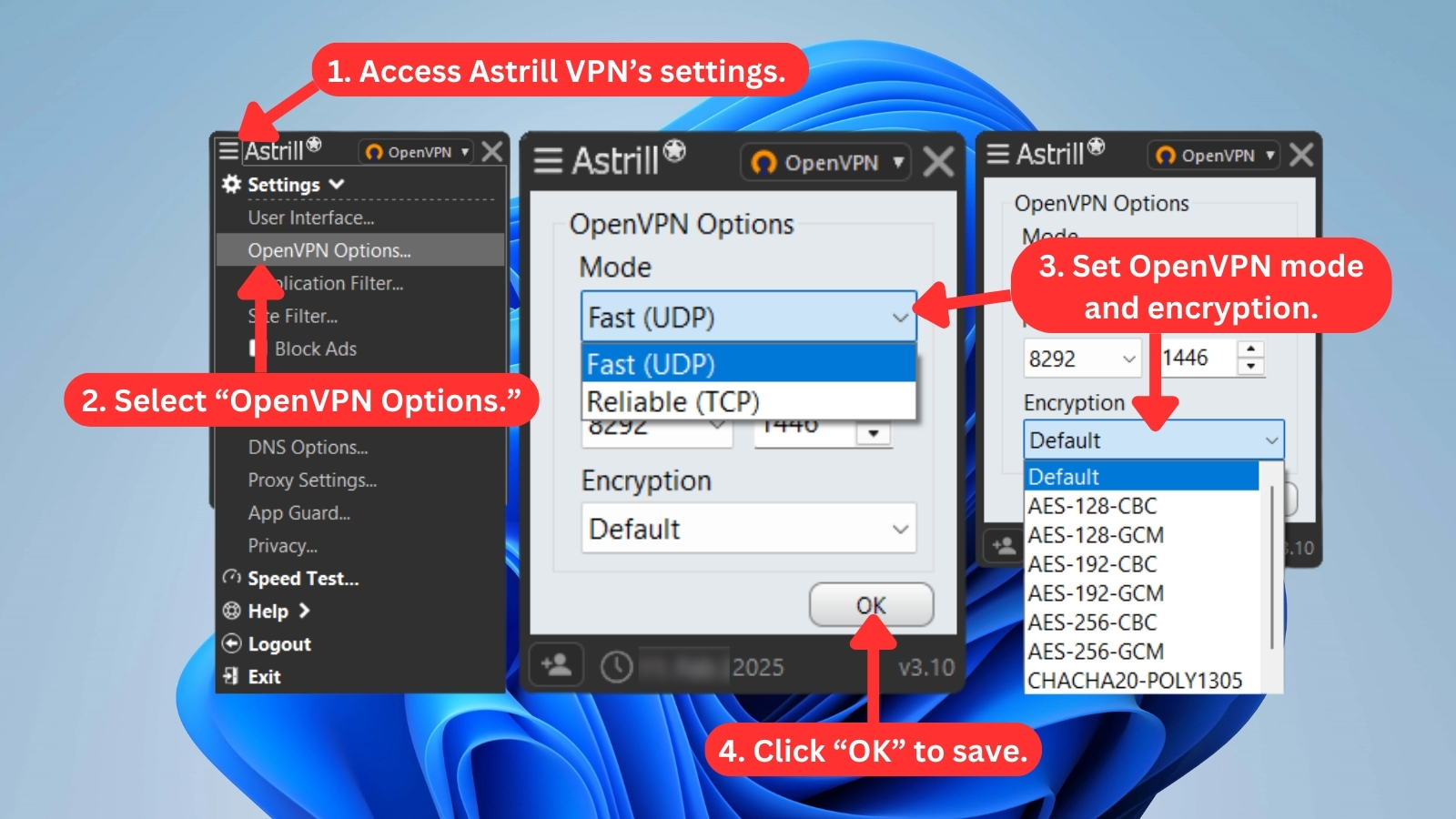
- OpenVPN Options: You can choose from two modes of OpenVPN (UDP or TCP), and you can also select a port, MTU size, and type of encryption.
- Application / Site Filter: You can decide which websites or applications you'd like to tunnel through the VPN. For example, you can filter international websites, specific applications, and more.
- Block Ads: As the name suggests, this built-in feature blocks intrusive ads while you browse. Just tick the box, and it'll help clean up cluttered pages and improve load times without needing any extra tools.
- Port Forwarding: This feature can directly route inbound traffic to specific devices on your internal network and vice versa. Hence, you can bypass the limits imposed by your LAN's firewall. Competitive gamers and users who seed torrents will find port forwarding useful, although it takes some effort to set up.
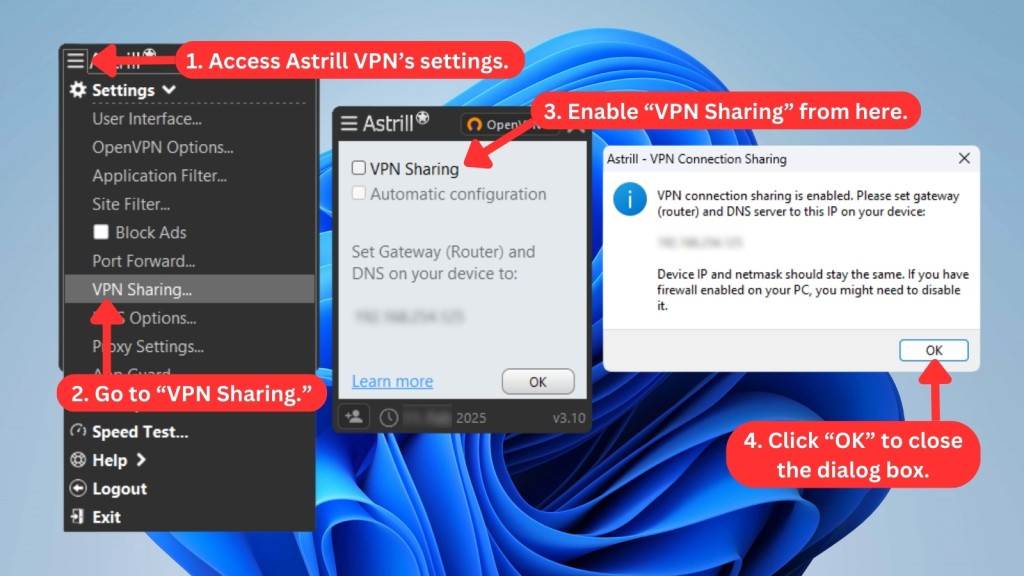
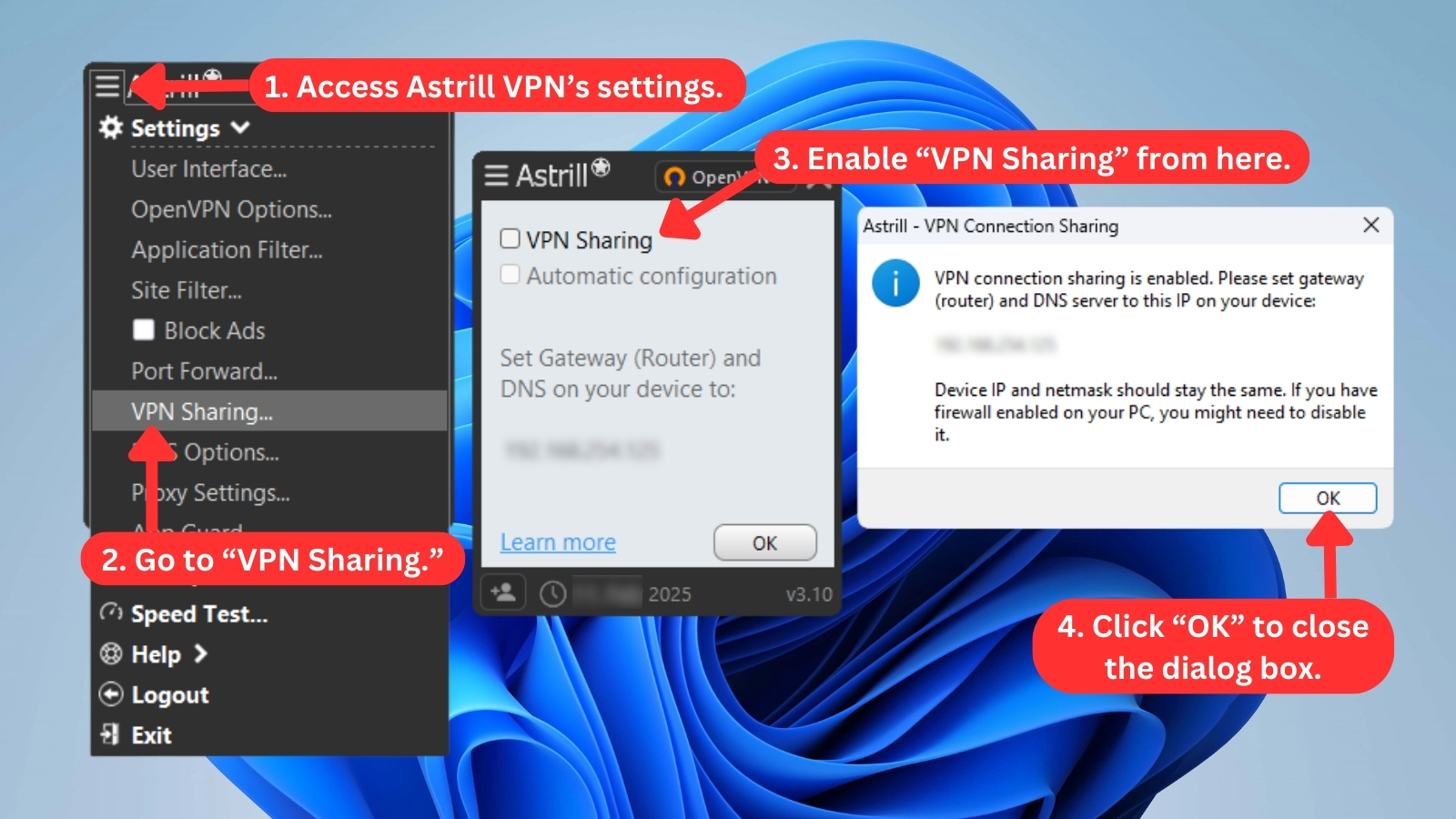
- VPN Sharing: Astrill VPN lets you quickly transform your device into a VPN gateway. You can connect other devices to your computer and share your VPN connection anywhere.
- DNS / Proxy Settings: This VPN allows you to set up custom DNS and proxy addresses, including anything related to these two options.
- App Guard: This feature can prevent specific applications on your device from accessing the Internet unless the VPN is activated. Guarded applications will only run if Astrill VPN is on.
- Privacy: We highly recommend enabling the application's kill switch and protecting yourself from data leaks, including DNS, IPv6, and WebRTC IP leaks.
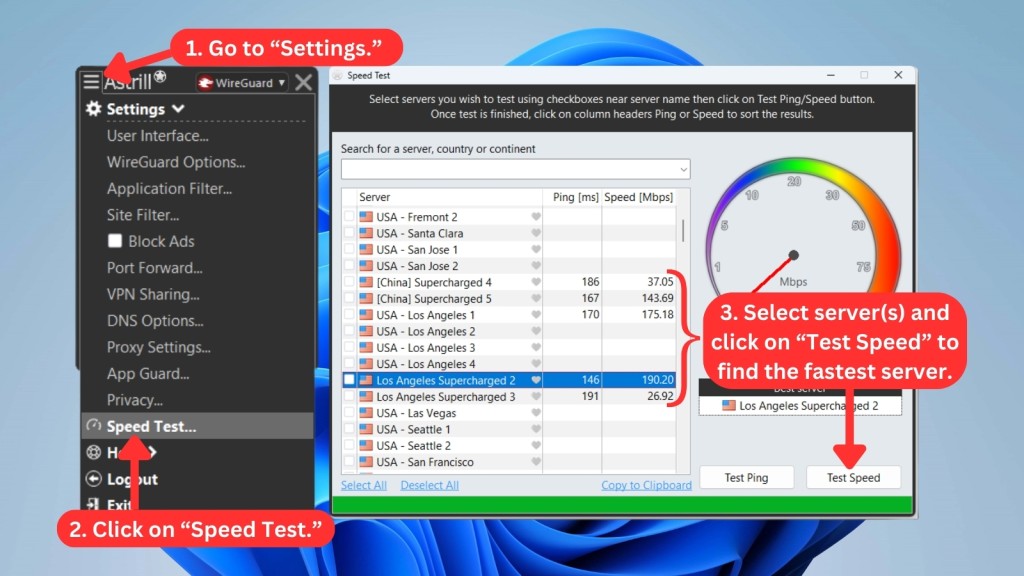
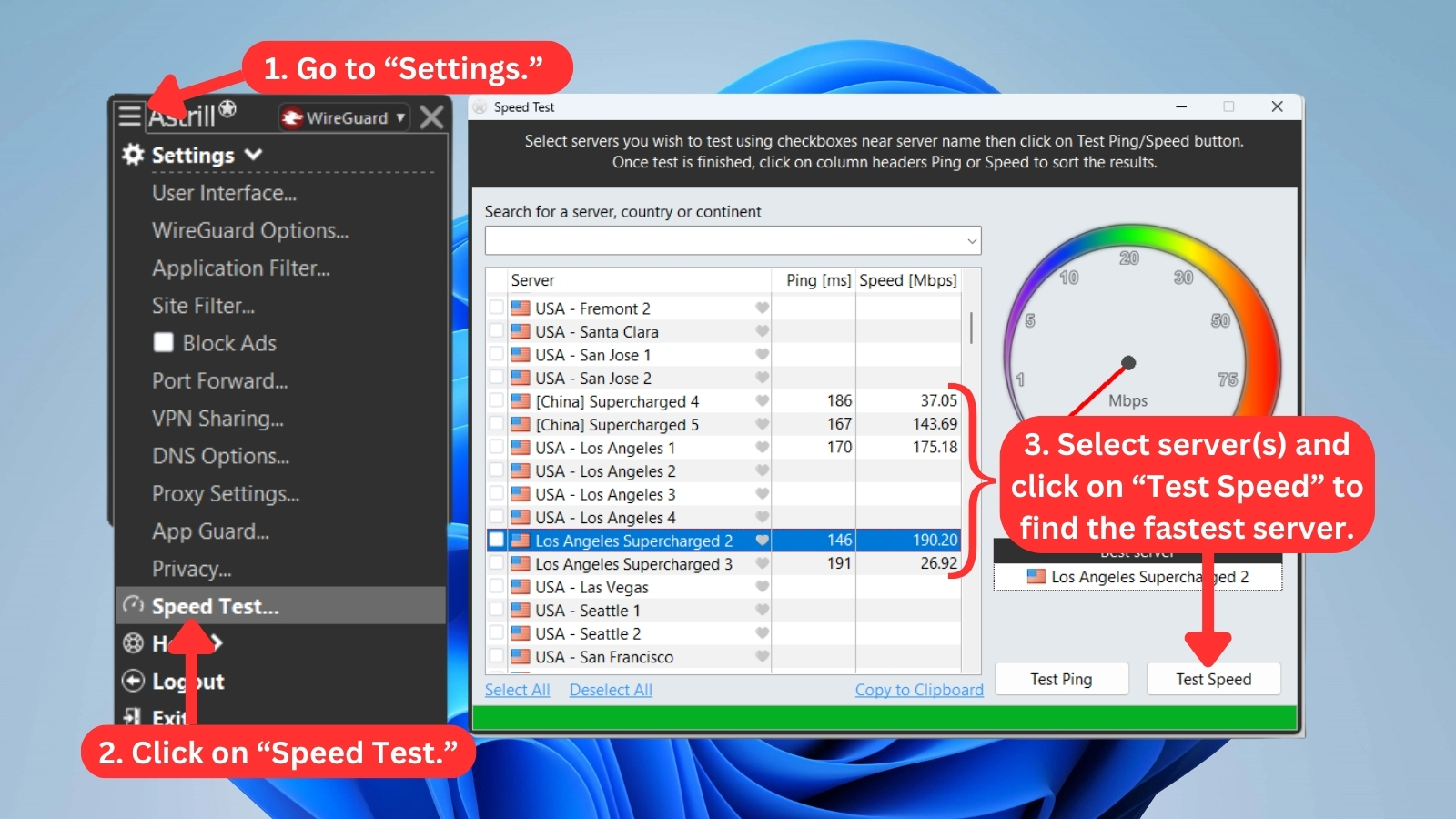
- Speed Test: Astrill provides a handy tool for checking the speed and ping of its servers, even before you connect to any. You can also batch-test multiple servers so you can pick the fastest one quickly.
- Help: This menu item gives you access to various help-related resources. You'll find handy tips, a router installation wizard, and more.
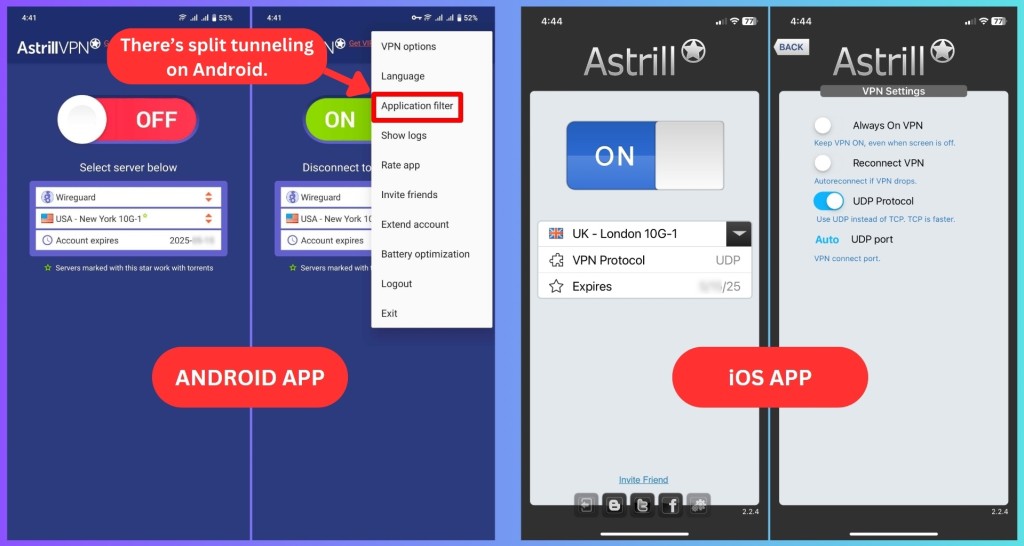
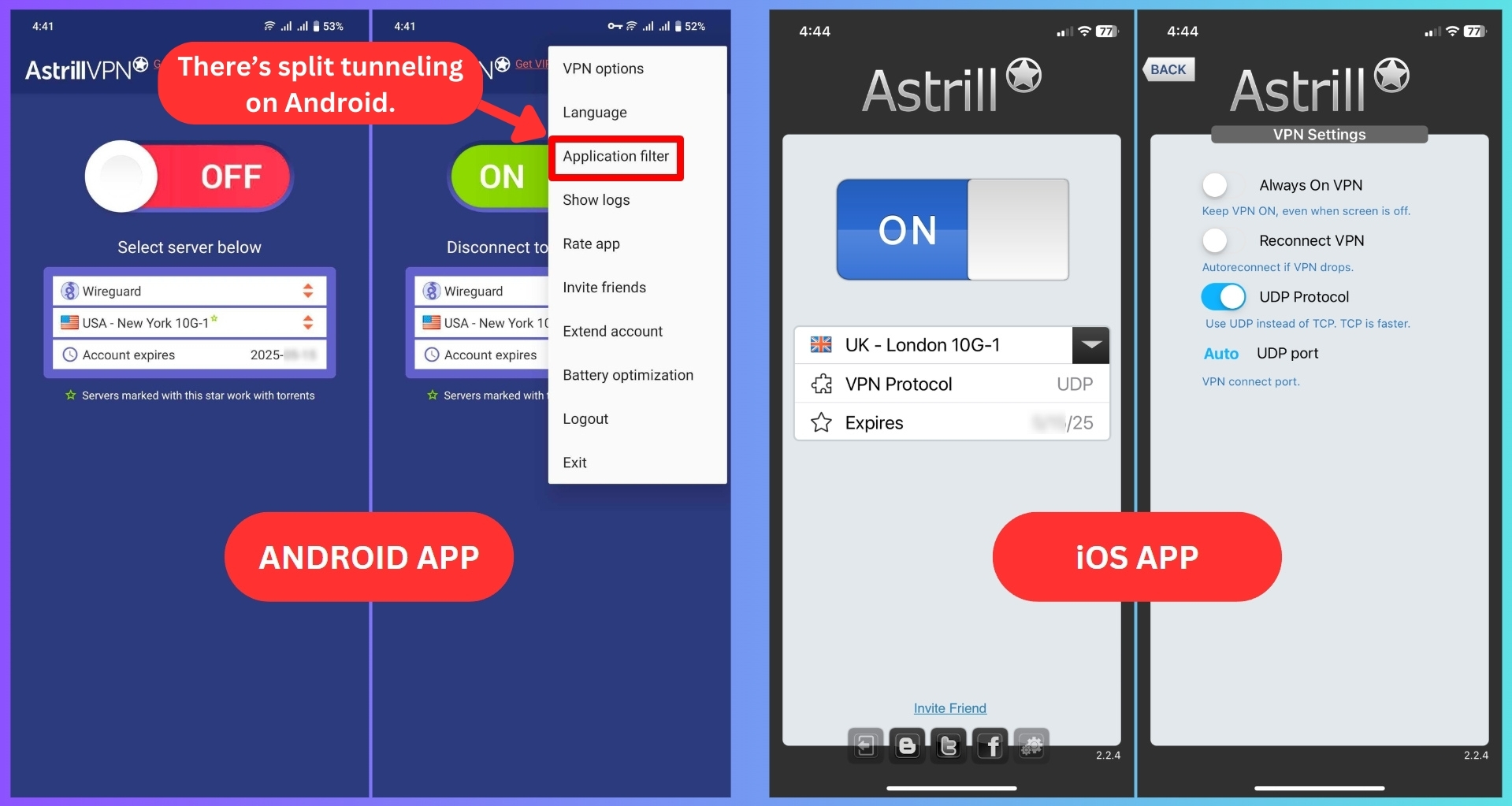
We also checked Astrill's mobile apps, and just like their desktop versions, they’ve got a simple design and UI. However, the mobile apps are more limited, especially iOS, which is pretty stripped-down. At least Android offers split tunneling, making it a bit more useful than the iOS version.
Media Streaming, Torrenting, and Gaming Support
Interestingly, Astrill VPN performs well in streaming, but it couldn’t unblock Prime Video. It handles P2P sharing effectively, though it's not ideal for gaming unless you upgrade to the VIP plan. Our Score: 7/10
So, can Astrill VPN unblock Netflix? Can it be used to access other popular media streaming services? Well, we’ve done a round of streaming tests, and here are the results.
Is Astrill VPN Good for Streaming?
Yes, Astrill VPN is surprisingly good for streaming. Our tests using the WireGuard protocol easily unblocks US Netflix, Disney+, Hulu, Max, and even BBC iPlayer. However, we faced some challenges with Amazon Prime Video despite trying various US-based servers and VPN protocols.
Astrill VPN may not be the best VPN service for streaming, but if you're an avid streamer seeking access to most major platforms, this VPN is worth exploring. Here are some US streaming services you can confidently unblock with Astrill VPN.
Astrill also expands your streaming options globally, not restricting you to the US. Here's a glimpse of what you can unblock with the service.
We reached out to Astrill's customer support, and they informed us that all their servers fully support streaming. They provided a solid guarantee that streaming sites are accessible on any server, with a particular focus on the UK or US. True to their word, Astrill successfully unblocked most streaming platforms in our tests and operated seamlessly without any noticeable lag.
Is Astrill VPN Good for Torrenting?
Yes, torrenting ran smoothly throughout our testing with Astrill. We connected to several servers and downloaded a few public-domain films using uTorrent. The connection stayed stable the whole time without any speed dips or dropouts.
P2P-friendly servers are clearly marked with a 'gold star' in the app, which makes them easy to spot. After enabling port forwarding and syncing the port in our torrent client, we noticed faster download speeds. The kill switch also worked well. During a simulated disconnect, it immediately stopped all traffic to keep our IP address from leaking.
It might not be the best torrent VPN, but it reliably gets the job done. It's fast enough, steady, and keeps things private.
Is Astrill VPN Good for Gaming?
No, we don't recommend this VPN for online gaming, at least not with the standard plan. We tried it with popular Riot titles like League of Legends and Valorant, and it couldn’t bypass region blocks. That was a letdown, especially since we expected more from something marketed as a gaming-friendly VPN.
Now, Astrill does offer a VIP add-on that might be worth checking out if you're serious about gaming. These servers are supposed to run on premium networks with optimized routes to Asia, and the ping is supposedly tuned for better responsiveness.
That said, considering how expensive Astrill already is (more on that later), it’s tough to say if paying extra for VIP access is something most people would want to stick with long term.
Security & Privacy
When it comes to the available VPN protocols, Astrill VPN stands out as one of the most robust options on the market. It also utilizes high-end encryption and keeps no PII data. Our Score: 8/10
In this section of our Astrill review, we'll focus on three things: how it sets up secure connections (VPN protocols), what it keeps track of (logging policy), and if there are any potential leaks of your info (IP/DNS leaks).
Astrill VPN Protocols
Astrill VPN gives you different VPN protocols, but the ones you get depend on the device you're using. Let's check out the protocols it offers:
Astrill VPN offers four different VPN protocols:
- OpenWeb: Astrill’s proprietary OpenWeb protocol, developed in 2009, is built on TCP with AES-256 encryption. It’s lightweight, performs well in highly censored regions, and is difficult to detect via deep packet inspection (DPI) due to its similarity to regular Web browsing.
- StealthVPN: This proprietary protocol builds on OpenVPN. It helps slip past automated firewalls designed to block VPN traffic. Unlike OpenWeb, it works in both UDP and TCP modes, so you’ll get enhanced security and stability throughout your session. Available only through Astrill’s apps, it’s a great option for overcoming censorship without compromising speed.
- WireGuard: This one is built for speed and security, using lightweight code and modern cryptography. It relies on tools like the Noise protocol framework, ChaCha20, and Curve25519, making it a faster alternative to older protocols like IPSec and OpenVPN.
- OpenVPN: Consider this protocol when cross-platform compatibility is important. It can operate over either UDP for quick speeds or TCP for enhanced security and stability. But since OpenVPN traffic isn’t obscured, it can be identified by automated firewall systems, leading to frequent blocking and throttling. For instance, it’s frequently restricted in China.
Does Astrill VPN Keep Logs?
No, Astrill VPN doesn't collect any user logs. Astrill says it implements a no-logs policy, meaning it collects no personally identifiable information. However, in reality, it still collects some connection-related details. We’ve looked closely at its privacy policy, and here’s what we’ve discovered.
Astrill collects plenty of data about your currently active session, including your IP address, connection timestamp, device type, and more. However, this information is deleted when you disconnect from the VPN. Also, this VPN keeps the information related to your previous 20 sessions, including timestamps, country of origin, device type, connection time, and the Astrill client version.
Again, no PII data is ever collected – and your IP address is away from this VPN’s servers. Still, there's no way to verify these claims, since Astrill hasn’t undergone an independent audit.
Nevertheless, we believe Astrill is still a trustworthy option. In case you didn’t know, every VPN needs to collect some types of information to provide its services, like your username, password, payment method, and other similar details.
Does Astrill VPN Leak/Expose Your Private Data?
In our tests, Astrill VPN didn’t leak any personal data. We ran DNS leak checks and each one came back clean, just like what you see in the image below.
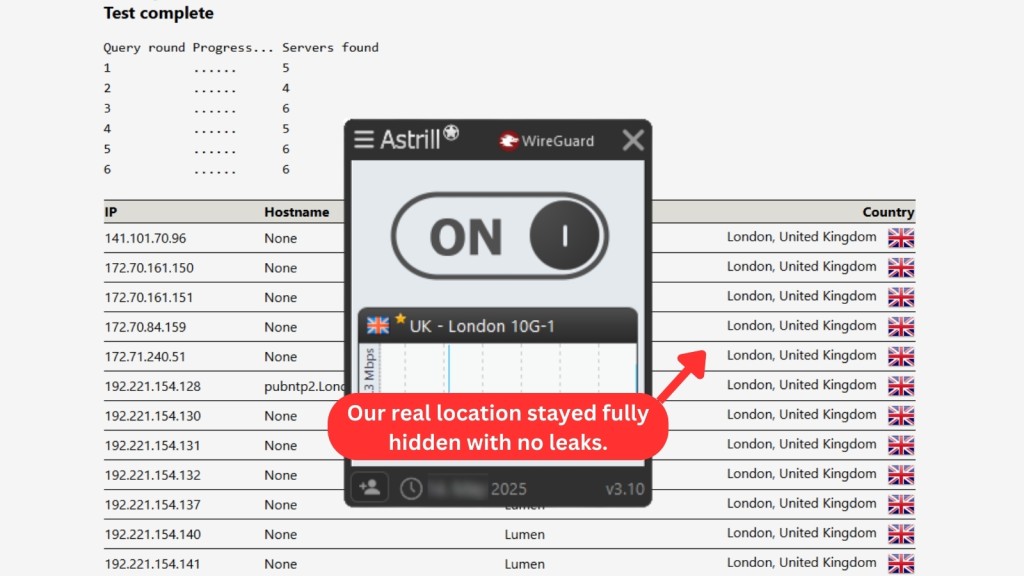
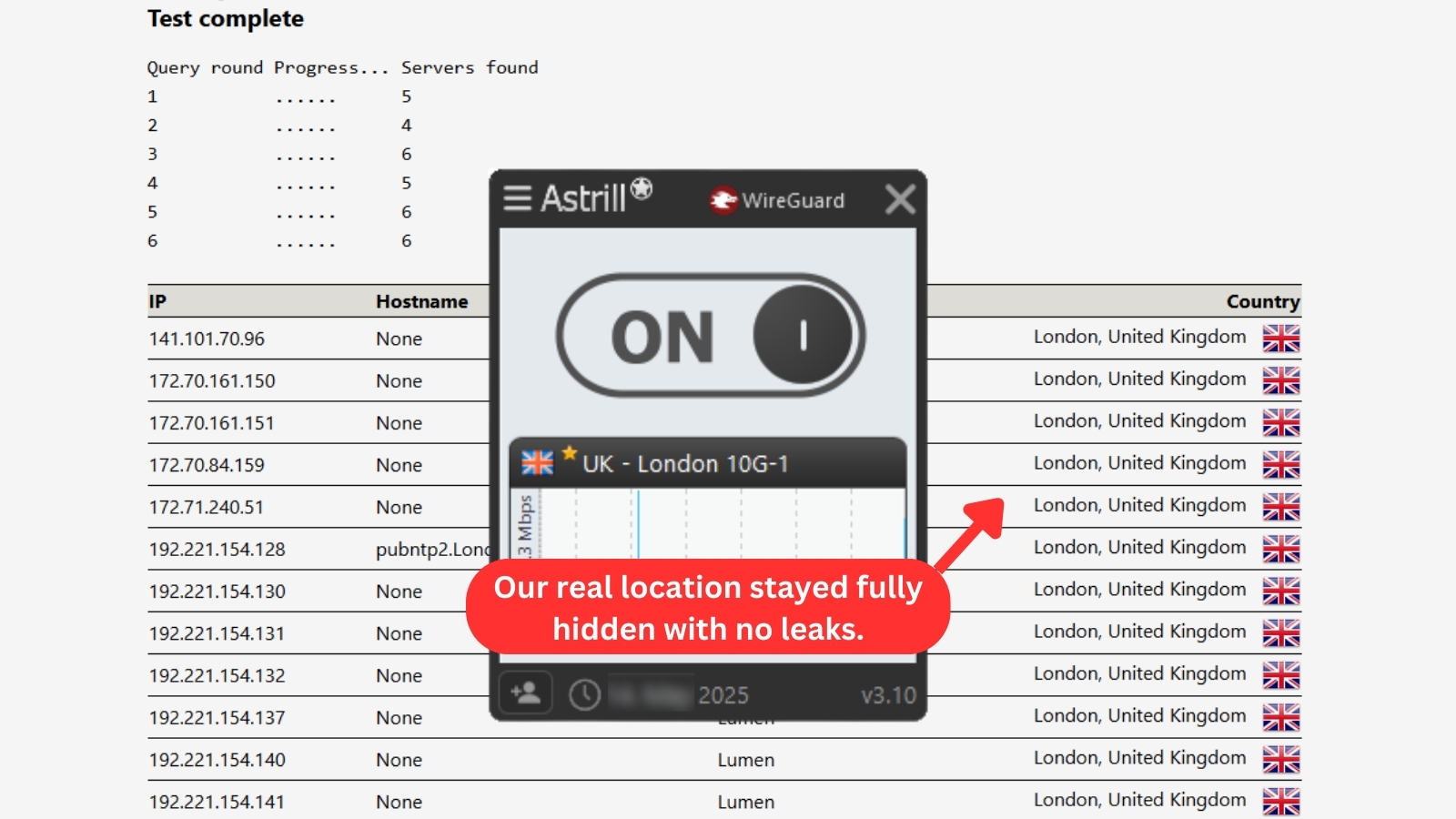
Astrill VPN did an excellent job of hiding our identity – it only showed our virtual information, including our IP address, hostname, country of origin, and other similar info.
Speed & Performance
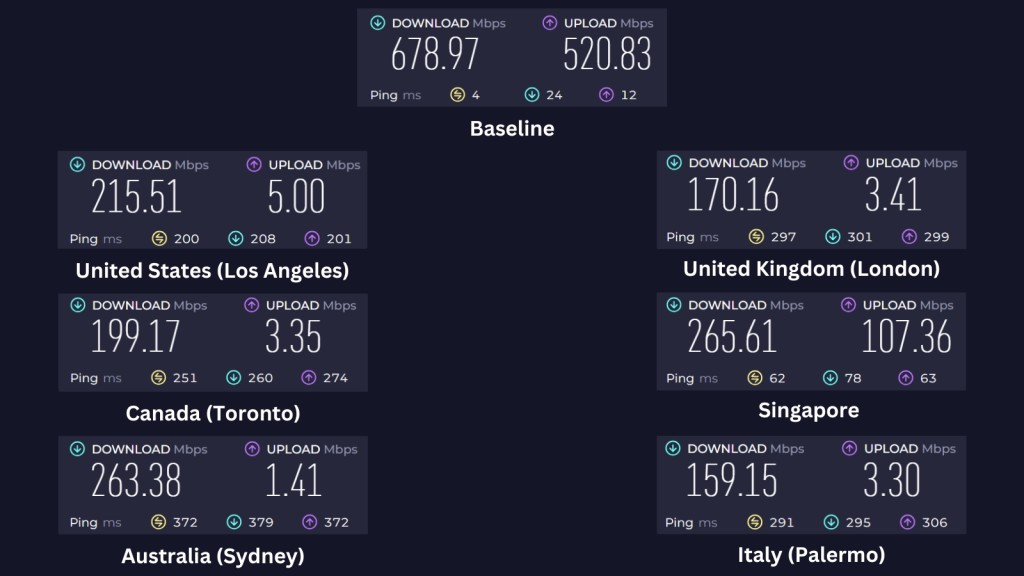

We found that sticking to nearby servers gives the best performance. While distant ones can really slow down, Astrill’s optimized US servers still manage to deliver decent speeds. Our Score: 4/10
We tested Astrill VPN’s performance by checking the speed of its servers in both nearby and distant locations. To compare, we first measured our Internet speed without the VPN.
Our starting speeds hit 678.97 Mbps for downloads and 520.83 Mbps for uploads. Since VPNs usually slow things down a little, we expected some speed drop. Let’s see how Astrill measures up.
- USA Server (Los Angeles): Although this server was farther away, it still gave us the best download speed of all the distant ones, reaching 215.51 Mbps. Astrill’s US servers are optimized for speed, which might explain why it performed better than the others, despite a 68% slowdown.
- UK Server (London): Being a faraway server, it performed similarly to the one in Italy, but with slightly better results. We reached 170.16 Mbps for downloads and 3.41 Mbps for uploads, with a 75% decrease in speed.
- Canada Server (Toronto): This is another distant server we tested, and it gave us a download speed of 199.17 Mbps, with a 71% average speed loss. Given the distance, we weren’t too surprised by the reduction in performance.
- Singapore Server: Likely due to its proximity, this one delivered the best results. Even with a 61% speed drop, we still got 265.61 Mbps for downloads and 107.36 Mbps for uploads, making it the fastest server we tested.
- Australia Server (Sydney): Also fairly close to our location, this server came in second in terms of performance. We saw a similar 61.2% speed reduction as with Singapore, with downloads reaching 263.38 Mbps. Uploads, however, dipped significantly to just 1.41 Mbps.
- Italy Server (Palermo): While it’s the slowest of the bunch, this kind of performance is pretty typical for servers that are quite far away. We only got 159.15 Mbps for downloads and 3.3 Mbps for uploads, showing an average slowdown of 76.6%.
Overall, Astrill VPN gave us mixed results. Nearby servers stood out with faster speeds, while distant ones showed the usual slowdowns you'd expect - averaging a 68.80% drop across the board.
Still, some of Astrill’s optimized servers managed to surprise us with decent performance despite the distance. Pair that with clean leak tests and strong streaming capabilities, and you've got a VPN that can still hold its ground in the right conditions.
Customer Support
Astrill VPN gives you a few ways to reach out if you need help, including live chat. They've also put together a decent support section, enough to get you through the basics without much hassle. Our Score: 9/10
Customer support really matters when choosing a VPN. No one wants to wrestle with tech issues alone. Here’s a quick look at what Astrill offers if you ever need a hand.
- FAQ: This helps you answer commonly asked questions about the VPN. You can check here to see if your question(s) might have been answered before contacting live support.
- 24/7 Live Support: You can talk to the company’s representative live (when they’re not overly busy). We used this option several times and managed to speak to someone after waiting a few minutes.
- Email: If you’ve got a question that’s a bit too detailed for live chat, emailing Astrill at [email protected] might be the better route. It’s not the fastest way to get help, but it’s handy when you need clear, thoughtful responses instead of quick one-liners.
- Contact Form: No one was ‘there’ even after waiting more than 30 minutes when we turned in the contact form. You can use this contact form to explain the problem you’re having, and someone should respond to you within 24 hours.
- Video Tutorials: The website's video tutorials and the comprehensive Astrill Wiki are valuable resources. The wiki contains instructions for port forwarding configuration, manual router installation, and using Astrill's various VPN protocols.
- Setup Manuals: Astrill offers a wiki section packed with setup and installation instructions for all types of devices, including routers. The setup manuals also cover troubleshooting the VPN and FAQs.
Overall, this provider's customer support is great. The customer service representative we connected with answered all our questions. If you get stuck using the service or have a problem, you can depend on them.
Pricing
Astrill is one of the least affordable VPNs out there. It does offer high-end features, but this still doesn’t justify its high price. Our Score: 3/10
Although Astrill is a decent VPN service, it’s expensive. Even top VPN services like NordVPN and ExpressVPN aren’t as expensive as Astrill VPN. Aside from its subscription fee, you still have to pay extra for a 'VIP Add-on' to access premium services like 'Multi-hop.'
How Much Does Astrill Cost?
Astrill starts at $12.50 per month when you subscribe to its 2-year plan. All Astrill VPN subscription plans offer the same benefits. The only difference is the pricing and savings you get for longer plans.
Here's what to expect from an Astrill VPN subscription:
- 1-Month Plan: It's the most expensive option. While it's flexible, it doesn't really work in your favor if you're just looking to test the waters because Astrill doesn’t offer a money-back guarantee. That means if you don’t end up liking it, there’s no refund coming your way.
- 1-Year Plan: You get 50% off with this plan, but it still requires you to pay the full amount upfront. And again, there's no money-back guarantee here either, so you’re locked in once you subscribe.
- 2-Year Plan: This is the longest plan, offering the best discount. However, the monthly cost is still high. If this plan included more features, it might be easier to justify, but as it is, you’re essentially paying more for a longer commitment without much extra in return.
Notably, Astrill VPN offers additional features at a premium price, offering 'Multi-hop' and a generous 100 GB VIP traffic on all servers. If you need more, additional traffic is also available for purchase. This Astrill VIP add-on comes at a cost of $10.00 per month and is tailored for clients in Asia and gamers seeking lower latency. You can also get a private IP address for $5.00 per month.
Another offering from Astrill is the Business VPN, which costs $7.92/month (per account) when paid annually. This comprehensive plan features 24/7 business support, complimentary 100 GB data on VIP servers, high-speed servers in over 50 countries, and more.
Sadly, Astrill doesn't provide a free plan or offer a free trial. There's also no money-back guarantee available. Once a purchase is made on their website, all sales are considered final, and refunds aren’t possible. Regarding payments, Astrill supports various payment methods such as credit cards, PayPal, UnionPay, AliPay, and more. Bitcoin is also accepted as a payment method.
Final Thoughts
Astrill VPN stands out because of one thing: it's a reliable VPN to use in China. It handles censorship and heavy restrictions better than most, which makes it a solid pick if you're behind the Great Firewall.
However, we don’t recommend Astrill VPN for most users. Its pricing is unreasonably high, especially considering that many of its advanced features are locked behind a VIP add-on that costs even more. Furthermore, due to the lack of browser extensions and a generally outdated interface, Astrill just doesn’t stack up to today’s top VPNs. If you’re not located in China, there’s little reason to choose Astrill over more balanced options.
If you're outside of China, you'd probably get more value with a top-rated provider like NordVPN. It's packed with performance, offers tons of fast servers, and comes with a no-fuss money-back guarantee - all for a much friendlier price.
PROS
- Based outside the Eyes Alliance.
- No-logs policy.
- Bypasses China’s Great Firewall.
- Unblocks most streaming platforms.
- Wide protocol selection.
- No DNS leaks.
- Supports torrenting.
- Offers obfuscation via StealthVPN.
CONS
- No money-back guarantee.
- No free trial.
- Quite expensive.
- Outdated user interface.
- Limited number of servers.
- 5 simultaneous connections only.
- Premium features cost extra.
| Review Summary Astrill VPN isn’t the cheapest, but it’s built for tough environments like China. But if you're not navigating firewalls or dodging strict restrictions, you might find better value elsewhere. | 6.5 Overall Score | ||
| Background, Jurisdiction & Reputation | 9 | ||
| Supported Platforms & Devices | 6 | ||
| Installation & Initial Configuration | 7 | ||
| Prominent Features | 9 | ||
| Server Count & Infrastructure | 4.5 | ||
| UI/UX Design & Ease of Use | 5 | ||
| Media Streaming & Torrenting Support | 7 | ||
| Security & Privacy | 8 | ||
| Speed & Performance | 4 | ||
| Customer Support | 9 | ||
| Pricing | 3 | ||