When you purchase through links on our site, we may earn an affiliate commission. Here’s how it works.
5 Best Discord VPNs in 2026



Our experts have reviewed 53 VPN providers, which were put through extensive rounds of testing. To learn more about that process, here’s how we review VPNs, where we explain our criteria and our policy of being fully transparent.
Ever tried opening Discord only to find it’s blocked? That’s the case in countries like China, Iran, and Oman, while places like the UAE restrict its VoIP features. Even schools and workplaces often ban it on their networks. And since Discord doesn’t use end-to-end encryption, your conversations aren’t fully private.
The good news is that a VPN fixes these issues. By masking your IP and encrypting your traffic, a VPN lets you bypass restrictions, unlock VoIP, and keep your communications secure.
Here’s why you need a VPN for Discord:
✅ Access Discord from Anywhere – Unblock the app and change the Discord server region.
✅ Unlock Discord’s VoIP – Get back calling features in countries where VoIP is blocked.
✅ Unblock Other Messaging Apps – Use WhatsApp, Telegram, Viber, and Skype freely.
✅ Encrypt Messages and Media – Protect chats and calls from being monitored.
✅ Boost Digital Security – Stay safe from trackers, malware, and malicious domains.
✅ Use Discord Safely on Public Wi-Fi – Avoid hackers targeting unsecured networks.
The article lists the top 5 best VPNs for Discord, and we'll also show you how to unblock the app with a VPN. Then, we'll compare the best options, discuss why you need a VPN, how to pick the best option, and how to unblock Discord. We'll also provide some troubleshooting tips and answer some FAQs.
Is Using a VPN with Discord Blocked or Legal?
Using a VPN with Discord is not inherently against Discord's Terms of Service. However, Discord employs various security measures that may be affected by VPN usage.
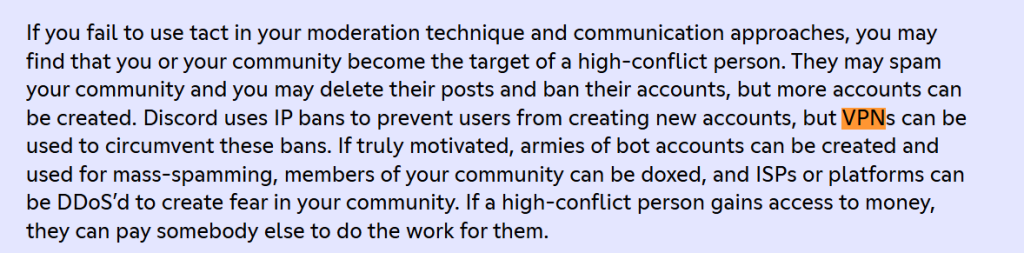
Discord utilizes IP bans to prevent users from creating new accounts. VPNs can be used to circumvent these bans. Additionally, some users have reported that Discord's security systems may flag accounts using VPNs, potentially leading to account verification requests or other security measures.
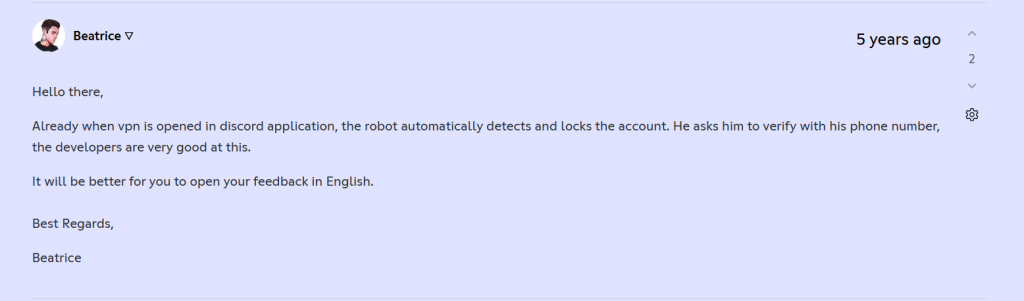
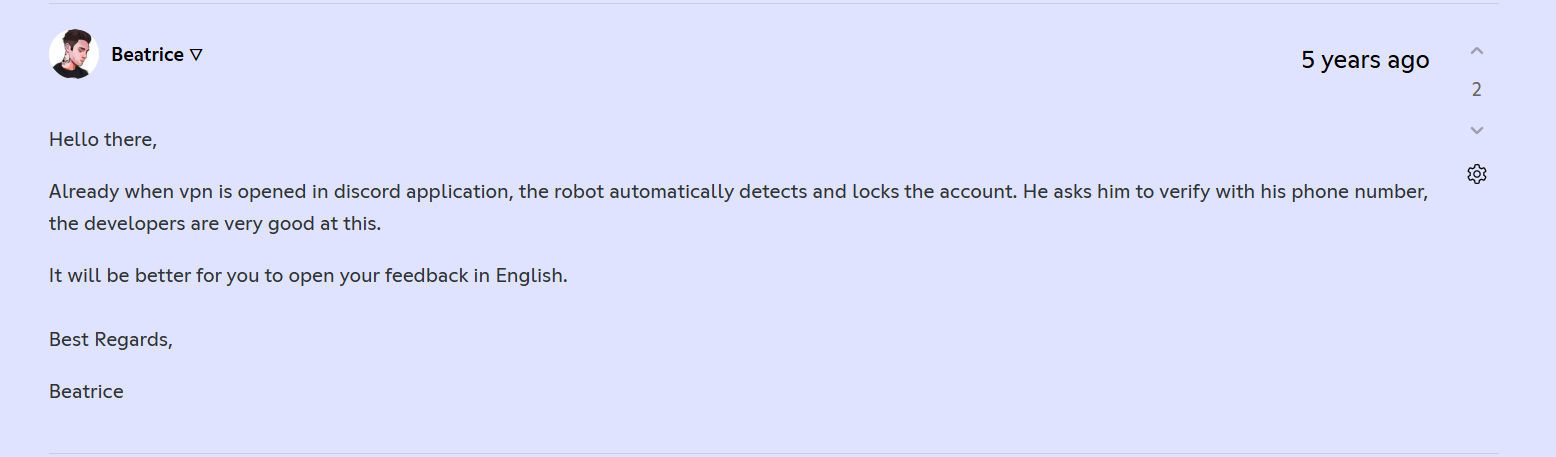
While these practices are not explicitly outlined in Discord's official policies, they are part of the platform's efforts to maintain security and prevent abuse. It's important to note that using a VPN to bypass bans or engage in activities that violate Discord's Community Guidelines can lead to account penalties.
The Best VPNs for Discord in 2026
Watching Fox Sports from anywhere shouldn’t be a struggle. A great VPN makes it simple, secure, and buffer-free. Here’s what to look for when picking your VPN:
✅ Servers in the US and key regions – So you can always access Fox Sports, no matter where you are.
✅ Fast, stable speeds – Because nothing kills the excitement like lag during a live game.
✅ Smooth HD & 4K streaming – Make sure your VPN can handle high-quality streams without freezing.
✅ Strong encryption & privacy features – Kill switch, no-logs policy, and advanced protocols (OpenVPN, WireGuard, AES-256) keep your data safe.
✅ Obfuscation/stealth mode – Makes your VPN traffic look like regular web traffic, perfect for bypassing tough geo-blocks.
✅ Multiple simultaneous connections – Watch on your phone, tablet, computer, or smart TV all at once.
✅ User-friendly apps – You shouldn’t need a tech degree to get streaming.
✅ Money-back guarantee & 24/7 support – For when things don’t go perfectly (hey, it happens!).
✅ Extra perks for sports fans – Some VPNs have dedicated streaming servers or smart DNS to make watching Fox Sports even smoother.
- NordVPN – Best-Rated VPN for Discord in 2026 • Servers worldwide for low-latency, lag-free Discord connections • NordLynx protocol & AES-256 encryption for secure, uninterrupted chatting and voice calls • SmartPlay tech ensures easy access to Discord from restricted regions
- Surfshark – Best VPN for Discord with Lots of Server Locations • Thousands of servers optimized for gaming and VoIP apps • Unlimited simultaneous connections for all your devices • NoBorders mode & CleanWeb ad blocker for seamless, private Discord usage
- ExpressVPN – Speedy Discord VPN for Total Data Obfuscation • Servers in 105+ countries for global Discord access • Lightway protocol for ultra-fast, stable connections • TrustedServer tech & Smart DNS for secure, uninterrupted Discord chats and streams
- Proton VPN – Secure Discord VPN with Strong Privacy Features • High-speed servers optimized for low-latency communication • WireGuard & OpenVPN support for encrypted Discord traffic • Strict no-logs policy with advanced privacy and kill switch protection
- Private Internet Access – Customizable Discord VPN for High-End Users • Extensive global server network for fast, reliable Discord access • WireGuard & OpenVPN protocols for robust security • Advanced features like split tunneling and port forwarding for ultimate control over Discord traffic
1. NordVPN
NordVPN is the best VPN to unblock Discord from anywhere. Plus, it can give you access to all its communities, popularly known as servers—not to be confused with VPN servers! The VPN’s network consists of 8,900+ servers in 129 countries. They can also unblock similar restricted apps like WhatsApp, Telegram, and more.
Your online data will be safe with NordVPN’s state-of-the-art security features, such as AES-256-GCM, ChaCha20, and Post-Quantum Encryption (NordLynx Protocol), leak protection, and a kill switch. Plus, it adheres to a strict no-logs policy and offers NordLynx (WireGuard-based), OpenVPN, IKEv2/IPsec, and NordWhisper. The latter is the best option since it's the most secure and lets the VPN deliver super-fast speeds with reliable performance.
You can bypass restrictive networks like the ones at schools or offices with NordVPN’s obfuscated servers. They are optimized to mask your VPN traffic as regular HTTPS data to give you access to Discord, even in places with strict Internet censorship. As said in our in-depth review of NordVPN, it also offers a Double VPN feature that can double your security by encrypting your data twice.
In addition, NordVPN can block malicious domains, trackers, and intrusive ads with its Threat Protection feature. It supports all popular devices like computers, tablets, routers, and smartphones. Plus, you can connect 10 simultaneous connections.
NordVPN’s 24 months subscription is priced at $3.09 per month. Furthermore, it has a 30-day money-back guarantee to test it risk-free, as well as 24/7 customer support.
NordVPN Features that can help Discord:
- Switch to the NordLynx protocol for the best speed. It’s optimized for low latency, so your voice and video calls on Discord stay crystal clear.
- Turn on Double VPN if you want an extra layer of privacy. Your traffic goes through two servers, making it nearly impossible to track your Discord activity.
- Set up Split Tunneling to keep Discord traffic on the VPN while letting other apps run on your regular internet connection.
- Turn on Threat Protection to block malicious links or trackers that sometimes pop up in Discord servers.
- Enable Dark Web Monitor to get alerts if your Discord-linked email or credentials leak in a breach.
PROS
- Accesses Discord from anywhere.
- Secure VPN protocols and encryption.
- Smooth and fast performance.
- Lots of advanced features.
- 30-day refund policy.
- 24/7 live chat support.
CONS
- Not all servers support obfuscation.
2. Surfshark
Surfshark is a powerful Discord VPN with a network of 4,500+ servers in 100 countries. This includes servers in the US that allow you to easily access Discord from anywhere. You can use it to bypass IP bans on Discord imposed by server admins. In addition, it can unblock other messaging apps like WhatsApp, Telegram, and Skype.
In terms of security, Surfshark has AES-256-GCM (OpenVPN and IKEv2), ChaCha20 (WireGuard), and Post-Quantum Encryption (WireGuard + Dausos), which is the strongest type available, plus WireGuard, IKEv2, OpenVPN, and Dausos. It adheres to a no-logs policy and has a highly efficient kill switch to safeguard your privacy. Moreover, it automatically obfuscates your data with its Camouflage Mode wherever you use a network with VPN-blocking firewalls.
Surfshark also has a Dynamic Multi-Hop feature, which allows you to choose both servers to double your encryption. Its CleanWeb feature can block all types of malware, adware, and trackers.
It has fast and allows unlimited simultaneous connections if you want to use a VPN on Discord in a large household. Plus, you can protect all your devices, like computers, routers, tablets, and smartphones.
Surfshark's lowest price is found in its 24 months plan, which costs $1.99 per month. Also, it comes with a solid 30-day money-back guarantee, so you can test it free of financial risk. If you run into issues, contact Surfshark’s round-the-clock customer support for assistance.
Surfshark Features that can help Discord:
- Turn on Camouflage Mode when you’re on school or work networks. It makes your VPN traffic look like normal browsing, so Discord can’t be blocked.
- Enable NoBorders Mode if you’re in a region with heavy internet restrictions. This lets Discord connect even under strict censorship.
- Use CleanWeb to block ads, trackers, and malicious links often shared in Discord servers.
- Try Split Tunneling (Bypasser) if you only want Discord to go through the VPN while keeping other apps on your normal internet.
- Enable MultiHop if you want extra privacy by routing your Discord traffic through two VPN servers at once.
- Turn on GPS Spoofing (Android only) if you need to match your IP location with your GPS for region consistency.
PROS
- Bypasses Discord bans easily.
- Several strong protocols.
- CleanWeb to prevent malware.
- Unlimited simultaneous connections.
- 30-day money-back period.
- 24/7 live chat customer support.
CONS
- Takes 10+ seconds to connect.
3. ExpressVPN
ExpressVPN is a very reliable VPN with undisclosed number of servers in 105 countries. As a result, it can unblock Discord from anywhere. It allows you to connect to any Discord server and unblock other similarly blocked apps like WhatsApp, Skype, and Telegram.
Thanks to automatic obfuscation, ExpressVPN can reliably work even in countries with strict Internet censorship, like China. In addition, it protects your data with AES-256 and ChaCha20/Poly1305, a kill switch, and a strict no-logs policy. It has OpenVPN, Lightway, and IKEv2, as explained in our full ExpressVPN review.
In addition, ExpressVPN has a Threat Manager that can block malware, harmful trackers, and annoying ads. However, it is more effective against malware, so you might still see an ad or two while using the Internet.
You can easily use ExpressVPN on all household devices, such as computers, smartphones, tablets, and routers, with up to 10-14 simultaneous connections. In terms of speed, ExpressVPN is incredibly fast and can deliver stable performance.
You can sign up for ExpressVPN for $2.44 per month (24 months plan). You can also test drive it risk-free with its 30-day money-back guarantee. Lastly, it has very responsive 24/7 customer support, and we never had to wait more than a minute to connect to an agent during our tests.
ExpressVPN Features that can help Discord:
- Switch on Lightway protocol for lightning-fast connections and ultra-low ping during Discord voice chats and video calls.
- Use TrustedServer technology to keep your data safe, every server runs on RAM only, meaning nothing is ever written to a hard drive.
- Enable Split Tunneling if you only want Discord to go through the VPN while other apps use your normal internet.
- Set up ExpressVPN on a router or get Aircove to protect your whole network, making Discord available on devices that don’t support VPN apps directly.
- Use the MediaStreamer (Smart DNS) feature if you want Discord access on devices that don’t support VPN apps.
PROS
- Easily accesses Discord.
- Fast and stable performance.
- Threat Manager for ad protection.
- Automatic obfuscation.
- 30-day money-back guarantee.
- 24/7 live chat support.
CONS
- Not the most affordable pick.
4. Proton VPN
Proton VPN makes it simple to bypass restrictions on Discord and other communication platforms like WhatsApp. Its 17,276 servers in 127 countries (130 secure core in 67 countries) (including multiple US locations) ensure you can always find a fast and reliable connection to access Discord. It even offers Secure Core servers, which route traffic through privacy-friendly countries for extra protection against surveillance.
Proton VPN uses advanced AES-256 and ChaCha20 ciphers and comes with a reliable kill switch to keep your data secure. It strictly follows a no-logs policy and supports WireGuard, OpenVPN, IKEv2, and Stealth. While it doesn’t offer specialized obfuscation, Proton VPN includes a Stealth protocol on certain platforms, designed to bypass even the toughest firewalls, making it an excellent choice for accessing Discord where it’s blocked.
This VPN also provides built-in NetShield to block malware, ads, and trackers. Its automatic Wi-Fi protection keeps you safe when connecting to unsecured networks. You can even configure profiles for quick connections, helpful if you want Proton VPN to connect automatically whenever you launch Discord.
You can install Proton VPN on Windows, macOS, iOS, Android, Linux, and routers, with up to 10 simultaneous connections.
Proton VPN’s 24 months subscription starts at $2.49 per month. It also comes with a 30-day money-back guarantee. If you run into issues, Proton VPN provides responsive customer support via email and a helpful knowledge base.
Proton VPN Features that can help Discord:
- Connect to Secure Core servers when you want maximum privacy. Your traffic gets routed through hardened servers in privacy-friendly countries before reaching Discord.
- Enable Stealth Protocol to bypass firewalls on school, work, or public networks that block Discord. This disguises VPN traffic as regular HTTPS.
- Switch to WireGuard or Proton’s VPN Accelerator for faster speeds and smoother Discord voice/video calls.
- Turn on NetShield to block ads, malware, and trackers, useful for staying safe from malicious links sometimes shared in Discord servers.
- Use Port Forwarding if you’re running bots, hosting, or need better connectivity for Discord-related apps.
- Set up Split Tunneling to send only Discord traffic through Proton VPN while keeping other apps on your regular internet.
PROS
- Consistently unblocks Discord.
- Secure Core servers for enhanced privacy.
- NetShield blocks ads and trackers.
- Automatic Wi-Fi protection.
- 10 simultaneous connections supported.
- 30-day refund guarantee.
- 24/7 live chat support.
CONS
- Slightly higher price than some competitors.
- Live chat support not available (email only).
5. Private Internet Access
Private Internet Access (PIA) has undisclosed number of servers in 91 countries, offering the biggest US-based network of servers. You can easily unblock Discord and bypass its bans with servers in 50+ US locations–at least one in every state. In addition, it can access other apps like WhatsApp, Telegram, and Skype with their VoIP services from anywhere.
You can customize your VPN connection by choosing between AES-128-GCM, AES-256-GCM, AES-128-CBC, AES-256-CBC, and ChaCha20. Plus, PIA’s kill switch offers additional advanced settings that disable your Internet until you connect to the VPN first. It also allows you to choose between WireGuard, OpenVPN, and IPsec (IKEv2). Moreover, it follows a strict no-logs policy.
PIA offers a Multi-hop option to obfuscate your online data by using the Shadowsocks proxy. It even has a feature called MACE that can block ads, malware, or trackers. However, it only offers medium but still manages to deliver consistent performance with all its customizability options.
PIA also allows you to connect unlimited simultaneous connections and supports all devices, such as computers, tablets, smartphones, and routers. Its applications are easy to use out of the box, but they come with an unparalleled level of customization.
At the moment, you'll find PIA priced at only $2.03 per month (24 months subscription plan). You can test all its features with its 30-day money-back guarantee. If you can’t trick Discord server location detection into unblocking it, PIA’s 24/7 customer support will assist you in real time.
PIA VPN Features that can help Discord:
- Switch to OpenVPN if you prefer rock-solid security over speed. Great for protecting private Discord chats.
- Turn on Split Tunneling so Discord traffic runs through the VPN while your other apps stay on regular internet.
- Use Port Forwarding to improve connection stability, especially if you’re hosting voice or gaming servers on Discord.
- Turn on MACE to block ads, trackers, and malicious domains. This keeps Discord cleaner and protects you from shady links dropped in servers.
- Customize DNS settings inside PIA to bypass DNS-level blocks that stop Discord from connecting.
PROS
- Unblocks Discord from anywhere.
- Shadowsocks proxy for obfuscation.
- MACE to block ads/malware.
- Unlimited simultaneous connections.
- 30-day money-back policy.
- 24/7 customer support.
CONS
- Average connection speeds.
- Requires some optimization.
How to Use Discord with a VPN
You first need to find a reliable VPN that works with the messaging platform. After this, install the VPN and connect to any of its servers in a region where the app is available. Follow these easy steps:
- Subscribe to a VPN that works with Discord. Pick one with obfuscated servers, fast speeds, unlimited bandwidth, and a money-back guarantee so you can test it risk-free (we recommend NordVPN).
- Download and install the VPN on your device(s). Install apps on Windows, macOS, iOS, Android, or even routers. For Discord, we recommend enabling split tunneling so only Discord traffic goes through the VPN while other apps stay on your regular internet.
- Enable key security features before connecting. Turn on the Kill Switch, enable obfuscation mode, activate DNS/IP leak protection, and switch on built-in ad/tracker blockers (like NordVPN’s Threat Protection or PIA’s MACE) for safe and private Discord chats.
- Connect to a server that bypasses restrictions. If Discord is blocked at school, work, or your region, use US-based or obfuscated servers to get access.
- That’s it! Now, you can use Discord and its VoIP services privately from anywhere.
How to Use Discord on Your Devices with a VPN
The procedure is the same whether you wish to unblock Discord, gain access to more features, or bypass a Discord ban. You'll need to install your chosen VPN (we highly recommend NordVPN) and connect before opening the messaging app. Let's show you how to do that on various devices.
1. Chromebook (PC)
You need to download a VPN strong enough to access the messaging service from anywhere. After this, install it and connect to any of its servers in a region where Discord is available, like the US. Follow these steps to access Discord on a school Chromebook:
- Go to the Google Play Store and download a reliable VPN.
- Sign up and install the VPN on your school Chromebook.
- Log in using your credentials.
- Connect to any of its servers in the US or any other place where Discord is available.
- Download Discord on your school Chromebook if it is not already installed.
- Launch the app, and that's it! You can now use Discord on your school Chromebook.
2. PS5
In this case, you must install a VPN on your router that can unblock Discord since PS5 does not support VPNs. The console doesn't have a native Discord app either, so you'll need to complete a couple of extra steps to use them together. Follow these simple instructions to use Discord with a VPN on your PS5:
- Subscribe to a VPN that supports routers and works with Discord.
- Install the VPN on your router.
- Connect to any of its servers in the US.
- Connect your PS5 and your main Discord device to the VPN-protected network.
- After this, go to User Settings on your Discord account dashboard.
- Choose Connections and click on the PlayStation icon.
- Follow the instructions to link your accounts.
- After this, transfer your Discord chat from your device to your PS5.
- That's it! You can now use Discord on your PS5 with VPN protection.
3. Phones
You must first install a good VPN compatible with Discord on your device. After this, log in and connect to any of its servers in Discord-supported regions. Follow these easy steps to unblock the messaging app or bypass a Discord server ban on mobile:
- Open the Play Store or App Store and download a VPN.
- Install the VPN and get a subscription.
- Log in using your new credentials.
- Launch the app and connect to any of its servers in the US.
- That's it! You can now safely use Discord on your mobile device with a VPN.
4. Xbox
You need to install a VPN on your router and connect to a US server. After this, connect your console to the same network and set up the Discord app on it. Follow these simplified steps to use Discord on your Xbox console with a VPN:
- Get a subscription to a VPN that supports routers and Discord.
- Set the VPN up on your router and connect to a US server.
- Connect your Xbox to the VPN-protected network and open Xbox’s Settings.
- Press Account > Linked social accounts and find the “Not Linked” section.
- Click on the Discord tile and select “Link.”
- Follow the prompts to connect your Discord and Xbox accounts.
- That’s it! Now, you can use Discord on your Xbox with VPN security.
Having Trouble Using Discord with a VPN? Try These Fixes
What you can do is check your baseline Web connection, switch to another protocol, or try another VPN server. Also, ensure that you have a single VPN running and that a firewall isn't blocking your connection. Here are some actionable tips on what you can try:
Should You Use a Free VPN for Discord?
Even though you can use free VPN services for Discord, we recommend against doing that. Why? Let's help you understand it:
❌ Rarely capable of bypassing geo-restrictions.
❌ Limited server networks with overcrowding and reliability issues.
❌ Bandwidth caps and very slow speeds.
❌ Lack of advanced security features.
❌ Some providers log and sell your data.
❌ Risk of malware from shady free VPNs.
A better idea is to opt for a VPN trial, giving you access to premium features for a limited time. You can try NordVPN free of charge on Android for 7 days. On other devices, this VPN has a 30-day money-back policy.
Once you're ready to make the final call, check out the best VPN services overall. You'll see that all of them come with zero risks involved, as they all have money-back guarantees.
Final Thoughts
Although Discord is now more popular than ever and is the first choice for gamers, it is still not available everywhere. Plus, some countries, like the UAE, have blocked its VoIP services. Then there’s the issue that Discord doesn’t use end-to-end encryption, and there are also Discord IP bans. However, you can solve all these problems with a VPN.
NordVPN should be your go-to provider because of its robust security features, fast speeds, and reliable overall performance. This Discord VPN has an extensive network with multiple servers in the US that can reliably unblock the app from anywhere. Plus, it offers a 30-day money-back guarantee so you can test it risk-free.
Surfshark is perfect if you want unlimited device connections and plenty of servers for hassle-free chats. ExpressVPN is all about speed and stability due to its Lightway protocol and servers in 105+ countries. If privacy is your top concern, Proton VPN stands out with strong encryption, a strict no-logs policy, and low-latency servers designed for secure communication. For power users who like control, Private Internet Access delivers customizable options like split tunneling and port forwarding, paired with a massive server network for reliable Discord access.
Some guides You May Refer to:
- Best VPNs for Gaming – Readers interested in Discord are almost always gamers too.
- Best VPNs for Streaming (Netflix, Hulu, Disney+) – A common crossover interest: if a VPN works for Discord, can it unblock Netflix?
- Best VPNs for Torrenting – Another highly-requested VPN use case, especially on Reddit.
- Best Free VPNs That Actually Work – Many Discord users (especially younger ones) will be searching for free options.
- Best VPNs for Privacy & Security – Appeals to people worried about Discord data collection, DDoS attacks, or general online anonymity.
- Best Cheap VPNs – For budget-conscious readers who liked Discord VPNs but don’t want to overspend.
- How to Get Unbanned From a Discord Server Without a VPN – Learn practical methods to regain access to a banned server without relying on a VPN.
- Best VPNs for Bypassing School or Work Restrictions – Huge overlap with Discord users trying to unblock it on restrictive networks.
That concludes our guide on selecting a VPN to unblock all of Discord's features. If you have any doubts, feel free to share them in the comment section below. Thank you for reading!