When you purchase through links on our site, we may earn an affiliate commission. Here’s how it works.
TorGuard VPN Review 2026


Our experts have reviewed 53 VPN providers, which were put through extensive rounds of testing. To learn more about that process, here’s how we review VPNs, where we explain our criteria and our policy of being fully transparent.
Established in 2012, TorGuard is a privacy-focused VPN based in Orlando, Florida. The catch is, being based in the US binds it to play by American rules, including the Foreign Intelligence Surveillance Act (FISA), opening the door for government snooping. This could turn into trouble for users' privacy.
The US is also part of the Five Eyes intelligence club, a group of countries that work together to collect and share sensitive information. But, make no mistake, TorGuard VPN is a powerhouse in the security arena. It also proves to be a reliable companion for streaming, gaming, and torrenting, thanks to its commendable speed.
To start off, Torguard has a vast array of servers that leave the competition in the dust. Then, WireGuard delivers top-notch performance, while OpenVPN operates smoothly with consistent results. There’s also a lot of fine-tuning available, making TorGuard VPN an excellent pick for advanced users.
Regarding its privacy policy, Torguard claims that it doesn't collect or log data. There has been no audit to verify the claim, but the VPN does offer plenty of technical features for privacy and security. These include stealth and obfuscation technologies, manual control of encryption, WebRTC and IPv6 leak protection, and, yes, a kill switch.
To start things off, we're going to highlight the key features of this VPN. The table below will give you an overview of some of TorGuard's standout points.
Our TorGuard VPN review will cover the company’s background, its privacy and security features, its performance, as well as its suitability for different types of activities, like streaming, torrenting, and gaming.
We’ll also examine how TorGuard VPN compares to other VPNs on the market (especially to the best VPN services). To learn more about our process of reviewing VPNs, visit our in-depth guide on how we review VPN services.
Background, Jurisdiction & Reputation
TorGuard comes from the USA, which isn’t ideal. However, they’ve proven they know how to keep your online privacy and anonymity intact. Our Score: 8/10
When evaluating a VPN's trustworthiness, it's essential to understand how it oversees and safeguards your data. In this context, two key factors to consider are the VPN's background and the jurisdiction. Now, let's explore how these aspects connect to TorGuard VPN.
Where Is TorGuard Based?
TorGuard is based in Orlando, Florida (the United States). If you visit TorGuard’s website, finding the location of its headquarters (or the name of its parent company) isn’t exactly straightforward. That's always a red flag and usually means that the VPN comes from a less-than-ideal country for this type of business.
TorGuard is a product of a company called VPNetworks LLC, which is owned by a parent company called Data Protection Services LLC. All those business entities are founded and still run by Benjamin Van Pelt, the owner of Private Router LLC (focusing on selling pre-flashed VPN routers) and PrivateMail (an encrypted email and cloud storage service).
Therefore, it's good to know that TorGuard isn't owned by a multinational corporation if that's something you see as beneficial. In that sense, TorGuard is an independent VPN. Still, keep in mind that this VPN comes from the USA, so let's see why that's important.
In case you didn’t know, the USA is one of the founding members of the 5 Eyes Alliance. And we hope that we don’t have to tell you about the highly publicized mass surveillance done by this country.
As you can see, that puts TorGuard in a problematic situation. Still, that doesn’t mean that you can’t trust this VPN, as there are ways for TorGuard to avoid collecting data.
Did TorGuard Leak Private Data In the Past?
In 2019, an interesting report started circulating on the Web about a breach that reportedly happened in 2017, affecting VPNs such as NordVPN, TorGuard, and VikingVPN. That report turned out to be accurate after being acknowledged by the affected VPNs.
As explained by TorGuard, that was an isolated incident in which an individual gained access to a secure server used by TorGuard and hosted by a third party. However, since this VPN uses secure PKI management, the primary CA key remained protected. In other words, even though TorGuard went through a breach in 2017, no sensitive information was exposed.
With that said, we're happy to report that TorGuard was never involved in any data leaks. Also, there are no reports of this VPN collecting user information or allowing third parties to track individual users. Since the VPN is more than a decade-old service, all of that sounds reassuring.
Is TorGuard Safe?
Yes, TorGuard is considered safe. It employs robust encryption, ranging from AES-128 to AES-256 (GCM and CBC) for various protocols. If speed is a priority, the option of Blowfish 128-bit encryption is available, trading a bit of security for faster performance. When opting for WireGuard, TorGuard relies on the secure ChaCha20 and Poly1305 for authentication.
In terms of VPN protocols, TorGuard offers a diverse selection, including OpenVPN, WireGuard, OpenConnect, IKEv2, PPTP, L2TP/IPsec, and SSTP. Unfortunately, there's no independent audit confirming its no-logs policy.
Adding an extra layer of security, TorGuard's Stealth VPN disguises VPN usage as regular Internet traffic. By concealing OpenVPN headers through obfuscation and rerouting traffic through a standard HTTPS port, it allows VPN use in locations where such technology is typically restricted.
Supported Platforms & Devices
You can use TorGuard on a wide range of desktop and mobile platforms - via native apps. The same applies to media streaming devices and compatible routers. Our Score: 10/10
VPNs usually offer several simultaneous connections, protecting many devices at once. That said, let’s see on what devices you can use this VPN and whether it offers native apps or you need to configure it manually.
We can see that TorGuard has done a great job of supporting just about every popular platform out there. When it comes to desktop platforms, you can count on Windows, macOS, and Linux (Ubuntu, Fedora, Redhat, CentOS, Arch Linux, and more).
And there are also Android and iOS (including iPadOS) apps for when you’re on the go. TorGuard even has certain gaming consoles covered!
Aside from supporting Web browsers (Firefox, Edge, and Chrome extensions), you can also use TorGuard on compatible VPN routers. To make that installation process as simple as possible, you can use router VPN setup tools. Once installed on routers, you can connect pretty much any other device and get TorGuard's protection.
And finally, TorGuard also supports media streaming devices powered by platforms like Android TV and Amazon Fire TV, including compatibility with Kodi. We're talking about TorGuard's native apps here, which means that unblocking new streaming apps is achievable quite easily.
Before we conclude this segment, you should also know that TorGuard comes with support for 8 simultaneous connections in its "basic" plans. If you need support for more connections, this VPN also offers plans that allow up to 30 devices.
Installation & Initial Configuration
You can set up TorGuard in a matter of minutes. Download the app from TorGuard's site, install it, and you’re good to go. This seems like a simple procedure overall. Our Score: 7/10
In this part of our TorGuard review, we'll guide you through the steps of getting the VPN, including installing and setting it up for the first time. It's a super easy process.
How to Download and Use TorGuard?

To kick off your TorGuard experience, begin by subscribing, downloading the installation file, and installing the VPN app on your device. The whole process is quick and straightforward, taking only a brief moment of your time.
Here are the steps:
- Subscribe to TorGuard VPN on any Web browser.
- Log in using your credentials to access the TorGuard dashboard.
- Click on "Support" and select "Downloads."
- Choose your OS or device.
- Download and run the installation file.
- Launch the app and log in using your account details.
- Select a VPN location and connect. That's it!
After installation, you can configure the settings to tailor the VPN to your preferences. If you've never installed any VPN application before, you won't have a hard time with this one. Even complete beginners should be covered well.
Prominent Features
TorGuard offers just about any feature you'd expect from a powerful VPN. However, split tunneling is only available on Android, which is a downside. Our Score: 8.5/10
In this section, let's take a look at what TorGuard brings to the table. We'll cover its basic offerings like leak protection and also dive into advanced features such as a dedicated IP, Pin an IP, App Kill, Stealth VPN, port forwarding, and more.
Here's what you can expect in terms of features from this VPN service:
- DNS/IPv6 Leak Protection: To keep your identity protected online, it offers both DNS and IPv6 leak protection. As you can imagine, TorGuard also blocks other types of data leaks (including WebRTC leaks), as it's capable of creating an incredibly secure VPN tunnel. That happens automatically (and those features are enabled by default) without you having to tinker with the VPN's settings.
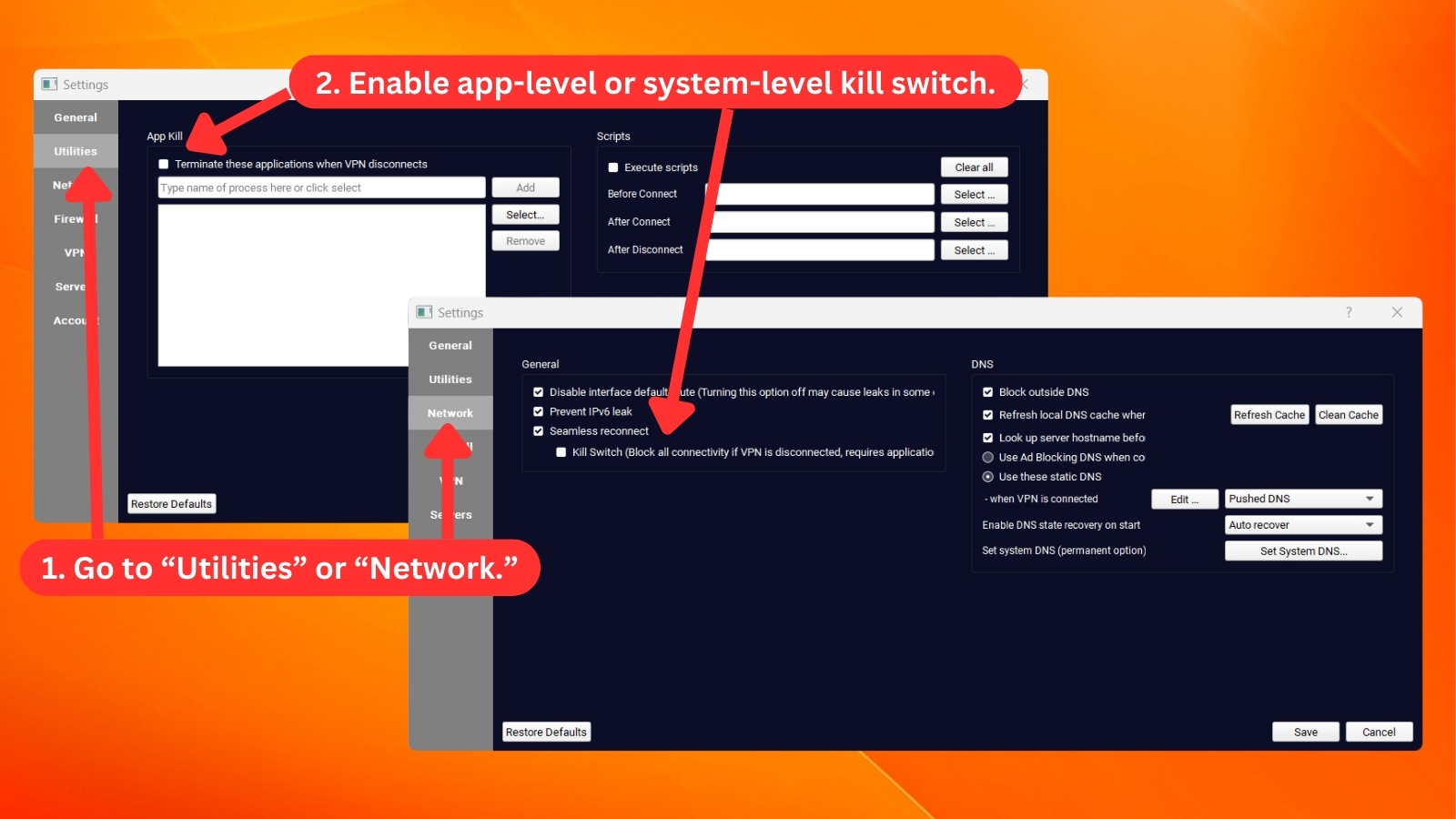
- App Kill (Kill Switch): TorGuard offers this feature across platforms like Windows, macOS, Android (Always-on VPN), and iOS. The VPN's kill switch allows for some customization on desktop platforms, letting you create a list of "high-risk" apps. You can enter the names of processes or applications you want to be terminated, and you can test your kill switch rules before activating them.
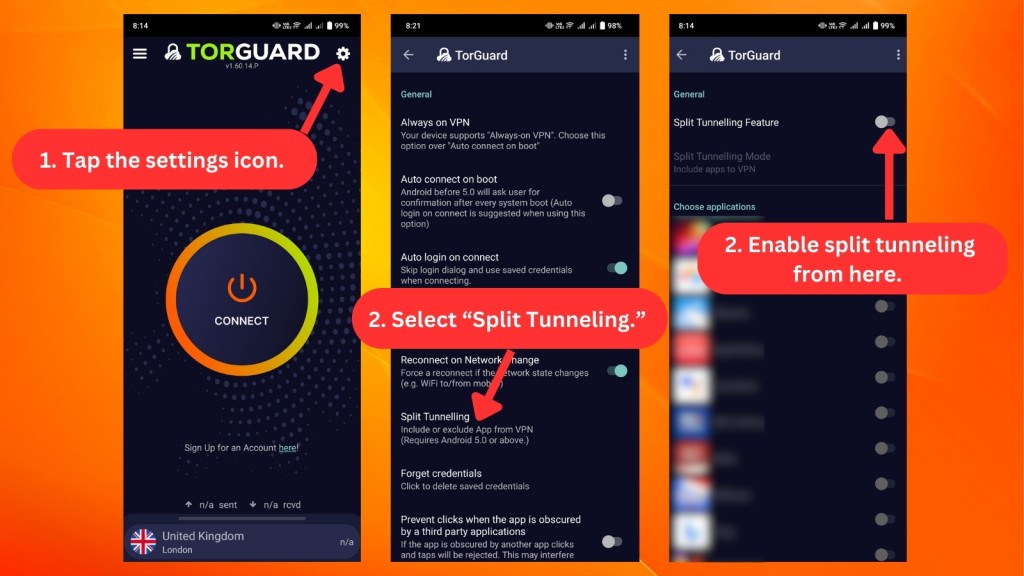
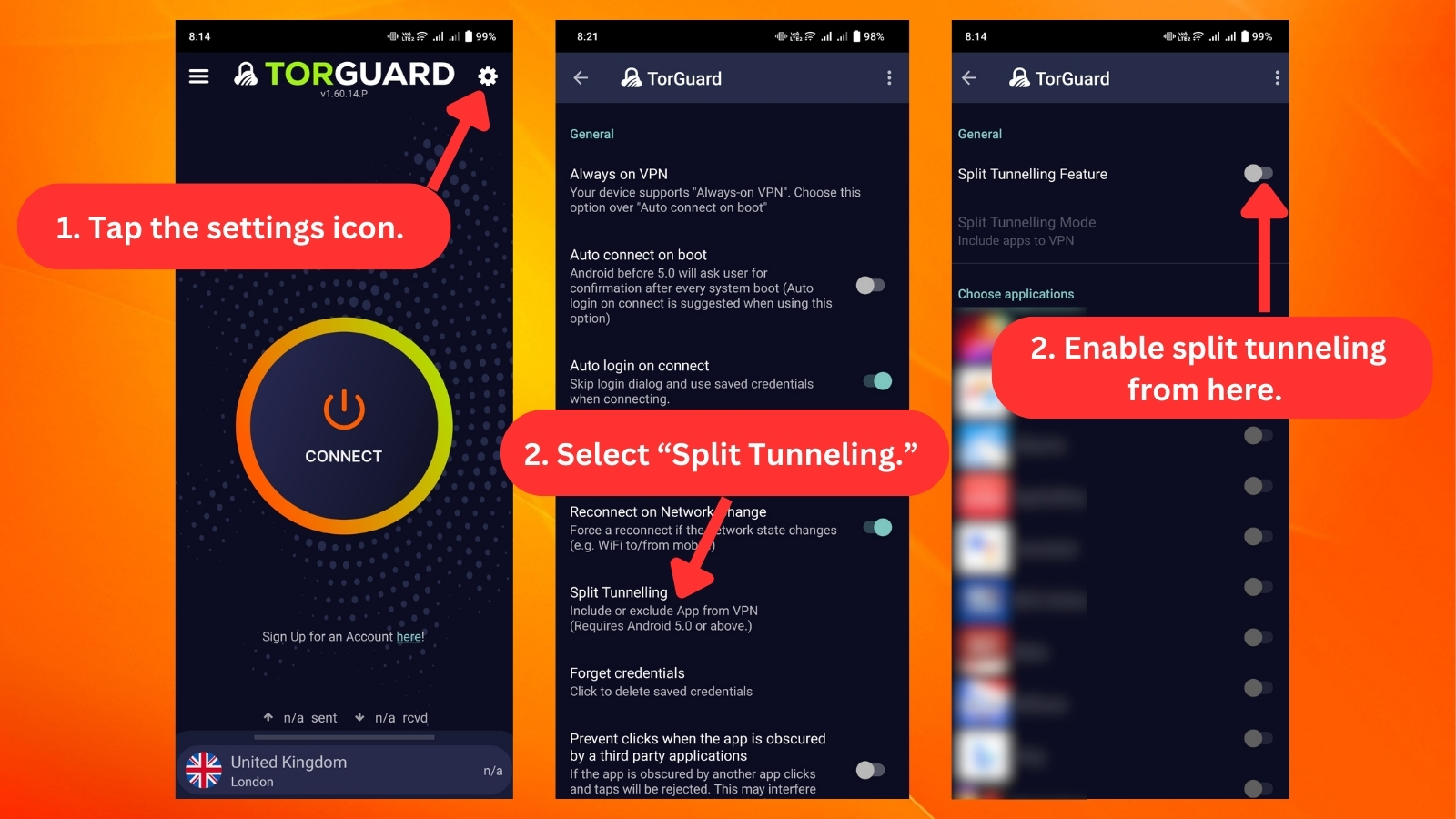
- Split Tunneling: With this feature, you get to pick which apps or websites use TorGuard VPN, and which ones go straight to the Internet. However, TorGuard's split tunneling feature is only available on Android.
- Dedicated/Static IPs: TorGuard provides dedicated IPs, where you can choose between a streaming IP ($7.99/month) or a residential IP ($13.99/month). These options enable you to unblock streaming services and access websites limited to specific countries.
- Ad-Blocking DNS: TorGuard provides DNS servers specifically built to remove ads, and you can choose whether you want to use those or not. The application comes with granular control over every feature that it offers, giving you plenty of freedom.
- STunnel: This stealth connection is a security layer between your device and a server. It encrypts your communication, adds an extra SSL layer to your existing OpenVPN encryption, and then sends the data to the usual destination, making your VPN service even more secure.
- SOCKS5 Proxy: Ideal for optimizing torrent clients, the SOCKS5 locations offered by TorGuard elevate your torrenting experience. Its efficient and secure routing enhances your connection, providing a smoother and more reliable torrenting process.
- Port Forwarding: This advanced feature allows you to open a specific gateway to the Internet while connected to TorGuard. Certain data can flow freely through that designated port, providing a more direct and efficient connection for specific applications or tasks.
- Pin an IP: Choosing a go-to Internet spot is what "Pin an IP" is all about. You get to connect to that same spot every time, especially if it's super fast or suits your needs.
- Unlimited Server Switches: With TorGuard VPN, you can enjoy a dynamic and versatile experience through seamless server switches. This feature enhances privacy, enables bypassing geo-restrictions, optimizes performance by selecting less congested servers, and effortlessly adapts to changing needs.
- Unlimited Data/Bandwidth: Having a consistent allocation lets you bypass ISP or government restrictions efficiently. This ensures uninterrupted access to essential websites for your digital routine.
Server Count & Infrastructure
TorGuard comes with 3,000+ servers, which is a lot. However, those servers are present in only 50+ countries, and a small group is virtual. Our Score: 7.5/10
TorGuard has often been praised for the size of its server network, which means it could contend with other VPNs with the most servers. So, let's talk about how many TorGuard servers are there, the countries they cover, and more.
Having access to more than 3,000 servers means that you have a lot of freedom, no matter what you plan on doing online. This also includes easily locating the fastest TorGuard server nearby, ensuring low latency and consistently speedy performance. Of course, we’re going to test the performance of this VPN later on in the review.
Among other things, this VPN’s servers are found in 50+ countries. In general, that's more than what the average home user would need. However, if you have specific needs and want an IP address associated with a particular country, we recommend checking TorGuard's list of servers before getting a subscription.
We should also mention that TorGuard offers 10 VPN virtual locations. These virtual servers include Argentina (Buenos Aires), Brazil (Sao Paulo), Mexico (Mexico City), Greece (Athens), Russia (Moscow), Turkey (Istanbul), Indonesia (Jakarta), Taiwan (Taipei), Bahrain (Manama), and India (Mumbai).
That means if you pick a server in any of those countries, you'll connect to a server that's not located in the chosen country (but you'll still get the desired country's IP address).
UI/UX Design & Ease of Use
TorGuard brings an incredible level of customization, which is great for advanced users. Still, even complete beginners should now feel happy as TorGuard has recently redesigned and simplified its apps. Our Score: 7/10
In this section, let's get into TorGuard VPN's performance on desktop and mobile platforms. Since this VPN also provides a handy Web browser extension, we'll take a closer look at that, too.
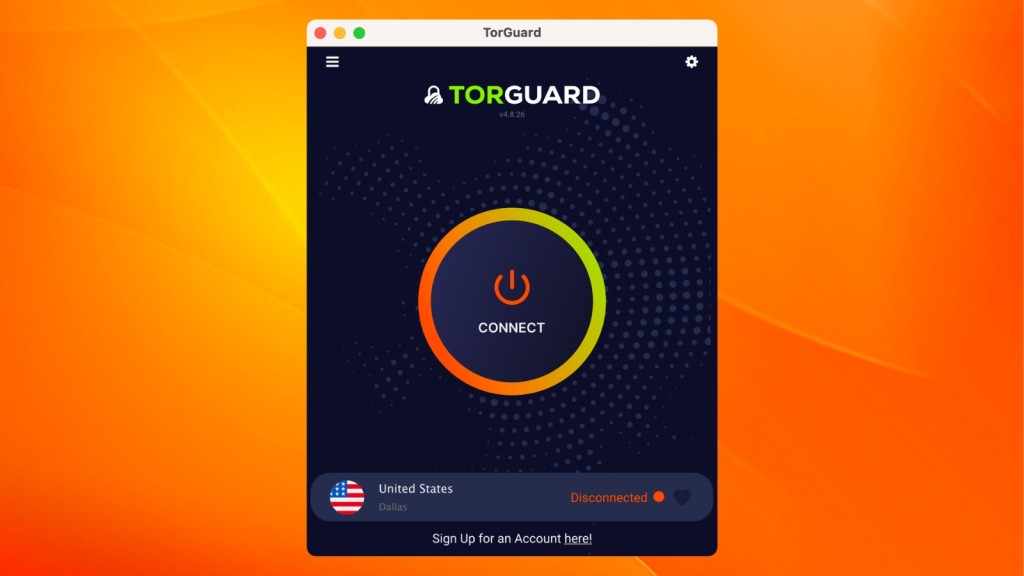
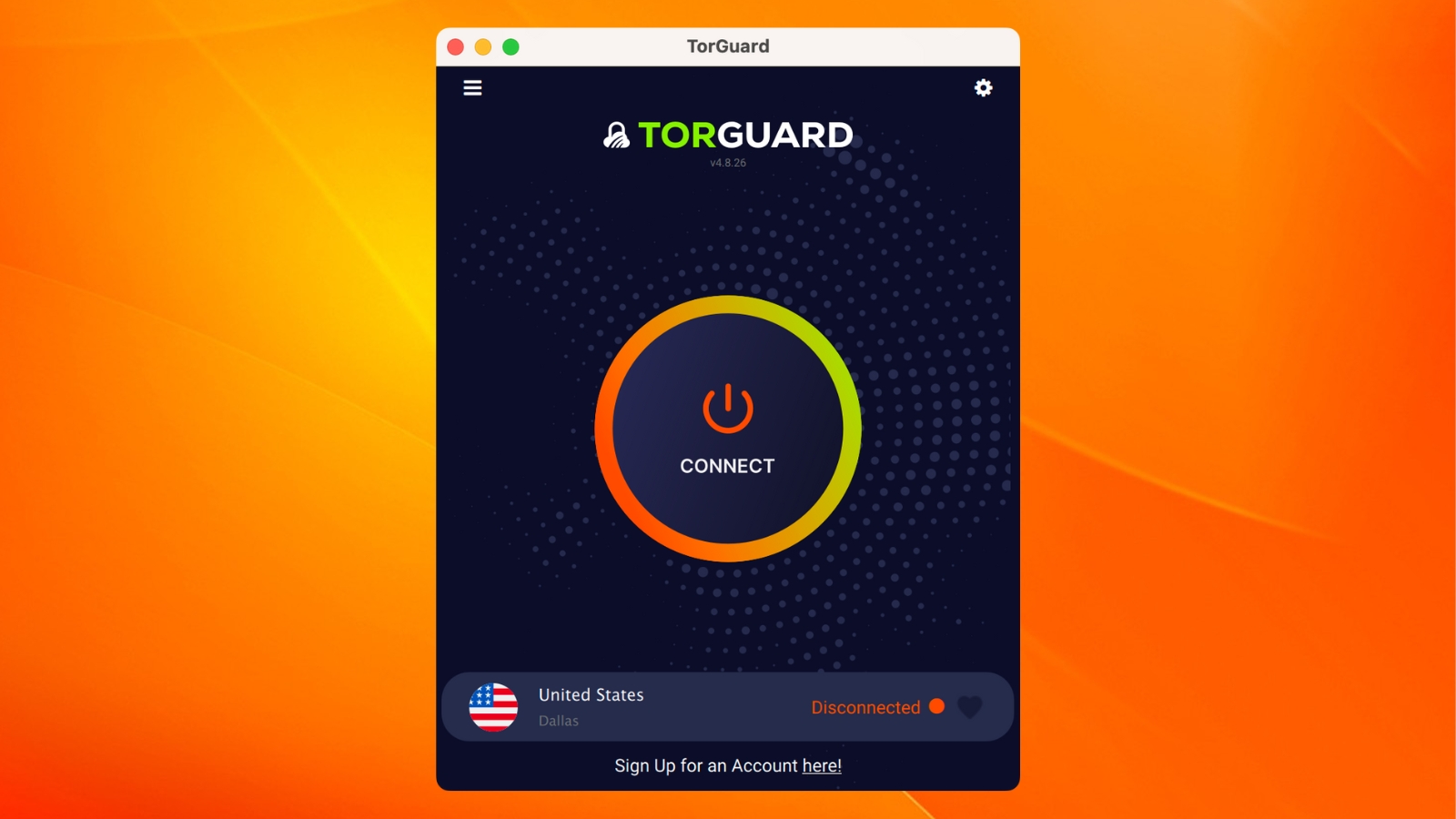
As soon as you install TorGuard and launch its application on Linux, Mac, or Windows, you’ll see its home screen. This is now a redesigned home screen, which is a drastic departure from what was available in the past.
The largest portion of the VPN's home screen is reserved for the ON/OFF switch, which you can use to connect and disconnect from servers. At the bottom of the home screen, you'll find a button that opens TorGuard's list of servers.
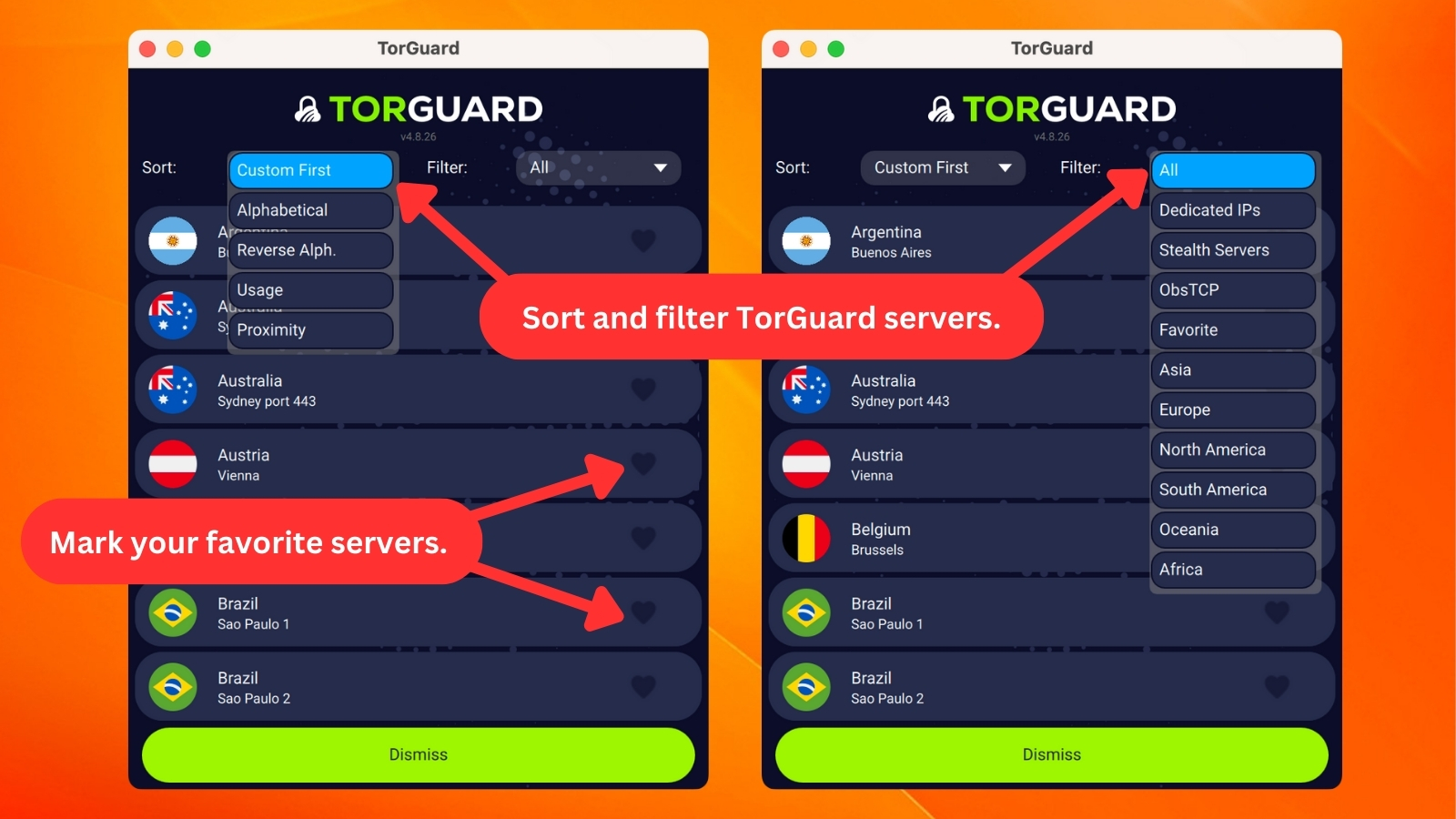
You can filter the available servers in many different ways, letting you easily find a server that will support your planned online activities in the best possible way.
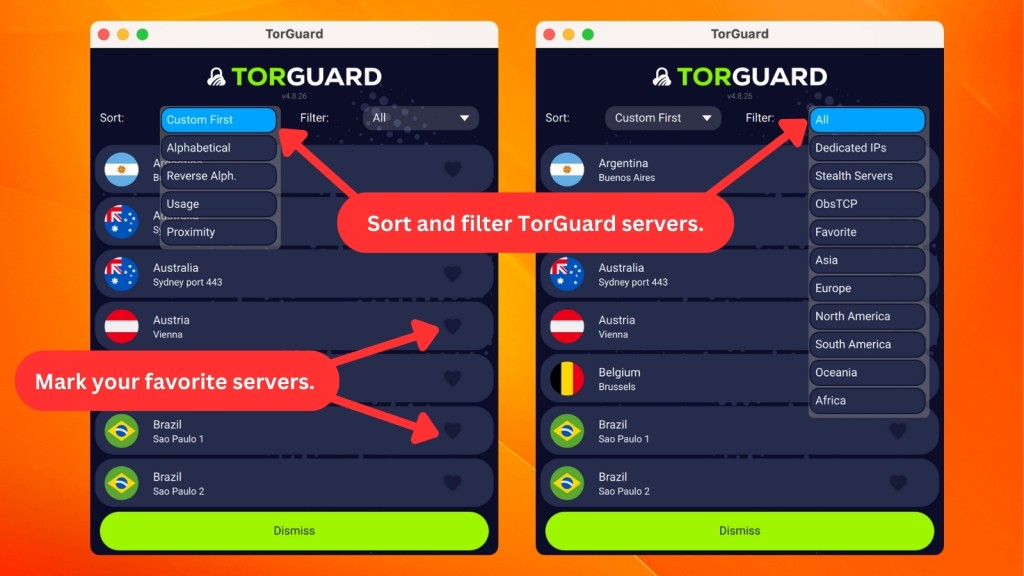
Once you return to the home screen, you'll see two important icons at the top. In the top-left corner, there's the hamburger button. That one allows you to switch between different VPN protocols without going into the application's settings.
In the top-right corner, you'll see a cogwheel icon, letting you fine-tune TorGuard by launching its settings. Speaking of those, let's see what exactly you can fine-tune.
- General: This tab lets you pick from a series of options that dictate how the VPN behaves. You can set the application to open on system startup, automatically connect to a specific server, refresh TorGuard's server list, manage the application's notifications or appearance, and more.
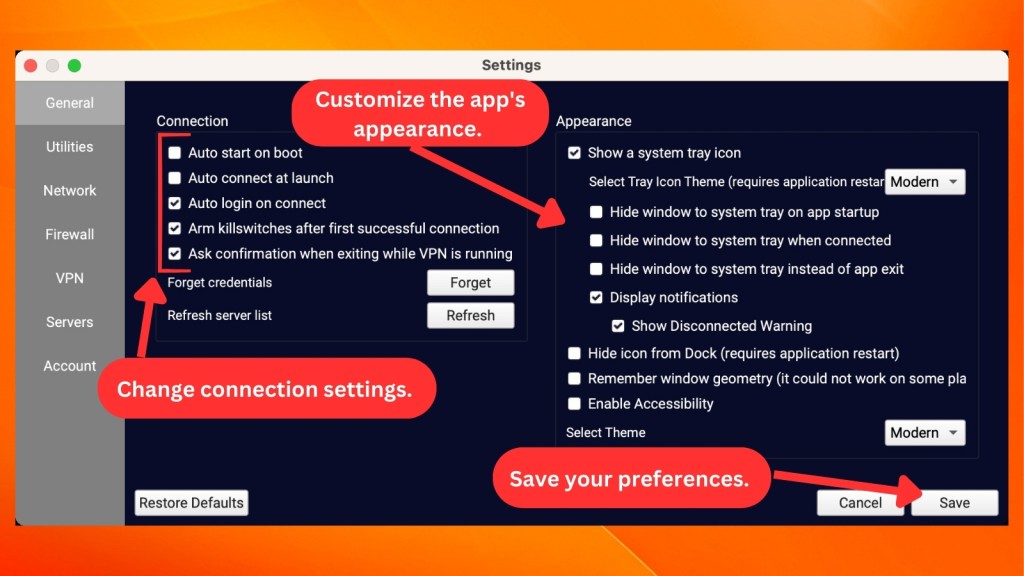
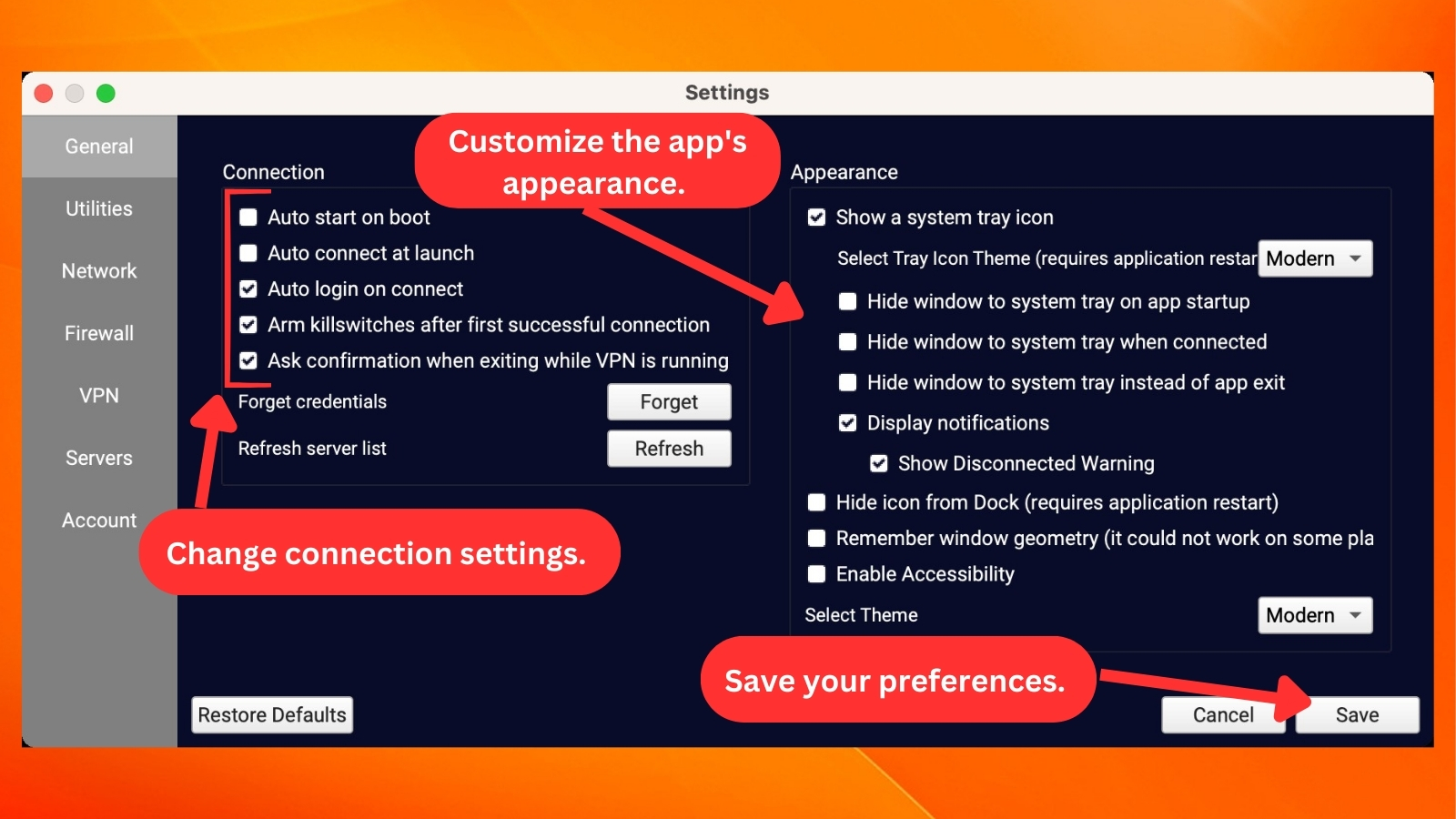
- Utilities: In this tab, you'll find the "App Kill" that can shut down chosen apps when the connection is lost. If you're an advanced user, there's another feature here called "Scripts," which can help you automate tasks like opening specific websites, closing apps, and more.
- Network: Now, this is a highly interesting tab that you can use to prevent IPv6 leaks, enable the system-wide kill switch, and more. This is also where you can change the VPN's DNS-related behavior, including using a DNS that hides ads on the Web.
- Firewall: Here, you can activate TorGuard's firewall, blocking traffic outside the VPN.
- VPN: This is where you can set up VPN protocols and use an OpenVPN proxy. You have the option to select Stealth Shadowsocks proxy servers from the US, Germany, Singapore, or the Netherlands. Also, remember that if you want to use a SOCKS5 proxy, TorGuard will provide you with a list of locations in Canada, the Netherlands, and the UK.
- Servers: TorGuard allows you to use a dedicated IP, which can be included in your plan or bought separately. You can use this tab to add those dedicated IPs.
- Account: This tab shows your login status and subscription due date for easy reference. It's also where you'll find the location of "debug" files, which is crucial for faster issue resolution when contacting TorGuard's customer support. Just remember to include your log file when reaching out to them for technical help.
We'd like to take a moment to talk about TorGuard's recently redesigned mobile apps as well. While its desktop apps have kept fragments of the VPN's old interface, that's not the case with its Android, iOS, and iPad apps. These are now modern and easy to use, on par with what TorGuard's competitors currently offer.
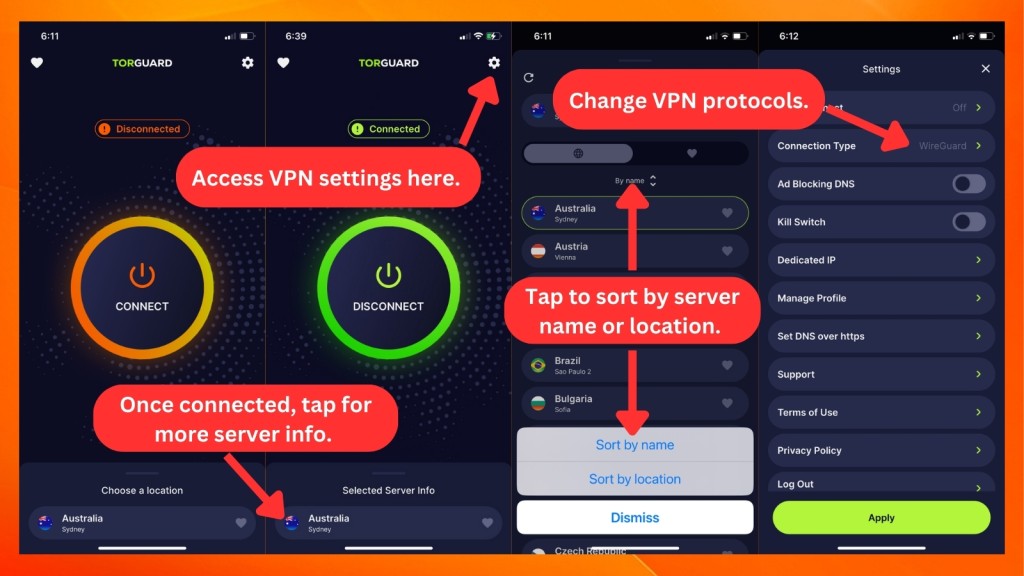
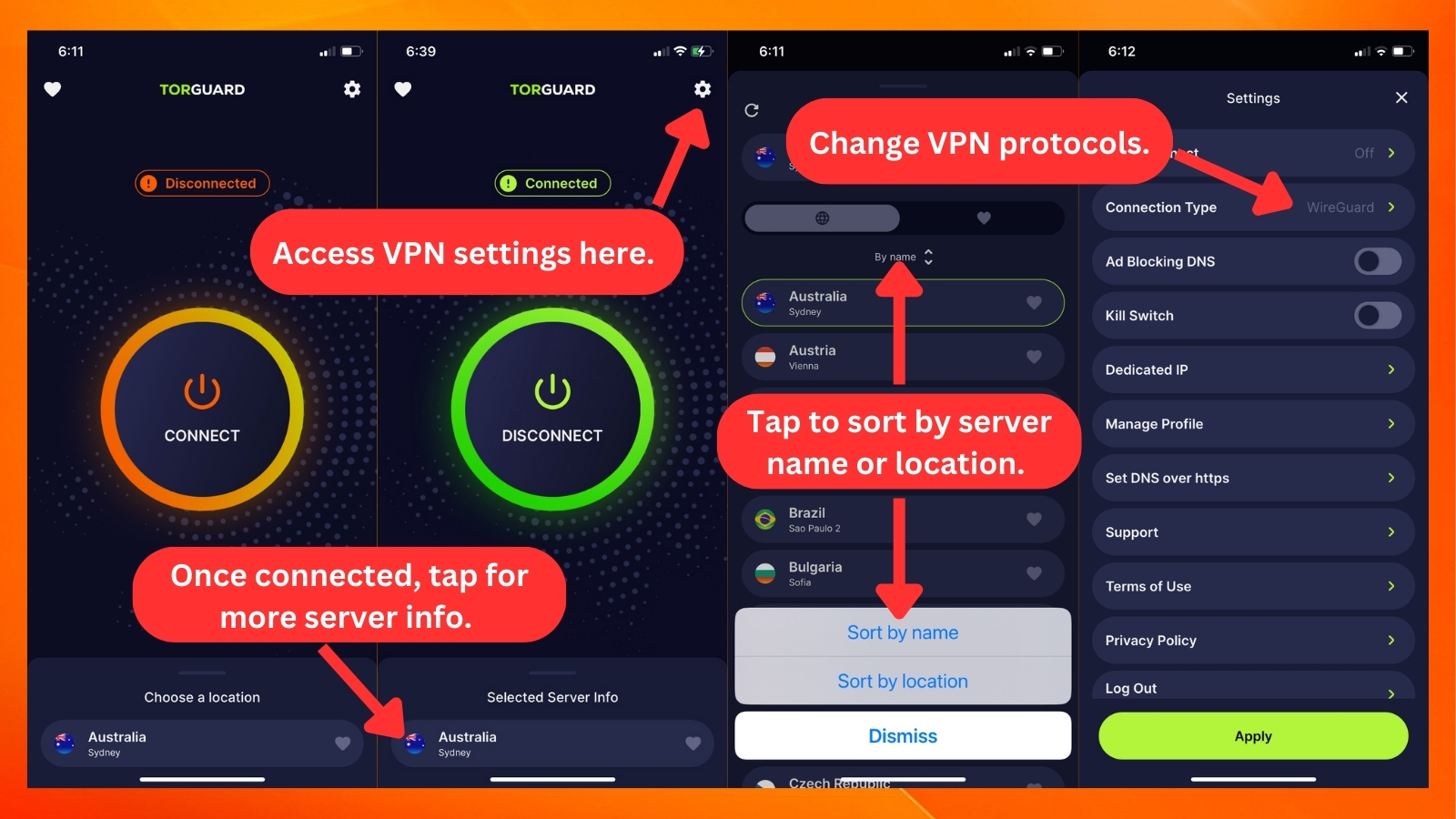
On both Android and iOS, TorGuard comes with a simple home screen that looks identical to what you'll find on desktop platforms. In the center, you'll find the ON/OFF switch, and when connected, the yellow-orange ring turns bright green, indicating your connection status.
At the bottom, you'll find a nicely designed list of TorGuard's servers. There are many ways to filter the available servers as well as check their locations in relation to your physical location.
Also, don't forget to check TorGuard's settings behind the cogwheel/hamburger button in the top-right corner. That's where you can enable the kill switch, ad-blocking DNS, switch servers, make use of a dedicated IP, and more.
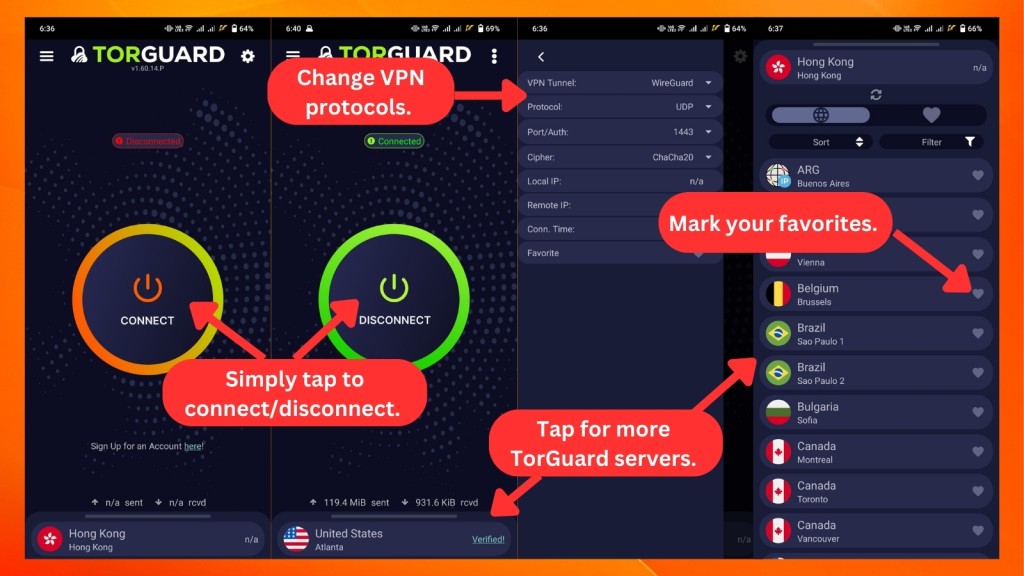
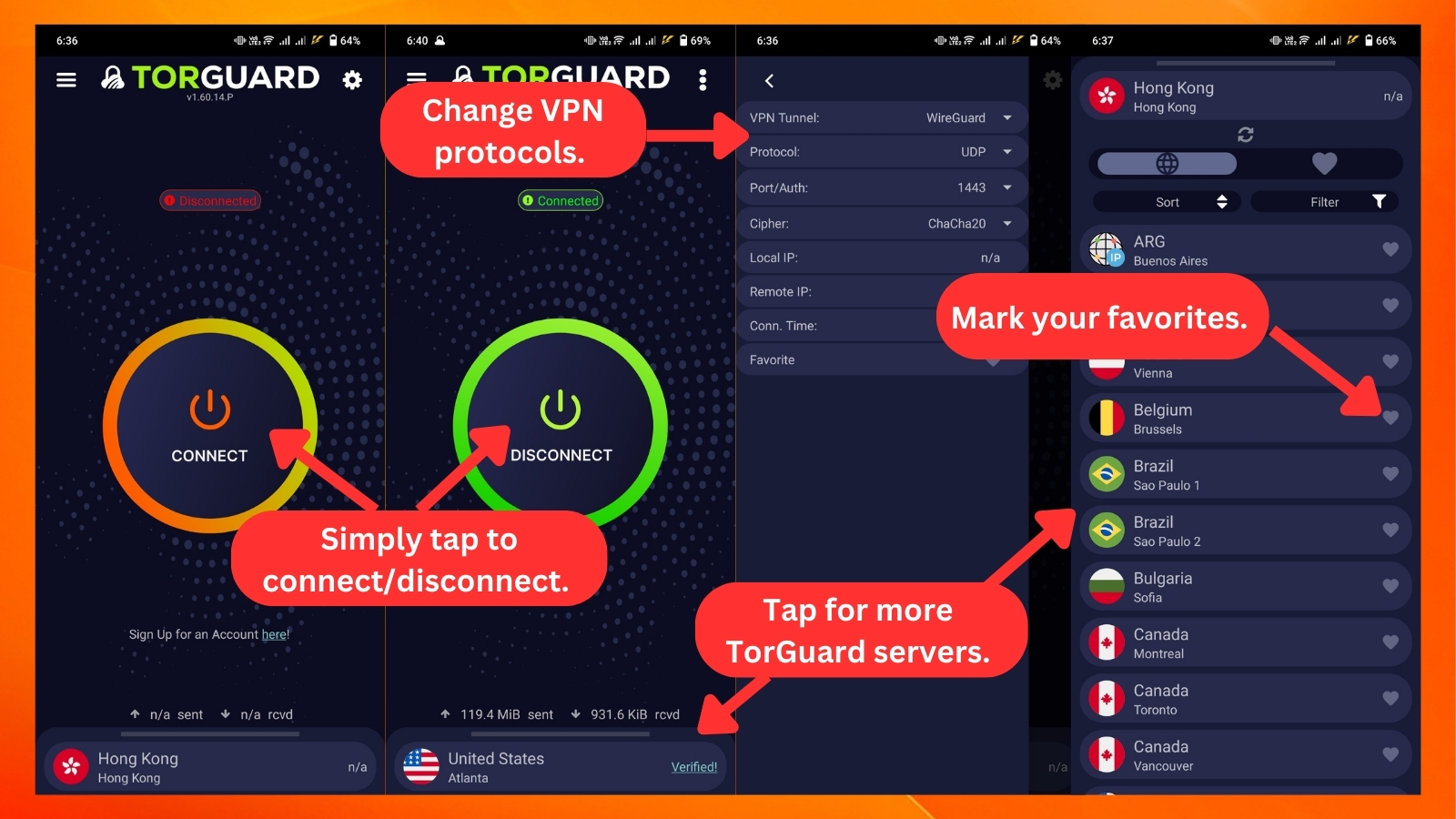
However, we have to say that the Android app has more settings you can tweak, while the iOS app is simpler. If you're new to VPNs, the Android interface might seem a bit overwhelming with all its options, but the iOS app should be straightforward for anyone.
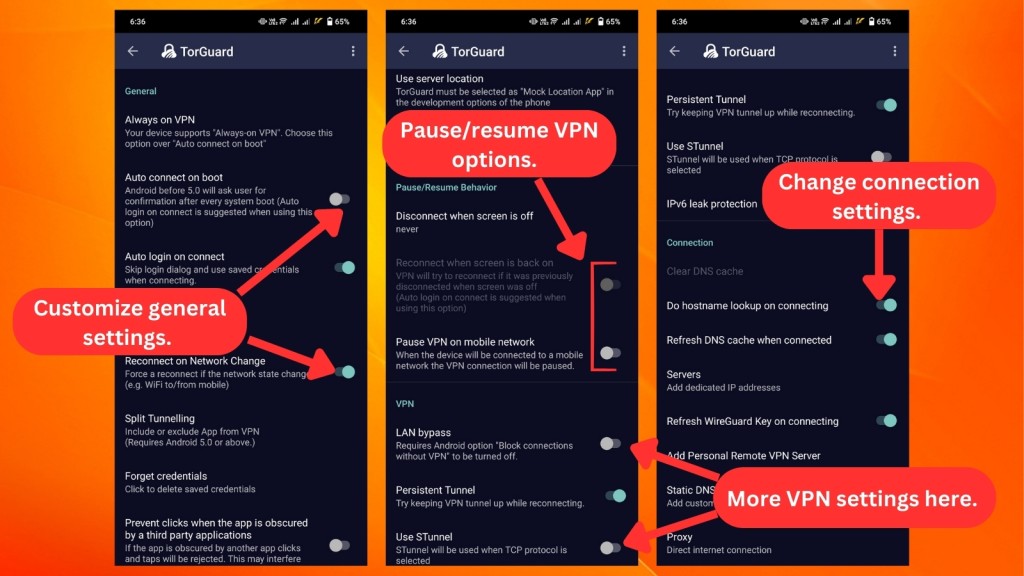
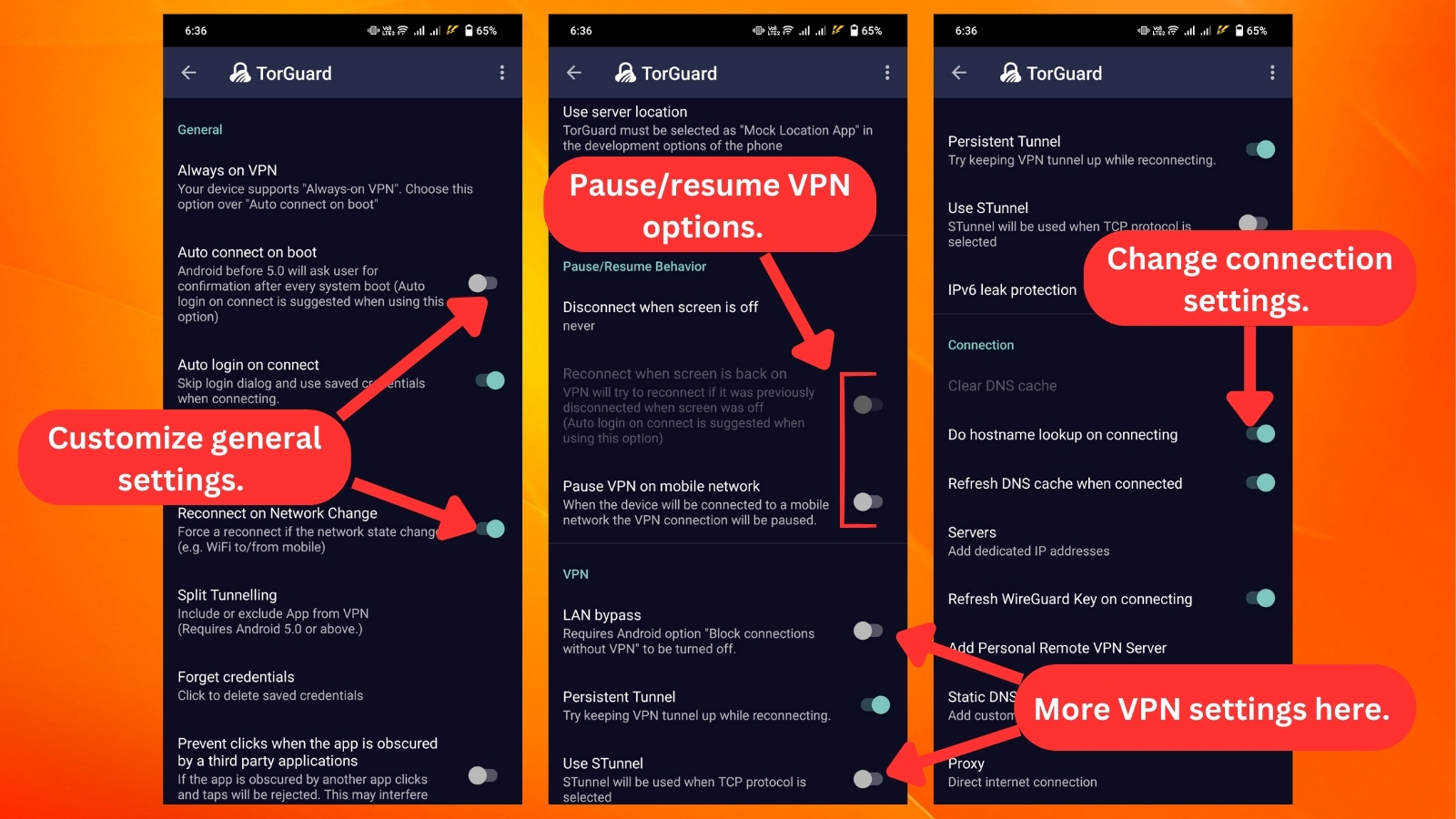
Here's what you can find in the Android app:
- General: Under "General," much like the desktop version, you'll discover features like auto-connect and auto-login, along with connectivity options like split tunneling.
- Pause/Resume Behavior: This setting lets you customize whether the VPN should automatically pause or resume when the connection is restored. It provides flexibility and convenience based on your preferences.
- VPN: In the VPN settings, you can activate the "LAN bypass" option, which allows local area network (LAN) connections even when the VPN is active. Additionally, you'll find the "Persistent Tunnel" feature to maintain the VPN tunnel during reconnection, the STunnel option for TCP protocol, and the prevention of IPv6 leaks.
- Connection: Here, you can perform actions like clearing the DNS cache, looking up hostnames when connecting, refreshing the DNS cache upon connection, adding dedicated IP addresses, and more.
Now, let's talk about TorGuard VPN's browser extensions, available for Chrome, Edge, and Firefox. They all look the same and work the same way. In the screenshot below from the Chrome extension, it's easy to click and connect or disconnect from servers.
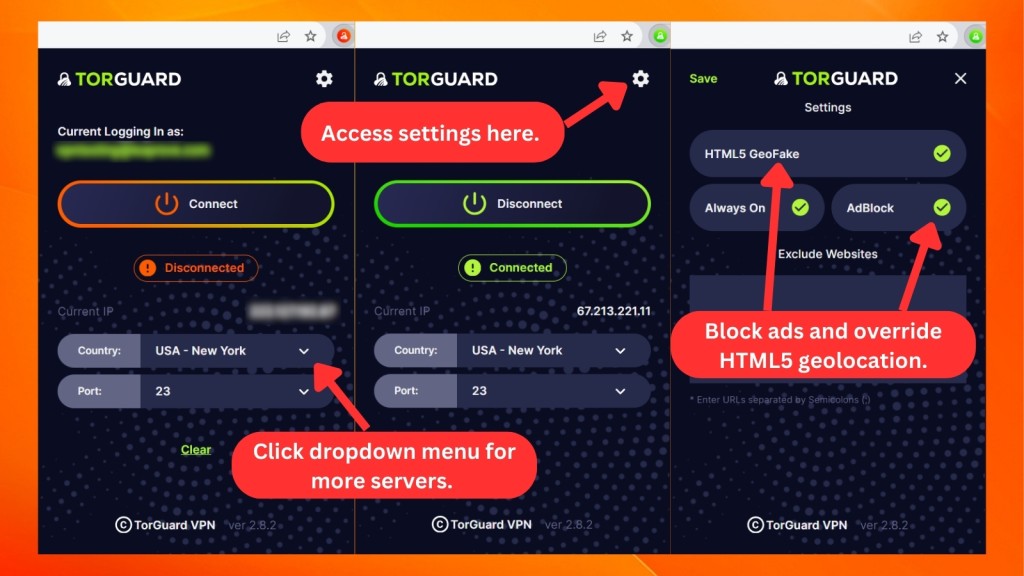
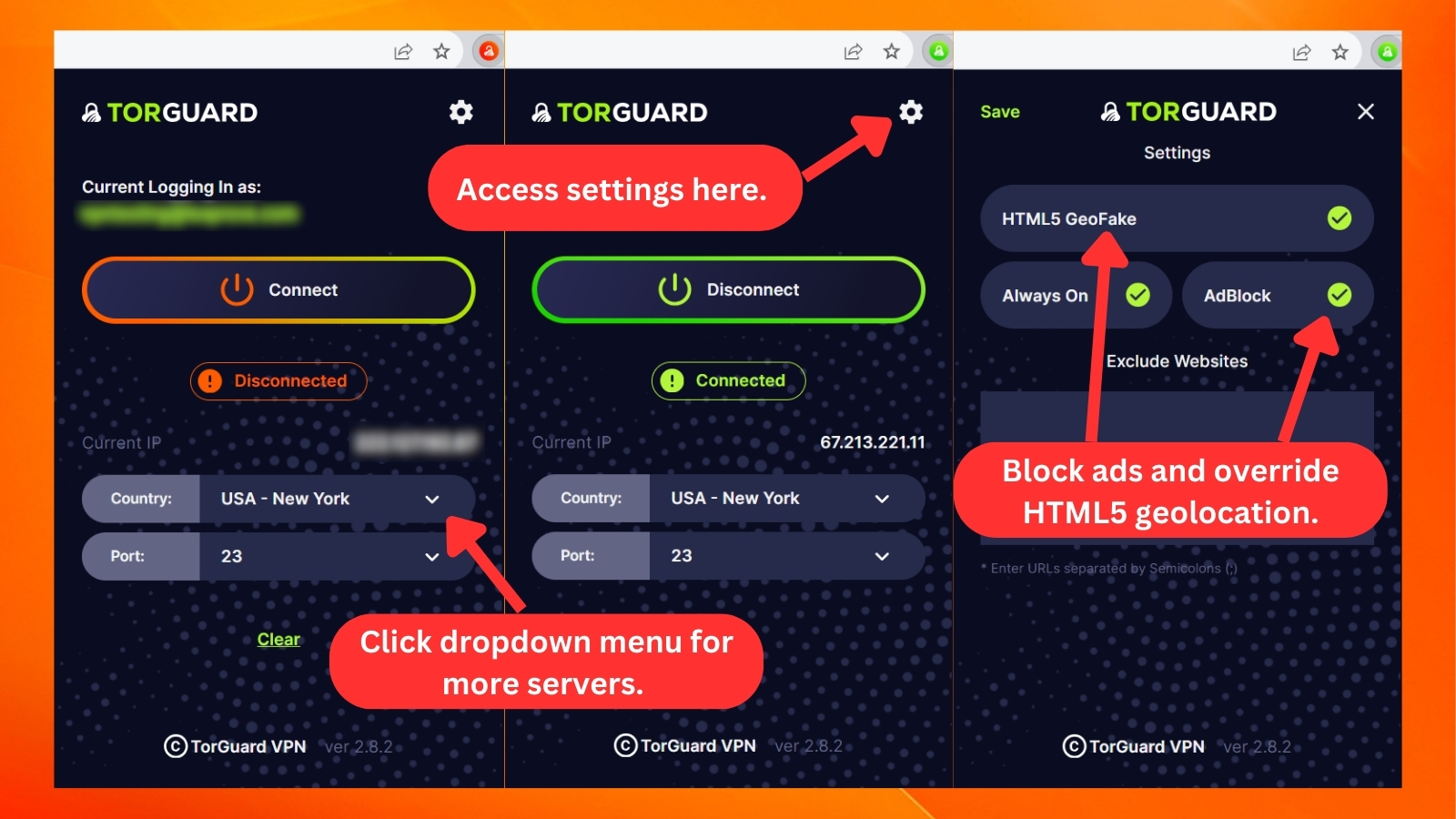
However, like most proxies, it only has a few basic features like blocking ads, changing your location, and choosing which sites don't use the VPN.
Overall, we like the new direction TorGuard has taken. When it comes to its mobile apps, they really are highly polished. The VPN's desktop apps could use a bit more polishing, but even complete beginners shouldn't have a problem using them.
Media Streaming, Torrenting, and Gaming Support
Even though there's some confusion regarding TorGuard's usability with media streaming, our experience was quite positive. Torrenting works well, while gaming over this VPN requires diving deep into its settings. Our Score: 9/10
Aside from privacy and security, we also use VPNs for different online activities, like streaming shows, downloading files, or gaming. But not every VPN delivers a smooth experience for these tasks. Now, let's explore how TorGuard handles these aspects and see if it's up to the mark.
Is TorGuard Good for Streaming?
Yes, TorGuard is good for streaming TV shows and movies. Although it's not the best VPN for streaming TV, we managed to unblock some popular streaming services using one of the "Anonymous VPN" plans via Amazon Fire TV.
We unblocked and streamed Netflix, Hulu, Apple TV+, and Max without any buffering or other annoyances. However, challenges arose during our tests with BBC iPlayer, Disney+, and Prime Video. These streaming services can detect when you're trying to connect from locations beyond their borders.
That said, let's take a look at the table below for some popular US streaming platforms that this VPN unblocks for you.
TorGuard is also useful for unblocking non-US and other international streaming platforms. Here's a preview of what it offers.
TorGuard VPN also works with Firestick and Kodi just fine. That said, we recommend that you carefully inspect TorGuard's options if you decide to subscribe. And also, we can't claim that what happened in our case will happen to you as well.
Still, even if you don't get to use "Anonymous VPN" plans for streaming, you can always upgrade (but that will cost you as "Streaming Bundle" plans are pricey).
Is TorGuard Good for Torrenting?
Yes, TorGuard is good when it comes to torrenting. Though it's not the best torrenting VPN, it can protect your P2P traffic, which means that no one will track your online whereabouts. On top of that, this VPN allows you to use SOCKS5 proxies, obfuscating your IP address without slowing down your Web speed.
Practically, all its servers support torrenting. It also seamlessly integrates with well-known apps like uTorrent, Vuze, BitTorrent, and qBittorrent. Moreover, it offers a kill switch for extra security and handy features like port forwarding, which enhances download speed.
Is TorGuard Good for Gaming?
Yes, TorGuard seems to be a good option for gaming as well. It's user-friendly enough to share with gaming consoles like PS3 and Xbox One. However, be prepared to dive deep into its settings.
This VPN can't really handle your ping and latency out of the box, which is why you'll need to optimize it. So, gaming over TorGuard is an option for advanced users only.
For TorGuard to be the best VPN for gaming, it needs to naturally reduce ping and control latency without you having to tweak a lot of settings. So, although TorGuard has a sizeable network coverage, we'd suggest it with the note that there's room for improvement before we fully recommend it.
Security & Privacy
There’s no reason not to trust TorGuard with your private data. It features strong encryption, capable VPN protocols, and provides a leak-free tunnel for your data. The only thing missing is an independent audit of its infrastructure. Our Score: 8/10
We’re sure you'll want to know whether TorGuard can be trusted with your personal data. To answer that question, we’ll check this VPN’s protocols, logging policy, and we’ll do a thorough DNS leak test.
TorGuard Protocols
In terms of encryption, you can count on everything from AES-128 up to AES-256 (GCM and CBC) with compatible protocols. And if you decide to use WireGuard, TorGuard will rely on ChaCha20 and Poly1305 for authentication, both of which are highly secure. If you want things a bit speedier, you can opt for Blowfish 128-bit encryption, which is a tad less secure but faster.
For the available VPN protocols, you can rely on OpenVPN (UDP/TCP), OpenConnect, and WireGuard. L2TP/IPSec, SSTP, PPTP, and IKEv2 are available but not via TorGuard's apps. That means that you'll need to configure those on your device manually.
- OpenVPN: This tunneling protocol has two transmission options: TCP and UDP. TCP prioritizes security, making it a bit slower, whereas UDP focuses on performance, delivering better speeds. OpenVPN is available on all supported platforms.
- WireGuard: This newest protocol is open source, fast, and keeps things safe. So, if you want speed and security together, WireGuard is a great pick. Like OpenVPN, you can use this protocol on both desktop and mobile devices.
- OpenConnect: Using OpenConnect unlocks the potential to maximize bandwidth, boost speeds, and sidestep ISP bandwidth throttling. It does this by routing through a second SSH tunnel on TorGuard's servers.
- And if you have an Android device, you can connect to TorGuard via the AnyConnect app.
- SSTP: This keeps your Web connection secure by putting your data in a protective "capsule" over HTTPS (SSL) on TCP. This makes it great for bypassing tough Internet restrictions, like in Iran or China.
- IKEv2: If your Internet goes in and out, like when you're in a train tunnel, this protocol is really helpful. It quickly reconnects your VPN, making it great for those who use their phones a lot. It keeps everything running smoothly even when the connection isn't steady.
- L2TP/IPsec: Think of L2TP like a virtual bridge connecting your device to a VPN server. However, it doesn't keep your online activities private. To make it more secure, it often teams up with another protocol called IPsec.
- PPTP: For fast Internet and compatibility across different devices, PPTP is a good pick. TorGuard recommends OpenVPN for stronger security, but if you just want to stream shows hassle-free, this protocol can do the trick.
Does TorGuard Keep Logs?
No, TorGuard doesn’t collect or log any data via its Virtual Private Network or Proxy services. That means that as you browse the Web with TorGuard enabled, everything you do is encrypted and deleted as you end your sessions. Since the VPN runs on RAM-only servers, no data is stored whatsoever.
After checking TorGuard's history, we can say that we're happy to report that TorGuard was never involved in any data logging case. With that said, there's no reason not to trust this VPN, at least until proven otherwise.
Still, we need to note that TorGuard has an extensive section on its site about DMCA notices, saying that it respects the intellectual property rights of others. That might be problematic if you plan on downloading torrents, even though there are no reports of TorGuard users receiving copyright infringement notices. Still, that's something to keep in mind.
Does TorGuard Leak/Expose Your Private Data?
No, TorGuard doesn't leak your data. To test the strength of TorGuard's VPN tunnel, we tested the VPN against a range of data leaks.
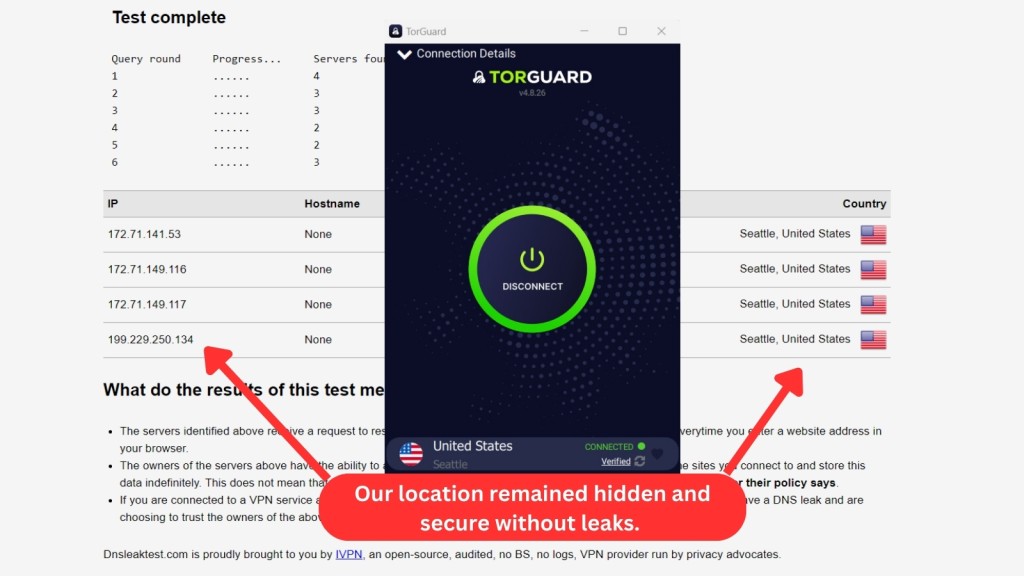
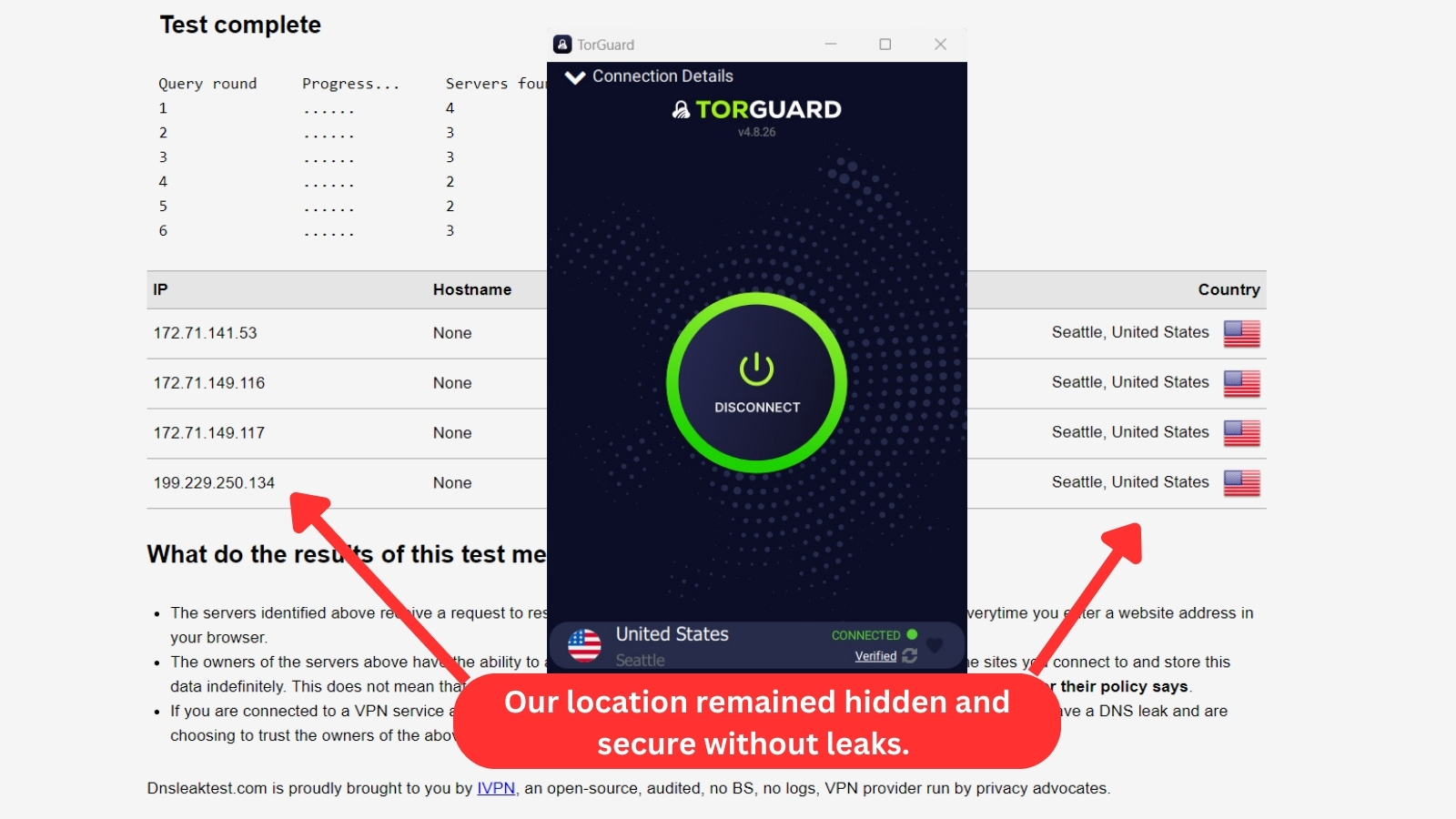
As you can see from the image above, it’s all good here. No DNS leaks were detected. So, third-party websites will only see your virtual IP address and other information served by TorGuard. In other words, there’s nothing to worry about when it comes to this VPN provider.
Speed & Performance
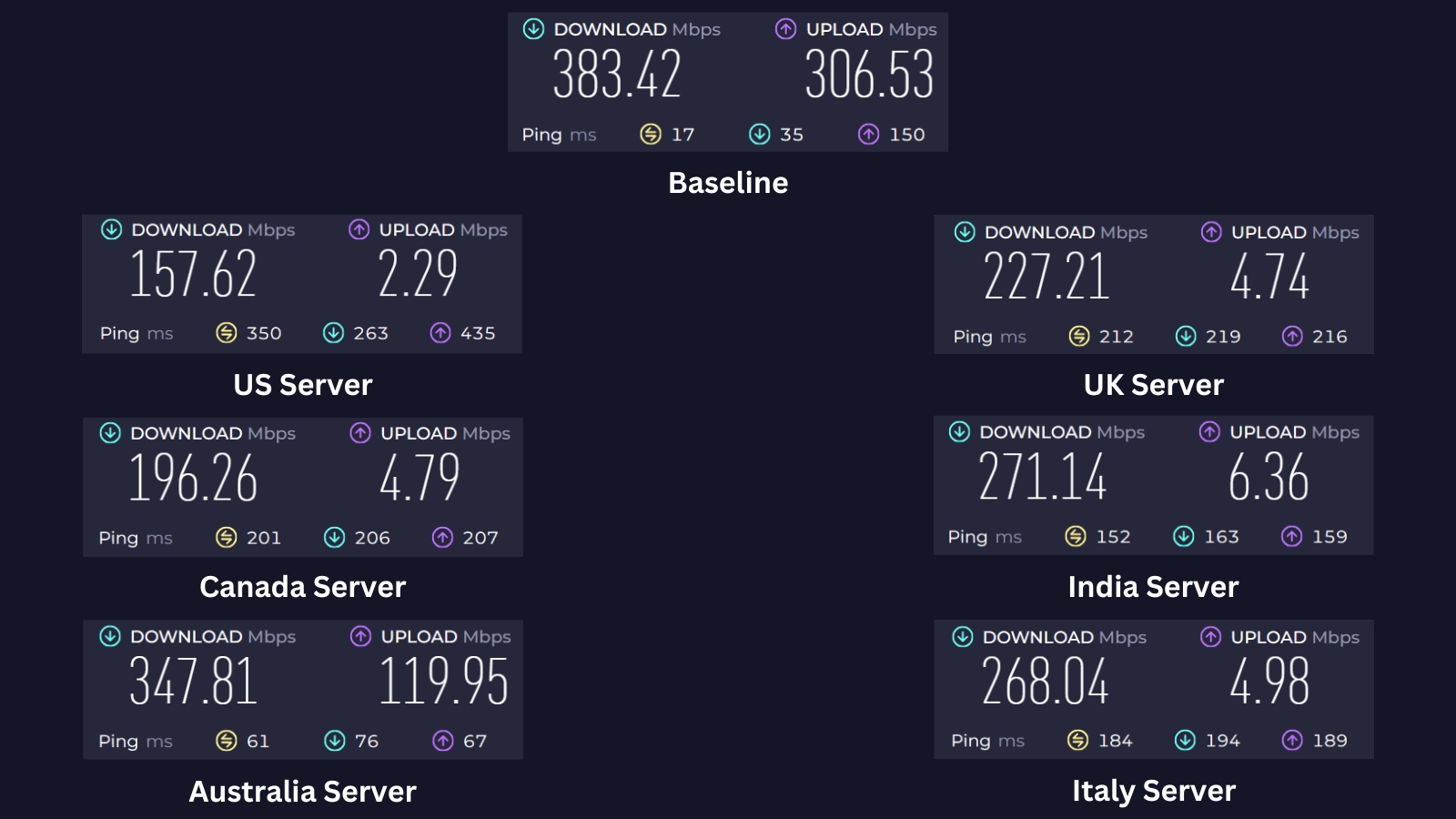
TorGuard isn’t the fastest VPN service out there, but it does come with speedy performance. That especially applies to nearby servers, even though remote VPN servers can be quite fast at times. Our Score: 7/10
The time has come to check TorGuard's speed and performance. For this purpose, we tested nearby and remote VPN servers, giving us an idea of what to expect from TorGuard.
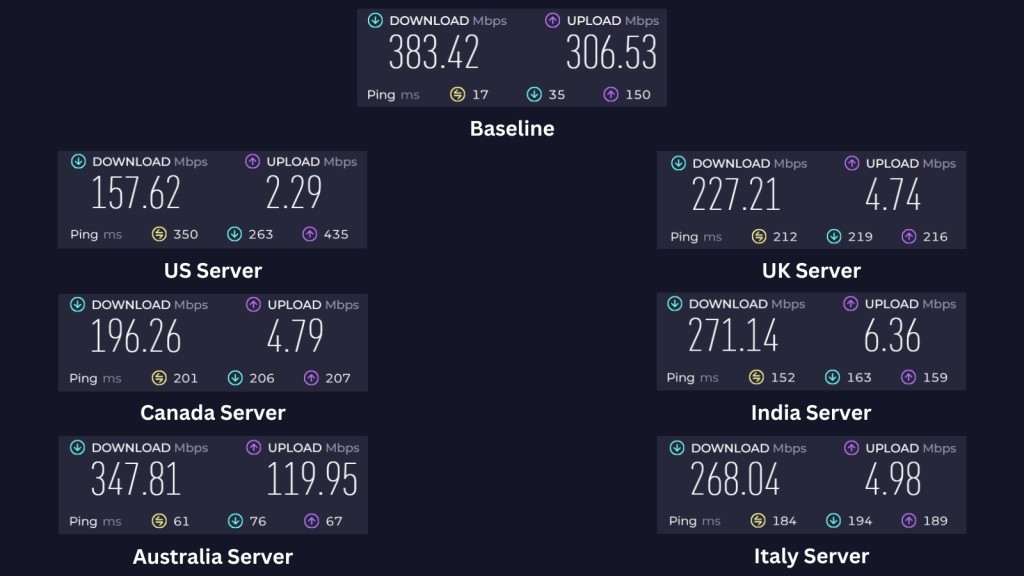
We started by checking the speed of our barebones Web connection - without using TorGuard in the background. So, when it comes to our connection's baseline data, we managed to get 383.42 Mbps for downloads and 306.53 Mbps for uploads.
- USA Server (Los Angeles): This server is quite far from our base in Asia. Despite the distance, TorGuard VPN managed to maintain a reasonable connection. However, there's a 59% speed reduction from the baseline, with a download speed of 157.62 Mbps and an upload speed of 2.29 Mbps.
- UK Server (London): The London server is relatively closer to where we are. This time, our speed reduction was 41%. The download speed reached 227.21 Mbps, and the upload speed was 4.74 Mbps.
- Canada Server (Montreal): Similar to the US server, this server in Montreal is far from our location. TorGuard exhibited a 49% reduction from our original speed, offering a download speed of 196.26 Mbps and an upload speed of 4.79 Mbps.
- India Server (Mumbai): The India server in Mumbai is closer to our base in Asia. It had a commendable performance with only a 29% speed reduction. The download speed was 271.14 Mbps, and the upload speed reached 6.36 Mbps.
- Australia Server (Sydney): This one is the closest to our current location and showcased outstanding performance. We only had a 9% decrease in speed from our baseline data. The download speed peaked at 347.81 Mbps, and the upload speed was 119.95 Mbps.
- Italy Server (Milan): Not too far away, this Italian server wowed us with its snappy and steady performance. The results pleasantly surprised us, managing a 30% speed drop yet delivering a fast 268.04 Mbps download speed and a 4.98 Mbps upload speed.
To make sense of the numbers displayed above, we placed them into the following table. So, let's check TorGuard's performance and draw some conclusions.
On average, TorGuard made our Web connection slower by 36%. It's not one of the fastest VPNs, but those slowdowns weren't as noticeable when using nearby servers. However, even some remote connections managed to perform quite admirably.
With that said, we conclude that TorGuard comes with speedy performance. Of course, keep in mind that every VPN will slow you down (here's how to speed up a slow VPN, by the way). So, the faster your Web connection is, the faster your VPN connection is going to be as well.
Customer Support
TorGuard doesn't offer live chat via its website, which is clearly a downside. However, it does offer plenty of other (highly useful) customer support resources. Our Score: 7.5/10
When having technical difficulties, you need to rely on support. And when it comes to VPNs, today’s top-rated services bring different kinds of customer support channels. So, here's what kind of support you’ll find if you become a TorGuard subscriber.
- Live Chat: TorGuard now offers live chat support, but availability is limited to 8 hours a day. If you can't connect during business hours, you can still get help by submitting a support ticket or sending an email.
- Email Support: The provider offers email support for any questions or concerns you may have. Their representatives are known for being helpful and responsive, aiming to answer your email ticket within minutes.
- Knowledge Base: TorGuard offers 100+ articles on installing this VPN on different devices, setting up different protocols, fine-tuning its options, and everything in between. We recommend this resource if you really want to get the most out of this VPN service.
- FAQ: Even though this isn’t the most comprehensive resource, this is where you’ll find answers to some of the most commonly asked questions.
- Video Tutorials: TorGuard runs a dedicated YouTube channel with plenty of useful and instructional videos. Make sure to subscribe to stay on top of the latest news and features.
- Community Forum: This is where you can read and search for topics related to TorGuard VPN. Other users can also ask questions, share tips, report issues, request features, and give feedback about TorGuard’s products and services.
Pricing
Although TorGuard's pricing structure is overly complicated, this VPN comes as a more affordable option when compared to its direct competitors. Our Score: 7.5/10
The truth is that TorGuard comes with overly complex subscription plans. That said, chances are that you'll be confused while signing up. So, we'll do our best to explain what to expect and how to pick the best possible plan per your needs.
How Much Is TorGuard?
TorGuard starts at $4.27/month when you subscribe to its standard 3-year plan. If you prefer a more flexible monthly payment, you'll pay $10.99 for the standard plan and $14.29 for the pro plan.
TorGuard offers different subscriptions on its website, catering to different types of users. Here's what's different about those types of subscriptions.
- Anonymous VPN: TorGuard's Anonymous VPN is your go-to for basic digital privacy and unblocking various streaming platforms. You can choose between Standard, Pro, and Premium plans with different simultaneous connections - 8,12, and 30. Pro and Premium plans include a free dedicated IP as well.
- Anonymous VPN + PrivateMail Bundle: Starting at $12.99/month, this bundled plan offers a secure and encrypted Internet connection, allowing you to browse the Web anonymously and maintain online privacy. On the other hand, the PrivateMail service gives you a secure and encrypted email account, letting you send and receive messages in private.
- Anonymous VPN + Streaming Bundle: If you're into streaming, TorGuard allows you to get 2 streaming IP addresses, maximizing your chances of unblocking streaming apps. You'll get to choose from the following: the USA, the UK, France, Germany, Spain, and Japan. This plan starts at $21.98/month.
- Secure Business VPN: As its name implies, this subscription plan is for businesses that need to secure Internet connections from multiple users at once. You can choose from four plans based on how many users you need to support. Pricing for this plan starts at $32.99/month.
- Anonymous Proxy: With its fast and reliable connection, Torguard's Anonymous Proxy (starts at $14.99/month) makes it easy to enjoy seamless, secure browsing. TorGuard's proxy allows you to mask your IP, torrent securely, and unblock websites. However, the range of countries offered is limited to around 20. TorGuard’s VPN gives you access to 50+ countries.
- Private VPN Cloud: This plan starts at $15.99/month. It allows you to securely link all your devices and share resources through an encrypted connection. You can self-host Web apps and servers, remotely access your devices, and access the Web as if you were at home. The service also offers firewalled self-hosting with dynamic IPs and the ability to limit access to ports.
We believe you'll want one of TorGuard's 'Anonymous VPN' plans. That said, here's a breakdown of how much you'll need to pay for this VPN.
Now, let's take a separate look at how much you'll pay if you get TorGuard's Premium Proxy service.
As you can see in the table above, you'll be able to save 53% if you opt for the 24-month Premium Proxy plan. Now, the TorGuard Secure Business VPN plan is more about keeping business info safe. All plans pretty much offer the same things, except for how many people can use them. Here's what each plan costs.
- Business VPN 5 - $32.99/month
- Business VPN 10 - $69/month
- Business VPN 15 - $110/month
- Business VPN 20 - $169/month
For the cost breakdown of the Private VPN Cloud, see the details below.
As you can see, choosing the 3-year plan for the VPN cloud gives you bigger savings of 43% than going for the monthly. Overall, with all these pricing tiers, you can explore your options and discover the ideal match for your requirements.
Even though TorGuard's pricing plans can be confusing, it all comes down to the following. If you want to pay monthly, you'll need to pay $10.99 for the 'Standard' plan or $14.29 for the 'Pro' plan. Savings are found in long-term plans only. With that said, the more you can pay right now, the lower TorGuard's price is going to be.
We'll also mention that TorGuard supports a wide range of payment options. Aside from using your credit card or Amazon Pay, you can also pay using cryptocurrencies and even gift cards.
Lastly, TorGuard doesn't have a free version but offers a 7-day free trial on iOS devices. However, it has a limited 7-day money-back guarantee policy. This isn't as generous as what you'll find offered by other VPNs. Still, that period should be enough for you to test the VPN and decide whether to continue being a subscriber.
Final Thoughts - Is TorGuard VPN Good?
Yes, TorGuard VPN is good and has a lot to offer. It packs quite a punch with fast speeds and a ton of security features, including strong encryption, zero-logs policy, ad-blocking, stealth mode, and more.
With a vast network, it's also suitable for streaming and downloading. Moreover, its flexible pricing and an extensive collection of add-ons only add to the user’s convenience.
However, if you're not tech-savvy, you might find TorGuard’s advanced options a bit challenging. It's not exactly user-friendly, but if you know your way around VPNs, you'll find that TorGuard has some pretty impressive tricks up its sleeve.
If you want a VPN that covers the basics, TorGuard is good. But if you want something better, with more servers, and excellent overall performance, we strongly recommend NordVPN.
PROS
- Robust encryption.
- Zero-logs policy.
- Ad-blocking.
- Stealth mode.
- 3,000+ servers in 50+ countries.
- Fast connection speeds.
- Fast email support.
- Affordable pricing plans.
- 8-30 simultaneous connections.
CONS
- Susceptible to freezing.
- May not be suitable for beginners.
- Not the most polished interface.
- Complex pricing structure.
| Review Summary TorGuard is, without any doubt, one of the most feature-rich VPNs right now. However, we primarily recommend it to more advanced users. | 7.9 Overall Score | ||
| Background, Jurisdiction & Reputation | 8 | ||
| Supported Platforms & Devices | 10 | ||
| Installation & Initial Configuration | 7 | ||
| Prominent Features | 8.5 | ||
| Server Count & Infrastructure | 7.5 | ||
| UI/UX Design & Ease of Use | 7 | ||
| Media Streaming, Torrenting, and Gaming | 9 | ||
| Security & Privacy | 8 | ||
| Speed & Performance | 7 | ||
| Customer Support | 7.5 | ||
| Pricing | 7.5 | ||