When you purchase through links on our site, we may earn an affiliate commission. Here’s how it works.
PrivateVPN Review 2026


Our experts have reviewed 53 VPN providers, which were put through extensive rounds of testing. To learn more about that process, here’s how we review VPNs, where we explain our criteria and our policy of being fully transparent.
Established in 2009, PrivateVPN is based in Sweden and offers a solid VPN at an affordable price point. The provider's location may raise some eyebrows since Sweden is part of the 14-Eyes Alliance. More precisely, countries that are part of the 5/9/14-Eyes Alliances try to collect and share intelligence from VPN services.
PrivateVPN's saving grace is that it doesn't store user logs, so there's nothing to share if anyone comes knocking - and it has never had a data leak!
The highlight of PrivateVPN's capabilities is its ability to consistently unblock geo-restricted content. Few cheap VPNs can unlock foreign content libraries, but PrivateVPN boasts access to Netflix and other streaming services. In addition, PrivateVPN provides high-speed connections powered by its High-Quality Network (HQN) that ensure smooth 4K streaming, torrenting, and gaming, especially on nearby servers.
PrivateVPN also promises to keep you safe online with a suite of excellent safety protocols that delivers some of the highest levels of encryption, so your sensitive data is protected from hackers and trackers. That said, it didn't make our list of the best VPNs available. We'll do a deeper dive on everything PrivateVPN offers, but first let's kick things off by taking a look at PrivateVPN’s key features:
PrivateVPN's claims sound great, but our job is to put them to the test. So, in this PrivateVPN review, we put the provider through a series of evaluations to determine if its promises are valid.
We’ll discuss its location and reputation, supported devices, installation, features, server network, user-friendliness, security and privacy, speed, and more. If you want to learn more about how we review VPNs, we created a comprehensive breakdown for you to read.
Background, Jurisdiction & Reputation
Despite being a Sweden-based VPN provider, PrivateVPN enforces a strict no-logs policy and has never had any data leaks. Our Score: 8/10
The most effective way to evaluate a VPN's reliability is to assess its background, location, and past data leaks. Luckily, as previously mentioned, PrivateVPN hasn't experienced any data leaks and doesn't store its users’ data despite being located in a country that’s part of the 14-Eyes Alliance.
Where Is PrivateVPN Based?
PrivateVPN is based in Sweden, which is part of the 14-Eyes Alliance, an agreement between countries to share data and intelligence about their citizens. However, Sweden doesn't apply data retention laws to VPNs because VPNs aren't considered electronic communication networks.
Regardless, PrivateVPN maintains a strict no-usage-logs policy, which means there's no data recorded that governments or authorities can access.
Miss Group Holdings Ltd. acquired PrivateVPN on June 17, 2022. Miss Group is an international Web hosting group founded in 2014 that provides a range of hosting-related services at affordable prices. These services include domain registration, web hosting, dedicated servers, VPS, a site builder, SEO tools, SSL certificates, domain management, and web security. At this time, Miss Group doesn't own any VPN services other than PrivateVPN.
Miss Group is also an ICANN-accredited domain name registrar through Name SRS. Its headquarters are in Stockholm, Sweden, and it has offices in several countries, including Finland, India, Mexico, Canada, the US, and the UK.
Did PrivateVPN Leak Personal Data in the Past?
No, PrivateVPN hasn't leaked personal data in the past. The provider firmly commits to its no-logs policy, assuring its users that their data is secure. PrivateVPN has steered clear of any privacy-related scandals or hacking incidents, setting a positive example in a market that is becoming increasingly unpredictable.
Until proven otherwise, it's safe to say that PrivateVPN is a top choice for those who value privacy and security. Still, it's worth noting that no VPN provider can guarantee 100% infallible security. You should always take necessary precautions, such as regularly updating your passwords and using two-factor authentication.
Is PrivateVPN Safe?
Yes, PrivateVPN is a safe VPN service that prioritizes your security and privacy. As such, they don’t keep any records of your online activities.
PrivateVPN uses military-grade 2048-bit encryption with AES-256 to ensure your online safety. It also offers several protocols, including OpenVPN (UDP/TCP), L2TP/IPsec, WireGuard, PPTP, and IKEv2/IPsec. (Please note that using WireGuard requires a manual setup process with raw configuration files.)
These VPN protocols provide a flexible mix of speed and security to suit your needs. They protect your data from hackers, government surveillance, and various other threats. Thus, you can surf the Web confidently and access restricted content without revealing your identity.
Additionally, PrivateVPN has several security features, such as DNS and IPv6 leak protection, a kill switch, and an 'Application Guard' to ensure your sensitive information is visible only to you. As the provider does not log anything, you don't have to worry about them selling your data to third parties. PrivateVPN believes that your online activities are your business.
PrivateVPN is lacking in one area: it hasn't been audited by a third party. Although an audit can provide additional assurance of a VPN's security and privacy practices, the lack of one doesn't necessarily mean you can't trust the company. That said, we hope the provider undergoes an audit in the near future.
Supported Platforms & Devices
PrivateVPN has comprehensive device coverage, but it's worth noting that it does not support web browsers. Our Score: 8/10
The table below will give you an overview of PrivateVPN's device coverage for desktop, mobile, and other VPN-compatible devices.
PrivateVPN offers apps for macOS, Windows, Linux, Android, and iOS, which you can download from their respective app stores. It also provides manual setup guides and configuration files if you want to install the VPN on other devices, such as Amazon Fire TV.
PrivateVPN now has a Chrome extension. It's a handy tool that makes using the VPN easier, especially for quick browsing. PrivateVPN also allows up to 10 simultaneous device connections, each with a unique IP address. This coverage means you can easily protect your Internet activity on all your devices.
Installation & Initial Configuration
Downloading, installing, and learning how to use PrivateVPN on major platforms is straightforward. All you need to do is visit the PrivateVPN website, register for an account, and download the app. Our Score: 9/10
In this part of our review, we’ll guide you through the download, installation, and initial setup process of PrivateVPN. It’s simple and quick.
To purchase PrivateVPN’s services and download the app, visit the official website. You must first subscribe to a PrivateVPN plan before you can use the app. Choose a plan based on how long you want to protect yourself and how much of a discount you want to receive. The longer your subscription, the higher the discount. After subscribing, download the app for your device(s).
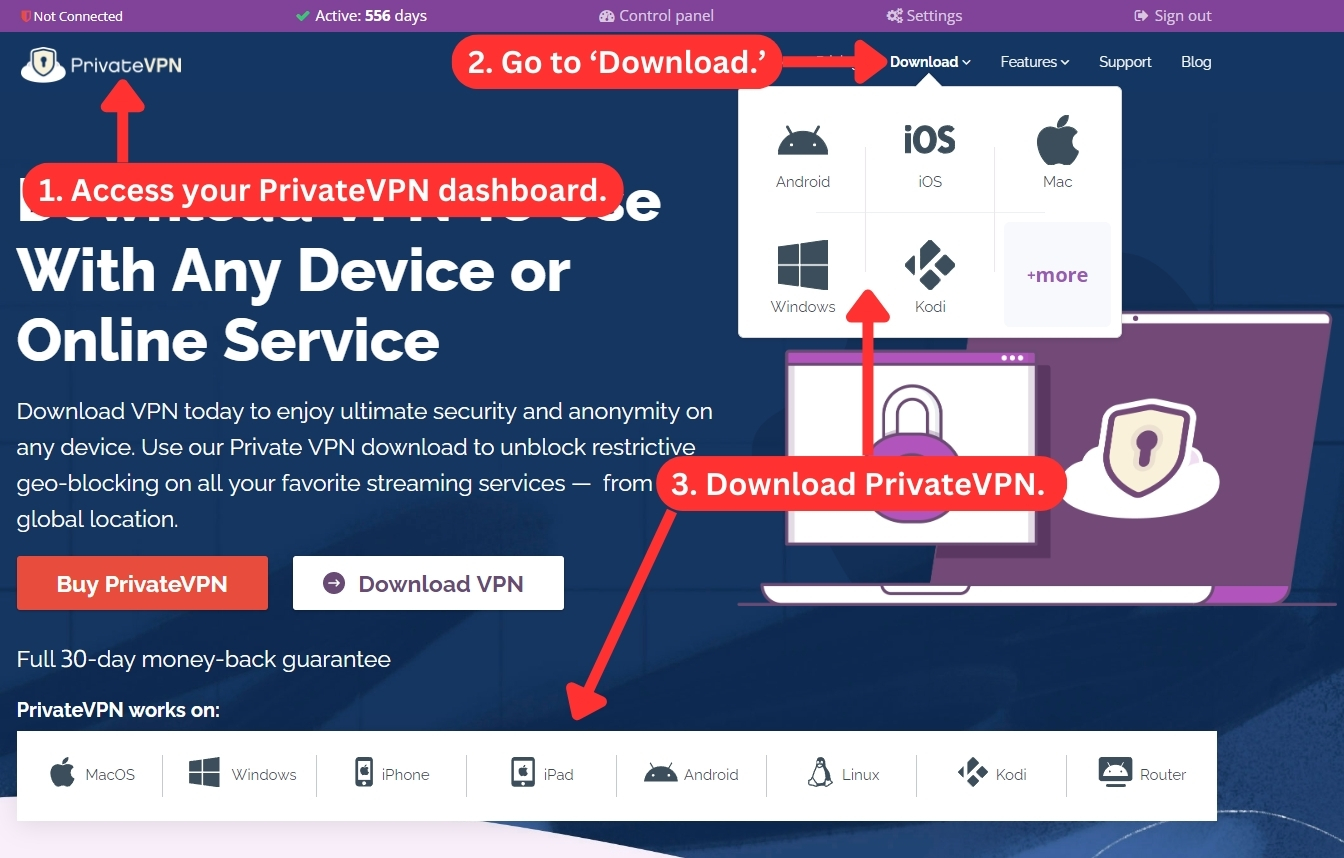
Once the download is complete, follow the installation procedure to install the app on your device. We downloaded the Windows app for our testing purposes. The installation process is simple: double-click the installer and choose where to save the application's files. After the installation, restart your computer, and PrivateVPN will be ready to use.
Once PrivateVPN is installed, open the app and input your credentials to log into your account. Choose a server and click the "Connect" button to establish a secure connection. Voila! You're now protected by PrivateVPN's robust and secure application.
Prominent Features
PrivateVPN offers customers a wide array of features to guarantee their online privacy and security. However, it doesn't have many advanced or unique features. Our Score: 8/10
PrivateVPN boasts a plethora of useful features that support your safety online. Its military-grade encryption protects your sensitive data, and its selection of protocols ensures you can use the VPN for any activity, whether it be streaming, gaming, torrenting, or simply browsing the Web.
Here's a breakdown of PrivateVPN's key features:
- DNS Leak Protection – A DNS leak allows your traffic to route to your ISP’s default DNS servers, exposing your real IP address. DNS leak protection assures that your DNS requests are properly routed through the VPN, securing your identity.
- IPv6 Leak Protection – This feature ensures your real IP is always hidden behind the VPN by disabling IPV6 traffic to prevent leaks from IPV6 requests. Most websites only support IPv4 addresses, so many VPNs don’t bother tunneling IPv6. However, if you connect to an IPv6 website using a VPN that does not support IPv6, your IP address will leak.
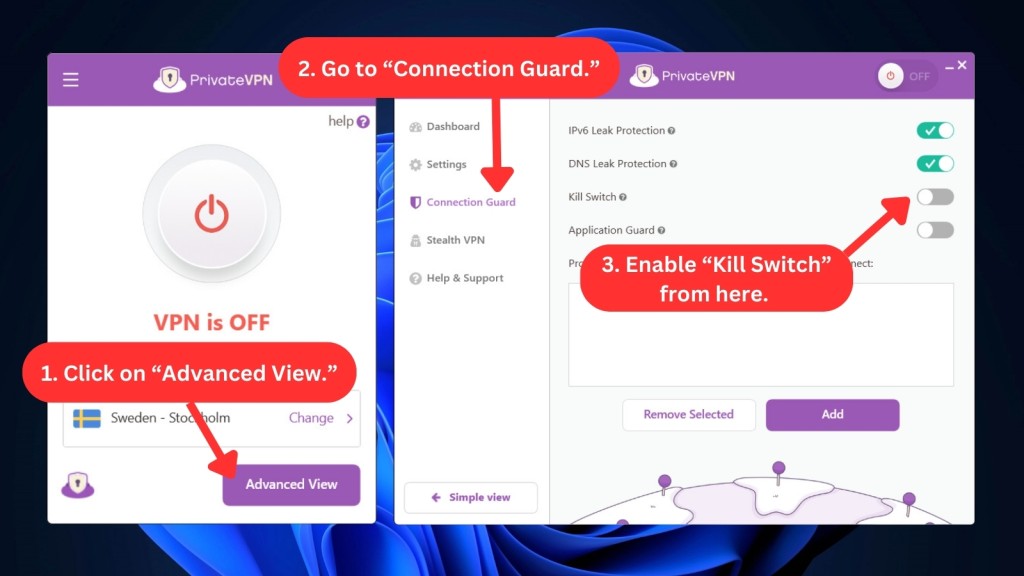
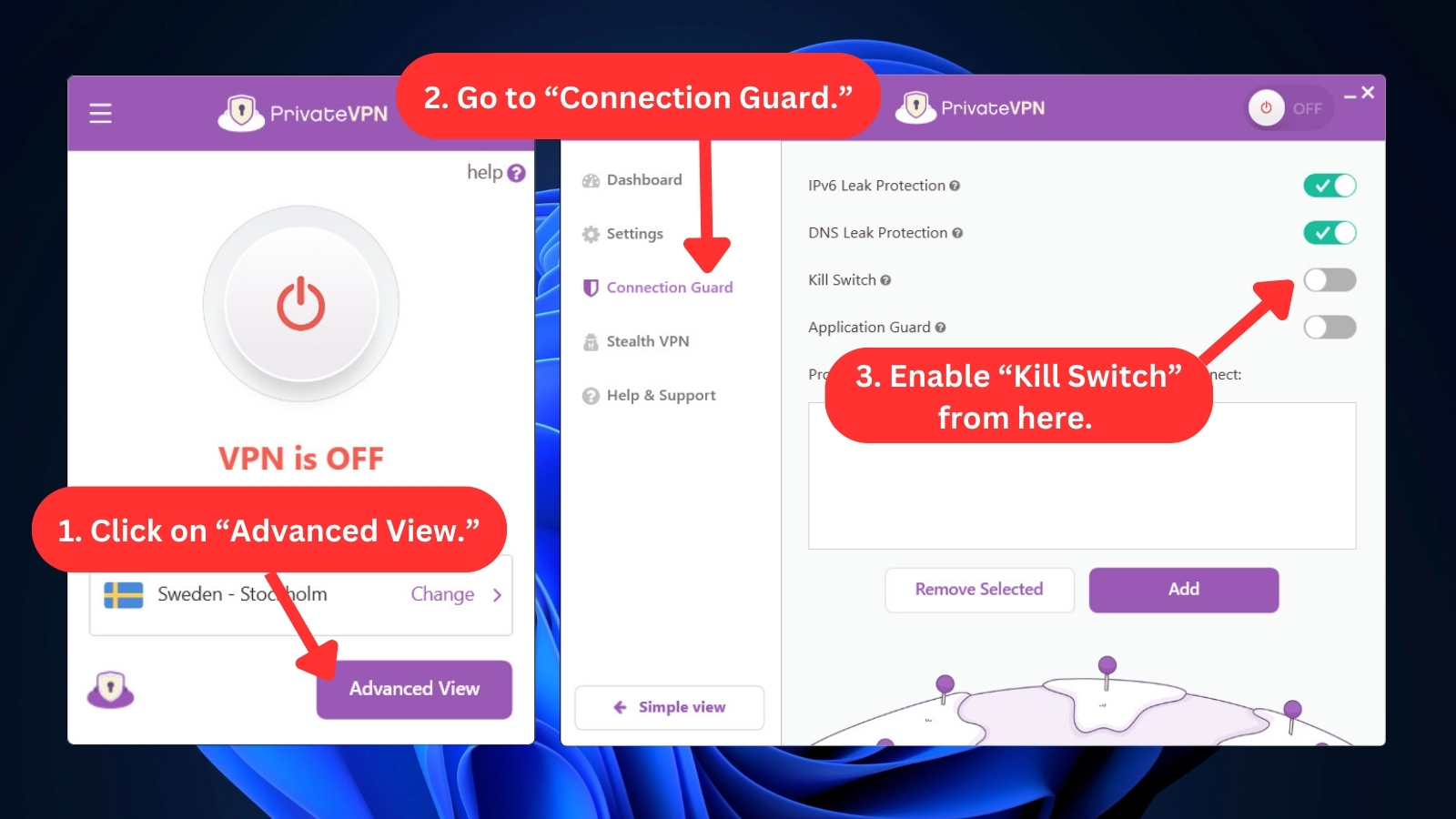
- Kill Switch – If your VPN connection drops, the kill switch instantly terminates your Internet connection, averting accidental exposure of your identity and online activities. This feature is available on Windows, macOS, and Android devices. Unfortunately, support for iOS devices was recently removed due to bugs.
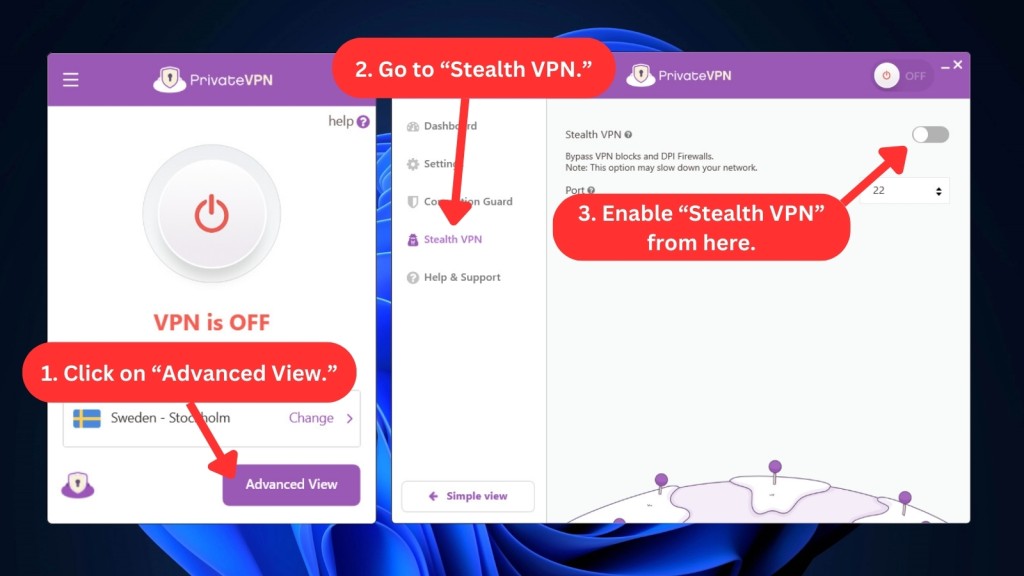
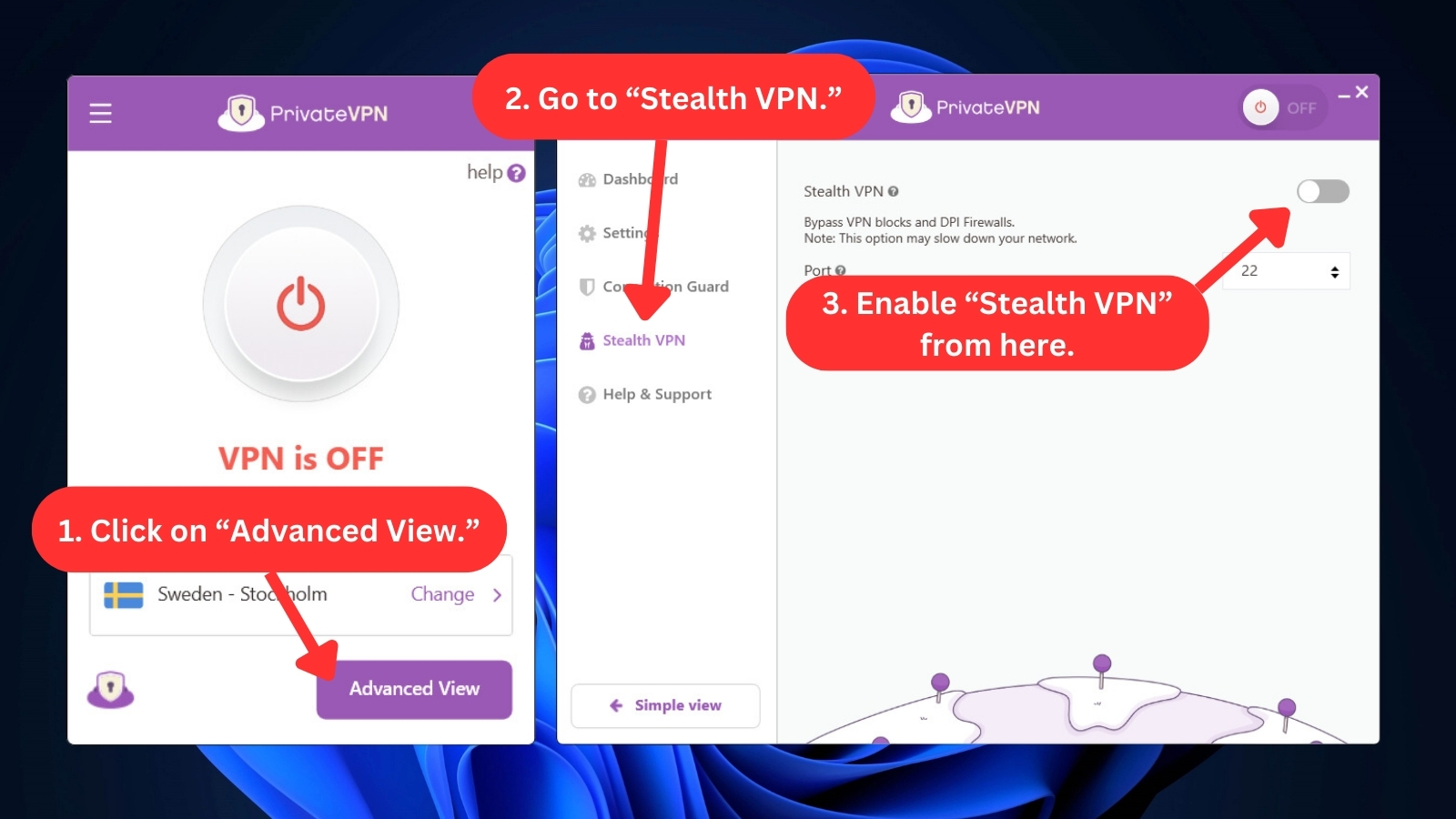
- Stealth VPN – This technology protects your online activities by disguising your VPN traffic to look like ordinary Internet traffic. It's very useful for countries with serious Internet restrictions and censorship issues, like China and India. All supported platforms, except for Linux, have this obfuscation feature.
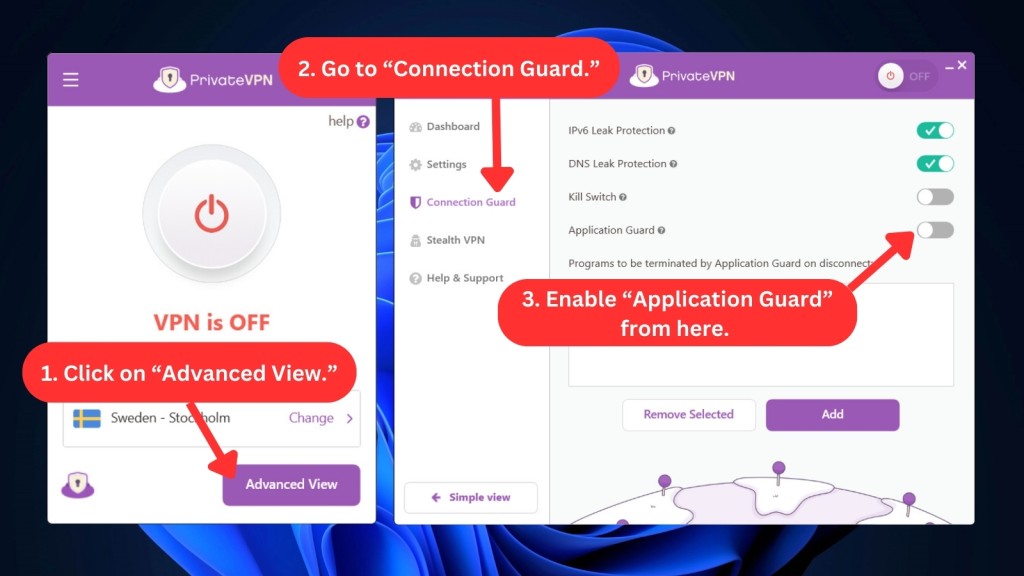
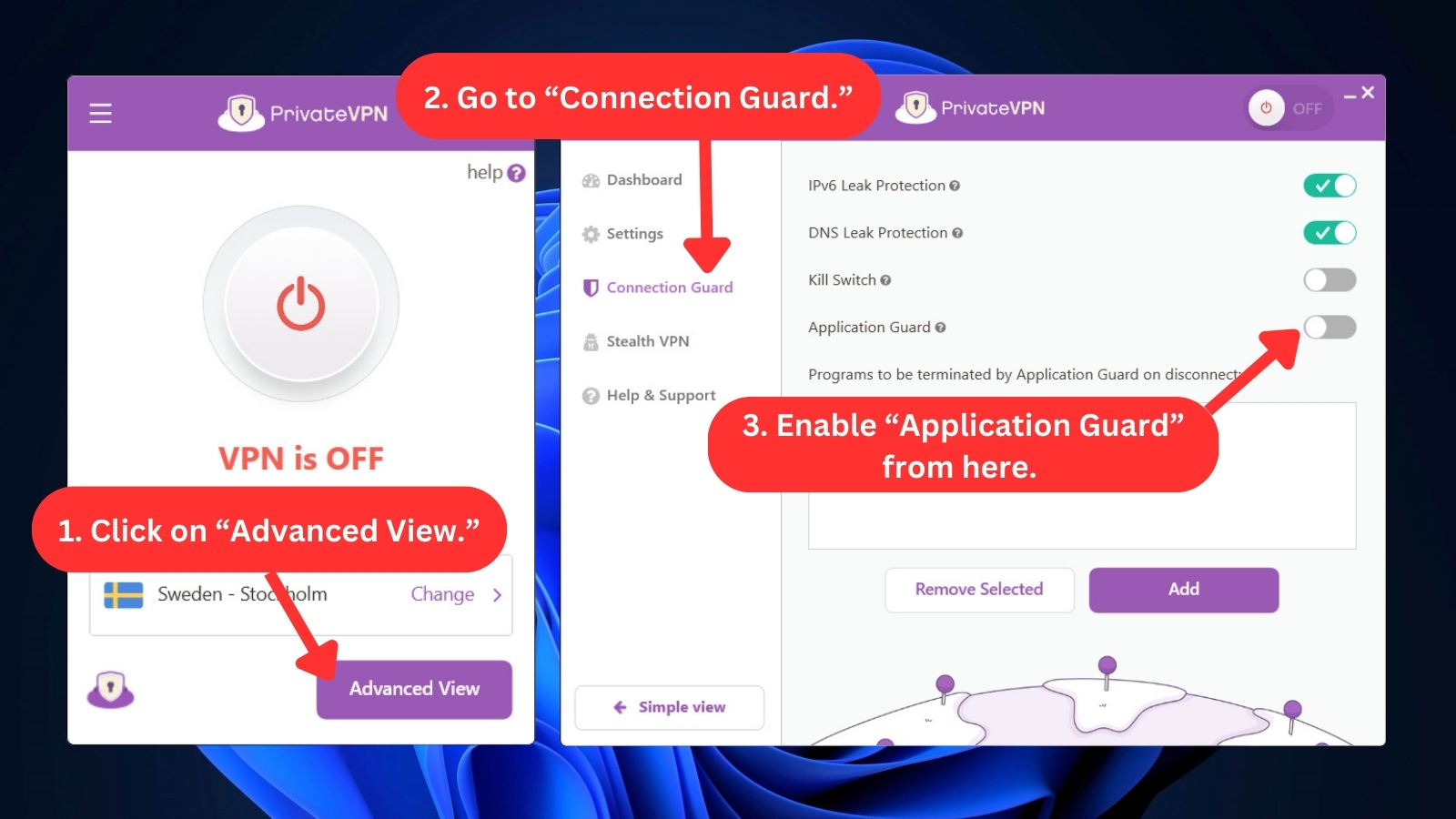
- Application Guard – This feature has the same function as the kill switch but focuses more on apps. It lets you select specific applications to work exclusively with PrivateVPN. Application Guard ensures that your online activities remain secure without requiring all your device’s applications to be routed through the VPN. At the moment, it's only available on Windows PCs.
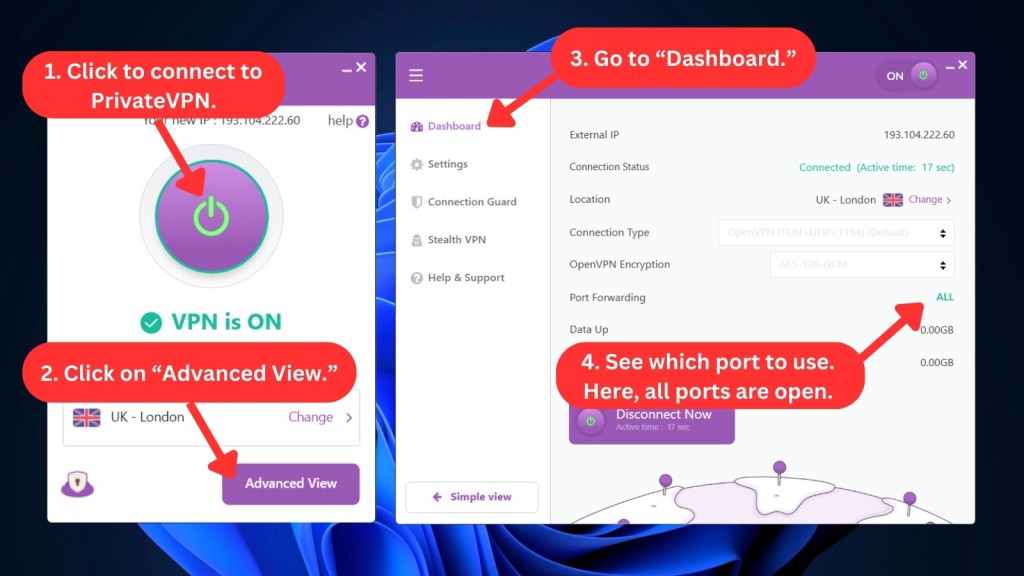
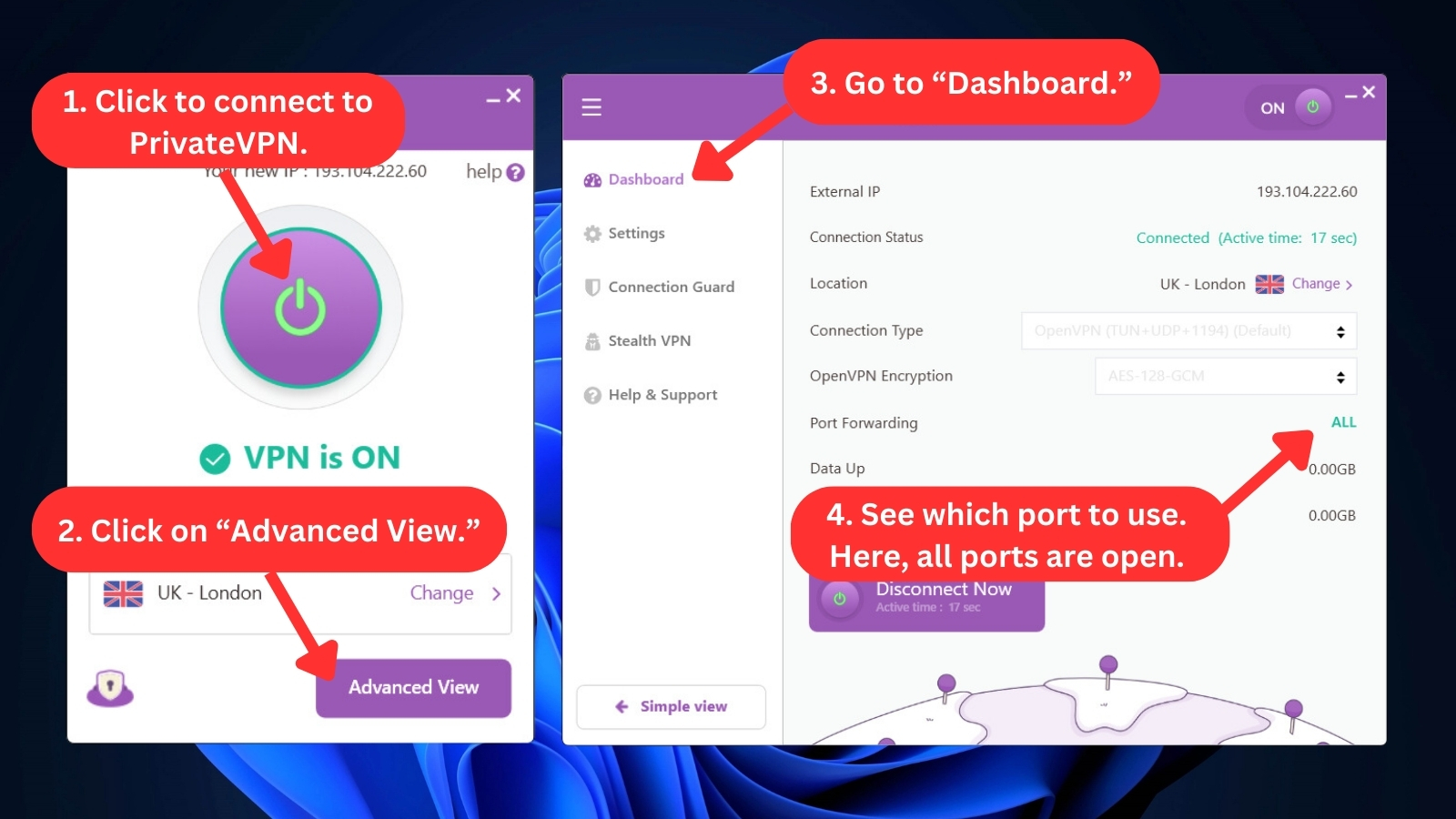
- Port Forwarding – PrivateVPN does port forwarding differently. When you connect, a random port number shows up for your torrent client. It's always on, and every time you link up to a server, you get a new port number. All supported desktop platforms have this feature except for mobile apps.
Server Count & Infrastructure
With only 200+ servers in 63 countries, PrivateVPN offers an average VPN server network. That said, it still delivers a smooth online experience. Our Score: 5/10
While PrivateVPN has a large number of server locations, its number of available servers could be higher, especially considering most competitors offer more extensive server networks. This small server list often results in overcrowding, which negatively impacts connection speeds.
PrivateVPN has a decent range of server locations across 63 countries. However, the network only has 200+ servers, which is relatively small compared to other VPNs with the most servers.
This VPN offers 16 dedicated IP servers, including those in Australia, Canada, India, the USA, and the UK. Dedicated servers are excellent for delivering enhanced security and blazing-fast speeds.
PrivateVPN’s server network consists of both physical and virtual servers. Virtual servers recreate the functionality and features of physical servers, but physical servers are preferred. Luckily, the provider only has 7 virtual servers.
UI/UX Design & Ease of Use

PrivateVPN boasts user-friendly apps that have been recently updated to improve user experience and appeal. They're intuitive when set up and used. Our Score: 8.5/10
PrivateVPN's UI/UX design for their desktop and mobile apps is simple and user-friendly, making accessing basic and advanced VPN features easy.
Launching the PrivateVPN app displays its sleek and "Simple" interface, specifically designed for newbies. It has a drop-down menu with all of the VPN's servers, enabling you to choose and connect to your desired location quickly.
To connect using the Simple View, click the red power button, and it will connect automatically to a random nearby server. You can choose a different server by clicking the "Change" button beside your server location. This will open an additional window with a list of servers.
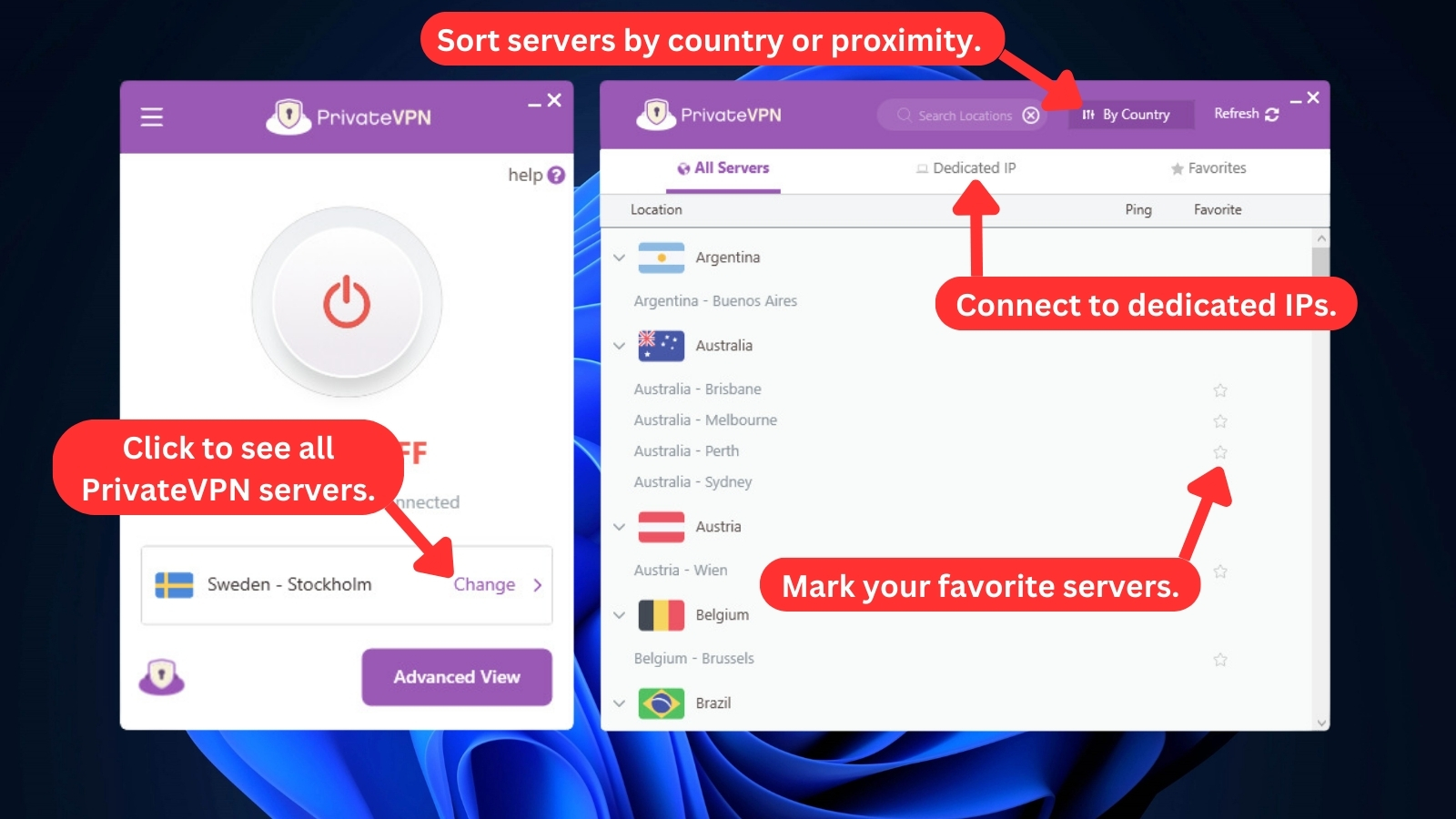
It’s easy to find fast servers because you can sort them by proximity and country. You can also access dedicated IPs, which are better for streaming.
You can switch to the Advanced View to access a more robust interface with extra features and customizable settings. You'll find five tabs on the screen's left side, allowing you to manage the application.
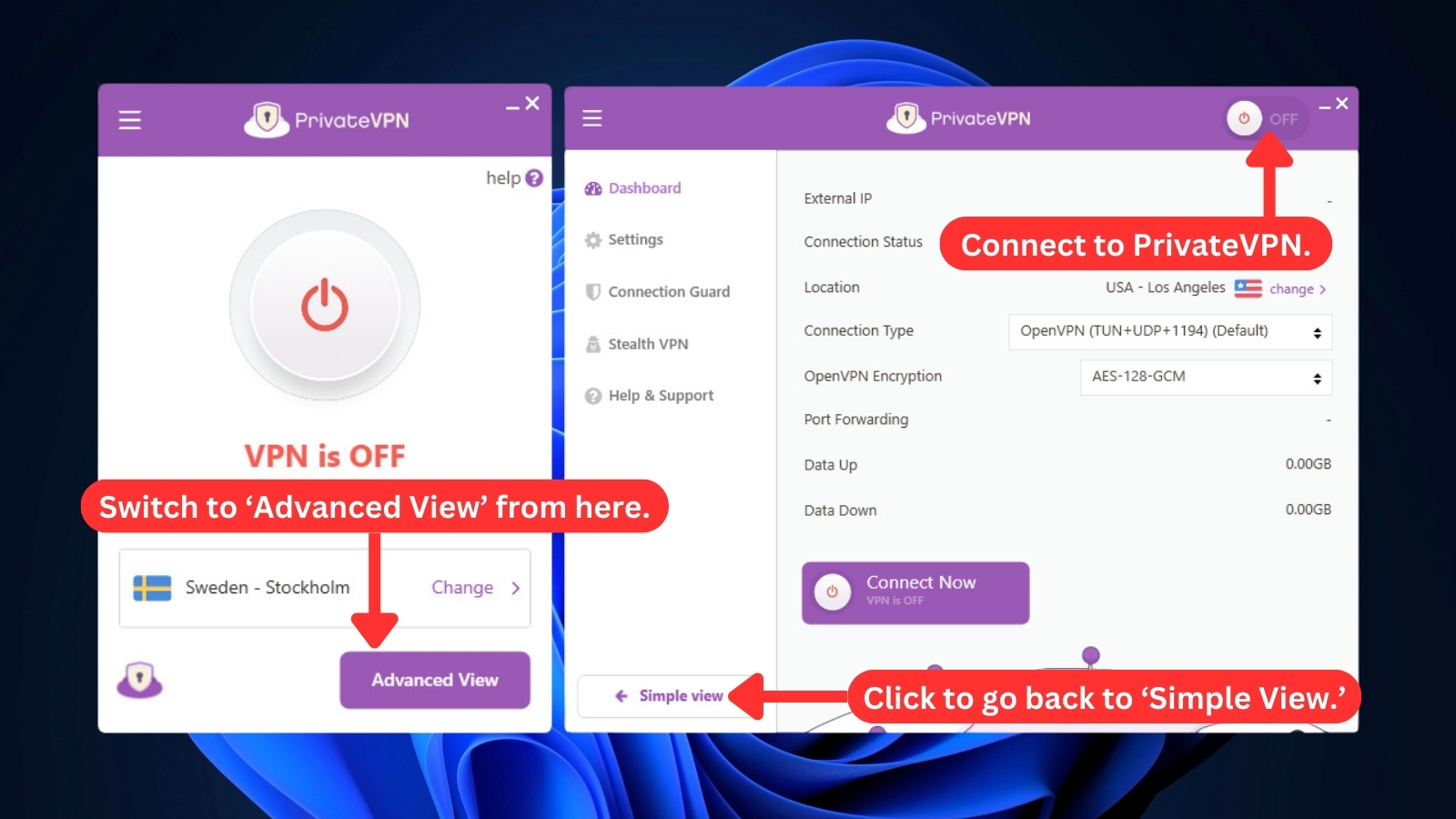
Let's take a closer look at each of these tabs:
- Dashboard – The dashboard offers an intuitive interface that streamlines VPN settings management. It displays your new IP, how long you've been connected, your current server location, and data consumption during the session. This is where you can choose the VPN protocol you’d like to connect with.
- Settings: PrivateVPN gives you complete management of your VPN experience. Here, you can allow or disable desktop notifications, customize the app's behavior, and similar.
- Connection Guard: This is where you'll find the kill switch, DNS leak protection, and IPv6 leak protection settings. The kill switch blocks Internet traffic if the VPN connection drops abruptly, so you don't expose your true IP address. DNS and IPv6 leak protection ensure your identity and location are always hidden from your ISP.
- Stealth VPN: The Stealth VPN feature can be a crucial tool if you're in a country with major Internet censorship. It offers an extra layer of protection with obfuscation, making it more difficult for deep packet inspection to catch and block VPN traffic. This feature ensures that users in highly restrictive countries can easily bypass firewalls and access content globally.
- Help & Support: You can get access to various resources to improve or troubleshoot your VPN experience. It includes live chat for instant assistance, a knowledgebase for troubleshooting common issues, and FAQs. These resources make it easy for you to get the help you need for a seamless online experience.
PrivateVPN's design quality is consistent across all platforms—its mobile app interface is similar to the desktop app's Simple View.
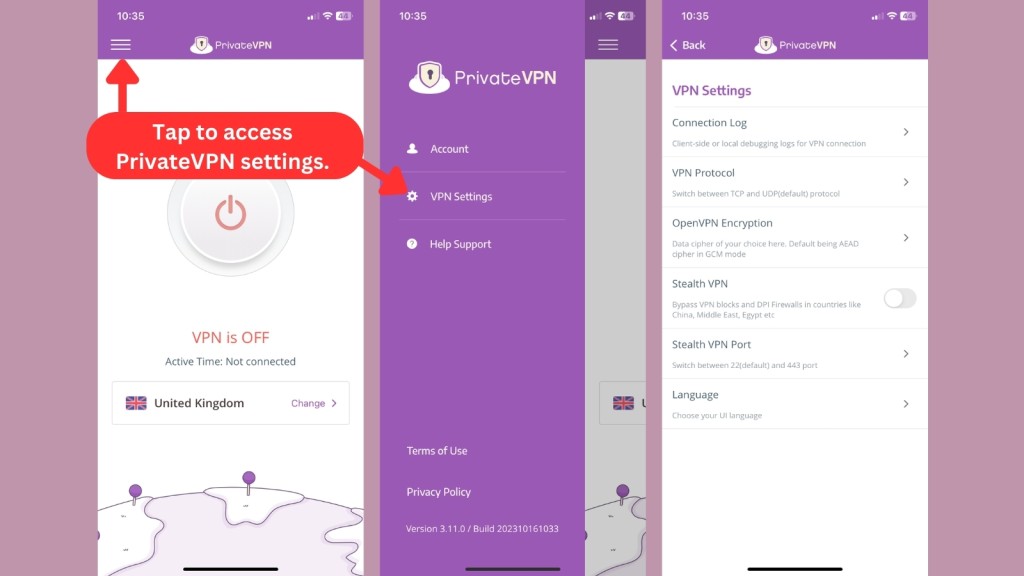
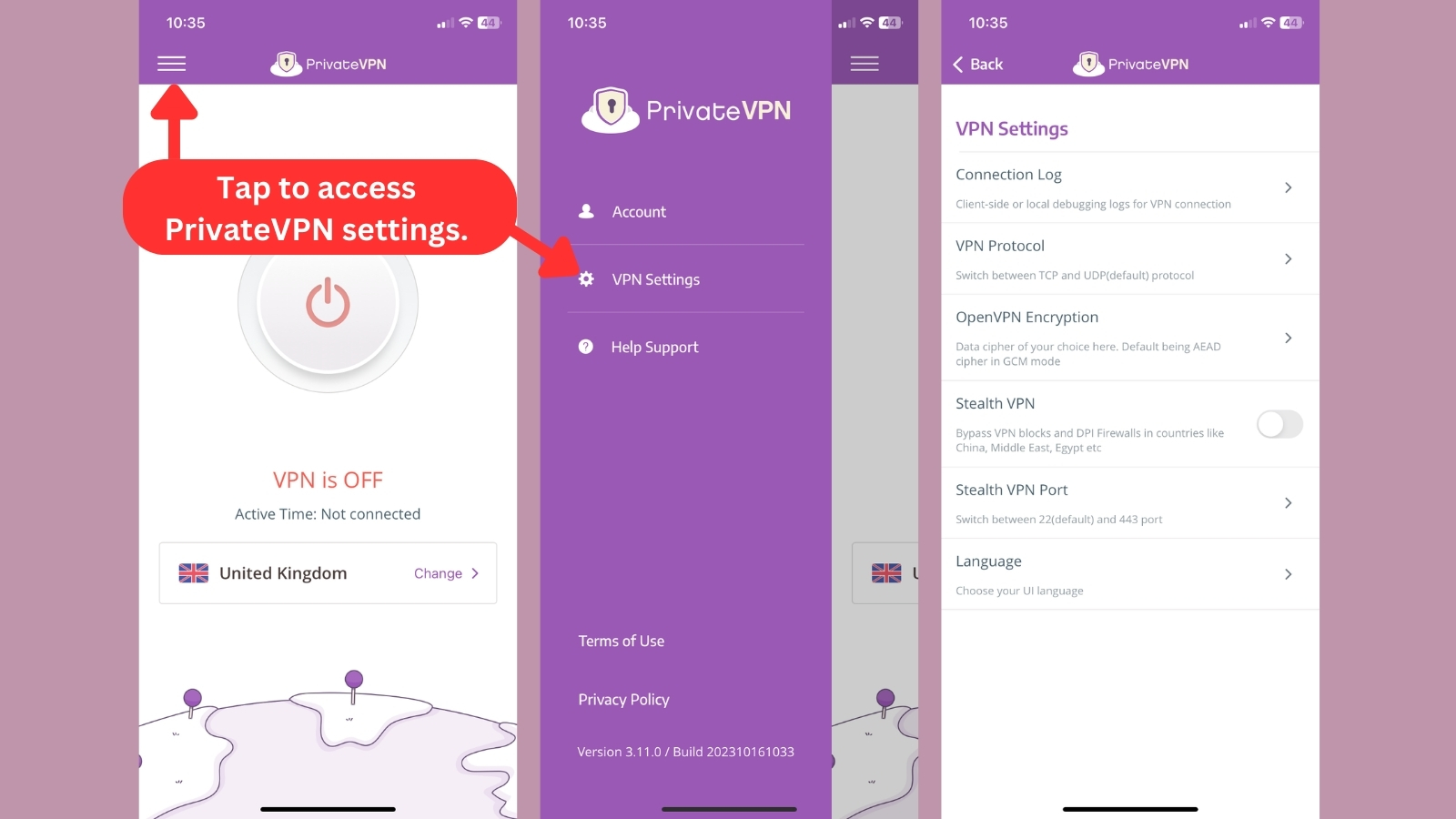
PrivateVPN's mobile app home screen displays basic info, including the connection status, session length, and connected server. Turn the VPN on by clicking the big power button, which should turn green once connected. You can switch servers by clicking "Change" beside your current server location.
To access more settings, tap the hamburger menu in the top-left corner. You'll see three options: Account, VPN Settings, and Help Support. You can view PrivateVPN's Privacy Policy and Terms of Use here as well. The VPN Settings section is where you tweak encryption, protocol, and Stealth VPN settings.
PrivateVPN only has a browser extension for Chrome. It’s pretty basic, but it works well to protect your online activity. You can switch servers easily, but you can’t change any other settings.
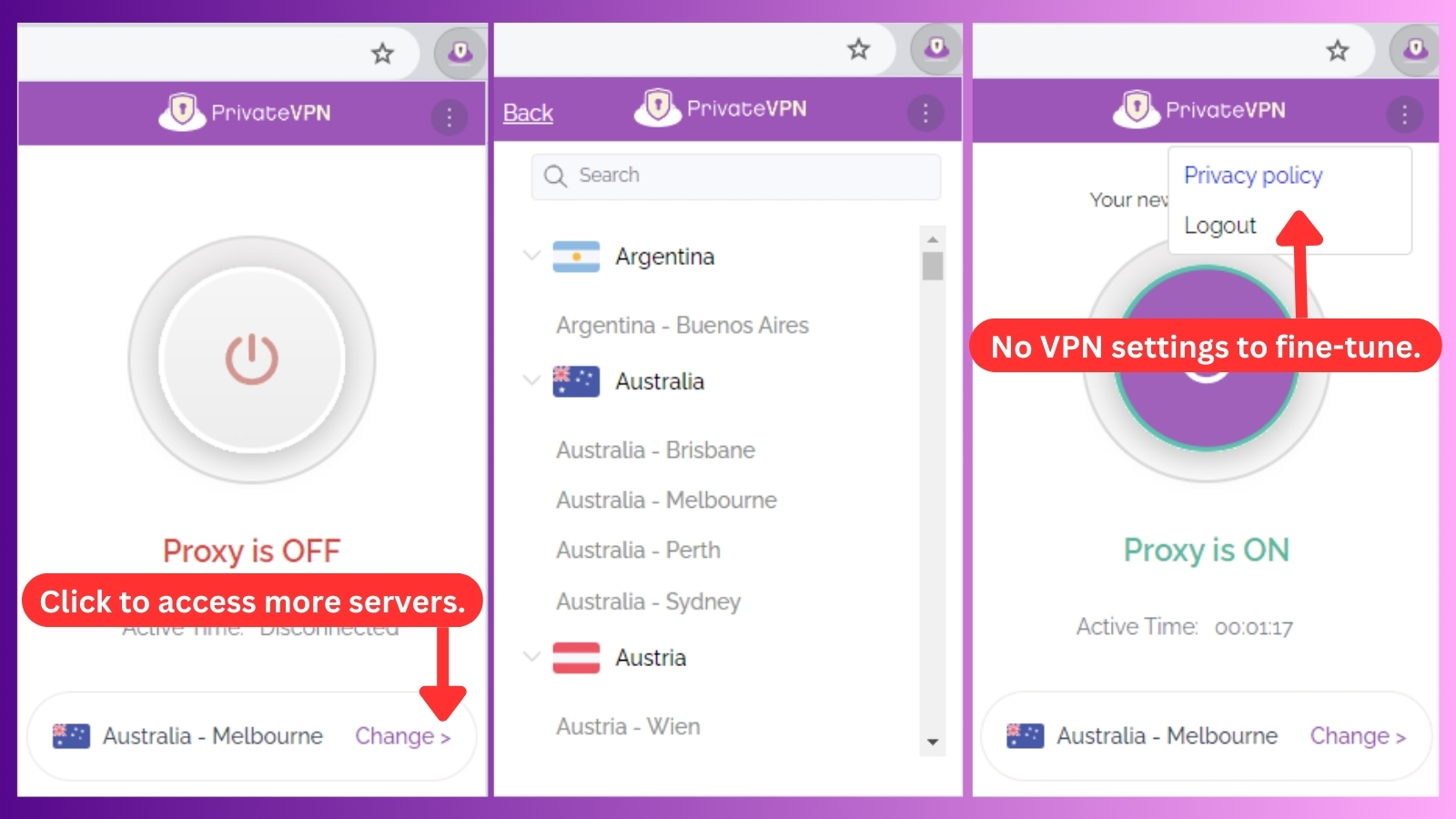
Overall, our experience with PrivateVPN's desktop and mobile apps was smooth and beginner-friendly. Neither app had overwhelming VPN settings, and we were able to navigate and locate all the important features easily.
Media Streaming, Torrenting, and Gaming Support
PrivateVPN has proven to be a top-performing VPN for streaming, as it unblocked every major streaming service when we tested it. This excellent performance also extends to torrenting and gaming. Our Score: 10/10
Aside from safeguarding your privacy and security, comprehensive VPNs provide additional features for media streaming, P2P activities, and online gaming. However, not all VPN services shine in these areas. So, let's explore how well PrivateVPN performs in these domains.
Is PrivateVPN Good for Streaming?
Yes, PrivateVPN is a good and reliable choice for media streaming. Similar to the best streaming VPN, the provider excels in unblocking all the popular media streaming providers, including Netflix, Hulu, and Amazon Prime Video.
We also found accessing the geo-restricted content on YouTube and BBC iPlayer using PrivateVPN effortless. Many premium VPN providers struggle to unblock BBC iPlayer, making PrivateVPN’s success with the task even more impressive.
Here are some of the US streaming platforms that PrivateVPN can unblock.
Now, let's check out what PrivateVPN can unblock regarding international and non-US streaming platforms.
We also have to mention that PrivateVPN plays well with Kodi, making it a great companion for all your streaming adventures.
Is PrivateVPN Good for Torrenting?
Yes, PrivateVPN is a good VPN for torrenting. It's got servers optimized for P2P traffic, ensuring you can safely torrent at super-fast speeds. You’ll be able to share files online without the risk of being intercepted by hackers or discovered by your ISP. Just remember to connect to the nearest server for the speediest downloads.
Moreover, it comes with port forwarding and SOCKS5 proxies, boosting your speed by connecting to more peers. And there's a kill switch, a must-have for torrenting, protecting you from any IP leaks.
But if you're on the lookout for VPNs that do well with torrenting, take a look at our best torrent VPN guide for our top picks.
Is PrivateVPN Good for Gaming?
Yes, PrivateVPN is a good VPN for gaming. Although it's not the best gaming VPN, using its Application Guard feature can ensure that only your game traffic is routed through the VPN, reducing any potential ping or latency issues.
By also changing your virtual location, PrivateVPN will help you bypass geo-restrictions to play games that are blocked in your country. You can choose your preferred server to access location-specific game content.
Security & Privacy
PrivateVPN's commitment to user privacy is impressive. The VPN service uses military-grade encryption and does not log personal data. Our Score: 8/10
In this section, we'll explore PrivateVPN's security and privacy features, closely examining three crucial aspects: VPN protocols, logging policy, and its defenses against IP/DNS leaks. This will give us a clear picture of how PrivateVPN protects your data.
PrivateVPN Protocols
PrivateVPN supports various VPN tunneling protocols for different devices. Its app automatically chooses the best protocol for your network conditions and device type. Understanding the different protocols and their specific use cases will help you get the most out of the service.
- OpenVPN UDP/TCP – OpenVPN is the fastest and most secure connection. This protocol supports multiple authentication methods and uses the secure SSL/TLS protocol for key exchange. OpenVPN comes in two different versions: TCP and UDP. OpenVPN over TCP is more stable because it uses error correction to automatically retransmit data packets during transfer. On the other hand, OpenVPN over UDP is faster than TCP because it doesn't have error correction, which can cause data retransmission interruptions.
- L2TP/IPsec – L2TP, or Layer 2 Tunneling Protocol, is an upgraded version of L2FP (Layer 2 Forwarding Protocol) and PPTP (Point-to-Point Tunneling Protocol). When used in combination with IPsec, L2TP provides strong authentication and encryption. However, this protocol is slower than OpenVPN and may be blocked by firewalls. L2TP is ideal for use on mobile devices that don't support OpenVPN.
- PPTP – PPTP offers fast VPN speeds at the expense of security. It's easy to implement and widely compatible with many devices. However, it has known vulnerabilities.
- WireGuard – This is a cutting-edge VPN protocol with exceptional speed and modern cryptography. Its simple design allows for a streamlined VPN experience, making it an excellent option for users who want speed and security. However, PrivateVPN's WireGuard protocol requires manual setup with raw configuration files.
- IKEv2 – Android and iOS devices often switch between cellular and WiFi when browsing the Internet. IKEv2 was specifically developed for mobile devices to protect your device if you change networks. This auto-reconnect feature and improved stability make IKEv2 a better choice than OpenVPN on mobile devices.
Does PrivateVPN Keep Logs?
No, PrivateVPN doesn't keep logs. It has a strict no-logs policy, meaning it doesn't monitor, record, or store any data on users' online activities, including websites visited, DNS queries, traffic, or IP addresses.
PrivateVPN collects only the necessary information from users to create an account, such as your email and payment information. Additionally, the provider collects aggregate bandwidth usage, but this data isn't tied to specific users and is instead used to optimize server performance.
Does PrivateVPN Leak/Expose Your Personal Data?
No, PrivateVPN doesn't leak your data. To be certain of this, a DNS leak test can be performed to determine if a VPN is truly concealing your identity.
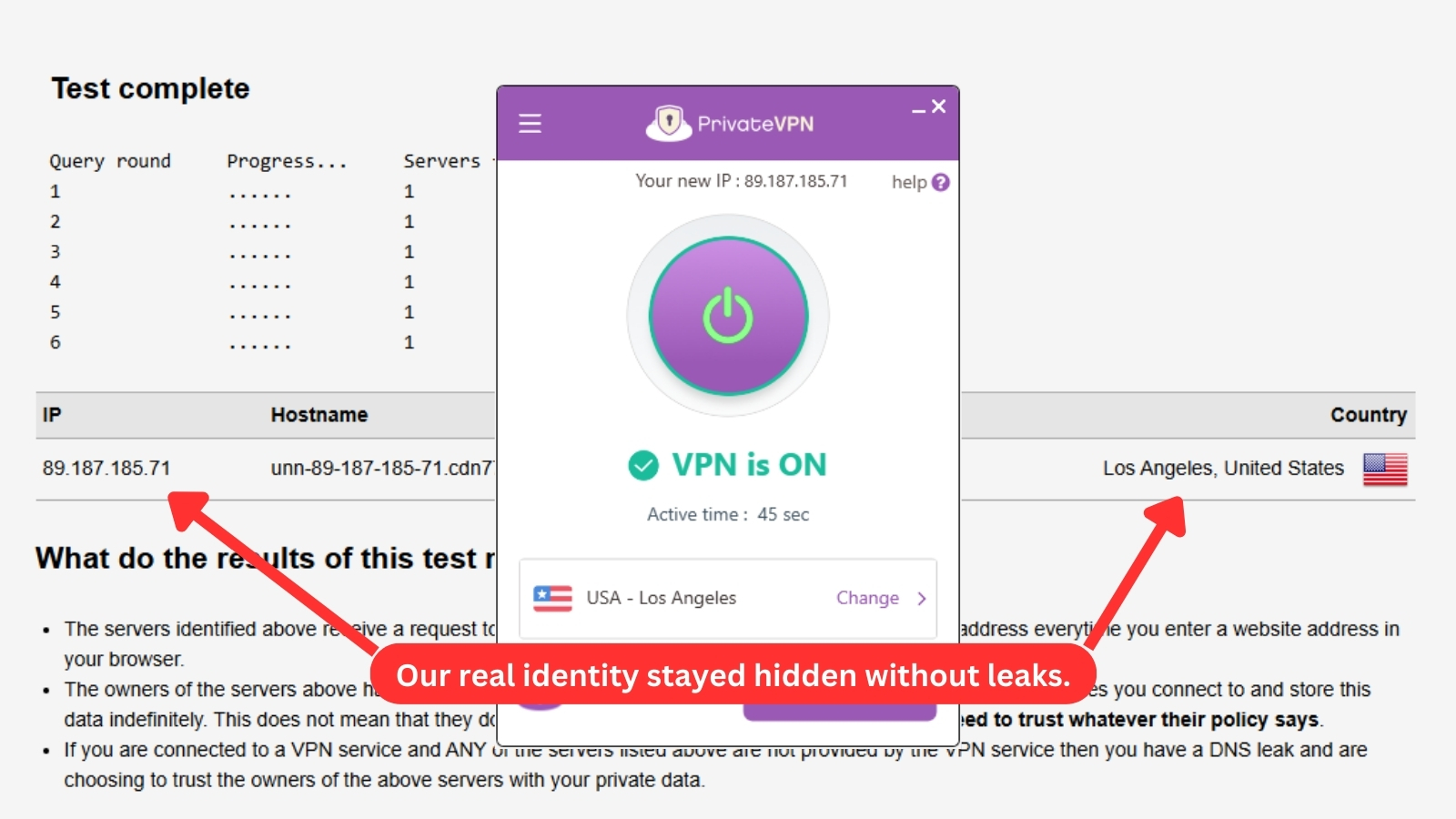
When we performed a DNS leak test, we connected to a server located in the USA to assess PrivateVPN's ability to conceal our real location.
Our test results confirmed that our real IP and location weren't visible. This means that when you use PrivateVPN, third parties will only see your virtual IP address and remote DNS server, ensuring that all your sensitive information remains secure.
Speed & Performance
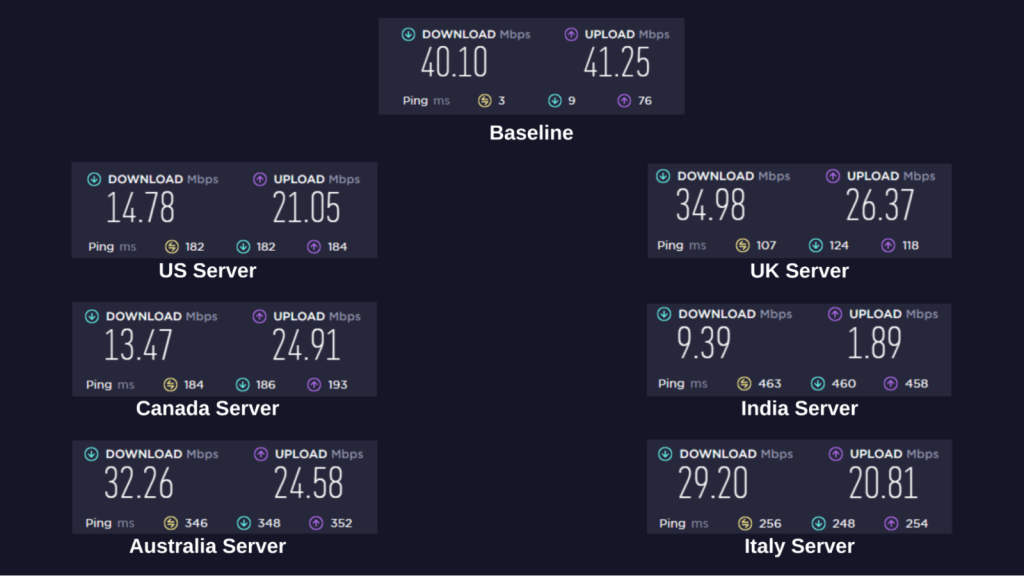
PrivateVPN's speed with near and distant servers was average but enough for general browsing, streaming, and torrenting. We observed a 44% average drop in download speeds across multiple servers. Our Score: 7/10
We evaluated the performance of PrivateVPN by testing the speed of its servers in various locations. To establish a baseline for comparison, we started out with a test of our Internet connection speed without using the VPN.
Our baseline speed results showed download speeds of 40.10 Mbps and upload speeds of 41.25 Mbps. Due to the encryption and security protocols VPNs use, we expected to see a decline in speed once PrivateVPN was turned on.
Here are the results of the rest of our server tests:
- United States Server – We tested the US (New York) server multiple times, but it peaked at 14.78 Mbps download speed (63% decline) and 21.05 Mbps upload speed (48% decline). At those levels, we were able to browse and stream pretty smoothly.
- United Kingdom Server – We began our tests by connecting to a nearby server in the UK (London). Our download speed was 34.98 Mbps, and our upload speed was 26.37 Mbps. For a nearby server with 107 ms ping, download and upload speed reductions of about 12% and 36%, respectively, are decent.
- Canada Server – We recorded similar results to the US server with the server located in Canada (Toronto). The download speed was reduced by 66%, reaching 13.47 Mbps, while the upload speed decreased by 39% to 24.91 Mbps.
- India Server – A server in India was far away and had the highest ping, so we expected a steeper decline. The speed dropped considerably by 76% to 9.39 Mbps, and the upload speed was much worse at only 1.89 Mbps, a 95% decrease.
- Australia Server – Australia (Sydney) was the most remote location we tested, with the highest ping at 346 ms, but we got surprisingly impressive results. The download speed dropped by less than 20% to 32.26 Mbps, while the upload speed dropped by 40% to 24.58 Mbps.
- Italy Server – After establishing a connection to an Italian server, our download speed went down to 29.20 Mbps, a 29% reduction. The upload speed dropped to 20.81 Mbps, a 49% decrease. That said, the download speed was sufficient enough for most online activities.
Overall, we saw less-than-average speed results on PrivateVPN, with a 44% average drop once traffic was routed through the provider. The results were satisfactory for most of our online activities, with faster speeds on nearby servers. As long as your baseline speed is high, you shouldn’t have any problem streaming, gaming, or browsing with PrivateVPN.
Keep in mind that the farther away a server is, the lower your connection speed will be, so choosing servers closer to you is always a good idea. PrivateVPN allows you to sort servers by distance in its app.
Customer Support
PrivateVPN provides multiple options to assist you and address your concerns. Its live chat support typically responds to inquiries in under two minutes. Our Score: 9.5/10
We've found PrivateVPN to be exceptionally responsive to customer needs. If you decide to subscribe to its service, here's what you can expect.
- Live Chat Support – Live chat support is available on the company's site and from the app. You will find a chat bubble in the bottom-right corner of the website and in the Help & Support section of the app.
- Installation Guides – PrivateVPN also provides straightforward installation guides and videos for all supported platforms on the official website's support page.
- Remote Setup – If you need more help with the installation or configuration process, PrivateVPN’s technical support team will remotely set it up for you. They'll also provide a list of tools you need to start the process.
- Frequently Asked Questions – PrivateVPN's FAQs page answers the most common user questions and provides links to helpful resources you might need.
- Support Tickets – Another option is to email PrivateVPN’s technical support team. Typically, you can expect to hear back from them within 24 hours.
Overall, PrivateVPN's customer support is top-notch, and you can trust that they'll be there to assist you every step of the way.
Pricing
PrivateVPN is an affordable choice compared to top VPN brands on the market. Its subscription costs as little as $2.00 per month, which is cheaper than most VPN services. Our Score: 8.5/10
PrivateVPN has three subscription plans. If you choose their long-term plan, you can trim down your expenses. Let's break it down for you.
How Much Is PrivateVPN?
You can get PrivateVPN for as low as $2 per month if you subscribe to the 36-month plan. The standard monthly plan costs $9.90, while its three-month plan is available for $6.00 per month.
All plans have identical features, including 10 simultaneous device connections, native app support for all OS, fast servers, and a 30-day money-back guarantee that doubles as a free trial.
Here's a breakdown of PrivateVPN's available plans:
- 1-Month Plan: The one-month plan costs $9.90 per month and is renewed every month. This is a good way to test out the service before committing to a longer term.
- 3-Month Plan: This plan has a price of $6 per month, which means you'll be charged $17.99 every three months. You'll save 39% on your PrivateVPN subscription.
- 36-Month Plan: PrivateVPN's 36-month plan costs $2 per month, which means you pay only $72 for three years of the service. You have to pay upfront, but you'll save a whopping 80% over 3 years compared to the monthly plan.
When your first 3-year term expires, your subscription will renew annually at the rate of $72 per year. Also, PrivateVPN doesn't have a free version. Since the provider offers a 30-day money-back guarantee, this plan can also serve as your free trial. If you don't like the service, you can contact support and get your refund within the 30-day period.
For modes of payment, you can choose to pay via Apple Pay, Google Pay, credit cards, and PayPal, including cryptocurrencies.
Final Thoughts - Is PrivateVPN Worth It?
Yes, apart from being reliable, PrivateVPN is a feature-rich yet inexpensive VPN provider. The provider's primary focus is providing top-notch privacy and security backed by solid customer support.
PrivateVPN also delivers a seamless streaming and browsing experience despite its average server network. Furthermore, its ability to unblock content is impressive, and it works in countries with extreme Internet restrictions. Of course, you'll quickly find a more powerful VPN - but you'll hardly find a more affordable option.
We recommend PrivateVPN if you’re looking for a cost-effective provider that doesn’t limit its performance to offset its low price point. However, for a truly worthwhile VPN experience where your server options and speed won't be limited, our top choice is NordVPN.
PROS
- No-logs policy.
- Good for streaming.
- P2P servers for torrenting.
- Dedicated servers in many cities.
- Offers multiple protocols.
- Military-grade security features.
- Unblocks geo-restricted content.
- 10 simultaneous device connections.
- Wide device coverage.
- Easy-to-use native apps.
- Works with routers.
- 30-day money-back guarantee.
CONS
- Average server network.
- Based in Sweden.
- No third-party audit.
- Significant distance-related speed declines.
| Review Summary PrivateVPN could be a good fit if you're willing to make some compromises. However, this VPN is committed to protecting your sensitive data, so you can be sure you're 100% safe online. | 8.1 Overall Score | ||
| Background, Jurisdiction & Reputation | 8 | ||
| Supported Platforms & Devices | 8 | ||
| Installation & Initial Configuration | 9 | ||
| Prominent Features | 8 | ||
| Server Count & Infrastructure | 5 | ||
| UI/UX Design & Ease of Use | 8.5 | ||
| Media Streaming, Torrenting, and Gaming Support | 10 | ||
| Security & Privacy | 8 | ||
| Speed & Performance | 7 | ||
| Customer Support | 9.5 | ||
| Pricing | 8.5 | ||