When you purchase through links on our site, we may earn an affiliate commission. Here’s how it works.
Perfect Privacy VPN Review 2026


Our experts have reviewed 53 VPN providers, which were put through extensive rounds of testing. To learn more about that process, here’s how we review VPNs, where we explain our criteria and our policy of being fully transparent.
Perfect Privacy VPN is a Swiss VPN established in 2008. Since Switzerland isn’t a part of the 5/9/14 Eyes intelligence alliance, the VPN is safe from intrusive government data sharing. Despite this secure location, with its no-logs policy, a reliable warrant canary, and an unbreached security record, Perfect Privacy is overdue for an independent audit.
The service's focus on privacy and security is immediately obvious with its highly customizable advanced features. Some of those features include the kill switch, Multi-Hop, NeuroRouting, ad blocking, and port forwarding, among others.
Moreover, you can stream, torrent, and play games effortlessly on this VPN with its default settings.
Here's a quick overview of its features.
In this Perfect Privacy VPN review, we'll evaluate its user-friendliness, security features, pricing, and other aspects based on our extensive tests. For a better understanding of our VPN review process, be sure to check out how we review VPNs.
Also, you can take a look at our list of the best VPN services. If you're simply looking for the best VPN, then we highly recommend NordVPN.
Background, Jurisdiction & Reputation
Perfect Privacy VPN is headquartered in Switzerland, where it isn't obligated to share data with governments. Also, the provider doesn't keep logs and has never been hacked. Our Score: 9/10
First, we'll answer the question: “Can you trust Perfect Privacy VPN with your data?” We'll examine its jurisdiction, history of data leaks, and data logging practices to give you all the context you need.
Where Is Perfect Privacy VPN Based?
Perfect Privacy is based in Switzerland. The country isn't part of the 5/9/14 Eyes Alliance, which means its government can't force the VPN provider to share your data. On the contrary, Switzerland proudly adheres to many data protection acts and ordinances.
There's limited information available about Perfect Privacy's owner. However, we know it’s owned by Vectura Datamanagement Limited Company, a Swiss company. We also know that it has employed a designated Data Protection Officer, Steffen Wernéry, to ensure privacy. Overall, Perfect Privacy's jurisdiction and obvious commitment to privacy are reassuring.
Did Perfect Privacy VPN Leak Private Data in the Past?
No, Perfect Privacy VPN hasn't leaked any private data in the past. Even better, the service doesn't keep logs.
Perfect Privacy never records your browsing history, VPN connection timestamps, IP addresses, or individual bandwidth usage. So, if it ever gets hacked, your data shouldn't be available to steal, especially since it uses RAM-only servers.
Governments can't get through to your data either. This was best exemplified in 2016 when the Dutch government seized two Perfect Privacy Rotterdam servers. The provider immediately informed its users that "no customer information was compromised" and quickly replaced the servers.
Perfect Privacy only stores your login info and subscription details for billing and support purposes, which is pretty standard.
Supported Platforms & Devices
Perfect Privacy VPN works on popular mobile devices, computers, and routers, but it doesn't support browser extensions. However, you get unlimited simultaneous device connections. Our Score: 7/10
The best way to secure your data is to get a VPN on all your devices. In this section of our Perfect Privacy VPN review, we'll examine the extent of the service's protection across various devices.
Perfect Privacy has native apps for Windows, macOS, and Android. However, iOS and Linux devices don't get native apps. That’s why you have to manually configure OpenVPN or IKEv2 on those devices.
We downloaded the configurations directly from the official website, and we were connected to a server in minutes. However, nothing beats the ease of connection you get with native apps. If you're not tech-savvy, you might be put off by the extra steps to get a server. Worse still, you have to download and install a new configuration if you want to switch servers.
Thankfully, Perfect Privacy supports various routers, including Tomato, OpenWrt, AsusWRT, DD-WRT, and pfSense, amongst others. You can log in to your router once and protect all your connected devices. Detailed guides to router configurations are available on the provider's official site.
The icing on the cake is Perfect Privacy's unlimited simultaneous device connections, an uncommon but most welcome perk.
Installation & Initial Configuration
Using Perfect Privacy VPN on devices without native apps requires some technical expertise. But its native apps are easy to download and use. Our Score: 8/10
In this section of the Perfect Privacy VPN review, we'll detail the steps to install Perfect Privacy VPN's native apps. Here's what you can expect.
How to Download and Use Perfect Privacy VPN?
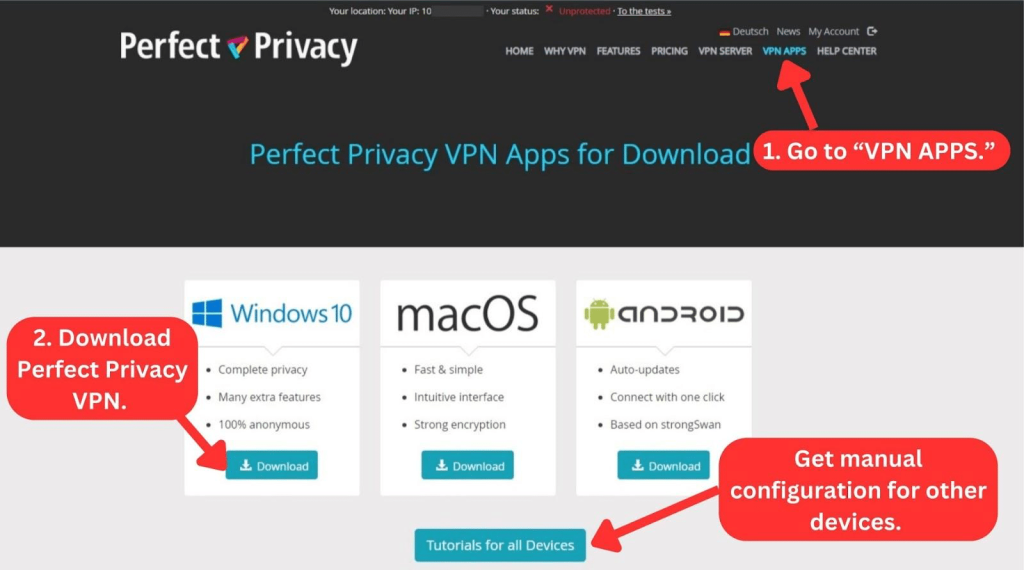
To download Perfect Privacy VPN, subscribe to the service first. Next, download the installation file directly from the official website and install the app.
Here's a step-by-step process for setting up Perfect Privacy VPN:
- Subscribe to Perfect Privacy VPN using any Web browser.
- Sign in using your username and password.
- Click "VPN APPS" in the main navigation menu.
- Select your device's OS and click "Download."
- Open the downloaded file to install the application.
- Launch the app and log in with your credentials.
- Click "Add Server" to select a server and connect.
This simple process works for Windows, macOS, and Android, as they all have native apps for Perfect Privacy VPN. The initial setup on those devices is straightforward and should only take a moment.
On desktop, the VPN has three modes: Simple, Advanced, and Expert. The Simple mode has basic settings, while the Advanced and Expert modes have a roster of technical features.
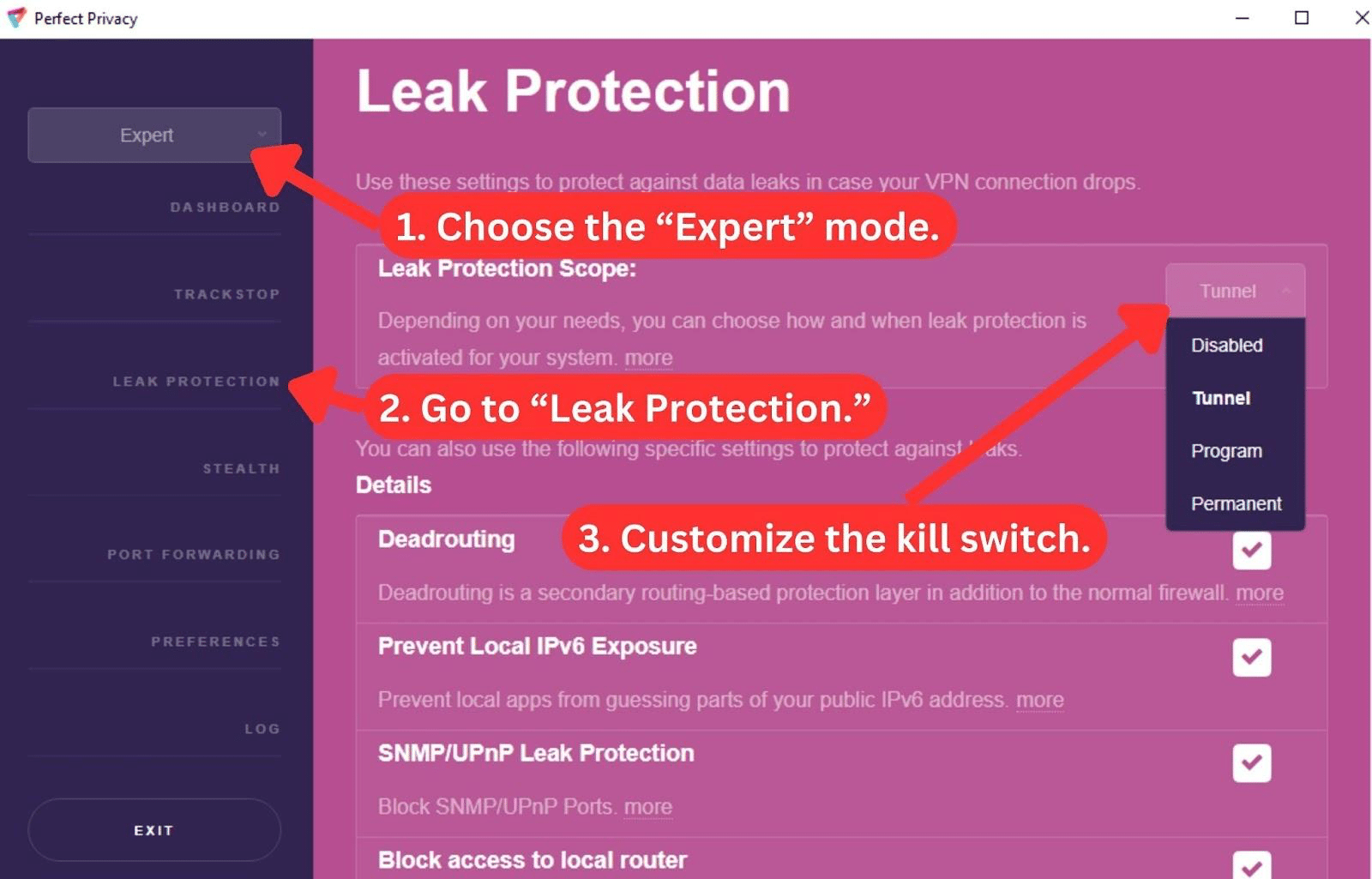
For instance, the kill switch, located in the Leak Protection section, is set to "Auto" in the Simple mode. But changing to the Advanced mode allows you to customize how the kill switch behaves. Lastly, in Expert mode, the Leak Protection section expands to show you 8 more settings, including DNS leak protection and MS leak protection.
If there are no native apps for your device, the initial setup takes a few extra steps. Thankfully, you can also refer to the website for the installation guides.
Prominent Features
Perfect Privacy VPN packs many powerful features on top of its standard offerings. There are no dedicated IPs, but you get an ad blocker. Our Score: 8.5/10
Perfect Privacy VPN offers essential features such as a Kill Switch and full IPv6 support. It also supports advanced features like Multi-Hop VPN, TrackStop, and NeuroRouting. In this section, we'll take a look at how these features actually protect you online.
Here's a rundown of Perfect Privacy's features:
- Multi-Hop VPN: You can connect to up to four different servers to better circumvent censorship and prevent online tracking.
- Leak Protection Scope (Kill Switch): If you switch to the Expert VPN mode, you can choose between three kill switch settings: Tunnel, Program, and Permanent. “Tunnel” prevents leaks when the VPN is connected, while “Program” deactivates your Internet if the VPN connection drops suddenly. However, “Permanent” keeps blocking non-VPN traffic, even if you close the app.
- NeuroRouting: Using AI and proprietary programming, the app optimizes your traffic's routes to the closest VPN servers to your target server. This feature helps cut down on potential points for attacks, making things safer.
- TrackStop: This highly customizable feature lets you block ads, malware, social media tracking, and phishing domains.
- Full IPv6 Support: Perfect Privacy automatically provides an IPv6 address, ensuring global accessibility while preventing leaks with IPv6 protection.
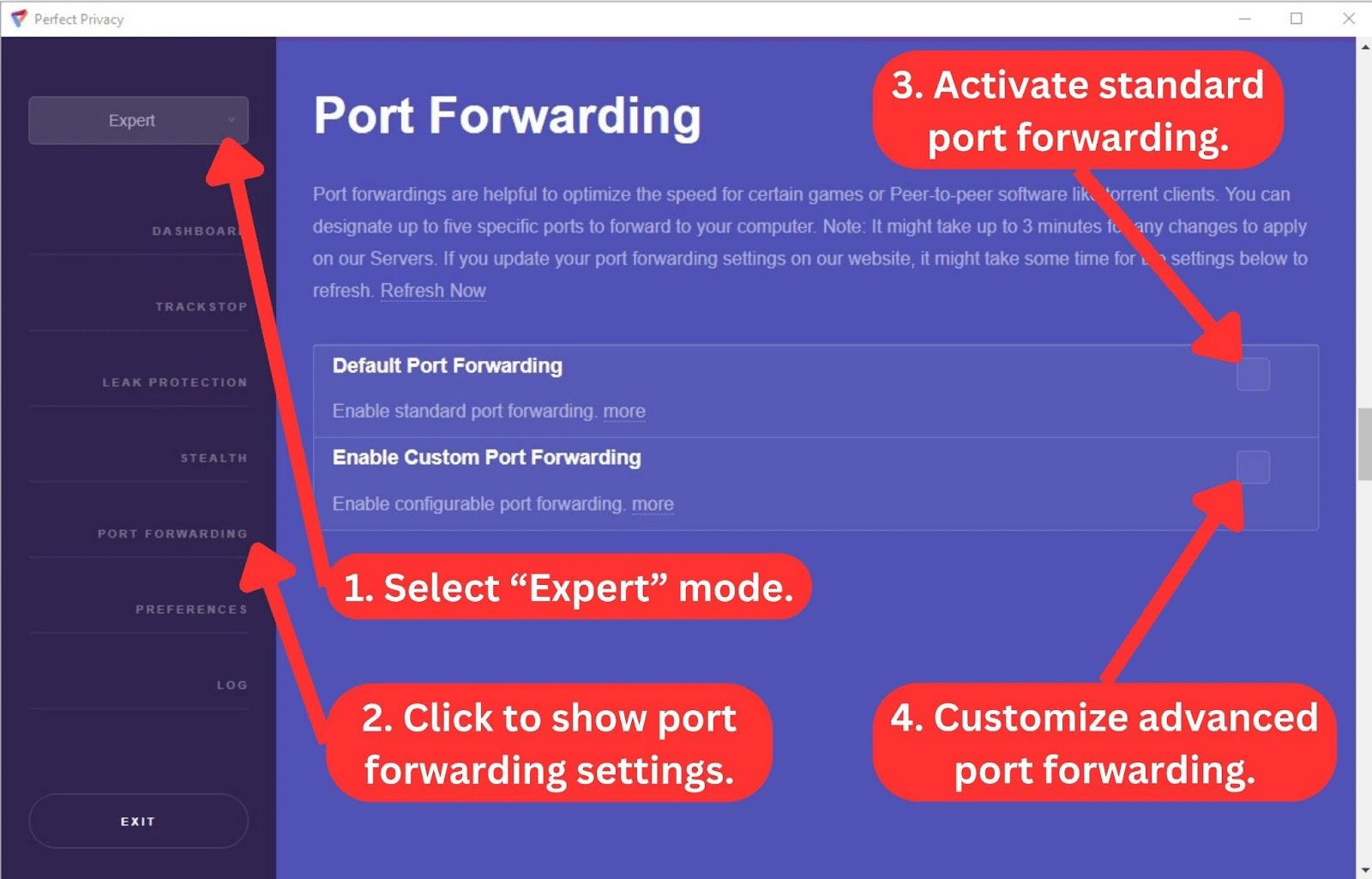
- Port Forwarding: Get faster speed performance when gaming or torrenting by allowing connections to specific ports on a private network.
- Stealth: This feature uses obfuscation techniques to disguise your data as regular HTTPS traffic, preventing your ISP from noticing that you're on a VPN.
- DNS Leak Protection: The app directs DNS queries exclusively through Perfect Privacy name servers, concealing your activities from nosy ISPs.
- Custom DNS Servers: You can use your own nameservers instead of Perfect Privacy's automatically selected nameservers. Keep in mind, though, that using custom DNS servers might affect TrackStop, which includes anti-malware, anti-phishing, and ad-blocking features.
- SOCKS5 Proxy: This feature lets you spoof your location without the speed drawbacks or safety benefits of a VPN's encryption.
Despite these advanced features, Perfect Privacy doesn’t offer split tunneling. If that's important to you when picking a VPN, it's definitely something to keep in mind.
Server Count & Infrastructure
Perfect Privacy has a small server network of 55 servers in 24 countries, which is below par. Our Score: 1.5/10
True flexibility comes from numerous server options. Large server networks allow you to find servers that fit your activity and desired location. It also prevents overcrowding.
Here's what you can expect from Perfect Privacy.
Unfortunately, Perfect Privacy VPN has a relatively restricted server network, comprising just 55 servers spanning 24 countries. Its server network is very small compared to VPNs with the most servers.
Perfect Privacy VPN's servers are well-distributed across Europe, Asia-Pacific, and North America. However, there are no servers in Africa or South America, which probably isn't good enough for other users.
Nevertheless, Perfect Privacy allows you to select servers at the city level in the limited number of countries in which it operates. The desktop app also lets you know the amount of load on each server and which servers are down for maintenance. Throughout our tests, three servers were down, and a handful had more than 30% load.
Perfect Privacy VPN claims not to use VPN virtual locations, implying that all its IP addresses are connected to actual servers. However, we often got connected to servers in a different city than the ones we selected.
UI/UX Design & Ease of Use
Perfect Privacy VPN has a user-friendly interface that’s customized for various levels of VPN users. Our Score: 5/10
In this section of our Perfect Privacy Review, we'll explore the VPN’s native applications on desktop and mobile platforms. However, it's a shame it doesn't have browser extensions.
How Well Does Perfect Privacy VPN Work on Desktop Platforms?
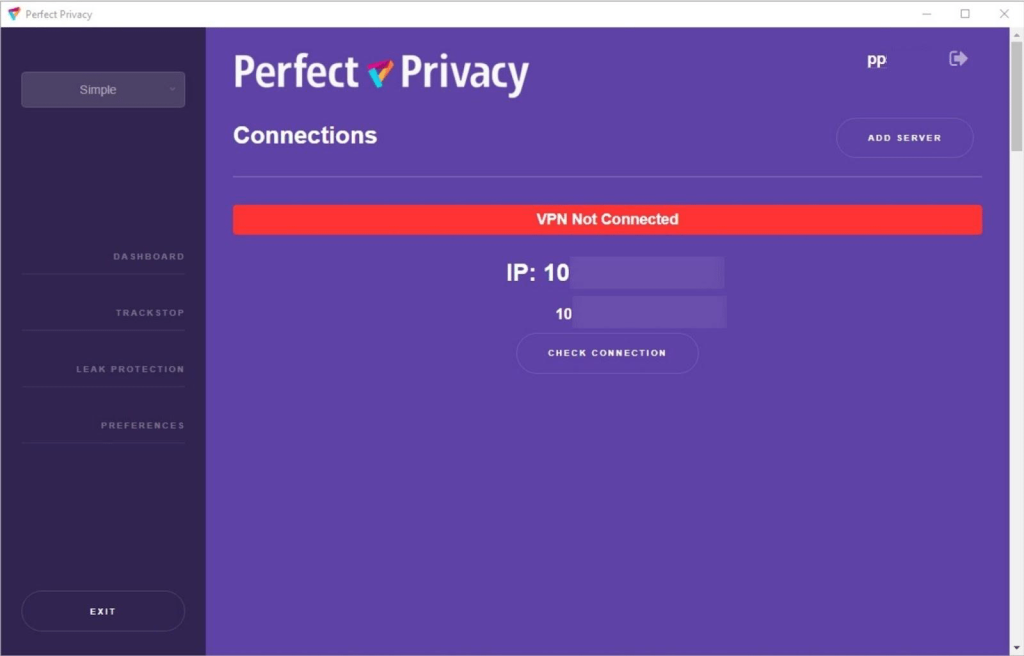
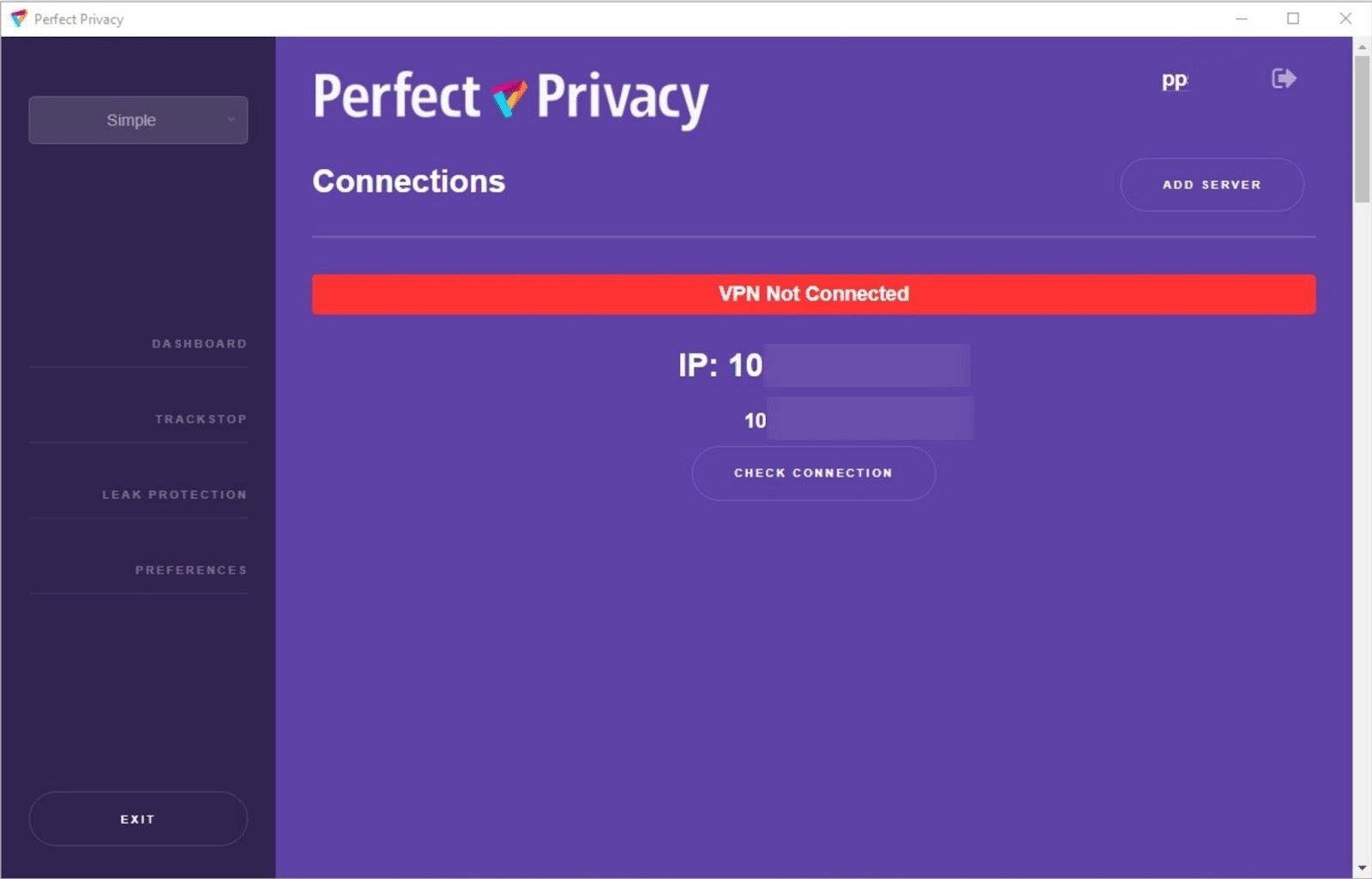
Perfect Privacy VPN works well on desktop platforms. It keeps things consistent across Windows and macOS. The dashboard, although a bit old-school, is minimalistic, focusing on key info like your IP address and connection status. Whether you're on Windows or macOS, the experience stays the same.
In the top-right corner, you can add a server you want to connect to. Enabling the Multi-Hop feature also allows connecting to multiple servers for added security.
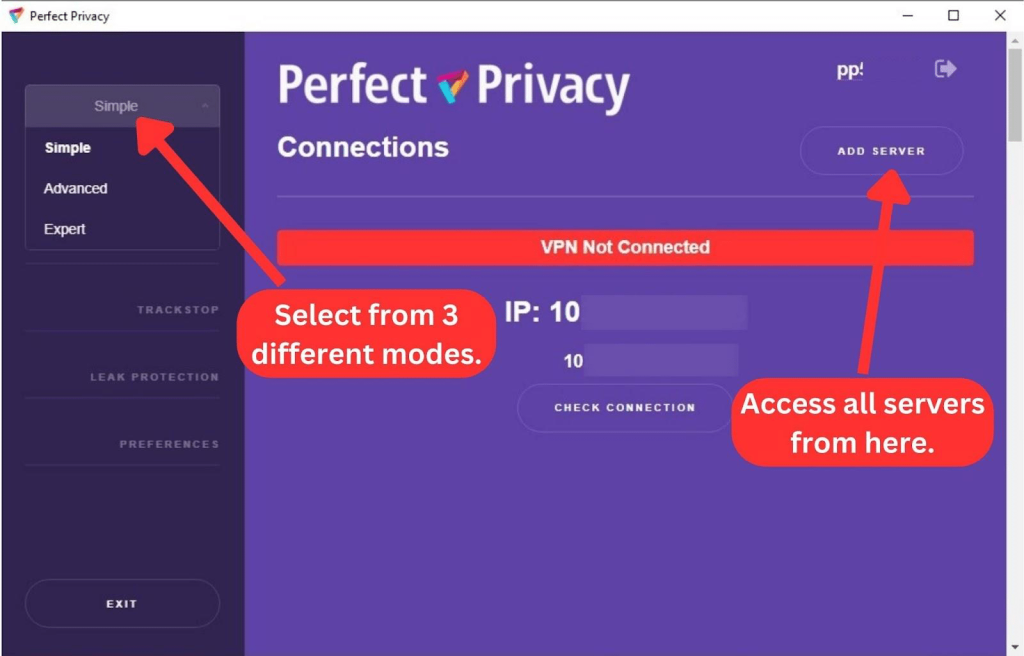
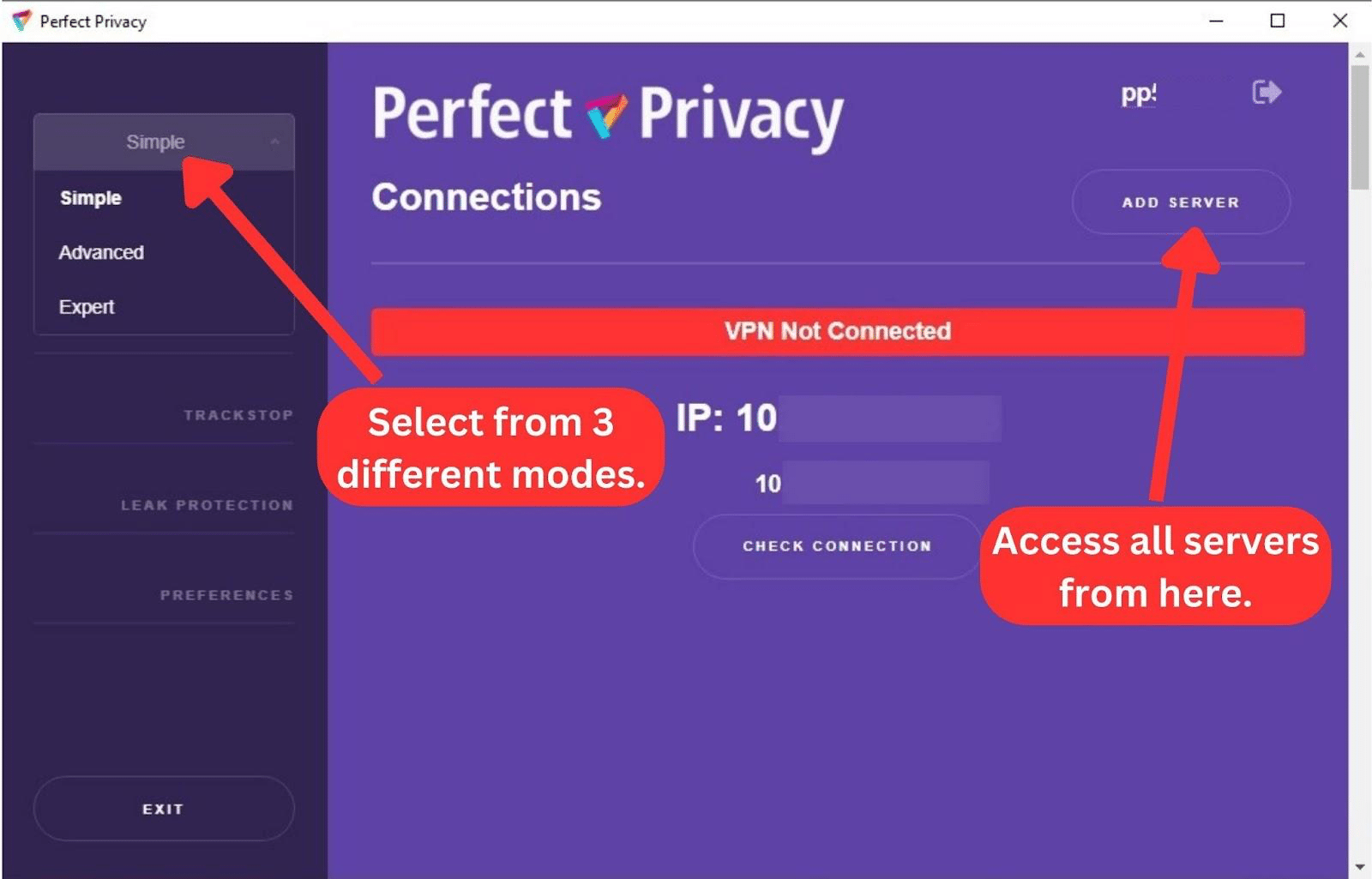
Once you select the server(s) you want, the app adds a green "Connect" button in the top right corner. Clicking that button connects you to the VPN server(s) you’ve selected. To disconnect, simply click the "Disconnect" button.
That's pretty much all on the right side of the dashboard. On the left sidebar, you can see lists of options. You can switch between Simple, Advanced, and Expert modes.
In Simple Mode, you’ll have access to the basic versions of TrackStop, Leak Protection, and Preferences. If you switch to Advanced or Expert modes, you'll unlock additional customizable options (as we've outlined in the bulleted list below).
Here's a list of all the menu options on the sidebar:
- Dashboard: This tab leads to the home screen, where you'll see your connection status and IP address. You can also add servers and explore all available server locations.
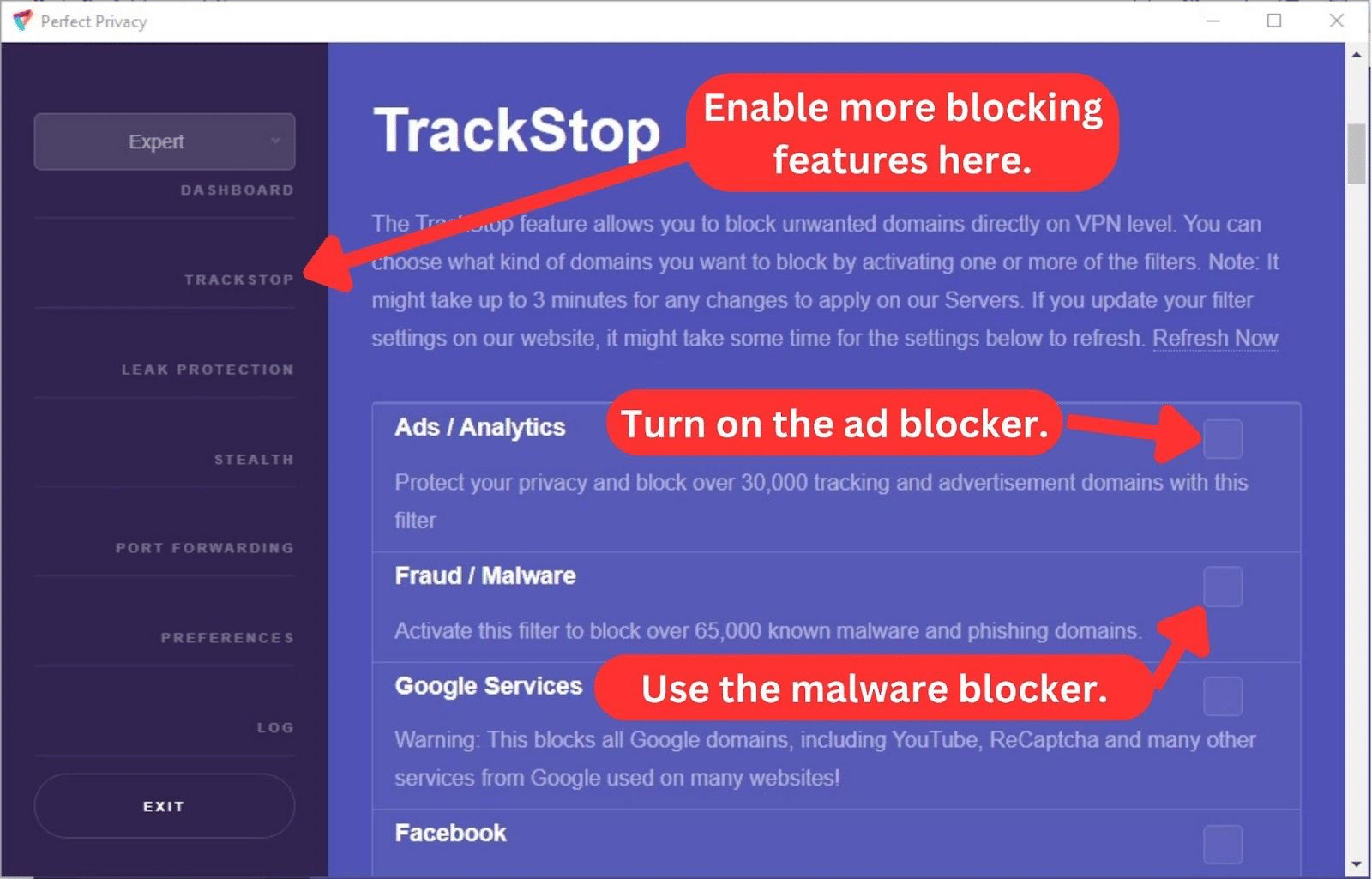
- TrackStop: Here, you can block ads, social media tracking, inappropriate content, malware websites, and content from unwanted sources.
- Leak Protection: This menu item lets you tailor the app's many leak-prevention features to your preferences. By default, the leak protection is set to "Auto" in the Simple mode.
- Stealth: This menu option leads to the Stealth VPN page, where you can hide your VPN traffic from your ISP.
- Port Forwarding: Select this menu option to choose between standard port forwarding and custom port forwarding.
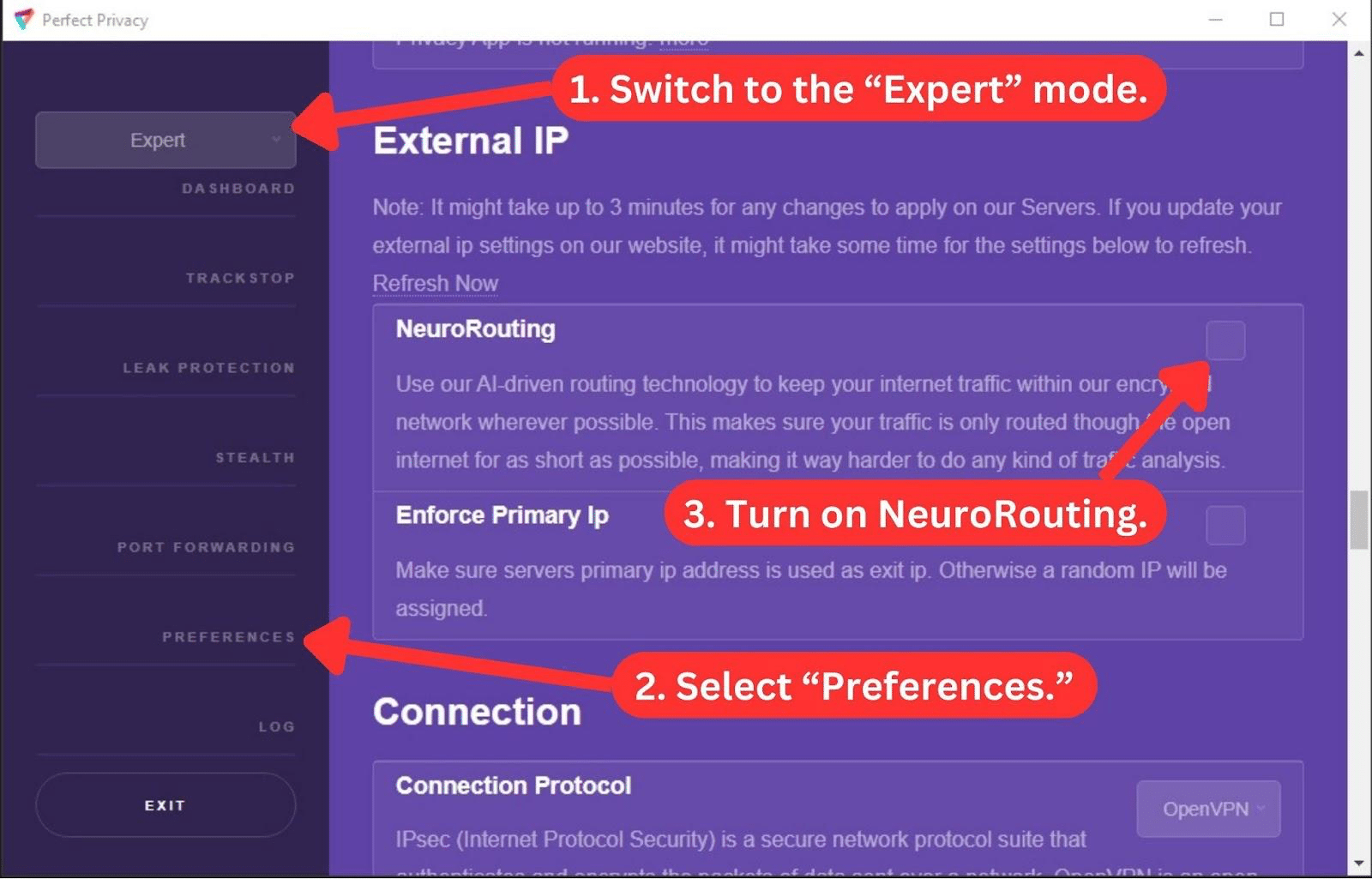
- Preferences: You can further customize the app with NeuroRouting, auto-start, external IP, connection protocols, and network driver settings in this tab.
- Log: Only available in Expert mode, this menu item shows you a log of your activities since you launched the app.
- Exit: With this button, you can close the app. Depending on your leak protection settings, it may also block your device's Internet or run the VPN in the background.
How Well Does Perfect Privacy VPN Work on Mobile Platforms?
Perfect Privacy VPN for mobile works great on Android. It has an uncluttered main page that lists all its server locations. Clicking a server location immediately connects you to the server. The app shows a "Disconnect" button once you're connected, but there isn't much else on the screen.
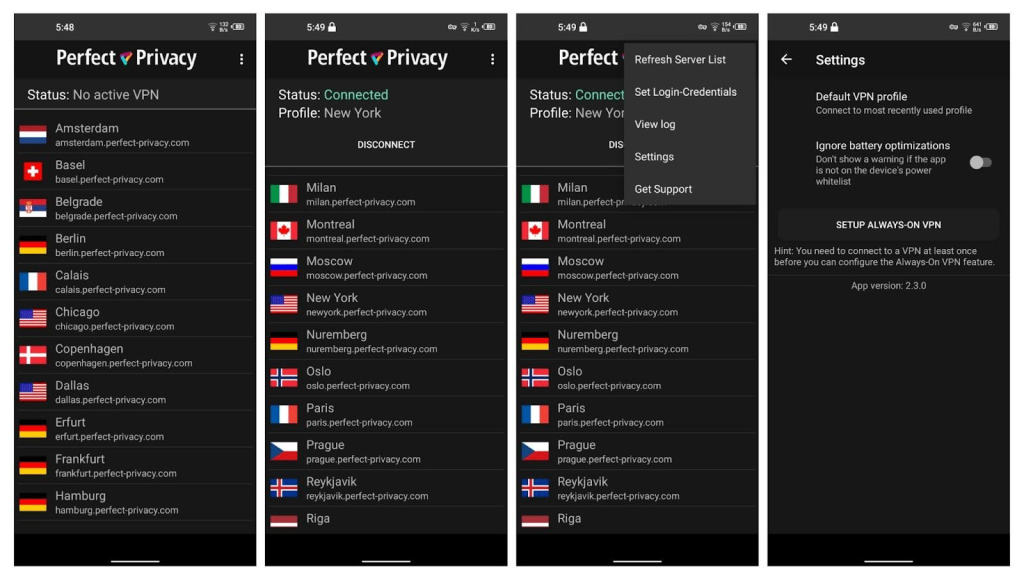
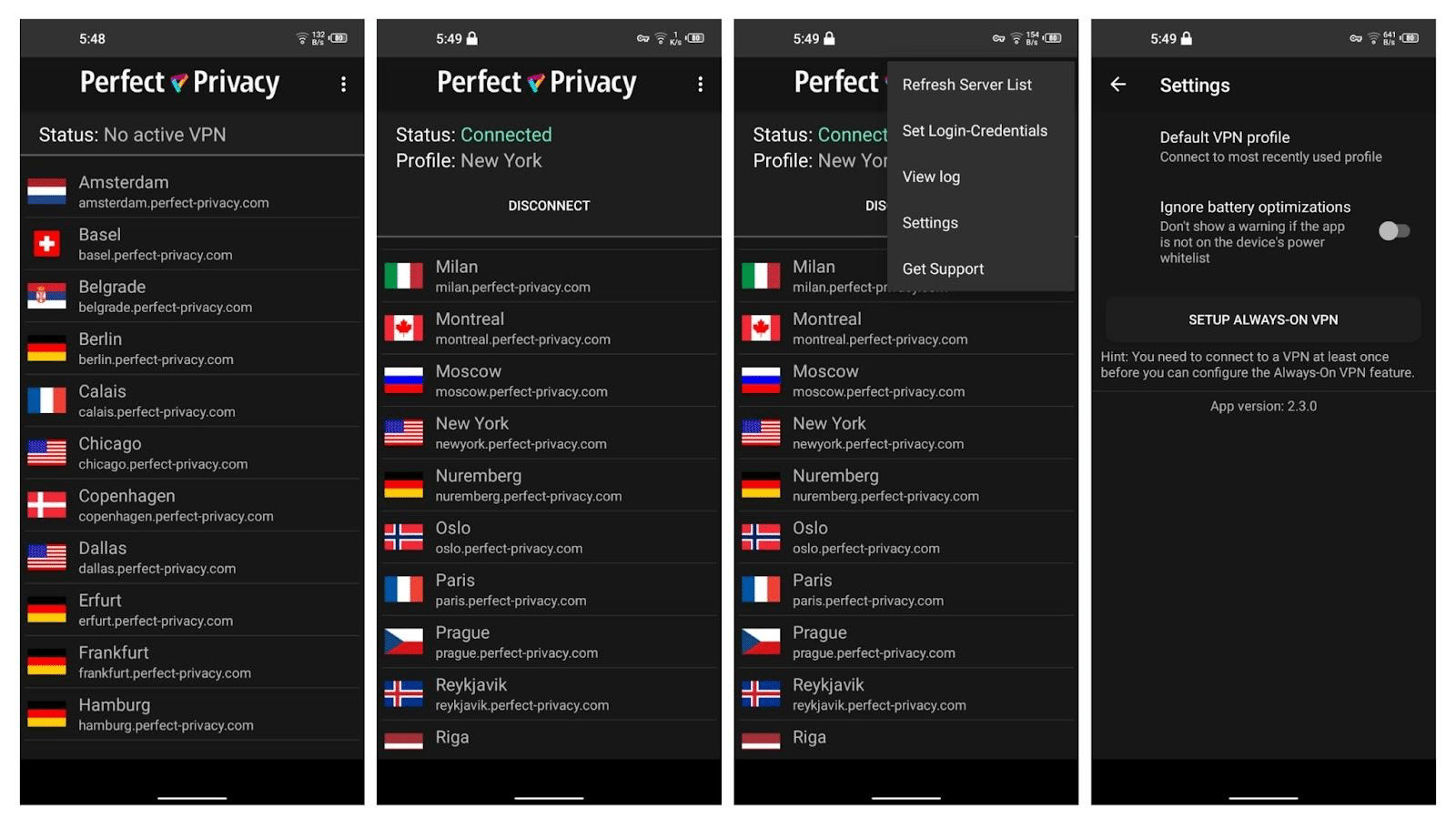
At the top right corner of the Android app, you'll find these menu items:
- Refresh Server List: Clicking this simply refreshes the server list.
- Set Login-Credentials: Here, you can log in to your Perfect Privacy account.
- View Log: This menu item shows a log of the VPN's activity.
- Settings: Access the Settings option, where you can turn on the Kill Switch or set default VPN profiles.
- Get Support: Tapping this option will redirect you to Perfect Privacy VPN's official support page.
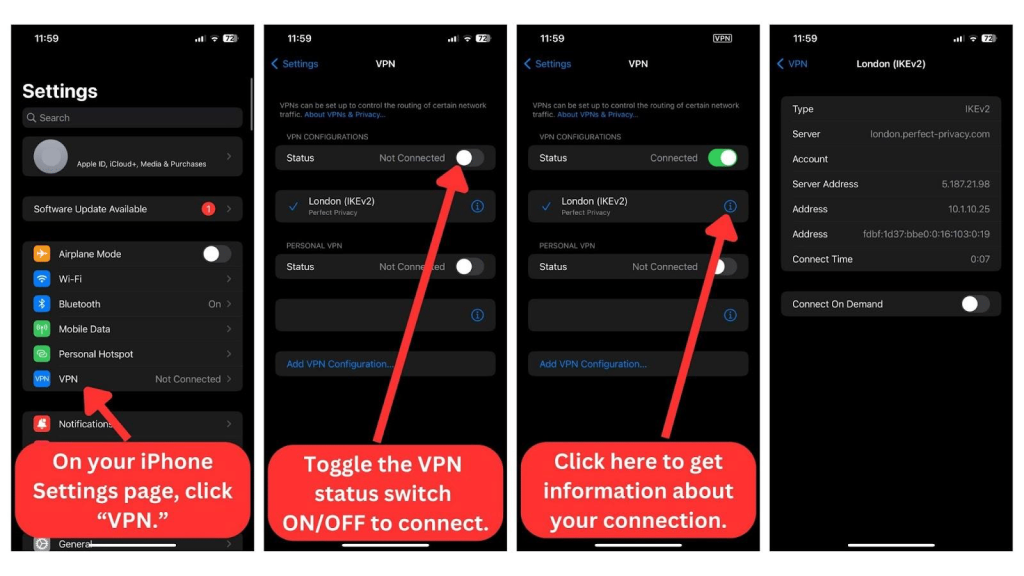
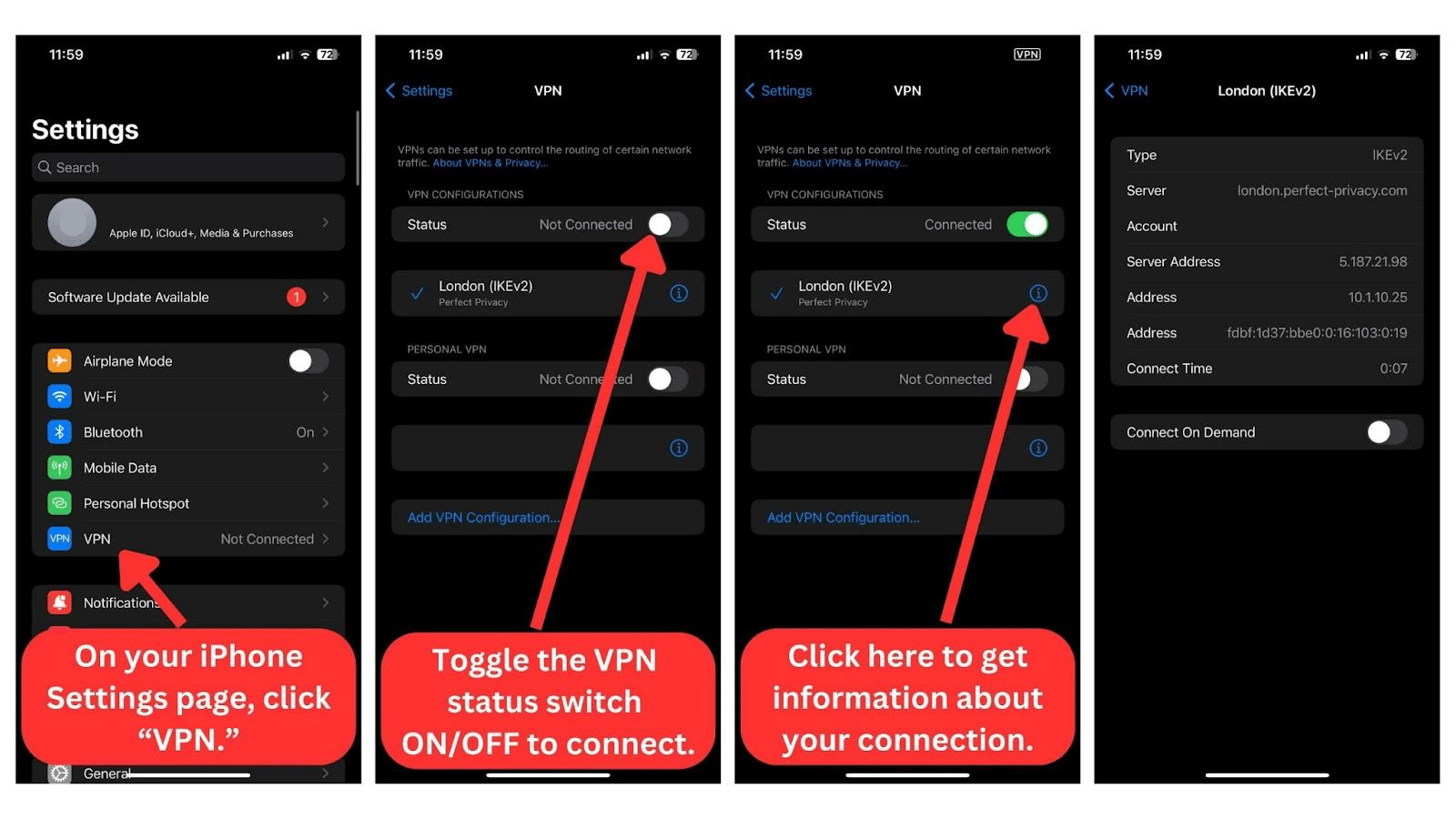
Additionally, there’s no iOS app for Perfect Privacy. Instead, you have to download VPN configurations from the official website and install them on your device. You’ll go to your iPhone or iPad settings and activate the VPN server, as shown below.
Media Streaming, Torrenting, and Gaming Support
Perfect Privacy VPN effortlessly bypasses geo-restrictions on different streaming platforms, including Netflix US. It’s also good for torrenting, although its gaming performance is so-so. Our Score: 6/10
Streaming providers are always looking to block VPN traffic. And many VPNs are unable to reliably access P2P content or unblock geo-restricted games. Hence, we must evaluate Perfect Privacy VPN's streaming, torrenting, and gaming features before we can recommend it.
Is Perfect Privacy VPN Good for Streaming?
Yes, Perfect Privacy VPN is a good VPN for streaming. The VPN successfully bypassed geo-blocks on various streaming platforms, including US-based like Netflix, Disney Plus, Max, and Hulu. But it doesn't stop there. We were able to enjoy on-demand content and live TV on non-US platforms as well.
However, as great as its stream-unblocking performance was, we can't consider it the best VPN for streaming. This is because it has a small server network and doesn't have streaming-optimized servers.
Regardless, here's a list of prominent US-based streaming platforms that this VPN effortlessly unblocks:
Here are also some non-US streaming platforms we had no trouble accessing:
Overall, we had no problems unblocking streams on most of Perfect Privacy's servers.
Is Perfect Privacy VPN Good for Torrenting?
Yes, Perfect Privacy VPN is good for torrenting if you have a fast Internet connection. The app supports P2P traffic and limitless bandwidth on all its servers, allowing you to seed and peer endlessly. It also has port forwarding to enhance your torrenting speeds.
Moreover, you can take advantage of its broad leak protection features to ensure your activities remain anonymous. One such feature is the kill switch, which ensures that your actual IP doesn't leak in the event of a sudden connection drop.
Perfect Privacy has a lot going for it, but it isn't the best torrenting VPN. We had to do some server hopping to find servers that were fast enough for the already slow torrent download speeds. If you have slow Internet, you should try its SOCKS5 proxy feature, which changes your location without encryption so you can get faster speeds.
Is Perfect Privacy VPN Good for Gaming?
Yes, Perfect Privacy VPN is a good VPN for gaming in general. It prioritizes privacy and security, so it’s able to unblock geo-restricted games in different regions. You can easily play simple games like Minecraft or Blade and Soul on different servers across the world.
Nevertheless, you should go for a faster VPN with lower pings if you play competitive games online. Every microsecond counts in high-stakes shooter games like Warzone, so Perfect Privacy's slow servers might be an issue. Also, Perfect Privacy could be better for gamers if it had gaming-optimized servers and a broader server network.
Security & Privacy
Perfect Privacy VPN hasn't leaked data, and it jealously protects your online activities. However, it only has a couple of VPN protocols. Our Score: 6.5/10
In this segment, we'll take a look at the VPN's encryption protocols, logging policies, and IP/DNS leaks. By the end, you should have a clear understanding of Perfect Privacy's protocols and security features, helping you decide if it meets your needs.
Perfect Privacy VPN Protocols
Underwhelmingly, Perfect Privacy VPN offers just two VPN protocols. These protocols are available on all native apps offered on Windows, macOS, and Android. However, iOS, Linux, and routers mostly rely on manual OpenVPN configurations.
Here's a summary of supported protocols:
- OpenVPN: When privacy and security are important, choose OpenVPN. By default, Perfect Privacy uses a 4096-bit public key and AES-256-bit encryption. However, it lets you customize the protocol deeply. You can choose between UDP and TCP or set preferred TLS methods, cascading hops, drivers, and encryption ciphers. If you're a newbie, though, the default configuration works well.
- IPsec: Switch to this protocol if you want faster speeds, albeit at the expense of security. It’s less effective against firewalls, but it works on many device platforms. It also uses less bandwidth, is very stable, and places a lighter load on your CPU.
For extra security, this Perfect Privacy also offers encrypted tunnels for certain apps using AES-256-bit encryption. It uses SSH protocols to connect to remote SSH servers. However, since these connections only protect traffic on specific programs, other apps use the regular, unencrypted Internet connection. To set up the SSH2 tunnel, you'll need additional software, depending on your operating system.
Does Perfect Privacy VPN Keep Logs?
No, Perfect Privacy VPN doesn't keep logs. It proudly advertises its no-logs policy and claims it’s one of the reasons it won't integrate the Wireguard protocol. You can rest assured that your IP addresses, browsing history, individual bandwidth usage, and VPN connection timestamps aren't logged.
The data that it logs includes your email address, login credentials, and account expiration date. Perfect Privacy rightfully says it uses this information to keep track of user-related information necessary for managing the VPN service. Moreover, your payment info isn't stored, and trusted third parties handle payments. However, these claims are yet to be audited by an independent third party.
Does Perfect Privacy VPN Leak/Expose Your Private Data?
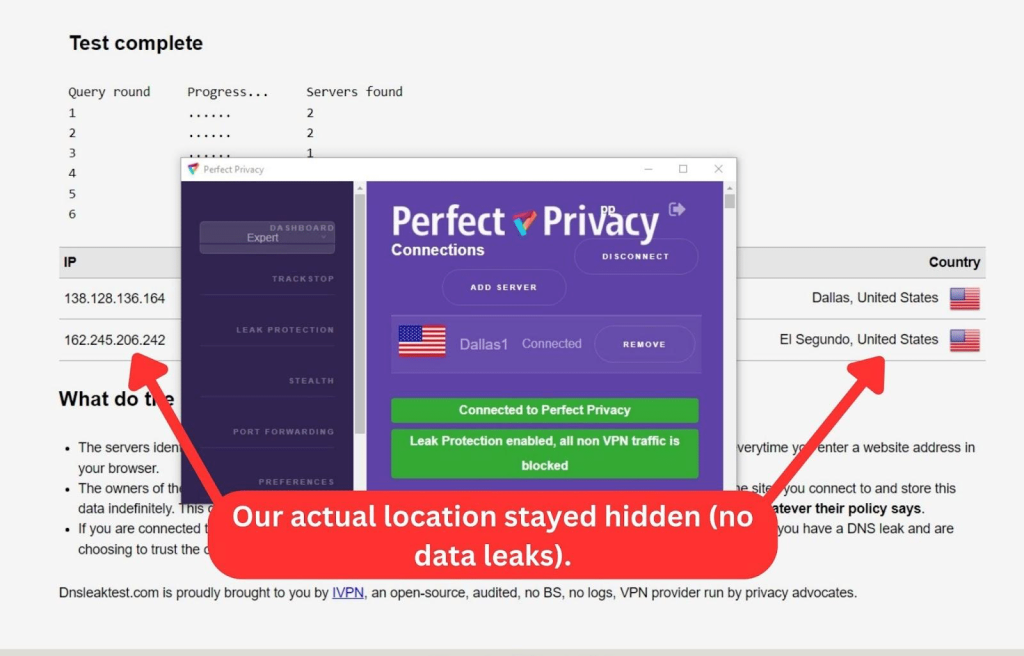
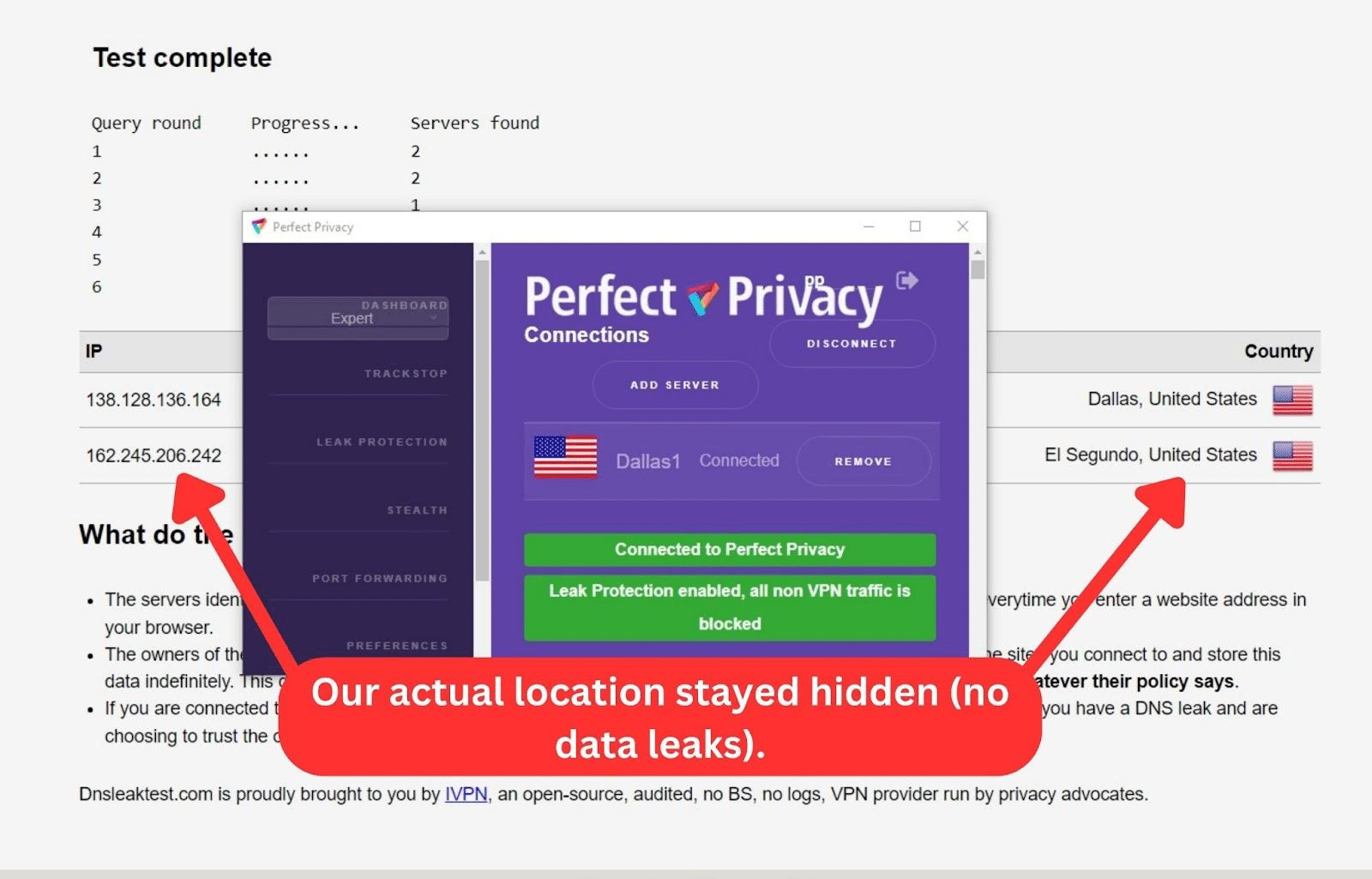
No, Perfect Privacy VPN doesn't leak or expose your private data. Once we connected, we tested different servers through a DNS leak test to see if there were any risks.
As you can see in the image above, there were no DNS leaks, and our actual IP address stayed secret.
Speed & Performance
The speed test results could’ve been better. With an average reduction speed of 70%, you might struggle to maintain a speedy connection. Our Score: 4/10
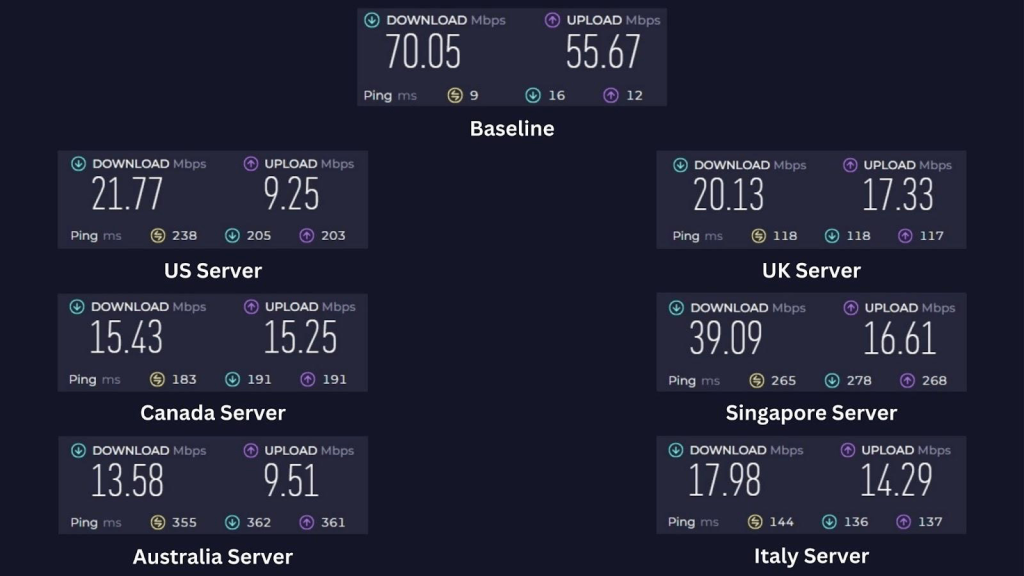
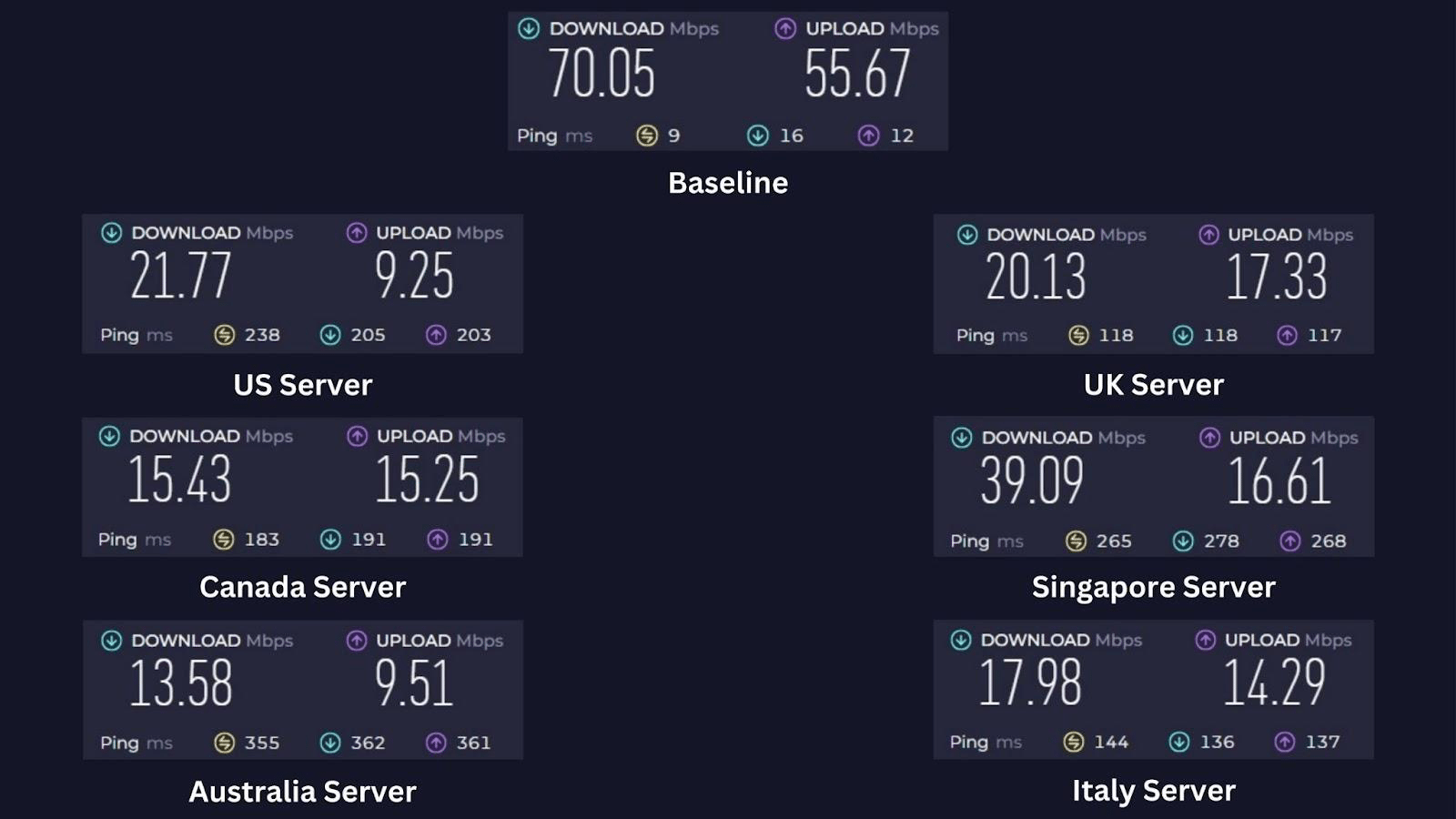
In this Perfect Privacy review, we tested the VPN's speed before and after we connected to a server. Before we connected, we had a baseline download speed of 70.05 Mbps and 55.67 Mbps upload speed.
After we connected, we tested servers across six countries globally. As usual, we expected some slowdowns due to heavy VPN encryption and server distance.
Here's how Perfect Privacy's servers performed:
- USA Server (Burlington): Our first connection test started poorly, with a 69% reduction in download speed. The tests showed a drop of 21.77 Mbps in download speed and 9.25 Mbps in upload speed.
- UK Server (Manchester): This much closer server performed even worse, cutting our download speed by 71%. We recorded a 20.13 Mbps download speed and an upload speed of 17.33 Mbps.
- Canada Server (Montreal): The trend continues with the Canadian server. We got a low 15.43 Mbps download speed and 15.25 Mbps upload speed. This represents a 78% speed drop.
- Singapore Server (Singapore): Our tests showed a commendable 39.09 Mbps download speed and a relatively lower 16.61 Mbps upload speed. This was the fastest server we tried, with only a 44% drop in speed.
- Australia Server (Sydney): This faraway server delivered downloads at 13.58 Mbps and uploaded at a rate of 9.51 Mbps. The 81% speed reduction was consistent with our experience on this VPN's other servers.
- Italy Server (Milan): The only Italian server available was in Milan, and it reduced our speed by about 74%. We downloaded at 17.98 Mbps and uploaded at 14.29 Mbps.
Perfect Privacy significantly affected our Internet speed, with an average reduction of about 70%. This decrease is substantial and may be an even bigger problem if you have slower baseline Internet connections.
If you seek faster VPN options, we recommend considering alternatives from our list of the fastest VPNs.
Customer Support
Perfect Privacy VPN has a ticket support system, email support, forums, manuals, and FAQs. However, it doesn't have live chat support, a feature that would’ve been beneficial considering its premium pricing. Our Score: 5/10
Perfect Privacy supports you through various channels, mostly on its website. Let's take a closer look at each of these support options:
- Support Tickets: You can contact support through a ticket system. Support is available in German and English and is segmented into technical, payment, and general support. The agents are generally knowledgeable, but the initial response time can be up to a day.
- Email: You can email Perfect Privacy's support agents directly and get a reply in your inbox.
- Manuals: Perfect Privacy provides comprehensive manuals for various operating systems and devices. We found these step-by-step tutorials, complete with screenshots, useful for both novice and advanced users.
- FAQs: The provider attempts to answer many common user questions on one page. You'll find answers to Account/Payment, General, and Technical questions, making it easy to find relevant information.
- Forums: Perfect Privacy's vibrant community members are often the first to answer questions in the VPN's forum. The VPN staff are active as well, although their replies come much later.
Pricing
Perfect Privacy VPN doesn't come cheap. Fortunately, it offers a discounted 2-year plan with significant cost savings. Our Score: 4/10
Perfect Privacy has three subscription plans. We'll break down the pricing and highlight any cost savings you can get right now.
How Much Is Perfect Privacy VPN?
Perfect Privacy VPN costs $12.99 per month. Alternatively, you can get its discounted annual or its 2-year plan. Naturally, the longest plan offers the best cost savings.
Besides the pricing, there are no differences in the features you get with each plan. You can connect to all 55 servers on unlimited devices at once, with up to 1 GB of bandwidth. There's also a 7-day money-back guarantee, allowing you to try out the service risk-free.
Here's a breakdown of the service's plans:
- 1-Month Plan: This subscription plan costs $12.99 monthly. This plan is billed per month, with a total cost reaching $155.88 per year.
- 1-Year Plan: At $9.99 monthly and $119.99 per year, this plan saves you 23% over the 1-month plan.
- 2-Year Plan: You pay $8.95 per month and about $214.95 for two years in total, but you save a whopping 31% on the regular monthly plan.
Perfect Privacy VPN's best plan is the 2-year plan. At $8.95 per month, you save 31% on its regular monthly plan. Payment options include PayPal or credit/debit cards through Stripe. You can also stay fully anonymous by paying with Bitcoin. While there's no free version, you do get a 7-day money-back guarantee with your purchase.
Final Thoughts - Is Perfect Privacy VPN Good?
Yes, Perfect Privacy VPN is good. The service places a premium on privacy and security, as evident in its no-logs policy and RAM-only servers. Notably, it allows in-depth customization of standard VPN privacy features to fit your needs. These are customizations that advanced VPN users will definitely appreciate.
Its Switzerland-based headquarters also means it’s safe from government data-sharing agreements. Across the world, its servers performed excellently when unblocking geo-blocked streaming platforms. And if you encounter any issues, you can trust its enthusiastic community and knowledgeable support.
But that’s pretty much where its merits end. The VPN has a very small server network and really sluggish speeds. Although you can simultaneously connect to unlimited devices, the absence of native apps for certain popular devices can complicate the setup.
Regardless of these performance and setup drawbacks, the provider charges a premium for its service. If your budget allows for Perfect Privacy VPN, then we strongly recommend NordVPN instead.
PROS
- No-logs policy.
- RAM-only servers.
- Unlimited simultaneous connections.
- No data leaks.
- Safe jurisdiction.
- Privacy-focused service.
- Comprehensive security features.
- Includes an ad blocker.
- 7-day money-back guarantee.
CONS
- Buggy Windows app.
- Slow browsing speeds.
- Small VPN server network.
- Expensive subscription plan.
- No iOS app.
- No live chat.
| Review Summary Perfect Privacy is a privacy-focused VPN with advanced capabilities. We recommend it for expert VPN users who can tweak its many features and regular users who want to unblock geo-restricted streaming content. | 5.9 Overall Score | ||
| Background, Jurisdiction & Reputation | 9 | ||
| Supported Platforms & Devices | 7 | ||
| Installation & Initial Configuration | 8 | ||
| Prominent Features | 8.5 | ||
| Server Count & Infrastructure | 1.5 | ||
| UI/UX Design & Ease of Use | 5 | ||
| Media Streaming & Torrenting, and Gaming Support | 6 | ||
| Security & Privacy | 6.5 | ||
| Speed & Performance | 4 | ||
| Customer Support | 5 | ||
| Pricing | 4 | ||