When you purchase through links on our site, we may earn an affiliate commission. Here’s how it works.
GOOSE VPN Review 2026


Our experts have reviewed 53 VPN providers, which were put through extensive rounds of testing. To learn more about that process, here’s how we review VPNs, where we explain our criteria and our policy of being fully transparent.
GOOSE VPN is a VPN service founded in 2016. Since it's based in the Netherlands, the provider is subject to 5/9/14 Eyes Alliance data sharing laws, which is less than ideal.
Thankfully, it has a strict no-logs policy. But while the Goose VPN insists it doesn't keep logs and has never had data leaks, there's no third-party audit to confirm these claims.
However, GOOSE VPN provides the essential privacy features you need in a VPN, such as a kill switch and DNS leak protection. When combined with its security protocols and strong 256-bit AES encryption, you can browse the Internet safely and anonymously.
Thanks to its specialized servers, GOOSE VPN allows you to stream and torrent endlessly. Plus, our tests also showed that it worked great in casual gaming.
Here's a quick overview of its features and services.
In this GOOSE VPN review, we examine its jurisdiction, performance, features, and more. All our reviews are based on hands-on testing. For details, please see our guide on how we review VPNs.
You can also check out our list of best VPN providers or read our NordVPN review if you need a VPN we trust.
Background, Jurisdiction & Reputation
Since its establishment, GOOSE VPN hasn't had any data breaches. However, its jurisdiction and privacy policies aren’t ideal for a premium VPN. Our Score: 7/10
VPNs, like ISPs, can access your online activity, including your sensitive information. Hence, in this review, we'll examine GOOSE VPN's origins and data protection policies to determine how much you can trust it.
Where Is GOOSE VPN Based?
GOOSE VPN is based in Rotterdam, Netherlands. But first, it’s important to know that the Netherlands is a member of the European Union since the inception of this political organization.
As you can expect, the Dutch government has implemented GDPR among the first countries in Europe, which means that your private data is protected against unauthorized collection and exploitation. This set of laws is already in action, and we’ve seen cases of Dutch courts protecting the anonymity of Web users in this country.
However, the Dutch government might be able to access your data on GOOSE VPN. This is because the Netherlands is part of the 5/9/14 Eyes Alliance, a coalition of countries that share intelligence.
Consequently, there’s a potential risk that government agencies might request access to data stored in the GOOSE VPN database. And there’s nothing the provider can do about it.
Speaking of the provider, the company behind GOOSE VPN is GOOSE B.V. The company also owns Guardey, a cybersecurity service for businesses. GOOSE B.V. was established in January 2016 by Joeri van de Watering, who currently serves as the CEO of both companies.
Did GOOSE VPN Leak Private Data in the Past?
No, GOOSE VPN hasn’t leaked data in the past. Moreover, there are no concerning allegations against the company as of the time of writing this review. As far as we know, the service has never been caught selling data to third parties either. But there's more.
GOOSE VPN doesn't log your Internet activities or your IP address when you use the VPN app. It also doesn't use any cookies on its servers. Once you log off a server, none of your information is left on it.
However, your information is more exposed on its website. When you first log on to the site, GOOSE VPN saves your last-used IP address. It uses this info to set the language on your account.
Overall, GOOSE VPN's no-logs policy on the app is reassuring, but its website raises a few concerns. Combine that with its jurisdiction and the fact that it hasn't been audited by a third party, and GOOSE VPN could do more to keep users anonymous.
Supported Platforms & Devices
GOOSE VPN offers apps for both desktop and mobile platforms. Additionally, you can connect countless devices simultaneously, depending on your plan. Our Score: 7/10
In this section of our GOOSE VPN review, you'll understand which of your devices can work well with this VPN.
GOOSE VPN has native apps for major operating systems, such as Windows, Mac, iOS, and Android. You do have to log in to the official website to download these apps, but the process is pretty easy. Also, Linux setups need manual configuration.
Routers are not left out either, as GOOSE VPN supports various router configurations with all its protocols. You can connect devices like gaming consoles and smart TVs with a protected router connection.
The only platforms left out are browser extensions for Chrome and Firefox. Premium VPNs often allow you to connect through your browser, but not GOOSE VPN.
But we have to give credit to GOOSE VPN for allowing you to connect an unlimited number of devices simultaneously on monthly and yearly plans. However, lifetime subscriptions do have a device limit, depending on the subscription tier.
Installation & Initial Configuration
Downloading, installing, and configuring GOOSE VPN is user-friendly and intuitive, with no need for technical expertise. Our Score: 7/10
In this segment of the GOOSE VPN review, we'll go over our experience setting up the service on desktop and mobile platforms. We found the process seamless, requiring no special skills.
How to Download and Use GOOSE VPN?
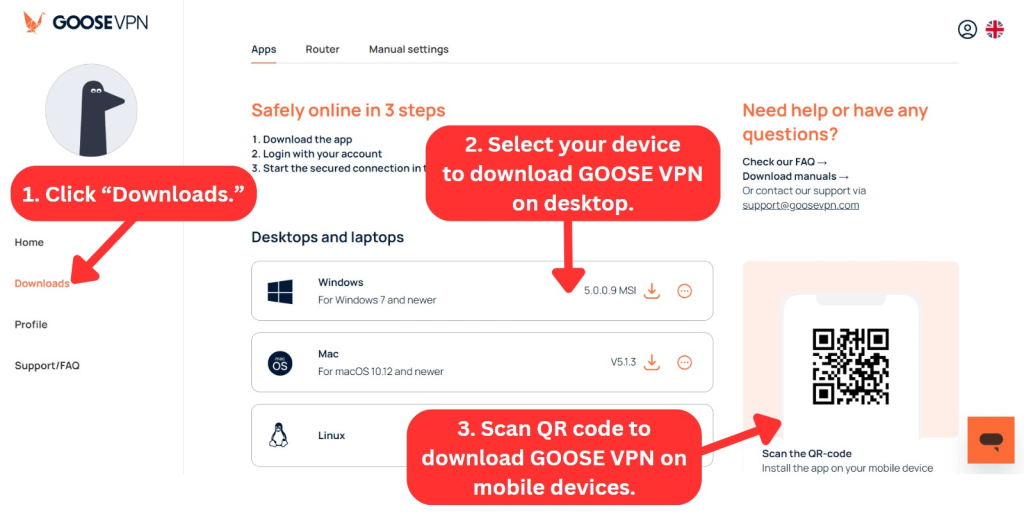
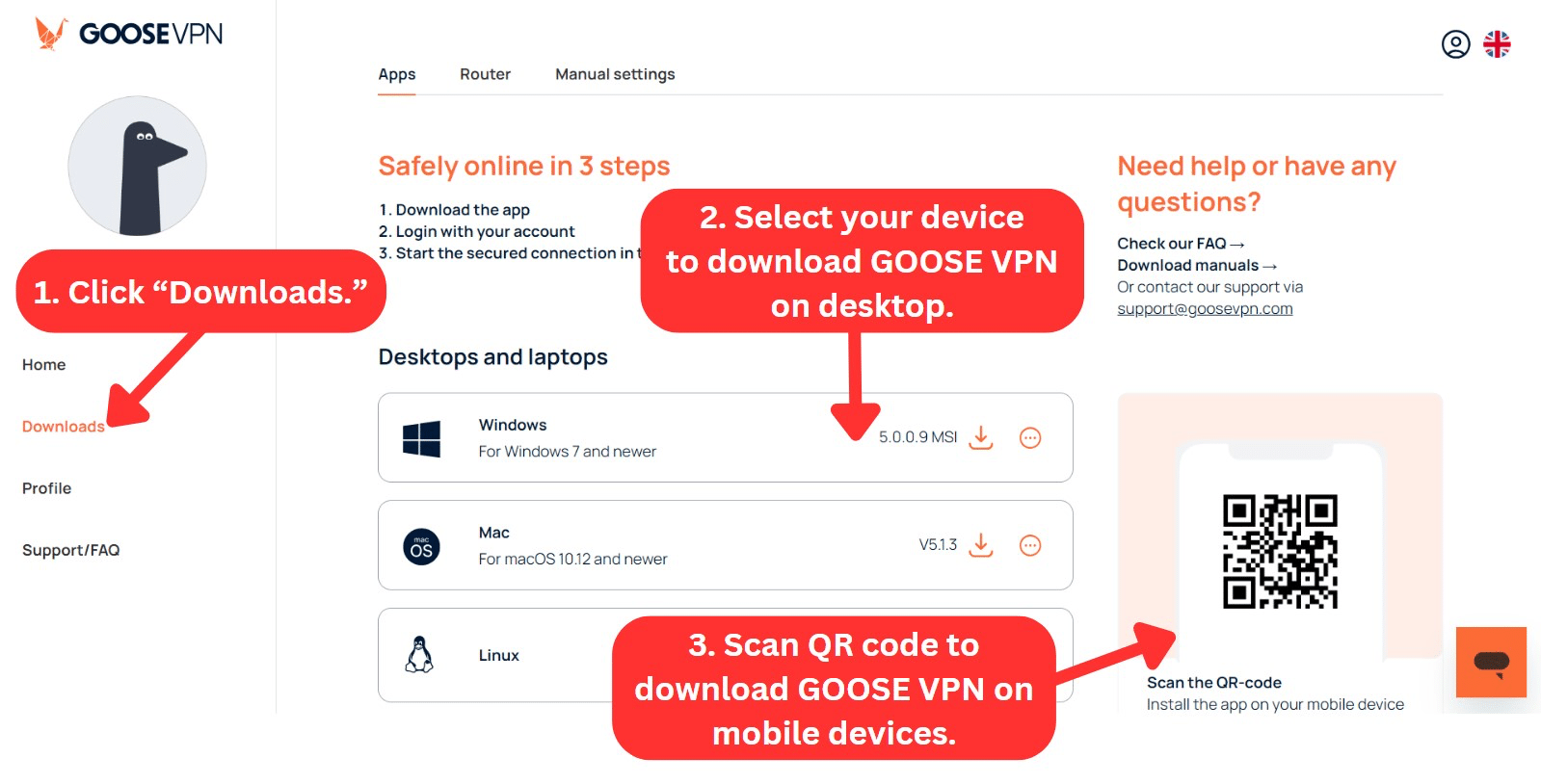
To download GOOSE VPN, you have to first subscribe to the service and create an account. Once you log in to your dashboard, select your operating system and download the app.
Here's the step-by-step process to download GOOSE VPN on Windows:
- Subscribe to GOOSE VPN through your Web browser.
- Click "Downloads" and select your device.
- Download and run the installation file.
- Once installation is complete, log in using your email and password.
- Choose a server to connect. You’re all set!
Once you log in, you are shown an in-app tutorial to help you familiarize the app. On other devices, the installation was straightforward as well. The bottom line is that you don't need to be an expert on VPNs to use this VPN client.
For steady protection, you should immediately turn on the Autopilot mode in the Advanced tab. This mode has two advantages. The first is the kill switch, which blocks your Internet if your VPN data is interrupted.
The other benefit is that Autopilot connects to a server if you connect to a WiFi network that's not trusted. Autopilot mode is also available on both iOS and Android devices.
Prominent Features
GOOSE VPN only has a few basic features. Hence, this isn’t the service for VPN power users. It's also missing advanced features like split tunneling, dedicated IPs, and an ad blocker. Our Score: 6/10
GOOSE VPN offers a relatively modest range of features compared to other VPN providers. You get several essential features, including a kill switch, Smart Server, and DNS leak protection. It also provides an extra feature called Cyber Alarm, which costs extra.
In this section, we'll delve into the standout features this VPN offers. Here's what you can anticipate from GOOSE VPN:
- Autopilot (Kill Switch): Available on all platforms, this feature allows you to automatically activate the VPN on public or untrusted networks. It also functions as a kill switch, shutting off your Internet access if you suddenly lose your VPN connection.
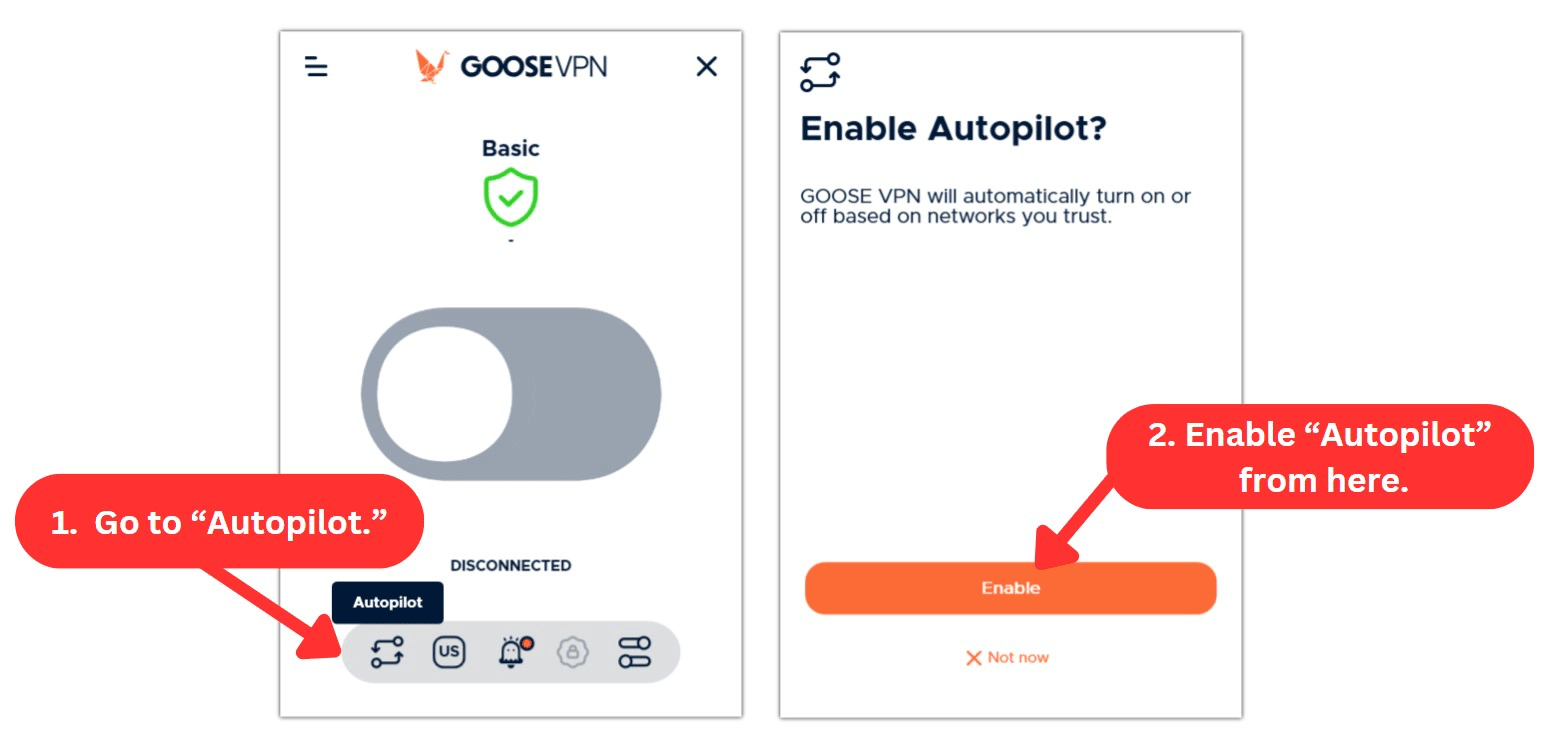
- Trusted Networks: If Autopilot is on, you can add some WiFi or cabled connections to a list of safe networks on the Advanced page. However, the VPN will also disconnect automatically when you're on trusted networks.
- Smart Server: GOOSE VPN can automatically select the best server for you based on your location. This takes the guesswork out of finding the fastest servers.
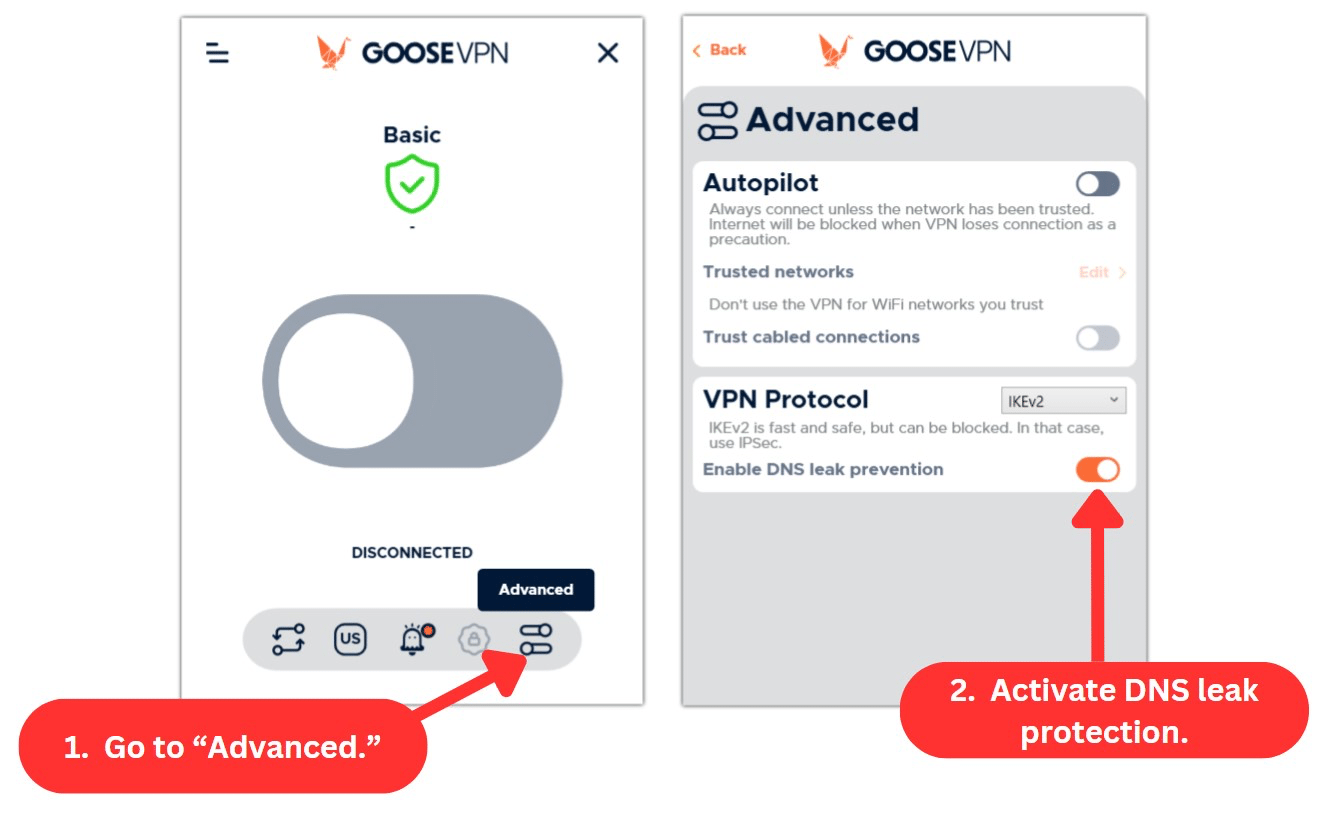
- DNS Leak Protection: This ensures that DNS queries are routed solely through GOOSE VPN servers, keeping your online activities hidden from your ISP. We recommend combining DNS leak protection with the kill switch to get the best out of GOOSE VPN.
- Cyber Alarm: For an additional $2.50 per month, GOOSE VPN monitors your traffic to identify malware, ransomware, or viruses. You'll be notified immediately so you can act on it.
- Unlimited Bandwidth: GOOSE VPN allows you to browse, stream, or torrent without any data limits.
- Unlimited Devices: If you buy its monthly or annual plan, you can connect as many devices as you want at the same time. However, its Lifetime plan has device limits.
Server Count & Infrastructure
GOOSE VPN provides a limited server network of 100+ servers across 25 countries, falling short of our expectations of a premium service. Our Score: 1.5/10
A vast server network typically allows you to connect to different parts of the world freely. This means you can easily find a server in a specific location should the need arise. This GOOSE VPN review delves into its server infrastructure across the world.
GOOSE VPN has 100+ servers in 38 locations across 25 countries. This server network is painfully small compared to other VPNs with the most servers. Most of GOOSE VPN's servers are located in Europe, in addition to servers in the United States, Brazil, Canada, Japan, and Australia. Furthermore, it's worth mentioning that GOOSE VPN doesn’t offer any servers in the Middle East.
Despite that, GOOSE VPN tries to make the best of its server network. It has three servers optimized for streaming and 20+ servers for P2P activities like torrenting. Its apps also offer a quick way to filter these specialized servers in the server list.
Moreover, GOOSE VPN doesn’t use VPN virtual locations. Virtual servers give you an IP address in your desired location but connect you to a server in another city. Instead, GOOSE VPN connects you to physical servers in the locations you select.
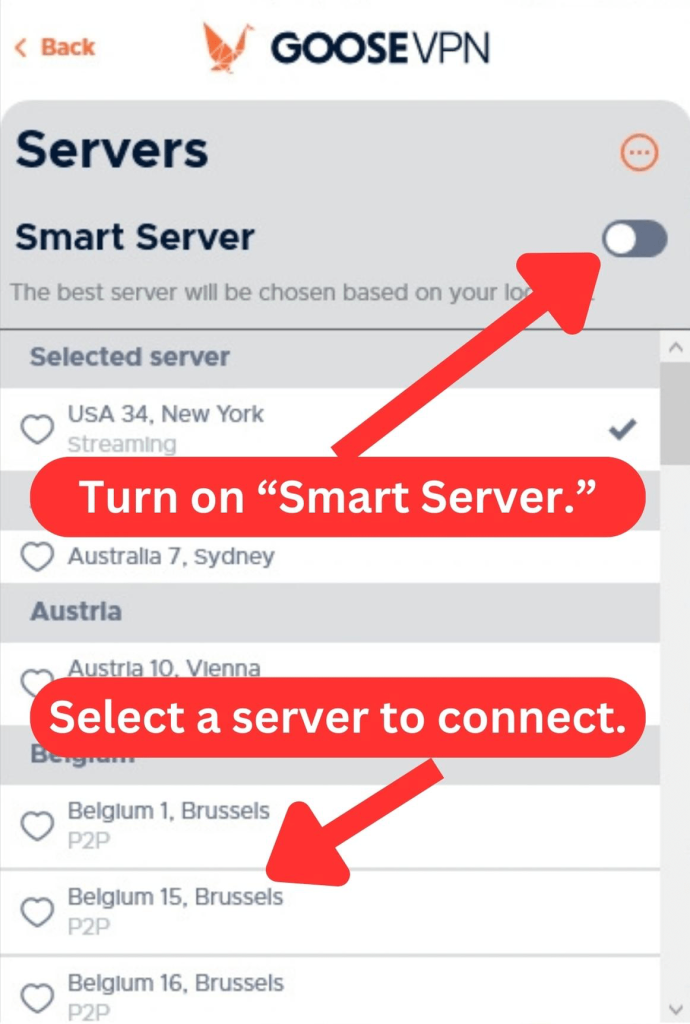
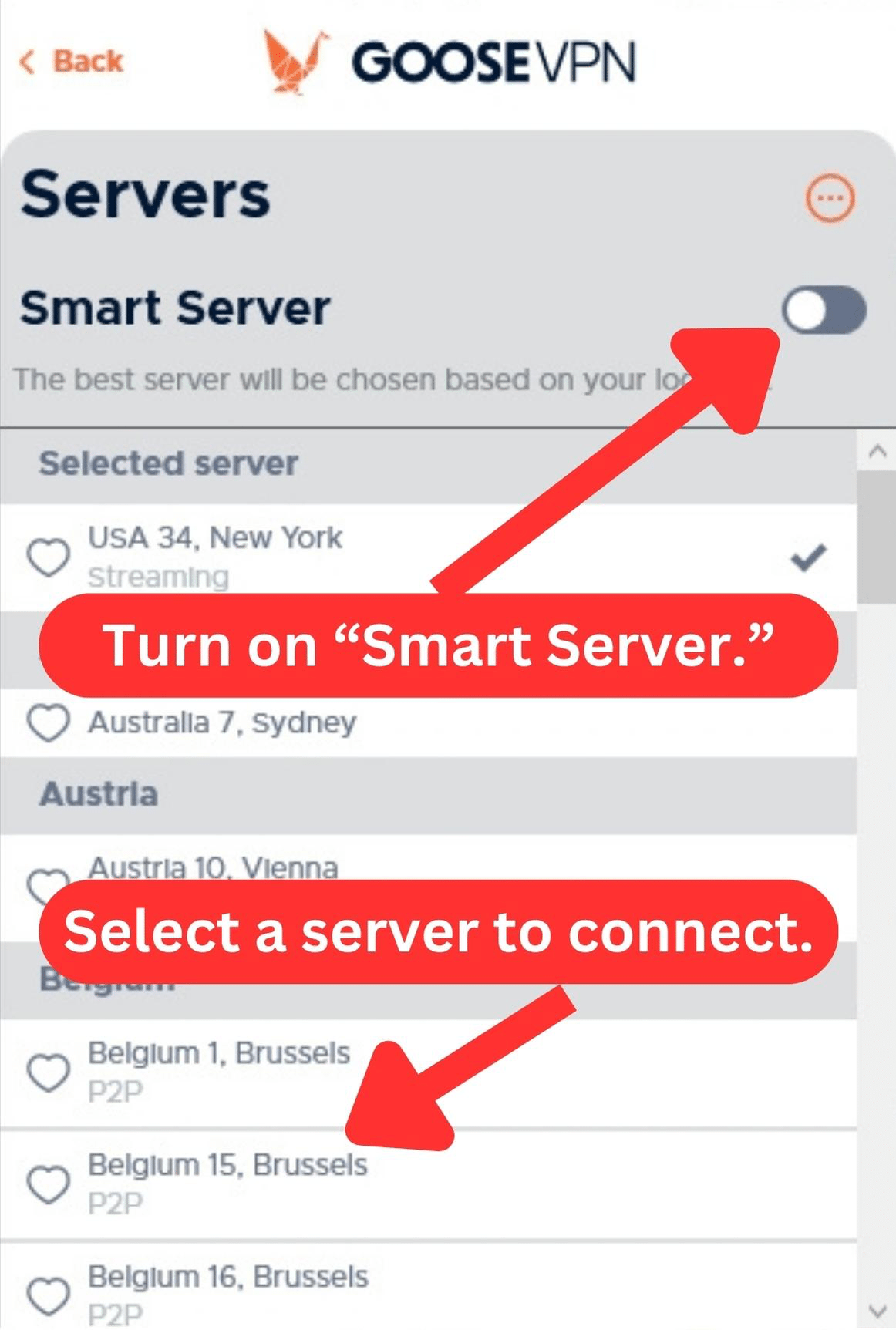
Also, the app lets you choose servers at the city level if you disable "Smart Server". If you want faster browsing speeds, you can also turn on the Smart Server feature, and you'll be connected to a nearby fast server.
UI/UX Design & Ease of Use
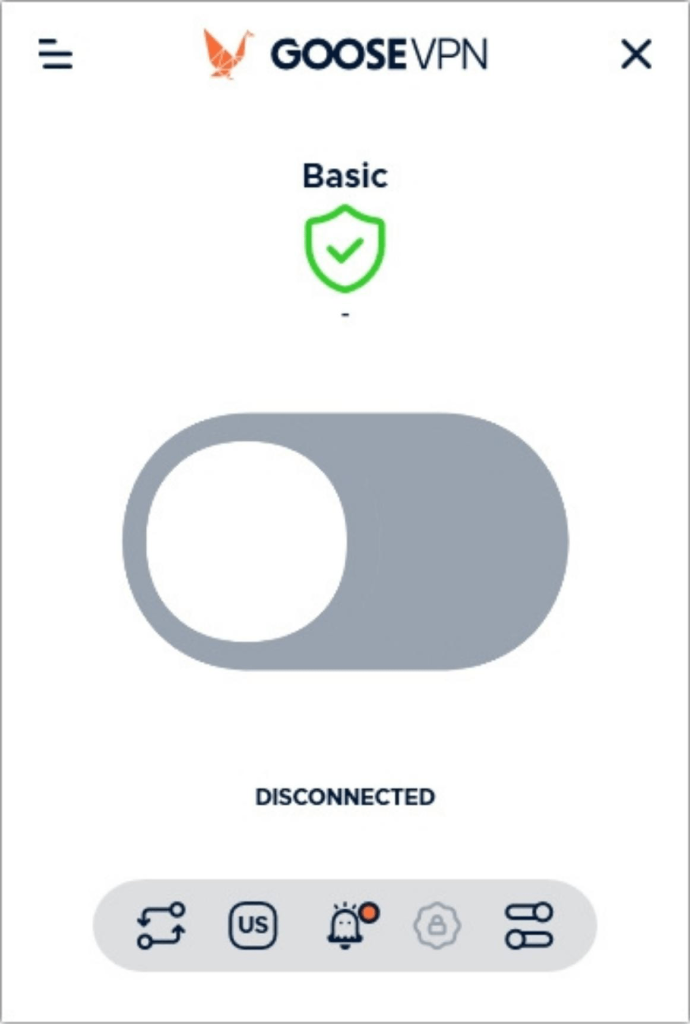
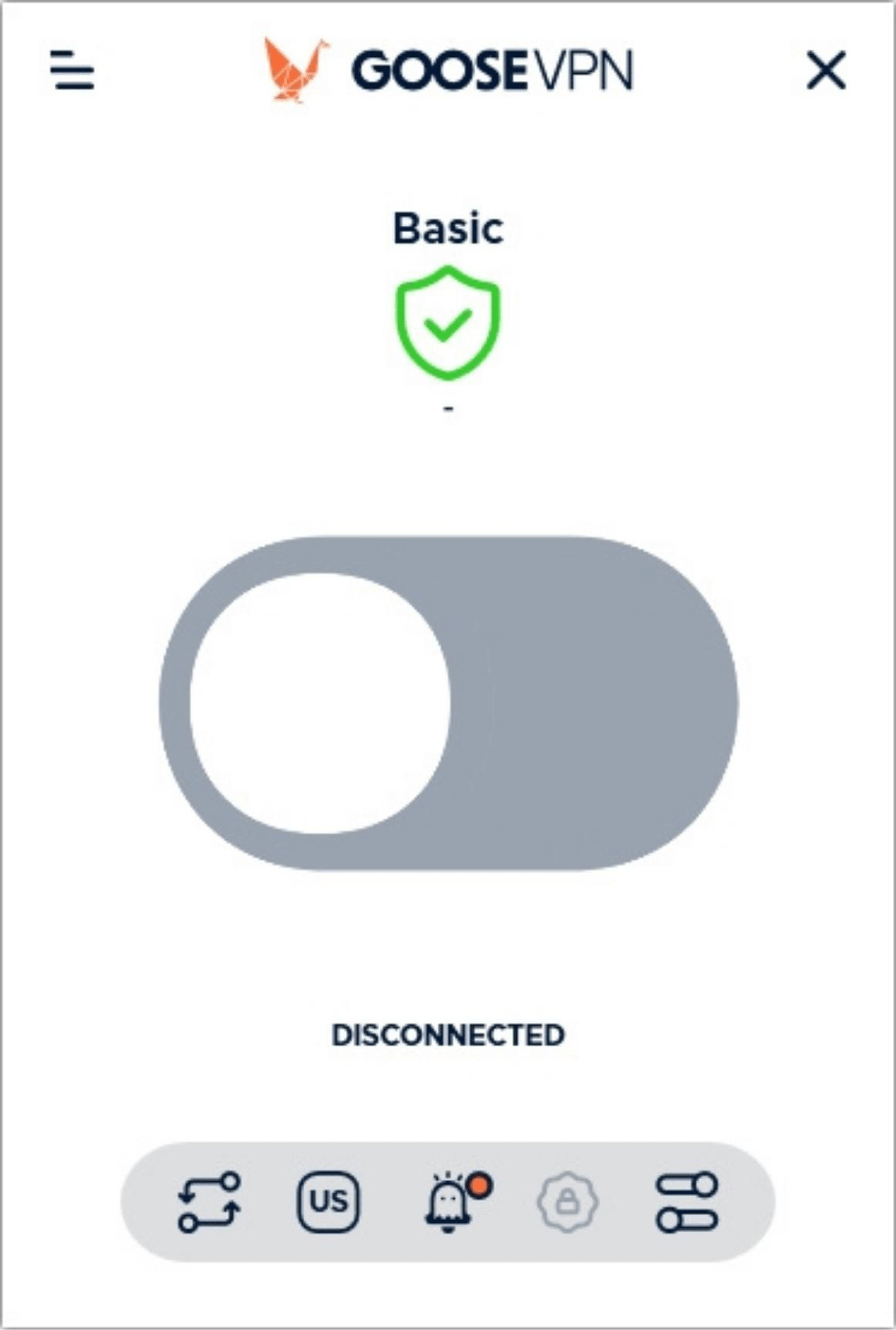
You can use GOOSE VPN easily, as its interface is straightforward. You don't have to be an expert to get the hang of it. Our Score: 8/10
Does GOOSE VPN care about user experience? In this section, we’ll determine how easy it is to use its desktop and mobile apps on a daily basis.
How Well Does GOOSE VPN Work on Desktop Platforms?
GOOSE VPN works well on desktop computers without issues. If you're new to VPNs, its mini-tutorial will help clarify things upon installation. Before you connect, you can choose a server location in the "Servers" tab. To connect, click the large grey ON/OFF button in the center of the app's homepage. When you're connected, the button is animated and turns into a bright orange color.
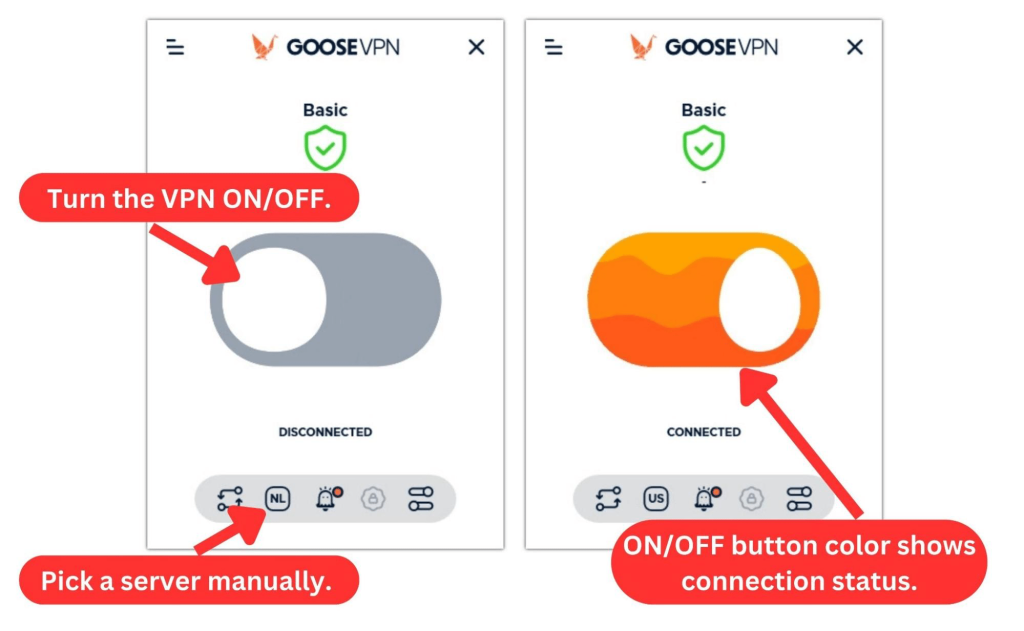
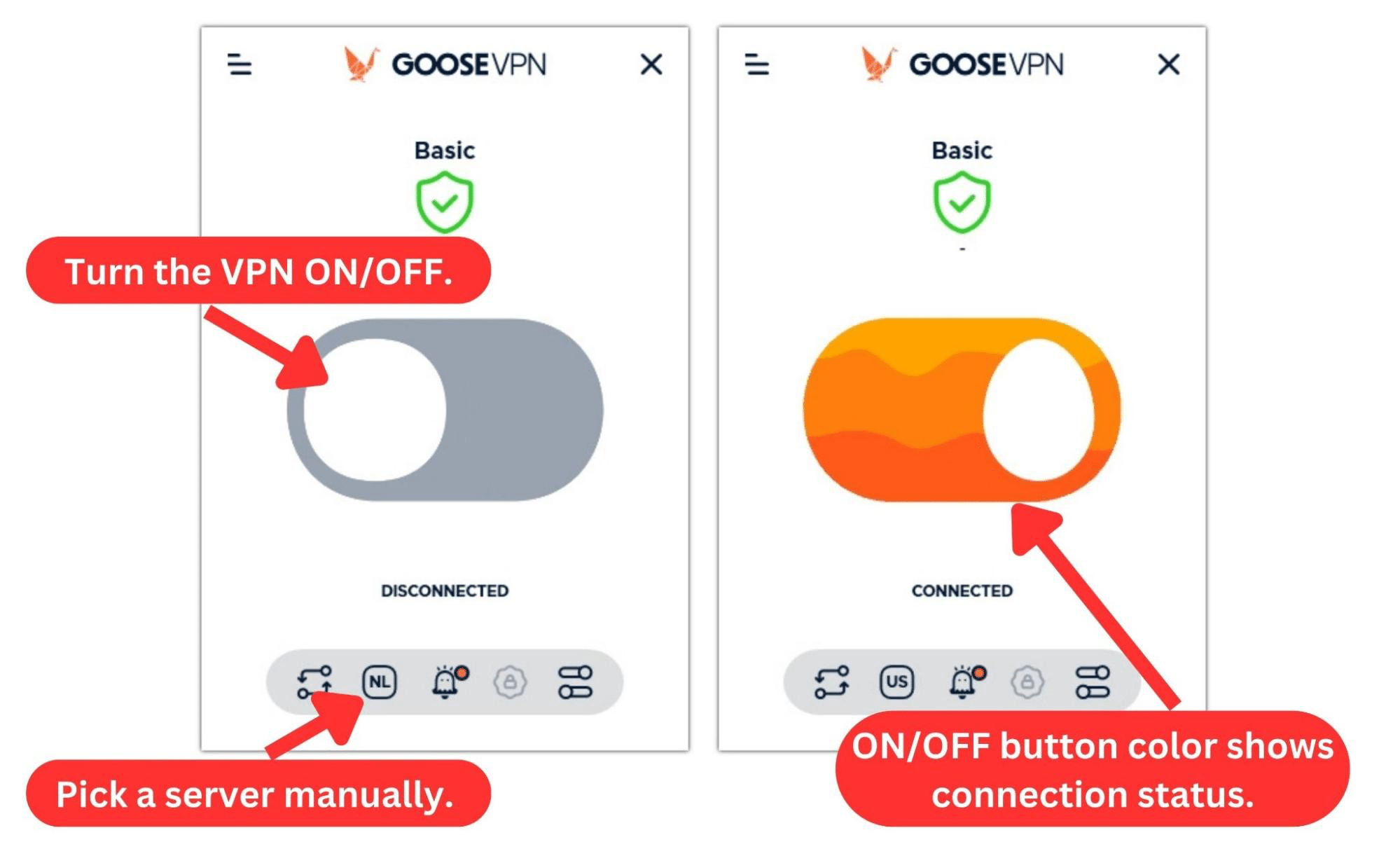
In the top left corner, a hamburger menu shows you some links to the app window and language settings. You also get links to update the app, get support, or quit the app. However, the most important settings are laid out at the bottom of the home screen.
Let's have a look at the home screen menu:
- Autopilot: This "recycle" button is a fast way to activate Autopilot. It acts as a kill switch and selectively protects you on certain Wi-Fi connections.
- Servers: Here, you can select your preferred server or activate “Smart Server” so the app can automatically select the best server for your location.
- Cyber Alarm: This bell icon serves as the Cyber Alarm button if you’ve subscribed to the feature. Otherwise, clicking it will just take you to your GOOSE VPN online dashboard.
- Trust WiFi-Network: If Autopilot is on, you can designate your current Wi-Fi connection as trusted, preventing GOOSE VPN from activating the VPN.
- Advanced: This button shows you most of the VPN settings, including Autopilot, DNS leak protection, protocol selection, and trusted networks.
How Well Does GOOSE VPN Work on Mobile Platforms?
GOOSE VPN is good on mobile platforms. Both Android and iOS apps mimic the desktop app's design. However, the iOS version is missing some key features like DNS leak protection and a kill switch.
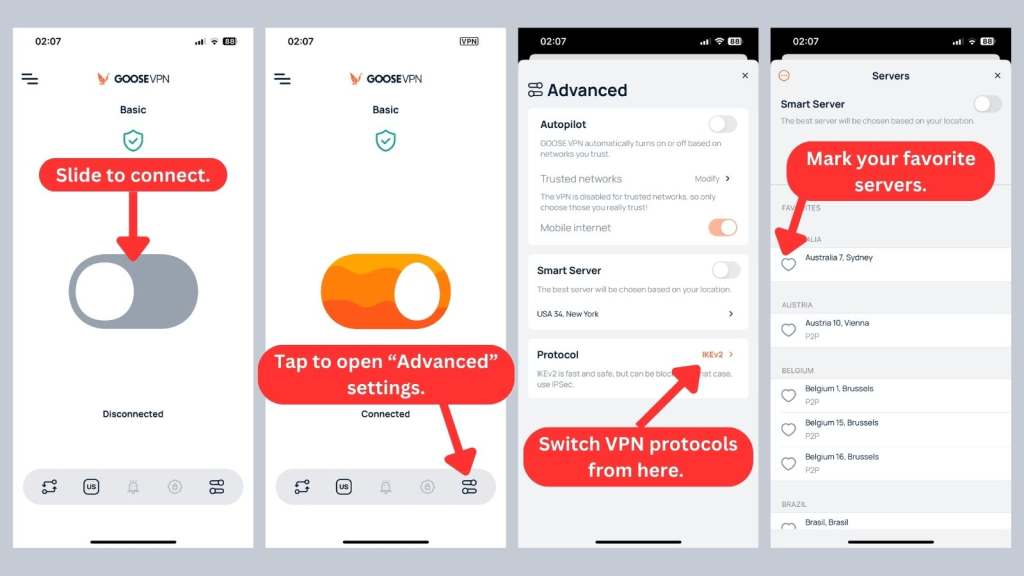
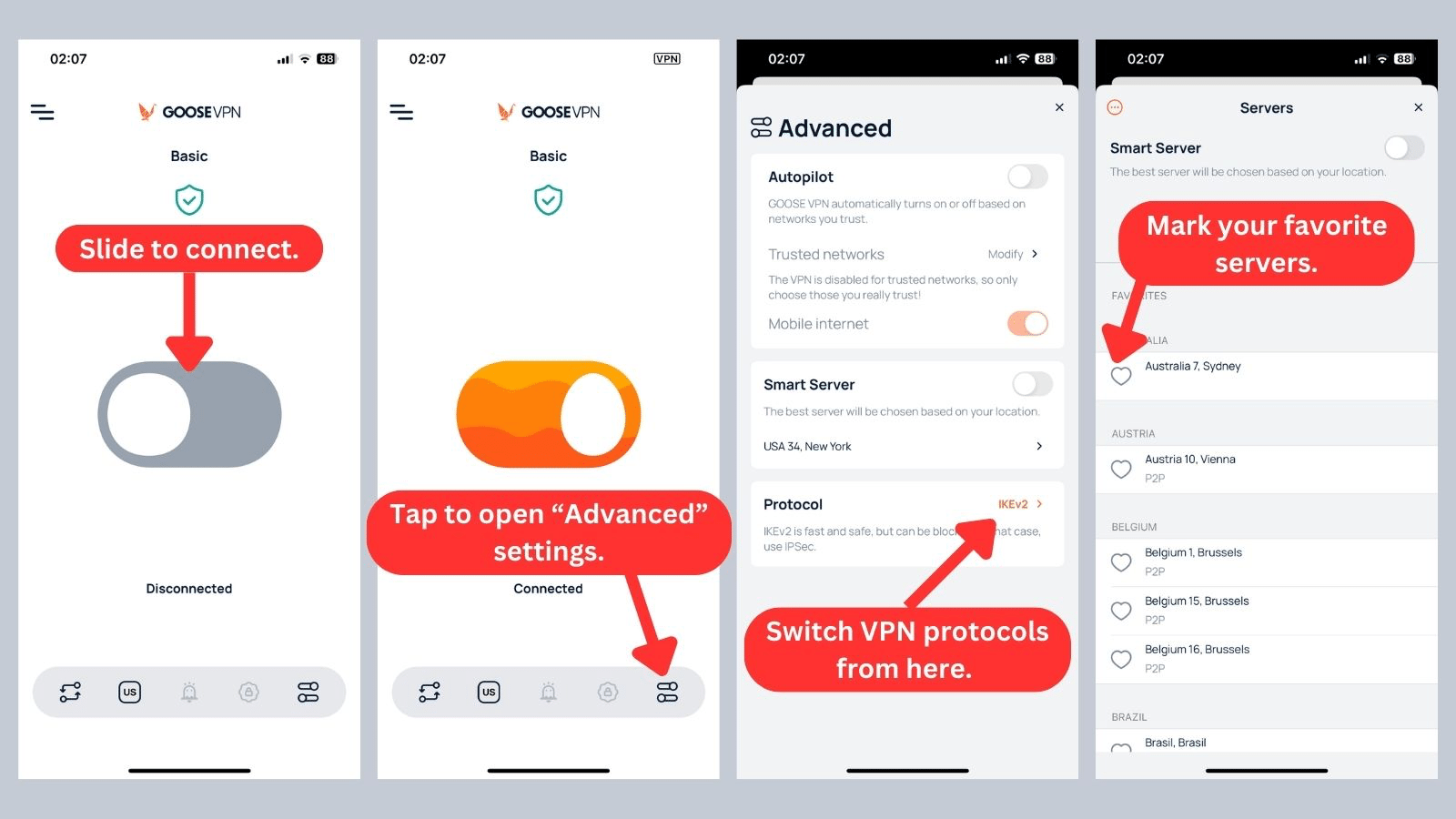
The Android version is even more barebones, only allowing you to select and connect to servers. There’s no Autopilot mode to protect you on certain WiFi networks, and you can't switch VPN protocols.
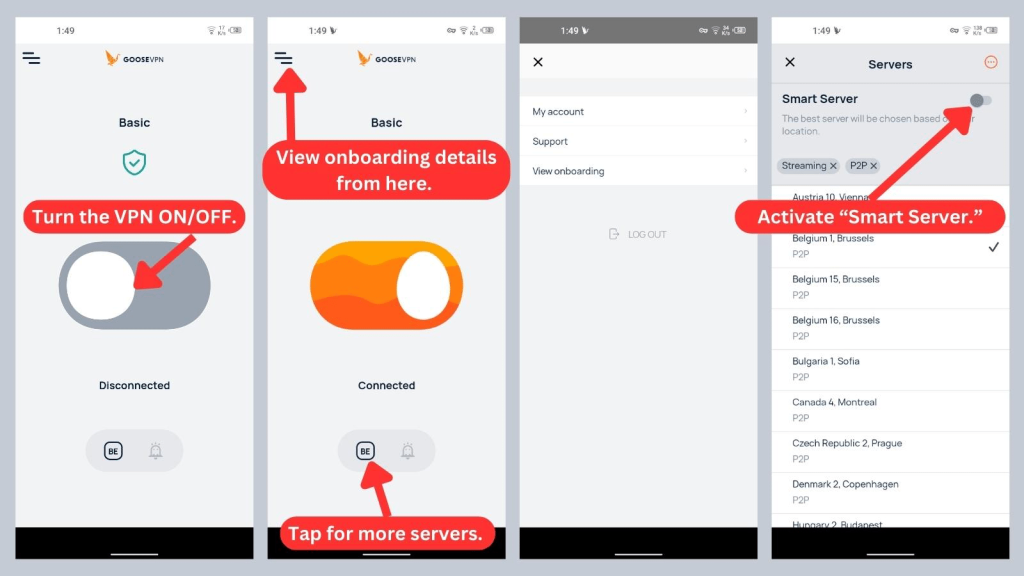
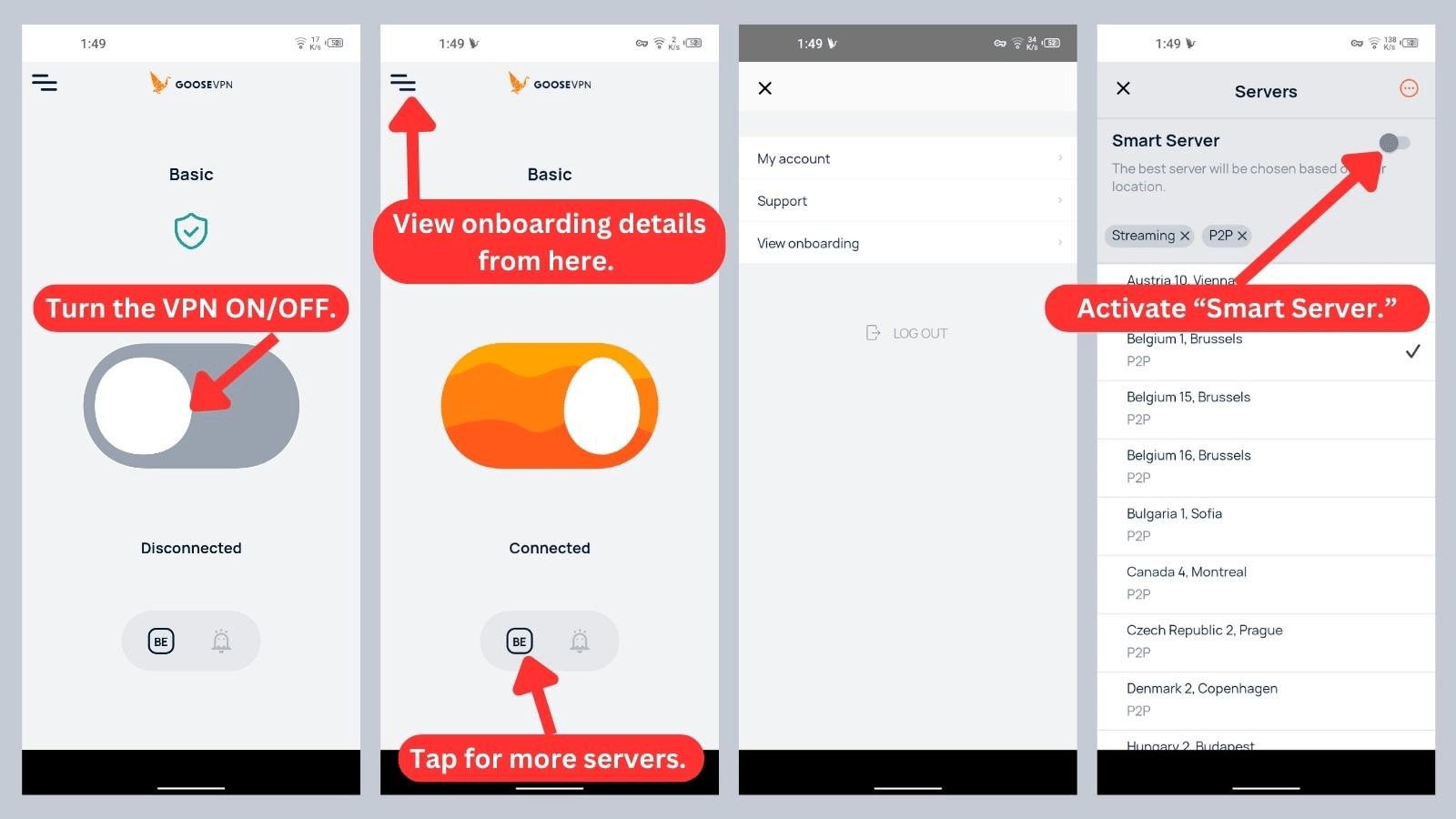
GOOSE VPN's Android app, unfortunately, is the most limited among its counterparts. It only offers “Smart Server,” lacking a few other features found in both the iOS and desktop versions.
Media Streaming, Torrenting, and Gaming Support
GOOSE VPN is good for streaming and torrenting as it offers optimized servers for these activities. However, its gaming performance is quite basic. Our Score: 8/10
VPNs offer various benefits, including bypassing streaming restrictions, improving gaming performance, and ensuring secure downloads from torrent sites. Our GOOSE VPN review assesses its performance in these areas for an informed purchase decision.
Is GOOSE VPN Good for Streaming?
Yes, GOOSE VPN is a good VPN for streaming. Although the VPN server network is relatively small, the VPN provider offers three specialized streaming servers in New York, Amsterdam, and Manchester. You can easily bypass geo-blocks on various streaming platforms.
During our tests, we were able to access US-based services like Netflix, Sling TV, Max, and Hulu. GOOSE VPN also offers servers optimized for streaming outside the US. However, its small server network places it below the top contenders for the best streaming VPN.
Here’s a table showing a list of prominent US-based streaming platforms that this VPN unblocks:
GOOSE VPN also excels at unblocking a range of non-US streaming services, including:
Is GOOSE VPN Good for Torrenting?
Yes, GOOSE VPN is good for torrenting. Similar to the best VPN for torrents, GOOSE VPN provides dedicated servers tailored for torrenting. These servers are purpose-built to enhance torrenting speed.
However, the download speeds we experienced on this VPN were generally slow. Additionally, GOOSE VPN lacks features like port forwarding or SOCKS5 servers, which are great for P2P traffic.
Is GOOSE VPN Good for Gaming?
Yes, GOOSE VPN is good for average performance. This is partly because the VPN doesn’t have low-ping connections for high-stakes gaming. It also lacks specialized servers for gaming.
Hence, if you need gaming-optimized servers and advanced features to safeguard against DDoS attacks, check out our best gaming VPN list instead. Nonetheless, if you're a casual gamer who plays with friends, GOOSE VPN is a service that should suffice for your needs.
Security & Privacy
GOOSE VPN guarantees no data leaks and zero online activity tracking. However, the VPN does keep logs, scaring off privacy-conscious users. Our Score: 7/10
To gauge GOOSE VPN's privacy and security features, we'll assess three key aspects: its VPN protocols, logging policy, and susceptibility to IP/DNS leaks. These factors give profound insight into how it performs.
GOOSE VPN Protocols
GOOSE VPN has a good range of VPN protocols. However, the available protocols vary across devices. Here’s a breakdown of GOOSE VPN's protocol on various devices:
- IKEv2: GOOSE VPN relies on this as its standard protocol, supporting it across most devices. Although it's pretty fast, it's prone to firewall detection.
- L2TP/IPSec: This protocol is used by routers and modems. L2TP doesn't encrypt your data, so it uses IPSec for encryption. Its speeds are decent, and it's fairly stable.
- PPTP: This is an older version of the L2TP protocol, so it's heavily outdated. However, it works well for speed, albeit at the expense of security.
- OpenVPN: This is the safest protocol available, and it's also great at bypassing firewalls. If you're on Windows or Linux, we recommend choosing OpenVPN.
Does GOOSE VPN Keep Logs?
No, GOOSE VPN doesn’t keep logs of your activity when you're connected to its server. It, however, logs your IP address when you first register on its website and tracks your bandwidth usage on the app.
Like most other VPNs, it also stores your account information when you open an account. But it doesn’t monitor or censor your traffic, nor does it use cookies on its servers that might retain your information.
Does GOOSE VPN Leak/Expose Your Private Data?
No, GOOSE VPN doesn't leak or expose private data. The VPN effectively conceals your data from ISPs and other third parties while connected, ensuring that your online activities remain private and secure.
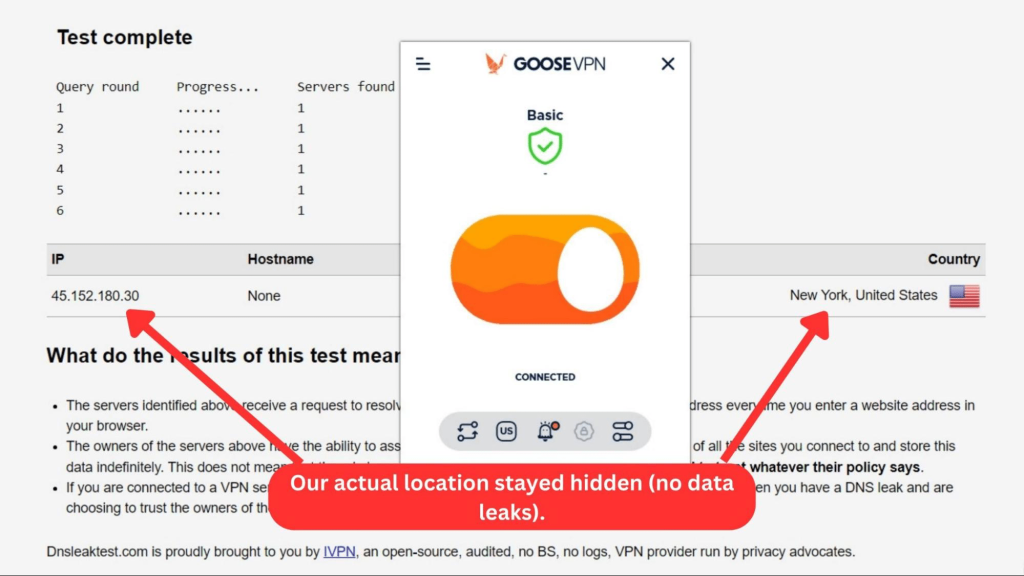
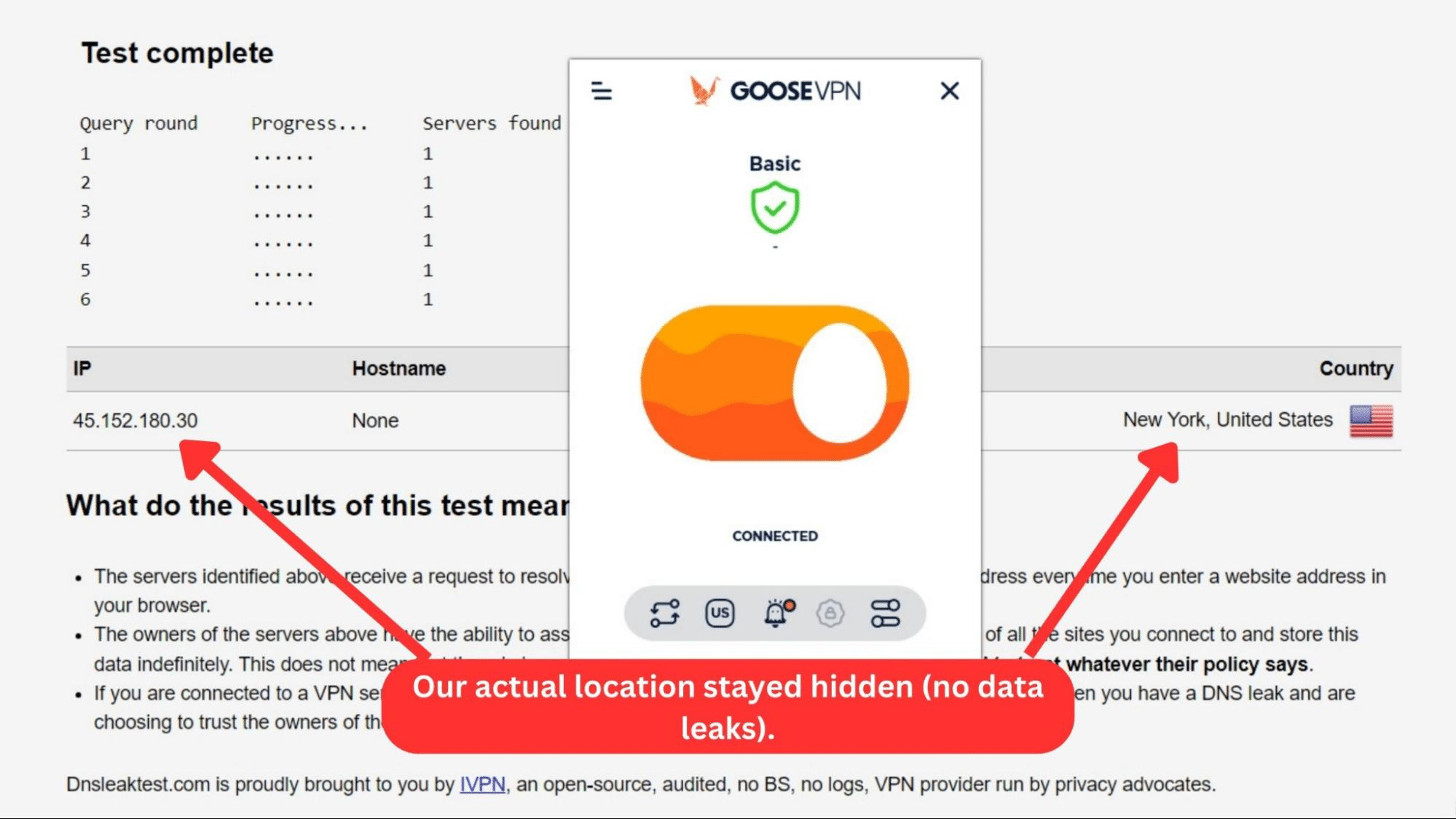
But we put its claims to the test by checking for leaks. From our results in the image above, you can see that our actual IP and location weren’t exposed. However, since GOOSE VPN hasn’t been audited, we can't know for sure if there have been any mishaps in the past.
Speed & Performance
GOOSE VPN showed a slightly decent speed performance during our tests. Our speed dropped by 55%, so GOOSE VPN is only good for non-speed-intensive tasks. Our Score: 6/10
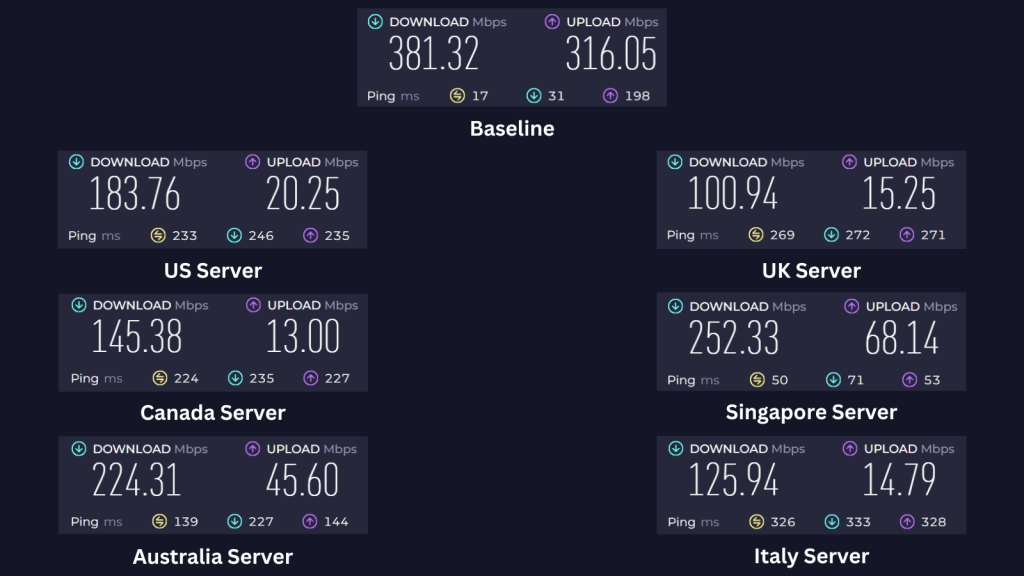
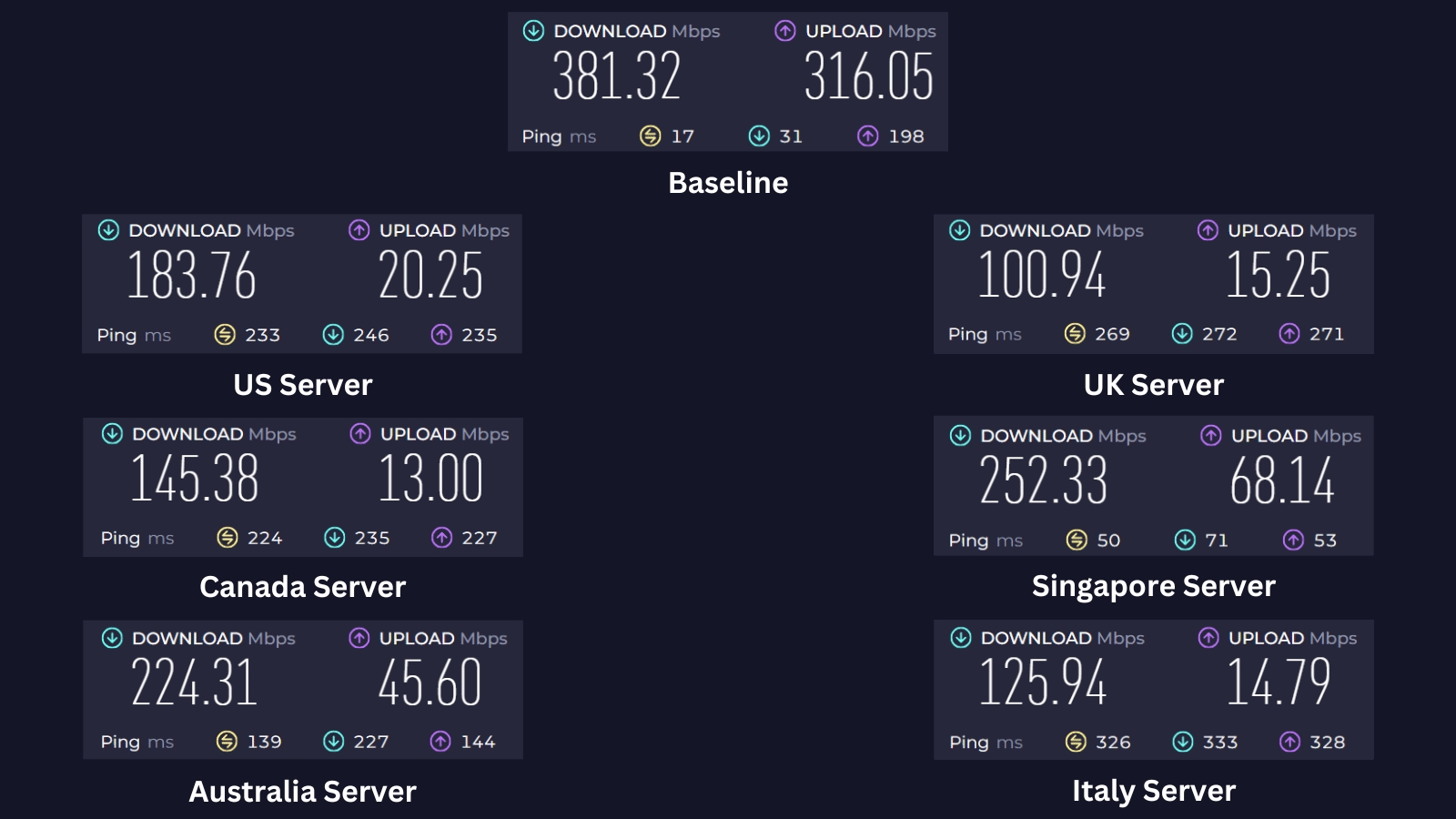
This GOOSE VPN review evaluates its server speeds by conducting speed tests before and after activating the VPN.
Before connecting to the VPN, we recorded a baseline download speed of 381.32 Mbps and an upload speed of 316.05 Mbps. Ultimately, we expect slight speed reductions on a VPN connection due to heavy encryption and server distance.
Here's how GOOSE VPN's servers performed:
- USA Server (New York): Our US server speed test showed a decent result, with a 52% reduction in speed. The tests returned a 183.76 Mbps download speed and 20.25 Mbps upload speed.
- UK Server (London): This server is quite distant from our current base in Asia, resulting in a 74% reduction in speed. Our download speed was only 100.94 Mbps, with an upload speed of 15.25 Mbps.
- Canada Server (Montreal): Our tests showed 145.38 Mbps download speed and a relatively lower 13 Mbps upload speed from this server. This represents a 62% decrease in download speed, which is noticeable but not too bad.
- Singapore Server (Singapore): This server, being the nearest to our location, demonstrated the best download speed at 252.33 Mbps and a relatively lower 68.14 Mbps upload speed. This resulted in a 34% decrease in download speed, which isn’t too bad.
- Australia Server (Sydney): This is the second-best option after the Singapore server. It delivered download speeds at 224.31 Mbps and uploads at 45.60 Mbps.
- Italy Server (Milan): We experienced a 67% speed reduction on this more distant server. Our download speed only reached 125.94 Mbps, and our upload speed was 14.79 Mbps.
Overall, GOOSE VPN reduced our Internet speed by 55% on average, which is passable at best. Still, GOOSE VPN isn’t on our list of the fastest VPNs for obvious reasons. Regardless, our speeds were steady across all servers.
Customer Support
GOOSE VPN offers several communication channels, including live chat, FAQs, email support, and a ticketing system. Our Score: 6/10
Good VPNs have something in common: responsive support. In this section of our GOOSE VPN review, we'll examine how easy it is to get in touch with GOOSE VPN.
Here are the channels to get support on GOOSE VPN:
- FAQs and Guides: The FAQs answer basic questions regarding setup, usage, payment, and more. As such, you might have to contact a customer care representative if you want more detailed answers.
- Ticketing System: You have to provide your email address to submit a ticket. Replies usually come within two hours.
- Email Support: You can also contact GOOSE VPN directly via email. We got a response one hour and a half after we reached out, and the agent was quite helpful.
- Live Chat: GOOSE VPN has a live chat on its website, but you can only speak with a bot named Guus. It shows related articles to your query and can connect you to a real person through email support. Since it can't do much else, we would’ve preferred a live agent instead.
- Facebook Support: Although you can reach the company on its Facebook account, the responses were slow and in Dutch.
- TeamViewer Remote Support: GOOSE VPN's technical team members can also provide remote support through TeamViewer.
Pricing
GOOSE VPN's monthly subscription plan is quite expensive compared to its direct rivals. However, its lifetime plan is worth considering. Our Score: 5/10
In this section, we'll examine how GOOSE VPN's pricing is structured. We'll also highlight plans that save you the most money.
How Much Is GOOSE VPN?
GOOSE VPN costs $9.99 per month. However, it also has cheaper subscriptions, such as its $4.99/month yearly plan and a lifetime deal for only $69.99.
All plans have similar features, including a kill switch, DNS leak protection, 100+ servers, and specialized servers. They also come with a 30-day money-back guarantee.
The main difference between the plans is the number of simultaneous connections. You can protect unlimited devices on the monthly and yearly plans. On the other hand, the Lifetime plan allows you to connect one, five, or ten devices simultaneously, depending on your subscription tier.
Also, if you're interested in GOOSE VPN's malware-scanning feature, "Cyber Alarm," you'll need to pay an extra $2.50 for it.
Here's what you need to know about GOOSE VPN's pricing:
- 1-Month Plan: This subscription plan costs $9.99 monthly, with a total cost of $119.88 annually. Since it has no discounts or cost savings, this is GOOSE VPN's most expensive plan.
- 1-Year Plan: At $4.99 monthly and only $59.99 per year, this plan saves you 50% over the 1-month plan.
- Lifetime Plan: With a one-time payment of $69.99, you get to use GOOSE VPN for life. This is, by far, the best plan GOOSE VPN offers.
With GOOSE VPN's lifetime plan at $69.00, you'll be saving 86% compared to the monthly plan in just 6 months. The VPN provider accepts payments through PayPal, credit cards, and iDEAL.
However, its money-back guarantee only applies if you’ve used less than 100 MB of data. The 100 MB data limit for testing the VPN might seem low, and you're right to think so. Since there’s no free version and a free trial, you have to be sure of this VPN service before making any payment.
Final Thoughts - Is GOOSE VPN Good?
Yes, GOOSE VPN is good. Setting it up on popular device platforms is smooth since it has native apps. Once installed, even VPN beginners will find it easy to use, offering essential features like a kill switch and DNS leak protection for added security.
You'll also have no problem unblocking different streaming platforms using its streaming-optimized servers. If you're into torrenting, they've got P2P-optimized servers too. Lastly, its lifetime deal is one of the cheapest we've seen.
That said, if you need a VPN with many advanced security and privacy features, we strongly recommend NordVPN. It offers thousands of servers worldwide, whereas GOOSE VPN only has about 100. Unlike GOOSE VPN, NordVPN is based in a safe jurisdiction and has been audited by a third party.
PROS
- No-logs policy.
- No data leaks.
- Unlimited bandwidth.
- Easy setup.
- Decent browsing speeds.
- Offers P2P and streaming servers.
- Affordable lifetime plan.
CONS
- Unsafe jurisdiction.
- No independent audit.
- Lacks advanced features.
- Small server network.
- No live chat (only chatbot).
- Pricey monthly plan.
- Limited money-back guarantee.
| Review Summary GOOSE VPN is a simple service with barebones features, making it great for casual VPN users who need basic privacy and data protection. | 6.2 Overall Score | ||
| Background, Jurisdiction & Reputation | 7 | ||
| Supported Platforms & Devices | 7 | ||
| Installation & Initial Configuration | 7 | ||
| Prominent Features | 6 | ||
| Server Count & Infrastructure | 1.5 | ||
| UI/UX Design & Ease of Use | 8 | ||
| Media Streaming & Torrenting, and Gaming Support | 8 | ||
| Security & Privacy | 7 | ||
| Speed & Performance | 6 | ||
| Customer Support | 6 | ||
| Pricing | 5 | ||