When you purchase through links on our site, we may earn an affiliate commission. Here’s how it works.
How to Find and Use ExpressVPN Activation Code in 2026
Your ExpressVPN activation code is a crucial piece of information that you receive as soon as you sign up for the VPN. More precisely, you'll need this string of numbers and letters to activate the VPN once you install its software. So, you'll want to know how to find and use your ExpressVPN activation code, which we'll show you in this guide.
We'll also help clear any doubts you might have. That means you'll find information on when and where you need to input your ExpressVPN activation code, as well as what to do when your code doesn't work or if it's expired.
How to Find Your ExpressVPN Activation Code
To find your ExpressVPN activation code, access your ExpressVPN dashboard via the VPN's website. These are the steps you need to take:
1. If you don't have a subscription yet, subscribe to ExpressVPN using your computer and any Web browser.
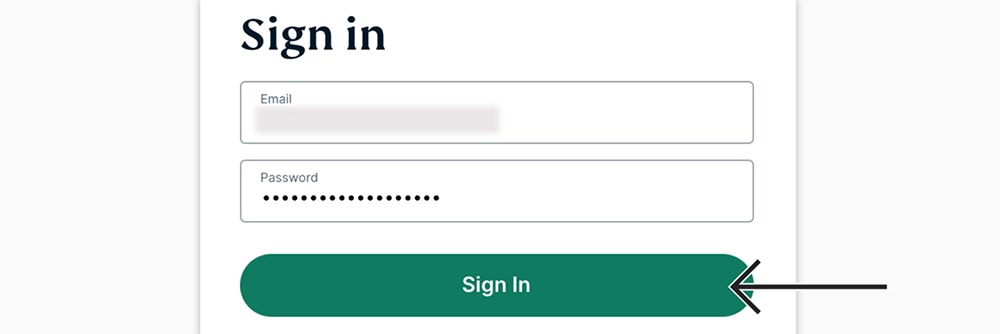
2. Return to ExpressVPN's home page. Click "My Account" visible in the top-placed main menu. Provide your credentials and access your ExpressVPN account dashboard.
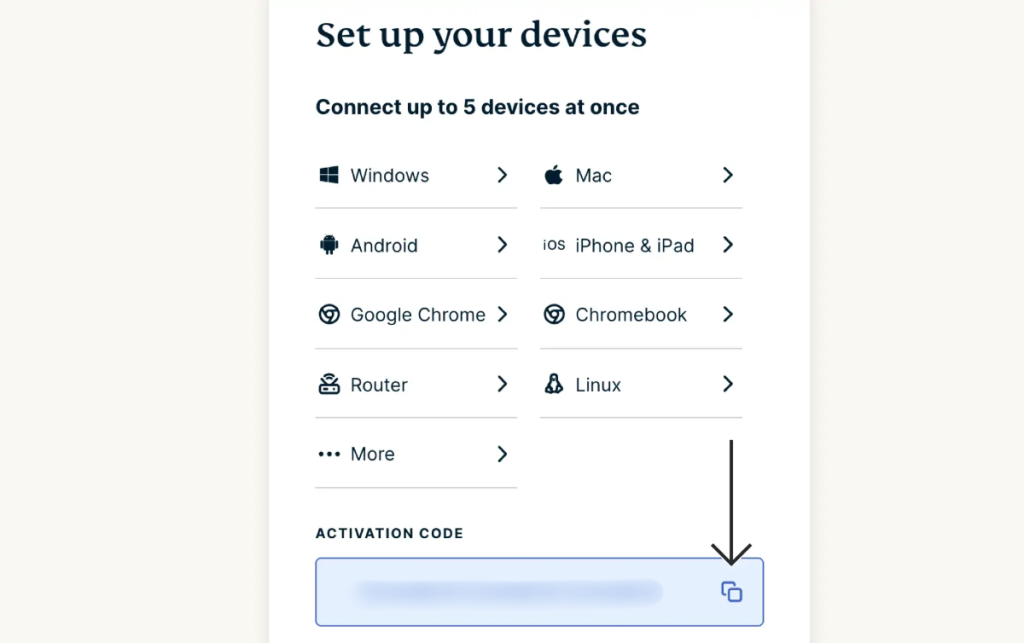
3. You'll see your ExpressVPN activation code on the right-hand side, in the "Set Up Your Devices" card. You can use the "Copy" button to copy your code. That's it!
When Do You Need to Use an ExpressVPN Activation Code
You'll need to use your ExpressVPN activation key to activate the app on desktop systems, but also when you sign out, reinstall the VPN, and when your code expires. Here's more information about each of those cases:
1. Install ExpressVPN
This primarily applies to ExpressVPN’s apps for desktop systems, as this VPN only has a single way to let you log in (you can’t log in using your email and password, for example).
2. Sign out of ExpressVPN
By default, this VPN app will keep you signed in, so you can launch and start using it in seconds. If you decide to sign out, you’ll need your activation code to go back in.
3. Uninstall and then reinstall ExpressVPN
Keep in mind that uninstalling ExpressVPN deletes all information about the VPN from your computer. That’s why an activation code is needed when trying to install it again.
4. Previous activation code expires
This typically happens if your subscription expires, which makes your activation code obsolete. Renewing your subscription will get you a new activation code, accessible via the VPN’s website.
Can You Get an ExpressVPN Activation Code for Free?
No, you can't get an ExpressVPN activation key for free. That's because ExpressVPN is a paid service, so you need a valid code for the duration of your subscription.
Services like ExpressVPN can’t be cracked. There are simply no code generators that will ever help you generate a valid key. There are several reasons for this, as follows:
- Activation Codes Are Unique: To obtain your activation key, you need to log in to your account on ExpressVPN’s site using a code sent to your email. There are other systems in place to secure your activation code, which simply can’t be manipulated easily.
- Limited Number of Simultaneous Connections: You get 10-14 simultaneous connections, so you can see why it would be impossible for an application like this one to be pirated (there's no way to go beyond ExpressVPN's limits).
- Eliminating Any Potential Misuse: Keep in mind that we’re talking about a VPN that logs no personal data. However, ExpressVPN is doing plenty to combat any misuse. Since the user-client constantly “talks” with servers, the VPN can see if someone is tampering with the software.
ExpressVPN Activation Code Not Working? - Try This!
If you have trouble activating your copy of ExpressVPN, you will see an error preventing you from accessing the VPN. Based on the error message you're seeing, we’ll offer several solutions to this problem to save you time and effort.
- "This activation code has either expired or is incorrect. Please log in to our website to get your correct activation code and try again." This message points to an expired ExpressVPN activation code. So, you need to resubscribe to ExpressVPN.
- “Your activation code is incorrect. Please try again or contact support”. You’ve probably tried to type in your key, and there’s a typo. Instead of typing in the code, we recommend copying it from your account (from ExpressVPN’s site). Also, make sure that your subscription is still valid (not expired).
- “Please make sure your email address and password are correct.” You’ve probably mistyped your email address or password. Pay attention to special characters or whether the Caps Lock key is enabled. You can also try logging in to your account on ExpressVPN’s site. Also, try resetting your password (via ExpressVPN’s site).
- “Please check your connection and try again.” For some reason, ExpressVPN thinks you aren’t connected to the Web. Something is preventing the application from contacting its servers to validate your activation code. We recommend checking if your Web connection works. Also, try restarting your networking devices.
Final Thoughts
As you can see, ExpressVPN has made it quite easy to find your activation code. You can simply copy it from your account dashboard, letting you activate the VPN app in under a few seconds. We'll remind you that you need your activation code for ExpressVPN's desktop apps. Regarding mobile apps, all you need is your email address and password.
Further, if you’d like to see how ExpressVPN works on various platforms, check out our full setup guide. It covers over 65 devices, from phones and computers to smart TVs and routers.
Lastly, we'll also add that there's no way to spoof an ExpressVPN activation code, as premium VPNs are "live" services, so the only way to use them is to pay for a subscription. There is no such thing as an ExpressVPN lifetime subscription either. However, you can check out the lowest prices or avail the ExpressVPN free trial.
You’ve reached the end of our guide on using your ExpressVPN activation code. Let us know if you have any questions. Lastly, thanks for reading!
Related