When you purchase through links on our site, we may earn an affiliate commission. Here’s how it works.
VPN.AC Review 2026


Our experts have reviewed 53 VPN providers, which were put through extensive rounds of testing. To learn more about that process, here’s how we review VPNs, where we explain our criteria and our policy of being fully transparent.
VPN.AC is a decent VPN provider headquartered in Romania. Since Romania isn’t a member of the 5/9/14 Eyes alliance and is big on data protection, VPN.AC is safe from government intrusion.
However, the provider logs some data temporarily, although it has never had a data leak. Still, an independent audit is needed to prove its data usage practices.
Regardless, VPN.AC is generous with security and privacy features, including AES-GCM 256-bit encryption, a kill switch, split tunneling, and DNS filtering. Additionally, it offers various protocols on different devices, such as OpenVPN and WireGuard.
With these features, we easily unblocked many streaming platforms. It also did well during our torrenting tests, although its gaming performance was so-so.
Here's a summary to provide a quick overview of VPN.AC’s offerings.
This VPN.AC review delves into all aspects of the service. You can read how we review VPNs to learn more about our process.
Background, Jurisdiction & Reputation
VPN.AC is based in Romania, a VPN safe haven outside the 5/9/14 Eyes alliance. However, it does log some data and is prepared to cooperate with law enforcement. Our Score: 9/10
In this section of our VPN.AC review, we'll put the provider under the lens to help you decide how much you can trust it with your data. We'll look into its history and any record of data leaks.
Where Is VPN.AC Based?
VPN.AC is based in Sibiu, Romania. Founded in 2009, it's owned by Cryptolayer SRL, a cybersecurity company that also does penetration testing and sells storage devices.
Thankfully, Romania isn’t a member state of the 5/9/14 Eyes alliance. That means there’s no risk of foreign countries forcefully requesting your data from VPN.AC. Although the country is a part of the European Union, it refused to be a part of its Data Retention Directive.
Moreover, data retention became unconstitutional in Romania in 2014 as the country’s Constitutional Court considered it a violation of Romanian’s right to privacy. VPN.AC is also able to ignore all DMCA or copyright complaints because of its location.
Romania's focus on data privacy allows VPN.AC to protect your data easily if it so chooses. However, on its Privacy Policy page, VPN.AC clearly states that it'll comply with law enforcement and share your data if required by law.
Despite Romania's impressive privacy protection laws, VPN.AC's readiness to cooperate with the law is as troubling as it sounds.
Did VPN.AC Leak Private Data in the Past?
No, VPN.AC hasn’t leaked data in the past. Nonetheless, VPN.AC's logging policy is below our expectations. Although it doesn't monitor your VPN activity, the provider collects your IP addresses, connection times, and the amount of data you transfer. VPN.AC says that it deletes these connection logs once you terminate your VPN session.
Deleting your data does offer some level of comfort. Regardless, you should consider other options if you want a no-logs VPN. VPN.AC also collects your IP address when you access its official website. It also collects your email address and payment information when you create an account.
These policies can be improved, and a much-needed third-party audit can raise VPN.AC's privacy profile in our books.
Supported Platforms & Devices
VPN.AC supports all popular platforms and devices. It also extends its compatibility to different router types. Our Score: 10/10
This section of our VPN.AC review examines which devices it protects with native apps and VPN configurations.
Here's a table showing the platforms that VPN.AC supports.
VPN.AC is compatible with various device platforms, including Windows, Linux, macOS, iOS, and Android. Additionally, you can set it up on many router models, including DD-WRT, Tomato, AsusWRT, and pfSense.
If you need to, you can connect up to 12 devices simultaneously as long as half are on OpenVPN and the other half uses WireGuard.
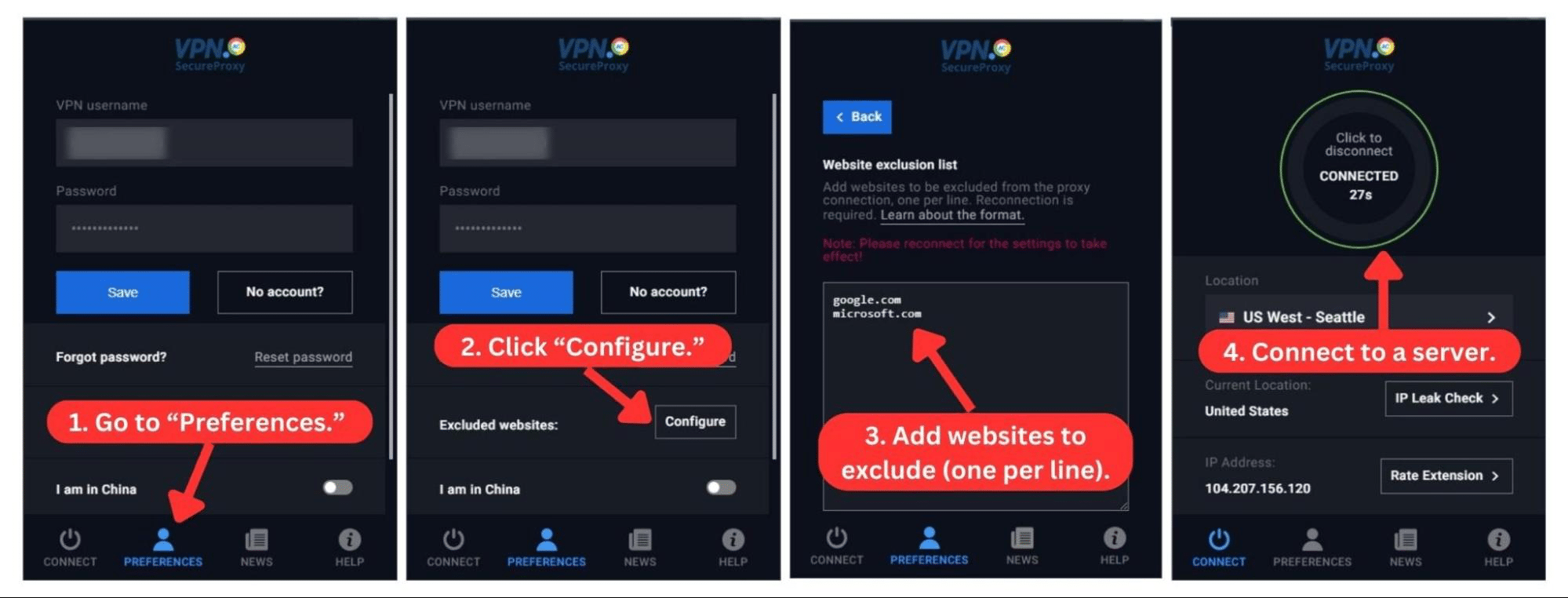
VPN.AC also supports Firefox, Chrome, and Opera with browser extensions, which it calls SecureProxy. The extensions allow you to choose and connect to a VPN server, disable WebRTC, and perform IP leak checks. You can also exclude certain websites from your VPN connection if you want to access them without any encryption.
Installation & Initial Configuration
Setting up VPN.AC's native apps only take a few minutes. Simply sign up, download the app, and install it. It's as straightforward as that. Our Score: 8/10
We can't overemphasize the importance of a quick and smooth setup. This section of our VPN.AC review delves into how easy it is to download and install the VPN's apps, even for newbies.
How to Download and Use VPN.AC?
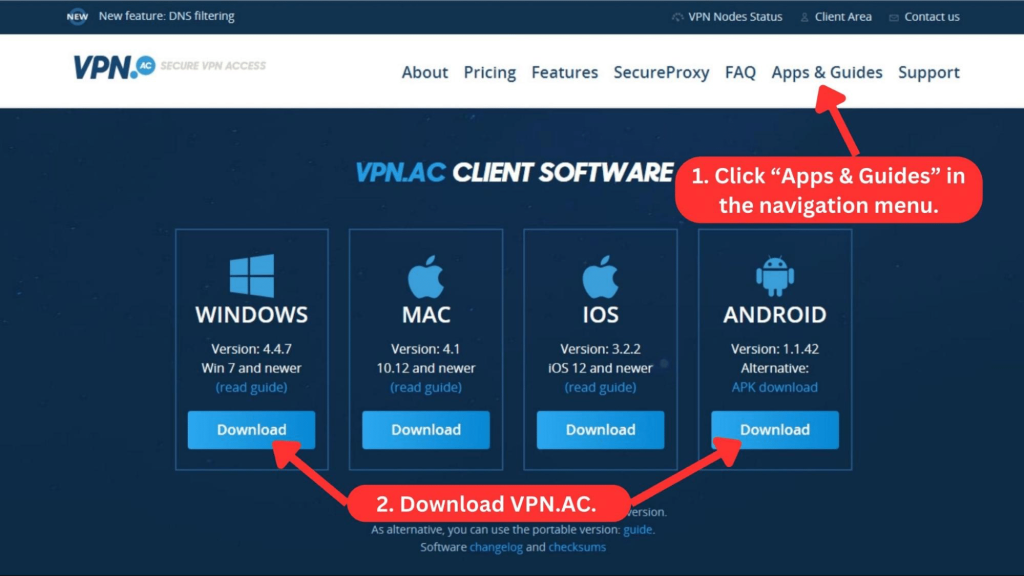
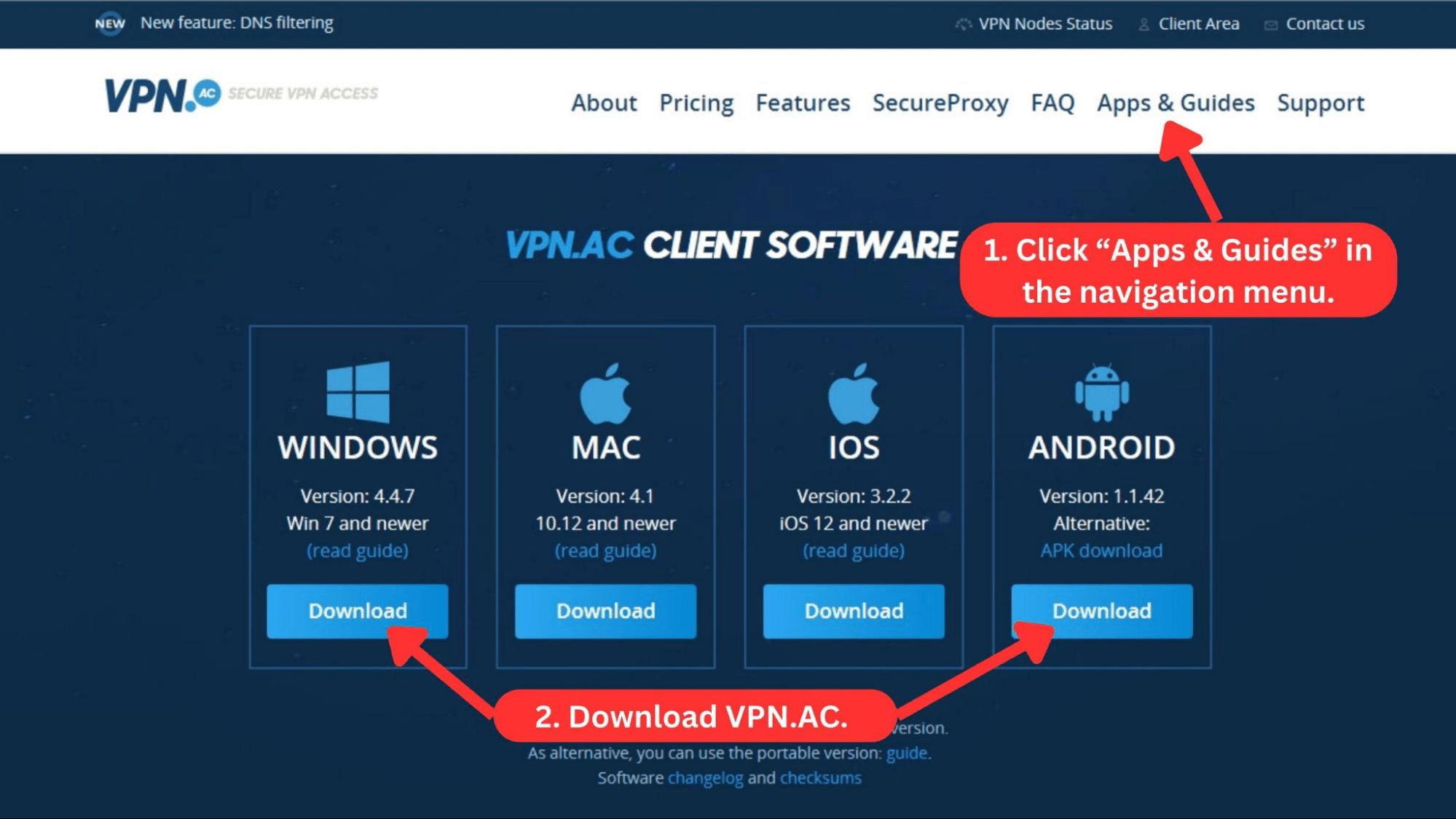
To use VPN.AC, you must first subscribe to the service. Next, download the VPN installation files from the official website and install the app.
Here's a detailed guide on how to get VPN.AC on Windows.
- Subscribe to VPN.AC on its website using any Web browser.
- Log in to the "Client Area" with your credentials.
- Click on "Apps and Guides."
- Find your device OS and click "Download."
- Install the downloaded file and launch the app.
- Enter your account details in the "Preferences" section.
- Choose a server and click "Connect" to use the VPN. That’s it!
We found that VPN.AC's desktop clients are quite easy to set up, except for a few unnecessary complexities. First, you have to provide your login information in the app's "Preferences" section, which can be confusing.
Even then, there’s no "Submit" button when you input your account details. Your information is only submitted and verified when connecting to a server. Thankfully, you only have to log in once.
You can download the app via the App Store or Play Store. Next, provide your VPN username and password in the "Preferences" tab before connecting to a server (the same as desktop platforms).
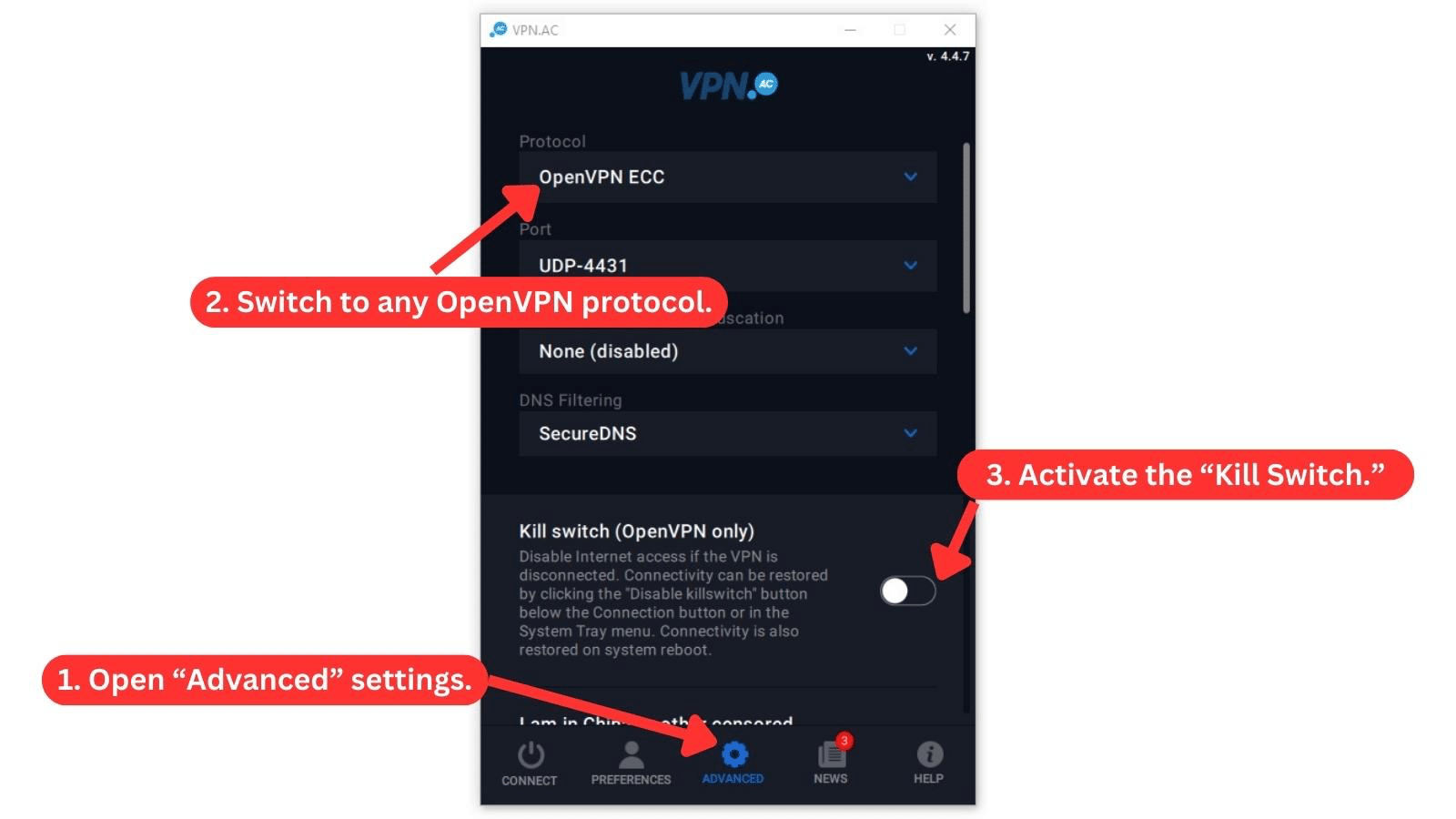
Once you successfully log in, we recommend turning on the kill switch for better protection. You can find it in the "Advanced'' section on desktop apps.
Overall, we believe newbies will find the VPN's setup easy to navigate on both mobile and desktop platforms.
Prominent Features
VPN.AC has a good selection of basic and advanced features, although they vary widely across device platforms. Our Score: 8.5/10
VPN.AC offers basic features like a kill switch and auto-connect. If you want more advanced features, it also has split tunneling, DNS filtering for ad blocking, and more. In this section, we'll review the VPN's features and how they serve you.
Here's a list of VPN.AC's features.
- Kill Switch: If you lose your connection to the VPN for any reason, VPN.AC blocks your device from connecting to the Internet. However, the kill switch is only available on desktop apps connected to OpenVPN.
- DNS Filtering: Similar to other ad-blocking VPNs, VPN.AC effectively filters out trackers, ads, malware, and phishing domains through SecureDNS. This feature is available on Windows, Mac, Linux, and Android apps.
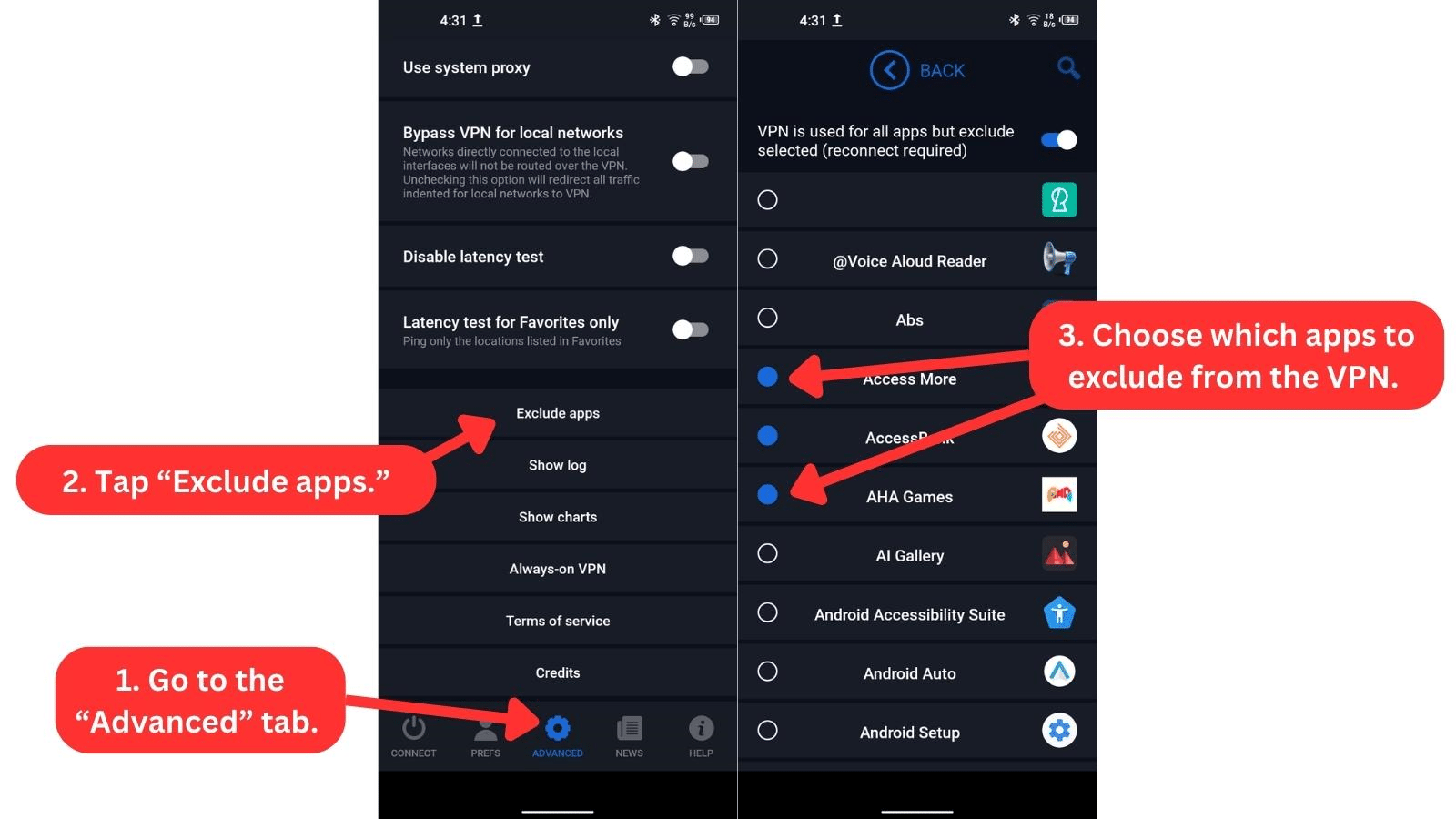
- Exclude Apps (Split Tunneling): This feature allows you to set which apps use the secure VPN connection and which apps use unencrypted traffic. Unfortunately, you can only use this useful feature on Android apps.
- Excluded Websites: If you use VPN.AC's browser extension, you can set which websites or IP addresses are excluded from the proxy connection.
- Double Hop: You can connect to two VPN servers simultaneously for more privacy and faster browsing speeds. VPN.AC generously offers 30 different double VPN configurations to choose from across different devices, which is better than most. However, these servers aren’t available on iOS devices.
- Block IPv6: Exclusive to Windows and macOS, this feature blocks all IPv6 requests to prevent leaks that your ISP could see.
- Auto Connect: You can set the VPN to automatically connect to your last server once you launch the software.
- IP Leak Check: Once you connect to a server, VPN.AC allows you to check for IP leaks on one of its websites.
- SOCKS5 Proxy: If you want faster speeds than a traditional VPN connection, you can browse using a proxy. You'll get a new IP address, but there's some manual configuration needed.
While exploring the app, we didn't find certain special features like dedicated IPs or port forwarding. Having these could make the VPN even better and more flexible for different uses.
Server Count & Infrastructure
VPN.AC offers a small network of servers, which can make it difficult to enjoy the service. But it gets credit for using self-hosted bare-metal servers that can reach 1000 Mbps. Our Score: 1.5/10
Small server networks risk overcrowding and, consequently, slower speeds. On the other hand, VPNs with the most servers give you more freedom to choose from many non-congested, speedier servers. In this section, we'll review the extent of VPN.AC's global server network.
VPN.AC manages a small server network with over 130 servers in 38 locations across 20+ countries. You'll find that most servers are spread across Asia, Europe, and North America. There are limited options in South America and Oceania, while there are no servers in Africa or the Middle East.
However, we must mention that VPN.AC owns all its servers. Using dedicated, Linux-based, bare metal servers instead of shared virtual servers can make you more secure and give you faster speeds. VPN.AC also claims that it doesn't use VPN virtual locations for that reason.
Additionally, VPN.AC has specialized servers for bypassing the Great Firewall of China. It runs a set of 18 obfuscated VPN servers designed to work well in China. Hence, we can say that VPN.AC puts its small network to good use.
UI/UX Design & Ease of Use
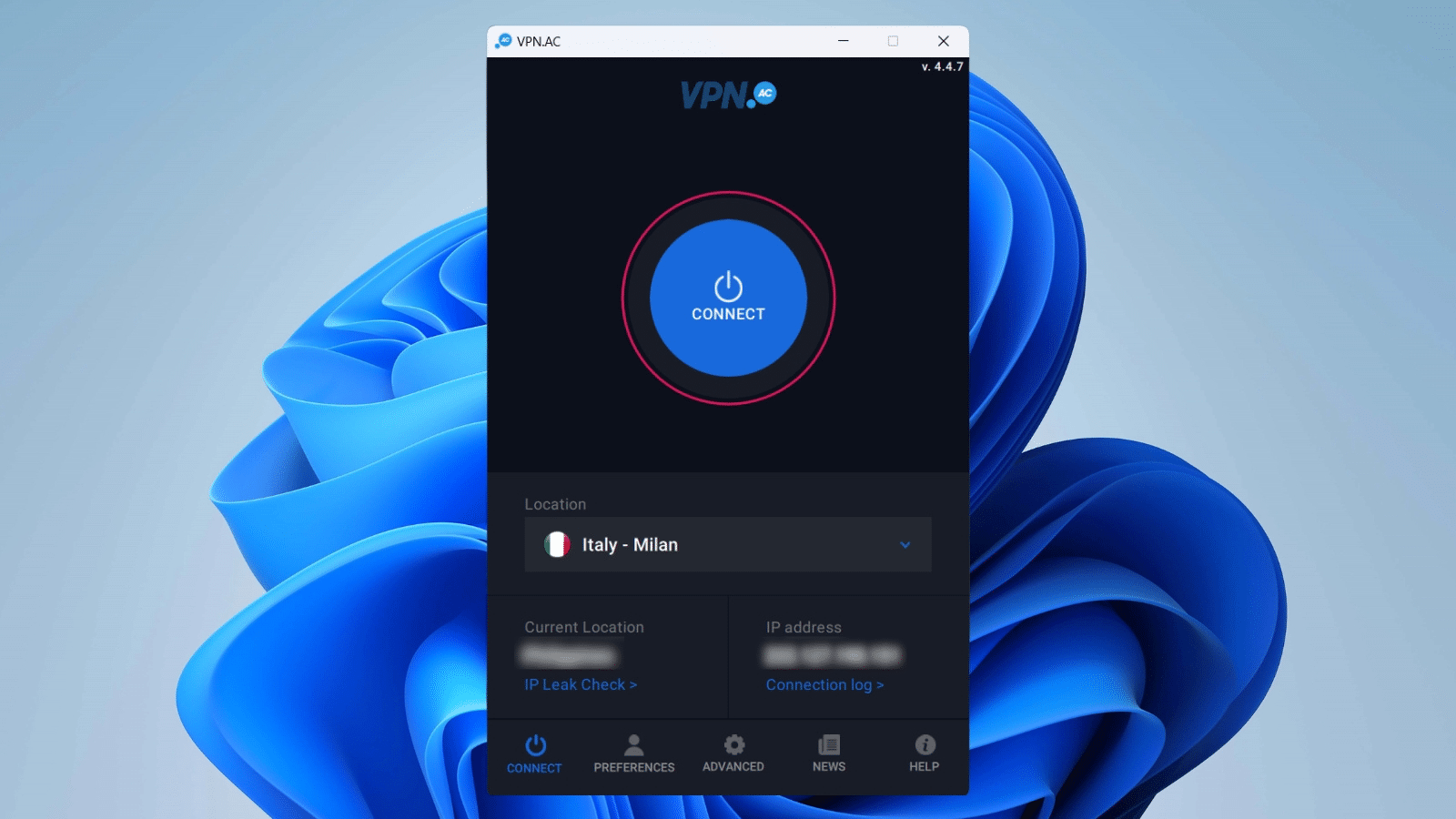
VPN.AC's apps are easy to use, even if you’re new to VPNs in general. It also helps that the apps look similar on desktop apps, mobile apps, and browser extensions. Our Score: 8/10
A good VPN pairs its underlying technology with an accessible UI. This segment of our VPN.AC review evaluates how easy it is to use its desktop and mobile apps. We'll also examine its browser extensions.
How Well Does VPN.AC Work on Desktop Platforms?
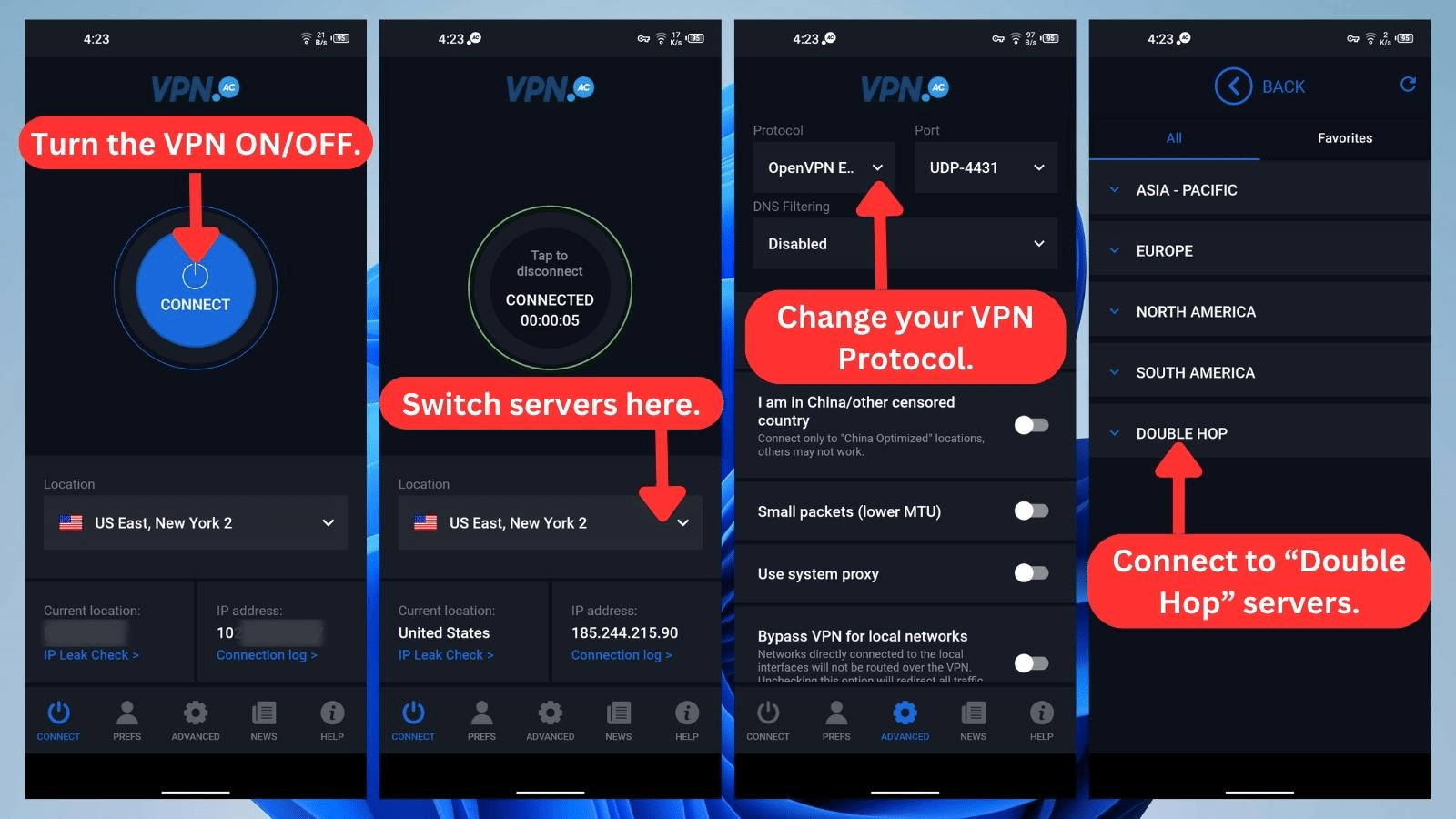
VPN.AC works well on desktop platforms, including Windows, macOS, and Linux. The desktop apps share the same UI and user friendIy experience. Once you provide your account details in the “Preferences” section, you can activate the VPN on the "Connect" page.
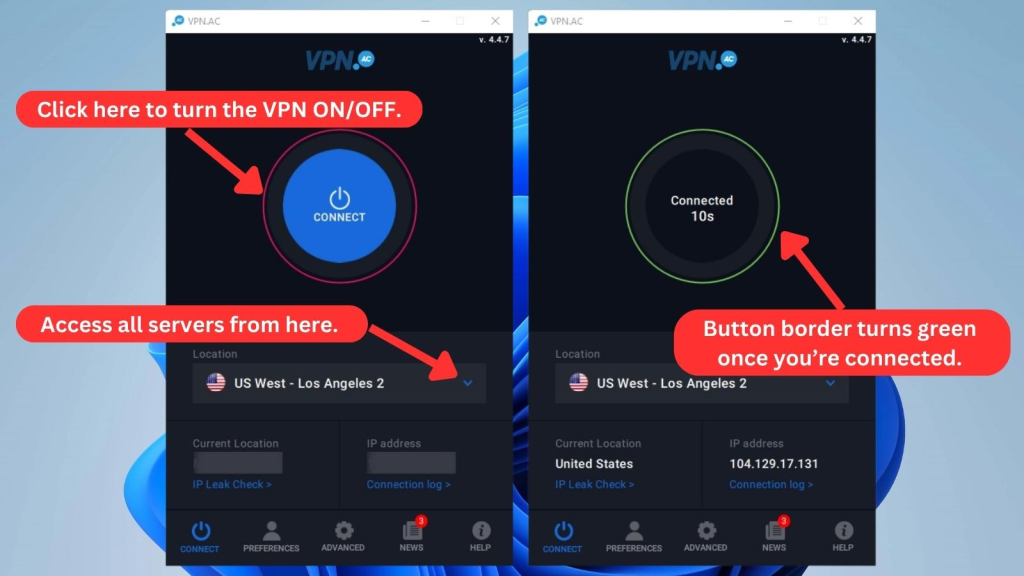
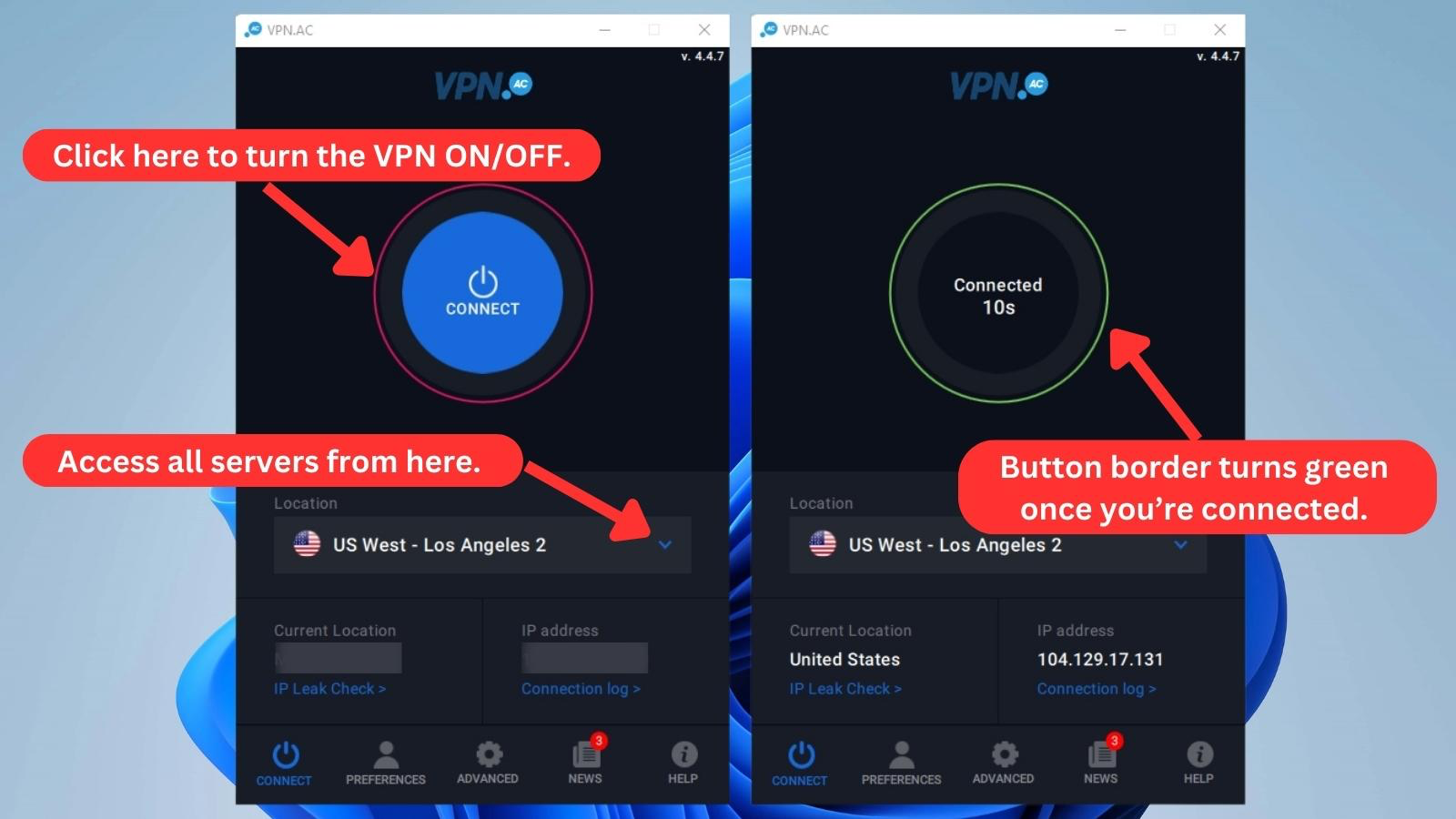
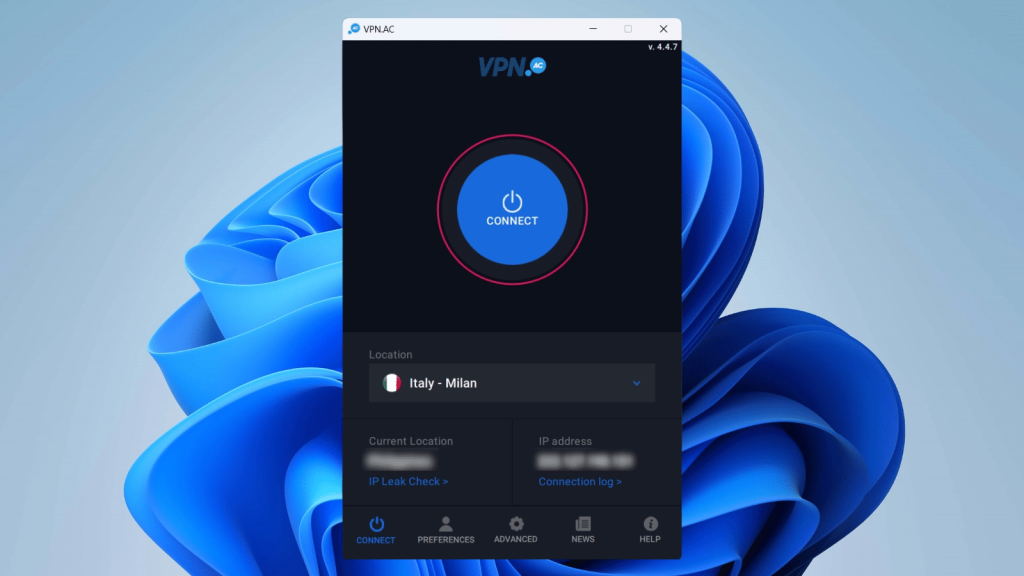
Hit the large blue ON/OFF button with a red border on the "Connect" page to connect to the VPN. Once the VPN connects, the button's color will change to a dark gray with a green border.
You'll also see a timer that shows how long you've been connected. If you want to change locations, click the "Location" dropdown under the ON/OFF switch to see all available locations. The VPN automatically connects to the new location you select.
At the bottom of the app, you'll find these five navigation buttons:
- Connect: Doubling as the app's home screen, this section lets you choose a server, connect to VPN.AC, monitor your connection, and check for IP leaks.
- Preferences: This is where you add your login info. Also, you can customize basic settings, such as changing themes from light to dark, minimizing the app window, enabling auto-start, and setting up auto-connect features.
- Advanced: Here, you can switch protocols, activate the kill switch, enable DNS filtering, and block IPv6 traffic, among others.
- News: VPN.AC updates you about its latest developments in this section.
- Help: This page contains links to useful blogs and tutorials, an IP leak checker, and customer support pages.
How Well Does VPN.AC Work on Mobile Platforms?
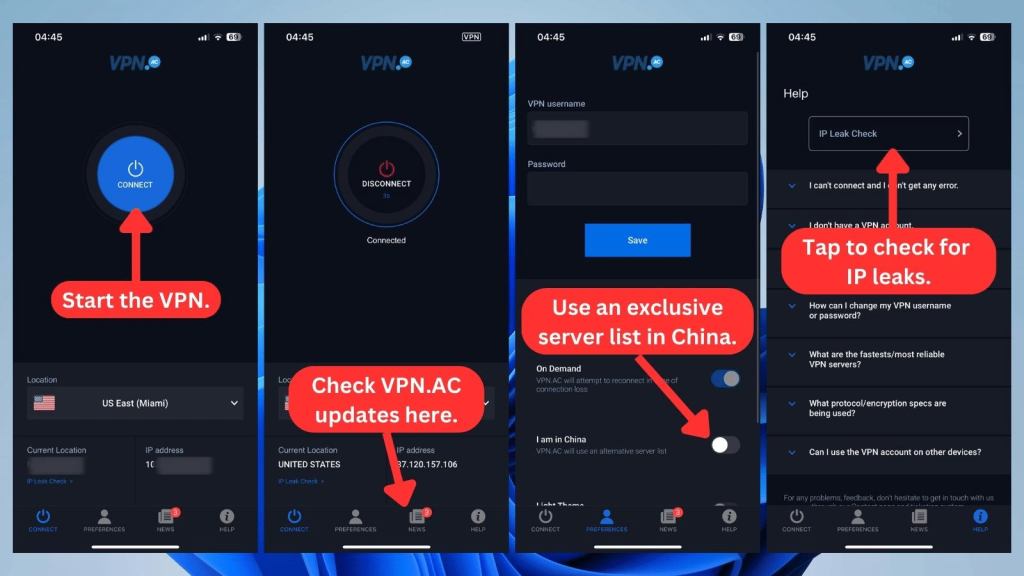
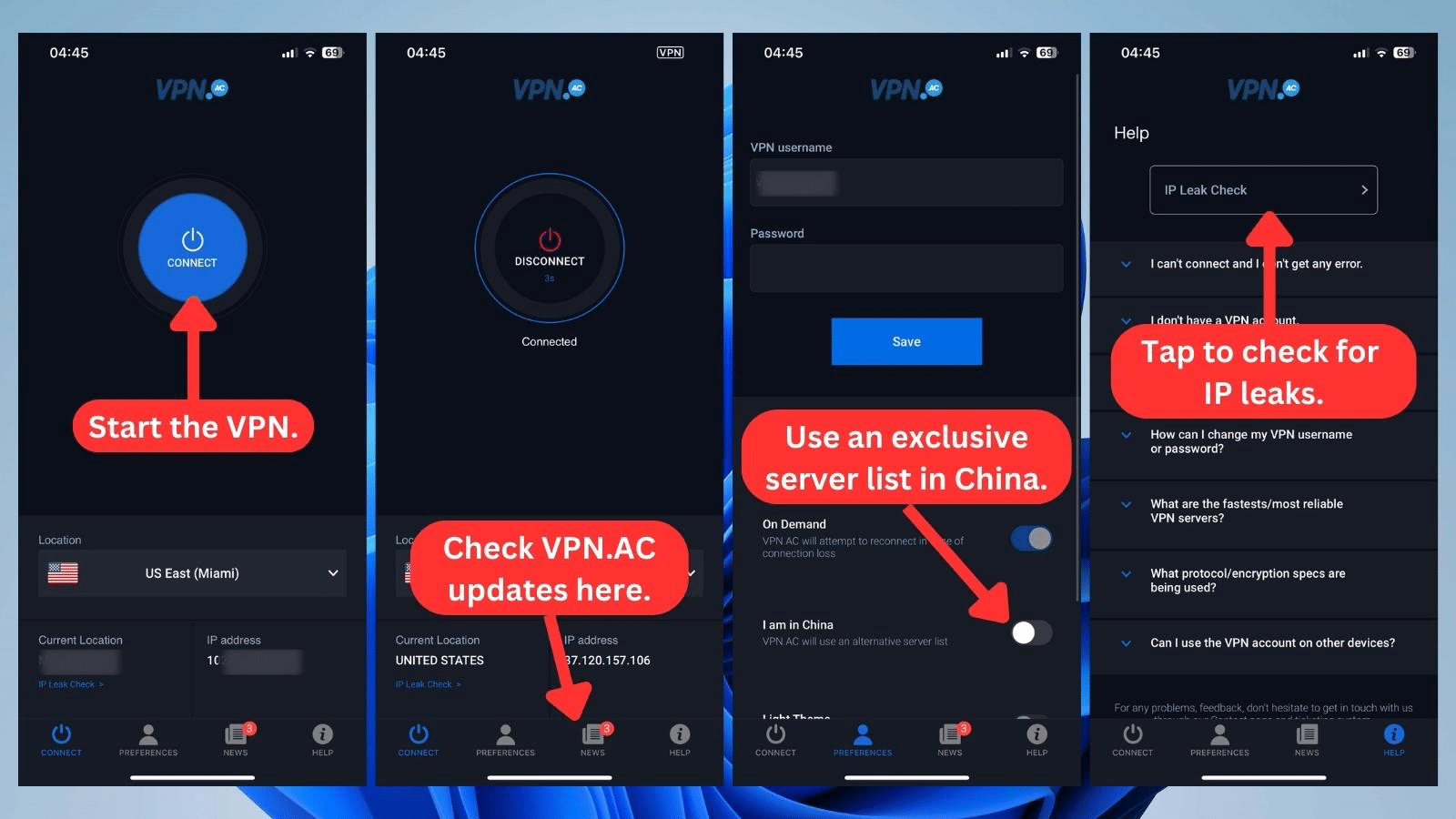
VPN.AC works excellently on mobile platforms. The mobile apps share the same design as the desktop apps with similar navigation.
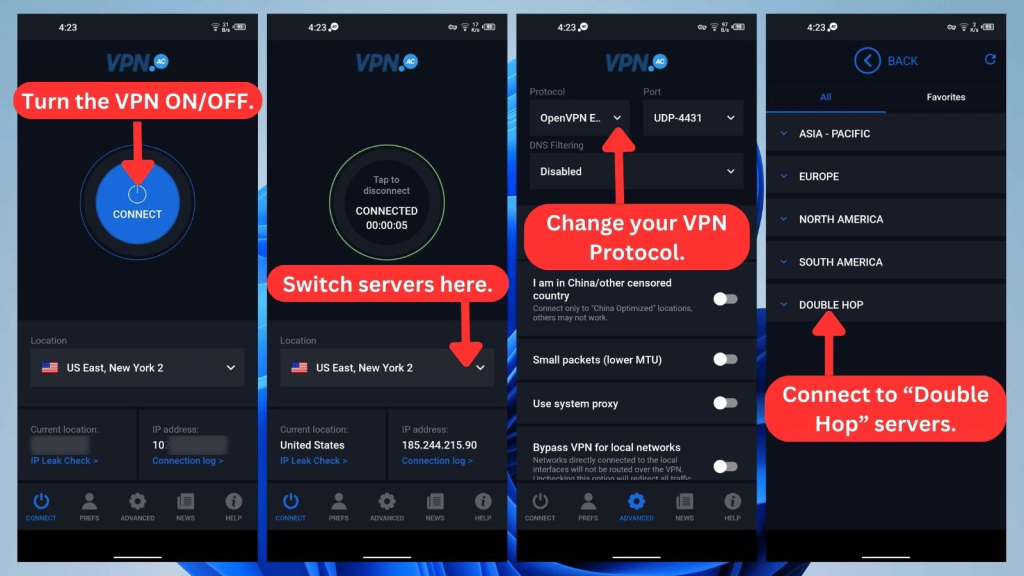
However, the iOS app is missing the “Advanced” tab. That’s why you won't find features like Exclude apps (split tunneling), DNS filtering, or protocol selection on iOS devices.
How Well Does VPN.AC Work on Browser Extensions?
VPN.AC works well on browser extensions for Chrome, Firefox, and Opera. The browser extension is called SecureProxy.
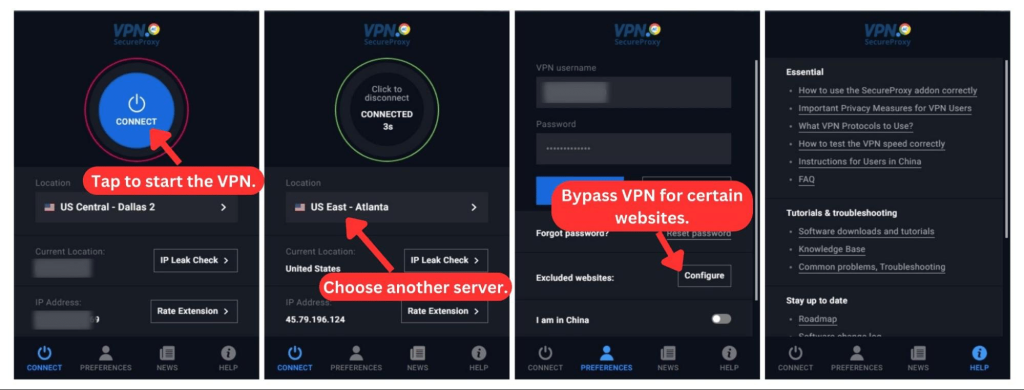
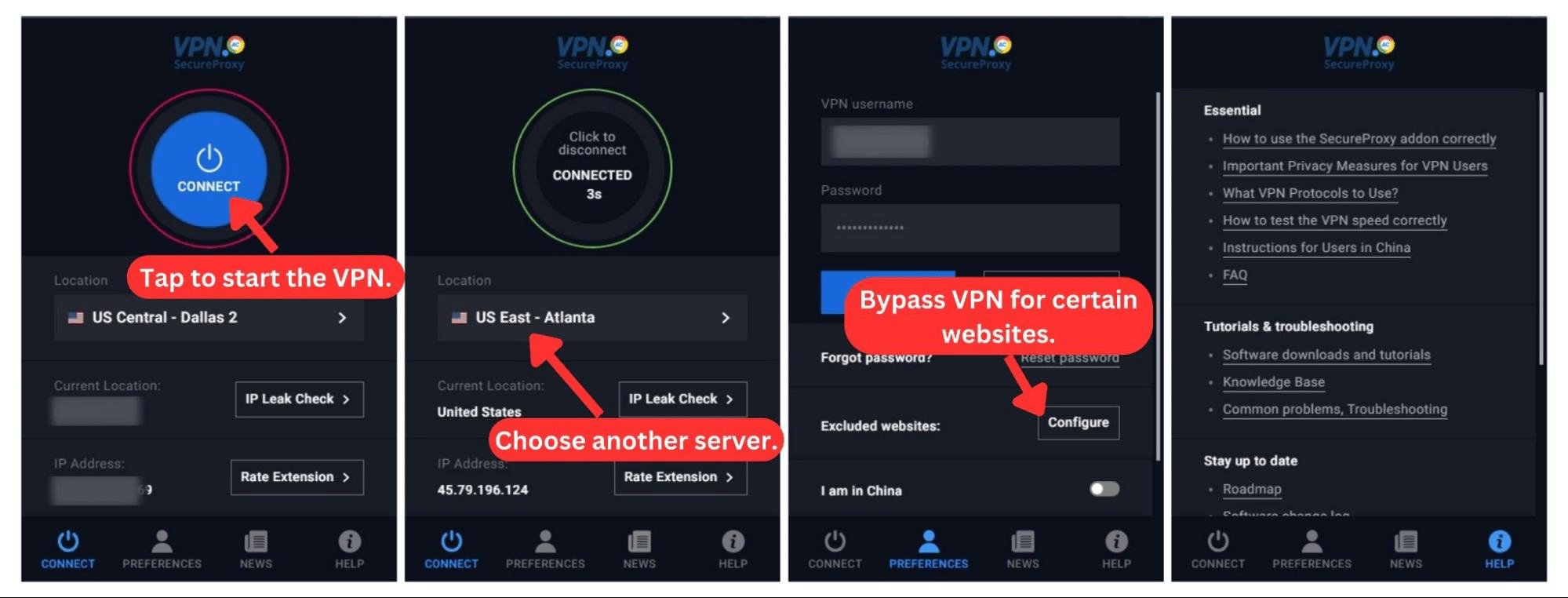
Since it uses the same UI across other devices, you'll find SecureProxy easy to navigate as well. There’s no configuration needed, and there are no complex features either. It does have split tunneling, which is absent on desktop platforms and iOS devices.
Media Streaming, Torrenting, and Gaming Support
You can unblock any popular media streaming platform you want with VPN.AC. P2P files are also easy to download, although the VPN provider needs to do better with gaming support. Our Score: 8/10
Next, we'll test VPN.AC's performance when it comes to streaming content, downloading torrent files, and gaming activities.
Is VPN.AC Good for Streaming?
Yes, VPN.AC is good for streaming. During our tests, we were able to watch content on US-based services like Netflix, Disney+, Max, and Hulu. Plus, we streamed reliably despite its lack of streaming-optimized servers.
We extended our tests to non-US-based streaming services and successfully streamed on platforms like CBC, Channel 4, and BBC iPlayer. Nevertheless, we wouldn't say this is a great VPN for streaming, given its small server network.
Here’s a list of popular US-based streaming platforms that this VPN consistently unblocks.
VPN.AC also unblocks international and non-US streaming platforms, such as:
Is VPN.AC Good for Torrenting?
Yes, VPN.AC is good for torrenting. It has 10 P2P-optimized servers for torrenting activities in mostly European countries apart from Canada. Although it doesn’t support port forwarding, we were impressed that it has a SOCKS5 proxy for faster speeds on qBittorrent, uTorrent, and Deluge.
We also turned on the kill switch when torrenting, and we recommend you do the same. This way, your identity is protected in case the VPN connection drops.
However, VPN.AC isn’t a contender for the best torrent VPN. This is largely due to its lack of speedy servers and IP logging policies. Still, we had no issues downloading torrent files, although it took longer than we expected.
Is VPN.AC Good for Gaming?
Yes, VPN.AC is a good VPN for gaming. You can play on desktop and mobile devices, but gaming consoles aren't directly supported. A handy workaround is to install VPN.AC on your router and then connect your gaming console.
Also, there are no bandwidth limits, so you can play to your heart's content. Instead of having optimized servers for gaming, the VPN gives us P2P servers, which are handy when downloading games.
However, its ping times and latency aren’t very impressive. To support competitive online gaming, VPN.AC must improve browsing speeds, reduce ping, and expand its server network. Only then can we recommend it for even the most intense games.
Security & Privacy
VPN.AC has many protocols to keep you secure online, but it logs some data, which means it isn't fully private. Our Score: 6/10
Next, we must determine how much you can trust this provider with your data. To do that, we'll take a look at its protocols, logging policy, and IP/DNS leak prevention measures.
VPN.AC Protocols
VPN.AC has five VPN protocols, each with its strengths and weaknesses. Although there are many protocols, VPN.AC relies strongly on OpenVPN across most device platforms. Other protocols, such as WireGuard, may require manual configuration using the WireGuard official app or the Passepartout VPN app.
Here's a brief overview of VPN.AC's protocols across various devices:
- OpenVPN: This protocol is available on all devices except iOS and has four variants. OpenVPN ECC gives you the best mix of speed and security, while OpenVPN XOR is great for bypassing Internet censorship. Also, the 128-bit AES variant gives you faster speeds, but the 256-bit AES protocol is far more secure.
- PPTP: This is an obsolete protocol and is the most vulnerable of the bunch. If you must use it, ensure you're not performing sensitive tasks.
- L2TP/IPsec: While this is more secure than PPTP, it's not as secure as other available protocols. However, you'll get good browsing speeds on this protocol. Still, we recommend choosing OpenVPN instead.
- IKEv2/IPsec: This is the only protocol the iOS app supports by default. It's super fast and also more secure than L2TP/IPsec.
- WireGuard: You have to set up this protocol manually on all devices, but VPN.AC provides a step-by-step guide. It's worth it, though, as you'll get great speeds and reliable security.
VPN.AV supports WireGuard, but it hasn't implemented it in its applications. That’s why you might not see this protocol on desktop and mobile apps. But by following its manual setup guides, we installed the WireGuard app and connected to VPN.AC's servers seamlessly.
Does VPN.AC Keep Logs?
Yes, VPN.AC keeps some logs when you access the VPN but it doesn't monitor or log your browsing activities. It logs your original public IP address and total bandwidth transferred. It also records VPN session start and end times.
The provider claims it uses these logs to identify potential attacks on its service and for fraud prevention. Also, according to its Privacy Policy, these logs are automatically deleted once you terminate your session.
Overall, it's also difficult to fully trust VPN.AC since an independent third party hasn’t audited its claims.
Does VPN.AC Leak/Expose Your Private Data?
No, VPN.AC doesn't leak your personal data. Although it isn't perfect, the provider obviously cares about keeping you anonymous.
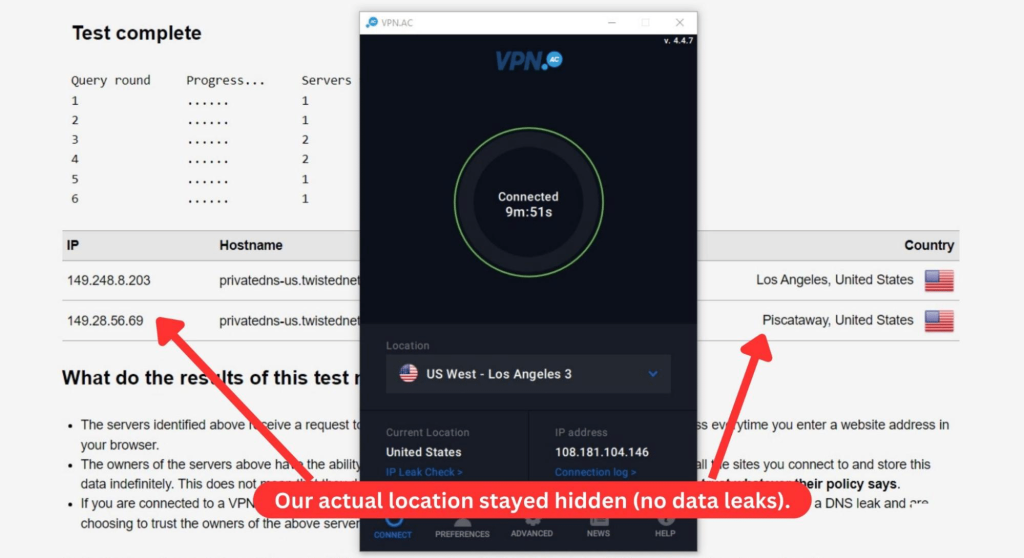
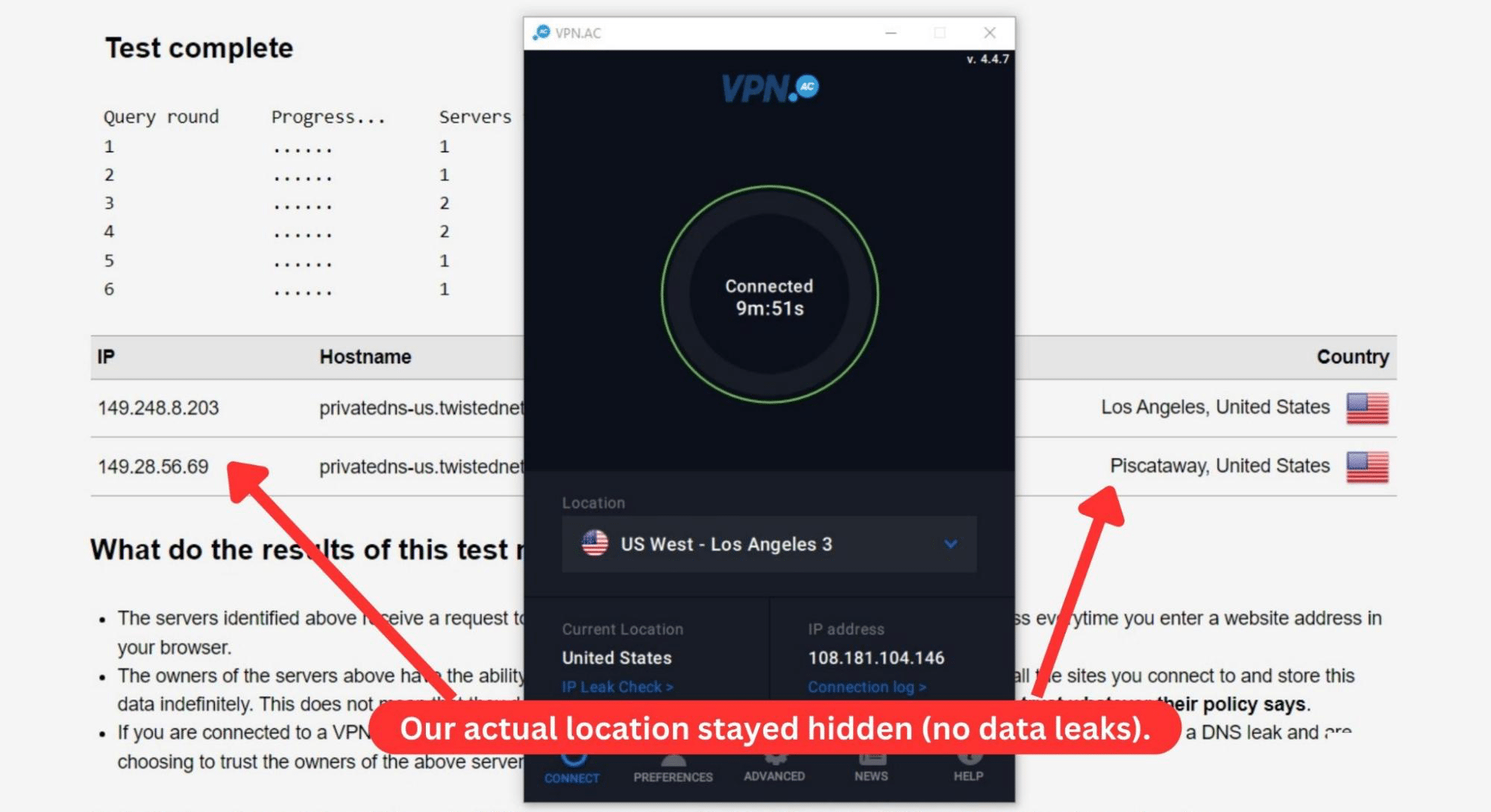
To confirm this, we conducted leak tests to determine if anyone else could see our real location. As you can see in the screenshot above, our IP address and actual location stayed hidden throughout the test.
Speed & Performance
VPN.AC dropped our speeds by 62% on average, which is poor by our standards. Our Score: 5/10
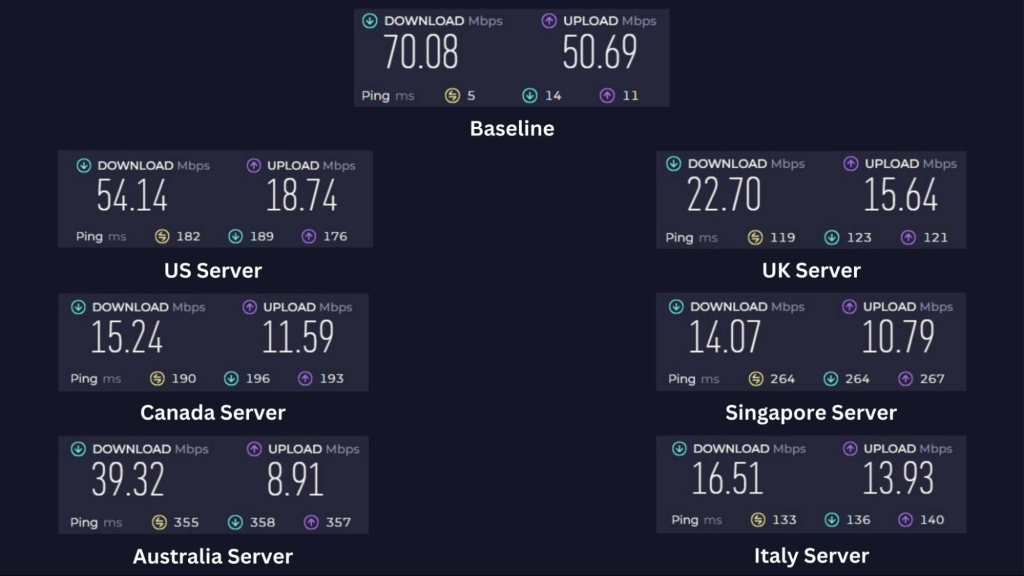
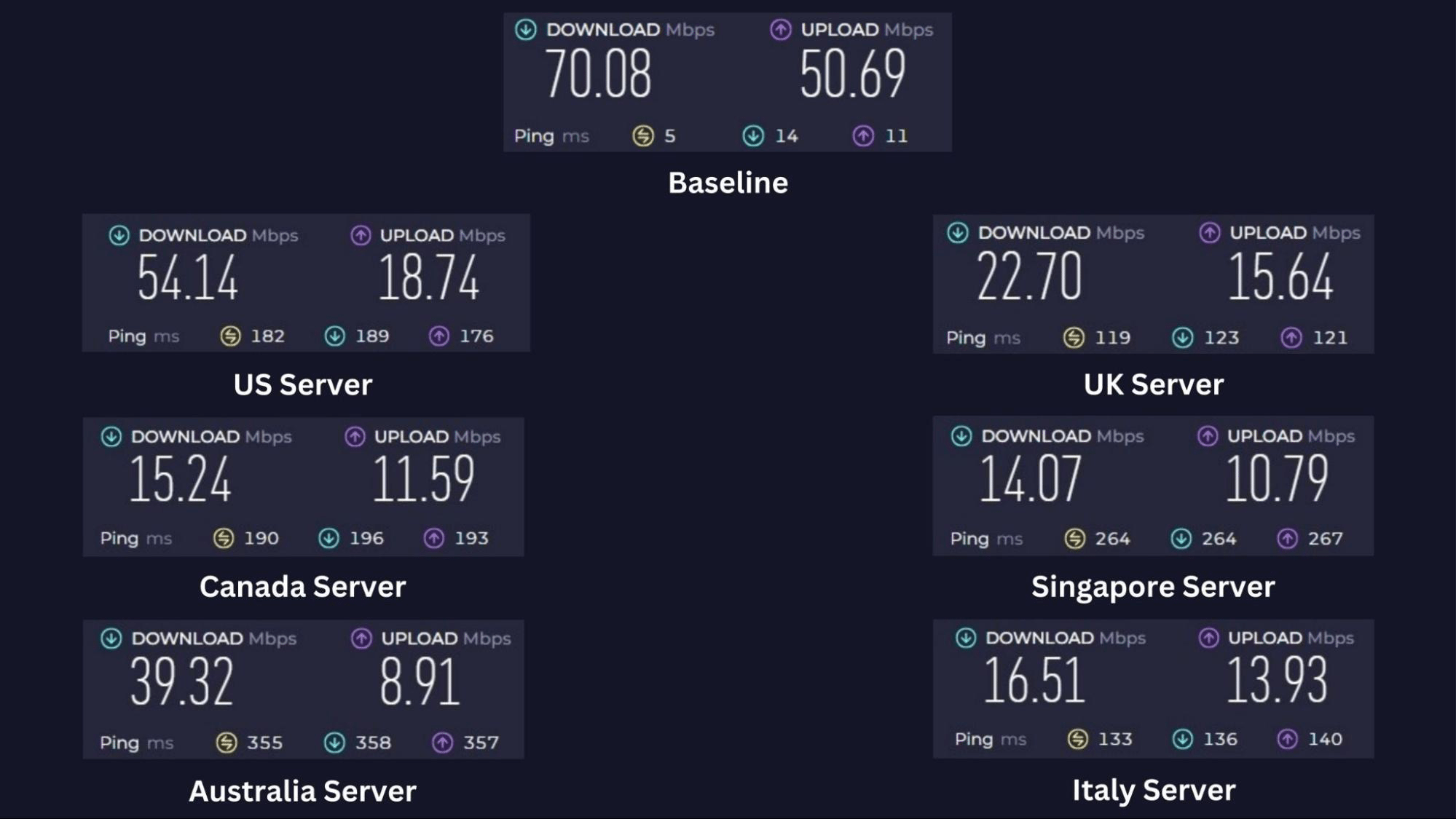
Our VPN.AC review takes server speeds into account. We tested our unencrypted network speeds first, and then we tested multiple locations after connecting to a server.
Before we connected, we got a baseline download speed of 70.08 Mbps and an upload speed of 50.69 Mbps. Keep in mind that we generally expect some speed reduction after we connect to any VPN.
That said, here are the results of our server speed tests.
- USA Server (New York): Our first connection test started great, with a 23% reduction in download speed. The tests showed a speed drop to 54.14 Mbps download speed and 18.74 Mbps upload speed.
- UK Server (Manchester): This much closer server didn't meet our expectations, as our download speed was cut by 68%. The fastest UK server could only manage a 22.70 Mbps download speed and an upload speed of 15.64 Mbps.
- Canada Server (Toronto): We tested all Canadian server locations but only peaked at a low 15.24 Mbps download speed and 11.59 Mbps upload speed. This represents a 78% download speed drop.
- Singapore Server (Singapore): The pattern continued with another 80% speed drop on the only Singapore server location. We could only download at 14.07 Mbps and upload at 10.79 Mbps.
- Australia Server (Sydney): This distant server weirdly performed better, albeit with a 44% speed drop. Our test showed 39.32 Mbps download and 8.91 Mbps upload speeds.
- Italy Server (Milan): Lastly, this Milan server reduced our baseline speeds by about 76%. We downloaded at 16.51 Mbps and uploaded at 13.93 Mbps.
Based on the results, we can say that VPN.AC has a sluggish speed performance. Our speeds dropped by 62% on average, which is a far cry from the performance of the fastest VPNs.
Customer Support
There’s no live chat, but you can contact a support agent through emails and a ticketing system. Moreover, there's tons of self-help material for assistance. Our Score: 7/10
VPN.AC lacks a live chat feature, which we have come to expect from premium VPNs. Instead, it provides other alternatives, all of which we'll evaluate to see how well they actually help you.
Here are its available customer support channels:
- Tutorials: There are tons of manual configurations for different protocols on VPN.AC. Its tutorials offer useful step-by-step tutorials for setting them up.
- FAQs: Here, you'll find concise answers to more than 30 questions on security, compatibility, and general VPN queries.
- Knowledge Base: This is where you go for more in-depth answers to technical questions, installation guides, and troubleshooting tutorials. We found the depth of the articles to be impressive, and there were also some video guides.
- Email Support: You can reach a support agent via Email support through the Contact page on the VPN's website.
- Ticketing System: This is as close to live support as it gets, as you get fast and helpful responses from knowledgeable staff.
- TeamViewer Remote Support: VPN.AC's team can connect to your device over TeamViewer for complex setups and troubleshooting. However, according to a support agent, this is only available in rare circumstances.
Pricing
VPN.AC is fairly priced for its services, and its long-term plans have huge savings. There's also a (paid) trial account available. Our Score: 8/10
VPN.AC has four subscription plans. However, if you want to save money, you should consider its longer, hugely discounted plans. This section will explore what you can expect to pay for this service.
How Much Is VPN.AC?
VPN.AC costs $9 per month. Apart from that, you can also buy its 3-month, yearly, or 2-year plan. Naturally, you save more on longer plans, which is why we recommend its 2-year plan at only $90.
There’s no difference in features across its plans. You can use all protocols and supported apps without any speed or server switching limits. Also, you get up to 12 simultaneous device connections: 6 using OpenVPN or IPsec and 6 using WireGuard.
There's no free trial, but you get a 7-day money-back guarantee on all its plans. Alternatively, VPN.AC lets you test the service for one week with 3 simultaneous device connections for only $2.
Here's the essential information you should know:
- 1-Month Plan: This subscription plan costs $9 monthly and offers no cost savings. In total, you pay up to $108 per year.
- 3-Month Plan: At $8 monthly and $24 every three months, this plan saves you 11% compared to the 1-month plan.
- 1-Year Plan: Its one-year plan costs $58, coming down to $4.80 per month. You do save up to 47% over the monthly plan, but this isn’t the best deal.
- 2-Year Plan: This is the best plan, with a whopping 58% discount compared to the monthly plan. You only pay $90 for two years of this service.
The 2-year plan costs $90 which comes down to $3.75 per month, saving you 58% off the regular monthly plan. VPN.AC will accept credit cards, gift cards, and PayPal payments as well as many cryptocurrencies.
You can also use region-based payment services like UnionPay and iDeal. However, keep in mind that it only has a short 7-day refund window.
Final Thoughts - Is VPN.AC Good?
Yes, VPN.AC is a good VPN. Beyond that, it's a powerful VPN with strong encryption that bypasses China's dreaded Internet firewall. Right out of the box, we were also able to unblock geo-restricted US and non-US streaming services and watch content without any buffering.
When we had questions about the service, we got helpful answers from its support. Plus, our tests went smoothly as it provides native apps and allows 12 simultaneous device connections.
However, we had to set up some protocols manually on those devices. Moreover, its limited server network had slow speeds, which meant that we had to do some server hopping to find blazing-fast servers. We also discovered that it logs some data while we're connected.
So even though we think VPN.AC put in a good effort, we strongly recommend NordVPN for its broader server network, better safety features, and overall reliable performance.
PROS
- Privacy-friendly jurisdiction.
- User-friendly interface.
- Wide device coverage.
- Up to 12 simultaneous connections.
- Solid VPN protocols.
- Works in China.
- P2P-optimized servers.
- Solid unblocking capabilities.
- Helpful customer support.
- Affordable long-term plans.
CONS
- Logs usage data temporarily.
- Small server network.
- Manual protocol configurations.
- 7-day money-back guarantee.
- No live chat.
- Slow speed performance.
| Review Summary VPN.AC is a good choice, especially for unblocking sites and reliable use in China. Its affordable long-term pricing also adds to its appeal. However, be aware of its logging practices if privacy is a primary concern for you. | 7.2 Overall Score | ||
| Background, Jurisdiction & Reputation | 9 | ||
| Supported Platforms & Devices | 10 | ||
| Installation & Initial Configuration | 8 | ||
| Prominent Features | 8.5 | ||
| Server Count & Infrastructure | 1.5 | ||
| UI/UX Design & Ease of Use | 8 | ||
| Media Streaming & Torrenting, and Gaming Support | 8 | ||
| Security & Privacy | 6 | ||
| Speed & Performance | 5 | ||
| Customer Support | 7 | ||
| Pricing | 8 | ||