When you purchase through links on our site, we may earn an affiliate commission. Here’s how it works.
Trust.Zone VPN Review 2026


Our experts have reviewed 53 VPN providers, which were put through extensive rounds of testing. To learn more about that process, here’s how we review VPNs, where we explain our criteria and our policy of being fully transparent.
Trust.Zone VPN is a privacy-focused VPN service launched in 2014. It operates from the Seychelles, which doesn't belong to any data-sharing alliances. It also follows a strict no-logs policy and has a warrant canary to warn its users of any government requests.
However, despite its robust privacy features, Trust.Zone VPN has areas for improvement. While offering online security with AES-256 encryption, leak protection, dedicated IPs, and more, it may encounter challenges in unblocking popular streaming platforms.
Moreover, Trust.Zone VPN boasts a proven track record of zero data breaches, showcasing its reliability and commitment to user safety. Despite its merits, it didn't make our best VPNs list. Additionally, it's good enough for casual gaming and torrenting.
To give you an overview of its main features, here's a table that summarizes them.
This Trust.Zone VPN review will examine the VPN’s design, supported platforms, protocols, speed performance, and much more. To better understand our review process, please check out our guide on how we review VPNs.
Background, Jurisdiction & Reputation
Trust.Zone VPN, headquartered in Seychelles, is a favorable privacy jurisdiction given the country's remote location. The VPN also has an impressive history of zero data leaks. Our Score: 9/10
A VPN must be trustworthy. Hence, a background check is crucial when choosing or testing a VPN service. We prioritize the VPN provider's jurisdiction and examine any history of past data leaks.
Where Is Trust.Zone VPN Based?
Trust.Zone VPN is based in Seychelles and is operated by Internet Privacy Limited. Seychelles isn't affiliated with mass surveillance groups like the 5/9/14 Eyes Alliance, which makes it an ideal headquarters for a VPN service.
Trust.Zone is also affiliated with Tersys Group OÜ. According to its Terms of Service, Trust.Zone authorizes Tersys Group OÜ, located in Estonia, to handle customer payments for the websites, software, and other Trust.Zone services.
It's standard for VPNs in foreign jurisdictions to collaborate with other entities for payment processing. Estonia, where Tersys Group OÜ is based, is also not part of the Eyes Intelligence Alliances.
Did Trust.Zone VPN Leak Personal Data in the Past?
No, Trust.Zone VPN has never leaked personal data. While many VPN providers have faced data breaches in the past, Trust.Zone has been successful in its commitment to protecting user data.
This remarkable track record is a crucial indicator for top VPN services when it comes to privacy. It reassures users that their sensitive information remains safe at all times. Trust.Zone VPN is able to achieve this with its robust security features, strict no-logs policy, and privacy-focused approach.
To demonstrate trustworthiness, the service also uses a warrant canary – a statement notifying users if the company has received government requests for user data. If the statement isn't updated or removed, it suggests a compromise, indicating potential privacy and security risks for users.
Therefore, the VPN provider remains a dependable VPN service in an increasingly interconnected world.
Is Trust.Zone VPN Safe?
Yes, Trust.Zone VPN is safe to use. To protect user data, it uses military-grade AES-256 encryption, which ensures that none of your data can be decoded by anyone else.
The service offers various encryption options by supporting numerous secure protocols, such as OpenVPN, L2TP/IPsec, IKEv2, and WireGuard. Furthermore, Trust.Zone adheres to a stringent no-logs policy, guaranteeing that user activity, connection timestamps, and browsing history aren’t tracked or kept.
While Trust.Zone hasn’t disclosed information about third-party audits, its impeccable track record of zero data leaks attests to its commitment to user privacy and security.
Supported Platforms & Devices
Trust.Zone provides extensive coverage for both popular and lesser-known platforms. This ensures you can protect your data across more devices than usual. Our Score: 9/10
A wider device coverage means you are safer across multiple platforms. Here's a table detailing the devices supported by this VPN.
Trust.Zone VPN works on various devices, including mobile phones, computers, routers, and tablets. Additionally, it provides browser extensions for Chrome and Firefox, ensuring privacy protection while utilizing public Wi-Fi networks. Microsoft Edge, however, isn’t supported.
Also, Trust.Zone only offers dedicated apps for Windows, iOS, and Android platforms. Manual setup guides are available on the website for macOS and Linux users. These guides, termed 'Connection Wizards,' provide step-by-step instructions. However, some non-tech-savvy users may find them challenging to follow.
Trust.Zone VPN lets you connect 3 devices at once, except for the 2-year plan, which allows 5. If you need more connections, you can add them in increments of 3. By default, the order page sets it to three, but you can choose more.
Installation & Initial Configuration
You don't need technical knowledge to download, install, and configure Trust.Zone. However, setting it up on some devices requires manual configuration. Our Score: 7/10
To get started, you need to subscribe to Trust.Zone. Installing Trust.Zone on Windows was straightforward. If you've downloaded software from the Internet before, you'll find the process seamless. Despite its ease on Windows, iOS, and Android devices, setting it up on other devices proved to be more challenging.
Since there’s no dedicated native app for macOS, you'll need to download the Tunnelblick OpenVPN client. Though the setup process with Tunnelblick isn’t overly complex, it’s undoubtedly less convenient than installing a native macOS app.
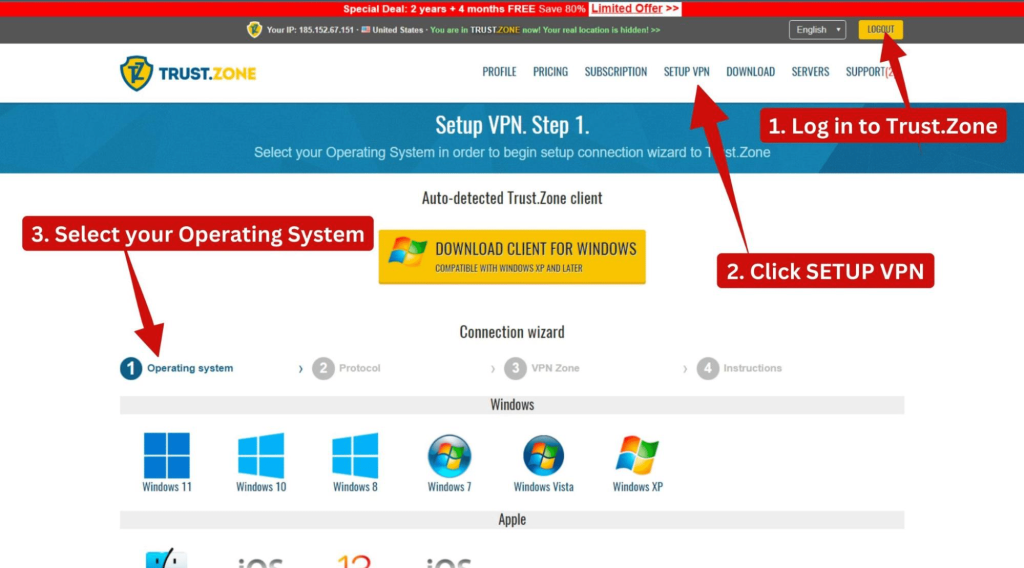
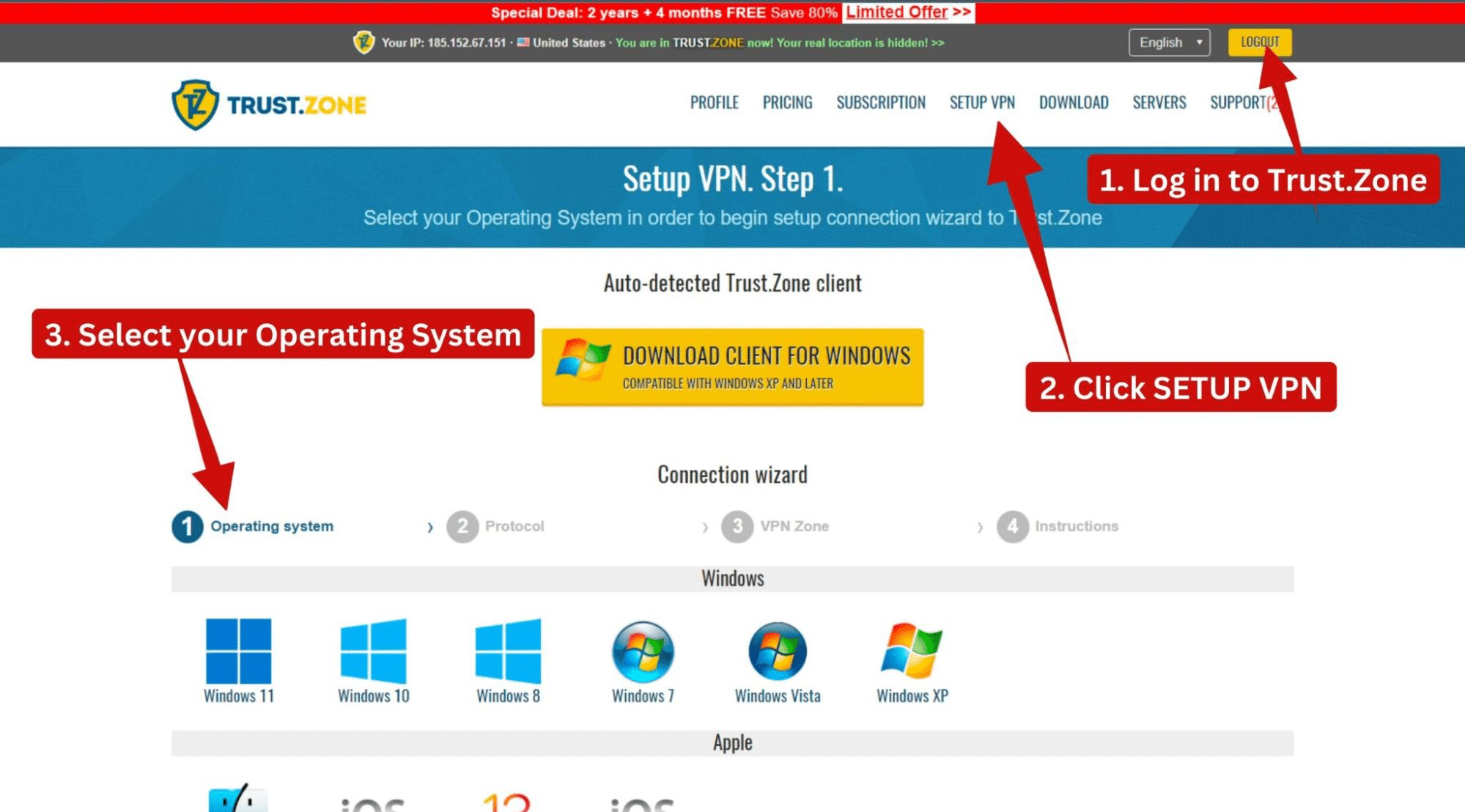
To begin the download process, we logged in to the website with our subscription details and clicked on the "Setup VPN" option. Several options were displayed, and we chose Windows 11. Windows versions as far back as Windows XP are supported as well.
After downloading and installing the file, launch the app and sign in using your credentials. The app's interface is surprisingly small, but you can make it more convenient by resizing it. Head to Settings > Other Settings > Double Size. This adjustment provides a better view and makes navigating the app a breeze.
To connect to the nearest server, just click on the prominent yellow shield in the center. Once connected, the shield will change color from yellow to green, confirming your VPN connection. If you wish to connect to other servers, simply choose from the server list.
Overall, downloading and installing native apps was simple, and connecting to servers was smooth. Others were less direct but relatively easy.
Prominent Features
Trust.Zone lacks advanced features, but its suite of features is good enough for most VPN users. While it does allow port forwarding, split tunneling and ad-blocking features aren’t included. Our Score: 7/10
This section explores the various standard and advanced features that this VPN offers. Many of the features are designed to keep you safe while browsing, and others protect your data from bad actors.
- Kill Switch: Unlike its Windows app, Trust.Zone's Android, iOS, and macOS apps don’t have a built-in kill switch. To use this feature on Mac, you need to install Tunnelblick and set "On unexpected disconnect" option to "Disable network access." On Android, you need to manually enable "Always-on VPN" and "Block connections without VPN" options. These steps will block all network traffic if the VPN disconnects.
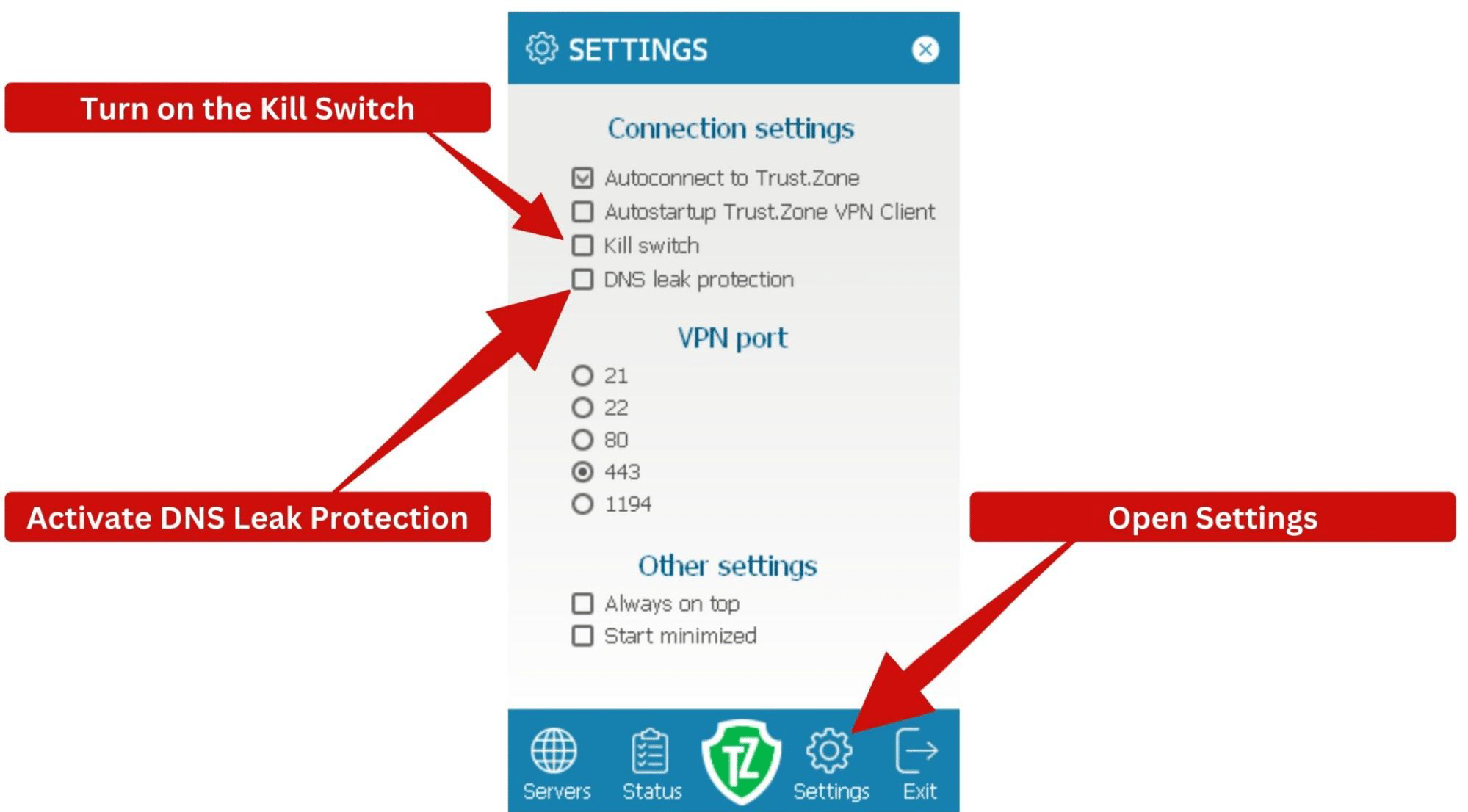
- DNS Leak Protection: Trust.Zone VPN ensures your DNS requests remain within the VPN tunnel and don't leak, protecting you from sneaky Internet Service Providers. To enable this feature on Windows, go to Settings > Connection Settings > DNS leak protection.
- Port Forwarding: Trust.Zone VPN allows you to open specific ports on devices within your local network to devices on an external network, like the Internet. In doing so, you bypass your firewall's limits for better speeds. However, using this feature comes at an extra cost. It's also exclusively available in certain countries or specific servers.
- Dedicated IPs: With Trust.Zone, you can get your own dedicated IPs. These unique IPs are less likely to be blocked, and they work faster. It's only available in selected locations, though.
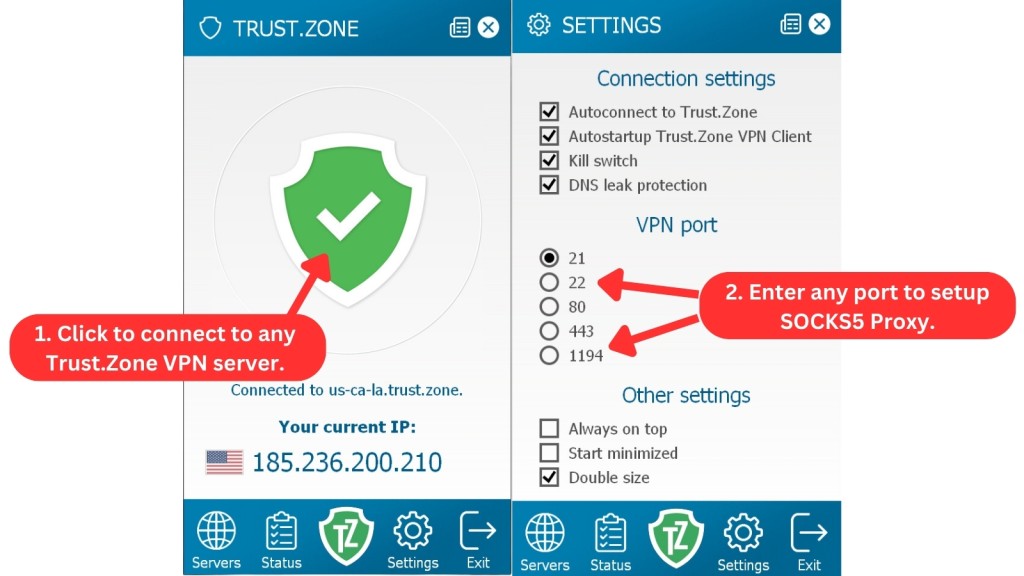
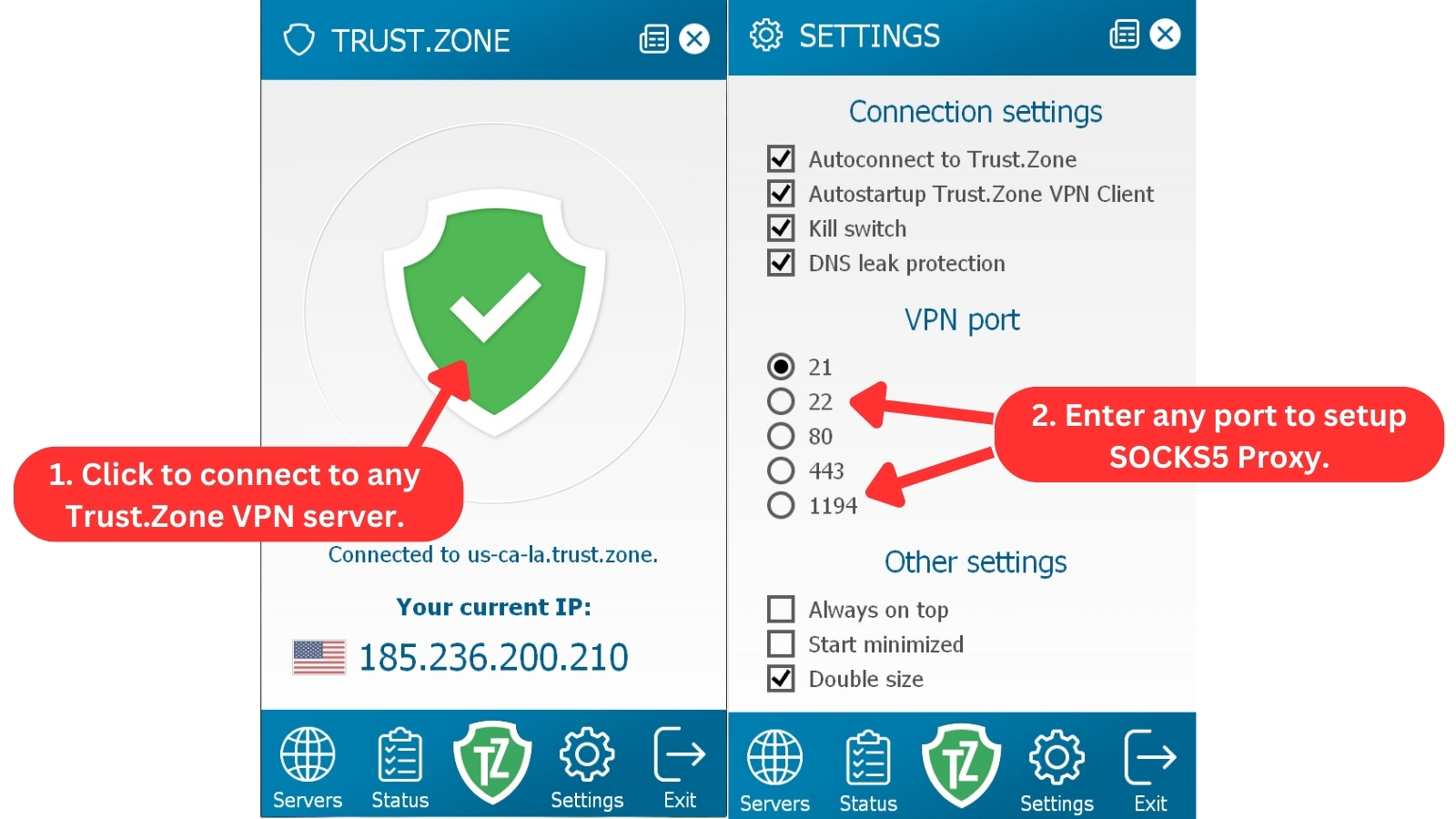
- SOCKS5 Proxy: Trust.Zone takes full advantage of the UDP protocol to hide your IPs from online services so you can bypass censorship and get better P2P performance. Every server on Trust.Zone supports SOCKS5 - just connect to a server and enter any port to enable the feature.
- DDoS Protection: Trust.Zone analyzes your traffic patterns to recognize and stop abnormal traffic from cybercriminals seeking to force you off the Internet. DDoS attacks can cause website downtime, financial losses, and reputational damage for businesses, while individuals may face service disruptions, privacy risks, and data breaches. You can get this feature for a minimal fee of $0.99/month.
- WebRTC Leak Protection: This feature comes into play when using Trust.Zone’s browser extensions. It’s great at stopping your IP address from leaking to the websites you visit.
Before, Trust.Zone VPN offers the Double VPN feature. However, we recently learned from their customer support that they've temporarily stopped offering this feature due to stability issues. They assured us that they plan to reintroduce it once it's more stable.
Server Count & Infrastructure
Compared to top-rated VPNs, Trust.Zone falls short in this area, with only 162 servers in 91 locations across 37 countries. Our Score: 2.5/10
Having a wide selection of VPN servers is crucial. It enables you to effortlessly switch to a new IP associated with a different country, granting you access to region-specific websites that would otherwise be restricted.
Compared to VPNs with the most servers, Trust.Zone VPN operates on a notably lower scale, with only 162 servers.
Although these servers aren't as numerous, they're strategically placed, focusing significantly on North America and Europe. And while it may have a less prominent presence in Asia and South America, it does offer servers in those regions.
Additionally, its servers are available in other countries with limited coverage, such as Hong Kong and India. Trust.Zone claims to own many of its servers but rents servers in less frequently used locations.
Despite its relatively small network size, we experienced consistent and reliable connections without sudden disruptions or significant slowdowns. If your server goes down, it will automatically switch to another server in the same geo-zone for a seamless connection. This is a feature that’s rare in many other VPNs.
UI/UX Design & Ease of Use
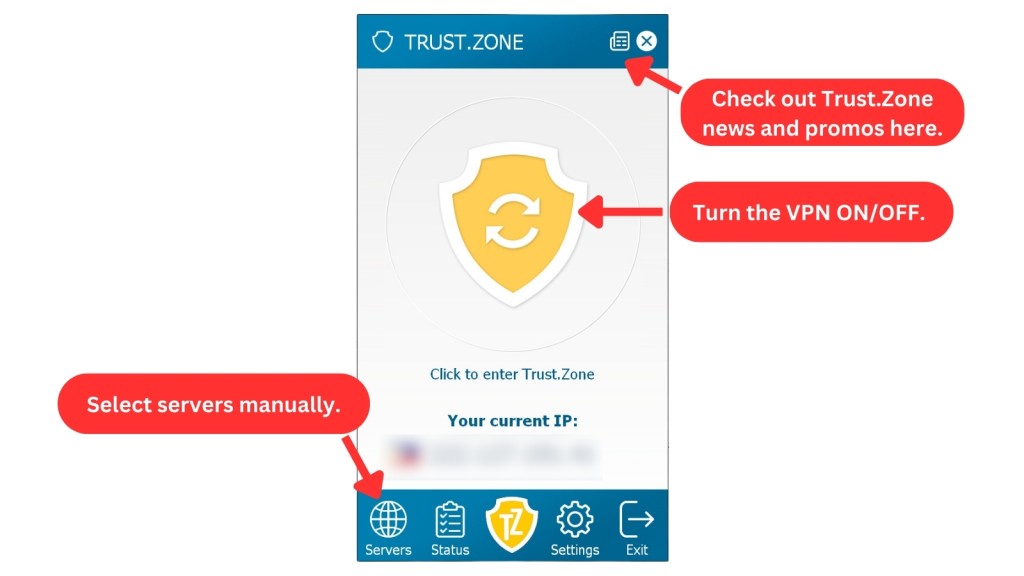
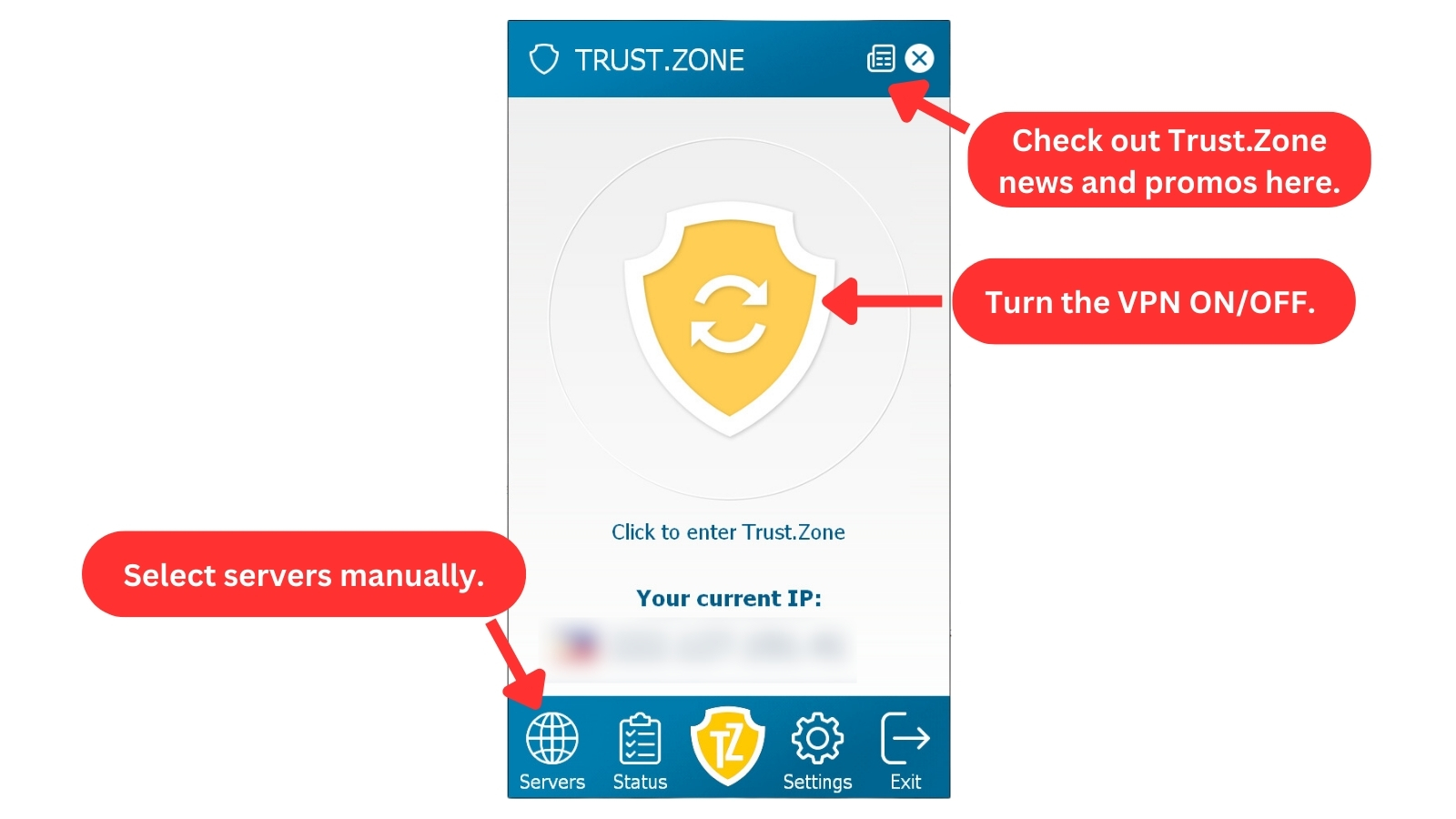
Trust.Zone is user-friendly and consistent across all devices, although it looks outdated. Our Score: 4/10
The UI is quite dated and reminiscent of a Windows XP interface. The app's window is also small. Its other major flaw is its lack of a server search box. Finding servers isn't that difficult because of how they’re grouped. But a server search feature would have made it more convenient.
Despite that, the app remains easy to navigate even for first-time VPN users. It also maintains the same interface on desktop and mobile apps, including browser extensions.
At the top, you'll find the VPN's name. Below that, you'll see the large main section that displays information based on your selected navigation. The bottom row hosts the app's five navigation options.
Here's a summary of all five navigation options on its desktop apps.
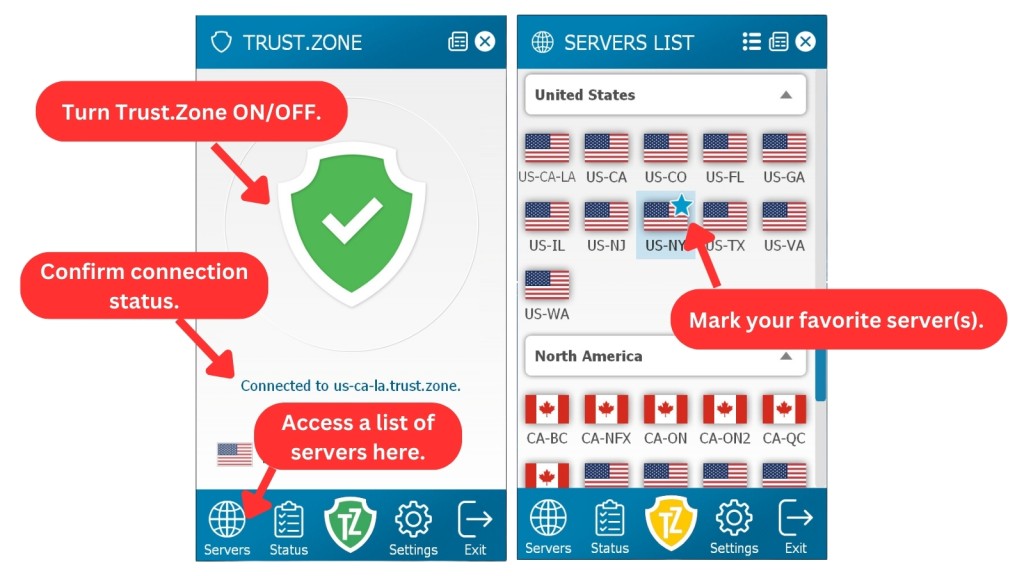
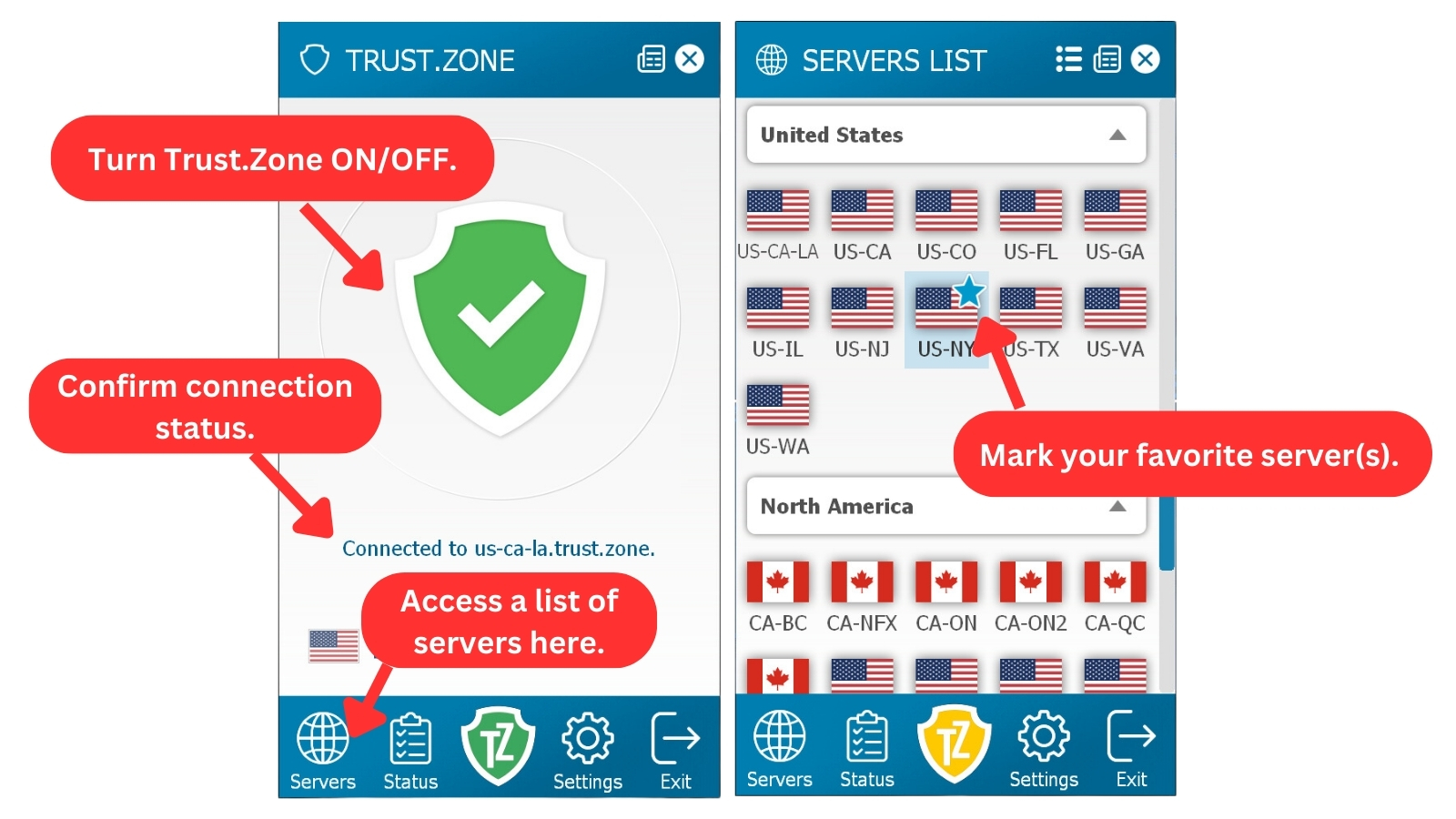
- Servers: Here, you can scroll through Trust.Zone's available servers, which are grouped by continent. However, a search box would have made finding servers twice as easy. Thankfully, you can mark and select your favorite servers, making them easier to find.
- Status: The app prominently displays the connection status, indicating whether the VPN is active. This visual cue ensures you know your privacy status at a glance. The kill switch's status is also visible on Windows in this tab. You also get info on your subscription, including username, expiration date, and data usage.
- VPN Logo: Clicking this logo allows you to connect to a VPN server. The shield button at the center will turn green when it's connected to a server. It’s also the app’s home screen and shows you your current IP and country.
- Settings: In this tab, you can choose to auto-connect, launch the VPN on system startup, and enable the kill switch and DNS leak protection. Then, you can select from different VPN ports (protocols) and play around with appearance options.
- Exit: This tab lets you easily close the Trust.Zone app at any time.
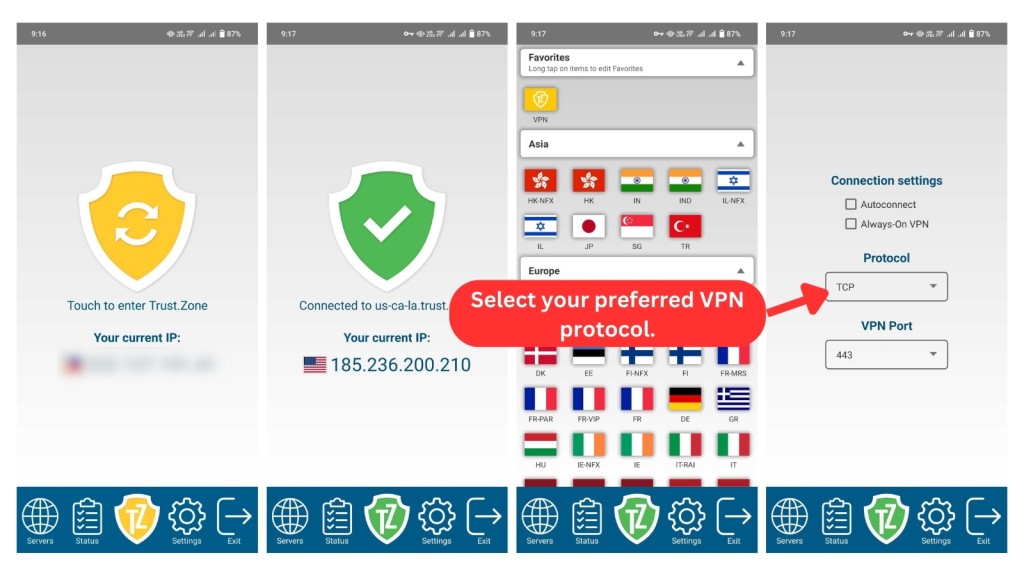
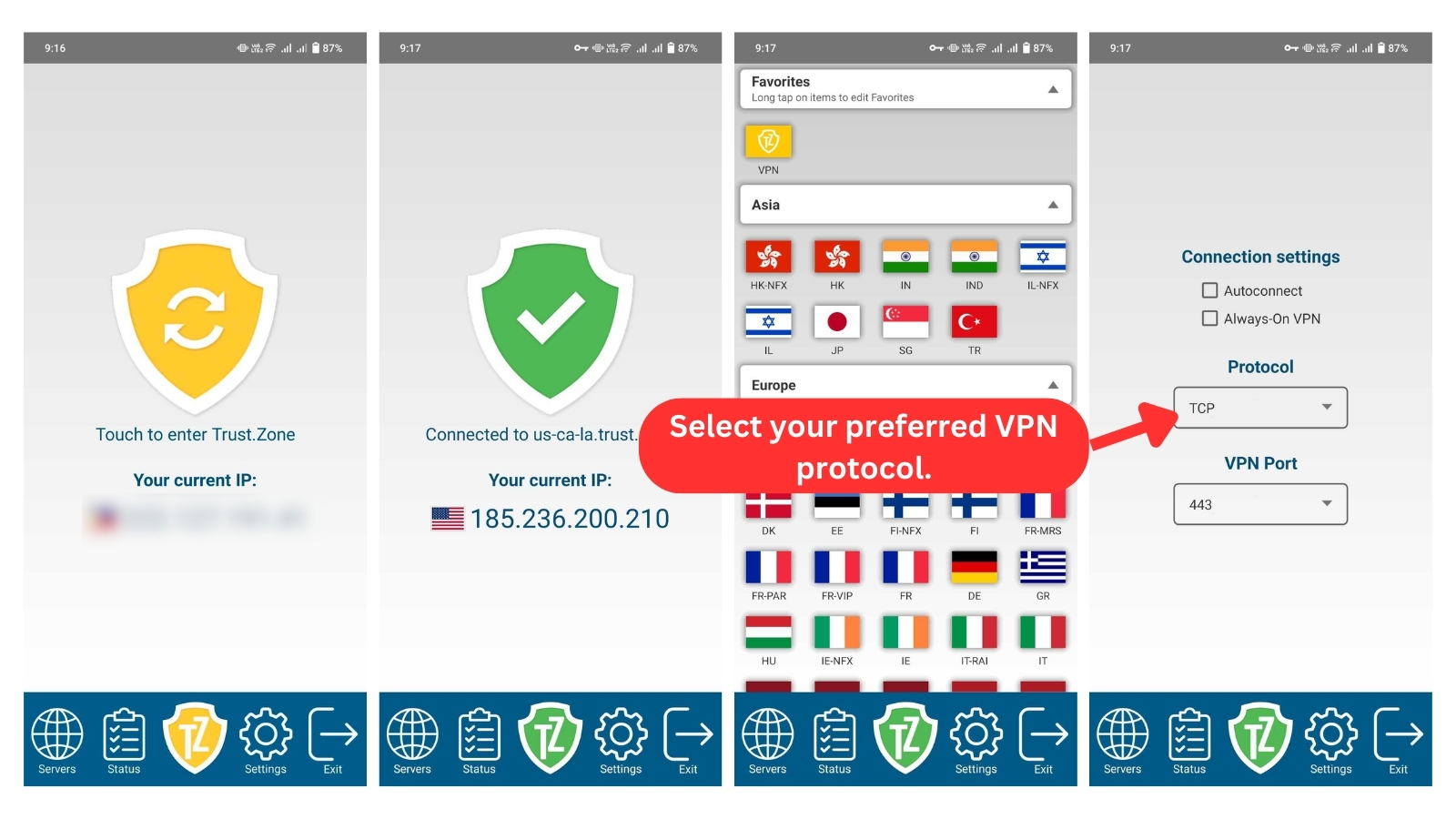
These navigation tabs are also available on mobile apps but with fewer connection settings. Moreover, Trust.Zone claims that Android 7.0 devices and newer versions now include a native kill switch. However, our inspection revealed otherwise - the Android app still doesn't have buttons for a kill switch, auto-start, and DNS leak protection. Similarly, the iOS app only features the "Autoconnect" setting.
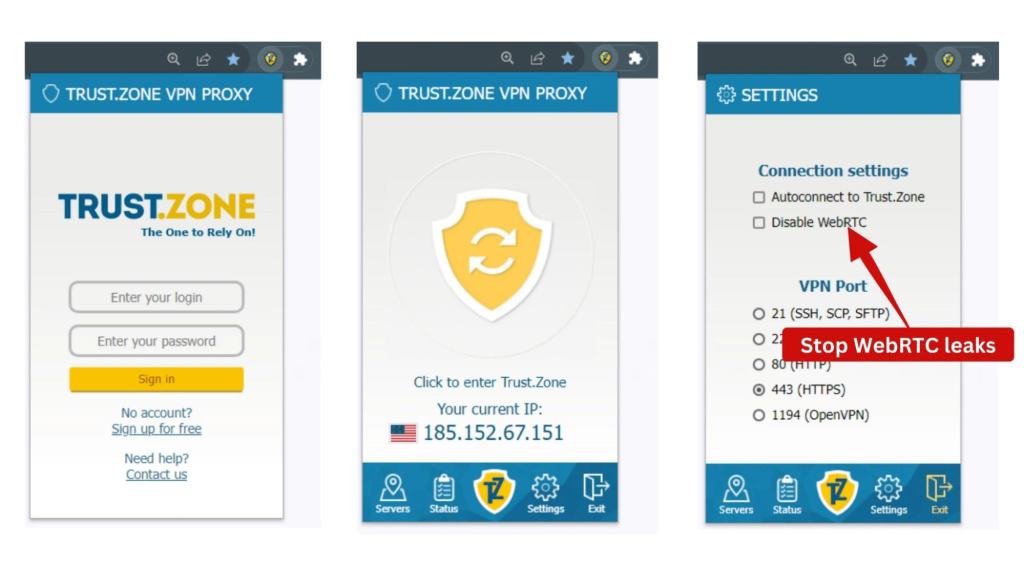
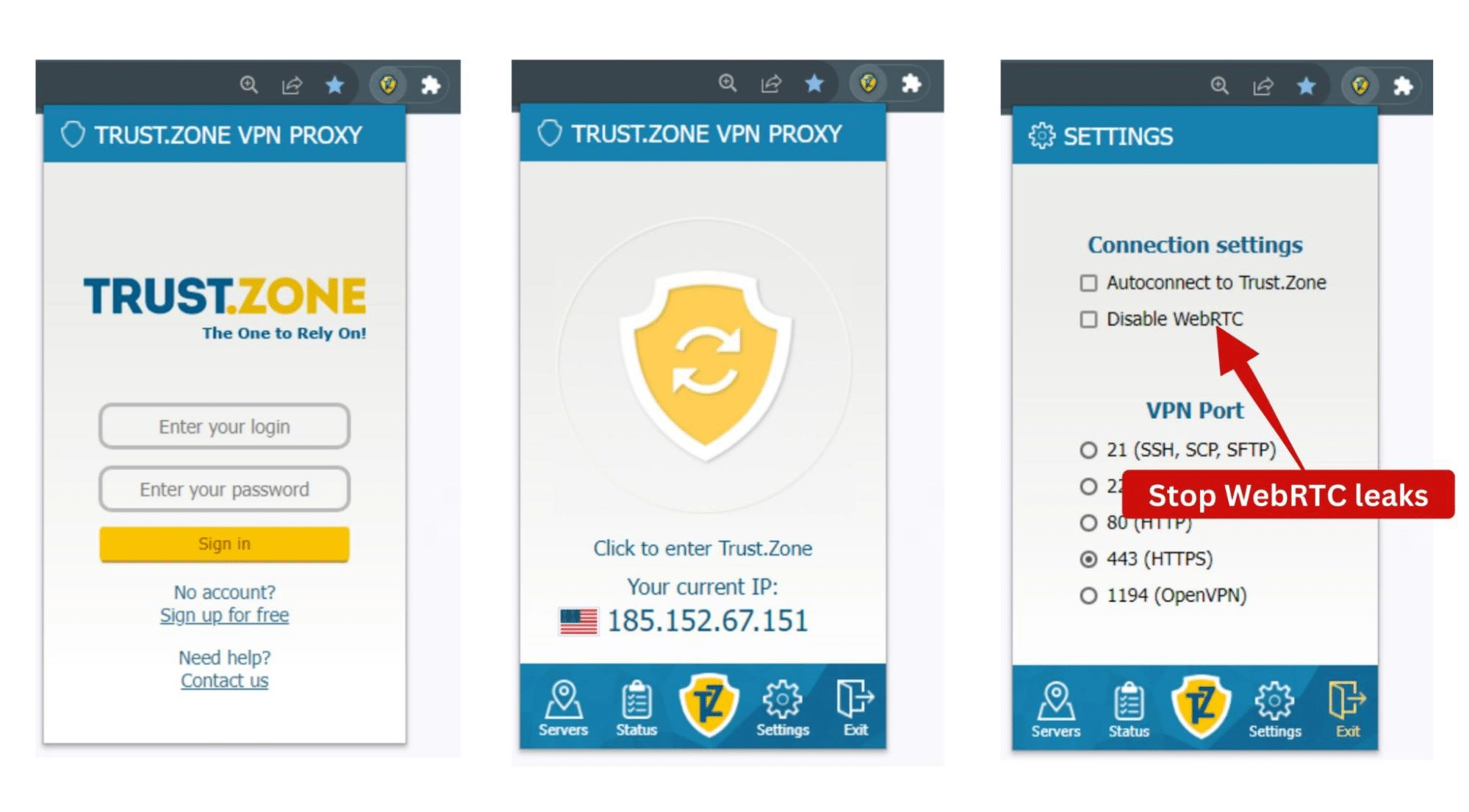
On its Chrome and Firefox extensions, you can easily disable WebRTC on the "Settings" page to better protect your anonymity.
Media Streaming, Torrenting, and Gaming Support
Trust.Zone struggled with unblocking streaming platforms, although it proved decent for torrenting and gaming. Our Score: 7/10
Most VPN users primarily access online content, including torrenting, streaming, and gaming. However, not all VPNs can provide a smooth and satisfying experience for these activities. Let's assess how Trust.Zone performs in this regard.
Is Trust.Zone VPN Good for Streaming?
Yes, Trust.Zone VPN is good for some streaming platforms. If you need a VPN that unblocks most streaming platforms, check out the best streaming VPNs we've tested lately.
With Trust.Zone, we could unblock US and non-US Netflix, Hulu, Prime Video, Paramount+, and Max. Most of its servers were able to unblock content as long as those servers were in countries supported by the streaming platforms.
However, other major platforms like BBC iPlayer, Disney+, and ESPN+ didn't budge. Not even the dedicated BBC iPlayer server in the UK, aptly named ‘UK-BBC’ in the app, could unblock BBC iPlayer. The platform simply reported that "BBC iPlayer only works in the UK" on all UK servers we tested. Sports fans are also out of luck, as Trust.Zone failed to unblock ESPN+.
Is Trust.Zone VPN Good for Torrenting?
Yes, Trust.Zone is a reliable VPN for torrenting, offering unrestricted P2P traffic on all its servers. It doesn’t keep logs, has good IP leak protection, and has no bandwidth limits, so you can seed and peer to your heart's content. However, it doesn't currently hold the title of the best torrent VPN.
Its port forwarding feature can also give you faster speeds than usual. The icing on the cake is its SOCKS5 proxy, which sends smaller data packets for better download speeds on peer-to-peer sites.
However, Windows users may find it more convenient, as it’s the only operating system with an integrated VPN kill switch. Although torrenting is possible on other platforms, we strongly advise against doing so without a kill switch. In the event of an unexpected VPN connection loss, your online activities may become exposed to your Internet Service Provider (ISP).
Is Trust.Zone VPN Good for Gaming?
Yes, Trust.Zone VPN is good for gaming. Although it's not the best gaming VPN, it has certain advantages, such as reducing the risk of DDoS attacks, accessing geo-restricted games, and providing additional privacy. However, faster VPNs might provide a better gaming experience since they have lower pings and speed reductions.
Trust.Zone can be a good choice for casual gaming or accessing specific game servers. But hardcore gamers with much to lose should explore VPN providers with a broader range of dedicated gaming servers and optimized speeds.
Security & Privacy
Trust.Zone offers multiple protocols to secure your online activities across different devices. Also, it doesn’t leak data. Our Score: 8/10
In our Trust.Zone review, we also evaluated how well the service keeps you safe online by analyzing its protocols, no-logs policy, and any signs of data leaks.
Trust.Zone VPN Protocols
Trust.Zone has a wide range of VPN protocols, but some protocols must be manually configured on specific devices. Here's what you can expect regarding VPN protocols if you buy this service.
Trust.Zone utilizes top-notch encryption standards, including AES-256-CBC cipher, SHA512 authentication, and a SHA-1 hash algorithm. This combination is the highest level of encryption available, rendering the VPN incredibly difficult to hack.
- OpenVPN: Trust.Zone offers this protocol on all its apps, which is a good thing. It’s renowned as the most secure method to circumvent firewalls, striking the perfect balance between browsing speed and your security.
- L2TP/IPSec: This alternative protocol is commendable and available on all platforms, but it's old. Hence, it's not the best for security and should be avoided since the service has better offerings.
- WireGuard: This is a more recent protocol and the fastest one Trust.Zone has. Although WireGuard is available on all its native apps, you have to manually download the configuration files.
- IKEv2: This protocol is particularly suitable for mobile devices, especially if you intend to stream online media. However, Trust.Zone only supports IKEv2 on Linux, macOS, and iOS platforms.
Does Trust.Zone VPN Keep Logs?
No, Trust.Zone doesn’t keep logs. The VPN provider adheres to a stringent no-logs policy.
It also doesn’t monitor, store, or retain any user activity logs, connection timestamps, or browsing history. The only personally identifiable info it stores about you is your email address during signup. However, it has yet to be audited by a third party.
Does Trust.Zone VPN Leak/Expose Your Private Data?
No, Trust.Zone VPN doesn’t leak or expose private data. Our leak tests showed no leaks, as Trust.Zone perfectly swaps our real IP and location with a new one.
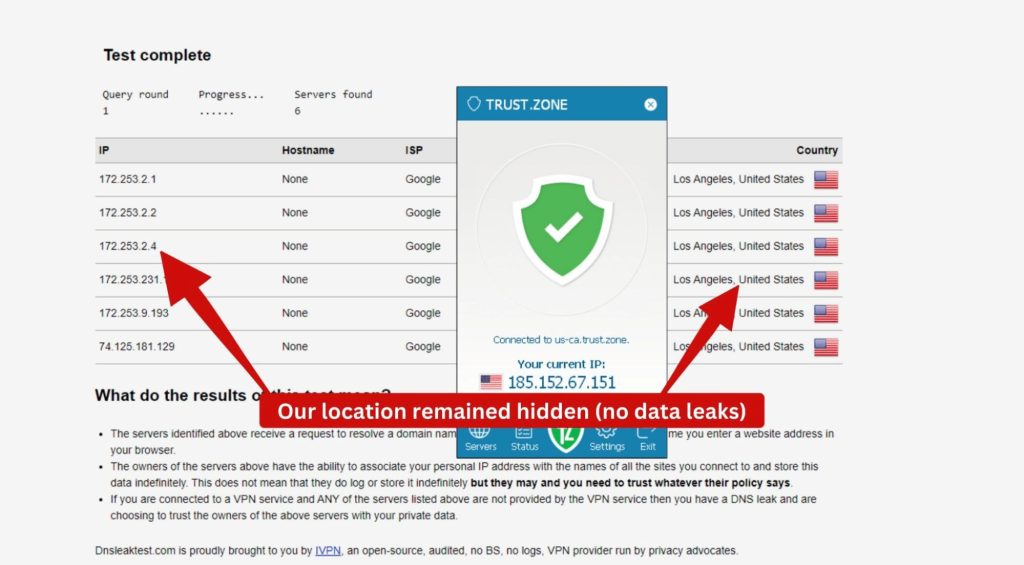
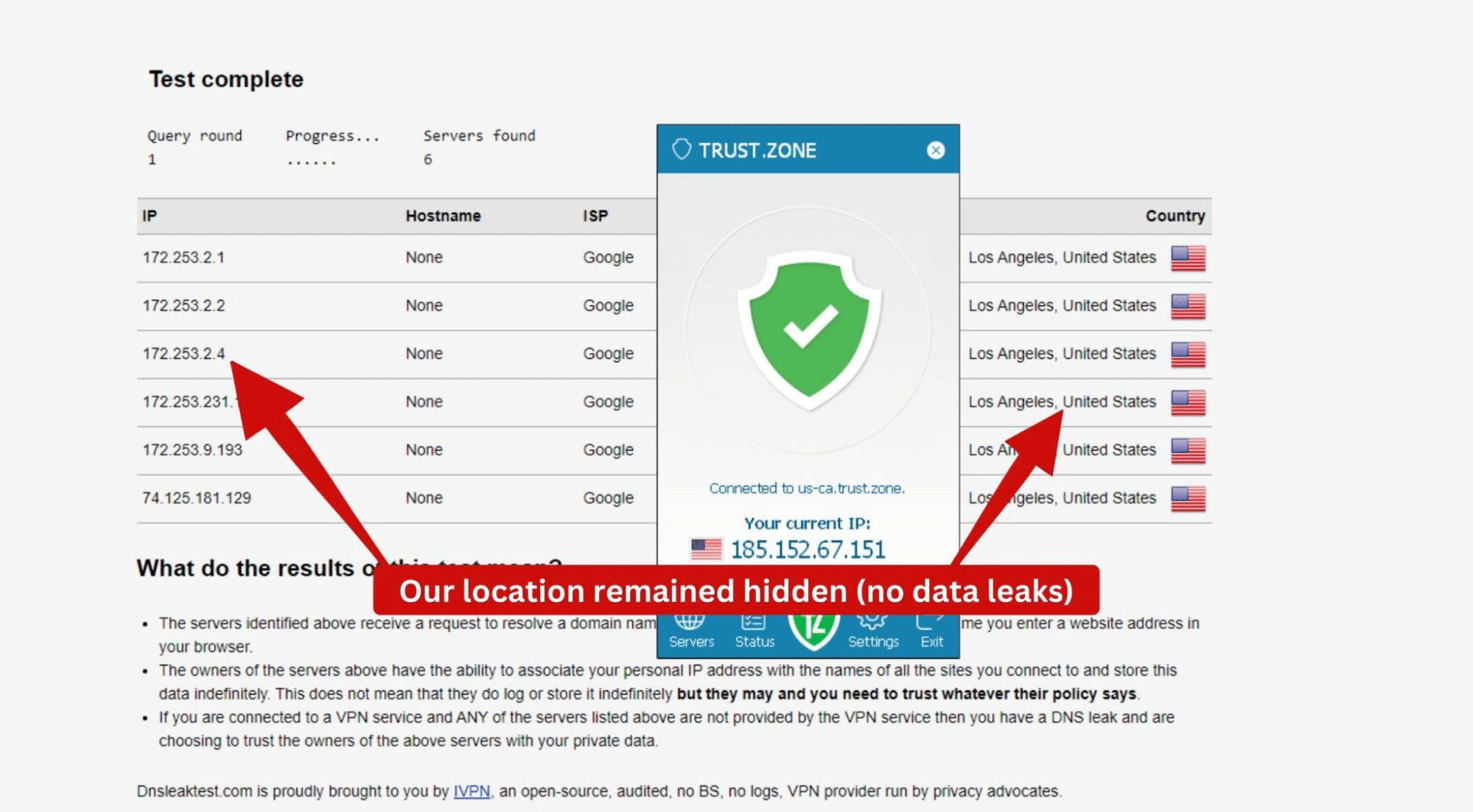
As you can see from the image above, our true location remained hidden. You can enable DNS leak protection by going to ‘Settings.’ Next, tick the "DNS leak protection" box under ‘Connection Settings.’
Speed & Performance
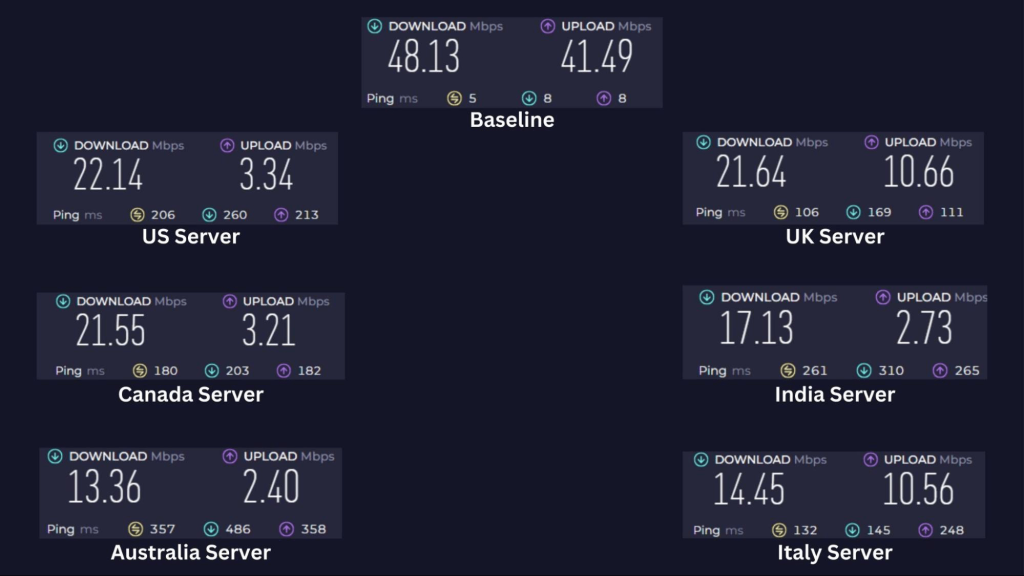
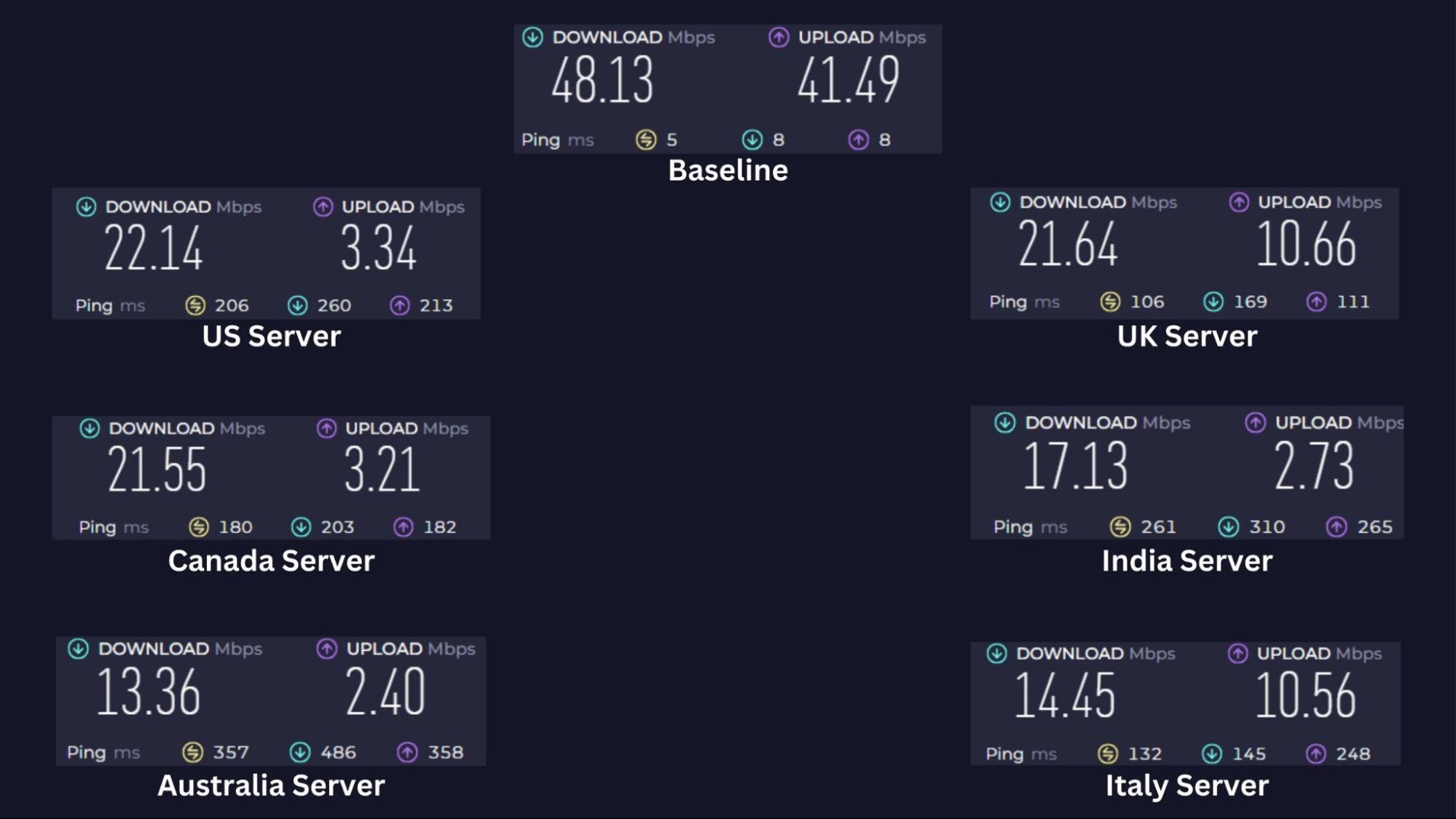
During testing, Trust.Zone VPN had below-average performance, resulting in an unimpressive Web connection slowdown of approximately 62%. Our Score: 5/10
In this part of our Trust.Zone review, we conducted speed tests on its servers. Before turning on the VPN, we recorded baseline speeds of 48.13 Mbps for download and 41.49 Mbps for upload.
Here are the results of our tests:
- US Server (Atlanta): The fastest US server reached a download speed of 22.14 Mbps (a 54% reduction) and an upload speed of 3.34 Mbps.
- UK Server (London): We downloaded at 21.64 Mbps and uploaded at 10.66 Mbps. The speed drop of about 55% was much slower than the baseline.
- Canada Server (Montreal): The Canadian server recorded download speeds of 21.55 Mbps and upload speeds of 3.21 Mbps. This meant a significant speed drop of 55% compared to the baseline speed.
- India Server (Bengaluru): With a substantial speed drop of 64%, we got disappointing download speeds of 17.13 Mbps and upload speeds of 2.73 Mbps.
- Australia Server (Sydney): Of the nine Australian servers we tested, the fastest performance we saw was a 13.36 Mbps download and a 2.40 Mbps upload speed. This means we lost approximately 72% of our speed.
- Italy Server (Milan): The Italian server performed similarly to the Australian server, with a 14.45 Mbps download (a 70% drop) and 10.56 Mbps upload speed.
Trust.Zone's servers reduced our browsing speed by almost 62% on average, a significant decrease in performance. When it comes to speed, there are undoubtedly other VPNs that outperform Trust.Zone and can be considered among the fastest VPNs.
Customer Support
Trust.Zone's customer support suffers from a notable drawback - the absence of a live chat option. Nevertheless, the company offers alternative methods for users seeking assistance. Our Score: 4/10
Trust.Zone's customer support isn’t the most responsive. When accessing the website's support section, you’re encouraged to check the FAQ pages and troubleshoot issues before contacting the support team.
- Guides for Installation: Setting up this VPN on Windows is straightforward. However, for other platforms, manual configuration is necessary. Fortunately, user-friendly guides are available that explain the process step by step.
- Troubleshooting Guides / FAQ: In a dedicated section, you'll find a collection of frequently asked questions. This section is handy if you encounter any issues with the native Windows app. Although the FAQ lacks depth, the setup guides prove to be helpful.
- Support Tickets: Support is available from Monday to Saturday between 2:00 PM and 12:00 AM. Users can email a support agent through an online form on the support page. However, email replies may take several hours, which isn’t great if you’re seeking quick assistance.
Pricing
Trust.Zone's long-term (2-year) plan offers good value for money and supports more simultaneous connections, making it a cost-effective option. This makes Trust.Zone a budget-friendly choice if you're seeking an extended subscription. Our Score: 7/10
Trust.Zone has 3 subscription plans with similar features. However, there are subtle differences in the number of simultaneous connections.
How Much Is Trust.Zone VPN?
Trust.Zone starts at $1.99 for its 2-year plan. Its four subscription plans come with unlimited data transfers across all 162 servers. Here's a rundown of its plans.
- 1-Month Plan: Trust.Zone's 1-month plan costs $8.88 per month, and you get three simultaneous device connections with unlimited data transfer.
- 1-Year Plan: You pay $39.95 for Trust.Zone's 1-year plan, which translates to only $3.33 per month (a 63% discount). You also get the features of the 1-month plan.
- 2-Year Plan (+4 Free Months): Trust.Zone's 2-year plan costs $55.99, at $1.99 per month. You save 78% and can connect 5 devices at once with unlimited data transfer.
Trust.Zone's best plan is the 2-year plan at $1.99 per month, saving you 78% on the monthly plan. Add-ons like DDoS protection and 3 extra simultaneous device connections are also available at $0.99 each per month.
You can increase the number of device connections at intervals of 3. Opting for the 2-year plan not only provides more device slots but also offers the most economical pricing per month, as shown in the table below.
The cheapest Dedicated Static IP Addresses cost $1.99 monthly. Additionally, you can buy Dedicated Static IP Addresses + Port Forwarding for as low as $2.99 per month. All add-ons are cheaper under the 2-year plan.
Thankfully, Trust.Zone offers a free 3-day trial with 1 GB of data to test the service. It also offers a refund within the first 10 days if you use less than 1 GB of traffic within that period.
You can make payments using various methods, including credit cards, PayPal, PayPro Global, UnionPay, and more. However, opting for Bitcoin or other cryptocurrency payments will earn you a 10% discount.
Final Thoughts – Is Trust.Zone VPN Any Good?
Yes, Trust.Zone is a good choice if safeguarding your online activities is your priority. The service ensures a reliable experience, boasting features like no-logs policy, robust encryption protocols, and support for torrenting and light gaming. However, it lacks a third-party audit, and the absence of a live chat option might be a drawback for some users.
While the speeds of Trust.Zone are satisfactory, they're not exceptional, and the international server coverage could be more extensive. Despite these limitations, the VPN stands out with its cost-effective long-term plans, making it an affordable option if you're willing to commit. Notably, the 2-year plan offers extra features at a reasonable price.
So, if your main goal is to keep your online activities private, subscribe to Trust.Zone VPN. Its affordability with the long-term plan, coupled with a range of features, makes it worth considering. However, if you want a larger server network, high speeds, and advanced features, NordVPN is your best option.
PROS
- Strict no-logs policy.
- No data-sharing alliances.
- Great for torrenting.
- Good for gaming.
- Affordable long-term plans.
- WireGuard protocol for fast connections.
- Supports up to 5 devices.
CONS
- Small server network.
- Lacks a split tunneling option.
- Advanced features cost extra.
- No live chat support.
- Below average speed.
| Review Summary Trust.Zone VPN offers robust privacy features, including a no-logs policy and strong encryption. However, its speed and unblocking performance could use some improvement. | 6.3 Overall Score | ||
| Background, Jurisdiction & Reputation | 9 | ||
| Supported Platforms & Devices | 9 | ||
| Installation & Initial Configuration | 7 | ||
| Prominent Features | 7 | ||
| Server Count & Infrastructure | 2.5 | ||
| UI/UX Design & Ease of Use | 4 | ||
| Media Streaming, Torrenting, and Gaming Support | 7 | ||
| Security & Privacy | 8 | ||
| Speed & Performance | 5 | ||
| Customer Support | 4 | ||
| Pricing | 7 | ||