When you purchase through links on our site, we may earn an affiliate commission. Here’s how it works.
Speedify VPN Review 2026


Our experts have reviewed 53 VPN providers, which were put through extensive rounds of testing. To learn more about that process, here’s how we review VPNs, where we explain our criteria and our policy of being fully transparent.
Speedify is a VPN service that focuses on improving Internet speed and security through a special feature called "Channel Bonding." It works by combining multiple Web connections for faster speeds. While the service claims to offer solid speeds and decent security measures, there are concerns that potential users should be aware of.
One issue is Speedify's logging policy. The provider claims to collect minimal information and doesn’t monitor or record user activity. However, its location in the US (part of the 5-Eyes Alliance) raises questions about government surveillance. There are also alleged reports of past security breaches and data leaks.
Additionally, its unique "Channel Bonding" feature may sound great in theory, but real-world performance tells a different story. In our tests, the service struggled to unblock streaming services that other top VPNs got into easily. It's not good for torrenting and gaming either due to poor speeds.
On the upside, Speedify VPN uses AES-256-GCM encryption, offers unlimited bandwidth, and has servers in 36 countries. But before we get into other details, let's kick off this Speedify review by outlining its key features. Refer to the table below for a quick summary.
In this comprehensive review, we'll examine every aspect of this VPN from an unbiased perspective. We'll inspect its country of origin, supported platforms, UI design, prominent features, server network, performance, and more. To understand our approach to testing VPN services, check out our guide on how we review VPNs.
It's worth noting that we keep this review constantly updated, so you'll learn about any new developments with Speedify if you revisit the page. We'll make it easy for you to see where Speedify currently stands in the global VPN market.
Background, Jurisdiction & Reputation
Speedify is a US-based VPN with potential connections to the intelligence community. There were also reports about data leaks in the past. Our Score: 2/10
Checking the jurisdiction of your chosen VPN is more important than you might think. By choosing a VPN headquartered in a country with aggressive data logging and mass surveillance, you’re at risk of having your data collected. So, here’s what you need to keep in mind before getting a Speedify subscription.
Where Is Speedify Based?
Speedify is based in the USA, which is a cause for concern. The USA is a member of the 5-Eyes Intelligence Alliance, a group of countries that work together to collect various types of personal data, which is then easily exchanged between the member countries.
Speedify was introduced in 2014 as a channel bonding service by Connectify Inc., a company founded in Philadelphia in 2009. However, it isn't the first software product from Connectify. Its parent company relied on Kickstarter in the past to help develop its applications.
The company also received funding from In-Q-Tel, a venture capital firm linked to intelligence agencies like the CIA, DIA, and NGA. In other words, Connectify has cooperated with the intelligence community in the past, either directly or indirectly.
While Speedify changed its privacy policy in 2015, stating that they don’t collect any logs and that the online activity of its users is fully protected, we remain doubtful, especially after discovering online reports of its data leaks.
Therefore, if you're looking for the best possible data protection, you should probably look elsewhere.
Did Speedify VPN Leak Personal Data in the Past?
Based on discussions online, there's an isolated case wherein Speedify VPN allegedly leaked data. A Reddit user claimed several years ago that Speedify leaked their data, including their social media and email accounts. Although there's no concrete evidence that Speedify was responsible, we advise exercising caution.
Speedify VPN asserts a no-log policy, emphasizing that they don't log user activities or disclose personal information. However, concerns arise as their privacy policy appears to collect certain user data, like IP addresses, the Web browser you're using, and accessed pages, among others, potentially conflicting with their no-log claims.
The lack of clarity regarding an independent security audit also raises concerns about trusting Speedify for online privacy and anonymity.
Is Speedify Safe?
No, Speedify isn't a safe VPN provider. Our concerns arise because the service is based in the USA and is part of the 5-Eyes Intelligence Alliance.
Additionally, the connections between Speedify's parent company and intelligence groups raise red flags. Reports of data leaks, privacy concerns, and the absence of a 3rd-party audit also contribute to our reservations about trusting this VPN.
Speedify uses a custom tunnel with DTLS 1.2 protocol for security, and depending on your device, it employs either AES 256-GCM or ChaCha20 encryption ciphers. With its own protocol based on "Channel Bonding," Speedify combines various Internet connections (like Wi-Fi and cellular) for an improved connection that supports both TCP and UDP, automatically selecting the best option for different situations.
Despite these security measures, we can't recommend Speedify as a reliable VPN for users who prioritize privacy and security. We suggest exploring other options that prioritize and respect user privacy.
Supported Platforms & Devices
Speedify VPN supports only the most popular devices, so you can’t set it up on most routers, media streaming devices, or any other platforms. Our Score: 6/10
Speedify isn't a typical VPN because it uses proprietary technology to reroute your Web traffic instead of common tunneling protocols. With this said, it’s not surprising to see that it supports a limited number of devices and platforms, which you can find below.
Speedify is compatible with Windows, macOS, and Linux operating systems, as well as Android and iOS mobile devices.
While Speedify can protect up to 5 devices simultaneously, it falls short compared to other services that offer protection for a larger number of devices. Support for 5 devices is generally sufficient in a home environment, but it may not be suitable for users with larger households.
Speedify also works on Android TV and Fire TV, using bonding technology to prevent interruptions and buffering. This ensures a smooth streaming experience without any connectivity issues on your Android or Amazon streaming device.
Additionally, you have the option to use Speedify on specific routers, including supported Linux devices such as Ubuntu and Raspberry Pi OS. However, please note that OpenWRT, DD-WRT, and MIPS processors aren't currently supported.
For Windows PC, Connectify Hotspot (a type of virtual router) allows you to share your Speedify connection, either wirelessly or through wired Ethernet with other devices. Lastly, Speedify doesn't offer a Chrome extension or extensions for major Web browsers like Edge and Firefox.
Installation & Initial Configuration
Speedify comes with an easy installation process, no matter if you’re using a desktop or mobile device. Our Score: 10/10
This section will walk you through the simple process of installing and setting up Speedify VPN. You'll be enjoying secure connections in no time.
Setting up Speedify is pretty straightforward. After subscribing to Speedify VPN (or if you’re using its free plan), simply download the application for your desired platform.

In our tests, installation on both a Windows 11 PC and an Android smartphone was quick and easy, with an automated process. On Windows, simply download the 8 MB Speedify installer file and click on it, and the application installs automatically. After a few moments, you can open the app and begin using it.
For Android and iOS devices, the Speedify app can be downloaded from the respective app stores. Once installed, launch the application and sign in using your credentials. The entire setup process is automated, making it easy for even novice users to get started with Speedify.
Prominent Features
Speedify comes with a strong set of basic VPN features that should meet the needs of most non-demanding users. Our Score: 8.5/10
It’s interesting to note that Speedify’s website has clear and thorough explanations of how this VPN works. However, these explanations usually avoid using common VPN-related terms, which is perhaps a way for this provider to differentiate itself from the rest of the pack. That’s why we needed to take a deep look at its set of features.
Here’s what you need to know:
- Channel Bonding Technology – The most unique feature of Speedify is that it's a bonded VPN, which means it allows users to combine multiple Internet connections for increased speed and stability. By using different types of Web connections such as Wi-Fi, Ethernet, and cellular signals, you can bond them together to boost your speed.
- DNS Leak and IPv6 Protection – Speedify provides both DNS and IPv4 leak protection, which can help prevent your ISP from tracking your online activity and compromising your privacy. The VPN claims to offer IPv6 leak protection, but it's recommended to test it on your own, especially if your ISP supports IPv6.
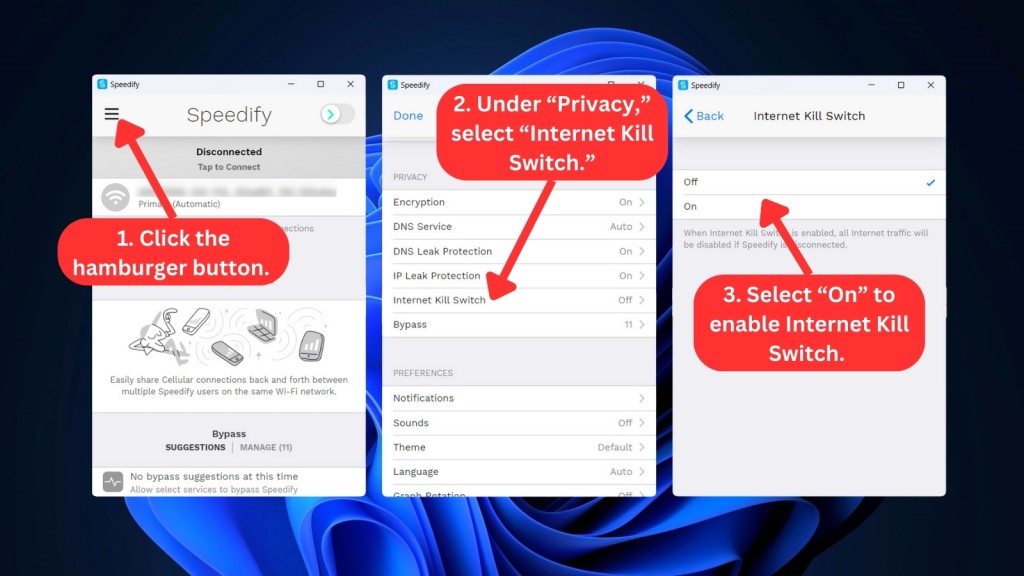
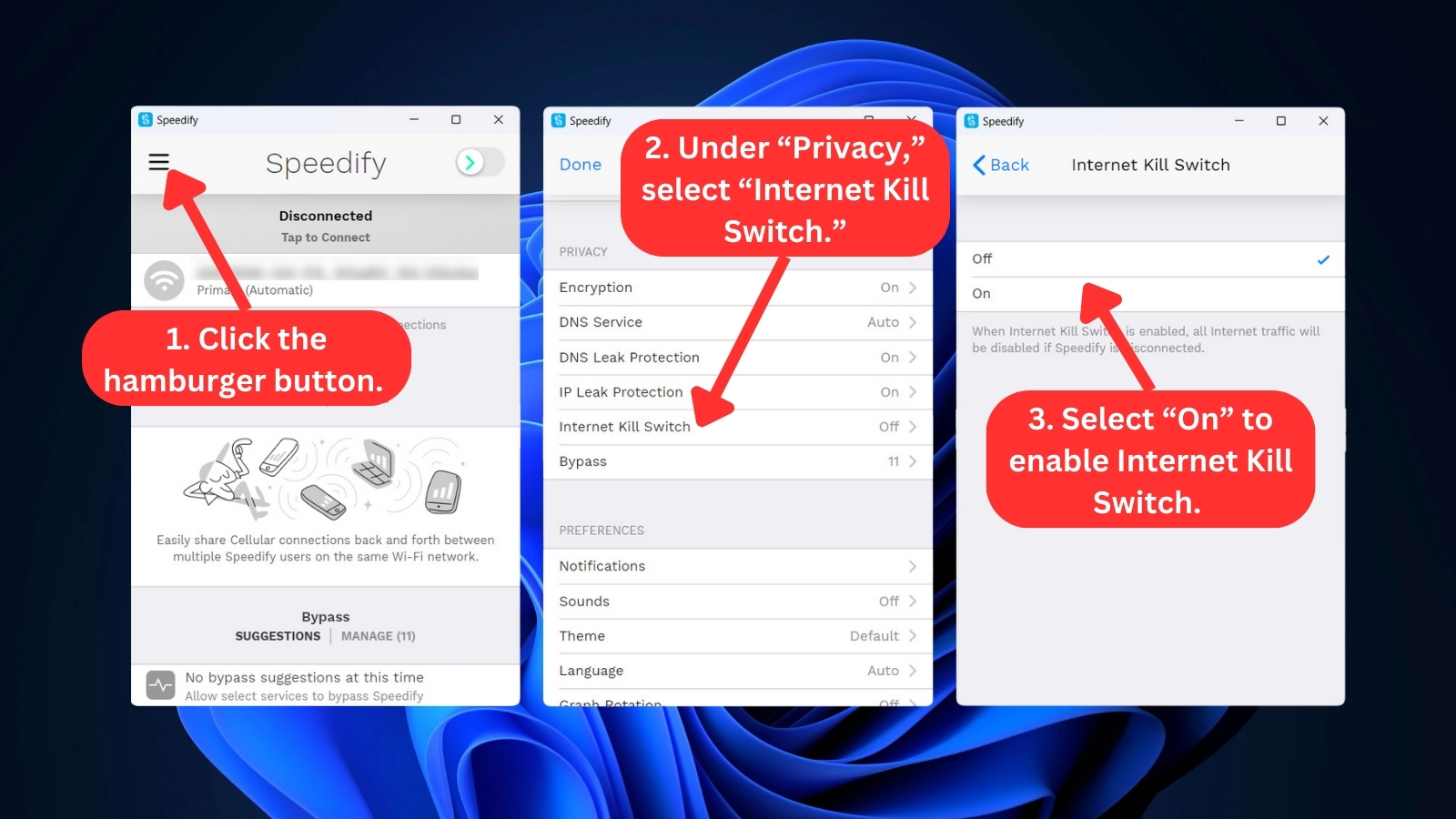
- Kill Switch – Speedify’s kill switch feature will automatically shut down your Internet connection if your VPN session is interrupted. This can help prevent your online activity from being exposed to your ISP or any other third party.
- Optimized Live Streaming and Video Conferencing – Speedify VPN automatically prioritizes live streams and video conferencing traffic over other network traffic, ensuring a smoother and more stable experience. This is achieved through Speedify's Streaming mode, which dynamically selects the best way to send and receive traffic over your available Internet connections. The VPN works with all major streaming apps and services, such as TikTok, Twitch, YouTube Live, Facebook Live, and Instagram Live.
- Secure Encryption – For recent phones and computers, the VPN employs AES 256-GCM encryption, taking advantage of the hardware support for AES built into modern CPUs. This provides robust encryption to safeguard against unauthorized access and data breaches. For older devices that do not support hardware acceleration for AES, Speedify uses the ChaCha encryption cipher to secure user data. This ensures that all your sensitive information remains confidential and protected from cyber threats.
- Internet Failover Protection – Speedify's smart automatic Internet failover protection ensures you don't go offline. Even if you do, Speedify will auto-reconnect and safeguard your online privacy once your Internet connection is back up.
- Captive Portal Assist – Speedify's Captive Portal Assist ensures secure connectivity on public Wi-Fi networks featuring splash pages. Unlike usual VPNs that may compromise your security with captive portal networks, Speedify effortlessly manages logins, eliminating the need for disconnection and maintaining constant protection against cyber threats.
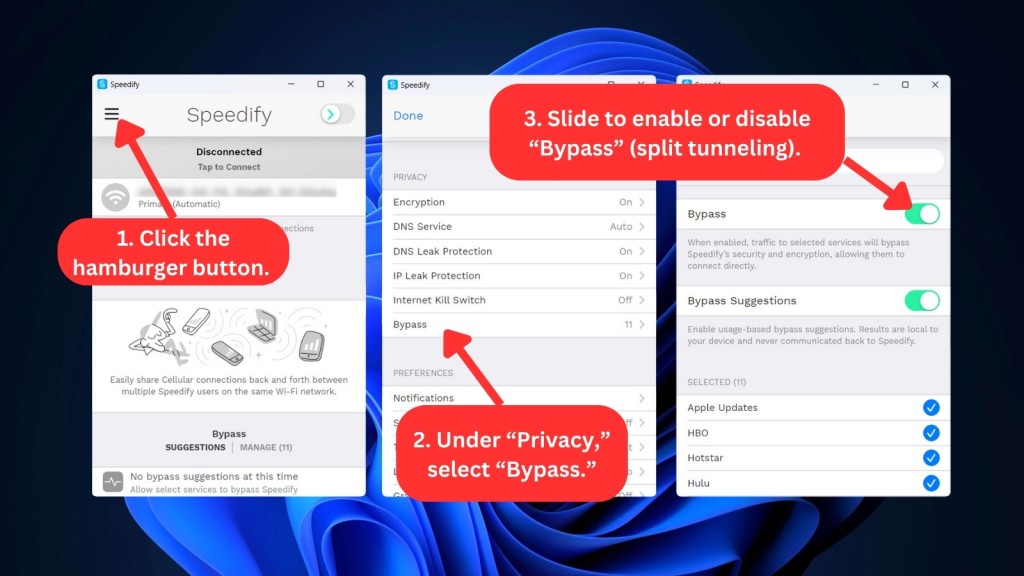
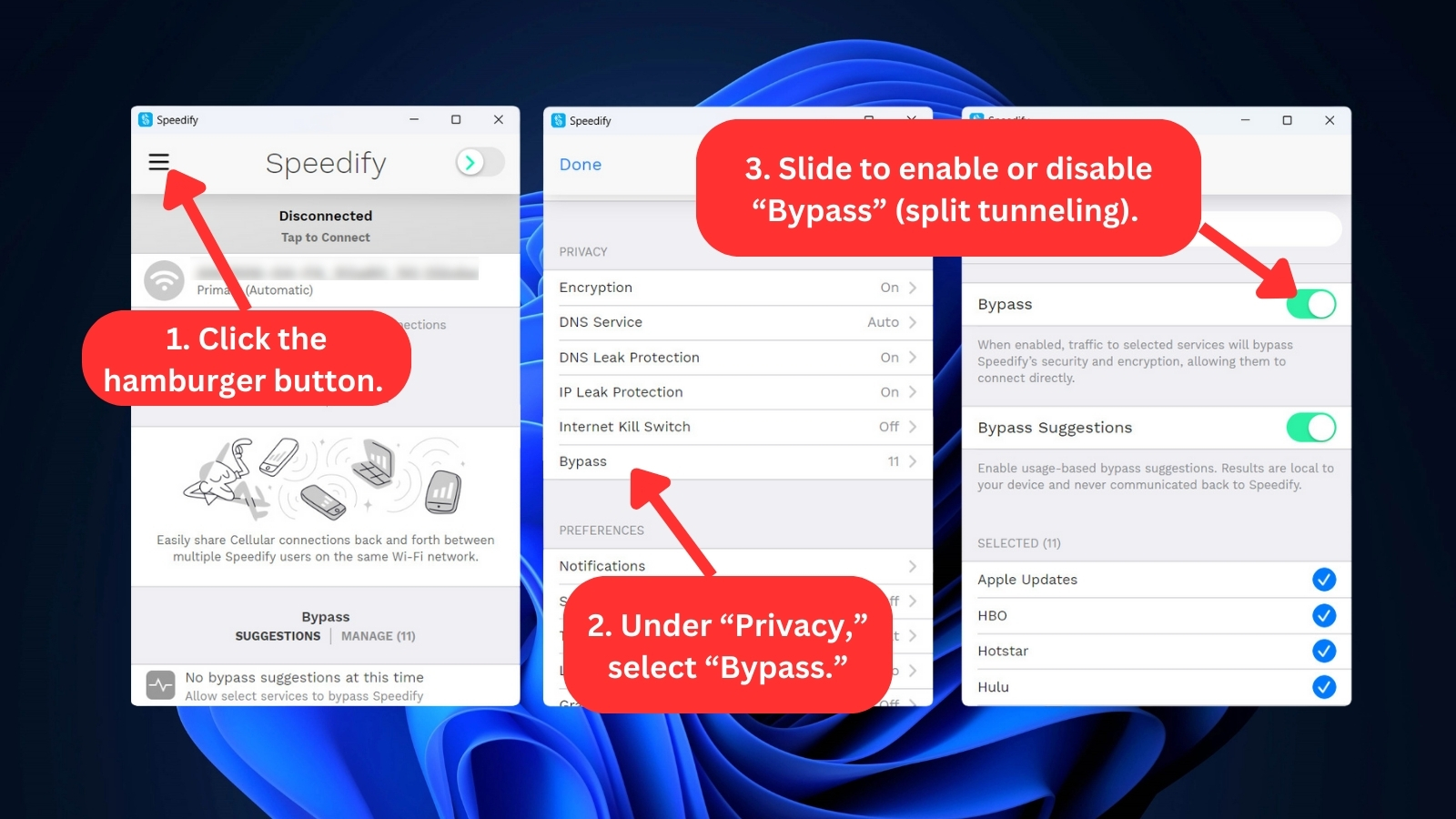
- Bypass (Split Tunneling) – You can use this feature on supported desktop and mobile platforms. When enabled, your device directly connects to trusted streaming services, while the VPN keeps the rest of your Web activities safe and encrypted.
- Dedicated VPN Server – This is an exclusive perk if you have a Teams account. You can enjoy the advantages of choosing your server location, coupled with guaranteed VPN connection speed and robust server processing power. According to Speedify, this surpasses the benefits of a dedicated IP, offering an enhanced level of service.
- Unlimited Server Switches, Bandwidth, and Data – Speedify allows users to connect to any server, change servers at will, and use as much data as they need without any restrictions. This can be a valuable feature for users who need to transfer large files, stream in 4K, or frequently switch between locations to access different geo-restricted content.
We also have to mention that Speedify's DNS privacy feature includes "AdGuard," which has a built-in ad blocker. Overall, Speedify provides basic VPN features and adds some unique elements to boost speed for all your Internet activities. However, it's not quite there yet in terms of fulfilling all expectations.
Server Count and Infrastructure
Speedify doesn't disclose the number of servers it has. However, it maintains servers across 36 countries and lets you connect to 50+ locations. Our Score: 3/10
It’s important to know how many servers a VPN has in its arsenal, what countries they’re located in, and whether there are any specialized servers. So, here’s what you need to know about Speedify’s server network.
Despite our efforts, we found it difficult to obtain precise information on the number of servers offered by Speedify. When we inquired about the exact number of servers available, their support team provided a vague response, explaining that the number changes constantly due to adding new servers and switching out old ones.
However, they said that each country has at least 2 servers per location, so they probably have over 200 servers at any given time. This lack of transparency regarding server quantity is concerning, as a small network can become overcrowded and result in slow speeds.
While Speedify does offer dedicated VPN servers with its "Teams" plans for $14.99 per month, it comes at a hefty cost. However, these servers provide higher speeds, static IP addresses, and port forwarding capabilities.
That said, the company has servers in 36 countries and 50+ locations, with the ability to connect to individual cities. Although Speedify's server network isn't the smallest we have encountered, it still falls short compared to VPNs with the most servers. It's worth noting that other providers offer more than 7,000 servers at a similar price point.
Thus, we advise potential users to carefully consider the server quantity before committing to this service.
UI/UX Design & Ease of Use
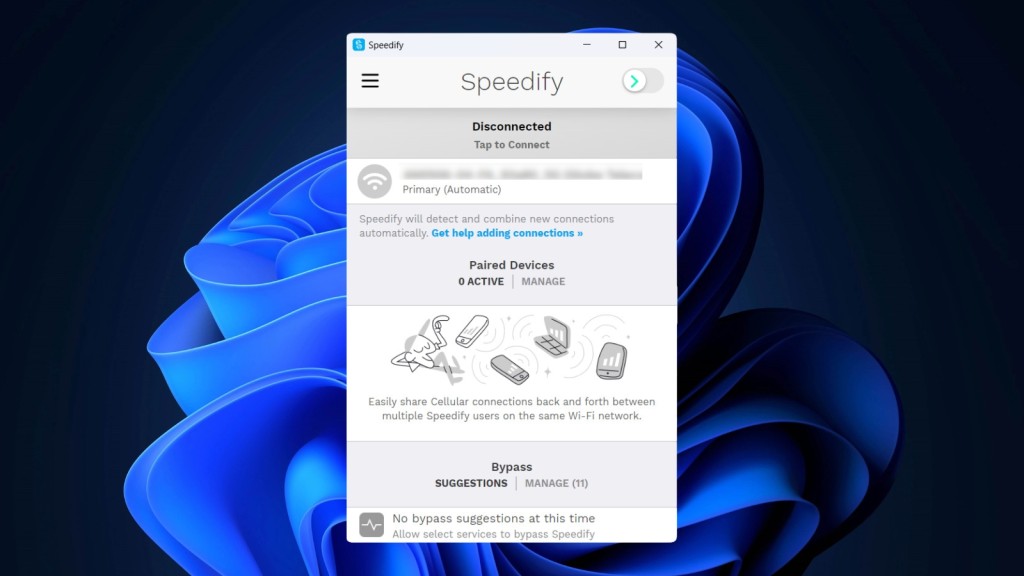
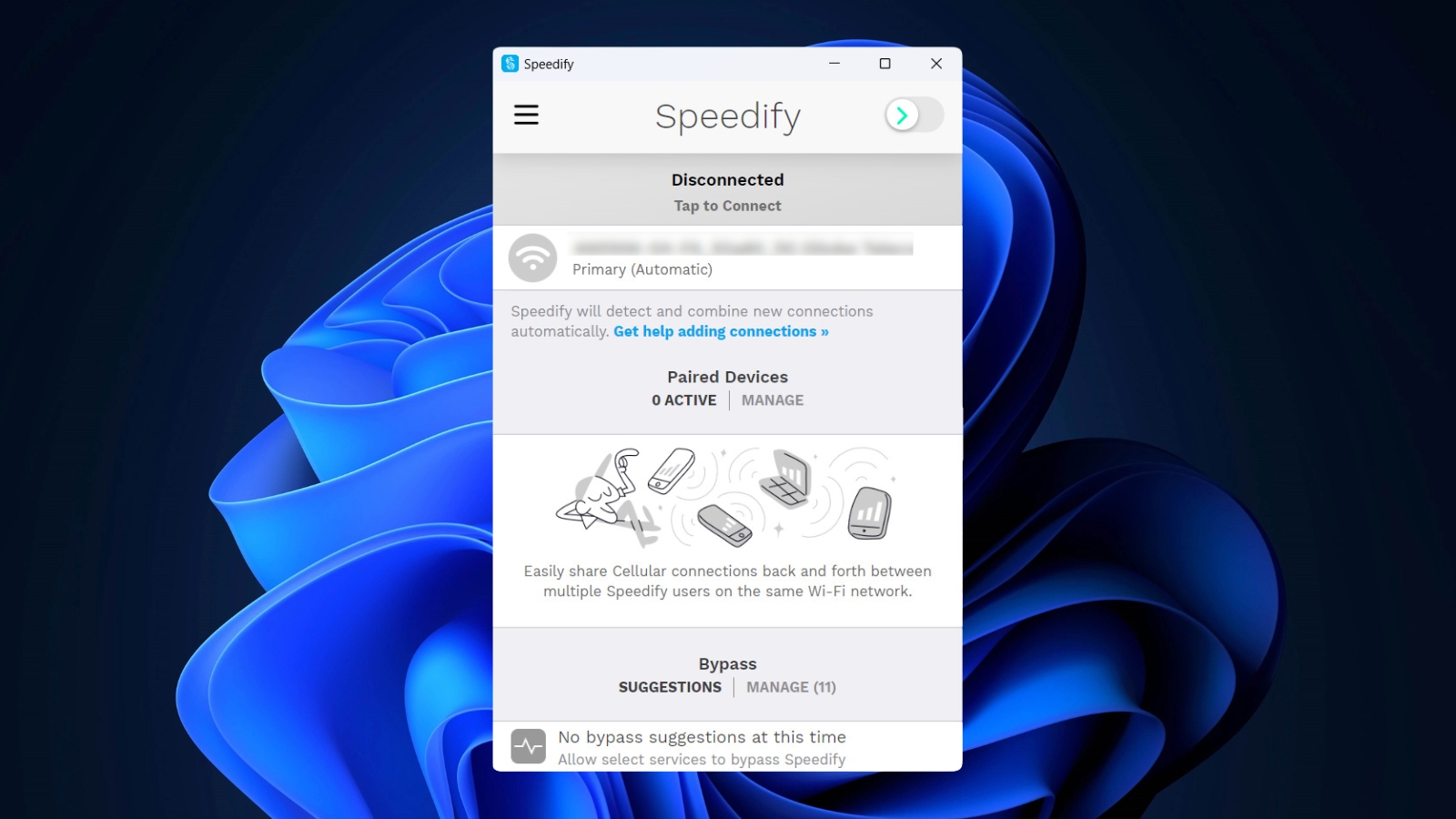
Speedify comes with a relatively simple UI. However, it may take time to master all of its features, as not all aspects of this application are intuitive. Our Score: 6/10
In this section of our review, we'll explore Speedify's desktop and mobile apps, paying close attention to the overall ease of use of its interface. Our aim is to determine whether Speedify proves to be straightforward and user-friendly.
For this review, we checked out the Windows app. Speedify has a unique-looking interface that might not be great for average users - they could struggle to find what they need. When you start it up, the home screen will be gray in tone. But once you're connected to the VPN, things light up with colors, so it's easy to tell when you're connected.
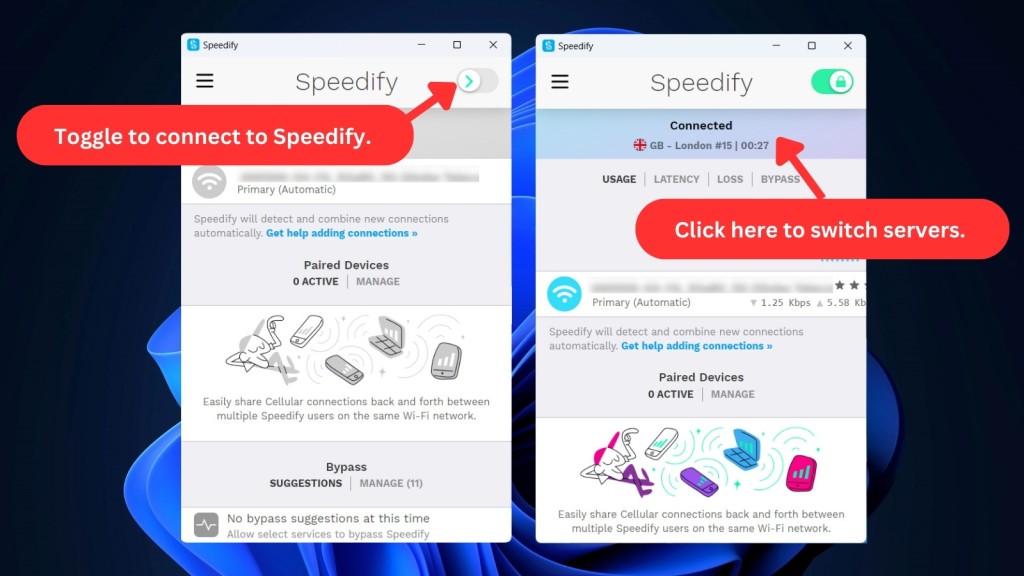
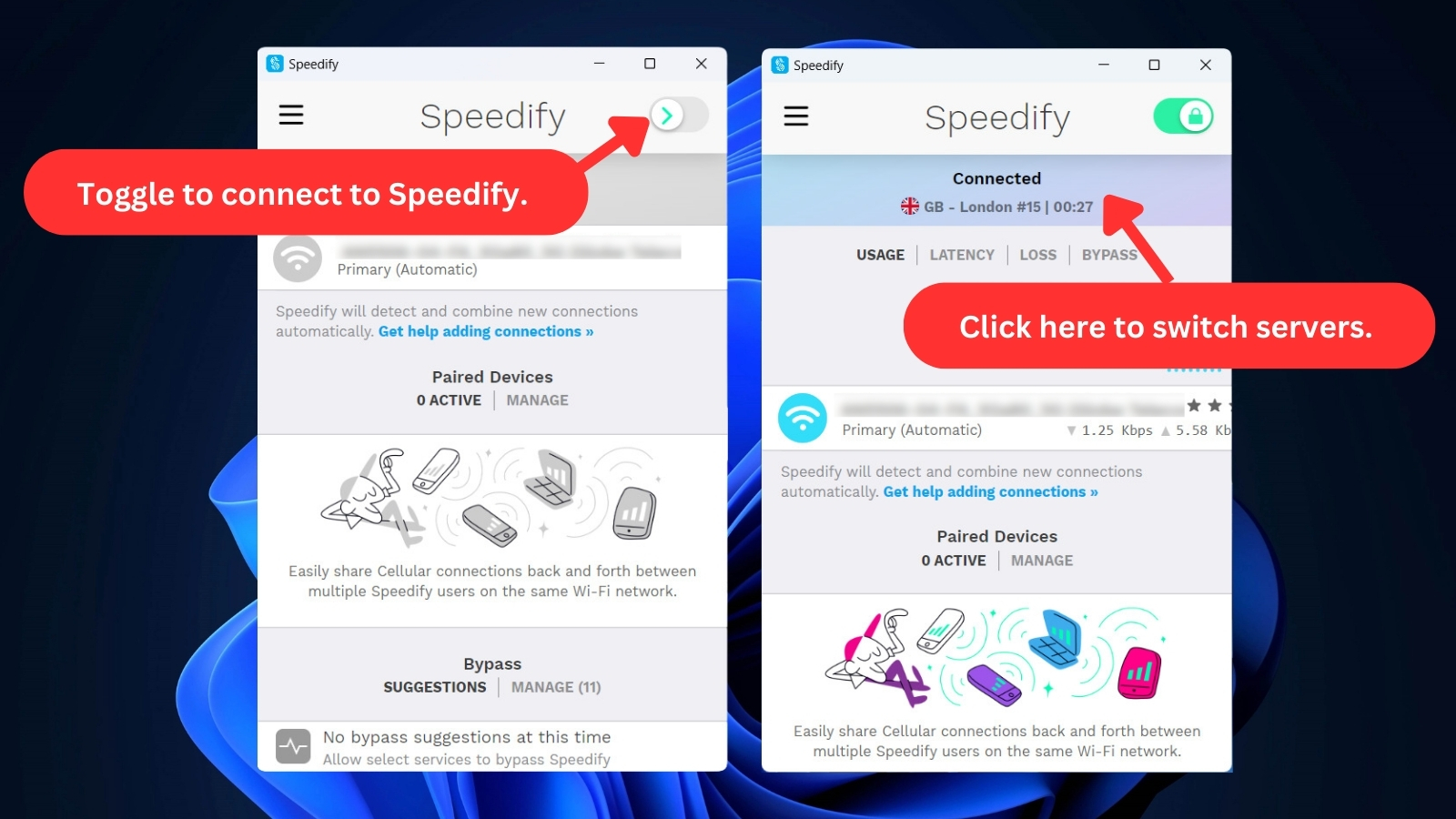
At the top-right corner of the home screen, you'll find a toggle button to turn Speedify on or off. Besides that, Speedify provides you access to a range of tools and statistics. Let’s take a look at everything that can be found on this main screen:
- Connection – This displays the current status of your connection and informs you which server you're connected to. By clicking on the server, you can access the server list and select the country through which you can route your Internet traffic. If you're not connected to the service, you can't access the list, which defeats the purpose of having the option on the home screen.
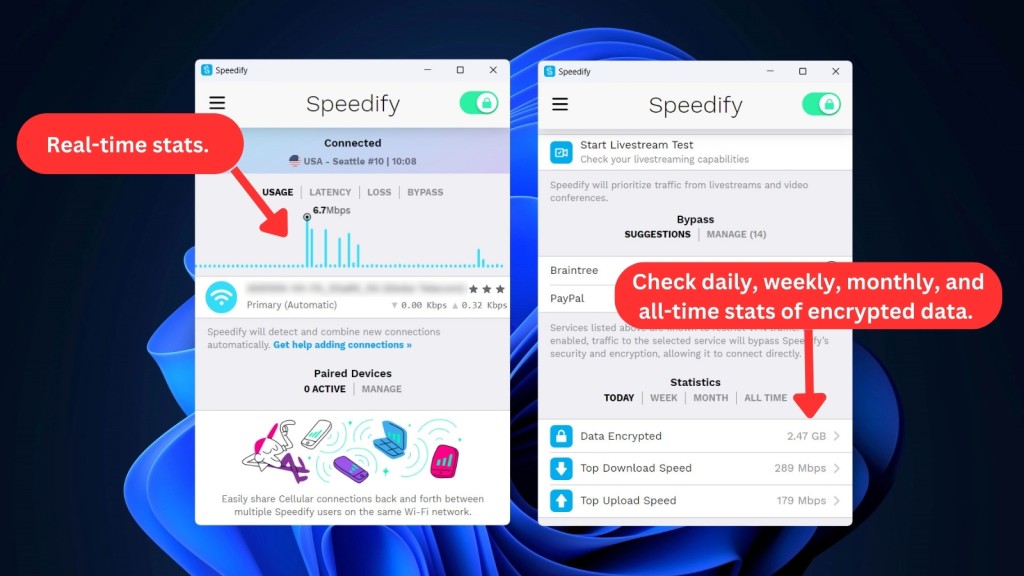
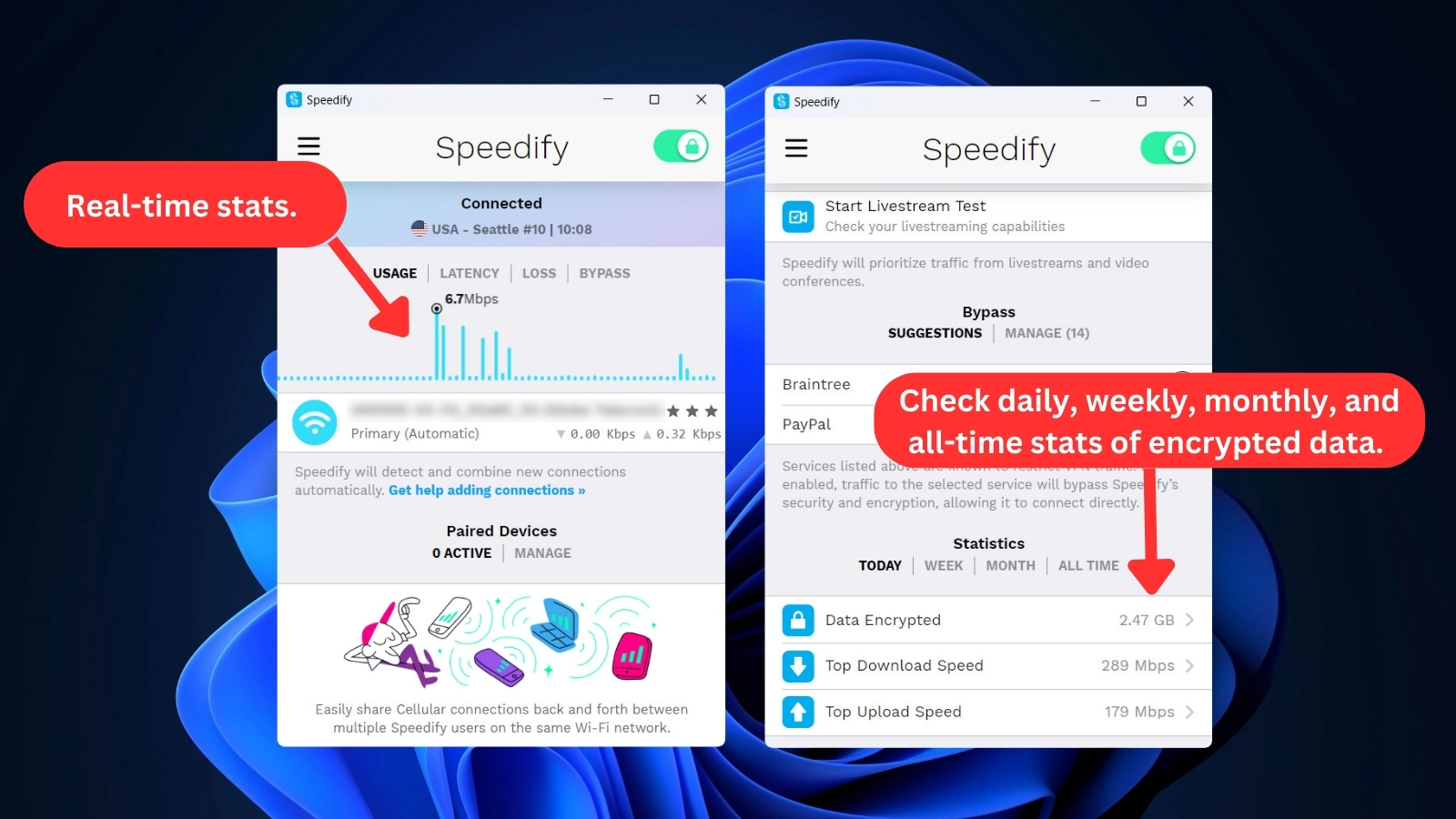
- Real-Time Stats – This section gives you stats on data usage, latency, loss, and "Bypass." You can also see the real-time upload and download speeds along with the name of your network.
- Paired Devices – Here, you'll find a list of devices you've paired with. It shows their status and whether you're sharing to, receiving from, or both sharing and receiving the connection with that device. Paired devices in Speedify refer to your device's connection with other devices on the same local network that also use Speedify.
- Streams – As mentioned previously, Speedify prioritizes traffic from live streams and video conferences. In this section, you can keep track of how many streams are currently running on your device and check your connection's live-streaming capabilities.
- Bypass – This option enables you to selectively allow specific trusted services to connect directly, bypassing the Speedify encrypted tunnel.
- Statistics – This section allows you to review the total amount of encrypted data used and the current speed of each of your connections, as well as a usage breakdown by month and day. You can also find additional information related to latency and loss.
Located at the top-left of the home screen is the main menu, where you'll find additional settings for customization.
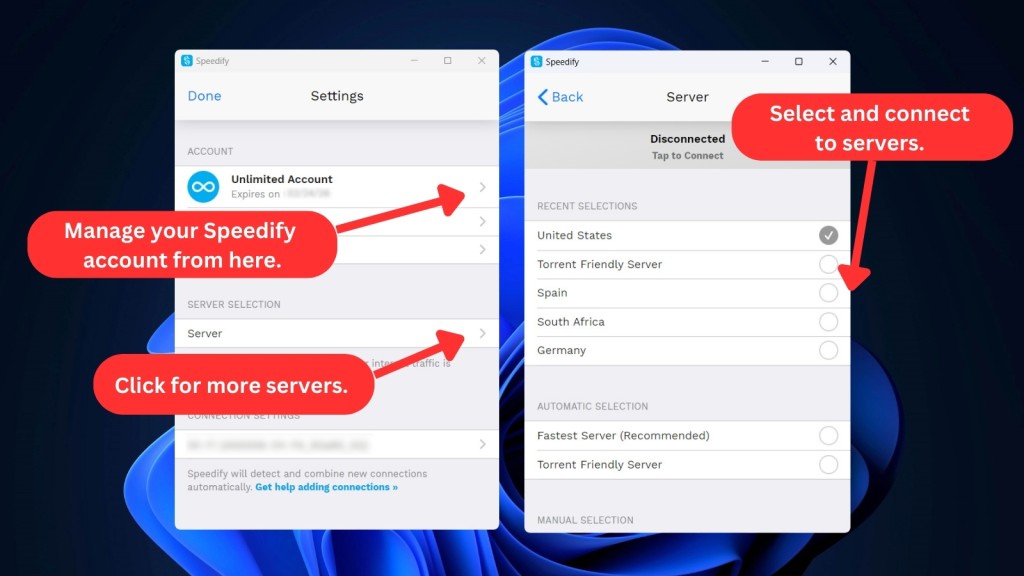
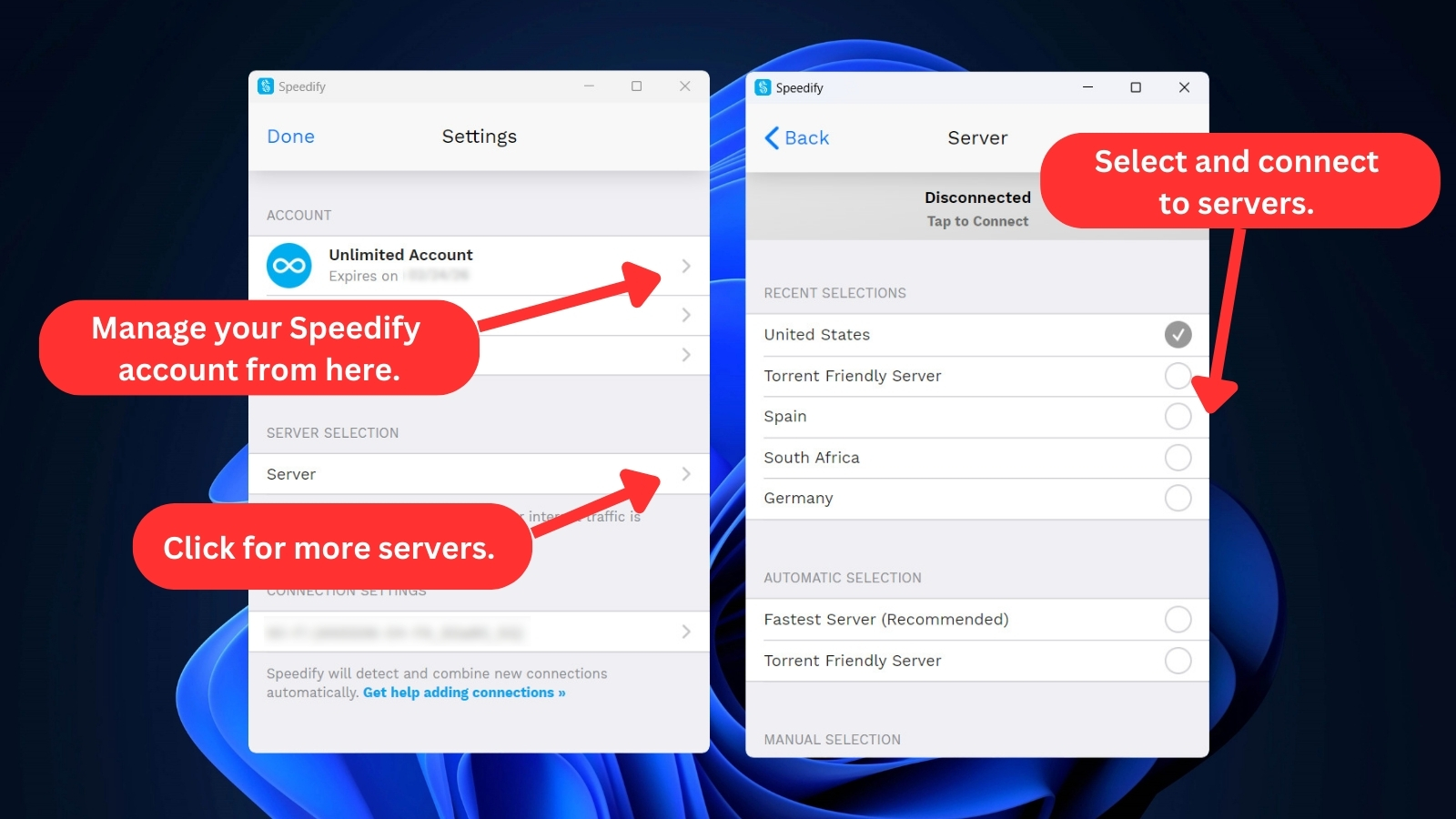
- Account – Here, you can check your plan’s status and renewal date. You can change your password and sign out from the app, too. This section also includes links to news and events, as well as your statistics. Apart from that, it gives you a direct link to your online dashboard.
- Server Selection – This option is the same as what’s available on the home screen, so it feels redundant.
- Connection Settings – This section provides detailed information on your connection, such as its IP address, service provider, adapter info, and more. You can also set up 'Pair & Share' settings and reset statistics from here. On top of that, you can test your Internet speed and see how well it handles live streaming – all within this section.
- Session Settings – Here, you can optimize your connection with options such as Bonding Mode, Transport Mode, Jumbo MTU, Header Compression, and more. You can also set the app to connect at startup and disconnect upon exit.

- Privacy – This allows you to change your privacy settings, including encryption, the kill switch, and DNS/IP leak protection. You can choose from five available DNS services, including AdGuard, which comes with an ad blocker.
- Preferences – From here, you can customize your notifications, sounds, theme, and language. There's also a "Graph Rotation" option to rotate the dashboard graph every 20 seconds.
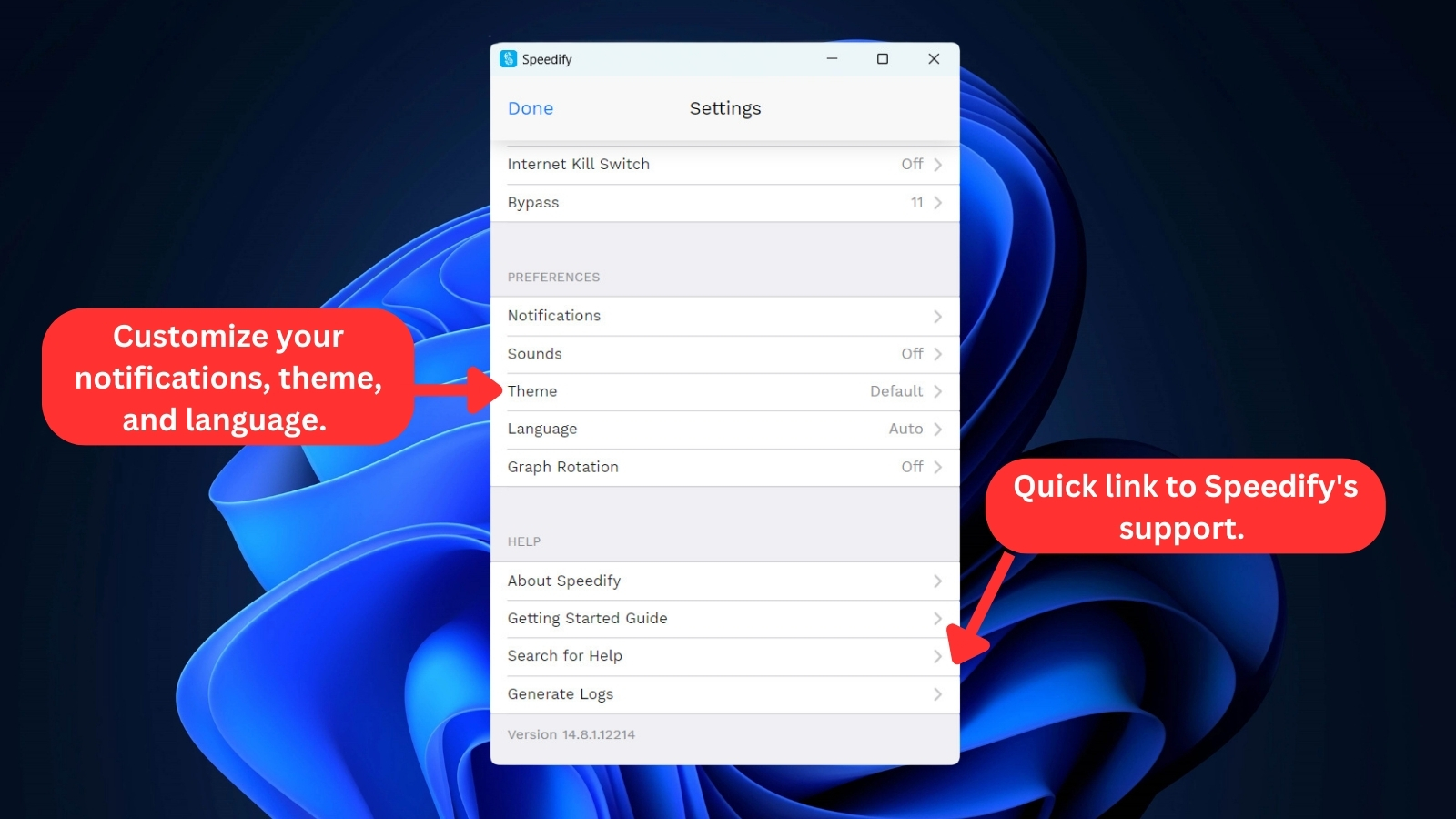
- Help – Find quick links to Speedify's social accounts, privacy policy, terms of service, third-party credits, starting guide, and support page. You can also generate offline logs of your existing data from here.
Speedify has a unique UI that sets it apart from competitors. It may take some time to learn all its options, as some sections may not be intuitive. Also, there are several ways to access the same settings, which may be confusing for inexperienced users. However, the same UI is available across all supported devices, so once you learn it on one device, you’ll know it for the rest.
But keep in mind that there are no browser extensions available, so you'll rely on the native apps for desktop and mobile.
Media Streaming, Torrenting, and Gaming Support
Speedify can’t unblock websites like BBC iPlayer, Hulu, or Prime Video. Even though it supports torrenting, it comes with a limited number of specialized servers, making it unreliable for both streaming and gaming. Our Score: 3/10
VPNs are commonly used to enhance your online experience, covering streaming, torrenting, and gaming. However, not all VPN providers ensure a seamless ride for these activities. So, let's see how Speedify VPN handles these tasks.
Is Speedify Good for Streaming?
No, Speedify isn't good for streaming since it doesn't support geo-unblocking. It can't help you access the libraries of popular streaming platforms from your country. However, it offers a "Bypass" option tailored for viewing your local versions of streaming services like Netflix, Disney+, Max, Hulu, and others.
This feature allows you to temporarily disable Speedify's protection and access these services directly. In essence, "Bypass" isn't about "unblocking" but a means to turn off Speedify for specific purposes. Our testing confirmed this limitation, as none of Speedify's servers could overcome geo-restrictions on platforms like Netflix, Prime Video, Hulu, Disney+, or BBC iPlayer.
However, Speedify is a good VPN for Starlink users, leveraging its advanced bonding technology. This not only enhances the security of your connection but also optimizes it for improved streaming capabilities, ensuring a seamless and reliable experience.
IRL live streaming platforms like Twitch TV and other streaming services do work with Speedify, but like we said, it can't bypass geo-blocking. So, we can't recommend it for seamless media streaming. If you want to explore other VPNs specifically for streaming, check out our article on the best VPN service for streaming.
Is Speedify Good for Torrenting?
No, Speedify isn't good for torrenting. Although it allows BitTorrent traffic on specific servers, the download speed can be frustratingly slow. There are 7 server locations in Amsterdam specifically for P2P, but they might not be as fast, depending on where you are. The catch (and this is a bit of a drawback) is that you can't manually choose a server.
There's also a port forwarding option available on their 'Teams Plan' with a dedicated server for connecting to more peers and boosting speeds. However, it comes with an extra cost. On the plus side, it has a kill switch, which is crucial for torrenting and protects you from IP leaks. However, it lacks SOCKS5 servers, which can speed things up without encryption.
So, it's not the best torrenting VPN, but it's doable if you can live with limited servers and some extra costs for certain features.
Is Speedify Good for Gaming?
No, Speedify isn't a good VPN for online gaming. While Speedify offers the option to opt for the UDP protocol under its Transport Mode setting, which should provide stable connections for latency-intensive applications like gaming, our hands-on experience was different.
We found that even switching Transport Mode to Auto didn't help when playing multiplayer titles on our PC. Speedify provides strong encryption and protection against DDoS attacks, but it's pointless if it negatively affects your gaming experience.
And to add to the letdown, there are no dedicated servers geared specifically for gaming. Overall, we can't recommend Speedify for media streaming, downloading torrents, or gaming. While it has some useful features, its limitations make it difficult to use for these purposes.
Security & Privacy
Speedify collects plenty of anonymized information, and it’s not built for total privacy. It doesn’t actively leak any data, though. Our Score: 3/10
VPNs are made to keep your privacy safe online, which they accomplish with numerous VPN protocols and different types of encryption. So, let’s see how successfully this VPN can protect your identity.
Speedify Protocols
When it comes to VPN protocols, Speedify VPN uses its own proprietary protocol, which is based on Channel Bonding technology. This technology allows Speedify VPN to combine multiple Internet connections, such as Wi-Fi, cellular, ethernet, and tethered phones, to create a faster and more stable connection.
Moreover, Speedify uses DTLS 1.2 as the core transport security protocol. This protocol provides the same level of encryption used to protect websites like Gmail and Facebook while also handling error correction for optimal performance, even in the face of unreliable lost packets.
Speedify also supports TCP, UDP, and HTTPS transport modes, and can automatically decide what type of connection to use in different scenarios. However, Speedify VPN’s protocol may not be compatible with some devices or platforms. It may not offer the same level of security and privacy as other VPN protocols, such as OpenVPN or WireGuard. Therefore, you should be aware of the pros and cons of Speedify VPN’s protocol before using it.
Despite these security measures, the service is adamant that it’s focused on speed, not security. While this may not instill confidence in users who prioritize security, it's worth noting that Speedify's AES-256-GCM and ChaCha20 encryption and security protocols are still based on industry standards, so they provide reliable protection for most users.
Does Speedify Keep Logs?
Yes, Speedify keeps logs of your activity, including the time, server location, traffic amount, and session duration of each connection, as well as your device and location information. While the VPN claims that it only collects anonymized data that can't be traced back to you, it's still possible for authorities to compel Speedify to reveal user identities.
Despite the VPN's website stating that it doesn't log user data, its privacy policy contradicts this claim. Therefore, it's important to be aware of the information that Speedify collects and how it's being used, even if it's anonymized.
Does Speedify Leak/Expose Your Private Data?
No, Speedify doesn't leak any data. When you connect to a secure server, Speedify assigns you a new IP address. Third parties can only see the information that Speedify allows them to, such as your virtual IP, hostname, ISP, and country of origin of your new connection.
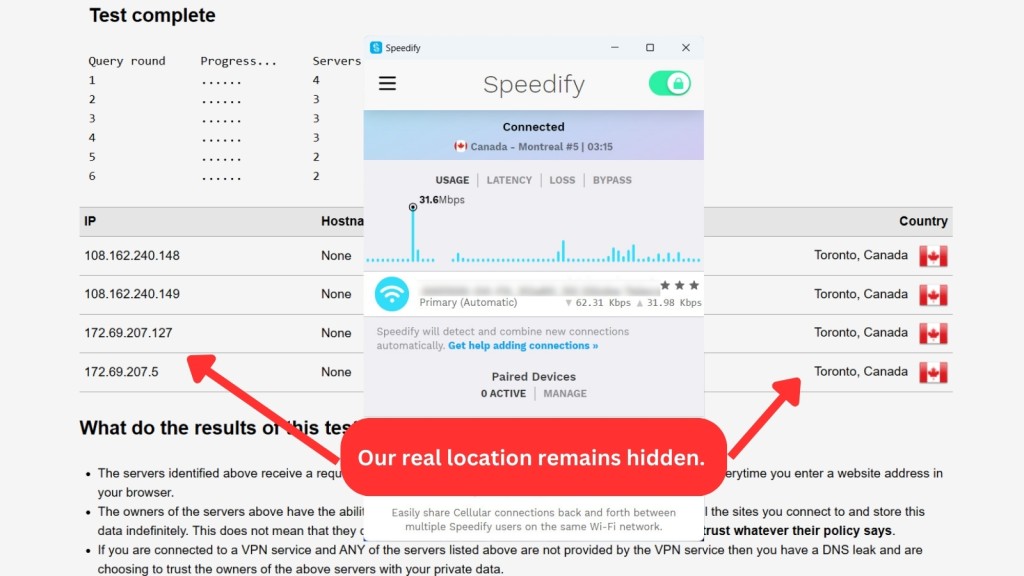
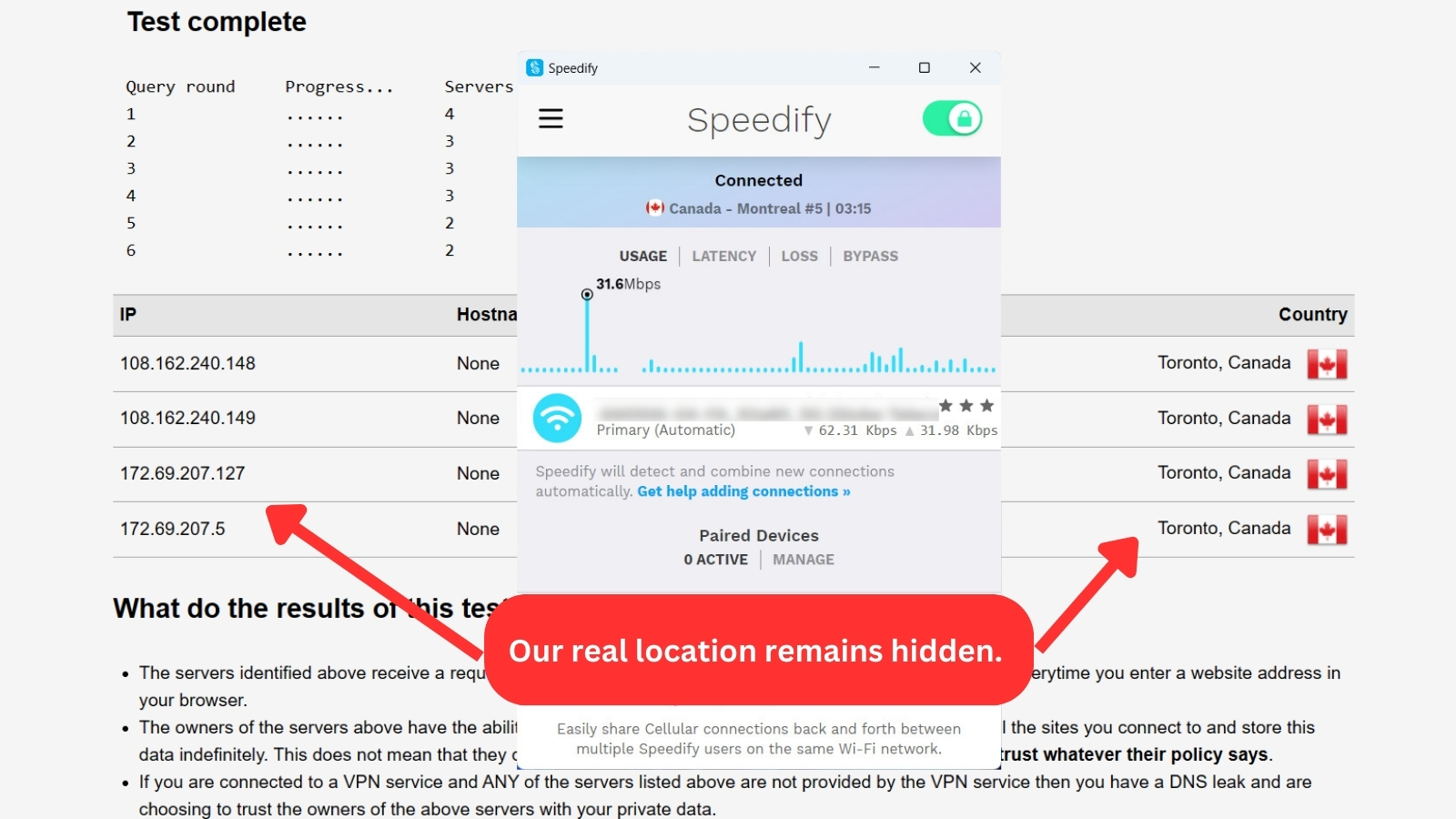
As you can see in the screenshot above, our true location remained hidden. Our DNS leak tests demonstrate that Speedify’s IP and DNS leak protection are effective.
Speed & Performance
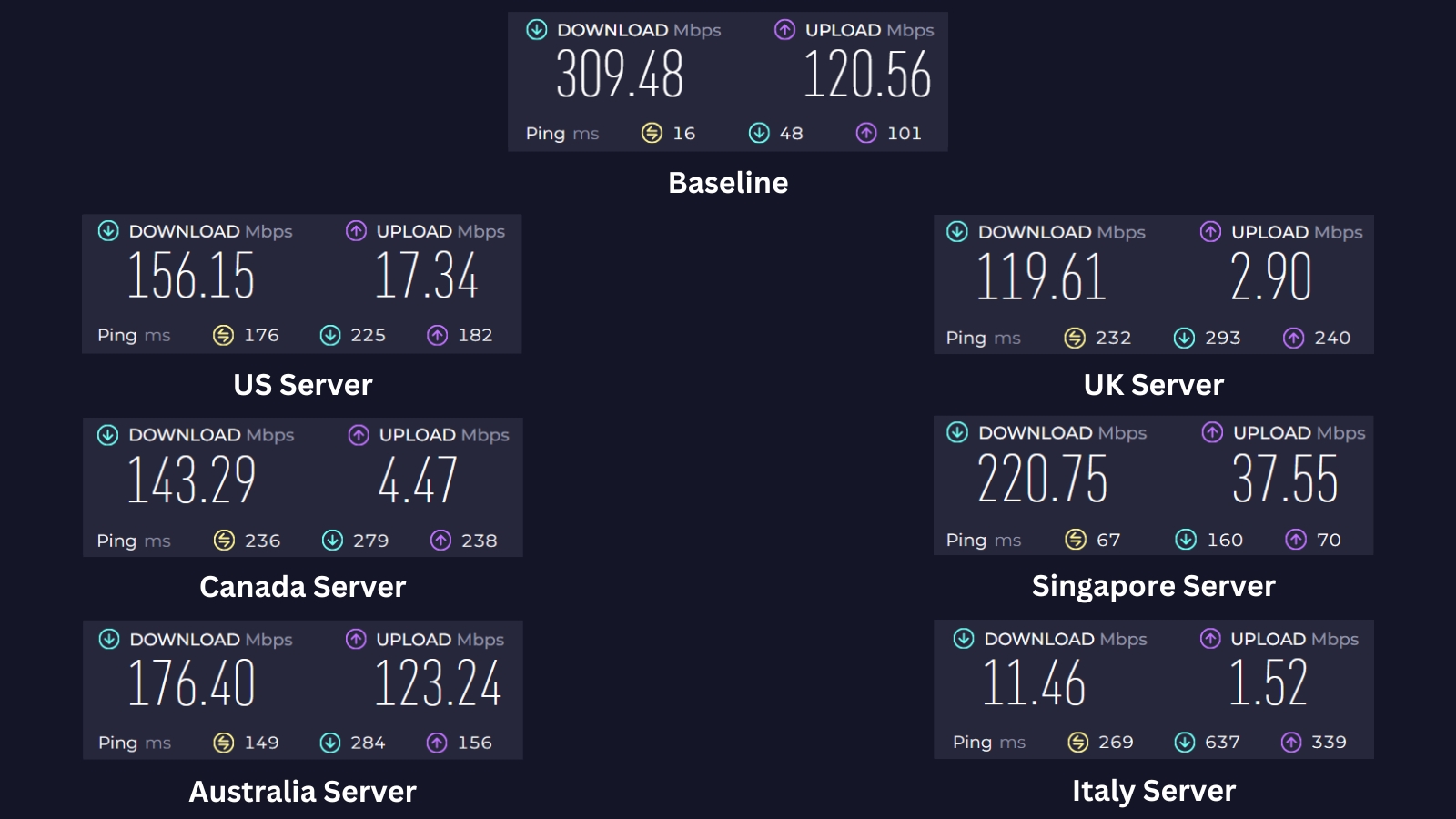
Despite its name, Speedify will hardly make your Web connection faster. There are many other VPNs available that provide higher speeds and smoother performance than Speedify. Our Score: 5/10
No matter which VPN you choose, your Internet connection speed will decline due to the effects of encryption and security measures. However, the best VPNs out there will only slow you down by 10-15%, which is tolerable, especially if you have a fast connection to begin with.
To see how well Speedify performs, we first established some baseline stats by testing the speed of our Internet without a VPN connection. We managed to get 309.48 Mbps for downloads and 120.56 Mbps for uploads using a 400 Mbps connection. Next, we tested a number of Speedify’s servers.
Here are all the speed test results:
- US Server (Seattle) – Due to the far distance between us and the US server, download speeds dropped significantly by 50%, reaching only 156.15 Mbps. Upload speeds were also affected at 17.34 Mbps.
- UK Server (London) – This UK server had a substantial effect on both upload and download speeds. Its upload speeds only reached 2.90 Mbps, while our download speed declined from 309.48 Mbps to 119.61 Mbps, resulting in a 61% reduction.
- Canada Server (Toronto) – Using the Toronto server, located far away, cut our download speeds by over 54% at 143.29 Mbps compared to our pre-VPN baseline. In other words, downloads will be much slower when using a distant or remote server.
- Singapore Server – Our closest server, Singapore, impressed with the fastest download speeds (220.75 Mbps) we recorded. It had a minor 29% slowdown compared to the baseline. Upload speeds were also decent at 37.55 Mbps. So, for optimal performance, consider connecting to servers nearest to your region.
- Australia Server (Perth) – Coming in a close second for speed is the Australia server likely due to its proximity. Downloads reached 176.40 Mbps, which is a 43% decrease from the baseline. Uploads also clocked in at an excellent 123.24 Mbps speed.
- Italy Server (Milan) – Downloading from this server location was super slow. It only got us 11.46 Mbps, which is 96% slower from our baseline speed. Also, uploading wasn't much better, as the speed only reached 1.52 Mbps. It was definitely the slowest server we tested.
Overall, Speedify's server performance varies depending on location. All servers caused some slowdown compared to our baseline speed, averaging a 56% reduction. However, distant servers affected download speeds more significantly. For the fastest speeds, prioritize connecting to servers closer to your actual location.
The service also promises to make your Web connection faster by combining different types of connections with their Channel Bonding technology, so we tested that claim as well.
We put Speedify to the test on our Android phone, where we attempted to combine our Wi-Fi network with our carrier’s 4G network. Our goal was to achieve a speed of more than 370 Mbps since we managed to get 370 Mbps download speed over 4G and 317 Mbps download speed over Wi-Fi.
However, when we conducted a speed test within Speedify, we only managed to get a combined speed of 252 Mbps. This falls short of the lofty claims made by Speedify, and we couldn't observe any tangible benefits. For absolute top speeds, you might want to explore other options we've reviewed in our guide to the fastest VPNs.
Customer Support
Aside from checking FAQs and articles on your own, you can also contact the provider via email. Sadly, live chat isn't an option with Speedify. Our Score: 7/10
When it comes to customer support, Speedify falls short in a few areas. While they do offer email support, there is no live chat support available, which can be frustrating for users who need immediate assistance. Additionally, representatives are only available during specific hours.
Here's what you can expect from their customer support channels:
- Knowledge Base – Speedify offers a range of guides and articles about various aspects of their VPN. With more than a few dozen articles, users can find information on different issues they might face with the service and how to resolve them.
- Email Support – Although email support is available, users may still have to wait up to an hour for a response. However, this response time is admirable compared to the email support of other VPN providers.
- FAQs – Speedify's FAQs section is brief, with only a few dozen questions available. While the questions are linked to each other, they aren't available in one place in any structured way. However, users can use their chatbot to find the answer they are looking for.
While Speedify's customer support channels provide some assistance, the lack of live chat support and limited availability of representatives can be inconvenient for users.
Pricing
Speedify offers several pricing plans. However, considering everything it includes (and everything it doesn’t), it seems slightly overpriced. Our Score: 5/10
Speedify's subscription plans are divided into three categories: Individuals, Families, and Teams. Users can choose the appropriate plan based on the number of people planning to use the subscription.
Each plan is available for monthly and yearly periods. Additionally, the subscription fees for these plans are considerably high, which could be a concern for budget users.
How Much Is Speedify?
Speedify costs $2.99 per month if you subscribe to the 3-year plan. While there are other subscription plans available, this review will focus on the "Individuals" plan. All "Individuals" plans include the same features, offering unlimited VPN usage and allowing connections on up to 5 devices per account.
Let's review the costs of each term length in detail.
- 1-Month Plan – Speedify’s monthly 'Individuals' plan costs $14.99 per month. It’s intended for a single user and allows up to 5 devices to be connected simultaneously.
- 1-Year Plan – The annual plan costs $53.99, which you'll have to pay upfront. This will save you 70% on the price of your subscription versus paying month-to-month.
- 3-Year Plan – This is Speedify VPN's longest subscription plan. It reduces your monthly cost by 80%, bringing the price down to $2.99 per month.
Speedify also offers two other categories of plans for those needing more simultaneous connections and higher device limits: Families and Teams.
- Families Plan – This plan allows up to 5 users to connect to the VPN simultaneously with 5 devices each. The monthly plan costs $22.50, while the yearly plan is $81, which breaks down to $6.75 per month. If you opt for the 3-year plan, it's available for $4.50 per month.
- Teams Plan – Now, this one's meant for larger groups and is priced at $14.99 per month. There's two types of plans under the Teams Plan. If you go for the annual plan, it's $4.49 per user/month. The price varies based on the number of users, and each user account has a 5-device limit. You can also add a dedicated server for an extra $75/month.
If you get the yearly plan of the Families or Teams plans, you'll save up to 54%. Additionally, Speedify offers a non-renewable 2-year pass for a one-time payment of $99.99.
However, its payment methods are limited to credit or debit cards, PayPal, and Venmo. The fact that Speedify doesn't accept Bitcoin or any other virtual currency means there's no way to buy the subscription anonymously.
Furthermore, Speedify doesn't offer many features compared to top VPNs, so we don't believe that sticking with the service for three years—the only way to get a good deal here—is a smart choice.
Is Speedify Free?
Yes, Speedify offers a free plan, but with a small data cap of 2GB. Although you can connect up to 5 devices, Speedify stops working until the next month if you exceed the limit. This might not be enough for most Internet activities, particularly if you plan on streaming videos or downloading large files.
Apart from the free plan, if you go for the annual subscription on Windows, macOS, and iOS, you get a 7-day free trial. This is a good way to try Speedify. Just a heads up, though - this perk isn't up for grabs on Android and Linux.
If you do need more data, you can take advantage of Speedify's 30-day money-back guarantee. Just know that Speedify can't give refunds for purchases made via Apple's App Store or Google Play. For these transactions, you'll need to request a refund from those companies.
There are also other free VPN options available that offer more bandwidth and features. So, if you’re on a tight budget, it may be worth checking out other providers that can deliver better value than Speedify's free plan.
Final Thoughts
Our Speedify VPN review shows that this service has potential but also has some drawbacks. Speedify claims to provide fast connection speeds through "Channel Bonding" but can’t deliver on its promises.
It also falls short in terms of unblocking capabilities and advanced security features. Considering its mediocre performance, it’s hard to justify its relatively high price point. While Speedify can improve live streaming and video conferencing, plenty of other VPNs offer wider server networks, transparent privacy policies, and better unblocking capabilities for lower prices.
You can certainly give Speedify a try by taking advantage of its 30-day refund policy, but we strongly recommend NordVPN. The service is clear about its logging policies, leaks no data, operates outside the purview of government surveillance, and delivers top-tier performance along with a range of premium features.
PROS
- Unique feature for live streaming.
- Channel Bonding technology.
- No active data leaks.
- AES-256-GCM encryption.
- 7-day free trial.
- 30-day money-back guarantee.
- Multiple subscription-plan options.
CONS
- Unintuitive design.
- Small server network.
- Collects anonymized information.
- Alleged data leaks.
- Not available on routers.
- Expensive monthly subscription.
- Unsafe jurisdiction.
| Review Summary Speedify’s Channel Bonding protocol is intriguing, but it doesn't seem to prioritize privacy protection. On top of that, it's unable to unblock most streaming services, it collects user data, and it has poor performance. We simply don't recommend this service. | 5.3 Overall Score | ||
| Background, Jurisdiction & Reputation | 2 | ||
| Supported Platforms & Devices | 6 | ||
| Installation & Initial Configuration | 10 | ||
| Prominent Features | 8.5 | ||
| Server Count & Infrastructure | 3 | ||
| UI/UX Design & Ease of Use | 6 | ||
| Media Streaming, Torrenting, and Gaming Support | 3 | ||
| Security & Privacy | 3 | ||
| Speed & Performance | 5 | ||
| Customer Support | 7 | ||
| Pricing | 5 | ||