When you purchase through links on our site, we may earn an affiliate commission. Here’s how it works.
FastVPN Review 2026


Our experts have reviewed 53 VPN providers, which were put through extensive rounds of testing. To learn more about that process, here’s how we review VPNs, where we explain our criteria and our policy of being fully transparent.
FastVPN is a proprietary VPN app developed by Namecheap, a popular Web hosting and domain name provider. In our tests, we found that it offers a good balance of security and performance. However, it’s based in the US, a jurisdiction of the Five Eyes Alliance. This means that the US government could access and use the data collected by Namecheap FastVPN for surveillance purposes.
On the bright side, FastVPN claims to keep no user logs (more on that later) and hasn’t experienced any data breaches in the past. It also offers a number of security features, along with a server network in 57 countries.
In terms of performance, FastVPN is generally fast and reliable. It can unblock streaming services like Netflix and Disney+, and it’s also good for torrenting. However, the gaming performance is rather disappointing. On top of that, you could face connection problems during peak hours.
Overall, if you’re looking for a VPN service that’s affordable and easy to use, then FastVPN could be a good option for you. Here’s a table that shows the main features of Namecheap FastVPN:
FastVPN by Namecheap claims to be one of the top VPNs on the market, but is it really? We’ll find that out for ourselves by putting it through a series of rigorous tests. We’ll look at its reputation, speed, security, privacy, pricing, and customer support to see how it compares to the best VPN services we’ve reviewed.
Our review process is consistent for every VPN we evaluate. We use various tests and criteria to measure different aspects of a VPN’s performance and quality. If you want to know more about our methodology, you can check out how we review VPNs.
Background, Jurisdiction & Reputation
FastVPN comes from the USA, which can be worrisome. Even more concerning is that FastVPN's owning company logs user data. This could be a significant issue for online anonymity, despite the lack of reported data leaks so far. Our Score: 5.5/10
When choosing a VPN, it’s crucial to know where it comes from. That’s because VPNs deal with private and personal information, and you want to make sure that no one is forcing the VPN to collect any data. So, let’s find out more about this aspect of FastVPN.
Where Is FastVPN Based?
FastVPN is based in the US. When you subscribe to this VPN, as their Privacy Policy says, your rights and actions are governed by the laws of the United States and the State of Arizona. This is a big red flag since the US is perhaps the most aggressive country when it comes to logging PII.
Now, the problem is that Namecheap's FastVPN comes from a member of the 5/9/14-Eyes Alliance, which is a group of countries collecting and exchanging all kinds of intelligence data. That’s precisely why VPNs are usually based in exotic locations with no data retention laws such as the British Virgin Islands, Seychelles, and similar.
In other words, it's always a better idea to use a VPN in a country without a record of collecting data or forcing data processors to log any kind of information.
Did FastVPN Leak Personal Data in the Past?
No, FastVPN has had no data leaks in the past. In all fairness, this is still a relatively new VPN, and we believe that it isn’t used by a large number of individuals around the globe. However, it’s good to know that this VPN’s reputation is still intact.
However, a lack of reported data leaks in the past doesn't guarantee your future security. As FastVPN grows in popularity, it'll attract more attention from hackers. This means it's crucial for the company to invest in robust security measures and undergo regular independent audits to maintain your trust.
Supported Platforms & Devices
FastVPN currently covers all of the major desktop and mobile platforms. You can use it on VPN-compatible routers and Chrome browser extension as well. Our Score: 8/10
Generally, VPNs let you access secure servers from multiple devices simultaneously. This means you need to check which platforms are compatible to ensure your safety both at home and while on the go. Here's a summary table for FastVPN's performance in this aspect.
FastVPN offers native apps for Windows and macOS, ensuring a consistent experience on desktops with intuitive interfaces. For Linux users, there’s the option to manually configure OpenVPN. In addition to these apps, FastVPN now has a Google Chrome extension to secure your browsing activity.
You could also configure the service on other devices, like Fire TV, Android TV, Apple TV, LG, and Samsung Smart TVs. The setup guides on FastVPN’s website are pretty detailed and easy to follow.
Mobile platforms are also well-supported, with apps available for both Android and iOS devices. Notably, FastVPN has expanded its compatibility to include routers such as DD-WRT, Tomato, pfSense, and more. Using this service on a router lets you connect as many devices as you would like to the VPN’s network without running out of support.
For the number of device connections, they've updated their rules. This VPN offers unlimited simultaneous connections, so you can connect all your devices to the VPN at once. However, there's something to keep in mind, specifically for streaming content.
There's a 5 device limit for streaming mode with FastVPN. It's in place to ensure fair access and top performance for all users. By restricting the number of simultaneous streams, they prevent network congestion.
However, if you want unlimited device connections, use FastVPN's 'Privacy Mode.' Just switch the servers to 'All' to activate it. Not many VPNs offer such flexibility when it comes to device connections, so we definitely think FastVPN deserves extra points for this reason.
Installation & Initial Configuration
Luckily, installing FastVPN's VPN software is quite simple. Download the app from its official website, install it, and then sign in using your credentials. Our Score: 10/10
In this section of our FastVPN review, we'll guide you through the simple process of installing and setting up the service. The process is straightforward – void of any third-party components or bundled offers. Overall, it's a breeze to get started with FastVPN. Let’s show you how.
How to Download and Use FastVPN?
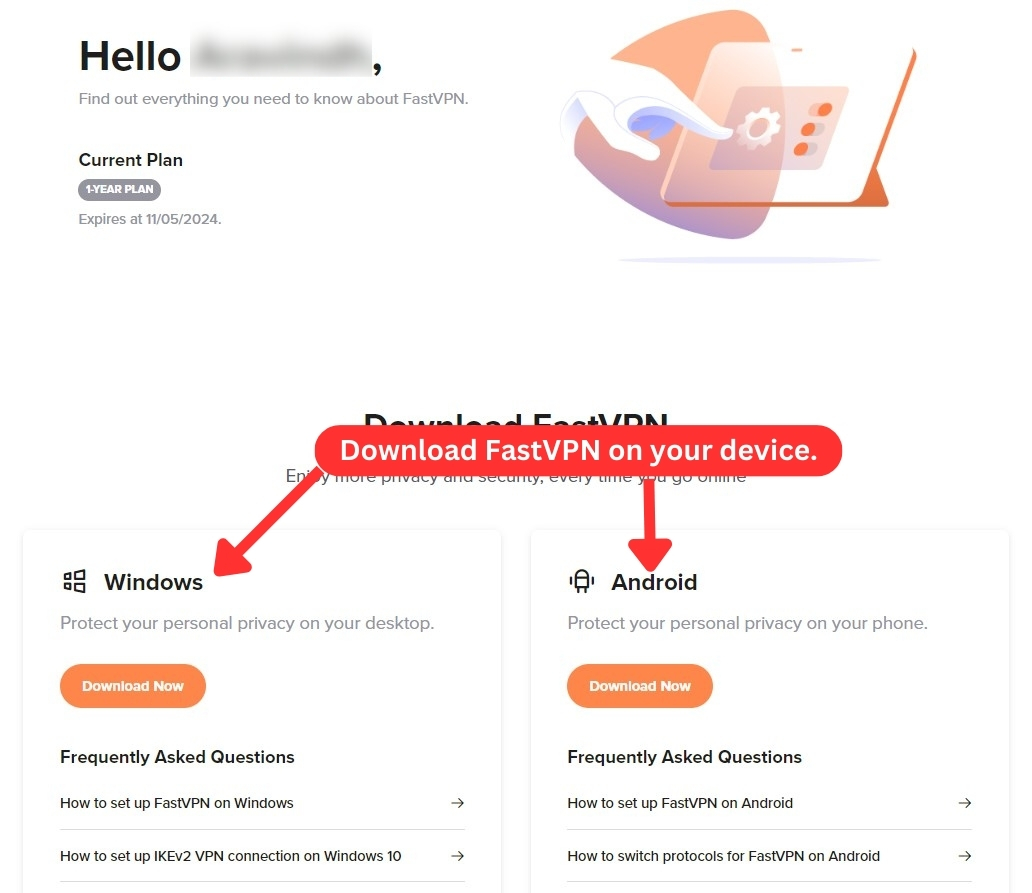
To use FastVPN, you need to sign up and pay for a subscription. Once subscribed, you can now download the app. Here are the steps in detail:
- Go to the official website and subscribe to FastVPN.
- Access your account on the site with your credentials.
- Select the "FastVPN" app for your device and download the installation file.
- Follow the on-screen instructions to install the app.
- Now, launch the app and log in using your credentials.
- Choose a server manually, or let the app automatically do it for you.
- You’re now ready to browse the Internet. That's it!
Through the user control panel, you have the convenience of reviewing all the services you've acquired from FastVPN, which may also include Web hosting plans and domain names. The dashboard is also a convenient hub to access various installation guides available in the help center.
Prominent Features
While FastVPN prioritizes essential VPN features, it lacks advanced options like anti-malware, dedicated IP, and ad-blocking. Without these extra features, it significantly reduces its power compared to other services. Our Score: 7/10
In this section, we‘ll evaluate how FastVPN performs according to our standards and highlight some of its main features. We know FastVPN is a newcomer in the VPN market and hasn’t added many new features to keep up with its rivals. It mainly offers the basic features that are essential for a VPN service, rather than a variety of advanced options.
That said, here’s what you can expect from the VPN:
- DNS Leak Protection: To ensure your data remains secure within the VPN tunnel, FastVPN offers DNS leak protection. This feature prevents any leaks and ensures your online activities are kept private. However, it's important to note that FastVPN doesn't provide IPv6 support, so users will need to manually disable this protocol and rely on IPv4 instead.
- AES-256 Encryption: You’ll be happy to know that FastVPN comes with the highest level of encryption. By encrypting your data, you’re basically making it unreadable to anyone else. This means that you’re safe even if someone gets to your data.
- Kill Switch: The service has a kill switch feature for Windows users. This valuable addition prevents any data leaks in case your VPN connection drops. It blocks all data traffic until you reconnect to the VPN or disable the kill switch, making sure that your IP address, data, and online activities remain protected.
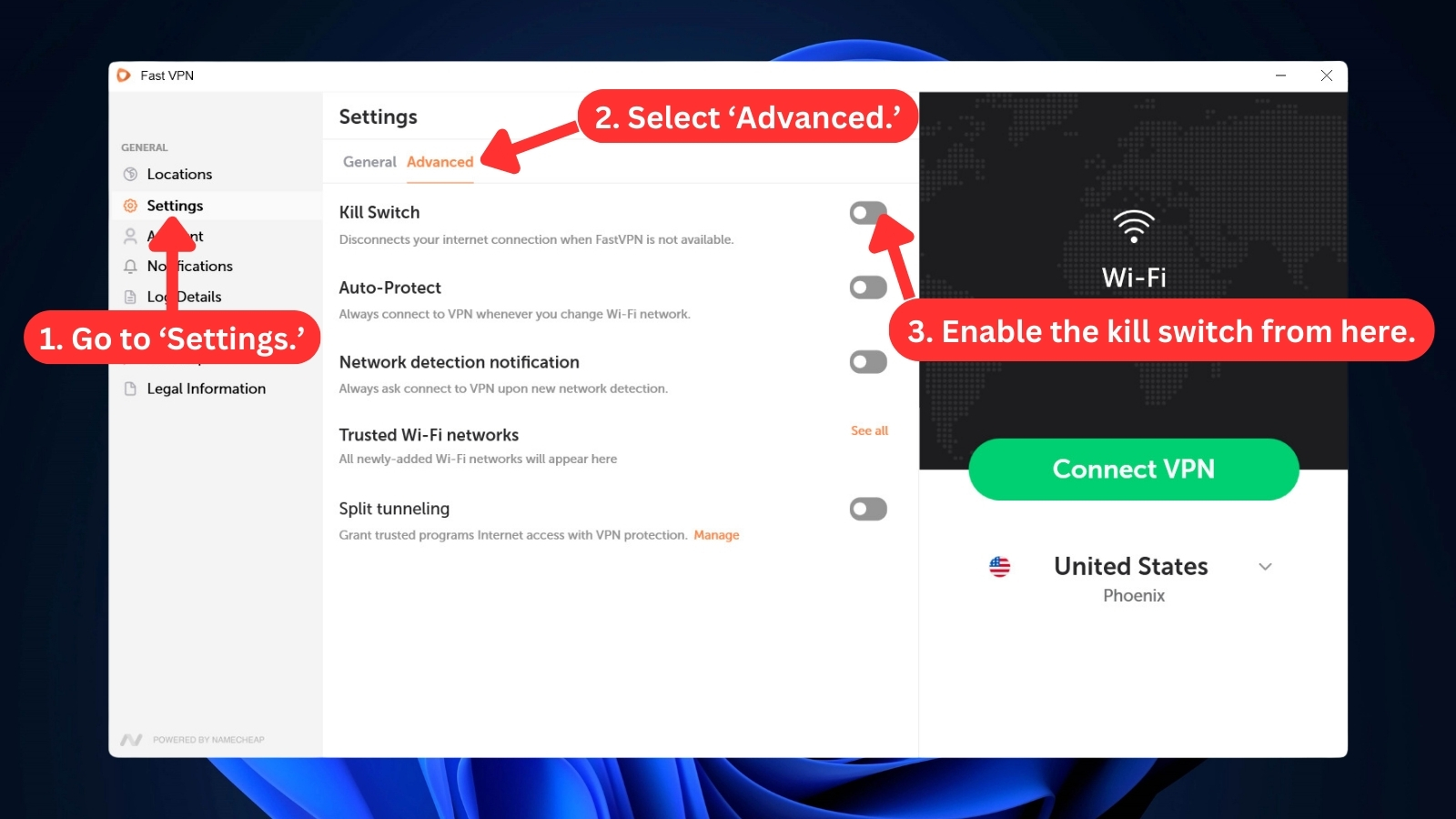
- Split Tunneling: This handy feature, available on Windows, Android, and iOS, gives you control over which apps use the secure, encrypted VPN tunnel for maximum privacy (think online banking) and which ones can zip along the regular Internet route for faster speeds.
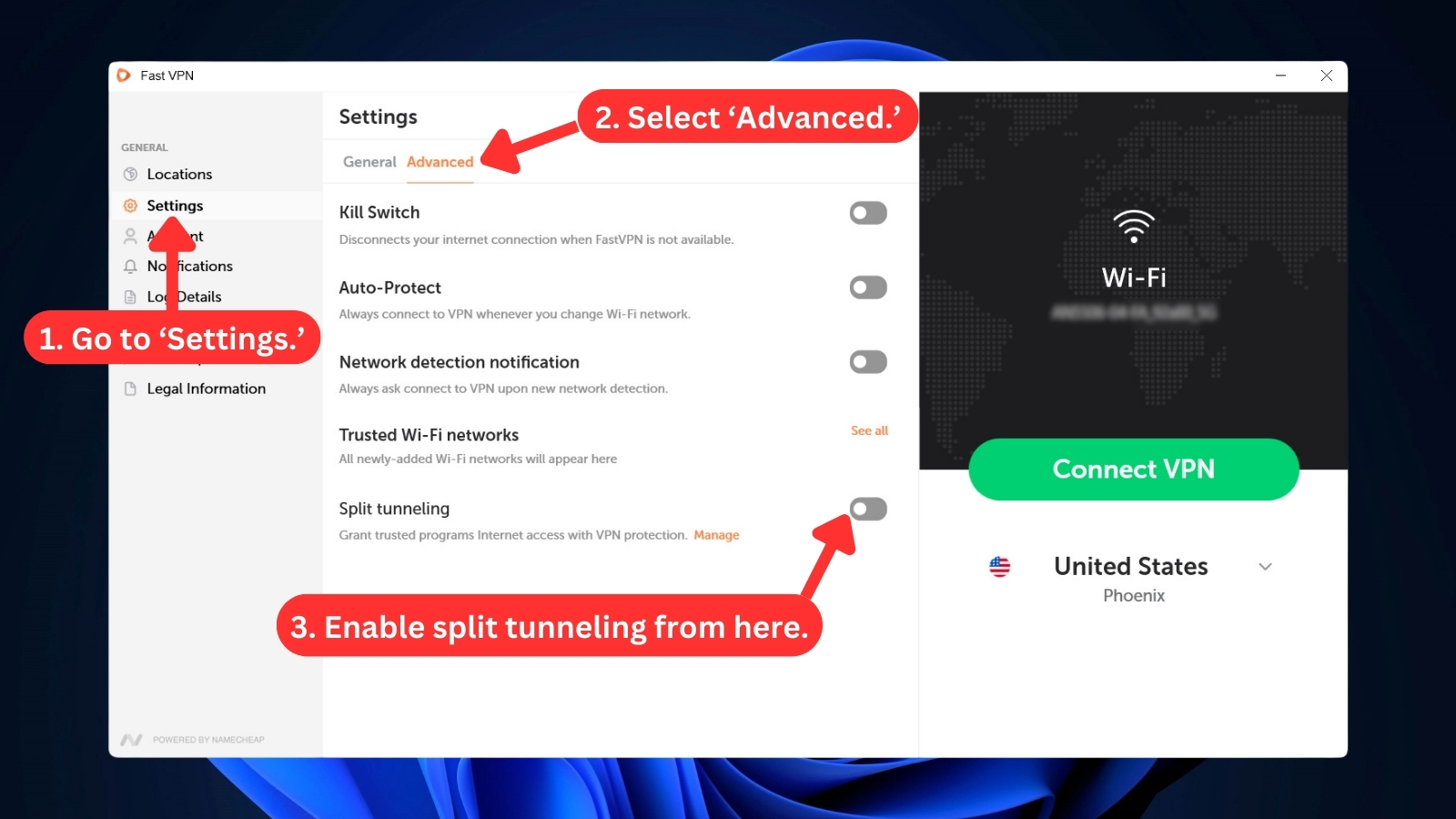
- Auto-Protect: FastVPN has an ‘Auto-Protect’ feature that’s designed for Windows, macOS, and iOS users. This feature automatically initiates the VPN connection as soon as you go online. This gives you immediate and seamless protection without any manual intervention.
- Unlimited Server Switches and Bandwidth: With this VPN, you can enjoy unlimited bandwidth for all your online activities. Whether you want to watch HD videos, download large files, or play online games, you can do it all without any data limits or speed issues. You can also switch between servers as often as you like, with no extra fees or limitations.
Server Count & Infrastructure
When it comes to its server count, FastVPN falls somewhere in the middle in comparison to other VPNs with 1,000+ servers. Our Score: 7/10
Having a wide range of server options is crucial to ensuring unrestricted access to global content. FastVPN aims to fulfill this need by offering an extensive network of servers distributed across the globe. Let's evaluate its server coverage in this segment. Here’s a table with some key details:
FastVPN boasts a well-spread network with 1,000+ servers in 57 countries and about 50+ locations. Even when compared to more established VPN providers, its number of server locations is still impressive.
While the European region stands out with over 30 countries covered, major regions like the United States enjoy multiple server options. It has servers in more than 6 Asian countries and even in South Africa.
FastVPN’s app also displays scores of server load and ping. The ping information is generally accurate, with minor discrepancies on distant servers. To easily find your server, you also have the option to mark them as favorites. In terms of performance, all servers proved reliable, connecting within a few seconds.
During our evaluation, we found a virtual server in India, which was surprising since the VPN mainly uses physical servers. Moreover, their support team told us that FastVPN was created in cooperation with StackPath, a private equity-funded cyber security company. As a result, Namecheap servers are powered by StackPath.
UI/UX Design & Ease of Use
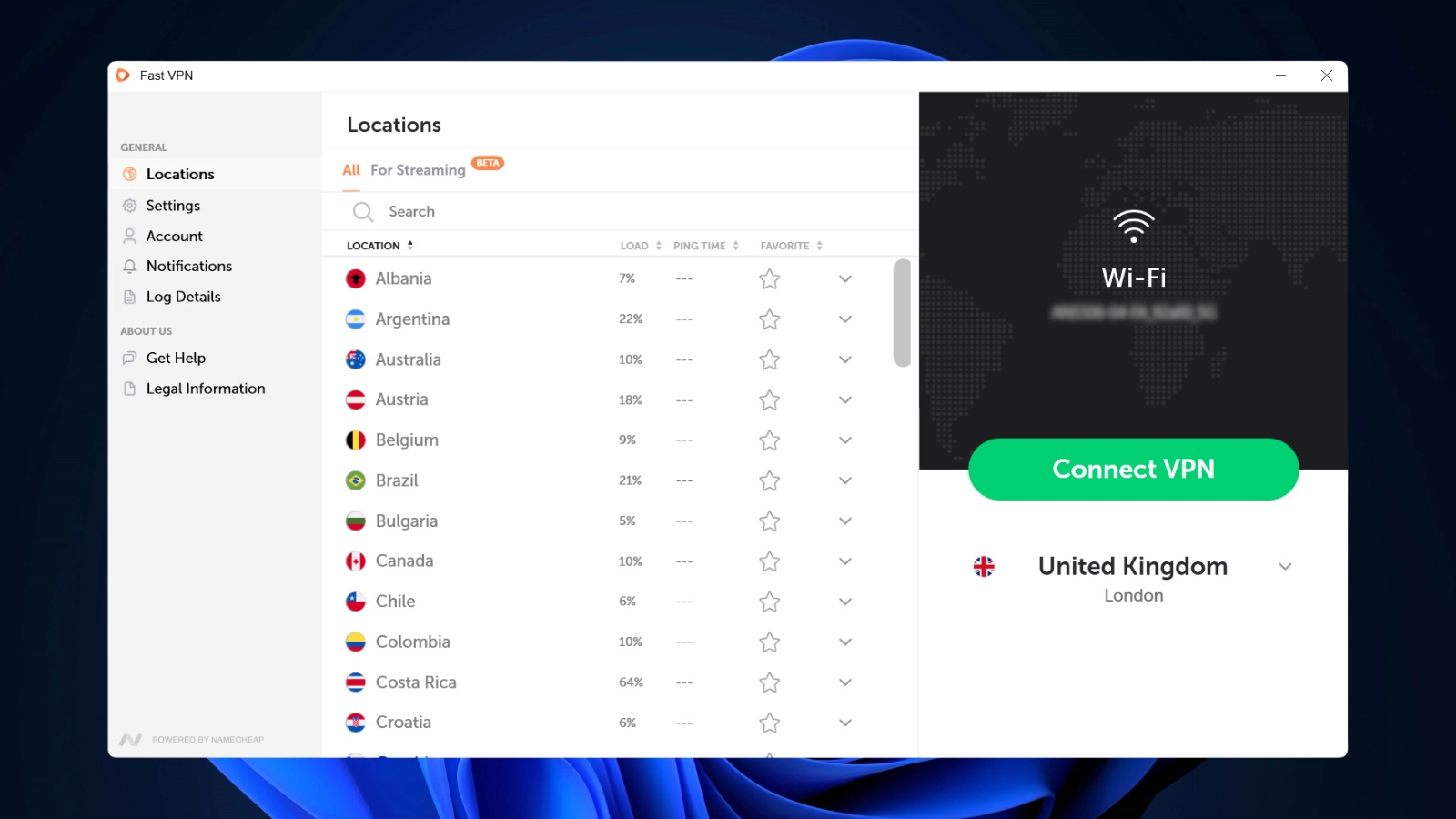
FastVPN has been on a roll lately, improving its applications across the board. To accommodate even more features, they recently gave their UI a welcome update. Our Score: 8/10
In this segment, we'll explore FastVPN's applications for Windows and talk a bit about its apps on iOS and Android. First of all, FastVPN has made significant improvements to its desktop applications, providing a more comprehensive user experience. Let's take a closer look at this and explore the app's features.
FastVPN's Windows app keeps things nice and simple. The main screen, designated as 'Locations,' is where you can view the list of all FastVPN servers. On the right, a prominent 'Connect VPN' button gets you started instantly, picking the best server for your location.
But if you know exactly where you want to virtually hang out, the left side of it shows you all the servers. You can sort the server list alphabetically, by load time, or ping time scores. Moreover, you can mark your favorite locations by simply clicking on the star icon.
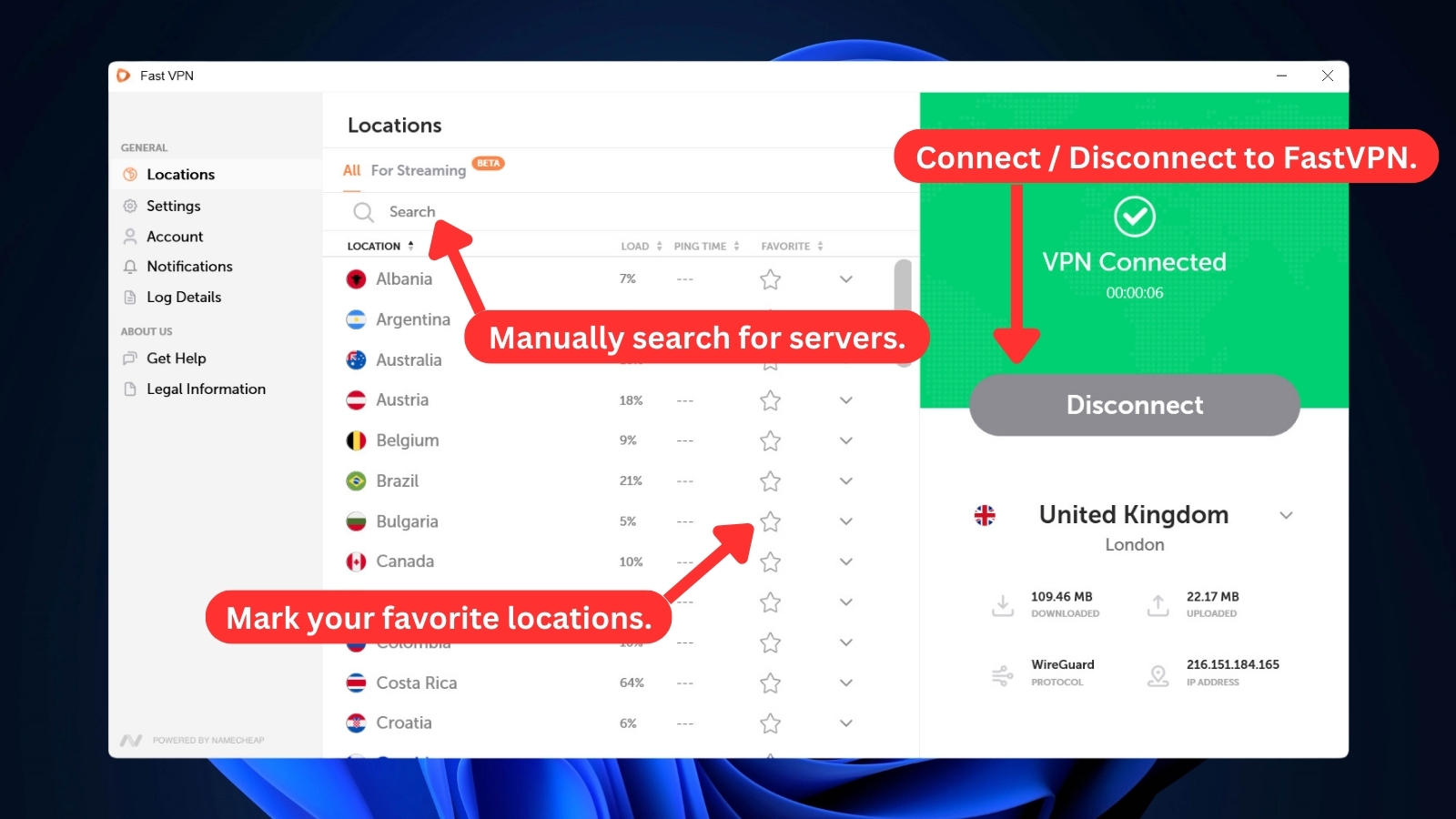
Just click on your desired country and you'll be connected to a secure server right away. Once connected, you'll see certain info about your VPN connection. This includes your virtual IP address, the security protocol being used, how long you've been connected, and even how much data you've used.
Following the interface of the main screen, FastVPN offers a well-organized 'Settings' menu. Divided into 'General' and 'Advanced' categories, the settings provide a range of options for tailoring the VPN's functionality. Let's explore what you can do with it.
- General: In this panel, you can set startup options, switch VPN protocols, and change the app's theme to either light or dark options. You can also check the bottom of the screen to ensure you're running the latest version.
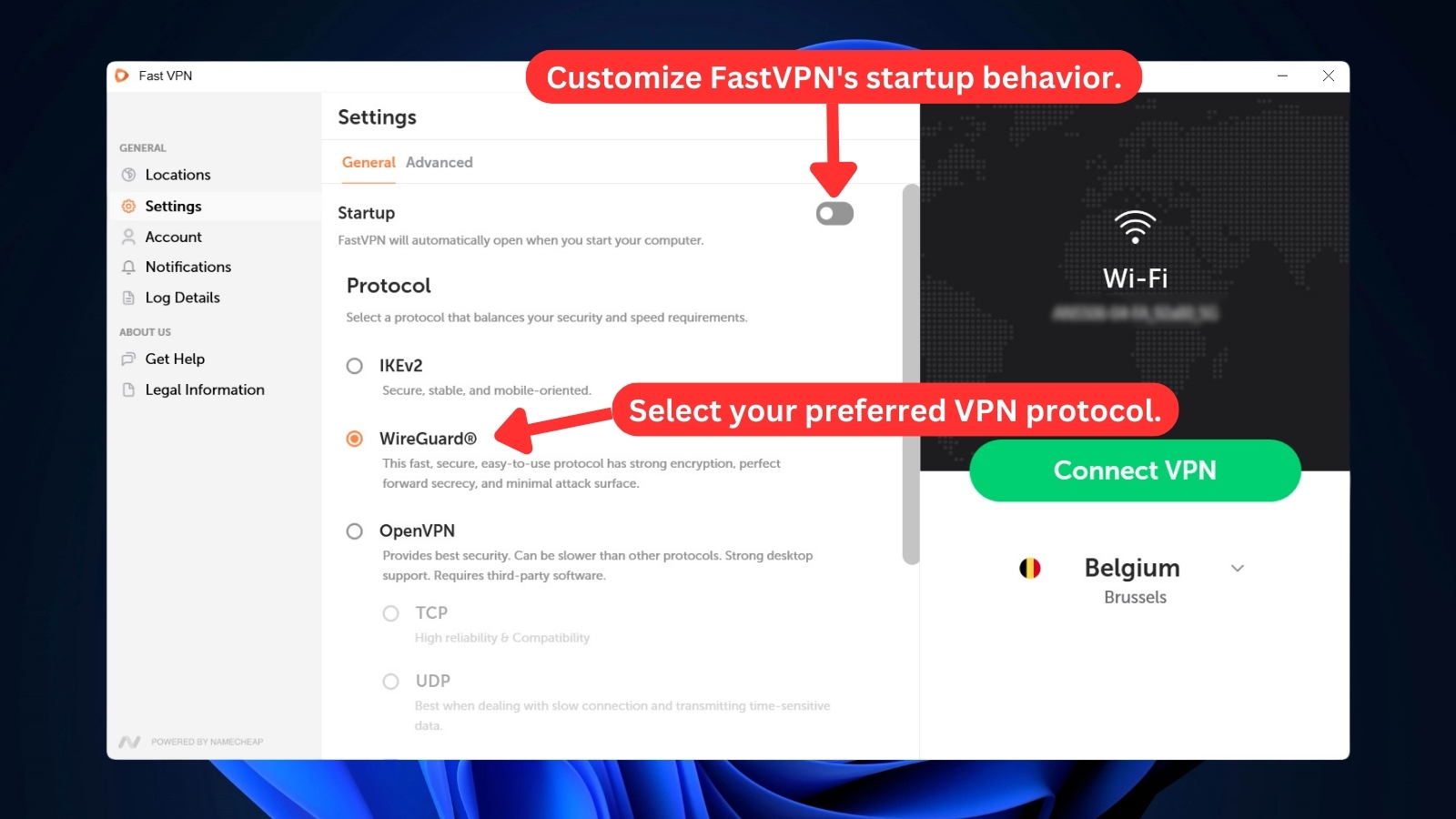
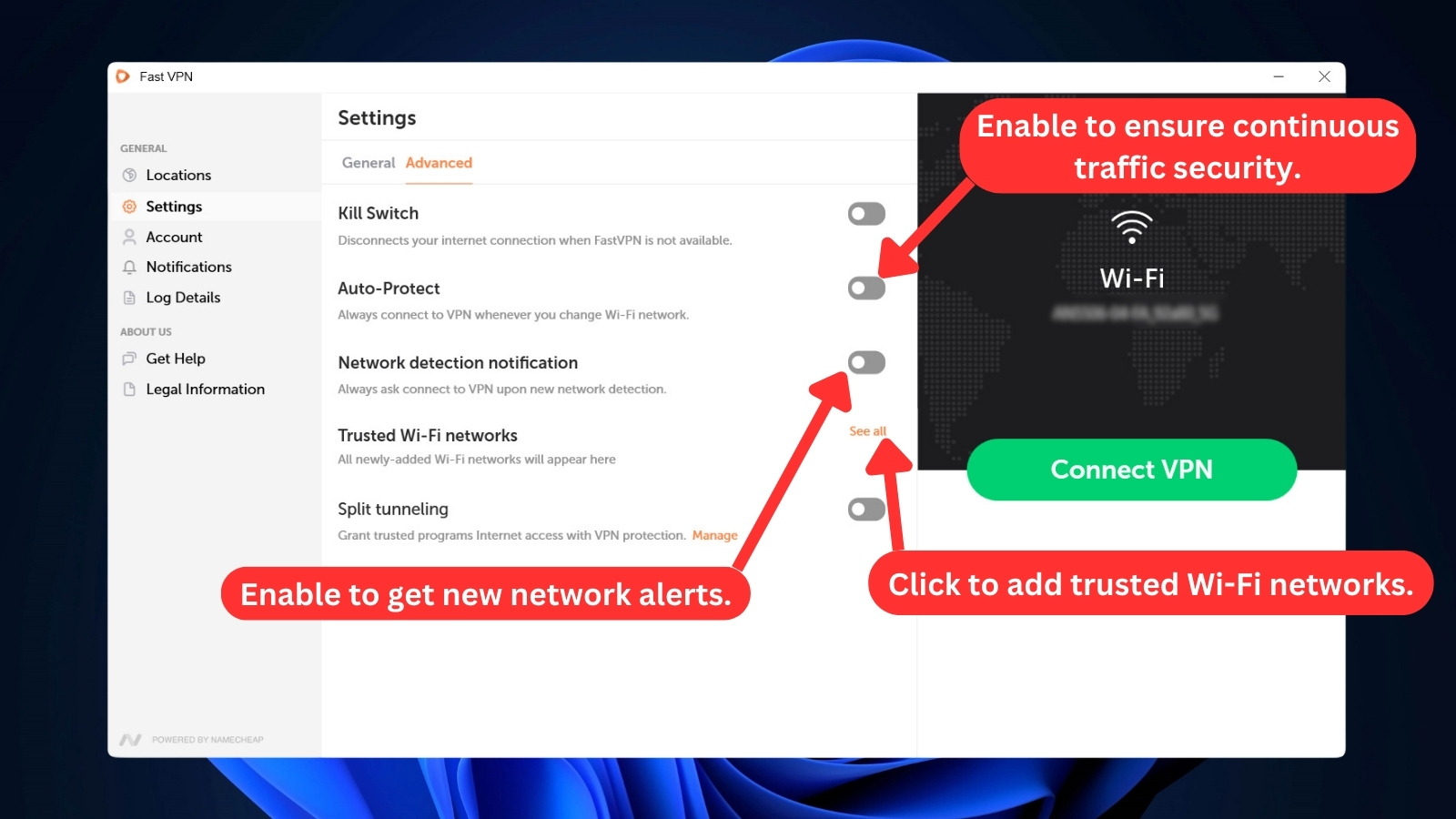
- Advanced: Here, you can take control of features like kill switch and split tunneling. You can also keep your traffic secure even when switching networks via 'Auto Protect' and get alerts for new networks by enabling 'Network Detection Notification.' Plus, easily add Wi-Fi networks for seamless protection.
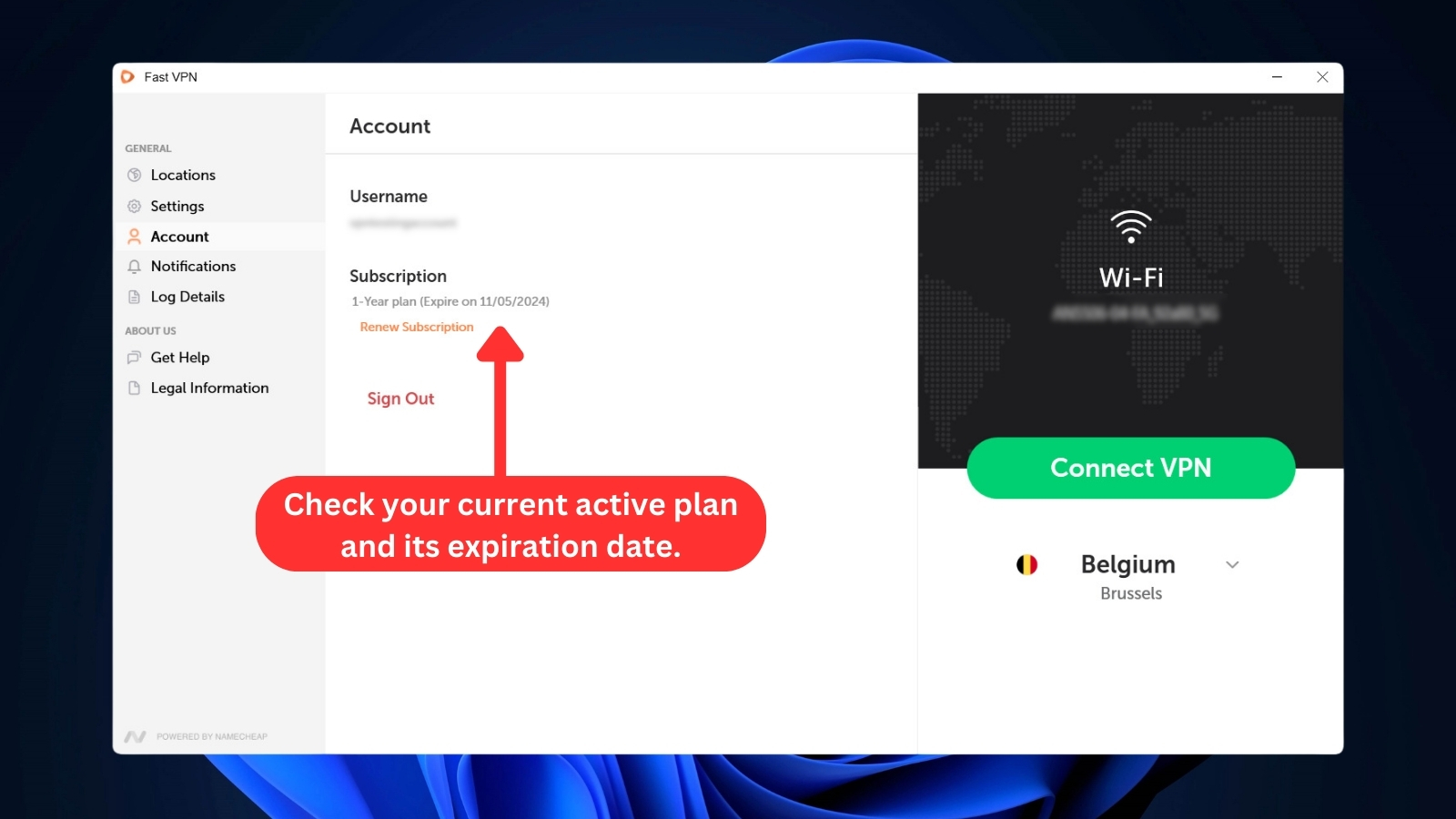
Next is the 'Account' section. It displays your username and subscription details, including the plan and its expiration date. Below this, you can auto-renew your subscription by clicking the ‘Renew Subscription’ link. You can sign out from here as well.
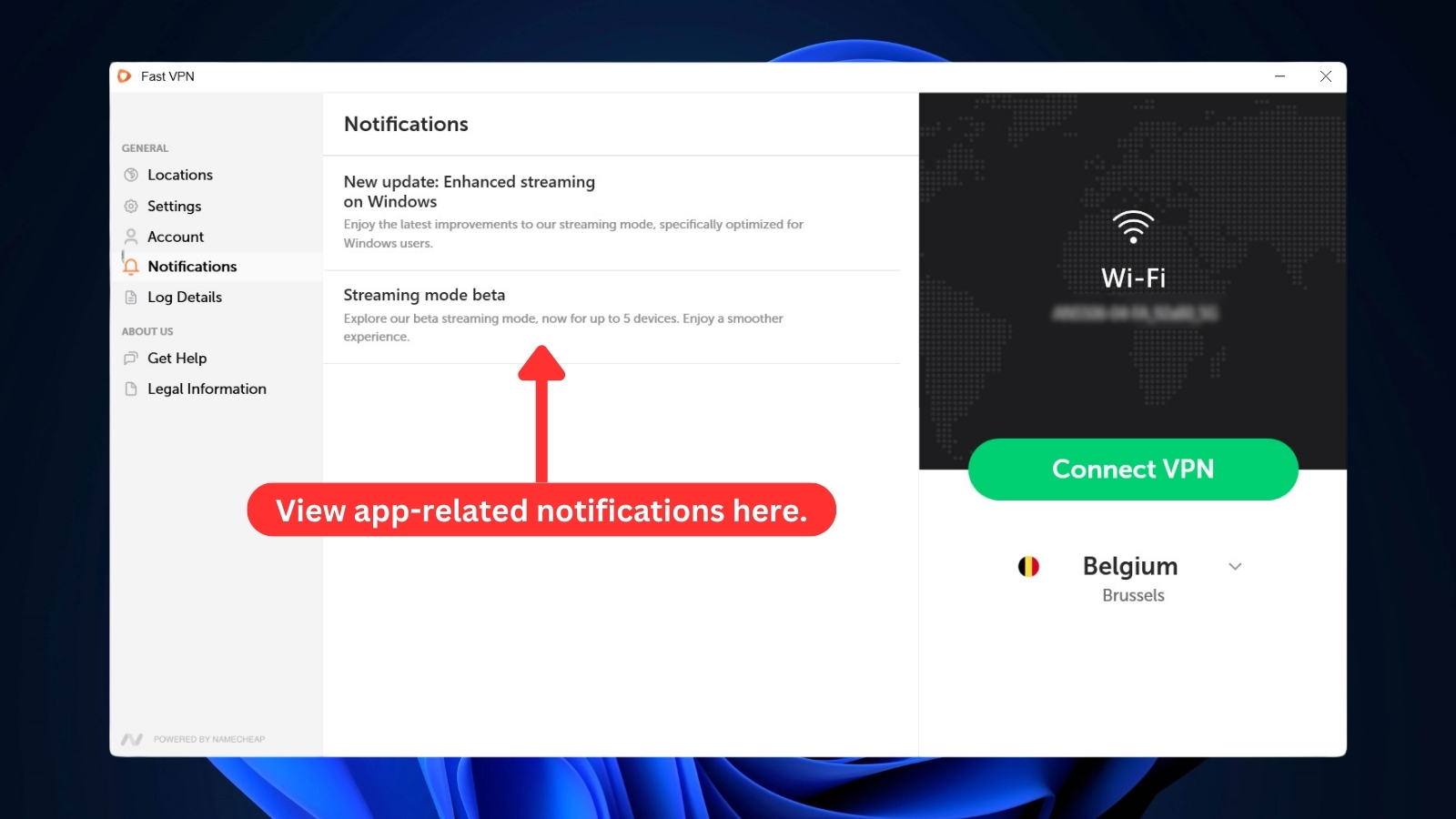
To ensure that you can easily address any issues that require attention, the app has a 'Notifications' section where all app-related messages are shown. So far, we've only seen a couple of notifications in this section.
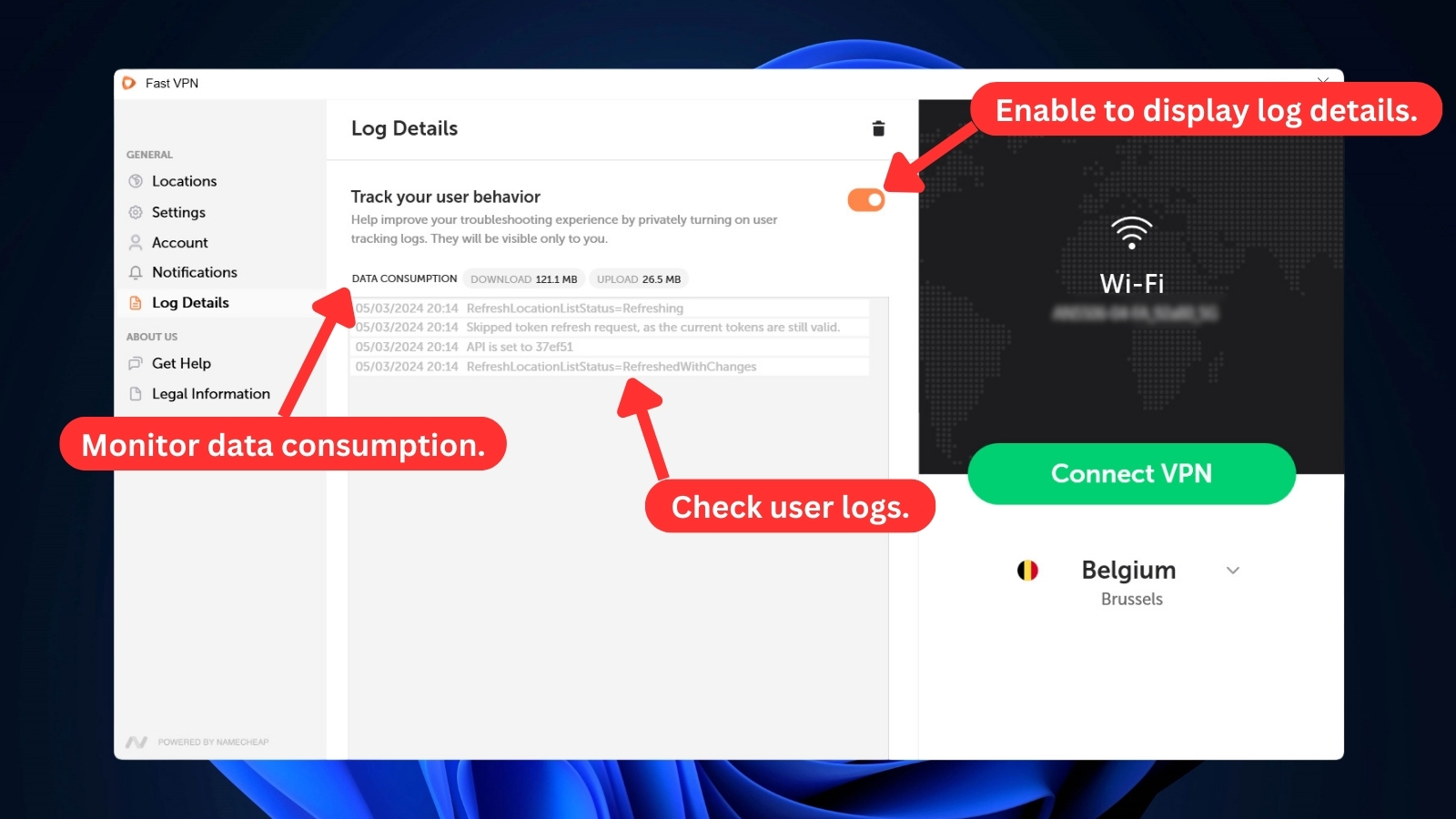
Then you have the 'Log Details' section, which provides you with valuable troubleshooting information. It also keeps track of your total data downloaded and uploaded through the VPN, giving you insights into your usage patterns.
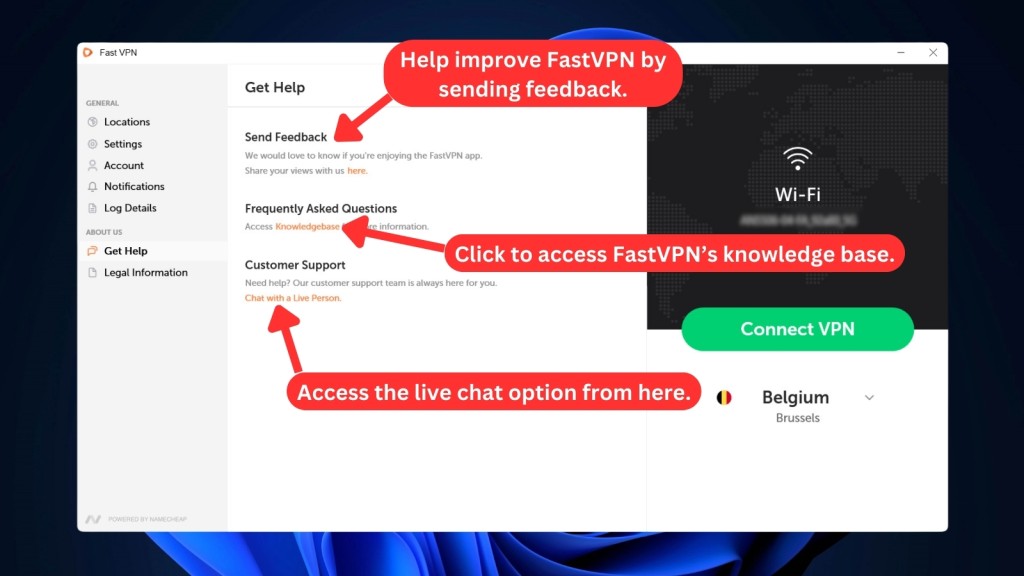
FastVPN doesn't leave you hanging if you need help. The "Get Help" tab offers a link to its knowledge base or you can jump on live chat and connect with a customer service rep directly. Plus, there's always the option to leave your own feedback and help shape the future of FastVPN.

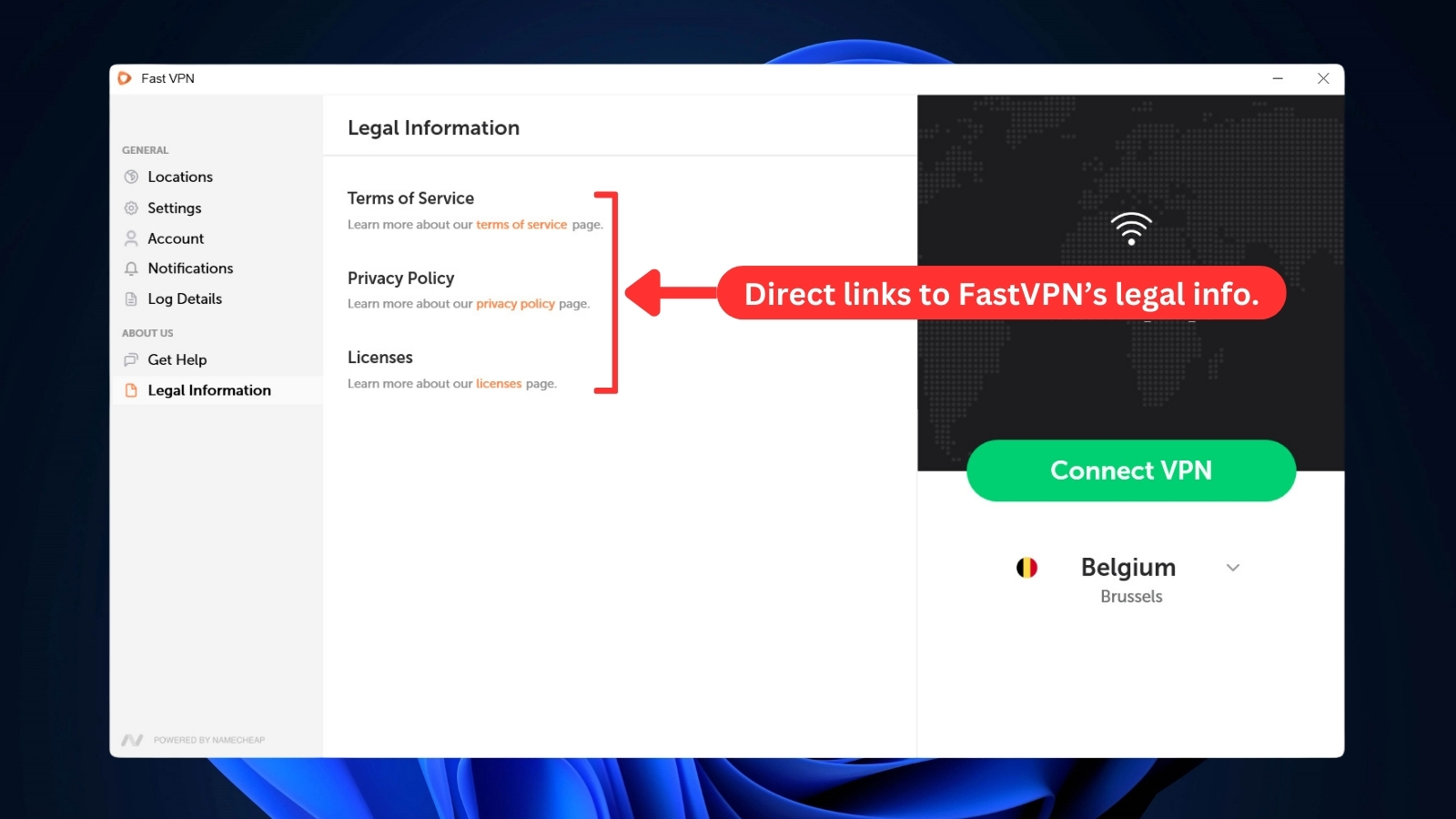
It’s also important for a VPN to be transparent about its policy and compliance. To do that, the app provides a 'Legal Information' tab where you'll find direct links to their Terms of Service, Privacy Policy, and Licenses. This ensures you can easily understand how they handle your data and what agreements govern their service.
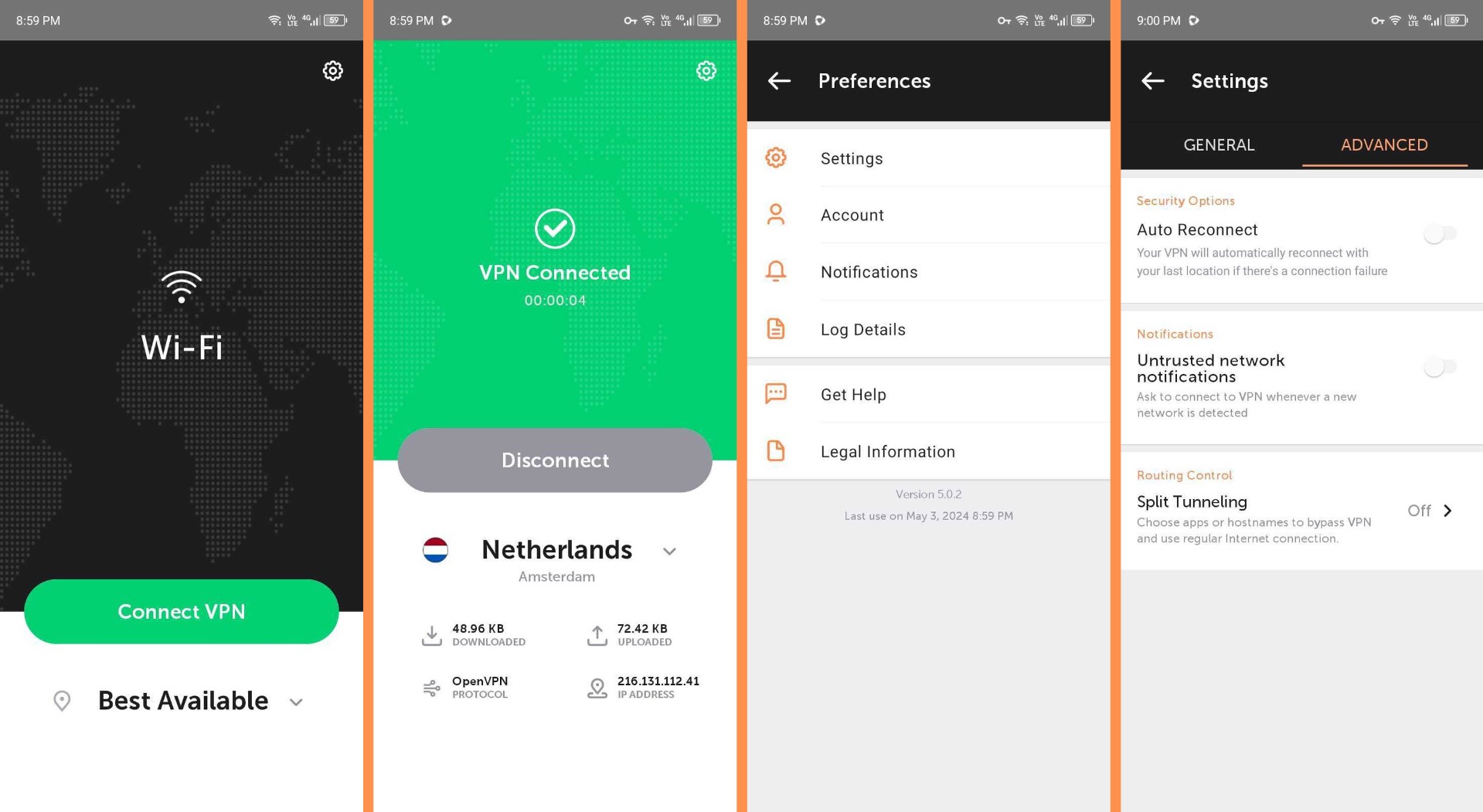
When it comes to FastVPN's iOS app, it boasts a clean UI with a world map background. This makes connecting to and disconnecting from servers effortless. The Android app also shares the same design with a world map and a list of countries.
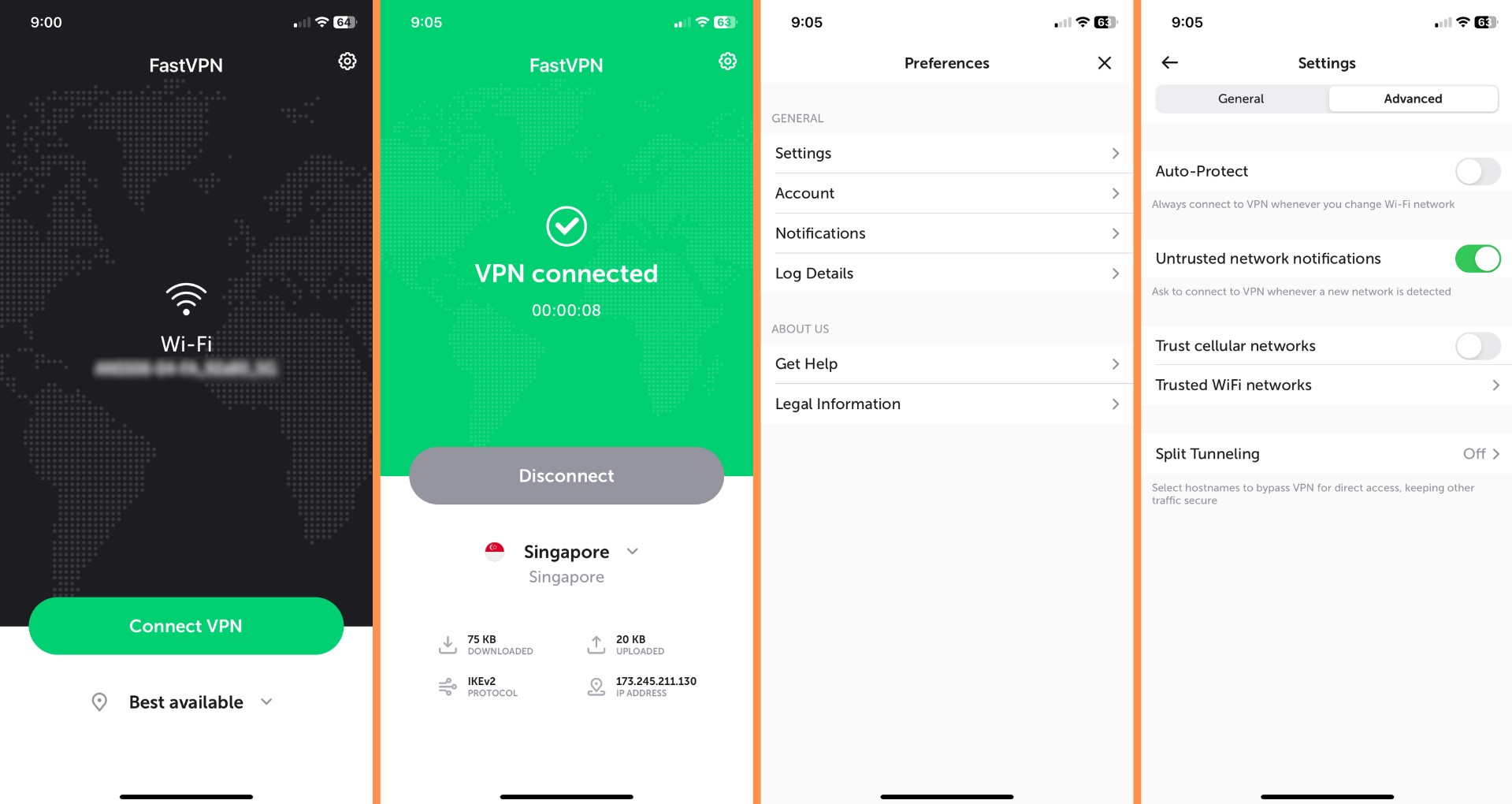
The iPhone and Android apps look almost identical, with just a few design quirks. They both got a recent update, so you can expect the same features on either platform.
FastVPN's Chrome extension keeps things user-friendly too. You won't find a maze of settings to get lost in. The interface is clean and simple, with a button to connect or disconnect from the VPN. Selecting a server location (USA, UK, Canada) is usually just a click or two away.
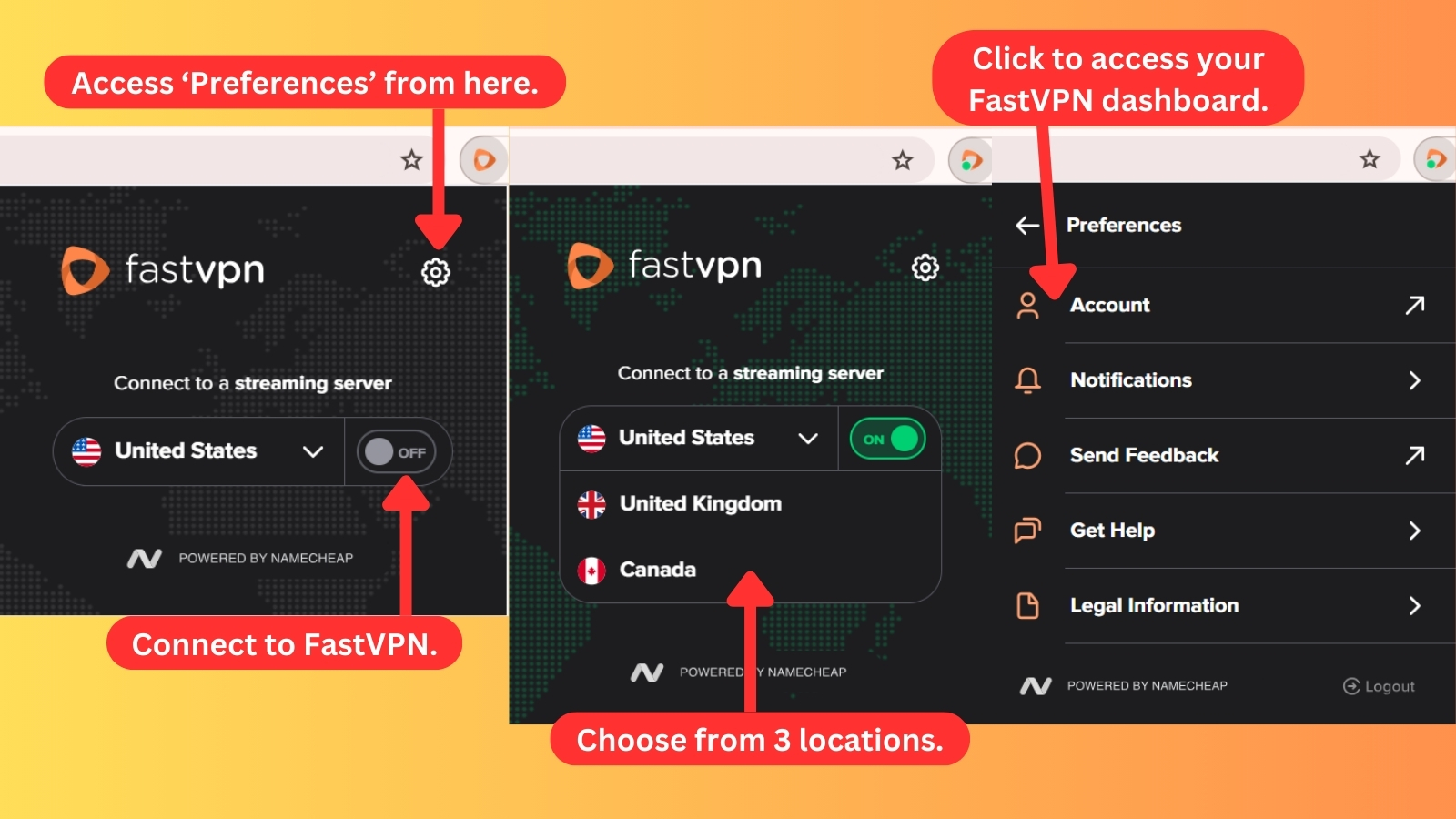
Clicking on the cogwheel icon reveals a 'Preference' menu, which keeps things handy by offering access to your FastVPN account dashboard like a portal. The menu also connects you directly to live chat support for quick assistance. And if you want to learn more, the menu includes direct links to FastVPN's legal information.
All in all, we like that the apps offer a consistent and user-friendly experience across desktop, mobile, and Chrome extension. From a simple interface on the desktop to straightforward connection options on mobile and browser extension, FastVPN makes securing your connection effortless.
Media Streaming, Torrenting, and Gaming Support
FastVPN lets you watch various streaming services and share files via P2P from many locations. However, it doesn’t offer a great gaming experience. Our Score: 7/10
We thoroughly tested FastVPN's performance in accessing online content through streaming services, torrenting sites, and gaming platforms. Here are our findings to help you determine if it meets your requirements.
Is FastVPN Good for Streaming?
Yes, FastVPN is a good VPN for streaming. Although FastVPN doesn't boast a massive server network for streaming, it punches above its weight with dedicated servers in the US, UK, and Canada – prime locations for popular streaming services. Impressively, it bypasses geo-restrictions, letting you access your favorite shows and movies globally.
Here are some of the most notable US-based streaming platforms this VPN can unblock.
It can also unblock a variety of non-US streaming platforms, including:
It's worth mentioning that Namecheap VPN shares the infrastructure with IPVanish, which is also used by other VPN providers. This means that if a streaming platform decides to block the VPN, Namecheap has limited control over the situation since the server network is managed by IPVanish.
Is FastVPN Good for Torrenting?
Yes, FastVPN is good, but it isn't the best torrenting VPN. During our tests, FastVPN demonstrated impressive download speeds, reaching up to 10MB/s. It doesn't have servers optimized for streaming, but it allows you to securely access torrents from anywhere in the world.
Its strong encryption and kill switch act as safety nets. Even if the VPN connection drops, the kill switch ensures your download activity remains private. However, it currently doesn’t support port forwarding, a feature that could've improved download speeds for torrenting.
But it's important to consider the legal implications of torrenting while using FastVPN. As FastVPN is based in the United States, it's subject to US laws. Downloading copyrighted content without proper permission is illegal and can lead to serious legal consequences. To minimize these risks, we recommend sticking to legal torrents only.
Is FastVPN Good for Gaming?
No, FastVPN isn't a good option for gaming due to its limitations. While it provided satisfactory results on local servers, we encountered significant latency issues when connecting to its US servers. If you're on the hunt for the best gaming VPN, you might want to explore other options that prioritize low latency and stability.
For a smooth gaming experience, we generally recommend having a ping of around 50 ms or lower. Unfortunately, with FastVPN, we experienced high ping rates, which resulted in frequent disconnects and lags. This put us at a disadvantage in multiplayer games, as our screens often buffered during the gameplay.
A static IP address can help you access region-locked games, but FastVPN doesn’t offer this feature. That said, FastVPN may not be the best choice for gamers.
Security & Privacy
FastVPN offers strong encryption and capable VPN protocols, but its Privacy Policy hasn’t been audited. This lack of transparency is concerning, especially given the fact that FastVPN is based in the United States. Our Score: 4/10
VPNs are supposed to keep your online identity and private data secure. So we assessed FastVPN through its VPN protocols, logging practices, and DNS leaks to see how well it does that. Here’s what we found.
FastVPN Protocols
With FastVPN, you can use three VPN protocols to encrypt your data: WireGuard, OpenVPN, and IKEv2. The table below shows which platforms are compatible with each protocol.
- WireGuard: This is an emerging VPN protocol known for its remarkable speed and robust security capabilities. One of its notable advantages is its ease of configuration and use. FastVPN currently offers WireGuard on its Windows, macOS, iOS, and Android apps.
- IKEv2: Designed with a primary focus on mobile platforms, IKEv2 offers impressive speeds and robust security. You can select this protocol on Windows, Mac, Android, and iOS devices.
- OpenVPN: This is one of the most trusted VPN protocols and is renowned for its reliability and security measures. It offers widespread compatibility across a diverse range of devices, including Windows and Android. Currently, macOS and Linux users, along with some supported routers, can set up an OpenVPN connection through external applications.
FastVPN's protocol support varies across platforms, resulting in different user experiences. The Windows and Android apps currently offer the most extensive support. Additionally, factors like distance to the VPN server and server traffic can affect the speed and security of the VPN protocol.
Does FastVPN Keep Logs?
Yes, FastVPN may keep logs of your online activities. Its privacy policy clearly states that it doesn't log user activity such as visited websites, DNS lookups, or emails. However, it would be more reassuring if FastVPN's no-logging policy was verified by an independent audit to provide clearer guidelines around data collection.
FastVPN might try to convince you that they don't collect a lot of your personal information directly. But here's the important thing to remember: FastVPN is owned by a company called Namecheap, and Namecheap's privacy policy applies to everything they offer. This means websites, products, apps, and services – including FastVPN.
So, even if FastVPN itself doesn't collect a lot of data directly, Namecheap's policy applies, and they collect quite a bit of information about you, like your name, email address, IP address, billing information, and more. To make matters worse, Namecheap may even share this data with advertisers and other businesses.
This is concerning because a VPN's main purpose is to protect your privacy online. If you're truly serious about keeping your online activity confidential, it's best to look for a different VPN service like NordVPN or ExpressVPN with a stricter no-logs policy.
Does FastVPN Leak/Expose Your Private Data?
No, FastVPN doesn’t leak your private data. We've done an extended DNS test and found that third parties will only see what FastVPN shows them: your virtual IP, hostname, ISP, and country.
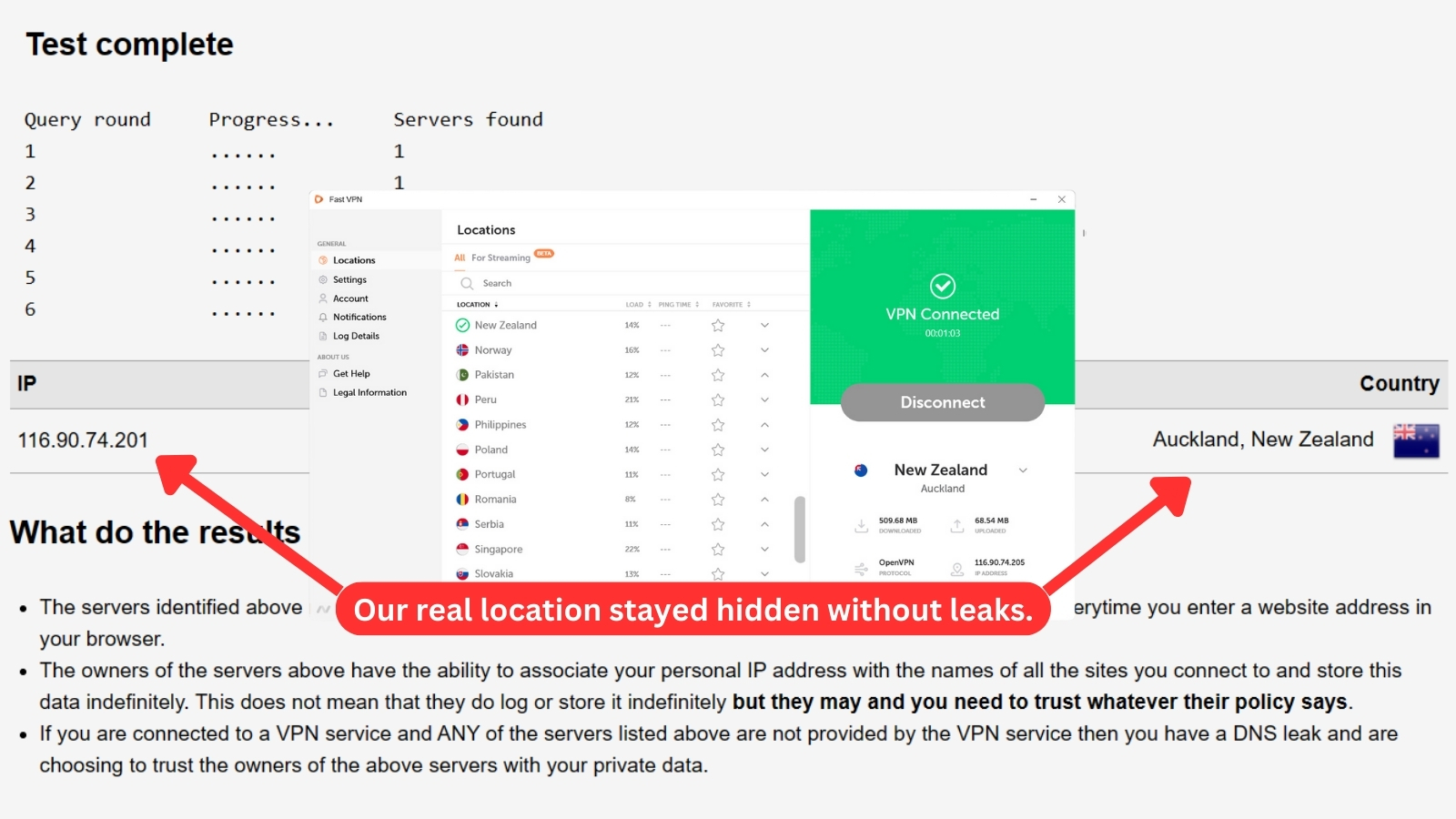
As you can see from the screenshot above, FastVPN has successfully hidden our true IP address and location. The DNS addresses point only to FastVPN's servers, which means that the VPN is effective in preventing DNS leaks and keeping our online activity private.
This VPN also shows our virtual IP address or location and prevents websites or third parties from seeing our real ones.
Speed & Performance
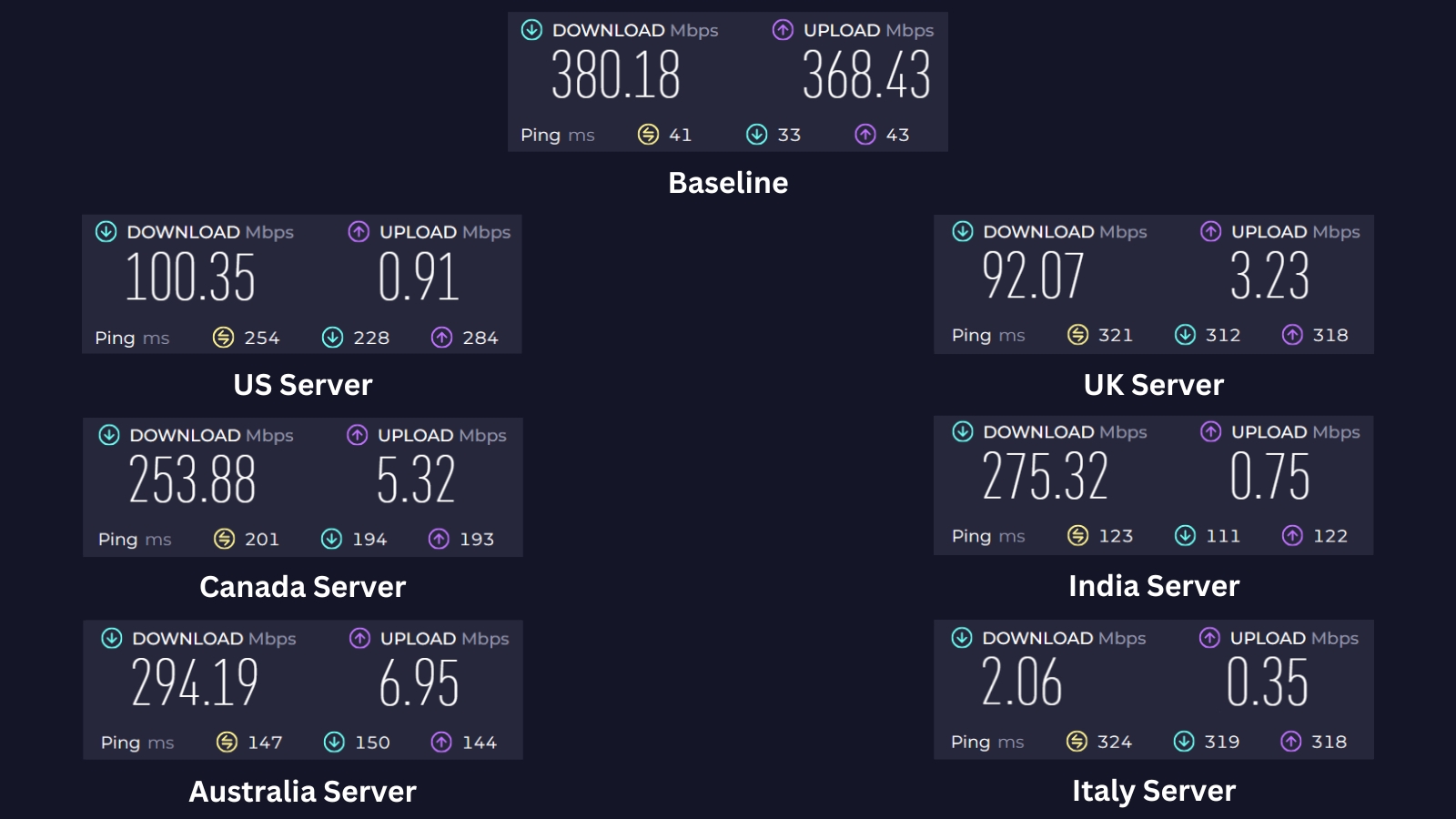
FastVPN slowed us down by 55.4% on average. Your mileage can vary, but this VPN’s performance is below average. Our Score: 5/10
To test Namecheap VPN's performance, we'll take a two-step approach to measuring its impact on our internet speed. First, we'll establish a baseline by running a speed test with the VPN disabled. This will show us the 'bare' connection speed without any encryption or rerouting that a VPN introduces.
In our baseline test, we saw download speeds of 380.18 Mbps and upload speeds of 368.43 Mbps on a 400 Mbps connection. As expected with any VPN, some slowdown is likely because the connection travels a longer route. Now, let's see how FastVPN performs compared to this starting point.
- USA Server (Dallas): The Dallas server, across the Pacific from us, mirrored the performance of FastVPN's UK server (more on that below). Our download speed took a big hit, dropping by 73.6% (we were only clocking in at 100.35 Mbps). Uploads weren't much better, barely reaching 0.91 Mbps.
- UK Server (London): This server offers slightly slower download speeds at 92.07 Mbps than the US server. However, both servers show a substantial drop in performance compared to a non-VPN connection. We got an average speed decline of 75.8%, with upload speeds of only 3.23 Mbps.
- Canada Server (Vancouver): Despite the long distance, FastVPN delivered a usable connection with this server. The speed did decrease by 33%, which is quite reasonable for such a remote connection. Even with the reduction, our download speed remained at a good level of 253.88 Mbps. However, the upload speed dropped significantly to 5.32 Mbps.
- India Server (Mumbai): This virtual server delivered results comparable to the Australian server's (below). We observed a download speed reduction of 27.6%, reaching 275.32 Mbps. However, upload speeds were significantly lower, at a mere 0.75 Mbps.
- Australia Server (Melbourne): Being the closest server to our location, this server provided a reliable connection with minimal slowdown (just over 22%). While not reaching peak speeds, we still saw impressive download speeds of 294.19 Mbps and upload speeds of 6.95 Mbps.
- Italy Server (Milan): Out of the servers we tested, this location was the farthest, resulting in the slowest speeds. Despite using the Wireguard protocol, the ping was very high at 1,075ms. Download and upload speeds were also crippled, reaching only 2.06 Mbps and 0.35 Mbps, respectively. That's a massive 99.5% speed reduction.
According to our tests, FastVPN slowed down our Web connection by 55.4% on average compared to the baseline speed. If you're located far away from the United States and the United Kingdom and rely on services restricted to those regions, FastVPN might not be the most suitable choice due to potential slowdowns.
Customer Support
Even though there are various communication channels available, the process of getting help can be a somewhat frustrating one. Our Score: 6/10
FastVPN is owned by Namecheap, which isn’t a freshly established company - so you can expect a comprehensive customer support system. There are several ways of communicating with the company and having your questions answered.
- 24/7 Live Chat: FastVPN offers its live chat feature to all users, not just registered customers. While this is a welcome change, the wait times have extended slightly. It took 15 minutes and two agents to properly answer our questions about supported protocols and P2P permissions. While live chat is a convenient way to get help, it’s not very efficient.
- FAQs: This is FastVPN’s first line of support for getting help from Namecheap. Here, you can find answers to common questions and troubleshoot any issues you may have regarding FastVPN's features, functionality, and usage.
- Knowledge Base: This is where you can find valuable information categorized by device. While the majority of the content is up-to-date, some articles date back to 2021 and 2022. However, FastVPN has made recent updates in 2024 to ensure the accuracy of its content. Additionally, there's a general section that provides you with a range of self-help resources.
- Support Ticket: To use this feature, you need to fill out a form with your name, email address, and a detailed description of your problem. However, you need to complete Google’s CAPTCHA to verify that you aren’t a robot. This method allows FastVPN to provide a more formal and structured response to your queries.
- Troubleshooting and Setup Guides: If you encounter any common problems, you can use the guides in this section to solve them. They’re organized by troubleshooter categories, and each one has easy-to-follow steps. You can also contact customer support if you need further assistance.
FastVPN offers many ways for you to have your questions answered. However, we were surprised by the lack of knowledge displayed by its support agents. They struggled to answer even the most basic questions. This may be attributed to the fact that the same support team handles queries related to other products from Namecheap.
Pricing
FastVPN is among the most affordable VPNs. In the end, we do have to admit that it brings good value for its price, overall. Our Score: 6/10
At the moment, FastVPN offers two subscription plans. Let’s see how much they cost and how much money they can potentially help you save.
How Much Is FastVPN?
Starting at $0.99/month, FastVPN offers two subscription plans to suit different needs and budgets. Both plans offer the same feature set. You can also try either of these plans risk-free with a 30-day money-back guarantee. Here’s a breakdown of each plan and what you can expect from them.
- 1-Month Plan: The monthly plan only costs $0.99 per month and provides an 87% discount from the regular monthly price of $7.88/month. Since it's a short-term plan, it allows you to adjust your VPN usage based on your needs. However, the plan automatically renews at $7.88 per month.
- 1-Year Plan: This one-year subscription is priced at just $1.57 per month and provides a 45% discount on the regular price. The plan simplifies your billing process with a single upfront payment of $18.88 for the entire year, eliminating the need for monthly transactions. The plan, however, renews at $34.56 per year, if you want to continue accessing FastVPN’s services without interruption.
As you can see, FastVPN's pricing starts with a discounted rate, then moves to a standard fee that's easy on the wallet. Therefore, the lack of a free plan makes more sense considering this attractive introductory offer. However, if you'd like to try it first before buying, FastVPN offers a 1-month free trial on iOS and Android devices.
FastVPN also offers a range of payment options, including major credit cards, PayPal, and popular cryptocurrencies such as Bitcoin, Ethereum, Dogecoin, Litecoin, and more. By accepting crypto, you have the flexibility to top up your account balance and conveniently use it for FastVPN and other Namecheap services.
Final Thoughts - Is FastVPN Good?
Yes, FastVPN is good enough when it comes to basic streaming needs, as it excels at unblocking popular streaming platforms at a budget-friendly price. It also offers a compelling combination of ease of use and strong security features.
However, a question mark hangs over its data logging practices. If ultimate privacy isn't your top priority and you prefer affordability, FastVPN could be a decent option.
That said, if you’re looking for a VPN service that offers strong privacy and security features, we’d recommend looking elsewhere. Our top choice is NordVPN. However, if you believe this VPN meets your needs, feel free to subscribe to FastVPN by Namecheap.
PROS
- Simple and easy to use.
- Over 1,000 servers.
- Affordable plans.
- Can unblock Netflix.
- Covers essential security features.
CONS
- Based in the USA.
- Logs data.
- No third-party audits.
- Lacks advanced features.
- Semi-helpful customer support.
| Review Summary FastVPN has some promising features, but it also has some weak points. We recommend it for those who want to unblock Netflix outside the USA and for average home users. However, if you’re looking for the best VPNs available today, you should continue your search. | 6.7 Overall Score | ||
| Background, Jurisdiction & Reputation | 5.5 | ||
| Supported Platforms & Devices | 8 | ||
| Installation & Initial Configuration | 10 | ||
| Prominent Features | 7 | ||
| Server Count & Infrastructure | 7 | ||
| UI/UX Design & Ease of Use | 8 | ||
| Media Streaming, Torrenting, and Gaming Support | 7 | ||
| Security & Privacy | 4 | ||
| Speed & Performance | 5 | ||
| Customer Support | 6 | ||
| Pricing | 6 | ||