When you purchase through links on our site, we may earn an affiliate commission. Here’s how it works.
FastestVPN Review 2026


Our experts have reviewed 53 VPN providers, which were put through extensive rounds of testing. To learn more about that process, here’s how we review VPNs, where we explain our criteria and our policy of being fully transparent.
FastestVPN, renowned as one of the most budget-friendly VPNs, boasts an enticing $40 lifetime plan. But before you bite the bullet and sign up, you should know what you’re getting into.
FastestVPN operates from the Cayman Islands, a privacy-friendly jurisdiction not part of any "Eyes Alliance." It has maintained a clean record with no past leaks, thanks to its strict no-logs policy. It's also reassuring that FastestVPN has undergone a successful audit conducted by the Altius IT audit firm.
Apart from that, FastestVPN isn’t as fast as its name suggests. The speed and latency are below average, making it a bad choice for streaming, torrenting, or gaming. The service does have some servers that are optimized for streaming and can bypass geo-blocks, but it requires a lot of trial and error to find them.
The provider offers decent privacy and security features, but there’s nothing that sets it apart from the competition. That said, FastestVPN isn’t as good or as fast as it claims, and we can’t let it get away with these claims by saying - you get what you pay for - because many services with the same price tag perform much better.
At TechNadu, we strive to be as objective as possible and make sure the way we review VPNs is fair, accurate, and unbiased. We also try to simplify VPN comparisons. To do that, we’ve prepared the following table with some basic but important facts about FastestVPN.
In this review, we’ll evaluate FastestVPN and compare it to the best VPN services by looking at various factors, such as speed, security, privacy, reputation, pricing, and customer support.
Background, Jurisdiction & Reputation
FastestVPN is based in the Cayman Islands, guaranteeing to protect your privacy and never store any of your data. It also has a clean record of no data breaches. Our Score: 9/10
Just like with any other VPN review, we’ll start by taking a look at FastestVPN’s background. This will help us determine how trustworthy and reliable this VPN is.
Where Is FastestVPN Based?
FastestVPN comes from the Cayman Islands, a haven for privacy-oriented businesses. This is because the Cayman Islands are an autonomous territory and can make their own laws.
One of these laws is the Data Protection Law (DPL), which grants new rights to individuals regarding their personal information and limits data logging in various ways. FastestVPN says that it complies with this law to the fullest extent.
Another benefit of their Cayman Islands base is that it falls outside the jurisdiction of the 5/9/14 Eyes Alliance. This means there's no legal obligation for FastestVPN to share user data with government agencies belonging to these agreements.
Since privacy is a major selling point for FastestVPN, it's important to clarify the company's ownership structure. Azneem Bilwani, a Pakistani businessman, founded FastestVPN. Bilwani also owns ABTACH Ltd., an IT company based in Pakistan. However, FastestVPN is separate from ABTACH Ltd.
This distinction is important because some users might be concerned about potential ties to a Pakistani company, especially considering Pakistan's data privacy laws are generally less strict compared to the Cayman Islands.
Additionally, when we contacted FastestVPN's customer support, they informed us that while their headquarters are in the Cayman Islands, the marketing and technical support teams are based in Dallas, Texas.
This raises some questions about the true location and jurisdiction of FastestVPN. Nevertheless, we haven't found any evidence of wrongdoing or malpractice by the brand in the past.
Did FastestVPN Leak Personal Data in the Past?
No, FastestVPN has had no personal data leaks in the past. The service assures us that it doesn’t collect personal information due to its zero-logs policy. We’re inclined to trust this assurance because FastestVPN operates from the Cayman Islands, a territory with strong data protection laws.
This VPN also has a limited number of users, which makes managing its data security much easier. Additionally, FastestVPN has completed an independent audit to verify its claims. So as of 2026, we don't have any doubts about FastestVPN’s safety or integrity.
Supported Platforms & Devices
You can use FastestVPN on any device you want, thanks to its native apps for all the popular platforms. For the rest, there are manual setup guides. Our Score: 9/10
One of the key factors to consider when choosing a VPN is its compatibility with different devices and platforms. FastestVPN offers native apps for a wide range of popular (and less popular) operating systems, making them easy to install and use.
FastestVPN offers native apps for Windows and macOS desktop platforms, as well as Android and iOS mobile devices. Apart from that, you can also manually configure it on Linux.
The service also has extensions for Chrome, Firefox, and Edge. These aren't full-fledged apps, but proxies that only secure your browser traffic. But the good news is that you can run up to 10 VPN connections at once on any number of devices.
The service offers support for Fire OS as well, but there's no app available on the Amazon App Store. If you want the app, you must sideload it on your device. The same goes for compatible Android TV boxes.
The provider also claims to support gaming consoles and Apple TV, but don’t expect to find a native app here either. Instead, you'll have to follow tutorials on how to set up different VPN protocols manually. Or, if you have any past experience, you can install FastestVPN on a router and protect all your devices at once.
Installation & Initial Configuration
Although we encountered some strange behavior, FastestVPN is easy to set up. Just download the app from the website, install it on your device, and you’re ready to go. Our Score: 8/10
In this part of our FastestVPN review, we'll show you how to download the VPN, as well as how to install and configure it. The process is actually simple and easy to follow.
To use this service, you first need to subscribe to FastestVPN. After that, you can download and install the app. You don’t have to log in to the website to do this. Enter your user credentials directly into the app after it’s installed, and you’re ready to go.
We started our testing by installing the FastestVPN app, which was about 25 MB in size. It only took a few seconds to complete this part of the process.
The streamlined installation process is great, but we encountered some problems with the app. Strangely, it launched many background processes that we couldn’t identify. Then, when we tried to uninstall FastestVPN, it consistently crashed.
The app also crashes while switching between the servers. And the background processes remained active even after the crash. We contacted their support team, but there was no satisfactory reply.
Prominent Features
FastestVPN has all the essential features you might need. Apart from that, it also offers some of the more advanced options. Our Score: 8/10
FastestVPN covers the basics well. It prevents DNS/IPv6 leaks and lets you use the VPN without restrictions. It also blocks harmful ads and malware, though the details of this feature are unclear.
Here are the main points you should know about each feature.
- DNS and IPv6 Leak Protection: To ensure your online activity remains private, FastestVPN provides protection against DNS and IPv6 leaks. DNS leak protection prevents your DNS requests from being routed outside the VPN tunnel, while IPv6 leak protection blocks potential IPv6-related leaks that could compromise your privacy.
- AES-256 Encryption: For top-level security, FastestVPN uses industry-standard encryption to hide all your online activities and data. This encryption makes it nearly impossible for hackers or anyone else to intercept or steal your data.
- VPN Protocols: FastestVPN supports multiple protocols, including OpenVPN, WireGuard, and IKEv2 (as well as IPSec, L2TP, PPTP, and OpenConnect through manual configuration). When it comes to OpenVPN, you can choose between TCP and UDP. Notably, WireGuard is a newer protocol known for its speed, making it a great choice for streaming and torrenting.
- Kill Switch: FastestVPN's kill switch feature protects your privacy by shutting down your connection if your VPN connection drops, preventing data leaks. It's important to note, however, that the kill switch of this service doesn’t work reliably on all systems.

- Ad and Malware Blocker: The service includes an ad blocker and built-in malware blocker enabled by default on all its desktop and mobile apps. However, our test suggests that this feature doesn't work very well. It fails to completely block ads and trackers, which suggests it may also struggle to block malware.
- Split Tunneling: Only the Windows and Android app have a split tunneling feature, which lets you pick which apps can use or skip the VPN network. It would've been nicer to have this option on other platforms, like macOS and iOS.

- D-VPN: For extra security, FastestVPN offers a double VPN feature called D-VPN, which allows you to route your connection through two VPN servers. However, this feature is limited to up to 5 routes and is available on Windows, macOS, iOS, and Android devices.

- Dedicated IP: For an extra $1.49/month, you'll get a unique dedicated IP for secure, unrestricted Internet access. This add-on keeps your connection encrypted and enables secure banking app access while avoiding IP blacklisting and constant CAPTCHA checks. Choose the Lifetime or 2-year plan and reduce the cost to only $1.30/month, or pay a one-time fee of $31.20.
- Port Forwarding: This affordable add-on starts at only $1.20/month and is designed to combat lag and optimize your online gaming experience. By reducing latency and forwarding your IP address to specific devices, Port Forwarding ensures a smoother, more responsive connection.
- NAT Firewall: All FastestVPN apps have this built-in security feature. It prevents unauthorized access and malicious intrusions, keeping your device safe from malware and other online threats.
Server Count & Infrastructure
FastestVPN has a good foundation by having more than 800 servers in 49+ countries. However, it would've been better if they had more servers in locations that are most in-demand by VPN users. This will make it easier to connect to a fast and reliable server no matter where you are in the world. Our Score: 6/10
When searching for a VPN, it's crucial to pay attention to the number of servers it provides. Ideally, you would want a VPN with a vast network of servers spread across the globe.
Finding out how many servers FastestVPN has and where they're located used to be a frustrating task. Thankfully, they've recently made this information public, which is a welcome improvement! FastestVPN now offers over 800 servers in 49+ countries, with more than 100 locations. However, this network is still relatively small compared to the best VPNs with the most servers.
Another thing to consider is the geographical distribution of FastestVPN's servers. Currently, they're heavily concentrated in the Western world. This might mean slower connection speeds for users in other regions like Africa, South America, and the Middle East.
On the bright side, FastestVPN does have some perks. It now offers ultra-fast 10 Gbps servers, and its unlimited server switching lets you find the best connection for your needs quickly. They even provide specialized servers for streaming and P2P transfers. Additionally, US and Germany servers come with specific cities for potentially more precise location control.
However, if you prioritize a geographically diverse server network for optimal connection speeds, you might want to consider a different VPN provider.
Does FastestVPN Use Virtual Server Locations?
Yes, FastestVPN does use VPN virtual locations, but only in India. A virtual VPN server is like a digital disguise for a real server. It makes the server seem like it's in a different place than where it actually is.
For instance, FastestVPN may have physical servers in one location, but they can appear as if they're located in India through virtualization. This can help optimize performance and accessibility for users in that region while maintaining server efficiency.
UI/UX Design & Ease of Use

FastestVPN recently revamped its design, resulting in a refreshingly modern and minimalist interface. They've managed to maintain a user-friendly layout, making it easy to navigate and find the features you need. Our Score: 8/10
In this part of our FastestVPN review, we explore how the VPN works across its software offerings. These include desktop apps, mobile apps, and even browser extensions. This will help you see if it provides a smooth experience on your devices.
How Well Does FastestVPN Work on Desktop Platforms?
FastestVPN performs well on desktop platforms. In this review, we used a Windows PC. After logging into your FastestVPN account, you'll be directed to the home screen, which has all the essentials to get you started.
On the right side of the screen, there’s a large pink connect button. Click this button or the 'Smart Connect' blue ribbon at the bottom to connect to FastestVPN’s 'Smart Location,' the fastest server for your area. You'll know you're connected when the connect button turns blue.
To change servers, you can search manually on the upper left side of the screen. Below the search button, you'll find 'Recommended' and 'All Locations' server lists.
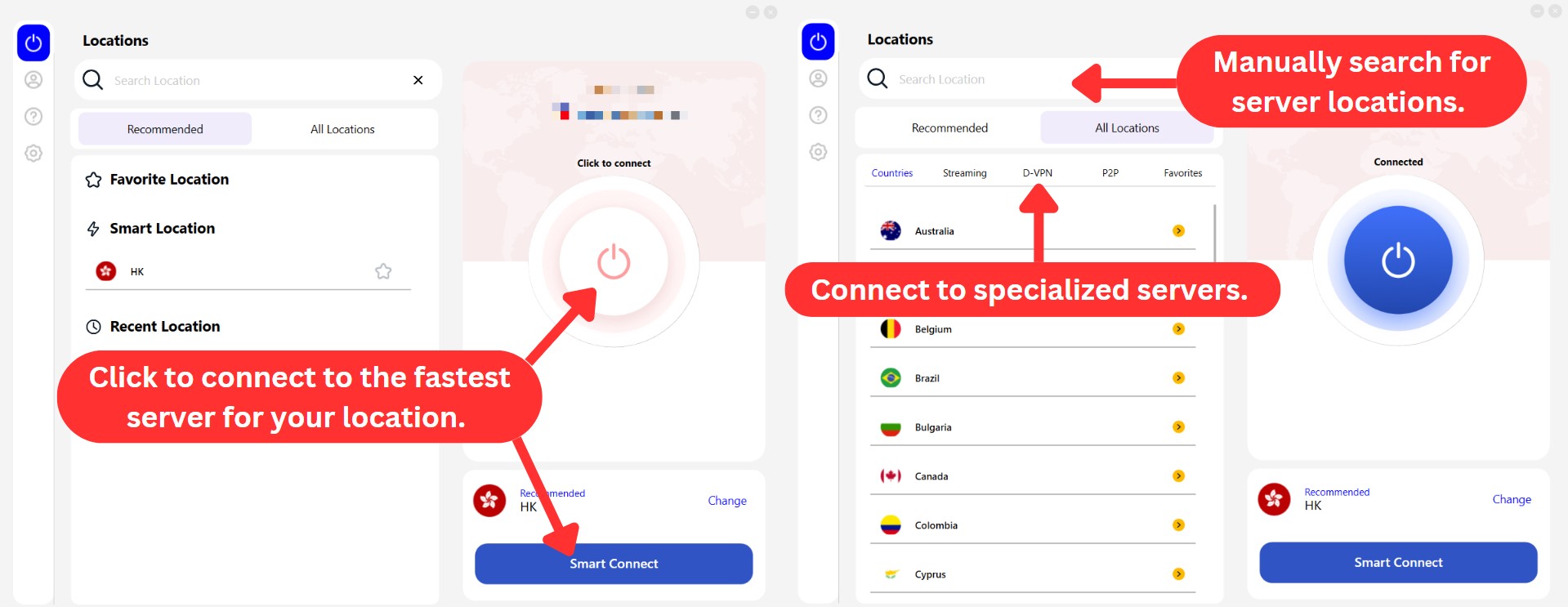
The 'Recommended' list includes your favorite servers, FastestVPN’s Smart Location, and recent locations. On the other hand, the 'All Locations' list categorizes servers by their use, such as dedicated Streaming, P2P, and D-VPN (double VPN) servers. You can also choose servers at the city level for US and Germany.
Then, on the top left corner, you'll find a sidebar menu with 4 tabs. Here's what you can expect from these tabs.
- Locations: This is actually the home screen or starting point in the app. You can connect to FastestVPN and choose from a list of servers to secure your connection.
- Account: This tab displays your sign-up email, product info, and current account status. You can also upgrade your plan, change your password, or log out from here.
- Help: The Help section provides links that take you directly to FastestVPN's website. These links include a FAQ section for common questions, Privacy Policy, Terms and Conditions, and company information. Link to its live chat support is also available for immediate assistance.
- Settings: FastestVPN's settings tab allows you to change protocols, enable different connection settings, and customize how the app behaves on startup.

How Well Does FastestVPN Work on Mobile Platforms?
The FastestVPN app maintains a consistent appearance and feel across its mobile applications. When you open these mobile apps, you'll notice a prominent button at the center of the home screen, which you can use to either connect to or disconnect from a server.

In the 'Settings' tab, you can change themes, select protocols, enable ad-blocking, activate the kill switch and split tunneling options, and more. The iOS app provides all these options except for theme selection. Unlike the Android app, it doesn't allow you to choose between System Default, Light, or Dark themes.

Overall, there isn't much need for extensive fine-tuning of the mobile apps. Advanced VPN users may find it a bit unexciting, but beginners should have no trouble navigating these apps.
How Well Do FastestVPN's Web Browser Extensions Work?
FastestVPN provides browser extensions for Chrome, Firefox, and Edge. These extensions offer identical features, including protection against WebRTC leaks and ad blocking.
However, their appearances differ, with Firefox featuring an older, outdated interface, while Chrome and Edge have the same sleek and modern look.

These extensions might have different designs, but they pack a punch when it comes to security. They offer essential features like WebRTC leak protection, robust ad blocking, access to global sites, and unlimited bandwidth with HTTPS encryption.
Media Streaming, Torrenting, and Gaming Support
With FastestVPN, you can access streaming services from different regions. However, you’ll have to try different protocols and servers to find the best ones. While the VPN supports P2P file transfers, its low speeds may affect torrenting and gaming. Our Score: 6/10
One of the main reasons people use VPNs is to unblock streaming services. That’s why we evaluate every VPN based on how well it can unblock the most popular streaming platforms.
Is FastestVPN Good for Streaming?
Yes, FastestVPN is a good VPN for streaming. It has dedicated servers for streaming popular platforms like Netflix US, Disney+, and ESPN+. We were able to unblock these services and watch high-quality videos without buffering.
However, we had some issues with Max, BBC iPlayer and Prime Video. We had to switch to the IKEv2 protocol to access them, which wasn’t very convenient. Also, the streaming server from Italy didn’t work, and the app crashed.
The table below shows which US streaming platforms this VPN can unblock for you.
When it comes to streaming services outside the US, FastestVPN shows off its unblocking capabilities once more. Here's an overview of what you can look forward to.
Although not all of FastestVPN's servers are geared specifically for streaming, it's got a knack for smoothly unblocking a bunch of our favorite streaming platforms. With that said, we've got to admit - it delivers a pretty neat performance in this area.
Is FastestVPN Good for Torrenting?
Yes, FastestVPN is good enough for torrenting on servers closest to your location. Otherwise, you'll find it frustrating with the speed drops.
FastestVPN allows P2P traffic on most of its servers and has a strict no-logs policy. However, we weren’t impressed by its speeds, which were very slow compared to those of other VPNs. The kill switch feature was also occasionally unreliable. Fortunately, it offers a port forwarding paid add-on, allowing you to potentially experience faster speeds by connecting to a wider range of peers.
So, if you have torrenting needs in mind, you might want to explore our article on the best torrenting VPN.
Is FastestVPN Good for Gaming?
No, FastestVPN isn't good for gaming. We experienced a lot of lag and high ping times when playing online games.
Attempting to solve this, we tried using the OpenVPN (UDP) protocol, which was supposed to offer lower latency. However, it didn’t make much difference. Additionally, there were difficulties connecting to certain servers, leading to multiple app restarts.
For a better experience, we recommend checking out our article on the best gaming VPN to find a more suitable option.
Security & Privacy
FastestVPN's logging policy is one of the only things that’s exceptional about it. Our tests have shown that the service can protect your data without any data leaks. Our Score: 9/10
In the world of VPNs, added features are all well and good, but what truly matters is the ability to keep you safe online. We place special emphasis on this as we learn more about FastestVPN’s encryption protocols, logging policies, and DNS leak protection.
FastestVPN Protocols
FastestVPN uses the OpenVPN protocol, which is pretty strong and trusted by many. Apart from that, the service also employs WireGuard and IKEv2 for added layers of protection.
Let’s go through each of these protocols:
- OpenVPN: This protocol is widely recognized as the most secure protocol. It can operate over both TCP and UDP transport layers. While TCP is more dependable, UDP is faster but less reliable. FastestVPN provides both options, but for most cases, we recommend using OpenVPN UDP, as it delivers better performance and lower latency. However, when connecting to the US server, it seems that OpenVPN TCP offers better speeds.
- WireGuard: FastestVPN also offers WireGuard, which promises faster, more secure, and more efficient connections than OpenVPN. Using state-of-the-art cryptography, it provides high-speed connections with minimal overheads. It has recently added WireGuard support in all its apps - for Windows, macOS, iOS, and Android.
- IKEv2: Another fast and secure protocol that works well in FastestVPN’s apps is IKEv2. In our experience, this one quickly reconnects to the VPN server after network interruptions. The service offers IKEv2 for all platforms. We recommend using it when you connect to the US server, as it has the best streaming performance among all protocols.
- IPSec: This one isn't available in the FastestVPN app but is available for manual connecting on iOS, macOS, and Android.
FastestVPN also uses other protocols like L2TP, PPTP, and OpenConnect, which require manual configuration.
Does FastestVPN Keep Logs?
No, FastestVPN doesn’t keep logs. Their privacy policy explicitly states they don't track or store any data related to your online activities. They only collect essential information for account management, like your email address and payment method.
Moreover, they collect connection duration for internal purposes, likely to analyze usage patterns and improve service quality. And when you deactivate your account, FastestVPN immediately removes your email address from their servers.
Additionally, the VPN doesn’t log any other data, including IP addresses or any form of aggregated data.
Since FastestVPN has already undergone a successful independent audit by a third party, we can confidently confirm the legitimacy of their no-logging policy. In our view, third-party verification is crucial to ensure the accuracy of a VPN provider's privacy policy, and FastestVPN has met this criterion.
Does FastestVPN Leak Your Private Data?
No, FastestVPN doesn’t leak your private data. Ensuring that a VPN doesn’t leak sensitive information is of the utmost importance. In this regard, we decided to test FastestVPN by connecting to a virtual server and conducting a DNS leak test to detect any concerning behavior.

FastestVPN didn't leak any sensitive data during the test. We're pleased to report that the websites that were visited using the service showed the user's virtual IP address, which can’t be traced back to their true physical location.
Speed & Performance
When connecting to different servers with FastestVPN, the speeds were fairly average and acceptable. You won't likely experience significant slowdowns for browsing the Web, but speeds may not be the best for large file downloads or streaming 4K content. Our Score: 7/10
In this section, we’ll share the results of our speed tests of FastestVPN's performance. To conduct these tests, we connected to various servers. However, before we did so, we first measured our regular Internet speed.
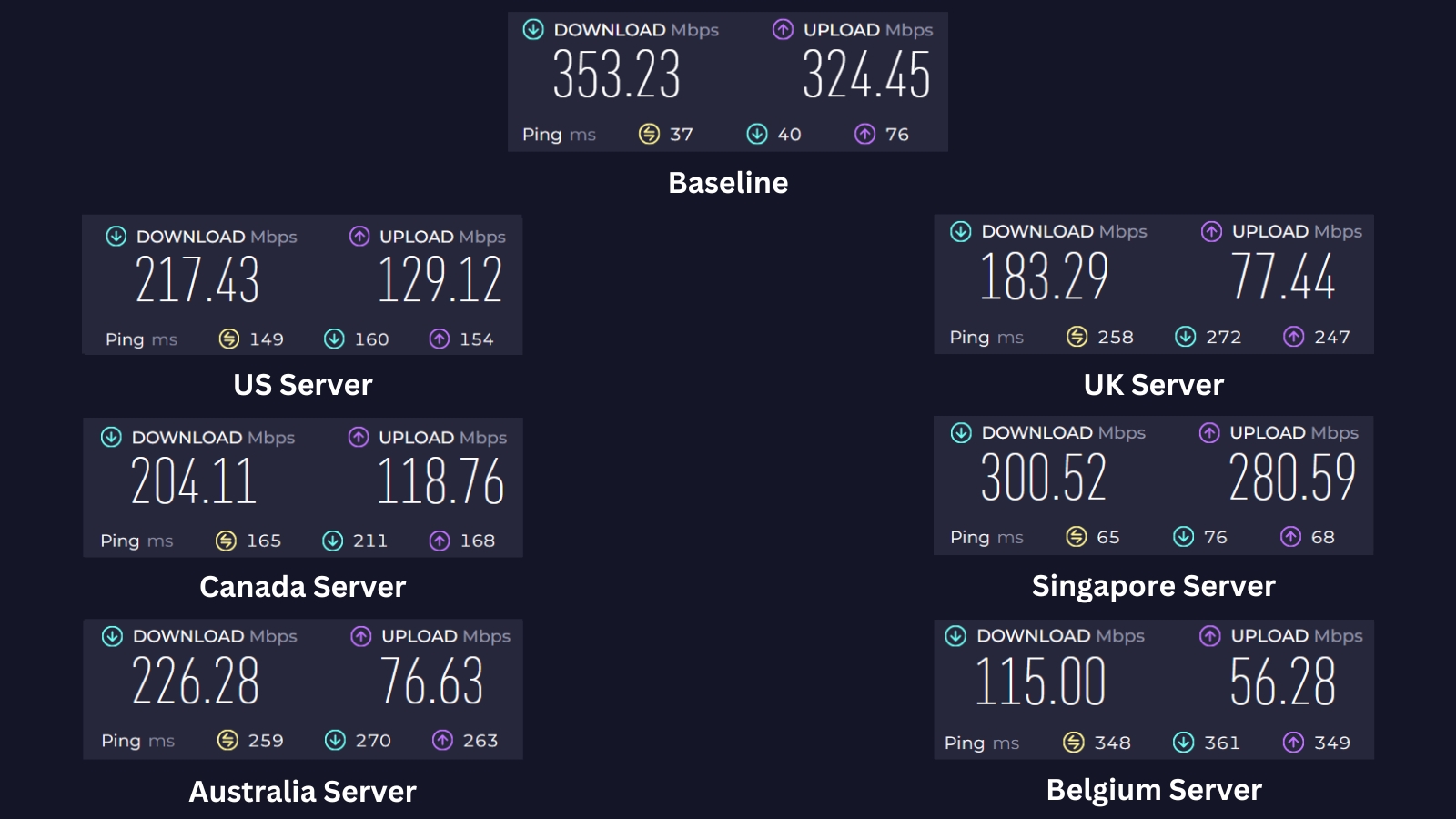
Our initial speed tests on a 400 Mbps connection showed a download speed of 353.23 Mbps and an upload speed of 324.45 Mbps. Now, let's dive into how FastestVPN performed in our tests and what you can expect from its speed.
- US Server (Miami): With a 38% speed reduction, this one performed slightly better than the other servers. With a download speed of 217.43 Mbps and an upload speed of 129.12 Mbps, you can use this server for streaming without hiccups.
- UK Server (London): This server was very far from us, performing similarly to FastestVPN's Canada server with a 48% speed reduction. Our download speed was 183.29 Mbps, and our upload speed was 77.44 Mbps.
- Canada Server (Montreal): This server is also quite far from our current location, but FastestVPN still delivered moderate speeds. While download speeds dropped by 42%, remaining at 204.11 Mbps, this decrease is acceptable for such a distant connection. Upload speeds also held up well at 118.76 Mbps.
- Singapore Server: Among all the servers tested, this server showed the best performance, with a speed reduction of only 15% and a download speed of 300.52 Mbps. This performance is likely due to the server's close proximity to our location, minimizing any distance-related slowdowns.
- Australia Server (Sydney): This server showed a moderate reduction in speed by 36%, with a download speed of 226.28 Mbps and an upload speed of 76.63 Mbps. Despite this reduction, it was still faster and outperformed most servers on the list.
- Belgium Server (Brussels): Given the distance, we weren't surprised by its noticeable speed reduction. As expected, connecting to this server resulted in a significant drop of around 67% in download speed. This brought it down to 115 Mbps from our baseline speed of 353.23 Mbps. Upload speeds also took a hit, dropping to 56.28 Mbps.
Our tests revealed that FastestVPN averages a 41% speed reduction when connected to various servers. This might seem significant, but it's important to consider the context. For basic online activities like checking emails, browsing the Web, and even some social media scrolling, this speed reduction is likely negligible.
However, activities that require high bandwidth, such as streaming HD or 4K content, online gaming, or downloading large files, might be noticeably impacted. If these activities are your primary concern, you may want to explore the fastest VPNs.
Customer Support
There are numerous support channels – some of which are more helpful than others. Overall, FastestVPN is there for you, always willing to assist. Our Score: 9/10
Without having someone to rely on, using a VPN can become a hectic experience. After all, VPNs are technical solutions, so something can go wrong with no clear explanation. That said, we’ve checked FastestVPN’s support, and here’s a breakdown of the available options:
- Live Chat Support: This VPN offers 24/7 live chat support on its site. You can launch this option from just about any page. We’ve used live chat a couple of times - and FastestVPN’s support agents were always fast to respond.
- Knowledge Base: If you prefer finding answers on your own, check out the knowledge base section on the website. It contains various resources and guides to help you use the VPN more effectively.
- FAQs: A section with frequently asked questions is there to help you clear up some doubts, especially about installing and using this VPN. Here, you can find answers to common questions, such as how to recover your account, request a refund, and more.
- Setup Tutorials: You’ll be happy to know there are detailed guides to teach you how to install this VPN on a wide range of systems. You can learn how to set up FastestVPN on Windows, Mac, iOS, Android, Linux, Fire TV, Kodi, routers, and more.
- Email Support: You can always send an email and open an official support ticket. This option is useful if you have a more complex or technical issue that requires more attention. If you encounter any problems, write to [email protected] and expect a reply within 24 hours.
Pricing
FastestVPN’s one-month plan won’t save you money. However, you'll find incredibly steep discounts on its longer-term plans. Our Score: 9/10
In this segment, we'll check out FastestVPN's pricing tiers. FastestVPN currently offers three subscription plans, and there's a cost-saving opportunity with its lifetime plan.
How Much Does FastestVPN Cost?
FastestVPN starts at $0.83/month if you get the annual plan. It also offers monthly and lifetime subscription plans to fit your needs. All subscription plans offer the same set of features with free malware protection, ad blocker, and NAT firewall. You also get 10 device connections, unlimited server switching, and a 31-day money-back guarantee.
Let's break down the pricing for each plan:
- 1-Month Plan: This plan is the most flexible option, starting at $5 per month. It's ideal for short-term use or if you prefer the month-to-month payment approach.
- 1-Year Plan: If you want to save money, you can commit to a longer-term plan. This plan offers a significant discount compared to the monthly plan, typically costing around $1.66 per month when billed annually. But with the Black Friday deal, you can save 83% and get the annual plan for just $0.83 per month plus an extra year free.
- Lifetime Plan: For a one-time payment of $40, you can enjoy lifetime access to FastestVPN with this plan. You can get the best value for money with this one, as you save 93% compared to the monthly plan and never have to worry about renewing your subscription.
FastestVPN's one-month plan isn’t very attractive. But you can get huge discounts with exclusive deals and longer-term plans. In fact, this service is one of the cheapest VPNs we've seen, offering an impressive 93% discount if you choose the lifetime plan.
Additionally, FastestVPN offers optional add-ons for your convenience. Starting at $2 per month, you can extend your device limit beyond the already generous 10 multi-logins. If you have specific networking needs, port forwarding is available for $1.20 per month.
If a dedicated IP address is what you need, you can add it for as little as $1.49 per month with the monthly option, $1.30 per month on the annual subscription, or $31.20 every two years through the lifetime plan.
All paid plans have a 31-day money-back guarantee, and you can pay with a credit card, PayPal, or crypto.
Is FastestVPN Free?
No, FastestVPN isn't offered for free. However, you can take advantage of its 7-day free trial and 31-day money-back guarantee. This means you'll need to make an initial payment for the VPN subscription.
If, within the first 31 days, you change your mind, you can simply request a refund from their support team. However, keep in mind that refunds aren't available for subscriptions purchased with cryptocurrency.
Final Thoughts - Is FastestVPN Good?
Yes, FastestVPN can be a good choice, particularly if you're looking for a lifetime VPN subscription at an affordable price. It offers standard security and privacy measures, so it's a solid option if you're seeking a basic yet reliable VPN service.
Moreover, FastestVPN is privacy-focused. In other words, it doesn’t collect user data. However, it may not be enough if you want more customization or faster speeds, as it falls behind most of its competitors in these aspects.
We also have to emphasize that it’s one of the cheapest VPNs at the moment - but not really a significant benefit, as most VPNs these days are more capable than FastestVPN.
So, if you're looking for the basics of a VPN with great streaming performance, FastestVPN might be enough. However, if you require top-tier security, advanced VPN features, extensive server coverage, and super-fast speeds, then we strongly recommend NordVPN as an alternative.
PROS
- Affordable lifetime plan.
- Good at unblocking streaming platforms.
- Fast live chat support.
- Independently audited.
- No data leaks.
- Doesn’t collect personal data.
- Ad- and malware-blocker.
- Dedicated IP & port forwarding add-ons.
CONS
- Very limited server network.
- Problematic performance.
- Connection failures & bugs.
- Router installation is tricky.
| Review Summary FastestVPN isn’t for everyone. If you want to browse the Web with decent privacy, it could be an interesting option. However, users who want plenty of servers and reliable features should try their luck elsewhere. | 7.5 Overall Score | ||
| Background, Jurisdiction & Reputation | 9 | ||
| Supported Platforms & Devices | 9 | ||
| Installation & Initial Configuration | 8 | ||
| Prominent Features | 8 | ||
| Server Count & Infrastructure | 6 | ||
| UI/UX Design & Ease of Use | 8 | ||
| Media Streaming, Torrenting, and Gaming Support | 6 | ||
| Security & Privacy | 9 | ||
| Speed & Performance | 7 | ||
| Customer Support | 9 | ||
| Pricing | 9 | ||