When you purchase through links on our site, we may earn an affiliate commission. Here’s how it works.
6 Best VPNs for Overwatch in 2026


Our experts have reviewed 53 VPN providers, which were put through extensive rounds of testing. To learn more about that process, here’s how we review VPNs, where we explain our criteria and our policy of being fully transparent.
Want to unblock and play Overwatch or Overwatch 2 from any location? Well, many universities and workplaces block this FPS game due to its immense popularity. However, playing the game on any network is easier than ever if you find the best Overwatch VPN and spoof your geolocation.
Countries like the UAE, Saudi Arabia, and Oman even block the game's VoIP, restricting residents from communicating with their teammates. That said, a VPN is the best way to mask your real IP and get a virtual one of a region where Overwatch and all its features are available.
Alongside that, a VPN for Overwatch will also safeguard your PC or console from DDoS attacks, doxing, as well as identity fraud. It will also help you reduce lag and latency, resulting in a more responsive gameplay experience, and even help you bypass ISP throttling.
In this guide, we'll present the best VPNs for Overwatch and show you how to use one to reduce your ping and eliminate lag. We'll also explain why an Overwatch VPN is required, which VPN location to pick, how to choose the best one, and we'll finish with a round of FAQs.
Best Overwatch VPNs - Our Shortlist
- NordVPN - Our #1-Rated Best Overwatch VPN in 2026
- Surfshark - Speedy VPN for Overwatch with Tons of Server Locations
- ExpressVPN - Powerful Gaming-Centric VPN for Total Privacy
- CyberGhost VPN - VPN with Specialized Gaming Servers for PCs
- Private Internet Access - Privacy-Focused VPN for Experienced Users
- IPVanish - User-Friendly VPN for Inexperienced Users
How to Play Overwatch with a VPN
To play Overwatch with a VPN, you need to subscribe to a VPN, install its application, and then connect to a suitable server. These are all the steps you need to take:
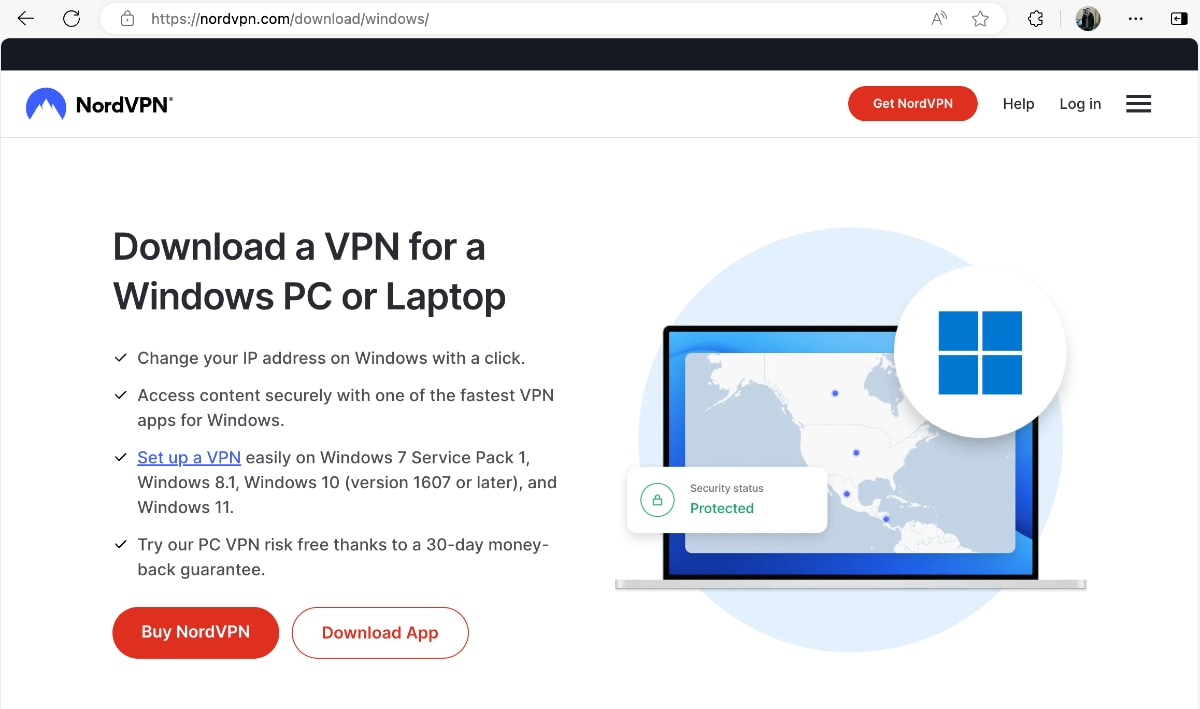
- Subscribe to a VPN for Overwatch (we recommend NordVPN).
- Download and install the VPN app on your device.

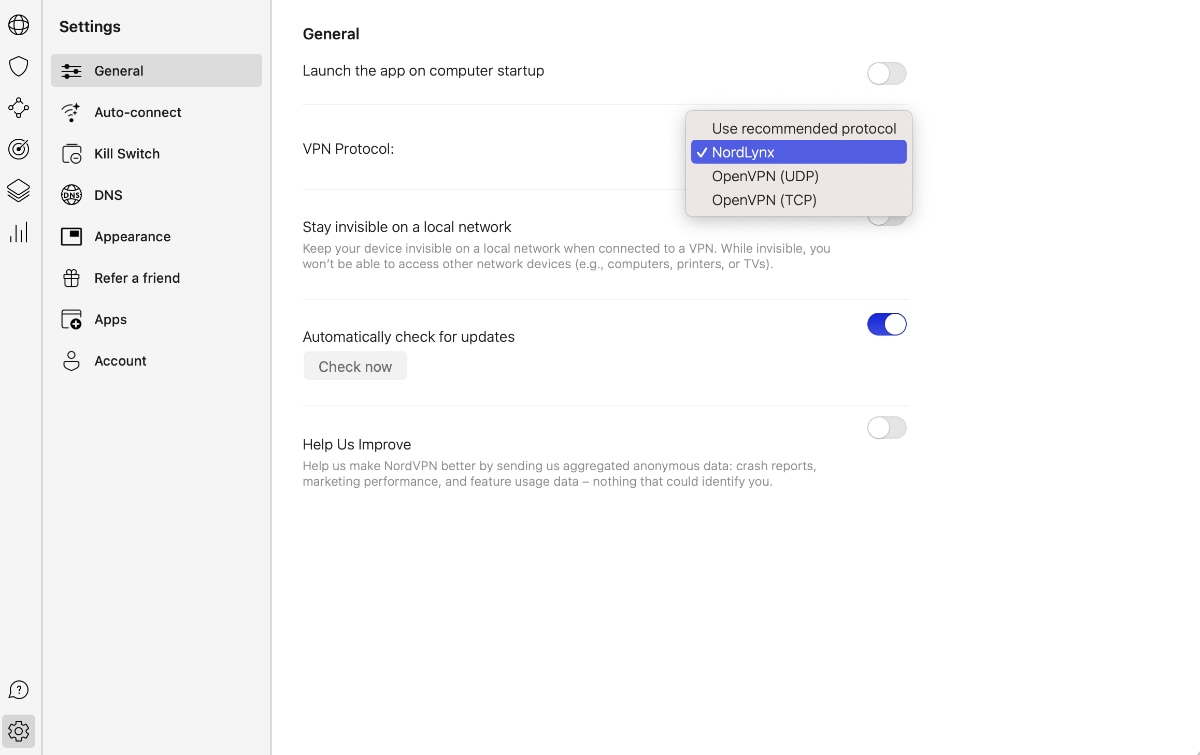
- Open the VPN and switch to a gaming-friendly protocol (NordLynx or OpenVPN).

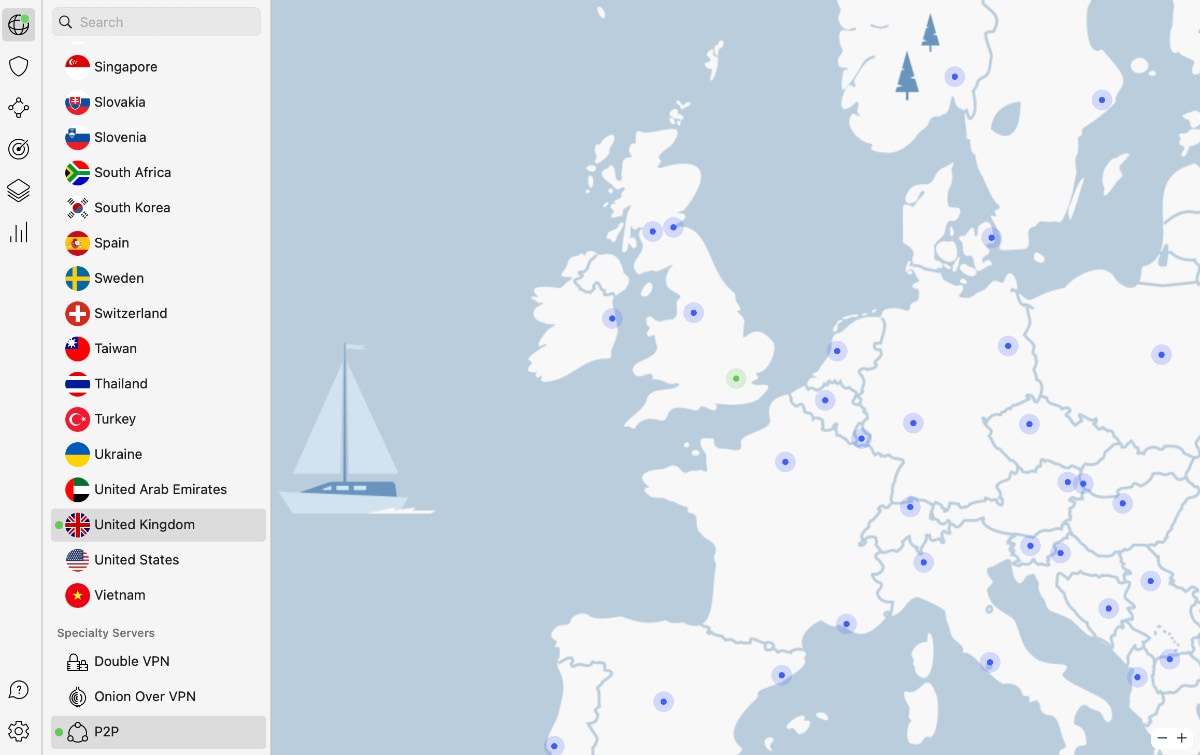
- Connect to a VPN server of your choice (pick a nearby one for the lowest ping).
- Now, launch Overwatch and start playing.
When playing games like Overwatch, it's crucial to get the lowest ping possible. That's why we strongly recommend using a nearby VPN server. In other words, remote servers are more likely to introduce more noticeable latency.
The Best VPNs for Overwatch in 2026
When choosing the best VPN for Overwatch, your search should be based on the same criteria that will help you find the best VPN for gaming. That said, your VPN must offer servers in countries where the game and its voice chat aren’t blocked. Also, it needs fast connection speeds that can handle online gaming, which means you'll want the ability to minimize ping and latency.
There should also be a kill switch to prevent accidental data leaks. Let's not forget about security features, such as OpenVPN or WireGuard protocols, which must be combined with AES-256 and ChaCha20 encryption. Also, ensure there are enough simultaneous connections, as you'll want to use your VPN for gaming as well as privacy protection on other devices.
Avoid manual configuration and pick a VPN with native software across the board. Of course, all that should come at a great price and plenty of value overall. To ensure a risk-free purchase, there should be a generous money-back policy. Finally, don't forget about customer support, either. We recommend going for a VPN that can deliver 24/7 live chat customer support.
Based on those criteria, these are the 6 best Overwatch VPNs in 2026:
1. NordVPN - Our #1-Rated Best Overwatch VPN in 2026
NordVPN is the best VPN for Overwatch, as it offers all you need for a smooth gameplay session in one place. It comes with 6,000+ servers in 60+ countries, covering the US, most of Europe, and even South Korea, so you'll get to join sessions with new types of Overwatch players.
We can also praise NordVPN's performance, which is among the fastest. When testing both nearby and remote servers, we managed to get equally fast speeds. That said, it's clear that NordVPN has the power to keep your ping and latency as minimal as possible.
You'll also find a kill switch, as well as secure protocols, such as OpenVPN, NordLynx, or IKEv2/IPsec. Those are paired with high-end encryption ciphers, like AES-256 and ChaCha20. Aside from that, NordVPN can block trackers and can even scan files for malware.
With NordVPN, you get 6 simultaneous connections, which seems generous enough. You also get native software for any device/platform imaginable. This VPN works on computers, phones, tablets, streaming devices, and even routers. So, you'll get to extend its reach even to Xbox and PlayStation consoles.
You can get started with NordVPN for $3.39/month (2-year subscription). If you don't like the services, cancel the subscription to get a refund within 30 days. Of course, you'll also get to rely on the VPN's 24/7-available customer support, featuring live chat.
PROS
- Tons of Overwatch-friendly servers.
- Keeps your ping and latency in check.
- Polished apps for any device/platform.
- Ultra-fast performance.
- 24/7 live chat support.
- 30-day money-back policy.
CONS
- 6 simultaneous connections.
2. Surfshark - Speedy VPN for Overwatch with Tons of Server Locations
Surfshark is another reputable VPN for Overwatch with great performance across its gaming-optimized servers. You get access to 3,200+ servers in 100+ countries, which means that Surfshark has one of the most extensive networks out there.
What we especially like about Surfshark is its performance. It's on par with other top-rated services, which means that getting low ping and latency is never an issue. You don't even have to optimize this VPN; it runs great out of the box.
You also get a kill switch, so you won't have to worry about data leaks. Next to that are protocols like OpenVPN and WireGuard, paired with AES-256 or ChaCha20 encryption ciphers. There are also tools that rotate your IP and help you battle against malware.
A single subscription gives you unlimited simultaneous connections - which means you can protect your entire household and use Surfshark's native software on any device. It works on Windows, macOS, Linux, Android, and iOS, and it also supports routers. So, it's possible to use it on game consoles as well.
Surfshark is priced at $2.29/month for its 2-year plan, and just like any reputable VPN, this one comes with a 30-day money-back policy as well. If you ever face any issues, connect with their 24/7 live support team.
PROS
- Servers in 100 countries.
- Unlimited simultaneous connections.
- Unlimited bandwidth.
- Wireguard support.
- 24/7 customer support.
CONS
- Takes longer to connect at times.
3. ExpressVPN - Powerful Gaming-Centric VPN for Total Privacy
ExpressVPN is a long-standing VPN provider that emphasizes privacy. Of course, it's more than suitable for gaming as well. One of the reasons for that is ExpressVPN's wide server network, giving you access to 3,000+ servers in 105 countries.
This VPN's performance is simply amazing. No matter if you connect to a server in the US, the UK, Asia, or even Australia, you'll get extra-fast speeds. You won't have to worry about ping or latency either, as ExpressVPN can guarantee the smoothest possible gameplay experience.
In terms of privacy, you're protected against data leaks thanks to a kill switch, which is called 'Network Lock' in this case. You can also take advantage of protocols like OpenVPN and Lightway, paired with AES-256 encryption. There are also anti-tracking and anti-malware components.
ExpressVPN gives you 8 simultaneous connections, as well as native software for any device. You get really nicely designed applications for computers, phones, and tablets. Since it supports routers as well, you can extend ExpressVPN's coverage to PlayStation, Xbox, and other consoles.
The lowest you can pay for ExpressVPN is $6.67/month for its annual plan. Also, there's a 30-day money-back policy, which means you can try this VPN risk-free. We'll also mention that you get 24/7-available customer support, with live chat on offer.
PROS
- Overwatch-friendly servers worldwide.
- High-end security and privacy.
- Optimized performance.
- 24/7 customer support.
- 30-day money-back policy.
CONS
- Limited customization.
4. CyberGhost VPN - VPN with Specialized Gaming Servers for Windows
CyberGhost is an exceptional alternative to our other recommendations, thanks to its global network of servers. It has more than 11,500 servers available to cater to all your gaming needs. You can connect to a server in any of the 100+ countries through the app at any time and log in to Overwatch.
However, we have to note that CyberGhost isn't the fastest option, even though it has gaming-centric servers available on Windows PCs. It can keep your ping and latency in check, but you will feel some throttling. That can be avoided if you have a fast baseline connection.
In terms of the basics, you're covered well. CyberGhost features a kill switch, as well as protocols like OpenVPN and WireGuard. You can also count on its AES-256 and ChaCha20 encryption ciphers, which are more than capable of creating a leak-free data tunnel.
Your subscription to this VPN will come with 7 simultaneous connections. You'll also get a range of easy-to-use apps for any device. There's native software for Windows, macOS, Linux, mobile devices, and streaming devices, and there's also support for game consoles through routers.
At the moment, this VPN is priced at $2.03/month for its 2-year plan. CyberGhost also comes with a 45-day money-back guarantee. That means you can try it out for yourself and get a refund if you don’t like it. It has 24/7 live support, too.
PROS
- Huge server network.
- Gaming servers on Windows.
- Supports plenty of devices.
- 24/7 customer support.
- 45-day money-back guarantee.
CONS
- Slower than the competition.
- Limited customization.
5. Private Internet Access - Privacy-Focused VPN for Experienced Users
Private Internet Access is a US-based VPN service provider that owns an incredibly large network - with thousands of servers in 90+ countries. A unique feature of this VPN is that it covers every single US state, which we haven't seen elsewhere.
Moreover, PIA has made its servers fully compatible with 10 Gbps connections. However, to take full advantage of its performance, you'll need to optimize its settings. In other words, you can get low ping values and low latency, but be prepared for some fine-tuning.
PIA has two types of kill switches to protect you from data leaks. Also, it uses AES-256-bit and AES-128-bit encryption keys to hide your data and provide you with maximum security. That encryption is paired with protocols such as OpenVPN and WireGuard.
Moreover, PIA allows 10 simultaneous connections to keep all your devices secured. It also features uniform apps for plenty of devices. You can use PIA on Windows, macOS, Android, iOS, and plenty more. And yes, you can use it on a game console by installing it on a router.
Right now, you can subscribe to PIA for $2.19/month for its 2-year plan. You'll also get a 30-day money-back guarantee, making your purchase risk-free. On top of all that, 24/7 live chat customer support is also available.
PROS
- VPN servers in 90+ countries.
- 10 simultaneous connections.
- Highly advanced VPN features.
- 24/7 live chat support.
- 30-day money-back policy.
CONS
- Requires some optimization.
- Best for more advanced users.
6. IPVanish - User-Friendly VPN for Inexperienced Users
IPVanish makes using a VPN as simple as possible. It's a capable VPN with fully automated features, giving you access to 2,200+ servers in 50+ countries. It doesn't have the biggest network out there, but it does have servers in most of the countries where Overwatch is popular.
Also, IPVanish performs well, for the most part. It can bring you gaming-friendly speeds, but try to target nearby servers first. The same applies to latency. It can keep your ping and latency in check, but only if you avoid connecting to VPN servers on the other side of the world.
Aside from its kill switch, you can count on IPVanish's handy VPN protocols (OpenVPN, WireGuard) and encryption (AES-256, ChaCha20) to keep data leaks away. This VPN's protection happens in the background, without any input needed. Just connect to a server of your choice.
Among other perks, you'll get unlimited simultaneous connections. You can take advantage of this VPN by installing it on Windows, macOS, Linux, iOS, Android, and more. And yes, it also supports routers and, thus, game consoles as well. So, it works on practically any device.
You can sign up for $3.25/month for its 2-year subscription, which also comes with a 30-day money-back policy. And, should you ever need help with anything, you can turn to IPVanish's 24/7 live chat support.
PROS
- Servers in 50+ countries in total.
- Unlimited simultaneous connections.
- Fully automated gaming VPN.
- 30-day money-back policy.
- 24/7 customer support.
CONS
- Not the fastest option.
- Limited customizability.
Why Do You Need a VPN for Overwatch?
The main reason you need an Overwatch VPN is that it can unblock the game at your school or workplace. Here are some other reasons why you might want to use one:
- Unblock Voice Chat – For a game like Overwatch, you need to be able to communicate with your team members, so voice chat is important. However, VoIP is blocked in some countries, like the UAE. Using the best VPN for Overwatch can unblock it quite easily.
- Reduce Ping and Latency - In many cases, a VPN can actually lower your ping, which means you'll get a more responsive session overall. Just keep in mind that you should stick to nearby servers, as remote servers will force your data to travel more and might increase your ping.
- Get Around Overcrowded Servers - Like other online games, Overwatch picks the most suitable server on your behalf, as it does that based on your location. To bypass that limitation, you can change your virtual location with a VPN.
- Bypass IP-Based Blocks/Bans - Of course, a VPN isn't an excuse to do anything against the game's rules. However, IP-based bans can happen by accident, as the game's system can flag you without any reason. When that happens, all you need is a new IP, which a VPN gives you.
- Hide Your IP Address - Your IP is used for more than issuing IP-based bans. It's used to track your physical location as well as your digital whereabouts. Since a VPN gives you a new IP every time you connect to a server, you'll get to hide your original IP.
- Hide Your Browsing History - Your Internet provider can see everything you do online, including your browsing history. Many ISPs can also forced to keep that data up to 12 months. This is a clear privacy intrusion, which you can bypass using a VPN with strong encryption.
- Avoid ISP Throttling - Certain ISPs implement selective throttling, especially in the US. For example, it can slow down your speed if you play a lot of games or stream a lot of movies. With a VPN, that won't happen, as your ISP won't get to see how much data you download.
- Connect Safely to Public Wi-Fi When Playing Games - Public Wi-Fi networks are most often set up to collect personal information and your browsing history. A VPN will help you turn any Wi-Fi into a secure network that uses encryption for both incoming and outgoing traffic.
How to Choose the Best Overwatch VPN?
To choose the best Overwatch VPN, you need to pick one that can unblock VoIP, deliver plenty of servers, and promise gaming-friendly performance. Here's what to keep in mind:
- Ability to Unblock VoIP - If you're in a country whose Internet providers block VoIP services, ensure that your chosen VPN has the power to restore this functionality.
- Sizable Server Network - You'll want both nearby and remote servers, since you'll want to lower your ping but also access new Overwatch and Overwatch 2 players from around the world.
- Stable and Fast Performance - The best VPN for Overwatch must offer ultra-log ping and latency while also introducing minimal throttling to make your session as smooth as possible.
- Kill Switch - You need a kill switch to prevent accidental data leaks. That's because a kill switch will shut down your connectivity until you reconnect to a VPN server.
- VPN Protocols and Encryption - We highly recommend getting a VPN built upon OpenVPN and WireGuard, which should be paired with AES-256 or ChaCha20 encryption.
- Native Software - Avoid VPNs that ask you to configure individual connections manually. What you need is a VPN that offers native software across the board.
- Simultaneous Connections - If you game on multiple devices or if you simply plan to use your VPN across your household, your VPN must come with generous simultaneous connections.
- Pricing - Avoid overpaying for a VPN by investing in a long-term plan. Aside from offering a good deal overall, you'll want a VPN that offers plenty of value for your money.
- Money-Back Policy - Ensure your purchase comes risk-free by picking a VPN with a generous money-back policy. Most of today's VPNs come with 30-day policies.
- Customer Support - Don't waste any of your precious time troubleshooting issues on your own. The best VPN should offer 24/7 live chat customer support.
Best VPN Server Location for Overwatch
The best VPN server location for Overwatch depends on your physical location. If you want the lowest ping, we highly recommend connecting to a nearby VPN server. However, Overwatch has plenty of servers around the world, which gives you more options.
More precisely, it's said that the best servers for Overwatch are in Europe. To access those, connect your VPN to a server in France, the UK, or Belgium. Aside from those, other servers with plenty of players are found in the US, Japan, and South Korea. Here's a handy overview.
Can a VPN Reduce My Ping in Overwatch?
Yes, a VPN can reduce your ping in Overwatch. With a lower ping, your latency will also decrease, resulting in a much smoother gameplay experience overall.
Ping refers to latency, which is the time it takes for data to travel to its destination and back. If your VPN can send data more efficiently than your Internet Service Provider (ISP) would typically be able to, your ping will be reduced.
Also, Overwatch servers can be overcrowded at times. So, even if your ISP routes your traffic efficiently, the game servers might cause your high ping. You can experience this most often in the evening hours when most players join the game.
No matter the reason, you can use a VPN to reduce your ping. A VPN will route your data more efficiently than your ISP. Also, it will help you change your Overwatch region to bypass overcrowded servers.
The key to getting the best performance in Overwatch with a VPN is to connect to a server that’s close to your physical location. Find more tips in our guide on how to reduce your ping with a VPN.
Final Thoughts
Like any other online game, Overwatch is prone to connectivity issues. If you connect to a server that's overcrowded, you'll experience high ping and latency. Also, some countries ban the game and its VoIP feature, which limits your gameplay experience. The best way to resolve all that is to use a VPN, as the best VPN for Overwatch will unblock the game, lower your ping, and unlock all features.
We recommend NordVPN as the best Overwatch VPN because it has an army of gaming-friendly servers and provides ultra-fast performance. With NordVPN, you can rest assured that your latency will always be minimal. On top of that, thanks to its unblocking features, this VPN can give you access to every Overwatch feature, including VoIP, no matter where you are.
That would be all for our guide on the best Overwatch VPN services. If you have any questions, let us know via the comments section below. Thank you for reading!