When you purchase through links on our site, we may earn an affiliate commission. Here’s how it works.
What is Internet/ISP Throttling and How to Stop it in 2026
It’s not uncommon for ISPs (Internet Service Providers) to limit your Internet speed during bandwidth-heavy activities like streaming and torrenting - a practice called throttling. This prevents you from enjoying the full speed of the data plan you initially signed up for. Your ISP may also secretly be throttling individual apps like Netflix to discourage users from accessing them. Fortunately, using a VPN is a foolproof way to stop Internet throttling.
Now, you may ask, how does ISP throttling work in the first place, and how to check if your connection is being limited? In this article, we’ll answer those questions and teach you how to bypass throttling with a VPN.
Key Takeaways: ISP Throttling Explained
- What is it? ISP throttling is when your internet provider intentionally slows your connection, often during heavy usage or certain activities.
- Why it happens:
- To manage network congestion
- To limit high-bandwidth use (like streaming or torrenting)
- Based on data caps or cheaper plan tiers
- Signs of throttling:
- Slow speeds on specific services (e.g., Netflix)
- Buffering, lag, or sudden speed drops
- Certain sites load slower than others
- Best solution: Use a VPN to hide your traffic and prevent throttling. NordVPN is the top choice as it offers obfuscated servers, strong encryption, and high-speed protocols like NordLynx. It effectively hides your online activity from ISPs and ensures consistent, throttle-free browsing.
What Is ISP Throttling?
ISP throttling occurs when your Internet Service Provider limits the rate at which your data can be transferred over the Web. When that happens, your connection speeds can become much slower than what you initially signed up for.
Your ISP may throttle your connection for various reasons, such as:
- Reducing network congestion: ISPs may throttle connections during high traffic to keep speeds stable for all users.
- Controlling bandwidth-heavy activities: Activities like 4K streaming or large downloads may be slowed during peak times to ensure fair bandwidth use.
- Deprioritizing different services: ISPs might slow certain services to favor others, often based on business deals, though this can be controversial.
But most commonly, you can experience throttling if you consume a lot of bandwidth in a short period. For instance, when downloading torrents and streaming in Full HD resolution (1920 x 1080 pixels) and above.
Internet providers also employ throttling during peak times to manage network congestion and to ensure that all users can get a stable connection. That is because Internet servers can only handle a set amount of bandwidth at a time.
How Does ISP Throttling Work?
ISP throttling works by affecting two components of your connection - speed and data limit.
The speed determines the rate of data transfer between your device and the Internet. On the other hand, the data limit is the maximum amount of data you can receive through the Internet in a given time period.
There are various ways in which ISPs can throttle your connection. Let’s look at some of the most common methods.
- Based on the data plans: Internet service providers sometimes classify customers as either belonging to the 'fast' speed lane or the 'slow' speed lane. Customers with the highest-paying subscriptions are allocated to the fast lane, where they get higher speeds, while those with cheaper plans get slower speeds.
- Based on data usage: Your ISP can also have a soft monthly data limit. Consuming more data and exceeding that limit can massively slow down your Internet speeds. In comparison, exceeding a hard data limit would prevent you from browsing the Internet until your subscription plan resets in the next billing cycle.
- Based on IP addresses of certain websites: Sometimes, ISPs track and limit speeds during certain activities like streaming and P2P file sharing that require a lot of data. For example, they can blacklist Netflix's IP, which means that you will experience slower speeds when streaming.
- Based on the protocol you’re using: The communication channel between your device and the server you are accessing is made up of small bits of data called "packets." Using deep packet inspection, your ISP can analyze the content inside these packets. Based on that, it can identify peer-to-peer protocols that are designed for torrenting and use more bandwidth.
Signs That Your ISP Is Throttling Your Internet Speeds
If your Internet speed is slower than what you subscribed for, it might mean that your ISP is throttling your connection. But that’s not the only sign of throttling.
Let’s take a look at common signs that your ISP is throttling your internet.
- Slow download speeds;
- Lag and buffering during streaming;
- Frequent disconnections;
- Blocked websites;
- Certain websites load slowly.
How to Test If Your ISP Is Throttling Your Internet Connection?
The most reliable method of testing ISP throttling is to compare your base connection speeds with your VPN speed.
If you are suspecting that your ISP is throttling a specific service, such as Netflix, you can also do a Netflix speed test on Fast.com. Alternatively, you can check Google’s video quality report if you live in the US or Canada.
Let’s take a look at each of these methods in detail.
Option #1: Internet Speed Test
To perform a VPN speed test, you have to get a capable VPN first. Then, run an Internet speed test on a website such as Speedtest by Ookla. Make sure to compare your speed with what your ISP has advertised in its plans.
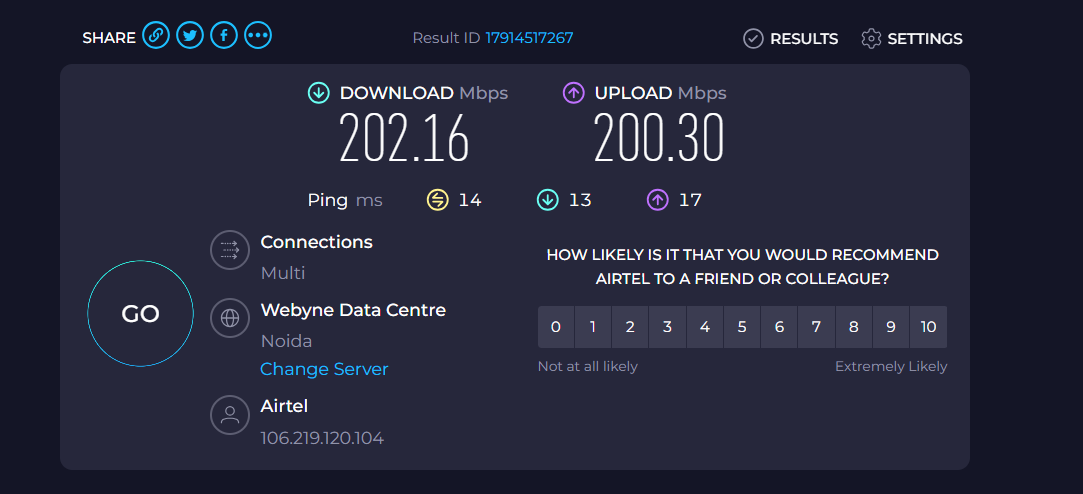
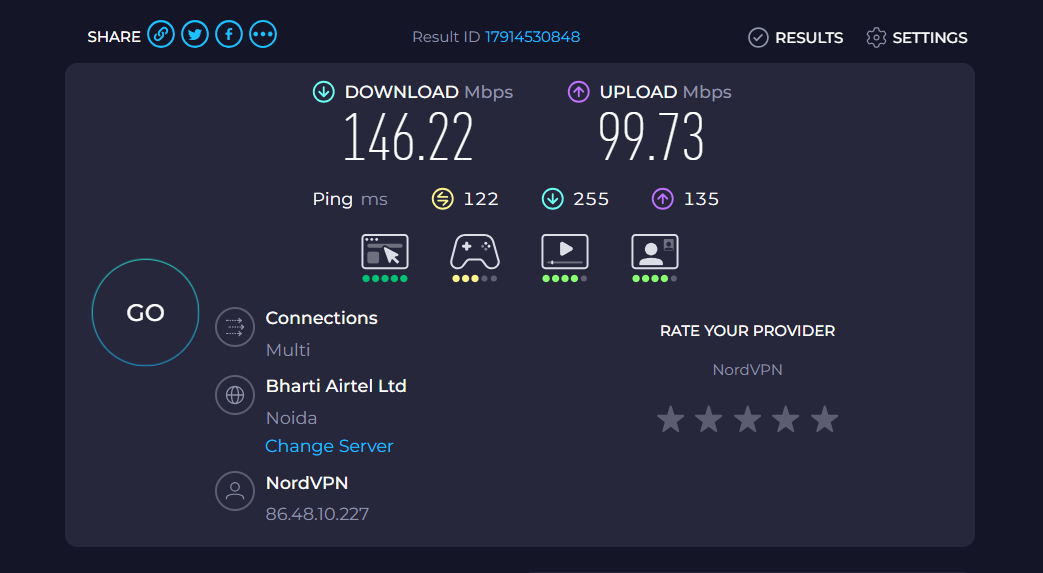
Now, connect to a VPN server. We suggest connecting to a server close to your physical location to maintain the accuracy of this test.
Perform a second speed test while staying connected to the VPN. If the speeds while connected to a VPN turn out to be higher than your base connection speed, it means that your ISP is throttling your speed.
Option #2: Netflix Throttling Test on Fast.com
Sometimes, ISPs can throttle specific streaming services such as Netflix. Since Netflix is aware of this controversial practice, it created its own speed test service called Fast.com.
To check if your ISP is throttling Netflix, follow the steps below:
- Open Fast.com and wait until it automatically analyses your connection speed. It will take a couple of seconds to load.
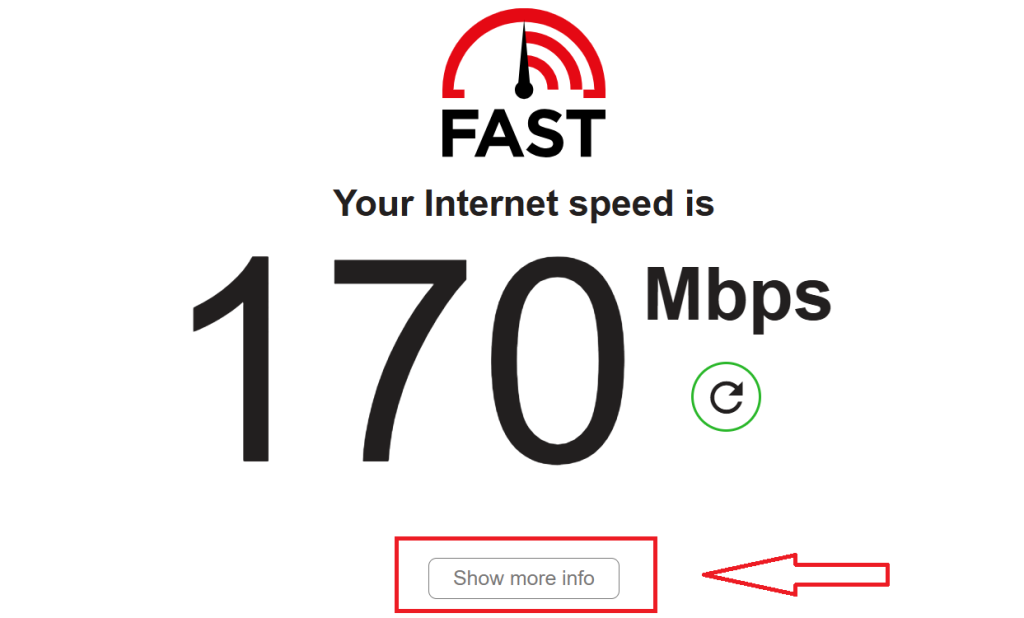
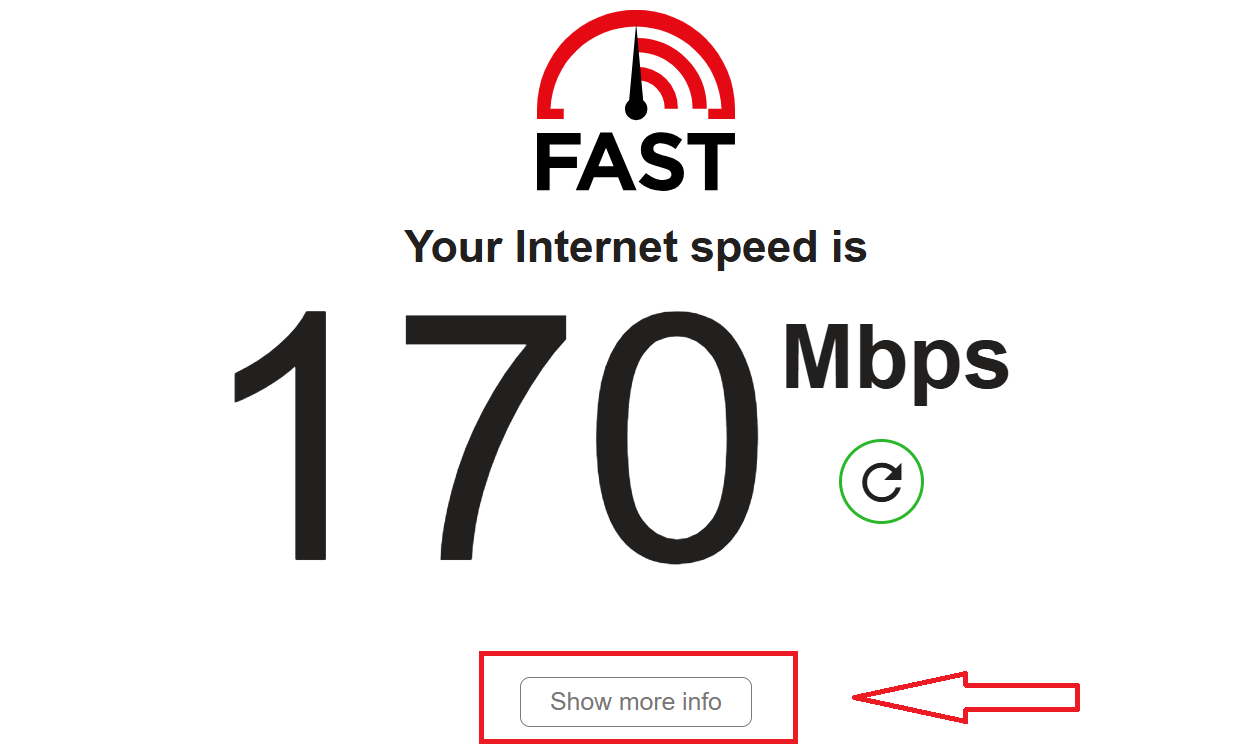
- Click on “Show more info” to get detailed information.
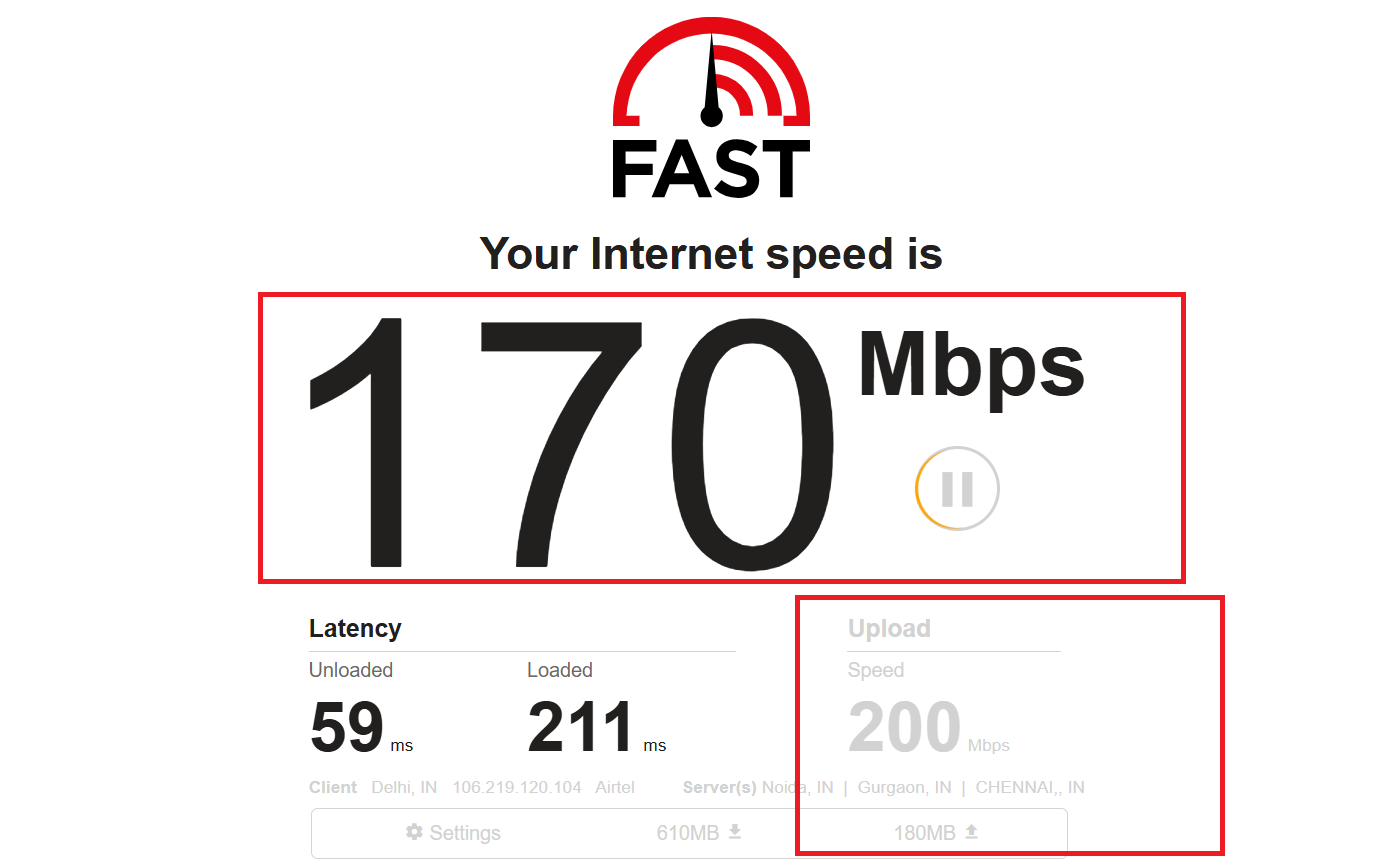
- Compare the results with the speed that your ISP has promised as part of your Internet plan. If this speed is noticeably lower than your ISP’s offering, it means that your connection to Netflix is getting throttled.
Option #3: Google’s Video Quality Report Tool
Google's Video Quality Report is a tool that compares your ISP’s performance to other ISPs in your area. It runs speed tests by connecting to YouTube servers and comparing your results to your ISP's typical performance as well as other ISPs nearby.
Based on the test results, Google gives your ISP one of the following ratings:
- HD Verified: You can enjoy videos on YouTube with little to no buffering in 720p resolution and above.
- Standard Definition: You will experience buffering on HD videos in 720p resolution and higher, but standard definitions, such as 480p and 360p, will work smoothly.
- Lower Definition: You will have trouble playing videos above 360p resolution due to frequent buffering delays.
This tool shows you a graph based on which you can check the performance of your ISP over a 24-hours time frame. You may notice that the video quality on streams is lower at certain times of the day based on network congestion.
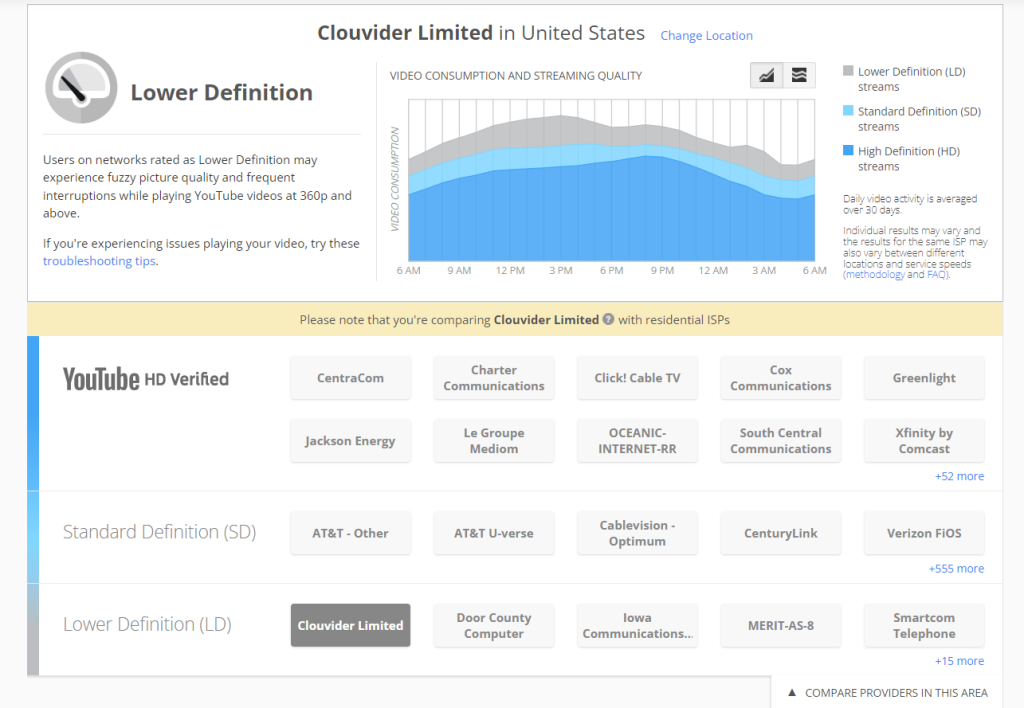
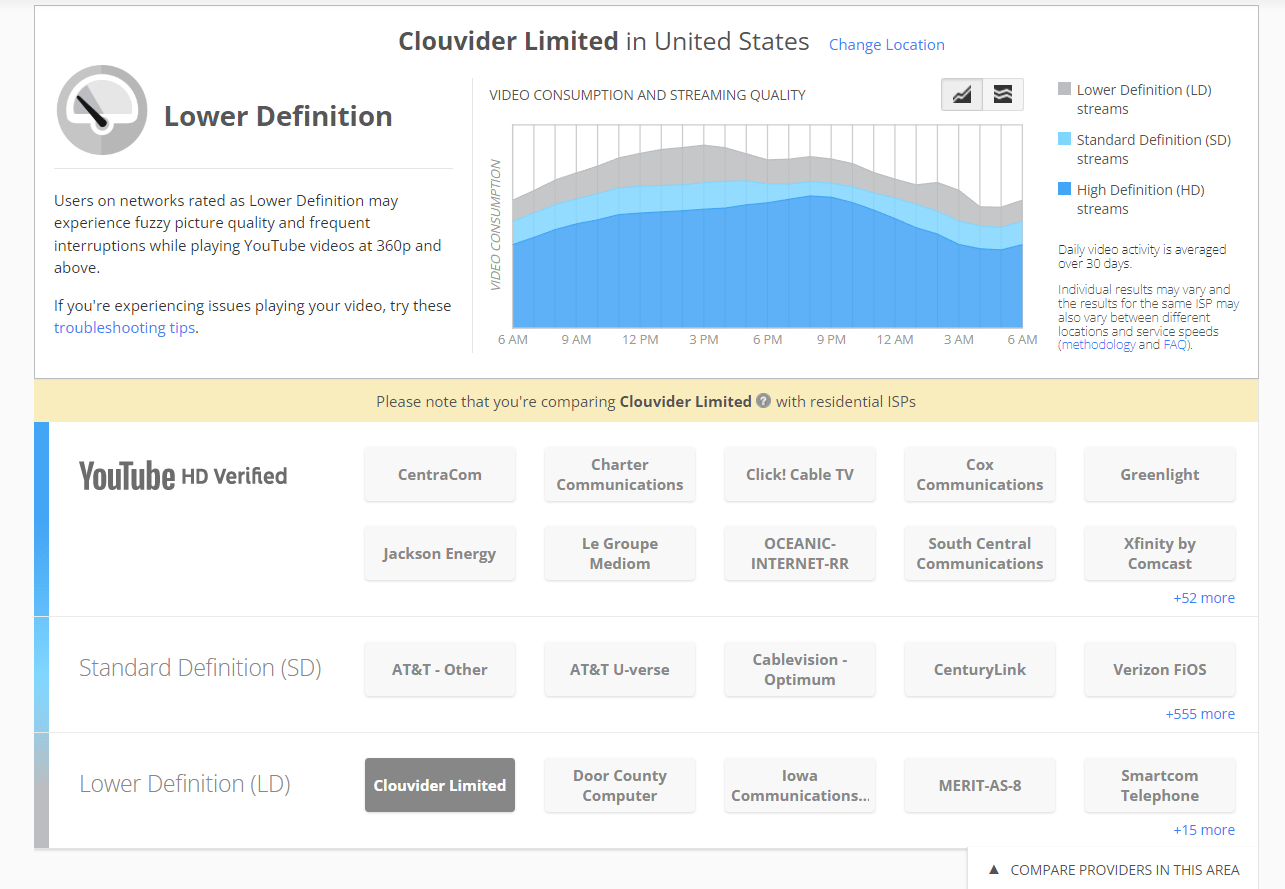
You can compare the data with other ISPs in your area and check their performance. If your ISP’s video streaming rating is lower than other providers’ in your area, it suggests that your connection might be getting throttled.
The Best Way to Bypass Internet/ISP Throttling?
Confirmed your internet is being throttled? Wondering what to do about it? You’re not alone. Millions of people deal with unfair slowdowns, especially during peak hours or while streaming, gaming, or downloading large files. The good news is: you don’t have to put up with it.
There are several effective ways to bypass ISP throttling and get your full internet speed back. Whether you’re looking for a quick fix or a long-term solution, here are the best methods to stop throttling and take back control of your connection.
1. VPN
Now that we have understood what Internet/ISP throttling is, the next thing we need to learn is how to stop it. The best and easiest way is to use a VPN (Virtual Private Network).
Think of a VPN like a secret tunnel for your internet. Normally, your ISP can see what you’re doing online. If they notice you're using too much data, for example, watching videos in 4K or playing games, they might slow you down. But with a VPN, your activity is hidden. Your ISP can’t tell what websites you're visiting or what type of content you're using, so they can’t target and throttle your speed. Let's compare the pros to cons and see if it is really useful:
Hence, we can see that VPNs are a great way to bypass ISP throttling. There are many VPNs out there, some free VPNs, some paid, but a good VPN will keep your connection private, fast, and fair. Let's have a closer look at some of our recommended top choices:
Best VPNs to Bypass ISP Throttling
To find a capable VPN to stop data throttling, you should look for features such as obfuscation and strong 256-bit encryption. This prevents your ISP from detecting that you’re using a VPN and tracking the websites that you are visiting.
Similarly, secure VPN protocols like WireGuard, OpenVPN UDP, and OpenVPN TCP are important for maximum security. In addition to that, look for a service that advocates for net neutrality, which means that it encourages equal Internet for all users.
After testing several dozen VPN servers, our team has found the following three options to be the best anti-ISP throttling VPN services. Let’s take a look at each of these.
1. NordVPN
NordVPN effectively prevents ISP throttling with its specialized obfuscated servers that conceal VPN metadata using extra layers of encryption such as SSL/SSH. This masks indicators that typically alert ISPs to throttle high-bandwidth activities.
- Obfuscated Servers with SSL/SSH Layering: Specialized servers that hide VPN traffic using additional layers of encryption, making it extremely difficult for ISPs to detect and throttle.
- AES-256 Encryption: Bank-grade encryption, including post-quantum encryption, that prevents ISPs from analyzing your data or applying speed caps based on usage.
- Secure Protocol Options: Supports NordLynx (based on WireGuard), OpenVPN, and IKEv2/IPsec for optimized speed and security.
- Double VPN: Routes your traffic through two VPN servers for extra anonymity, useful for extra-sensitive connections where throttling is aggressive.
- Threat Protection: Blocks ads, trackers, and malicious websites, reducing unwanted bandwidth consumption and helping improve speed.
Save upto 70% on NordVPN’s 2-year plan – now priced at $3.39/month ($81.36 in total). 30-day money-back guarantees available!
$
$12.99
3.39
/mo
Save 70%
With all these advanced tools working together, NordVPN delivers unmatched capability to mask VPN usage, evade detection, and ensure your internet speed stays fast and unrestricted, making it the best overall choice to defeat ISP throttling.
2. Surfshark
Surfshark is engineered for high performance and is one of the best VPNs for defeating ISP throttling. It leverages both speed-optimized protocols and obfuscation technology to keep your traffic fast and hidden.
- Dual Encryption Options: AES-256 and ChaCha20 encryptions keep data secure and untraceable. Additionally, it uses WireGuard and OpenVPN, offering speed and stability.
- Obfuscation Features: Masks VPN data packets to prevent ISP-based traffic shaping.
- Nexus Technology: Surfshark’s new Nexus system improves network stability and speed by dynamically managing servers and routing, ideal for staying throttle-free under ISP restrictions.
- GPS Spoofing: Adds an extra layer of privacy and circumvents location-based throttling by masking your device’s location.
- Everlink Technology: A cutting-edge connection protection method that outperforms traditional kill switches, maintaining your speed and privacy even if the VPN connection drops.
With its speed-oriented architecture and ability to hide VPN traffic, Surfshark is an excellent choice for uninterrupted, throttle-free internet use.
3. ExpressVPN
ExpressVPN is a top choice for users looking to bypass ISP throttling due to its advanced obfuscation and robust security protocols.
- Obfuscated Servers by Default: Every server disguises VPN traffic as regular data, preventing ISPs from detecting and throttling your activity.
- Lightway Turbo Protocol: A major upgrade to ExpressVPN’s custom-built Lightway protocol, now optimized for even faster, more stable connections, ideal for streaming, gaming, and large downloads without slowdown.
- Rust-Based Development: ExpressVPN is pioneering new privacy tools built in Rust, a memory-safe language that reduces vulnerabilities and improves performance for long-term, throttle-free browsing.
- 256-bit Military-Grade Encryption: Keeps your online data completely private, making it unreadable to ISPs and blocking their ability to analyze or shape traffic.
With its always-on obfuscation and high-speed encryption protocols, ExpressVPN is highly effective for avoiding ISP throttling and maintaining unrestricted internet access.
2. Proxy
Another way you can stop your ISP from throttling you is with a proxy server. This will hide your IP address too so your ISP can’t tell who you are. But unlike a VPN, a proxy server does not hide the way you use the internet. So, it’s not the best choice if you want full privacy.
3. New ISP
If you want, you can shop around to find a new ISP that gives you a higher or no data cap. Some smaller or local providers are more transparent and may not throttle your connection as aggressively.
4. Monitor Data Usage
You can get your ISP to stop throttling your speeds by monitoring your data usage. If you don’t hit your data limit, your ISP won’t throttle your speeds, at least not for that reason.
4.1 Monitoring Data Usage on Android
- Go to Settings > Network & Internet > Data usage
- Set your data warning and limit to track your usage
4.2 On iPhone
- Head to Settings > Cellular
- Check app data usage under “Cellular Data Usage”
5. Complain to the Government
If all else fails, you can send a complaint to the FCC or your local representative. Here’s how to contact the FCC:
- Email: [email protected]
- In the body of the email, write:
"get form"followed by your email address - You’ll receive a form via email that you can use to file a complaint.
You can also look up your congressperson’s contact info through the U.S. House of Representatives website.
How to Set Up a VPN to Stop ISP Throttling
To get around ISP throttling, follow the steps below:
- Sign up for a VPN that let you stop ISP throttling (we recommend NordVPN).
- Download the VPN app/client on your device and install it.
- Open the application and sign into your account.
- Connect to a VPN server in your preferred location.
- Now, you can freely use the Internet without throttling.
How to Stop ISP Throttling Without a VPN?
To stop ISP from throttling without a VPN, you can use a proxy service that encrypts your Internet traffic. On its own, all that a proxy will do is spoof your location. However, your ISP will still be able to track your activities and throttle your connection during specific activities. However, it is difficult to find a proxy service that also offers reliable encryption. Let's have a closer look at its pros and cons to analyze it:
Hence, your best bet to stop ISP throttling would still be to use a capable VPN that has advanced AES 256-bit encryption in combination with secure protocols like WireGuard and OpenVPN.
Is ISP Throttling Legal?
Before we dive into whether throttling is actually legal, it helps to understand why it happens in the first place, and that brings us to a key concept: net neutrality. This principle plays a big role in shaping the rules about how internet providers can treat your online activity. Once you get a quick handle on what net neutrality means, you’ll have a much clearer picture of what your ISP can, and can’t, legally do.
What Is Net Neutrality?
Net neutrality is the idea that all websites and online services should be treated the same by your internet provider. That means they shouldn’t slow down (or speed up) certain websites or apps just because they feel like it.
The rules around net neutrality in the U.S. have changed a lot in the past few years. Back in 2015, it was protected by law. Then those protections were taken away in 2017. Since then, there haven’t been strong federal rules, but some individual states have created their own net neutrality laws.
Is ISP Throttling Legal in 2025? (U.S.)
In most of the U.S. right now, internet providers can legally slow down your connection in certain situations, if they tell you about it in their terms of service.
However, some states (like California, Oregon, and Washington) have passed their own laws to protect net neutrality. In those states, your ISP may not be allowed to throttle specific apps or websites without a valid reason.
What ISPs Are Allowed to Do (According to Their Fine Print)
When you sign up for internet service, there’s usually a lot of small print (terms of service) that most people don’t read. That’s where ISPs often say they can:
- Slow your internet during “busy hours” to manage network traffic
- Lower your speed after you use a certain amount of data (even on “unlimited” plans)
- Give faster speeds to certain websites or companies that pay more (if allowed in your state)
So yes, a lot of throttling is legal, as long as it’s written in the agreement and you accepted it when you signed up.
Final Thoughts
ISP throttling can be frustrating, especially when you’re paying for high-speed internet but experience slowdowns during streaming, gaming, or downloading. While throttling is often used to manage network traffic, it can feel unfair, especially when it targets specific services or users.
The good news is that you don’t have to accept it. A reliable VPN is the most effective way to regain control over your connection, maintain consistent speeds, and ensure your online activities remain private and unrestricted. We highly recommend going for NordVPN as it can significantly improve your online experience and help you take back the speed you’re already paying for. You can also:
- Run speed tests to detect throttling
- Use tools like Fast.com and Google’s Video Quality Report
- Try a proxy (with caution)
- Monitor your data usage to avoid hitting limits
- File a complaint with the FCC if you feel your rights are being violated
Ultimately, the best way to stop ISP throttling is to stay informed, use the right technology, and hold your provider accountable. The internet should be fast, fair, and open for everyone.
We hope that you enjoyed reading this article and learned how to stop ISP throttling. If you have any experiences to share, feel free to comment below.
Related