When you purchase through links on our site, we may earn an affiliate commission. Here’s how it works.
Mullvad VPN Review 2026


Our experts have reviewed 53 VPN providers, which were put through extensive rounds of testing. To learn more about that process, here’s how we review VPNs, where we explain our criteria and our policy of being fully transparent.
We didn’t go into Mullvad VPN looking for buzzwords or brand promises. We set it up on our laptops, phones, and tablets and used it like normal people would - at home, on café Wi-Fi, and while bouncing between networks on the road. The goal was simple: see how it performs when privacy actually matters, not just in controlled tests.
Over the course of several weeks, we stressed Mullvad with HD streaming, torrenting, gaming sessions, and everyday browsing. We also dug into its infrastructure, encryption setup, no-logs claims, traffic policies, and leak protection systems. Everything in this Mullvad review comes from hands-on use and technical analysis, not marketing copy or surface-level impressions.
Pros
✅ Anonymous accounts with zero personal data – Mullvad doesn’t require an email address, username, or identity verification. Users log in using a randomly generated account number, making it one of the few VPNs that genuinely removes identity from the equation.
✅ Advanced privacy defenses (Multihop, DAITA, quantum-resistant tunnels) – Mullvad offers multihop routing, DAITA (Defense Against AI-guided Traffic Analysis), and quantum-resistant tunnel options, all designed to counter modern surveillance techniques and advanced traffic analysis.
✅ 100% RAM-only servers with public infrastructure transparency – Every Mullvad server runs on diskless RAM-only hardware, meaning no data survives reboots. Server ownership, configuration, and deployment details are publicly listed, setting a rare standard for transparency in the VPN industry.
✅ WireGuard-first encryption architecture done right – Mullvad centers its VPN stack around WireGuard with optimized implementations like WireGuardNT (Windows) and GotaTun (Android), delivering modern cryptography, low latency, and efficient performance across platforms.
✅ QUIC and lightweight obfuscation for restrictive networks – Mullvad supports QUIC-based WireGuard obfuscation and lightweight traffic masking to bypass VPN blocking, censorship, and deep packet inspection without sacrificing connection stability.
✅ Independently audited web app and infrastructure – Mullvad’s web application passed an external Assured security audit with no critical issues, reinforcing its commitment to verifiable privacy and open security practices.
✅ Unique privacy partnerships and two-party VPN architecture – Through partnerships like Obscura VPN, Mullvad offers two-party VPN routing, where no single provider can see both your identity and traffic destination, a rare and powerful privacy design.
✅ Strong cross-platform support and frequent client updates – Native apps are available for Windows, macOS, Linux, Android, and iOS, along with router support, browser tools, and CLI clients. Recent updates added in-app upgrades on Windows and macOS for smoother maintenance.
✅ Anonymous payments including Bitcoin Lightning – Mullvad supports privacy-first payment options, including Bitcoin Lightning, helping users avoid linking financial data to their VPN accounts. Pricing starts at around $5.80/month on annual plans.
Cons
❌ Sweden-based jurisdiction (14 Eyes Alliance) – Mullvad operates from Sweden, which participates in international intelligence-sharing agreements. While its strict no-logs architecture mitigates this risk, privacy purists may prefer VPNs based in non-alliance countries.
❌ Smaller server network than major competitors – Mullvad’s network is modest compared to VPNs offering thousands of servers globally, which can limit location choices and lead to higher congestion in some regions.
❌ Limited streaming support – Mullvad doesn’t optimize for unblocking streaming platforms, and access to services like Netflix, Disney+, and BBC iPlayer is inconsistent at best.
❌ Noticeable speed drops on long-distance servers – Testing showed an average speed reduction of roughly 52% on distant connections, which may impact users with slower baseline internet speeds.
❌ No live chat support – Customer support is handled via email and documentation only, which isn’t ideal for users who want instant help.
Our Ultimate Verdict on Mullvad VPN
Mullvad VPN is built for users who prioritize true anonymity. Based in Sweden, a 14 Eyes jurisdiction, Mullvad offsets potential legal concerns with a strict no-logs policy, multiple independent audits, and a privacy-by-design architecture that removes personal data entirely, including emails, usernames, and account credentials. Its real-world track record, including law enforcement being unable to obtain user data during a 2023 office search, reinforces its credibility.
Mullvad secures connections using modern cryptography with WireGuard as its core protocol, alongside OpenVPN (being phased out in 2026), QUIC obfuscation, multihop routing, DAITA traffic analysis protection, and quantum-resistant tunnel options. Its entire server network runs on RAM-only hardware, with publicly documented ownership and configurations, offering one of the most transparent infrastructures in the VPN industry. Features like DNS-based content blocking, automatic kill switch, split tunneling, SOCKS5 proxy access, and obfuscation tools further strengthen its privacy toolkit.
While Mullvad isn’t designed for streaming and long-distance connections can see speed drops of around 50%, it delivers consistent performance for browsing, torrenting, and privacy-critical use cases. The smaller server network and lack of live chat support may deter casual users, but for those who value uncompromising privacy, anonymous payments, and open security practices, Mullvad stands out as one of the most trustworthy VPN services in 2026.
Best For
- Privacy-first users who want true anonymity – Ideal for anyone who doesn’t want to share an email, name, or payment details and prefers a VPN built around zero-identity usage.
- Advanced users needing censorship resistance and traffic protection – A strong fit for those who want features like multihop routing, QUIC obfuscation, DAITA, and quantum-resistant tunnels in restrictive environments.
- Torrenting and P2P users prioritizing privacy over streaming – Well-suited for users who want safe, unrestricted P2P support without activity logging or IP exposure.
We conducted multiple tests on Mullvad VPN to determine its ranking among the best VPN services. Our assessment process evaluates criteria like reputation, speed, security, privacy, pricing, and customer support.
As mentioned in our article, which outlines how we review VPNs, our standards for rating VPN services are unbiased. We try to keep our reviews updated at all times, so feel free to revisit this Mullvad review if you want to see the latest updates on the provider.
Background, Jurisdiction & Reputation
Mullvad, based in Sweden, has no previous data leaks and takes several measures to safeguard its customers. It undergoes independent audits to validate its high-security standards. Our Score: 9/10
A VPN is an essential tool that can help protect your online privacy by encrypting your Internet traffic and routing it through a remote server. However, it's important to be mindful of the origin of your chosen VPN, as it determines how your sensitive data is managed. Different countries have different laws, and some of these laws can be very limiting.
Where Is Mullvad VPN Based?
Mullvad VPN is based in Sweden, a member of the 5/9/14 Eyes Alliance. This means that the Swedish government is part of an international intelligence network that shares information with other member countries. This could potentially be a cause for concern.
However, Mullvad VPN takes several measures to ensure its users' privacy and security, despite being based in Sweden. The company has a strict no-logging policy and doesn't keep any user data or activity logs. It also regularly undergoes independent security audits to ensure its systems and processes are secure.
We have to add that Amagicom AB, the former operator of Mullvad VPN, reorganized its operations in 2020 by creating a new subsidiary called Mullvad VPN AB. This move brought updated Terms of Service, but the only real change is the new company running Mullvad VPN. Fredrik Strömberg and Daniel Berntsson, founders of Amagicom, own both Amagicom and Mullvad.
This strategic split is primarily driven by the founders' aim to separate various business ventures under the Amagicom umbrella.
Did Mullvad VPN Leak Personal Data in the Past?
Mullvad VPN hasn't had any data leaks or breaches in the past. Its no-logs policy has been audited, which confirmed that no personally identifiable information could be attached to any Mullvad user. Additionally, Mullvad underwent a penetration testing audit, which revealed no dangerous or critical vulnerabilities.
Recent independent audits by X41 D-Sec, 4th Infrastructure audit by Cure53, & 3rd security audit by the Netherlands-based security firm Radically Open Security in June of 2023 concluded that Mullvad does a great job protecting the end-user from privacy-related risks.
In April 2023, a search warrant was issued in Mullvad VPN's Gothenburg office related to a blackmail attack in Germany. The Swedish police were unable to obtain any user information from Mullvad VPN, highlighting their commitment to data protection. Also, as part of its ongoing efforts to enhance user privacy, Mullvad VPN has taken the proactive step of eliminating subscriptions that could potentially retain user data.
Another good thing is that Mullvad VPN has completed its transition to a RAM-only diskless infrastructure, which will further prevent user data from being stored on Mullvad's servers. Many of Mullvad's 680 servers are fully owned and maintained by the company. The servers that Mullvad owns are labeled on its server page, so you can easily check and choose between a Mullvad-owned server or a rented one.
Is Mullvad VPN Safe?
Yes, Mullvad VPN is regarded as one of the safest VPNs on the market. Signing up for the service requires zero personal information, such as an email or username. When you create an account, you're only assigned a unique, random, 16-digit account number that you use to sign in.
The VPN's no-logging policy means that your connection timestamps and IP addresses are never collected. This means that none of your online activity can be traced back to you since none of your personal information is connected to your account number.
It uses AES-256 encryption, supports two protocols (OpenVPN and WireGuard) for its secure VPN tunnel, and undergoes multiple external audits. Their latest audit, conducted in June 2023, proved that they weren't logging or leaking any customer data.
Apart from that, Mullvad VPN's built-in DNS leak protection is enabled by default. The kill switch is also auto-enabled as you switch between server locations.
Mullvad's website only uses cookies essential for providing certain services and doesn't contain any trackers or ads. The VPN offers a wide range of anonymous payment options, including cryptocurrencies like Bitcoin. This provides users with an optional extra layer of security and privacy.
Supported Platforms & Devices
Mullvad VPN offers native apps for both desktop and mobile devices, as well as Android TV. You can also set up Mullvad for Linux and Qubes OS using its comprehensive guides. While there's a Firefox browser extension, it doesn't extend to other widely used Web browsers. Our Score: 8/10
Modern premium VPNs should ideally be able to protect almost any device that connects to the Internet. Mullvad luckily offers a fairly wide range of device support.
Mullvad VPN has native applications for the most popular desktop platforms: Windows, macOS, and Linux, including Chromebook. Mullvad VPN has recently introduced in-app update functionality for Windows and macOS, allowing users to receive automatic updates directly within the app, eliminating the need for manual downloads and improving overall security hygiene. If you'd rather set up Mullvad on Linux yourself, they provide in-depth guides, even for Qubes OS.
Mullvad VPN has native applications for the most popular desktop platforms: Windows, macOS, and Linux, including Chromebook. If you'd rather set up Mullvad on Linux yourself, they provide in-depth guides, even for Qubes OS.
The VPN also offers native apps for iOS and Android, which can be downloaded from their respective app stores. Mullvad VPN is now available as a Firefox extension, too, although there's no news yet about a potential Chrome extension.
The Mullvad VPN Android app has a limited settings menu, but it does include split tunneling, a feature missing on an iPhone. Moreover, you can enable auto-connect or local network sharing and select the country, city, and individual VPN server you want to connect to.
Mullvad also works on devices running Android TV (which includes Google TV) and Fire TV. When it comes to Apple TV, Mullvad VPN doesn't have an app. However, if you have a router that has an OpenVPN client or WireGuard, then you can install Mullvad on that and then connect the Apple TV to the router to get it connected through Mullvad.
Additionally, Mullvad collaborates with the Tor Project to create the Mullvad Browser, enhancing online privacy without the Tor Network. This browser combats tracking and allows you to use it with a trustworthy VPN, offering an alternative for private browsing.
Lastly, Mullvad VPN allows up to 5 simultaneous connections. While this may not be the most generous offer, it should be enough to protect both home and mobile devices.
Installation & Initial Configuration
Installing Mullvad is a straightforward process, whether you want to use it on your computer or mobile device. Additionally, the VPN offers well-written guides to assist you every step of the way. Our Score: 10/10
To begin using this VPN, you must first subscribe to Mullvad and create a new account. Unlike other VPN services that collect personal data during registration, Mullvad assigns a random 16-digit account number to users instead of asking them to create credentials with an email and password.
It’s very important to note that if you lose this unique, system-generated account number, Mullvad can’t guarantee that they’ll be able to recover it, as they keep as little information as possible about you. Thus, make sure you keep a record of your account number in a safe place.
Moreover, you can pay for their subscription anonymously via Bitcoin or other similar methods, ensuring complete privacy from the start.
To install Mullvad on desktop platforms like Windows, macOS, and Linux, you can download the official application from the VPN's website. The VPN service also offers guides for using Mullvad VPN on Qubes OS.
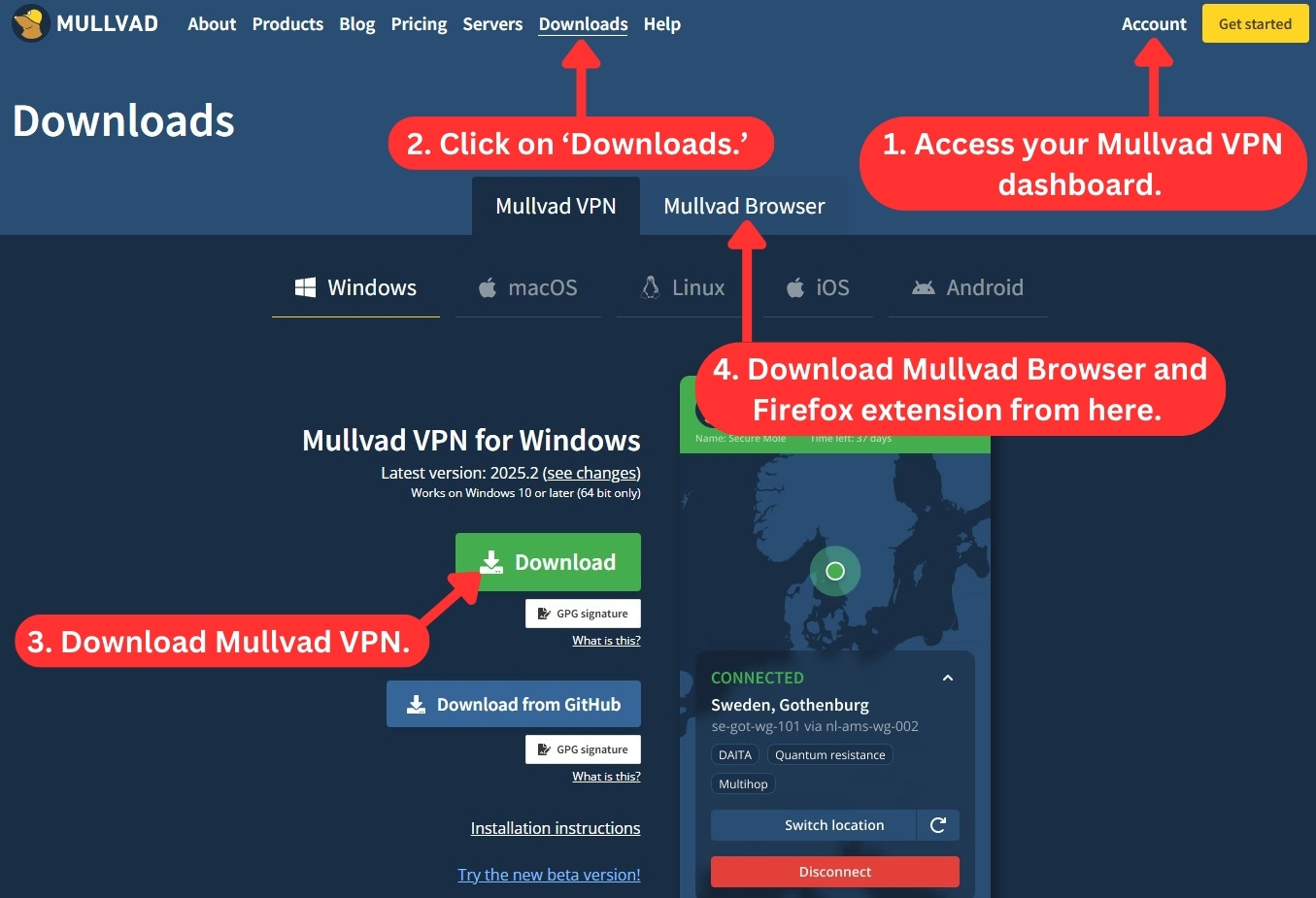
The desktop installation process is quick and easy, taking less than a minute to complete. For iOS or Android devices, the Mullvad VPN app can be found in Apple's App Store or Google's Play Store. The installation process is straightforward and free of any unnecessary distractions. If you're using an Android device, you also have the option to download it via F-Droid or the .apk file.
If you want to install Mullvad VPN on a router, the Mullvad website provides detailed guides for routers that support OpenWRT, DD-WRT, pfSense, and Asus Merlin. The step-by-step instructions are easy to follow, making the process of installation hassle-free.
Prominent Features
Mullvad VPN offers both essential and advanced features, including split tunneling, ad-blocking, and a kill switch, to enhance user privacy and security. Our Score: 8.5/10
Mullvad VPN has updated its feature set to remain competitive in the saturated VPN market. Let's take a closer look at what you can expect from the service.
- DNS and IPv6 Leak Protection – Mullvad VPN's DNS and IPv6 leak protection features ensure that users' actual location remains safe within the VPN tunnel by protecting their DNS queries and IPv4/IPv6 addresses. This enhances user privacy and prevents their online activities from being tracked.
- Local Network Sharing – This feature lets you connect to devices on your local network, like for sharing files, streaming, or printing. Basically, it allows communication outside the VPN tunnel, so you can access devices within your network, including private IP addresses.
- DNS Content Blocker – This feature, accessible across all supported desktop, iOS, and Android devices, allows you to block specific content like adult sites, gambling, malware, ads, and trackers. DNS content blocking is particularly helpful for parents seeking a safe online environment for their children.
- Advanced Encryption – Mullvad VPN uses military-grade AES-256 encryption to secure user data against hacking, eavesdropping, and other cyber threats. This encryption standard is widely recognized as being unbreakable and highly secure, ensuring that users' online activities remain private and protected.
- Kill Switch – Mullvad VPN's built-in kill switch is available on all supported desktop and mobile platforms. It automatically stops all network traffic if connectivity issues occur while the VPN is active. This prevents personal data from leaking online and revealing true information, even if the VPN connection becomes unstable.
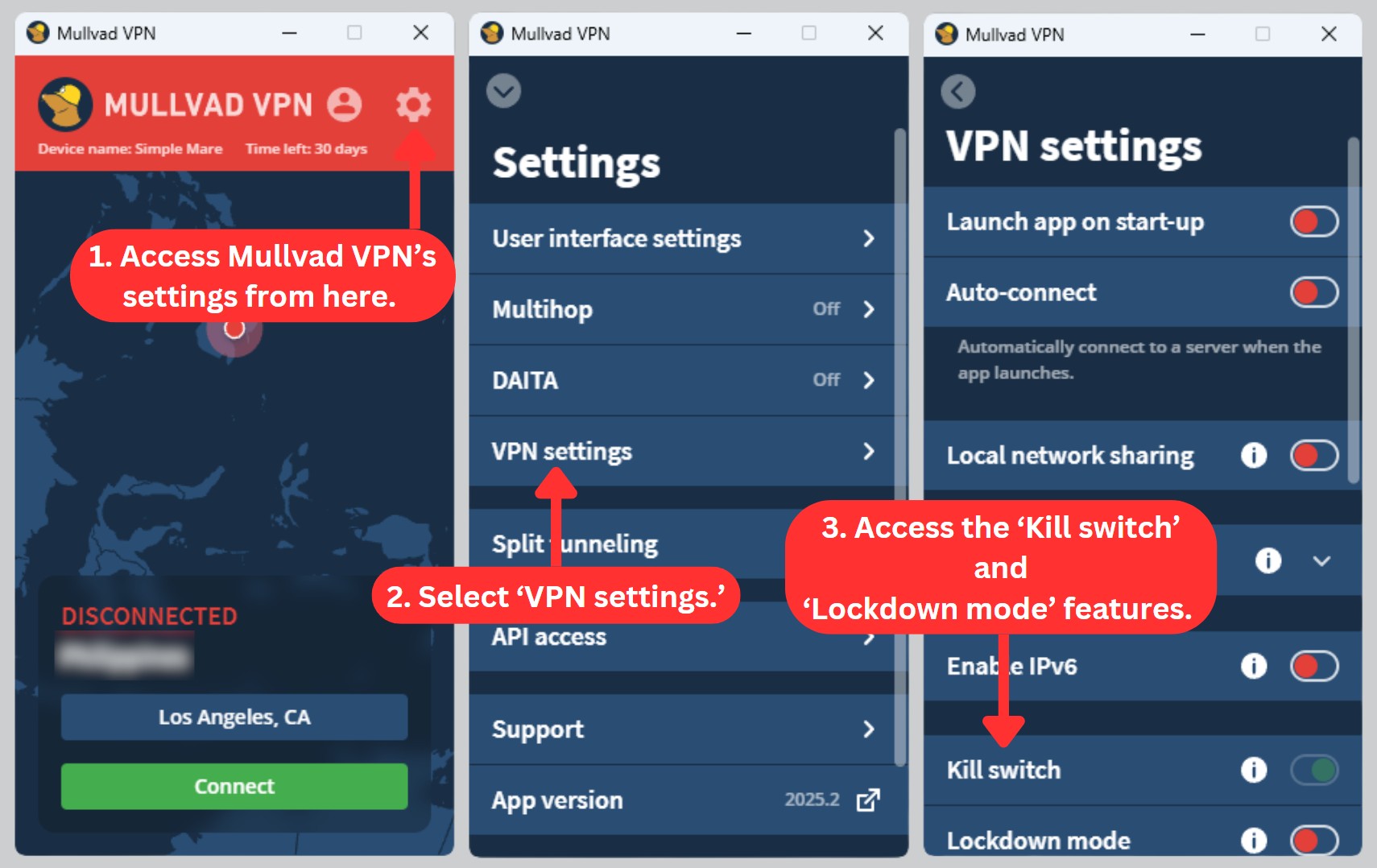
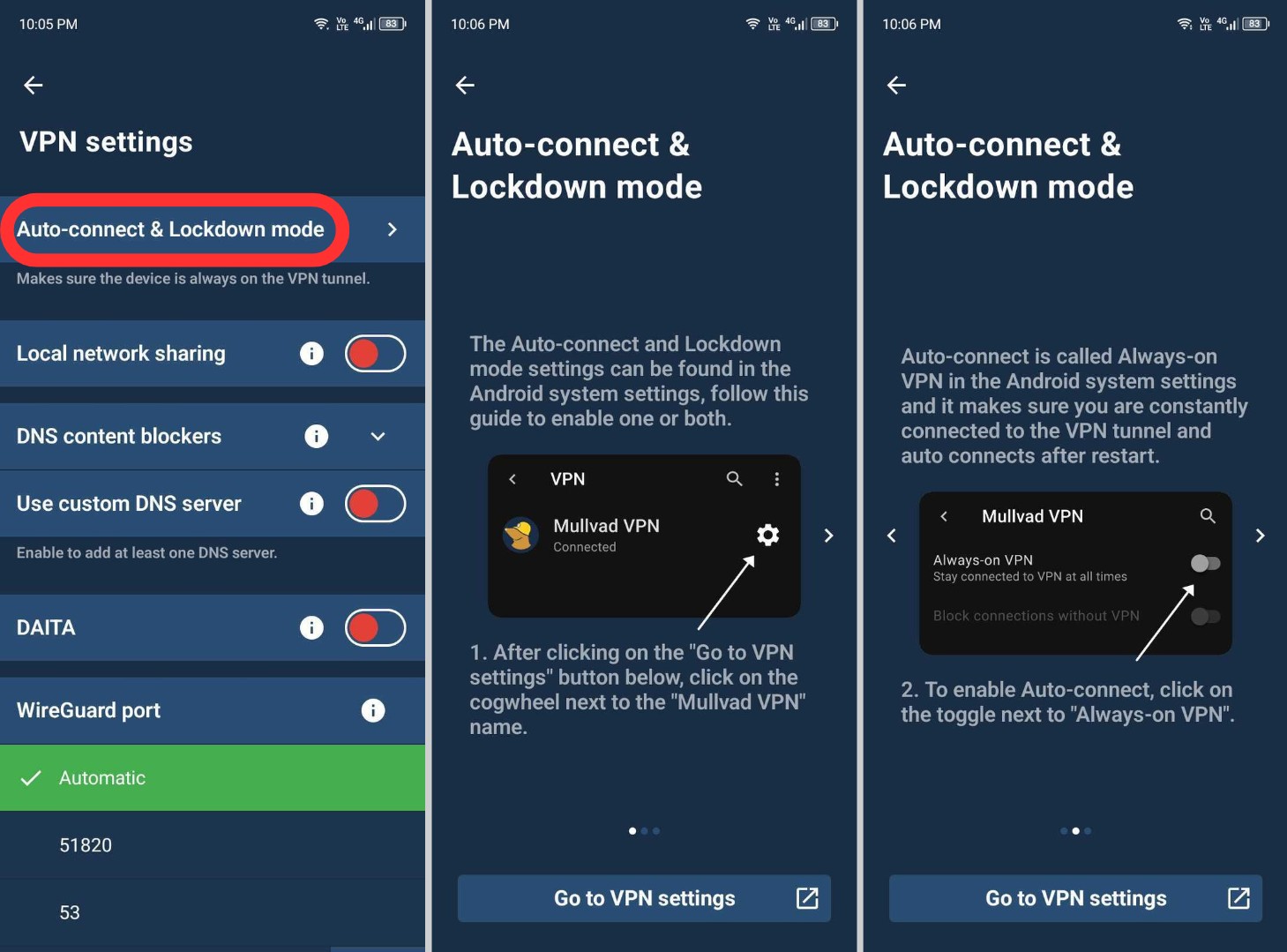
- Lockdown Mode – Enabling this feature requires an active connection to a Mullvad VPN server. Disconnecting manually or quitting the app will temporarily block your Internet access until a connection is re-established. Lockdown mode is available on Mullvad for Windows, macOS, and Linux users. On Android, you can enable it through the 'Always-on' option.
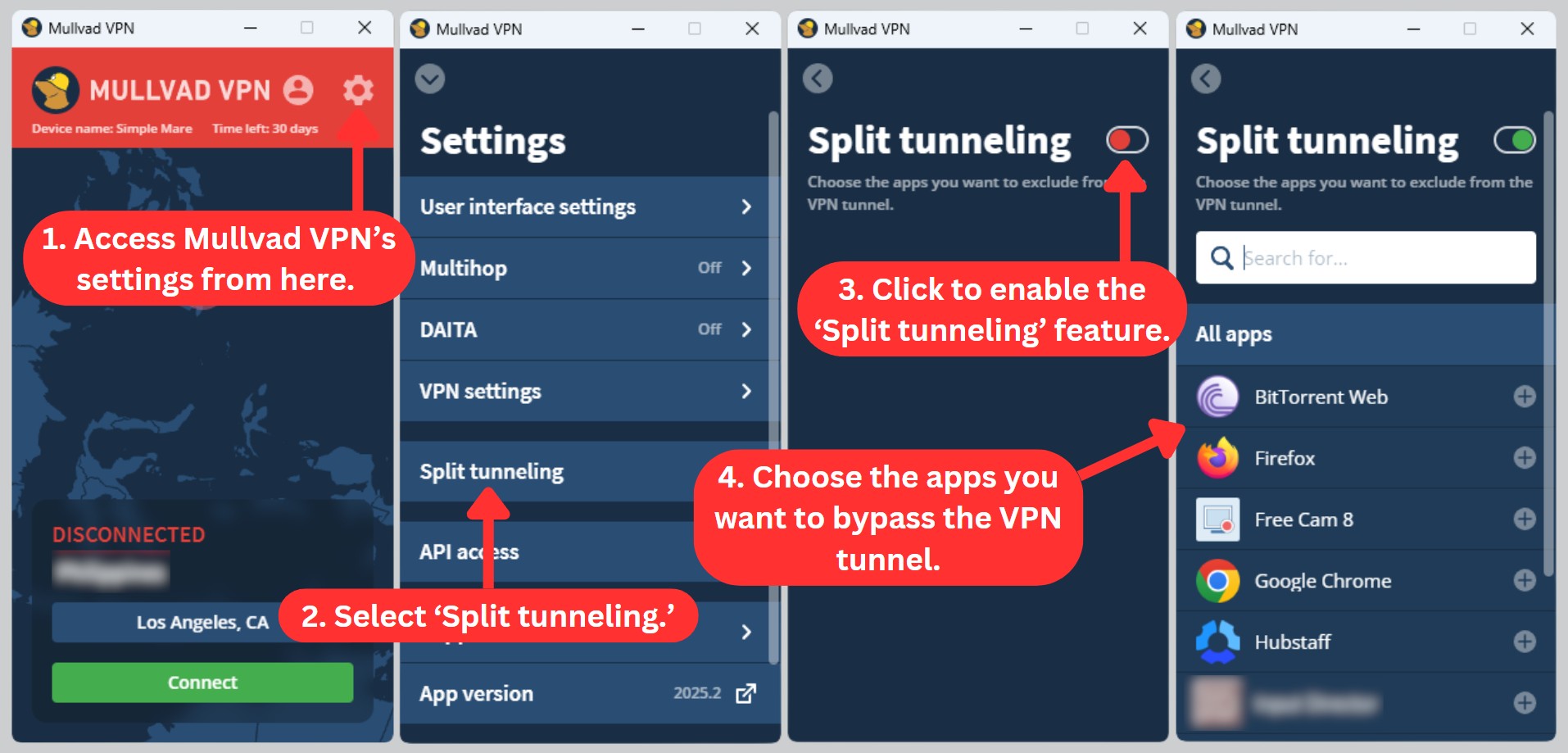
- Split Tunneling – Mullvad VPN's split tunneling feature allows you to specify which apps send your data through the VPN connection, making it easier to access services that block VPNs, such as Netflix or banks. This feature is available on Windows, Mac, Linux, and Android platforms, giving you greater flexibility on how you use the VPN.
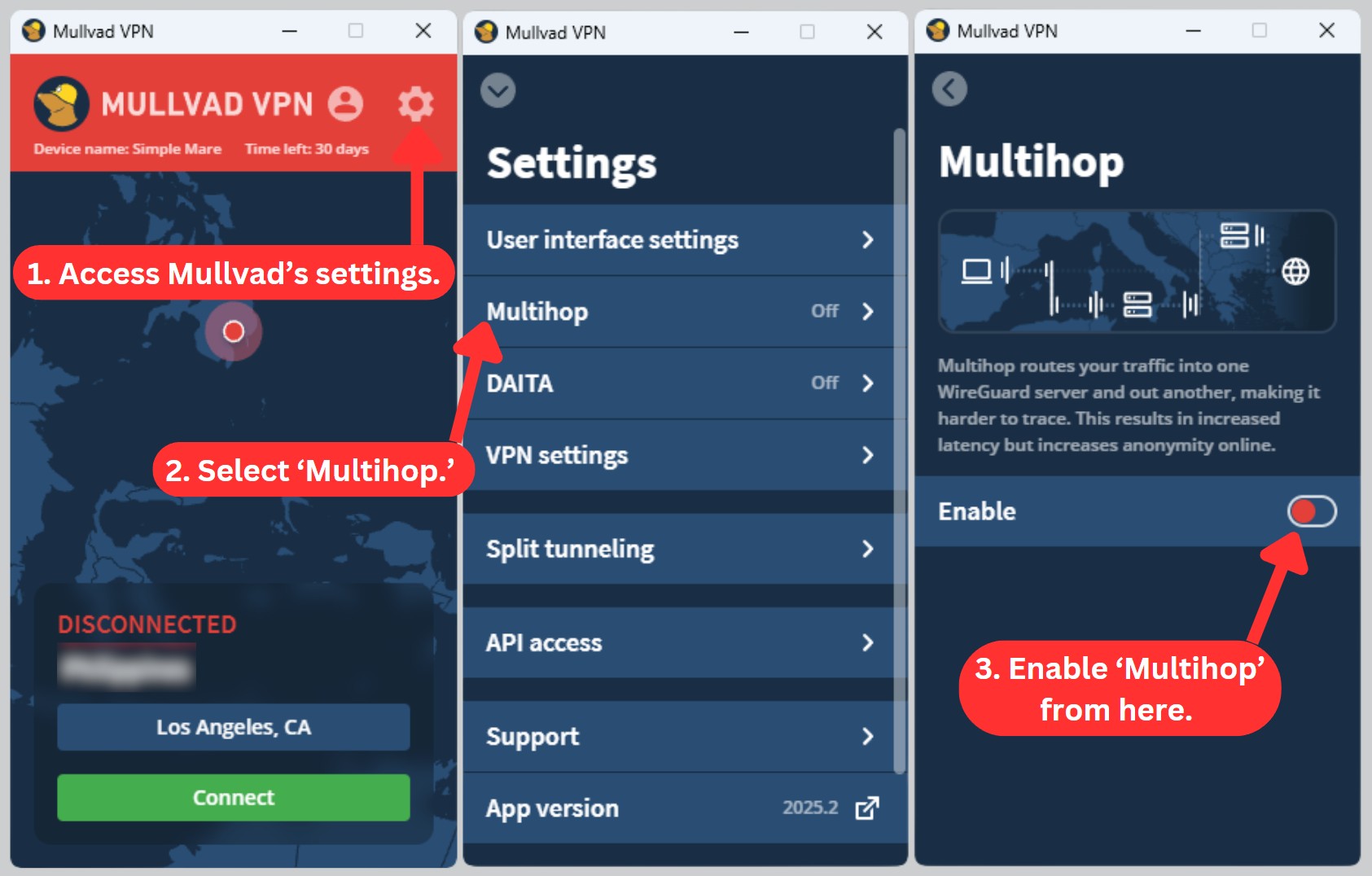
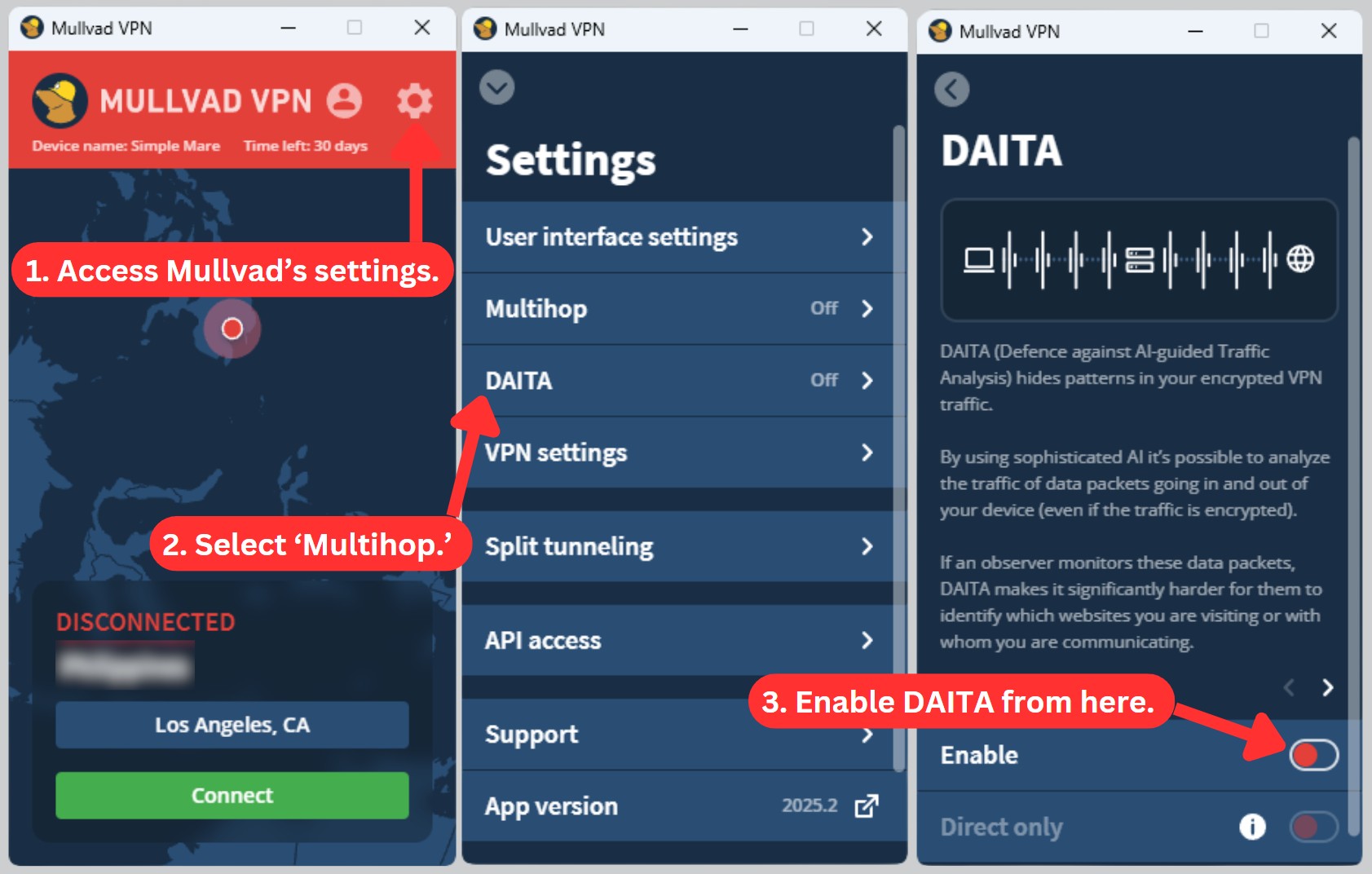
- Multihop – This feature, available on Windows, macOS, Linux, and iOS devices, lets you route your traffic through one WireGuard server and out through another. While this adds some latency, it boosts your online anonymity by making your connection harder to trace.
- DAITA – Short for 'Defense Against AI-guided Traffic Analysis,' this feature works exclusively with the WireGuard protocol and is available on all supported desktop and mobile apps. When enabled, it helps protect your traffic from AI-driven analysis, increasing your online anonymity. Right now, you can only use DAITA on select servers in Amsterdam, London, Los Angeles, and New York.
- SOCKS5 – Mullvad's VPN servers come equipped with a SOCKS5 proxy. This feature not only minimizes the exposure of your PC's identity but also helps reduce the hassle of CAPTCHAs.
- Obfuscation – Mullvad offers several obfuscation methods (including WireGuard, Shadowsocks, and V2Ray) to help you bypass restrictive networks. Available on all supported platforms, this feature adds another layer of protection against surveillance.
- Unlimited Server Switches and Bandwidth – Mullvad VPN allows unlimited server switches and bandwidth, making it easy for users to switch between locations as often as they need to access geo-restricted content or improve their browsing experience. With no restrictions on data, users can keep the VPN active for as long as they need without worrying about additional fees or data caps.
We also have to mention that Mullvad has stopped its port forwarding support due to recurring misuse that led to IP blacklisting and issues with hosting providers. While it can be helpful for legitimate uses, this change aims to prevent negative consequences for the majority of users.
Overall, Mullvad VPN offers robust security features that ensure user privacy and protection against cyber threats. While they've recently discontinued support for port forwarding and don't provide static or dedicated IP addresses, Mullvad VPN offers advanced features like split tunneling and ad-blocking.
These features allow you to customize your online experience and, at the same time, ensure the security of your personal information.
Server Count & Infrastructure
Mullvad VPN’s nearly 700 servers may be sufficient for average users, but those seeking a larger network for their VPN needs may want to consider other options. Our Score: 5.5/10
Server availability is one of the most important aspects to consider when evaluating any VPN provider. Let's take a closer look at Mullvad's server network, ownership, and privacy implications.
While Mullvad offers 680 servers in 49 countries, it's important to keep in mind that VPNs with the most servers (7,000+) are strategically located in 100+ countries around the world. The Mullvad server network is definitely smaller than expected for a VPN that has been around for over a decade.
Despite this, Mullvad servers are distributed globally and cater well to average home users. The majority of Mullvad's server list is concentrated in North and South America, as well as Europe, which are popular destinations for VPN users. Unfortunately, the network falls short in Africa and Asia, particularly in countries like India.
We were delighted to see that Mullvad VPN provides ample information about its servers. As of the publication of this article, Mullvad has successfully completed its transition to a RAM-only infrastructure, enhancing user privacy. These RAM-only servers automatically wipe all data with each reboot, making them a strong choice for privacy-conscious users.
Mullvad owns roughly 166 of its servers and leases the rest. That’s no cause for concern, though, as even the rented servers are all dedicated, so they aren’t shared with anyone else. Furthermore, Mullvad doesn't use any virtual servers—they're all physical units, which means they tend to be faster and more secure.
UI/UX Design & Ease of Use
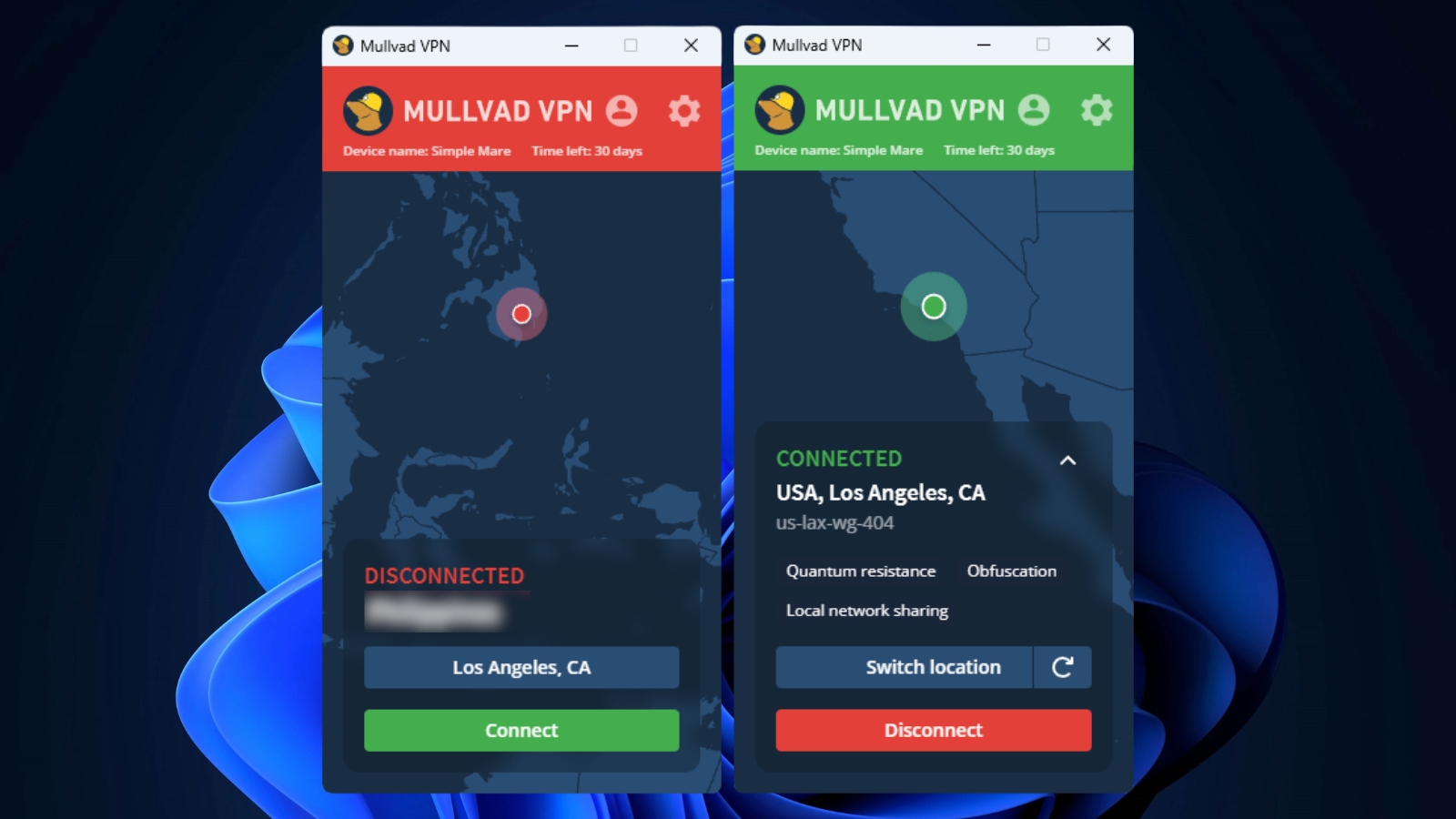
Mullvad's user interface is nicely designed but can be frustrating due to its limited fine-tuning options. It's best for users seeking a fully automated VPN experience. Our Score: 8/10
To know how user-friendly Mullvad is, we'll explore its interface and user experience on both desktop and mobile apps. We'll also see how Mullvad's browser extension fares in terms of UI and UX to determine if it offers a smooth experience no matter which device you choose.
Mullvad VPN has a consistent design across all its supported platforms. Unfortunately, its UI and UX offer limited options for fine-tuning. The login screen requires entering an account number randomly generated during account creation.
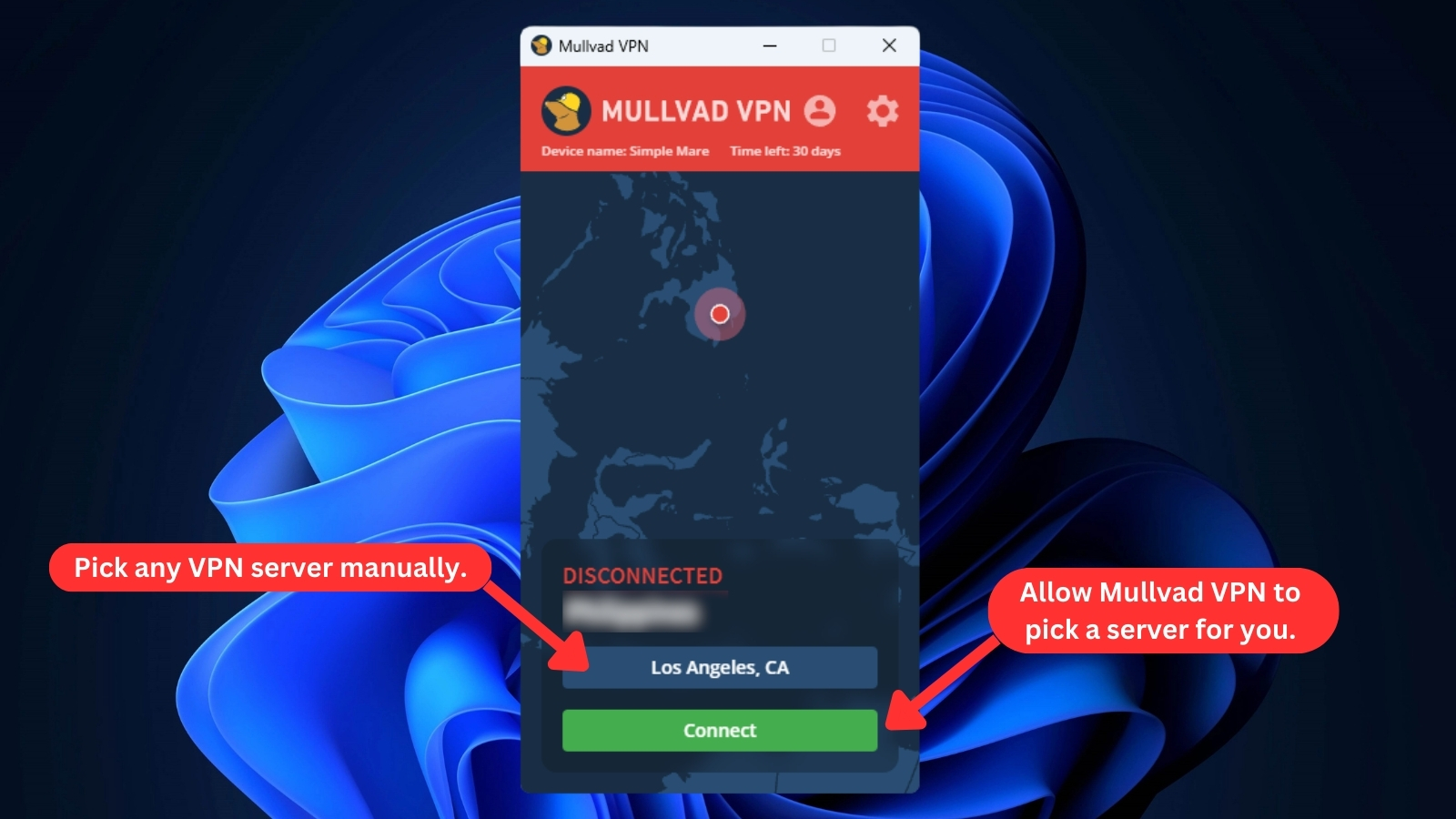
The app's interface is simple and basic. The home screen isn't very interactive, and the map is merely a visual aid. When you launch the Mullvad app, you'll be greeted with a non-interactive map and two buttons at the bottom of the interface. One button allows you to browse the list of available servers, while the other is for connecting to an auto-selected server.
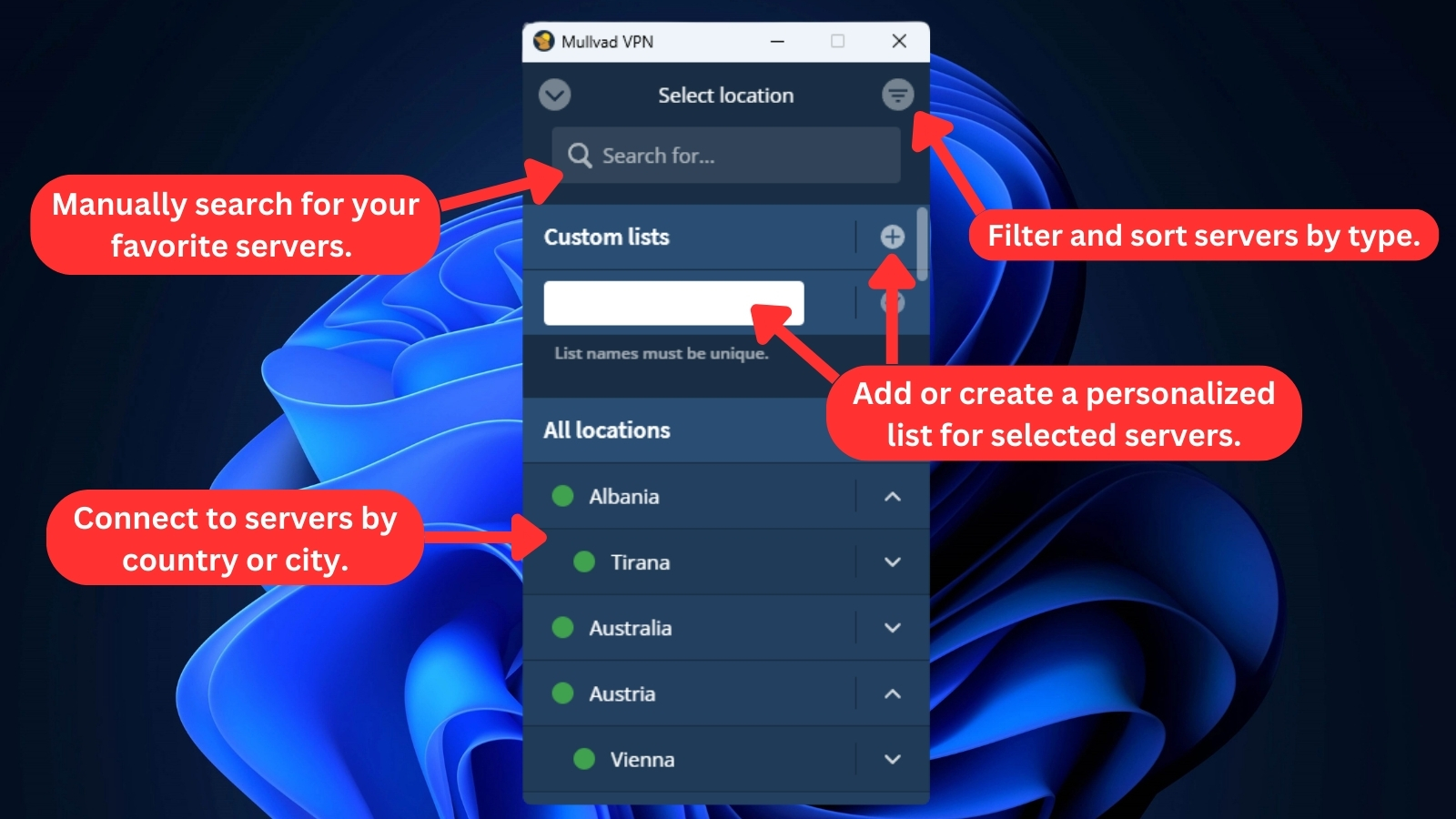
Mullvad provides a long list of VPN servers sorted by country and city. This is especially helpful for US-based servers because it allows you to find a server closer to your physical location. You can also tailor the list to your preferences by adding custom list names.
Clicking on the cogwheel icon in the top-right corner of the interface will take you to the VPN's main 'Settings' page. When using Mullvad on Windows, you can customize the following settings:
- User Interface Settings - This setting gives you control over how Mullvad interacts with your system. Here, you can manage notifications, choose how the tray icon appears, select your preferred language, and more.
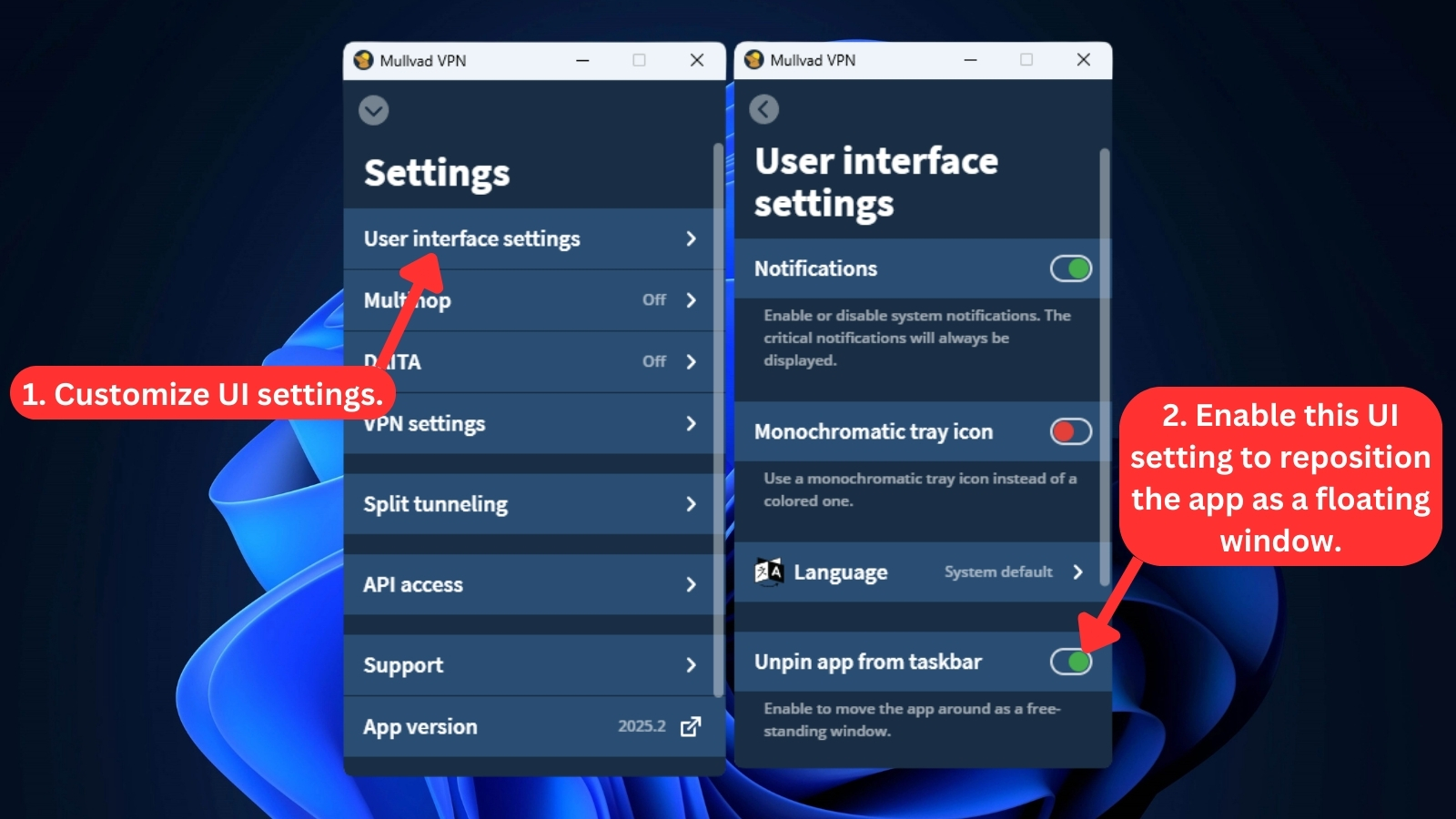
- Multihop and DAITA - These features are easy to enable with well-placed toggle switches, keeping the interface clean and user-friendly. Mullvad’s design keeps things simple, so it's easy to adjust privacy settings without digging through menus.
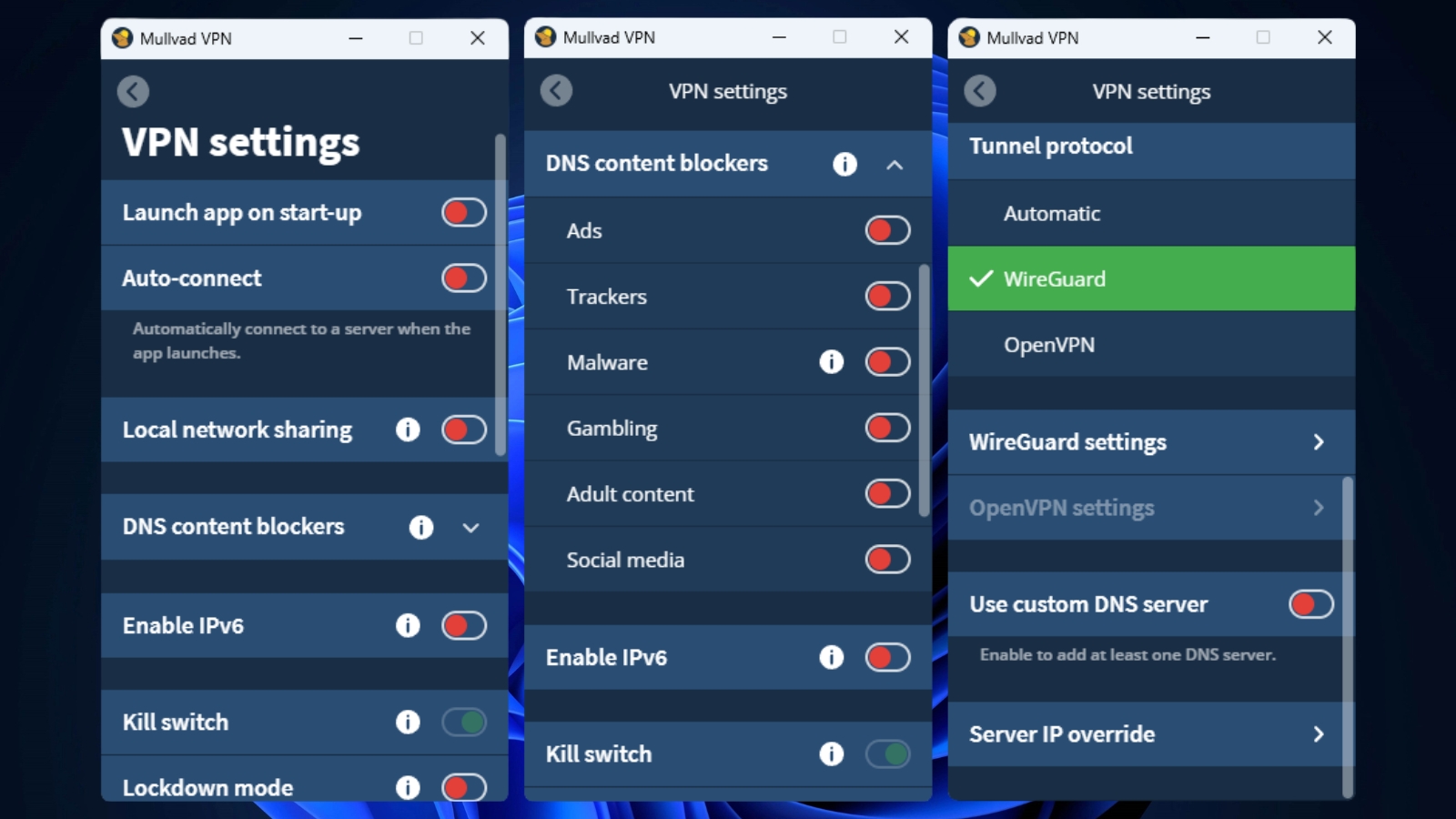
- VPN Settings - Here, you can set your app startup preferences, control local network sharing, enable IPv6 protection, use 'Lockdown mode,' select your preferred VPN protocol, and more. You can also add custom DNS servers and refine your browsing experience by selectively blocking ads, malware, and trackers.
- Split Tunneling - This feature allows you to pick which apps use your regular Internet connection, while others benefit from Mullvad's security and privacy. This way, you can customize your VPN experience for optimal speed and protection.
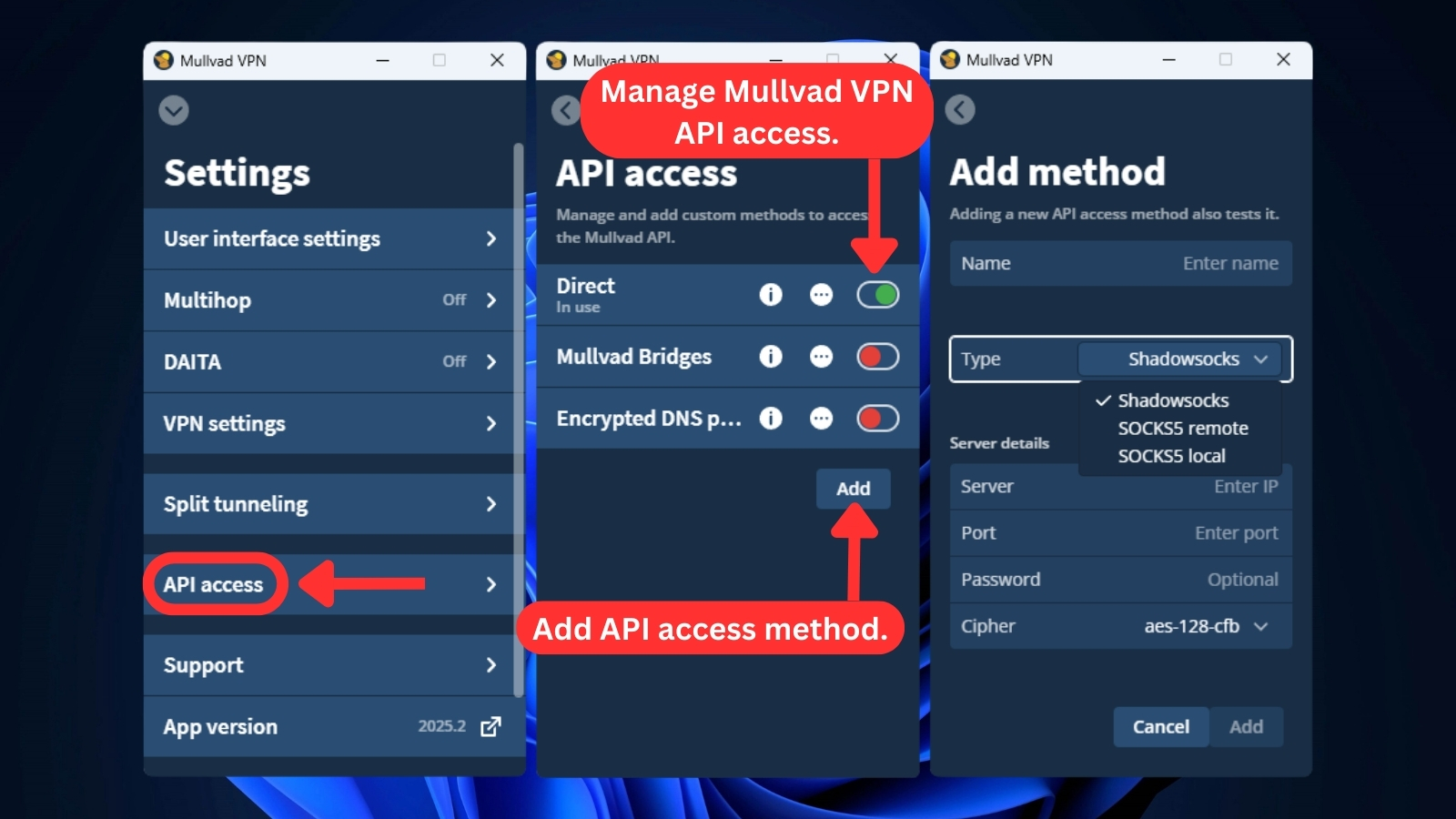
- API Access - This one may sound complicated, but it's just a setting in Mullvad VPN for tech-savvy folks. It lets you fine-tune how the app connects to Mullvad's inner workings, which is useful for automation or connecting Mullvad with other programs.
- Support – You'll find a link to Mullvad's website here with helpful resources, FAQs, and a way to report any problems you may experience.
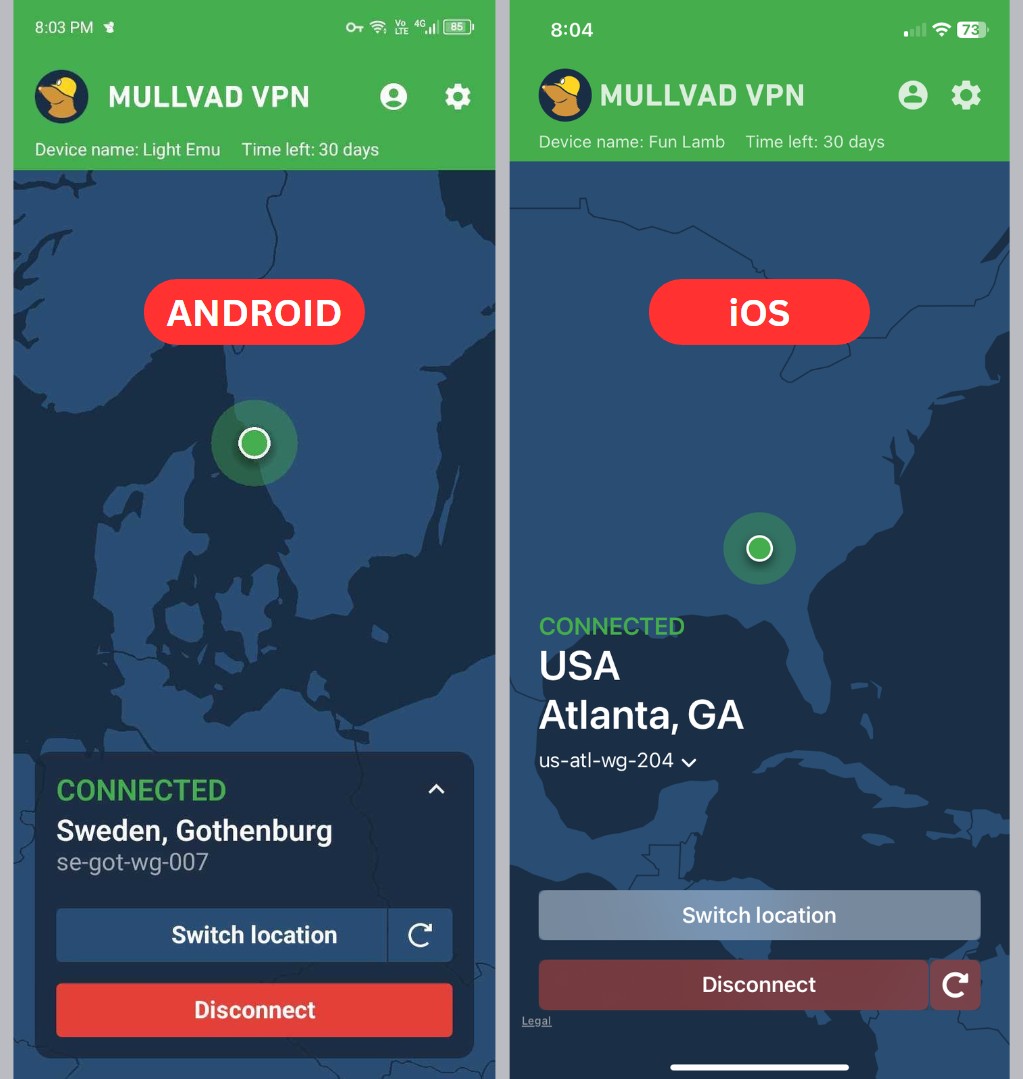
If you're familiar with the Mullvad desktop application, transitioning to the mobile apps will be seamless. The Mullvad mobile apps mirror their desktop counterparts closely, ensuring a familiar interface with similar menus and functionalities.
Taking privacy a step further, Mullvad developed its own browser in collaboration with the Tor Project. When you use the 'Mullvad Browser,' you're essentially using a Tor-developed browser without relying on the Tor Network. The key difference is that this browser is specifically designed to work seamlessly with a VPN.
The Mullvad browser also comes with a pre-installed extension that enhances your browsing experience while connected to Mullvad VPN. If you prefer using a different browser, Mullvad offers a dedicated extension compatible with Firefox and other Firefox-based browsers. Unfortunately, Mullvad doesn't provide browser extensions for Chrome or other Chromium-based browsers (like Edge or Brave).
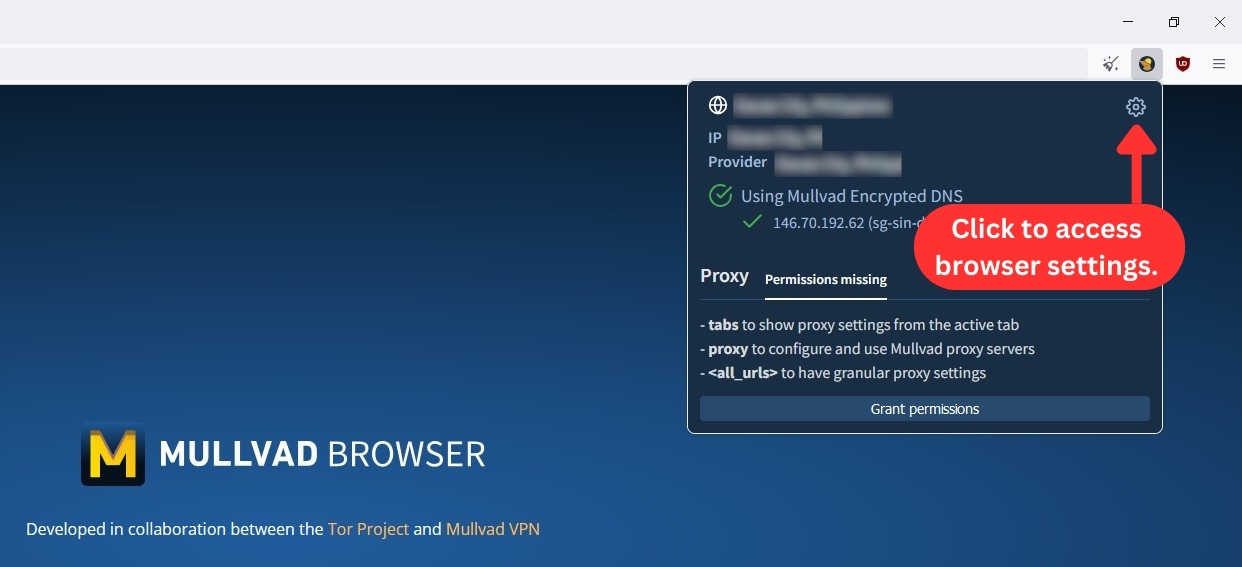
Mullvad browser's interface is also refreshingly simple and uncluttered, striking a perfect balance with all the necessary options readily available. You won't need to hunt for the menu and its options - Mullvad prefers to keep them easily accessible, unlike some browsers that hide them away.

The overall design of Mullvad is decent, but it lags behind other VPN apps on the market. If you're an experienced user looking for advanced VPN tunnel customization, you'll probably feel disappointed with Mullvad's limited options.
Media Streaming, Torrenting, and Gaming Support
Mullvad VPN can unblock and stream Netflix intermittently - but don't get your hopes up for other streaming services because they don't work with this VPN. However, if you're interested in torrenting or gaming, Mullvad isn’t a bad option. Our Score: 6.5/10
VPNs have their perks, like unblocking websites, helping with downloads, and making gaming secure and smooth. But not all VPNs do these things well. In this section, we'll check out how Mullvad VPN handles these crucial aspects.
Is Mullvad VPN Good for Streaming?
No, Mullvad isn't a good choice if you're looking for the best VPN service for streaming. Mullvad is a bit hit-or-miss for streaming. It can reliably unblock and stream Netflix US and Max. However, it struggles with Hulu, Disney+, BBC iPlayer, and ESPN+. So, its unblocking capabilities are limited for some platforms.
Below is a list of US streaming services that Mullvad VPN can unblock for you.
When it comes to streaming services from around the world (not just in the US), Mullvad can unblock some of them. Here's a glimpse of what you can access.
Is Mullvad VPN Good for Torrenting?
Yes, Mullvad is good for torrenting. The VPN service fully supports torrenting and even offers a guide on how to secure your connection when downloading P2P files.
Mullvad for torrenting works well with qBittorrent or any torrent client. P2P file-sharing is also allowed on all of its servers. In our experience, torrenting over Mullvad's network was fast and smooth, with no issues whatsoever.
Additionally, Mullvad has two essential VPN features that aid in torrenting. Its SOCKS5 proxy on all servers conceals your IP address without encryption, ensuring faster speeds. Moreover, its kill switch is vital to protect you against IP leaks during torrenting.
That said, Mullvad isn't the best VPN for torrenting, based on our tests. It has some slower servers, and configuring its advanced features can be a bit challenging. And as we mentioned earlier, Mullvad VPN no longer offers port forwarding, which could've improved peer connections and download speeds.
Is Mullvad VPN Good for Gaming?
Yes, Mullvad is a good VPN for gaming. Although it doesn't have dedicated servers for online gaming, it still offers decent performance. It allows us to play multiplayer games (even on Steam Deck) without too much impact on ping.
If you play more casual online games, Mullvad should work fine. To minimize ping increases, we recommend using the WireGuard protocol and choosing a server geographically close to you. However, if you're playing a highly competitive game where ping matters, we'd suggest finding a VPN that can provide faster ping times.
Security & Privacy
Mullvad is a highly secure VPN that doesn't collect personal data, uses the latest protocols, and is free of DNS leaks. Our Score: 7/10
Under the hood of Mullvad's trustworthiness, we'll take a look at three key aspects: VPN protocols, logging practices, and leak prevention mechanisms. This will show us how well Mullvad safeguards your privacy and overall security.
Mullvad VPN Protocols
Mullvad VPN offers only two VPN protocols that optimize security and speed: OpenVPN and WireGuard. Each protocol has its advantages and disadvantages, allowing users to choose the one that best suits their needs.
- OpenVPN – This is one of the most widely used VPN protocols and is provided as a standard option by Mullvad VPN. It has been used for many years and has no known vulnerabilities, making it an excellent option if you prioritize security. Additionally, OpenVPN is compatible with most operating systems, including Windows, macOS, iOS, and Android.
- WireGuard – Mullvad also offers WireGuard, a rapidly growing protocol known for its blazing speeds and strong security. While newer than OpenVPN, WireGuard is designed to be lightweight and efficient, ensuring a smooth and secure connection. It's currently available on select servers and works seamlessly with most major operating systems. In 2025, Mullvad introduced QUIC obfuscation for WireGuard, a major upgrade that helps users bypass internet censorship and deep packet inspection. This enhancement makes WireGuard even more resilient in restrictive environments, especially for users in countries with aggressive VPN blocking.
WireGuard and OpenVPN are both highly regarded in the VPN industry for their strong encryption and fast speeds. Advanced users may prefer a wider range of protocol options, but the simplicity of Mullvad VPN's protocol offerings makes it an equally great choice, especially for average users.
Does Mullvad VPN Keep Logs?
No, Mullvad VPN doesn’t keep logs. In fact, Mullvad is among the very few VPN services that truly prioritize user privacy. As previously noted, Mullvad doesn't store your email address and instead assigns a random account number.
Although Mullvad's no-logging policy ensures user activity isn't tracked, they do process certain personal data in specific situations. This includes information related to payments when you use methods like bank wire (requiring your bank account information), PayPal (needing your PayPal ID), Swish, or Stripe.
For payment methods requiring your personal data, such as PayPal, Mullvad will process and protect this information in accordance with the GDPR and other applicable data protection regulations. But if you seek maximum anonymity, Mullvad offers the option to pay via Bitcoin.
Additionally, Mullvad uses a third-party service for email support, so when you contact them, your email address will be processed. However, all emails sent to their support address are automatically and permanently deleted after 6 months.
Mullvad also collects two types of data as part of its monitoring system: aggregated application data and generic system metrics. The former is used to ensure that users remain within the limit of five simultaneous connections, while the latter provides insight into the performance of individual servers.
With a decade of experience in the market, Mullvad has maintained a strong reputation for security and privacy. The service hasn't experienced any incidents of data leaks or reports of data collection, providing users with peace of mind that their online activities are protected. Overall, Mullvad is a secure VPN that can be trusted to ensure online privacy.
Does Mullvad VPN Leak/Expose Your Private Data?
No, Mullad VPN doesn’t leak or expose your private data. This provider is a reliable option for safeguarding your online privacy.
We conducted a thorough leak test to determine whether the service exposed any personal data, such as our IP address or DNS queries. As indicated in the accompanying screenshot, Mullvad performed exceptionally well in this regard.
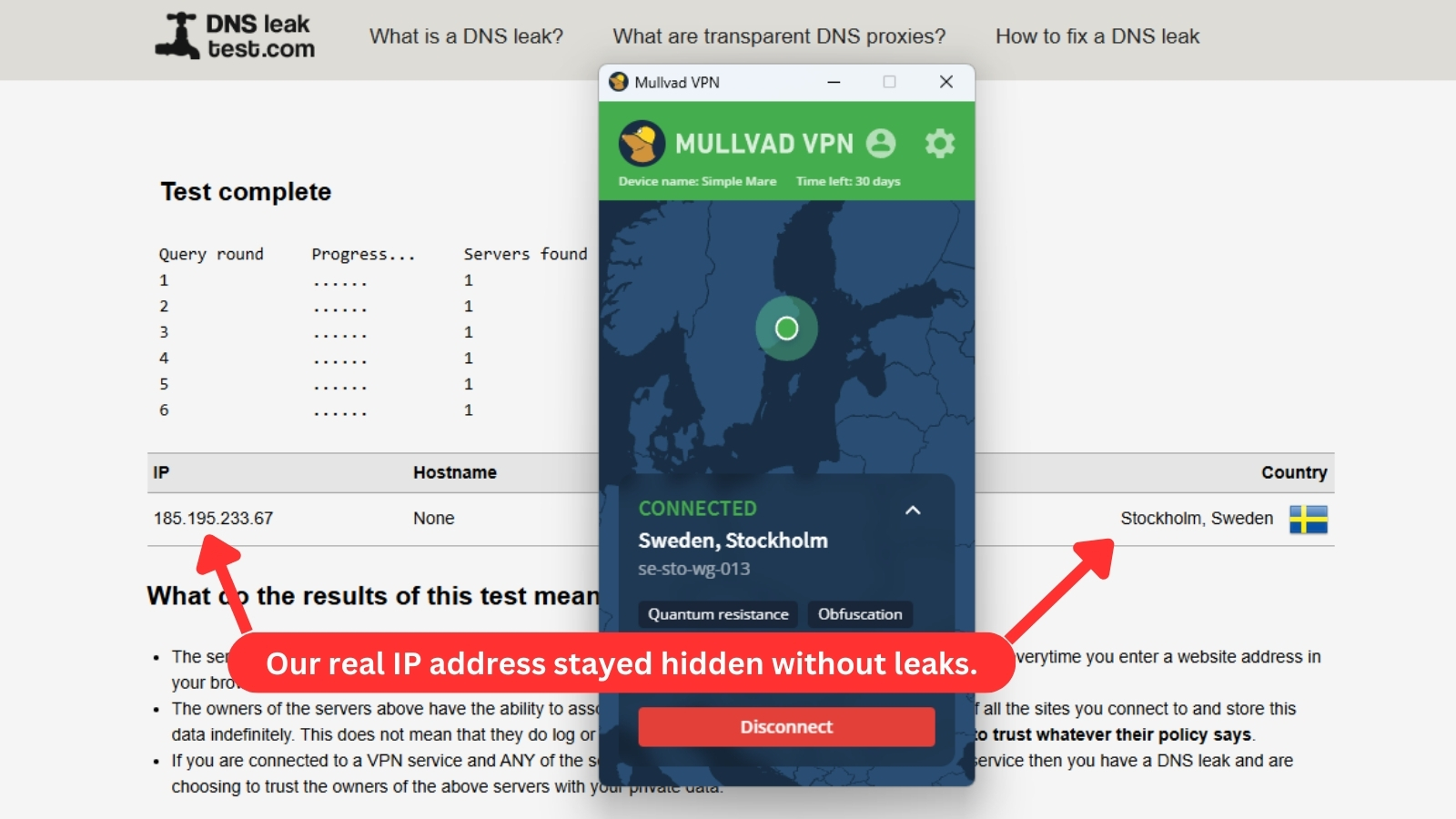
We connected to a server in the United States to assess if a DNS leak had occurred. Fortunately, we found no evidence of any leaks, indicating that Mullvad effectively hides your personal information and IP address at all times.
Speed & Performance
Mullvad's performance can vary. Generally, closer servers give you the best speeds, but we’ve found that good routing and solid network conditions can sometimes make a distant server perform surprisingly well. Our Score: 6/10
A VPN can slow down your Internet performance because it adds an extra layer of security to your traffic. To measure Mullvad’s impact on speed, we used the Ookla speed test tool and compared test results with and without Mullvad VPN activated. We used WireGuard as our protocol for the tests.
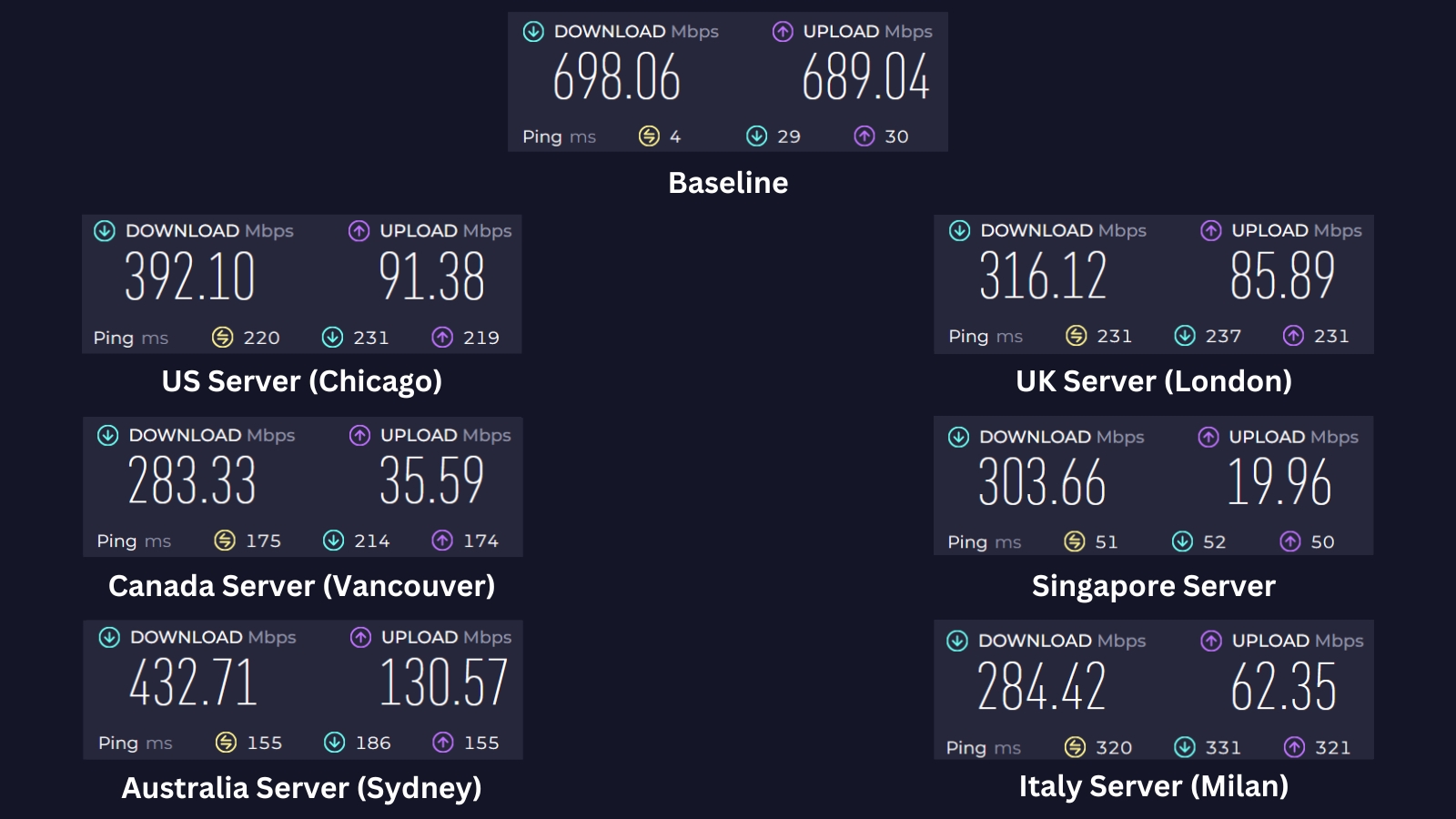
Before testing Mullvad VPN, we established a baseline by conducting a speed test without the VPN. The results were 698.06 Mbps for downloads and 689.04 Mbps for uploads. We then conducted speed tests on Mullvad VPN servers in various locations to evaluate their performance.
Here are the results of the rest of our server tests:
- US Server (Chicago) – This server is a good distance away, so we expected a noticeable dip in speed. Surprisingly, it didn’t slow down as much as we thought. Our download speed came in at 392.1 Mbps, which is a 44% decrease from the baseline. For a server this far away, we'd say that’s pretty solid.
- UK Server (London) – The performance of this London server was a bit similar to that of the US server, despite the UK being a bit farther. The download speed dropped to 316.12 Mbps, which is a 55% decrease. It’s not the most impressive result, but for the distance, it still holds up reasonably well.
- Canada Server (Vancouver) – After seeing good results from both the US and UK servers, we expected the Canadian server to perform similarly, even though it’s still a bit far. But the story turned out differently. The download speed here was the slowest, coming in at just 283.33 Mbps. That's a hefty 59% speed drop from the baseline. It ended up being the least impressive server we tested with Mullvad.
- Singapore Server – We thought this server would deliver the best results since it's the nearest to our location in Asia. However, the download speed was just 303.66 Mbps, reflecting a 56% speed loss. For a nearby server, we expected much better performance.
- Australia Server (Sydney) – The Sydney server, being the second closest to our location, gave us the best results (as we kind of expected). Download speeds hit 432.71 Mbps, with a speed loss of around 38%. It was one of the better results among all the servers we tested.
- Italy Server (Milan) – This server, located far away abroad, was on par with the Canada server. Our download speed was 284.42 Mbps, showing a 59% speed reduction from our starting speed. Not great, but also not surprising given the distance.
We know the numbers above can be a bit confusing, so we've made a table below to help break it all down for you.
During our test, we experienced an average speed reduction of 52%. Depending on where in the world you're located and which server you choose, you may experience some issues, especially if your baseline speed isn’t very high.
However, it's also clear that Mullvad’s performance is generally better with nearby servers. What’s interesting, though, is how the US and UK servers (both far away) actually outperformed Singapore, which is the closest to our location. That could be due to network congestion or routing quirks on the Singapore server, but it’s a bit of a head-scratcher.
As for Mullvad's Aussie server, it really impressed us with its speed. Even though it's farther than Singapore, the connection and stable routing made a big difference, showing that distance isn't everything when it comes to performance.
Customer Support
There are a few ways to get help from Mullvad, but live chat isn't one of them. In case of any issues, you'll be forced to wait until you get an email response and try a possible solution. Our Score: 5/10
When you’re buying any type of product, especially a digital one, you want to know what kind of support you’ll be getting. Even though VPNs are usually stable applications, things can go wrong at times. Here’s how you can get support from Mullvad.
- Email Support – Mullvad VPN offers email support at [email protected], and if privacy is a big deal for you, they even let you use PGP encryption for extra security. It’s another way of showing how they take privacy seriously. That said, the lack of live chat can be a hassle if you need quick answers.
- Help Center – Mullvad caters to self-sufficient users with a comprehensive online knowledge base. This includes clear setup guides for their VPN apps, tutorials on using various features, and a well-organized FAQ section. The guides excel in clarity and searchability, but the overall content volume might be less extensive compared to Mullvad's competitors.
- FAQs – This support section is a good resource if you're looking for answers to common questions related to Mullvad's service. It's well-organized and covers a wide range of topics, from technical issues to billing and account management.
Overall, Mullvad's customer support is decent but lacks a live chat option, which can be a disadvantage if you prefer instant assistance. However, the availability of encrypted email support, helpful FAQs, and well-written guides makes up for it to some extent.
Pricing
Mullvad comes with a simple pricing structure of €5.00 (around $5.16) per month, which certainly seems like a fair deal. Our Score: 6/10
Unlike some VPNs, Mullvad offers a flat monthly rate, regardless of the billing cycle you choose. There's no price difference for all its plans, so you won't save money by committing to a longer-term subscription.
How Much Is Mullvad VPN?
A Mullvad VPN subscription costs €5.00 (or around $5.16 per month). The VPN offers a simple pricing structure without any confusing plans.
Its pricing model is straightforward, with only one price available. The company has a no-frills approach and doesn't offer any long-term discounts. While some users might find this lack of options limiting, others may appreciate the simplicity and transparency of Mullvad's pricing policy.
Additionally, you can commit to the service for up to 10 years. However, there's no financial incentive to choose a longer-term payment plan, as the monthly cost remains the same regardless of the subscription period. Let's take a closer look at Mullvad's prices.
- 1-Month Plan – Mullvad VPN's monthly subscription costs €5.00 (or around $5.16), and it's charged for as long as the account is active. The VPN also offers a refund with its 14-day money-back guarantee if you want to try the service without any risk.
- 1-Year Plan – If you prefer a longer subscription, you can choose to pay €60.00 for a year of service, which translates to about $61.95. Mullvad VPN doesn't limit you to any specific subscription period and allows you to extend your accounts for however long you like. However, paying Mullvad for a year doesn't result in any type of discount or reward.
- 1-Decade Plan – Looking for a long-term commitment with Mullvad? They offer a 10-year plan priced at €600.00, which is approximately $619.47. Even with this decade-long plan, the monthly cost remains at €5.00 ($5.16) without additional savings.
Compared to other VPNs that charge anywhere between $4-$12 monthly, Mullvad VPN's €5.00 price is affordable. The lack of plan options may be disappointing for some users, but the pricing is affordable and transparent. Mullvad VPN isn't the least expensive VPN available, but it's definitely a cost-effective option.
In terms of payment options, Mullvad VPN offers various payment methods, such as Bitcoin (for complete anonymity during registration), Bitcoin Cash, Monero, Swish, Eps transfer, Bancontact, iDEAL, and Przelewy24. These payment methods cater to different user preferences, allowing you to pay securely and conveniently.
However, their 14-day money-back guarantee doesn't apply to cash and crypto payments. They provide a 10% discount on cryptocurrency payments for added savings, though refunds aren't issued for these types of payments. For in-app purchases, Apple and Google handle these directly. But for bank wire payments, only SEPA payments within Europe are eligible for refunds from Mullvad.
In an effort to enhance user privacy, Mullvad has stopped accepting new PayPal and credit card subscriptions for recurring payments, resulting in less data being stored about their users.
Is Mullvad VPN Free?
No, Mullvad VPN isn't a free service. However, their subscription is simple and relatively inexpensive, with a flat monthly rate of €5.00.
That said, Mullvad does have a 14-day money-back policy, so you can use it as a risk-free trial period to try out the service and see how the VPN performs. However, refunds for cash and crypto payments are exempted due to anti-money laundering regulations.
Mullvad VPN Comparison with Other VPN Providers
Mullvad has always stood out for its no-nonsense approach to privacy and straightforward pricing. If you’re trying to figure out how it compares to other big names, take a look at the review articles below to see how it measures up.
- Mullvad vs. NordVPN
- Mullvad vs. Proton VPN
- ExpressVPN vs. Mullvad VPN
| Review Summary Mullvad VPN is primarily focused on providing online security by not collecting personal data. Although it has been known to unblock Netflix on occasion, it's not the best option for streaming as it can't unblock other popular streaming websites. However, if your main focus is privacy, Mullvad is an excellent option. | 7.2 Overall Score | ||
| Background, Jurisdiction & Reputation | 9 | ||
| Supported Platforms & Devices | 8 | ||
| Installation & Initial Configuration | 10 | ||
| Prominent Features | 8.5 | ||
| Server Count & Infrastructure | 5.5 | ||
| UI/UX Design & Ease of Use | 8 | ||
| Media Streaming, Torrenting, and Gaming Support | 6.5 | ||
| Security & Privacy | 7 | ||
| Speed & Performance | 6 | ||
| Customer Support | 5 | ||
| Pricing | 6 | ||