When you purchase through links on our site, we may earn an affiliate commission. Here’s how it works.
Kaspersky VPN Review 2026


Our experts have reviewed 53 VPN providers, which were put through extensive rounds of testing. To learn more about that process, here’s how we review VPNs, where we explain our criteria and our policy of being fully transparent.
Kaspersky VPN, also known as Kaspersky VPN Secure Connection, is a VPN service provided by Kaspersky Lab, a cybersecurity company based in Moscow, Russia. The provider claims to encrypt online traffic for a secure and private connection, but we have some concerns about their effectiveness.
First off, the location of the service, being in Russia, a country with a history of surveillance and censorship, raises some red flags. Although not a part of the Eyes Alliance, Russia has been active in an intelligence-sharing network with other countries.
Another red flag is that the company's logging policy isn't transparent and does retain user data, such as connection logs and device info, for troubleshooting purposes. Furthermore, Kaspersky VPN has had data leaks in the past, raising questions about the company's overall safety.
When it comes to performance, Kaspersky VPN Secure Connection is generally reliable and offers decent speeds, but it's not the best option for streaming, torrenting, or gaming. While Kaspersky offers some essential features, such as an automatic kill switch, DNS leak protection, and split tunneling, these features are relatively basic compared to other top VPN providers.
Let's first outline Kaspersky VPN’s main features before going deep into the details. You can find a brief summary in the table below.
In this Kaspersky Secure Connection review, we'll thoroughly examine every facet of the service to evaluate its standing among the best VPN services. This includes its country of origin, supported platforms, user interface design, prominent features, VPN server network, performance, and more.
To better understand our methodology, you can refer to our guide on how we review VPNs. We'll also regularly update this Kaspersky VPN review to reflect new developments in the VPN industry, so we intend to keep you apprised of where Kaspersky stands among its competitors.
Background, Jurisdiction & Reputation
Kaspersky VPN comes surrounded by mystery with numerous worrisome accusations about its relations with the Russian government. Our Score: 1/10
Kaspersky Lab has been the subject of controversy due to its place of jurisdiction. Although they have not been convicted of a crime in the Western world, the company's public perception isn't very favorable.
Where Is Kaspersky VPN Based?
Kaspersky VPN is headquartered in Moscow, Russia, and is owned by Kaspersky Labs Limited, a UK-based digital security company founded in 1997.
As a result of its controversial jurisdiction, the company has faced numerous allegations of having connections with the Russian government. The app even got banned by the U.S. government in 2016, citing concerns that Kaspersky was using American data for political purposes.
Kaspersky has consistently denied the allegations, but their cooperation with the Russian government is a real concern for those seeking privacy in their VPN service. Moreover, several governments have issued warnings about the potential risks of using Kaspersky’s software, citing concerns that the Russian company could be coerced or compromised by the Kremlin.
The US, Germany, and Ukraine have all advised their public and private sectors to avoid or replace Kaspersky’s products, especially after Russia’s invasion of Ukraine in 2022. They fear that Kaspersky could be used as a tool for espionage, sabotage, or cyberattacks by the Russian government or its allies.
However, Kaspersky's data retention policy states that they'll only process personal data for specific and legitimate purposes and retain it only as long as necessary to fulfill those purposes.
Did Kaspersky VPN Leak Personal Data in the Past?
Yes, Kaspersky VPN has faced several allegations about leaking personal data in the past. On top of that, the company has been accused of creating fake malware to harm competitors like Microsoft.
Furthermore, Kaspersky VPN hasn't withdrawn its servers from Russia, a country with strict laws against VPNs. Thus, any data collected by the software may be subject to surveillance by the Russian government.
Although the VPN service claims to have a zero-logs policy, it does store specific data, such as your IP address during VPN connections, encrypted device IDs, and various VPN statistics. However, it's worth noting that its no-logs policy hasn't been verified by a third-party audit yet, leaving us somewhat skeptical about the accuracy of the VPN's claims.
Additionally, Kaspersky VPN uses Pango's VPN servers. Pango (formerly known as AnchorFree) also owns Hotspot Shield VPN. This partnership involves data processing by both Kaspersky and Pango to ensure the proper functioning of the VPN service. It also involves minimal data exchange for VPN sessions, with Pango retaining the necessary technical information for crash analysis.
Unfortunately, Kaspersky has been hacked at least twice in the past. The first time was in 2015, when Israeli intelligence agents discovered that Russian hackers had breached Kaspersky’s network and used its antivirus software to spy on US government agencies.
The second time was in 2023, when Kaspersky reported that some of its staff members’ iPhones were hacked with malware that could bypass Apple’s security features. Kaspersky also claimed that a cyberespionage campaign targeted it. The company called it Operation Triangulation, which involved multiple threat actors and advanced techniques.
Kaspersky may also disclose information within its group, share data with service providers for various functions, and respond to law enforcement or government agency requests following legal verification.
Lastly, be aware that certain products, like Kaspersky VPN Secure Connection, may involve third-party services with their own privacy practices.
Is Kaspersky VPN Safe?
Yes, Kaspersky VPN is probably safe to use. It incorporates key VPN security elements, such as 256-bit AES with ChaCha20-Poly1305 encryption algorithm, a reliable kill switch, and a strict no-logs policy.
However, since Kaspersky VPN is based in Russia, a country known for Internet restrictions and data requests, we can't help but wonder about potential privacy concerns. The transparency they maintain regarding user data requests is commendable, but it's worth noting that, when necessary, they may share user data with government authorities.
Although Pango stated the completion of an application security audit for its "partner VPN" solution, the absence of specifics about the VPN service raises questions. Additionally, Kaspersky has yet to officially disclose the results of a third-party audit for Secure Connection, leaving a gap in the transparency of its security practices.
To be fair, the VPN employs secure VPN tunnels and has enhanced its supported VPN protocol by incorporating WireGuard. Previously, it relied solely on Catapult Hydra.
Supported Platforms & Devices
While Kaspersky does provide native apps for Windows PC, Mac, Android, and iPhone, the absence of Linux support and easy manual configuration is disappointing. Our Score: 5/10
In terms of device and platform support, Kaspersky VPN isn't very impressive. The limited native support is a major drawback, as it's limited to only four major platforms: Windows, macOS, Android, and iOS.
With Kaspersky VPN Secure Connection, you can now secure your entire home network effortlessly. The built-in OpenVPN client in your Wi-Fi router ensures that all devices under your roof are shielded with just one secure connection.
Unfortunately, the service doesn't support Linux, and there's no direct option for manual configuration, making it very difficult to install the VPN on a router or media streaming platforms, such as Android TV and Amazon FireOS. This leaves users who require broader device support with no option but to seek alternatives.
Kaspersky's limitations will pose a challenge if you wish to use the VPN on a variety of devices. It doesn't have extensions for Chrome and other popular Web browsers. That said, the VPN service allows up to 5-10 devices to be used simultaneously.
If you want to install Kaspersky VPN Secure Connection on a router, there's a workaround available. The option is located inside the “Other Device” section of the app, which takes you to your online dashboard. From there, you can generate a configuration file based on your location that you can later use to set up a connection via an OpenVPN client.
While the option is better than not having it at all, it will probably be a complicated task for an average user.
Installation & Initial Configuration
Kaspersky has slightly different installation processes for free and paid users. Either way, it will only take a few clicks to download the installer file and let it install the app. Our Score: 8/10
Kaspersky Secure Connection offers unique installation routes for its free and paid users, making it a hassle-free experience. To take advantage of all the features the service provides, you’ll need to subscribe to Kaspersky VPN.
The main installer file for the free version can be downloaded from the website.
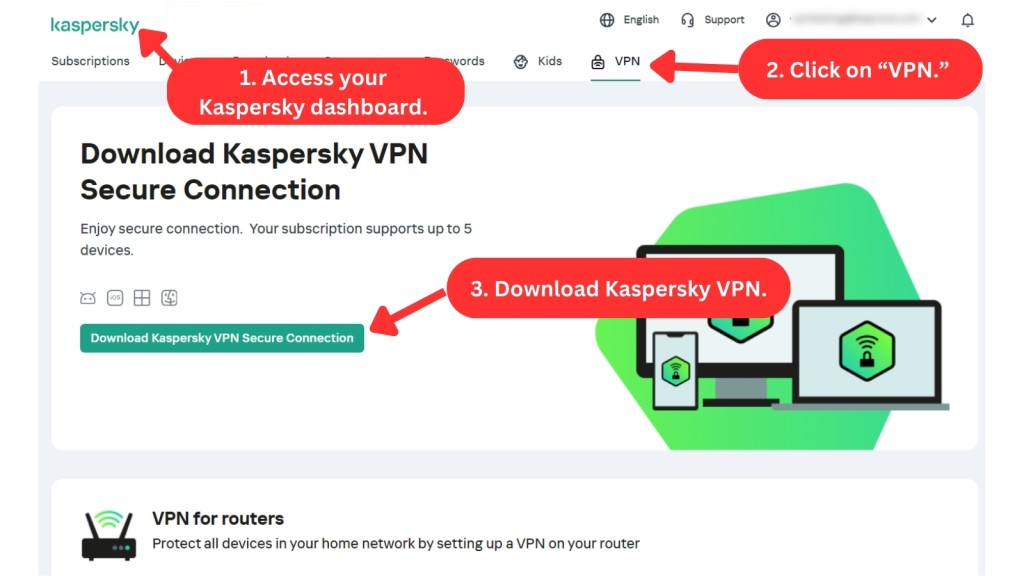
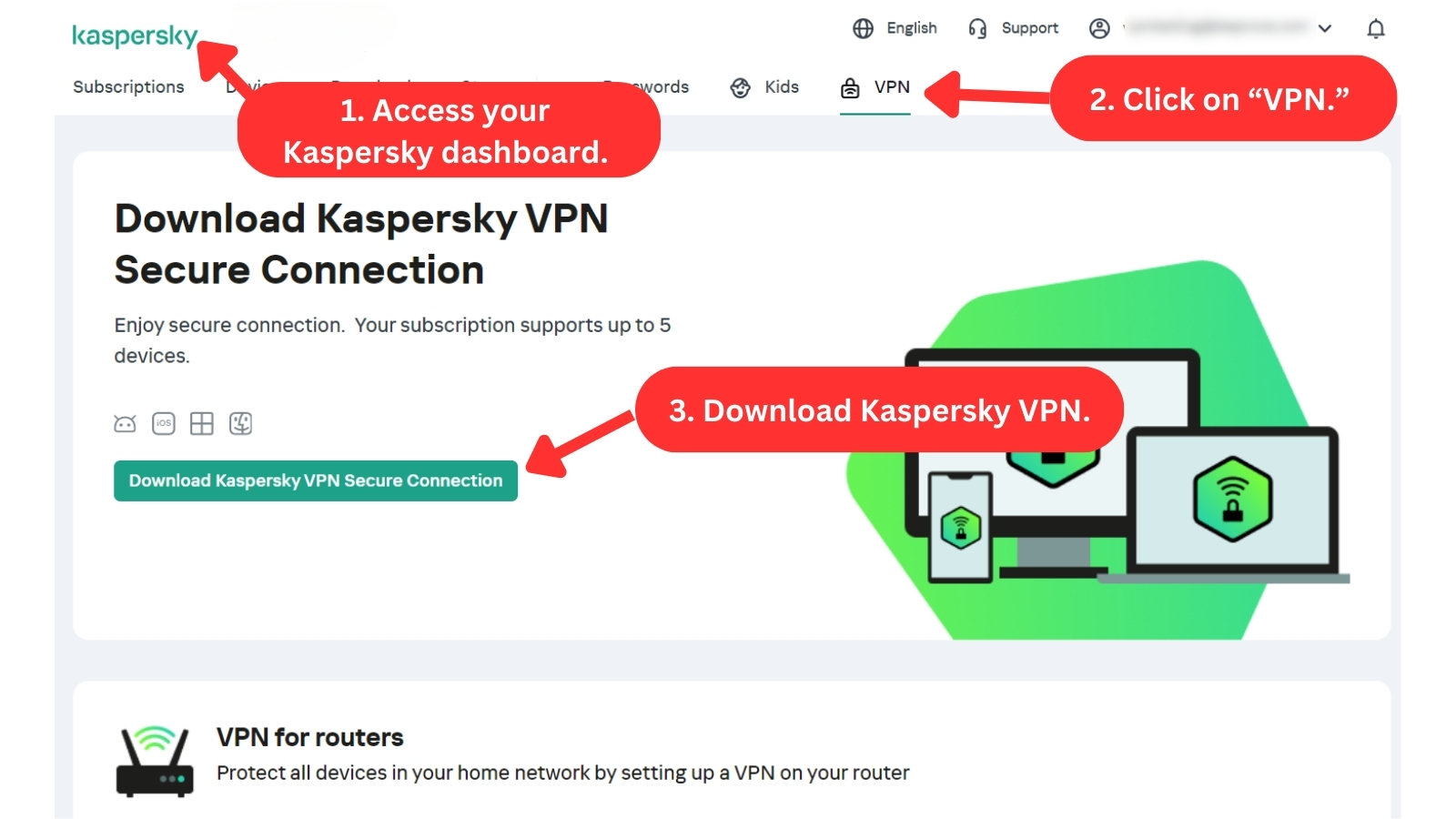
From there, the process is straightforward—the installer file automatically installs the app in under a minute. (It’s worth noting that once installed, users are given the option to upgrade to the paid version or enter an activation code.)
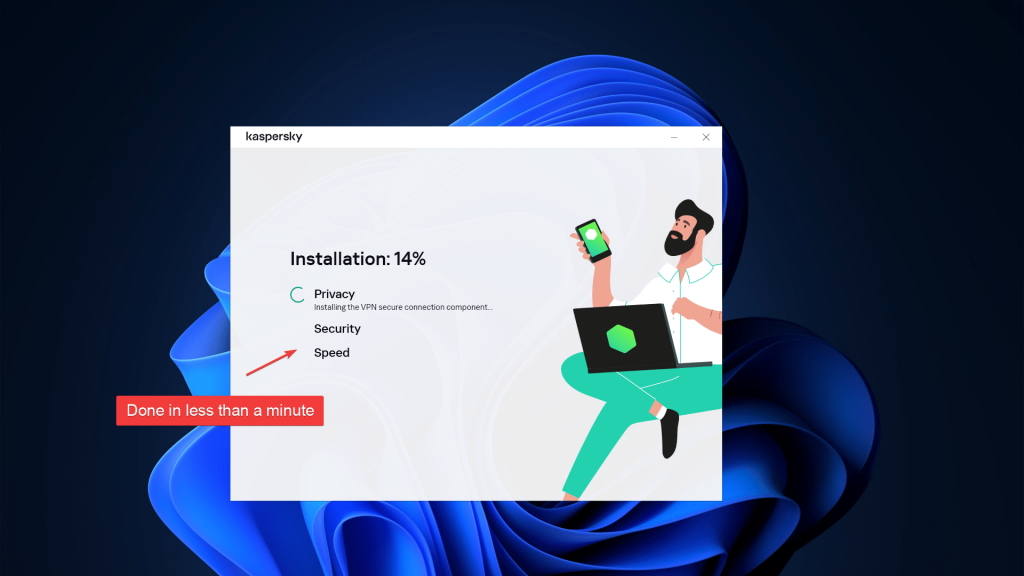
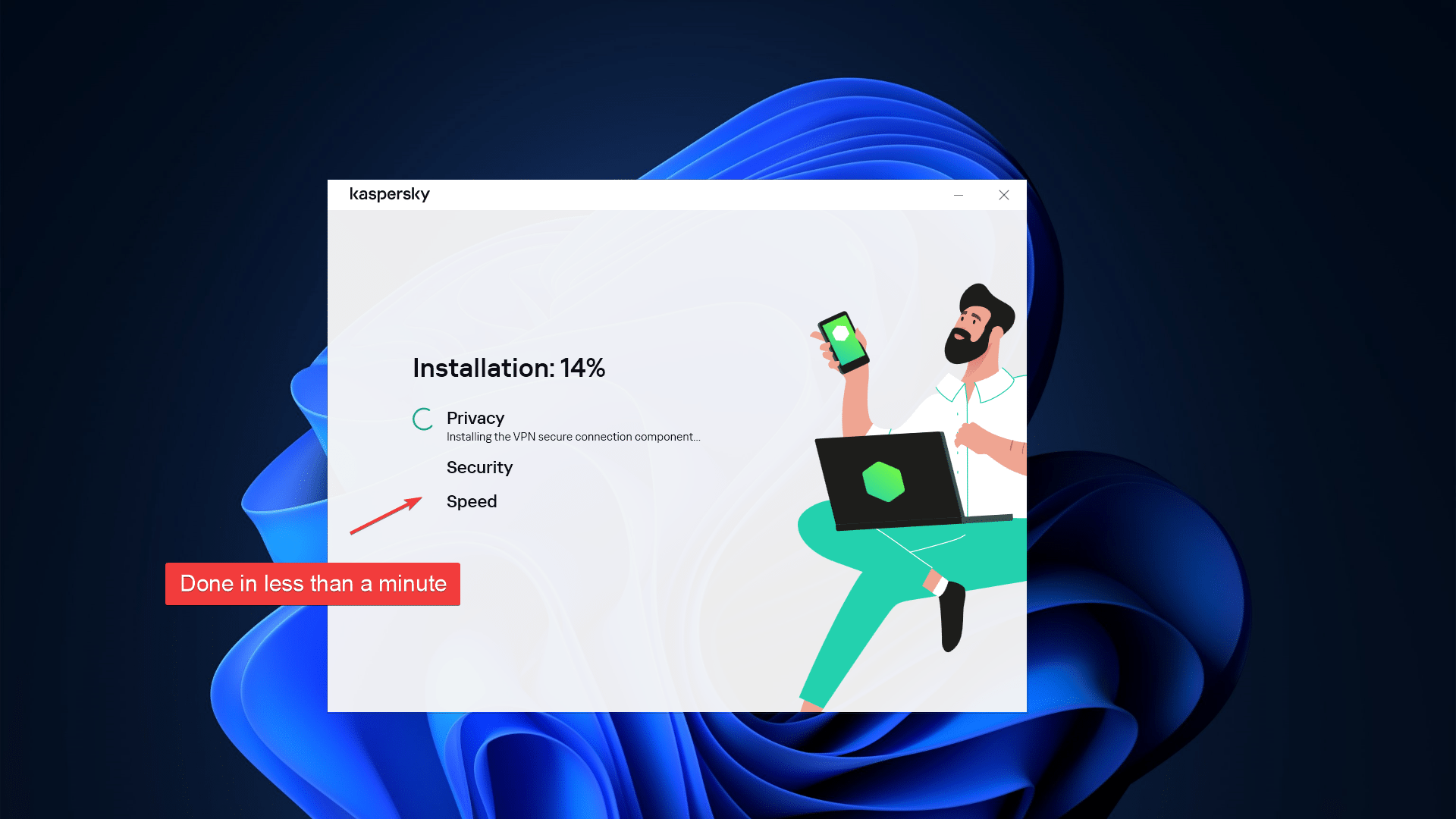
On the other hand, paid users can log in to their Kaspersky account on the website, download the paid version of the app, and install it. The process is streamlined, and users are automatically logged in to the app upon installation.
However, Kaspersky VPN isn't available for installation in specific countries due to legal restrictions. These include Belarus, China, Saudi Arabia, Iran, Oman, Pakistan, and Qatar.
Prominent Features
Kaspersky Secure Connection is a basic VPN service. In comparison to other VPNs, especially top-rated ones, it falls short in most ways. Our Score: 7.5/10
Kaspersky Secure Connection has some essential features for a secure and reliable online experience. Unfortunately, while some of these features are useful, others may not be as effective as advertised.
This service appears to be designed for consumers who have little to no experience with VPNs. However, this simplicity comes at the cost of advanced features that many users require. Furthermore, the company’s website doesn't provide any in-depth information regarding the product.
That said, here is what we were able to learn about Kaspersky VPN’s features:
- DNS Leak and IPv6 Protection – Kaspersky VPN protects your Internet traffic from DNS leaks and IPv6 vulnerabilities. DNS leak protection prevents your online activities from being exposed to third parties, while IPv6 protection safeguards you while visiting sites that use IPv6.
- Advanced Encryption – Kaspersky uses 256-bit AES encryption and advanced protocols (WireGuard and Catapult Hydra) to secure your traffic. This potentially protects you from cyber criminals and prying eyes.
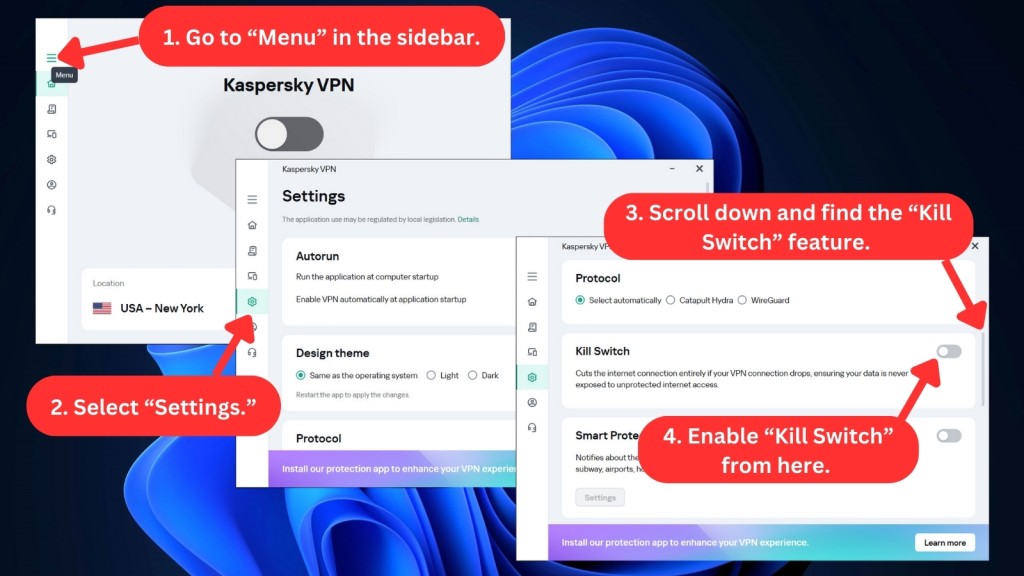
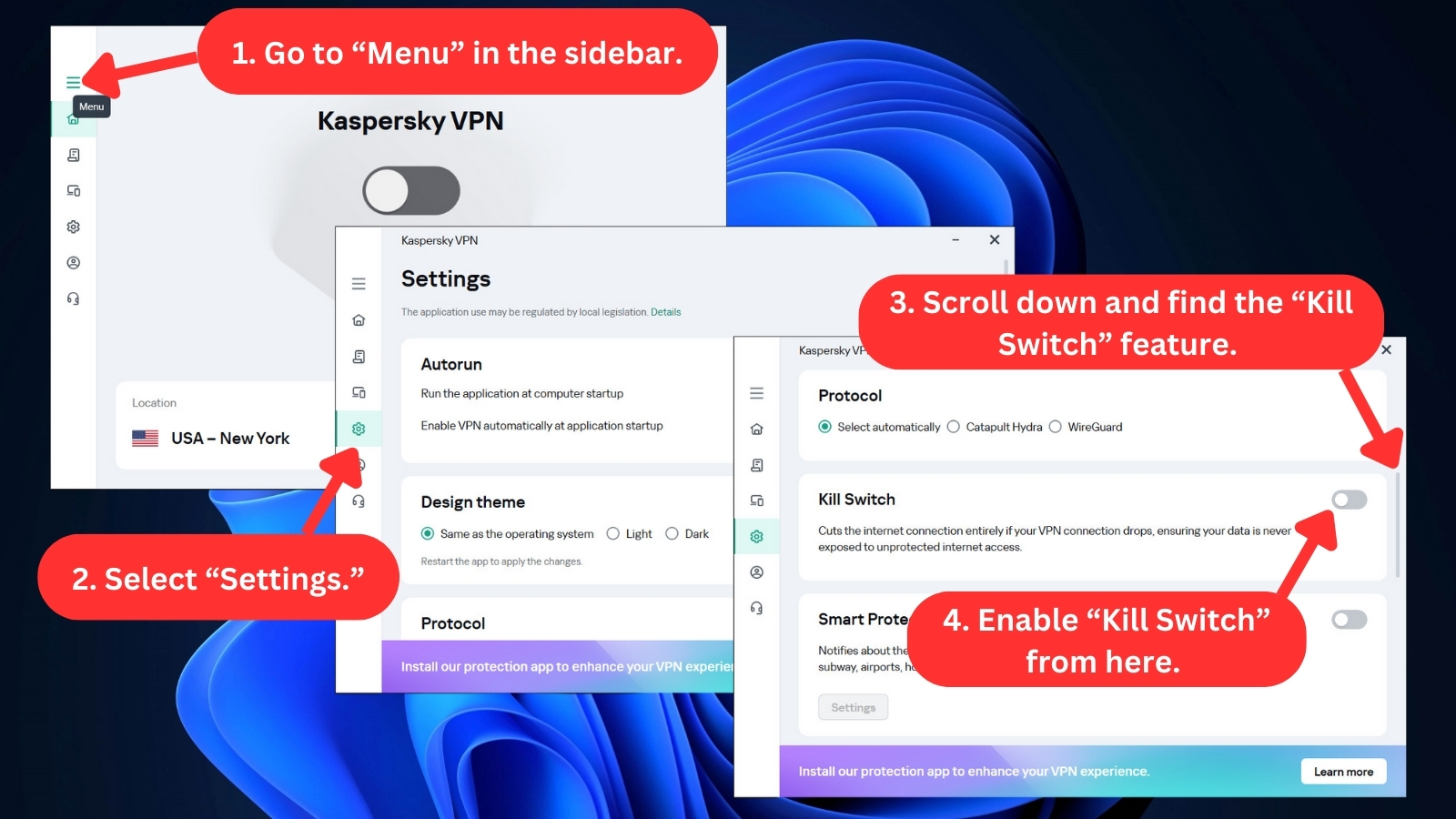
- Kill Switch – The kill switch feature instantly cuts off all Internet traffic if your VPN connection drops, so your online activities remain private. This ideally prevents accidental data leaks.
- Smart Protection – Smart Protection automatically secures your Internet traffic, regardless of the network you're on. Using intelligent algorithms, Smart Protection determines the best course of action to protect your online activities on public networks.
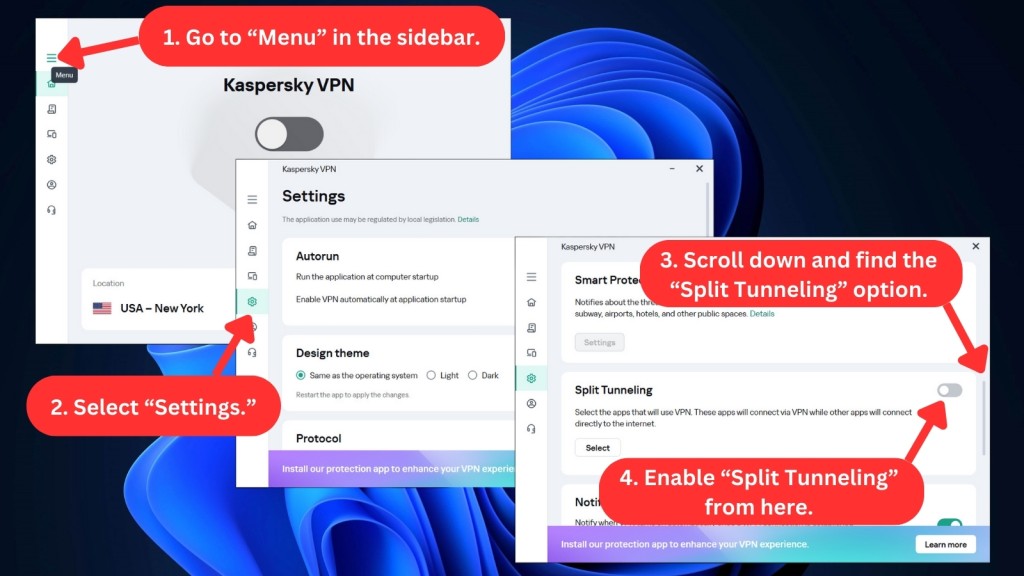
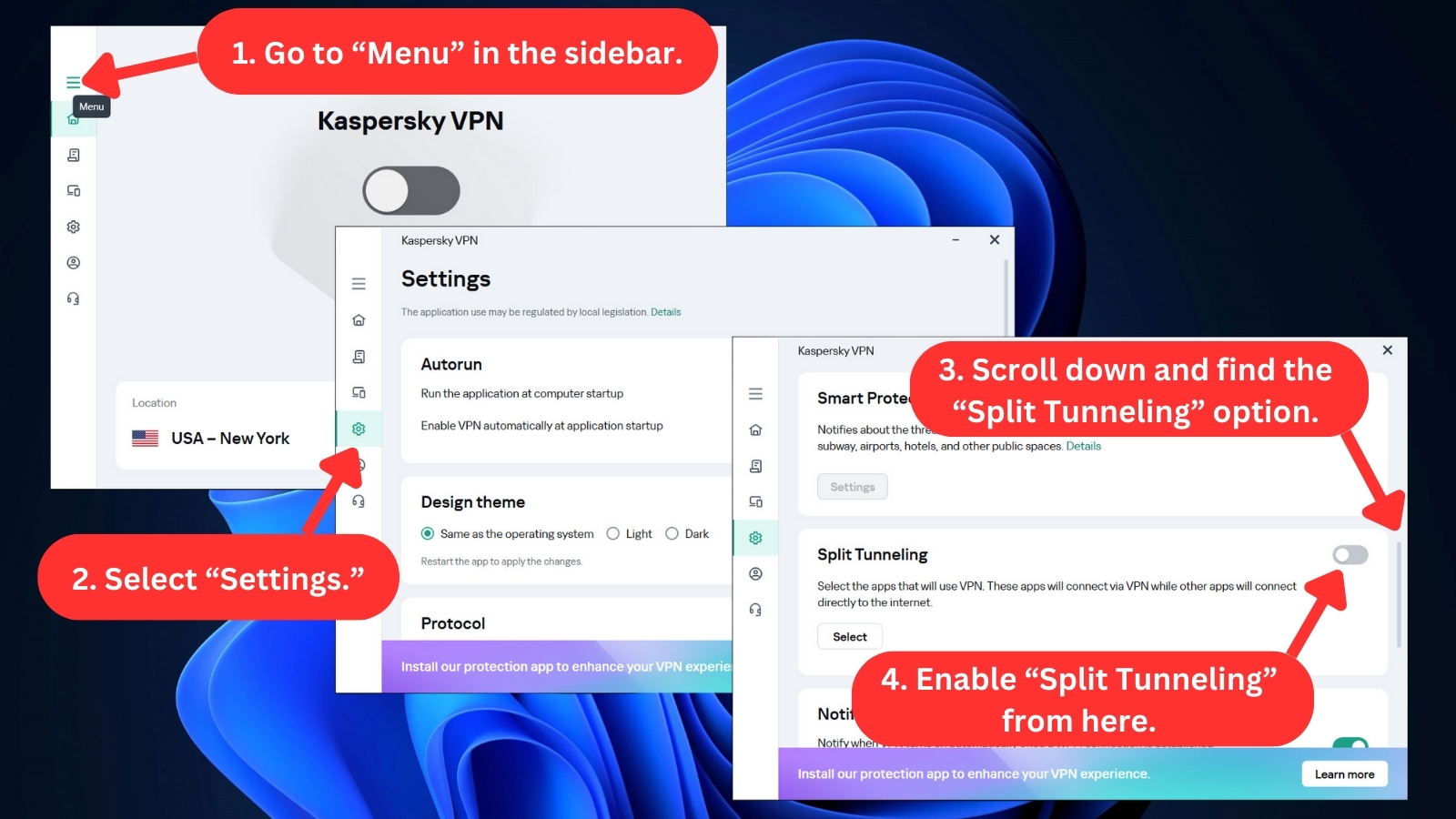
- Split Tunneling – This feature partially routes your Internet traffic through the VPN server and leaves the rest to your regular connection. This is useful as it reduces latency and assigns VPN protection for specific online activities. However, you can't use it when you select the WireGuard protocol.
- Double VPN – This one allows you to change your location twice, adding an extra layer of encryption. In other words, Double VPN makes sure that your Web traffic stays secure and intact.
- Unlimited Server Switches, Bandwidth, and Data – This means you can connect to any server in any location and enjoy unlimited data usage. This is extremely helpful for heavy Internet users who frequently stream and download large files.
Based on its basic feature set, Kaspersky VPN Secure Connection seems to be a reasonable option for novice users with minimal security requirements. However, more advanced users seeking customization and advanced features may need to explore alternative VPN solutions.
Server Count & Infrastructure
With 2,000+ servers on offer, Kaspersky Secure Connection has a decent-sized network. However, free users don’t get to pick their server. Our Score: 9/10
When choosing a VPN, information about how many servers you’ll have access to (and where they are based) is crucial. So, here’s what you need to know about the server network Kaspersky VPN offers:
Kaspersky's server network is decent for users who are looking for well-spread options. With around 2,000+ servers for paid users, Kaspersky clearly competes with other VPNs with the most servers.
However, the limited city selections, even for paid users, is a significant issue. The service is available in 80+ countries, but you may not have the flexibility to choose your preferred server location within those countries.
The restricted number of servers available in Kaspersky VPN's free version leaves much to be desired, as you're limited to connecting to the server chosen by the app. This lack of flexibility could result in slower speeds and a less optimal connection for users who require specific server locations.
While the paid version of Kaspersky VPN offers unlimited server switches and a feature that selects the fastest location for better speeds, the service's limited server locations and city options could be a deal breaker for most.
With these restrictions, you may find it more beneficial to consider other VPN services that are better suited to your needs.
UI/UX Design & Ease of Use
Kaspersky Secure Connection has a modern UI. We found it intuitively designed, which makes it pretty easy to use for both advanced and newbie users alike. Our Score: 8/10
The UI/UX design of Kaspersky VPN is user-friendly, making it easy for anyone to navigate through the app. Read on to learn what you can expect from the interface.
- Home Screen – The home screen of Kaspersky VPN Secure Connection is designed to be simple and uncluttered. The app has a clean, unified look that's easy to understand, with Kaspersky's trademark teal and white woven throughout.
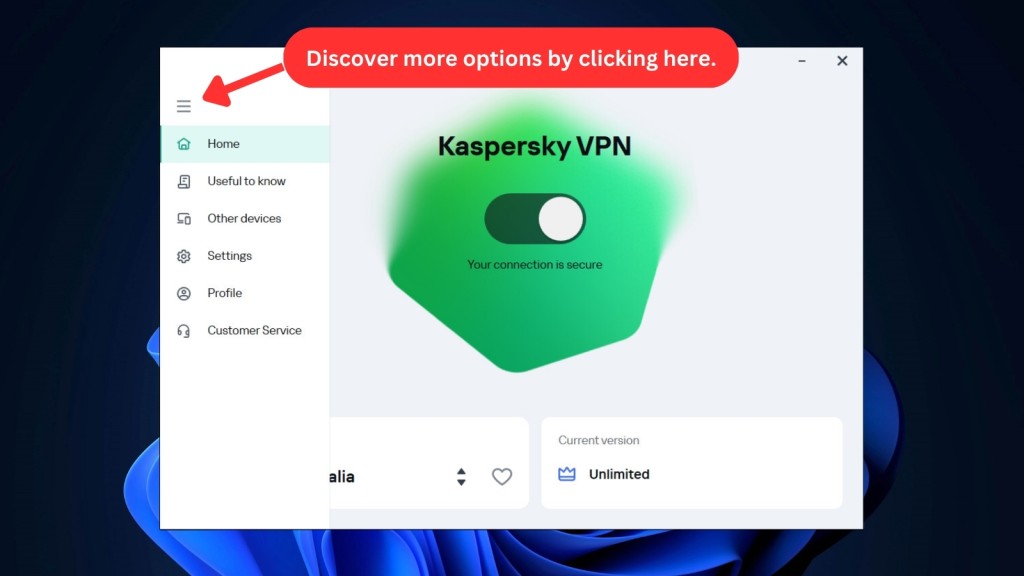
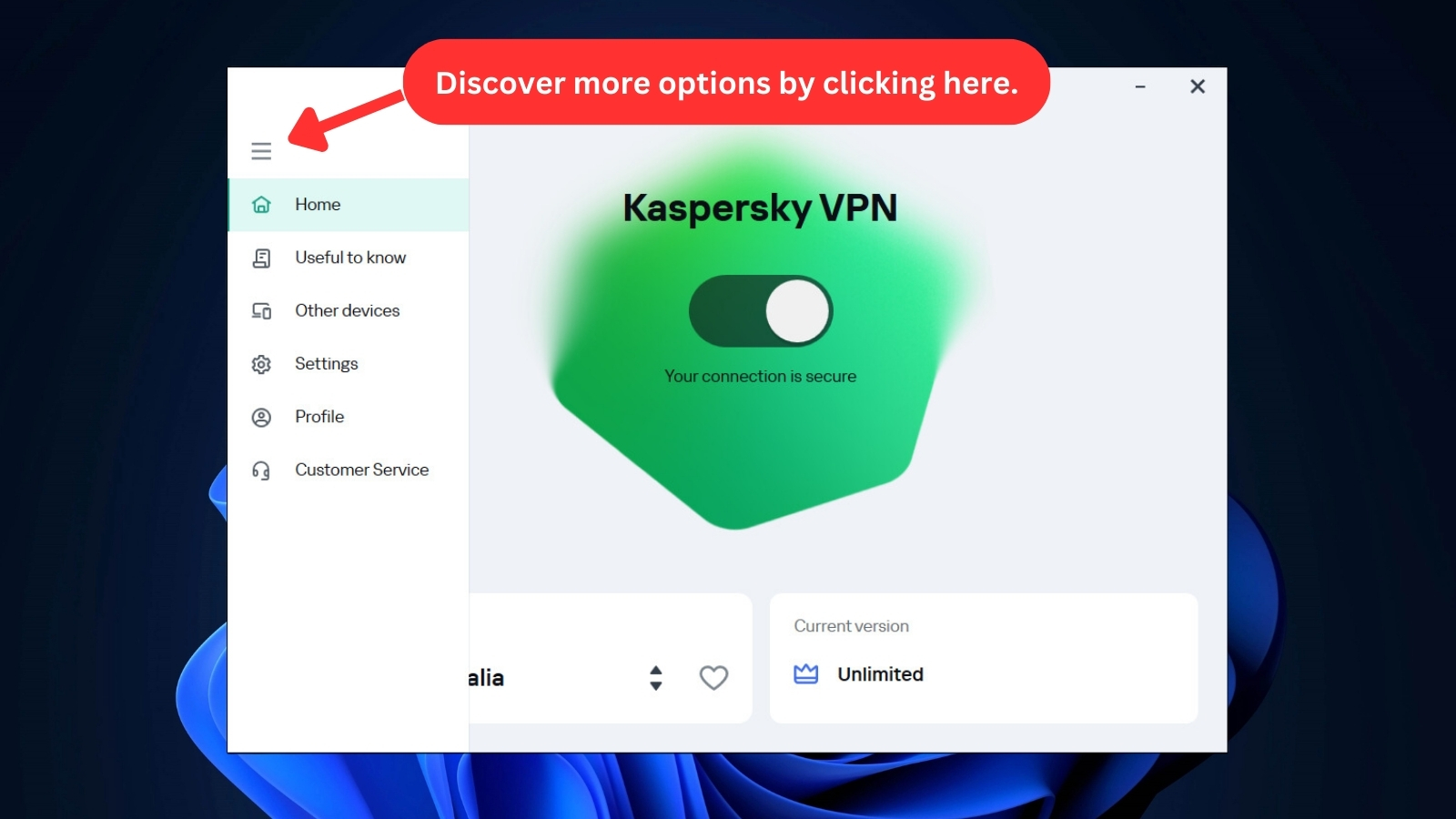
- On and Off Switch – The central panel shows a large toggle that activates the VPN with a single click. Once connected, a large green hexagon rotates lazily, which is almost soothing to watch.
- Server List – Clicking the large VPN server button at the bottom of the screen opens up a list of available servers. A helpful search bar sits at the top, but the list is short enough to scan by eye. Note that you can only browse at the country level and not select specific servers in a particular region.
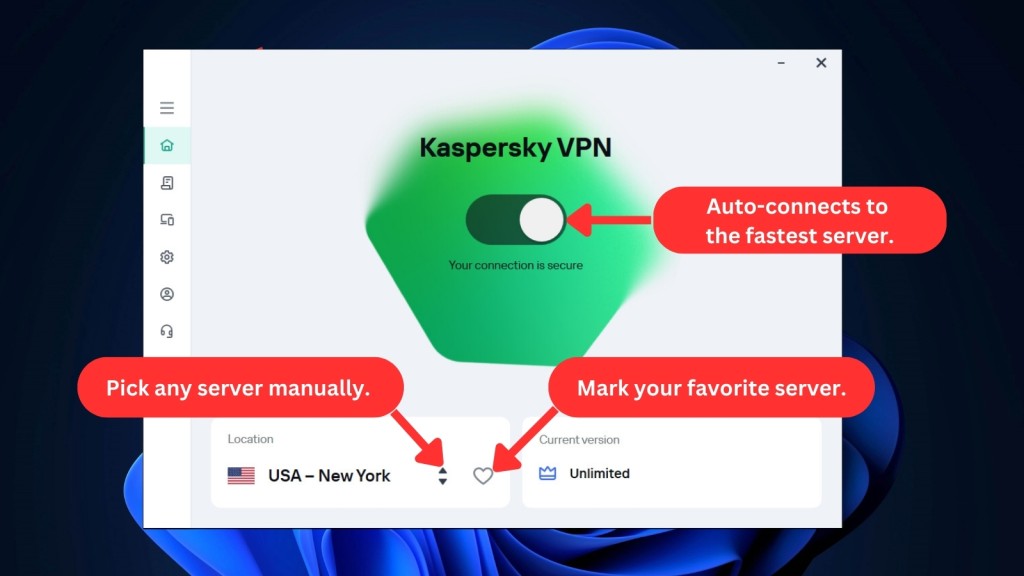
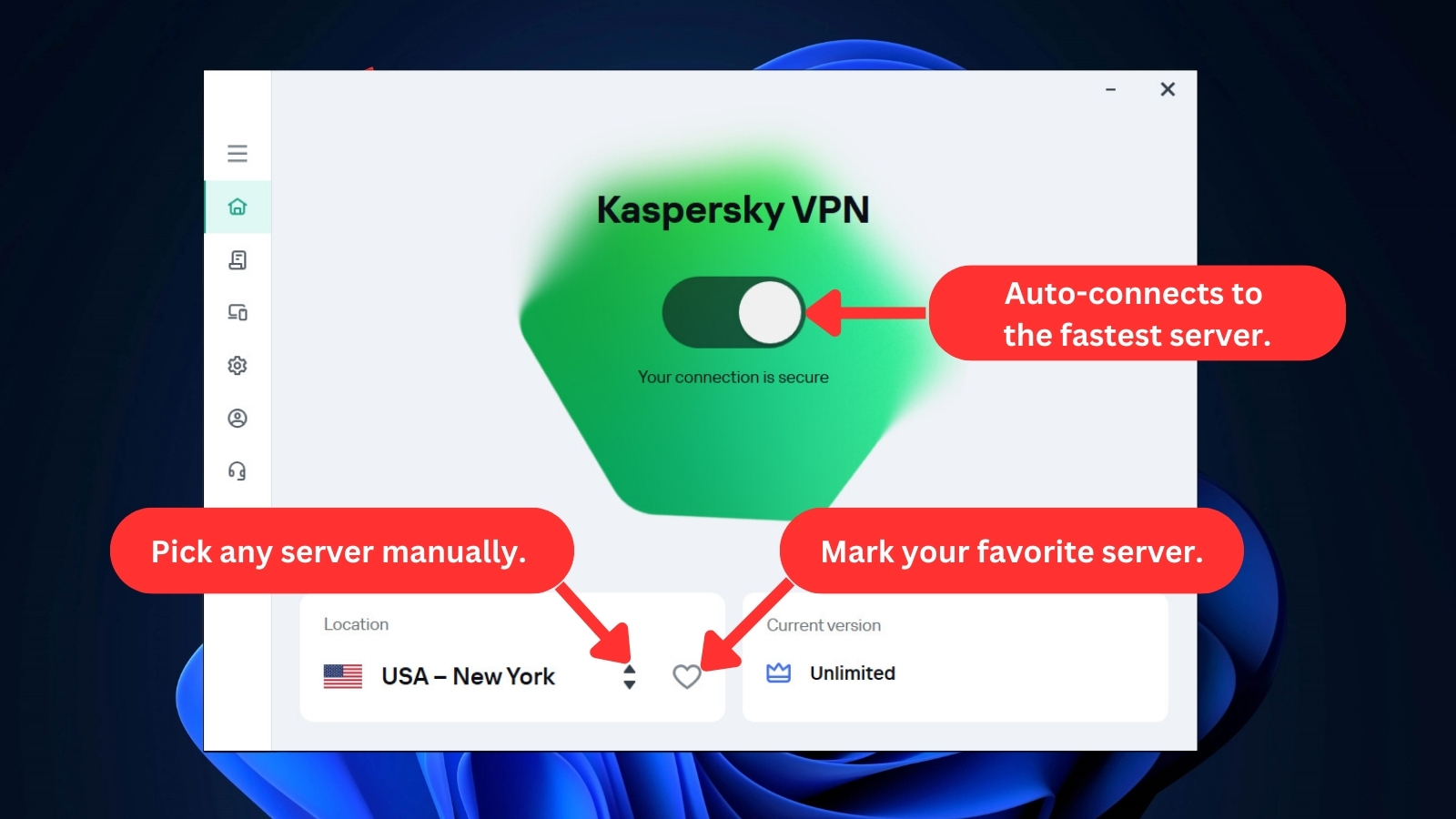
- Current Version – This section has information on your current subscription and a direct link to the “Manage Your Subscription” section of the website.
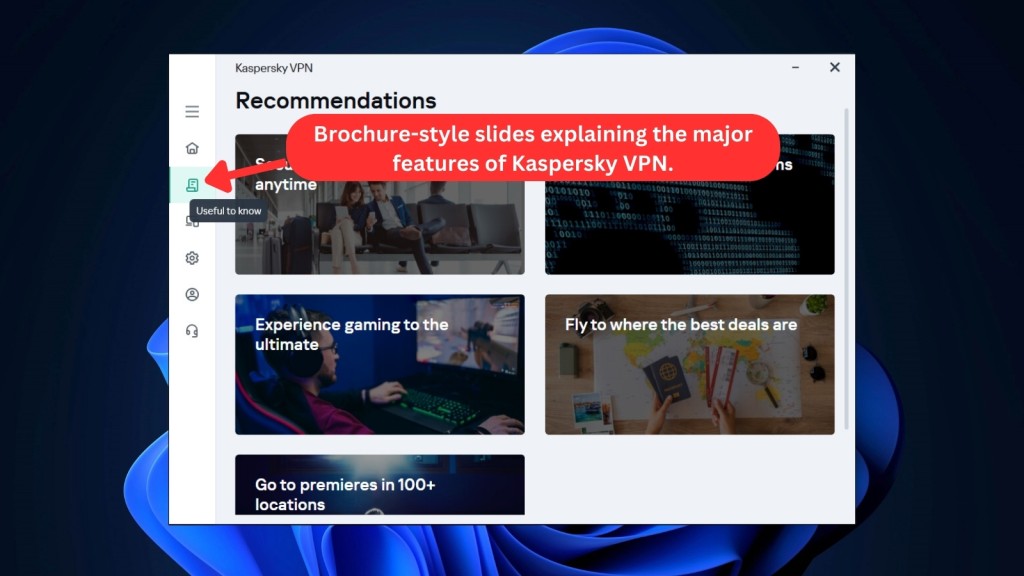
- Useful to Know – Kaspersky VPN includes brochure-style slides that describe the major features of the service. It's a useful addition for users who want to quickly learn about its different functionalities.

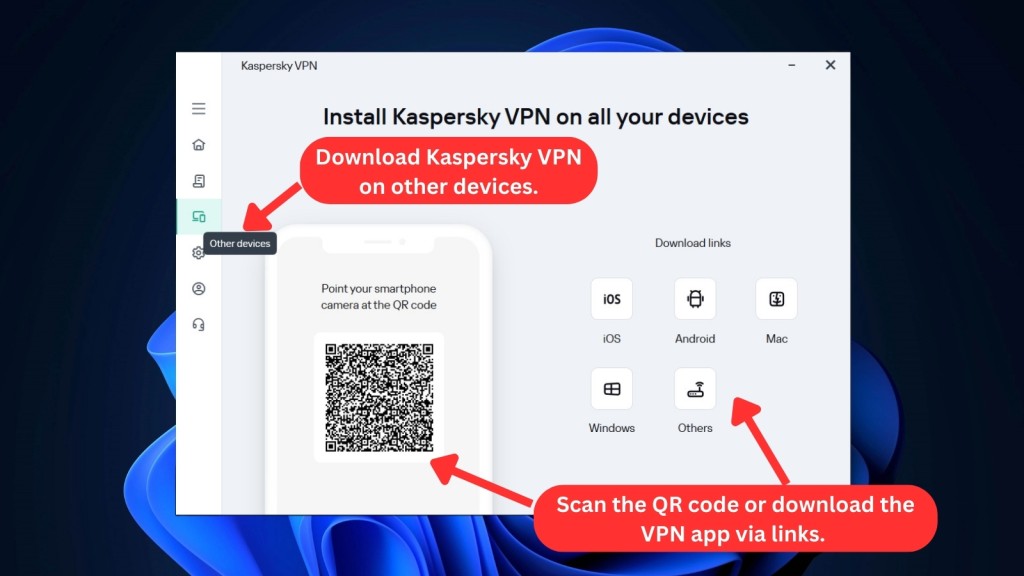
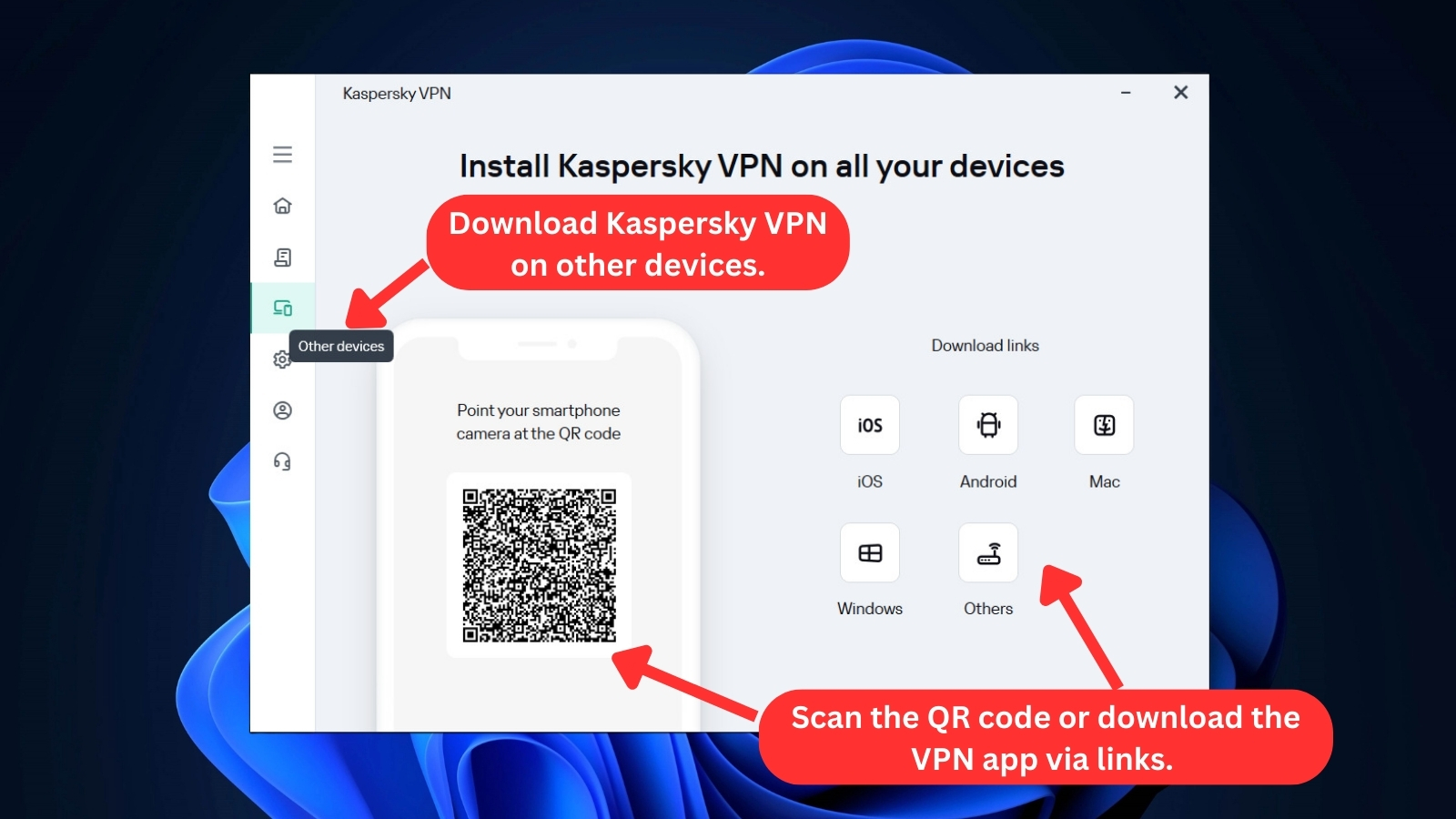
- Other Devices – This section includes links to all the download pages of all the platforms where Kaspersky VPN is available. It also has a QR code that you can scan to download the app on your device.
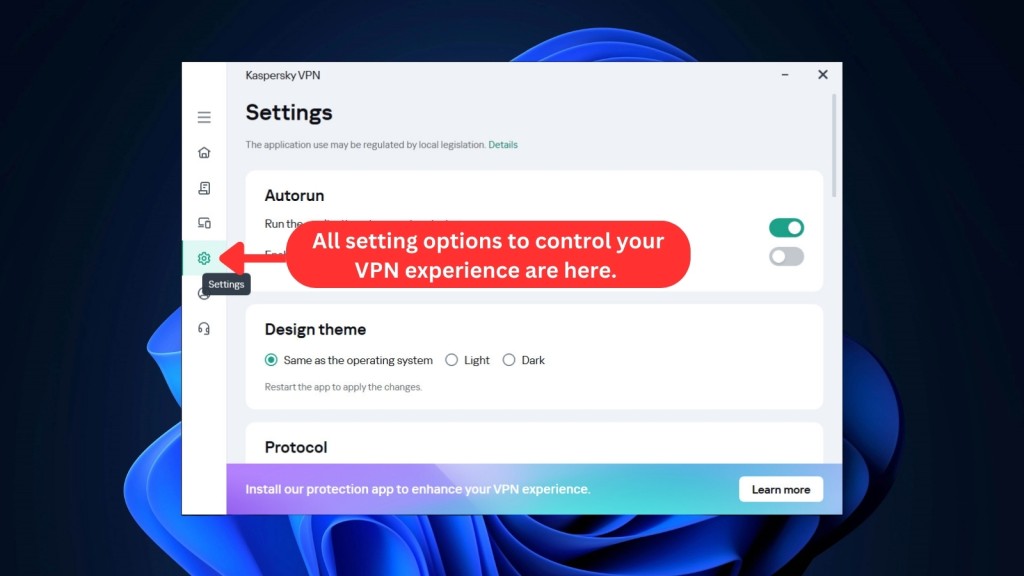
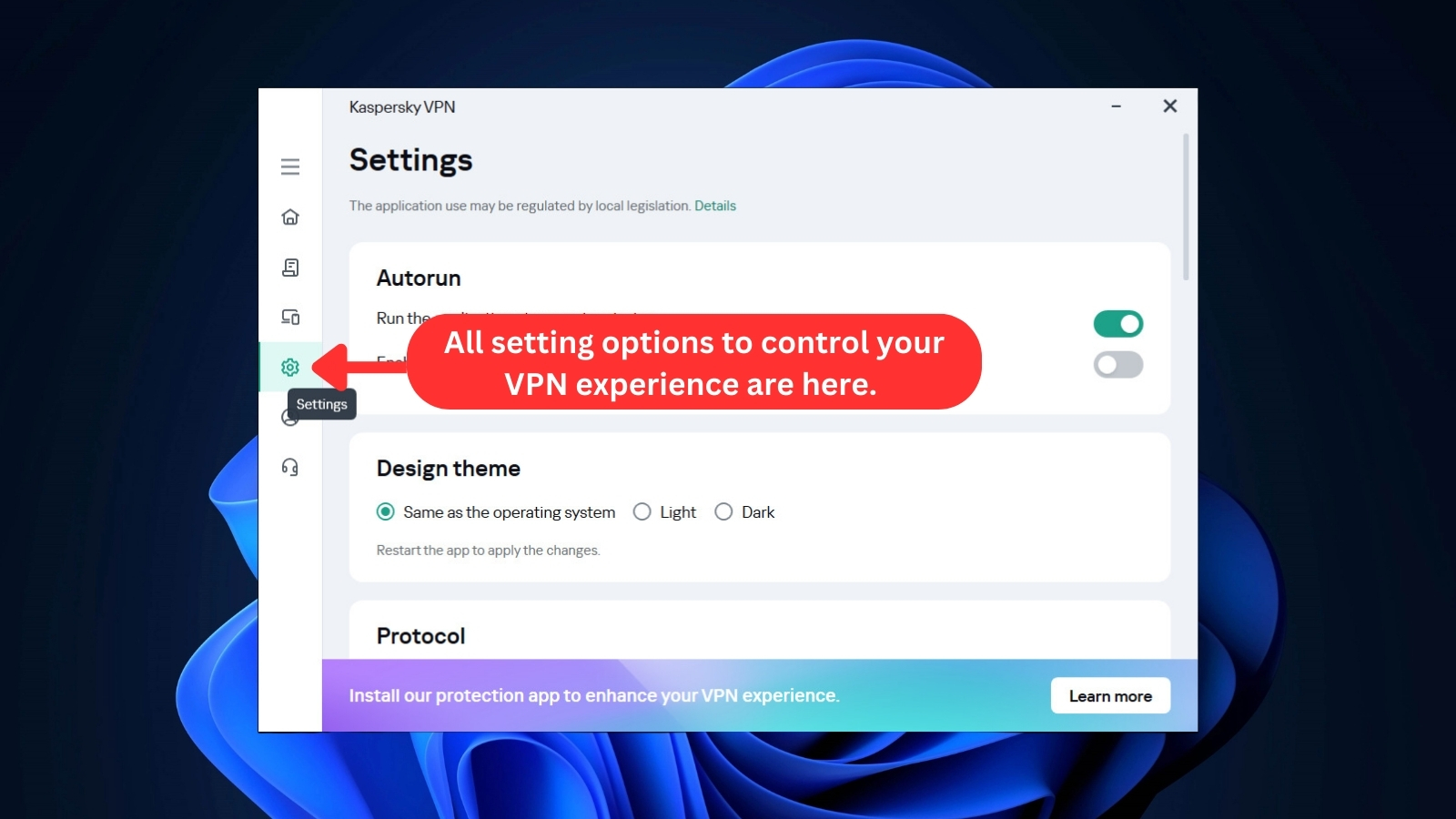
- Settings – From here, you can access various options, such as running the application when the computer starts up, changing the application's theme, selecting protocols, turning on the kill switch, split tunneling, and Smart Protection, as well as enabling notifications for each connection established or disconnected.
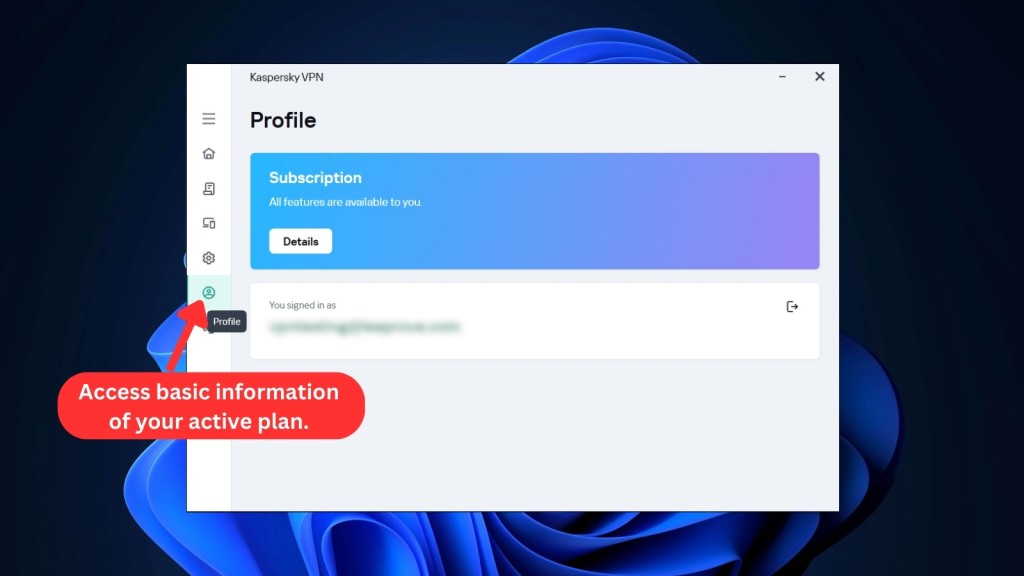
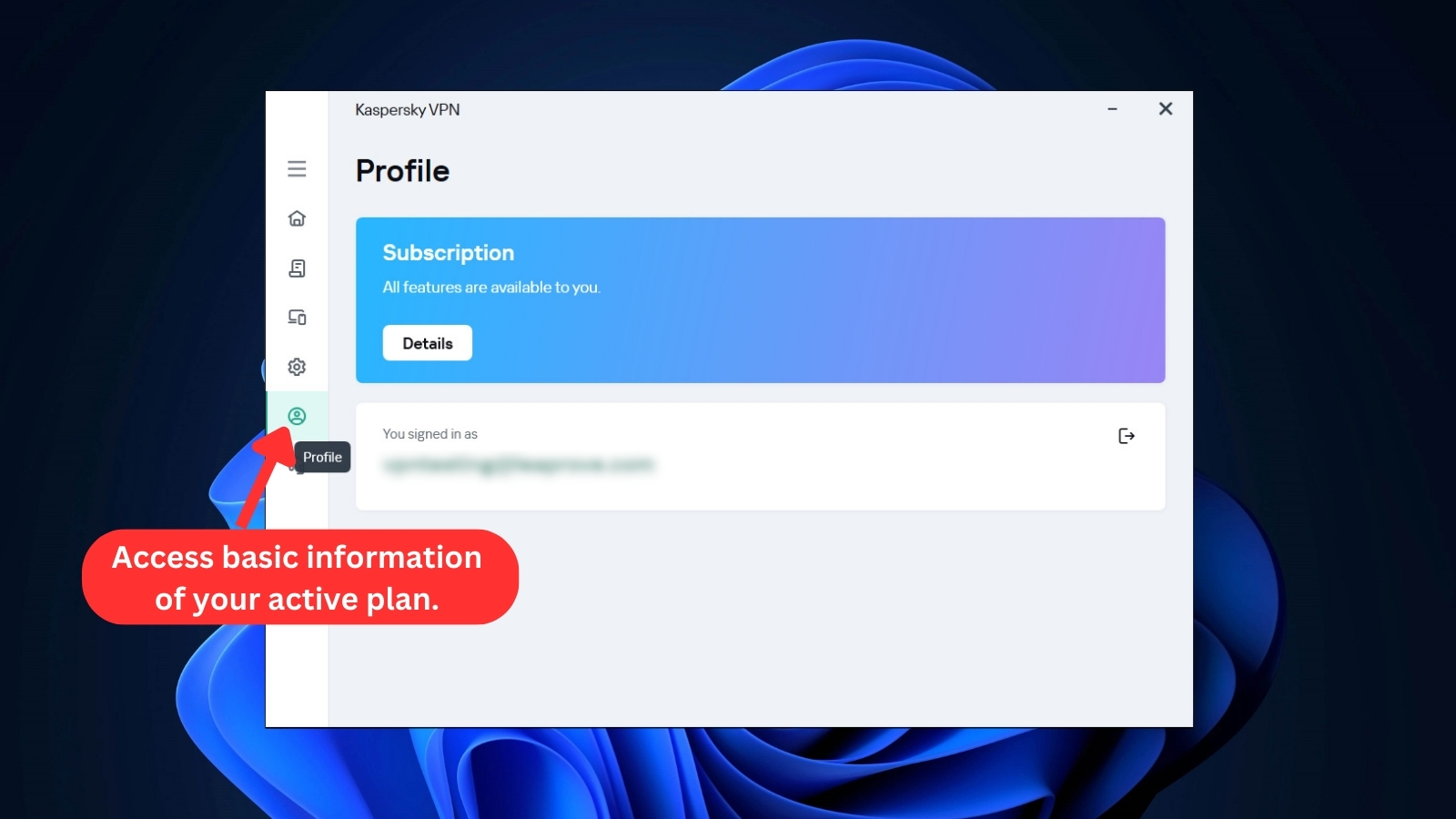
- Profile – This section of the home screen has information about your active subscription plan and the option to log out from the signed-in account.
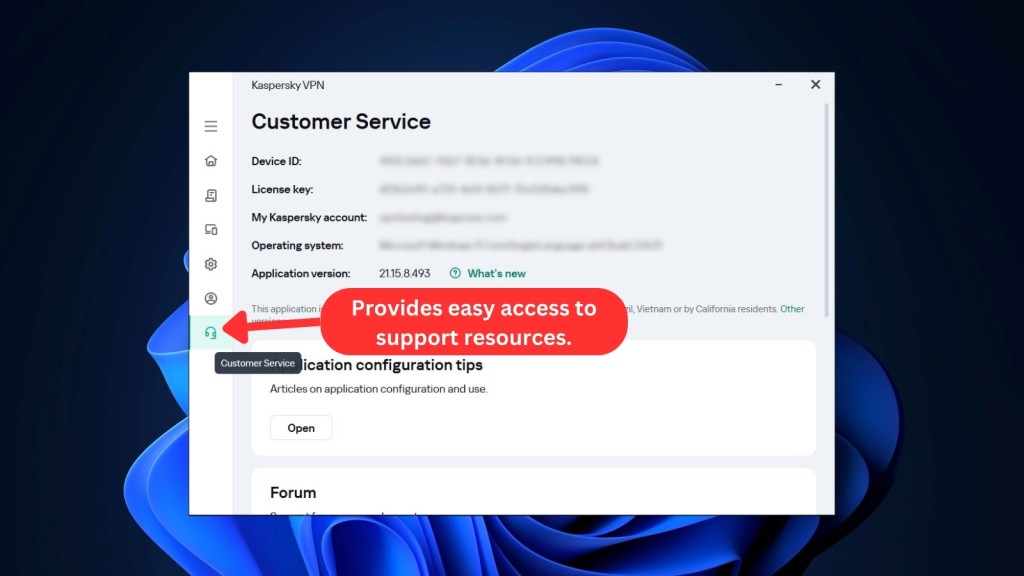
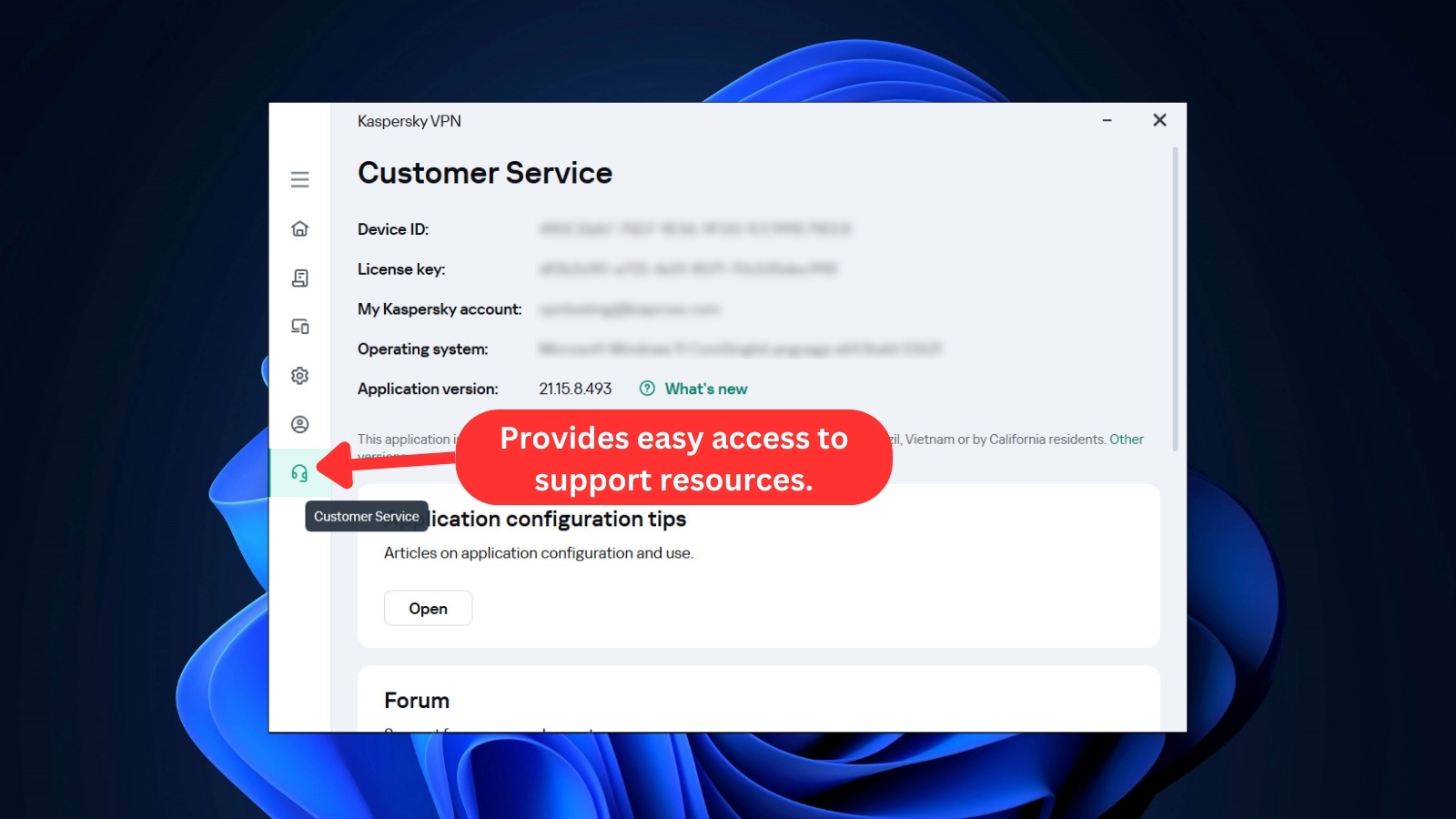
- Customer Service – Here, you can easily access various support resources, such as configuration tips, forums, and support tools. In addition, there's an option to record a video of any issue that may arise and send it to customer care for prompt resolution. The section also contains essential information related to the user's license key, subscription, and device.
Kaspersky VPN’s app interface is streamlined and simple to navigate, even for VPN newbies. Keep in mind that free users are unable to make many changes to the app's settings.
Despite this limitation, the free version of the app is suitable for basic tasks such as browsing and shopping securely. Overall, Kaspersky’s design is one of its more positive attributes.
Media Streaming, Torrenting, and Gaming Support
This VPN can unblock some popular media streaming services. It also supports low-intensity gaming and P2P (but you must stay away from copyrighted files). Our Score: 6/10
In selecting a VPN service, the key considerations involve its capability to unblock popular streaming services, support torrent downloads, and ensure smooth gaming experiences. Let's see how Kaspersky VPN performs on these functionalities.
Is Kaspersky VPN Good for Streaming?
When it comes to streaming, Kaspersky Secure Connection has a mixed performance. While it surprisingly offers servers optimized for streaming, it isn't the best VPN for streaming.
It can work well with some popular streaming platforms such as Prime Video and Max, but it fails to unblock Disney+ and Hulu and only unblocks BBC iPlayer intermittently. Netflix US works on some of its servers, but most servers are useless in this context. This inconsistency is disappointing.
Check out this table that lists some of the US streaming services Kaspersky VPN can unblock.
Kaspersky VPN also opens up access to streaming platforms worldwide, not just in the US. Let's take a quick look at what it can unblock for you.
We have to warn you, though - regular servers may pose challenges like geo-restrictions and error messages. However, Kaspersky VPN's dedicated streaming servers worked well for us (except for a few streaming platforms we mentioned earlier). So, if you just stick to specialized servers, you won't have much trouble accessing content.
Is Kaspersky VPN Good for Torrenting?
No, Kaspersky VPN isn't good for torrenting. Although it has servers optimized for P2P activities and a built-in kill switch, the service logs a considerable amount of activity and device data, which could potentially reveal a user's identity while torrenting.
Therefore, we strongly recommend refraining from downloading copyrighted content due to this privacy concern.
While our tests revealed no IP or DNS leaks and fast torrent download speeds, Kaspersky VPN lacks additional features tailored for torrenting, like port forwarding and a SOCKS5 proxy. For a more comprehensive experience in P2P activities, we definitely recommend using the best VPN for torrenting for this purpose.
Is Kaspersky VPN Good for Gaming?
Yes, Kaspersky VPN is good, but only for low-intensity online gaming. Based on its performance in streaming and torrenting, it's reasonable to assume that the service can handle such gaming activities.
During our tests, Kaspersky VPN demonstrated fast speeds, low ping, and low latency. It lets us access geo-restricted games and those with regional variations. However, it lacks specifically optimized gaming servers. For this reason, we recommend the best VPN for gaming if you're into additional features and improved privacy.
Security & Privacy
Kaspersky VPN Secure Connection uses WireGuard and a unique protocol called Catapult Hydra, which can be very fast. Unfortunately, the provider collects plenty of information about your hardware and software. Our Score: 3/10
Privacy and security are top concerns for most VPN users. To accomplish this, VPNs rely on a variety of protocols and encryption methods to keep your identity safe and secure online. In this segment of our Kaspersky VPN Secure Connection review, we assess how well the service performs in this regard.
Kaspersky VPN Protocols
When it comes to VPN services, you can rightfully expect a certain level of flexibility. Unfortunately, Kaspersky VPN falls short when it comes to VPN protocol options.
- WireGuard – This one is an open-source protocol that offers good data transfer speeds on low-power devices. It uses the ChaCha20-Poly1305 data encryption algorithm, which is strong and secure enough. That said, split tunneling isn't available with this protocol option. We also noticed that the UDP protocol must not be blocked on your device in order for WireGuard to work correctly.
- Catapult Hydra – This is the fastest of the available two protocols, making it a good choice for long-distance data transfers. It also employs a strong and secure AES-256 encryption algorithm. We had no issues with the protocol, but some users have reported that it occasionally drops and slows down their connection.
- OpenVPN – This has been around for quite a while and works well on computers, smartphones, and routers. However, it might not give you the fastest VPN speed, and it can be tough on your router's processor. If you're using an inexpensive router with a less powerful processor, it might impact how well your Wi-Fi works at home.
We must also mention that WireGuard is already accessible on Windows, macOS, and Android devices, including routers. However, its availability is still notably absent on iOS.
Despite Kaspersky's assurance that WireGuard would be available on both Android and iOS by the end of 2023, our disappointment arises from the fact that this protocol has yet to be implemented on iOS devices.
Does Kaspersky VPN Keep Logs?
Yes, Kaspersky keeps logs. Kaspersky VPN's no-logging policy is inadequate despite the company's claims of prioritizing privacy. Their privacy policy is hard to find on their website, and even when you locate it, it provides limited information.
Kaspersky collects an excessive amount of user data, including software information, unique IDs, license information, computer details, and geographic location. The company also gathers information about nearby WiFi networks and monitors traffic usage. Although some of this data may be useful to provide better service, it is unclear why Kaspersky needs to collect such a vast amount of information.
Their privacy policy also permits the collection of anonymous IP and DNS server addresses, which raises serious questions about the company's data collection practices.
Users should exercise caution when using Kaspersky VPN and weigh the potential benefits against the risks of their data being logged and potentially shared with third parties.
Does Kaspersky VPN Leak/Expose Your Private Data?
No, Kaspersky VPN doesn't leak your private data. After conducting a thorough DNS leak test, it appears that Kaspersky VPN is successful in keeping your DNS-related information secure.
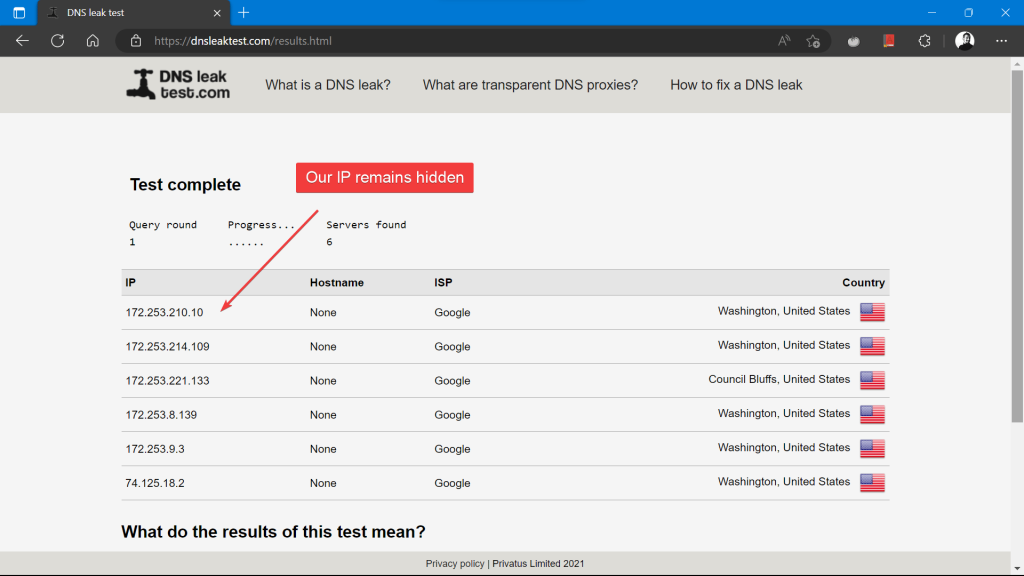

Our testing found no evidence of DNS or WebRTC leaks, which is certainly a positive aspect of the service. It's important to keep in mind, however, that Kaspersky VPN does collect a significant amount of data about your device and online activity, as we discussed in our previous section.
Speed & Performance
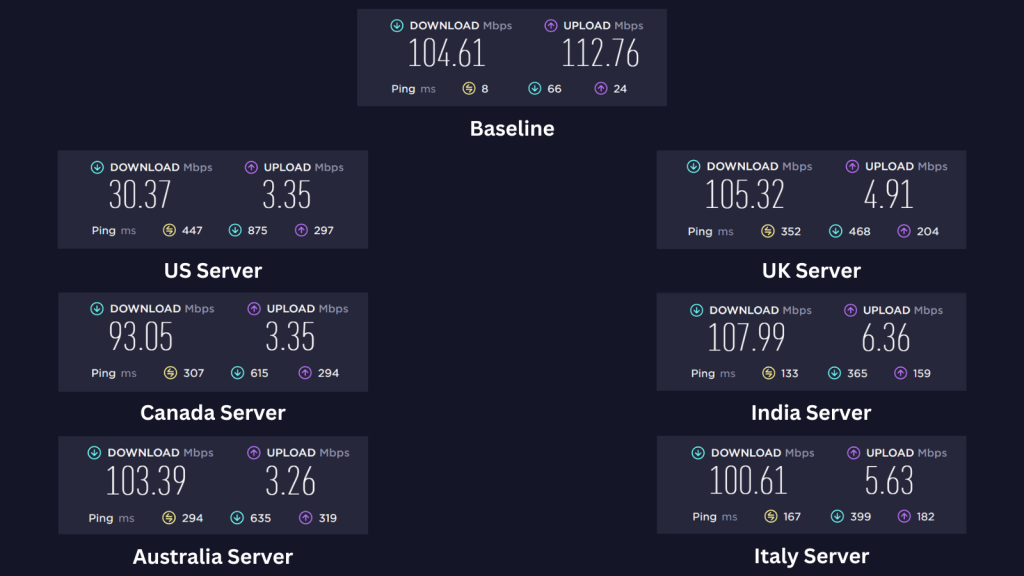
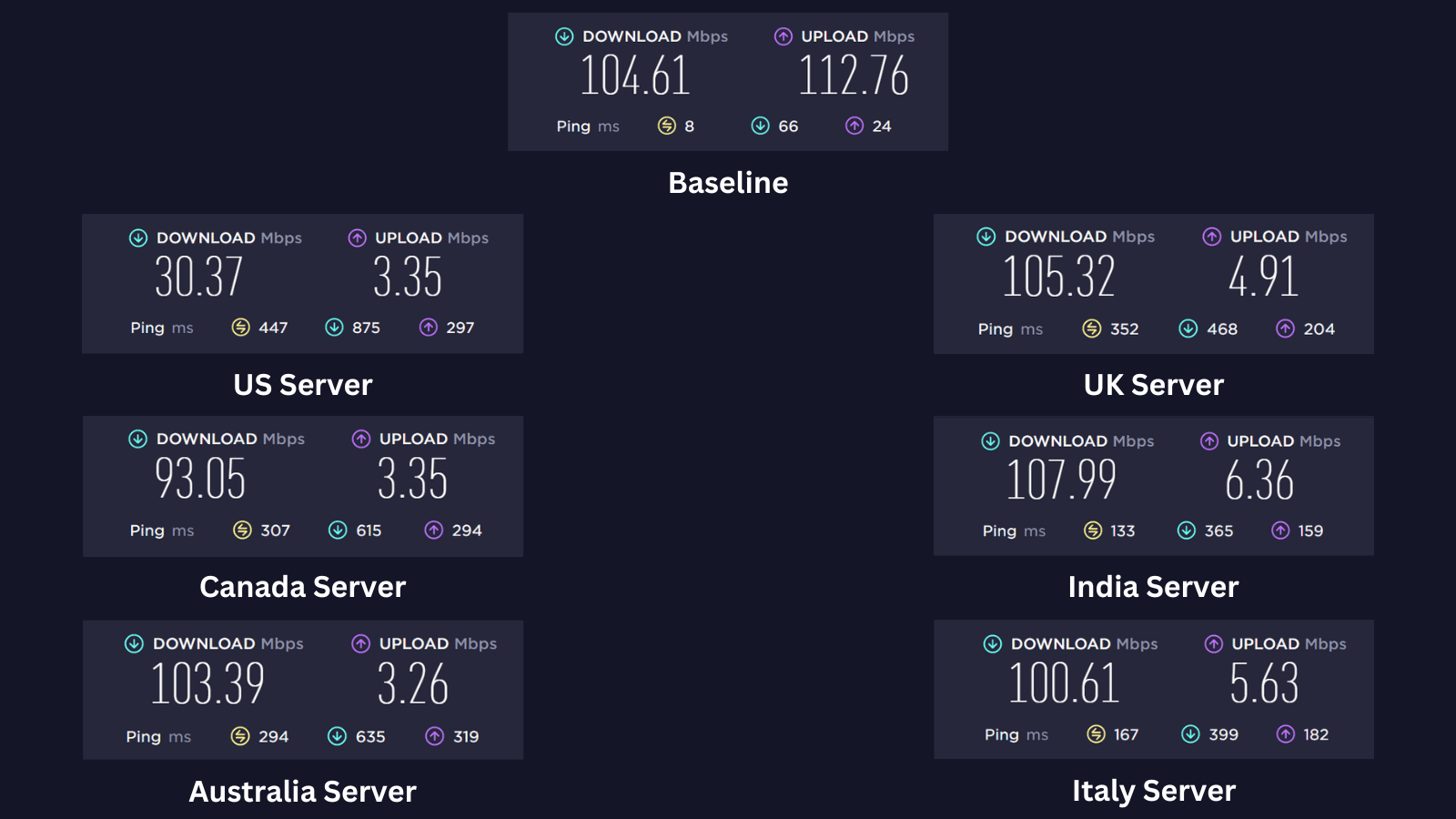
Kaspersky slowed us down by 15% on average. Overall, you can expect good results on almost all servers around the globe. Our Score: 10/10
After running a test on our Internet connection to determine our baseline speed, we tested the download and upload speeds of Kaspersky VPN's servers across various countries.
To calculate the speed reduction percentage for each server, we compared its speed to our baseline speed of 104.61 Mbps for download and 112.76 Mbps for upload. As VPNs typically employ encryption and security protocols, a decrease in both download and upload speeds is usually expected when the service is activated.
Here are the results of the rest of our server tests:
- US Server – The US server had a significant reduction in download speed by 71%, bringing the speed down to 30.37 Mbps. The upload speed was also reduced by 97%. Overall, the US server's speed was not satisfactory.
- UK Server – The UK server showed excellent performance with a download speed of 105.32 Mbps, which is actually faster than the baseline speed. However, the upload speed was reduced by 95.6%, bringing it down to 4.91 Mbps. The upload speed reduction is significant, but the download speed is quite impressive.
- Canada Server – The Canadian server had a minor speed reduction of 11.1% on the download speed, bringing it down to 93.05 Mbps. The upload speed, however, was reduced by 97%. Although not as fast as the baseline speed, the Canada server's speed is still more than acceptable.
- India Server – During our speed test, Kaspersky VPN's Indian server demonstrated impressive download speeds of 107.99 Mbps and upload speeds of 6.36 Mbps. The server performed flawlessly, with an increase in download speed instead of a decline, making it an excellent choice for users who require high-speed Internet for streaming.
- Australia Server – The Australian server showed a 1.2% reduction in speed, bringing it down to 103.39 Mbps. The upload speed was drastically reduced by 97%. Overall, the performance of the Australia server is very good.
- Italy Server – The Italian server had a speed reduction of 3.8% in the download speed, bringing it down to 100.61 Mbps. The upload speed, on the other hand, was reduced by 95%. The performance was solid overall.
The average 15% reduction in download speeds achieved by Kaspersky VPN's international servers is truly remarkable, surpassing even some of the top VPNs. This impressive performance can be attributed to its lightning-fast Hydra protocol, which is provided by Hotspot Shield.
That said, its declines in upload speed are abysmal, so it might be ineffective for activities that require uploading large amounts of data, such as gaming if you don’t start with a super strong upload connection.
Customer Support
There are numerous ways to get help and have your questions answered. However, this experience can easily be overwhelming for average home users. Our Score: 7/10
When it comes to customer support, Kaspersky has one unified support suite for all its products. You can easily filter the information based on the product you are using and what kind of help you want. Overall, it gives you enough options to pick from at your convenience.
Here's what you can expect from their customer support channels:
- Live Chat – While testing the live chat feature, we did have to go through multiple screens, completing two forms to specify our device and product information and accept their terms and conditions to get hold of someone. Once we got past the initial steps, it took about 6 minutes to get connected to a real person. That said, the representative was helpful and able to answer all the questions we had. There were reasonably long pauses between her responses, but the answers were helpful.
- Knowledge Base – Kaspersky offers a comprehensive knowledge base section that includes a wide range of articles and resources to help users troubleshoot common issues. It’s easy to navigate and includes step-by-step instructions so you can solve problems on your own.
- Email – Kaspersky offers email support for users who prefer to communicate with support staff directly. While it may not be as immediate as live chat or phone support, email support is still a useful option for users who have more complex issues or questions.
- Phone – Available during business hours on a 24/7 basis, Kaspersky VPN's phone support ensures prompt assistance with an estimated wait time of approximately 15 minutes. The support is provided in English, guaranteeing effective assistance and clear communication.
- FAQs – Kaspersky has an extensive FAQ section on its website that covers a wide range of topics related to the service. This is a useful resource for users who have questions about how the VPN works, as well as for those who are new to VPNs in general.
- Forums – Kaspersky provides a platform for communication and knowledge sharing between experts and users through their forums. While the company does not guarantee that all requests published on the website will be resolved, the forums can still be a great resource for users who want to connect with other VPN users and seek advice from community experts.
- Blog – Kaspersky's blog serves as an insightful platform, offering a diverse range of articles covering cybersecurity trends, threat intelligence, and expert analyses.
Overall, Kaspersky VPN's customer support channels are impressive, with remote assistance and quick response times for chat support. They provide users with a wide range of resources and support options to help them get the most out of the service.
Pricing
Kaspersky's VPN service seems reasonably priced based on the features and performance it offers. Our Score: 7/10
Kaspersky VPN offers both free and paid variables of their service. The free version has limited features, while the paid plans have more to offer. Pricing varies depending on the subscription duration, but Kaspersky does provide a 30-day money-back guarantee on all its products. If you're not happy, you can request a refund.
How Much Is Kaspersky VPN?
Kaspersky VPN costs $2.37/month with the 2-year plan. However, if you prefer to test it out before opting for a long-term commitment, the monthly price is $6.99. The service offers four different subscription terms.
Each subscription tier provides an identical set of features, including access to over 2,000 fast servers across 100 locations, support for streaming and torrenting, compatibility with VPN-enabled routers, and a 30-day money-back guarantee. The sole distinctions lie in the subscription duration and the number of simultaneous devices allowed.
Let's explore the specifics of each plan:
- 1-Month Plan (5 Devices) – If you prefer to pay on a monthly basis, Kaspersky VPN offers a 1-month plan for a price of $6.99. While this plan doesn't offer any savings in terms of the total cost, it does provide flexibility if you don't want to commit to a longer-term subscription.
- 1-Year Plan (5 Devices) – This plan is for you if you want to save money in the long run. Subscribing to this 1-year plan will cost you $29.99, which equates to a monthly cost of $2.50.
- 1-Year Plan (10 Devices) – Get this annual plan if you need more devices to protect. It starts at $4.17/month or $49.99 every year, providing you with 40% savings.
- 2-Year Plan (5 Devices) – Select the 2-Year Plan for $56.99 every two years, offering a cost-effective monthly rate of $2.37. With this plan, you'll enjoy a fantastic 66% discount.
As evident, the most substantial savings come with the VPN's extended subscriptions. Opting for the 2-year plan not only secures your online activities at $2.37 per month but also grants you a remarkable 66% discount, all while safeguarding up to 5 devices.
Additionally, you can get the Premium Plan if you're seeking both Kaspersky's VPN and antivirus solutions. This premium subscription costs $74.99 per year. It covers 10 devices and includes Kaspersky Safe Kids, which is provided free for a year.
Is Kaspersky VPN Free?
Yes, Kaspersky offers a free plan. However, Kaspersky VPN's free version may not be suitable for many users as it only allows a daily usage limit of 200 MB, which isn't enough for any significant online activity. Although the free data allowance can be increased to 300 MB per day, it requires a My Kaspersky account, and 100 MB extra isn’t going to do much.
The free plan from this VPN service falls short in several areas. We were unable to select a server of our choice as it's automatically assigned. The absence of a sign-up requirement for the free account means that it can be used on multiple devices. However, this advantage is nullified by the severe data limit.
If you have a free account, you can't use split tunneling and kill switch features. Furthermore, you can only adjust a few settings in the app, such as choosing VPN protocols and changing the Smart Protection settings.
In addition to the 30-day refund policy, Kaspersky VPN offers a 7-day free trial specifically for mobile phones. This allows you to test it on your phone before committing. Billing begins at the end of the trial period, but if you cancel before that, no charges will be incurred.
Final Thoughts – Is Kaspersky VPN Good?
No, Kaspersky Secure Connection may not be a good and reliable VPN service. Although it can unblock some popular streaming platforms, there are concerns that can't be ignored.
One major issue is that the VPN logs user data and is subject to Russian censorship laws. This is a significant cause for concern, especially if you value privacy. Furthermore, Kaspersky’s protocol selection and advanced security features are pretty lackluster.
Given these detractors, there are other VPNs available at a similar price point that offer a safer experience than this provider. That said, we strongly recommend NordVPN for a more secure and robust VPN option.
PROS
- Suitable for complete beginners.
- Excellent download speeds.
- Unblocks Prime Video and Max.
- Advanced encryption with Catapult Hydra.
- Modern, easy-to-use apps.
- Efficient kill switch.
- No IP or DNS leaks.
CONS
- Banned on U.S. government devices.
- Excessive logging.
- Based in Russia.
- Very few security settings.
- No Firestick application.
- No native router support.
| Review Summary Kaspersky VPN Secure Connection, despite being budget-friendly, lacks essential features and raises privacy concerns with its ties to Russian authorities and intrusive logging practices. For these reasons, we don't recommend Kaspersky VPN. | 6.5 Overall Score | ||
| Background, Jurisdiction & Reputation | 1 | ||
| Supported Platforms & Devices | 5 | ||
| Installation & Initial Configuration | 8 | ||
| Prominent Features | 7.5 | ||
| Server Count & Infrastructure | 9 | ||
| UI/UX Design & Ease of Use | 8 | ||
| Media Streaming, Torrenting, and Gaming Support | 6 | ||
| Security & Privacy | 3 | ||
| Speed & Performance | 10 | ||
| Customer Support | 7 | ||
| Pricing | 7 | ||