When you purchase through links on our site, we may earn an affiliate commission. Here’s how it works.
5 Best VPNs for Lost Ark in 2026


Our experts have reviewed 53 VPN providers, which were put through extensive rounds of testing. To learn more about that process, here’s how we review VPNs, where we explain our criteria and our policy of being fully transparent.
Being a game played by millions, Lost Ark isn't a stranger to connectivity issues. Many players still have a hard time with overly long queue times, keeping their ping low, playing the game without any lag, and going through frequent disconnects from the game. On top of that, this game isn't the same for everyone, as it has country-based versions.
More precisely, there are versions of Lost Ark available in South Korea and Russia, and there's a version for the rest of the world. The South Korean version of Lost Ark has more classes and fewer pay-to-win mechanics, and its PvP mechanics are more elaborate (with more modes to play, more rewards, and even a ranked system).
To resolve connectivity issues and access different game versions, you need a VPN. A gaming-friendly VPN will improve your ping and latency when you connect to servers closer to the game servers you want to use. It can also supply IP addresses that will allow you to bypass geo-restrictions on the Korean and Russian versions.
In this article, we'll recommend the 5 best VPNs for Lost Ark and offer a guide to playing the game with a VPN. We’ll also share the best server locations, discuss why you need a VPN, and explain how to pick the best one. We'll then show you how to play Lost Ark on Korean servers in English and resolve crashing-related issues, and we'll finish with a round of FAQs.
Top 5 Lost Ark VPNs – Our Shortlist
- NordVPN – Our #1-Rated Best VPN for Lost Ark in 2026
- Surfshark – Easy-to-Use Lost Ark VPN with Tons of Servers
- ExpressVPN – Fully Obfuscated VPN Servers to Play Lost Ark
- CyberGhost VPN – Gaming-Ready Lost Ark VPN with Specialized Servers
- Private Internet Access – Server-Rich VPN That Works with Lost Ark
How to Play Lost Ark from Anywhere
Once you've found a suitable VPN, you need to get a subscription and download its app. You'll then log in, pick a suitable server, and start your Lost Ark gameplay session. Just follow these steps:
- Subscribe to a VPN that works with Lost Ark (we recommend NordVPN).
- Download and install the VPN app on the device(s) you'll use to play Lost Ark.
- Open the VPN app and sign in to your VPN account to activate it.
- Connect to a VPN server in your preferred location.
- That's it! You can now play Lost Ark from anywhere.
To get the best performance with minimal latency and ping, connect to a VPN server closest to the location of your desired game server. For example, if you want to play on the Ealyn server (Europe West), connect to a VPN server in Western Europe. And if you wish to access special versions of Lost Ark, go for servers in South Korea and Russia.
The Best VPNs for Lost Ark in 2026
In our guide to the best gaming VPN services, we pooled together a list of criteria you should use when choosing the best option available. That said, ensure your chosen VPN has a large server network covering North America, Europe, South America, and Asia. This will provide you with access to all Lost Ark servers and game versions.
Next, find a VPN that offers fast Internet connection speeds and reliable performance to minimize your ping and latency and eliminate any Lost Ark lag spikes. It should also come with a kill switch, secure VPN protocols, and strong encryption.
In addition, you'll want a VPN with at least a few simultaneous connections and compatibility with multiple devices. A wallet-friendly price should be there as well. Lastly, ensure you’ll get reliable, 24/7 customer support and a trustworthy money-back guarantee.
According to the criteria mentioned above, these are the 5 best VPNs for playing Lost Ark in 2026:
1. NordVPN – Our #1-Rated Best VPN for Lost Ark in 2026
NordVPN is a long-standing VPN with plenty of gaming-oriented features, offering an array of servers covering North and South America, Europe, and Asia. The provider has 10+ servers in South Korea, so you can access the Korean version of Lost Ark. In total, its network covers 110+ countries with over 6,300 servers.
This VPN can help you minimize your ping and latency, as it features optimizations that make it suitable for gaming. More importantly, it's one of the fastest VPNs right now, managing to bring smooth performance on nearby and remote servers.
NordVPN comes with a range of security and privacy features that will hide your location and ensure none of your data leaks. Some of those features include a capable kill switch, secure protocols (OpenVPN, NordLynx, IKEv2/IPsec), AES 256-bit and ChaCha20 encryption, a no-logs policy, double VPN encryption, data leak protection, antivirus software, and more.
Also, you can play Lost Ark with NordVPN on multiple devices, including laptops and PCs (plus, you can install the VPN on routers). You're allowed up to 10 simultaneous connections, which should be enough to cover all your devices.
NordVPN's pricing starts at $3.09/month (2-year subscription plan). In addition, NordVPN offers a 30-day money-back guarantee and 24/7 customer support via live chat.
PROS
- Great option for gaming.
- Strong encryption and security.
- Unblocks the South Korean version.
- Fastest VPN available.
- 30-day money-back guarantee.
- 24/7 live chat support.
CONS
- Partially obfuscated network.
2. Surfshark – Easy-to-Use Lost Ark VPN with Tons of Servers
Surfshark is an easy-to-use VPN that gives you access to servers in all the regions where Lost Ark is available, including North America, South America, Europe, and Asia. It has servers in South Korea, allowing you to unblock and play the Korean version of the game. In total, the provider has more than 3,200 servers in 100 countries.
This provider is one of the fastest VPNs on the market, offering super-fast Internet connection speeds and reliable performance. Thus, Surfshark can help you reduce your ping significantly and keep your latency to a minimum. It's excellent for gaming and delivers a smooth experience to all users with little to no lag.
With Surfshark, you can connect an unlimited number of devices simultaneously and use it on a wide range of devices, including PCs, laptops, routers, and more.
All your devices will be protected with military-grade encryption (AES-256, ChaCha20), secure protocols (WireGuard, OpenVPN, IKEv2/IPsec), a kill switch, a no-logs policy, MultiHop, obfuscation, dedicated IPs in a few countries, and more.
You can get started for only $2.29/month (2-year plan). Finally, like most of its competitors, Surfshark provides a 30-day money-back guarantee and reliable, 24/7 customer support via live chat.
PROS
- Unlimited simultaneous connections.
- Super-fast speeds.
- Excellent performance.
- Top-notch privacy and security.
- Reliable 24/7 customer support.
- 30-day money-back policy.
CONS
- Takes a while to connect.
3. ExpressVPN – Fully Obfuscated VPN Servers to Play Lost Ark
ExpressVPN features plenty of servers in all the regions where the game's servers are located. More specifically, ExpressVPN has thousands of servers in 105 countries, covering regions like North America, South America, Europe, and Asia. It also has servers in South Korea, meaning that it can give you access to the Lost Ark Korean servers.
Since ExpressVPN is among the fastest VPNs on the market, it'll give you blazing-fast connection speeds and reliable performance. It can also help you reduce your ping and latency, so you can resolve Lost Ark lagging issues.
ExpressVPN comes with a wide range of useful features that will protect you online, including secure VPN protocols (Lightway, OpenVPN, and IKEv2/IPsec), military-grade encryption (AES-256, WolfSSL), a kill switch, a no-logs policy, and more. It supports a wide range of devices, including Windows PCs, laptops, routers, and more.
You can have up to 8 simultaneous connections running with ExpressVPN, which is more than enough to cover all your devices. All that is available for $6.67/month (annual plan). In addition, you'll get a 30-day money-back guarantee and reliable 24/7 customer support via live chat.
PROS
- Covers all Lost Ark regions.
- Top-notch security and privacy.
- No-logs policy.
- 30-day money-back policy.
- 24/7 live chat support.
CONS
- On the pricier end.
4. CyberGhost VPN – Gaming-Ready Lost Ark VPN with Specialized Servers
CyberGhost has one of the largest server infrastructures in the VPN market, with thousands of servers in 100 countries, and some of them are specialized for different purposes, like gaming, streaming, and P2P file sharing.
It has thousands of servers in all the regions where Lost Ark is available (Europe, Asia, North America, and South America) and allows you to access the Korean and Russian versions of the game as well.
This VPN is excellent for Windows because it offers specialized gaming servers. It offers stable and reliable speeds and performance, so you can lower your ping and latency, especially on its gaming servers. It's not as fast as our other recommendations, but it can still provide you with a smooth gaming experience.
You'll get strong encryption (AES-256 and ChaCha20), a kill switch mechanism, and secure VPN protocols (OpenVPN, WireGuard, and IKEv2/IPsec). You can use its services on up to 7 devices simultaneously, including laptops, PCs, routers, and more.
If you opt for its 2-year plan, you'll get to pay $2.03/month. CyberGhost has a more generous money-back guarantee than most VPNs: a 45-day policy for longer-term plans and a 14-day policy for its monthly plan. Lastly, you'll get 24/7 customer support via live chat.
PROS
- Large server network.
- Specialized gaming servers.
- 45-day money-back guarantee.
- Stable performance.
- 24/7 customer support.
CONS
- Gaming servers only on Windows.
- Not the fastest option.
5. Private Internet Access – Server-Rich VPN That Works with Lost Ark
Private Internet Access (PIA) is a top-notch VPN provider with a network spanning the entire planet. Namely, PIA has thousands of servers in 90+ countries, covering North America, South America, Europe, and Asia. Connecting with the provider will reduce your ping and latency in Lost Ark, but you might have to tweak some settings to achieve this.
Without any modifications, PIA offers medium-fast Internet connection speeds and reliable performance. However, with some protocol changes and optimization, you can increase your speed to enjoy a faster Lost Ark gameplay experience. Unfortunately, your encryption and other security measures will need to decrease to improve your speed.
Speaking of security, PIA offers features such as strong encryption (AES-128/256 and ChaCha20), secure protocols (OpenVPN, IKEv2/IPsec, WireGuard), a kill switch, a no-logs policy, obfuscation, dedicated IPs in certain locations, and more. It also allows you to have unlimited simultaneous connections, meaning you can use it on all your devices and even share it with as many people as you want.
PIA supports many different devices, including PCs, laptops, routers, and more. Plus, it's priced at only $2.03/month (2-year subscription plan). It has a 30-day money-back guarantee on all plans and offers reliable, round-the-clock customer support via live chat.
PROS
- Thousands of reliable servers.
- Great for customization.
- 24/7 customer support.
- 30-day money-back policy.
- Ideal for advanced users.
CONS
- Best for advanced users.
- Slower than its competitors.
Why Do You Need a VPN for Playing Lost Ark?
If you're looking to play Lost Ark with lower ping and latency, even when using more crowded servers, you'll want to utilize a VPN. Other reasons why you need a VPN include the following:
- Unblock Different Versions of Lost Ark – Lost Ark is not available in countries like Saudi Arabia, Yemen, Libya, Qatar, North Korea, and Iran. Also, the Korean and Russian Lost Ark versions are geo-restricted, so they’re only accessible if you're in those specific countries. Luckily, with a VPN, you can bypass all those restrictions.
- Reduce Your Ping and Eliminate Latency – High ping and latency are common issues that many Lost Ark players deal with, especially on more crowded servers. That said, if you're experiencing Lost Ark server lagging, you can change your virtual location with a VPN.
- Avoid Having Your IP Banned - Like other online games, Lost Ark tracks your IP address as you play. If you find yourself in a critical situation, your IP could be banned until the game's moderators can review the entire case, which you can bypass with a VPN.
- Avoid DDoS Attacks – When a DDoS attack happens, your IP is flooded with Internet traffic, disconnecting you from the game and preventing your device from accessing the Web for a bit. VPNs can help you avoid this as they have DDoS protection measures in place.
- Play Lost Ark Safely on Public Wi-Fi - Public Wi-Fi networks are typically set up to log various kinds of data. Also, they're often used by malicious actors to propagate malware. With a VPN, you can encrypt your connection and use public Wi-Fi with no worries.
- Circumvent Bandwidth Throttling - Since a VPN hides your Internet data, your Internet provider won't see what you do online. That means your ISP won't be able to throttle your speed, giving you the full performance of your Internet connection.
- Get Around Overcrowded Lost Ark Servers - Every month, more than a million players visit the world of Lost Ark, which means you'll encounter overcrowded servers. With a VPN, you'll hide your physical location and force the game to connect you to less crowded servers.
- Bypass Price Discrimination - Games like Lost Ark come with premium-priced elements whose price is determined by your location. By switching to a country with lower prices, you can buy extras at a discount, helping you bypass price discrimination.
- Get Cosmetics, Skins, and Weapons for Free - Lost Ark isn't the same across the whole world. It has country-based versions with their own characters, weapons, and skins. The best VPN will help you bypass those restrictions and get cosmetics not typically available in your region.
- Use the Web Anonymously - Your ISP sees what you do online, which is a clear privacy intrusion. The same could be said for online trackers employed by digital services. To put an end to this and hide your browsing history, you only need a VPN server.
What to Look for in the Best VPN for Lost Ark?
Make sure that your chosen VPN offers a sizable server network, low ping, and the ability to handle your latency when playing games. This is what you need to keep in mind:
- Good-Sized Server Network - Your chosen VPN must offer as many servers as possible in as many locations as possible, as you'll want to target a nearby Lost Ark server.
- Fast and Consistent Performance - A VPN will slow you down, but many come with various gaming-friendly optimizations, keeping their throttling up to around 10%.
- Ability to Reduce Ping and Latency - Go for a VPN with a proven ability to keep your ping and latency in check, as that's crucial for getting a streamlined gaming experience.
- Robust Protocols and Encryption - The best VPN should have protocols like Lightway or WireGuard, which are typically extra-fast without compromising your security.
- Kill Switch (Leak Prevention) - A kill switch ensures your data doesn't leak even if your VPN connection drops, which is how you'll evade Lost Ark's VPN detection mechanisms.
- Simultaneous Connections and Supported Devices - Go for a VPN with several connections, as that will allow you to install it on all your gaming devices and access Lost Ark from anywhere, even when you're not at home.
- Fair and Budget-Friendly Price - You'll want a VPN that's worth your money, so make sure to pick one with heavy discounts on its long-term subscription plans.
- Long-Term Money-Back Guarantees - By getting a VPN with a generous money-back policy, you ensure that your money won't be wasted, as you'll get to test-drive it properly.
- Live Chat Customer Support - You'll appreciate having access to a VPN with 24/7 live chat support, as that's always the most efficient way to resolve technical issues.
What Are the Best Server Locations for Playing Lost Ark?
The best Lost Ark server location will vary based on numerous factors that affect the type of gameplay you're looking for. You might want more player vs. player or player vs. environment gameplay, for example. The best server to connect to also depends on what language you speak, whether you want more player-packed servers or less-crowded ones, and many more variables.
All things considered, the best game server for playing Lost Ark with minimal ping and latency is the one that is closest to your physical location. Or, if you're using a VPN, the best Lost Ark server would be the one closest to the VPN server you connect to.
When choosing your game server location, make sure to take all these different elements into account to optimize your experience.
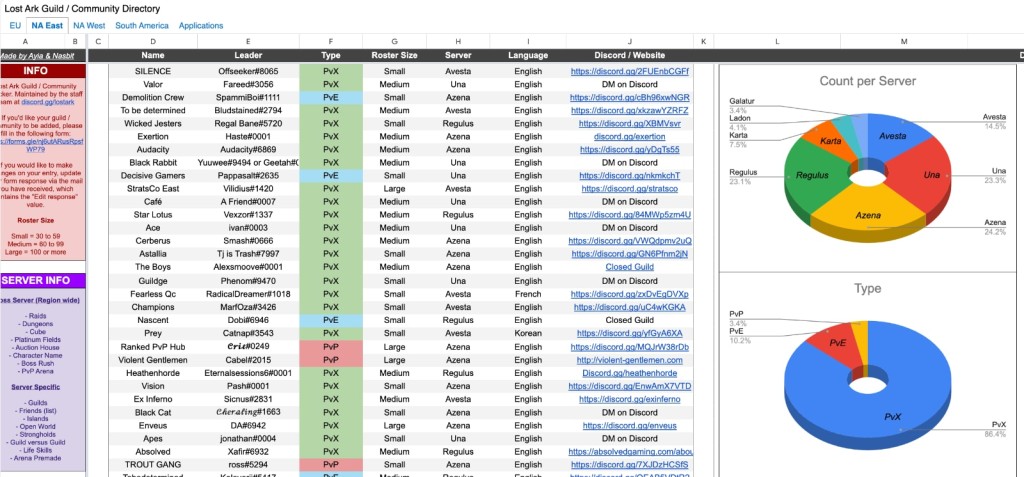
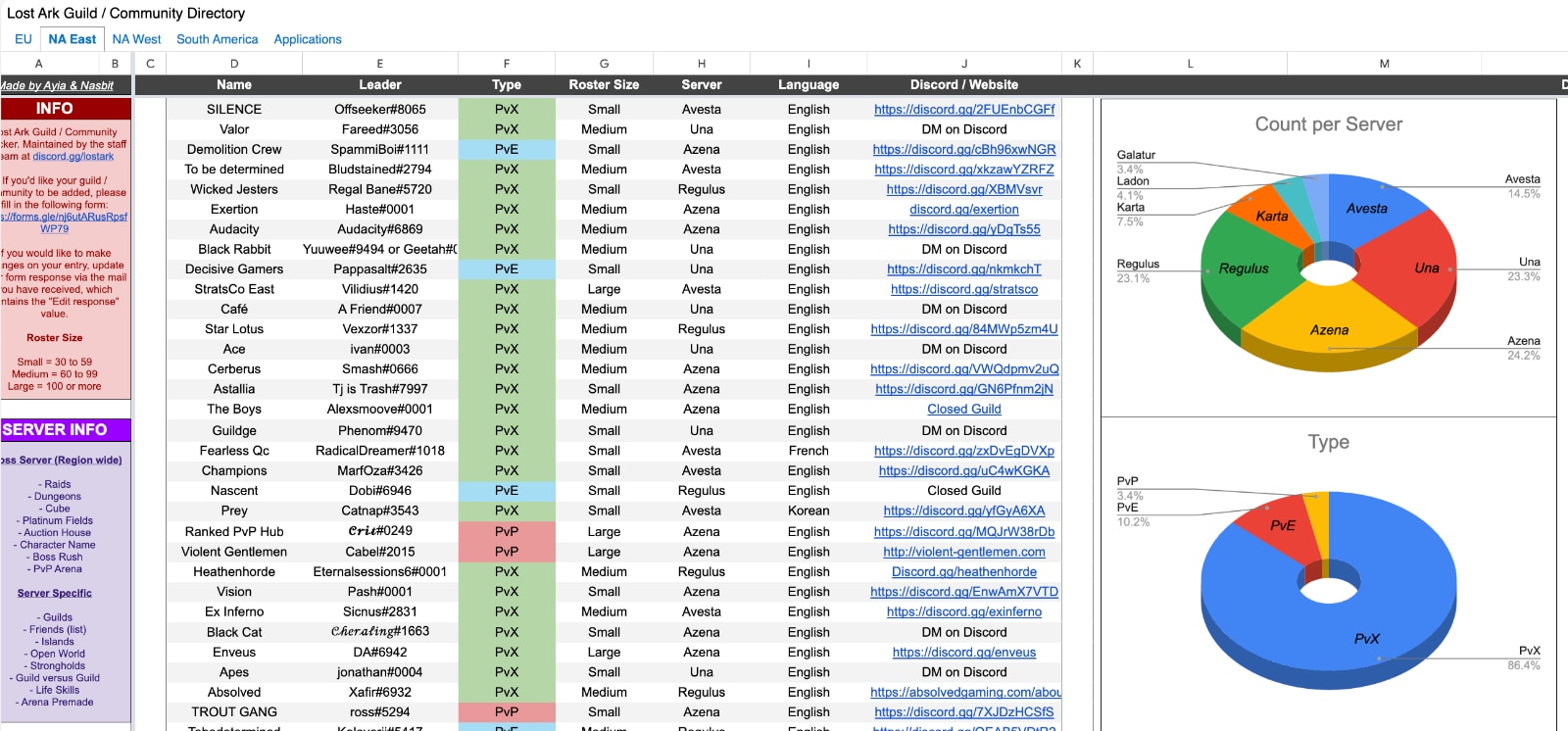
Also, check out this Lost Ark Guild sheet, created by a Lost Ark community member Ayia, where you'll find thousands of guilds and communities, filtered by their size and language. Check the charts you'll find there as well, as they can help find a Lost Ark world based on the primary language or the number of players.
How to Play Lost Ark on Korean Servers in English
You'll need a VPN that has servers in South Korea to be able to access that country's version of Lost Ark. Here's everything you'll need to do:
- Sign up for a VPN that has South Korean servers (we recommend NordVPN).
- Download and install the VPN on the device(s) you'll use to play Lost Ark.
- Launch the VPN app and log in to your account.
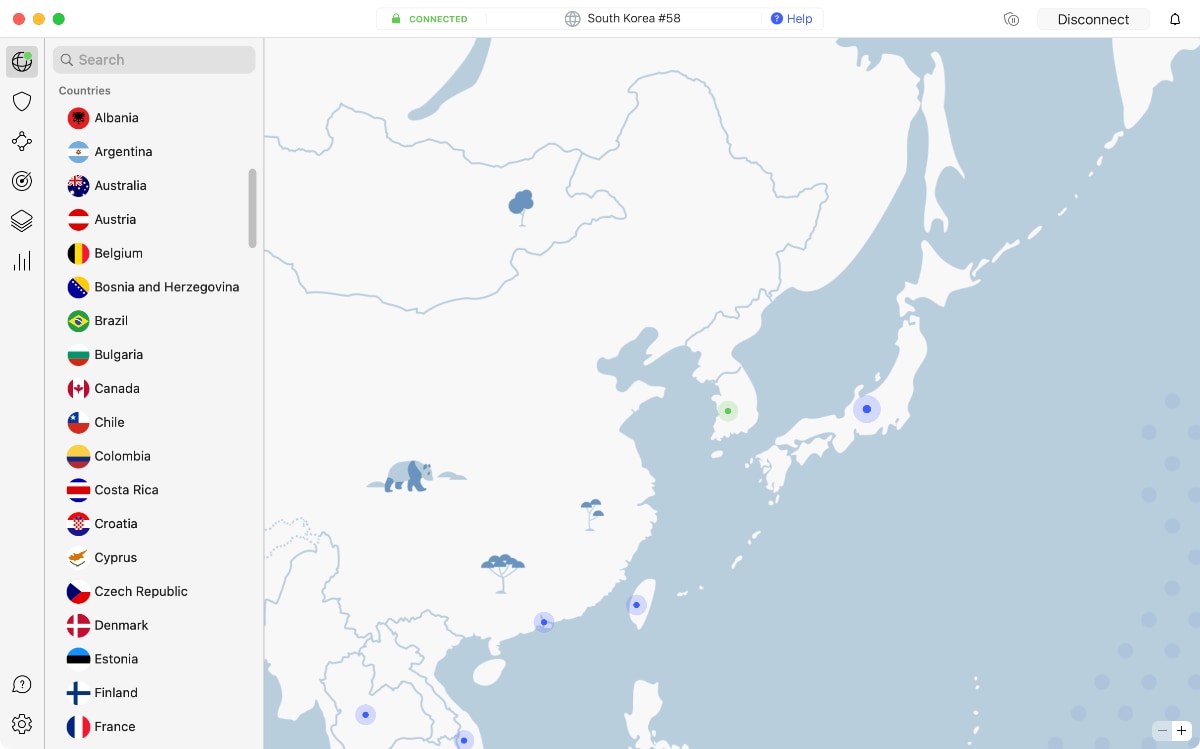
- Connect to a VPN server in South Korea.

- Make a Korean Lost Ark account using the game's Korean website.


- Download the Korean version of Lost Ark.
- Download this custom patcher for translating Lost Ark from Korean to English.
- Launch the "LaoTranslation.exe" file (run as Administrator).
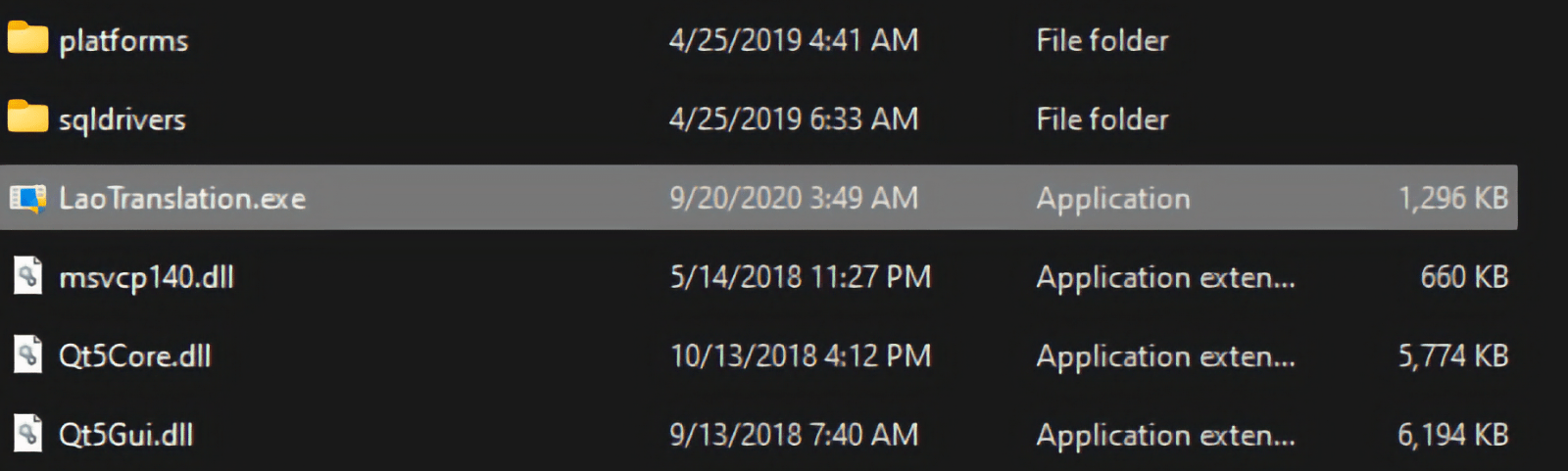

- Look for Lost Ark's executable and choose English.
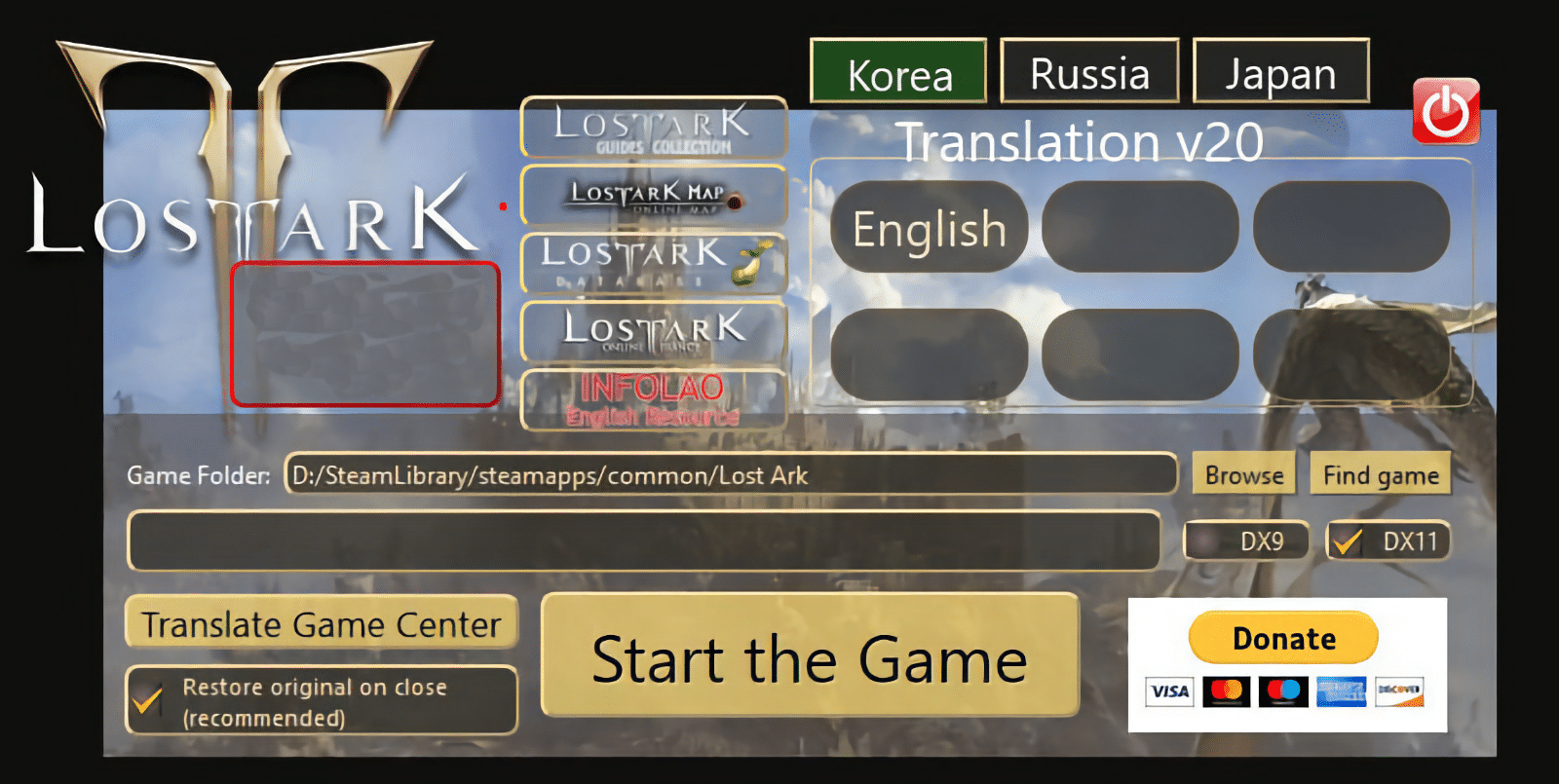

- Open Lost Ark via the English patch software (don't close the patcher).
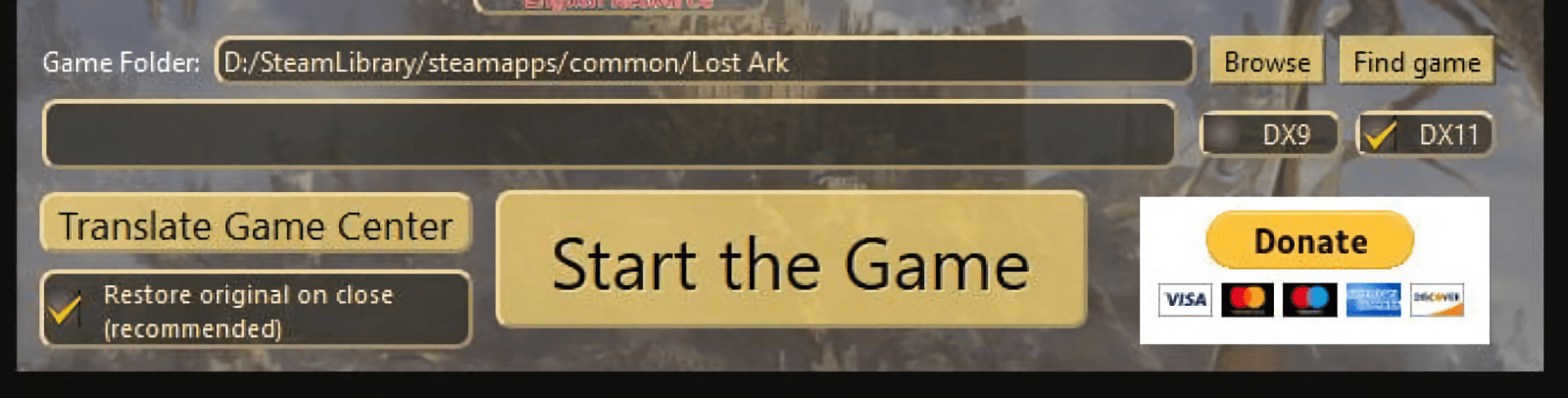
- Once you're done playing, select "Restore original on close" in the translation patch. This allows the game to install updates and ensures it will continue to function properly.

Why Does Lost Ark Keep Crashing?
Lost Ark is crashing because the game files might be corrupted, your GPU drivers might be outdated, your antivirus might be blocking the game, or you’re connecting to a faulty game server - among other things. Here’s what you can try:
- Lost Ark's Minimum Requirements: Check if your computer meets the minimum requirements to run the game without issues. You need an adequate CPU and GPU to ensure the game has enough resources to run without hiccups.
- Network Connectivity Issues: Your Internet connection might be going through some technical issues, forcing the game to behave oddly. You might want to contact your Internet provider or restart your router by keeping it unplugged for around 30 seconds.
- Overly High Graphics Settings: Visit Lost Ark's settings and see if the game's graphics settings are perhaps set to 'High.' Depending on your device's specifications, you'll want to lower everything to 'Medium' or even 'Low.'
- Corrupted Game Files: If Lost Ark keeps crashing on startup, its files are most likely damaged. You need to open Steam, right-click on the game, and pick ‘Properties.’ Then, select ‘Local Files’ and choose ‘Verify Integrity of Game Files.’
- Outdated Game Files: Lost Ark receives regular updates, and these are often focused on fixing the game's performance. So, check if any updates are available.
- Outdated GPU Drivers: You can fix a Lost Ark crash by updating your graphics card drivers, as it’s crucial always to have the latest ones installed. Visit Nvidia's or AMD's website and download the latest available software.
- Too Many Background Processes: Open your computer's Task Manager and quit any unneeded background processes, which will free up your system's resources.
- Antivirus-Related Software Blocks: It’s not unusual for games like Lost Ark to be blocked by antivirus applications. You can resolve this by visiting your antivirus and disabling it temporarily.
- Overcrowded/Offline Lost Ark Servers: Lost Ark crashes often during the evening hours when its servers become overcrowded. The best way to fix this is to use a VPN, which helps you reroute your data through a server in a different region.
- Hardware Overheating: If there's an issue with one of your computer's components, your system might be shutting down to prevent potential physical damage. Make sure that your computer has proper ventilation and cooling.
Can You Use a Free VPN for Lost Ark?
Even though it's possible to use a free VPN for Lost Ark, we don't recommend doing so. Virtually all free VPN providers have many limitations that might do you more harm than good.
For instance, free VPNs have small server networks and usually only cover a few locations, mainly in Europe or North America. So, they won't offer servers in Korea, so you won’t be able to download and play the Korean version of Lost Ark. Also, free VPNs have low data caps and bandwidth and speed limitations. So, they'll make your ping and latency even higher instead of reducing them.
If you want to enjoy Lost Ark with low ping and latency and get restriction-free access to the game, your best option is to use a premium VPN. The best VPN providers will lower your ping, keep your latency in check, and give you access to everything Lost Ark offers.
If you want to use a premium option without any risk, we recommend you to first try a premium VPN for free. That way, you'll experience how a powerful VPN should work for a limited time. More precisely, you can test NordVPN for free through its trial, which can be activated on Android for 7 days. NordVPN also has 30-day money-back guarantees that apply to all its supported devices.
Final Thoughts
Lost Ark has seen major success over the years, especially in Western countries. As a result, most Western servers are overcrowded, leading to high ping and latency issues. Also, there are Korean and Russian versions of the game that are unavailable unless you have an IP address from those countries. That's where a VPN comes into play, as a capable and gaming-friendly VPN fixes all those issues.
NordVPN should be your preferred choice, being the best VPN for Lost Ark, as it has high-performance servers in all the regions where Lost Ark's game servers are located. It allows you to access the Korean version of the game and protects you from DDoS attacks as well. Look no further than NordVPN for a seamless, secure experience playing Lost Ark.
That's all for our guide on choosing a VPN for Lost Ark. Should you have any questions or comments, you can leave them in the comments section below. Thanks for reading!