



ExpressVPN Updates Apple TV App With New Home Screen, More VPN Protocols, and Built-In Speed Test
Published on June 4, 2026

Key Takeaways
- ExpressVPN Apple TV app update: Introduces redesigned home screen, favorite locations, new protocols, and speed testing.
- Enhanced accessibility: Frequently used controls and saved locations now available directly from the home screen.
- Expanded connectivity options: Adds WireGuard and OpenVPN support alongside integrated server performance testing.
ExpressVPN has rolled out a new update for its Apple TV app, introducing several usability improvements designed to make VPN management on television devices more convenient.
The latest version of the app is now available through the Apple TV App Store and brings four key additions: a redesigned home screen, quick access to favorite locations, support for more VPN protocols, and a built-in speed testing feature.
The update focuses on simplifying navigation and reducing the number of steps required to connect to VPN servers or adjust settings while using a TV remote.
Redesigned Interface Brings Key Controls Together
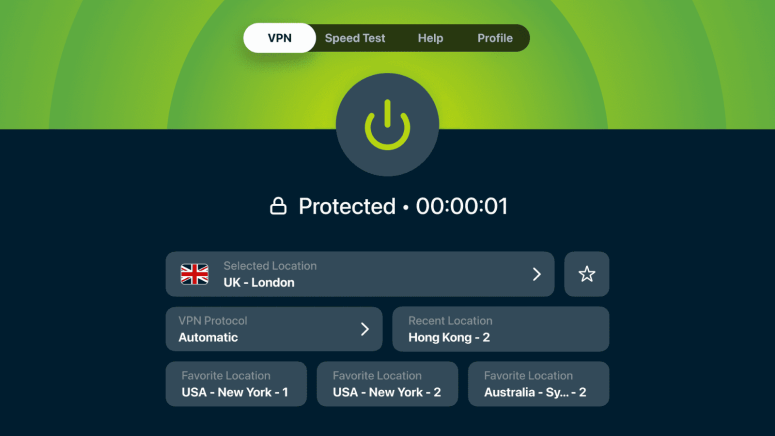
One of the biggest changes in the update is a redesigned home screen that places frequently used controls and information in a single view.
Users can now see the connection toggle, selected VPN location, current protocol, most recently used location, and favorite locations directly from the main screen. The layout has been optimized for TV remote navigation and follows a visual structure similar to ExpressVPN’s iOS app, creating a more consistent experience across devices.
The company says the redesign aims to help users access commonly used functions more quickly without navigating through multiple menus.
Favorite Locations Now Available From the Home Screen
The update also makes favorite VPN locations easier to access.
While the ability to save favorite locations was already available in the app, users previously had to open the Locations menu to use them. With the new update, saved favorites now appear directly on the home screen as quick-access tiles.
This allows users who regularly connect to the same servers to switch locations with a single click, eliminating the need to browse server lists or enter search terms using the on-screen keyboard.
Additional VPN Protocol Options Added
ExpressVPN has expanded protocol support within its Apple TV app.
Previously, users could choose between the company's Lightway protocol and an Automatic setting. The latest update adds support for WireGuard as well as OpenVPN in both UDP and TCP configurations.
According to ExpressVPN, Automatic remains the recommended option for most users and is generally expected to deliver the best experience. However, the new protocol choices provide additional flexibility for users who prefer manual control, are troubleshooting network-related issues, or have specific protocol preferences.
Built-In Speed Test Introduced
Another addition is a speed testing tool integrated directly into the Apple TV app.
The feature allows users to measure server performance without leaving the application. It can be used to check connection quality when a server appears slower than expected, evaluate alternative locations, or troubleshoot performance issues from the Apple TV itself.
The speed test is designed to provide quick performance insights and help users identify servers that may offer a better connection experience.
The updated ExpressVPN Apple TV app is available now through the App Store. Existing subscribers can access all new features by updating the app, with no additional setup or subscription changes required.
Related






Get expert insights on threats, breaches, scams, and security trends — delivered every Monday.
Most Popular






Get expert insights on threats, breaches, scams, and security trends — delivered every Monday.
Most Popular