When you purchase through links on our site, we may earn an affiliate commission. Here’s how it works.
4 Best VPNs with Antivirus in 2026


Our experts have reviewed 53 VPN providers, which were put through extensive rounds of testing. To learn more about that process, here’s how we review VPNs, where we explain our criteria and our policy of being fully transparent.
Cyberattacks have increased year after year, and 2026 will see even more attacks than ever before. Internet users need protection from viruses, malware, and other threats while downloading files, browsing the Web, viewing geo-restricted content, or accessing remote devices. Moreover, they want to keep their online activities private.
This makes it imperative to protect oneself with proper security and privacy measures by using the best VPN with antivirus. This type of VPN will keep you safe from online threats by blocking harmful websites, ads, trackers, and files. At the same time, it will ensure your sensitive personal information and activities are hidden through data encryption, among other methods.
In this article, we’ll share our top VPNs with antivirus features, in addition to explaining how to use one. Of course, we’ll also cover the differences between a VPN and antivirus, whether VPNs protect you from viruses, why you need a VPN plus antivirus, how to choose the best provider, and much more.
Best VPNs with Antivirus - Our Shortlist
- NordVPN – Our #1-Rated Best VPN with Antivirus
- CyberGhost – VPN with Antivirus and Optimized Servers
- Private Internet Access – Open-Source VPN with Virus Protection
- Surfshark – Antivirus VPN with Unlimited Connections
How to Use a VPN with Antivirus
To use a VPN with antivirus, you need to choose a VPN with built-in antivirus software, get a subscription, and install it on your device. Follow these steps to make things simple:
- Sign up for a VPN that includes antivirus protection (we recommend NordVPN).
- Download and install it on your device.
- Launch the VPN software and log in to your account.
- Open your VPN’s settings panel and turn on the antivirus feature(s).
- Connect to a VPN server of your choice and enjoy the extra protection.
The Best VPNs with Antivirus in 2026
When choosing the best VPN with antivirus, it’s important to make sure it fulfills certain criteria. Start by looking for providers that offer protection against malware and other viruses. They should have as many servers as possible in many locations across the globe and support obfuscation if you want to easily access geo-restricted content.
Look for exceptionally good security features, such as uber-strong protocols, robust encryption standards, a no-logs policy that ensures your chosen VPN doesn’t collect or save any of your data, a kill switch, split tunneling, and data leak protection. Furthermore, your selected VPN must deliver fast connections and consistent performance.
It is also important for a VPN to allow many simultaneous device connections per account and support a wide selection of devices and operating systems. Last but not least, make sure it offers a generous money-back guarantee and multiple customer support channels available at all times.
Based on the criteria mentioned above, here are the 4 best VPN and antivirus packages:
1. NordVPN – Our #1-Rated Best VPN with Antivirus
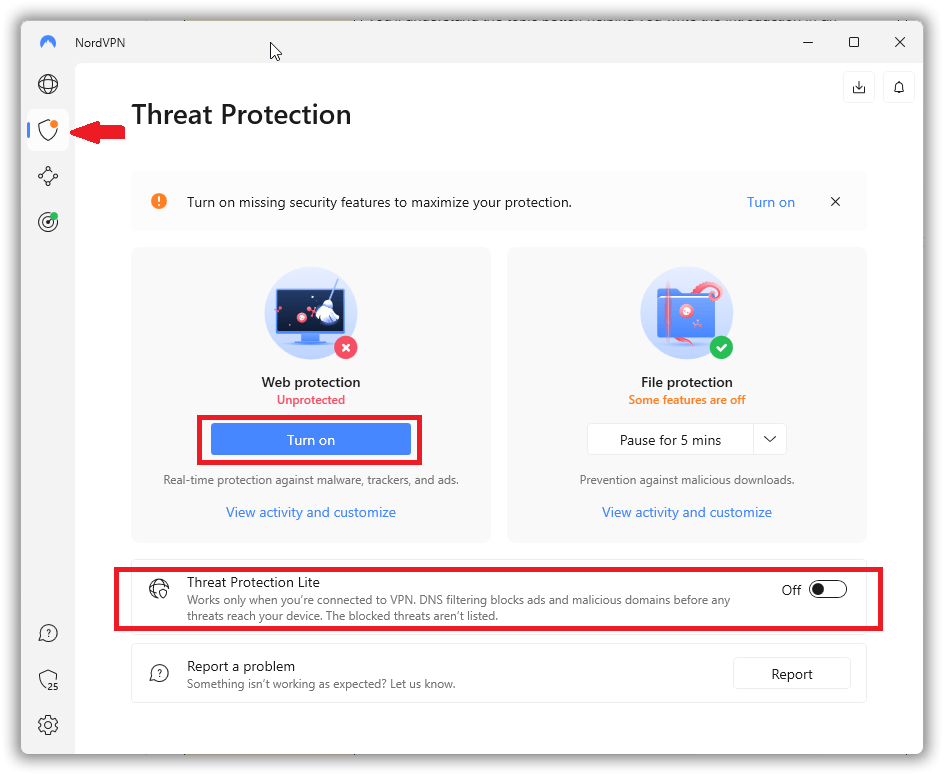
NordVPN is the best VPN with antivirus because it offers an antivirus feature named Threat Protection to secure users from cyber dangers. It scans downloads for malware and blocks malicious websites, ads, and trackers. At present, this feature only works on Windows and macOS devices, but it doesn’t need the VPN to be connected to work.
There is another version of NordVPN’s antivirus called Threat Protection Lite, which only works while connected to the VPN. It does not scan files for malware or block trackers, either. That said, it has expanded device compatibility, working with computers (Windows, macOS, and Linux), mobile devices (iOS and Android), and browsers (Chrome, Firefox, and Edge).
NordVPN ensures private and secure access to the Internet with its 5,700+ servers distributed across 60 countries. This VPN security software also has a strict no-logs policy, which guarantees that your online activities are not monitored, recorded, saved, or sent to third parties.
This provider supports three main tunneling protocols, including OpenVPN, IKEv2/IPsec, and NordLynx, for data transmission between client and server. What’s more, NordVPN uses the AES-256-CBC cipher, and NordLynx uses the ChaCha20 protocol to establish an encrypted connection and make your traffic unreadable to anyone.
NordVPN strives to provide the most secure experience with obfuscated servers and two types of kill switches: system-wide and app-based. On top of all that, it delivers reliable performance and fast speeds.
Other key features include 6 simultaneous connections per account and support for many different types of devices, including computers, smartphones, tablets, Smart TVs, gaming consoles, and routers. NordVPN also offers an iron-clad 30-day money-back guarantee, and 24/7 customer support, so you can get help with any issues or a refund if you so choose.
PROS
- Antivirus doesn’t cost extra
- Strong encryption and tunneling protocols
- Fast speeds and unlimited bandwidth
- No-logs policy
- 30-day money-back guarantee
CONS
- Cheaper alternatives are available
2. CyberGhost – VPN with Antivirus and Optimized Servers
CyberGhost has partnered with Intego to offer users antivirus software as part of CyberGhost Security Suite, their all-in-one privacy and security solution. This includes the VPN, the antivirus program, and its Security Updater tool. The bundle of VPN protection software is compatible with all versions of Windows.
This provider has more than 9,100 servers located in 90 countries. It also maintains a strict no-logs policy and doesn’t track, store, or sell your information. Plus, it employs excellent VPN protocols, like OpenVPN, IKEv2, and WireGuard, to provide you with reliable performance and fast connections.
CyberGhost also conceals your location and IP address and protects your Internet traffic with industry-leading 256-bit AES encryption. While it doesn’t have obfuscated servers, it features an automatic kill switch to block Web traffic if your connection ever drops.
CyberGhost offers 7 simultaneous connections—one more than NordVPN. Additionally, the VPN app is available on smartphones, computers, gaming systems, Smart TVs, routers, and more. Another benefit to this provider is that it offers a 45-day money-back guarantee and reasonable pricing. Lastly, its technical support via live chat feature is also quite helpful.
PROS
- Huge global server network
- Antivirus upgrade offered
- Servers for streaming/torrenting/gaming
- DNS leak protection available
- 45-day money-back guarantee
CONS
- Antivirus protection only for Windows
3. Private Internet Access – Open-Source VPN with Virus Protection
Private Internet Access (PIA) offers Antivirus by PIA as an add-on purchase. This includes a DNS-based ad blocker, a prevention engine for identifying and fixing computers’ built-in defenses, a cloud database of virus definitions, max-security quarantine, and detailed security reports. Like CyberGhost, this VPN plus antivirus is available only on Windows OS devices.
With thousands of servers in 84 countries, PIA has an independently audited no-logs policy. Plus, it uses only trusted, open-source VPN protocols like OpenVPN and WireGuard to protect your data. For encryption, it offers 128-bit or 256-bit AES ciphers.
PIA achieves obfuscation by rerouting VPN traffic through a proxy and includes a firewall-based kill switch function that ensures no data leakage. When it comes to speed, this provider only delivers average speeds, but it does have stable connections.
Furthermore, PIA is available on various devices like computers, smartphones, gaming systems, and routers—and it allows unlimited simultaneous connections. It also offers a 30-day money-back guarantee with all its plans. Moreover, there is a dedicated resource library, email support, and a 24/7 live chat feature so you can easily get help.
PROS
- Add-on antivirus available
- Split tunneling and multi-hop features
- Flexible encryption and protocol options
- Reasonable pricing plans
- 30-day refund period
CONS
- Antivirus available on Windows only
- Can be difficult to configure
4. Surfshark – Antivirus VPN with Unlimited Connections
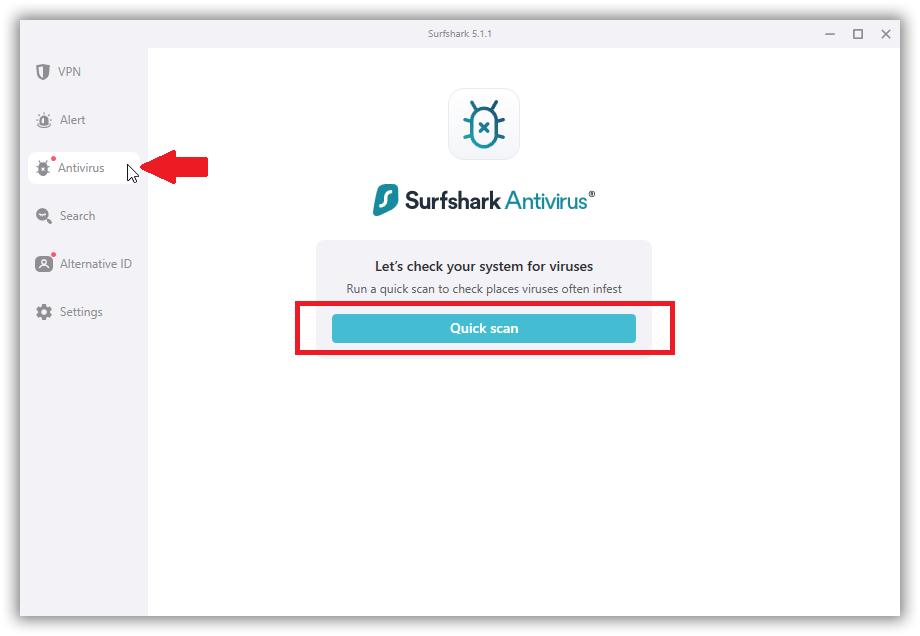
The last VPN on our list is Surfshark, which offers a cybersecurity bundle with an antivirus called Surfshark One. This all-in-one protection solution includes the VPN, the antivirus software, a global data leak detection system, and a private search engine. The comprehensive package is available for only Windows and Android users.
With over 3,200 servers in 100 countries, Surfshark offers multiple protocols (like OpenVPN, IKEv2, and WireGuard) on different platforms and uses 256-bit AES encryption to keep your data secure on all networks. Moreover, it’s a no-logs VPN, meaning it doesn’t track or store your online activities.
Surfshark’s Camouflage mode stops the VPN from leaving any identifiable traces through obfuscation. This VPN also features a dependable kill switch to disconnect you from the Web in case of server disruption. Known for its outstanding speeds and smooth connections on nearby and distant servers, it delivers very stable performance.
This VPN allows unlimited simultaneous connections on a single account and supports many different devices like smartphones, computers, Smart TVs, routers, and more. However, if it doesn’t work for you, Surfshark will give you a refund within 30 days of buying your subscription. Finally, there is customer support available 24/7 in case you need any help.
PROS
- Antivirus available with upgrade
- Impressive malware detection rates
- Powerful security features
- Super-affordable plans
- 30-day money-back policy
CONS
- Antivirus costs extra unlike NordVPN
What’s the Difference Between a VPN and an Antivirus?
While a VPN and an antivirus application are both cybersecurity tools, they differ in how they provide online protection. VPNs establish encrypted connections to keep your online activities and data secure, whereas antivirus programs guard devices from various viruses and malware through real-time protection.
A VPN conceals your IP address, Web traffic, and geographical location by creating a secure tunnel between your device and the server you connect to. It provides you with strong privacy to hide your browsing activities from third parties. Though a VPN alone doesn’t protect you against viruses, it encrypts your data, which provides safety against various attacks.
Since a VPN masks your IP address, it enables you to bypass geo-blocks and access banned websites and platforms in your region. VPNs also allow you to download files safely and anonymously and prevent your ISP from slowing down your service. In addition, you can use multiple connections on multiple devices with a single account.
Antivirus software, on the other hand, scans existing files for malicious code like malware and removes it. It also scans downloads to keep viruses from infecting devices and prevent identity theft. Plus, in addition to blocking phishing and securing online accounts with password encryption, antivirus can tune up your devices to keep them running smoothly.
Do VPNs Protect You from Viruses?
No, VPNs don’t directly protect you from viruses, but they can minimize their damage. For example, they encrypt your data and can reduce the harm that malware might do.
Cyberattackers use malware that communicates via open ports. Because VPNs block ports, this makes it challenging for malware infections to transmit data.
Furthermore, VPNs build anonymous, secure connections between your device and the server. Online traffic gets routed through this tunnel and protected from tracking or infiltration by third parties. This stops man-in-the-middle attackers from intercepting your traffic.
As malware-infected ads and websites can pose several risks, VPN services often include ad blockers that ensure you don’t click on anything ridden with malicious code. That said, if you are exposed to malware or another kind of virus by downloading an infected torrent file, for example, a VPN will not prevent it from infecting your device.
Why Do You Need a VPN with Antivirus Protection?
You need a VPN with antivirus protection for complete security of your device and data. While a VPN protects your data through encryption, an antivirus feature prevents cyber threats from infecting your device. One works at the network level, whereas the other works at the device level. Here is why using VPN security software with antivirus is advantageous:
- Privacy and Security – A VPN keeps your online activities and identity hidden using various data leak protection methods like strong encryption, secure tunneling protocols, and a kill switch. Plus, since no one will be able to track your movements, ads won’t be able to target you.
- Ad-Blocking – A suitable VPN will also have an ad-blocking feature that will prevent you from accessing unsafe websites or clicking on harmful ads. This means you’ll get real-time threat scanning while surfing the Internet, which can also help you avoid phishing attempts.
- Protection from Infection – Antivirus software will prevent you from downloading files infected with malware, viruses, or other malicious code. It scans all files during the download process and blocks them if it detects anything harmful.
- Full VPN Benefits – There are some antivirus providers that also offer VPN services, but their VPN capabilities are usually restricted, with minimal security features, low bandwidth caps, and limited server options. On the other hand, a VPN, including antivirus software, provides users access to the VPN’s full capabilities while also protecting themselves against viruses. Thus, they can access geo-blocked content without worrying about their devices getting infected with malicious code.
- Easy Management – An antivirus and VPN bundle gives you a more streamlined experience because you can control both programs from one interface.
- Unified Support – If you encounter any issues, you’ll only need to deal with one customer support team.
- Cost-Effectiveness – Instead of purchasing two separate software packages, a VPN plus antivirus protection included will often save you money.
How to Choose the Best VPNs with Antivirus?
To choose the best VPN with antivirus, you must consider different key features, such as the availability of antivirus support, server network size, and available security measures. Here are all the important criteria to consider when selecting a VPN plus antivirus solution:
- Antivirus Integration – The most important feature to look for is its antivirus software and how capable it is. The antivirus should provide robust protection against cyber threats like viruses, worms, malware, and ransomware. Moreover, it needs to offer this on as many different operating systems and devices as possible.
- Server Coverage – Another thing to consider is the number and distribution of servers worldwide. VPN protection software should have a large number of servers across as many countries as possible to allow for the smoothest, fastest connections no matter where you are physically located.
- Security – Go for a VPN that offers a high level of security, including impenetrable encryption standards, strong tunneling protocols, obfuscation, a kill switch, an ad-blocker, and many other data-protection features.
- Privacy – Privacy is of the utmost importance when using the Internet, so make sure you select a no-logs VPN that won’t collect, store, or share any of your data or activities.
- Performance and Speed – Make sure your chosen VPN provides stable, high-speed performance on both nearby and remote servers.
- Money-Back Guarantee – When choosing an antivirus and VPN bundle, go for the one that promises to return your money if you are not satisfied with its features. Usually, providers offer a money-back guarantee for 30-45 days.
- Customer Support – Consider VPN providers that offer 24/7 customer support through various channels, such as live chat and email. A well-populated FAQ section and detailed knowledge base are also helpful.
Final Thoughts
Increasing cyberattacks have made Internet users more concerned than ever about their privacy and security. They seek to keep their activities and data private while protecting themselves from threats like malware, viruses, and phishing so they can safely browse the Web, download files, and more. The best solution is a VPN and antivirus bundle.
We recommend NordVPN as the best VPN with antivirus because it offers robust, integrated antivirus software—and it’s the only provider that doesn’t charge extra for it. It also delivers stellar privacy features, strong security protocols, and fast connection speeds. With NordVPN, both your data and your devices will be protected.
We have come to the end of our guide on the best VPNs with antivirus. Don’t hesitate to comment below if you have any questions. Thanks for reading!