



IPVanish Introduces Incognito Mode for Threat Protection Pro on Windows and Mac
Published on June 18, 2026

Key Takeaways
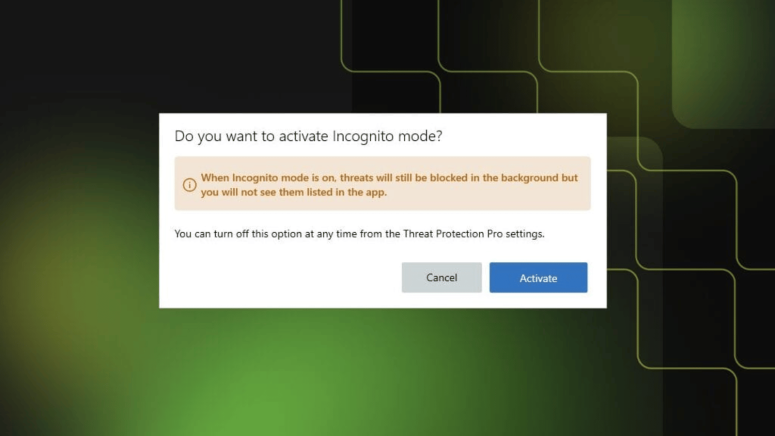
- IPVanish Incognito Mode: New security events stay hidden while Threat Protection Pro remains active.
- Protection Continues: Malicious websites, downloads, files, and network attacks are still blocked automatically.
- History Remains Available: Existing records stay preserved and reappear if Incognito Mode is disabled.
IPVanish has launched a new Incognito Mode for its Threat Protection Pro feature on Windows and Mac, giving users more control over how security activity is stored and displayed within the app.
The new setting is designed for users who prefer not to keep a visible record of threat detections and online security activity on their device. Once enabled, Threat Protection Pro continues to protect against malicious websites, harmful downloads, malicious files, and network attacks, but new security events are no longer added to the app’s local history.
What Changes for Users?
With Incognito Mode turned on, the Activity and Threat sections in the IPVanish app switch to a dedicated Incognito view. New threat detections and activity logs will not appear in these dashboards, helping users reduce the amount of security-related information stored locally.
The feature may be useful for people using shared computers or those who simply want greater privacy over their security activity.
Protection Remains Unchanged
While threat history is hidden, Threat Protection Pro continues to operate normally in the background. The service still blocks malicious websites, stops harmful downloads, detects network attacks, quarantines malicious files, and follows existing Allow List and security settings.
IPVanish says the feature only changes how information is stored and displayed within the application, not how protection works.
Users will also continue to receive important alerts for critical security events, including network attack detections and file quarantine actions.
Existing History Is Preserved
Enabling Incognito Mode does not delete previously recorded activity. Existing threat and activity records remain saved and can be viewed again if the feature is later turned off.
At the same time, quarantine records and Allow List entries continue functioning as usual while Incognito Mode is active.
The new feature is available through Threat Protection Pro settings in the latest versions of IPVanish for Windows and Mac.
Related




Get expert insights on threats, breaches, scams, and security trends — delivered every Monday.
Most Popular






Get expert insights on threats, breaches, scams, and security trends — delivered every Monday.
Most Popular