



IPVanish Introduces Threat Protection Pro for Always-On Device Security
Published on April 1, 2026

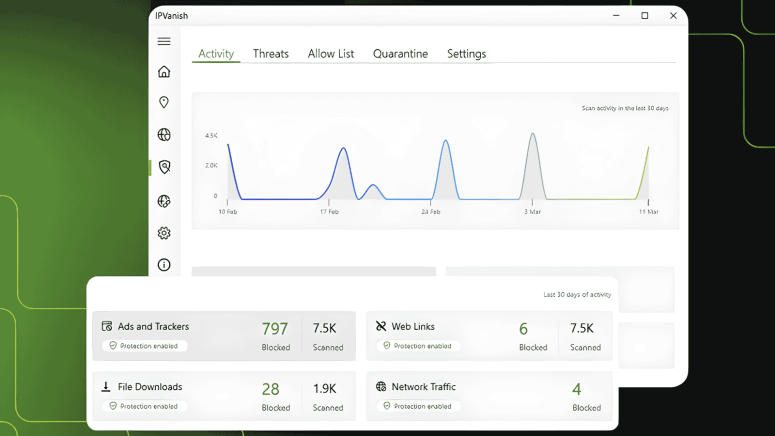
Key Takeaways
- IPVanish Threat Protection Pro launch: IPVanish Threat Protection Pro adds always on security blocking malware phishing ads trackers without VPN connection
- Advanced real time threat detection: Uses VIPRE engine to scan webpages files and network activity preventing threats before reaching devices
- Expanded cybersecurity platform: IPVanish moves beyond VPN offering integrated protection across browsing downloads and overall digital activity
IPVanish has announced the launch of Threat Protection Pro, a new security feature designed to expand its services beyond traditional VPN protection. The tool is built into the company’s apps for Windows and macOS and focuses on providing real-time protection against malware, phishing, malicious downloads, ads, and trackers.
Unlike standard VPN-based protections, Threat Protection Pro works independently of a VPN connection, offering continuous security even when the VPN is turned off.
Rising Online Threats Drive Need for Broader Protection
The company highlights that online risks have become more complex and widespread in recent years. Threats are no longer limited to suspicious websites but are now embedded in everyday online activities, including browsing, downloading files, and interacting with ads.
Malware hidden in downloads continues to be a major concern. Even files from trusted sources can be compromised, carrying harmful code disguised as installers, documents, or browser extensions. Once opened, such files can silently install spyware or steal personal information.
In addition, malvertising, malicious ads appearing on otherwise safe websites, can expose users to risks without requiring any interaction. At the same time, trackers collect browsing data, device information, and location details, raising both privacy and performance concerns.
According to IPVanish, these evolving threats can bypass traditional defenses, creating the need for deeper, real-time protection.
What Threat Protection Pro Offers
Threat Protection Pro is integrated directly into the IPVanish desktop apps and operates in the background. It continuously analyzes different aspects of user activity to identify and block threats before they reach the device.
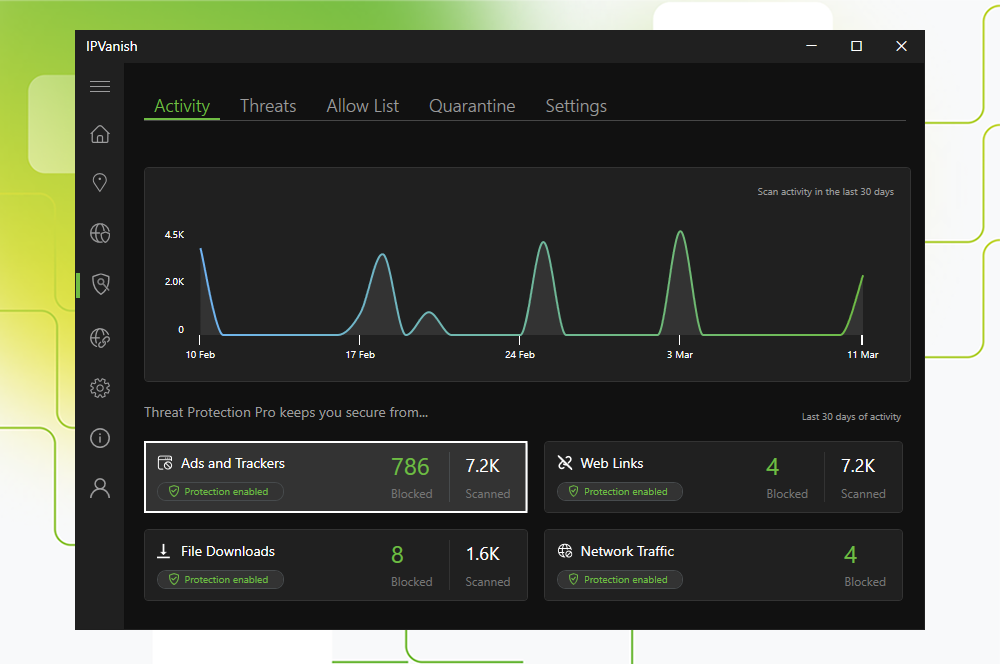
The system examines webpages before they load, scans files before they are opened, and monitors network activity for suspicious behavior, particularly on Windows devices. This allows it to prevent access to harmful websites, stop malicious downloads, and detect unusual system activity.
A key aspect of the feature is its always-on capability. Protection remains active regardless of whether the VPN is connected, ensuring continuous coverage.
The feature is powered by the VIPRE antivirus engine, which has been developed over more than 25 years. This technology is already used in other IPVanish tools such as Link Checker, QR Code Checker, and Secure Browser™, and now brings real-time threat detection into the main desktop experience.
VIPRE currently protects over one million devices globally and has received industry recognition, including an Advanced+ rating in AV-Comparatives’ November 2025 Real-World Protection Test, along with awards from Globee IT World Awards and Global Infosec Awards.
Key Features and How It Works
Threat Protection Pro runs automatically once enabled and applies real-time threat intelligence across browsing and downloads.
When active, it:
- Analyzes webpages before they load
- Scans downloaded files before opening
- Monitors system and network activity (Windows)
- Blocks or isolates threats automatically
For example, if a file hosted on a legitimate website has been compromised, the tool can detect the malicious content and prevent it from executing.
Additional benefits include continuous protection without VPN use, real-time malware detection, advanced phishing and scam identification, ad and tracker blocking, and network-level monitoring on Windows systems.
Difference Between Threat Protection and Threat Protection Pro
IPVanish continues to offer its standard Threat Protection feature, which is available across all plans and works through VPN-based DNS filtering. This version blocks malicious domains, ads, and trackers but requires an active VPN connection.
Threat Protection Pro, on the other hand, offers deeper security. It works without a VPN, includes page-level threat detection, scans files for malware, quarantines threats, and provides network monitoring. It also uses more advanced threat intelligence.
While standard Threat Protection is available on all platforms, Threat Protection Pro is currently limited to Advanced plans on Windows and macOS.
Availability and Setup
Threat Protection Pro is included with IPVanish Advanced subscriptions and is designed to run automatically after setup.
On Windows, users can enable it through the app’s navigation panel, where it installs and activates during first-time setup. On macOS, users need to install the feature, provide system permissions such as Full Disk Access and Network Extensions, and then activate it.
Once enabled, the system runs in the background without requiring further input.
The standard Threat Protection feature remains available on mobile and streaming platforms, including Android, iOS, Fire TV, and Apple TV.
Expanding Beyond VPN Services
With the introduction of Threat Protection Pro, IPVanish is positioning itself as more than a VPN provider. The company is moving toward a broader digital security model that combines privacy, threat detection, and device protection in one platform.
As online risks continue to evolve, the company suggests that integrated, always-on solutions like Threat Protection Pro are becoming increasingly important for everyday users.
Related





Get expert insights on threats, breaches, scams, and security trends — delivered every Monday.
Most Popular



Get expert insights on threats, breaches, scams, and security trends — delivered every Monday.
Most Popular