



‘EPI PDF Editor’ Pretends to Be a PDF Converter, Only Hijacks Internet Browsers Instead
Published on August 5, 2025

- Risks of free PDF tools: Free PDF tools often come with hidden risks, including the installation of additional unwanted programs.
- How they can compromise users: These tools can compromise user security and device performance through browser hijacking and more.
- Disguised as converters: EPI PDF Editor disguises itself as a PDF converter while operating as an intrusive web browser.
Free PDF software EPI PDF Editor includes deceptive practices and does not perform its advertised converter function but hijacks browsers, which makes it a potentially unwanted program (PUP), according to McAfee's latest insights.
Deceptive Practices Unveiled
Free PDF tools, such as EPI PDF Editor, often bundle unwanted applications during installation, including toolbars, browser extensions, and even replacement search engines.
These actions are typically pre-selected in installation prompts, silently altering browser settings or running hidden processes on the user's device.
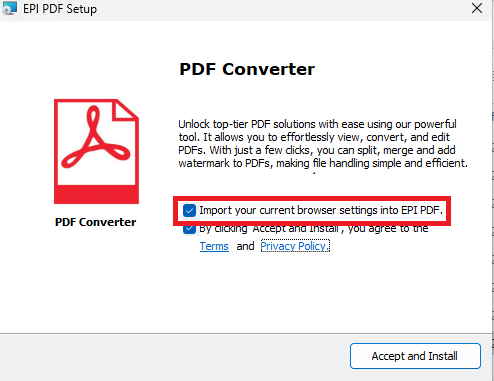
For example, McAfee's analysis highlighted how EPI PDF Editor disguises itself as a PDF converter, but the tool’s Privacy Policy and Terms say it operates as a web browser.
Further investigation revealed privacy policy conflicts and opt-out settings, such as pre-selected checkboxes to "import browser settings."
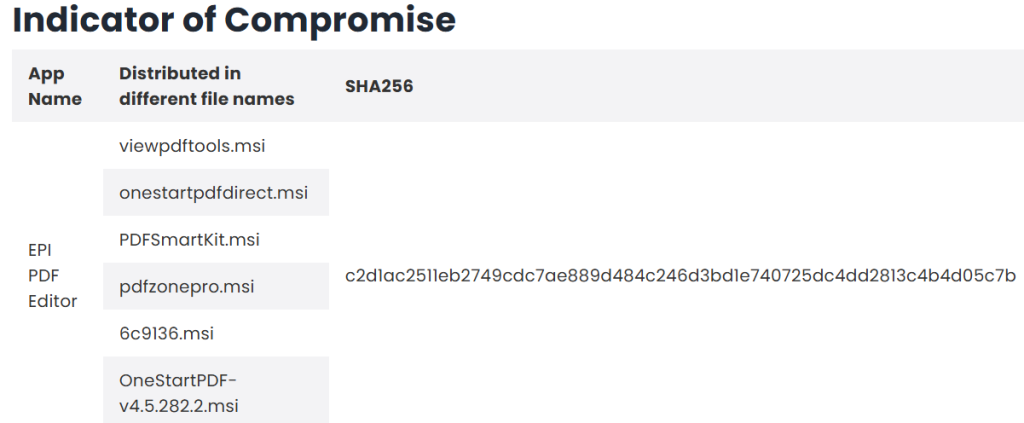
When the installation is complete, a Chromium-based browser opens with PDF actions that do not work, but it allows internet browsing by opening other tabs.
These hidden extras not only slow down system performance but also pose significant risks to user privacy, including unauthorized data collection and disclosure.
Potential Threats
These PUPs may not qualify as traditional malware, but their intrusive nature can degrade user experience and potentially expose sensitive information. The deceptive bundling of browser hijackers and background apps creates avenues for data exploitation.
In April, TechNadu reported on a Trojanized npm package posing as PDF converter that compromised Atomic and Exodus wallets.
Cybersecurity Tips
To protect against risks associated with free PDF tools, experts recommend the following steps:
- Use advanced installation options to identify and deselect unnecessary components.
- Download tools from official, trusted sources rather than ads or third-party sites.
- Rely on built-in PDF tools from operating systems like Windows or macOS.
- Regularly monitor and reset browser settings when experiencing unusual behavior.
Staying informed about these tactics and being vigilant during installations can help users bypass the dangers of EPI PDF Editor scams and other deceptive tools. Always think twice before you click "Next."
Related






Get expert insights on threats, breaches, scams, and security trends — delivered every Monday.
Most Popular
Get expert insights on threats, breaches, scams, and security trends — delivered every Monday.
Most Popular