




Hackers Clone U.S. Department of Education’s Grant Site in Credential Theft Campaign
Published on July 23, 2025
- The Target: Phishing sites are impersonating the U.S. Department of Education’s G5 portal to steal login credentials
- The Culprit: Attackers use lookalike websites, cloaked scripts, and cloned interfaces to trick users
- The Impact: Credential theft could lead to grant fraud, data exposure, and deeper federal compromise
The U.S. Department of Education's G5 portal has been targeted in a phishing campaign. The cyber attacks were discovered on July 15, and they involve several fraudulent domains impersonating the federal platform managing education grants and funding.
The incident came to light when PreCrime Lab, a threat research unit at BforeAI, discovered fake domains mimicking the G5.gov login page. Investigators quickly determined that the spoofing campaign aimed to impersonate a government system and steal user credentials.
The primary targets are speculated to be grant administrators, educators, and vendors whose accounts could be further exploited for lateral movement and scams.
Lookalike Domains to the U.S. Department of Education (G5)
The structure of the phishing pages gave an impression of being affiliated with federal systems.
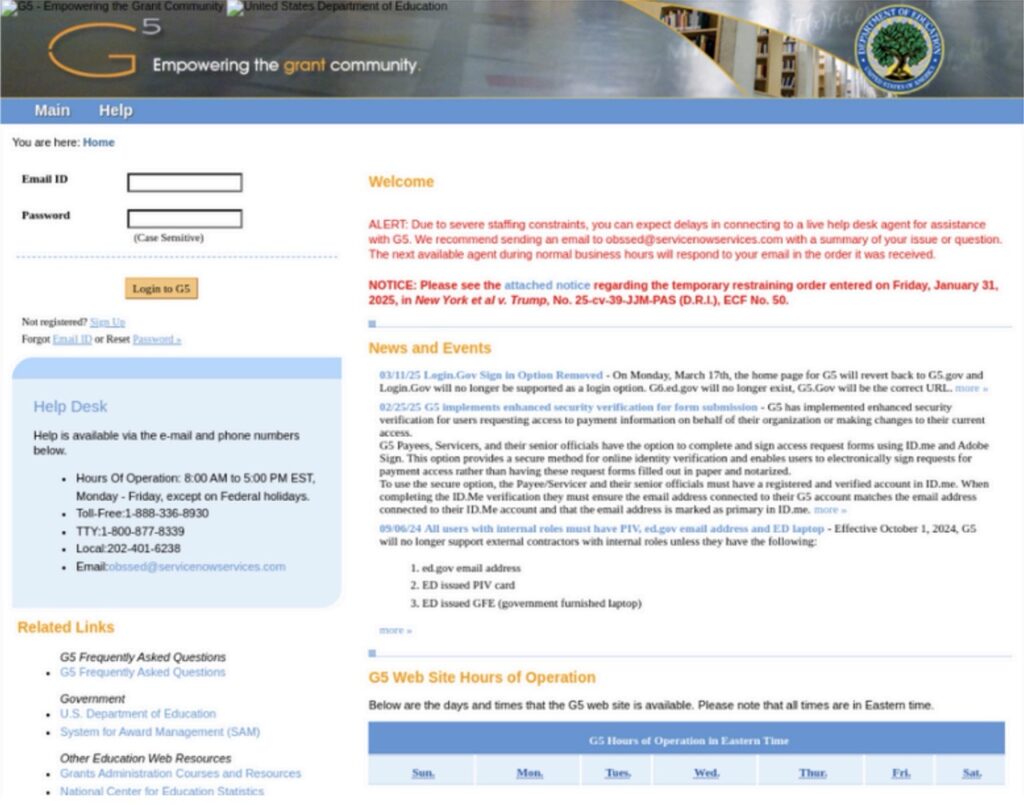
The login page of the G.5 portal was replicated to trick education professionals, grant administrators, and vendors tied to the U.S. Department of Education, the BforeAI report read.
The fraudulent domains and websites hosting phishing kits:
- mynylifeinsuraces.com
- mysoleverhrnix.com
- myizolvedpeopls.com
- myapdpetrol.com
- g5parameters.com
- g4parameters.com
What Researchers Found
Researchers noticed a compelling likeness in the visual design of the phishing platforms mimicking https://www.g5.gov. The pages also redirect to a /verify/ endpoint which likely leads to another phishing site or MFA bypass for easy loginmulti-factor authentication (MFA) bypass to facilitate unauthorized access.
These are the Other Findings About the G.5 Phishing Campaign
- The domains were fronted by CloudFlare CDN for obfuscation and uptime resilience
- Javascript-based credential exfiltration was used
- Included a case-sensitive login field to appear legitimate
- Stolen data was transferred via analytics.php
- The login process is simulated using an asynchronous updates.php loop
- Relied on browser-based cloaking and DOM manipulation in order to confuse automated scanners
Potential Threats and Impact to Guard Against
This phishing campaign could help attackers not only to access sensitive information but also to change payment instructions. They could impersonate recipients to commit fraud.
Moreover, the tactic could be leveraged to target federal infrastructure as part of a broader supply chain attack.
Another speculation the researchers made was that “these domains could be paired with phishing emails referencing ongoing layoffs or grant disbursement delays.”
“This activity is particularly alarming given the recent Trump Administration announcement of 1,400 layoffs at the Department of Education, which may create confusion and an opportunity for social engineering,” the report further noted.
Action Taken So Far
The Department of Education Office of the Inspector General (OIG) has been alerted about the phishing scam. BforeAI has officially flagged all the malicious domains which are now undergoing disruption, and shared critical threat intelligence with its partner intelligence ecosystems.
The possible reuse of assets, including favicon hashes, JS signatures, and others, is under continuous monitoring.
How to Prevent Threats
Phishing actors often replicate official login portals, including logo, layout, and URL structure to deceive users. In response to this trend, TechNadu approached the BforeAI for information on how to verify the legitimacy of a portal when confronted with spoofed logos and login pages.
Abu Qureshi, Threat Research and Mitigation Lead, BforeAI, responded by saying that it is technically possible to detect such threats, but it requires awareness and vigilance.
These are Qureshi’s recommendations:
- Verify the URL carefully – Look for minor spelling errors or use of misleading domain endings (e.g., .com instead of .gov). Legitimate portals like https://www.g5.gov use strict .gov domains.
- Check the SSL certificate – Click the padlock in the browser address bar and inspect the certificate. Official government sites typically have certificates issued to U.S. government entities.
- Use bookmarks – Rather than clicking links in emails, users should manually enter the official URL or use a trusted bookmark.
In addition, government employees must bookmark the official G5 postal and continue using it until all threats are fully mitigated. They must also be wary of clicking on any suspicious links or responding to emails that appear urgent or ask for personal information.
All malicious activity or communications should be reported to [email protected] or one’s agency’s cybersecurity team.
Related






Get expert insights on threats, breaches, scams, and security trends — delivered every Monday.
Most Popular
Get expert insights on threats, breaches, scams, and security trends — delivered every Monday.
Most Popular