



YouTube Introduces Hashtags for Easier Video Searches and Categorization
Last updated June 10, 2021

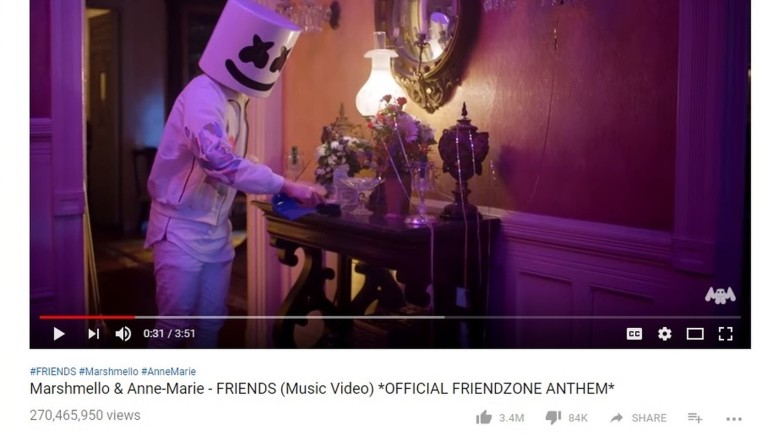
- With Twitter popularizing the use of hashtags for finding relevant social media content, YouTube is adopting the popular feature to find videos easily on the platform.
- Users will now be able to use hashtags in the search bar, which will make the platform’s search engine scan through video titles and descriptions to find relevant videos.
- Hashtags on the platform will be automatically hyperlinked so users can click on them and find related videos quicker than ever.
YouTube’s search functionality has been a hit or miss, and the video sharing platform’s algorithm is less than perfect with criticisms coming at the company from both YouTubers and users. With most social media websites adopting hashtags for quickly sorting content on their respective platform, YouTube is now adopting the feature for video titles and descriptions.
Metadata tags have been around on the internet for quite some time. Known as IRC or Internet Relay Chat. IRC was capable of categorizing messages, videos, images, etc. However, in October 2007 Nate Ridder created the first hashtag #sandiegofire to inform citizens about a spreading wildfire in the area. However, Stowe Boyd is said to be the first person to call the term hashtags and is credited with discovering the term. Twitter began using hashtags in 2009, and it became massively popular with websites like Facebook, Instagram, and Google Plus by following suit and adopting the feature.
Hashtags on YouTube are already live with only iOS users being left out temporarily. Google is yet to release an official statement on when hashtags will be live for Apple iOS users. Users can use the hashtags to search for videos that include the search terms in either the titles or descriptions. Clicking on a hashtag on YouTube will allow users to find more videos that contain the same hashtag, making it easier to find content than relying on YouTube’s hit-or-miss suggestions feature.
If you want to include a hashtag on your own videos, you simply need to add a ‘#’ before any word, and it will be added to your title or description. You can have up to 15 hashtags in a single video, and no spaces are allowed. Videos that include hashtags that are not relevant will be flagged, and uploaders will be asked to remove them. Any form of hate speech, fake news, vulgarity or violating content is also not allowed when using the hashtag feature.
What do you think about the hashtags feature on YouTube? Let us know in the comments below. Get instant updates on TechNadu’s Facebook page, or Twitter handle.
Related






Get expert insights on threats, breaches, scams, and security trends — delivered every Monday.
Most Popular

Get expert insights on threats, breaches, scams, and security trends — delivered every Monday.
Most Popular