


When you purchase through links on our site, we may earn an affiliate commission. Here’s how it works.
How to Watch ‘Sunnyside’ Online – Live Stream Season 1 Episodes
Last updated October 11, 2019

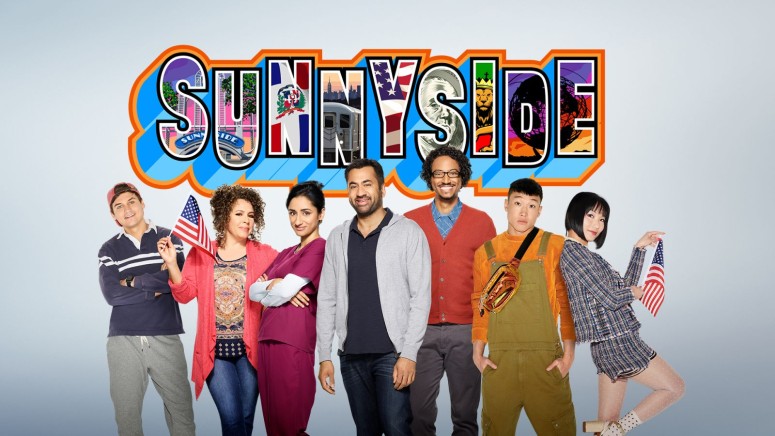
You know that when Kal Penn is involved in a movie, you're probably going to laugh a lot, so that's no different from Sunnyside, which has just premiered on NBC this fall.
Sunnyside is set in New York City and focuses on Garrett Modi who is a former City Councilman who lost his career following drug charges that were brought upon him. He then concentrates on teaching immigrants the civics lesson that they need to know in order to qualify as American citizens.
We would be honored if Jun Ho gave us his hand-me-downs. #Sunnyside pic.twitter.com/Mt4DVv5XTY
— Sunnyside (@NBCSunnyside) October 9, 2019
It is unclear exactly how many episodes the first season will have but we estimate that it is going to be around 20 or 22, much like other series that are featured on NBC. The episodes are 25 minutes long and we are quite certain that this is going to happen.
When and Where to Watch Sunnyside?
The first season of Sunnyside premiered on NBC on September 26th, 2019, and new episodes are broadcast by the station on Thursdays, at 9:40 PM.
How Can I Live Stream Sunnyside?
In this day and age, it is easier than ever to watch TV online so it's no surprise that if you want to watch NBC it's probably best that you use a platform such as fuboTV, which can help you watch the channel quite easily. There is a single bundle of channels available on fuboTV, but it features over 100 networks. Start your 7-Day free trial on fuboTV today!
On top of the main bundle, you can add a bunch of channel packs and various premium networks, to enable you to watch more channels. fuboTV works on Amazon Fire TV, Android and iOS phones and tablets, Android TV, Apple TV, Chromecast, Roku, and Samsung Smart TVs. (Note: fuboTV is a platform that only works in the United States so if you want to access it from abroad, you're going to need to use a VPN. Click here to learn how you can do this in just a few steps.)
Here's what you need to do to set up for fuboTV's 7-Day free trial so you can start watching Sunnyside:
- The first thing you have to do is to go straight to fuboTV's website and tap the "Start free trial" button.
- Then, you will have to provide your email address and password. Alternatively, you can also use the social login buttons from Facebook and Twitter.
- Then, you have to start customizing your platform by choosing the bundle that you're going to go for. fubo Standard is the main option and it includes nothing else but the channels, while Family, Family Deluxe, and Premium are additional plans that will enable you to mix up fubo Standard with extra channel packs and premium networks, offered at discount prices.
- Once you're done with making that choice, you can go ahead and add your own channel packs and premium networks, depending on your desires. You can also add some add-ons that will enhance your cloud DVR storage space and will give you another device to watch content on.
- The last step involves providing your credit card details so you can set up the payment process. You won't actually get billed until the 7-Day free trial is complete so you don't need to worry about that particular issue right now.
Other Ways to Watch Sunnyside
Hulu - The first thing you need to know about Hulu is that the subscription will also give you access to the video-on-demand library, not just dozens of channels. Talking of which, these are all organized in a single bundle and you will get to watch NBC quite easily. Start your 7-Day free trial on Hulu today! You can also customize your subscription by adding channel packs and premium networks.
Sling TV - We also have sling TV on the list, and you should know that it has three bundles in total. NBC is only part of two of these bundles, namely Blue, and Orange + Blue, and your choice will also influence the number of devices that you can enjoy the content on, as Blue subscribers get to watch content on the devices at once, while Orange + Blue subscribers can watch on up to four devices at the same time. Start your Sling TV subscription by saving 40% OFF the first month! There are a ton of channel packs and premium networks that you can add to your plan on Sling TV.
What Can I Do to Watch Sunnyside Outside of the United States?
Even though they may be quite annoying, licensing deals are in place because they have to protect the copyright of these shows that we all love watching, so they can't allow the broadcast to take place outside of the United States. Therefore, when using the services from anywhere else outside of the United States you're going to quickly find out that the platforms are all geo-blocked and you can't actually watch anything from abroad. The problem can be fixed somewhat easily with the help of a VPN, which can change your IP address and make the site believe you're still in the United States. We only recommend the very best so we will direct you towards ExpressVPN, which is easily one of the best on the market.
Here's how you can set up ExpressVPN and watch Sunnyside outside of the United States:
- The first thing you have to handle is subscribing to ExpressVPN (49% OFF) after visiting its website. The whole process is relatively simple to follow so you shouldn't have any issues in setting up an account. ExpressVPN offers a 30-day money-back guarantee so you can ask for a refund if there's anything that you don't enjoy about it.
- The next step involves downloading the app that was created for your device and installing it. Once the installation is done, you can launch the tool and log in to your new account to get things going.
- You have to choose a server that is located in the United States so you can connect to it.
- When the process is complete, you can load the fuboTV platform so you can start watching Sunnyside wherever you may be.
Can I Watch Sunnyside on the NBC Website?
The NBC website features a live stream, which means that you can watch Sunnyside on the website quite easily. The thing you have to keep in mind is that you will need to log in to an account by using credentials from your TV provider, which can either be a cable company or live TV service.
NBC also features an app that will enable you to watch the shows quite easily. (Note: Both the app and the website or geo-blocked so you will be needing VPN to enjoy any of the content when traveling outside of the country. Click here to learn how you can do this.)
Can I Watch Sunnyside With a TV Antenna?
That is also something that you will be able to do because NBC is a channel that broadcasts over-the-air, so you will be able to enjoy the content anywhere you have an antenna. Antennas are super popular with cord-cutters because they are cheap and they will get you access to a couple of dozen channels for free.
Before you purchase any device we advise you to check a site such as NoCable, which will tell you what channels are available over-the-air in your specific location, and how far the broadcasting stations are, so you can figure out what range you need your device to have. We've offered a bunch of suggestions and you can check them all out to see if you find the perfect fit, or if you need to search for others.
Can I Binge-Watch Sunnyside?
Sunnyside is available to watch on the NBC website right now, although not all episodes will be available for a long time. You should know that you can watch the episodes you missed for a couple of days without even having to log in to your account on the NBC website. You can also check out Sunnyside over on Hulu and start binging on the show.
Can I Purchase Sunnyside Episodes?
There have only been a few episodes of Sunnyside so far, but you can already purchase them from platforms like Google Play, YouTube, iTunes, Microsoft Store, Amazon Prime, and Vudu. Make sure to check all the links in case any of these platforms have a better deal for you at the time of the purchase.
We would love to hear back from you, so please drop us a note in the comments section below the article and tell us what you love most about Sunnyside so far. Share the article with friends and family so they can find a better way to enjoy TV as well, and follow TechNadu on Facebook and Twitter so you can read more great tech news, guides, reviews, and interviews.
Related


Get expert insights on threats, breaches, scams, and security trends — delivered every Monday.
Most Popular
Get expert insights on threats, breaches, scams, and security trends — delivered every Monday.
Most Popular