



This ‘Vote for My Friend’ WhatsApp Message Could Hand Over Your Entire Account by Abusing Linked Devices and the Wa.me Domain
Published


Key Takeaways
- Scam vector: A "vote for my friend" WhatsApp message from a hijacked contact pushes victims toward a fake voting page.
- Feature abuse: Attackers exploit WhatsApp's Linked Devices feature to authorize their own sessions without ever touching user passwords.
- Key indicator: Malicious redirects lean on the legitimate wa.me domain to appear trustworthy.
A WhatsApp account takeover scam that seizes full control of accounts without cracking a single credential. A Malwarebytes analysis draws on anonymized submissions to Malwarebytes Scam Guard, where WhatsApp now ranks as the third most common scam delivery channel, behind websites and email.
The "Vote for My Friend" Lure
It starts with a message that feels routine, asking you to support a friend or relative by voting in an online contest. The malicious message typically comes from a contact whose own account is already compromised.
The tone stays casual, sometimes urgent, built for a quick tap rather than a second thought. But the link redirects through something that looks WhatsApp-related – often riding on the legitimate wa.me domain to look trustworthy – and that's where the actual attack begins.
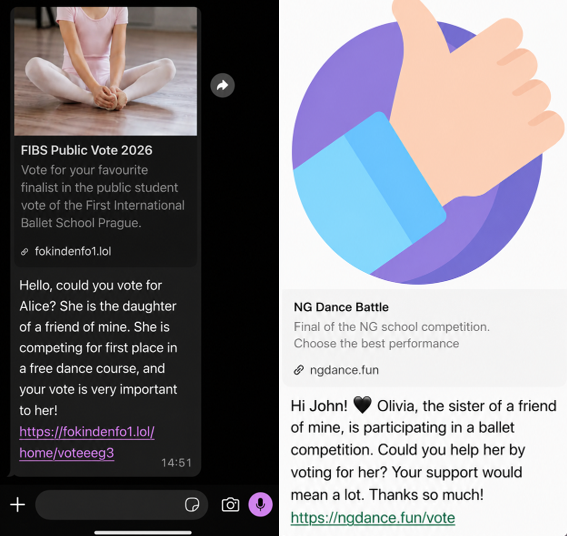
Known indicators of compromise include:
- ngdance[.]fun/vote
- fokindenfo1[.]lol/home/voteeeg3
- stardancer[.]fun/home/voteCZ03
- thebestscollato[.]top/home/scolatica
- vatiter[.]click/home/voteerok
- megadencer[.]top/home/eng10
Linked Devices Abuse Without Passwords
The campaign does not steal passwords, but hijacks WhatsApp's own Linked Devices feature, the same tool that lets you legitimately run WhatsApp on a laptop or browser, the report says.
Victims get walked through steps that resemble a normal WhatsApp Web setup, or are told to open Connected Devices and enter a code the scammer provides. That single action links an attacker-controlled device to the account.
How to Stay Protected
Because there's no conventional login involved, none of the usual warning signs show up. Once linked, the attacker can read messages, send messages that appear to come from you, and forward the same scam onward to your contacts.
WhatsApp scam victims are advised to:
- Check Settings > Linked Devices regularly, and log out of anything you don't recognize.
- Turn on two-step verification in WhatsApp for an extra layer of protection.
In July, a HermeticReader flaw (CVE-2026-48294) in Adobe's Acrobat extension exposed WhatsApp chats to any website.
Related






Get expert insights on threats, breaches, scams, and security trends — delivered every Monday.
Most Popular

Get expert insights on threats, breaches, scams, and security trends — delivered every Monday.
Most Popular