



Microsoft bypasses passwords for phone-based logins using an authenticator app
Last updated September 25, 2021

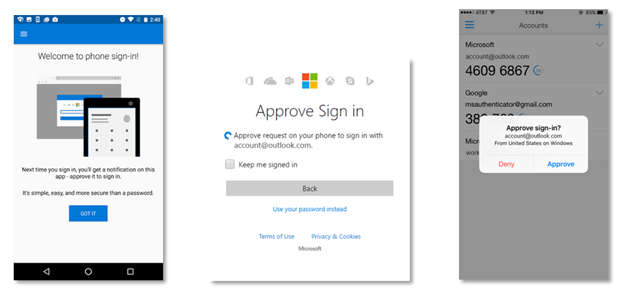
Recently, Microsoft announced the new phone sign-in feature which is a fast and secure way to sign- into your account without using any password.
The company allowed this feature to public users last month and now they have enabled it to all Microsoft accounts. If you want to use this feature, first add your Microsoft account to the Android or iOS Microsoft Authenticator App.
With phone sign-in, we’re shifting the security burden from your memory to your device. Just add your account to the Android or iOS Microsoft Authenticator app, then enter your username as usual when signing in somewhere new. Instead of entering your password, you’ll get a notification on your phone. Unlock your phone, tap “Approve”, and you’re in.
Here’s how you set it up:
- If you already use the Microsoft Authenticator for your personal account, select the drop-down button on your account tile, and choose to Enable phone sign-in.
- If you are adding a new account on an Android phone, we’ll automatically prompt you to set it up.
- If you are adding a new account on an iPhone, and we’ll automatically set it up for you by default.
In case, you have already use the Microsoft Authenticator app for your personal Microsoft account, follow this steps as, "select the drop-down button on your account and choose to Enable phone sign-in".
The whole process is "easier than standard two-step verification and significantly more secure than only a password". Microsoft said.
Related






Get expert insights on threats, breaches, scams, and security trends — delivered every Monday.
Most Popular






Get expert insights on threats, breaches, scams, and security trends — delivered every Monday.
Most Popular