

How to Turn ON ‘Find My iPhone’ on iPhone X?
Last updated June 16, 2021

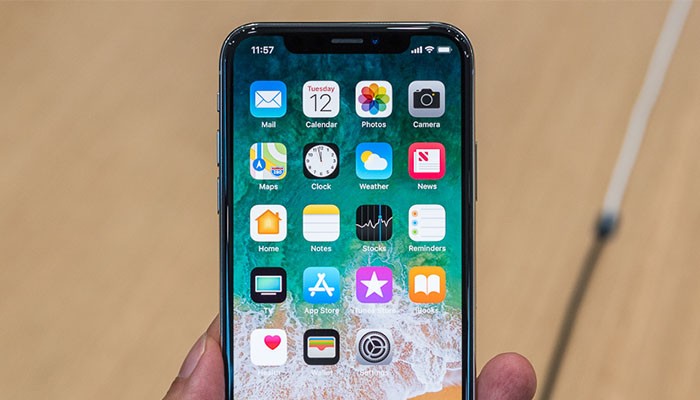
Long-term iOS users know all about the 'Find My iPhone' feature. It allows you to track different iOS devices and as such, it can be a life-saver at times. No matter if you lose or misplace your iPhone X, or if it gets stolen, you can use this feature to find your device's whereabouts. This is why we'll tell you how to turn ON 'Find My iPhone' on iPhone X?
How to Turn ON 'Find My iPhone' on iPhone X?
This is a very capable feature can be used across a range of iOS devices, as well as on Mac computers and on the Web. However, the first thing you need to do is to enable it on your iPhone. Here's how it's done on your brand new, and home button-free, iPhone X:
- Open the Settings app on your iPhone X;
- Now tap on your username (Apple ID) at the top;
- Select 'iCloud';
- Scroll down until you see an option that says 'Find My iPhone';
- Tap to enable this feature.
How to Use 'Find My iPhone' on iPhone X?
Now you know how to turn ON 'Find My iPhone' on iPhone X. What you need to know is that you can do this for several iOS devices. This can be useful for your entire family since you can use this feature remotely access devices and make certain adjustments.
Here's how you can use 'Find My iPhone';
- Download or launch the Find My iPhone app on your device;
- Log in using your iCloud credentials;
- Now tap on the name of the device that you want to track;
- Finally, you can perform different operations if you click on 'Actions'.
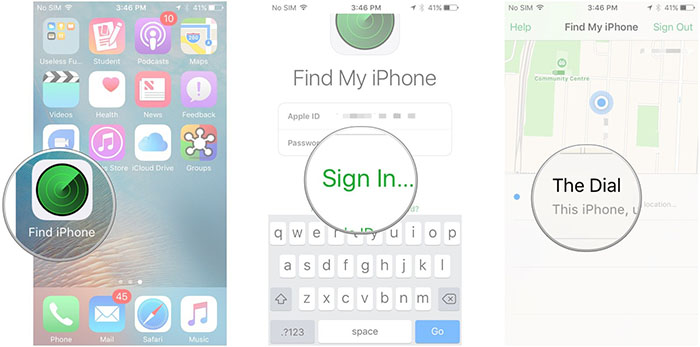
Image Credit: iMore.com
How to Access 'Find My iPhone' On The Web
In case you have a single iOS device, you can't use the Find My iPhone app to track it. However, if you lose your phone, you can access this option on the Web:
- Go to www.icloud.com in any Web browser;
- Log in using your iCloud account;
- Click on the 'Find My iPhone' option in the main menu;
- Sign-in if prompted;
- Click on 'All Devices' at the top of the screen and then pick the device you'd like to track.
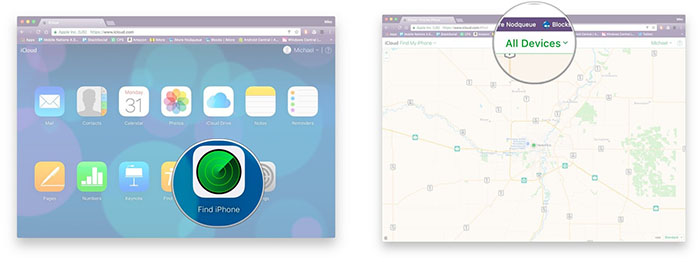
Image Credit: iMore.com
Summary
As you can see, there are different ways to track your lost or stolen device. We are glad you asked how to turn ON 'Find My iPhone' on iPhone X since we're sure you'll find it to be very useful.
In case you think this article could be of use to other iOS users, why not share it on Facebook and Twitter. Furthermore, you can use the comments section below to talk to us.
Related






Get expert insights on threats, breaches, scams, and security trends — delivered every Monday.
Most Popular



Get expert insights on threats, breaches, scams, and security trends — delivered every Monday.
Most Popular