

When you purchase through links on our site, we may earn an affiliate commission. Here’s how it works.
How to Sign Up for YouTube TV Free Trial in 2026
Last updated March 22, 2022

If you're interested in YouTube TV and want to enjoy a free trial first to see what the service has to offer, you are in the right place. Free trials attract new customers and let them test the services before deciding to make a payment, so almost all of the live TV and streaming platforms nowadays have them on offer. This is one of the best options when it comes to streaming services on the market right now, offering plenty of channels and some nice perks for a great price. So if you're interested in details regarding the YouTube TV free trial, we have all the information you may need.
Before moving on, we should mention that YouTube TV is geo-restricted. This means you can create a subscription to the service, use the platform, or take advantage of any of its offers only while you are within the United States borders.
Does YouTube TV Have a Free Trial?
Yes, at the moment, YouTube TV does have a free trial. The streaming platform has a single main plan, and it starts with a free trial, so read on to find out more.
- YouTube TV base plan free trial
- Add-ons free trial
You can also create a YouTube TV account and enjoy a free trial through a third-party bill if you:
- are a Comcast customer with an Xfinity Flex or an eligible X1 device.
- have an existing Roku account and a supported Roku device.
- have an existing Amazon account and a supported Amazon device.
- have an existing iTunes account and a supported Apple TV or iOS mobile device.
How Long Is the YouTube TV Free Trial?
Usually, YouTube TV offers a 7-day free trial that you can take advantage of quite easily as long as you are a new customer. However, the length of the free trials varies, so you may find different deals, such as a 5-day free trial with a price reduction for the first few months when it comes to the subscription fee.
For add-ons:
- 4K Plus - free for 30 days
- VSiN - free for 30 days
- Acorn TV - free for 14 days
- ALLBLK - free for 14 days
- AMC Plus - free for 7 days
- Cinemax - free for 7 days
- Comedy Dynamics - free for 7 days
- CONtv - free for 7 days
- Docurama - free for 7 days
- Dove - free for 7 days
- Fandor - free for 7 days
- FOX Nation - free for 7 days
- HBO Max - free for 7 days
- Hallmark Movies Now - free for 7 days
- IFC Films Unlimited - free for 7 days
- Law & Crime - free for 7 days
- NBA League Pass monthly - free for 7 days
- Outside TV Features - free for 7 days
- Pantaya - free for 7 days
- Screambox - free for 7 days
- ScreenPix - free for 7 days
- Sports Plus (Includes NFL RedZone, beIN SPORTS, FOX Soccer Plus, VSiN, Outside TV+, PokerGO+, MAVTV, TVG, Stadium, GOLTV, Billiard TV, SportsGrid, PlayersTV) - free for 7 days
- UP Faith & Family - free for 7 days
- CuriosityStream - free for 5 days
- Epix - free for 5 days
- Showtime - free for 5 days
- Shudder - free for 5 days
- Starz - free for 5 days
- Sundance Now - free for 5 days
How to Get a YouTube TV Free Trial?
This platform heavily advertises its free trial, so it's pretty easy to get one. Here's a step-by-step guide on how to get a YouTube TV free trial. However, we should mention that only new customers benefit from this offer.
1. To sign up, go to the YouTube TV website and use the Try It Free button.
2. A pop-up will appear asking you to log in to your Google account, so select one from the list to continue or enter your Google account info if you're asked to.
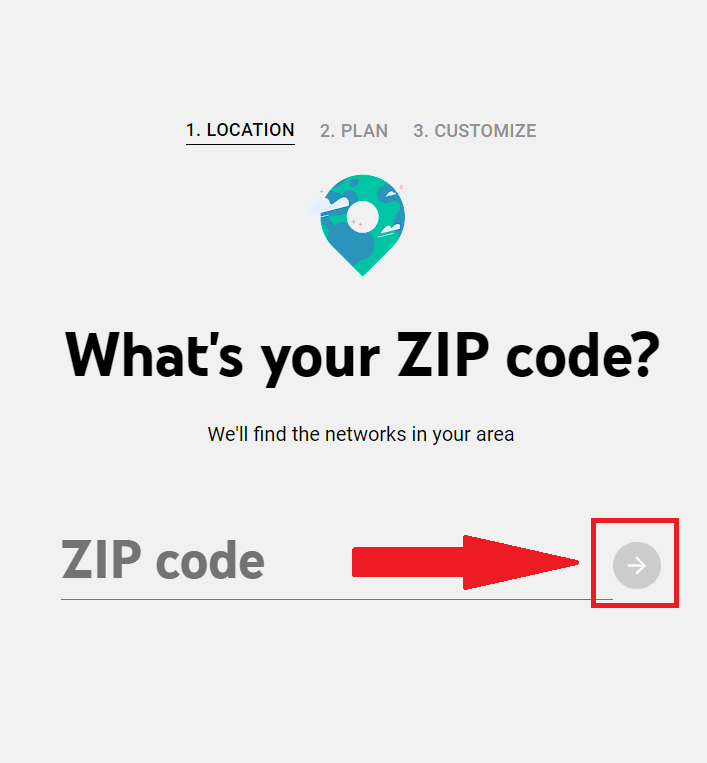
3. Step 1 is to fill in your ZIP code and then use the round Arrow button to move to the next step.
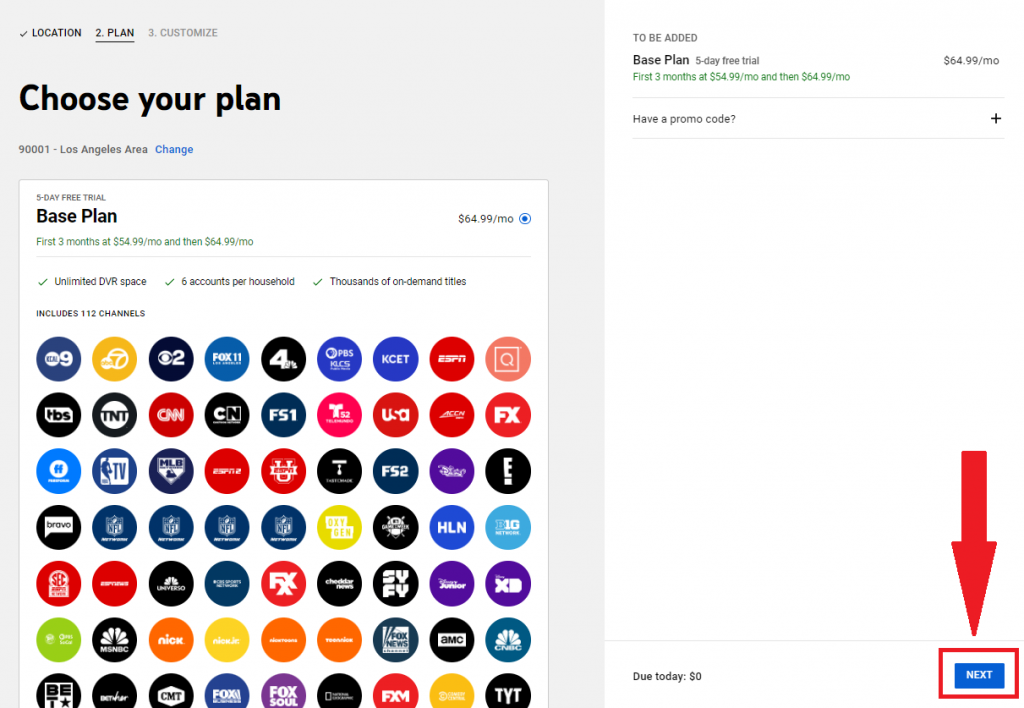
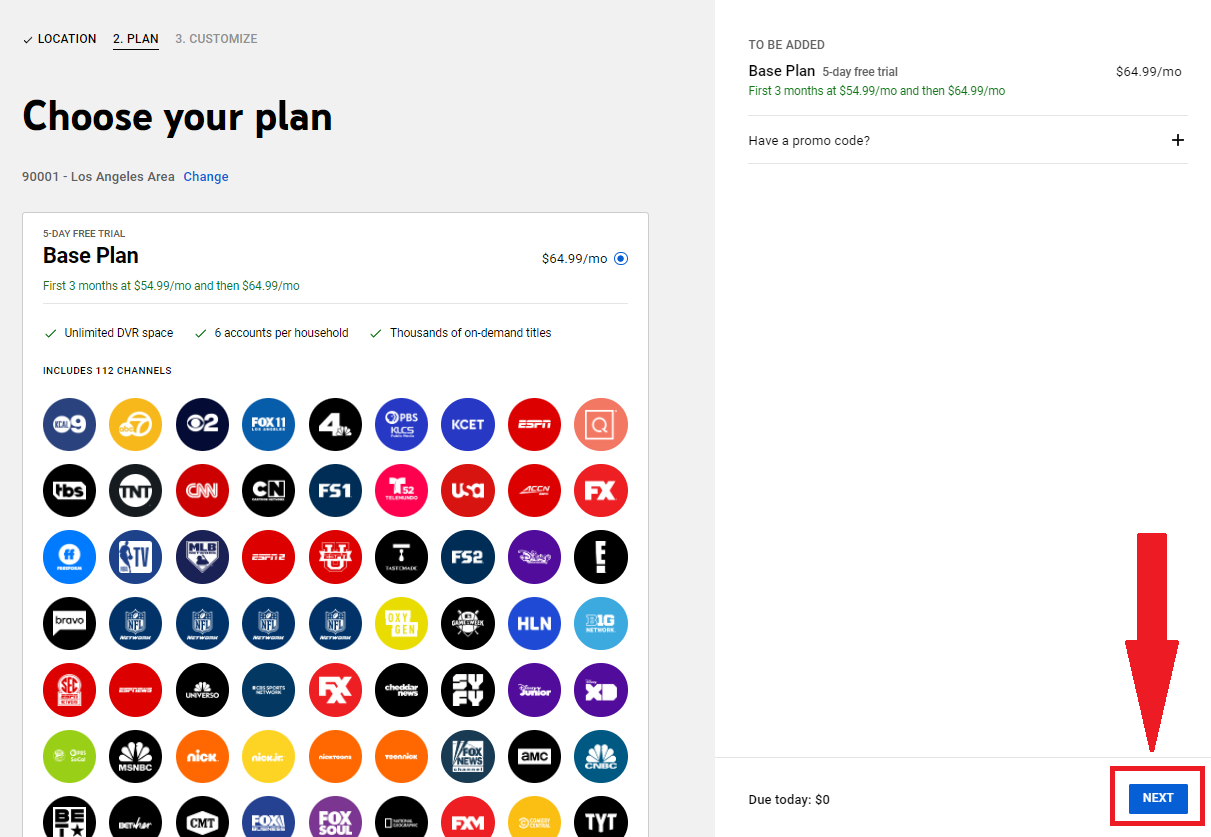
4. For Step 2, you don't really have to select the desired plan since there's only one plan on YouTube TV, so just click the Next button.
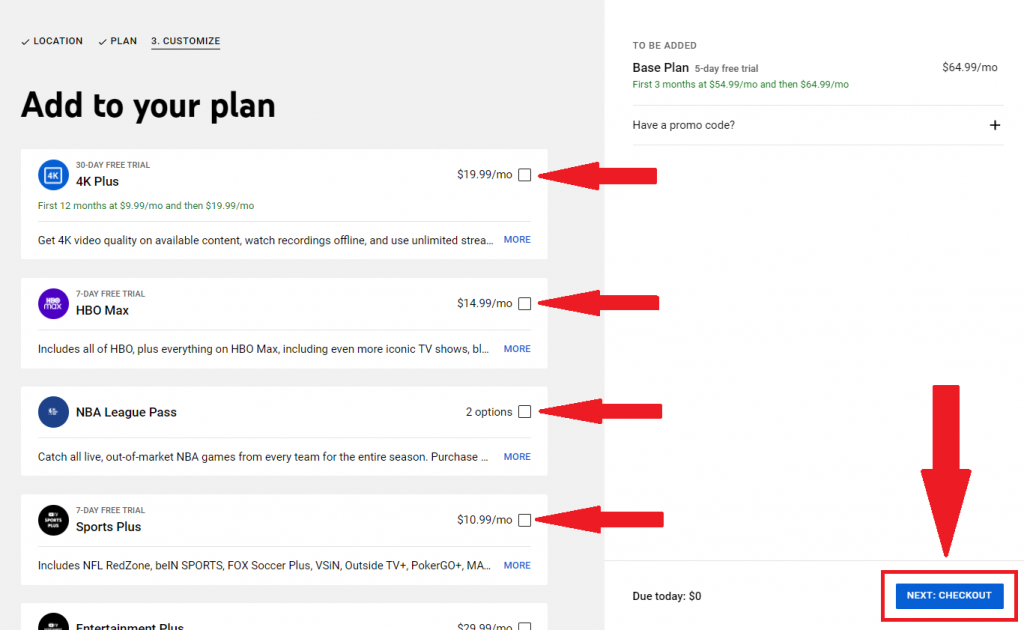
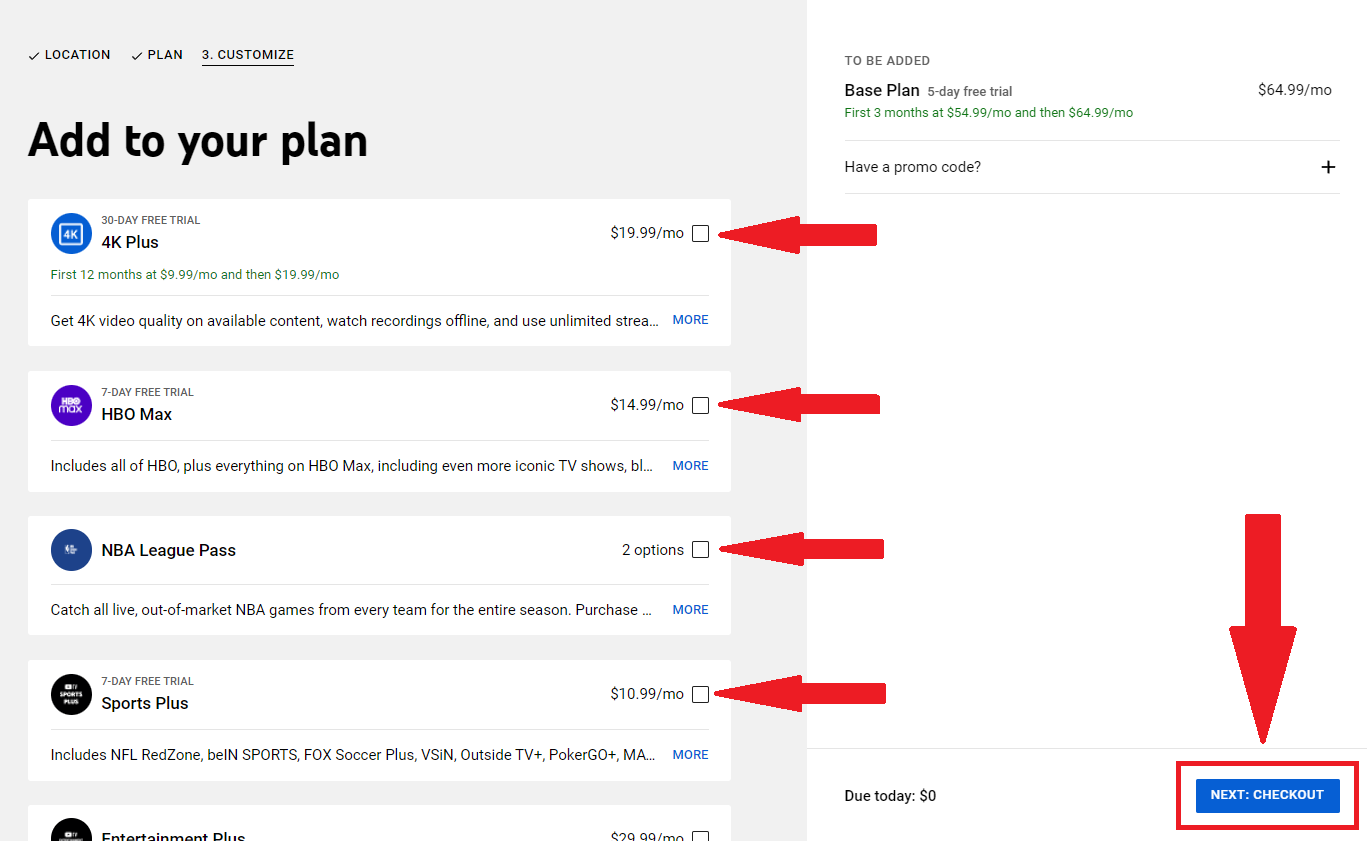
5. Step 3 is where you can customize your subscription and add various add-ons. Keep scrolling down because there are a lot of them, and you will find the available trial length for each just above their names. Click the box for each desired add-on and click the Next: Checkout button to move on to the final step.
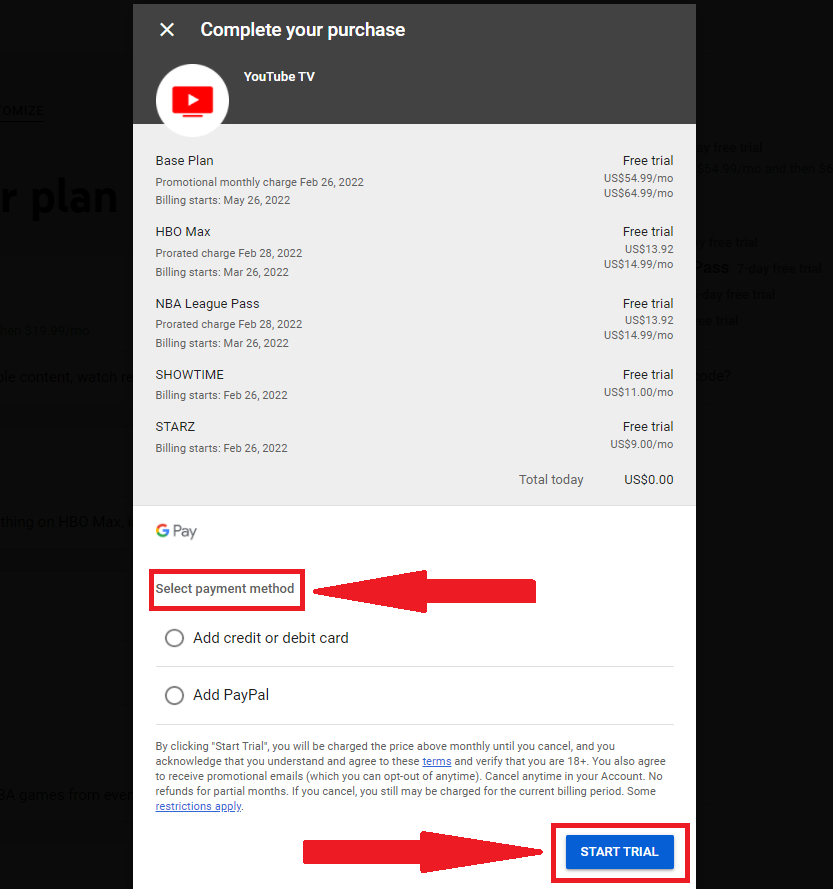
6. The final step is to select a payment method, so select Add credit or debit card and enter your details or Add PayPal to complete your registration and use the Start Trial button to finish the process.
7. Finally, you can access YouTube TV on all your compatible devices for free for the length of the trial.
Keep in mind that some add-ons have a longer free trial period than the base plan, so if you decide to keep the subscription when the base plan subscription trial ends, you will still be able to enjoy the add-ons you selected that were listed to have 14 or 30 days of a free trial.
Is YouTube TV Free on Roku?
You can get YouTube TV free on Roku if you are a new customer, you just need to use your Roku.com account to sign up for your free trial on YouTube TV. It is usually 7-days long, but it can be 5 days sometimes, depending on their current deals.
The first thing to do is download and install the YouTube TV app onto your Roku. When you open YouTube TV, you'll see a button that says "Try It Free." Select the free trial button and follow the steps to create your account.
What Does the YouTube TV Free Trial Offer?
The YouTube TV free trial offers everything the streaming platform's base plan has available, with no limitations to what you can access or the included perks. This way, you can truly test it and see whether you like it. With a free trial, you get access to the following on YouTube TV for the length of your trial period:
- Over 85 top channels, including PBS, BET, Comedy Central, MTV, and Nickelodeon
- NFL, NBA, and MLB networks
- Unlimited cloud DVR storage space and rewind, fast forward, and pause capability
- 3 streams and 6 accounts per household
Moreover, you can also sign up to try extras before adding these to your YouTube TV membership, such as Premium add-on networks, like HBO Max, Showtime, EPIX, and several more.
To get the most value out of a current free trial, use the limitless DVR feature to record shows, movies, and sports to your YouTube TV library. Here are a few of the benefits of unlimited DVR:
- There's no limit on storage space, so you can record as many programs as you want.
- Enjoy live and on-demand programs you want to watch at the time that’s best for your schedule.
- Access all recordings from the Library tab - just hit the button below any airing to add it to your library.
- You can share YouTube TV with your family since your membership includes up to 5 additional accounts for your household. Each family member gets a unique profile and personal DVR, so you can build your own library of things to watch. You can also create a YouTube TV family group.
What Channels Come With the YouTube TV Free Trial?
As we mentioned before, some channels in the library differ depending on the ZIP code you entered since several of them are regional networks. Here are some of the channels you will enjoy during your YouTube TV free trial:
- ABC
- AMC
- BET, BET Her
- Cartoon Network
- CBS
- Cheddar News
- CNN
- Comedy Central
- Disney Channel
- Disney Jr
- Disney XD
- E!
- ESPN
- ESPN2
- ESPNU
- Food Network
- Fox
- FS1
- FX
- FXX
- Galavision
- Hallmark Channel, Hallmark Drama, Hallmark Movies & Mysteries
- HGTV
- MLB Network
- MTV, MTV 2, MTV Classic
- Nat Geo
- NBA TV
- Nickelodeon
- Nick Jr.
- Nicktoons
- Olympic Channel
- Oxygen
- Paramount Network
- Smithsonian Channel
- SyFy
- TBS
- TeenNick
- TLC
- TNT
- Tru TV
- TV Land
- Universal Kids
- USA Network
- VH1
Can You Get a YouTube TV Free Trial Without a Credit Card?
In order to sign up for a free trial on YouTube TV, you must provide a future form of payment. The available options are the following: fill in your credit or debit card details or add a PayPal account. So the answer is no, you cannot get a YouTube TV free trial without a credit card.
But keep in mind that you can cancel at any time. Besides, if decide you don't want the subscription, you can check the length of the remaining free trial for your account and cancel before the trial ends in order to avoid being charged.
Will the YouTube TV Free Trial Automatically Renew Into a Subscription?
Most of the time, the point of asking for payment details upon subscribing for a free trial with a service is to make the transition to a paid subscription seamlessly after the testing period comes to an end, so yes, the YouTube TV free trial automatically renews into a subscription, and this happens with most of the live TV and streaming platforms.
It means that when your free trial period is over, your YouTube TV account will automatically switch to a paid membership unless you cancel before that happens.
At that point, the payment method you entered will be charged the standard price for your first month of the YouTube TV base plan. Also, you will be charged for any subscriptions you've added to your YouTube TV membership when their respective free trial ends. The date when your free trial ends will become your monthly billing date from now on.
How Much Does YouTube TV Cost After the Free Trial?
When your account switches from a free trial to a paid membership, you’ll be charged the standard price for the base plan (plus any add-on networks you’ve subscribed to). You will pay the price shown for the plan and the add-ons you picked upon subscribing.
This means you will pay the following amounts for the YouTube TV plan: $64.99 per month (+ tax) if there's no special deal available upon subscribing or the first 3 months will cost $54.99 per month and then $64.99 per month if the promotion is running.
For add-ons, after their respective free trial ends, the following amounts will be added to your base plan monthly subscription fee:
- 4K Plus - $19.99 per month
- VSiN - $3.99 per month
- Acorn TV - $6.99 per month
- ALLBLK - $5.99 per month
- AMC Plus - $6.99 per month
- Cinemax - $9.99 per month
- Comedy Dynamics - $4.99 per month
- CONtv - $4.99 per month
- Docurama - $4.99 per month
- Dove - $4.99 per month
- Fandor - $3.99 per month
- FOX Nation - $5.99 per month
- HBO Max - $14.99 per month
- Hallmark Movies Now - $5.99 per month
- IFC Films Unlimited - $5.99 per month
- Law & Crime - $1.99 per month
- NBA League Pass monthly - $14.99 per month
- Outside TV Features - $4.99 per month
- Pantaya - $5.99 per month
- Screambox - $4.99 per month
- ScreenPix - $2.99 per month
- Sports Plus (NFL RedZone, beIN SPORTS, FOX Soccer Plus, VSiN, Outside TV+, PokerGO+, MAVTV, TVG, Stadium, GOLTV, Billiard TV, SportsGrid, PlayersTV) -$10.99 per month
- UP Faith & Family - $5.99 per month
- CuriosityStream - $3 per month
- Epix - $6 per month
- Showtime - $11 per month
- Shudder - $6 per month
- Starz - $9 per month
- Sundance Now - $7 per month
How to Cancel the YouTube TV Free Trial?
You're free to end the trial at any time to avoid being charged if you feel like YouTube TV isn't what you were looking for. If you cancel during your free trial, you'll lose access to YouTube TV immediately upon cancellation, including any add-ons you may have, so you will not be able to receive the remaining days of your trial.
If you accidentally cancel your free trial, you cannot undo this.
Free trial lengths can vary, so be sure to double-check how much time is left on your free trial. You can do this at any point during the free trial period by going to Settings in the YouTube TV app.
- Open the YouTube TV app.
- In the top-right corner, select your profile photo.
- Select Settings and then Membership, where you can see the number of days remaining on your free trial until your account will convert to a paid membership - and also the remaining days of the add-ons' free trials.
To cancel, log in to your YouTube TV account and follow the instructions. Here is how to cancel the YouTube TV free trial:
- Open the YouTube TV app on your Android device, or go to YouTube TV on a web browser.
- Select your profile photo.
- Go to Settings, and then Membership.
- Click Manage.
- Click Cancel membership, and then click Cancel.
If you forgot to cancel your free trial and got charged, you can get a refund. All you have to do is to request a refund, and if it is granted, your money will be returned and you'll lose access to YouTube TV immediately.
Related






Get expert insights on threats, breaches, scams, and security trends — delivered every Monday.
Most Popular


Get expert insights on threats, breaches, scams, and security trends — delivered every Monday.
Most Popular