

How to Restore your Old iPhone to your New iPhone X
Last updated June 16, 2021

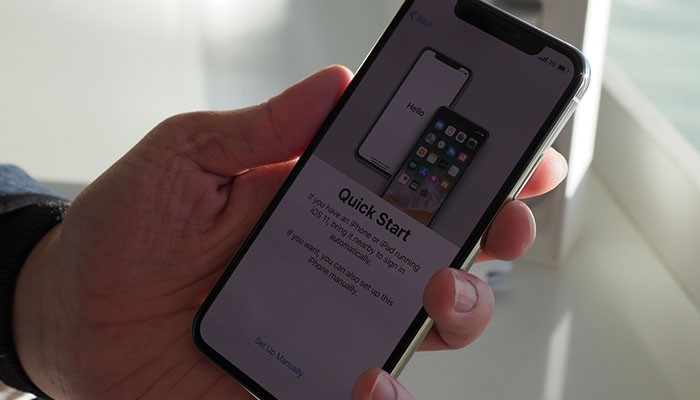
If you are one of the lucky people who managed to acquire the new iPhone X, the first thing you need do is to transfer your data from your old iPhone to your iPhone X. Luckily, there is a tool that can enable you to safely transfer your data in an instant. Phone Transfer is the all-in-one data transfer program that can directly and effectively transfer all the data including music, contacts, photos, videos, text messages, calendars, apps and other files to your iPhone X. You can also restore the data from iTunes/iCloud backup files. Here is a guide on how to restore your old iPhone to your iPhone X with Phone Transfer.
How to Restore Your Old iPhone to Your iPhone X
Let's take a look at the easiest methods of resting your old iPhone to the one you've recently purchased.
Use Quick Start
Since your new iPhone X comes with iOS 11, you can use a very straightforward setup process. It's called Quick Start and allows you to easily copy all of the required information from your old to your new iPhone. Here's how it's done.
Important prerequisite: Both of your iPhone models need to be running the latest iOS, which is iOS 11. Once you've ensured that, you're ready to proceed:
- First, make sure that both devices are turned ON and that they're next to each other;
- You should see the Quick Start on your old device notifying you if you'd like to initiate the process. Make sure that your Apple ID is displayed on the screen.
- Tap on 'Continue';

Image Courtesy of iMore.com.
- Now, wait for an animation to appear on your new device. Hold your old phone over the new iPhone X, and center the animation in the viewfinder. Wait for a message that pop-up, saying 'Finish on New Devices';
- On the iPhone X, enter your passcode and authenticate the procedure;
- You will also be asked whether you'd like to set up Face ID, and how'd you like to restore apps. After selecting a backup, you can choose if you'd like to do a full restore. This applies to settings related to Apple Pay, Siri, and system settings.
Important note: It might take some time until you fully restore your iPhone X. Be patient, and keep both devices close to each other.
Conclusion
We hope you've successfully followed these steps and learned how to restore your old iPhone to your iPhone X.
Also, we hope you found this article useful. If that’s the case, feel free to share it with your friends over social networks. Also, If you have any suggestions or comments related to the topic feel free to comment in the section below.
Related






Get expert insights on threats, breaches, scams, and security trends — delivered every Monday.
Most Popular

Get expert insights on threats, breaches, scams, and security trends — delivered every Monday.
Most Popular