


When you purchase through links on our site, we may earn an affiliate commission. Here’s how it works.
What is VPN Encryption: A Comprehensive Guide with Latest Developments in 2026
In a world full of digital threats, VPN encryption is your silent guardian. It scrambles your data, making it unreadable to hackers, snoopers, even your internet provider. Whether you're shopping online or just want to keep your activity private, strong encryption keeps you in control.
But how exactly does it work? Which encryption cipher should you trust? And can you actually test it yourself?
In this article, we will answer all these questions for you. You will also learn about the types of encryption and the steps to test it using Wireshark. Let’s get started!
Key Takeaways (TL;DR)
- VPN encryption protects your online activity by converting your data into unreadable code using secure algorithms like AES-256 and ChaCha20.
- It uses a combination of asymmetric and symmetric key encryption to ensure both privacy and speed.
- Popular ciphers include AES-256, ChaCha20, Blowfish, Camellia.
- Post-quantum encryption is the future, and top VPNs like NordVPN, ExpressVPN, and Surfshark are already moving in that direction.
Bottom Line: A VPN with strong encryption is your first line of defense in the digital world. Choose wisely, and stay encrypted.
What Is VPN Encryption?
VPN encryption is like putting your data in a secret code. This encrypted code can only be opened by the right person. It keeps your online activity private and stops others (like hackers or even your internet provider) from seeing what you’re doing.
Using a capable VPN is a foolproof way of encrypting your Internet traffic and hiding your browsing activities. All this information gets hidden after it passes through the VPN’s server (here’s more info on how a VPN works, by the way).
Generally, good VPNs use the AES-256 cipher for data encryption because it’s one of the best encryption technologies. Hence, it should be the minimum requirement. However, alternative options like the ChaCha20 and Blowfish ciphers are also used, as explained later in the article.
How Does VPN Encryption Work?
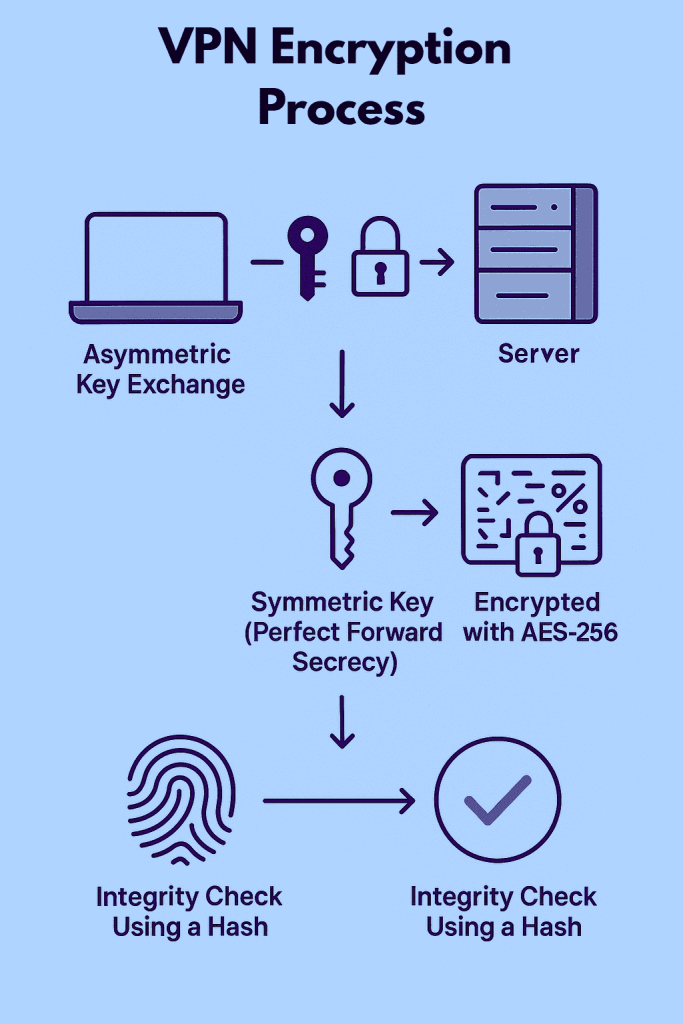
Think of VPN encryption like sealing your online data in a super-secure envelope before sending it through the internet. Even if someone intercepts it, they can't open or read it. Here's how the magic happens, broken down into four simple steps:
1. Asymmetric Key Exchange
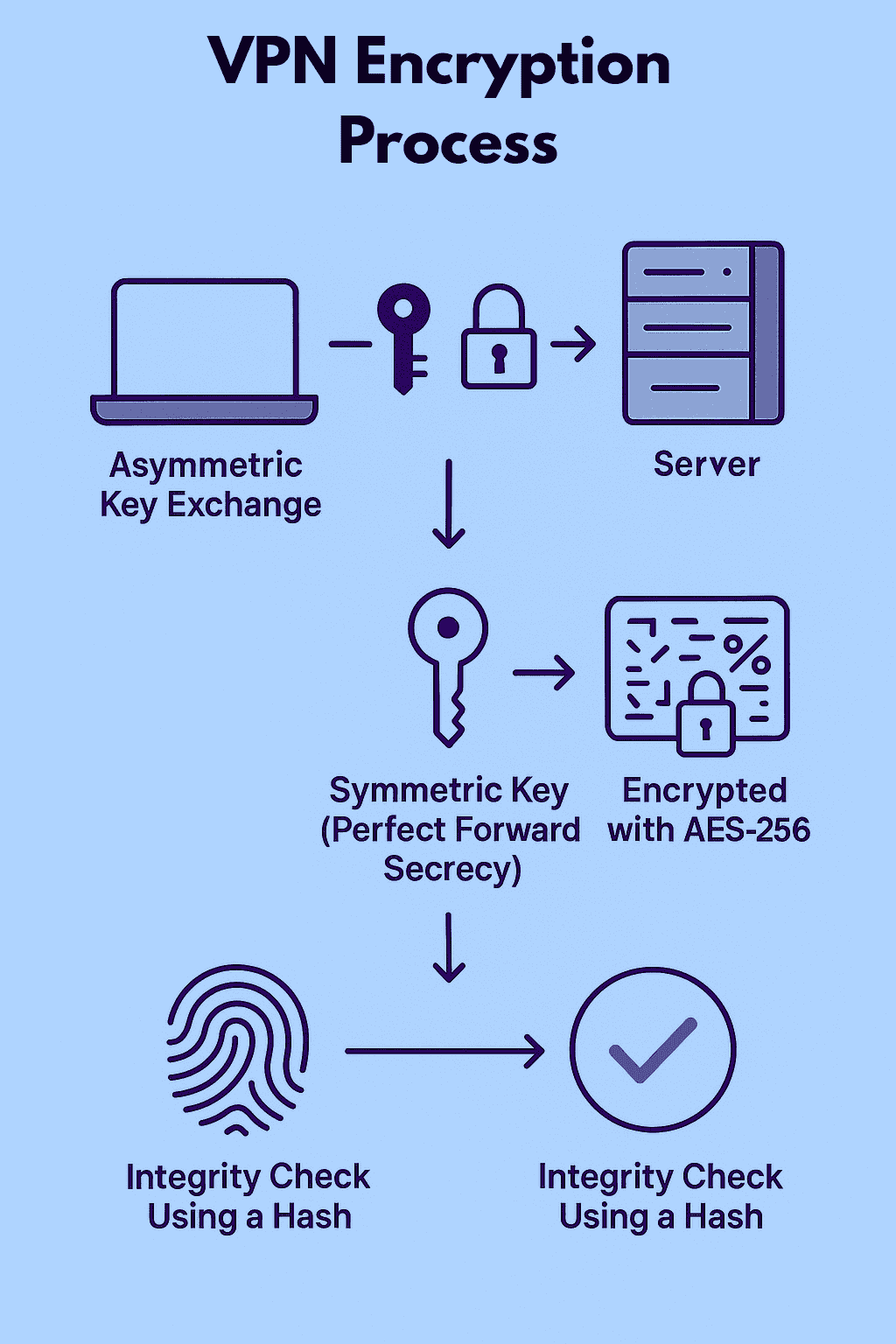
When you connect to a VPN, your device and the VPN server first set up a secure connection. The server shares a public key (kind of like an open padlock). Your device uses this key to send a secret code (called a session key) to the server. Only the server can unlock it using its private key. This step helps both sides agree on a secure way to talk.
2. Symmetric Key Exchange
Next, both your device and the server use that session key (secret code) to create a shared secret key. This key is used to encrypt all your data while you're connected. It also makes sure each session has its own key, so if someone ever gets access to an old one, they still can’t see your current or future data. This is known as Perfect Forward Secrecy.
3. Encryption Algorithms
Once the shared key is ready, your data is locked using strong encryption algorithms like AES-256. This turns your messages, websites, and files into scrambled code that looks like nonsense to anyone trying to spy on you.
4. Integrity Algorithms
To make sure your data isn’t changed while traveling through the internet, a digital fingerprint (called a hash) is added to it. When the server gets the data, it checks the fingerprint. If it matches, your data is safe. If not, it gets rejected because it may have been tampered with.
Types of Encryption
Generally, based on the encryption key, there are two types of encryption methods. These include asymmetric key encryption and symmetric key encryption.
Common VPN Encryption Ciphers
Encryption ciphers are algorithms that scramble and unscramble data to protect your security. One of the most important aspects of encryption is the key length, where longer keys are considered to have stronger encryption. For example, AES-256 is more secure than AES-128 due to its longer key length.
There are multiple VPN encryption ciphers out there. In the following sections, we will explore four popular ciphers - AES, Blowfish, ChaCha20, and Camellia - and their respective features.
1. Advanced Encryption Standard (AES)
AES is often regarded as the gold standard for encryption protocols. It was developed by Belgian cryptographers Joan Daemen and Vincent Rijmen, and adopted by the US government in 2001 as a replacement for the earlier Data Encryption Standard (DES).
AES is available in key lengths of 128-bit and 256-bit. When you hear about "military-grade encryption," it typically refers to AES-256-bit encryption, which is nearly impossible to break.
2. ChaCha20
ChaCha20, designed by Daniel J. Bernstein in 2008, is a relatively new encryption cipher. It’s the only cipher compatible with the WireGuard protocol, making it popular in the VPN industry. ChaCha20 uses a 256-bit key length and is considered to be about three times faster than AES.
While ChaCha20 is generally considered secure, it hasn't been as extensively tested as other ciphers like AES, so it could potentially reveal vulnerabilities in the future.
3. Blowfish
Blowfish was designed by Bruce Schneier in 1993 as a fast, free alternative to existing encryption algorithms. It uses key lengths ranging from 32 to 448 bits. However, Blowfish has a weakness: it’s vulnerable to a "birthday attack." This type of attack exploits the fact that the probability of finding two identical elements in a set increases with the size of the set.
Due to this vulnerability, Blowfish is often only used as a second resort, with AES-256 being the preferred encryption cipher.
4. Camellia
Camellia is an encryption cipher similar to AES in terms of speed and security. Developed by Japanese researchers, it’s available in key lengths of 128, 192, and 256 bits. Despite its smaller key length, brute force attacks are still considered infeasible against Camellia.
However, Camellia is not NIST-certificated. The National Institute of Standards and Technology (NIST) certification is significant for encryption ciphers as it attests to their security and reliability. Due to the lack of NIST certification and extensive testing, Camellia is rarely available in VPN apps.
What About Post-Quantum Encryption?
Right now, most VPNs use encryption methods like AES and ChaCha20 to keep your data safe. These work really well against today’s computers. But in the future, quantum computers could become powerful enough to crack these current encryption systems in minutes, which would be a huge threat to our privacy and online security.
That’s where post-quantum encryption comes in. This is a new kind of encryption being developed to stay secure even against quantum computers. It’s like upgrading your lock today to protect your house from a tool that doesn’t exist yet, but might soon.
What Is Post-Quantum Encryption?
Post-quantum encryption (also called quantum-resistant encryption) uses special mathematical techniques that quantum computers can’t easily solve. It's designed to stay strong even in a world where quantum computers are real and widely used.
Right now, most VPNs don’t want to fully switch away from proven ciphers like AES. So they’re starting to use hybrid encryption, which combines:
- Today’s strong encryption (like AES or ChaCha20)
- A post-quantum algorithm (for future-proofing)
This way, even if quantum computers become a reality tomorrow, your encrypted data will already be protected by both.
How to Check if Your VPN Is Encrypted?
You can test whether your VPN is encrypted using Wireshark (Windows/macOS), which is a free, open-source tool for network analysis and troubleshooting.
Wireshark allows inspection of individual data packets, which means that you can easily verify whether your Web traffic is encrypted or not. Let’s take a look at the steps involved, and keep in mind that we’re using NordVPN, our #1-rated VPN in our list of best VPNs.
- Download Wireshark from the official website and install the application.
- Run Wireshark and choose a network that you want to test, and click “Start capture.”
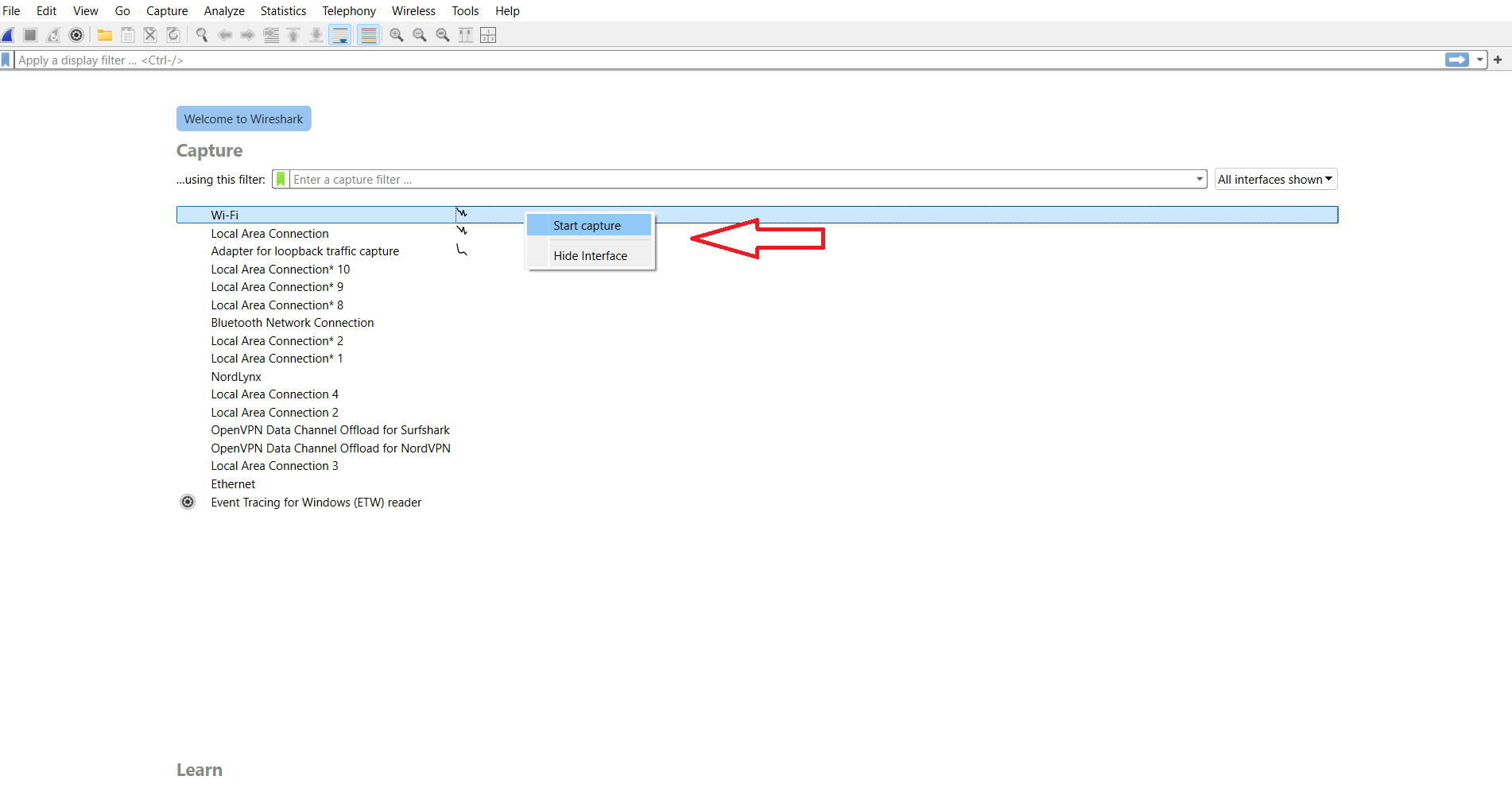
- As shown in our screenshot below, the website names are visible in the contents of the data packets, which means that the data isn’t encrypted.
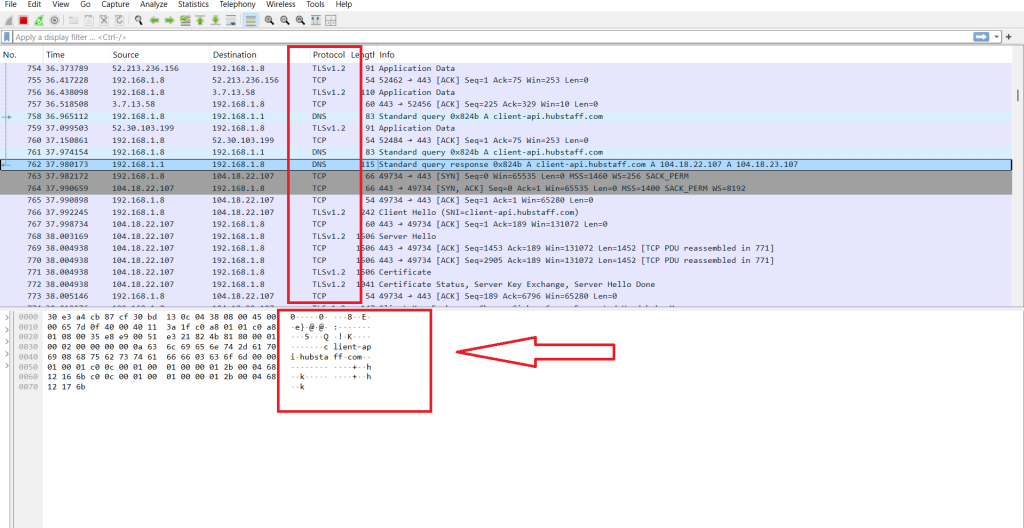
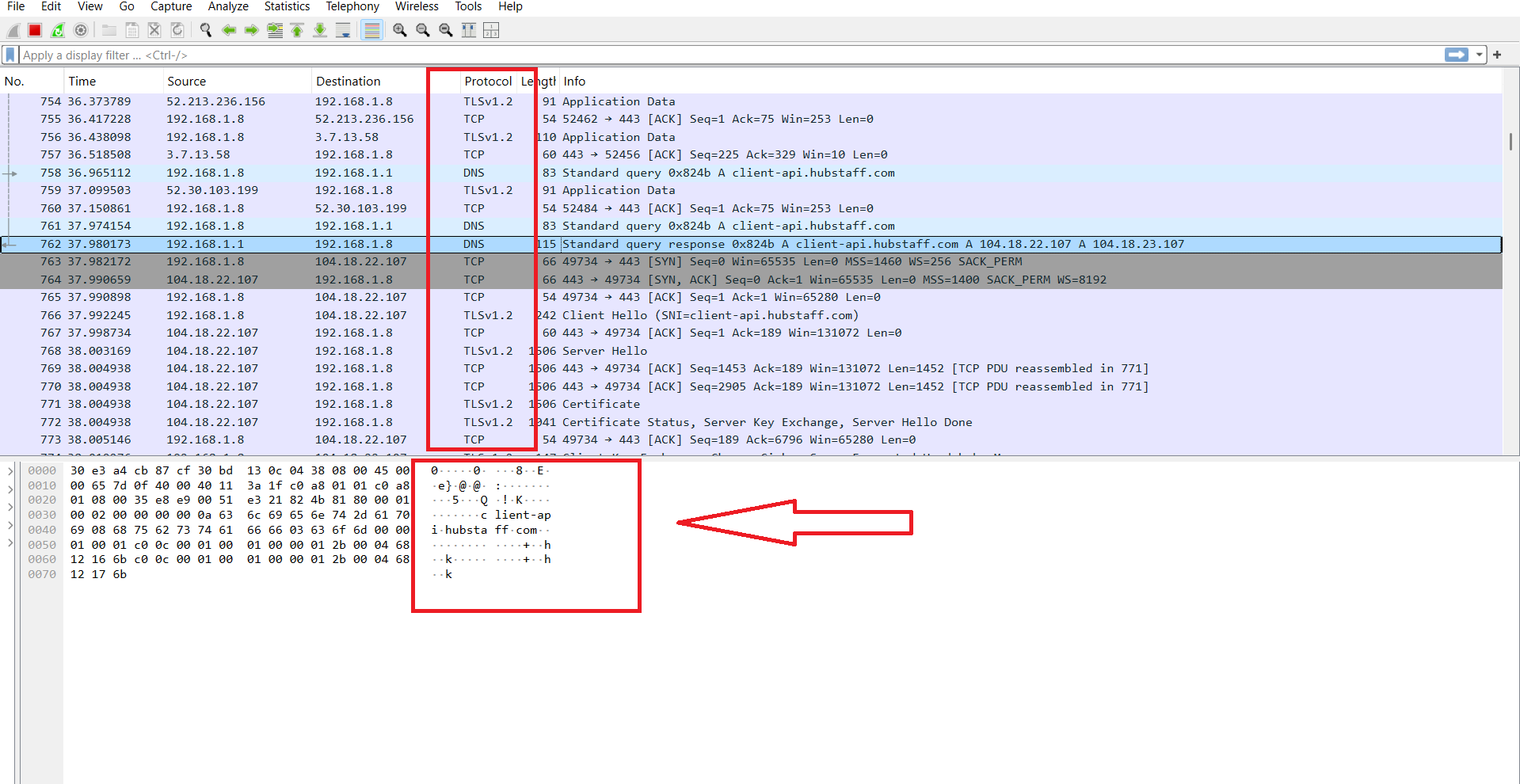
- Now connect to your preferred VPN, and recapture your internet traffic on Wireshark.
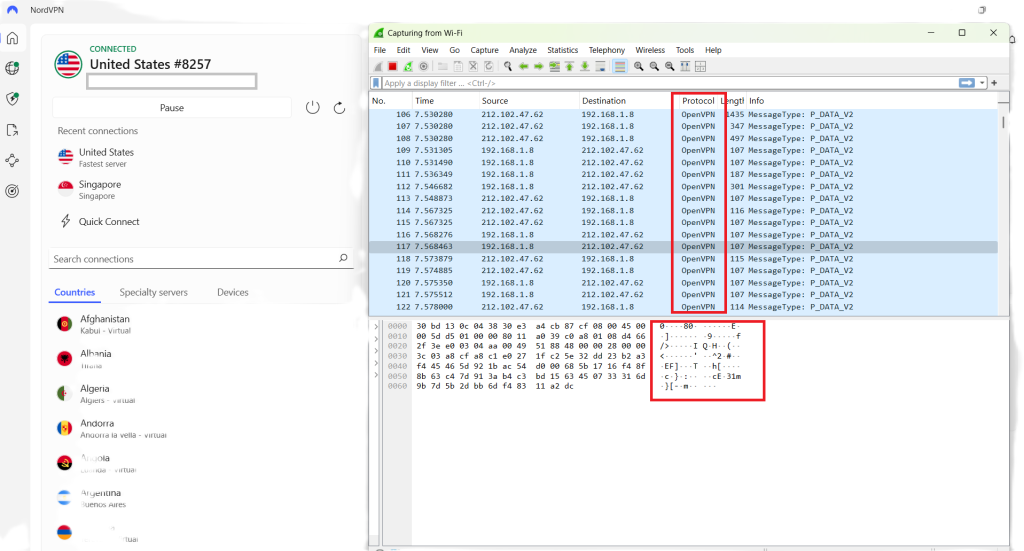
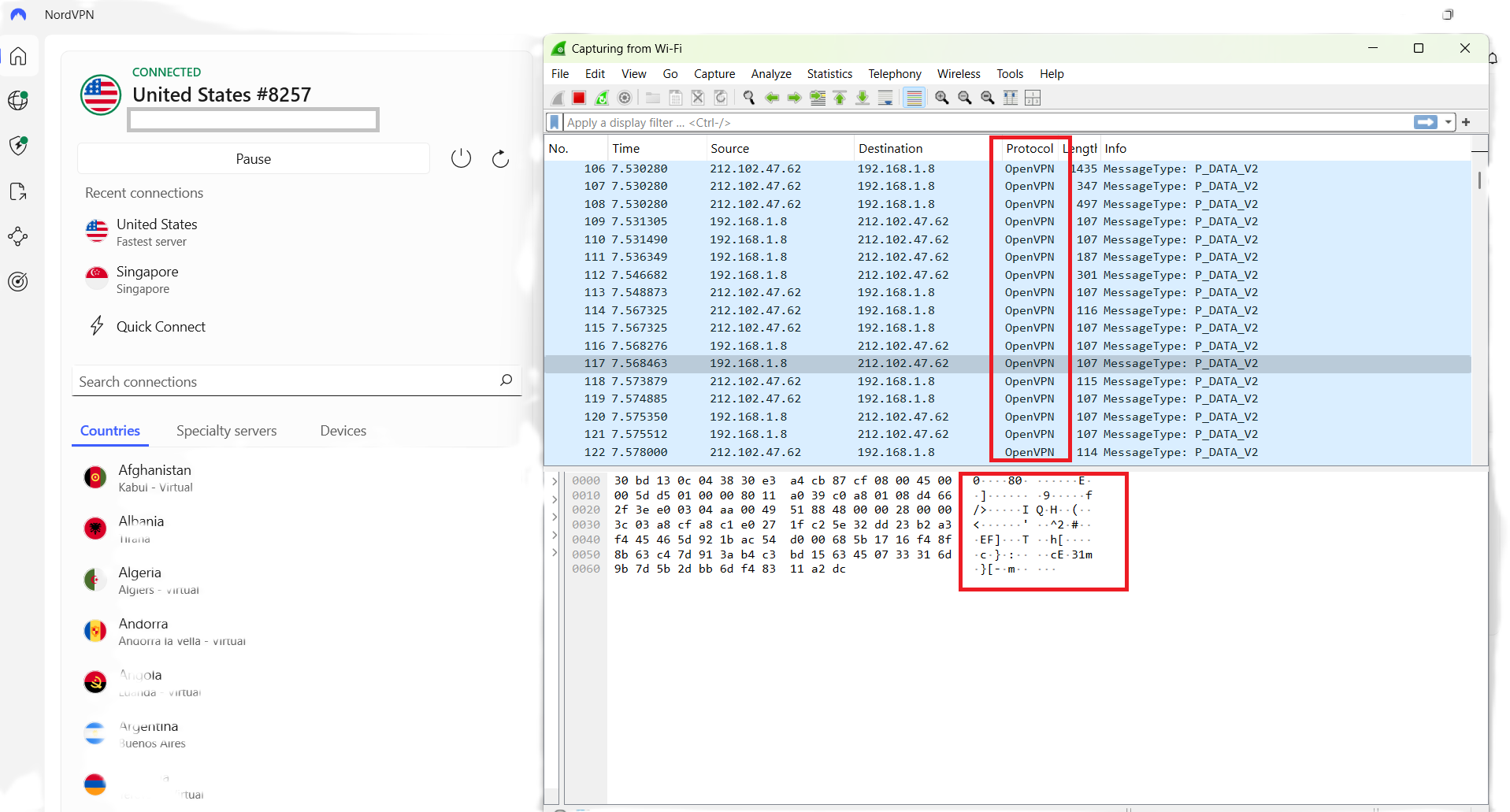
- If you can’t see anything written in readable text on the data packets, it means that your information is successfully getting encrypted.
Along with that, you may notice in the screenshots above that the protocol has also changed from TCP to UDP. This happened because our VPN client is set to use OpenVPN UDP.
Difference Between VPN Protocols and VPN Encryption Ciphers
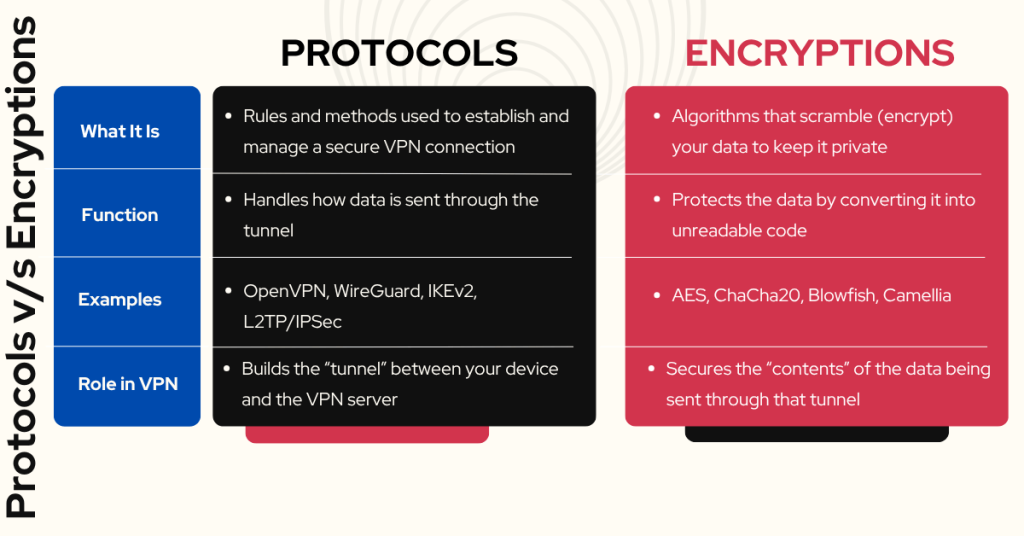
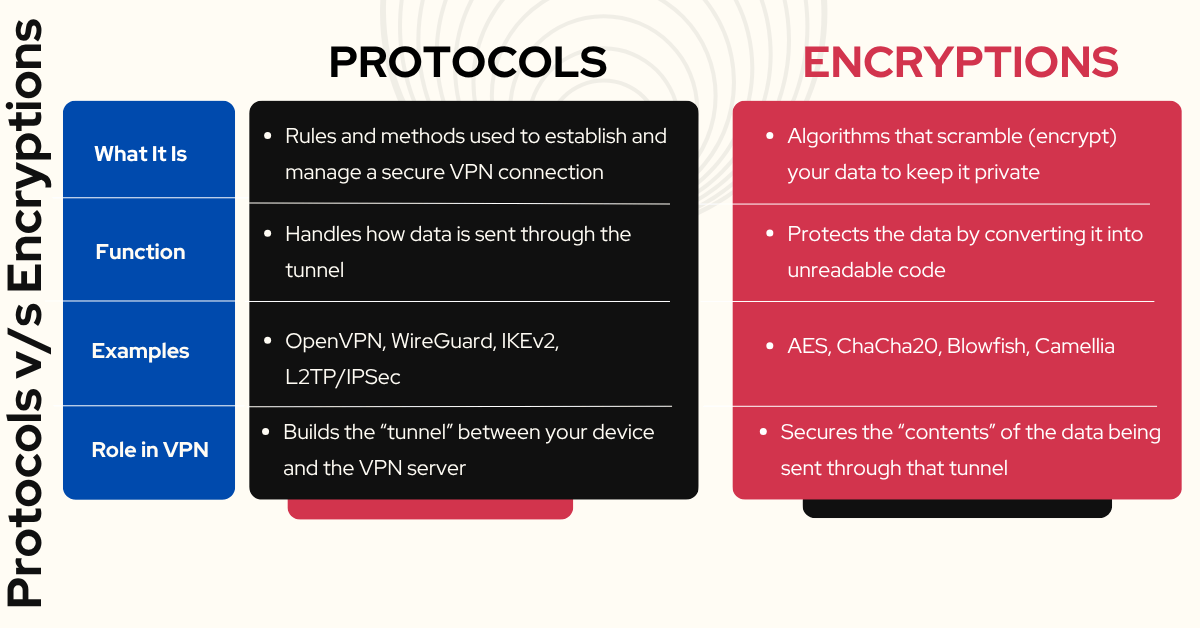
VPN protocols are a set of rules and processes that a device follows to establish a connection with a VPN server. These protocols are responsible for forming the VPN tunnel, which secures the data that flows between your device and the VPN server.
On the other hand, encryption ciphers are the algorithms used to encrypt the data that flows through the VPN tunnel, ensuring that your information remains safe and unreadable even if intercepted. Let's have a full-fledged comparison on both:
Why VPN Encryption Matters
In today’s digital world, every click, search, and scroll leaves behind a trail of data. Without proper protection, this data can be snooped on, stolen, or sold, often without your knowledge. That’s where VPN encryption becomes more than just a nice-to-have feature. It’s your digital bodyguard.
Here’s why it truly matters:
- Protects Your Personal Data: VPN encryption shields sensitive info like passwords, credit card numbers, and messages from cybercriminals and data harvesters.
- Stops ISP Tracking: Without a VPN, your ISP can see every website you visit and how much time you spend online. VPN encryption hides this, so your browsing stays private.
- Blocks Government Surveillance: In some countries, governments monitor and log online activity. A VPN encrypts your data, making it unreadable, even if intercepted.
- Secures Public Wi-Fi Connections: Public Wi-Fi networks (in cafes, airports, hotels) are goldmines for hackers. VPN encryption turns your connection into a secure tunnel, even on open networks.
- Protects Against Man-in-the-Middle Attacks: Hackers can intercept unencrypted data between your device and a website. With VPN encryption, even if they grab the data, it’s useless without the decryption key.
- Avoids Censorship: In countries where the internet is restricted, a VPN helps users access blocked websites and services by routing traffic through encrypted channels.
- Preserves Net Neutrality: ISPs sometimes throttle specific services (like video streaming). With encrypted traffic, they can’t see what you’re doing, so they can’t selectively throttle.
- Keeps Your Work Data Safe (Remote Work & Travel): Employees or freelancers can easily handle sensitive company info if they use best remote VPN, especially when traveling or using public networks.
- Prevents Advertisers from Profiling You: Many websites and trackers build profiles based on your browsing behavior. Encrypted VPN traffic makes this tracking much harder.
- Builds True Digital Freedom: VPN encryption gives you the power to control your data and reclaim your online privacy, something that’s becoming increasingly rare.
Are VPN Encryption Ciphers Unbreakable?
Yes, VPN encryption ciphers are practically unbreakable. That is because the length of the keys used to encrypt and decrypt data are quite lengthy, which is what makes VPN encryption so secure.
For example, 256-bit keys are considered the gold-standard encryption for securing credit card transactions and other sensitive information on the Internet.
Since each bit can only have two states (1 or 0), the number of possible combinations for a 256-bit key is 2 to the power of 256. That is a properly, massively, stupendously huge number.
Even if you took the most powerful computers in the entire world, like the ones governments have, and you let it guess millions of possible key combinations every second of every day, it would still take billions of years for that computer to try every possible combination of bits that make up the key.
So while it’s not technically impossible to use brute force to 'crack' strong encryption, it’s so impractical that you can consider it unbreakable.
Based on this, here's the answer to the question of whether VPNs can be hacked - no, they are safe as long as their encryption is strong.
Final Thoughts
In a digital age where data is currency and surveillance is everywhere, VPN encryption is more than a feature, it's a necessity. It doesn’t just hide your IP address; it secures your entire connection, ensuring that your private life stays just that, private.
From robust ciphers like AES-256 to modern solutions like ChaCha20 and the emerging promise of post-quantum encryption, VPNs today are well-equipped to defend against even the most sophisticated cyber threats. And tools like Wireshark empower you to verify that protection for yourself.
But remember: encryption is only as strong as the VPN you choose. Stick with providers that prioritize transparency, use proven protocols, and adopt forward-thinking security, like NordVPN, ExpressVPN, and Surfshark. And if you are still unsure or hesitant to subscribe right away, then we recommend you checkout their free trials. This will help you get a taste of how well that VPN actually works.
- How to get NordVPN free trial
- How to get ExpressVPN free trial
We hope that this article has answered all your questions about VPN encryption. If you have a question or additional information to share, feel free to add it in the comments section below. Thank you for reading!
Related