When you purchase through links on our site, we may earn an affiliate commission. Here’s how it works.
VPN Protocols Explained & Compared
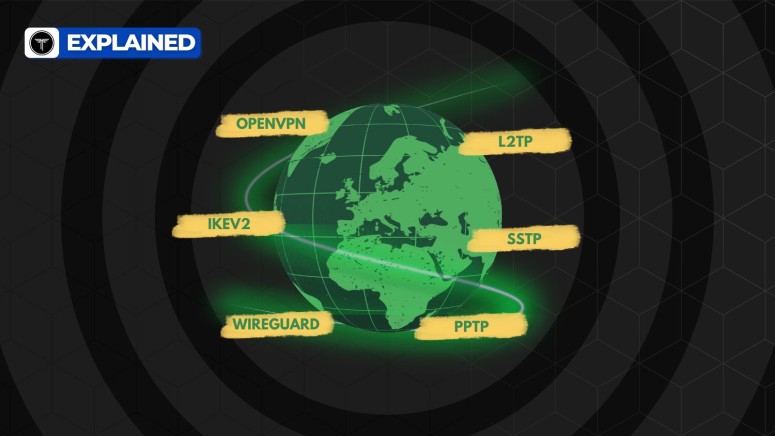
VPN apps are generally easy to use, but behind the simple interface are different protocols, like OpenVPN, WireGuard, and IPSec, that power how they work. These protocols can impact your connection speed, stability, and overall security.
Understanding the strengths and weaknesses of each can help you make a smarter choice, especially if you care about performance or privacy.
In this article, we’ll break down what VPN protocols are, compare the most common ones, and help you decide which protocol is best for your needs.
Key Takeaways
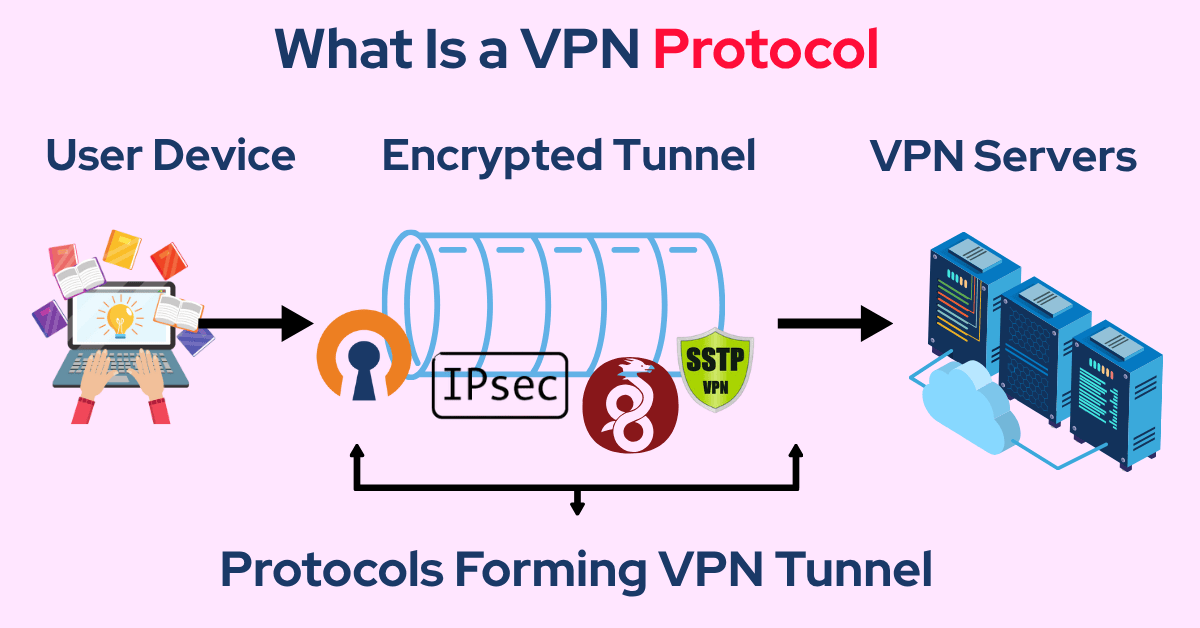
- Protocol Meaning: They create an encrypted pathway between your device and the VPN server, ensuring your data travels privately. Each protocol uses unique methods to package and transmit data, influencing how secure and reliable your connection is.
- The Choice? Some protocols prioritize speed for streaming or gaming, while others focus on strong encryption for privacy. Choosing the right protocol helps maintain a smooth connection, especially when dealing with censorship or network restrictions.
- There is no single “best” VPN protocol; the right one depends on what you’re using it for, such as streaming, gaming, or torrenting. OpenVPN is widely considered the most secure option, though it typically uses more bandwidth. If speed is your top priority, WireGuard is the fastest protocol available, making it ideal for gaming and streaming. Scroll below to learn more about them.
What Is a VPN Protocol?
Some protocols are designed to have stronger encryption, which results in better security. However, these protocols will result in lower speeds because your data will spend more time getting encrypted.
For example, if you try to stream a movie on Hulu with a high-security protocol, you are bound to face longer loading times and buffering issues. In a case like this, speed is more important than security, so you should choose a protocol that prioritizes fast connections.
Most capable VPNs give you various protocol options to choose from. There is no single best VPN protocol. Rather, the suitability of a protocol depends on what your intention is behind using a VPN.

Common VPN Protocols
The first-ever VPN protocol, called PPTP, was developed in 1996 by Gurdeep Singh-Pall at Microsoft. Over the years, VPN technology has come very far and many new protocols have emerged.
Let’s look at some of the common ones you are likely to come across.
1. OpenVPN – The Best VPN Protocol
OpenVPN is among the most secure protocols for VPNs. Its open-source technology relies on the OpenSSL security library and currently has no known vulnerabilities. You can rest assured that your connection is fully private and safe when using OpenVPN.
Almost all capable VPNs out there support OpenVPN on major devices running macOS, iOS, Android, Linux, and Windows. You can also easily download an OpenVPN configuration file to set up a manual connection on unsupported platforms.
OpenVPN further breaks down into two categories of communication protocols (transport layer protocols) called UDP and TCP. These transport layer protocols determine the way your data gets transmitted.
For instance, OpenVPN TCP offers stable connections and bypasses firewalls more reliably. But OpenVPN UDP is much faster, and hence, it is preferable. If the website or content you are trying to access is not loading, you can always try TCP.
On the flip side, OpenVPN consumes noticeably high bandwidth, so it is not as efficient and lightweight as other protocols such as WireGuard.
If you are someone who prioritizes security and privacy over everything else, then you should use OpenVPN. But if you want to save bandwidth and enjoy higher speeds for activities like gaming and streaming, you should consider other options.
Some of the capable VPNs that support OpenVPN include NordVPN, ExpressVPN, CyberGhost, IPVanish, PrivateVPN, Surfshark, and Private Internet Access.
PROS
- High security
- Supported by many VPN services
- Good compatibility with firewalls
CONS
- Difficult to configure manually
- Consumes more bandwidth
- Not the fastest protocol
2. IKEv2/IPsec –The Best Protocol for Mobile Users
IKEv2 (Internet Key Exchange Version 2) is a popular choice for mobile users due to its fast connection speeds. This VPN protocol handles changes in connections really well, which makes it an ideal choice for people who frequently switch between WiFi and cellular networks on their mobile phones.
IKEv2 doesn't encrypt your activity on its own. Instead, its purpose is to create a VPN tunnel and provide authentication, which is why it’s normally combined with IPsec.
IPsec is a suite of protocols supporting different 256-bit ciphers, including ChaCha20, Camellia, and AES. While it is widely supported by most VPNs for mobile phones, this protocol is not open-source. This slightly reduces its trustworthiness because it may have some unknown vulnerabilities. In fact, according to some sources, IKEv2/IPsec may have already been compromised by government surveillance agencies.
One of the biggest downsides of IKEv2 is that it uses UDP port 500 only, which can easily be blocked by network administrators. This makes it a less effective protocol to bypass firewalls, especially in countries like Russia and China, where censorship is a serious issue.
Top VPNs that support IKEv2/IPsec include NordVPN, ExpressVPN, Surfshark, PrivateVPN, AtlasVPN, and Hotspot Shield.
PROS
- Good speed and latency
- High stability when switching connections
- Less bandwidth usage
CONS
- Only uses UDP port 500
- Can be blocked easily
- Not open source
3. WireGuard – The Fastest VPN Protocol
WireGuard is a newer protocol that's designed for more efficiency and faster performance than OpenVPN. This protocol was first released in 2019, and numerous updates have been added thanks to its supportive open-source community. According to our tests at TechNadu, WireGuard is noticeably faster than other protocols, such as OpenVPN. This makes it an excellent protocol for streaming or gaming. The WireGuard code base is very efficient because it is open source; numerous developers have contributed to its code, which consists of only 4,000 lines. Its smaller code base makes it more secure.
WireGuard is also among the least bandwidth-heavy protocols and only consumes up to 4% of data in addition to your regular activities.
The only downside to this protocol is that it is still in its infancy. Despite having excellent performance, it has some incompatibility issues with tested ciphers like AES-256. Instead, this protocol relies on ChaCha20, which is newer.
On top of that, the default configuration of WireGuard requires VPN servers to temporarily log the users’ IP addresses. Given the fact that other protocols don't have this requirement, security enthusiasts are often wary of using WireGuard. Furthermore, since WireGuard is only compatible with UDP, it's sometimes not very effective at bypassing firewalls.
Top VPNs that support WireGuard include NordVPN, Surfshark, IPVanish, CyberGhost, Private Internet Access, Perimeter 81, and AtlasVPN.
PROS
- High speeds
- Open-source code base
- Less bandwidth usage
CONS
- Compatibility limitations with AES-256
- Temporarily logs users’ IP addresses
- Only compatible with UDP
4. SSTP – The Best Firewall-Busting Protocol
SSTP (Secure Socket Tunneling Protocol) is a Microsoft-owned protocol with closed-source code. This protocol employs SSL/TLS encryption, which means it can use TCP Port 443, allowing it to effectively bypass firewalls because the usual HTTP traffic also flows through this VPN port. This makes it a suitable VPN protocol for countries like China.
However, one of the biggest downsides of this VPN protocol is that it might contain a big vulnerability. The “man-in-the-middle” attack, also referred to as POODLE, is known to affect SSL 3.0. It is unconfirmed whether or not SSTP is also affected by this.
Furthermore, Microsoft is known to have cooperated with the NSA in the past. Since this VPN protocol has a closed code base, it is impossible to check for any vulnerabilities placed in it.
SSTP might come in handy if there's no better protocol available and you want to bypass school or government firewalls. That said, we highly suggest users avoid using SSTP for activities requiring a high amount of security or privacy.
Common VPNs that support SSTP include NordVPN, ExpressVPN, PureVPN, and SwitchVPN.
PROS
- Simple to use
- Can bypass firewalls
- Comes integrated into Windows
CONS
- Not open source
- Not suitable for high security
- Incompatibility with non-Windows platforms
5. L2TP/IPsec – The Hybrid Protocol
L2TP/IPsec was a successor to PPTP, the original VPN protocol. It is quite commonly supported by most VPN services due to its ease of implementation. Just like IKEv2/IPsec, L2TP/IPsec is a hybrid protocol that combines L2TP and IPsec. This means that it might have similar privacy concerns, as IPsec is rumored to have been compromised in the past. Another issue with L2TP/IPsec is that it's not compatible with NAT, which can result in problems with connectivity.
L2TP also has a known security flaw that comes into play when VPN services use pre-shared keys. If an attacker gets access to VPN encryption keys, they can use them to impersonate and eavesdrop on your Internet activities. This is commonly referred to as the “man-in-the-middle” attack.
Using this protocol is not recommended at all since it offers no distinctive advantage to other protocols and exposes you to possible security risks. We suggest using this protocol only if no other protocol is available.
Common VPNs that offer L2TP/IPsec include CyberGhost, PureVPN, Hotspot Shield, and Private Internet Access.
PROS
- Supported by almost all platforms
- Easy to set up
- Supports multithreading
CONS
- Lack of trust and security
- Not compatible with NAT
- Communicates over UDP only
6. PPTP – The Oldest Protocol
Point-to-Point Tunneling Protocol, otherwise known as PPTP, was the first VPN protocol developed in 1996. At first glance, PPTP offers fast speeds. However, it only uses 128-bit encryption, which is less secure than military-grade AES 256-bit encryption. Needless to say, security is not a strong point for this protocol.
In fact, PPTP prioritizes speed to a level where it leaves known vulnerabilities that can be exploited easily by skilled hackers. Rumor has it that the NSA has also exploited these vulnerabilities in the past.
PPTP is heavily outdated and, hence, very unsafe. We don't recommend using this protocol unless you have no other options available. Don't trust it with activities requiring sensitive information such as passwords or bank details. The only use case for this protocol is if you want fast speeds, and security is of no concern to you.
Common VPNs that support PPTP include Private Internet Access, Hotspot Shield, and PureVPN.
PROS
- Fast speeds
- Compatibility with almost all platforms
- Low costs and easy installation
CONS
- Low performance on unstable networks
- Lack of security
- Easily blocked by firewalls
What Are Proprietary VPN Protocols?
Other than the protocols listed above, most capable VPN services also offer their own proprietary VPN protocols on top of other standard ones. One can expect these proprietary protocols to be faster as VPN services spend their time and resources building them. Some providers even claim their protocols to be more secure, but this may not always be true.
One big downside of proprietary VPN protocols is that they're almost always closed-source. Open-source protocols are generally thought to be more reliable because they get tested by thousands of developers. Thus, their vulnerabilities are resolved quickly. When it comes to proprietary VPN protocols, you never know if any vulnerabilities or backdoors exist in the code, so your security may be at risk.
Some of the most common VPNs and their associated proprietary protocols include
- NordVPN (NordLynx and NordWhisper)
- ExpressVPN (Lightway Turbo)
- VyprVPN (Chameleon)
- Surfshark (Shadowsocks)
- Private Internet Access (PIA MACE)
- IPVanish (SugarSync)
- TunnelBear (GhostBear)
- Hotspot Shield (Hydra)
NordVPN's newest proprietary protocol, called NordWhisper, is built on Web tunnel technology rather than traditional VPN methods, giving it an edge over competitors. This protocol works by mimicking regular Internet traffic, which can help you get around common network filters and keep you connected in restrictive environments.
PROS
- High speeds
- Supported by many devices
- Improved abilities to bypass firewalls
CONS
- Usually not open-source
- Unknown security vulnerability risks
VPN Protocol Comparison
Why VPN Protocols Matter
Have you ever wondered what truly makes a VPN fast, safe, and dependable? More significant than the software or server by itself is the VPN protocol, which runs in the background. The choice of protocol can have a big impact on speed, security, and performance. Here's what you need to know and why VPN protocols are so crucial:
- They decide how secure your connection is: Some protocols use stronger encryption, making it nearly impossible for hackers or snoopers to see your online activity.
- They impact your internet speed: Lightweight protocols offer faster speeds, great for streaming, gaming, or video calls.
- They affect connection stability: A good protocol keeps your connection stable, even on shaky Wi-Fi or mobile data.
- They help bypass internet restrictions: Some protocols are better at getting around firewalls and censorship (like in schools or certain countries).
- They determine device compatibility: Not every protocol works with all devices or operating systems, so choosing the right one matters for smooth performance.
- They balance between speed and security: Some are ultra-secure but slow, while others are fast but slightly less secure. The right choice depends on your needs.
- They support advanced features: Certain protocols allow features like split tunneling, kill switch, or multi-hop connections.
- They handle how reconnects are managed: Protocols like WireGuard reconnect faster after network drops, ideal for mobile users.
- They influence privacy levels: Privacy-focused protocols leave less digital trace and don’t log user activity.
In short, VPN protocols are the foundation of your online safety and performance. Whether you're working remotely, traveling, or just binge-watching your favorite show, understanding these protocols helps you choose the right VPN and use it smarter.
What Is the Best VPN Protocol?
As previously mentioned, there's no universally best protocol for VPNs. Instead, your choice depends on the use case and other requirements. Let’s take a look at some common use cases.
Which VPN Protocol Offers the Fastest Speeds?
WireGuard is considered the fastest VPN protocol due to its leaner code and faster methods of encryption. IKEv2/IPsec is also quite fast, but it provides speeds at the expense of security. Hence, it’s never recommended over WireGuard.
The biggest reason why WireGuard is the fastest VPN protocol is that it uses UDP only, so it skips OpenVPN’s TCP checks. Furthermore, it has a very efficient code base with only 4,000 lines of code. This makes security audits quick and easy.
Which VPN Protocol Is the Most Secure?
OpenVPN is the most secure VPN protocol since it has a huge community of developers who routinely test the code for vulnerabilities. It supports military-grade AES 256-bit encryption, making it more secure in comparison to WireGuard, which uses the newer ChaCha20.
What makes OpenVPN so secure is its custom security protocol which creates point-to-point connections and allows key exchange with SSL/TLS. It is also very difficult to block since it runs over both TCP and UDP. However, due to its complexity, the manual configuration of OpenVPN requires some technical knowledge.
What Is the Most Stable VPN Protocol?
IKEv2/IPsec is the most stable VPN protocol because it allows you to switch networks without losing connection or reducing privacy. However, this VPN protocol is not very secure and is suspected to have vulnerabilities built into its code.
IKEv2/IPsec supports almost all major devices and platforms, including a wide range of routers, Linux, iOS, macOS, Android, and Windows. In particular, IKEv2/IPsec works flawlessly on macOS. Due to its high stability, some VPN providers include IKEv2/IPSec as the default VPN protocol on their apps.
What Is the Best VPN Protocol for Gaming?
WireGuard is hands down the best VPN protocol for gaming due to its fast speeds. However, it is not very good at bypassing firewalls. If your connection keeps dropping, you might want to try SSTP, as long as privacy and security are not a big concern for you.
The biggest perk of using WireGuard for gaming is that it can deliver lower latency. WireGuard is designed to create better routes for packets, which can also help reduce packet losses and other annoying ping issues.
What Is the Best VPN Protocol for Streaming?
OpenVPN is the best VPN protocol for streaming due to its ability to bypass geo-restrictions and firewalls easily. Streaming services like HBO Max, Netflix, and Hulu often try to block VPN connections, so you need a protocol like OpenVPN that can reliably bypass any VPN detection measures.
Other benefits of OpenVPN are its fast servers and reduced drop-off in connection speeds. Provided that your Internet connection is at least 4 Mbps, you can easily stream full HD videos with OpenVPN without having to deal with annoying buffering issues.
What Is the Best VPN Protocol for Torrenting?
OpenVPN is the best VPN protocol for torrenting due to its strong security capabilities. After all, privacy and protecting your identity are the first priorities when downloading torrents—speed comes second.
WireGuard may also be suitable due to its fast speeds, but it uses the newer ChaCha20 encryption, which is not as widely tested as OpenVPN’s AES 256-bit encryption. Though WireGuard is generally accepted to be sufficiently safe, this could be a concern for some privacy-focused users who can’t afford to have any copyright infringement issues.
Which VPN Protocol Is the Easiest to Set Up?
PPTP is the easiest VPN protocol to set up since it is pre-built into many different devices. However, it is important to remember that PPTP is very outdated and known to have vulnerabilities, including the chance of sending decrypted data, MITM attacks, password thefts, and more.
PPTP lags behind its competition because its security capabilities have not been updated as frequently as other protocols. The only reason why VPN providers still offer PPTP is that this protocol does not cost them anything, and it often comes pre-installed on devices.
Should You Switch VPN Protocols?
VPNs come with different protocols, and each one affects how secure, fast, or reliable your connection is. Most VPN apps let you switch protocols with just a tap. But the real question is: Should you? Knowing when to change VPN protocols and when not to can make a big difference in your online experience.
Final Thoughts
VPN protocols are the foundation of your online security, speed, and overall experience. From lightning-fast streaming with WireGuard to rock-solid privacy with OpenVPN, each protocol serves a different purpose.
However, there’s no one-size-fits-all solution. The best VPN protocol depends on what you need at the moment, for instance, like speed, stability, privacy, or the ability to break through restrictive networks.
- Want speed? Choose WireGuard or IKEv2.
- Need strong privacy? Go with OpenVPN.
- Facing restrictions or firewalls? Use OpenVPN (TCP) or stealth modes.
- Using mobile data often? Try IKEv2/IPSec for stable switching between networks.
- Not sure what to choose? Stick to Auto mode or use the protocol recommended by your VPN app.
Whenever in doubt, don’t chase the fastest option; go with what works best for your current activity and always keep your security top of mind. Additionally, we recommend NordVPN as the best VPN because it offers a wide range of VPN protocols, including its lightning-fast and secure proprietary NordLynx and NordWhisper protocols. With NordVPN’s robust features and excellent protocol options, you can trust that your online experience will be safe and efficient.
That’s all for our guide to VPN protocols. If you have any questions, leave a comment below. Thank you for reading!
Related