



ExpressVPN Launches First VPN MCP Server, Allowing AI Tools to Control VPN Connections
Published

QUICK ANSWER
- ExpressVPN MCP server launch: ExpressVPN launches first VPN MCP server enabling AI tools to manage VPN status, switch regions, and run diagnostics locally.
- AI integration with VPN control: Beta connects MCP-compatible AI tools like Claude Code and Codex with ExpressVPN desktop apps for automated workflows.
- Privacy-focused local architecture: Feature runs locally, requires manual opt-in, uses command allowlist, and follows ExpressVPN no-logs privacy policy.
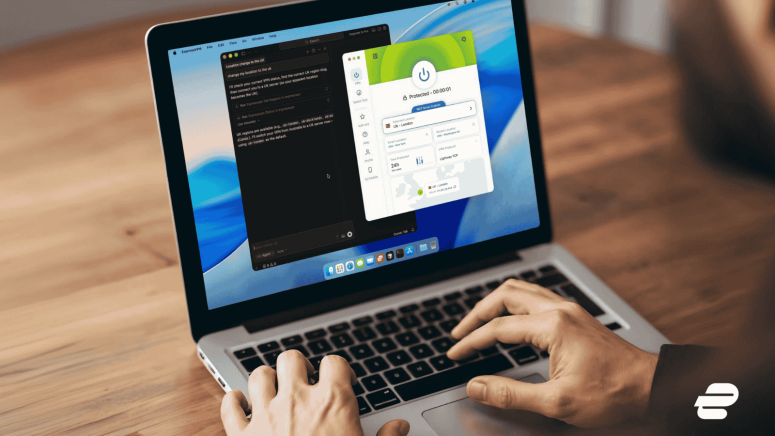
ExpressVPN has announced the beta launch of a new Model Context Protocol (MCP) server, becoming the first VPN provider to integrate this emerging standard. The feature allows AI-powered development tools to securely read VPN status and adjust connection settings directly from a developer’s workflow.
The company says the new integration is designed to remove friction for developers who increasingly rely on AI assistants to automate coding, testing, and troubleshooting tasks.
The MCP server beta became available on March 5, 2026, and currently works with ExpressVPN’s desktop apps on macOS, Windows, and Linux.
Bringing VPN Control Into AI Workflows
Model Context Protocol (MCP) is an open standard introduced in November 2024 to connect AI systems with external tools and data sources. While several developer platforms have already adopted the protocol, VPN infrastructure has remained separate from this ecosystem until now.
ExpressVPN’s MCP server bridges that gap by allowing AI tools to interact with the user’s VPN client through a strictly local connection. This means developers can use natural language commands through their AI assistants to perform tasks such as:
- Checking whether the VPN is connected
- Switching server locations
- Changing VPN protocols
- Running connection diagnostics
- Reviewing security settings
Previously, developers had to manually open the VPN application, change settings, and then return to their coding environment. The MCP server removes that extra step, allowing network configuration to happen directly within automated workflows.
The early beta currently supports MCP-compatible AI tools, including developer-focused assistants like Claude Code and Codex. Other AI clients that support local MCP servers can also connect through a local server URL.
Local Architecture With Privacy Safeguards
ExpressVPN says the integration was built with strict security boundaries. The MCP server is disabled by default and must be manually enabled by users in the ExpressVPN desktop application.
Once activated, the system runs entirely on the user’s device and does not accept remote connections. This local-only architecture is designed to prevent unauthorized access and reduce the risk of external attacks.
The server also operates using a fixed command allowlist, which limits what AI tools can do. Commands are restricted to predefined queries and configuration actions, preventing access to sensitive information such as account credentials, session history, or browsing data.
According to ExpressVPN, the feature also follows the company’s no-logs policy, meaning it does not collect or store activity logs, connection logs, traffic destinations, or DNS queries.
Use Cases for Developers
The MCP server allows developers to automate several tasks that previously required manual checks.
One example is automated security verification. Developers can instruct an AI assistant to confirm that the VPN is active and properly configured before running scripts or sensitive processes.
The integration also supports global testing of apps and websites. Developers can switch between different server locations to test geo-sensitive APIs or observe how a product behaves in different regions.
Another use case is network troubleshooting. AI assistants can run diagnostic checks on VPN settings, server regions, and connection protocols, identify potential issues, and apply adjustments automatically.
The feature may also help users working in restricted network environments. AI tools can recommend or configure the most suitable VPN protocol based on local network conditions.
Availability
The ExpressVPN MCP server is currently available in beta and is limited to certain subscription plans. Eligible users include subscribers on Basic, Advanced, or Pro tiers with one-year or two-year plans, as well as ExpressVPN for Teams customers.
The company says it plans to continue developing the feature as the adoption of AI-powered workflows grows and MCP becomes more widely used across developer tools.
Related




Get expert insights on threats, breaches, scams, and security trends — delivered every Monday.
Most Popular





Get expert insights on threats, breaches, scams, and security trends — delivered every Monday.
Most Popular