



ExpressVPN Adds Fastest Location to Mobile, Releases New Native macOS App
Published on December 3, 2025


- Fastest Location on mobile: Automatically connects users to the optimal server using real-time speed and latency checks.
- Redesigned mobile interface: Cleaner layout removes Smart Location and Recent sections, highlighting protection and device indicators.
- Native macOS app upgrade: New Catalyst-based app improves speed, responsiveness, and system integration for smoother daily use.
ExpressVPN has rolled out two major updates aimed at improving connection speed and overall user experience. The VPN provider has introduced its Fastest Location feature on mobile devices and launched a fully native app for macOS users.
ExpressVPN Fastest Location Expands to iOS and Android
Fastest Location, previously available only on select platforms, is now live on iOS and Android, as well as the App Store version of ExpressVPN for macOS. The feature automatically connects users to the best-performing server based on real-time network conditions.
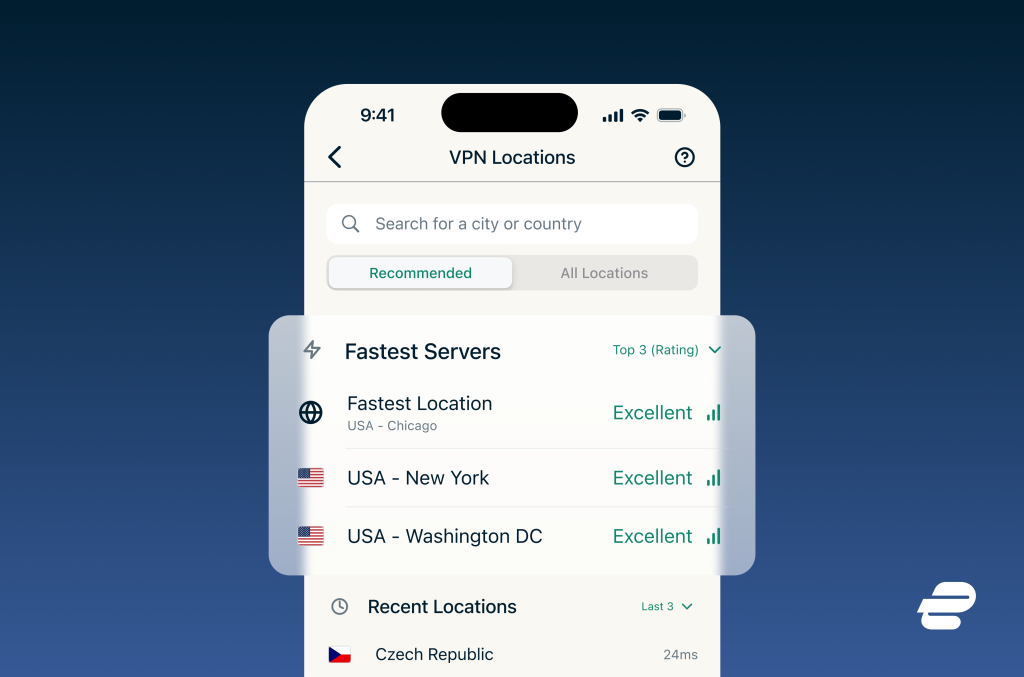
Instead of browsing server lists or running manual speed tests, users can tap once to connect. ExpressVPN says the system evaluates factors such as speed, latency, and distance to determine the ideal server for each session.
The feature continues to monitor changing network conditions in the background. While users won’t be switched to a different server during an active session, the app recalculates for the next connection as soon as they disconnect.
ExpressVPN has also redesigned its mobile home screen to support this update. The previous “Smart Location” and “Recent” sections have been removed, making the interface cleaner. Users now see more space dedicated to indicators like time protected, Secure Device Assistant, and a clearer “Protected” status when connected.
In the server list, the top three to five fastest options now display connection-strength indicators. These update automatically as network conditions shift, replacing older static rankings.
New Native App Arrives on macOS
ExpressVPN has also released a new Mac app designed specifically for macOS. According to the company, the app launches faster, responds more smoothly, and fits better into the overall Mac experience.
Previous versions of ExpressVPN for Mac were adapted from the iOS app using Apple’s cross-compatibility tools. While functional, the company says there was room to improve performance and integration.
The new app is built using Apple’s Mac Catalyst framework, allowing deeper integration with macOS. Users can expect smoother animations, more responsive window resizing, and better multitasking performance. Small interface refinements also contribute to a more polished desktop experience.
Whether running in the background or switching servers mid-task, the updated macOS client is designed to feel more like a native macOS application than before.
Related






Get expert insights on threats, breaches, scams, and security trends — delivered every Monday.
Most Popular






Get expert insights on threats, breaches, scams, and security trends — delivered every Monday.
Most Popular