


Proton Launches Free Authenticator App with End-to-End Encryption
Published on August 2, 2025

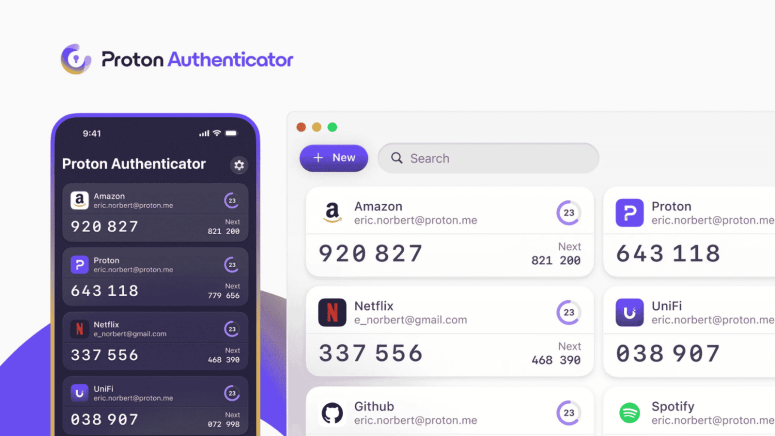
- Cross-Platform Availability: Proton 2FA App is free on iOS, Android, Windows, macOS, and Linux with full offline support.
- Privacy-Focused Features: Offers end-to-end encryption, biometric/PIN security, and open-source transparency.
- Flexibility for Users: Use standalone or with Proton Pass; import/export 2FA codes with no vendor lock-in.
Proton, the privacy-focused company best known for its secure email and Proton VPN, has launched Proton Authenticator, a free, open-source 2FA app available on iOS, Android, Windows, macOS, and Linux. The app adds another privacy tool to Proton’s growing suite of services, aiming to give users full control over their two-factor authentication (2FA) setup.
A Secure and Flexible Proton 2FA App
Proton Authenticator is designed to offer a simple but highly secure way to protect your online accounts with time-based one-time passwords (TOTP). Like other authenticator apps, it generates short-lived codes used alongside your password during login, helping block unauthorized access, even if someone steals your password.
Proton Authenticator's offline accessibility, cross-platform compatibility, and end-to-end encryption set it apart. 2FA codes can be safely synced across devices or stored locally by users.
Notably, you don’t need a Proton account to use the app, though Proton users get added benefits like iCloud or Proton account sync.
Key Features of Proton Authenticator
- Full device compatibility: Works on mobile (iOS, Android) and desktop (macOS, Windows, Linux)
- End-to-end encrypted backups: Ensures your codes are safe, even in case of data loss
- Offline access: 2FA codes are accessible without an internet connection
- Easy import/export: Switch from other authenticator apps with just a few taps
- Biometric or PIN protection: Optional extra layer of device-level security
- Open-source codebase: Transparency allows community reviews and independent audits
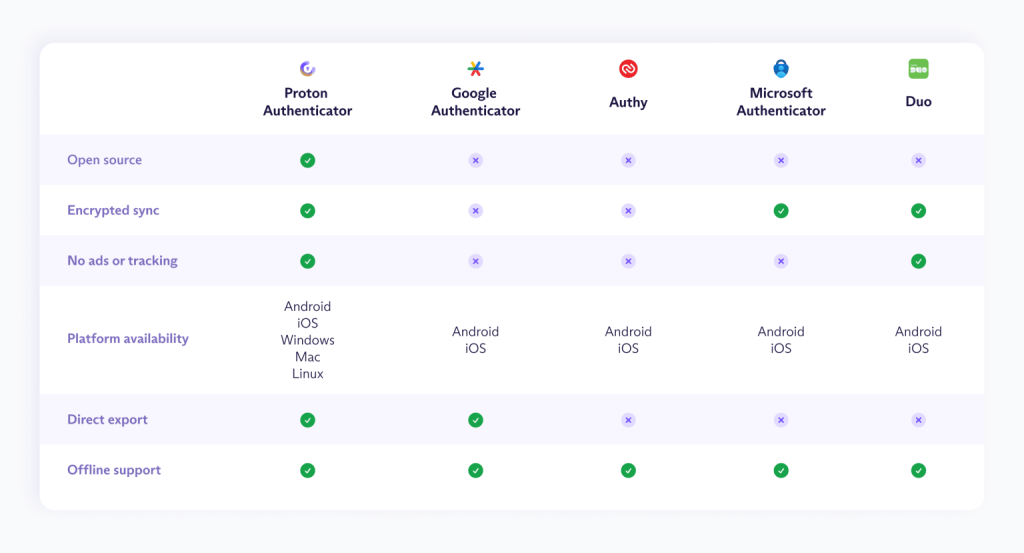
Proton says the Proton 2FA App is aimed at users looking for no-compromise privacy without the ads, tracking, or data lock-in seen in many existing 2FA apps.
Why Proton 2FA App Matters
Account takeover attacks are on the rise globally, often causing major data breaches and financial loss. While SMS-based 2FA is common, it remains vulnerable to SIM-swapping and phishing. Authenticator apps that generate codes locally are a more secure alternative.
However, Proton argues that many current solutions are closed-source, collect user data, or don’t allow for data portability, leaving users locked into apps that may disappear or turn hostile over time. Proton Authenticator aims to fix that by putting security and user control first.
Proton Authenticator vs. Proton Pass
For users already using Proton Pass, Proton’s password manager, there might be some overlap. Proton Pass also includes built-in 2FA code generation. So, what’s the difference?
- Proton Pass is ideal for convenience. It autofills passwords and 2FA codes together, speeding up logins.
- Proton Authenticator is best for those needing a standalone, hardened 2FA app, separate from other services, adding an extra layer of protection.
Proton says this dual approach gives users the freedom to choose, depending on their needs and threat model.
Earlier this year, Proton even shared its Proton VPN Spring improvements report, and now with Proton Authenticator, the company hopes to make secure logins accessible and private for everyone. As with all Proton services, user feedback will guide development. Proton encourages users to share their experience on platforms like Reddit, X (formerly Twitter), or UserVoice.
The Proton 2FA App is available now for free download across all major platforms.
Related


Get expert insights on threats, breaches, scams, and security trends — delivered every Monday.
Most Popular

Get expert insights on threats, breaches, scams, and security trends — delivered every Monday.
Most Popular