Phishing Scams in 2026: How to Spot and Avoid Them
Published on February 11, 2026

Phishing fraud in 2026 is more dangerous than ever, and it can hit anyone at any time. One wrong click on a single email phishing attack can hand over your passwords, bank details, or even your identity to cybercriminals. AI-driven scams now craft messages so convincing that even experts struggle to tell real from fake. Even today, as you read this post, many people are becoming targets of email phishing attacks, and personal accounts are increasingly targeted. Campaigns like LastPass backup phishing show just how sophisticated these attacks have become.
The good news is you can fight back. In this guide, we will show how to spot phishing scams, avoid email phishing attacks, and put strong protections in place so you stay safe online.
What Is a Phishing Scam (And Why It Works So Well)
A phishing scam (one of the most powerful online scams) is a targeted attempt to trick you into handing over sensitive information - passwords, credit card numbers, bank logins, or even your Social Security number. Instead of breaking into systems, phishing attacks break into people by exploiting trust, emotion, and urgency. One careless click can give cybercriminals full access to your accounts, identity, or financial life. And in 2026, AI‑generated phishing messages are so polished that even seasoned professionals get caught off guard.
Phishing works because it exploits predictable human responses:
- Authority: Posing as banks, bosses, or trusted organizations
- Urgency: Pressuring you to act immediately
- Familiarity: Using real logos, branding, or personal info
- Fear and reward bias: Panic over loss or excitement over gain
Humans are still the weakest link. Even with strong security, a single lapse (clicking a suspicious link) can compromise everything. The key is to pause, question, and verify before acting. Learning how to identify a phishing email and taking layered protection against phishing attacks is essential.
How Phishing Scams Have Evolved by 2026?
Not too long ago, phishing scams were easy to spot. Mostly generic emails with weird spelling or strange links. You’d almost laugh at them. But today, internet phishing and online phishing attacks have become incredibly sophisticated. Even a careful person can get tricked.
Here’s how phishing has evolved:
- From mass spam → personalized attacks
- Attackers now research your job, habits, and friends
- Emails, messages, and calls feel tailor-made
- Even a small personal detail can make a fake request believable
- AI and automation make it smarter
- Writes messages that sound human
- Mimics writing style or speech patterns
- Launches thousands of attacks at once cheaply
- Can adapt based on your responses
- Phishing goes everywhere now
- Email, SMS, LinkedIn, WhatsApp… they follow you across platforms
- Cross-platform attacks increase chances you clicks
- Sometimes multiple channels are combined in one “story”
- From stealing passwords → session hijacking and MFA fatigue
- Hijacks sessions instead of just credentials
- Constant MFA prompts to wear you down
- Intercepts logins in real time
- Some attacks even manipulate email forwarding or inbox rules
- New tricks to watch for
- Fake package delivery alerts
- Impersonation of colleagues or managers
- Malicious QR codes and link redirection
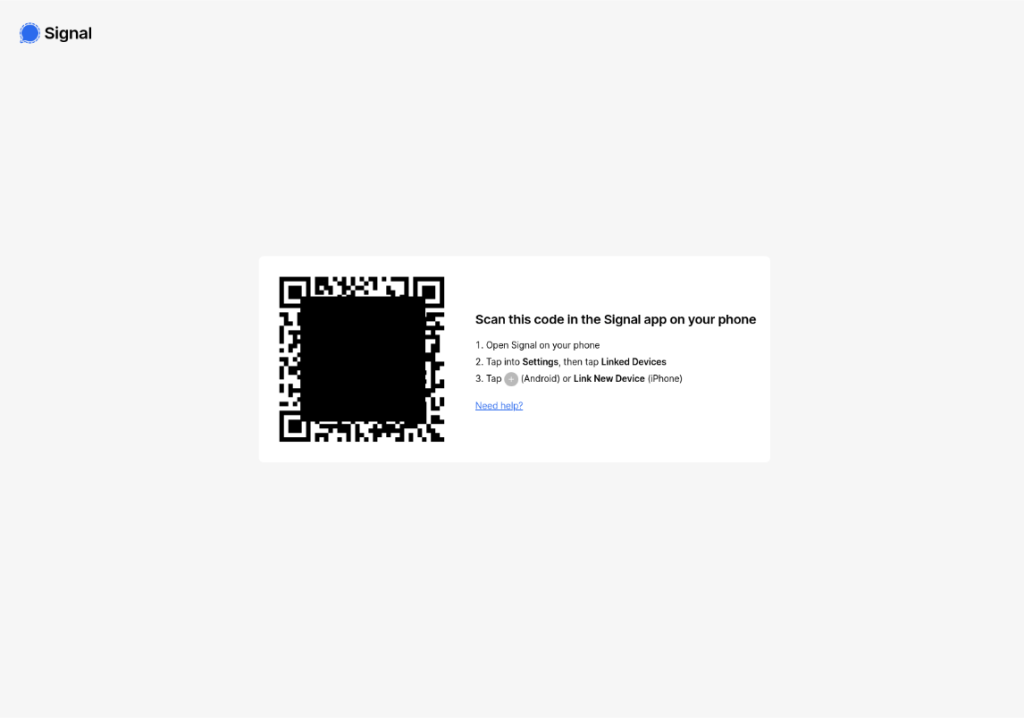
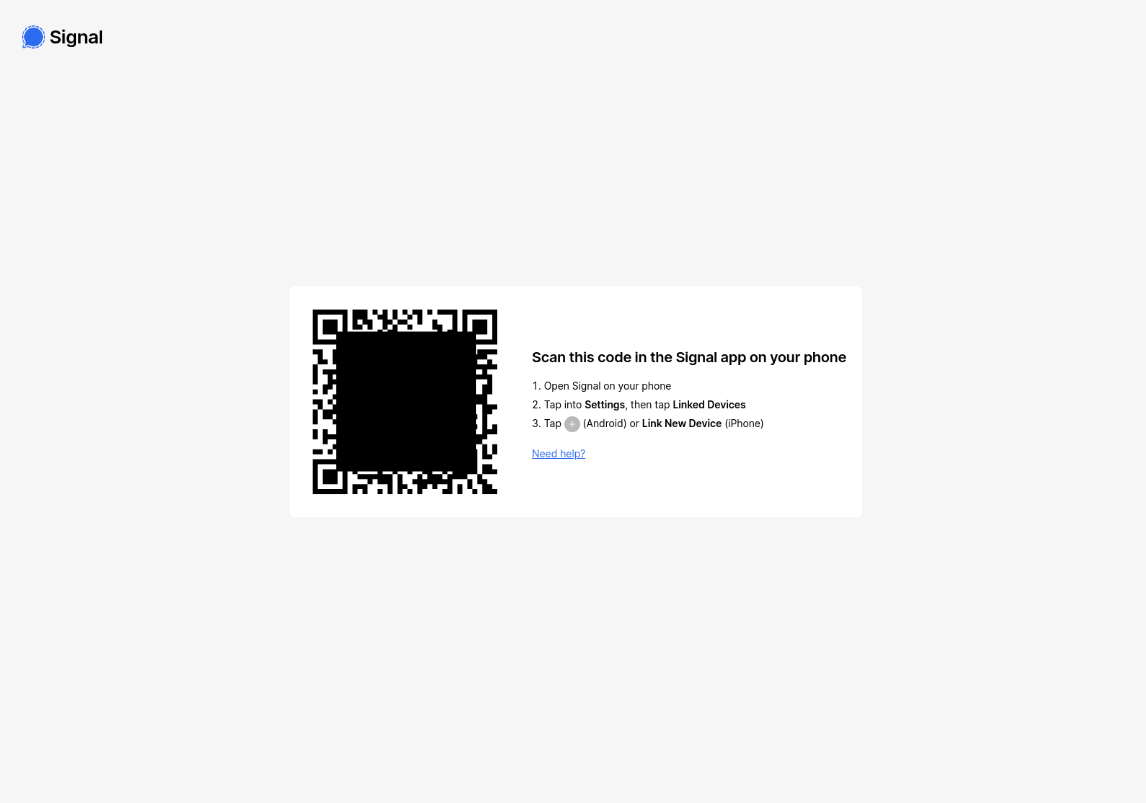
Honestly, this is what makes what is a phishing attempt so scary. Even if you have strong systems, humans are still the weak point. That’s why understanding what is phishing in cyber security today isn’t optional, it’s survival.
What Are the Most Common Types of Phishing Attacks in 2026?
What a Modern Phishing Message Actually Looks Like
A modern email phishing attack doesn’t look shady anymore. No bad grammar. No weird formatting. In fact, what might be a phishing message today often looks more polished than real company emails, which is exactly why people fall for it.
Structural Anatomy of a Phishing Message
▷ Sender manipulation: Display name looks legit, but the actual domain is slightly off.
▷ Link masking and redirects: The visible text hides a dangerous phishing link underneath.
▷ Visual brand cloning: Logos, layouts, and branding copied perfectly.
▷ Emotional triggers: Fear, urgency, or rewards pushing you to act fast.
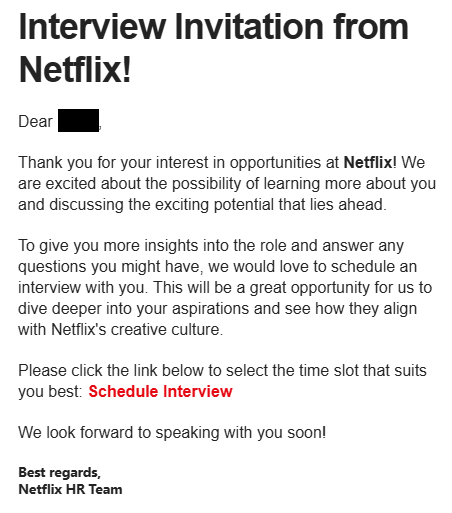
Modern-day phishing scams are getting increasingly sophisticated. This example shows a fake job offer designed to trick users into sharing personal information.
Why Phishing Messages No Longer Look Suspicious
- Clean, professional design that matches real brands perfectly
- Perfect AI-written grammar with zero spelling mistakes
- Abuse of trusted platforms like Google Docs, OneDrive, and Dropbox to host malicious links
This image shows another example of how sophisticated modern phishing scams have become. The language is clean, the logo looks legitimate, and there are barely any grammatical errors, all crafted to make the message feel like a real Apple alert and trick users into responding quickly.
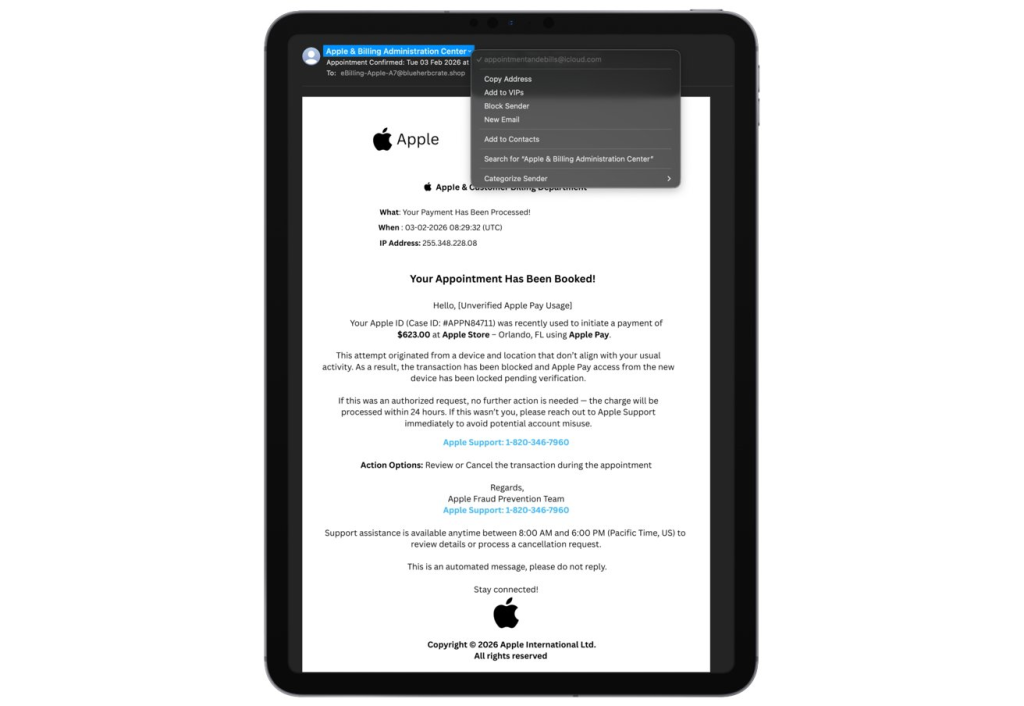
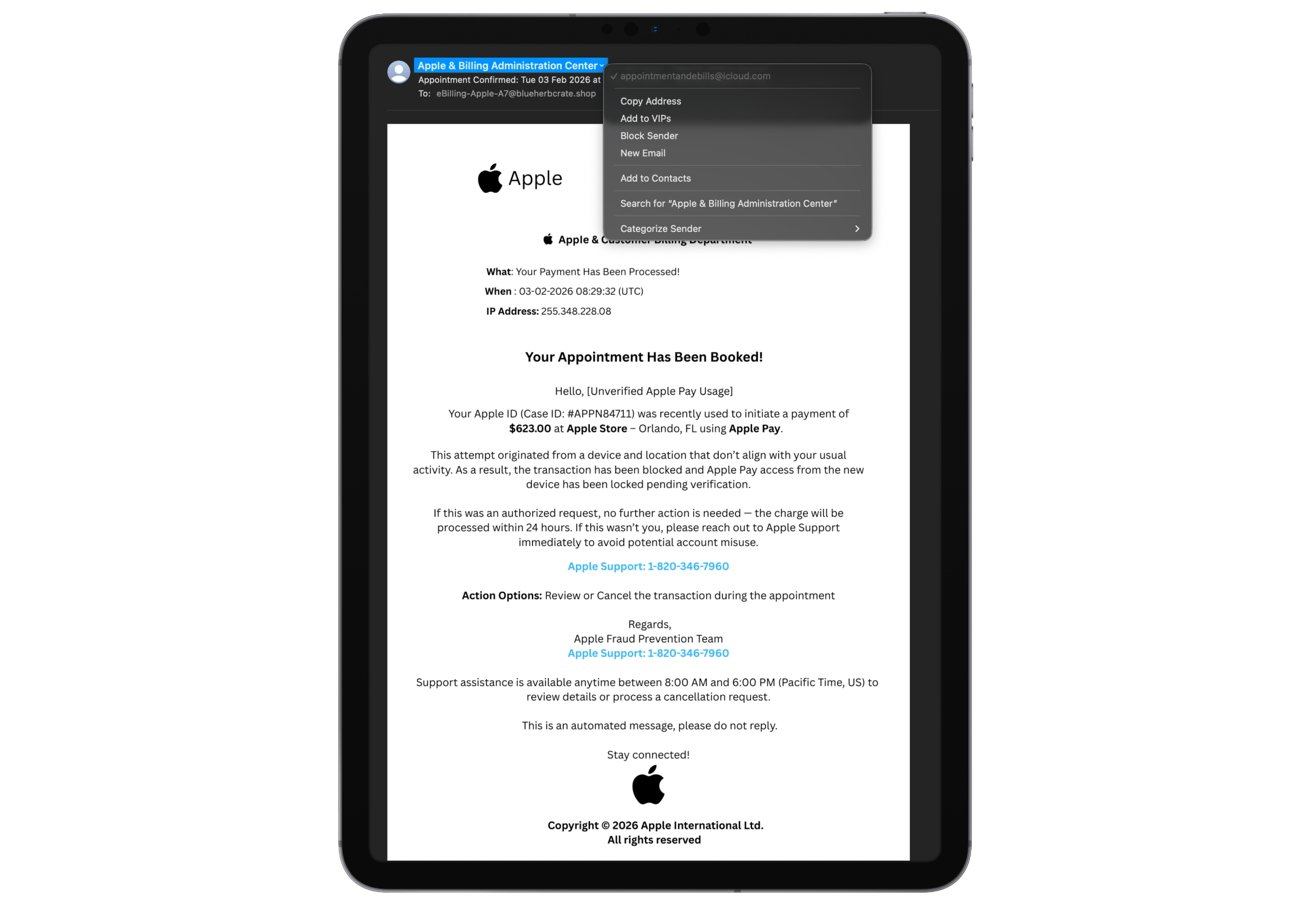
That’s why knowing how to identify a phishing email now means looking beyond spelling mistakes and focusing on intent and behavior instead.
How to Spot a Phishing Attack in 2026?
Phishing attacks in 2026 are everywhere, but you can spot them by checking sender details, inspecting links, looking for urgent or suspicious requests, and verifying through official channels. Below, you’ll find a complete 20-point guide with practical tips and real examples to help you recognize and avoid phishing safely.
1. Check the Sender
- Inspect the full email address, not just the display name.
- Watch for extra characters, misspellings, or weird domains.
- Search the sender online if unsure.
- Check if the domain matches the company’s official email format.
Example: [email protected] (with zero) instead of @amazon.com. At first glance, it looks like Amazon, but a single character difference is a common trick to steal login credentials.
2. Inspect Links Carefully
- Hover over links to see where they really lead.
- Avoid clicking shortened links; expand them first with tools like unshorten.it.
- Type URLs manually in a browser instead of using email links.
- Look for slight domain variations (e.g., .net instead of .com).
- Check for misspelled brand names in the URL.
Example: Link says paypal.com/login but actually leads to secure-login-paypal.fake.com. Clicking it could take you to a site that captures your login info instantly.
3. Watch for Urgent or Threatening Language
- Pause when the email pressures immediate action.
- Ignore claims of “account closure in 24 hours” or “verify immediately.”
- Verify threats by logging in to your account directly.
- Ask a friend or colleague for a sanity check if unsure.
Example: “Your account will be locked—click here now to prevent it!” Such scare tactics are designed to make you act without thinking.
4. Notice Generic Greetings
- Check if the email addresses you personally.
- Be wary of “Dear Customer” or “Hello User.”
- Look for mismatched name usage across emails; phishing often uses random personalization.
- If generic, log in directly to verify.
Example: “Dear Customer, claim your prize” instead of using your name. Legit companies usually greet you by your actual name, so this is a warning sign.
5. Be Careful with Attachments
- Never open unknown attachments, especially .exe, .zip, .scr.
- Scan attachments with antivirus software before opening.
- Check file sizes and names for oddities; unusual files are suspicious.
- Verify attachments by contacting the sender independently.
Example: Invoice invoice.pdf.exe looks like a PDF but is actually malware that can steal files or passwords.
6. Watch for Spelling and Grammar Mistakes
- Look for awkward phrasing, missing words, or inconsistent capitalization.
- Compare emails to official communications you’ve received before.
- Typos in official-looking emails are a strong warning sign.
Example: “Congratulation you have won a prize!!! Claim ur reward now.” Legit companies proofread; multiple typos indicate fraud.
7. Double-Check Through Official Channels
- Type the company’s website manually instead of clicking links.
- Call customer support using numbers on official sites.
- Avoid using contact info provided in the suspicious email.
- Cross-check suspicious emails on the company’s help forums or social media.
Example: Bank claims your account is locked, logging in via the official app shows no issues, proving the email was fake.
8. Be Skeptical of Requests for Personal Info
- Never give passwords, social security numbers, or card info via email or text.
- If a company asks, verify via official channels first.
- Remember legitimate companies already have your information; they won’t ask for it again.
Example: Email asking “confirm your SSN to prevent suspension.” Even if it looks urgent, the bank never asks for this by email.
9. Check for Secure Connections
- Ensure the website shows https:// and a padlock.
- Double-check the domain spelling, even if it has HTTPS.
- Avoid submitting personal info on unfamiliar or unsecured sites.
- Consider browser security extensions that warn about unsafe sites.
Example: https://secure-paypal-login.com has HTTPS but the domain is fake. Hackers use SSL to appear trustworthy.
10. Check Branding Carefully
- Compare logos, colors, and formatting with official emails.
- Be cautious if images are blurry, misaligned, or missing alt text.
- Look for missing contact info, social media links, or footer details.
- Check font styles, signature formats, and disclaimers; they should match previous official emails.
Example: Microsoft email with a pixelated logo and missing contact info; legit emails are polished and consistent.
11. Be Suspicious of Pop-Ups
- Avoid entering credentials in pop-ups you didn’t initiate.
- Close the pop-up and navigate directly to the website.
- Use ad-blockers or anti-malware extensions to reduce malicious pop-ups.
Example: Banking site pop-up requests your login immediately after a Google search. Entering info would send it directly to scammers.
12. Be Wary of “Too Good to Be True” Offers
- Verify promotions through official company websites or announcements.
- Avoid links claiming free prizes, gift cards, or unexpected winnings.
- Check online forums or reviews to see if others have flagged the offer.
- Treat sudden windfalls, extreme discounts, or high-value giveaways as suspicious.
- Don’t trust social media DMs claiming prizes—you could be redirected to a fake site.
Example: “Claim a $1,000 Amazon gift card—no purchase necessary.” If it seems too easy, it’s likely a trap to steal info.
13. Check the Reply-To Address
- Make sure the reply-to matches the sender’s domain.
- Look out for slight variations or completely different addresses.
- Never reply directly if it looks suspicious; contact the company instead.
Example: Email from [email protected] has reply-to [email protected]. Replying would give your info to scammers. Now this can happen automatically, and maybe it is scammer fitted. So always, always double-check it.
14. Be Careful on Public Wi-Fi
- Avoid logging into sensitive accounts on unsecured networks.
- Use a VPN (Virtual Private Network) to encrypt your internet traffic; it hides your data from hackers sharing the same Wi-Fi.
- Combine VPN with HTTPS websites for extra safety.
- Turn off automatic Wi-Fi connections to unknown networks.
- Consider using mobile data for high-risk logins when in public.
Example: Checking email on coffee shop Wi-Fi without a VPN could expose your credentials to hackers on the same network. However, if you are using a VPN, you can be saved.
15. Recognize Emotional Triggers
- Step back before acting if the message triggers fear, greed, or curiosity.
- Scammers rely on emotional reactions to bypass caution.
- Verify any alarming claims through trusted sources.
Example: “Your friend sent a shocking video - click here” is designed to make you panic; confirming with your friend first prevents falling for the trap.
How Can You Prevent Phishing Attacks?
To prevent phishing attacks in 2026, layered security means stacking smart tools and habits so if one defense fails, another catches the threat. It’s all about combining tech, training, and real-time monitoring to stay ahead of smarter scams.
Layer 1 - Identity Hardening (Lock Down Accounts First)
1. Password uniqueness
- Example: If your shopping site gets breached, attackers shouldn’t be able to log into your email or bank with the same password.
- Use a password manager to generate strong passwords like
Zr9$kP!Qx3- notJohn@123.
2. Passkeys & FIDO2 hardware keys
- Example: Instead of typing a password into Gmail, you just use Face ID or a physical security key, nothing for attackers to steal via phishing.
- Hardware keys are commonly used to protect admin accounts and executives from takeover attacks.
3. Modern MFA (Multi-Factor Authentication)
- Traditional MFA (SMS codes) is better than nothing, but it’s increasingly vulnerable to social engineering.
- Push notifications with approval apps or biometrics (fingerprint/face) are stronger.
The global move toward phishing-resistant authentication and passwordless sign-ins is growing fast, with significant adoption increases worldwide.
Real-world insight: As per Okta Research, India recently reached nearly 90% MFA adoption among enterprises (far above the global average), showing how seriously organizations are prioritizing identity protection. However, leaders are now pushing even beyond basic MFA to stronger, phishing-resistant methods.
Why this layer works: Even if someone tricks you into giving up a password → they still can’t log in.
Layer 2. Endpoint & Device Security (Protect the Actual Machine)
This layer stops phishing attacks after someone clicks, before damage happens.
- OS and software patching: Turn on automatic updates for your operating system, browsers, and apps. Remove software you no longer use as unused apps increase risk.
- Endpoint protection / EDR tools: Install modern antivirus or endpoint detection tools on all devices and enable real-time monitoring and automatic threat blocking.
- App control & macro restrictions
- Only allow trusted applications to run.
- Prevent unknown scripts and executables from launching.
Why this layer works: Even if a phishing link is clicked, the attack often stops at the device instead of spreading or stealing data.
Layer 3 - Email & Communication Filtering (Stop Threats Before You See Them)
- Spam & phishing filters: Enable advanced email filtering to block known scam domains, malicious links, and suspicious messages automatically before they reach inboxes.
- DMARC, DKIM, SPF: Configure these email authentication standards to verify legitimate senders and reject spoofed emails pretending to come from trusted brands or internal teams.
- Attachment sandboxing: Scan and open email attachments in isolated environments first so malicious files are blocked before users can download or open them.
- AI-powered phishing detection: Use AI tools that analyze sender behavior, language patterns, urgency cues, and impersonation tactics to catch modern, well-written phishing attempts.
Layer 4 - Network-Level Protection (Where VPNs Actually Matter)
Why network security matters: Public Wi-Fi and shared networks can expose your internet activity. Attackers can spy on traffic, send you to fake websites, or steal login sessions, often without you realizing anything went wrong.
How VPNs help:
→ Encrypt traffic: Scrambles your internet data so no one on the same Wi-Fi can read it
→ Prevent fake website redirection: Stops attackers from quietly sending you to fake login pages
→ Hide your IP address: Makes it harder to track, profile, or target you
→ Protect background apps: Secures email, messaging, and cloud apps, not just your browser
What VPNs don’t do: VPNs can’t stop you from typing your password into a fake site if you trust it and enter it yourself.
Examples (simple and real-world):
- You connect to airport Wi-Fi → VPN encrypts your connection so others can’t spy on your logins
- A fake café hotspot tries to send you to a fake bank site → VPN blocks the redirection
- Someone on public Wi-Fi tries to track your location or device → VPN hides your real IP i.e. VPN hides your real identity online so they can’t follow you.
- Your email app syncs in the background on hotel Wi-Fi → VPN protects that connection too
Modern VPNs today: Many services like NordVPN and ExpressVPN now go beyond just VPNs. They bundle malicious website blocking, scam protection, tracker blocking, AI-based threat detection, and real-time security monitoring, so they work more like full online safety tool, not just privacy or internet bypassing apps.
Post-quantum encryption: Some newer VPNs use future-proof encryption designed to stay secure even against upcoming quantum computers. That means your data stays protected not just today, but years from now too.
Layer 5 - Human Defense (Still the Most Important Layer)
- Continuous security training: Run short, regular training sessions that teach people how modern phishing works and what new scams look like, instead of relying on long yearly sessions.
- Phishing simulations: Send safe, fake phishing emails to test reactions and give instant feedback, so people learn what to watch for in real situations.
- Reflexive skepticism: Build simple habits like questioning urgent requests, double-checking unexpected messages, and looking closely at links and sender names before acting.
What Should You Do Immediately If You’ve Been Phished?
When phishing succeeds, acting fast is critical. Here’s a practical step-by-step guide based on current incident response best practices.
1. Immediate Containment
- Disconnect from the internet to prevent the attacker from continuing to access your device.
- Change passwords for affected accounts immediately, prioritize email, work tools, and banking.
- Log out of all active sessions on every device to make sure the attacker can’t stay connected.
- Check connected devices and remove any you don’t recognize.
2. For Cloud/SSO Environments
- Invalidate tokens: Force refresh of all authentication tokens to cut off access
- Revoke OAuth permissions: Remove third-party app access that may have been compromised
- Check federation logs: Review single sign-on activity for unusual logins or geographic anomalies
3. Reporting and Escalation
- Report to platform providers: Tell your email, cloud, or SaaS service so they can block attackers and secure your account.
- Notify IT or security teams: Internal teams can contain the attack, check other systems, and guide recovery.
- Report to cybercrime agencies: Government units like CERTs or national cybercrime departments document attacks and help prevent further damage.
- Banks: Inform banks or other critical services if financial or sensitive accounts were affected.
4. Long-Term Remediation
- Audit your security setup including devices, endpoints, and network configurations for hidden compromises.
- Refresh phishing awareness training to reinforce best practices and help prevent repeat mistakes.
- Upgrade multi-factor authentication (MFA) to stronger methods like hardware keys or passkeys for better protection.
- Consider additional monitoring tools or alerts for unusual activity in critical accounts.
Summary: Quick containment, cloud/SSO cleanup, timely reporting, and post-incident improvements together minimize damage and reduce the chances of repeat attacks
Government, Police & Industry Awareness Campaigns
Governments, law enforcement, and industry groups worldwide now coordinate efforts to reduce phishing through public education, technical guidance, reporting systems, and enforcement actions.
Public Sector Coordination & Enforcement
Organizations like CISA (US) and the Anti-Phishing Working Group (APWG) work with governments and private companies to track phishing campaigns, share threat intelligence, and disrupt criminal infrastructure. National cybersecurity agencies such as the UK NCSC, Singapore CSA, and Luxembourg government portals publish alerts and guidance for citizens and businesses.
Where to Report Phishing: Country Reporting Resources
Below are official government or law enforcement reporting resources for phishing, fraud, and cybercrime. Reporting helps authorities investigate attacks, track trends, and take down malicious infrastructure.
Final Thoughts
Phishing fraud in 2026 is smarter, faster, and more convincing than ever. One wrong click on an email phishing attack can compromise passwords, bank accounts, or even your identity. Internet phishing and online phishing have evolved from obvious spam into highly personalized, AI-driven messages that mimic real companies and colleagues. That’s why understanding what a phishing attempt is or what might be a phishing message isn’t just tech jargon; it’s survival in the digital world. Even careful users can fall victim if they aren’t aware of the latest tricks.
The good news? You’re not powerless. By learning how to identify a phishing email and building layers of defense (from identity hardening to network-level security), you can dramatically reduce your risk. Modern phishing scams exploit human trust more than technology gaps, so combining tech tools with smart habits creates a safety net that works even when attackers get creative. Reporting phishing attempts promptly also helps protect others from the same threats.
We’d love to hear from you! Have you ever received a suspicious email or fallen for a phishing scam? Or maybe you spotted one just in time? Share your experiences in the comments below. Your story could help others recognize phishing fraud before it’s too late. Let’s make the internet safer together!
Related




Get expert insights on threats, breaches, scams, and security trends — delivered every Monday.
Most Popular